warning light AUDI TT COUPE 2014 Workshop Manual
[x] Cancel search | Manufacturer: AUDI, Model Year: 2014, Model line: TT COUPE, Model: AUDI TT COUPE 2014Pages: 284, PDF Size: 34.42 MB
Page 88 of 284
Downloaded from www.Manualslib.com manuals search engine Driver
assist systems
Indicator lamps
• Ready: The indicator Lamp Lights up when the
system is fully functional. The system is ready to
intervene .
• Not ready: The indicator Lamp Lights up when
the system is switched on but not ready to inter
vene. The causes for this can include the follow
ing:
- There are no Lane markings.
- The system cannot detect the relevant Lane
markings (e.g. temporary markings for road
works or markings obscured by snow, dirt, rain
or adverse Light).
- The vehicle's speed is below 65 km/h, the
speed at which the Lane assist system is activa
ted (the threshold may vary in different export
markets).
- The Lane is narrower than 2.1 m or wider than
5.5 m.
- The bend is too tight.
- You have taken your hands off the steering
wheel.
@ Note
- Make sure that the camera window
¢ Fig. 92 is not covered with stickers or sim
ilar objects. Notes on cleaning ¢ page 236.
- On vehicles for some export markets: once
the system is activated, it is "ready" each
time the ignition is switched on.
Infotainment display
Applies to vehicles: with Audi active lane assist
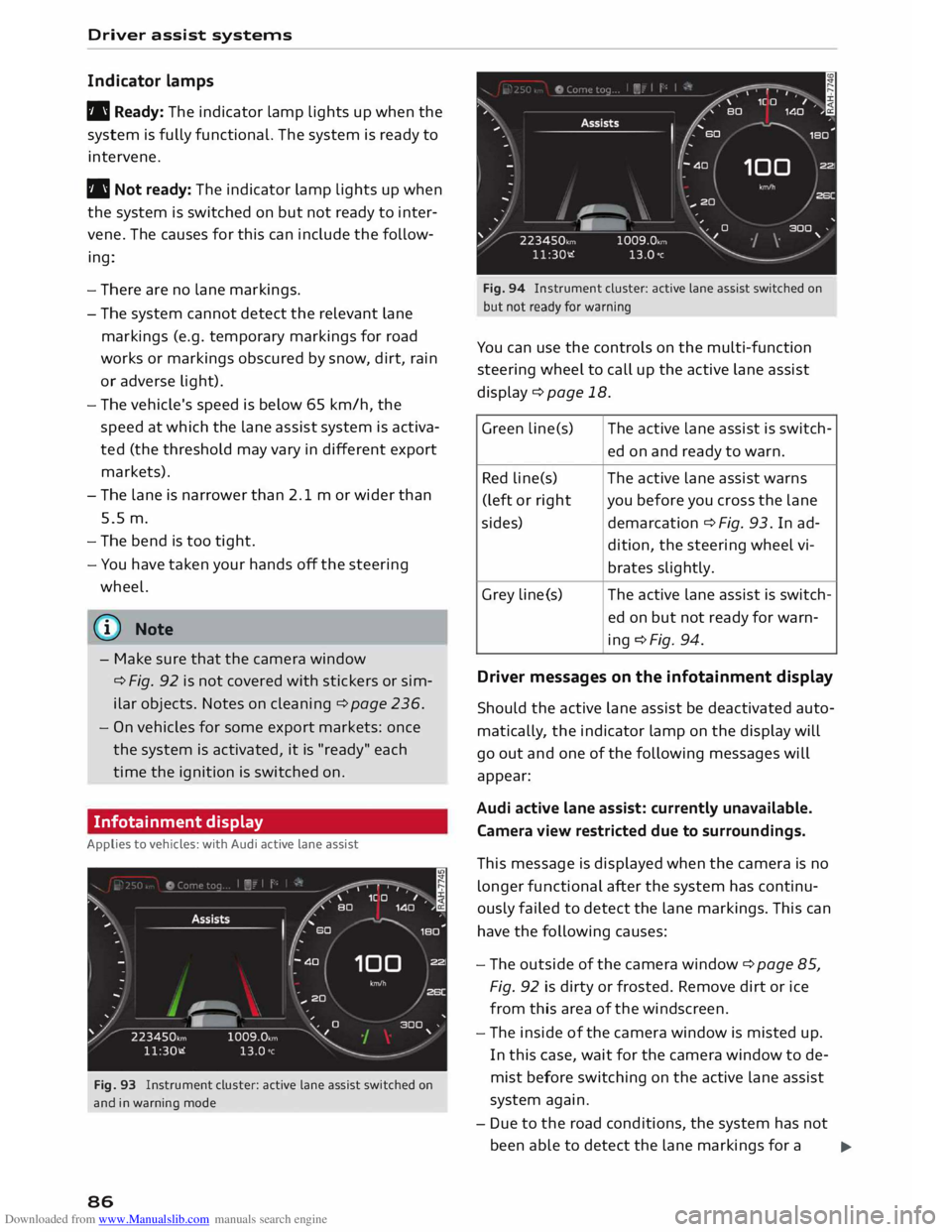
Fig. 93 Instrument cluster: active lane assist switched on
and in warning mode
86 Fig.
94 Instrument cluster: active lane assist switched on
but not ready for warning
You can use the controls on the multi-function
steering wheel to call up the active lane assist
display¢ page 18.
Green Lin e(s) The active Lane assist is switch-
ed on and ready to warn.
Red line(s) The active lane assist warns
(left or right you before you cross the lane
sides) demarcation¢ Fig. 93. In ad-
dition, the steering wheel vi-
brates slightly.
Grey Line(s) The
active lane assist is switch-
ed on but not ready for warn-
ing ¢Fig. 94.
Driver messages on the infotainment display
Should the active lane assist be deactivated auto
matically, the indicator lamp on the display will
go out and one of the following messages will
appear:
Audi active lane assist: currently unavailable.
Camera view restricted due to surroundings.
This message is displayed when the camera is no
longer functional after the system has continu
ously failed to detect the lane markings. This can
have the following causes:
- The outside of the camera window¢ page 85,
Fig. 92 is dirty or frosted. Remove dirt or ice
from this area of the windscreen.
- The inside of the camera window is misted up.
In this case, wait for the camera window to de
mist before switching on the active lane assist
system again.
- Due to the road conditions, the system has not
been able to detect the lane markings for a .,..
Page 90 of 284
Downloaded from www.Manualslib.com manuals search engine Driver
assist systems
critical, the warning lamp@ on the exterior mir
ror lights up¢ Fig. 96.
The warning lamp on the left-hand mirror assists
the driver when changing lane towards the left
and the warning lamp on the right-hand mirror
assists the driver when changing lane towards
the right.
Information mode
As long as you do not operate the turn signal, the
side assist will merely inform you of the presence
of vehicles that it has detected and judges to be
critical. In this case, the warning lamp on the rel
evant exterior mirror will light up at low intensi
ty.
The intensity of the warning lamp in this infor
mation mode is kept relatively low, so that it
does not distract you while you are looking at the
road in front.
Warning mode
If you operate the turn signal, the side assist will
warn you if it registers what it judges to be a crit
ical vehicle. In this case, the warning lamp on the
relevant exterior mirror will flash brightly. Please
check the situation in the exterior mirror and by
looking back over your shoulder ¢.&. in General
notes on page 89.
@ Note
You can adjust the brightness of the warning
lamp on the exterior mirror¢ page 90.
88 General
notes
Applies to vehicles: with Audi side assist
®
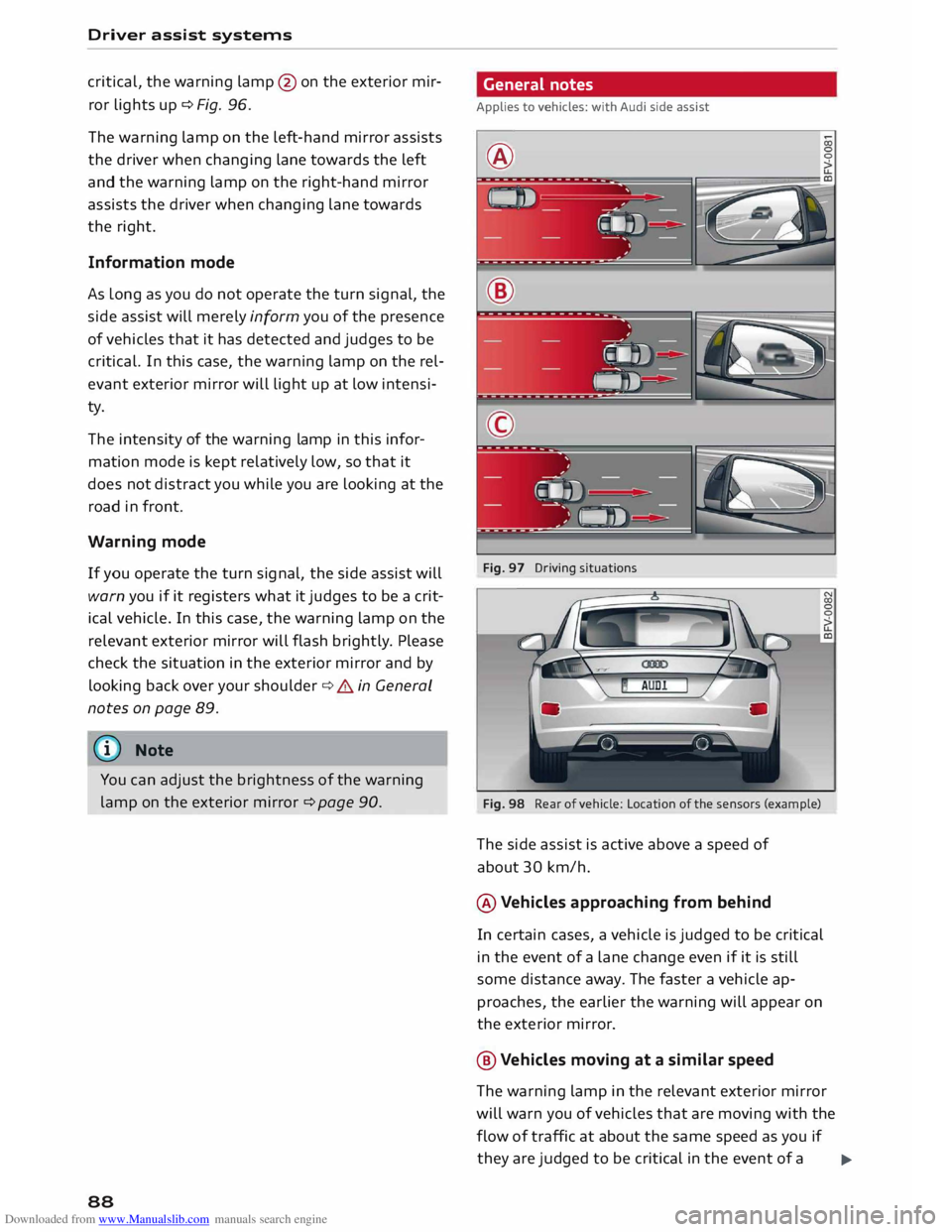
Fig. 97 Driving situations
Fig. 98 Rear of vehicle: Location of the sensors (example)
The side assist is active above a speed of
about 30 km/h.
® Vehicles approaching from behind
In certain cases, a vehicle is judged to be critical
in the event of a lane change even if it is still
some distance away. The faster a vehicle ap
proaches, the earlier the warning will appear on
the exterior mirror.
@ Vehicles moving at a similar speed
The warning lamp in the relevant exterior mirror
will warn you of vehicles that are moving with the
flow of traffic at about the same speed as you if
they are judged to be critical in the event of a ..,.
Page 91 of 284
Downloaded from www.Manualslib.com manuals search engine 0
N
co
....
\D Lfl
N
Lfl
.... lane
change. In all cases, the side assist will give
a warning for the vehicles it has detected at the
latest when they enter the "blind spot".
© Other vehicles being overtaken
When you are overtaking another vehicle slowly,
with a speed differential of less than 15 km/h,
the warning lamp in the exterior mirror will light
up as soon as the other vehicle enters your blind
spot.
If you are overtaking another vehicle quickly, with
a speed differential of more than 15 km/h, the
warning lamp will not light up.
System limitations
The radar sensors are designed for normal lane
widths and monitor the lanes immediately to the
left and right of your vehicle. In certain situations
the warning lamp on one of the exterior mirrors
may light up even if no vehicle is travelling in an
area that could be critical in the event of a lane
change. For example:
- When you are travelling in a narrow lane or
when you are not travelling in the centre of the
lane. In this case the system may monitor an
other lane and register a vehicle that is not in
fact travelling in an adjacent lane.
- When you are driving into a bend. The side as
sist may react to a vehicle two lanes away.
- If the system detects other objects (such as
crash barriers, etc).
- In poor weather conditions. The functionality of
the side assist is then restricted.
The radar sensors ¢ Fig. 98 must not be obstruc
ted by stickers, bicycle racks, deposits or any oth
er substances which could impair the function of
the system. For notes on cleaning, please refer to
¢page 236.
.&_ WARNING
-Always watch the road and the area sur
rounding the vehicle. The side assist feature
is not a substitute for the full concentration
of the driver. The driver is always responsi
ble for the safety of lane changes and other
manoeuvres. Driver
assist systems
- In certain situations, the system may not
function properly, or the functionality of the
system may be restricted. For example:
- If other vehicles are approaching very
qui ckly, or if you are overtaking other
vehicles quickly. The warning lamp may
not light up in time.
- In poor weather conditions, such as heavy
rain, snow or road spray.
- If you are travelling in very wide lanes, in
tight bends or over crests. The system may
not detect vehicles in the adjacent lane
because they are outside the area covered
by the sensors.
CD CAUTION
Impacts or damage to the bumper, wheel
arches or underbody can cause misalignment
of the sensors. This can impair the functional
ity of the system. Have the systems checked
by a qualified workshop.
� Note
The warning lamps on the exterior mirrors
may not be properly visible if tinted foil is af
fixed to the side windows on the driver's or
passenger's side.
Switching on and off
Applies to vehicles: with Audi side assist
The system can be switched on and off on the in
fotainment system.
... Select the following on the infotainment sys
tem: I MENU I button >Car> left control button
> Driver assist> Audi side assist.
The warning lamps in the exterior mirrors light
up briefly each time the ignition is switched on to
indicate that the system is activated .
89
Page 92 of 284

Downloaded from www.Manualslib.com manuals search engine Driver
assist systems
Adjusting brightness of warning lamp
Applies to vehicles: with Audi side assist
The brightness of the warning Lamp can be ad
justed on the infotainment system.
.. Select the following on the infotainment sys
tem: IM E
N u I
button > Car > left control button
> Driver assist> Audi side assist.
The brightness of the warning lamp in both the
information and warning modes is regulated au
tomatically according to the ambient light level.
If you are in very dark or very light surroundings
when you adjust the brightness of the warning
lamp, the automatic brightness control may al
ready have reached the lowest or the brightest
setting. In such a case it is possible that you
won't notice a difference while you are adjusting
the brightness or that you will only notice it once
the light surroundings have changed.
Please adjust the brightness of the warning lamp
for the information mode so that it does not dis
tract you while you are looking at the road in
front. When you change the brightness, the
warning lamp on the exterior mirror will light up
briefly with the intensity set for the information
mode. The intensity of the lamp in the warning
mode is linked to the intensity in the information
mode and is adjusted automatically.
(CO} Note
- The side assist is not active while the set
tings are being adjusted.
- Your personal settings are stored automati
cally and assigned to the remote control key
which is being used.
Driver messages
Applies to vehicles: with Audi side assist
Should the side assist be deactivated automati
cally, a driver message will appear on the info
tainment display.
@j Audi side
assist: currently unavailable.
Sensor view restricted due to surroundings.
See owner's manual
The radar sensors are blocked. The area in front
of the sensors must not be obstructed by bicycle
90 racks,
stickers, deposits or any other substances.
If necessary, clean the area in front of the sen
sors ¢ page 88, Fig. 98.
@j Audi
side assist: currently unavailable.
See owner's manual
The side assist is temporarily inoperative and
cannot be switched on (for instance if the battery
is not sufficiently charged).
@j Audi
side assist: fault. Please contact
workshop
The system cannot detect vehicles reliably and
will be deacti vated. The sensors are out of align
ment or defective. Have the system checked by a
qualified workshop soon.
Audi drive select (vehicle
set-up functions)
Introduction
Applies to vehicles: with Audi drive select
Drive select allows you to use different set-ups on
your vehicle. The four modes efficiency*, com
fort, auto and dynamic allow the driver, for ex
ample, to change from a sporty mode to a more
comfortable one via the �:11
� button in the centre
console or via the infotainment system. In addi
tion, the individual mode allows you to adapt the
vehicle set-up to suit your personal driving style.
For example, you might choose to combine a
more dynamic engine set-up with a lighter steer
ing response.
Description
Applies to vehicles: with Audi drive select
The possible vehicle set-up in each mode de
pends on which equipment is installed on your
vehicle. The engine and steering are basic parts
of your vehicle which are always included in the
set-up.
Engine and automatic gearbox*
The response of the engine and automatic gear
box* to accelerator pedal movements will be
more spontaneous or balanced, depending on
which mode you select. In efficiency* mode the
automatic gearbox* selects the next gear at
..,.
Page 95 of 284
Downloaded from www.Manualslib.com manuals search engine 0
N
co
,-j
\D Lfl
N
Lfl
,-j Parking
aids
General notes
Applies to vehicles: with rear parking aid/parking system
plus/park assist
Various systems are available to help you when
parking or manoeuvring in tight spaces, depend
ing on the equipment fitted on your vehicle.
The rear parking aid gives an acoustic warning if
there are any obstacles behind the car
¢page 93.
When you are parking, the parking system plus
warns you acoustically and optically about obsta
cles detected in front of and behind the vehicle
¢ page 94. On vehicles with park assist, the
area detected at the side of the vehicle ®
¢page 94, Fig. 101 is also monitored.
The park assist helps you to find suitable parking
spaces, to manoeuvre the vehicle into spaces par
allel or perpendicular to the roadside and to drive
out of spaces parallel to the kerb ¢ page 95.
.&_ WARNING
- Always watch the road and the area sur
rounding the vehicle. The electronic systems
cannot replace the full concentration of the
driver. The driver is always responsible for
safety during parking and all other manoeu
vres.
- Please note that certain surfaces, such as
clothing fabrics, cannot be detected or dis
played by the system -risk of accident!
- Sensors have blind spots in which neither
people nor objects are registered. It is par
ticularly important to ensure that there are
no small children or animals near the vehi
cle -risk of accident!
- Always keep a close watch on the area
around the vehicle and make full use of the
rear-view mirrors.
CD CAUTION
- The system may not always be able to de
tect objects such as the following:
- Chains, trailer draw bars, posts or fences Parking
aids
- Objects above the sensors, such as wall
protrusions, etc.
- Objects with certain surfaces or struc
tures, such as wire fences or powder snow
- As your car moves closer to low obstacles,
they may disappear from the sensors' field
of vision. Please note that you will no longer
be warned about these obstacles.
- Impacts or damage to the radiator grille,
bumper, wheel arches or underbody can
cause misalignment of the sensors. This can
impair the effectiveness of the parking aids.
Have the systems checked by a qualified
workshop.
{D) Note
- In certain situations, a warning may be giv
en by the system even if there is no obstacle
within range of the sensors. This can be
caused by the following, for instance:
- Certain road surfaces or long grass
- External ultrasound sources, e.g. from
street cleaning vehicles
- Heavy rain or snow or dense exhaust
fumes
- To familiarise yourself with the system, we
recommend that you practise parking in a
quiet location or a car park. The weather
and light conditions should be good.
- You can adjust the volume of the beeps.
- To ensure that the acoustic parking aid
works properly, the sensors must be kept
clean and free of snow and ice.
- There is a slight delay in the picture display.
Rear parking aid
Description
Applies to vehicles: with rear parking aid
The rear parking aid is an acoustic parking sys
tem.
Description
Sensors are located in the rear bumper. When the
sensors detect an obstacle, you are alerted by
acoustic signals (beeps).
..,.
93
Page 97 of 284
Downloaded from www.Manualslib.com manuals search engine 0
N
co
....
\D L/'l
N
L/'l
.... Switching
on/off
Applies to vehicles: with parking system plus
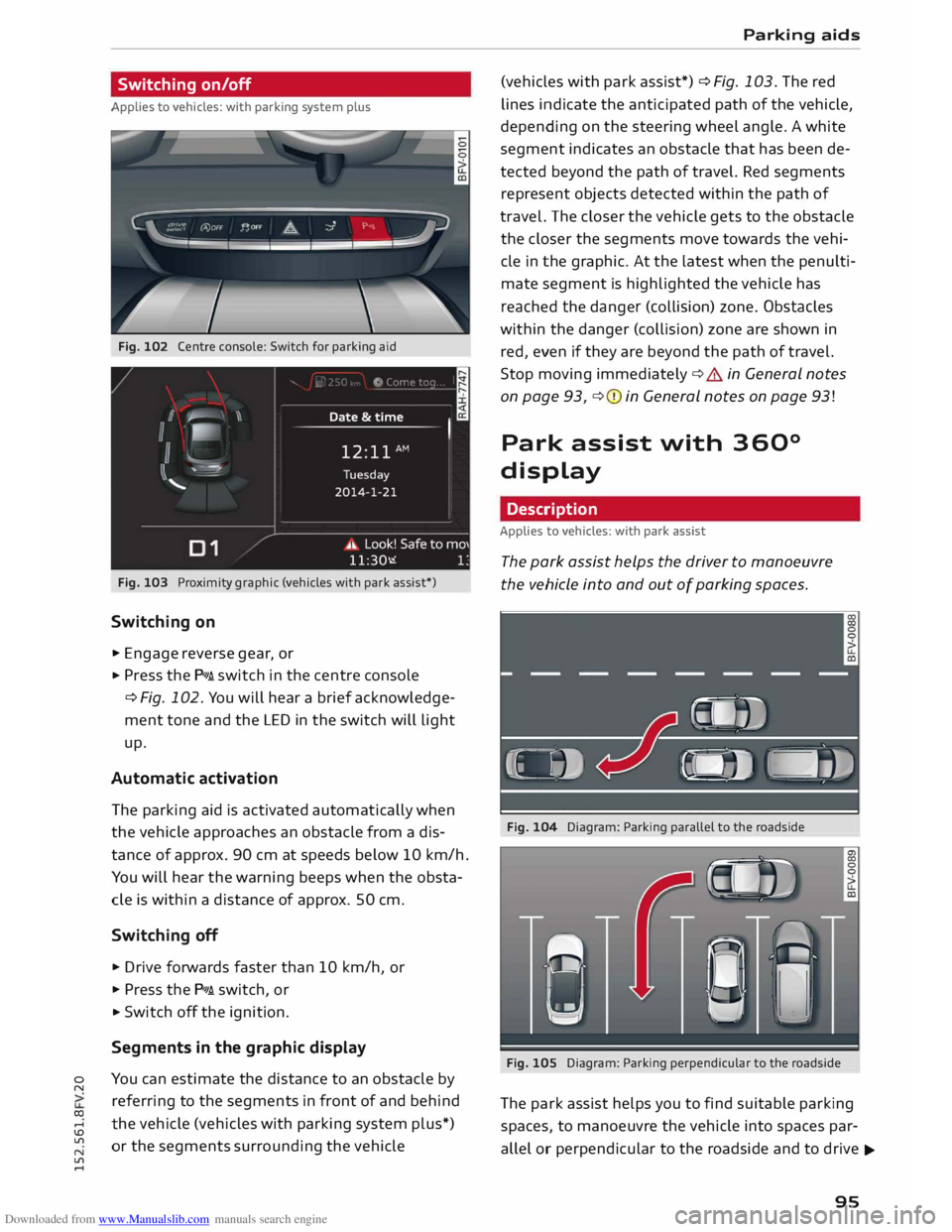
Fig. 102 Centre console: Switch for parking aid
Fig. 103 Proximity graphic (vehicles with park assist*)
Switching on
.,. Engage reverse gear, or
... Press the P111A. switch in the centre console
¢ Fig. 102. You will hear a brief acknowledge
ment tone and the LED in the switch will light
up.
Automatic activation
The parking aid is activated automatically when
the vehicle approaches an obstacle from a dis
tance of approx. 90 cm at speeds below 10 km/h.
You will hear the warning beeps when the obsta
cle is within a distance of approx. 50 cm.
Switching off
... Drive forwards faster than 10 km/h, or
.,. Press the P111A. switch, or
... Switch off the ignition.
Segments in the graphic display
You can estimate the distance to an obstacle by
referring to the segments in front of and behind
the vehicle (vehicles with parking system plus*)
or the segments surrounding the vehicle Parking
aids
(vehicles with park assist*) ¢ Fig. 103. The red
lines indicate the anticipated path of the vehicle,
depending on the steering wheel angle. A white
segment indicates an obstacle that has been de
tected beyond the path of travel. Red segments
represent objects detected within the path of
travel. The closer the vehicle gets to the obstacle
the closer the segments move towards the vehi
cle in the graphic. At the Latest when the penulti
mate segment is highlighted the vehicle has
reached the danger (collision) zone. Obstacles
within the danger (collision) zone are shown in
red, even if they are beyond the path of travel.
Stop moving immediately ¢.&. in General notes
on page 93, ¢(I) in General notes on page 93!
Park assist with 360°
display
Description
Applies to vehicles: with park assist
The park assist helps the driver to manoeuvre
the vehicle into and out of parking spaces.
Fig. 104 Diagram: Parking parallel to the roadside
Fig. 105 Diagram: Parking perpendicular to the roadside
The park assist helps you to find suitable parking
spaces, to manoeuvre the vehicle into spaces par
allel or perpendicular to the roadside and to drive ...,.
95
Page 103 of 284
Downloaded from www.Manualslib.com manuals search engine Intelligent
technology
Electro-mechanical
power steering
Electro-mechanical power steering assists the
driver when steering.
The degree of power assistance is adapted elec
tronically, depending on the speed.
If the power steering should fail at any time or
the engine is switched off (for instance when be
ing towed), the car can still be steered. However,
substantially more effort than normal will be re
quired to turn the steering wheel.
Warning/indicator lamps and driver
messages
• Steering: fault. Please stop vehicle
If the warning lamp lights up permanently and
the message appears, there may be a power
steering failure.
Do NOT drive on. Obtain professional assistance.
• Steering: fault. Please stop vehicle
There is a malfunction in the electronic steering
lock. The ignition can no longer be switched on.
Do not have the vehicle towed away, because you
won't be able to steer it. Obtain professional as
sistance.
G'!b Steering:
fault. You can continue driving
If the indicator lamp lights up, the steering re
sponse may be heavier or lighter than usual. In
addition, it is possible that the steering wheel
will be off centre when driving in a straight line.
Drive slowly to a qualified workshop and have the
fault rectified.
Ive Steering
lock: fault. Please contact work
shop
There is a malfunction in the electronic steering
lock.
� Drive
to a qualified workshop soon and have the
a: fault rectified.
....
\D Lfl
N
Lfl
.... Intelligent
technology
A WARNING
Have the system malfunction repaired by a
qualified workshop as soon as possible -risk
of accident!
«]} Note
You can drive on if the warning/indicator lamp
• or mJ lights up only briefly.
Brakes
New brake pads
New brake pads do not give full braking effect for
the first 400 km, they must first be "bedded in".
However, you can compensate for the slightly re
duced braking effect by applying more pressure
on the brake pedal. Avoid placing a heavy load on
the brakes during the running-in period.
Wear The rate of wear on the brake pads depends a
great deal on how you drive and the conditions in
which the vehicle is operated. Negative factors
are, for instance, city traffic, frequent short trips
or hard driving with abrupt starts and stops.
Noises Brake noise may develop in certain situations, de
pending on the speed, braking force and ambient
conditions (such as temperature and relative hu
midity).
Effect of moisture and salt
In certain conditions, such as in heavy rain, or af
ter washing the car or driving through water, the
full braking effect can be delayed by moisture (or
in winter by ice) on the discs and brake pads. The
brakes should be "dried" by pressing the pedal to
restore full braking effect.
When you are driving at higher speeds with the
windscreen wipers on, the brake pads are very
briefly brought into contact with the brake discs.
This automatic process which goes unnoticed by
the driver is carried out at regular intervals and is
intended to improve braking response in wet con-
ditions. ..,..
101
Page 106 of 284
Downloaded from www.Manualslib.com manuals search engine Intelligent
technology
Switching on/off
The ESC is switched on automatically when the engine is started.
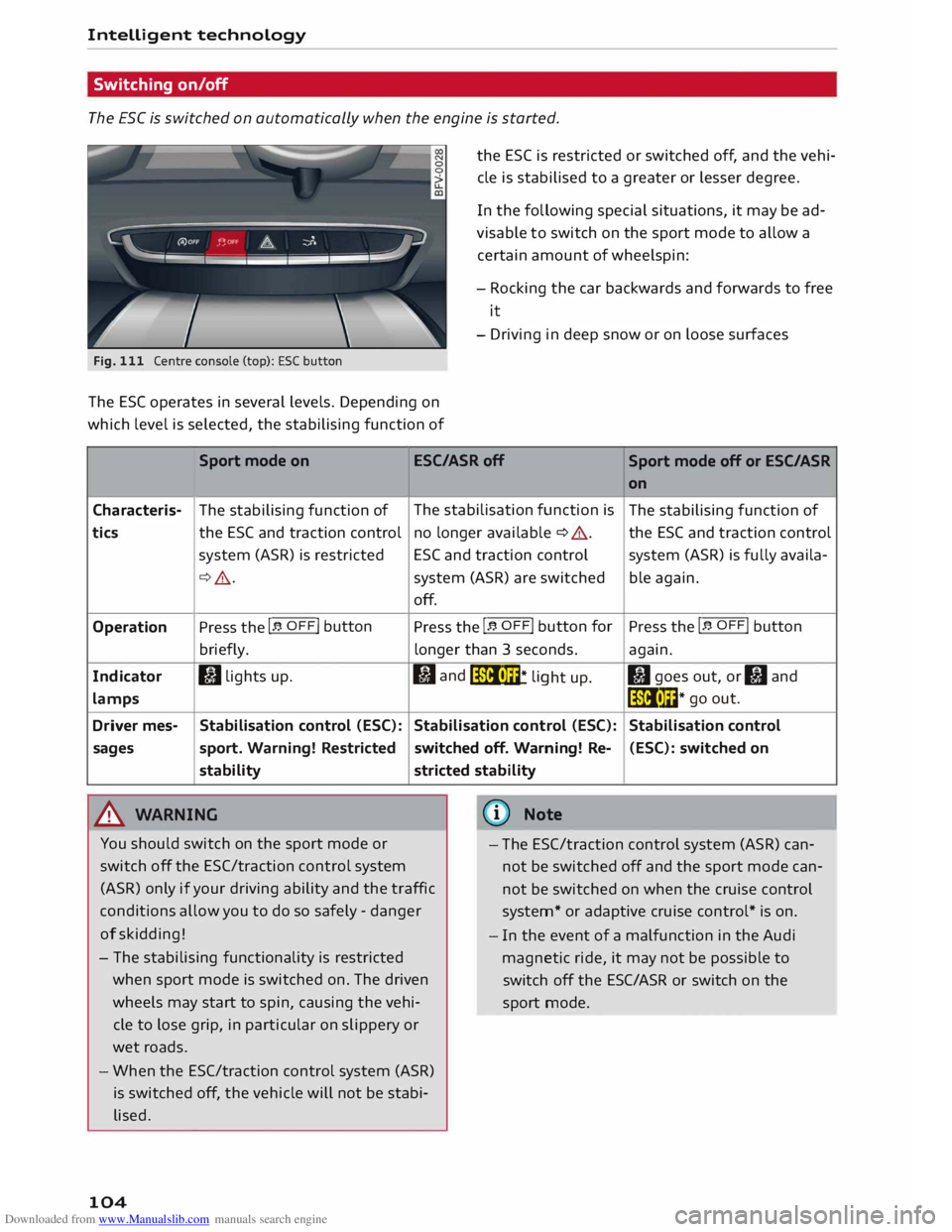
Fig. 111 Centre console (top): ESC button
The ES( operates in several levels. Depending on
which level is selected, the stabilising function of the
ESC is restricted or switched off, and the vehi
cle is stabilised to a greater or lesser degree.
In the following special situations, it may be ad
visable to switch on the sport mode to allow a
certain amount of wheelspin:
- Rocking the car backwards and forwards to free
it
- Driving in deep snow or on loose surfaces
Sport mode on ESC/ASRoff
Sport mode off or ESC/ASR
Characteris-
tics
Operation
Indicator
lamps
Driver mes-
sages The
stabilising function of
the ESC and traction control
system (ASR) is restricted
¢ .&_.
Press the I� OFF! button
briefly.
I) lights up.
Stabilisation control (ESC):
sport. Warning! Restricted
stability
.&_ WARNING The
stabilisation function is
no longer available ¢ A.
ESC and traction control
system (ASR) are switched
off.
Press the I� OFF! button
for
longer than 3 seconds.
fl and
liiii• m
* li
ght up.
Stabilisation control (ESC):
switched off. Warning! Re-
stricted stability
@ Note on
The stabilising function of
the ESC and traction control
system (ASR) is fully availa-
ble again.
Press the I� OFF! button
again.
II goes out, or II and
liiii• l��* go
out.
Stabilisation control (ESC): switched on
You should switch on the sport mode or
switch off the ESC/traction control system
(ASR) only if your driving ability and the traffic
conditions allow you to do so safely -danger
of skidding! -
The ESC/traction control system (ASR) can
not be switched off and the sport mode can
not be switched on when the cruise control
system* or adaptive cruise control* is on.
- The stabilising functionality is restricted
when sport mode is switched on. The driven
wheels may start to spin, causing the vehi
cle to lose grip, in particular on slippery or
wet roads.
- When the ESC/traction control system (ASR)
is switched off, the vehicle will not be stabi
lised.
104 -
In the event of a malfunction in the Audi
magnetic ride, it may not be possible to
switch off the ESC/ASR or switch on the
sport mode.
Page 118 of 284
Downloaded from www.Manualslib.com manuals search engine Speech
dialogue system
Speech dialogue system
How to use the system
Applies to vehicles: with speech dialogue system
You can operate many infotainment functions
conveniently by voice.
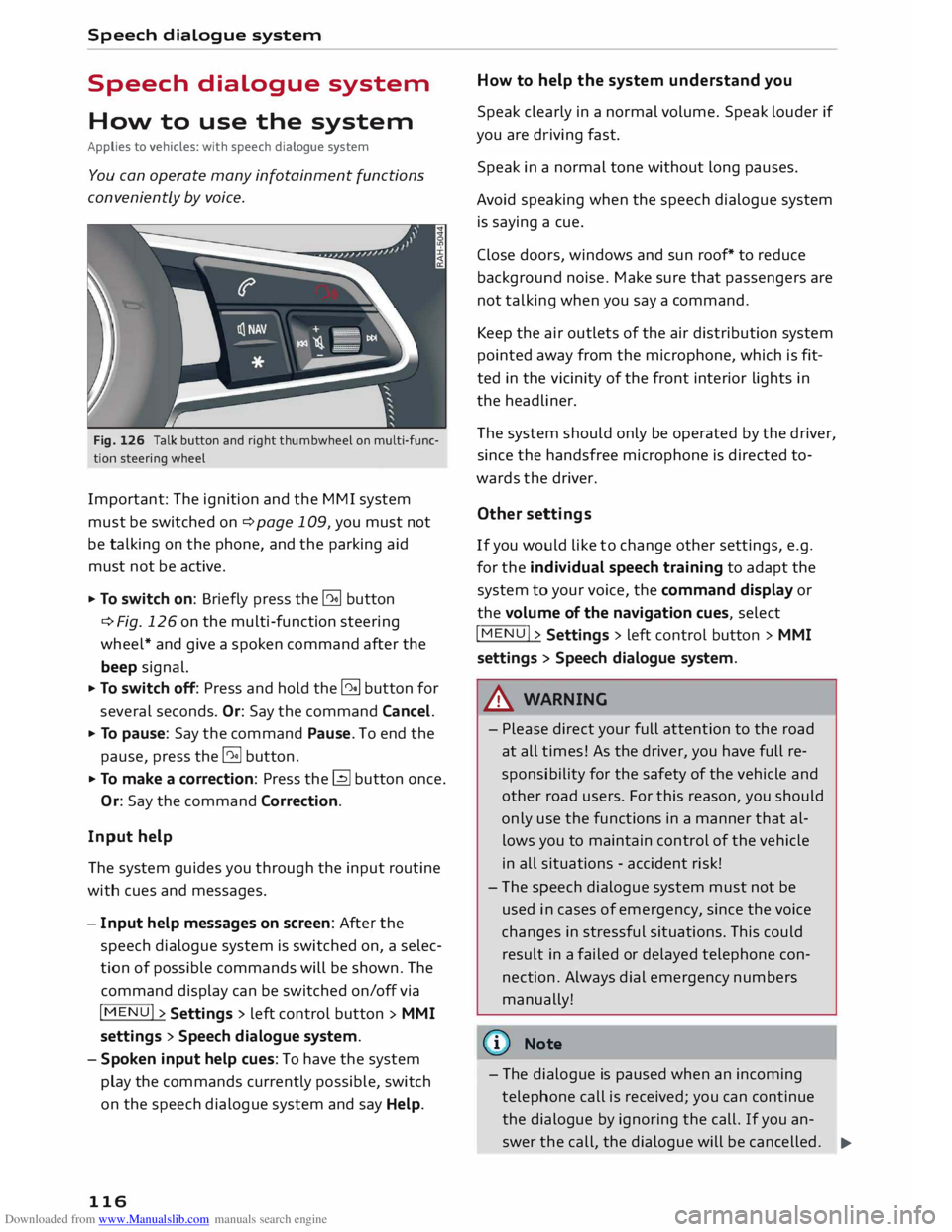
Fig. 126 Talk button and right thumbwheel on multi-func
tion steering wheel
Important: The ignition and the MMI system
must be switched on ¢page 109, you must not
be talking on the phone, and the parking aid
must not be active.
... To switch on: Briefly press the [2!] button
c:::> Fig. 126 on the multi-function steering
wheel* and give a spoken command after the
beep signal.
... To switch off: Press and hold the [2!] button for
several seconds. Or: Say the command Cancel.
... To pause: Say the command Pause. To end the
pause, press the l2!l button.
... To make a correction: Press the� button once.
Or: Say the command Correction.
Input help
The system guides you through the input routine
with cues and messages.
- Input help messages on screen: After the
speech dialogue system is switched on, a selec
tion of possible commands will be shown. The
command display can be switched on/off via
I MENU I>
Settings > left control button >
MMI
settings > Speech dialogue system.
- Spoken input help cues: To have the system
play the commands currently possible, switch
on the speech dialogue system and say Help.
116 How
to help the system understand you
Speak clearly in a normal volume. Speak louder if
you are driving fast.
Speak in a normal tone without long pauses.
Avoid speaking when the speech dialogue system
is saying a cue.
Close doors, windows and sun roof* to reduce
background noise. Make sure that passengers are
not talking when you say a command.
Keep the air outlets of the air distribution system
pointed away from the microphone, which is fit
ted in the vicinity of the front interior lights in
the headliner.
The system should only be operated by the driver,
since the handsfree microphone is directed to
wards the driver.
Other settings
If you would like to change other settings, e.g.
for the individual speech training to adapt the
system to your voice, the command display or
the volume of the navigation cues, select
I MENU I>
Settings > left control button >
MMI
settings > Speech dialogue system.
A WARNING
- Please direct your full attention to the road
at all times! As the driver, you have full re
sponsibility for the safety of the vehicle and
other road users. For this reason, you should
only use the functions in a manner that al
lows you to maintain control of the vehicle
in all situations -accident risk!
- The speech dialogue system must not be
used in cases of emergency, since the voice
changes in stressful situations. This could
result in a failed or delayed telephone con
nection. Always dial emergency numbers
manually!
{tI)) Note
- The dialogue is paused when an incoming
telephone call is received; you can continue
the dialogue by ignoring the call. If you an-
swer the call, the dialogue will be cancelled.
..,.
Page 128 of 284
Downloaded from www.Manualslib.com manuals search engine Telephone
® USB adapter for mobile phones with micro
USB connector*
@ USB adapter for mobile phones with Apple
Lightning connector*
© USB adapter for mobile phones with Apple
dock connector*
_& WARNING
Loose objects can be flung around in the pas
senger compartment in the event of sudden
driving or braking manoeuvres. This could re
sult in serious injuries and also cause you to
lose control of the vehicle. Always keep the
centre armrest closed when driving.
- The Audi phone box is not available in all
countries. Your Audi dealer will be able to
provide you with more detailed information.
- If the mobile phone is placed in the Audi
phone box in a bag or a protective case, this
may interfere with the connection to the ex
ternal aerial.
- An enhanced transmission quality cannot be
guaranteed if more than one mobile phone
is placed inside.
- Audi recommends the use of Audi Genuine
Accessories. Audi has tested these products
for suitability, reliability and safety.
- USB adapters are available from Audi deal
ers or specialist retailers.
- To avoid malfunctions, ensure that the mo
bile phone is correctly placed inside the Audi
phone box.
Using the SIM card reader
Applies to vehicles: with SIM card reader
You can choose how you wish to make telephone
calls when you insert a separate SIM card in the
SIM card reader:
Telephone installed in vehicle (SIM card)*
The SIM card in the SIM card reader is used both
for telephone calls and Audi connect services
¢page 137.
126 Your
telephone conversations are directed via the
external vehicle aerial to optimise sound and re
ception quality. For the telephone options, you
can be reached on the telephone number of the
SIM card in the SIM card reader. Depending on
the SIM card type, this may be the same number
as for your the current mobile phone contract
(twin/Multi SIM card) or another number from a
different mobile phone contract.
Personal mobile phone (Bluetooth)
Calls are made with the mobile phone connected
using the Handsfree function. You can therefore
be reached on the phone number of the SIM card
in your mobile phone. In this case, the SIM card
in the SIM card reader is used for Audi connect
services only.
Using a separate SIM card
Applies to vehicles: with SIM card reader
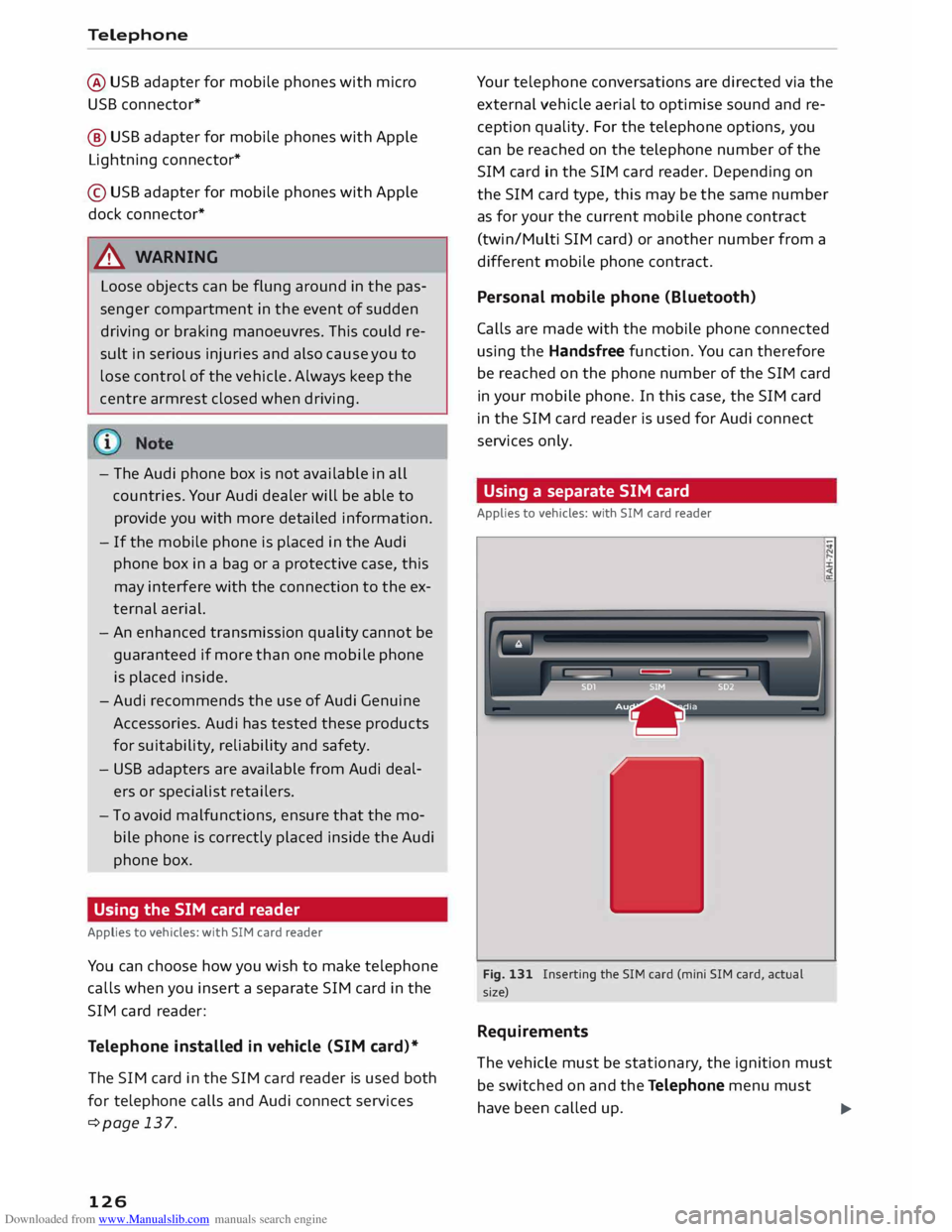
Fig. 131 Inserting the SIM card (mini SIM card, actual
size)
Requirements
The vehicle must be stationary , the ignition must
be switched on and the Telephone menu must
have been called up.
liJ.