234 AUDI TT COUPE 2014 Owners Manual
[x] Cancel search | Manufacturer: AUDI, Model Year: 2014, Model line: TT COUPE, Model: AUDI TT COUPE 2014Pages: 284, PDF Size: 34.42 MB
Page 6 of 284
Downloaded from www.Manualslib.com manuals search engine Table
of Contents
Service and care . . . . . . . . . . . . . . . . . . 217
Checking and topping up fluids . 217
Fuel ............................... 217
Filling the tank ...................... 218
Emission control systems . . . . . . . . . . . . .
220
Engine compartment . . . . . . . . . . . . . . . . .
220
Engine oil . . . . . . . . . . . . . . . . . . . . . . . . . .
223
Cooling system . . . . . . . . . . . . . . . . . . . . . .
224
Brake fluid . . . . . . . . . . . . . . . . . . . . . . . . .
226
Battery . . . . . . . . . . . . . . . . . . . . . . . . . . . .
226
Windscreen washer . . . . . . . . . . . . . . . . . . 229
Service interval display
229
Wheels and tyres . . . . . . . . . . . . . . . . 231
Wheels . . . . . . . . . . . . . . . . . . . . . . . . . . . . 231
Tyre pressure loss indicator . . . . . . . . . . . .
234
Care of vehicle and cleaning . . . . . 236
General notes . . . . . . . . . . . . . . . . . . . . . . . 236
Washing the vehicle .. . . . . . . . . . . . . . . . .
236
Notes on cleaning and care . . . . . . . . . . . . 237
Taking the vehicle out of service . . . . . . . .
240
Self-help . . . . . . . . . . . . . . . . . . . . . . . . . . 241
Mobility . . . . . . . . . . . . . . . . . . . . . . . . . . 241
General notes . . . . . . . . . . . . . . . . . . . . . . . 241
Equipment . . . . . . . . . . . . . . . . . . . . . . . . . 241
Tyre repair kit . . . . . . . . . . . . . . . . . . . . . . . 242
Changing a wheel . . . . . . . . . . . . . . . . . . . . 244
Spare wheel . . . . . . . . . . . . . . . . . . . . . . . .
247
Jump-starting . . . . . . . . . . . . . . . . . . . . . . . 248
Tow-starting/ towing away . . . . . . . . . . . .
250
Fuses and bulbs . . . . . . . . . . . . . . . . . .
254
Fuses.............................. 254
Bulbs......... ..................... 256
Technical data and accessories . . 257
Technical data . . . . . . . . . . . . . . . . . . . . 257
Vehicle identification data . . . . . . . . . . . . . 257
Dimensions . . . . . . . . . . . . . . . . . . . . . . . . . 257
Capacities . . . . . . . . . . . . . . . . . . . . . . . . . . 258
Explanation of technical data . . . . . . . . . . 258
4 Petrol
engines . . . . . . . . . . . . . . . . . . . . . .
259
Diesel engine . . . . . . . . . . . . . . . . . . . . . . .
259
Accessories and modifications
to the vehicle . . . . . . . . . . . . . . . . . . . . .
260
Accessories, replacement parts and
repairs . . . . . . . . . . . . . . . . . . . . . . . . . . . . 260
Modifications . . . . . . . . . . . . . . . . . . . . . . .
260
Radio transmitters and business
equipment . . . . . . . . . . . . . . . . . . . . . . . . . 261
Component protection . . . . . . . . . . . . . . . 261
Environmental compatibility . . . . . . . . . . . 262
Index .............. ............... 263
Page 12 of 284
Downloaded from www.Manualslib.com manuals search engine Instruments
and warning/indicator lamps
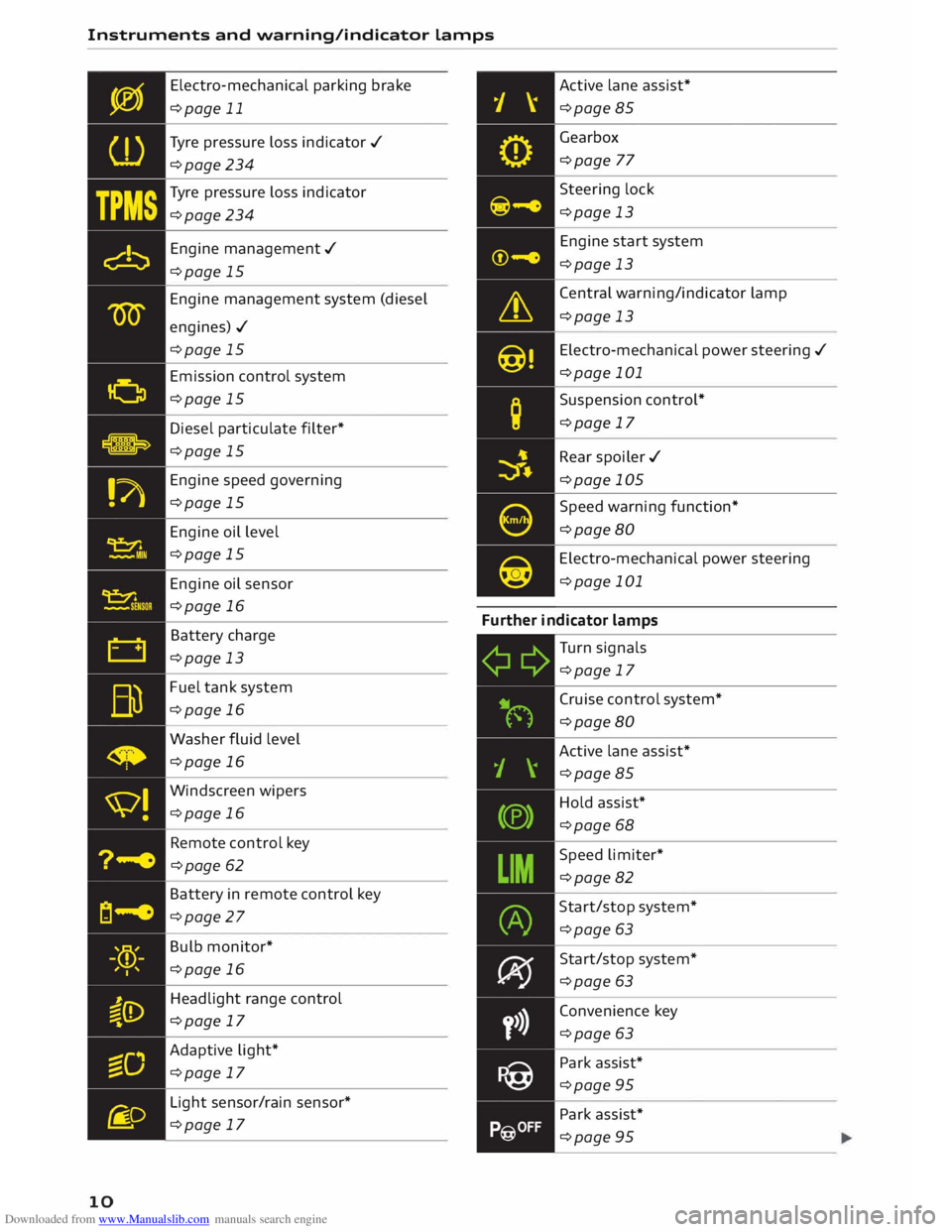
10 Electro-mechanical
parking brake
¢page 11
Tyre pressure loss indicator ./
¢page 234
Tyre pressure loss indicator
¢page 234
Engine management./
¢page 15
Engine management system (diesel
engines)./ ¢page 15
Emission control system
¢page 15
Diesel particulate filter*
¢page 15
Engine speed governing
¢page 15
Engine oil level
¢page 15
Engine oil sensor
¢page 16
Battery charge
¢page 13
Fuel tank system
¢page 16
Washer fluid level
¢page 16
Windscreen wipers
¢page 16
Remote control key
¢page 62
Battery in remote control key
¢page 27
Bulb monitor*
¢page 16
Headlight range control
¢page 17
Adaptive light*
¢page 17
Light sensor/rain sensor*
¢page 17 Active
lane assist*
¢page 85
Gearbox ¢page 77
Steering lock
¢page 13
Engine start system
¢page 13
Central warning/indicator lamp
¢page 13
Electro-mechanical power steering ./
¢page 101
Suspension control*
¢page 17
Rear spoiler ./
¢page 105
Speed warning function*
¢page 80
Electro-mechanical power steering
¢page 101
Further indicator lamps
Turn signals
¢page 17
Cruise control system*
¢page 80
Active lane assist*
¢page 85
Hold assist*
¢page 68
Speed limiter*
¢page 82
Start/stop system*
¢page 63
Start/stop system*
¢page 63
Convenience key
¢page 63
Park assist*
¢page 95
Park assist*
¢page 95
Page 26 of 284
Downloaded from www.Manualslib.com manuals search engine Driver
information system
Controls
Applies to vehicles: with camera-based traffic sign recognition
')· ·.
I
,
,··· .. ,
,· Date
&time
12: 11 AM (.
�1\
.
I
..
' Tuesday
2014-1-21 ...
/ 223450,,,,
11:30-.i �
-- .
1009.0,m ?® Y
13.0"C �
Fig. 16 Instrument cluster: Secondary display
Calling up traffic sign menu
.,. Select the following on the infotainment sys
tem: jMENUj button> Car > On-board comput
er, or
.,. Use the buttons on the multifunction steering
wheel too switch to the tab marked "Car" and
scroll the thumbwheel to select the desired
menu,
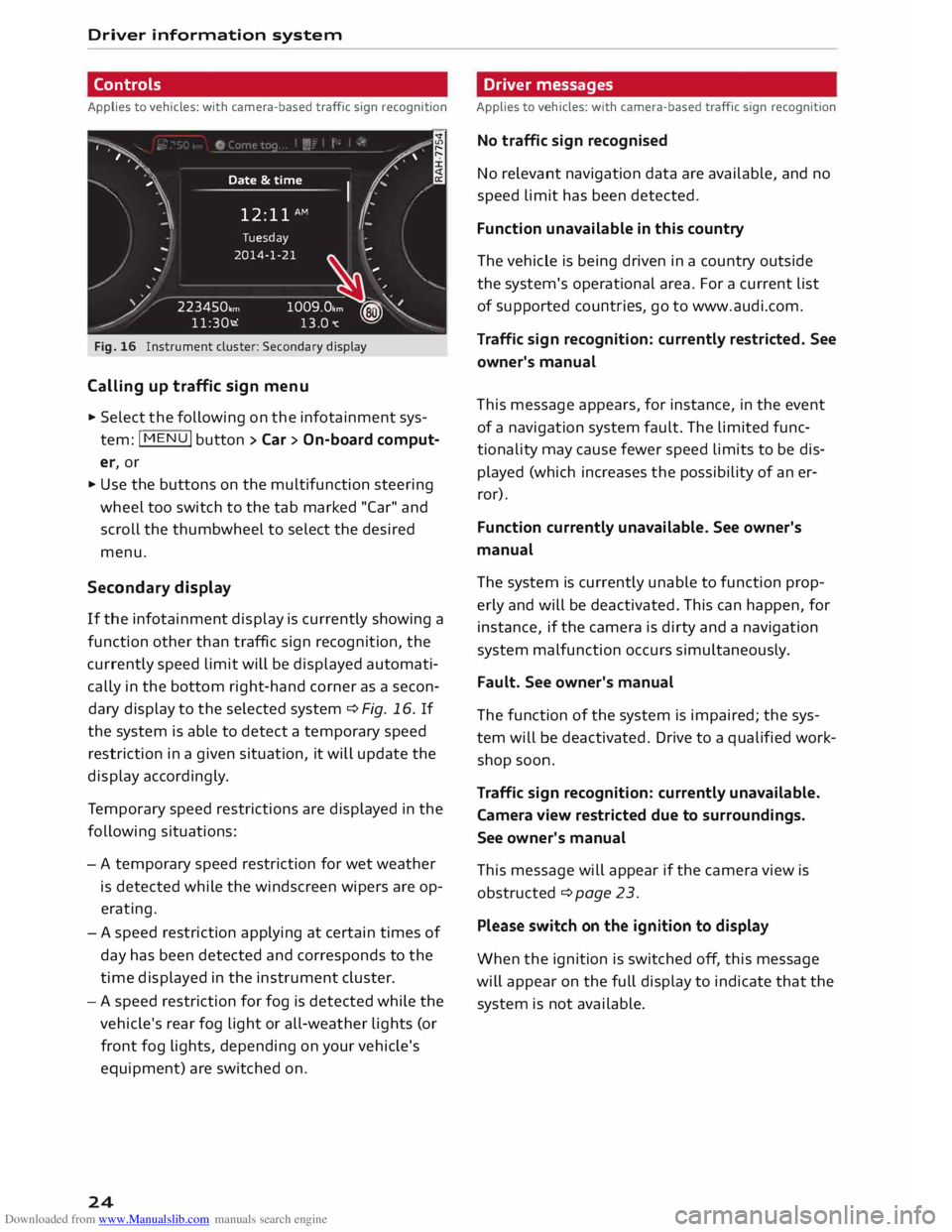
Second ary display
If the infotainment display is currently showing a
function other than traffic sign recognition, the
currently speed limit will be displayed automati
cally in the bottom right-hand corner as a secon
dary display to the selected system ¢ Fig, 16, If
the system is able to detect a temporary speed
restriction in a given situation, it will update the
display accordingly.
Te mporary speed restrictions are displayed in the
following situations:
- A temporary speed restriction for wet weather
is detected while the windscreen wipers are op
erating.
- A speed restriction applying at certain times of
day has been detected and corresponds to the
time displayed in the instrument cluster.
- A speed restriction for fog is detected while the
vehicle's rear fog light or all-weather lights (or
front fog lights, depending on your vehicle's
equipment) are switched on.
24 Driver
messages
Applies to vehicles: with camera-based traffic sign recognition
No traffic sign recognised
No relevant navigation data are available, and no
speed limit has been detected.
Function unavailable in this country
The vehicle is being driven in a country outside
the system's operational area. For a current list
of supported countries, go to www.audi.com.
Traffic sign recognition: currently restricted. See
owner's manual
This message appears, for instance, in the event
of a navigation system fault. The limited func
tionality may cause fewer speed limits to be dis
played (which increases the possibility of an er
ror).
Function currently unavailable. See owner's
manual
The system is currently unable to function prop
erly and will be deactivated. This can happen, for
instance, if the camera is dirty and a navigation
system malfunction occurs simultaneously.
Fault. See owner's manual
The function of the system is impaired; the sys
tem will be deactivated. Drive to a qualified work
shop soon.
Traffic sign recognition: currently unavailable.
Camera view restricted due to surroundings.
See owner's manual
This message will appear if the camera view is
obstructed ¢ page 23.
Please switch on the ignition to display
When the ignition is switched off, this message
will appear on the full display to indicate that the
system is not available.
Page 107 of 284
Downloaded from www.Manualslib.com manuals search engine 0
N
co
....
\D L/'l
N
L/'l
.... Four-wheel
drive
(quattro)
Applies to vehicles: with four-wheel drive
On quattro models the engine power is distrib
uted to all four wheels.
General notes
On four-wheel drive vehicles, the engine power is
distributed to all four wheels. The distribution of
power is controlled automatically according to
your driving style and the road conditions. Also
refer to ¢ page 102, Electronic stabilisation con
trol (£SC).
The four-wheel drive is specially designed to
complement the superior engine power of your
Audi. This combination gives the car exceptional
handling and performance capabilities -both on
normal roads and in more difficult conditions,
such as snow and ice. Even so (or perhaps espe
cially for this reason), it is important to observe
certain safety points¢.&,..
Winter tyres
Thanks to its four-wheel drive, your car will have
plenty of traction in winter conditions, even with
the standard tyres. Nevertheless, we still recom
mend that winter tyres or all-season tyres should
be fitted on all four wheels when winter road
conditions are expected, mainly because this will
give a better braking response.
Snow chains
On roads where snow chains are mandatory, this
also applies to cars with four-wheel drive
¢ page 234, Snow chains.
Replacing tyres On vehicles with four-wheel drive, all four tyres
must have the same rolling circumference. Also
avoid using tyres with varying tread depths
¢ page 231, New wheels or tyres.
Off-road er?
Your Audi does not have enough ground clear
ance to be used as an off-road vehicle. It is there
fore best to avoid rough tracks and uneven ter
rain as much as possible. Intelligent
technology
_&. WARNING
- Even with four-wheel drive, you should al
ways adjust your speed to suit the condi
tions. Do not let the extra safety provided
tempt you into taking any risks when driving
- this can cause accidents.
- The braking ability of your car is limited by
the grip of the tyres. In this respect, your
car is no different from a car without four
wheel drive. So do not be tempted to drive
too fast on icy or slippery roads just because
the car still has good acceleration in these
conditions -risk of accident!
- On wet roads bear in mind that the front
wheels may start to "aquaplane" and lose
contact with the road if the car is driven too
fast. If this should happen, there will be no
sudden increase in engine speed to warn the
driver, as with a front-wheel drive car. So do
not drive too fast in the wet: adjust your
speed to suit the conditions (accident risk).
Rear spoiler
Applies to vehicles: with automatic rear spoiler
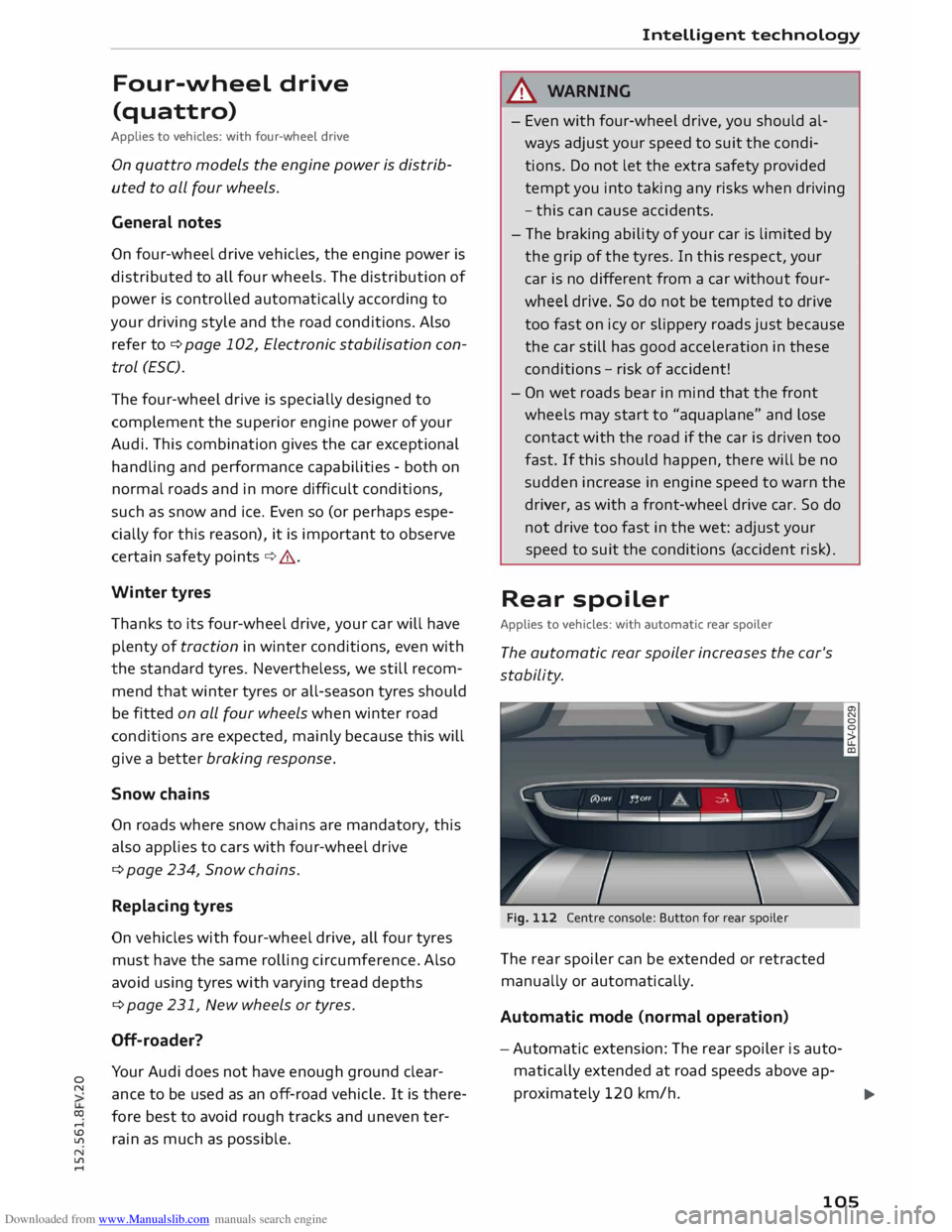
The automatic rear spoiler increases the car's
stability.
Fig. 112 Centre console: Button for rear spoiler
The rear spoiler can be extended or retracted
manually or automatically.
Automatic mode (normal operation)
- Automatic extension: The rear spoiler is auto
matically extended at road speeds above ap-
proximately 120 km/h.
..,.
105
Page 120 of 284
Downloaded from www.Manualslib.com manuals search engine Speech
dialogue system
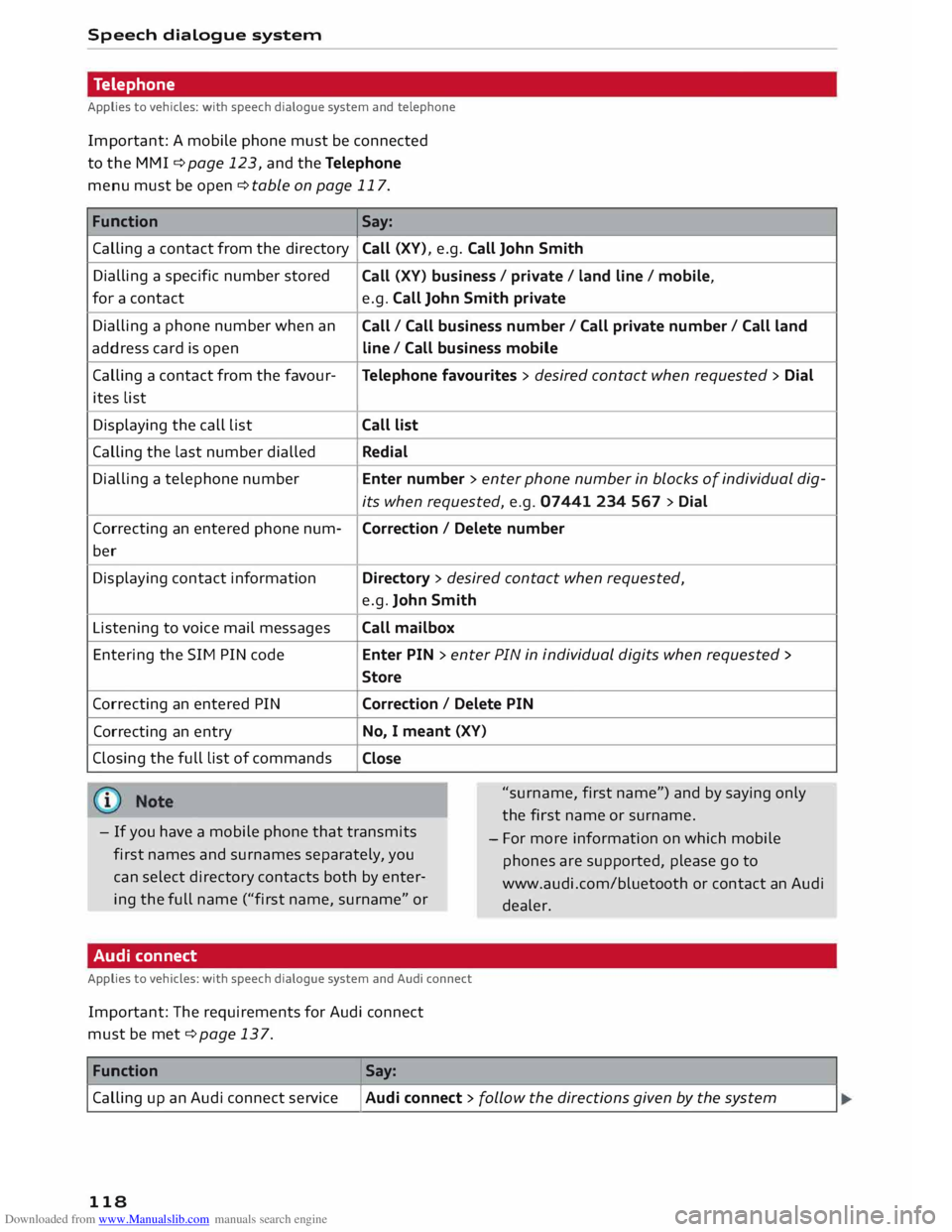
Telephone
Applies to vehicles: with speech dialogue system and telephone
Important: A mobile phone must be connected
to the MMI ¢page 123, and the Telephone
menu must be open ¢ table on page 117.
Function Say:
Calling a contact from the directory Call
(XV), e.g. Call John Smith
Dialling a specific number stored
for a contact
Dialling a phone number when an
address card is open
Calling a contact from the favour-
ites List
Displaying the call List
Calling the Last number dialled
Dialling a telephone number
Correcting an entered phone num-
ber
Displaying contact information
Listening to voice mail messages
Entering the SIM PIN code
Correcting an entered PIN
Correcting an entry
Closing the full List of commands Call
(XV) business / private / land line/ mobile,
e.g. Call John Smith private
Call / Call business number/ Call private number/ Call land
line / Call business mobile
Telephone favourites > desired contact when requested > Dial
Call list
Redial
Enter number > enter phone number in blocks of individual dig-
its when requested, e.g. 07441 234 567 > Dial
Correction / Delete number
Directory > desired contact when requested,
e.g. John Smith
Call mailbox
Enter PIN > enter PIN in individual digits when requested >
Store
Correction / Delete PIN
No, I meant (XV)
Close
"surname, first name") and by saying only
the first name or surname.
- If you have a mobile phone that transmits
first names and surnames separately, you
can select directory contacts both by enter
ing the full name ("first name, surname" or -
For more information on which mobile
phones are supported, please go to
www.audi.com/bluetooth or contact an Audi
dealer.
Audi connect
Applies to vehicles: with speech dialogue system and Audi connect
Important: The requirements for Audi connect
must be met ¢page 137.
Function Say:
Calling up an Audi connect service
I Audi connect > follow the directions given by the system
118
Page 135 of 284
Downloaded from www.Manualslib.com manuals search engine 0
N
co
....
\D Lfl
N
Lfl
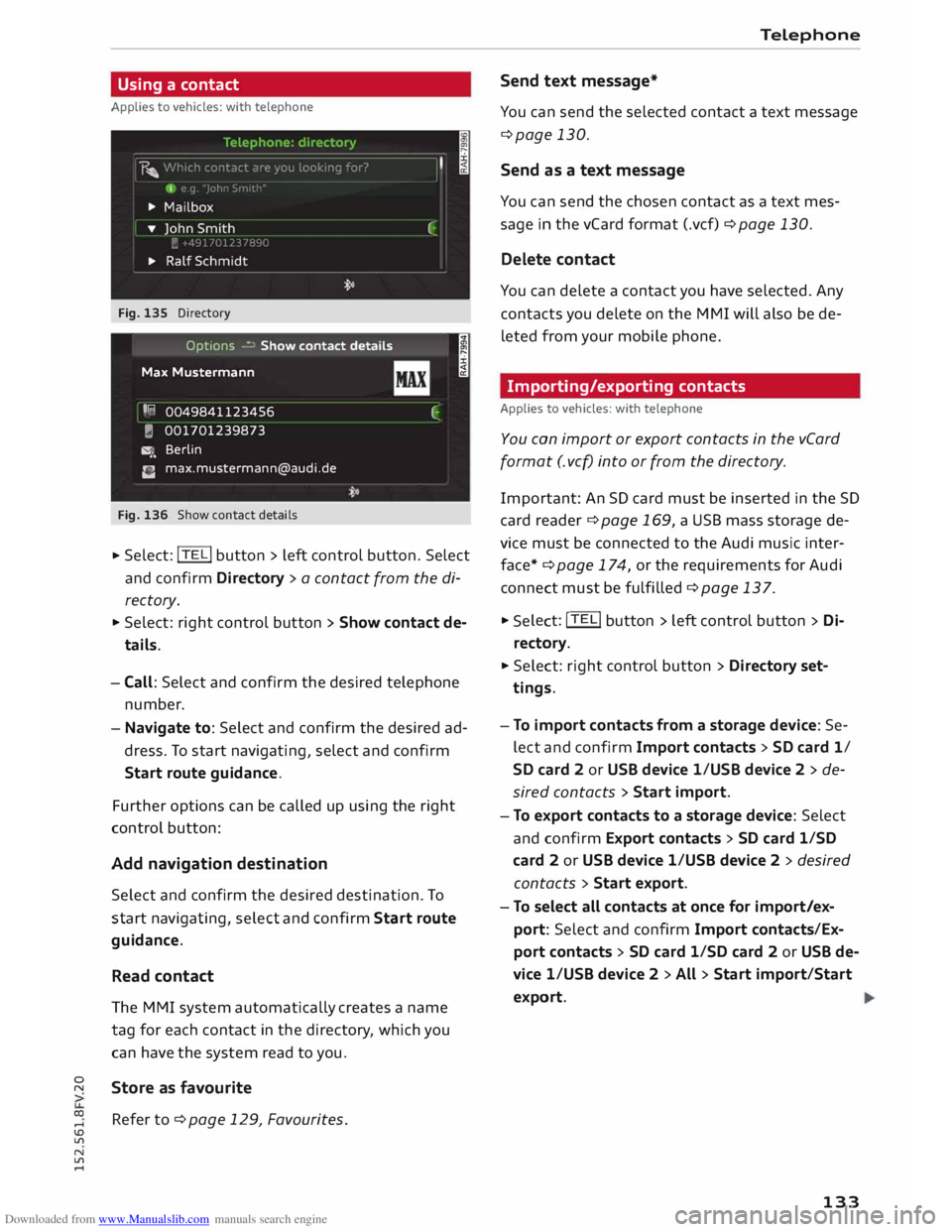
.... Using
a contact
Applies to vehicles: with telephone
Fig. 135 Directory
Options � Show contact details
Max Mustermann
I R
0049841123456
� 001701239873
�. Berlin
C [email protected]
Fig. 136 Show contact details I
C
.,. Select:
!TE
Li button
> left control button. Select
and confirm Directory > a contact from the di
rectory.
.,. Select: right control button > Show contact de
tails.
- Call: Select and confirm the desired telephone
number.
- Navigate to: Select and confirm the desired ad
dress. To start navigating, select and confirm
Start route guidance.
Further options can be called up using the right
control button:
Add navigation destination
Select and confirm the desired destination. To
start navigating, select and confirm Start route
guidance.
Read contact
The MMI system automatically creates a name
tag for each contact in the directory, which you
can have the system read to you.
Store as favourite
Refer to ¢ page 129, Favourites . Telephone
Send text message*
You can send the selected contact a text message
¢page 130.
Send as a text message
You can send the chosen contact as a text mes
sage in the vCard format (.vcf) ¢ page 130.
Delete contact
You can delete a contact you have selected. Any
contacts you delete on the MMI will also be de
leted from your mobile phone.
Importing/exporting contacts
Applies to vehicles: with telephone
You can import or export contacts in the vCard
format (. vcf) into or from the directory.
Importa nt: An SD card must be inserted in the SD
ca rd reader ¢ page 169, a USB mass storage de
vice must be connected to the Audi music inter
face*¢ page 174, or the requirements for Audi
connect must be fulfilled ¢page 137. .,.
Sele ct: !TE Li button
> left control button > Di
re cto ry .
.,. Select: right control button > Directory set
tings.
- To import contacts from a storage device: Se
lect and confirm Import contacts > SD card 1/
SD card 2 or USB device 1/USB device 2 > de
sired contacts > Start import.
- To export contacts to a storage device: Select
and confirm Export contacts > SD card 1/SD
card 2 or USB device 1/USB device 2 > desired
contacts > Start export.
- To select all contacts at once for import/ex
port: Select and confirm Import contacts/Ex
port contacts > SD card 1/SD card 2 or USB de
vice 1/USB device 2 > All > Start import/Start
export.
133
Page 185 of 284
Downloaded from www.Manualslib.com manuals search engine 0
N
co
....
\D Lfl
N
Lfl
.... until
the source overview ¢ page 179 is dis
played. Select a source which supports Catego
ries ¢ page 180 (e.g. an SD card). Select the Fa
vourites category.
Important: The favourites list must be displayed.
- To listen to a favourite: Select and confirm an
item in the favourites list.
- To move a favourite: Select the desired item
from the favourites list. Select: right control
button > Move favourite. Select and confirm
the desired memory position.
- To delete a favourite: Select the desired item
from the favourites list. Select: right control
button > Move favourite > Delete this favour
ite or Delete all favourites.
Other settings
Media settings
� Select: I MEDIA! button > right control button >
Media settings.
Depending on the active source and the storage
device used, you can select the following set
tings:
Sound settings
Refer to¢ page 190.
Input level
Important: A mobile device must be connected
via an AUX adapter cable* or a USB adapter*.
The volume of the mobile device will be adapted
to the MMI system. We recommend setting the
volume of the mobile device to about 70 percent
of the maximum volume.
Bluetooth settings
Refer to¢ page 188.
Wi-Fi settings
Refer to ¢ page 143, Wi-Fi hotspot.
Connection manager
Refer to¢ page 187. Media
Child lock*
Important: A video DVD must be playing.
You can use the child lock to restrict video DVD
playback.
Enter the child lock password. The password set
at the factory is 1234. The following options are
available:
- Safety level: Select and confirm a safety level
(e.g. level 5). Eight safety levels are available
for the child lock function. If you select child
lock level 5, all DVDs with safety levels 1-5 can
be played. Playback of DVDs with a higher safe
ty level will be blocked. Select No restriction to
remove all restrictions.
- Change password: You can change the current
password.
Detailed track info
When this function is switched on [;1 and the
playlist is open, information on the selected track
(e.g. the artist, album, album cover*) as well as
the total and remaining playing time will be dis
played.
Jukebox memory capacity
Information on the jukebox memory capacity and
the number tracks stored on the jukebox will be
displayed.
{!) Note
- Not all video DVDs have a child lock feature.
- The child lock safety levels comply with the
US standards of the Motion Picture Associa
tion of America (MPAA). Please note that
age ratings for DVDs may vary between dif
ferent European countries.
- If you enter the wrong child lock password
three times in a row, you will not be able to
enter a password for approximately one mi
nute. The password can only be reset by an
Audi worksho p.
183
Page 236 of 284
Downloaded from www.Manualslib.com manuals search engine Wheels
and tyres
tread pattern), summer tyres give less grip on ice
and snow.
... Winter tyres must be fitted on all four wheels.
... Only use winter tyres of the correct type ap-
proved for your vehicle.
... Please
note that the maximum permissible
speed for winter tyres may be lower than for
summer tyres¢.&_ . Your specialist retailer can
advise you of the maximum speed for your
tyres.
... After fitting the wheels you must always check
the tyre pressures ¢page 233.
Winter tyres lose their effectiveness when the
tread is worn down to a depth of 4 mm. The per
formance of winter tyres is also severely impaired
by ageing, even if the tread is still much deeper
than 4 mm.
.&_ WARNING
- Never exceed the maximum approved speed
for your tyres. This causes the tyres to over
heat and can even result in a blow-out -risk
of accident!
- Always adapt your driving style to the pre
vailing road and traffic conditions. Drive
carefully and reduce your speed on icy or
slippery roads. Even winter tyres lose their
grip on black ice.
@) For the sake of the environment
Summer tyres should be fitted again as soon
as possible; they give better handling on
roads which are free of snow and ice. They are
quieter, do not wear so quickly and reduce
fuel consumption.
(Qj) Note
All-weather tyres can also be used instead of
winter tyres. Please note that winter tyres
with the & symbol are required by law during
the winter season in some countries.
Snow chains
Snow chains will improve braking ability as well
as traction in winter conditions.
234 ...
Snow chains can be used on the front wheels
only. This also applies to vehicles with four
wheel drive* .
... Check that the snow chains are correctly seated
after driving for a few yards; follow the instruc
tions given by the manufacturer .
... Keep your speed below 50 km/h. Please ob-
serve the applicable local regulations.
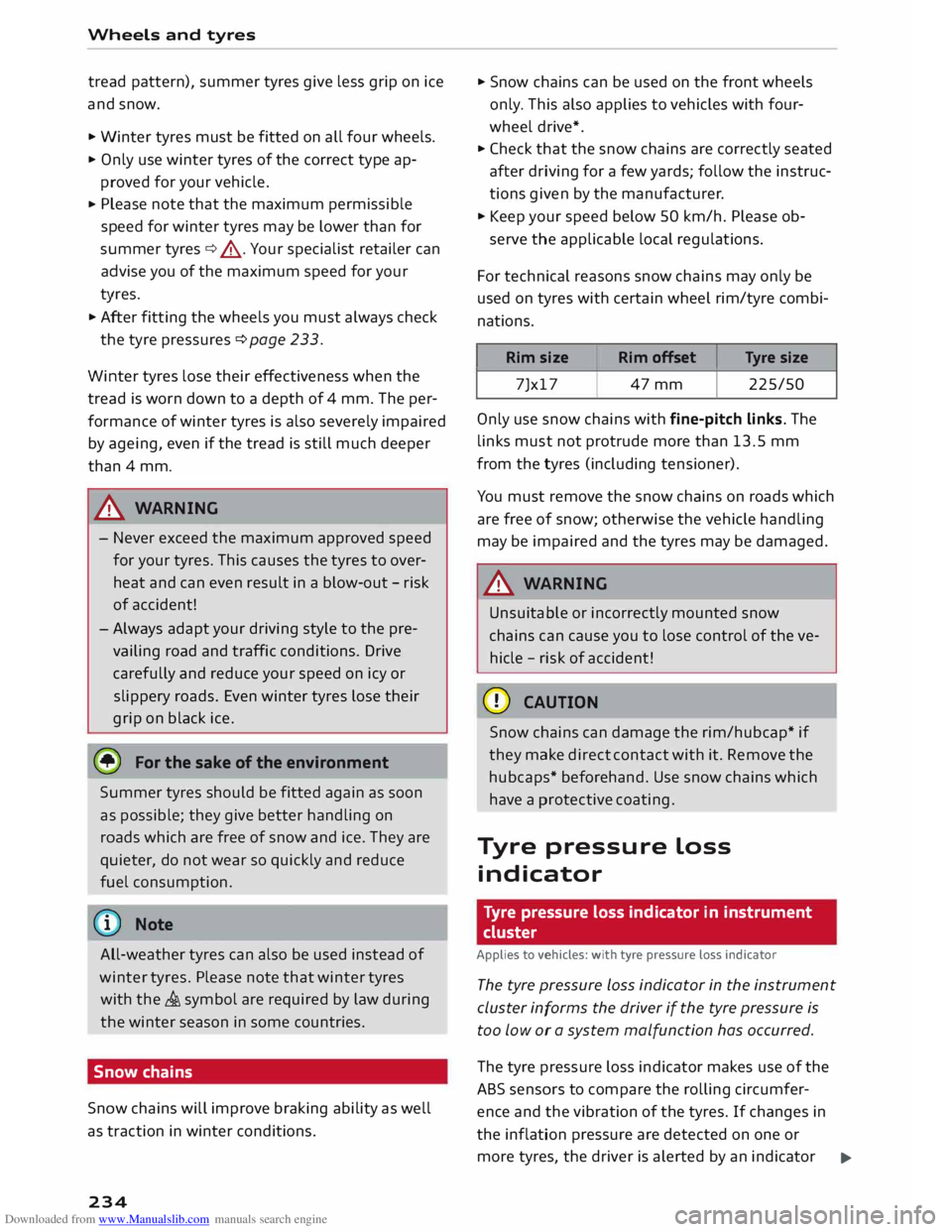
For technical reasons snow chains may only be
used on tyres with certain wheel rim/tyre combi
nations.
Rim size
Rim offset Tyre
size
7Jx17 47mm 225/50
Only use snow chains with fine-pitch links. The
links must not protrude more than 13.5 mm
from the tyres (including tensioner).
You must remove the snow chains on roads which
are free of snow; otherwise the vehicle handling
may be impaired and the tyres may be damaged.
.&_ WARNING
Unsuitable or incorrectly mounted snow
chains can cause you to lose control of the ve
hicle -risk of accident!
CD CAUTION
Snow chains can damage the rim/hubcap* if
they make direct contact with it. Remove the
hubcaps* beforehand. Use snow chains which
have a protective coating.
Tyre pressure Loss
indicator
Tyre pressure loss indicator in instrument
cluster
Applies to vehicles: with tyre pressure Loss indicator
The tyre pressure Loss indicator in the instrument
cluster informs the driver if the tyre pressure is
too low or a system malfunction has occurred.
The tyre pressure loss indicator makes use of the
ABS sensors to compare the rolling circumfer
ence and the vibration of the tyres. If changes in
the inflation pressure are detected on one or
more tyres, the driver is alerted by an indicator
..,.
Page 248 of 284

Downloaded from www.Manualslib.com manuals search engine Mobility
.&_ WARNING
- Make sure the jack* is stable. If the ground
underneath the jack* is slippery or soft, the
jack can slip or sink in -risk of injury!
- Use only the jack* supplied with your vehicle
to raise the vehicle. If you use a jack from a
different vehicle, your vehicle may slip off
the jack -risk of injury!
- Apply the jack* only at the jacking points Lo
cated behind the markings on the door sill
and align it properly. Otherwise there is a
risk of injury since the jack* can slip off sud
denly if it is not properly engaged.
- The height of the parked vehicle can change
as a result of variations in Loading.
- Never start the engine when the vehicle is
on the jack -risk of accident!
- If work has to be done under the vehicle, en
sure that it is safely supported on suitable
stands -risk of injury!
CD CAUTION
The vehicle must not be lifted up on its sills.
Only apply the jack* at the jacking points Loca
ted behind the markings on the door sill. Oth
erwise your vehicle could be damaged.
Taking off/ putting on the wheel
Fig. 233 Wheel: Hexagonal socket for turning wheel bolts
246 Fig.
234 Wheel: Mounting pin in wheel bolt hole nearest
to the top
Taking off the wheel
... Using the hexagonal socket in the screwdriver
handle {provided in the vehicle's tool kit), un
screw the top wheel bolt and place it on a clean
surface ¢ Fig. 233.
... Screw in the mounting pin (provided in the ve
hicle's tool kit) by hand in place of the wheel
bolt¢ Fig. 234.
.,. Then unscrew the other wheel bolts .
.,. Take off the wheel ¢(D
. The mounting pin
stays where it is.
Putting on the wheel
When putting on a tyre with directional tread
pattern, refer to ¢ page 247.
.,. Put on the wheel, using the mounting pin to
guide it into place ¢(D
.
.,. Screw in the wheel bolts and tighten them
lightly using the hexagonal socket .
... Then unscrew the mounting pin and tighten the
remaining wheel bolt lightly .
... Carefully lower the car with the jack* .
.,. Tighten the wheel bolts in diagonal sequence
with the box spanner.
The wheel bolts should be clean and turn easily.
Before putting on the wheel, inspect the condi
tion of the wheel and hub mounting surfaces.
These surfaces must be clean before mounting
the wheel.
.&_ WARNING
Do not use the hexagonal socket in the screw-
driver handle to tighten the wheel bolts. It is ..,.
Page 272 of 284
Downloaded from www.Manualslib.com manuals search engine Index
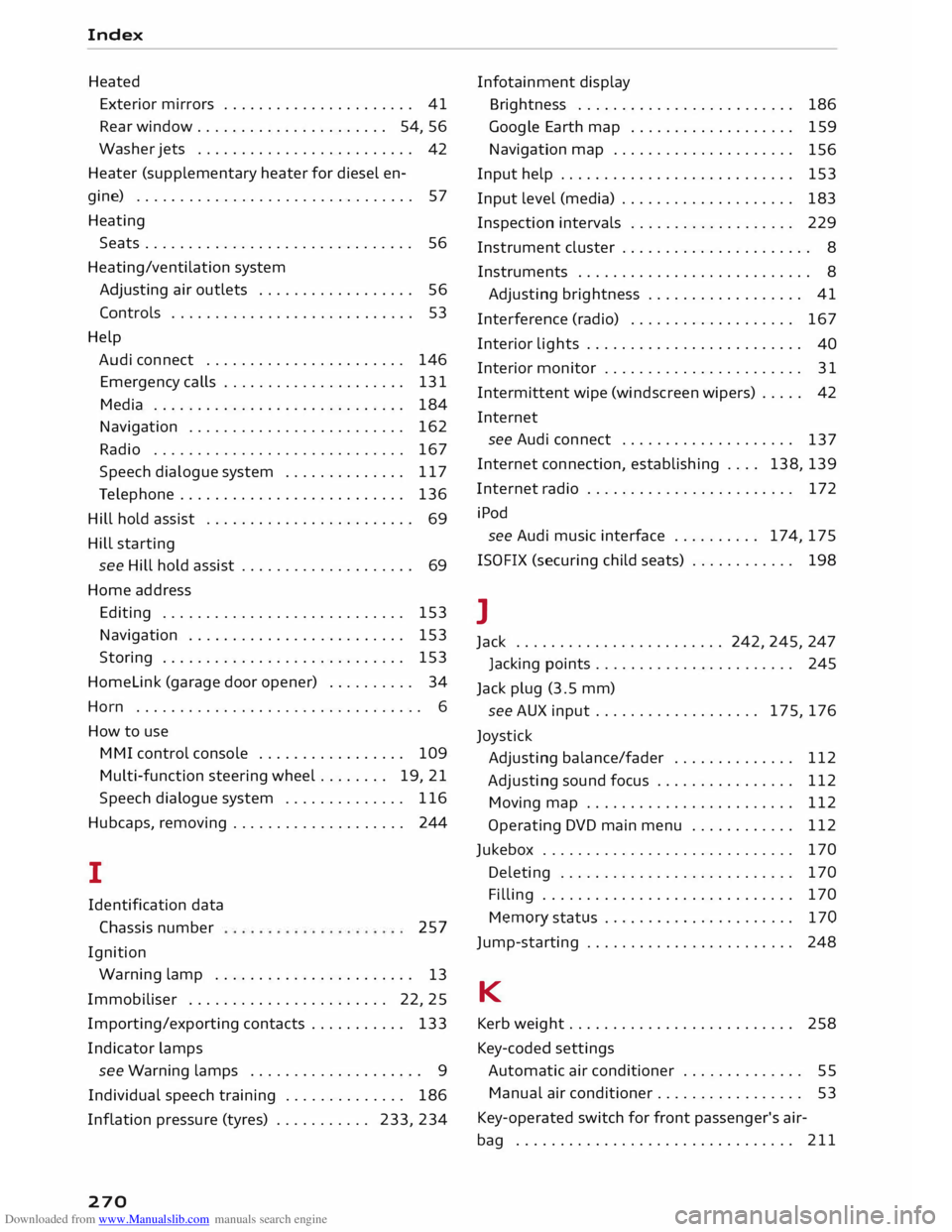
Heated Exterior mirrors . . . . . . . . . . . . . . . . . . . . . . 41
Rear window...................... 54, 56
Washer jets . . . . . . . . . . . . . . . . . . . . . . . . .
42
Heater (supplementary heater for diesel en-
gine) . . . . . . . . . . . . . . . . . . . . . . . . . . . . . . . . 57
Heating Seats ............................... 56
Heating/ventilation system
Adjusting air outlets . . . . . . . . . . . . . . . . . . 56
Controls . . . . . . . . . . . . . . . . . . . . . . . . . . . .
53
Help Audi connect . . . . . . . . . . . . . . . . . . . . . . .
146
Emergency calls . . . . . . . . . . . . . . . . . . . . .
131
Media . . . . . . . . . . . . . . . . . . . . . . . . . . . . . 184
Navigation . . . . . . . . . . . . . . . . . . . . . . . . .
162
Radio . . . . . . . . . . . . . . . . . . . . . . . . . . . . .
167
Speech dialogue system . . . . . . . . . . . . . . 117
Telephone . . . . . . . . . . . . . . . . . . . . . . . . . . 136
Hill hold assist . . . . . . . . . . . . . . . . . . . . . . . . 69
Hill starting
see Hill hold assist . . . . . . . . . . . . . . . . . . . . 69
Home address
Editing . . . . . . . . . . . . . . . . . . . . . . . . . . . .
153
Navigation . . . . . . . . . . . . . . . . . . . . . . . . . 153
Storing . . . . . . . . . . . . . . . . . . . . . . . . . . . . 153
Homelink (garage door opener) . . . . . . . . . . 34
Horn . . . . . . . . . . . . . . . . . . . . . . . . . . . . . . . . . 6
How to use
M MI control console . . . . . . . . . . . . . . . . . 109
Multi-function steering wheel . . . . . . . . 19, 21
Speech dialogue system . . . . . . . . . . . . . . 116
Hubcaps, removing . . . . . . . . . . . . . . . . . . . .
244
I
Identification data
Chassis number
Ignition 257
Warning lamp . . . . . . . . . . . . . . . . . . . . . . .
13
Immobiliser . . . . . . . . . . . . . . . . . . . . . . . 22, 25
Importing/exporting contacts . . . . . . . . . . . 133
Indicator lamps
see Warning lamps . . . . . . . . . . . . . . . . . . . . 9
Individual speech training . . . . . . . . . . . . . . 186
Inflation pressure (tyres) ........... 233, 234
270 Infotainment
display
Brightness . . . . . . . . . . . . . . . . . . . . . . . . .
186
Google Earth map . . . . . . . . . . . . . . . . . . .
159
Navigation map . . . . . . . . . . . . . . . . . . . . .
156
Input help . . . . . . . . . . . . . . . . . . . . . . . . . . .
153
Input level (media) . . . . . . . . . . . . . . . . . . . .
183
Inspection intervals . . . . . . . . . . . . . . . . . . .
229
Instrument cluster . . . . . . . . . . . . . . . . . . . . . .
8
Instruments . . . . . . . . . . . . . . . . . . . . . . . . . . . 8
Adjusting brightness . . . . . . . . . . . . . . . . . . 41
Interference (radio) . . . . . . . . . . . . . . . . . . . 167
Interior lights . . . . . . . . . . . . . . . . . . . . . . . . .
40
Interior monitor . . . . . . . . . . . . . . . . . . . . . . .
31
Intermittent wipe (windscreen wipers) . . . . .
42
Internet see Audi connect . . . . . . . . . . . . . . . . . . . .
137
Internet connection, establishing . . . . 138, 139
Internet radio . . . . . . . . . . . . . . . . . . . . . . . . 172
iPod see Audi music interface .......... 174,175
ISOFIX (securing child seats) . . . . . . . . . . . . 198
l
Jack ........................ 242, 245, 247
Jacking points . . . . . . . . . . . . . . . . . . . . . . . 245
Jack plug (3.5 mm)
see AUX input ...................
175, 176
Joystick Adjusting balance/fader . . . . . . . . . . . . . .
112
Adjusting sound focus . . . . . . . . . . . . . . . . 112
Moving map . . . . . . . . . . . . . . . . . . . . . . . . 112
Operating DVD main menu . . . . . . . . . . . .
112
Jukebox . . . . . . . . . . . . . . . . . . . . . . . . . . . . . 170
Deleting . . . . . . . . . . . . . . . . . . . . . . . . . . .
170
Filling . . . . . . . . . . . . . . . . . . . . . . . . . . . . .
170
Memory status . . . . . . . . . . . . . . . . . . . . .
. 170
Jump-starting . . . . . . . . . . . . . . . . . . . . . . . .
248
K
Kerb weight...... . . . . . . . . . . . . . . . . . . . . 258
Key-coded settings
Automatic air conditioner . . . . . . . . . . . . . . 55
Manual air conditioner. . . . . . . . . . . . . . . . .
53
Key-operated switch for front passenger's air-
bag . . . . . . . . . . . . . . . . . . . . . . . . . . . . . . . . 211