steering AUDI TT COUPE 2014 Owners Manual
[x] Cancel search | Manufacturer: AUDI, Model Year: 2014, Model line: TT COUPE, Model: AUDI TT COUPE 2014Pages: 284, PDF Size: 34.42 MB
Page 4 of 284
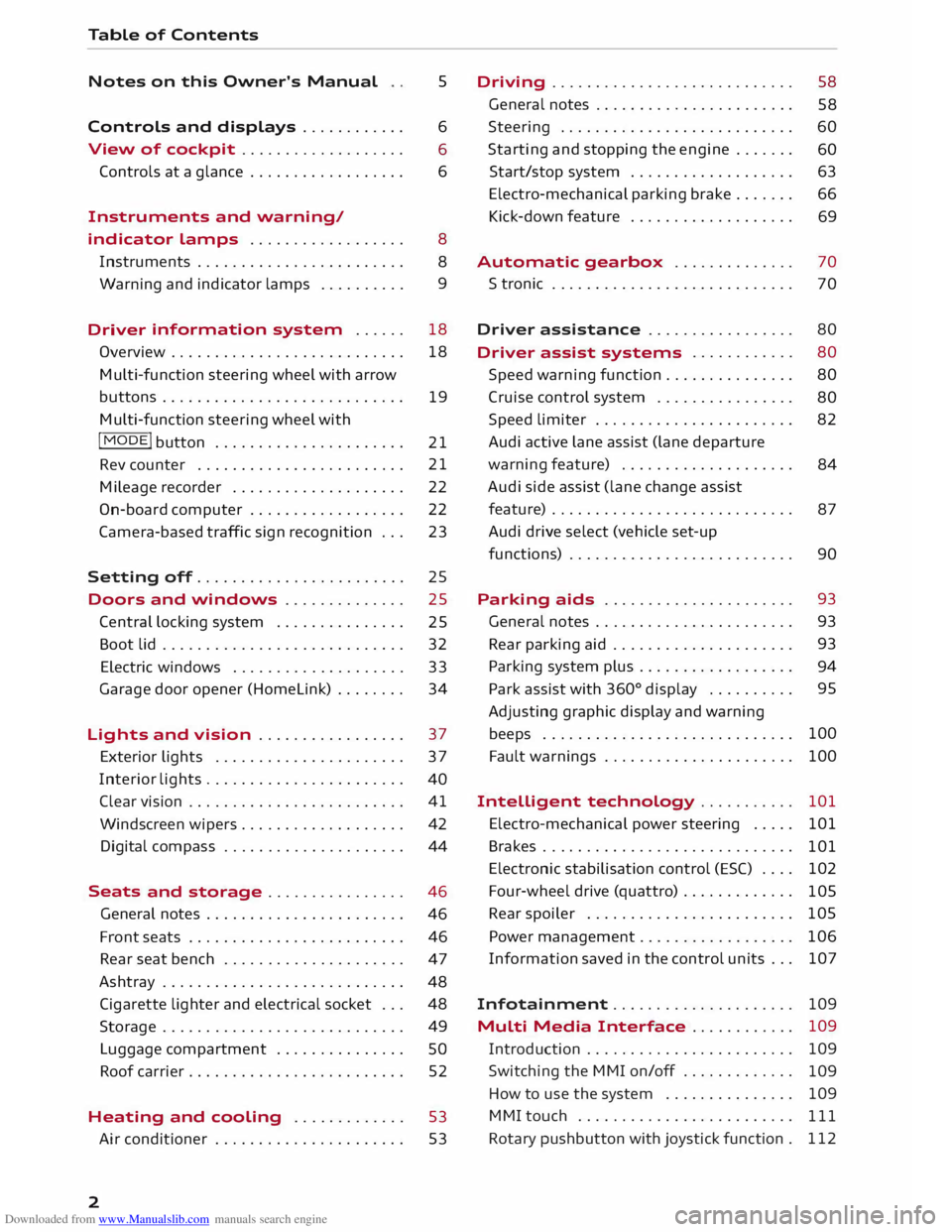
Downloaded from www.Manualslib.com manuals search engine Table
of Contents
Notes on this Owner's Manual
Controls and displays ........... .
View of cockpit .................. .
Controls at a glance ................. .
Instruments and warning/ 5
6
6
6
indicator lamps . . . . . . . . . . . . . . . . . .
8
Instruments . . . . . . . . . . . . . . . . . . . . . . . .
8
Warning and
indicator lamps . . . . . . . . . . 9
Driver information
system . . . . . . 18
Overview . . . . . . . . . . . . . . . . . . . . . . . . . . .
18
Multi-function steering wheel with arrow
buttons............................ 19
Multi-function steering wheel with
I MODE!
button . . . . . . . . . . . . . . . . . . . . . .
21
Rev counter . . . . . . . . . . . . . . . . . . . . . . . . 21
Mileage recorder . . . . . . . . . . . . . . . . . . . .
22
On-board computer . . . . . . . . . . . . . . . . . . 22
Camera-based traffic sign recognition . . .
23
Setting off........................ 25
Doors and windows . . . . . . . . . . . . . .
25
Central locking system . . . . . . . . . . . . . . .
25
Boot lid . . . . . . . . . . . . . . . . . . . . . . . . . . . . 32
Electric windows . . . . . . . . . . . . . . . . . . . . 33
Garage door opener (Homelink) . . . . . . . .
34
Lights and vision . . . . . . . . . . . . . . . . . 37
Exterior lights . . . . . . . . . . . . . . . . . . . . . . 37
Interior lights . . . . . . . . . . . . . . . . . . . . . . .
40
Clear vision . . . . . . . . . . . . . . . . . . . . . . . . .
41
Windscreen wipers. . . . . . . . . . . . . . . . . . .
42
Digital compass . . . . . . . . . . . . . . . . . . . . .
44
Seats and storage ................ 46
General notes . . . . . . . . . . . . . . . . . . . . . . .
46
Front seats . . . . . . . . . . . . . . . . . . . . . . . . .
46
Rear seat bench . . . . . . . . . . . . . . . . . . . . .
47
Ashtray . . . . . . . . . . . . . . . . . . . . . . . . . . . .
48
Cigarette lighter and electrical socket . . .
48
Storage . . . . . . . . . . . . . . . . . . . . . . . . . . . .
49
Luggage compartment . . . . . . . . . . . . . . .
SO
Roof carrier . . . . . . . . . . . . . . . . . . . . . . . . .
52
Heating and cooling . . . . . . . . . . . . .
53
Air conditioner . . . . . . . . . . . . . . . . . . . . . . 53
2 Driving
............................ 58
General notes . . . . . . . . . . . . . . . . . . . . . . .
58
Steering . . . . . . . . . . . . . . . . . . . . . . . . . . .
60
Starting and stopping the engine . . . . . . .
60
Start/stop system . . . . . . . . . . . . . . . . . . .
63
Electro-mechanical parking brake . . . . . . . 66
Kick-down feature . . . . . . . . . . . . . . . . . . .
69
Automatic gearbox . . . . . . . . . . . . . . 70
S tronic . . . . . . . . . . . . . . . . . . . . . . . . . . . .
70
Driver assistance . . . . . . . . . . . . . . . . . 80
Driver assist systems . . . . . . . . . . . .
80
Speed warning function . . . . . . . . . . . . . . .
80
Cruise control system . . . . . . . . . . . . . . . .
80
Speed limiter . . . . . . . . . . . . . . . . . . . . . . .
82
Audi active lane assist (lane departure
warning feature) . . . . . . . . . . . . . . . . . . . .
84
Audi side assist (lane change assist
feature) . . . . . . . . . . . . . . . . . . . . . . . . . . . .
87
Audi drive select (vehicle set-up
functions) . . . . . . . . . . . . . . . . . . . . . . . . . .
90
Parking aids . . . . . . . . . . . . . . . . . . . . . . 93
General notes . . . . . . . . . . . . . . . . . . . . . . .
93
Rear parking aid . . . . . . . . . . . . . . . . . . . . . 93
Parking system plus . . . . . . . . . . . . . . . . . . 94
Park assist with 360°
display . . . . . . . . . . 95
Adjusting graphic display and warning
beeps . . . . . . . . . . . . . . . . . . . . . . . . . . . . . 100
Fault warnings . . . . . . . . . . . . . . . . . . . . . .
100
Intelligent technology . . . . . . . . . . .
101
Electro-mechanical power steering . . . . .
101
Brakes . . . . . . . . . . . . . . . . . . . . . . . . . . . . .
101
Electronic stabilisation control (ES() . . . .
102
Four-wheel drive (quattro) . . . . . . . . . . . . .
105
Rear spoiler . . . . . . . . . . . . . . . . . . . . . . . .
105
Power management . . . . . . . . . . . . . . . . . .
106
Information saved in the control units . . . 107
Infotainment . . . . . . . . . . . . . . . . . . . . .
109
Multi Media Interface . . . . . . . . . . . . 109
Introduction . . . . . . . . . . . . . . . . . . . . . . . .
109
Switching the MMI on/off . . . . . . . . . . . . .
109
How to use the system . . . . . . . . . . . . . . .
109
MMI touch . . . . . . . . . . . . . . . . . . . . . . . . .
111
Rotary pushbutton with joystick function .
112
Page 9 of 284
Downloaded from www.Manualslib.com manuals search engine 0
N
co
....
\D L/'l
N
L/'l
.... (D
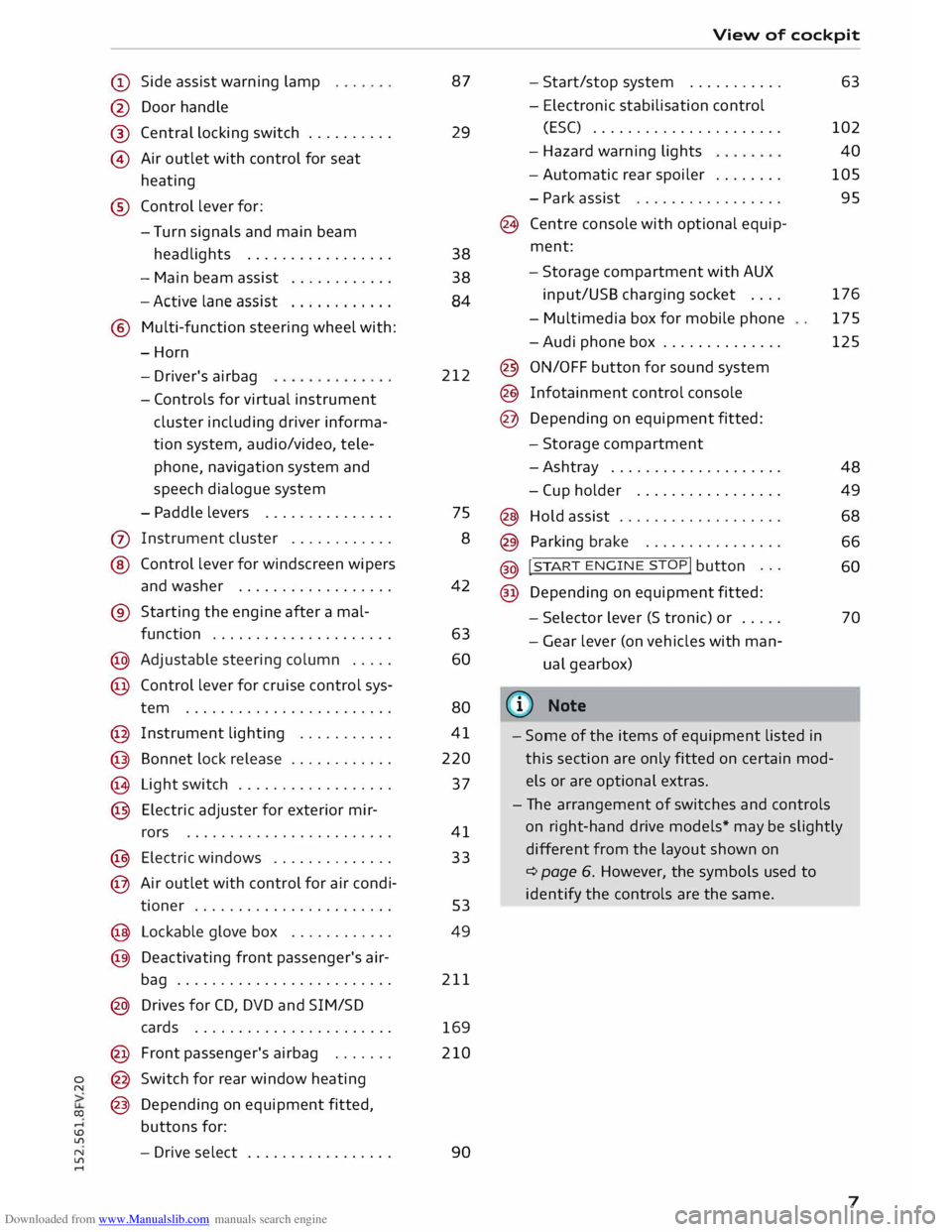
Side assist warning lamp
@ Door handle
®
© Central
locking switch ......... .
Air outlet with control for seat
heating
® Control lever for:
- Turn signals and main beam
headlights ................ .
- Main beam assist
........... .
- Active lane assist
........... .
® Multi-function steering wheel with:
-Horn
- Driver's airbag
- Controls for virtual instrument
cluster
including
driver informa
tion system, audio/video, tele
phone, navigation system and
speech dialogue system
- Paddle levers .............. .
(j) Instrument cluster ........... .
@ Control lever for windscreen wipers
and washer ................. .
® Starting the engine after a mal-
function .................... .
@ Adjustable steering column .... .
@ Control lever for cruise control sys-
tem ....................... .
@ Instrument lighting .......... .
@ Bonnet lock release ........... .
@ Light switch ................. .
@ Electric adjuster for exterior mir-
rors ....................... .
@ Electric windows ............. .
@ Air outlet with control for air condi-
tioner ...................... . 87
29
38
38 84
212
75 8
42
63 60
80
41
220
37
41
33
53
@ Lockable glove box . . . . . . . . . . . .
49
@ Deactivating front passenger's air-
bag . . . . . . . . . . . . . . . . . . . . . . . . . 211
@ Drives for CD, DVD and SIM/SD
cards . . . . . . . . . . . . . . . . . . . . . . .
169
@ Front passenger's airbag ...... . 210
@ Switch for rear window heating
@ Depending on equipment fitted,
buttons for:
- Drive select ................ . 90 View
of cockpit
- Start/stop system .......... .
- Electronic stabilisation control
(ES() ..................... .
- Hazard warning lights
- Automatic rear spoiler ....... .
- Park assist ................ .
@ Centre console with optional equip
ment:
- Storage compartment with AUX
input/USS charging socket ....
- Multimedia box for mobile phone
-Audi phone box ............. .
@ ON/OFF button for sound system
@ Infotainment control console
@ Depending on equipment fitted:
- Storage compartment
-Ashtray ................... .
- Cup holder ................ .
@ Hold assist .................. .
@ Parking brake ............... .
@ !
S TAR
T ENGINE ST
OP! button ..
.
@ Depending on equipment fitted: 63
102 40
105
95
176 175
125
48 49
68
66 60
- Selector lever (S tronic) or . . . . .
70
- Gear lever (on vehicles with man
ual gearbox)
((ij} Note
- Some of the items of equipment listed in
this section are only fitted on certain mod
els or are optional extras.
- The arrangement of switches and controls
on right-hand drive models* may be slightly
different from the layout shown on
¢ page 6. However, the symbols used to
identify the controls are the same.
7
Page 11 of 284
Downloaded from www.Manualslib.com manuals search engine Instruments
and warning/indicator lamps
Fuel gauge
The gauge @ only works when the ignition is
switched on. If there is less than 7 litres of fuel in
the tank, the LED at the bottom of the dial will
light up in red and the indicator lamp tD will ap
pear c:::>page 16. The LED at the bottom of the
dial will flash in red if the fuel level is very low.
The tank capacity of your vehicle is given in the
Technical data section c:::> page 258.
CD CAUTION
Never run the tank completely dry. If there is
an irregular fuel supply, misfiring can occur.
Unburnt fuel can then enter the exhaust sys
tem. This can lead to overheating and dam
age to the catalytic converter.
Warning and indicator
lamps
Description
The warning and indicator lamps light up or flash
in the instrument cluster. Their purpose is to in
dicate functions or faults.
Some of the warning and indicator lamps may be
accompanied by a driver message and a warning
tone. The warning/indicator lamps and driver
messages on the display can be masked by fur
ther displays. To display a warning or message
again, use the controls on the multi-function
steering wheel to select the display tab for warn
ing/indicator lamps and messages c:::> page 18.
If several malfunctions have occurred, you can
use the thumbwheel to scroll through them on
the display.
Some of the warning lamps may be displayed in
different colours.
Overview
When you switch on the ignition, some of the
warning and indicator lamps light up briefly to
0
� show
that the associated systems are working
� properly.
These systems are marked with a./ in
� the
following tables. If one of these warning/in-
N
ll'l
.... dicator
lamps does not light up, there is a fault in
the associated system.
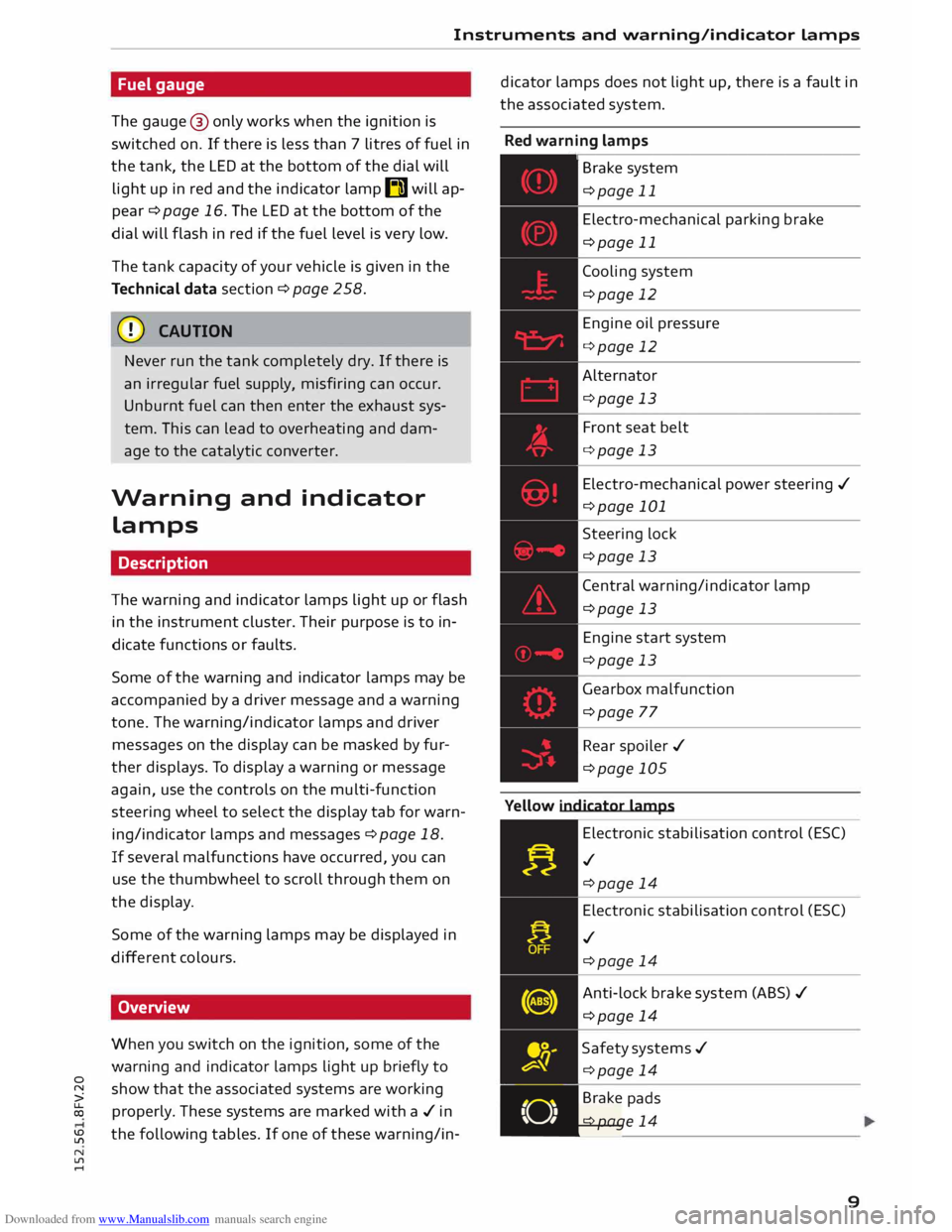
Red warning lamps
,---------------
Br a k e system
c:::>page 11
Electro-mechanical parking brake
c:::>page 11
Cooling system
c:::>page 12
Engine oil pressure
c:::>page 12
Alternator c:::>page 13
Front seat belt
c:::>page 13
Electro-mechanical power steering ./
c:::>page 101
Steering lock
c:::>page 13
Central warning/indicator lamp
c:::>page 13
Engine start system
c:::>page 13
Gearbox malfunction
c:::>page 77
Rear spoiler ./
c:::>page 105
Yellow indicator lamps
Electronic stabilisation control (ES()
./ c:::>page 14
Electronic stabilisation control (ES()
./ c:::>page 14
Anti-lock brake system (ABS)./
c:::>page 14
Safety systems ./
c:::>page 14
• Brake
pads
. c:::>page 14
9
Page 12 of 284
Downloaded from www.Manualslib.com manuals search engine Instruments
and warning/indicator lamps
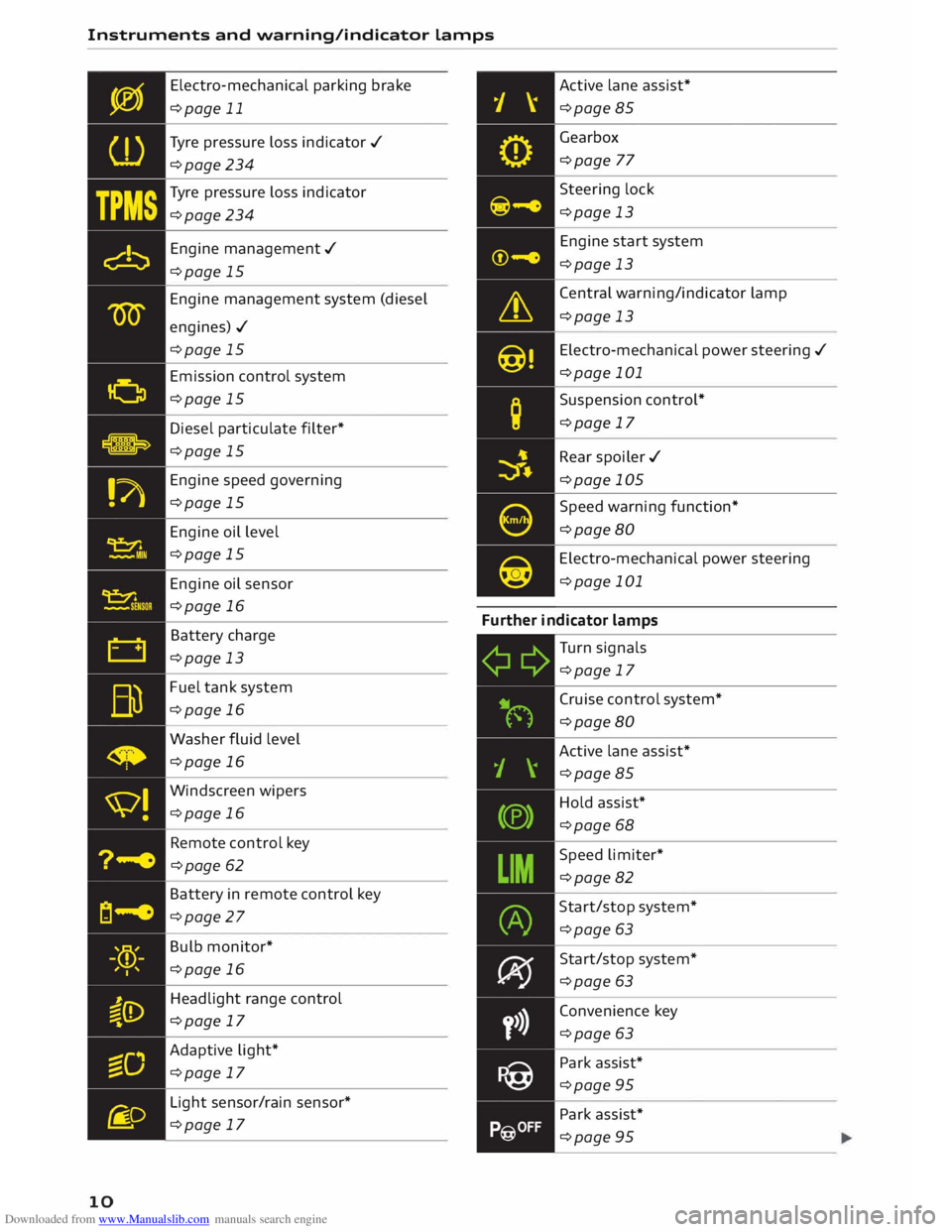
10 Electro-mechanical
parking brake
¢page 11
Tyre pressure loss indicator ./
¢page 234
Tyre pressure loss indicator
¢page 234
Engine management./
¢page 15
Engine management system (diesel
engines)./ ¢page 15
Emission control system
¢page 15
Diesel particulate filter*
¢page 15
Engine speed governing
¢page 15
Engine oil level
¢page 15
Engine oil sensor
¢page 16
Battery charge
¢page 13
Fuel tank system
¢page 16
Washer fluid level
¢page 16
Windscreen wipers
¢page 16
Remote control key
¢page 62
Battery in remote control key
¢page 27
Bulb monitor*
¢page 16
Headlight range control
¢page 17
Adaptive light*
¢page 17
Light sensor/rain sensor*
¢page 17 Active
lane assist*
¢page 85
Gearbox ¢page 77
Steering lock
¢page 13
Engine start system
¢page 13
Central warning/indicator lamp
¢page 13
Electro-mechanical power steering ./
¢page 101
Suspension control*
¢page 17
Rear spoiler ./
¢page 105
Speed warning function*
¢page 80
Electro-mechanical power steering
¢page 101
Further indicator lamps
Turn signals
¢page 17
Cruise control system*
¢page 80
Active lane assist*
¢page 85
Hold assist*
¢page 68
Speed limiter*
¢page 82
Start/stop system*
¢page 63
Start/stop system*
¢page 63
Convenience key
¢page 63
Park assist*
¢page 95
Park assist*
¢page 95
Page 15 of 284
Downloaded from www.Manualslib.com manuals search engine Instruments
and warning/indicator lamps
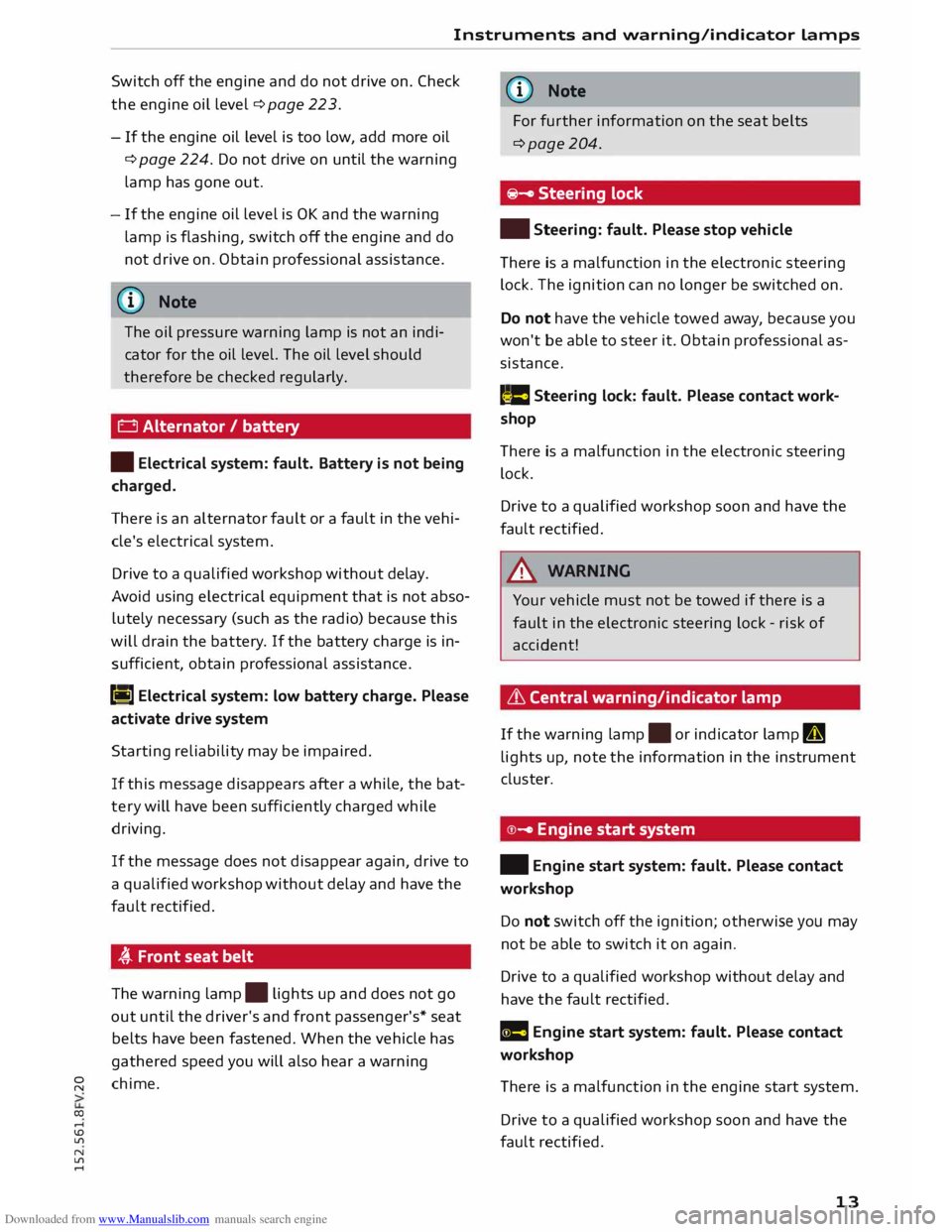
Switch off the engine and do not drive on. Check
the engine oil level ¢ page 22 3.
- If the engine oil level is too low, add more oil
¢ page 224. Do not drive on until the warning
lamp has gone out.
-If the engine oil level is OK and the warning
lamp is flashing, switch off the engine and do
not drive on. Obtain professional assistance.
(I}) Note
The oil pressure warning lamp is not an indi
cator for the oil level. The oil level should
therefore be checked regularly.
0 Alternator / battery
• Electrical system: fault. Battery is not being
charged.
There is an alternator fault or a fault in the vehi
cle's electrical system.
Drive to a qualified workshop without delay.
Avoid using electrical equipment that is not abso
lutely necessary (such as the radio) because this
will drain the battery . If the battery charge is in
sufficient, obtain professional assistance.
(•] Electrical
system: low battery charge. Please
activate drive system
Starting reliability may be impaired.
If this message disappears after a while, the bat
tery will have been sufficiently charged while
driving.
If the message does not disappear again, drive to
a qualified workshop without delay and have the
fault rectified.
� Front seat belt
The warning lamp.
lights up and does not go
out until the driver's and front passenger's* seat
belts have been fastened. When the vehicle has
gathered speed you will also hear a warning
� chime.
co ....
\D L/'l
N
L/'l
.... (D)
Note
For further information on the seat belts
¢page 204.
�- Steering lock
• Steering: fault. Please stop vehicle
There is a malfunction in the electronic steering
lock. The ignition can no longer be switched on.
Do not have the vehicle towed away, because you
won't be able to steer it. Obtain professional as
sistance.
,�. e Steering
lock: fault. Please contact work
shop
There is a malfunction in the electronic steering
lock.
Drive to a qualified workshop soon and have the
fault rectified.
,&. WARNING
Your vehicle must not be towed if there is a
fault in the electronic steering lock -risk of
accident!
L'.h Central warning/indicator lamp
If the warning lamp.
or indicator lamp II
lights up, note the information in the instrument
cluster.
© - Engine start system
• Engine start system: fault. Please contact
workshop
Do not switch off the ignition; otherwise you may
not be able to switch it on again.
Drive to a qualified workshop without delay and
have the fault rectified.
Ill Engine start system: fault. Please contact
workshop
There i
is
a malfunction in the engine start system.
Drive to a qualified workshop soon and have the
fault rectified.
13
Page 21 of 284
Downloaded from www.Manualslib.com manuals search engine 0
N
co
....
\D Lfl
N
Lfl
.... Multi-function steering
wheel with arrow
buttons
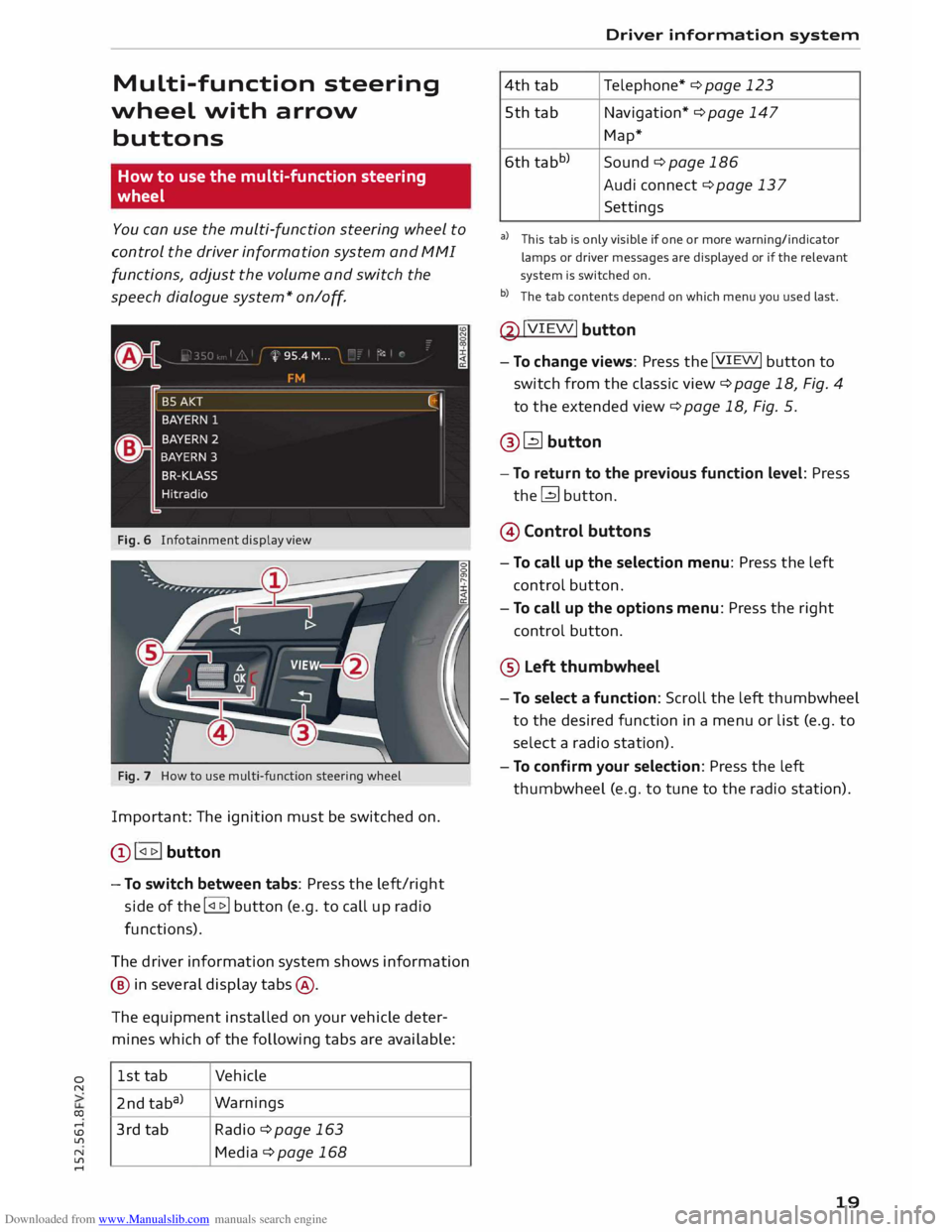
How to use the multi-function steering
wheel
You can use the multi-function steering wheel to
control the driver information system and MMI
functions, adjust the volume and switch the
speech dialogue system* on
/o
ff.
Fig. 6 Infotainment display view
Fig. 7 How to use multi-function steering wheel
Important: The ignition must be switched on.
Q) !<11>! button
- To switch between tabs: Press the left/right
side of the !<11>! button (e.g. to call up radio
functions).
The driver information system shows information
@ in several display tabs@.
The equipment installed on your vehicle deter
mines which of the following tabs are available:
1st tab Vehicle
2nd taba) Warnings
3rd tab Radio ¢page 163
Media ¢page 168 Driver
information system
4th tab Telephone*
¢ page 123
5th tab Navigation* ¢ page 147
Map*
6th tabb)
Sound¢ page 186
Audi connect ¢ page 137
Settings
al This tab is only visible if one or more warning/indicator
lamps or driver messages are displayed or if the relevant
system is switched on.
b l
The tab contents depend on which menu you used last.
@ !VIEW!
button
- To change views: Press the !VIEW! button to
switch from the classic view ¢page 18, Fig. 4
to the extended view¢ page 18, Fig. 5.
@� button
- To return to the previous function level: Press
the� button.
@ Control buttons
- To call up the selection menu: Press the left
control button.
- To call up the options menu: Press the right
control button.
® Left thumbwheel
- To select a function: Scroll the left thumbwheel
to the desired function in a menu or list (e.g. to
select a radio station).
- To confirm your selection: Press the left
thumbwheel (e.g. to tune to the radio station).
19
Page 22 of 284
Downloaded from www.Manualslib.com manuals search engine Driver
information system
Control buttons
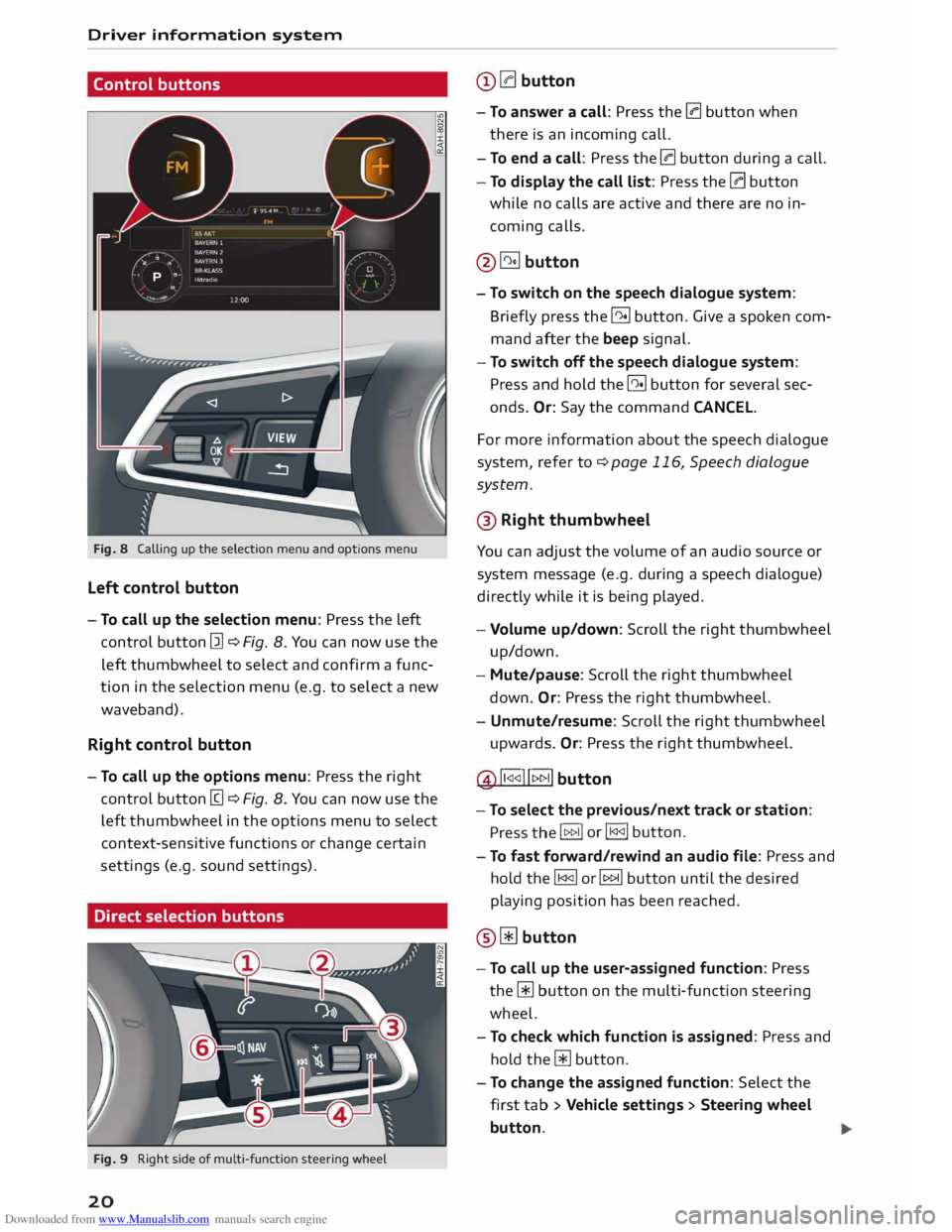
Fig. 8 Calling up the selection menu and options menu
Left control button
- To call up the selection menu: Press the left
control button [21 ¢ Fig. 8. You can now use the
left thumbwheel to select and confirm a func
tion in the selection menu (e.g. to select a new
waveband).
Right control button
- To call up the options menu: Press the right
control button [g ¢ Fig. 8. You can now use the
left thumbwheel in the options menu to select
context-sensitive functions or change certain
settings (e.g. sound settings).
Direct selection buttons
Fig. 9 Right side of multi-function steering wheel
20 @
0 button
- To answer a call: Press the 0 button when
there is an incoming call.
- To end a call: Press the 0 button during a call.
- To display the call list: Press the 0 button
while no calls are active and there are no in
coming calls.
@� button
- To switch on the speech dialogue system:
Briefly press the 51 button. Give a spoken com
mand after the beep signal.
- To switch off the speech dialogue system:
Press and hold the 51 button for several sec
onds. Or: Say the command CANCEL.
For more information about the speech dialogue
system, refer to ¢ page 116, Speech dialogue
system.
@ Right thumbwheel
You can adjust the volume of an audio source or
system message (e.g. during a speech dialogue)
directly while it is being played.
- Volume up/down: Scroll the right thumbwheel
up/down.
- Mute/pause: Scroll the right thumbwheel
down. Or: Press the right thumbwheel.
- Unmute/resume: Scroll the right thumbwheel
upwards. Or: Press the right thumbwheel.
@ ll
button
- To select the previous/next track or station:
Press the I 1>1>11 or
I 1<1<11 button.
- To fast forward/rewind an audio file: Press and
hold the� or� button until the desired
playing position has been reached.
@ Wbutton
- To call up the user-assigned function: Press
the [ii button on the multi-function steering
wheel.
- To check which function is assigned: Press and
hold the [ii button.
- To change the assigned function: Select the
first tab> Vehicle settings > Steering wheel
button.
Page 23 of 284
Downloaded from www.Manualslib.com manuals search engine 0
N
co
....
\D Lfl
N
Lfl
.... ®
l<)NAVI button
- To have the last navigation cue repeated: Press
the� button while route guidance is active.
- To adjust the volume of the navigation cues:
Scroll the right thumbwheel up/down during
route guidance while a navigation cue is being
spoken.
Multi-function steering
wh
eel
with !MODE! button
How to use the multi-function steering
wheel
Applies to vehicles: with multi-function steering wheel
You can use the multi-function steering wheel to
control the driver information system and MMI
functions and adjust the volume.
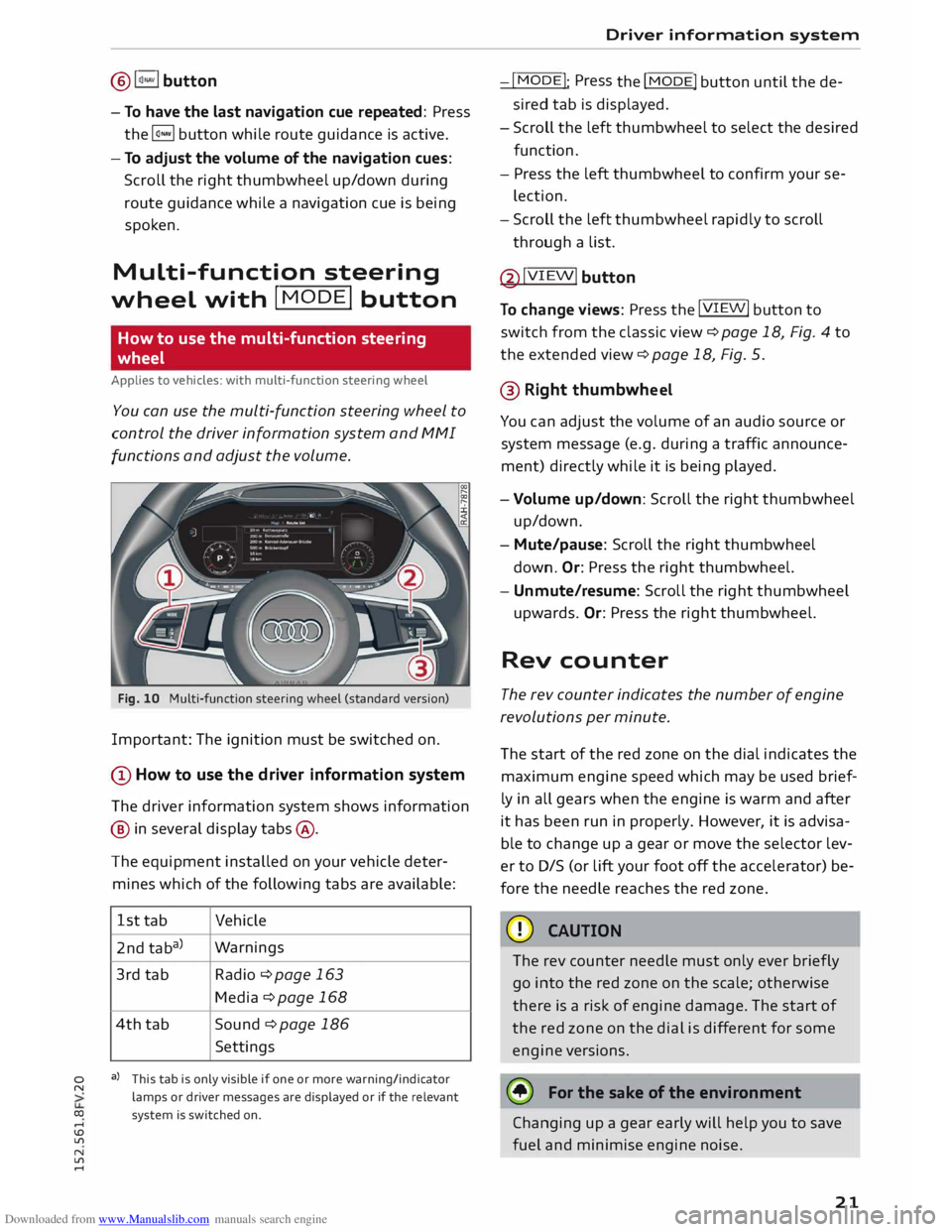
Fig. 10 Multi-function steering wheel (standard version)
Important: The ignition must be switched on.
(D How to use the driver information system
The driver information system shows information
@ in several display tabs@.
The equipment installed on your vehicle deter
mines which of the following tabs are available:
1st tab Vehicle
2nd taba) Warnings
3rd tab
Radio ¢page 163
Media ¢ page 168
4th tab
Sound ¢ page 186
Settings
a) This tab is only visible if one or more warning/indicator
lamps or driver messages are displayed or if the relevant
system is switched on. Driver
information system
-I MODE!
: Press
the I
MODE! button until the de
sired tab is displayed.
- Scroll the left thumbwheel to select the desired
function.
- Press the left thumbwheel to confirm your se
lection.
- Scroll the left thumbwheel rapidly to scroll
through a list.
@ !VIEW!
button
To change views: Press the !VIEW!
button to
switch from the classic view¢ page 18, Fig. 4 to
the extended view¢ page 18, Fig. 5.
@ Right thumbwh eel
You can adjust the volume of an audio source or
system message (e.g. during a traffic announce
ment) directly while it is being played.
- Volume up/down: Scroll the right thumbwheel
up/down.
- Mute/pause: Scroll the right thumbwheel
down. Or:
Press the right thumbwheel.
- Unmute/resume: Scroll the right thumbwheel
upwards. Or: Press the right thumbwheel.
Rev counter
The rev counter indicates the number of engine
revolutions per minute.
The start of the red zone on the dial indicates the
maximum engine speed which may be used brief
ly in all gears when the engine is warm and after
it has been run in properly. However, it is advisa
ble to change up a gear or move the selector lev
er to D/S (or lift your foot off the accelerator) be
fore the needle reaches the red zone.
CD CAUTION
The rev counter needle must only ever briefly
go into the red zone on the scale; otherwise
there is a risk of engine damage. The start of
the red zone on the dial is different for some
engine versions.
@ For the sake of the environment
Changing up a gear early will help you to save
fuel and minimise engine noise.
21
Page 26 of 284
Downloaded from www.Manualslib.com manuals search engine Driver
information system
Controls
Applies to vehicles: with camera-based traffic sign recognition
')· ·.
I
,
,··· .. ,
,· Date
&time
12: 11 AM (.
�1\
.
I
..
' Tuesday
2014-1-21 ...
/ 223450,,,,
11:30-.i �
-- .
1009.0,m ?® Y
13.0"C �
Fig. 16 Instrument cluster: Secondary display
Calling up traffic sign menu
.,. Select the following on the infotainment sys
tem: jMENUj button> Car > On-board comput
er, or
.,. Use the buttons on the multifunction steering
wheel too switch to the tab marked "Car" and
scroll the thumbwheel to select the desired
menu,
Second ary display
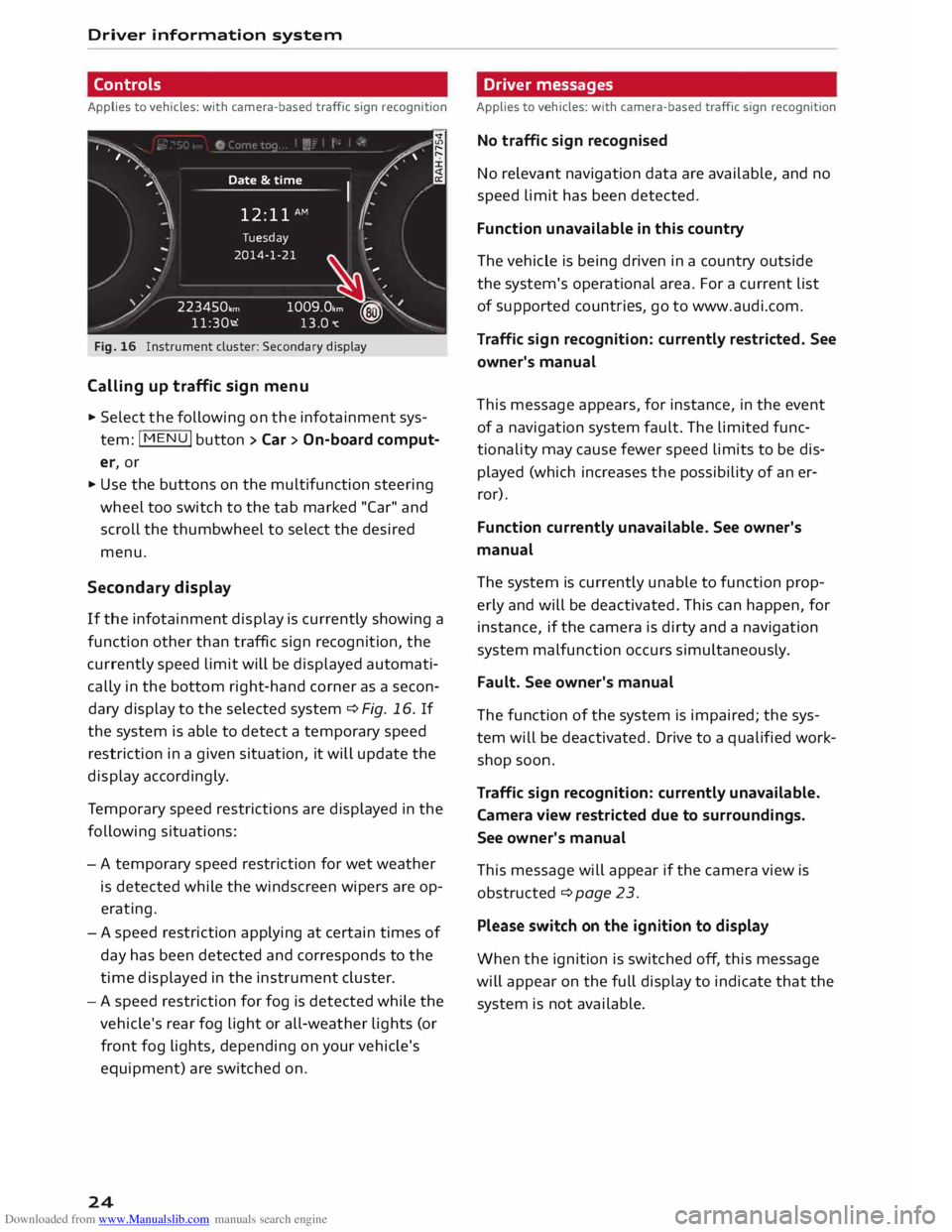
If the infotainment display is currently showing a
function other than traffic sign recognition, the
currently speed limit will be displayed automati
cally in the bottom right-hand corner as a secon
dary display to the selected system ¢ Fig, 16, If
the system is able to detect a temporary speed
restriction in a given situation, it will update the
display accordingly.
Te mporary speed restrictions are displayed in the
following situations:
- A temporary speed restriction for wet weather
is detected while the windscreen wipers are op
erating.
- A speed restriction applying at certain times of
day has been detected and corresponds to the
time displayed in the instrument cluster.
- A speed restriction for fog is detected while the
vehicle's rear fog light or all-weather lights (or
front fog lights, depending on your vehicle's
equipment) are switched on.
24 Driver
messages
Applies to vehicles: with camera-based traffic sign recognition
No traffic sign recognised
No relevant navigation data are available, and no
speed limit has been detected.
Function unavailable in this country
The vehicle is being driven in a country outside
the system's operational area. For a current list
of supported countries, go to www.audi.com.
Traffic sign recognition: currently restricted. See
owner's manual
This message appears, for instance, in the event
of a navigation system fault. The limited func
tionality may cause fewer speed limits to be dis
played (which increases the possibility of an er
ror).
Function currently unavailable. See owner's
manual
The system is currently unable to function prop
erly and will be deactivated. This can happen, for
instance, if the camera is dirty and a navigation
system malfunction occurs simultaneously.
Fault. See owner's manual
The function of the system is impaired; the sys
tem will be deactivated. Drive to a qualified work
shop soon.
Traffic sign recognition: currently unavailable.
Camera view restricted due to surroundings.
See owner's manual
This message will appear if the camera view is
obstructed ¢ page 23.
Please switch on the ignition to display
When the ignition is switched off, this message
will appear on the full display to indicate that the
system is not available.
Page 39 of 284
Downloaded from www.Manualslib.com manuals search engine 0
N
co
....
\D L/'l
N
L/'l
.... Lights
and vision
Exterior lights
Switching lights on and off
Fig. 35 Dashboard: Light switch
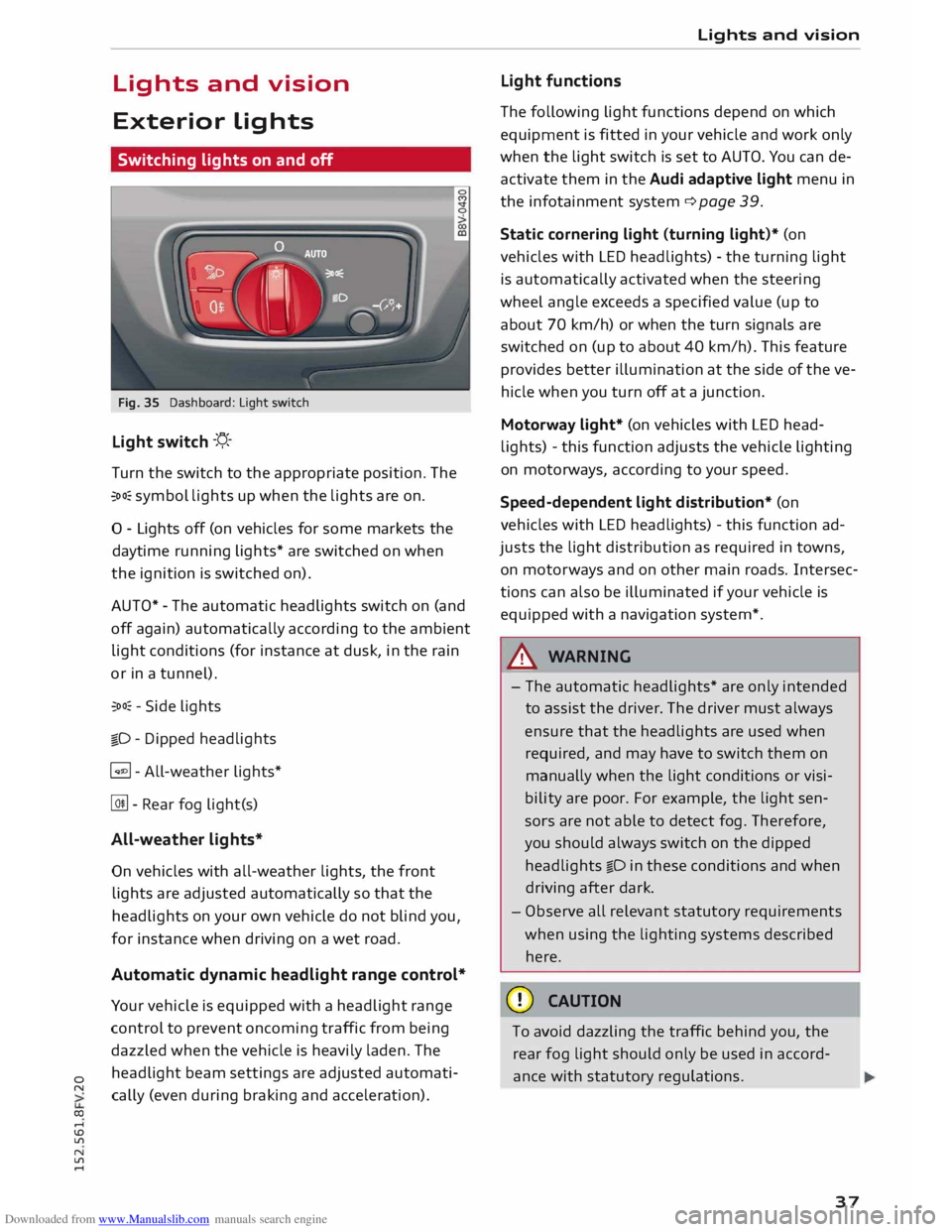
Light switch -'!;5.-
T urn the switch to the appropriate position. The
�oo: symbol lights up when the lights are on.
0 - Lights off (on vehicles for some markets the
daytime running lights* are switched on when
the ignition is switched on).
AUTO* -The automatic headlights switch on (and
off again) automatically according to the ambient
light conditions (for instance at dusk, in the rain
or in a tunnel).
�oo: -Side lights
�D -Dipped headlights
� - All-weather lights*
@!l - Rear fog light(s)
All-weather lights*
On vehicles with all-weather lights, the front
lights are adjusted automatically so that the
headlights on your own vehicle do not blind you,
for instance when driving on a wet road.
Automatic dynamic headlight range control*
Your vehicle is equipped with a headlight range
control to prevent oncoming traffic from being
dazzled when the vehicle is heavily laden. The
headlight beam settings are adjusted automati
cally (even during braking and acceleration). Lights
and vision
Light functions
The following light functions depend on which
equipment is fitted in your vehicle and work only
when the light switch is set to AUTO. You can de
activate them in the Audi adaptive light menu in
the infotainment system¢ page 39.
Static cornering light (turning light)* (on
vehicles with LED headlights) -the turning light
is automatically activated when the steering
wheel angle exceeds a specified value (up to
about 70 km/h) or when the turn signals are
switched on (up to about 40 km/h). This feature
provides better illumination at the side of the ve
hicle when you turn off at a junction.
Motorway light* (on vehicles with LED head
lights) -this function adjusts the vehicle lighting
on motorways, according to your speed.
Speed-dependent light distribution* (on
vehicles with LED headlights) -this function ad
justs the light distribution as required in towns,
on motor ways and on other main roads. Intersec
tions can also be illuminated if your vehicle is
equipped with a navigation system*.
A WARNING
- The automatic headlights* are only intended
to assist the driver. The driver must always
ensure that the headlights are used when
required, and may have to switch them on
manually when the light conditions or visi
bility are poor. For example, the light sen
sors are not able to detect fog. Therefore,
you should always switch on the dipped
headlights io in these conditions and when
driving after dark.
- Observe all relevant statutory requirements
when using the lighting systems described
here.
CD CAUTION
To avoid dazzling the traffic behind you, the
rear fog light should only be used in accord
ance with statutory regulations.
37