manual transmission AUDI TT COUPE 2016 User Guide
[x] Cancel search | Manufacturer: AUDI, Model Year: 2016, Model line: TT COUPE, Model: AUDI TT COUPE 2016Pages: 322, PDF Size: 52.86 MB
Page 69 of 322
Downloaded from www.Manualslib.com manuals search engine Starting on a hill
.. Set the parking brake.
.. With the driving gear selected, press the accel
erator pedal carefully. The parking brake will
re l
ease automatically if your safety belt is fas
tened.
Under certain circumstances, such as driving in
the mountains, it may be useful to switch tempo
rarily
to the manual shift program in order to
manually adjust the gears to the driving condi
tions¢ page 68.
When parking on a level surface, simply place the
selector lever in the P position. On inclines, acti
vate the parking brake first and then move the
selector lever to the P position ¢ page 61. This
prevents the loc kin g mechanism from being
loaded too heavily and will make it easier to
move the selector lever out of the P position.
A WARNING
-The vehicle can roll even when the engine is
switched off.
-Unintended vehicle movement can lead to
serious injuri es.
- Never leave
your vehicle with the engine
running while in gear. If you must leave
your vehicle when the engine is running , set
the parking brake and move the selector lev
er to the P position.
- Power is still
transferred to the wheels
when the engine is running at idle. To pre
vent the ve hicle from "creeping", you must
keep your foot on the brake when the en
gine is running and the selector lever is in
the D, Sor R position or "tiptronic" mode is
selected.
-Do not inadvertently press the accelerator
pedal when the vehicle is stationary. Other
wise the vehicle will start to move immedi
ately, even if the parking brake is set. T his
could resu
lt in a crash.
-
Do not press the accelerator pedal when
changing the selector lever position while
the vehicle is stationary and the engine is
running .
Automatic transmission
-Never engage the R or P selector level posi
tions while driving. It could cause a crash .
- Before driving
down a steep slope, reduce
your speed and shift into a lower gear with
"ti ptronic".
-Do not ride the brakes or press the brake
pedal too often or too long when driving
down a hill. Constant braking causes the
brakes to overheat and substantially re
duces braking performance, increases brak
ing
distance or causes complete failure of
the brake system.
-If you must stop on an incline, always hold
the vehicle in place with the foot brake or
parking brake to prevent it from rolling
back.
- N
ever hold the vehicle on an incline with a
slipping clutch. The
clutch opens automati
cally when it becomes too hot from the
overload. The mJ indicator light turns on
and a message appears¢ page 70 when
the clutch is overloaded.
-If the engine must run while you are work
ing
in the engine compartment with the
hood open, make sure a gear is not engag
ed. The selector lever must be firmly in the
P position and loc ked in place and the park
ing brake must be set¢ page 236. Other
wise, the vehicle could begin moving when
increasing the engine speed, even with the
parking brake set.
@Note
-When stopping on an incline, do not try to
hold the veh icle in place by pressing the ac
celerator pedal while a driving gear is se
lected. This can cause the automatic trans
mission to overheat and can damage it. Ac
tivate the parking brake or press the brake
pedal to prevent the vehicle from rolling.
- Allowing
the vehicle to roll when the engine
is stopped and the selector lever is in the N
position will
damage the automatic trans
mission because it is not lubricated under
those circumstances.
67
Page 70 of 322
Downloaded from www.Manualslib.com manuals search engine Automatic transmission
-The transmission can overheat and be dam
aged under certain driving and traffic condi
tions such as frequent starts, creeping for a
l
ong time, or stop-and-go traffic. When the
@]or. indicator light turns on, stop the
vehicle at the next opportunity and let the
transmission cool r::!;> page 70.
- Allowing the veh icle to roll when the engine
is stopped will damage the S troni c trans
mission because it is not lubricated
r::!;> page 290, Towing with a tow truck.
@ Tips
For
safety reasons, the parking brake is re
leased automatically only when the driver's
safety belt is engaged i n the buckle.
Hill descent control
The hill descent control system assists the driv
ing when driving down declines .
Hill descent control is activated when the selec
tor lever is in the Dor S position and you press
the brake pedal. The transmission automatically
selects a gear that is suitable for the incline. Hill
descent control tries to maintain the speed ach
ieved at the time of braking, within physical and
technical
limitations. If may still be necessary to
adj ust the speed with the brakes. Because hill de
scent control cannot shift down farther than 3rd
gear, it may be necessary to shift into tiptronic
mode in very steep areas. In this case, shift into
1st or 2nd gear in tiptronic mode to use the en
g ine 's braki ng force to relieve the brakes.
Hill
descent control switches off once the decline
levels
out or you press the accelerator pedal.
On vehicles with a cruise control system*
r::!;> page 72, hill descent control is also activated
when the speed is set.
A WARNING
Hill descent control cannot overcome physical
limitations,
so it may not be able to maintain
a
constant speed under all conditions. Always
be ready to apply the brakes.
68
Shifting manually (tiptronic mode)
The tiptronic allow the driver to shi~ the gears
manually.
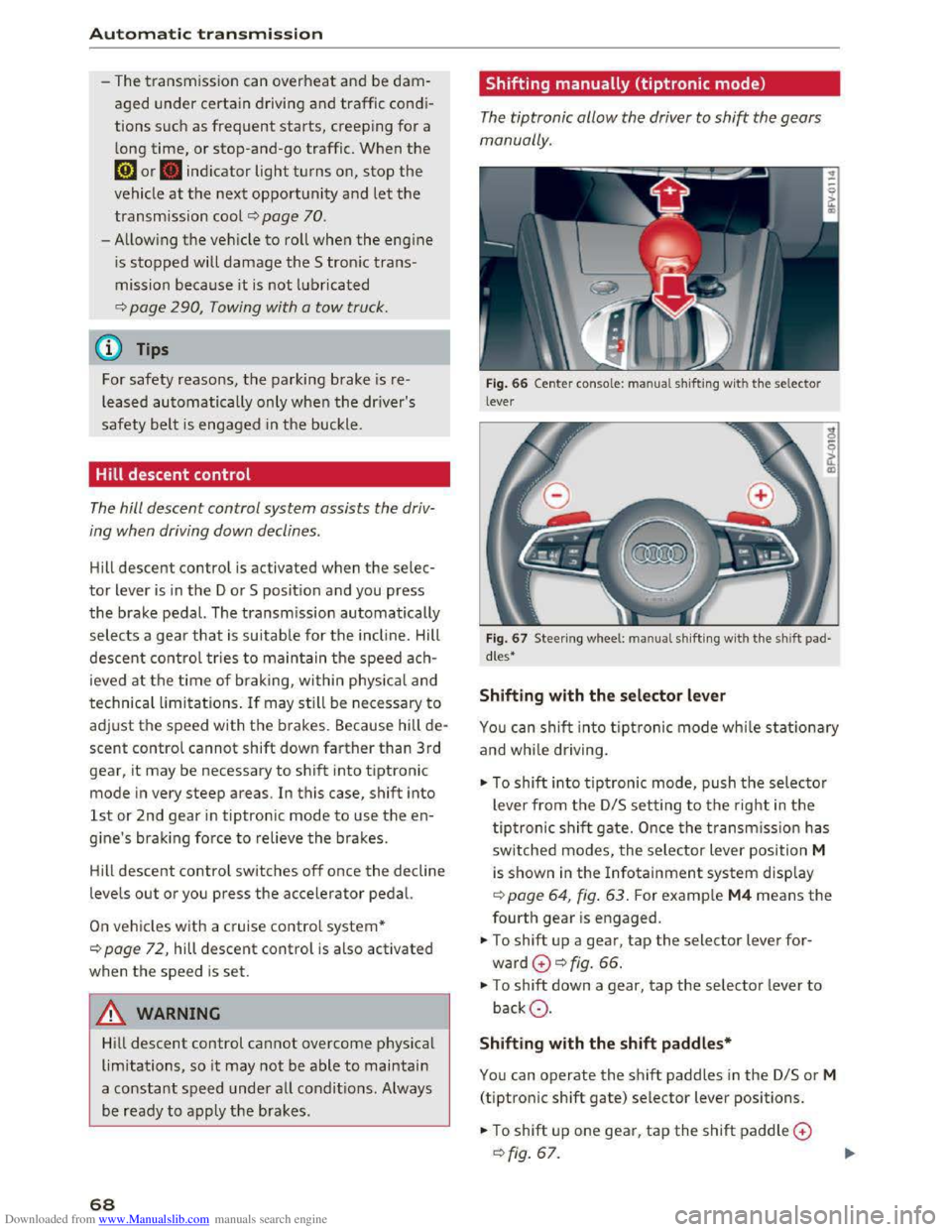
Fig. 66 Center conso le : ma nua l shifting with the selector
lever
Fig.
67 Steer ing whee l: ma nual shifting with the shift pad
dles•
Shifting with the selector lever
You can shift into tiptronic mode while stationary
and while dri ving.
""To shift into tiptronic mode, push the selector
lever from
the D/S setting to the right in the
tiptronic shift gate. Once the transmission has
switched modes, the selector lever position M
is shown in the Infotainment system display
r::!;>poge 64, fig. 63. For example M4 means the
fourth gear is engaged.
""To shift up a gear, tap the selector lever for
ward G ¢fig. 66.
""To shift down a gear, tap the selector lever to
backQ.
Shifting with the shift paddles*
You can operate the shift paddles in the D/S or M
(tiptronic shift gate) selector lever positions.
""To shift up one gear, tap the shift paddle G
r::!;> fig. 67.
Page 71 of 322
Downloaded from www.Manualslib.com manuals search engine ..... N
G'. CX)
.... ID IJ' .... ID ....
.,. To shift down one gear, tap the shift paddle Q.
If the shift paddles are tapped while in the D/S
selector lever position, automatic mode switches
off briefly. To switch from manually shifting back
to automatic shifting immediately, tap the shift
paddle 0 Q fig. 67 for 1 second.
To keep shifting using the shift paddles, move
the selector lever to the right out of the D/S posi
tion into
the tiptronic shift gate.
The transmission automatically shifts up or down
before critical
engine speed is reached.
The
transmission only allows manual shifting
when
the engine speed is within the permitted
rang e.
(D Tips
-If you shift to the next lowest gear, the
transmission will only shift if the engine will
not be over-rewed.
- With kick-down, the transmission shifts to a
lower
gear, depending on vehicle speed and
engine speed.
-tiptronic does not work if the transmission
is running in emergency mode.
Kick-down
Kick-down enables maximum acceleration.
When you press the accelerator pedal down be
yond
the resistance point, the automatic trans
mission downshifts into a lower gear, depending
on vehicle speed and engine RPM. It shifts up in
to the next higher gear once the max imum speci
fied
engine RPM is reached.
A WARNING
Please note that the wheels could spin on
s
lick or slippery roads when kick-down is ac
tive.
ll The ESC light turns on continuously and the message Sta·
bilization control (ESC): sport. Warning! Reduced stabil
ity appears temporarily to indicate in the Infotainment
system
that the syste m was deactivate d.
Automatic transmission
Launch Control-Program
The Launch Control Program enables maximum
acceleration.
Requirement: the engine must be at operating
temperature and the steering wheel must not be
turned.
... With the engine running, press the l.eoFFI but
ton briefly one time ll .
.,. Pull the selector lever back out of the D/S posi
tion briefly to select the S pos ition, or press it
toward the right into the tiptronic position or
select the Dynamic driving mode in drive se
lect* Q page 79.
.,. Press the brake pedal firmly with your left foot
and hold it all the way down for at least 1 sec
ond .
... At the same time, press the gas pedal all the
way down with your right foot until the engine
reaches and stays at a high RPM level.
.,. Remove your left foot from the brake.
A WARNING
-Always adapt your driving to the traffic flow.
-
Only use Launch Control when road and traf-
fic conditions allow it and other drivers will
not be endangered or impacted by your driv
ing and the vehicle's acceleration.
-
Please note that the drive wheels can spin
and the vehicle can break away when sport
mode is sw itched on, especially when the
road is slippery.
-
Once the vehicle has started moving, press
the l.t'l OFFI button briefly to turn the sport
mode off.
(D Tips
- The transmission temperature may increase
s ignificantly
after using the launch control
program. If that happens, the program may
not be available for a few minutes. It w ill be
available again after a cool-down period. "'
69
Page 72 of 322
Downloaded from www.Manualslib.com manuals search engine Automatic transmission
-When accelerating using the launch control
program, all vehicle
parts are subject to
heavy loads . This can lead to increased
wear.
Emergency mode
In the event of a system malfunction, there is on
emergency program.
If all of the selecto r lever positions are highlight
ed wit h a light background
in the Infotainment
display, there is a system malfunction and the S
tronic transmiss ion is running in the emergency
program . The vehicle can still be driven
in emer
gency mode,
but only with reduced speed and
not in a
ll gears. In some cases, the vehicle can
n ot dri
ve in rever se .
@Note
If the transmission runs in emergency mode,
drive
to an author ized Audi dealer or author
ized
Audi Service Facility immediately to have
the malfunction corrected.
Transmission malfunction
• Transmission : malfunction! Please stop ve
hicle and s
hift to P
There is a malfunction in the t ra nsmission. Park
the vehicle securely and do not continue driving.
See an authorized
Audi dealer or authorized Audi
Service Facility for assistance .
• Transmis sio n : too hot. Please stop vehicle
The transmission is too hot and can become dam
aged .
Stop and let the transmission cool with the
engine running (at idle) in the P selector lever po
sition. Then
the indicato r light and the message
turn off, drive to an authorized Audi dea le r or a u
thorized Audi Se rvice Facility immediately to have
the ma lfunction cor rected . If the indicator light
and
the driver message do not turn off, do not
continue driving. See an authorized
Audi dealer
or authorized Audi Service Facility for assistance .
[o] Tran smission : malfunction! You can contin
ue dri
ving. See owner's manual
70
Drive to an au thorized Audi dealer or authori zed
Audi Service Facility immediate ly to have the
malfunction corrected.
[o] Transmiss ion : malfunction! You may contin
ue driving. No rever se gear
Drive to an authorized Audi dealer or authorized
Audi Service Facility immed iately to have the
malfunction corrected .
ml Transmi ss ion: malfunction! You may contin
ue driving in D
until engin e off
Drive the vehicle away from moving traffic and
park . See an
authorized Audi dealer or authorized
Audi Service Facility for assistance.
ml Tran smiss ion: too hot. Please adapt driving
style
Continue driving moderately. When the indicator
light turns off, you can continue driving normal
l
y.
ml Tran smission: please press brake pedal a nd
s elect gear again
If the transmiss ion mal f u nct ions because the
temperatu re is too high, a message appears
when
the transmission is cooled .
Page 73 of 322
Downloaded from www.Manualslib.com manuals search engine ..... N
G: CX)
.....
"' U"I
.....
"' .....
Selector lever emergency release
If the vehicle's power supply fails, the selector
lever can
be released in an emergency.
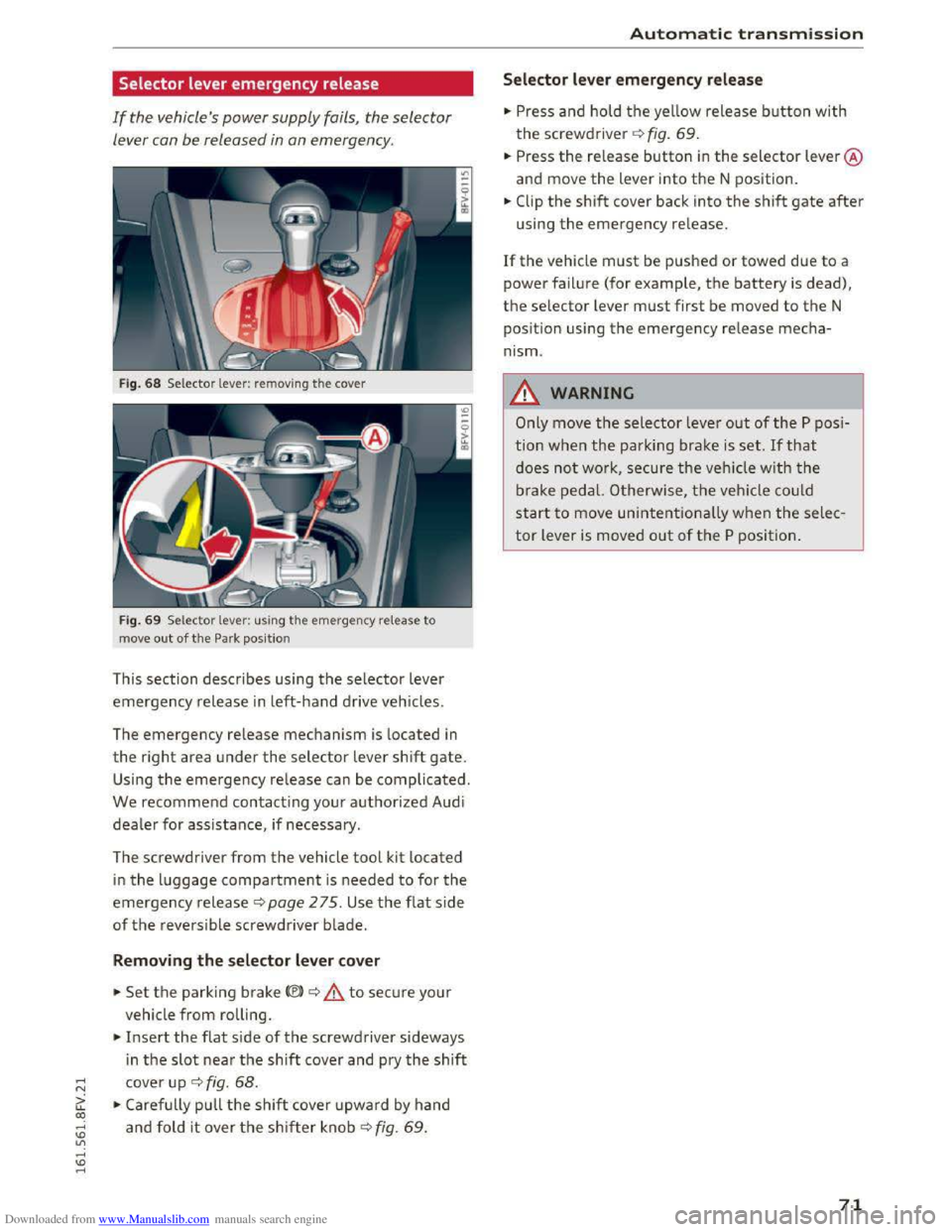
Fig. 68 Selector lever: removing the cover
Fig. 69 Selector lever: us ing the emergency release to
move
out of the Park position
This section describes using the selector lever
emergency release in left-hand drive vehicles.
The
emergency release mechanism is located in
the right area under the selector lever shift gate.
Using the emergency release can be complicated.
We recommend contacting your authorized Audi
dealer for assistance, if necessary.
The screwdriver
from the vehicle tool kit located
in the luggage compartment is needed to for the
emergency release c:> page 2 75. Use the flat side
of the reversible screwdriver blade.
Removing the selector lever cover
.. Set the parking brake<®> c:> A to secure your
vehicle
from rolling .
.. Insert the flat side of the screwdriver sideways
i n
the slot near the shift cover and pry the shift
cover up c:> fig. 68 .
.. Carefully pull the shift cover upward by hand
and fold it over the shifter knob c:> fig. 69 .
Automatic transmission
Selector lever emergency release
.. Press and hold the yellow release button with
the screwdriver c:> fig. 69.
.. Press the re lease button in the selector lever @
and move
the lever into the N position .
.. Clip the shift cover back into the shift gate after
using the emergency release.
If the vehicle must be pushed or towed due to a
power failure (for example, the battery is dead),
the selector lever must first be moved to the N
pos ition using
the emergency release mecha
nism.
_&WARNING
Only move the selector lever out of the P posi
tion
when the parking brake is set. If that
does not work, secure the veh icle w ith the
brake pedal. Otherwise,
the vehicle could
start to move unintentionally when the selec
tor lever is moved out of the P position.
71
Page 82 of 322
Downloaded from www.Manualslib.com manuals search engine Assist
& WARNING
Using Audi drive select incorrectly can lead to
collisions, other accidents and serious inju
ries.
Description
Applies to: vehicles with Audi drive select
The vehicle setup in each mode depends on the
vehicle's features. However, the engine and
steering are always affected.
Engine and automatic transmission
Depending on the mode, the engine and auto
matic transmission respond more quickly or i n a
more balanced
manner to accelerator pedal
movements.
Adaptive dampers (Audi magnetic ride)*
The adaptive dampers use sensors to record in
formation regarding steering movements, brak
ing and acceleration operations by the driver,
road
surface, driving speed, and load. With dri ve
select, you can adjust the adaptive dampers to
sporty (dynamic), comfortable (comfort) or ba l
anced (auto).
Steering
The power steering adapts. Indirect steering that
moves easily as in comfort mode is especially
suited to long drives on a highway. The dynamic
mode provides sporty, direct steering.
Cruise control system*
The acceleration performance is especially fuel
efficient in efficiency* mode.
Engine sound*
The engine sound is adapted to the applied mode
and can be subtle to sporty.
@ Tips
In some models, the maximum vehicle speed
can only be reached in the auto and dynamic
modes.
80
Selecting the driving mode
Applies to: vehicles with A ud i drive select
You can select between efficiency*, comfort, au
to, dynamic and individual.
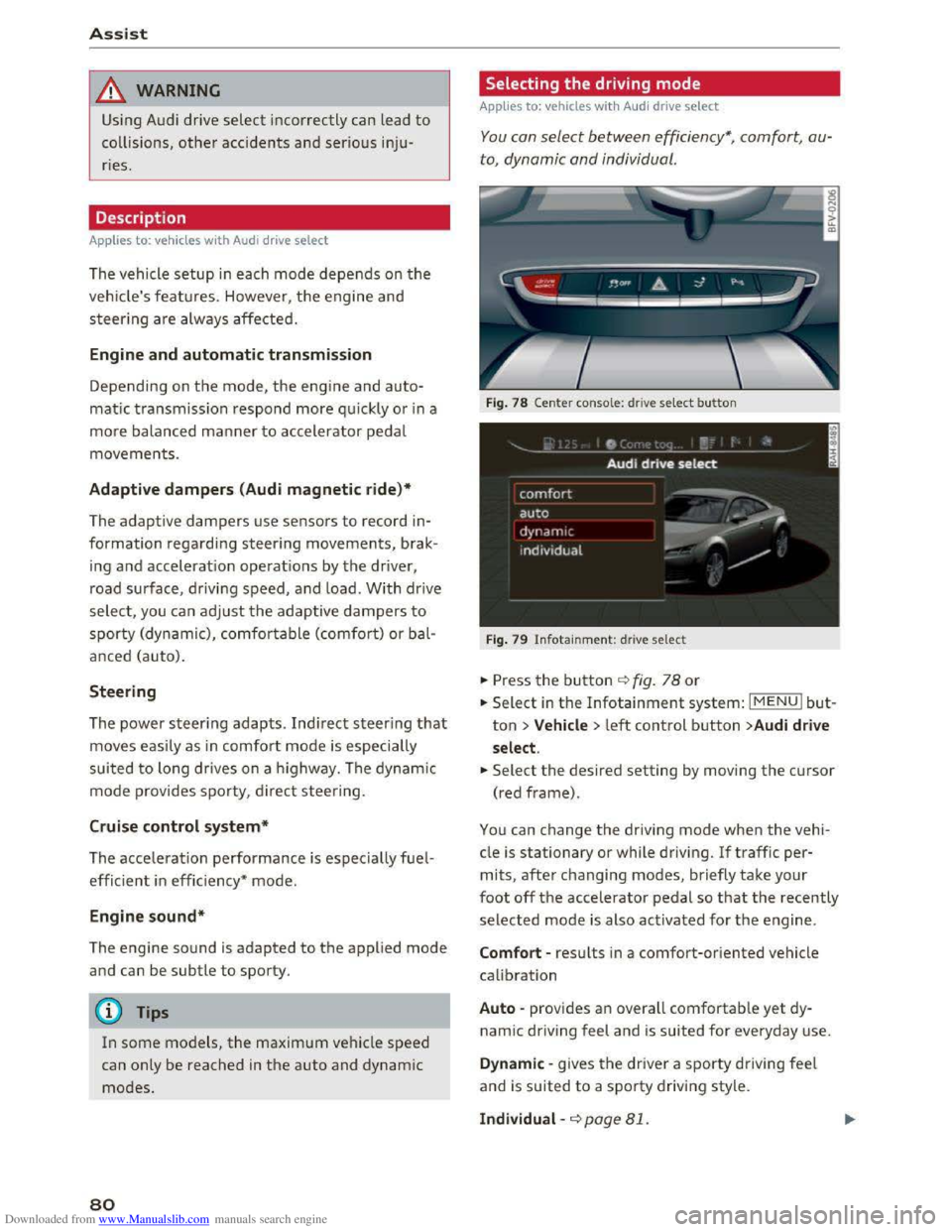
Fig. 78 Center conso le: drive select button
Fig. 79 Infotainment: drive select
.. Press the button ¢fig. 78 or
.. Select in the Infotainment system: IMENUI but
ton >Vehicle > left control button >Audi drive
select .
.. Select the desired setting by moving the cursor
(red frame).
You can change the driving mode when the vehi
cle is stationary or while driving. If traffic per
mits, after changing modes, briefly take your
foot off the accelerator pedal so that the recently
selected mode is also activated for the engine.
Comfort -results in a comfort-oriented vehicle
calibration
Auto -provides an overall comfortable yet dy
namic driving feel and is suited for everyday use.
Dynamic -gives the driver a sporty driving feel
and is suited to a sporty driving style.
Individual -¢page 81.
Page 83 of 322
Downloaded from www.Manualslib.com manuals search engine A WARNING
Pay attention to traffic when operating the
drive select to prevent potential risk of an ac
cident.
Adjusting the Individual mode
Applies to: vehicles with Audi drive select
Assist
-I
You can adjust the vehicle settings to your personal preferences.
"' Press the button¢ page 80, fig. 78 > Individu·
al> right control button, or
"'Select in the Infotainment system: IMENUI but
ton > Vehicle> left control button>Audi drive
select > Individual
> right control button
After you have closed the settings, you are auto
matically driving in the Individual* driving mode.
Systems comfort
Engine
and Transmission comfortable
Steering comfortable
Damper control* comfortable
Engine sound* subtle
quattro* comfortable
@ Tips
Your Individual* mode settings are automati
cally stored and assigned to the remote con
trol key being used.
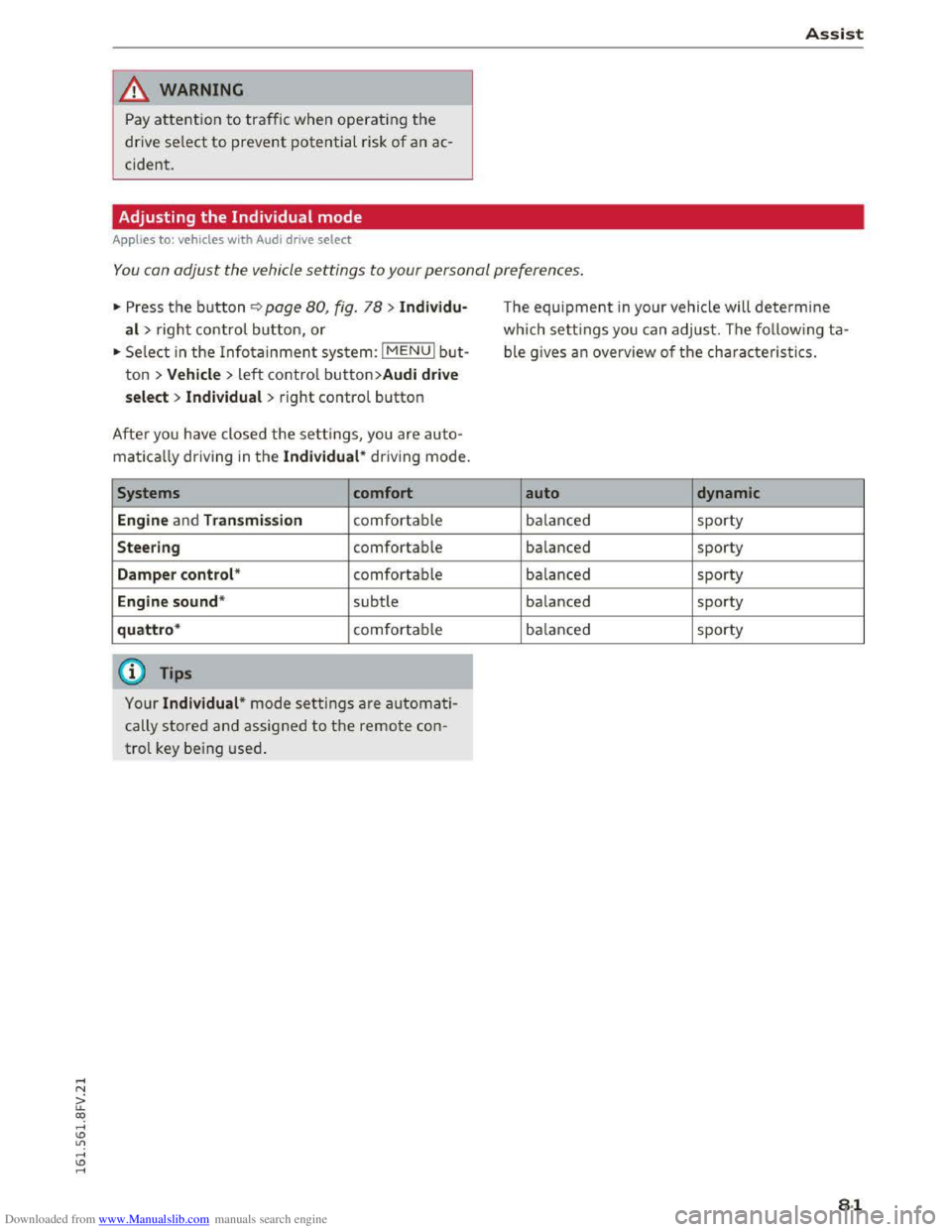
The equipment in your vehicle will determine
which settings you can adjust. The following ta
ble gives an overview of the characteristics.
auto dynamic
balanced sporty
balanced sporty
balanced sporty
balanced sporty
balanced sporty
81
Page 114 of 322
Downloaded from www.Manualslib.com manuals search engine Telephone
For ease of use, Audi offers a special USB adapt
er* ~page 155, fig. 132. The following USB
adapters are availab le at this time:
CD USB adapter for cell phones wit h a micro USB
connection*
@ USB adapter for cell phones with an Apple
Lightn ing connection*
® USB adapter for cell phones with an Apple
Dock connector*
.&. WARNING
Loose objects can be thrown around the vehi
cle
inter ior during sudden driving or braki ng
maneuvers. T his can cause serious inj uries
and loss of control of the vehicle. Always keep
the center armrest closed while driving.
- The Audi
phone box is not availab le in all
countries. Contact your authorized A udi
dealer for additional information.
-If the cell phone is placed in a bag or protec
tive sleeve inside the Audi phone box, this
can interfere with the connection to the ex
ternal antenna.
-
Strong transmission quality cannot be guar
anteed if more than one cel l phone is insert
ed.
- Audi recommends using original Audi acces
sories. Audi
has established their reliability,
safety and suitability.
-
You can purchase a USB adapter from an au
thorized Audi dealer or authorized Audi
Service Facility,
or at specialty stores.
-To prevent malfunctions, make sure the cell
phone is positioned correctly in the Audi
phone box .
- The Audi
phone box is only availab le in the
Canadian market.
112
Using the telephone
Accessing the telephone
Applies to: vehicles with telephone
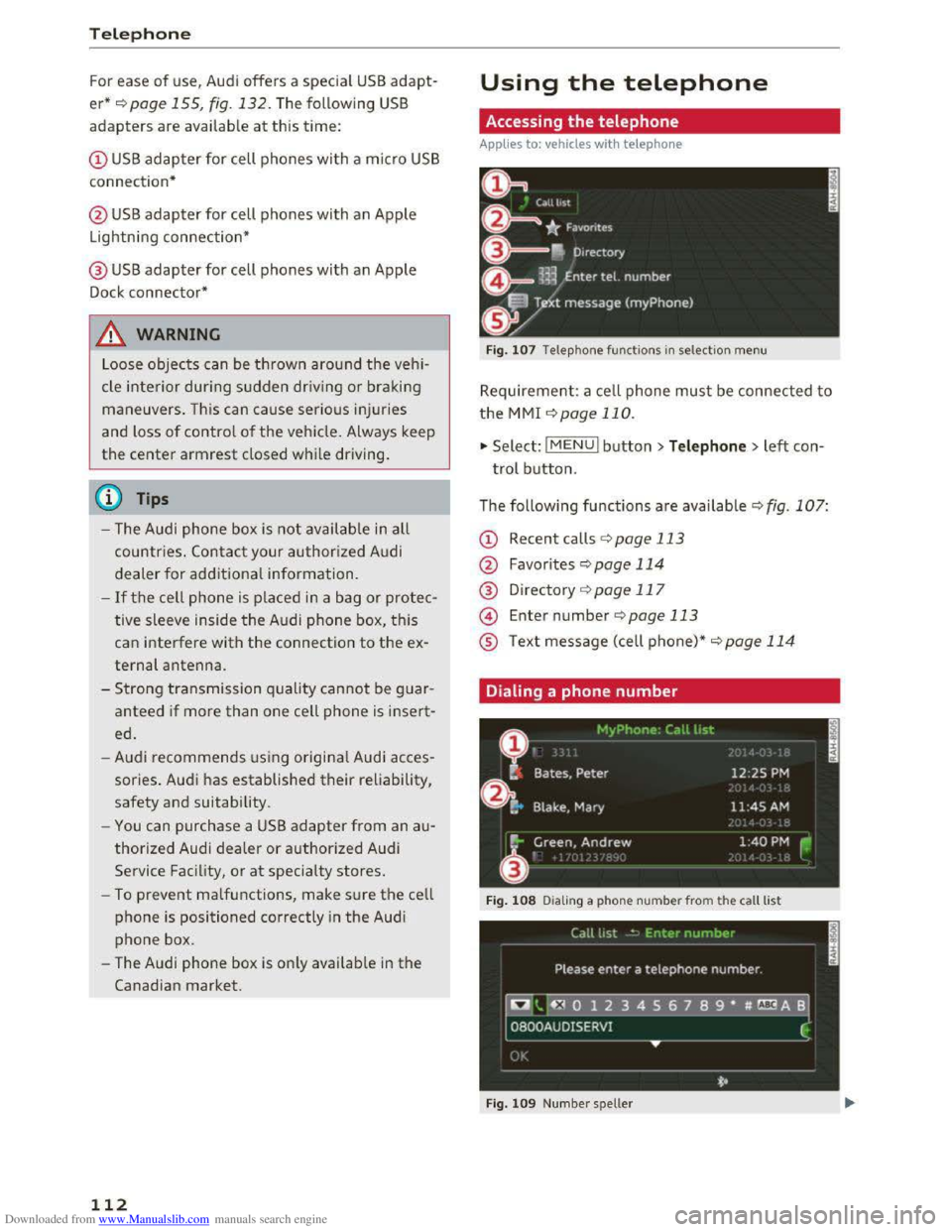
Fig. 107 Telephone functio ns in selection menu
Requirement: a cell phone must be connected to
the MMI ~page 110.
.,. Select: l M ENUI button> Telephone > left con
trol button.
The following
functions are available Q fig. 107:
CD Recent calls ¢ page 113
@ Favorites ¢page 114
® Directory ¢page 117
@ Enter number ¢page 113
® Text message (cell phone)*~ page 114
Dialing a phone number
Fig. 108 Dia ling a phone nu mber from the call list
Fig.
109 Numbe r sp eller
Page 254 of 322

Downloaded from www.Manualslib.com manuals search engine Wheels
be happy to provide more infor
mation.
® Mud and snow capability
"M/S" or "M+S" indicates the tire
has characteristics that make it
suitable for driving on mud and
snow. & indicates a winter t ire.
@ Compos ition of the tire cord
and materials
The number of plies indicates the
number of rubberized fabric lay
ers in the tire. In general: the
more layers, the more weight a
tire can carry. Tire manufacturers
must also specify the materials
used in the tire. These include
steel, nylon, polyester and other
materials.
@Maximum permitted load
This number indicates the maxi
mum load in kilograms and
pounds that the tire can carry.
@Uniform tire quality grade
standards for treadwear,
traction and temperature
resistance
Tread wear, t raction and temper
ature ranges c:> page 266.
252
@ Running direction
~ Maximum permitted
inflation pressure
This number indicates the maxi
mum pressure to which a tire can
be inflated under normal operat
ing conditions.
Glossary of tire and loading
terminology
Accessory weight
means the combined weight (in
excess of those standard items
wh ich may be replaced) of auto
matic transmission, power steer
ing , power brakes, power win
dows, power seats, radio , and
heater, to the extent that these
items are available as factory-in
stalled equipment (whether in
stalled or no t).
Aspect ratio
means the ratio of the height to
the width of the tire in percent.
Numbers of SS o r lower indicate a
low
sidewall for improved steer
ing response and better overa ll
handling on dry pavement.
Bead
means the part of the tire that is
made of steel wires, wrapped or ...
Page 280 of 322
Downloaded from www.Manualslib.com manuals search engine Emergency assista nce
-If you have a flat tire, move a safe distance
off the road. Turn off the engine, turn the
emergency flashers on and use other warn
ing devices to alert other motorists.
-Make sure that passengers wait in a safe
place away from the vehicle and well away
from the road and traffic.
-
To help prevent the vehicle from moving
suddenly and possibly slipping off the jack,
always fully
set the parking brake and block
the wheel diagonally opposite the wheel be
ing changed. When one front wheel is lifted
off the ground, placing the Automatic
Transmission in P (Park) will not prevent the
vehicle from moving.
- Before you
change a wheel, be sure the
ground is level and firm. If necessary, use a
sturdy board under the jack.
- Always
store the veh icle tool k it, the jack
and the replaced tire in the luggage com
partment¢ page 176.
Changing a wheel
When you change a wheel, follow the sequence
described
below step-by-step and in exactly that
order .
1. Remove the decorative wheel co ver*. For
more de tails see also¢ page 2 78, Decora
tive wheel covers or c::> page 2 79, Wheels
with wheel bolt caps.
2. Loosen the wheel bolts ¢page 2 79.
3. Locate the proper mounting point for the
jack and align the jack below that point
c::>page280.
4. Raise the car with the jack c::> page 280.
5. Remove the wheel with the flat tire and then
install the s pare ¢ page 281.
6. Tighten all wheel bolts lightly.
7.
Lower the veh icle with the jack .
8. Use the wheel bolt wrench and firml y tighten
all wheel bolts ¢page 279.
9. Replace the decorative wheel cover*.
278
A WARNING
Always read and follow all WARNINGS and in
formation c::> .& in Raising the vehicle on
page
280 and c::>page 282.
After changing a wheel
A wheel change is not complete without the do
ing the following.
.. Always store the vehicle tool kit, the jack* and
the replaced tire in the luggage compartment
c::>page 176.
.. Check the tire pressu re on the spare wheel im
mediately after mounting it.
.,. As soon as possib le, have the tightening tor
que s on all wheel bolts checked with a torque
wrench. The correct tightening torque is 90 ft
lb (120 Nm).
.. Have the flat t ire replac ed as soon as possible .
(0 Tips
-If you notice tha t the wheel bolts are cor
roded and difficult to turn while changing a
t ire,
they s hou ld be replaced before you
check
the tightening torque.
- Drive
at reduced speed unti l yo u have the
tightening torques checked.
-
After changing a wheel, the tire pressure in
all four tires must be checked/corrected and
the tire pressure monitoring indicator must
be stored in the Infotainment c::> page 269.
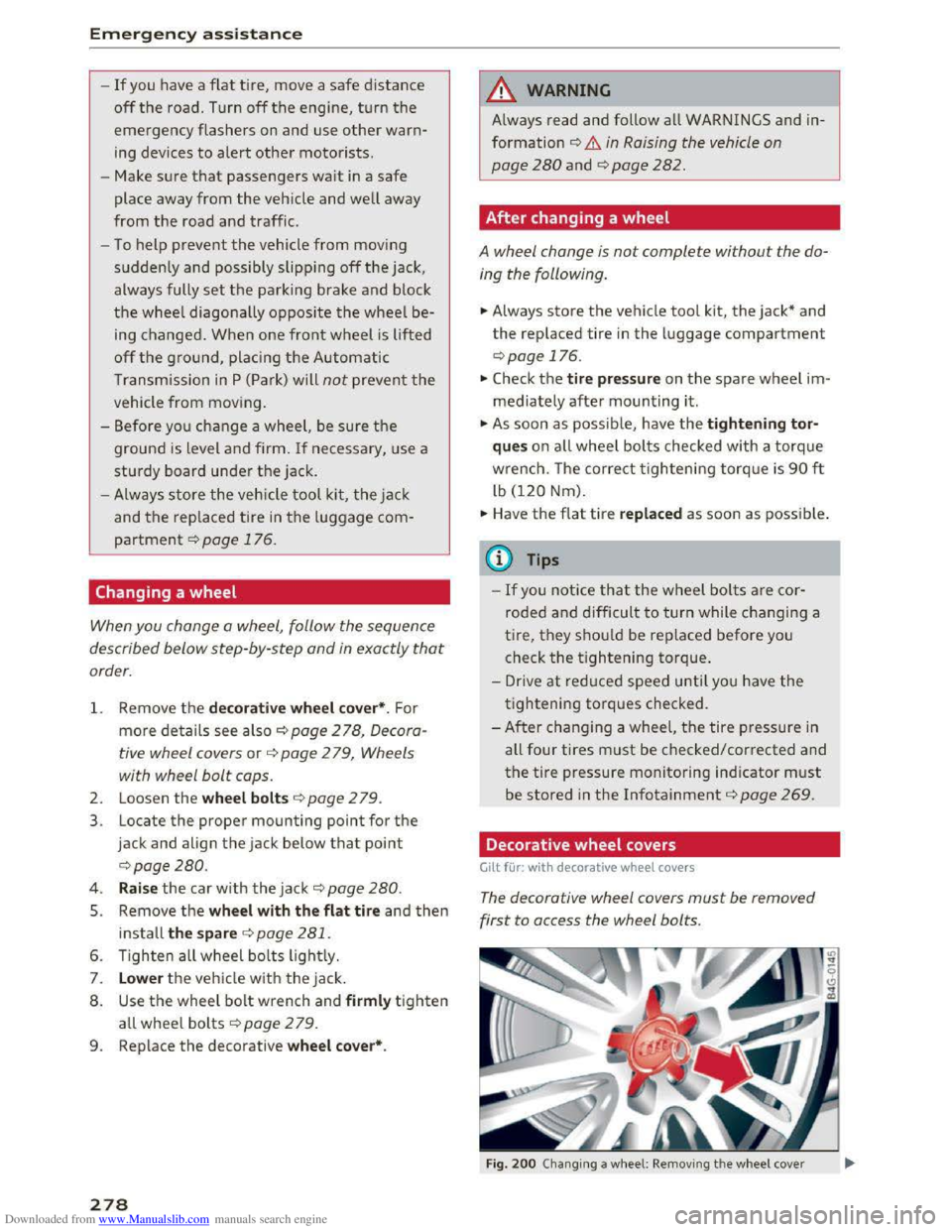
Decorative wheel covers
Gilt for: with decorative wheel covers
The decorative wheel covers must be removed
first to access the wheel bolts.
Fig. 200 Changing a w heel: Removing th e w heel cover