child lock AUDI TT COUPE 2016 Owners Manual
[x] Cancel search | Manufacturer: AUDI, Model Year: 2016, Model line: TT COUPE, Model: AUDI TT COUPE 2016Pages: 322, PDF Size: 52.86 MB
Page 28 of 322
Downloaded from www.Manualslib.com manuals search engine Opening and closing
visible . You can activate the Connectivity service*
on your vehicle using this PIN code.
Replacing a ke y
If a key is lost, see an authorized Audi dealer or
authorized Audi Service Facility. Have this key de
activa ted. It is important to bri ng all keys wit h
you .
If a key is lost, you should report it to your
insurance company.
Numb er of keys
You can check the number of keys assigned to
your veh icle in the Infotainment system. To do
this, select: the I MENU I button > Vehi cle > left
control button > Service & checks > Vehicle in·
fo rma tion. This way, you can make sure that you
have
all the keys when purchasing a used vehicle.
Electron ic immobilizer
The immobilizer preven ts unauthorized use of
the vehicle.
Unde r certain circumstances, the vehicle may not
be able to start if there is a key from a different
veh icle manufacturer on the key chain.
Data in the master key
When driving, service and maintenance-relevant
data is continuously stored on your remote con
trol key. Your Audi service advisor can read out
this data and tell you about the work your vehi cle
needs. This applies also to vehicles with a con
ven i
ence key*.
Personal comfort settings
If two people use one vehicle , it is recommended
that each person always uses "their own " master
key. When the ignition is turned off or when the
veh icle is locked, personal convenience settings
for the following systems are stored and as
signed to the remote master key.
-
Climate control system
-Parking aid*
- Active
lane assist*
- Si
de assist*
- Drive
select
26
The stored settings are automatically recalled
when you unlock the vehicle, open the doors or
turn on the ignition .
_&WARNING
Always take the vehicle key with you when
leav ing the vehicle, even for a short period of
time. This applies particularly when children
remai n in the vehicle . Otherwise the children
could
start the engine or operate e lectrical
equipment such as power w indows .
@Tips
-1
The operation of the remote control key can
be
temporarily d isrupted by interference from
transmitters in the vic in ity of the vehicle
working
in the same frequency range (e.g. a
cell
phone, rad io equipment). Always check if
your vehicle is locked!
Removing the mechanical key
Fig. 15 Remote contro l master key : remov ing the m ec ha ni·
cal key
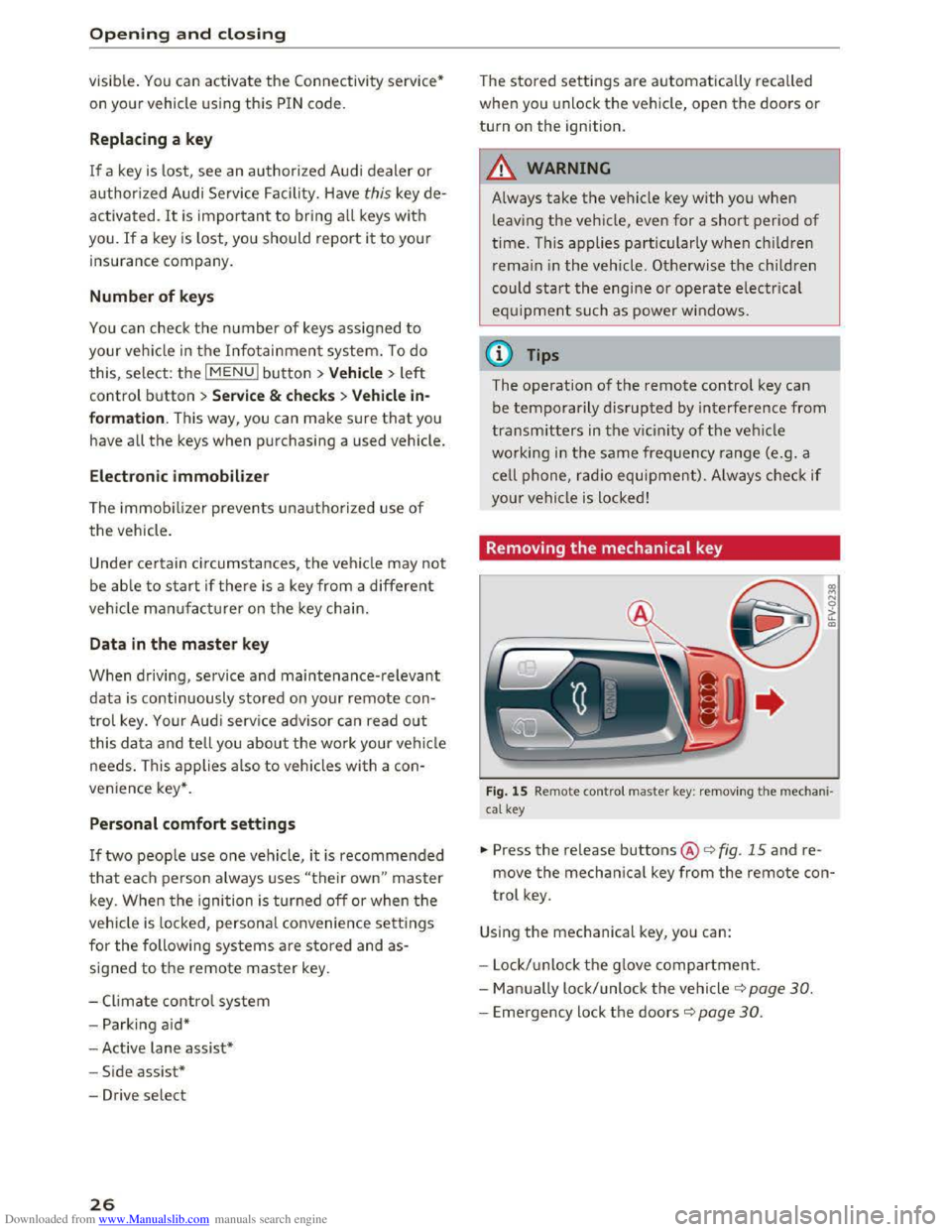
.,,. Press the release buttons@<=> fig. 15 and re
move the mechanical key from the remote con
trol key.
Using the mechanical key, you can:
- Lock/ unlock th e g love
compartment.
- Man ually lock/unlock
the vehicle ¢ page 30.
-Emergency lock the doors c::> page 30.
Page 29 of 322
Downloaded from www.Manualslib.com manuals search engine ..... N
G: CX)
.....
"' U"I
LED and batteries in the remote control key
Fig. 16 Rem ote contro l key: rem ov ing the battery hol der
Fig. 17 Remote control key (back side ): remov ing the ba t
tery ho lder
LED in the remote control key
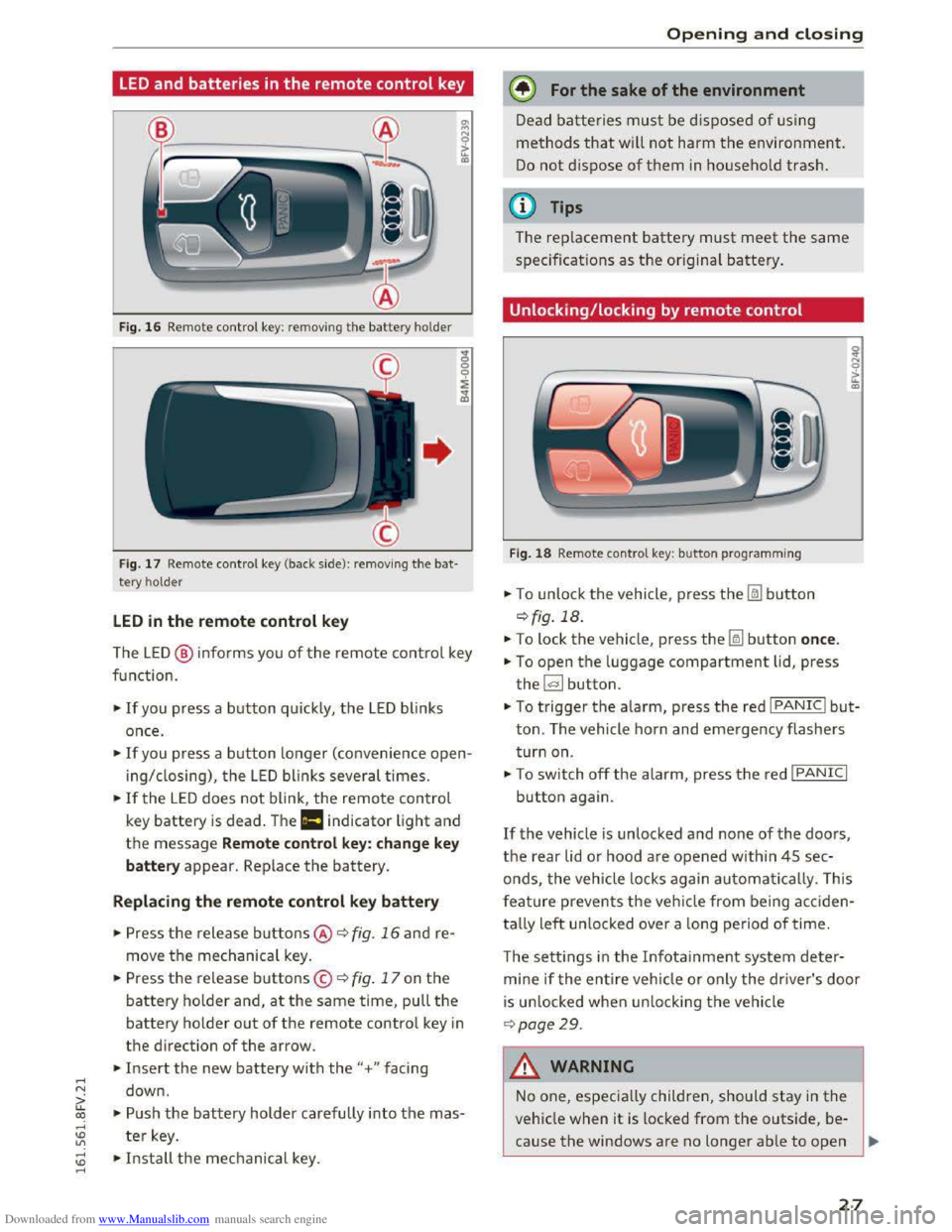
The LE D @ info rms you of the remote control key
function.
•If you press a button quick ly, the LED blinks
once .
• If you press a button longer (convenience open
ing/ closing), the LED blinks several times.
•If the LED does not blink, the remote control
key battery is dead . The Ill indicator light and
the message Remote control key: change key
battery appear. Replace the battery.
Replacing the remote control key battery
• Press the release buttons@ ¢ fig. 16 and re
move the mechanical key.
.. Press the release buttons© ¢ fig. 17 on the
battery holder and, at the same time, pull the
battery holder out of the remote contro l key in
the direction of the arrow .
.. Insert the new battery with the"+ " facing
down .
.. Push the battery holder carefully into the mas
ter key.
~ •Install the mechanical key . .....
Opening and closing
@) For the sake of the environment
Dead batteries must be disposed of using
methods that will not harm the environment.
Do not dispose of them in household trash.
@Tips
The replacement battery must meet the same
specificat ions as th e origina l battery.
Unlocking/locking by remote control
Fig. 18 Remote contro l key : button programming
.. To unlock the vehicle , press the Im button
¢ fig. 18.
.. To lock the vehicle, press the~ button once.
.. To open the luggage compartment lid, press
the~ button .
.. To trigger the alarm, press the red I PANIC I but
ton. The vehicle horn and emergency flashers
turn on.
•To switch off the alarm, press the red I PANIC I
button again .
If the vehicle is unlocked and none of the doors,
the rear lid or hood are opened within 45 sec
onds,
the veh icle locks again automatically. This
f
eature prevents the vehicle from being acciden
tally
left un locked over a long period of time.
T
he setti ngs in the Infota inment system deter
mine if the entire vehicle or only the driver's door
is un locked when un locking the vehicle
¢page 29.
A WARNING
--1
No one, especially children, should stay in the
vehicle when it is locked from the outside, be
cause the windows are no longer able to open
27
Page 31 of 322

Downloaded from www.Manualslib.com manuals search engine ..... N
G: CX)
.....
"' U"I
Central locking switch
Fig. 20 Driver's door: central loc king switch
... To lock the veh icle, press the@! button ¢,&. .
... Press the !ill button to unlock the veh icle .
When locking
the vehicle with the central locking
switch, the
following applies :
- Opening
the door and the lu ggage compart
ment lid from the outside is not possible (f or
sec urity such as when stopped
at a light) .
- The
LED in the central locking switch turns on
when all doors are closed and locked.
-
You can open the doors individually from the
inside
by pulling the door handle .
- In the event of a crash with airbag deployment,
the doors unlock automatically to allow access
to the vehicle .
.&. WARNING
-The power locking switch works with the ig
nition off and automatically locks the entire
vehicle when
the~ button is pressed .
- The centra l loc kin g switc h is inoperative
when
the veh icle is l ocked from the outside.
-
Locked doors make it more difficult for
eme rgency workers
to get into the veh icle,
whic h puts lives at risk. Do not leav e anyone
behi nd i n
the ve hicle , especially children.
@ Tips
Your vehicle locks a u
tomatically when it
reaches a speed of 9 mph (15 km/h) (Auto
Lock) q page 25. You can unlock the vehicle
ag
ain usi ng the [ill button in the ce ntral loc k
ing switch.
.....
"' l) This functio n is not availa ble in all countries . .....
Opening and closing
Setting the central locking system
In the Infotainment system, you can set which
doors the central locking system will unlock .
... Select in the Infotainment system: I MENU! but
ton> Vehicle> left control button >Vehicle set
tings .
Door unlocking
-you can decide if All doors or
only
the Driver door should unlock. The luggage
compartment
lid also unl ocks when All is select
ed. If you select Driver i n a vehicle with a conve n
ience key*, only the doo r whose handle you pull
will un
lock .
If you select Driver , all the doors and luggage
compartment
lid will unlock if you press the@l
button on the remote control key twice.
Fold mirrors * -if you select On, the exterior rear
view mirrors fold in automatically when you press
the l:ru button on the remo te contro l master key
or touch th e s ensor* in th e handle .
Lock when driving l) -if you select On, the vehi
cle locks automatically when driving. All of the
doo rs and the luggage compartment lid lock.
29
Page 33 of 322

Downloaded from www.Manualslib.com manuals search engine ..... N
G: CX)
.....
"' U"I
.....
"' .....
open when driving, which increases the risk
of an accident.
- Never drive with
the luggage compartment
lid ajar or open, because poisonous gases
can enter the vehicle interior and create the
risk of asphyxiation.
- Never leave your vehicle
unattended when
the luggage compartment lid is open. A
child could climb
into the vehicle through
the luggage compartment. If the luggage
compartment lid was then closed, the child
would be
trapped in the vehicle and unable
to escape. To reduce the risk of inju ry, do
not allow children to play in or around the
vehicle. Always keep the luggage compart
ment lid and the doors closed when the ve
hicle is
not in use.
- Always make sure no one is in the luggage
compartment lid's range of motion when it
is closing, especially near the hinges. Fin
gers or hands could be pinched.
@ Tips
-When the vehicle is locked, the luggage
compartment lid can be unlocked separately
by pressing the l.::::11 button on the remote
control key. When the luggage compart
ment lid is closed again, it locks automati
cally.
-
In case of an emergency or a faulty handle,
the luggage compartment lid can be opened
manually from the inside¢ page 31.
Opening and closing
Luggage compartment lid emergency
release
The luggage compartment lid can be released in
an emergency from
the inside.
Fig. 24 The emergency release is accessed on the left side
of
the luggage compartment underneath the rear w indow.
F ig.
25 Sect io n: inside of luggage compartment: emergen
cy re lease
.. Tilt the left rear seat backrest forward.
.,. Pry out the cover¢ fig. 24 using the mechanical
key
9 page 26.
.. Pull the plastic cord in the direction of the ar
row¢ fig. 25 .
31
Page 34 of 322
Downloaded from www.Manualslib.com manuals search engine Opening and closing
Power windows
Controls
The driver can control all power windows.
Fig. 26 D river's door: powe r w in dow controls
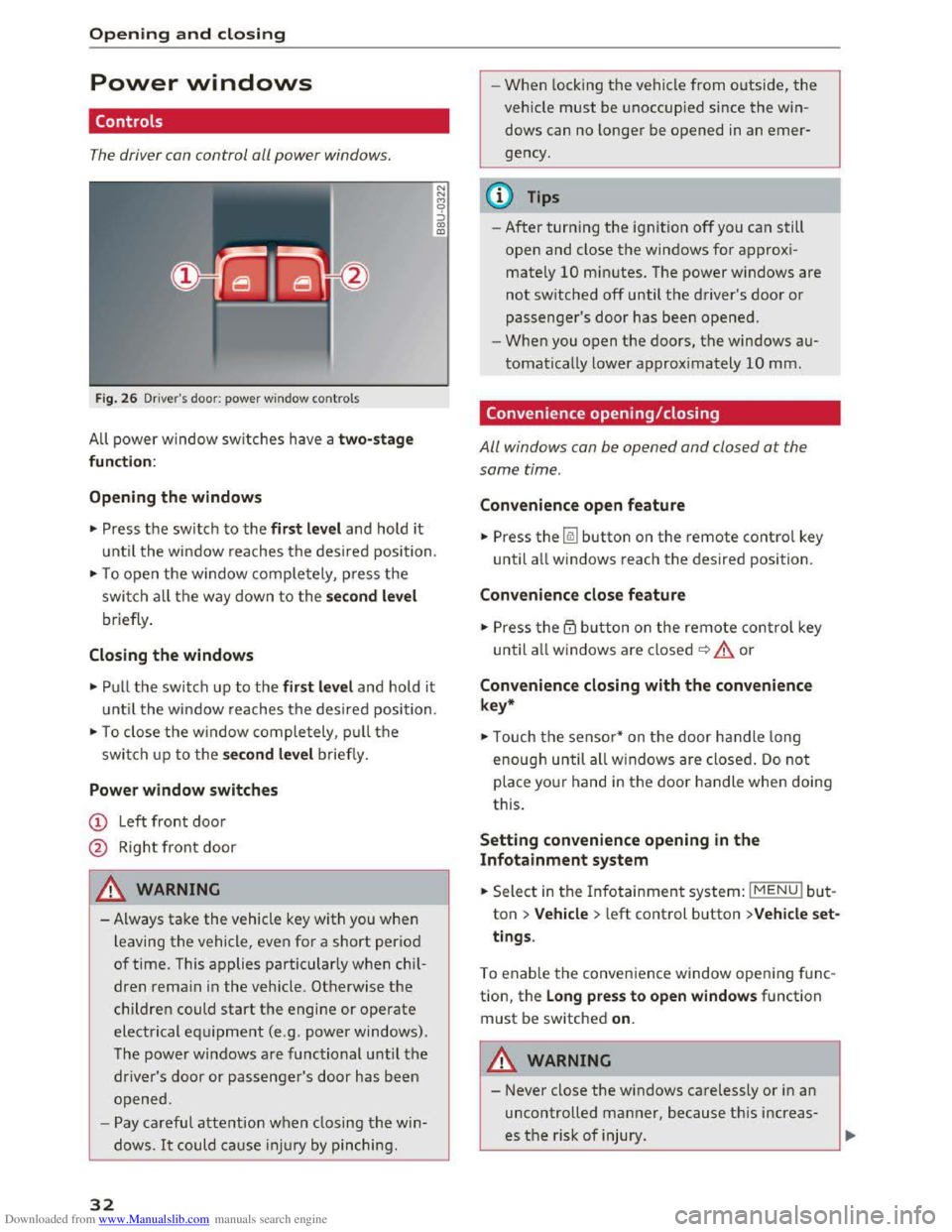
All power window switches h ave a two- stage
function:
Opening the windows
"' Press t h e switch to the first level and hold it
until the window reaches the desired position .
"'To open the window completely, press the
swi tch all the way down to the second level
briefly .
Closing the windows
"'Pull the switch up to the first level and hold it
until the window reaches the desired position.
"'To close the window completely , pull the
switch u p to the second level briefly.
Power window switches
CD Left front door
@ Right front door
A WARNING
- Always take the vehicle key with you when
leaving the vehicle, even for a short period
of time. This applies particularly when chi l
dren remai n in the vehicle. Otherwise the
children could start the engine or operate
electrical equipment (e .g . power windows).
T he
power windows are functional until the
driver's door or passenger's door has b een
o pened.
- Pay carefu l attention when closing the win
dows. It could cause in jur y by pin ching .
32
N
N
M 0 ::) CX> ID
-1
-When locking the vehicle from o utside, the
veh icle must be unoccupied since the win
dows can no longer be opened in an emer
gency.
(l} Tips
-After turning the ignition off you can s till
open and close the windows for approxi
mately 10 mi nutes. The power windows are
not switched off until the driver 's door or
passenger's door has been opened.
-When you open the doors, the windows au
tomatically lower approximately 10 mm.
Convenience opening/closing
All windows can be opened and closed at the
same time.
Convenience open feature
"' Press the~ button on the remote contro l key
until all windows reach the desired position.
Convenience close feature
"' Press the ~ button on the remote control key
until all w indows are closed~ A or
Convenience closing with the convenience
key*
"'Touch the sensor * on the door handle long
enough until all w indows are close d. Do not
place your hand in the door handle when doing
this.
Setting convenience opening in the
Infotainment system
.. Select in the Infotainment system: IMENUI but
ton > Vehicle > left control button >Vehicle set
tings .
To enable the conven ience window opening f u nc
tion, the Long press to open windows function
must be switched on.
A WARNING
-Never close the windows ca relessly or in an
uncontrolled manner, because this increas
es th e risk of injury.
Page 64 of 322
Downloaded from www.Manualslib.com manuals search engine Driving
-If driver's door is opened while the ignition
is
switched on, the parking brake sets auto
matically. This prevents unintended rolling
of the vehicle.
- Occasional noises
when the parking brake is
applied
and released are normal and are not
a cause for concern.
-
When the vehicle is parked, the parking
brake goes through a self-test cycle at regu
lar intervals. Any noises associated with this
are normal.
-If the. (USA models) I. (Cana-
da models) indicator lights or llJ indicator
lig ht
turn on, there could be a malfunction
in the park ing brake ~page 11.
-If there is a power failure, the parking brake
will not set if it is released, and it will not
release if it is set~.&.. See an authorized
Audi dealer or authorized Audi Service Fa
cility for
assistance.
Parking
.... Press the brake pedal to stop the vehicle.
.... Pull the switch~ to set the parking brake .
.... Place the selector lever in the P position.
.... Turn the engine off~,&.
.... Turn the steering wheel when parking on in
clines
so that the wheels will roll into the curb
if the vehicle starts moving .
A WARNING
-Always take the vehicle key with you when
leaving the vehicle, even for a short period
of time. This applies particularly when chi l
dren remai n in the vehicle. Otherwise the
children could start the engine, release the
parking brake or operate electrical equip
ment (e.g. power windows). There is the risk
of an accident.
-
When the vehicle is locked, no one -particu
larly
not children should remain in the vehi
cle. Locked
doors make it more difficult for
emergency workers to get into the vehicle,
which
puts lives at risk.
62
Starting from a stop
The start assist function ensures that the park
ing brake
is released automatically upon start
mg.
Stopping and applying parking brake
.... Pull the switch~ to set the parking brake.
Starting and automatically releasing the
parking brake
Requirement: the driver's door must be closed
and the driver's safety belt must be fastened.
.... When you press the accelerator pedal, the
parking brake is automatically released and
your vehicle begins to move.
When stopping at a traffic signal or stopping in
city traffic, the park ing brake can be applied. The
vehicle
does not have to be held with the brake
pedal. The parking brake eliminates the tendency
to creep when a selector lever position is engag
ed. As soon as you press the accelerator pedal,
the parking brake releases automatically and the
vehicle starts to move .
Starting on slope s
When starting on inclines, the hill start assist
prevents the vehicle from unintentionally rolling
back. The braking force
of the parking brake is
not released until sufficient driving force has
been built up at the wheels.
(0 Tips
For safety reasons, the parking brake is re
l
eased automatically onl y when the driver's
safety be lt is fastened and the driver's door is
l ocked.
Emergency braking function
In the event that the conventional brake system
fails or locks.
.... To brake your vehicle in an emergency, pull the
~switch and hold it pulled.
.... As soon as you release the button or accelerate,
the braking stops. .,..
Page 94 of 322
Downloaded from www.Manualslib.com manuals search engine Intelligent Technology
Automatic mode (normal operation)
-Automatic extension: the rear spoiler will auto
matically extend when speeds exceed approxi
mately 75 mph (120 km/h)
-Automatic retraction: the rear spoiler will auto
matically retract when speeds decrease to un
der approximately 50 mph (80 km/h).
Manual mode
-Extending manually: briefly tap the~ fig. 89
button to fully extend the rear spoiler.
- Retracting manually:
when driving at speeds
below approximately 10 mph (20 km/h), press
and hold the button to retract the rear spoiler.
When at speeds between 10 mph (20 km/h)
and 75 mph (120 km/h), the rear spoiler will
completely retract when you tap the button.
Indicator lights
Ii) I. Rear spoiler: malfunction!
The
rear spoiler may not have extended due to a
malfunction.
This could change the veh icle's driv
ing characteristics
at high speeds. Do not drive
faster than 85 mph (140 km/h). Drive to an au
thorized Audi dealer or authorized Audi Service
Facility
immediately to have the malfunction cor
rected. The color
of the indicator light depends
on the vehicle speed.
..&. WARNING
-
Driving at higher speeds without the rear
spoiler deployed can impair handling charac
teristics, making
the vehicle harder to con
trol.
- Always
make sure that the spoiler is de
ployed when driving at
speeds ove r 85 mph
(140 km/h). If the rear spoiler warning/indi
cator light in the instrument cluster comes
on, the rear spoiler may not have deployed.
- Never drive
at speeds higher than 85 mph
(140 km/h) ifthe spoiler is not deployed.
Have
the spoiler inspected as soon as possi
ble by an
authorized Audi dealer or qualified
workshop.
- Always obey
speed limits and other traffic
laws.
92
..&. WARNING
Improper operation of the rear spoiler can
cause crushing injuries.
-Always make sure that nobody, especially
children, is
in the way when the rear spoiler
is deployed or retracted.
«J:) Note
-Never push on the vehicle on the rear spoil
er. This could
cause damage.
- To
prevent damage to the rear spoiler do
not lean or place anything on it.
-
-Only operate the rear spoiler manually when
the luggage compartment lid is close and
the rear spoiler moving parts are not
blocked. Otherwise, damage could occur.
(D Tips
Clean the rear spoiler compartment every 2 to
3 months. To function correctly, the rear
spoiler must be free of ice, snow and leaves.
Energy management
The starting ability is optimized
The energy management system manages the
electrical energy distribution
and optimizes the
availability
of electrical energy for starting the
engine.
When a vehicle with a conventiona l energy sys
tem is not driven for a long time, the battery is
drained by equipment (for example the immobil
izer). In
certain circumstances, there could may
not be enough energy to start the engine.
Your vehicle
is equipped with an intelligent ener
gy
management system for distributing electrici
ty. T his sign ificant
ly improves the starting ability
and increases the battery life.
The
energy management system Is made up of
battery diagnosis, Idling current management
and dynamic energy management.
Battery diagnosis
The battery diagnosis determines the battery
charge level. The sensors determine the battery Ill>
Page 175 of 322
Downloaded from www.Manualslib.com manuals search engine ...... N
G'. CX)
..... ID IJ' ..... ID .....
.&. WARNING
Drivers who are unbelted, out of position or
too close to the airbag can be seriously in
jured by an airbag as it unfolds. To help re
duce the risk of serious personal injury:
- Always
adjust the driver's seat and the
steering wheel so that there are at least
10 in (25 cm) between your breastbone and
the steering wheel.
-Always adjust the driver's seat and the
steering wheel so that there are at least 4 in
(10 cm) between the knees and the lower
part of the instrument panel.
- Always hold
the steering wheel on the out
side of the steering wheel rim with your
hands at the 9 o'clock and 3 o 'clock posi
tions to help reduce the risk of personal in
jury if the driver's airbag inflates.
- Never hold
the steering wheel at the
12 o'clock position or with your hands at
other positions inside the steering wheel
rim or on the steering wheel hub. Holding
the steering wheel the wrong way can cause
serious injuries to the hands, arms and head
if
the driver's airbag inflates
-
Pointing the steering wheel toward your
face
decreases the ability of the supplemen
tal driver's airbag to protect you in a colli
sion.
- Always
sit in an upright position and never
lean
against or place any part of your body
too close to the area where the airbags are
located.
- Before driving, always
adjust the front seats
properly and make sure that all passengers
are properly restrained.
- Never
adjust the seats while the vehicle is
moving. Your seat may move unexpectedly
and you could lose control of the vehicle .
- Never drive with
the backrest reclined or
tilted far back! The farther the backrests are
tilted back, the greater the risk of injury due
to incorrect positioning of the safety belt
and improper seating position .
- Children
must always ride in child seats
Q page 212. Special precautions apply
-
Safe driving
when installing a child seat on the front
passenger seat Q page 188.
Proper seating position for the front
passenger
The proper front passenger seating position is
important for safe, relaxed driving.
For your own safety and to reduce the risk of in
jury in the event of an accident, we recommend
that you adjust the seat for the front passenger
to the following position:
... Adjust the angle of the seatback so that it is in
an upright position and your back comes in full
contact with it whenever the vehicle is moving.
... Keep both feet flat on the floor in front of the
front passenger seat.
"' Fasten and wear safety belts correctly
Qpage 184.
For detailed information on how to adjust the
front passenger's seat, see Q page 44.
A WARNING
personal injury:
-
Passengers must always sit in an upright po
sition and never lean against or place any
part of their body too close to the area
where the airbags are located.
-
Passengers who are unbelted, out of posi
tion or too close to the airbag can be seri
ously injured by an airbag as it unfolds with
great force in the blink of an eye.
- Always
make sure that there are at least
10 in (25 cm) between the front passen
ger's breastbone and the instrument panel.
- Always
make sure that there are at least 4 in
(10 cm) between the front passenger's
knees and the lower part of the instrument
panel.
- Each
passenger must always sit on a seat of
their own and properly fasten and wear the
safety belt belonging to that seat. ..,.
173
Page 179 of 322
Downloaded from www.Manualslib.com manuals search engine -Please observe information on safe driving
r:;. page 171.
A WARNING
r-=-
To help prevent poisonous exhaust gas from
being drawn into the vehicle, always keep the
rear lid closed while driving.
- Never
transport objects larger than those
fitting completely into the luggage area be
cause the rear lid cannot be fully closed.
-
If you absolutely must drive with the rear lid
open, observe the following notes to reduce
the risk of poisoning:
-
Close all windows,
-
Open all air outlets in the instrument pan-
el,
-Switch off the air recirculation,
-
Set the fresh air fan to the highest speed.
A WARNING
Always make sure that the doors, all windows
and the rear lid are securely closed and locked
to reduce the risk of injury when the vehicle is
not being used.
- After closing
the rear lid, always make sure
that it is properly closed and locked.
- Never leave your vehicle
unattended espe
cially with the rear lid left open. A child
could crawl into
the vehicle through the lug
gage compartment and close the rear lid be
coming trapped and unable to get out. Be
ing trapped in a vehicle can lead to serious
personal injury.
- Nev er
let children play in or around the vehi
cle.
- Never
let passengers ride in the luggage
compartment. Vehicle occupants must al
ways be properly restrained in one of the ve
hicle's seating positions.
(D Tips
-Air circulation helps to reduce window fog
ging. Stale air escapes to the outside
through vents in the trim panel, on the left
side of the luggage compartment. Be sure
to keep these slots free and open.
Safe driving
-The tire pressure must correspond to the
load. The tire pressure is shown on the tire
pressure label. The tire pressure label is lo
cated on the driver's side B-pillar. The tire
pressure label lists the recommended cold
tire inflation
pressures for the vehicle at its
maximum capacity
weight and the tires that
were on your vehicle at the time it was man
ufactured. For recommended tire pressures
for normal load conditions, please see chap
ter r:;. page 261.
Tie-down s
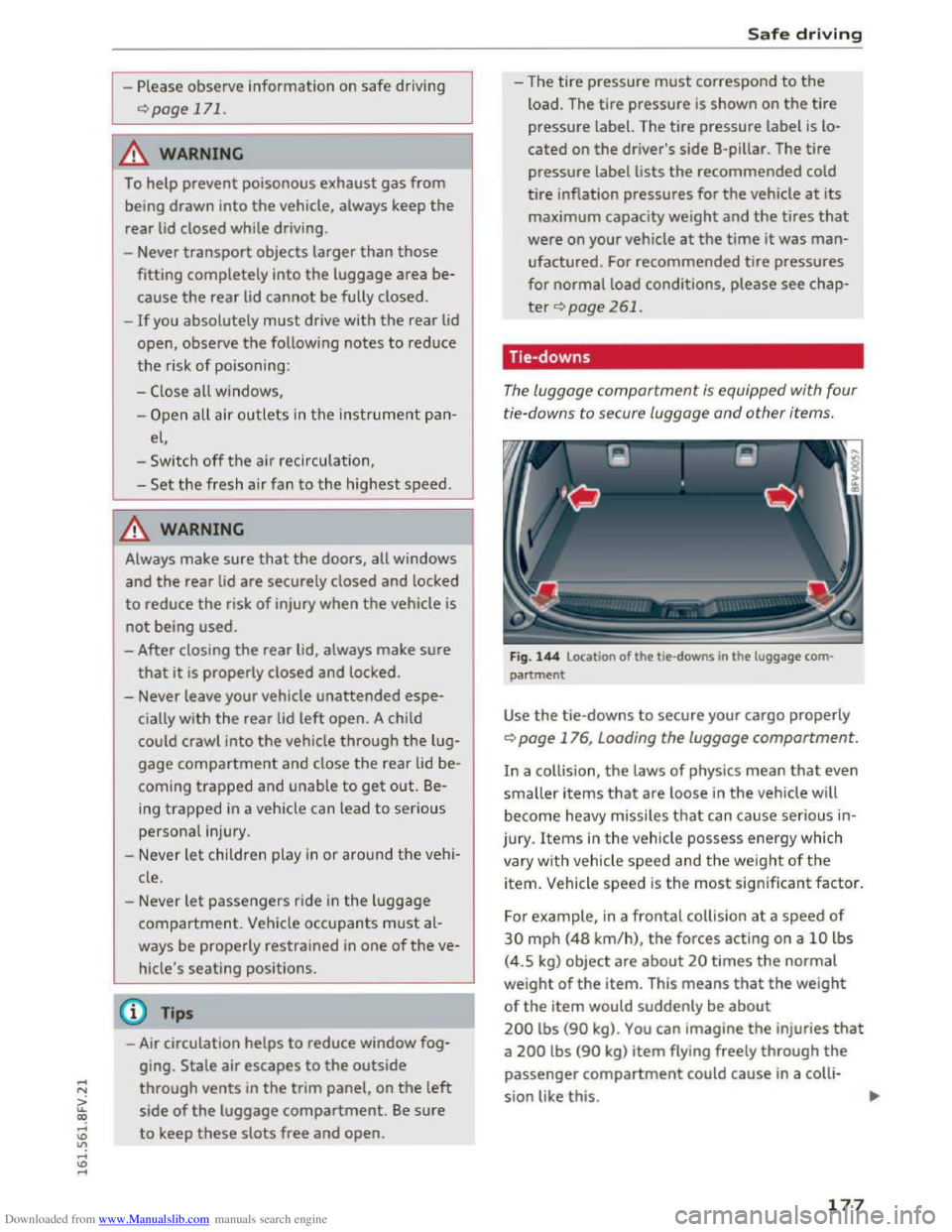
The luggage compartment is equipped with four
ti e-downs to secure luggage
and other items.
Fig. 144 Location of the tie-downs in the luggage com
partment
Use the tie-downs to secure your cargo properly
r:;. page 176, Loading the luggage compartment.
In a collision, the laws of physics mean that even
smaller items that are loose in the vehicle will
become heavy missiles that can cause serious in
jury . Items in the vehicle possess energy which
vary with vehicle
speed and the weight of the
item. Vehicle speed is the most significant factor.
For example, in a frontal collision at a speed of
30 mph (48 km/h), the forces acting on a 10 lbs
(4.5 kg) object
are about 20 times the normal
weight of the item. This means that the weight
of the item would suddenly be about
200 lbs (90 kg). You can imagine the injuries that
a 200 lbs (90 kg) item flying freely through the
passenger compartment could cause in a colli
sion like this.
177
Page 186 of 322
Downloaded from www.Manualslib.com manuals search engine Safety belts
-Always keep the belts clean. Dirty belts may
not work properly and can impair the func
tion
of the i nertia reel ¢table Internal
cleaning on page 272.
Safety belts
Fastening safety belts
Seat first -everybody buckle up!
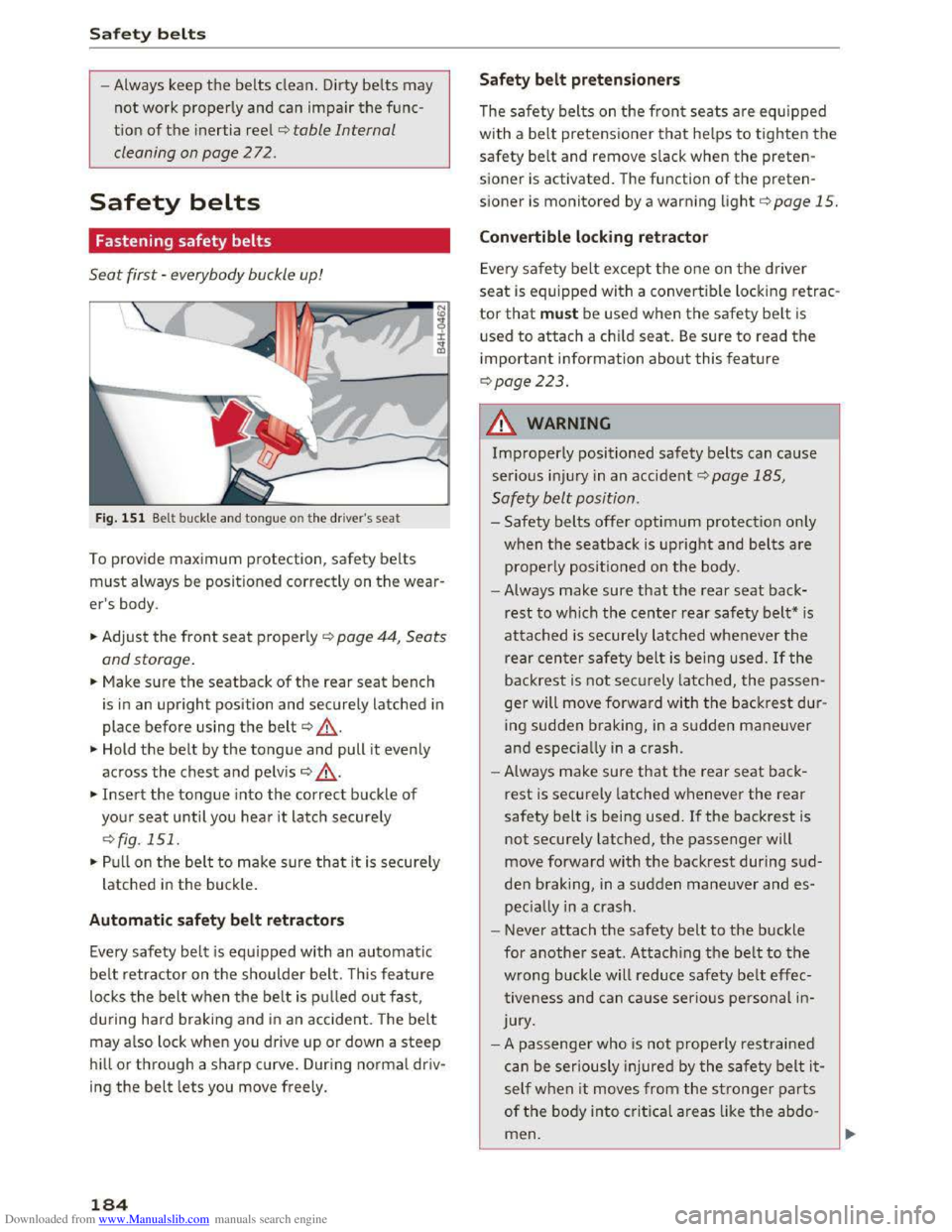
Fig. 151 Belt buckle and tongue on t he driver's seat
To provide maximum protection, safety belts
must always be positioned correctly on the wear
er's body.
... Adjust the front seat properly c::> page 44, Seats
and storage.
... Make sure the seatback of the rear seat bench
is
in an upright position and securely latched in
place before using the belt¢ ,&. .
... Hold the belt by the tongue and pull it evenly
across
the chest and pelv is c::> .&_.
... Insert the tongue into the correct buckle of
your seat until you hear i t latch securely
c::>fig. 151.
... Pull on the bel t to make sure that it is securely
latched in the buck le .
Automatic safety belt retractors
Every safety belt is equipped with an automatic
belt retractor on the shoulder belt. T his feature
locks the belt when the belt is pul led out fast,
during hard braking and in an accident. The belt
may also lock when you drive up or down a steep
hill or through a sharp curve. During normal driv
ing
the belt lets you move freely.
184
Safety belt pretensioners
The safety belts on the front seats are equipped
with a belt pretensioner that helps to tighten the
safety belt and remove slack when the preten
sioner is activated. The function of the preten
sioner is monitored by a warning light c::> page 15.
Convertible locking retractor
Every safety belt except the one on the driver
seat is equipped with a convertib le locking retrac
tor that must be used when the safety belt is
used to attach a child seat. Be sure to read the
important information about this feature
c::>page223 .
.&. WARNING
Improperly positioned safety belts can cause
serious injur y in an accident .:::>page 185,
Safety belt position.
-Safety belts offer optimum protection only
when the seatback is upright and belts are
properly positioned on the body .
- Always
make sure that the rear seat back
rest to which the center rear safety belt* is
attached is securely latched whenever the
rear center safety belt is being used. If the
backrest is not securely latched, the passen
ger will move forward with the backrest dur
ing
sudden braking, in a sudden maneuver
and especiall y in a crash .
- Always
make sure that the rear seat back
rest is securely latched whenever the rear
safety belt is being used. If the backrest is
not securely latched, the passenger will
move
forward with the backrest during sud
den braking, in a sudden maneuver and es
peciall y in a crash.
- Never
attach the safety belt to the buckle
for
another seat. Attaching the belt to the
wrong buckle will reduce safety belt effec
tiveness and can cause serio us personal in
jury.
- A
passenger who is not properly restra ined
can
be seriously injured by the safety belt it
self when it moves from the stronger parts
of the body into critical areas like the abdo
men.