headlights AUDI TT COUPE 2016 Owners Manual
[x] Cancel search | Manufacturer: AUDI, Model Year: 2016, Model line: TT COUPE, Model: AUDI TT COUPE 2016Pages: 322, PDF Size: 52.86 MB
Page 7 of 322
Downloaded from www.Manualslib.com manuals search engine This manual contains important information,
tips, suggestions and warnings for using your ve
hicle.
Keep
this manual in your vehicle at all times. This
is
especially important if you loan your vehicle to
others or sell it.
This
owner's manual describes the equipment
range
specified for thi s model at the time of
printing. Individual equipment options described
may only be availab le at a later date or may only
be offered in certain countries.
Some sections in this manual do not apply to all
vehicles.
When this is the case, the beginning of
the section indicates the validity, for example
"Applies to: vehicles with B iXenon headlights''.
Optional or vehicle-specific equipment is also
identified with an asterisk"*".
The illustrations are designed as a general guide
and on your vehicle may look slightly different
than what is illustrated.
There is a Table of Contents at the beginning of
this owner's manual that lists all of the topics
covered in this book in the order that they ap
pear. There is also an a lphabetical Index at the
end of this owner's manual.
All directions, such as "left", "right", "front" and
"rear", are based on the vehicle's direction of
travel.
* Optional or vehicle -specific equipment
... The section continues on the next page.
c::> .&. Cross reference to a " WARNING " within a
section. If a page number is indicated, the
WARNING is located outside of the section.
_&WARNING
Text with this symbol contains information
about safety and how to reduce the r isk of se
rious personal injury or death.
CD Note
Text with this symbol contains information
about reducing the r is k of damage to your ve
hicle.
- 1
About this Owner's Manual
® For the sake of the environment
Text with this symbol contains information on
protecting the environment.
{!) Tips
Text with this symbol contains additional use
ful information.
5
Page 10 of 322
Downloaded from www.Manualslib.com manuals search engine Instruments and indicator lights
Instruments and indicator Lights
Instruments
Audi virtual cockpit (instrument cluster)
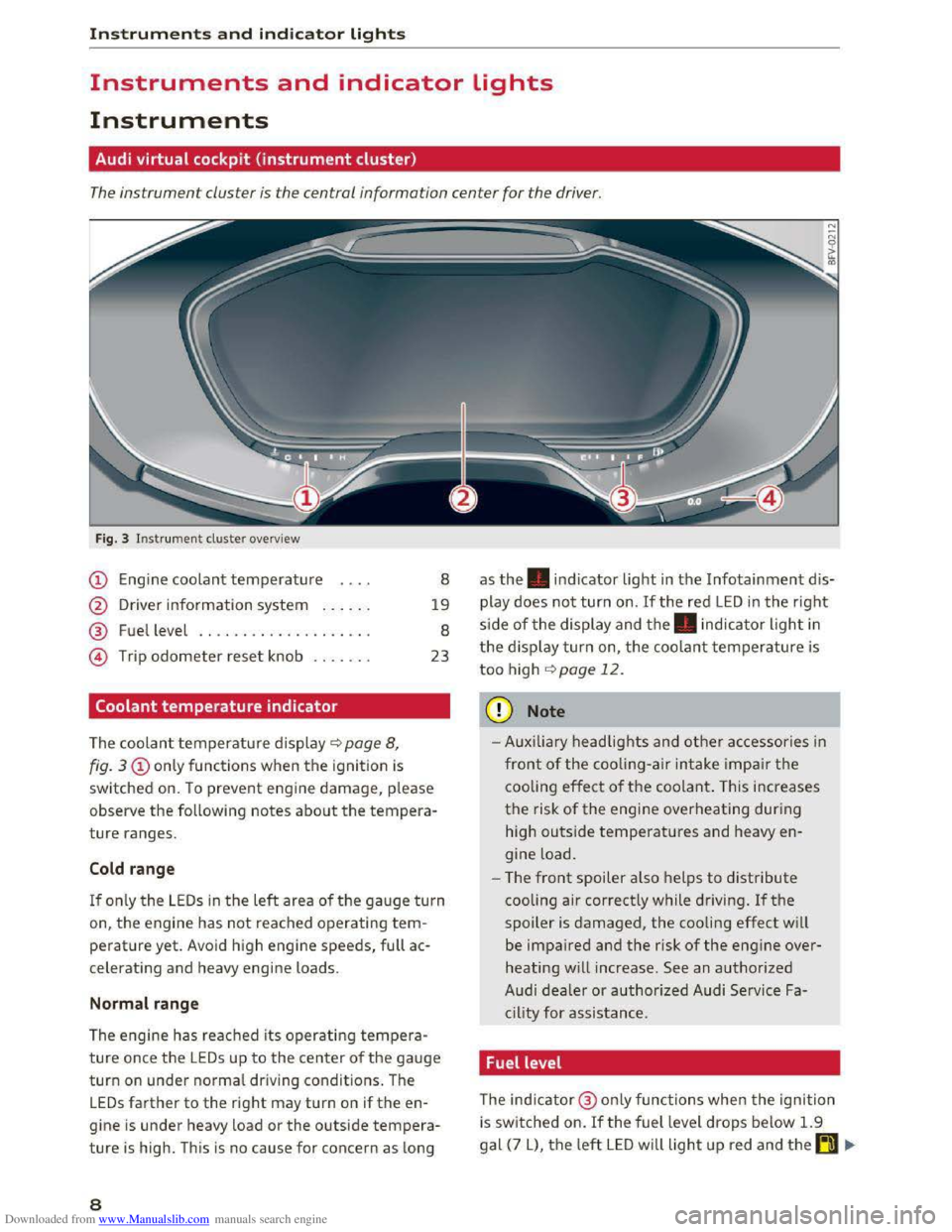
The instrument cluster is the central information center for the driver.
Fig. 3 Instrument cluster overview
(!) Engine coolant temperature
@ Driver information system ..... .
@ Fuel level .. ................. .
@ Trip odometer reset knob ...... .
Coolant temperature indicator
The coolan t temperature display~ page 8,
8
19
8
23
fig. 3 (!)only functions when the ignition is
switched
on. T o prevent engine damage, please
observe the following notes about the tempera
ture ranges.
Cold range
If o nly the LEDs in the left area of the gauge turn
on, the engine has not reached operating tem
perature yet. Avoid high engine speeds, full ac
celerating and heavy engine loads.
Normal range
The engine has reached its operating tempera
ture once the LEDs up to the center of the gauge
turn on under normal driving conditions . The
LEDs farther to the right may turn on if the en
gine is under heavy load or the outside tempera
ture is high. This is no cause for concern as long
8
as the. indicator light in the Infotainment dis
play does not turn on. If the red LED in the rig ht
s ide of the display and the. indicator light in
the d isplay turn on, the coolant temperature is
too high ~page 12.
CD Note
-Auxi lia ry headlights and other ac cessories in
front of the cooling-air intake impair th e
cooling
effect o f the coolant. T his increases
the risk of the engine overheating during
high
outside temperatures and heavy en
gine load.
- T
he front spoiler also helps to distribute
cooling air correctly while driving. If the
spoiler is damaged, the cooling effect will
be impaired and the risk of the engine over
heating will increase . See an authorized
Audi dealer or authorized Audi Service Fa
c ility
for assist ance.
Fuel level
The indicator@ only funct ions when the ignition
i s sw i
tched on. If the fuel level drops below 1.9
gal (7 L), the left LED will light up red and the~ .,.
Page 18 of 322

Downloaded from www.Manualslib.com manuals search engine Instruments and indicator lights
You may continue driving for the time being.
Check the engine oil level as soon as possible
<:!)page 239.
-If the engine oil level is too low, add engine o il
<:!)page 240.
-If the engine oil level is correct and the indica
tor light still turns on, drive at low engine
speed to an authorized Audi dealer or author
ized Audi Service Facility.
X;:';,,, Engine oil sensor
• Oil le vel system: malfunction! Please con·
tact Service
The sensor to check the engine oil level has
failed. Drive to an authorized Audi deale r or a u
thorized Audi Service Facility immediately to have
the malfunction corrected.
[JlJ Tank system
D Ple a se r efuel
If the indicator light turns on for the first time
and the message appears, there are about 1.9
gal (7 L) of fuel left in the tank.
D Plea se refuel immediately
If t he indicator lig ht turns on the message ap
pears, the fuel tank is almost empty. Refuel the
vehicle immediately.
D Tank sy ste m : malfun ction! Please contact
Servic e
If the indicator light t urns on and this message
appears, there is a malfunction in the tank sys
tem.
Drive to an author ized Audi dealer or authorized
Audi Serv ice Facility immediately to have th e
malfunction corrected.
@l For the sake of the environment
Fuel should never enter the sewer system or
come into contact w ith the ground.
(Di Tips
More information on refueling is available on
page¢ page 232.
16
· ,_Washer fluid level
m Pleas e add washer fluid
Fill the washer fluid for the windshield washer
system and the headlight washer system* when
the ignit ion is switched off<:!) page 248.
\9 ! Windshield wipers
@Windshield wiper s: malfunction! Plea se
conta ct Servi ce
There is a malfunction with the windshield wip
e r
s.
Drive to an authorized Audi dealer or authorized
Audi Service Facility immediately to have the
malfunction corrected.
-:q>.-Bulb failure indicator
If the II indicator light turns on, a bulb has
failed. The message indica tes the location of the
bulb.
Replace
the bu lb immediately .
Vehicle lights: malfunction! Please contact
Service
There i s a malfunction in the headlights or the
light switch. Drive to an authorized Audi dealer or
authorized Aud i Serv ice Facility immediately to
have the malfunction corrected.
&. WARNING
-Light bulbs are under pressure and can ex·
plode when bulbs are replaced, whic h in
creases the risk of injury.
-
With gas-discharge lamps* (xenon head
lights), the high-vo ltage component must
be handled appropriately. Otherwise, there
is a risk of fatal injury.
~CD Headlight range control system
II Headlight range control: malfunction! See
owne
r's manual
There i s a mal f u nction in the headlight range
control system, which may cause glare for other
drive rs. .,..
Page 19 of 322

Downloaded from www.Manualslib.com manuals search engine Drive to an authorized Audi dealer or authorized
Audi Service Facility immediately to have the
malfunction corrected.
~O Audi adaptive light
Applies to: vehicles with Audi adaptive light
rJJ Audi adaptive light: malfunction! See own
er's manual
There is a malfunction in the adaptive lights. The
headlights still function.
Drive to an authorized Audi dealer or authorized
Audi Service Facility immediately to have the
malfunction corrected.
li,D Light/rain sensor
El Automatic headlights: malfunction! See
owner's manual
II Automatic wipers: malfunction! See owner's
manual
The light/rain sensor is malfunctioning.
The low
beams remain switched on at all times
for safety reasons when the light switch is in the
AUTO position. You can continue to turn the
lights on and off using the light switch. You can
still control all wiper functions that are inde
pendent of the rain sensor.
Drive to an authorized Audi dealer or authorized
Audi Service Facility immediately to have the
malfunction corrected.
; Damper control
App lies to: vehicles with Audi drive select
R Suspension: malfunction! You may continue
driving
There is an adaptive damper malfunction.
Drive to an authorized Audi dealer or authorized
Audi Service Facility immediately to have the
malfunction corrected.
Instruments and indicator lights
¢ Q Turn signals
If the. or B indicator light blinks, a turn sig
nal is turned on. If both indicator lights are blink
ing,
the emergency flashers are on.
In
an indicator light blinks twice as fast as usual,
then a turn signal bulb has failed. Replace the
bulb immediately.
CJ! 4f. Rear safety belt
Applies to: vehicles with rear safety belt detection
The respective indicator light will turn on briefly
when a safety belt on the rear seats is fastened
or unfastened.
f!l-If this indicator light turns on briefly, the
safety belt on the rear seat is not fastened.
II-If this indicator light turns on briefly, the
safety belt on the rear seat was fastened.
·-If this indicator light blinks, the safety belt
was unfastened while driving. Above a certain
speed, there will also be a warning tone.
(D Tips
For additional information on safety belts, re
fer to ~page 180.
On-Board Diagnostic
system (OBD)
System indicator light (MIL)
The system indicator light (MIL) Ill in the instru
ment cluster is part of the On Board Diagnostic
System (OBD II).
The
warning/indicator light turns on when the ig
nition is
switched on and turns off once the en
gine is started and is running in idle at a stable
speed. This indicates that the MIL is functioning
correctly.
If the light does not turn off after starting the
engine or turns on while driving, this may indi
cate there is a malfunction in the engine. If the
indicator turns on, the catalytic converter may be
damaged. ..,.
17
Page 38 of 322
Downloaded from www.Manualslib.com manuals search engine Lights and Vision
Lights and Vision
Exterior Lighting
Switching lights on and off
Fig. 30 Instrument panel: light switch
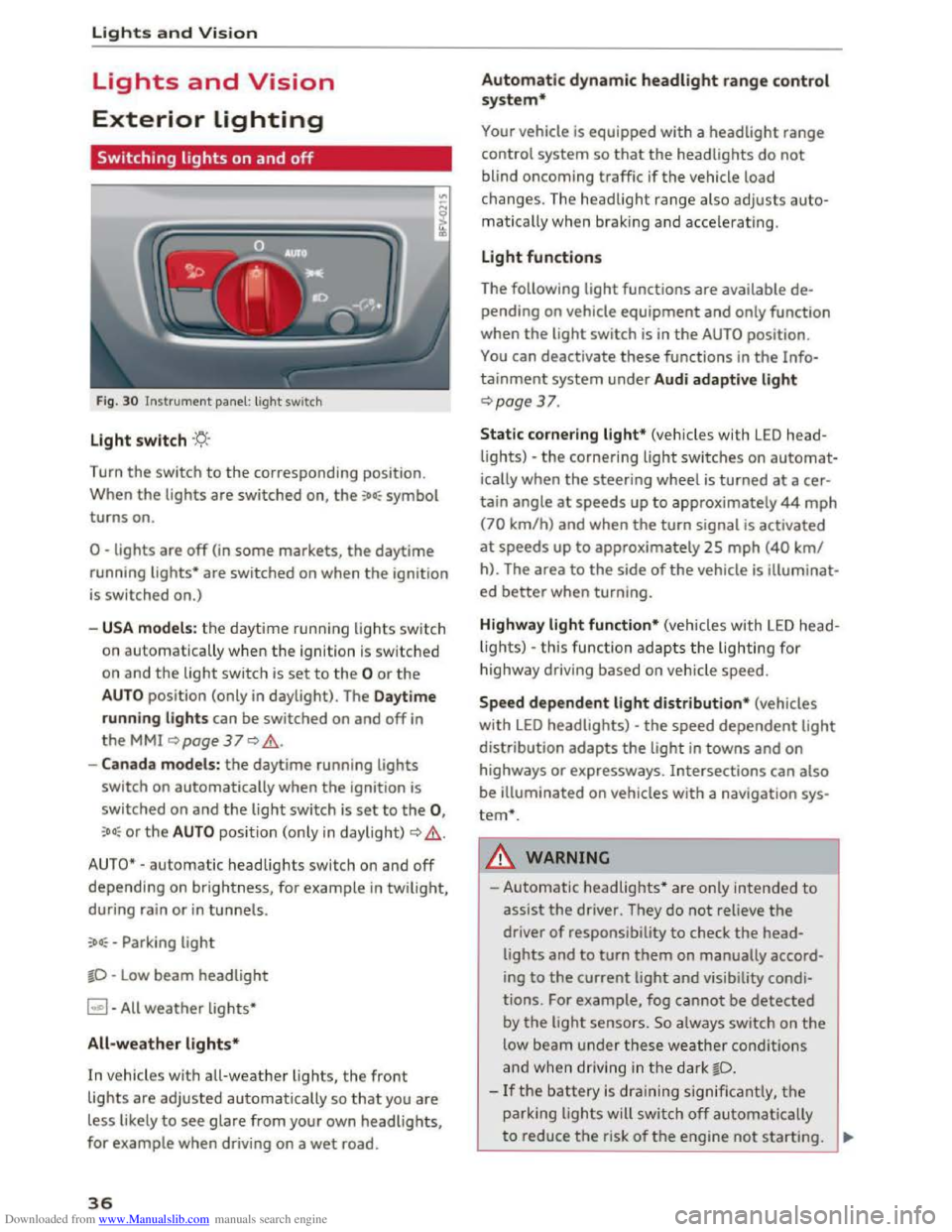
Light switch ·'t/;
Turn the switch to the corresponding position.
When
the lights are switched on, the :oo: symbol
turns on.
0 -lights are off (in some markets, the daytime
running
lights* are switched on when the ignition
is switched on.)
-USA models: the daytime running lights sw itch
on automatica
lly when the ignition is sw itched
on and
the light switch is set to the 0 or the
AUTO position (only in daylight). The Daytime
running lights
can be switched on and off in
the MMI ~page 37 Q &.
-Canada models: the daytime running lights
switch on automatically when the ignition is
switched on and the light switch is set to the 0,
:oo: or the AUTO position (only in daylight) QA .
AUTO* -automatic headlights switch on and off
depending on brightness, for example in twilight,
during rain
or in tunnels.
:oo: -Parking light
~D -Low beam headlight
~ -All weather lights*
All-weather lights*
In vehicles with all-weather lights, the front
lights are adjusted automatically so that you are
less likely
to see glare from your own headlights,
for example when driving on a wet road.
36
Automatic dynamic headlight range control
system*
Your vehicle is equipped with a headlight range
control system
so that the headlights do not
blind oncoming traffic if the vehicle load
changes. The headlight range also
adjusts auto
matically when braking and accelerating .
Light functions
The following light functions are available de
pending on vehicle equipment and only function
when the
light switch is in the AUTO position.
You can deactivate these functions in the Info
tainment system under Audi adaptive light
Qpage 37.
Static cornering light* (vehicles with LED head
lights) -the cornering light switches on automat
ically when the steeri ng wheel is turned at acer
tain angle at speeds up to approximately 44 mph
(70 km/h) and when the turn signal is activated
at speeds up to approxim ately 25 mph (40 km/
h). The area
to the side of the vehicle is illuminat
ed better when turning.
Highway light function* (vehicles with LED head
lights) -this function adapts the lighting for
highwa y driving based on vehicle speed.
Speed dependent light distribution* (vehicles
with LED headlights) -the speed dependent light
distribution adapts the light in towns and on
highways
or expressways. Intersections can also
be illuminated on vehicles
with a navigation sys
tem*.
A WARNING
- Automatic headlights * are only intended to
assist the driver. They do not reliev e the
driver
of responsibility to check the head
lights and to turn them on manually accord
ing to the current ligh t and visibility condi
tions. For example, fog cannot be detected
by
the light sensors . So always switch on the
low beam under these weather conditions
and when
driving in the dark ~D.
-If the battery is dra ining significantly, the
parking lights will switch off automatically
to reduce the risk of the engine not starting . ..,..
Page 39 of 322
Downloaded from www.Manualslib.com manuals search engine Always make sure your vehicle is parked and
adequately lit according to the laws. Avoid
using
the parking lights for several hours.
Switch
on the right or left parking light if
possible.
-
Please observe legal regulations when using
the lighting systems described.
Tips
-The light sensor for the automatic head
lights*
is in the rearview mirror mount.
Therefore, do not place any stickers in this
area on the w indshield.
-
Some functions of the exterior lighting can
be
adjusted ~page 3 7.
-
If yo u turn off the ign ition whil e the exterior
lights are on and open the door, you will
hear a warning tone.
- In some markets, the tail lights will switch
on when the daytime running lights switch
on.
- In cool
or damp weather, the inside of the
headlights, turn signals and tail lights can
fog over due to the temperature difference
between the inside and outside. They will
clear shortly after switching them on. This
does not affect the service life of the light
ing.
Turn signal and high beam lever
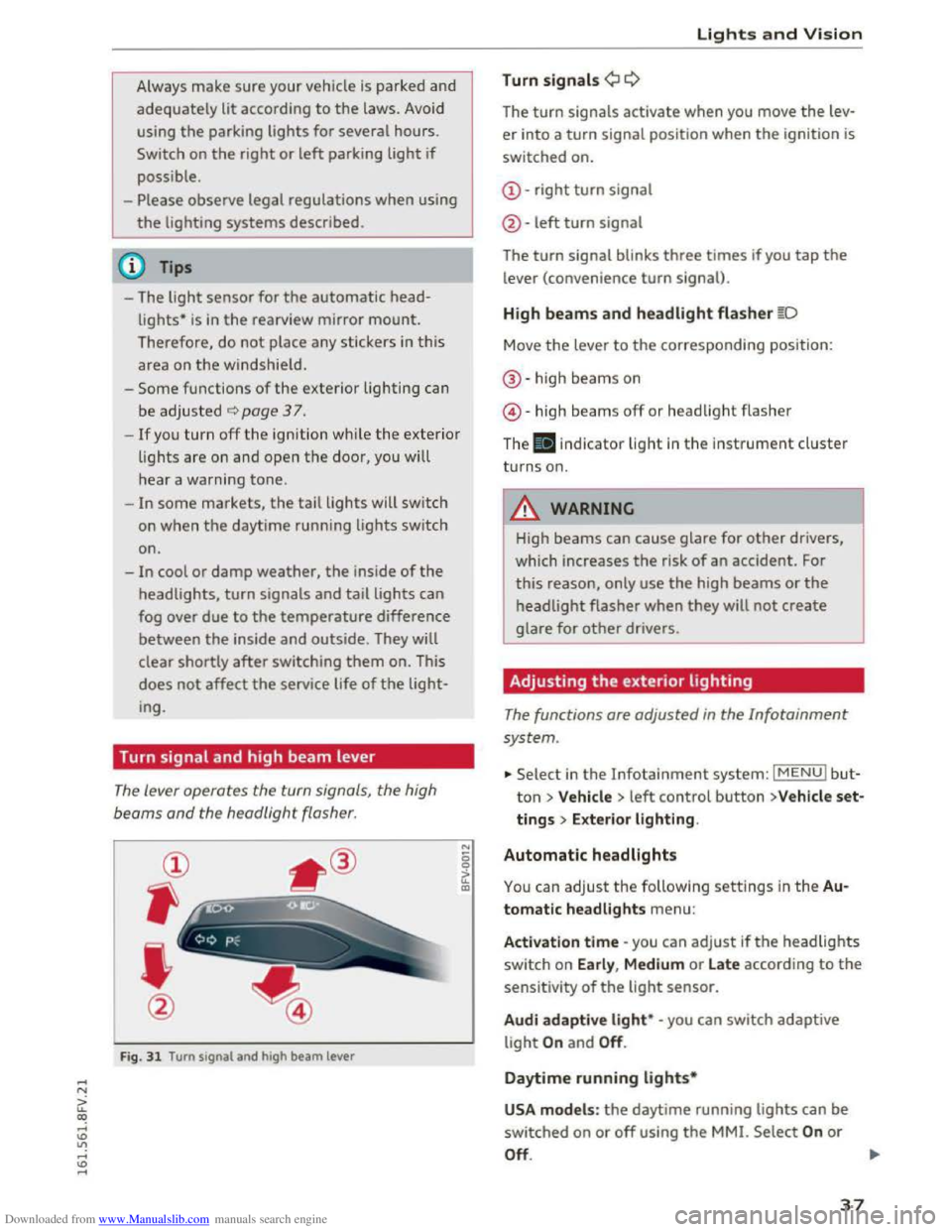
The lever operates the turn signals, the high
beoms
and the headlight flasher.
@
,
I
@
Fig. 31 Turn signal and high beam lever
"' 0 0
a'.: CXl
Lights and Vision
Turn signals¢ Q
The turn signals activate when you move the lev
er into a turn signal position when the ignition is
switched on.
@-right turn signal
@
-left turn signal
The turn signal blinks three times if you tap the
lever (convenience turn signal).
High beams and headlight flasher §D
Move the lever to the corresponding position:
®-high beams on
@-high beams off or headlight flasher
The . indicator light in the instrument cluster
turns on.
A WARNING
High beams can cause glare for other drivers,
which increases
the risk of an accident. For
this reason, only use the high beams or the
headlight flasher when they will not create
glare for other drivers.
Adjusting the exterior lighting
The functions are adjusted in the Infotainment
system .
... Select in the Infotainment system: IMENUI but
ton> Vehicle > left control button >V ehicle set
tings > Exterior lighting.
Automatic headlights
You can adjust the following settings in the Au
tomatic headlights
menu:
Activation time -you can adjust ifthe headlights
switch on Early, Medium or Late according to the
sensitivity of the light sensor.
Audi adapti ve light* -you can switch adaptive
light On and Off.
Daytime running lights*
USA models : the daytime running lights can be
switched on or off using the MMI. Select On or
Off. ....
37
Page 42 of 322

Downloaded from www.Manualslib.com manuals search engine Lights and Vision
Dimming the mirrors
Fig. 36 Automatic dimming rearview mirror•
Manual dimming rearview mirror
,...
-0
~ ID
... Pull the lever on the bottom of the mirror back.
Automatic
dimming rearview mirror*
... Press t h e button@ C) fig . 36. The ind icator
light @turns on. Interior and exterior mir rors*
will dim wh
en there is in com ing light (such as
headlights from the rear) .
A WARNING
Electro l
yte fluid can leak from automatic dim
m ing mirrors ifthe glass is broken . Electro
lyte fluid can
irritate skin, eyes and airways.
-
Repeated or long-term exposure to electr o-
lyte fluid can lead
to irritation of the air
ways, especially in people with asthma or
oth e r respiratory co ndi tions. T ak e deep
breaths immediately after leaving the vehi
cle or, if this is not possible, open all of th e
doors
and win dows as wide as possible .
-If electrolyte f luid enters the eyes, flush
t h
em thoroughly with a la rge amount of
clean wa ter for at least 1 5 mi nutes and t hen
seek medical attention.
- If e lectrolyte fluid comes into conta ct w ith
th e skin , flush the affected a rea with clean
water for at least 15 minutes and then clean
with
soap and water and seek medica l at
tention. Clean affected clothing and shoes
thoroughly befo re wearing again .
-
If the fluid was swallowe d and the person is
conscious, flush the mouth with water for at
least 15 m inutes. Do not induce vomiting
unless this is recommended by medical pro-
40
fessiona ls . Seek medical attention immedi
ately.
CD Note
I f t he
glass on an a utomatic dimming mirro r
b reaks,
electrolyte can leak out. T his liquid
damages plastic surfaces. Remove th e liquid
as quickly as possible, for example us ing a
wet sponge.
(!}Tips
-If the light reaching the rearview mirror is
obstructed, the automatic dimming mirror
w ill not function correctly,
- The
automatic dimming m irrors do not dim
when the interio r lighting is turned on or
th e reverse gear is selected .
Sun visors
Fig. 37 S un sh ade
The sun visors can be moved out of their brackets
and turned toward the doors C>fig. 37@ . The
mirror light switches on when the cover over the
vanity mirror@ opens .
Page 43 of 322
Downloaded from www.Manualslib.com manuals search engine ..... N
G: CX)
.....
"' U"I
.....
"' .....
Windshield wipers
Switching the windshield wipers on
Fig. 38 Windshield wiper lever
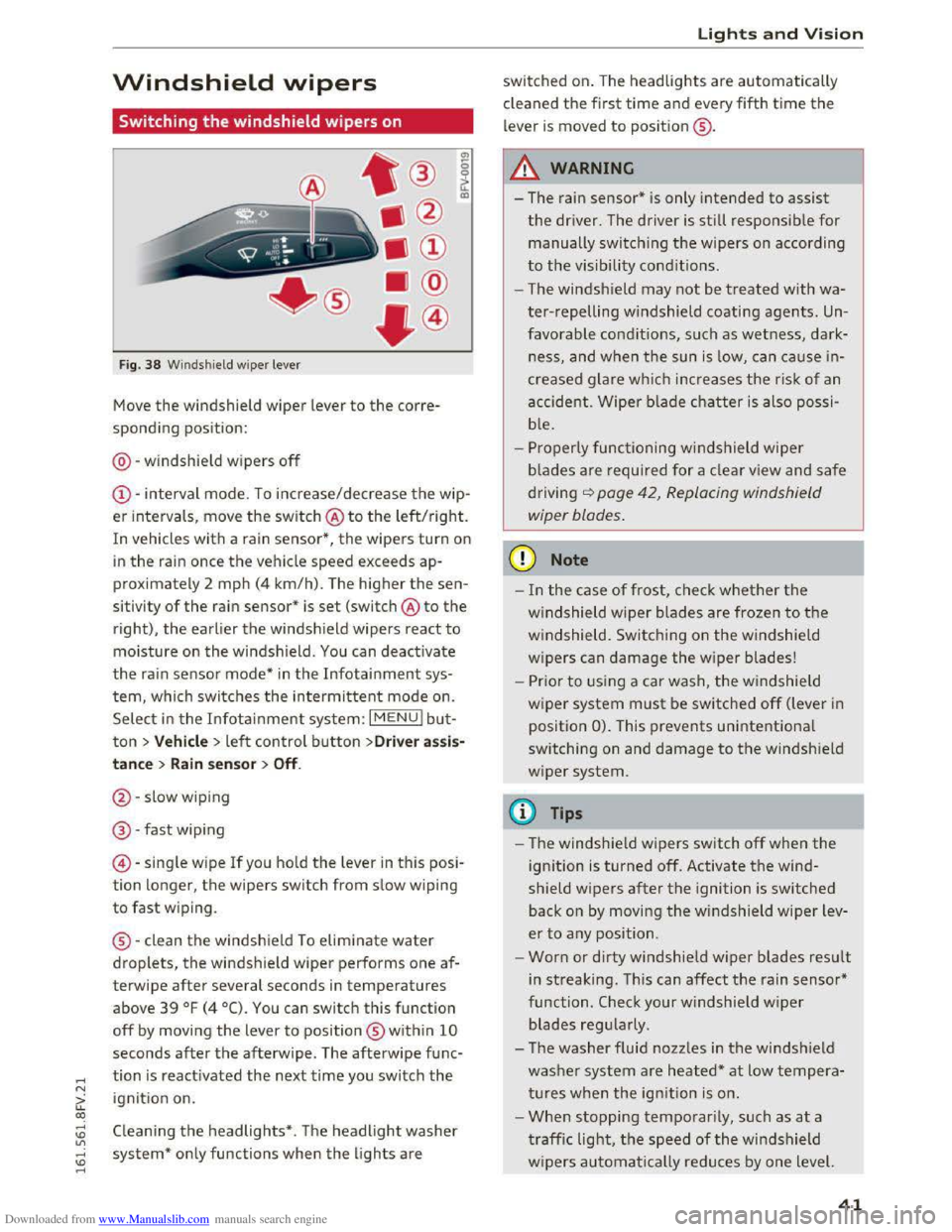
Move the windshield wiper lever to the corre
sponding position:
@ -windshield wipers
off
@-interval mode. To increase/decrease the wip
er intervals , move
the switch @ to the left/right.
In vehicles with a rain sensor*, the wipers turn on
in the rain once the vehicle speed exceeds ap
proximately 2 mph (4
km/h). The higher the sen
sitivity
of the rain sensor* is set (switch @ to the
right),
the earlier the windsh ield wipers react to
moisture on the windsh ield. You can deact ivate
the rain sensor mode* in the Infotainment sys
tem, which switches the intermittent mode on.
Select
in the Infotainment system: I MENU! bu t
ton> Vehicle > left control button >Driver assis
tance > Rain sensor > Off.
@-slow wiping
@ -fast wip ing
©
-singl e w ipe If you hold the lever in this posi
tion longer, the wipers switch from slow wiping
to fast wiping .
® -clean
the windshield To eliminate water
droplets, the windshield wiper performs one af
terwipe
after several seconds in temperatures
above
39 °F (4 °C). You can switch this function
off by moving the lever to position ® within 10
seconds after the afterwipe . The afterwipe func
tion is reactivated the next time you switch the
ignition on.
Cleaning the headlights* . The headlight washer
system*
only functions when the lights are
Lights and Vision
switched on. The headlights are automatically
cl eaned
the first time and every fifth time the
lever is moved to position ® ·
A WARNING
f-==" -I
- The rain sensor* is only intended to assist
the driver. The driver is still responsib le for
manually switching the wipers on according
to the visibility conditions .
- The windsh ield may
not be treated with wa
ter-repelling windshield coating agents. Un
favorable conditions, such as wetness, dark
ness, and when
the sun is low, can cause in
creased glare which increases
the risk of an
accident.
Wiper blade chatter is also possi
b l
e.
-Properly functioning windshield wiper
b lad
es are required for a clear view and safe
driving
<:::>page 42, Replacing windshield
wiper blades.
CD Note
-In the case of frost, check whether the
windshield wiper blades are frozen to the
windshield. Switching on the windshield
wipers
can damage the w ip er blades!
-
Prior to using a car wash, the windshield
w ip er system
must be switched off (lever in
position
0). This prevents unintentiona l
switching on and damage
to the windsh ield
wiper system .
@Tips
-The windshie ld wipers switch off when the
ignition is turned off. Activate the wind
shield wipers
after the ignition is switched
back on by moving
the windshield wiper lev
er
to any position.
-
Worn or dirty windshie ld wiper blades result
in streaking.
This can affect the rain sensor*
function .
Check your windshield wiper
blades regularly .
- The washer fluid nozzles in
the windshield
washer system are heated*
at low tempera
tures when
the ignition is on.
- When stopping
temporarily, such as at a
traffic light, the speed of the windshield
w ipers automatically reduces by one level.
41
Page 273 of 322
Downloaded from www.Manualslib.com manuals search engine -To reduce the risk of cuts, protect yourself
from sharp metal components when wash
ing th e underbody or the inside of the wheel
housings.
- After
washing the vehicle, the brak ing effect
may be delayed due to moisture on the
brake rotors or ice in the w inter. The brakes
must be dried first w ith a few careful brake
applications.
CD Note
-If you wash the vehicle in an automatic car
wash, yo u must retract the extendable rear
spoiler* if necessary, and fold the exterior
mirrors in to red uce the risk of damage.
Power folding exterior mirrors* must on ly
be fol
ded in and ou t u sing the power folding
function.
-
To p reve nt paint d amage, d o not wash th e
vehicle in dir
ect sunlight.
Care and cleaning
- To red uce the risk of damage to the surface,
do
not use insect removing sponges, kitchen
sponges or s imilar items.
-
Matte finish painted veh icle components:
-To reduce the risk of damage to the sur-
face, do not use polishing agents or hard
wax.
- Never u
se protective wax. It can destroy
the matte finish effect.
-
Do not place any stickers or magnetic
signs on vehicle parts painted with matte
finish paint. The paint could be damaged
when the stickers or magnets are re
moved .
@ For the sake of the environment
Only wash the vehicle in facilities sp ec ia ll y de
signed for that pu rpose. This will reduce the
risk of dirty water contamina ted with oil from
entering the sewer sys tem.
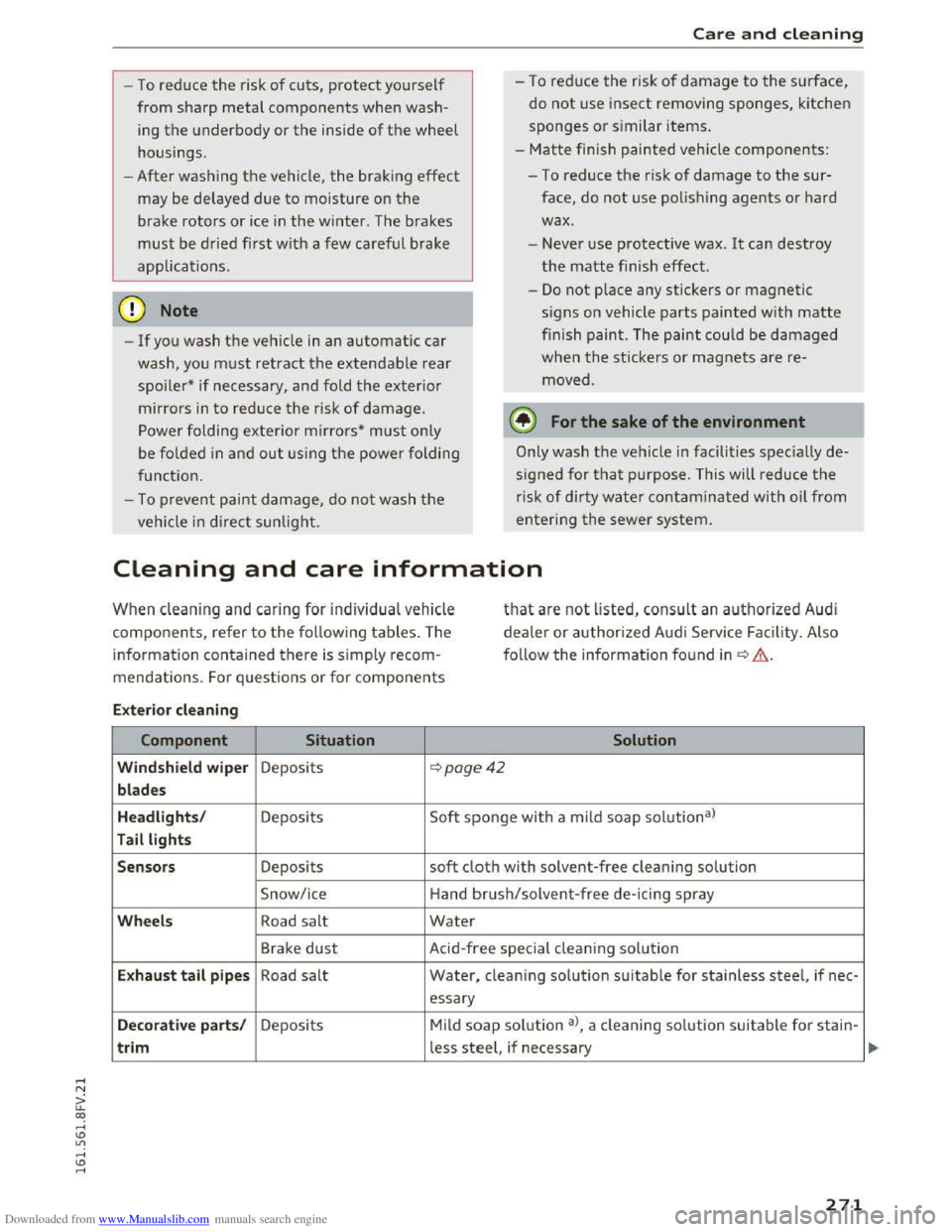
Cleaning and care information
When cleaning and ca ring for individua l vehicle
components, refer to the follow ing tables. The
information contained there is simply recom
mendations. For q uestions or for components
that are not listed, consult an authoriz e d Audi
de a
ler or authorized Audi Service Facility. Also
f o ll
ow the informa tion found in~.&..
Ext erior cleaning
Component Situation Solution
Windshield wiper Deposits ~poge42
blades
Headlights /
Deposits Soft sponge with
a mild soap solutiona)
Tail lights
Sensors
Deposits soft cloth with solvent-free clean ing solution
Snow/ice Hand brush/solvent
-free de-icing spray
Wheels Road salt Water
Brake dust Acid-free special cleaning sol u tion
E x haust tail p ipes Road salt Water, clean ing solution suitable for stainless steel, if nee -
essary
Decorative parts/ Deposits Mild soap solution a>, a cleaning solution suitable for stain-
trim less steel, if necessary
271
Page 275 of 322
Downloaded from www.Manualslib.com manuals search engine Care and cleaning
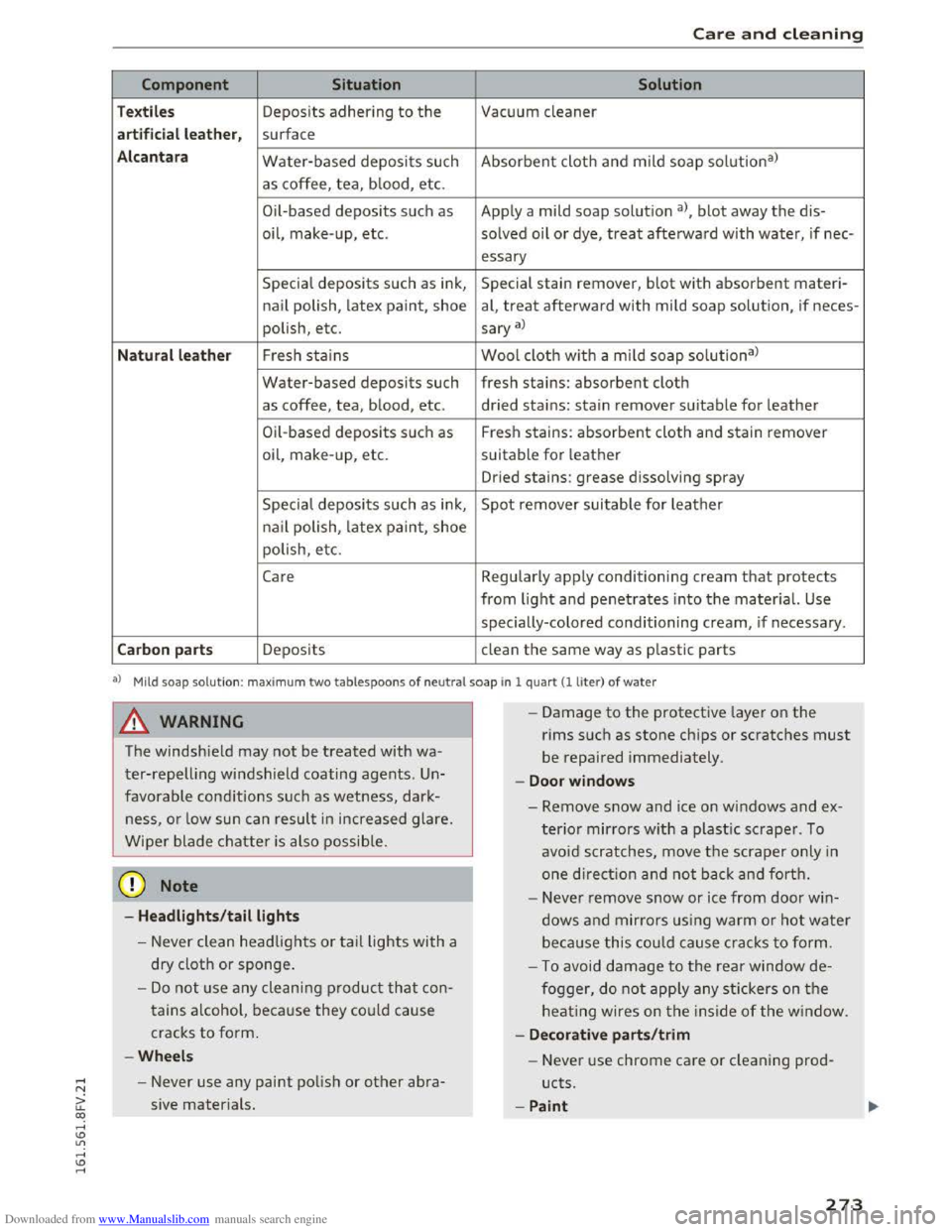
Component Situation Solution
Textiles Deposits adhering to the Vacuum cleaner
a rt ificial leat her , surface
Alc an tara Water-based deposits such Absorbent cloth and mild soap solu tion3>
as coffee, tea, b lood, etc.
O il-based
deposits such as Apply a mild soap solutio n a), blot away the dis-
oil,
make- up, etc. solved oil or dye, treat afterward with water, if nee-
essary
Special deposits such as ink, Special stain remover, blot with absorbent materi-
nail polish, latex paint, shoe al, treat afterward with mild soap solution, if neces-
polish, etc.
sary a)
Natural leather Fresh stains Wool cloth w ith a mild soap solutiona )
Water-based deposits such fresh stains: absorbent cloth
as coffee, tea, blood, etc. dried stains: stain remover suitable for leather
Oil-based deposits su ch as Fresh stains: absorbent cloth and stain remover
oil, make-up, etc. suitable for leather
Dried stains: grease dissolving spray
Specia l deposits such as ink, Spot remover suitable for leather
na il polish, latex paint, shoe
polish, etc.
Care Regularly apply conditioning cream that protects
from light and penetrates into the material. Use
specially-colored conditioning cream, if necessary .
Carbon parts Deposits clean the same way as plastic parts
al M ild soap sol u tion: max im um two tablespoons of ne u tra l soap in 1 quart(! liter) of water
A WARNING
The windshield may not be treated with wa
ter-repelling windshield coating agents. Un
favorable conditions such as wetness, dark
ness, or low sun can result in increased glare.
Wiper blade chatter is also possib le.
@ Note
-Headlights /tail lights
-Never clean headlights or tail lights with a
dry
cloth or sponge.
-Do not use any cleaning product that con
tains a lcohol, because they could cause
cracks to form.
-Wheels
- Never use any paint polish or other abra-
sive materials.
- I
-Damage to the protective layer on the
rims such as stone chips or scratches must
be repaired immediately.
-Doo r window s
-Remove snow and ice on windows and ex-
terior mirrors with a plastic scraper. To
avoid scratches, move the scraper only in
one direction a nd not back and forth.
- Neve r remove snow or ice from door win
dows and mirrors us ing warm o r hot water
beca u
se this could cause cracks to form.
- To avoid damage to the rear window de
fogger, do not apply any stickers on the
heating wires on the inside of the window.
- De corati ve parts/trim
- Never use chrome care or cleaning prod-
ucts.
-Paint
273