ECO mode AUDI TT COUPE 2017 User Guide
[x] Cancel search | Manufacturer: AUDI, Model Year: 2017, Model line: TT COUPE, Model: AUDI TT COUPE 2017Pages: 322, PDF Size: 79.73 MB
Page 65 of 322
CD
CD
.... N
" N ...... 0
0
Ill co
-Do not inadvertently press the accelerator
pedal when the vehicle is stopped if a gear is
engaged. Otherwise the vehicle will start to
move immediately, even if the parking brake
is set . This could result in a crash .
- Do not press the accelerator pedal when
changing the selector lever position while
the vehicle is stationary and the engine is
running.
- Never leave your vehicle with the engine running while in gear.
If you must leave
your vehicle when the engine is running, set
the parking brake and move the selector lev
er to the P position .
- To decrease the risk of an accident, these
lector lever must be in the P position and
the parking brake must be set before open
ing the hood and working on a running en
gine. Always read and follow the applicable
warnings¢
page 244, Working in the en
gine compartment.
{[) Note
Never let the vehicle roll downhill with engine
off and the selector lever in the
N position,
because this could damage the automatic
transmission and catalytic converter.
@ Tips
- Drive select: sporty shifting characteristics
can be selected using the
Dynamic driving
mode. The Infotainment display shows 5 as
the selector lever position instead of D.
- If you accidentally select N while driving,
take your foot off the accelerator pedal im
mediately and wait for the engine to slow
down to idle before selecting Dor 5 .
- If there is a power failure, the selector lever
will not move out of the P position. The
emergency release can be used if this hap
pens. Left-hand drive vehicles
q page 69.
Driving
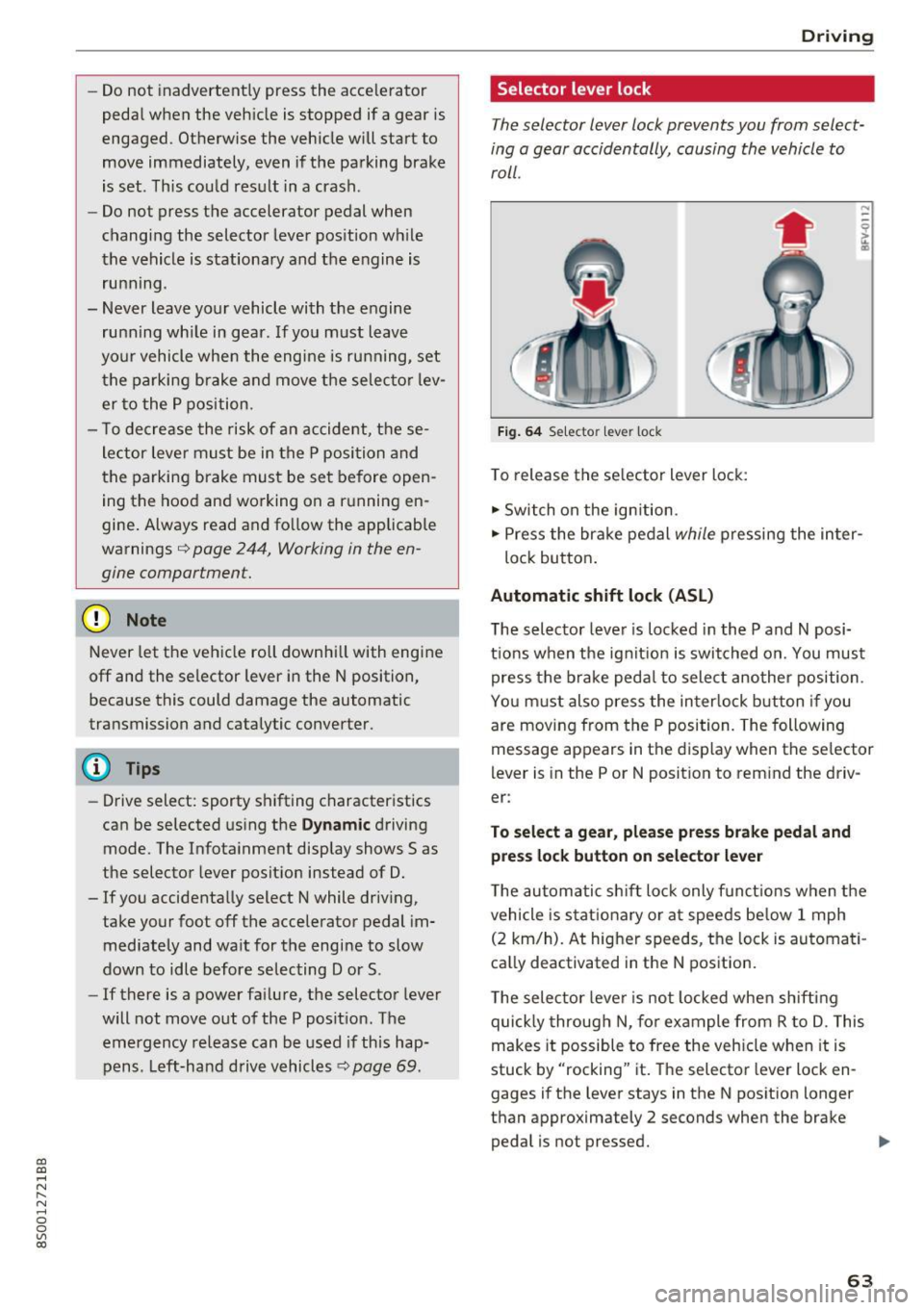
Selector lever lock
The selector lever lock prevents you from select
ing a gear accidentally, causing the vehicle to
roll.
Fig. 64 Selecto r lever lock
To release the selector lever lock:
.,. Switch on the ignition.
.,. Press the brake pedal
while pressing the inter-
lock button.
Automatic shift lock (ASL)
The selector lever is locked in the P and N posi
tions when the ignition is switched on. You must press the brake pedal to select another position.
You must also press the interlock button if you
are moving from the
P position. The following
message appears in the display when the selector
lever is in the P or
N position to remind the driv
er:
To select a gear, please press brake pedal and press lock button on selector lever
The automatic shift lock only functions when the
vehicle is stationary or at speeds below 1 mph
(2 km/h). At higher speeds, the lock is automati
cally deactivated in the N position.
The selector lever is not locked when shifting
quickly through N, for example from R to D. This
makes it possible to free the vehicle when it is
stuck by "rocking" it. The selector lever lock en
gages if the lever stays in the N position longer
than approximately 2 seconds when the brake
pedal is not pressed.
II>-
63
Page 67 of 322

co
co
.... N
" N .... 0
0
Vl c:o
Starting on a hill
"' Set the parking brake .
"'With the driving gear selected, press the accel
erator pedal carefully. The parking brake will
release automatically if your safety belt is fas
tened .
Under certain circumstances, such as driving in
the mountains, it may be useful to switch tempo
rarily to the manual shift program in order to
manually adjust the gears to the driving condi
tions ¢
page 66.
When parking on a level surface, simply place the
selector lever in the P position. On inclines, acti
vate the parking brake first and then move the selector lever to the P position ¢
page 60. This
prevents the locking mechanism from being
loaded too heavily and will make it easier to
move the selector lever out of the P position .
.8, WARNING
- The vehicle can roll even when the engine is
switched off.
- Unintended vehicle movement can lead to
serious injuries.
- Never leave your vehicle with the engine
running while in gear.
If you must leave
your vehicle when the engine is running, set
the parking brake and move the selector lev
er to the P position.
- Power is still transferred to the wheels
when the engine is running at idle. To pre
vent the vehicle from "creeping", you must keep your foot on the brake when the en
gine is running and the selector lever is in
the D, Sor R position or "tiptronic" mode is
selected.
- Do not inadvertently press the accelerator
pedal when the vehicle is stationary. Other
wise the vehicle will start to move immedi ately, even if the parking brake is set. This
could result in a crash.
- Do not press the accelerator pedal when
changing the selector lever position while
the vehicle is stationary and the engine is running .
Driving
-Never engage the R or P selector level posi
tions while driving. It could cause a crash.
- Before driving down a steep slope, reduce
your speed and shift into a lower gear with "ti ptronic".
- Do not ride the brakes or press the brake
pedal too often or too long when driving
downhill. Constant braking causes the brakes to overheat and substantially re
duces braking performance, increases brak
ing distance or causes complete failure of
the brake system.
- If you must stop on an incline, always hold
the vehicle in place with the foot brake or
parking brake to prevent it from rolling
back .
- Never hold the vehicle on an incline with a
slipping clutch. The clutch opens automati
cally when it becomes too hot from the
overload. The
mJ indicator light turns on
and a message appears ¢
page 68 when
the clutch is overloaded.
- If the engine must run while you are work
ing in the engine compartment with the
hood open, make sure a gear is not engag
ed. The selector lever must be firmly in the
P position and locked in place and the park
ing brake must be set ¢
page 244. Other
wise, the vehicle could begin moving when
increasing the engine speed, even with the
parking brake set .
(!) Note
- When stopping on an incline, do not try to
hold the vehicle in place by pressing the ac
celerator pedal while a driving gear is se
lected. This can cause the automatic trans
mission to overheat and can damage it. Set
the parking brake or press the brake pedal
to prevent the vehicle from rolling.
- Allowing the vehicle to roll when the engine
is stopped and the selector lever is in the N
position will damage the automatic trans
mission because it is not lubricated under
those circumstances.
65
Page 69 of 322

co
co
.... N
" N .... 0
0
Vl c:o
~ To shift down one gear, tap the shift paddle 0-
If the sh ift paddles are tapped while in the D/S
selecto r lever posit io n, automatic mode switches
off briefly . To switch from manually shifting back
to a utomatic shifting immediately, tap the shift
paddle G)¢fig . 67for 1 second .
To keep shifting using the shift paddles, move
the sele ctor lever to the right out of the D/S posi
tion into the t ipt ronic shift gate.
The transm ission automatically shifts up o r down
befo re critical engine speed is reached.
The transm ission only a llows manual sh ift ing
when the engine speed is within the permitted
range.
(D Tips
- If you sh ift to the next lowest gear, the
transm ission w ill only shift if the engine w ill
not be over-revved.
- With kick-down, the transmission shifts to a
l ower gear, depending on vehicle speed and
engine speed.
- tiptronic does not wo rk if the t ransmiss ion
i s r unning in emergency mode.
Kick-down
Kick-down enables maximum acceleration.
When you press the accelerator pedal down be
yond the resistance point , the automatic trans
m iss ion downshifts into a lower gear and the en
g ine utilizes its fu ll power , depend ing on veh icle
speed and engine R PM.
It shifts up into t he next
h igher gea r once the maximum spec ified engine
RP M is reached.
A WARNING
Please note that the wheels could spin on
slick or slippery roads when kick-down is ac
tive.
-
l ) T he ESC lig ht turn s on continuous ly and the mess age S ta·
b ili za tion co ntro l (E SC): sport. Warn ing! Red uced st abi l·
ity appe ars te mporar ily in th e I nfotainment syste m to in
di cate tha t the syste m wa s deact ivate d.
D riv ing
Launch Control-Program
The Launch Control Program enables maximum
acceleration .
Requirement: the engine must be at operating
temperature and the steering wheel must not be
turned .
~ With the engine running, press the l1' 0FF I but
ton briefly one t ime
l ).
~ Pull the selector lever back out of the D/S posi
tion briefly to select the S position, or press it
toward the r ight into the tiptron ic position or
select the
Dynamic dr iving mode in dr ive se
lect* ¢
page 79.
~ Press the brake pedal fi rm ly w ith your left foo t
and hold it all the way down for at least 1 sec
ond.
~ At the same time, p ress the gas peda l all the
way down with your right foot until the eng ine
reaches and stays at a high RPM level.
~ Remove your left foot from the brake.
A WARNING
- Always adapt your driving to the t raff ic flow.
- Only use Launch Control when road and traf-
f ic conditions allow it and other drivers will
not be endange red or impacted by your dr iv
ing and the vehicle's acceleration.
- Please note that the d rive wheels can spin
and the vehicle can b reak away when spo rt
mode is switched on, especially when the
road is slippery.
- Once the vehicle has started mov ing, press
the
! .P-O FF I button briefly to turn the spo rt
mode off.
(D Tips
- The transmission temperature may increase
significant ly after using the launch control
prog ram. If that happens, the prog ram may
no t be ava ilable for a few minutes.
It will be
avai lab le again afte r a cool -down period. ..,.
67
Page 70 of 322
Driving
-When acce lerating using the launch control
program, all vehicle parts are subject to
heavy loads . Th is can lead to increased
wear.
Emergency mode
In the event of a system malfunction, there is on
emergency program.
If all of the se lecto r lever posit ions are h ighlight
ed wit h a light background in the Infotainment
d isp lay, there is a system malfunction and the S
tron ic transmiss ion is running in the emergency
program . The vehicle can still be driven in emer
gency mode, but only with reduced speed and not in a ll gears . In some cases, the vehicle
can
not drive in rever se.
(D Note
If the transmission runs in emergency mode,
drive to an aut ho rized Aud i deale r or a uthor
ized Aud i Service Fac ility immediately to have
the malfunction corrected.
Transmission malfunction
• Tran smis sion: malfun ction! Please stop ve
hicle and shift to P
There is a malfunc tion in the transmiss ion. Pa rk
the vehicle se curely and do not continue driving.
See an autho rized Au di dea ler o r autho rized Aud i
Serv ice Facility for assistance .
• Transmission: too hot . Please stop vehicle
The transm ission is too hot and can become dam
aged . Stop and let the transm ission cool with the
engine run ning (at id le) in t he P selector leve r po
sition. Then the indicato r ligh t an d the message
tur n off, drive to an a uthorized Aud i dea le r or au
t hor ized Audi Se rvice Facility immed iate ly to have
the ma lfunction co rrected . If the ind icator light
and the driver message do not turn off, do not
continue dr iv ing. See an authorized A udi d ealer
or author ized Audi Se rvice Facility for assistance .
[O] Transmission: malfunction! You can contin
ue driv ing. See owner' s manual
68
Drive to an au thori zed A udi dealer or authori zed
Audi Se rvice Facility immediate ly to have the
malfunction cor rected.
[O] Tran smission: malfunction! You may contin
ue dr iving. No reverse gear
Drive to an authorized A udi dealer or au thorized
Audi Se rvice Fa cility immed iate ly to have the
malfunc tion cor rec ted .
ml Tran smiss ion: malfunction! You may contin
ue driving in D until engine off
Drive the vehicle away from mov ing traff ic and
park . See an author ized Audi dealer or author ized
Audi Se rvice Facility for assis tance.
ml Transmission: too hot . Please adapt driving
style
Continu e driving moderate ly. When the indicator
li ght turns off, you can cont inue driving norma l
l y.
ml Tran smission: Plea se press brake pedal and
select gear again
I f the transm iss ion m alfu nct io ns bec ause the
temperat ure is too high, a message appe ars
when the t ransmission is cooled .
Page 73 of 322
co
co
.... N
" N .... 0
0
Vl c:o
speed and the distance between your vehi
cle and other vehicles.
- For safety reasons, cruise control should not
be used in the city, in stop-and-go traffic, on
winding roads and when road conditions are
poor (such as ice, fog, gravel, heavy rain and
hydroplaning), because this increases the
risk of a n accident.
- Switch the cruise control off temporarily
when driving in turning lanes, highway exits
or in construction zones.
- Please note that unconsciously "resting"
your foot on the accelerator pedal prevents
the cruise control from braking. This is be
cause pressing the accelerator pedal over
rides the cruise control system.
- If a brake system malfunction such as over
heating occurs when the cruise control sys
tem is switched on, the braking function in
the system may be switched off . The rest of
the cruise control system functions remain
active as long as the
@;\1)~14 (USA models) I
ill (Canada models) indicator light is on.
@ Tips
The brake lights turn on when the brakes are
app lied automatica lly.
Changing speed
Applies to: veh icles with c ruise control system
.. To increase/decrease the speed in increments,
briefly
tap the lever toward 010 Q page 70,
fig. 70 up/down to the first level.
.. To increase or decrease the speed in incre
ments,
tap the lever toward 010 Q page 70,
fig. 70 up/down to the second level.
.. To increase or decrease the speed quickly ,
hold
the leve r in the 0 / 0 direction until the de
sired speed is reached .
Overriding the speed
Applies to: veh icles with c ruise control system
You can press the accelerator pedal down to in
crease your speed, for example if you want to
pass someone. The speed you set earlier wi ll re-
Assist
sume as soon as you release the acce lerator ped
al.
However, if you are exceeding the stored speed
by a considerable amount for a long time, the
cruise contro l system will temporarily switch off.
The
(ff;ji )~i4 (USA mode ls) Iii (Canada mode ls) in
dicator light in the instrument cluster turns off
and the stored speed is maintained.
Preselecting the speed
Applies to : vehicles with cruise control system
You can pre-select your desired speed when the
vehicle is stationary.
.. Switch on the ignition.
.. Pull the lever into position (!)
Q page 70,
fig. 70.
.. To increase or decrease the speed, tap the lever
toward
0 10 .
This function makes it possible, for example, to
save the speed you want before driving on the
highway . Once you are on the expressway, acti
vate the cruise control system by pulling the lev
er into position (!).
Switching off
Applies to: vehicles with cruise control system
Temporary deactivation
.. Press the brake pedal, or
.. Press the lever toward@(not locked into
place)
Q poge 70, fig. 70.
Switching off completely
.. Press the lever into position @(clicked into
place), or
.. Switch the ignit ion off .
The speed you stored will be maintained if the cruise control has been switched off temporarily .
To resume the stored speed, release the brake or
clutch pedal and pull the lever to position (!).
Switching the ignition off will erase the stored
speed .
71
Page 81 of 322

co
co
.... N
" N .... 0
0
Vl c:o
The display brightness adjusts automatically to
the brightness of the surroundings, both in the information and in the warning stage. In very
dark or very bright surroundings, the automatic
adjustment will set the display to the minimum
or maximum level. In such cases, you may notice no change when adjusting the brightness, or the
change may only be noticeable once the sur roundings change.
Adjust the brightness to a level where the display in the information stage will not disrupt your
view ahead .
If you change the brightness, the dis
play in the exter ior mirror will briefly show the
brightness level in the information stage. The
brightness of the warning stage is linked to the
brightness in the information stage and is adjust
ed along with the information stage.
(D Tips
- Side assist is not active while you are ma k
ing the adjustment.
- Your settings are automatically stored and
assigned to the remote control key being
used.
Messages
Applies to: veh icles with Audi side assist
If the side assist switches off automatically, a
message appears in the Infotainment system dis
play.
@j Audi side assist : cur rently unavailable.
Sensor vision restricted due to surroundings.
See owner's manual
The radar sensors' vision is affected. Do not cover
the area in front of the sensors with bike wheels,
stickers, dirt or other objects . Clean the area in
front of the sensors, if necessary~
page 77,
fig. 80.
@j Audi side assist: currently unavailable.
See owner's manual
Side assist cannot be switched on at this time be
cause there is a malfunction (for example, the
battery charge level may be too low).
Assist
@j Audi side assist: malfunction! Please
contact Service
The system cannot guarantee that it will detect
vehicles correct ly and it has switched off. The
sensors have been moved or are faulty . Have the
system checked by an authorized Audi dealer or authorized Audi Service Facility soon .
Audi drive select (drive
settings)
Introduction
Applies to : vehicles with Audi drive se lect
Drive select makes it possible to experience dif
ferent types of vehicle sett ings in one veh icle .
The driver can select from three modes,
Comfort,
Auto
and Dynamic , using the ~t.~, button in the
center console or by using the Infotainment sys
tem. This allows you to switch between a sporty
and a comfortable driving mode, for example. In
the
Individual mode, the settings can be adjust
ed to your persona l preferences . This makes it
possible to combine settings such as a sporty en
gine setting with light steering.
A WARNING
=
Using Audi drive select incorrectly can lead to
collis ions, other accidents and serious inju
ries .
Description
Applies to: vehicles with Audi drive se lect
The vehicle setup in each mode depends on the
vehicle's features. However, the engine and
steering are always affected .
Engine and automatic transmission
Depending on the mode, the engine and auto
matic transmission respond more quickly or in a
more ba lanced manner to accelerator pedal
movements.
Adaptive dampers (Audi magnetic ride)*
The adaptive dampers use sensors to record in
formation regarding steering movements, brak
ing and acceleration ope rations by the driver,
road surface, driving speed, and load. With d rive .,..
79
Page 94 of 322
Intelligent Technology
snow and ice. Always read and follow safety pre
cautions
¢ & .
Winter tires
By using all wheel drive, your vehicle has good
forward motion with standard tires in winter con
ditions. However, in winter we recommend using
winter or all season tires on
all four wheels, be
cause this will improve the
broking effect.
Snow chains
If there are snow chain laws, snow chains must
also be used on vehicles with all wheel drive
¢ page 2 70, Snow chains.
Replacing tires
For vehicles with all wheel drive, only whee ls with
the same rolling circumference should be used .
Avoid using tires with different tread depths
¢ page 262, New tires or wheels.
Offroad vehicle?
Your Aud i is not an offroad vehicle - there is not
enough ground clearance. For this reason, avoid
difficult terrain.
_&. WARNING
-Also, in vehicles with all wheel drive, adapt
your driv ing style to the current road and
t ra ffic conditions. Do not let the increased
safety provided tempt you into taking risks,
because this increases the r isk of an acci
dent.
- The braking ability of your vehicle is limited
to the traction of the wheels. In this way, it
is not different from a two wheel drive vehi
cle. Do not be tempted to accelerate to a
high speed when the road is slippery, be
cause this increases the risk of an accident.
- Note that on wet streets, the front wheels
can "hydroplane" if driving at speeds that
are too high. Unlike front whee l drive
vehicles, the eng ine does not rev highe r sud
denly when the vehicle begins hydroplaning.
For this reason, pay attention to the road
conditions regardless o f your speed.
92
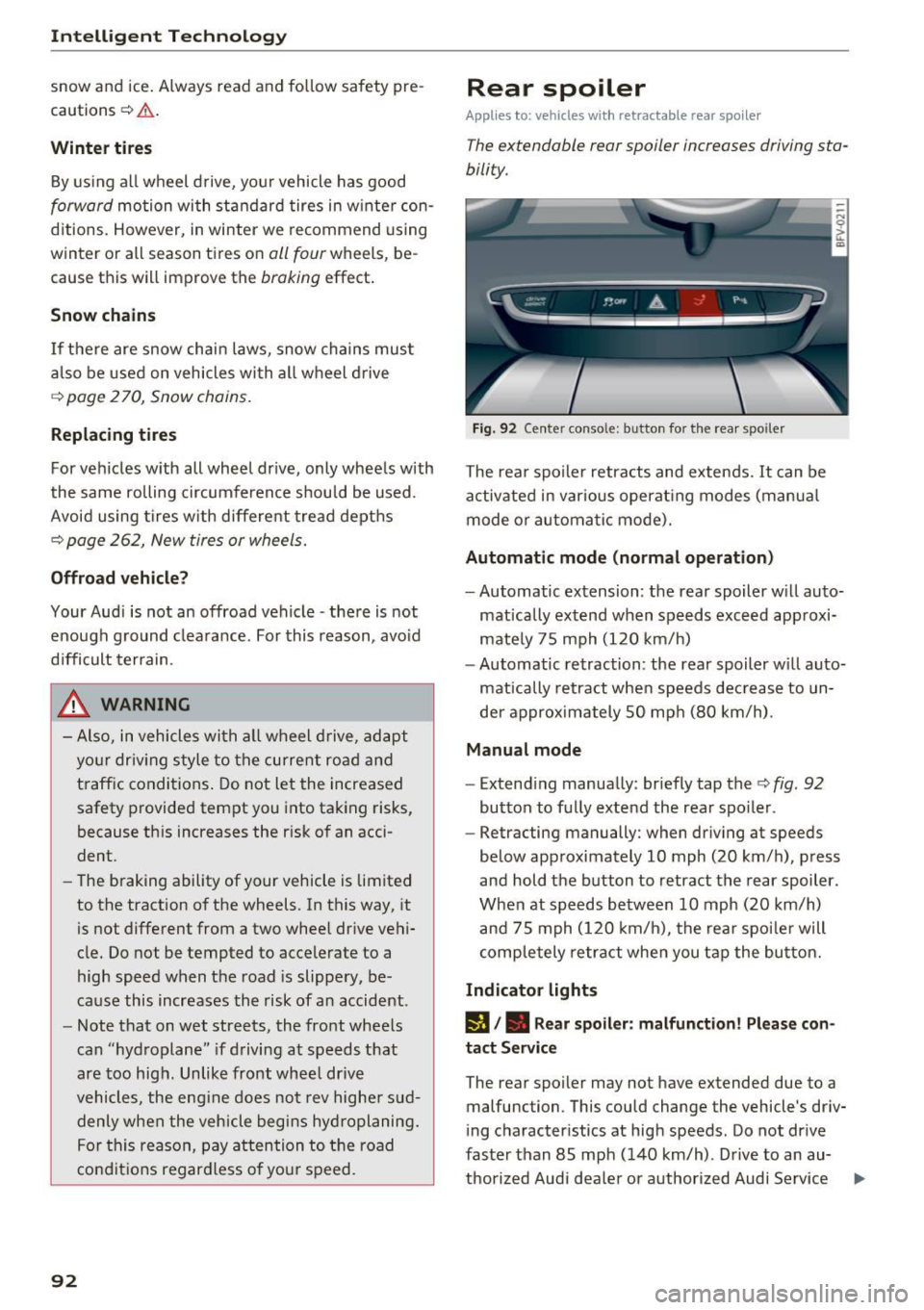
Rear spoiler
Appl ies to: vehicles with retractable rear spoile r
The extendoble rear spoiler increases driving sta
bility.
Fig. 92 Center conso le: button for the rear spoiler
The rear spoiler retracts and extends. It can be
activated in various operat ing modes (manua l
mode or automatic mode).
Automatic mode (normal operation)
- Automatic extension: the rear spoiler w ill auto-
mat ically extend when speeds exceed approxi
mately 75 mph
(120 km/h)
- Automatic retraction: the rear spoiler w ill auto
matically retract when speeds decrease to un
der approximately 50 mph (80 km/h).
Manual mode
-Extend ing manually : briefly tap the¢ fig. 92
button to fully extend the rear spoiler .
- Retracting manually: when driving at speeds
below approximately
10 mph (20 km/h), press
and hold the b utton to retract the rear spoiler .
When at speeds be tween
10 mph (20 km/h)
and 75 mph
(120 km/h), the rea r spoi ler will
completely retract when you tap the button.
Indicator lights
IJ,. Rear spoiler: malfunction! Please con
tact Service
The rear spoiler may not have extended due to a
malfunction. This could change the vehicle's driv
ing characteristics at high speeds. Do not drive
faster than 85 mph
(140 km/h) . Drive to an au-
thorized Audi dea ler or authorized Audi Service ..,.
Page 135 of 322
co
co
.... N
" N .... 0
0
Vl c:o
-Using Audi connect services requires a mini
SIM card with data options and, when using
L TE*, it also requires L TE options.
- Usage of Audi connect services depends on
the availability of services through third par
ty providers.
- Also note the information in the chapter
¢ page 114, Telephone.
-Audi connect is designed for use only with
the provided SIM card. Receiving data pack
ets from the Internet will quickly increase
the volume of data used. For more informa
tion, contact Audi connect customer service
at 877-S0S-AUDI (2834).
- The Audi connect services are available in
the USA. Audi connect services are currently not available in Canada or in Mexico.
- Availability, scope, providers, screen display
and costs of services may vary depending on
the country, model, model year, end device
and rates. Additional information can be
found under
www.audiusa.com/audicon
nect.
- An initial registration/activation on the
myAudi platform at
my.audiusa.com is re
quired to use individual services. You can
contact an authorized Audi dealer or Audi
connect customer service at 877-505-AUDI (2834) to receive information on options for
expanding your usage and any costs that
may result.
- It is only possible to use Audi connect serv
i ces with a valid Audi connect SIM card.
- To ensure all of the Audi connect features
work correctly, Audi recommends setting up
data service and a Wi-Fi package with your
network service provider. Your network
service provider can be authorized by law,
through a judicial order or other lawful in
structions, to disclose the position of your
vehicle. Additional information on your cell
phone service provider's privacy policies can
be found in their Terms of Use.
- The Audi connect services are a Wi-Fi/Inter
net-based system. If the system does not
function correctly even though all of the re
quirements are met, please try again later
Audi connect
or contact Audi connect customer service at
877-505-AUDI (2834).
- For detailed information on Audi connect
and the Terms of Use, visit
www.audiusa.com/audiconnect.
Data protection
Applies to : vehicles wit h Aud i connect
(D Tips
- You can find additional information in your
MMI in the options menu¢
page 98 for the
selected Audi connect service and also on
the Internet at
www.audiusa.com/audicon
nect.
- Your privacy is important to us.
- AUDI AG collects, processes, shares and
transmits your personal information in ac
cordance with legal regulations in order to
ensure proper function and availability of
the individual Audi connect services. You
can view the complete, current and valid
Audi connect data protection policy in your MMI. The myAudi website is available for to
you to activate additional Audi connect serv ices and to transfer data with your vehicle,
among other services. A one-time registra
tion is required to establish a connection to
your vehicle. For this purpose, AUDI AG col lects, processes, transmits and uses your re
quired personal information as required for
you to use the services provided by AUDI
AG. Your information is not distributed to
third parties. Using your cell phone with the help of your myAudi platform, you can
transfer information for Audi connect serv
ices functions to your vehicle and allow spe
cific information to be transmitted from
your vehicle .
- By activating special information services
that are part of your Audi connect portfolio,
you can use these functions directly in your
vehicle by entering data to confirm your identity (to use social networks, for exam
ple). To do this, the identification informa
tion you provided is forwarded with the re
quest to the respective service provider.
Then you can access your personal content .,.
133
Page 177 of 322
co
co
.... N
" N .... 0
0
Vl c:o
Individual speech training (o nly when the vehi
cle is stationary): yo u can adapt the vo ice recog
n it ion system to yo ur voice or pron unc iation in
order to improve the system's ability to recogni ze
your speec h. Individua l tra in ing is comp rised of
20 speec h entries that cons ist o f comman ds and
sequences of nu mbers . Yo u can delete t he p ro
g ra m med vo ice tr aining w it h t he
Reset individu
al speech training
f unc tion.
Factory settings
The fo llow ing funct io ns can be reset to the facto
ry de fault set tings :
-Sound settings
- Radio
- Media settings
-Jukebox *
- Directory *
- Telephone*
- Bluetooth and Wi -Fi *
- Navigat ion settings *
- Navigation and online memory*
- Voice recognition system*
- Message settings *
-Apps *
- Tool tips
- Audi connect *
You can se lect the desi red functions individually
or all at once with t he
Select all entries option.
Selec t and confi rm
Restore factory settings .
@ Tips
-Make s ure t hat not only t he settings we re
deleted but also the store d data, if ap plica
ble.
- If yo u reset the
Navigation and online
memory* or Audi connect*
to t he factory
default settings, t he system automatically
r estarts after approximate ly 20 seconds.
Th e In fota inm en t system display will b e
b lac k for sev eral minu tes when restar ting.
System settings
Connection manager
Introduction
The connection manager gives you an overview
of your conn ected d evices and their network sta
tus .
"'Select: !M EN UI button> Settings > left control
button >
MMI settings > Connection manager .
"'Select and confirm a m enu i tem .
If a mobi le device was already c onnected and you
select and co nfirm the co rresponding menu item,
the device name and co nnect io n mode a re dis
played under the men u item .
You can ind iv id ually
connect (~) or disconnect
(0) a pa ired device.
Using the telephone
App lies to : vehicles wit h te lepho ne
- Connect new device: searc h fo r a nd con nect a
cell p hone .
- List of devices already paired : select yo ur cell
pho ne from t he list of all th e de vic e s tha t are
alr eady pair ed .
Second telephone
App lies to : vehicles wi th telepho ne
- Connect new device: se arch for an d co nne ct a
c ell p hone.
- List of devices already paired : selec t your c ell
p hon e fr om th e list o f all the dev ices that ar e
a lready paire d.
Data connection
Appl ies to: vehicles wi th Audi connec t
-Connect new device: sea rc h fo r and con nect a
mob ile dev ice (such as a sma rtphone) .
-List of devices already paired : select yo ur cell
p ho ne from t he list of a ll the dev ices t hat a re
already paired.
Or : inse rt a m ini SIM ca rd into
the SIM card reader*¢
page 126.
175
Page 214 of 322
Airbag syste m
Make sure that the PASSENGER AIR BAG
OFF
11;; li ght comes on and stays on all t he
t ime whenever the ignition is switched on.
A WARNING
-
- If the PA SSEN GER AIR BAG OFF 11;; light
does not go out when an adult is si tting on
the front passe nger seat a fter ta king the
steps described above, make sure the adult is p roperly seated and restrained at one of
the rear seating positions.
- Have the airbag system inspected by your
Audi dealer befo re t ransporting anyone on
the front passenger seat.
@ Tips
If the capacitive passenger detection system
determines that the front passenger seat is
empty, the frontal airbag on the passenge r
side w ill be tu rned off, and the
PASSENGER
AIR BAG OFF
11;; light will stay on.
Repair , care and disposal of the airbags
Parts of the a irbag system are installed at many
different places on your Audi. Installing, remov ing, servic ing or repa iring a part in an area of the
ve hicle can damage a part of an airbag system
and prevent that system from working properly
i n a collision .
There are some important things you have to
know to make sure that the effectiveness of the
system w ill not be impaired and that discarded
components do not cause injury or pollute the
env ironment.
A WARNING
Improper care, serv icing and repai r proce
dures can increase the r is k of personal injury
and death by preventing an airbag from de
ploying when needed or dep loying an airbag
unexpectedly:
-
- Never cover, obstruct, or change the stee r
ing wheel horn pad or airbag cover or the in
strument pane l or modify them in any way.
212
- Never attach any objects s uch as c up ho lders
or telephone mountings to the surfaces cov
ering the a irbag un its.
- For cleaning the horn pad or instrument
panel, use only a soft, dry cloth or one mois
tened w ith plain water. Solvents or cleaners
could damage the airbag cover or change
the st iffness or strength of the material so
that the airbag canno t deploy and p rotect
properly.
- Never repair, adjust , or change any parts of
the airbag system.
- All work on the steering wheel, inst rument
panel, front seats or e lectr ica l system ( in
cluding the installation of a udio eq uipment,
cellular telephones and C B radios, etc.)
m ust be perfo rmed by a qualified techn ician
who has the training and specia l equipment
necessary.
- For any work on the airbag system, we strong ly recommend that you see your au
thorized A udi dealer or qualified workshop.
- Never modify the front b umper or parts of
the vehicle body.
- Always make sure that the side a irbag can
inflate w ithout interference:
- Never install seat covers or replacement
upholstery over the front seatbacks that
have not been specifically approved by
A udi.
- Never use additional seat c ushions that
cover the areas where the side airbags in
flate.
- Damage to the orig inal seat cove rs or to
the seam in the area of the s ide airbag
module mus t alway s be repaired immedi
ate ly by an autho riz ed Au di dealer.
- The a irbag system can deploy on ly once. Af
ter an airbag h as been deployed, i t m ust be
repla ced with new replacement parts de
signed and approved espec ia lly for your
Audi model version . Replacement of com
plete airbag systems or airbag components
must be perfo rmed by qua lified workshops
only. Make su re that any airbag service ac
tion is entered in your A udi Warranty
&
Ma intenance boo klet under AIRBAG RE-
PLAC EM EN T RECORD.
~