warning AUDI TT COUPE 2017 User Guide
[x] Cancel search | Manufacturer: AUDI, Model Year: 2017, Model line: TT COUPE, Model: AUDI TT COUPE 2017Pages: 322, PDF Size: 79.73 MB
Page 21 of 322
CD
CD
.... N
" N .... 0
0
Ill co
Driver information system
Overview
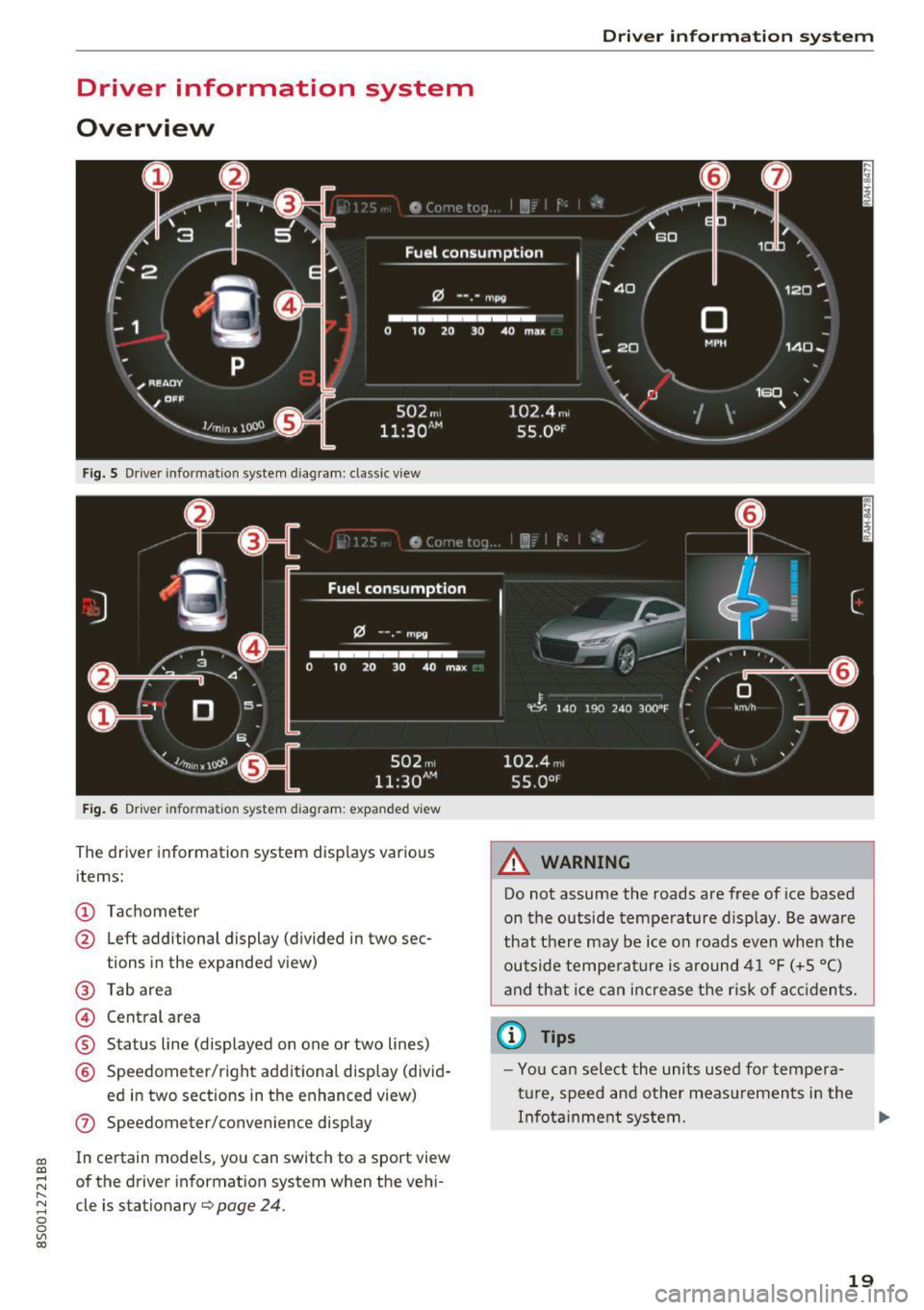
Fig. S Dr iver information system diagram: classic v iew
Fig. 6 D river information system diagram : expanded view
The driver information system displays various
items:
@ Tachometer
@ Left additional display (divided in two sec-
tions in the expanded view)
@ Tab area
@ Central area
® Status line (displayed on one or two lines)
@ Speedometer/right additional display (divid-
ed in two sections in the enhanced view)
(J) Speedometer/convenience display
In certain models , you can sw itch to a sport view
of the driver information system when the vehi
cle is stationary
¢ page 24 .
Driver in forma tion system
A WARNING
-Do not assume the roads are free of ice based
on the outside temperature display . Be aware
that there may be ice on roads even when the
outside temperature is around 41 °F (+5 °C)
and that ice can increase the risk of accidents.
(D Tips
-You can select the units used for tempera
ture, speed and other measurements in the
Infotainment system. .,,.
19
Page 22 of 322

Drive r inf orm ati on sy stem
- If your vehicle is stationary or if you are driv
ing at very low speeds, the temperature dis
played may be s light ly higher than the ac
tual temperature outside due to the heat
radiating from the engine.
- At temperatures below 41 °F (+S
0
(), a
snowflake symbol appears in front of the
temperature display¢,&.
Multifunction steering
wheel plus
Operating
A pp les to: ve hicles w ith multifunctio n steering wheel p lus
The Multifunction steering wheel plus* hos 14
buttons. You con use them to operate the driver
information system and the MMI functions ,
change the volume and switch the voice recogni
tion system* on and off.
Fig . 7 Infotainment system display
Fig . 8 Mult ifunc tion steering whee l, left side
Req uirement: the ignition must be switched on.
The driver information system contains mult iple
tabs
(D that display various informat ion @.
The follow ing tabs are available, depending on
veh icle equipment :
20
First tab Vehicle
Second Warnings
tab
a)
Third tab Radio c::> page 150
Media c::>page 155
Fourth tab Telephone*¢ page 114
Fifth tab Navigation
* c::> page 135
Map* c::> page 143
Sixth tab b) Sound¢ page 17 4
Audi connect*¢ page 126
Settings c::> page 174
a) This tab is only visible if at le ast one indicat or light or
message is shown or
if t h e correspond ing system is
switched on.
b) The contents of the tab de pend on the menu that was
used last.
@ Button ~
-Swit ch ing tab s: p ress the l<1 1>I bu tto n to the
left/right (for example, radio).
@ !VIEWI button
S witching th e view : press the !VIEWI button to
switch from the classic v iew
c::> page 19, fig. 5 to
the e nhanced view
c::>page 19, fig. 6.
@button ~
Returning to funct ions at higher levels
@ 121 and 19 contr ol butt ons
Opening/closing the selection menu or options
menu
c::> page 21.
(J) Left thumbwheel
-Sele cting a function in a m enu /list : turn the
left thumbwheel to the des ired function in a
menu or list (such as se lecting a station, Lap
times*) .
-Co nfirming a selection : press the left thumb
wheel (for example, confirm the station).
-Zoomin g in /out on th e map : when a map is
disp layed, turn the le ft thumbwheel up/down
to zoom in/o ut on the map.
Page 24 of 322
Driver information system
© button l1<1<1 I l1>1>1 I
-Selecting the previous/next tr ack or station :
press the ll
- Fast forwarding /re winding audio file s: press
and ho ld the
! 1q<] I or l1>1> 1I bu tton un til t he desired
location in the fi le is reached .
@button @
- Programmable steering wheel button - open
ing a function :
press the@ bu tton.
- Programmable steering wheel button - re
questing a function :
ho ld dow n the Ill button.
- Programmable steering wheel button - chang
ing a function:
selec t the fi rst tab> Vehicle
settings
> Steering wheel button a ssignment .
@ button 1~·" 1
- Repeating the last navigat ion prompt : press
the
I Q•,.., I button when route guidance is active.
- Changing the voice guidance volume : when
route gu idance is active, turn th e right thumb
whee l upward or dow nward d uring a navigat ion
prom pt.
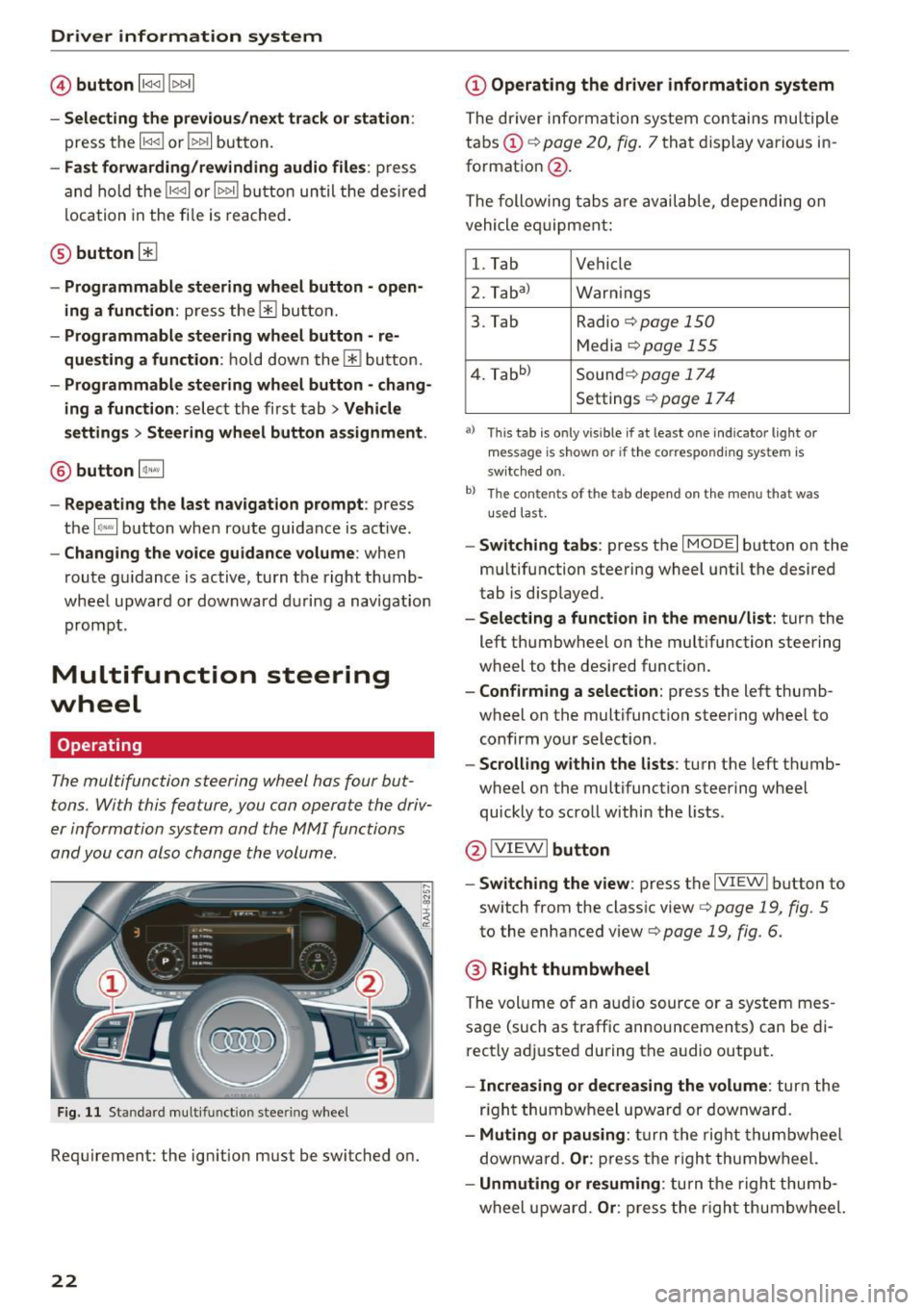
Multifunction steering
wheel
Operating
The multifunction steering wheel has four but
tons. With this feature, you can operate the driv
er information system and the MMI functions
and you can also change the volume.
Fig . 11 Standard multifunction stee ring wheel
Requirement: the ignition must be switched on.
22
(D Operating the driver information system
The driver information system contains multiple
tabs (!)¢
page 20, fig . 7 that disp lay various i n
format ion
@ .
The following tabs a re av ail ab le, depe nding on
vehicle e quipment:
l. Tab Vehicle
2. Taba )
Warnings
3. Tab Radio
c::> page 150
Media c::>page 155
4. Tabb )
Sound¢ page 174
Settings ¢page 17 4
a) Thi s tab is only v is ib le if at least one indicator lig ht or
message is shown or if t he co rrespond ing sys te m is
sw itched o n.
b ) Th e co ntents of th e tab depend on the menu t hat was
u se d l ast.
-Switch ing tabs : press th e I MODE I button on the
m ultifunction steering wheel unt il the desired
tab is disp layed .
-Selecting a function in the menu/list : turn the
left thumbwheel on the multifunction steering
wheel to the desired function .
-Confirming a selection : press the left thumb
wheel on the multifunction steering wheel to
confirm your selection.
-Scrolling with in the lists : turn the left thumb
wheel on the multifunction steering whee l
quickly to scro ll within the lists .
@!VI EWI button
- Switching the view :
press the IVIEWI button to
switch from the class ic view
c::> page 19, fig. 5
to th e enhanced view c::> page 19, fig. 6.
® Right thumbwheel
The volume o f an a udio source o r a system mes
sage (such as traffic announcements) can be di
r ectly adjusted during the a udio output.
- Increasing or decreasing the volume : turn the
r ig ht thumbwheel u pward or downwa rd.
- Muting or pausing : turn the rig ht thumbwhee l
downwa rd.
Or : press th e righ t thumbwheel.
- Unmuting or resuming : turn the righ t thumb
wheel u pw ard.
Or : press the r igh t thumbwheel.
Page 28 of 322
Opening and clo sin g
@ Key tag with PIN
Only app lies to veh icles with Connec tiv ity serv
ice*: open the key fob and rub th e PIN unti l it is
visib le. You can activate the Connectivity service*
on your vehicl e using this PIN code.
Replacing a key
If a key is lost, see an authorized Audi dealer or
author ized Audi Service Facility. Have
this key de
activated . It is important to bri ng a ll keys with
you . If a key is lost, you should report it to your
insuranc e company.
Numb er of keys
You can check the n umber of keys ass igned to
your veh icle in the Infotainment system . To do
this, select : the
I MEN U I button > Vehicl e > left
control b utton
> Service & chec ks > Vehicle in
fo rm ation .
This way, you can make sure that you
have all the keys when purchasing a used vehicle .
Electron ic immobili ze r
The immobilizer preven ts unauthorized use of
the vehicle .
Under ce rtain c ircumstances, the ve hicle may not
be ab le to start if the re is a key from a differe nt
vehicle manufact urer on the key chain .
Data in the master k ey
When driving, service and maintenance-relevant
data is continuously stored in your remote con
trol key. Your Aud i service adv isor can read out
this da ta and tell yo u about the wo rk your vehicle
needs . This applies a lso to vehicles with a con
ven ience key* .
Personal convenience settings
If two peop le use one vehicle, it is recommended
that ea ch pe rson always uses "t heir ow n" master
key. When the ignition is tur ned off or when the
vehicle is locked, persona l convenience settings
for the follow ing systems are stored and as
signed to the remote mast er key.
- Clima te contro l system
- Parking a id*
- Active lane assist*
- Side assist*
26
- Drive se lect
The stored settings a re a utomat ica lly recalled
whe n you unlock the vehicle , open the doo rs or
tu rn o n the ignition.
&_ WARNING
Always take the vehicle key with you when
leav ing the veh icle, even for a short period of
time. This applies particularly when chi ldren
remain in the vehicle . Otherwise the children
could start the engine or operate e lectrica l
equ ipment such as power wi ndows.
(D Tips
-
The operation of the remote control key can
be temporarily d isrupted by interference from
transmitters near the vehicle working in the
same frequency range (such as a cell phone or radio equipment) . A lways check if your vehicle
i s locked!
Removing the mechanical key
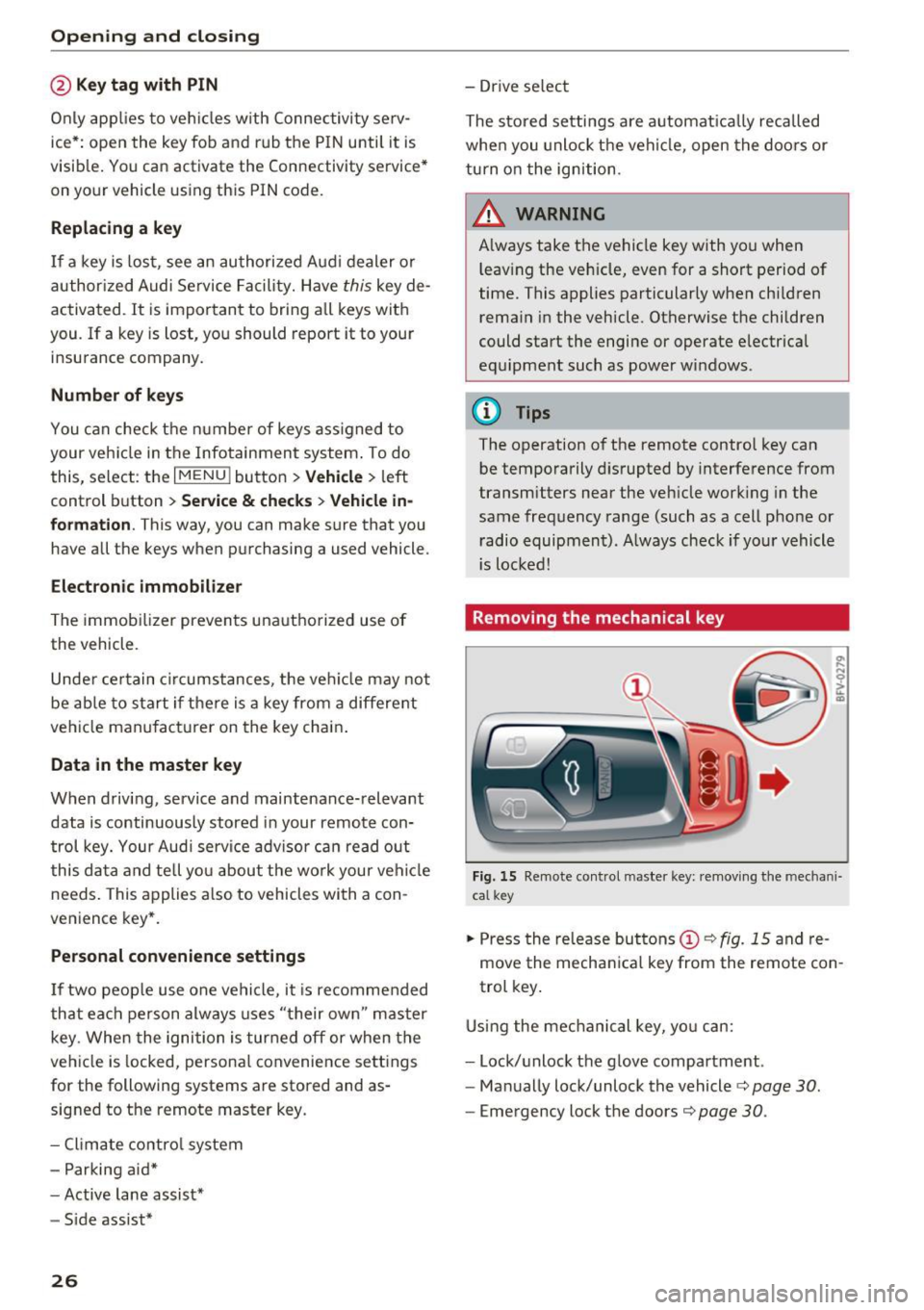
F ig. 15 Remote control m aste r key : remov ing the mec hani
ca l key
.. Press the re lease buttons (!)¢ fig. 15 and re
move the mecha nica l key from the remote con
trol key .
Using the mec hani cal key, yo u ca n:
- Lock/unlock the g love compar tment .
- Ma nually lock/unlock the vehicle¢
page 30.
-Emergency lock the doors¢ page 30.
Page 30 of 322

Opening and closing
& WARNING
No one, especially children, should stay in the
vehicle when it is locked from the outside, be
cause the w indows can no longer be opened
from the inside¢
page 30. Locked doors
make it more difficu lt for eme rgency workers
to get into the vehicle, which puts lives at
risk.
@ Tips
- Only use the remote control key when you
a re within view of the vehicle.
- Do not use the remote control when you are
in side the vehicle. Otherwise, you could un
in tent ionally lock the vehicle. If you then
tried to start the engine or open a door, the
alarm would be triggered. If this happens,
press the un lock button@.
- The selector lever must be in the P position
on vehicles with a convenience key*. Other
wise the vehicle will not be ab le to lock .
- Only use the panic function in an emergen
cy.
Unlocking and locking with the
convenience key
App lies to: ve hicles with conven ience key
The doors and luggage compartment lid can be
unlocked/locked without using the remote con
trol key .
Fig. 19 Door han dle : senso r
Unlocking the vehicle
.,. Grip the door handle . The door unlocks auto
matically.
.,. Pull on the door handle to open the door.
28
.... 0 0
0
~ al
Locking the vehicle
.,. Place the selector lever in the P position (auto
matic transmissions), or else the vehicle wi ll
not be able to lock.
.,. To lock the vehicle, close the door and touch
the sensor in the door handle once¢
fig. 19. Do
not hold the door handle while doing this .
You can unlock/lock the vehicle at every door.
The remote control key cannot be more than ap
prox imately S ft (1.5 m) away from the door han
dle. It makes no difference whether the master
key is in your jacket pocket or in your briefcase,
for example .
If you hold the door handle while locking, this
can impair the locking function.
The door cannot be opened for a brief period di
rectly after locking it. This way you have the op
portunity to check if the doors locked correctly.
The settings in the Infotainment system deter
mine if the entire vehicle or on ly one of the doors
is un locked when un locking the vehicle
¢ page 29.
& WARNING
Read and follow ing all WARNINGS. ¢ A in
Key set on page 26
{!) Tips
If your vehicle is left standing for a long peri
od of t ime, note the following :
- The proximity sensor sw itches off after a
few days to
save energy. You then have to
pull once on the door handle to un lock the
vehicle and a second time to open it.
- The energy management system gradually
turns off unnecessary convenience functions
to prevent the veh icle battery from drain ing
and to maintain the vehicle's ability to start
for as lon g as poss ible. You may not be ab le
to unlock your vehicle using the convenience
key.
- For an explanati on on conformity with the
FCC reg ulations in the United States and the
Industry Canada regulations, see
¢page 304.
-
Page 31 of 322
CD
CD
.... N
" N .... 0
0
Ill co
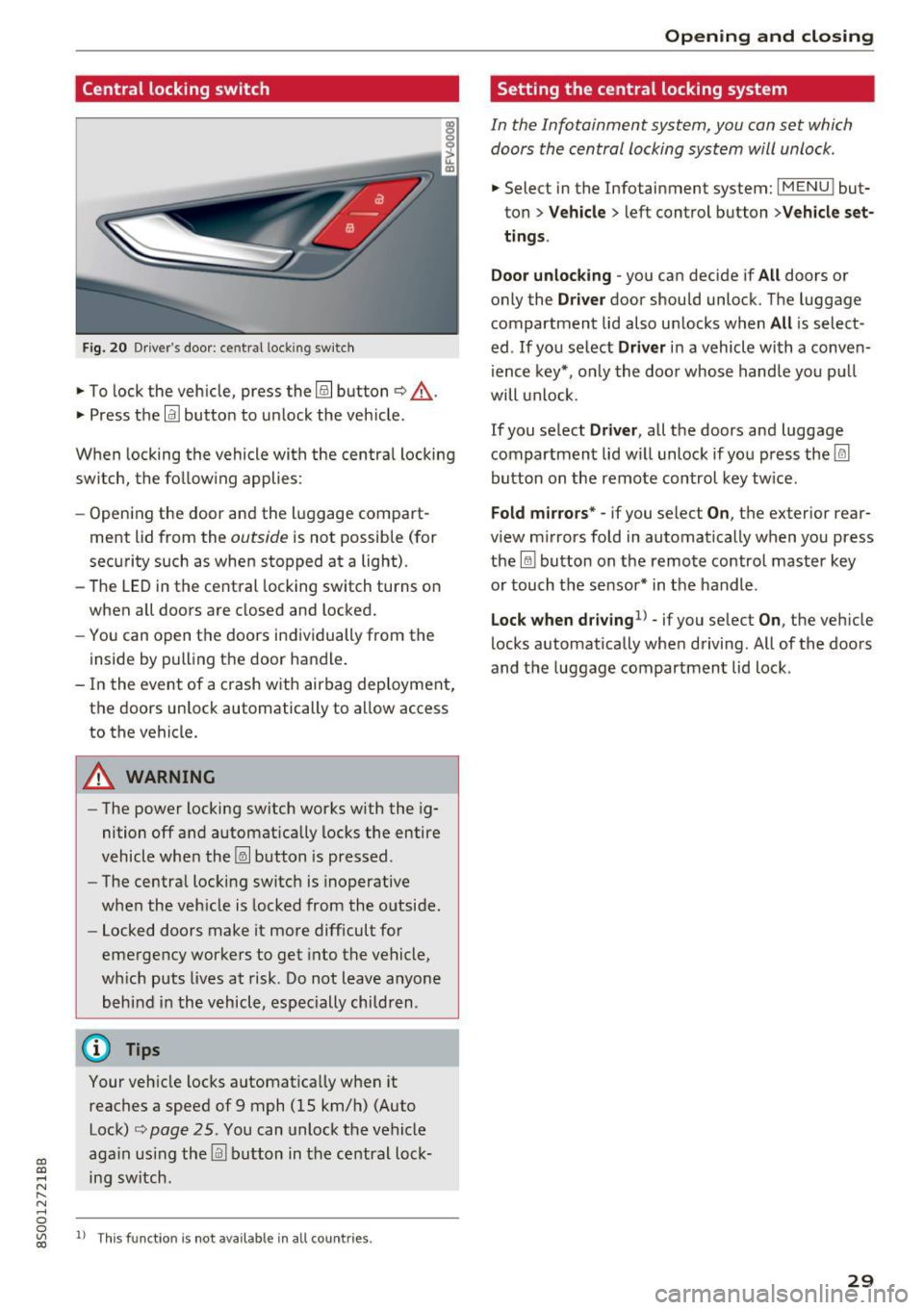
Central locking switch
Fig. 20 Dr ive r's door: cent ral loc king sw itch
.,. To lock the veh icle, press the@! button ¢,&. .
.,. Press the
!ill button to u nlock the veh icle.
When locking the vehicle with the centra l locking
switch, the fo llowing applies :
- Opening the door and the l uggage compart
ment lid from the
outside is not possible (for
sec urity such as when stopped at a light) .
- The LED in the central locking switch turns on
when a ll doors are closed and locked.
- You can open the doors in dividually from the
inside by pulling the door ha ndle .
- In the event of a crash with airbag dep loyment,
the doors un lock automatically to a llow access
to the vehicle.
A WARNING
- The power locking sw itch works w ith the ig
nition off a nd automatically locks the entire
vehicle whe n the ~ button is pressed .
- The centra l loc kin g switc h is inoperative
when the veh icle is locked from the o utside.
- Locked doors make it more difficult for
eme rgency worke rs to get into the ve hicle,
wh ic h puts lives at risk. Do not leav e anyone
behind i n the v ehicle , especially chi ldren .
@ Tips
Your veh icle loc ks a utomat ica lly w hen it
reaches a speed of 9 mph (15 km/h) (Auto Lock)
q page 25 . You can unlock the vehicle
ag ain usi ng the
llil bu tton in the ce ntral loc k
ing sw itch .
ll T hi s fun ctio n is not a vail able in all c oun tries.
Open ing and closing
Setting the central locking system
In the Infotainment system , you con set which
doors the central locking system will unlock .
.,. Select in the Infotainment system: I MENU ! but
ton>
Vehicle > left control button >Vehicle set
ting s.
Door unlocking
-you can decide if All doors o r
only the
Driver door shou ld unlock. T he luggage
compartment lid also un locks when
All is select
ed . If you se lect
Driver i n a vehicle wi th a conve n
i ence key*, o nly the doo r whose handle you p ull
will unlock .
If you se lect
Driver , all the doors and luggage
compartment lid w il l unlock if yo u press the@l
button on the remote control key tw ice.
Fold m irrors* -if you select On , the exterior rear
view m irrors fo ld in automatically when you press
the
lru bu tton on the remo te contro l master key
o r touch t he s ensor* in t he handle .
Lock when dr iving1l -if you se lect On, the veh icle
locks a utomatically whe n driving. All of the doors
and the luggage compartmen t lid lock .
29
Page 32 of 322
Opening and clo sin g
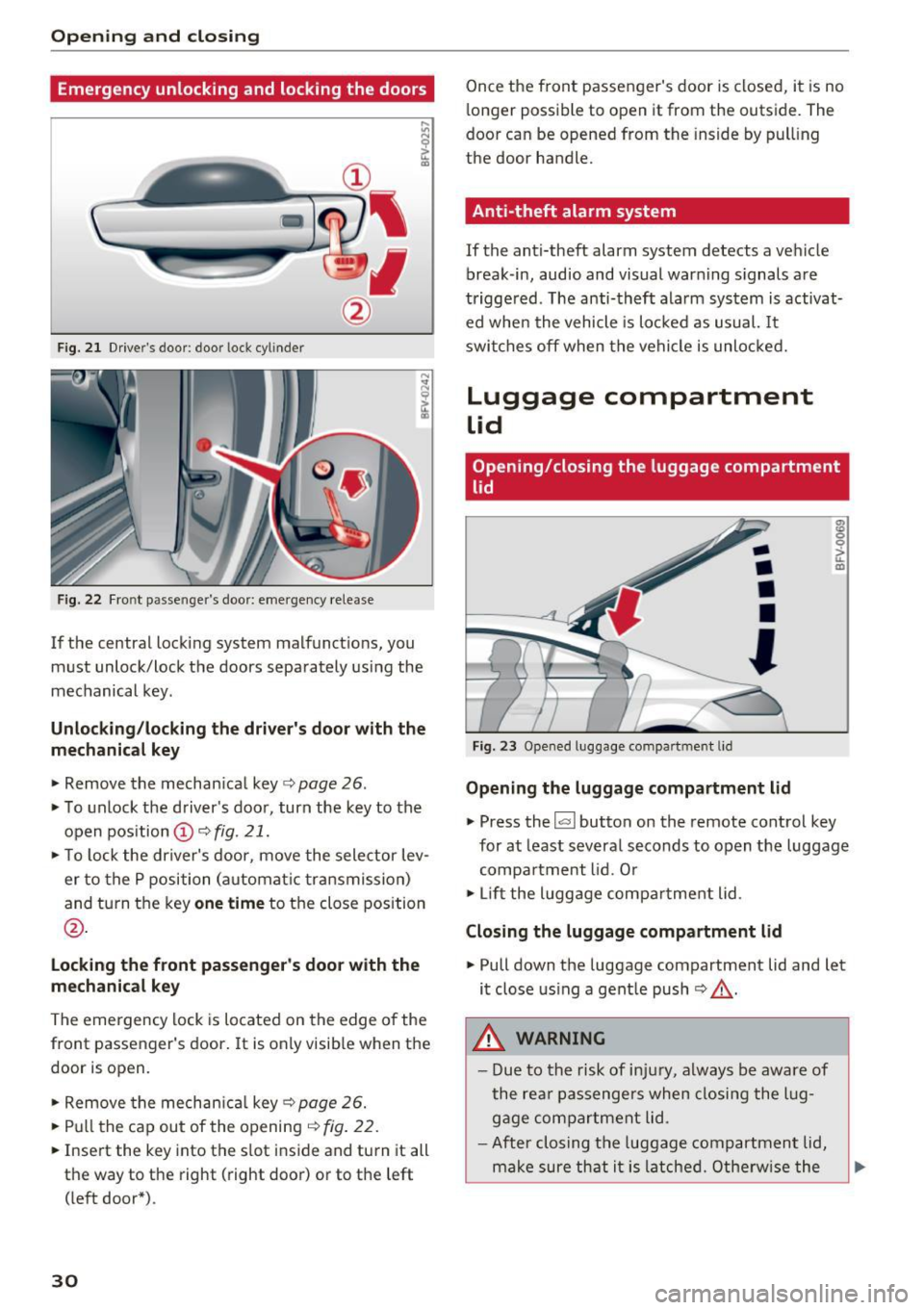
Emergency unlocking and locking the doors
----
F ig. 2 1 Drive r's door : door lock cy linder
F ig. 22 Fr ont p asse nge r's door: eme rgency release
If the central locking system malfunct ions, you
must unlock/lock the doors separately using the
mechanical key .
Unlocking /locking the dri ver's door with the
mechanic al key
• Remove the mechan ical key ¢ page 26.
• To unlock the driver's door, turn the key to the
open position @¢
fig. 21.
• To lock the dr iver's door, move the selector lev
er to the P position (automat ic transmission)
and turn the key
one time to the close position
@ .
Locking the front passenger's door with the
me chanic al key
The emergency lock is located on the edge of the
front passenger 's door.
It is only visible when the
door is open.
• Remove the mechan ica l key ¢
page 26.
• Pull the cap out of the opening¢ fig. 22.
• Inse rt the key into the slot inside and turn it all
th e way to the right (right door) or to the left
( left door*) .
30
Once the front passenger's door is closed, it is no
longer possible to open it from the outside. The
door can be opened from the inside by pul ling
the door handle.
Anti-theft alarm system
If the anti-theft alarm system detects a vehicle
break -in, audio and visual warn ing s ignals are
triggered . The anti-theft alarm system is activat
ed whe n the vehicle is locked as usual. It
switches off when the vehicle is unlocked.
Luggage compartment
lid
Opening/closing the luggage compartment
lid
F ig. 23 Opened luggage compa rtmen t lid
-
•
•
•
'
Opening the luggage compartment lid
m 0 0
~ m
• Press the l<.::< I button on the remote control key
for at least several seconds to open the luggage compa rtment lid . O r
• Lift the luggage compa rtment lid .
Closing the luggage compartment lid
• Pull down the luggage compartment lid and let
it close us ing a gent le push ¢.&, .
.&_ WARNING
-Due to the risk of in ju ry, a lways be aware of
the re ar passengers when closi ng the lug
gage compartment lid .
- After closing the luggage compartment lid,
make sure that it is latche d. Othe rw ise the
Page 34 of 322

Opening and closing
Power window
Controls
The driver can control all power windows.
Fig. 26 Driver's door: power w indow controls
All power window sw itches have a two-stage
function:
Opening and closing the windows
N
N
M 0 ::':, (X) m
"'To open or close the w indow completely, press
the switch down or pu ll the switch up br iefly to
the second level. The operation will stop if the
switch is pressed/p ulled aga in.
.. To se lect a position in between opened and
closed, press/pull the switch to the first level
until the desired window position is reached.
Power window switches
(D Left doo r
@ Right door
A WARNING
- Pay careful attention when closing the win
dows. Pinching could cause serious injur ies.
- When locking the vehicle from outside, the
vehicle must be unoccupied since the win dows can no longer be opened in an emer
gency .
(D Tips
- You can still open and close the windows for
approximately 10 minutes after turning the i gnition
off. The power windows do not
switch
off until the driver's door or front
passenger's door has been opened.
- When you open the doors, the w indows au
tomatically lower approximately 10 mm.
32
· Convenience opening/closing
All windows can be opened and closed at the
same time.
Convenience opening feature
.. Press the~ button on the remote control key
until all windows reach the desired position.
Convenience closing feature
.. Press the (TI button on the remote control key
until a ll windows are closed~&. or
Convenience closing with the convenience
key*
.. Touch the sensor* on the door handle long
enough until all windows are closed . Do not
place your hand in the door handle when doing
this.
Setting convenience opening in the
Infotainment system
.. Select in the Infotainment system : IMENU! but
ton
>Ve hicle > left control button >V ehicle set
t in gs .
To enable the convenience window opening func
tion, the
Long press to open windows function
must be switched
on .
A WARNING
-Never close the w indows carelessly or in an
uncontrolled manner, because this increas
es the risk of injury.
- For security reasons, the windows can only
be opened and closed with the remote con
trol key at a maximum distance of approx i
mate ly 6 ft (2 m) away from the vehicle.
When pressing the~ button, always watch
the windows while they are closing so that
no one is pinched in the window. The closing
process will stop immediately when the~
button is released.
Page 35 of 322
CD
CD
.... N
" N ...... 0
0
Ill co
Correcting power window malfunctions
You can reactivate the one-touch up/down func
tion if it malfunctions.
~ Pull the power window switch up until the win
dow is completely raised.
~ Release the switch and pull it up again for at
least one second .
Garage door opener
(Homelink)
Description
Applies to: vehicles with garage door opener (Homelink)
Fig. 27 Garage door o pen er: examples of usage for differ
ent sy stems
With the garage door opener (Homelink), you
can act ivate systems such as the garage doors,
security systems or house lights from inside your
vehicle. Up to three remote control functions can
be programmed to the three buttons that are in
tegrated in the control unit above the rearview
mirror.
To be able to operate systems using the garage door opener, the buttons in the control unit must
first be programmed .
A WARNING
When operating or programming the garage
door opener, make sure that no people or ob
jects are in the area immediately surrounding
the equipment . People can be injured or prop
erty can be damaged if struck when closing.
Open ing and closing
(D Tips
-For security reasons, we recommend that
you clear the programmed buttons before selling the vehicle.
- For add itiona l information about Homelink,
visit
www.homelink.com.
- For the Declaration of Conformity with the
provisions from the FCC in the United States
and Industry Canada, see ¢
page 304.
Operation
Applies to: vehicles with garage door opener (Home Link)
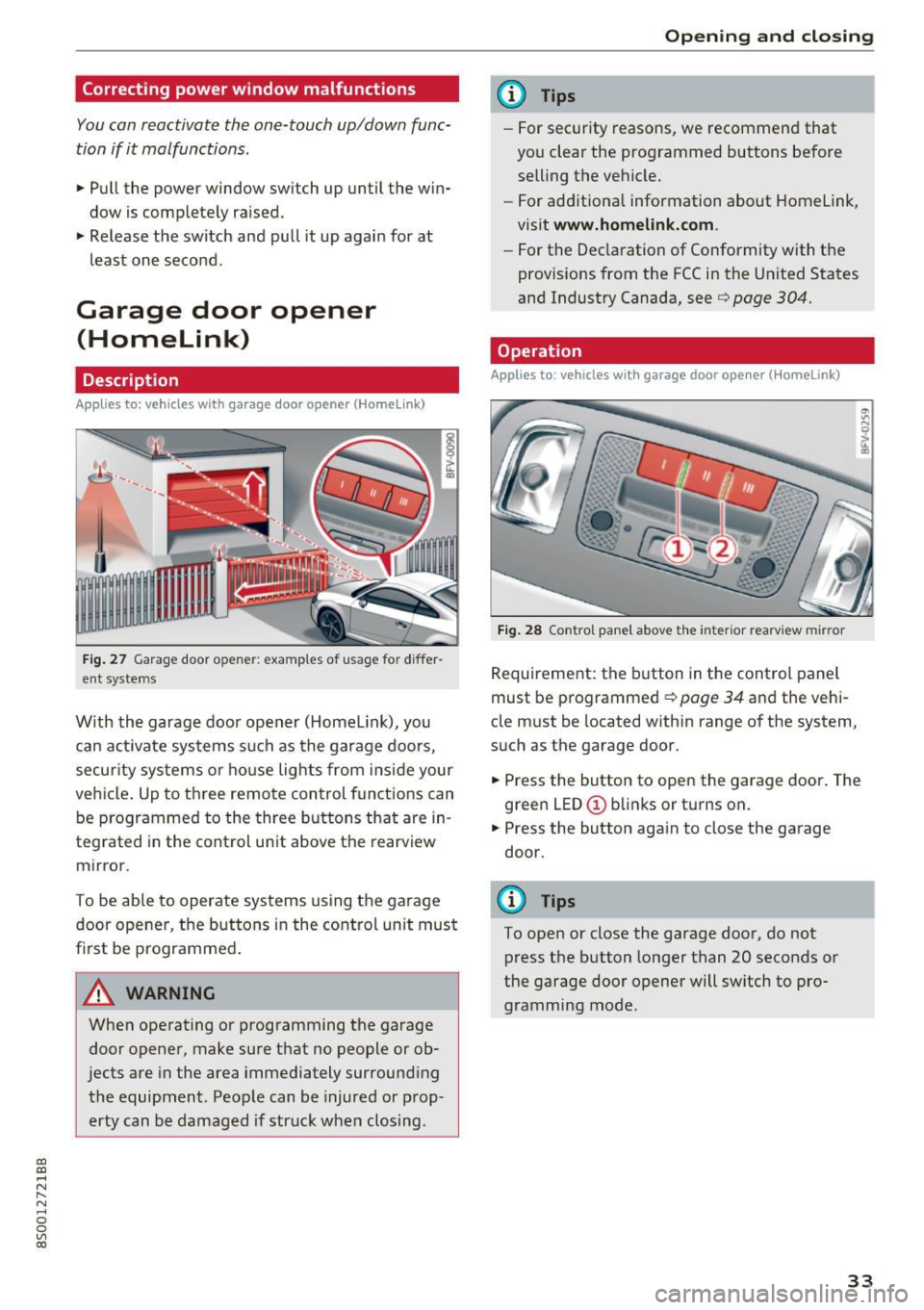
Fig. 28 Control pane l above the interior rearview mirror
Requirement: the button in the control panel
must be programmed ¢
page 34 and the vehi
cle must be located within range of the system,
such as the garage door.
~ Press the button to open the garage door. The
green LED(!) blinks or turns on.
~ Press the button again to close the garage
door.
(D Tips
To open or close the garage door, do not press the button longer than 20 seconds or
the garage door opener will switch to pro
gramming mode .
33
Page 38 of 322

Lights and Vision
Lights and Vision
Exterior lighting
Switching lights on and off
Fig. 30 Instrument panel: l ight sw itch
Li ght switch ·~ -
I
Tu rn the switch to the corresponding position.
When the lights are switched on, the
;oo: symbo l
turns on .
0 -lights are off (in some markets, the daytime
running lights* are switched on when the ignition
is switched on.)
- USA models : the daytime running lights switch
on automatically when the ignition is switched on and the light switch is set to the
O or the
AUTO position (only in daylight). The D ayt ime
runn ing lights
can be switched on and off in
the MMI
c:;, page 37c:;, &..
-Ca nad a model s: the daytime running lights
switch on automatically when the ignition is
switched on and the light switch is set to the
0 ,
::oo: or the AUTO position (only in daylight) c:;, &. .
AUTO* - automatic headlights switch on and off
depending on br ightness, for example in twilight,
during ra in or in tunnels.
;oo: -Parking lights
io -Low beam headlights
l~"' I -All-wea ther lights*
@il -Rear fog light(s)
All-weather light s*
In vehicles with all-weathe r lights, the front
lights are adjusted automatically so that you are
36
l ess likely to see g lare from your own head lights,
for example when driving on a wet road.
Automatic dynamic headlight range control
system*
You r vehicle is equipped with a headlight range
contro l system so that there is less g lare for on
coming t raffic if the vehicle load changes. The
headlight range also adjusts automatically when
braking and accelerat ing.
Light functions
The following light funct ions may be avai lable
depending on ve hicle equ ipment and only f unc
tion when the light switch is in the AUTO posi
tion.
Static cornering light* (vehicles with LED head
li ghts) -the cornering light switches on automat
ica lly when the steer ing whee l is turned at acer
ta in angle at speeds up to approximate ly 44 mph
(70 km/h) and when the turn s ignal is activated
at speeds up to approximately 25 mph (40 km/ h) . The area to the side of the vehicle is illum inat
ed bette r when turn ing.
H ighway light fun ction * (vehicles with LED head
lights) - this function adapts the lighting for
highway driv ing based on veh icle speed .
Speed dependent light distributio n* (vehicles
with LED headlights) -the speed dependent light
distribution adapts the light in towns a nd on
highways or expressways . Intersections can a lso
be illumina ted on veh icles w ith a navigation sys
tem*.
& WARNING
- Autom atic headlig hts* are o nly inten ded to
assist the driver. They do not relieve the
driver of responsi bility to check the head
lights and to t urn them on manually based
on the current light and vis ibility conditions.
For examp le, fog cannot be detected by the
light sensors. So always switch o n the low
beam under these weather condit ions and
when dr iv ing in the da rk
io.
- The rear fog lights should only be turned on
in acco rdance w it h traffic regulations, to
prevent glare for traffic behind your vehicle . ..,.