ad blue AUDI TT COUPE 2017 Owner's Manual
[x] Cancel search | Manufacturer: AUDI, Model Year: 2017, Model line: TT COUPE, Model: AUDI TT COUPE 2017Pages: 322, PDF Size: 79.73 MB
Page 168 of 322
Media
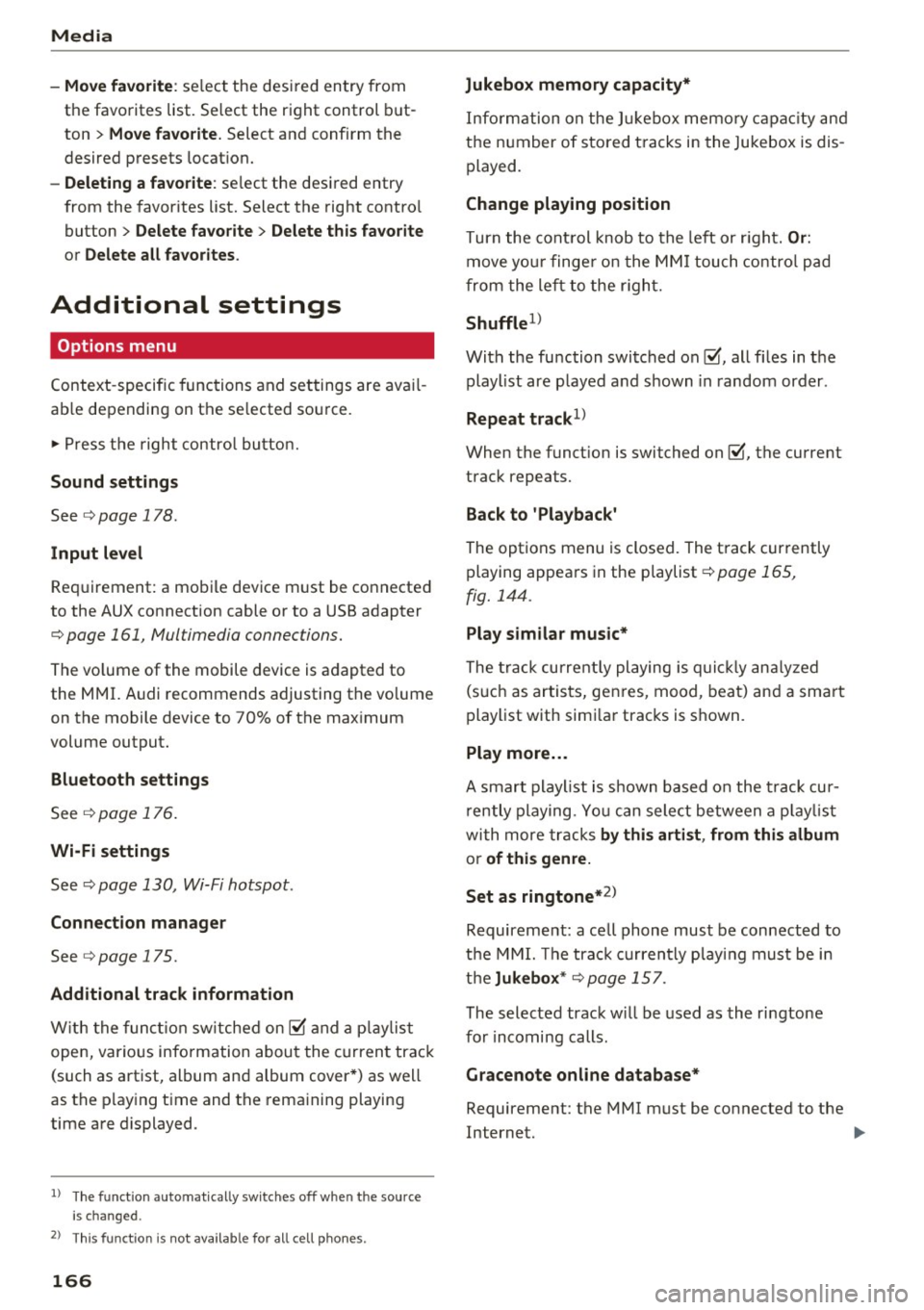
-Move fa vorite : select the des ired entry from
the favorites list. Select the right control but
ton
> Mo ve fav orite. Select and confirm the
desired presets locat ion.
- Delet ing a fa vorite : select the desired entry
from the favorites list. Select the right contro l
button
> Delete fa vo rit e > Del ete this f avorite
or Delete all favorit es.
Additional settings
Options menu
Context -specific functions and settings are ava il
ab le depending on the se lected source.
.,. Press the right contro l bu tton.
Sound settings
See ¢ page 178 .
Input level
Req uirement: a mobi le device must be connected
to the AUX connection cable or to a USB adapter
¢ page 161, Multimedia connections.
The vo lume of the mobile device is adapted to
the MMI. Audi recommends adjusting the vo lume
on the mobile device to 70% of the max imum
volume output.
Bluetooth settings
See ¢ page 176.
Wi-Fi settings
See ¢ page 130, Wi-Fi hotspot .
Connection manager
See ¢page 175.
Additional track information
With the funct ion sw itched on~ and a p laylist
open, vario us information about the current track
(such as artist, album and album cover *) as well
as the p lay ing t ime and the rema ining playing
time are displayed.
l ) The fun ctio n auto matic ally sw itche s off when th e source
is cha nge d.
2> This fun ction is not a vai la bl e fo r all cell phon es.
166
Jukebox m emory capacity *
Information on the J ukebox memo ry capac ity and
the number of stored tracks in the Jukebox is dis
played .
Change playing position
Turn the cont rol knob to the left or r ight. O r:
move you r finge r on the MM I touch contro l pad
from the left to the r igh t.
Shuffle1>
With the function switched on~, all files in the
playlist are p layed and shown in random order .
Repeat track1l
When the funct ion is switched on~, the current
track repeats.
Back to 'Playback '
The options menu is closed. The track currently
playing appears in the playlist
¢ page 165,
fig. 144 .
Play similar music *
The track curre ntly playing is q uick ly ana ly zed
(such as artists, genres, mood , beat) and a sma rt
playlist with simi lar tracks is shown .
Play more ...
A smart playl ist is s hown based on the t rack cur
r ently playing . Yo u can sele ct between a p lay list
with more tracks
by thi s arti st , from thi s album
or of thi s genre.
Set as ringtone*
2l
Requirement: a cell phone must be connected to
t h e MMI. The track c urrently playing must be in
the
Juk ebo x* ¢ page 157 .
The selected track w ill be used as the ri ngtone
for incoming calls.
Gr acenote online databa se *
Requirement: the MMI must be connected to the
Internet. .,.
Page 172 of 322
Media
on the system language and canno t always
be g uarantee d.
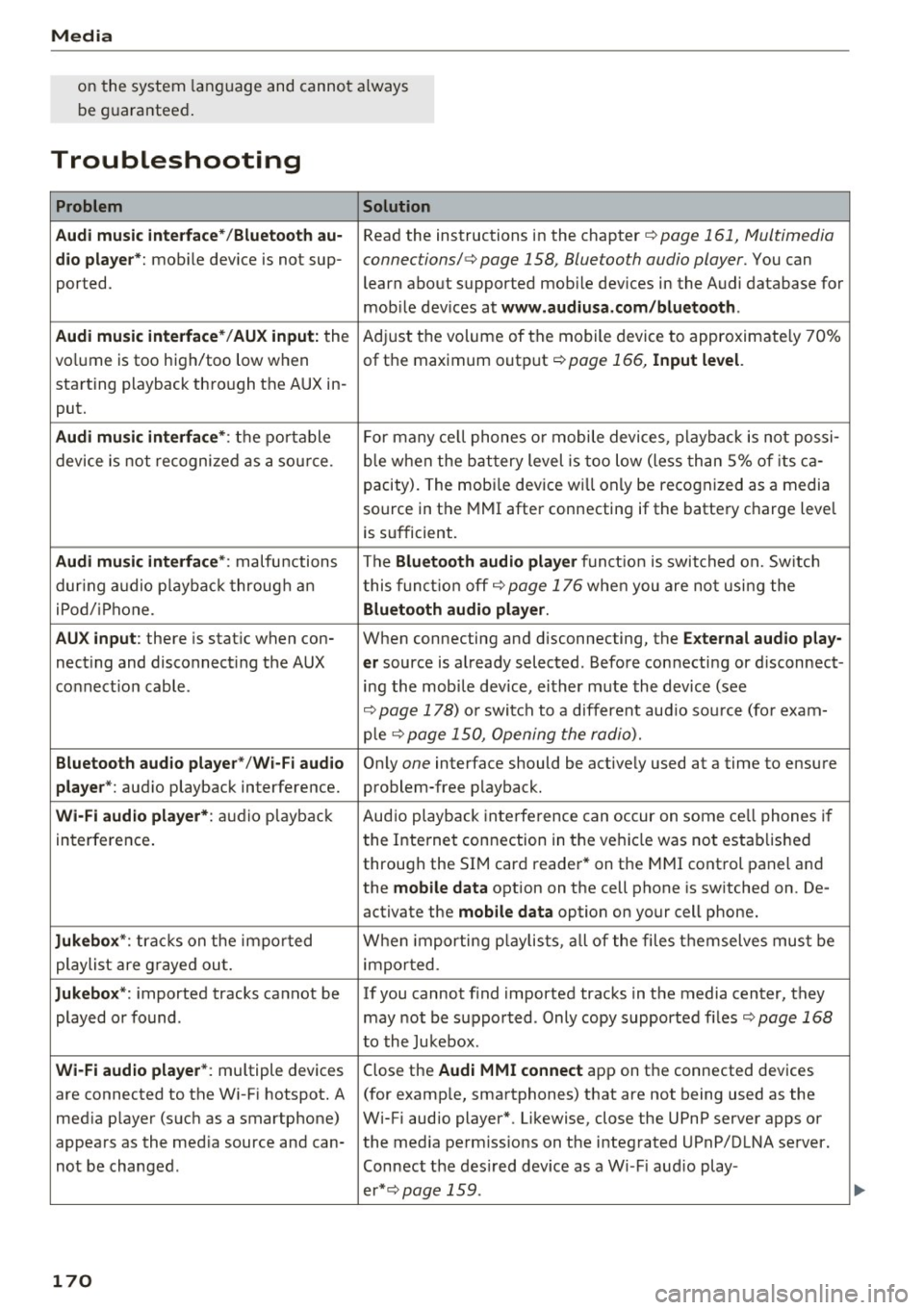
Troubleshooting
Problem Solution
Audi music inte rface* /Bluetooth au-
Read the instructions in the chapter c:;, page 161 , Multimedia
dio playe r*: mobile dev ice is not sup -connections/ c:;, page 158, Blue tooth audio player. You can
ported. learn about supported mobile dev ices in the Audi database for
mob ile dev ices at
www.audiusa .com /bluetooth .
Audi music interface* /AUX input:
the Ad
just the volume of the mobile device to approximate ly 70%
vo lume is too high/too low when of t he maximum out put
c;, page 166, Input level.
sta rting playback thro ugh the AUX in -
put.
Audi music interface *: th e port able For many ce ll p ho nes o r mobile device s, pl ayback i s not pos si-
device is not recogni zed as a so urc e. b
le w hen the b attery level is too low (less th a n 5% o f its ca -
pacity). The mobi le device w ill on ly be reco gni zed as a media
source in the MMI after connecting if the batte ry c harge leve l
is s ufficient.
Audi music interface *: malfu nctions T he Bluetoot:h audio player fu nct io n is swit ched o n. Sw itch
dur ing a udio p layback t hroug h an t his funct io n off
c:;, page 1 76 whe n you are no t usi ng the
iPod/ iPhone.
Bluetooth audio player .
AUX input :
there is stat ic when con- When connecting and disconnecting , the E xternal aud io play-
nec ting and disconnect ing the AUX er source is al ready selected . Befo re con necting or d isconnect -
co nnect io n cabl e. ing the mobile device, ei ther mute the device (see
c:;, page 178) o r swi tch to a different aud io so urce (fo r exam-
p le
¢ page 15 0, Opening the radio).
Bluetooth audio player " /Wi-Fi audio On ly one interface should be active ly used at a time to ensure
player *: audio playback interference. problem -free playback.
Wi-Fi audio player* : audio playbac k Aud
io playb ack inte rference can occur on some ce ll phones if
in terference . t
he Inte rnet connection in t he ve hicl e was no t establis hed
through the SI M card reade r* on the MMI cont rol panel and
the
mobile data option on the cell phone is sw itched on. De-
activate the
mobile data option on your cell phone.
Jukebox *: tracks on the i mpo rted When importing p laylist s, al l of the files themselves mus t be
playlist are g raye d ou t.
import ed.
Jukebox *: imported tracks ca nnot be If you cannot find imported tracks in the media center, they
played o r found . may not be suppor ted . Only copy supported fi les
c:;, page 168
t o the Jukebox .
Wi-Fi audio player* : multiple devices Close the Audi MMI connect app on t he connected devices
are connected to the W i-F i h otspot . A (for examp le , sma rtphones) that are not being used as the
med ia p layer (s uch as a smartphone) W i-Fi audio player*. Likewise, close the UPnP server apps or
appea rs as the med ia source and can- the med ia pe rmissio ns on t he i nteg rated UPnP/DLNA se rver.
no t be changed . Connect the desired device as a W i- F i aud io play-
er* c:;,
page 159 .
170
...
Page 173 of 322
co
co
.... N
" N .... 0
0
Vl c:o
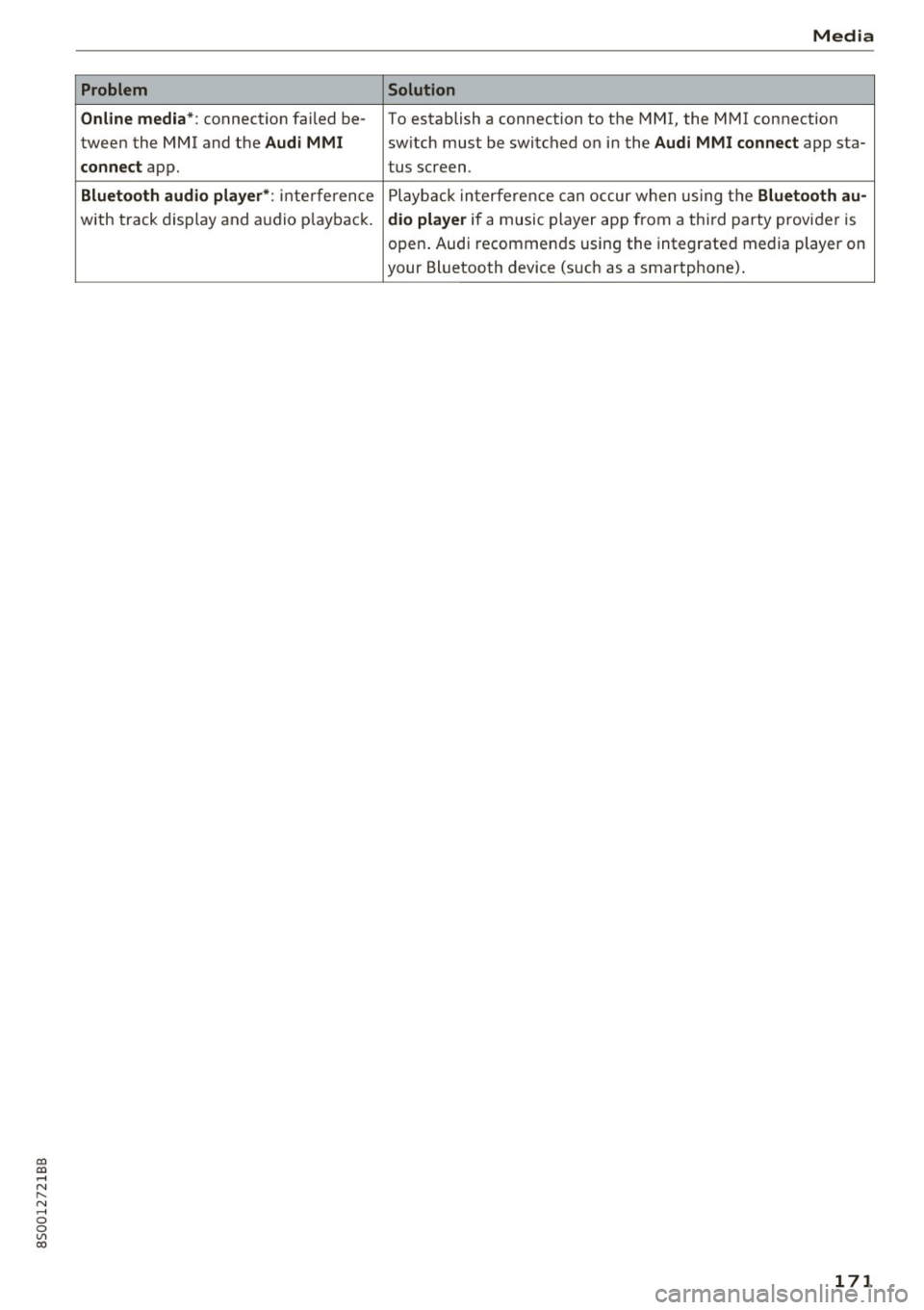
Problem
Online media*:
connection failed be-
tween the MMI and the
Audi MMI
connect
app.
Bluetooth audio player* : interference
with track display and audio pla yback .
Media
Solution
To establish a connection to the MMI, the MMI connection
switch m ust be switched on in the
Audi MMI connect app sta-
tus screen.
Playback interference can occur when using the
Bluetooth au-
dio player
if a music player app from a third party provider is
open. Au di recommends using the integrated media player on
your Bluetooth device (such as a smartphone) .
171
Page 177 of 322
co
co
.... N
" N .... 0
0
Vl c:o
Individual speech training (o nly when the vehi
cle is stationary): yo u can adapt the vo ice recog
n it ion system to yo ur voice or pron unc iation in
order to improve the system's ability to recogni ze
your speec h. Individua l tra in ing is comp rised of
20 speec h entries that cons ist o f comman ds and
sequences of nu mbers . Yo u can delete t he p ro
g ra m med vo ice tr aining w it h t he
Reset individu
al speech training
f unc tion.
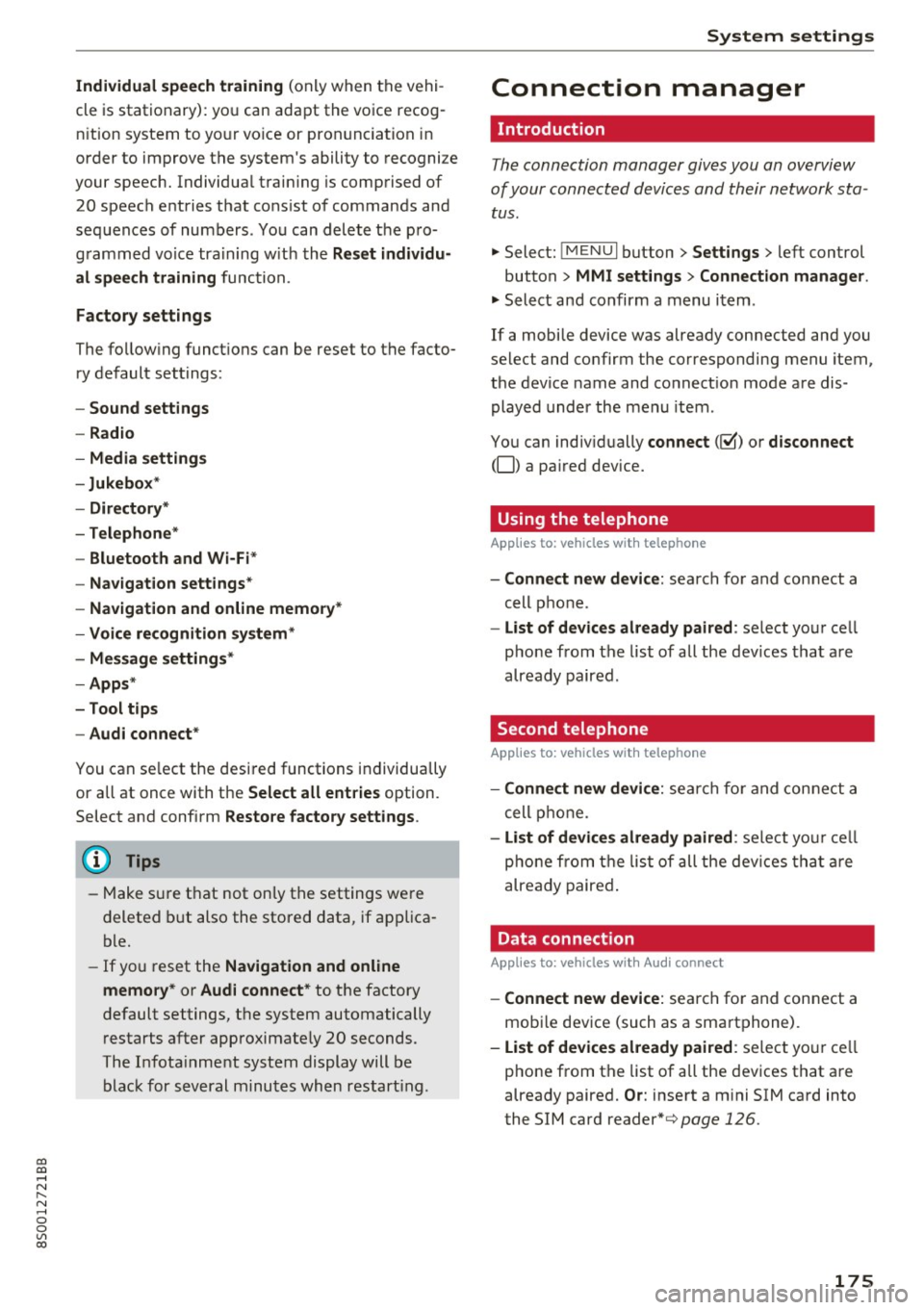
Factory settings
The fo llow ing funct io ns can be reset to the facto
ry de fault set tings :
-Sound settings
- Radio
- Media settings
-Jukebox *
- Directory *
- Telephone*
- Bluetooth and Wi -Fi *
- Navigat ion settings *
- Navigation and online memory*
- Voice recognition system*
- Message settings *
-Apps *
- Tool tips
- Audi connect *
You can se lect the desi red functions individually
or all at once with t he
Select all entries option.
Selec t and confi rm
Restore factory settings .
@ Tips
-Make s ure t hat not only t he settings we re
deleted but also the store d data, if ap plica
ble.
- If yo u reset the
Navigation and online
memory* or Audi connect*
to t he factory
default settings, t he system automatically
r estarts after approximate ly 20 seconds.
Th e In fota inm en t system display will b e
b lac k for sev eral minu tes when restar ting.
System settings
Connection manager
Introduction
The connection manager gives you an overview
of your conn ected d evices and their network sta
tus .
"'Select: !M EN UI button> Settings > left control
button >
MMI settings > Connection manager .
"'Select and confirm a m enu i tem .
If a mobi le device was already c onnected and you
select and co nfirm the co rresponding menu item,
the device name and co nnect io n mode a re dis
played under the men u item .
You can ind iv id ually
connect (~) or disconnect
(0) a pa ired device.
Using the telephone
App lies to : vehicles wit h te lepho ne
- Connect new device: searc h fo r a nd con nect a
cell p hone .
- List of devices already paired : select yo ur cell
pho ne from t he list of all th e de vic e s tha t are
alr eady pair ed .
Second telephone
App lies to : vehicles wi th telepho ne
- Connect new device: se arch for an d co nne ct a
c ell p hone.
- List of devices already paired : selec t your c ell
p hon e fr om th e list o f all the dev ices that ar e
a lready paire d.
Data connection
Appl ies to: vehicles wi th Audi connec t
-Connect new device: sea rc h fo r and con nect a
mob ile dev ice (such as a sma rtphone) .
-List of devices already paired : select yo ur cell
p ho ne from t he list of a ll the dev ices t hat a re
already paired.
Or : inse rt a m ini SIM ca rd into
the SIM card reader*¢
page 126.
175
Page 178 of 322
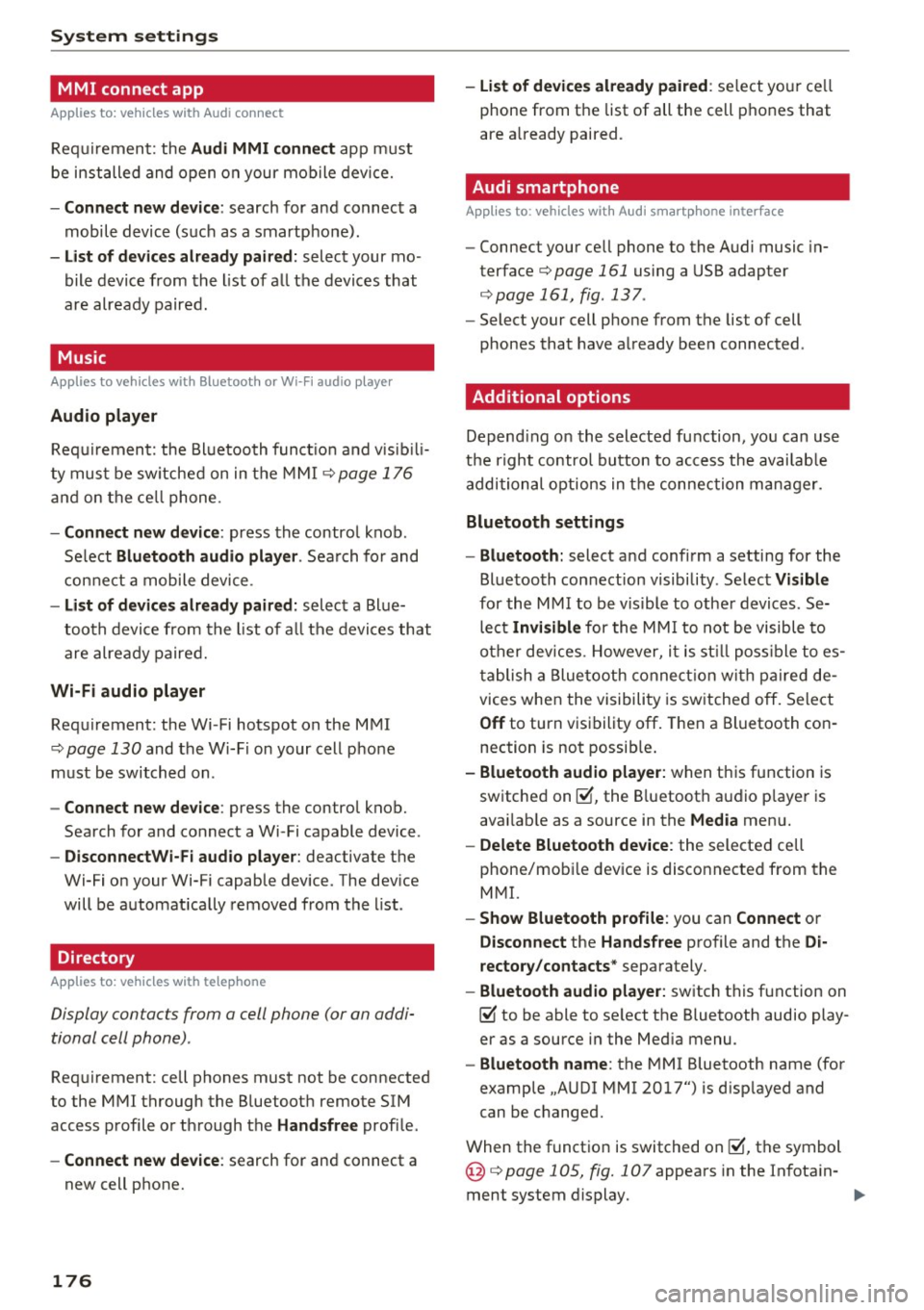
System settings
MMI connect app
Applies to: vehicles with Audi connect
Req uiremen t: the Audi MMI connect app m ust
be installed and open on your m obile devi ce.
- Connect new device : search for and connect a
mobile device (s uch as a smartpho ne) .
- List of devices already paired : select your mo
bile device from the list of a ll the devices that
are already paired.
Music
Applies to vehicles with Bluetooth or Wi-Fi audio player
Audio player
Requ ir emen t: the Bl uetoo th funct io n and v isib ili
ty mus t be sw itche d on in t he M MI ¢
page 1 76
and on th e ce ll p hone.
-Connect new device : press the control knob.
Se lect
Bluetooth audio player . Search fo r and
con nect a mobile device .
-List of devices already paired : select a Bl ue
t oo th d evice from the list of a ll th e devi ces that
are already paire d.
Wi-Fi audio player
Req uirement: the Wi -Fi hotspot on the MMI
¢
page 130 and the Wi-F i on your cell p ho ne
m ust be switch ed on .
-Connect new device : press the control knob.
Sea rch fo r and connect a Wi-Fi capable device .
-DisconnectWi-Fi audio player : deactivate the
Wi-Fi on your Wi-Fi capable device . The dev ice
will be automat ically removed from the list .
Directory
Applies to: vehicles with telephone
Display contacts from a cell phone (or on addi
tional cell phone) .
Requirement: cell phones must not be connected
to the MMI through the B luetoot h remote SIM
access p rofile o r thr ough the
Handsfree profi le .
- Connect new device : search for and connect a
new cell p hone.
176
- List of devices already paired : select yo ur cell
phone from the list of all the cell p hon es that
are a lready paired.
Audi smartphone
Applies to: vehicles with Audi smartphone interface
-Connect your ce ll phone to the A udi music in
terface¢
page 161 using a USB adapter
¢ page 161, fig . 137 .
-Select your cell p hone from the list of cell
phones that have a lready bee n connected .
Additional options
Depending o n the selected fu nction, yo u can use
t he right control bu tton to access the avai lab le
addi tional options in t he connection man ager.
Bluetooth settings
- Bluetooth:
select a nd confi rm a setting for the
Bl uetooth connection visibility. Se lec t
Visible
for the MM I to be v is ible to othe r devices . Se
lec t
Invi sible for the MM I to not be visible to
o th er dev ices. H owev er, i t is st ill poss ible t o es
t a b lish a Blue tooth connect ion w ith pai red de
vices when the visibili ty is sw itche d off. Select
Off to turn v is ib ility off . Then a Bluetooth con
nection is not possib le .
- Bluetooth audio player: when t his function is
sw itche d on ~, the B luetoot h aud io p laye r is
avai lab le as a source in the
Media men u.
-Delete Bluetooth device : the selected cell
phone/mob ile dev ice is disco nnected from the
M MI.
- Show Bluetooth profile : you can Connect or
Disconnect the Handsfree profile and the Di
rectory /contacts *
separately.
- Bluetooth audio player: sw itch this f unction on
~ to be able to se lect the Bluetooth audio play
er as a source in the Med ia menu .
-Bluetooth name : the MMI Bluetooth name (fo r
example ,.AUDI MMI 2017") is d isp layed and
can be c hanged.
When the f unct io n is switched on~, th e symbo l
@ ¢
page 105, fig. 107 appea rs in the In fota in-
ment system display.
1111>
Page 291 of 322
CD
CD
.... N
" N ...... 0
0
Ill co
Fuses and bulbs
Electrical fuses
Replacing fuses
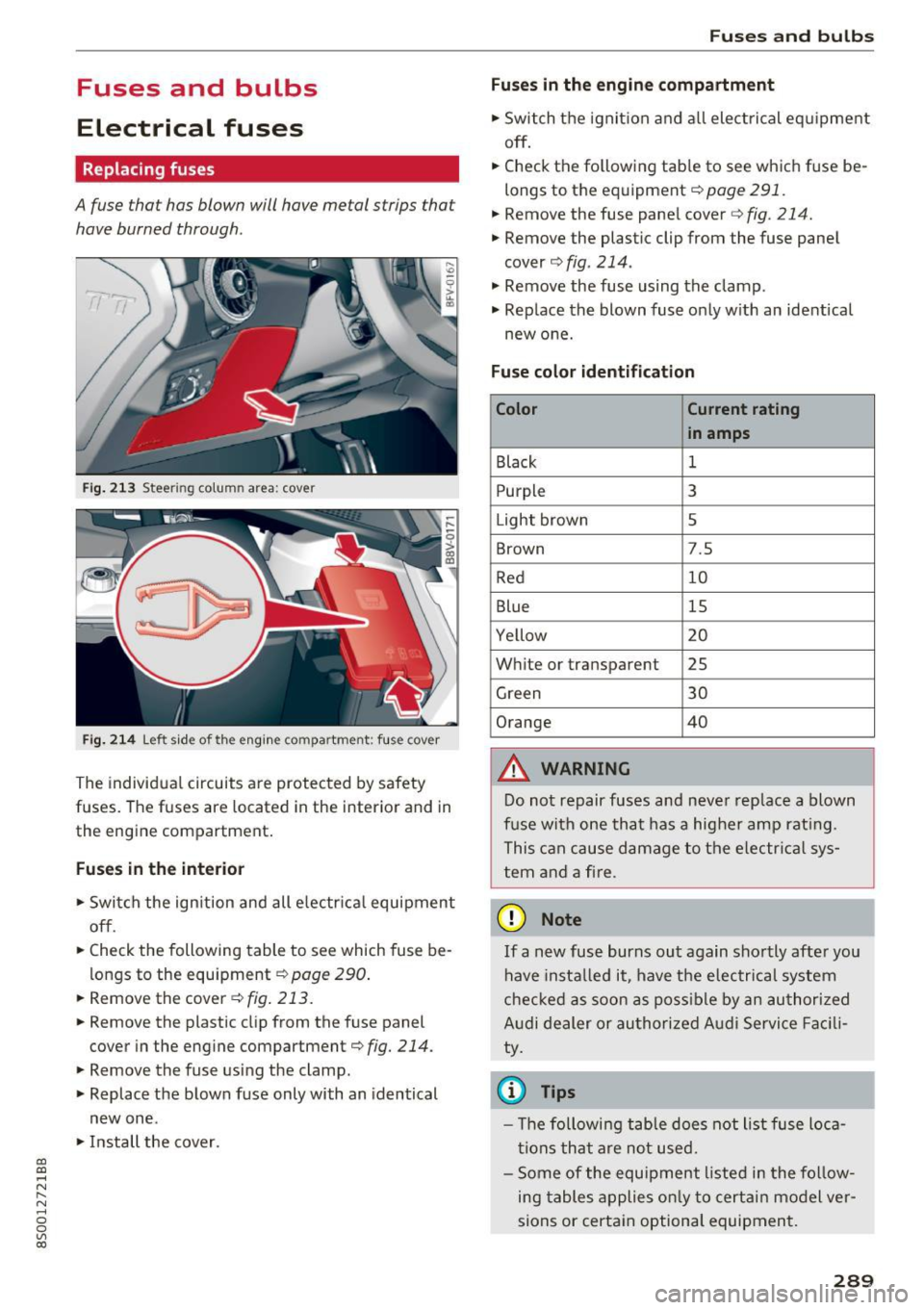
A fuse that has blown will have metal strips tha t
have burned through .
Fig. 213 Steer ing colu mn area : cove r
Fig. 214 Left side of the engin e com partment : fus e cover
The individual circuits are protected by safety
fuses. The fuses are located in the interior and in
the engine compartment.
Fuses in the interior
"S witch the ignition and all electrical equipment
off .
"C heck the following table to see which fuse be
longs to the equipment ¢
page 290.
"R emove the cover ¢
fig. 213.
"Remove the plastic clip from the fuse panel
cover in the engine compartment¢
fig. 214.
"Remove the fuse using the clamp.
" Replace the blown fuse only with an identical
new one .
"Install the cover.
Fuses and bulbs
Fuses in the engine compartment
"S witch the ignition and all electrical equipment
off .
.. Check the following table to see which fuse be
longs to the equipment¢
page 291.
.. Remove the fuse panel cover¢ fig. 214.
" Remove the plastic clip from the fuse panel
cover
¢ fig. 214 .
" Remove the fuse using the clamp .
.. Rep lace the blown fuse only with an identical
new one.
Fuse color identification
Color Current rating
in amps
Black
1
Purpl e 3
Light brown 5
Brown 7.5
Red 10
Blue 15
Ye llow 20
White or transparent 25
Green 30
Orange 40
&, WARNING
-
Do not repair fuses and never replace a blown
fuse with one that has a higher amp rating.
This can cause damage to the electrica l sys
tem and a fire .
(D Note
If a new fuse burns out again shortly after you
have instal led it, have the electrical system
checked as soon as possible by an authorized
Audi dealer or authorized Audi Service Facili
ty.
© Tips
- Th e following table does not list fuse loca
tions that are not used.
- Some of the equipment listed in the follow
ing tables applies only to certain model ver
sions or certain optional equipment.
289
Page 307 of 322
co
co
.... N
" N .... 0
0
Vl c:o
A
A/C (climate control system) . . . . . . . . . . . . . 52
Accessories . . . . . . . . . . . . . . . . . . . . . . . . . . 303
Active lane assist . . . . . . . . . . . . . . . . . . . . . . 72
Activating vibration warning . . . . . . . . . . . . 74
Adjusting steering time.......... ...... 74
Cleaning the camera area . . . . . . . . . . . . . 276
Indicator light . . . . . . . . . . . . . . . . . . . . . . . 73
Messages . . . . . . . . . . . . . . . . . . . . . . . . . . . 73
Switching on/off . . . . . . . . . . . . . . . . . . . . . 73
Adaptive dampers . . . . . . . . . . . . . . . . . . . . . . 79
Adaptive light . . . . . . . . . . . . . . . . . . . . . . . . . 79
Adapt ive light (indicator light) . . . . . . . . . . . 17
Additional phone ............ .. .. . 115, 175
Adjusting a ir distribution (Cl imate control sys-
tem) . . . . . . . . . . . . . . . . . . . . . . . . . . . . . . . .
52
Adjusting the air vents . . . . . . . . . . . . . . . . . . 53
Adjusting the center console lighting . . . . . . 39
Adjusting the sound . . . . . . . . . . . . . . . . . . . 178
Adjusting the temperature (climate control
system) . . . . . . . . . . . . . . . . . . . . . . . . . . . . . .
52
Advanced Airbag System
Children . . . . . . . . . . . . . . . . . . . . . . . . . . . 223
Componen ts . . . . . . . . . . . . . . . . . . . . . . . .
204
Front airbags . . . . . . . . . . . . . . . . . . . . . . . 202
How the components work together . . . . 206
Airbag . . . . . . . . . . . . . . . . . . . . . . . . . . . . . . 197
Indicator light . . . . . . . . . . . . . . . . . . . . . . . 15
Airbag system . . . . . . . . . . . . . . . . . . . . . . . . 217
Advanced Airbag-System . . . . . . . . . . . . . . 201
Care . . . . . . . . . . . . . . . . . . . . . . . . . . . . . . 212
Child restraints . . . . . . . . . . . . . . . . . . . . . 223
Components (front airbags) . . . . . . . . . . . 204
Danger of fitting a child safety seat on the
front passenger seat . . . . . . . . . . . . . . . . .
198
Disposal . . . . . . . . . . . . . . . . . . . . . . . . . . . 212
Front airbags . . . . . . . . . . . . . . . . . . . . . . . 201
H ow do the front airbags work? . . . . . . . . 207
How many airbags does my vehicle have? 204
Important information . . . . . . . . . . . . . . . 197
Important safety instructions on the knee
airbag system ................. ..... .
215
Knee airbags. ....................... 213
Monitoring . . . . . . . . . . . . . . . . . . . . . . . . . 209
PASSENGER AIR BAG light . . . . . . . . . . . . 209
Repairs ... . .. .. ............. .. .. .. . 212
Safety instructions . . . . . . . . . . . . . . . . . . . 211
Index
Side airbags . . . . . . . . . . . . . . . . . . . . . . . . 215
Side curtain airbags . . . . . . . . . . . . . . . . . . 218
Warning/Ind icator lights . . . . . . . . . . . . . 209
When must the system be inspected? . . . 209
Alarm system
refer to Anti-theft alarm system . . . . . . 25 , 30
Alignment pin (chang ing the wheel) . . . . . . 281
All season tires . . . . . . . . . . . . . . . . . . . . . . . 270
All weather lights . . . . . . . . . . . . . . . . . . . . . . 36
All wheel drive . . . . . . . . . . . . . . . . . . . . . . . . 91
Alternative routes . . . . . . . . . . . . . . . . . . . . . 142
Amb ient lighting . . . . . . . . . . . . . . . . . . . . . . 38
AMI
refer to Audi music interface . . . . . . . . . . . 161
Android Auto
refer to Audi smartphone interface 172
Announcements (sett ings)
refer to Voice guidance . . . . . . . . . . . . . . . 142
Anti -freeze
Windsh ield washer system . . . . . . . . . . . .
253
Anti-lock braking system (ABS) . . . . . . . . . . . 88
Anti-s lip regulat ion . . . . . . . . . . . . . . . . . . . . 88
Anti-theft alarm system . . . . . . . . . . . . . . . . . 30
Apple CarP lay
refer to Audi smartphone interface . . . . . 172
Arm rest.. .. .... .. .. ............... .. . 45
Ashtray . . . . . . . . . . . . . . . . . . . . . . . . . . . . . . 46
Aspect ratio (video) . . . . . . . . . . . . . . . . . . . 166
Audi connect . . . . . . . . . . . . . . . . . . . . . . . . . 126
Data connection . . . . . . . . . . . . . . . . . . . . . 131
Data protection . . . . . . . . . . . . . . . . . . . . . 133
Services (overview) . . . . . . . . . . . . . . . . . . 128
Setup . . . . . . . . . . . . . . . . . . . . . . . . . . . . . 126
Audi magnetic r ide
refer to Adaptive dampers . . . . . . . . . . . . . 79
Audi music interface . . . . . . . . . . . . . . . . . . . 161
Audi music stream
refer to Wi-Fi . . . . . . . . . . . . . . . . . . . . . . . 159
Audio files . . . . . . . . . . . . . . . . . . . . . . . . . . . 163
Audio player
Bluetooth audio player . . . . . . . . . . . . . . .
158
Wi-Fi audio player . . . . . . . . . . . . . . . . . . . 159
Audio track . . . . . . . . . . . . . . . . . . . . . . . . . . 166
Audi Service Repair Manuals and Literature 301
Audi smartphone interface . . . . . . . . . 172, 176
Audi virtual cockpit (instr ument cluster) . . . . 8
305
Page 308 of 322
Index
AUTO Automatic climate control system . . . . . . . 52
Automatic headlights . . . . . . . . . . . . . . . . . 36
Auto Lock (centra l locking) . . . . . . . . . . . . . . 25
Automatic belt retractor . . . . . . . . . . . . . . . 193
Automatic climate control system
refer to Climate control system (automatic) .5.2
Automatic key . . . . . . . . . . . . . . . . . . . . . . . . . 25
Automatic transmission . . . . . . . . . . . . . . . . . 61
Driving tips . . . . . . . . . . . . . . . . . . . . . . . . . . 64
Emergency mode . . . . . . . . . . . . . . . . . . . . . 68
Hill descent contro l . . . . . . . . . . . . . . . . . . . 66
Kick-down . . . . . . . . . . . . . . . . . . . . . . . . . . . 67
La unch Control-Program . . . . . . . . . . . . . . . 67
malfunction . . . . . . . . . . . . . . . . . . . . . . . . . 63
Selector leve r eme rgency release . . . . . . . . 69
Selector leve r lock . . . . . . . . . . . . . . . . . . . . 63
Selector lever positions . . . . . . . . . . . . . . . . 62
Shifting manually . . . . . . . . . . . . . . . . . . . . 66
Steering wheel with shift paddles. . . . . . . . 66
tiptronic . . . . . . . . . . . . . . . . . . . . . . . . . . . . 66
Automatic wipe/wash system
Automatic zoom (navigation) .......... .
Auto Safety Hotline ............ .... .. .
41
145
187
AUX input . . . . . . . . . . . . . . . . . . . . . . . . . . . 161
Average fuel consumption . . . . . . . . . . . . . . . 23
Average speed . . . . . . . . . . . . . . . . . . . . . . . . 23
Avoid damaging the vehicle . . . . . . . . . . . . . . 55
B
BACK button . . . . . . . . . . . . . . . . . . . . . . . . . . 96
Balance (sound) . . . . . . . . . . . . . . . . . . . . . . 178
Bass (sound) . . . . . . . . . . . . . . . . . . . . . . . . . 178
Battery Jump starting . . . . . . . . . . . . . . . . . . . . . . . 292
Before driving . . . . . . . . . . . . . . . . . . . . . . . . 180
Better route (navigation) . . . . . . . . . . . . . . . 149
Blended gasoline . . . . . . . . . . . . . . . . . . . . . 240
Blower (climate control system) . . . . . . . . . . 52
Bluetooth Aud io player . . . . . . . . . . . . . . . . . . . . . . . . 158
Connecting a cell phone . . . . . . . . . . . . . . 114
Settings . . . . . . . . . . . . . . . . . . . . . . . . . . . 176
Boost . . . . . . . . . . . . . . . . . . . . . . . . . . . . . . . . 24
Booster seats . . . . . . . . . . . . . . . . . . . . . . . . 230
Boost pressure indicator . . . . . . . . . . . . . . . . 24
306
Brake fluid
Checking the brake fluid level . . . . . . . . . . 251
Brakes . . . . . . . . . . . . . . . . . . . . . . . . . . . . . . . 89
Brake ass ist system . . . . . . . . . . . . . . . . . . . 88
B rake booster . . . . . . . . . . . . . . . . . . . . . . . . 89
Brake fluid ... ... .. .. ............... 251
Electromechanical parking brake . . . . . . . . 60
Indicator light . . . . . . . . . . . . . . . . . . . . . . . 10
New brake pads . . . . . . . . . . . . . . . . . . . . . . 89
B raking
Brake assist . . . . . . . . . . . . . . . . . . . . . . . . . 88
Emergency braking function . . . . . . . . . . . . 60
Worn brake pads . . . . . . . . . . . . . . . . . . . . . 15
Break-in secu rity feature . . . . . . . . . . . . . . . . 25
Breaking in
New engine . . . . . . . . . . . . . . . . . . . . . . . . . 55
New tires . . . . . . . . . . . . . . . . . . . . . . . . . . 262
Browser
refer to Media center . . . . . . . . . . . . . . . . . 164
Bu lb fai lure (indicator light) . . . . . . . . . . . . . 16
Bulb replacement . . . . . . . . . . . . . . . . . . . . . 291
Buttons Control panel (MMI) . . . . . . . . . . . . . . . . . . 96
Multifunction steering wheel . . . . . . . . 20, 22
C
Cable (USB adapter/AUX connector cable) 161
California Proposition 65 Warning . . . . . . . 244
Battery specific . . . . . . . . . . . . . . . . . . . . . 252
Call list . . . . . . . . . . . . . . . . . . . . . . . . . . . . . 117
Call options . . . . . . . . . . . . . . . . . . . . . . . . . . 124
Capacities Fuel tank. . . . . . . . . . . . . . . . . . . . . . . . . . . 299
Washer fluid reservoir . . . . . . . . . . . . . . . . 299
Care . . . . . . . . . . . . . . . . . . . . . . . . . . . . . . . . 275
Cargo area
refer to Luggage compartment. . . . . . . . . 185
CD drive (med ia drives) . . . . . . . . . . . . . . . . 157
Cell phone Playing music . . . . . . . . . . . . . . . . . . . . . . . 158
olso refer to Telephone . . . . . . . . . . . . . . . 114
Central locking . . . . . . . . . . . . . . . . . . . . . . . . 25
Centra l locking switch . . . . . . . . . . . . . . . . . 29
Emergency locking . . . . . . . . . . . . . . . . . . . . 30
Luggage compartment lid . . . . . . . . . . . . . . 30
Power windows . . . . . . . . . . . . . . . . . . . . . . 32