USB AUDI TT COUPE 2019 User Guide
[x] Cancel search | Manufacturer: AUDI, Model Year: 2019, Model line: TT COUPE, Model: AUDI TT COUPE 2019Pages: 312, PDF Size: 83.95 MB
Page 158 of 312
Alwaysfollowtheinformationfoundin>@in
Generalinformationonpage123.
@)Tips
— Depending ontheInternetconnectionand
networktraffic,theconnectionmaydiscon-
nectedwhenonlinemediasourcesareplay-
ing.
—OnlinemediaandInternetradiousagede-
pendsontheserviceavailabilityofthethird
partyprovider.
—AudiAGsimplymakestheaccesstoonline
mediaservicespossiblethroughtheMMI
anddoesnottakeanyresponsibilityforthe
contentsoftheonlinemediaservices.
—Alwaysreadthechapter>page123,Audi
connect.
— Dependingonthemobiledevicebeingused,
theremaybeinterruptionsduringmedia
playbackandwhenusingthemyAudiapp.
Topreventinterruptionswhenusingamo-
biledevice,donotlockthescreenonyour
mobiledeviceandkeepthemyAudiappin
theforeground.
—ContactanauthorizedAudidealeror au-
thorizedAudiServiceFacilityforadditional
informationaboutonlinemedia.
156
Multimediaconnections
OMFeeTomeNemeatsKole
USBchargingport
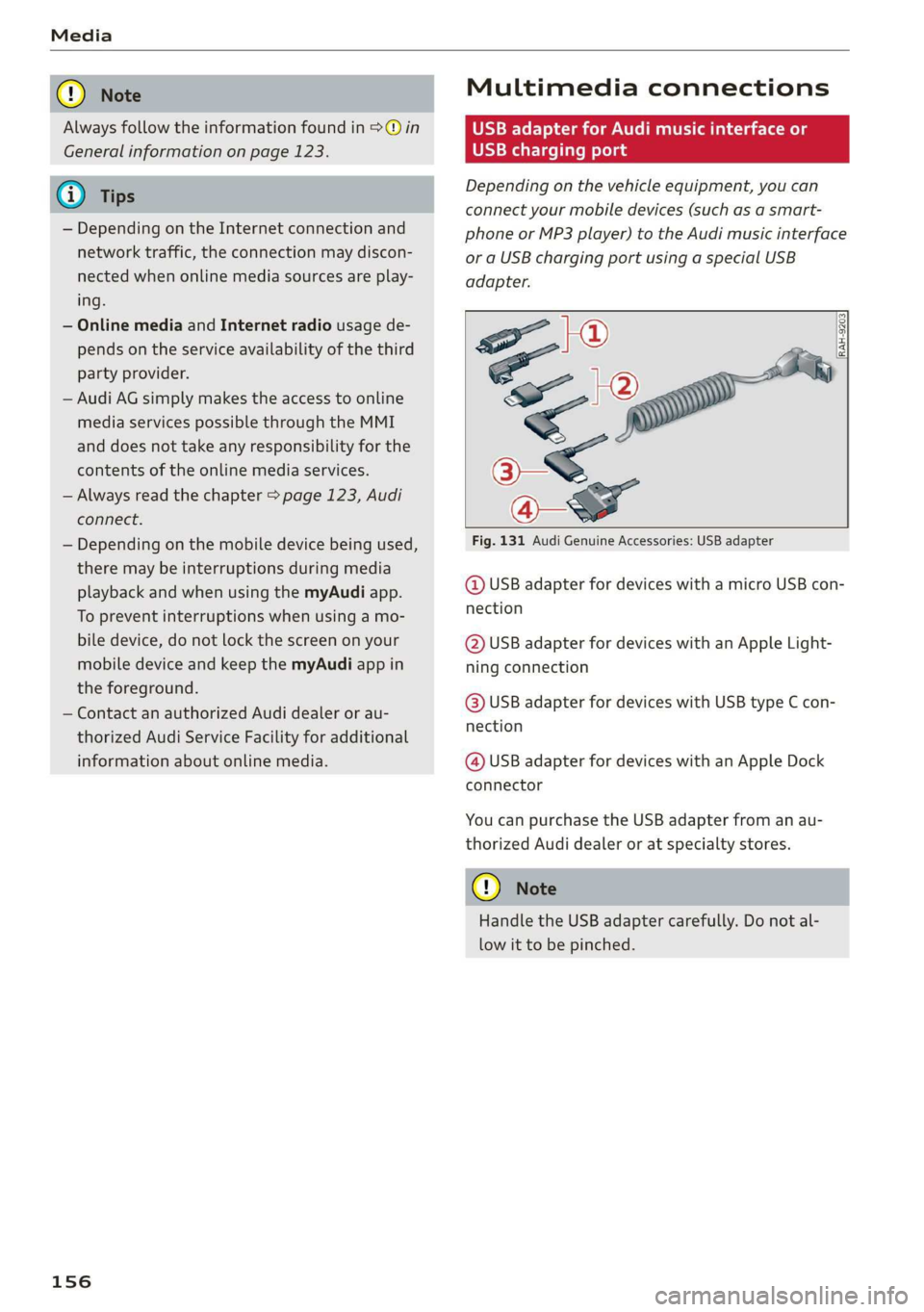
Dependingonthevehicleequipment,youcan
connectyourmobiledevices(suchasasmart-
phoneorMP3player)totheAudimusicinterface
oraUSBchargingportusingaspecialUSB
adapter.
oe|®
SO2
<
7
Fig.131AudiGenuineAccessories:USBadapter
RAH-9203|
@USBadapterfordeviceswithamicroUSBcon-
nection
@USBadapterfordeviceswithanAppleLight-
ningconnection
@USBadapterfordeviceswithUSBtypeCcon-
nection
@USBadapterfordeviceswithanAppleDock
connector
YoucanpurchasetheUSBadapterfromanau-
thorizedAudidealeroratspecialtystores.
()Note
HandletheUSBadaptercarefully.Donotal-
lowittobepinched.
Page 159 of 312
8S1012721BA
Media
Audimusicinterface
Appliesto:vehicleswithAudimusicinterface
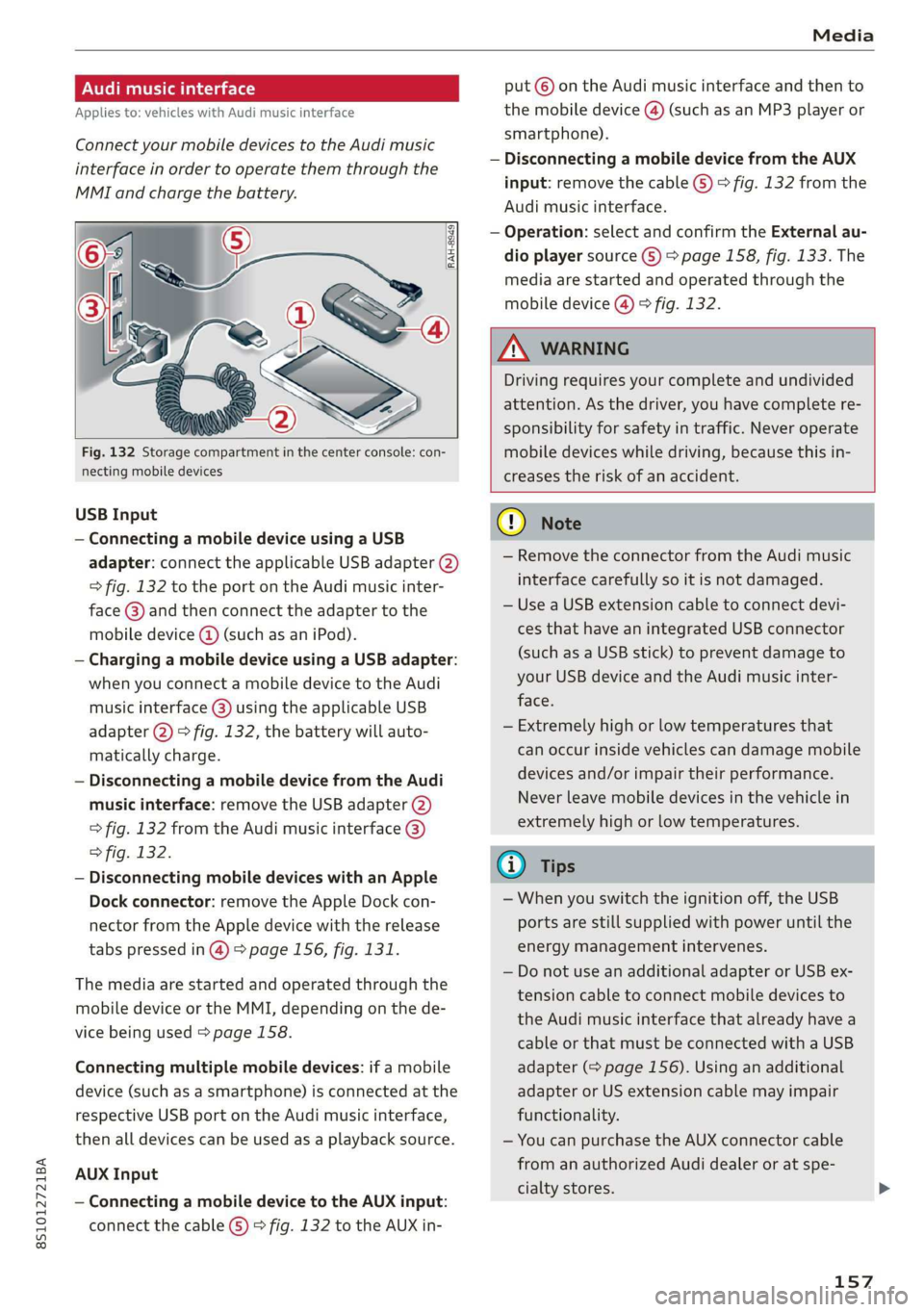
ConnectyourmobiledevicestotheAudimusic
interfaceinordertooperatethemthroughthe
MMIandchargethebattery.
put©ontheAudimusicinterfaceandthento
themobiledevice@)(such asanMP3playeror
smartphone).
—DisconnectingamobiledevicefromtheAUX
input:removethecableG)>fig.132fromthe
Audimusicinterface.
—Operation:selectandconfirm theExternalau-
dioplayersourceG)>page158,fig.133.The
mediaarestartedandoperatedthroughthe
mobiledevice@)>fig.132.
Fig.132Storagecompartmentinthe centerconsole:con-
nectingmobiledevices
USBInput
—ConnectingamobiledeviceusingaUSB
adapter:connecttheapplicableUSBadapter(2)
=>fig.132totheportontheAudimusicinter-
face@)andthenconnecttheadaptertothe
mobiledevice@(such asaniPod).
—ChargingamobiledeviceusingaUSBadapter:
whenyouconnectamobiledevicetotheAudi
musicinterface@)usingtheapplicableUSB
adapter@)>fig.132,thebatterywillauto-
maticallycharge.
—DisconnectingamobiledevicefromtheAudi
musicinterface:removetheUSBadapter(2)
>fig.132fromtheAudimusicinterface@)
>fig.132.
—DisconnectingmobiledeviceswithanApple
Dockconnector:removetheAppleDockcon-
nectorfromtheAppledevicewiththerelease
tabspressedin@)>page156,fig.131.
Themediaarestartedandoperatedthroughthe
mobiledeviceortheMMI,dependingonthede-
vicebeingused>page158.
Connectingmultiplemobiledevices:ifamobile
device(suchasasmartphone)isconnectedatthe
respectiveUSBportonthe Audimusicinterface,
thenalldevicescan beusedasaplaybacksource.
AUXInput
—Connectingamobiledevice totheAUXinput:
connectthecable(G)>fig.132totheAUXin-
Z\WARNING
Drivingrequiresyourcompleteandundivided
attention.Asthedriver,youhavecompletere-
sponsibilityforsafetyintraffic.Neveroperate
mobiledeviceswhiledriving,becausethisin-
creasestheriskofanaccident.
Gq)Note
—RemovetheconnectorfromtheAudimusic
interfacecarefullysoit isnotdamaged.
—UseaUSBextensioncabletoconnectdevi-
cesthathaveanintegratedUSBconnector
(such asaUSBstick)topreventdamageto
yourUSBdeviceandthe Audimusicinter-
face.
—Extremelyhighorlow temperaturesthat
canoccurinsidevehiclescandamagemobile
devicesand/orimpairtheirperformance.
Neverleavemobiledevicesinthevehiclein
extremelyhighorlowtemperatures.
@)Tips
—Whenyouswitchtheignitionoff,theUSB
portsarestillsupplied withpoweruntilthe
energymanagementintervenes.
—DonotuseanadditionaladapterorUSBex-
tensioncabletoconnectmobiledevicesto
the Audimusicinterfacethatalreadyhavea
cableorthatmustbeconnectedwithaUSB
adapter(=page156).Using anadditional
adapterorUSextensioncablemayimpair
functionality.
—YoucanpurchasetheAUXconnectorcable
fromanauthorizedAudidealeror atspe-
cialtystores.
157
Page 160 of 312
Media
—Audirecommendssettingthevolumeofa
mobiledeviceconnectedtotheAUXinputto
approximately70%ofthemaximumvol-
ume.
—Functionalityisnotguaranteedformobile
devicesthatdonotconformtotheUSB2.0
specification.
—USBhubsarenotsupported.
—SomeversionsoftheiPodsuchastheiPod
shufflecannotbeconnectedtotheUSB
adapterfordeviceswithAppleDockconnec-
tor.ConnectthesedevicesusingaAUXcon-
nectorcable.
—Videoplaybackthroughthe Audimusicin-
terfaceisonlysupportediftheconnected
deviceisrecognizedasaUSBstoragedevice
(forexampleaUSBstick).Appledevicesand
MTPdevices(such assmartphones)arenot
recognizedasUSBstoragedevices.
—iPod oriPhonemalfunctionsalsoaffectthe
operationoftheMMI.ResetyouriPod or
iPhoneifthishappens.
—Forimportantinformationonoperating
youriPodoriPhone,refertotheuserguide
forthedevice.Audirecommendsupdating
theiPodoriPhonesoftwaretothelatest
version.
—Formoreinformationaboutthe Audimusic
interfaceandsupporteddevices,checkthe
Audidatabaseformobiledevicesatwww.
audiusa.com/mp3orcontactanauthorized
AudidealerorauthorizedAudiServiceFa-
cility.
Playingmedia
Accessingmedia
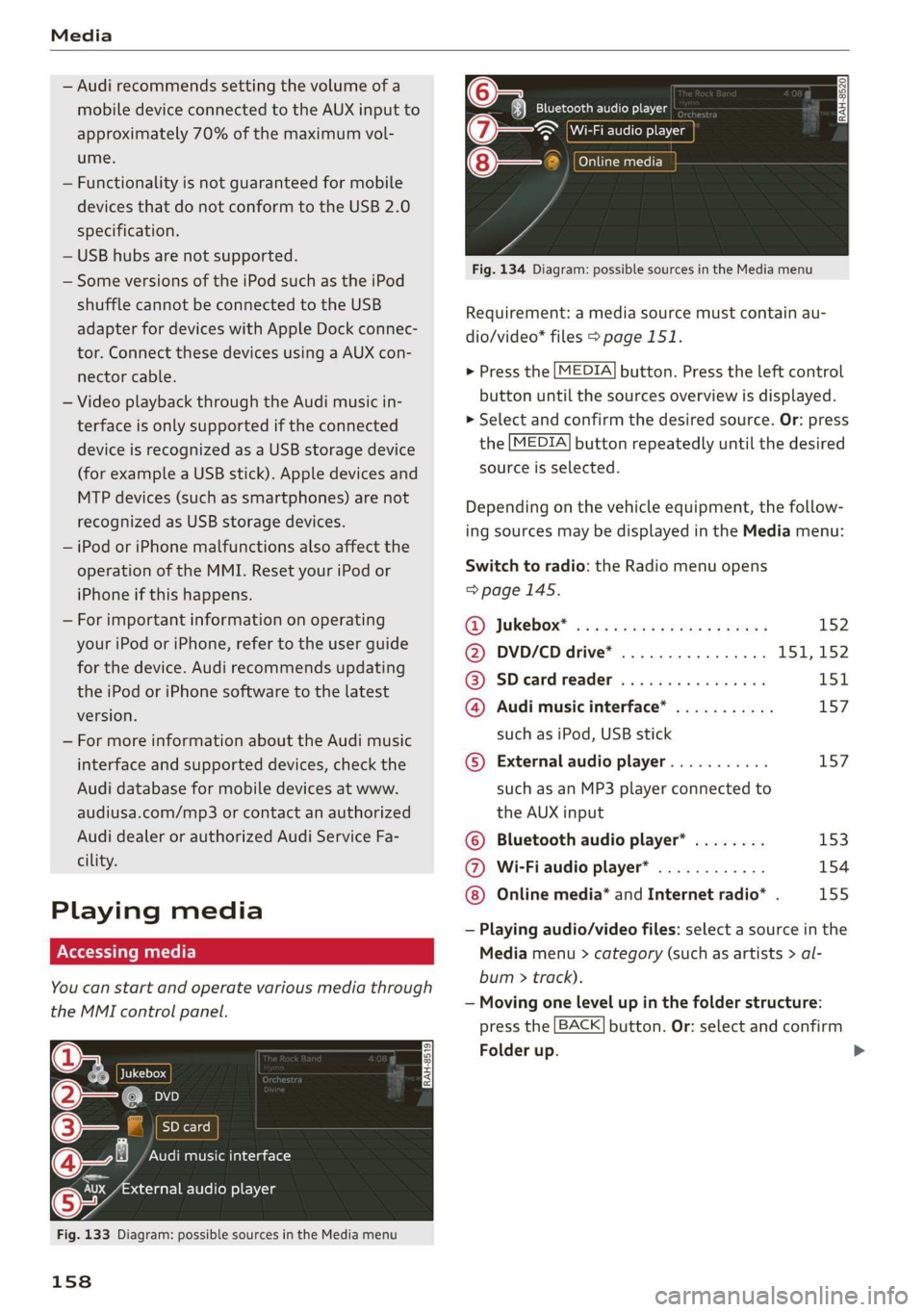
Youcanstartandoperatevariousmediathrough
theMMIcontrolpanel.
Ue@@|Jukebox
@—eies
[RAH-8519]
@—§Audimusicinterface
evaudioplayer
Fig.133Diagram:possiblesourcesintheMediamenu
158
RAH-8520Bluetoothaudioplayer
=~Wi-Fiaudioplayer
Onlinemedia
Fig.134Diagram:possiblesourcesintheMediamenu
Requirement:amediasourcemustcontainau-
dio/video*files>page151.
>Pressthe[MEDIA]button.Presstheleftcontrol
buttonuntilthesourcesoverviewisdisplayed.
>Selectandconfirmthedesiredsource.Or:press
the[MEDIA]buttonrepeatedlyuntilthedesired
sourceisselected.
Dependingonthevehicleequipment,thefollow-
ingsourcesmaybedisplayedintheMediamenu:
Switchtoradio:the Radiomenuopens
=>page145.
RD):JUKEDOX®wesssserex xsemeveeee152
@DVD/CDdrive*................ISI,152
@SDeardreader................151
@Audimusicinterface*...........157
suchasiPod,USBstick
©Externalaudioplayer...........157
suchasanMP3playerconnectedto
theAUXinput
©Bluetoothaudioplayer*........153
@Wi-Fiaudioplayer*............154
Onlinemedia*andInternetradio”.155
—Playingaudio/videofiles:selectasourceinthe
Mediamenu>category(suchasartists>al-
bum>track).
—Movingonelevelupinthefolderstructure:
pressthe[BACK]button.Or:selectandconfirm
Folderup.
>
Page 161 of 312
8S1012721BA
Media
—Selectingthepreviousornexttrack/chapter
D: presstheOn/OffknobontheMMIcontrol
panelbrieflytotheleftKdorrightDo.
—Fast-forwardingandrewindingaudio/video
files:pressandholdtheOn/Offknobonthe
MMIcontrolpaneltotheleftKdorrightDelfor
alongertime.
—Pausingorresumingplayback:pressthe
On/OffknobontheMMIcontrolpanelbriefly.
@)Tips
—Youcanscrollthroughlonglistsquicklyby
turningthecontrolknobquickly.Thescroll-
ingspeeddependsonthenumberoflisten-
tries.
—Forsafetyreasons,thevideoimageisonly
displayedwhenthevehicleisstationary.On-
lythesoundfromthevideoplayswhiledriv-
ing.
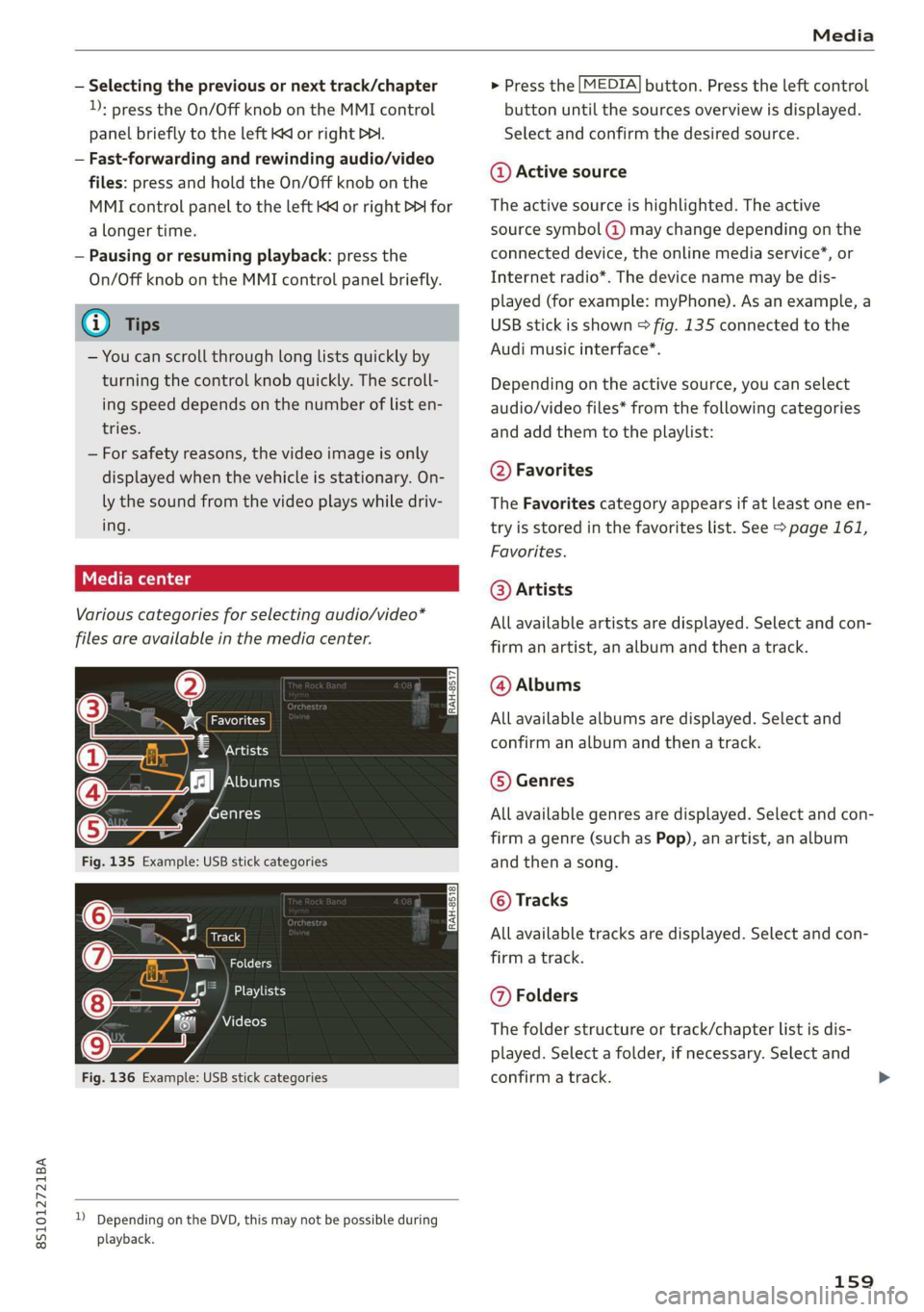
Variouscategoriesfor selectingaudio/video*
filesareavailableinthemediacenter.
ao
€Artists
(4)‘falNeyeraa
ogalg-t)
—
Fig.135Example:USBstickcategories
Track
(7)RNa
Fig.136Example:USBstickcategories
))DependingontheDVD,thismaynotbepossibleduring
playback.
>Pressthe[MEDIA]button.Presstheleftcontrol
buttonuntilthesourcesoverviewisdisplayed.
Selectandconfirmthedesiredsource.
@Activesource
Theactivesourceishighlighted.Theactive
sourcesymbol(@)maychangedependingonthe
connecteddevice,theonlinemediaservice*,or
Internetradio*.Thedevicenamemaybedis-
played(forexample:myPhone).Asanexample,a
USBstickisshown>fig.135connectedtothe
Audimusicinterface*.
Depending ontheactivesource,youcanselect
audio/videofiles*fromthefollowingcategories
andaddthemtotheplaylist:
@Favorites
TheFavoritescategoryappearsifatleastoneen-
tryisstoredinthefavoriteslist.See>page161,
Favorites.
@Artists
Allavailableartistsaredisplayed.Selectandcon-
firmanartist,analbumandthenatrack.
@Albums
Allavailablealbumsaredisplayed.Selectand
confirm analbumandthenatrack.
©Genres
Allavailablegenresaredisplayed.Selectandcon-
firm
agenre(suchasPop),anartist,analbum
andthenasong.
©Tracks
Allavailabletracksaredisplayed.Selectandcon-
firm
atrack.
@Folders
Thefolderstructureortrack/chapterlistisdis-
played.Selectafolder,ifnecessary. Selectand
confirmatrack.
159
Page 163 of 312
8S1012721BA
Media
Playlist
naa)
ThebigB
Sola
a:
Again
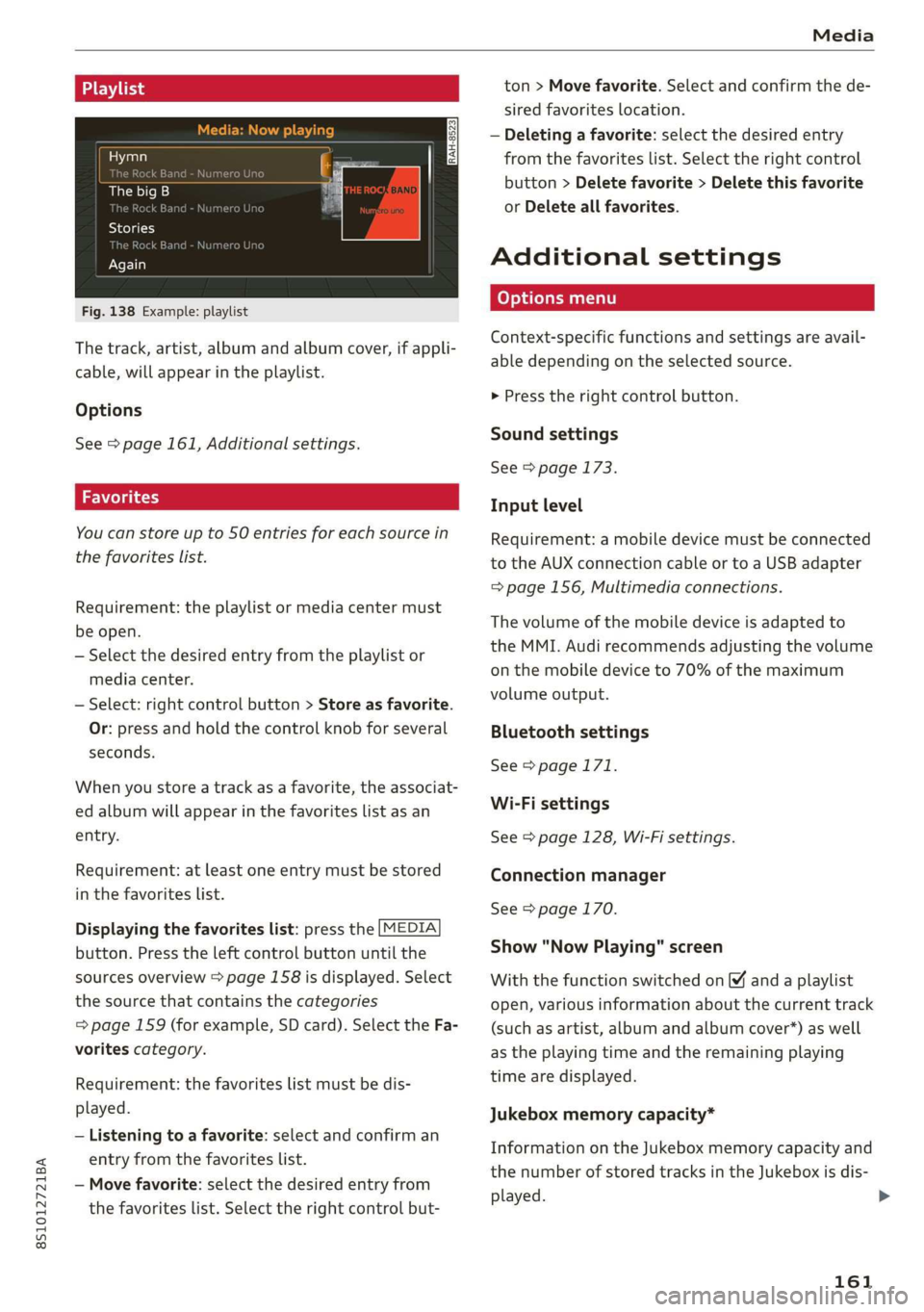
Fig.138Example:playlist
Thetrack,artist,albumandalbumcover,ifappli-
cable,willappearintheplaylist.
Options
See>page161,Additionalsettings.
Youcanstoreupto50entriesforeachsourcein
thefavoriteslist.
Requirement:theplaylistormediacentermust
beopen.
—Selectthedesiredentryfromtheplaylistor
mediacenter.
—Select:rightcontrolbutton>Storeasfavorite.
Or:pressandholdthecontrolknobforseveral
seconds.
Whenyoustoreatrackasa favorite,theassociat-
edalbumwillappearinthefavoriteslistasan
entry.
Requirement:atleastoneentrymustbestored
inthefavoriteslist.
Displayingthefavoriteslist:pressthe[MEDIA
button.Presstheleftcontrolbuttonuntilthe
sourcesoverview>page158isdisplayed.Select
thesourcethat containsthecategories
=>page159(forexample,SDcard).SelecttheFa-
voritescategory.
Requirement:thefavoriteslistmustbedis-
played.
—Listeningtoafavorite:selectandconfirm an
entryfromthefavoriteslist.
—Movefavorite:selectthedesiredentryfrom
thefavoriteslist.Selecttherightcontrolbut-
ton>Movefavorite.Selectandconfirmthede-
siredfavoriteslocation.
—Deletingafavorite:selectthedesiredentry
fromthefavoriteslist.Selecttherightcontrol
button>Deletefavorite>Deletethisfavorite
orDeleteallfavorites.
Additionalsettings
Context-specificfunctionsandsettingsareavail-
abledependingontheselectedsource.
>Presstherightcontrolbutton.
Soundsettings
See>page173.
Inputlevel
Requirement:amobiledevicemustbeconnected
totheAUXconnectioncableor toaUSBadapter
=>page156,Multimediaconnections.
Thevolumeofthemobiledeviceisadaptedto
theMMI.Audirecommendsadjustingthevolume
onthemobiledeviceto70%ofthemaximum
volumeoutput.
Bluetoothsettings
See>page171.
Wi-Fisettings
See>page128,Wi-Fisettings.
Connectionmanager
See>page170.
Show"NowPlaying"screen
Withthefunctionswitchedon¥andaplaylist
open,variousinformationaboutthecurrenttrack
(suchasartist,albumandalbumcover*)aswell
astheplayingtimeandtheremainingplaying
timearedisplayed.
Jukeboxmemorycapacity*
InformationontheJukeboxmemorycapacityand
thenumberofstoredtracksintheJukeboxisdis-
played.
161
>
Page 166 of 312
Media
Supportedmediaandfileformats
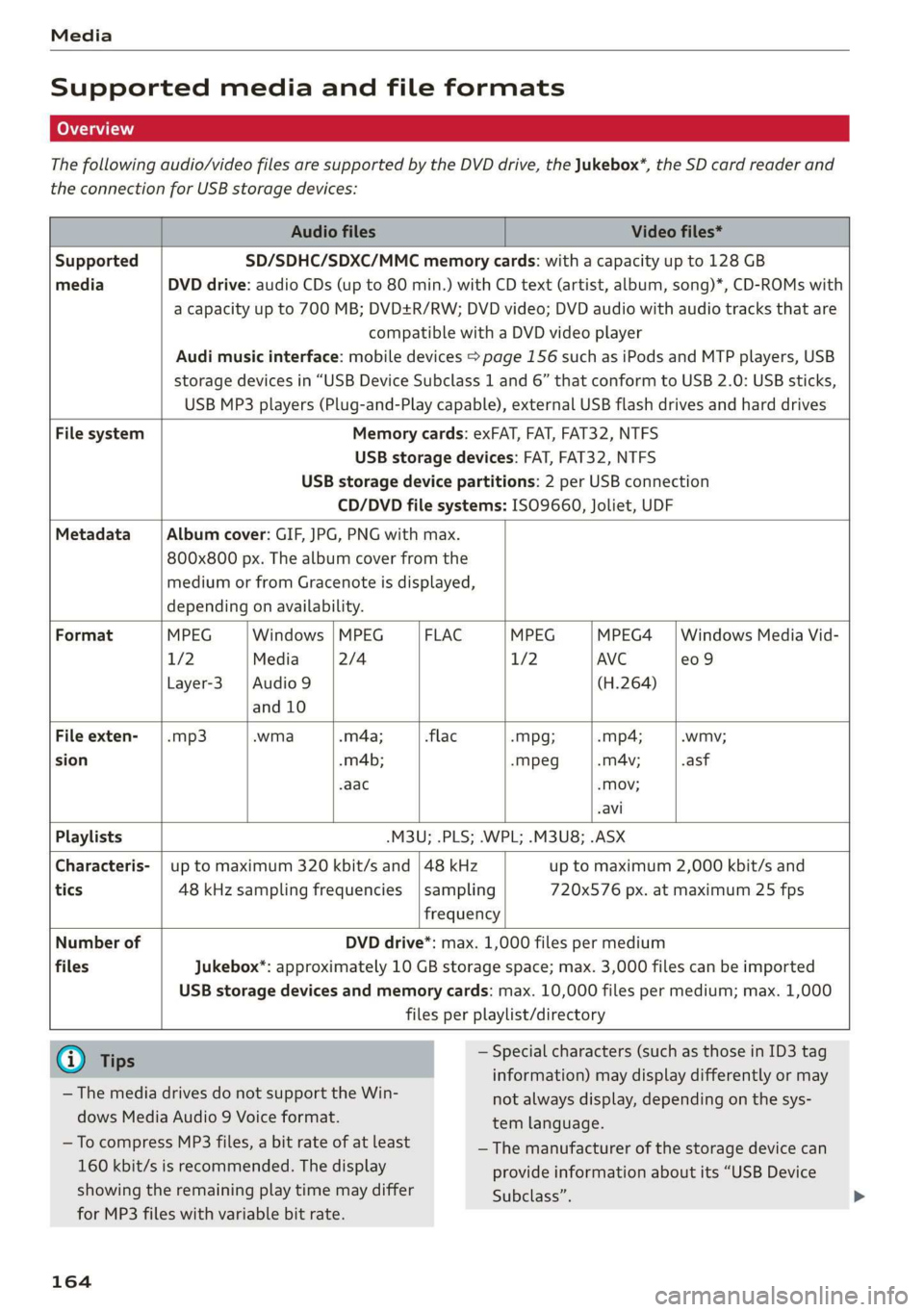
Thefollowingaudio/videofilesaresupportedbytheDVDdrive,theJukebox*,theSDcardreaderand
theconnectionforUSBstoragedevices:
AudiofilesVideofiles*
SupportedSD/SDHC/SDXC/MMCmemorycards:withacapacityupto128GB
mediaDVDdrive:audioCDs(upto80min.)withCDtext(artist,album,song)*,CD-ROMswith
acapacityupto700MB;DVD+R/RW;DVDvideo;DVDaudiowithaudiotracksthatare
compatiblewithaDVDvideoplayer
Audimusicinterface:mobiledevices>page156suchasiPodsandMTPplayers,USB
storagedevicesin“USBDeviceSubclass1and6”thatconformtoUSB2.0:USBsticks,
USBMP3players(Plug-and-Playcapable),externalUSBflashdrivesandharddrives
FilesystemMemorycards:exFAT,FAT,FAT32,NTFS
USBstoragedevices:FAT,FAT32,NTFS
USBstoragedevicepartitions:2perUSBconnection
CD/DVDfilesystems: ISO9660,Joliet,UDF
MetadataAlbumcover:GIF,JPG,PNGwithmax.
800x800px.Thealbumcoverfromthe
mediumorfromGracenoteisdisplayed,
dependingonavailability.
FormatMPEGWindows|MPEGFLACMPEGMPEG4|WindowsMediaVid-
1/2Media2/41/2AVCe09
Layer-3|Audio9(H.264)
and10
Fileexten-|.mp3.wma.m4a;-flac-Mpg;-mp4;.wmy;
sion.m4b;-mpeg.mA4v;.asf
aac-Mov;
avi
Playlists-M3U;.PLS;.WPL;.M3U8;.ASX
Characteris-|uptomaximum320kbit/sand|48kHz uptomaximum2,000kbit/sand
tics48kHzsamplingfrequencies|sampling720x576px.atmaximum25fps
frequency
NumberofDVDdrive*:max.1,000filespermedium
filesJukebox*:approximately10GBstoragespace;max.3,000filescan beimported
USBstoragedevicesandmemorycards:max.10,000filespermedium;max.1,000
filesperplaylist/directory
@Ti—Specialcharacters(suchasthoseinID3tag
ips::::
information)maydisplaydifferentlyormay
notalwaysdisplay,dependingonthesys-
temlanguage.
— ThemediadrivesdonotsupporttheWin-
dowsMediaAudio9Voiceformat.
—ToeeMP3files,abitrateoiatleast—Themanufacturerofthestoragedevicecan
160kbit/sisrecommended.Thedisplayprovideinformationaboutits“USBDevice
showingtheremainingplaytimemaydifferSubclass”.
forMP3fileswithvariablebitrate.
164
Page 169 of 312
8S1012721BA
Audismartphoneinterface
Audismartphone
interface
Setup
Appliesto:vehicleswithAudismartphoneinterface
YoucanconnectyoursmartphonetotheMMIus-
ingtheAudismartphoneinterface.Certaincon-
tenton yoursmartphoneisadaptedtotheInfo-
tainmentsystemdisplaywhiledrivingandcan
beoperatedthroughtheMMIcontrolpanel.
Requirement:
Thevehiclemustbestationaryandtheignition
mustbe switchedon.
iPhonegeneration5orhigher withLightning
connectorandiOS7.1.2operatingsystemor
higher.Or:
AsmartphonewiththeAndroidAutoapp andAn-
droid5.0Lollipopoperatingsystemorhigheris
required.
>Connectyour smartphonetotheAudimusicin-
terface>page157usingtheapplicableUSB
adapter>page156,fig. 131.
> SelectandconfirmActivateAppleCarPlayor
ActivateAndroidAutonow.
>Follow thesysteminstructions.
>Payattentiontoanyadditionalsystemprompts
onyoursmartphone,ifapplicable.
IfyouchosenottouseAppleCarPlayorAndroid
Autowhenconnectingyoursmartphoneforthe
firsttime,youcanstarttheAudismartphonein-
terfacelateronusingtheConnectionmanager.
>Select:[MENU]button>Audismartphonein-
terface>Changetoconnectionmanager.
>Connectyour smartphonetotheAudimusicin-
terface>page157usingtheapplicableUSB
adapter>page156,fig. 131.
>SelectandconfirmAudismartphoneinterface
intheConnectionmanager>page170.You
canselectyoursmartphoneinthelistofdevi-
cesthatarealreadypaired>page171.
>Follow thesysteminstructions.
)Inpreparationatthetimeofprinting.
ZAWARNING
Drivingrequiresyourcompleteandundivided
attention.Asthedriver,youhavecompletere-
sponsibilityforsafetyintraffic.Neveroperate
mobiledeviceswhiledriving,becausethisin-
creasestheriskofanaccident.
@)Note
Alwaysfollowtheinformationfoundin>@in
Generalinformationonpage123.
@)Tips
—Thefunctionsthatcan beuseddependon
thefollowingfactors,amongothers:
—Thebrandofyoursmartphone
~Theversionoftheoperatingsystemin
yoursmartphone
—Thesoftwareversionoftheappused
—TheUSBadaptercableandcorrectconnec-
tion
—Yourcellphoneserviceprovider
—Thecustomizedsettingson yoursmart-
phone
—Oneofthefactorsaboveoracombination
ofanyofthemcouldcauseyoursmart-
phonetobe incompatiblewiththeAudi
smartphoneinterface.Compatibilitycannot
beguaranteedforalltypesofsmartphones.
Formoreinformationandassistance,refer
totheuserguideandthemanufacturerof
yoursmartphone.
—Iftheconnectedsmartphonehasvoicecon-
trol,youcan operateyoursmartphoneusing
theexternalvoicerecognitionsystem*
=>page107.
— ThemenulanguageshownintheMMIis
basedonthesettingsinyoursmartphone.
—ThetimedisplayedintheMMIisbasedon
thesettingsinyoursmartphone.
—SomeMMIfunctionsarenotavailablewhen
AppleCarPlayorAndroidAutoisactive.
—Youcannotconnectanymobiledevicesvia
BluetoothwhenanAppleCarPlayconnec-
tionisactive.
167
Page 170 of 312
Audismartphoneinterface
—WhentheAppleCarPlayconnectionisac-AndroidAuto:togobacktotheAndroidAuto
tive,TagthissongforiTunes*»jsnotavail-menubar,pushthecontrolknob down.
able>page146.
Operating
Openingamenuitem
SelectandconfirmamenuitemusingtheMMI
Appliesto:vehicleswithAudismartphoneinterfacecontrolpanel.
Openingamenu
AppleCarPlay:youcangobacktotheAppleCar-
Playmainmenuregardlessoftheselectedmenu
itembypressingandholdingthe[BACK]button.
Troubleshooting
Appliesto:vehicleswithAudismartphoneinterface
ProblemSolution
Audismartphone
interfacecannotbe
opened.
Checkthebatterychargelevelonyoursmartphone.
ChecktheUSBcableanduseadifferentoneifnecessary.
CheckifAndroidAutoorAppleCarPlayisavailableinthecountrywherethevehi-
cleisbeingoperated.
AndroidAuto:checkiftheAndroidAutoappisinstalledonyoursmartphone.
Connectingthe
smartphonetothe
MMIfailed.
MakesurethatyouareusingthecorrectUSBadapterandcheckiftheUSB
adapterisconnectedcorrectlytoyour smartphoneandtheAudimusicinterface
=>page156.
AppleCarPlay:checkifAppleCarPlayisactivatedonyoursmartphone.
AndroidAuto:checkintheAndroidAutoappifAndroidAutopermitsnewvehi-
cles.
Thesmartphoneis
notautomatically
detected.
MakesurethatyouareusingthecorrectUSBadapterandcheckiftheUSB
adapterisconnectedcorrectlytoyoursmartphoneandtheAudimusicinterface
=>page156.
Checkiftherequirementsneededtoconnectasmartphonehavebeenmet.
DInpreparationatthetimeofprinting.
168
Page 171 of 312
![AUDI TT COUPE 2019 User Guide 8S1012721BA
Systemsettings
Systemsettings
Settingthedateand
time
Youcanset theclocktimemanuallyorusingthe
GPS.
>Select:[MENU]button>Settings>leftcontrol
button>MMIsettings>Date&time.
>Or:select:](/img/6/57659/w960_57659-170.png "AUDI TT COUPE 2019 User Guide 8S1012721BA
Systemsettings
Systemsettings
Settingthedateand
time
Youcanset theclocktimemanuallyorusingthe
GPS.
>Select:[MENU]button>Settings>leftcontrol
button>MMIsettings>Date&time.
>Or:select:")
8S1012721BA
Systemsettings
Systemsettings
Settingthedateand
time
Youcanset theclocktimemanuallyorusingthe
GPS.
>Select:[MENU]button>Settings>leftcontrol
button>MMIsettings>Date&time.
>Or:select:[MENU]button>Vehicle>leftcon-
trolbutton>Vehiclesettings>Date&time.
Automaticsetting
Whenthisfunctionisswitchedon©,thetime
anddateareautomaticallyset.
Time
Requirement:theAutomaticsettingmustbe
switchedoff.
Pressthecontrolknob.YoucansettheTime
manuallybyturningandpressingthecontrol
knob.
Date
Requirement:theAutomaticsettingmustbe
switchedoff.
Pressthecontrolknob.YoucansettheDate
manuallybyturningandpressingthecontrol
knob.
Timezone
Whenselectingtheappropriatetimezone,a
samplingofcountriesinthiszonewillbelisted.
Automatictimezone*
Whenthisfunctionisswitchedon@,thetime
willautomaticallyadjusttothecorresponding
timezone.
Timeformat
Ifyouselect24h,theclockwilldisplay,forexam-
ple,13:00.IfyouselectAM/PM,theclockwill
display,forexample,1:00PM.
D_TheQistandardmakesitpossibletocharge yourmobile
devicewirelessly.
Dateformat
IfyouselectDD.MM.YYYY,thedatedisplaywill
show,forexample,31.08.2017.Ifyouselect
MM/DD/YYVY,thedatedisplaywillshow,forex-
ample,08/31/2017.IfyouselectYYYY-MM-DD,
thedatedisplaywillshow,forexample,
2017-08-31.
MMIsettings
>Select:[MENU]button>Settings>leftcontrol
button>MMIsettings.
Language
Youcanchangethedisplaylanguageaswellas
thelanguageforthevoiceguidance*andvoice
recognitionsystem*.
Thenumberoflanguagesavailabledependson
themarket.
Measurementunits
Thefollowingmeasurementunitscanbesetde-
pendingonavailability:Speed,Distance,Tem-
perature,Fuelconsumption,Volume,Pressure.
Mobiledeviceremindersignal
Appliesto:vehicleswithAudiphonebox
Requirement:yourcellphonemustbeQi-capa-
ble)orconnectedtotheAudimusicinterface@
withaUSBadaptercable>page111,fig.107.
Whenthedeviceremindersignalisswitchedon,
youwillbenotifiedthatyourmobiledeviceisstill
intheAudiphonebox*whenyouleavethevehi-
cle.YoucanselectbetweenSpokencue,Signal
toneandOff.
Mobiledeviceremindersignalvolume:youcan
adjusttheremindersignalvolumebyturningthe
controlknob.
Switchoffpop-up:whenthefunctionisswitched
on[M,themessagesintheInfotainmentsystem
displayregardingthechargingstatusofyourcell
phoneinthe Audiphonebox*arehidden.There-
mindernottoforgetyourcellphonewhenleav-
ingthevehicleislikewiseswitchedoff.
169
Page 173 of 312
8S1012721BA
Systemsettings
Secondaryphone
Appliesto:vehicleswithtelephone
—Connectnewdevice:searchforandconnecta
cellphone.
—Listofdevicesalreadypaired:selectyourcell
phonefromthelistofallthedevicesthatare
alreadypaired.
PELe-Meolaal-vaale)a)
Appliesto:vehicleswithAudiconnect
—Connectnewdevice:searchforandconnecta
mobiledevice(such asasmartphone).
—Listofdevicesalreadypaired:selectyourcell
phonefromthelistofallthedevicesthatare
alreadypaired.Or: insertaminiSIMcardinto
theSIMcardreader*=page124.
@Note
Alwaysfollow theinformationfoundin>@in
Generalinformationonpage123.
myAudiapp
Appliesto:vehicleswithAudiconnect
Requirement:themyAudiappmustbeinstalled
and
openonyourmobiledevice.
—Connectnewdevice:searchforandconnecta
mobiledevice(such asasmartphone).
—Listofdevicesalreadypaired:selectyourmo-
biledevicefromthelistofallthedevicesthat
arealreadypaired.
Audioplayer
Appliesto:vehicleswithBluetoothorWi-Fiaudioplayer
Bluetoothplayer
Requirement:theBluetoothfunctionandvisibili-
tymustbe switchedonintheMMI>page171
andontheBluetoothaudioplayer.
—Connectnewdevice:pressthecontrolknob.
SelectBluetoothaudioplayer.Searchforand
connectamobiledevice.
—Listofdevicesalreadypaired:selectaBlue-
toothdevicefromthelistofallthedevicesthat
arealreadypaired.
Wi-Fiaudioplayer
Requirement:theWi-FihotspotontheMMI
=page128andtheWi-FionyourWi-Fiaudio
playermustbe switchedon.
—Connectnewdevice:pressthecontrolknob.
SearchforandconnectaWi-Ficapabledevice.
—DisconnectWi-Fiaudioplayer:deactivatethe
Wi-FionyourWi-Ficapabledevice.Thedevice
willbeautomaticallyremovedfromthelist.
@)Note
AlwaysfollowtheinformationfoundinS@in
Generalinformationonpage123.
Appliesto:vehicleswithtelephone
Displaycontactsfromacellphone(oranaddi-
tionalcellphone).
Requirement:cellphonesmustnot beconnected
totheMMIthroughtheBluetoothremoteSIM
accessprofileorthroughtheHandsfreeprofile.
—Connectnewdevice:searchforandconnecta
newcellphone.
—Listofdevicesalreadypaired:selectyourcell
phonefromthelistofallthecellphonesthat
arealreadypaired.
Audismartphoneinterface
Appliesto:vehicleswith Audismartphoneinterface
—ConnectyourcellphonetotheAudimusicin-
terface>page157usingaUSBadapter
=>page156,fig.131.
—Selectyourcellphonefromthelistofcell
phonesthathavealreadybeenconnected.
Additionaloptions
Depending on
theselectedfunction,youcan use
the
rightcontrolbuttontoaccesstheavailable
additionaloptionsintheconnectionmanager.
Bluetoothsettings
—Bluetooth:selectandconfirmasettingforthe
Bluetoothconnectionvisibility.SelectVisible
fortheMMItobevisibletootherdevices.
171