bluetooth AUDI TT COUPE 2019 User Guide
[x] Cancel search | Manufacturer: AUDI, Model Year: 2019, Model line: TT COUPE, Model: AUDI TT COUPE 2019Pages: 312, PDF Size: 83.95 MB
Page 116 of 312

Telephone
—Dialingaphonenumber:selectandconfirm@.
Or:pushthecontrolknobdown.Selectand
confirmOK.
—Deletingindividualcharacters:selectandcon-
firm&l.
—Deletingallcharactersenteredatonce:turn
thecontrolknobwiththecharacterselectionto
landpressandholdthecontrolknob.Or:se-
lecttherightcontrolbutton>Clearinputfield.
Tonesequences(DTMF)canbeentereddirectly
intothespellerduringaphonecall.
Acceptingorendingacall
Appliesto:vehicleswithtelephone
—Acceptingacall:selectandconfirmAnswer.
—Decliningacall:selectandconfirmDecline.
—Mutingtheactivecall:selectandconfirm
Mute.
—Endinga phonecall/canceldialing:selectand
confirmEndcall.Or:pressthecontrolknob.
Acceptinganothercall:see>page114,Duringa
phonecall.
Callerinformation:thename, phonenumberor
UnknownappearsintheInfotainmentsystem
displaydependingonifthecallerhasbeenstored
inthedirectoryandifthephonenumberhas
beentransmitted.Apicturemayalsobedis-
played,dependingonwhetheryouhaveassigned
apicturetoacontactinyourdirectoryandifit
wastransferredtoyourMMI.Youcanfindoutif
yourmobiledevicesupportsthisfunctionfrom
yourmobiledevicenetworkprovider,yourmobile
deviceowner'smanual,oratwww.audiusa.com/
bluetooth.
@Tips
Theradioormediaplaybackismutedduringa
phonecall.
Duringaphonecall
Appliesto:vehicleswithtelephone
Requirement:
theremustbeacallinprogress.
>
Presstherightcontrolbutton.
114
Thefollowingoptionsmaybepossibleduringa
calldependingonthemobiledevicebeingused
andthetypeofconnection:
—Makinganadditionalcall:select:Findcontact
>Calllist/Directory/Favorites>anentryfrom
thelist.
—Acceptinganincomingcallwhenthereisan
activecallandacallonhold:selectReplace.
Theactivecallisreplacedwiththeincoming
call.
—Answeringanadditionalcall:ifthereisanin-
comingcallwhileanothercallisactive,youcan
selectAnswertoput theexistingcallonhold
andanswertheincomingcall.IfyouselectDe-
cline,theincomingcallwillbedeclined.
Additionalfunctionsinclude:
Mute:ifyouselectandconfirmthisfunction,the
otherpersononthephonecannothearyou.You
willstillbeabletoheartheotherperson.
Holdcall/Resume:youcanplacetheexistingcall
onholdandresumeitagain.Toresumethecall,
selectandconfirmthecallyouwouldliketore-
sume.
Transfercalltomobiledevice*:selectandcon-
firm
Transfercalltomobiledevicetotransfer
theexistingcallfromtheMMItoyourcellphone.
Switchtohands-freemode*:Requirement:you
musthaveaphonecallinprogressonyourcell
phone.SelectandconfirmSwitchtohands-free
modetotransferthecallfromyourcellphoneto
theMMI.
Swapcall:alternatebetweentwophonecalls
whileoneofthecallsisonhold.SelectingEnd
call willendtheactivephonecall.Aphonecall
onholdcanberesumedusingtherightcontrol
button>Resume.
Addtoconference:apartyonholdanduptofive
activeparties(dependingonthenetwork)canbe
addedtoaconferencecall.Tomakeanadditional
call,putallparticipantsinthecurrentconference
callonholdusingtherightcontrolbutton>Hold
conference.Presstheleftcontrolbutton.Select
andconfirmCalllist/Directory/Favorites>an
entryfromthelist.Youcanaddcalledcontacts
totheconferenceusingtherightcontrolbutton>
Page 117 of 312

8S1012721BA
Telephone
>Addtoconference.Resumetakesallpartiesoff
hold.
Multi-partycalling:selecttherightcontrolbut-
ton>Telephonesettings>Calloptions.When
thefunctionisswitchedon¥youcanacceptan
additionalcallusingAnswerordeclineacallus-
ingDecline.Whenthefunctionisswitchedoff,
youcanReplacethecallorDecline.
Connectionmanager:see>page170.
Telephonesettings:see>page120.
G)Tips
—To benotifiedofanincomingcallduringa
phonecall,thecallwaitingfunctioninyour
cellphonemustbe switchedonwhenusing
thehands-freeprofile(Handsfree).
—Youcanobtainmoreinformationfromyour
mobiledeviceserviceproviderorfromyour
mobiledeviceuserguide.
—Whenleavingthevehicle,theBluetooth
connectiontothemobiledevicewillauto-
maticallydisconnect.Depending onyour
mobiledevice,phonecallsinprogressmay
beautomaticallyredirectedfromtheMMI
toyourmobiledevicesothatyoucancon-
tinuethecallonyourphone.
— Thedisplay ofan incomingphonecallinthe
Infotainmentsystemdisplaymaystill be
visibleforafewsecondsdependingonthe
cellphoneinuse.UsingtheReplaceorDe-
clinefunctionsmaythenendtheactive
phonecall.
Favorites
Appliesto:vehicleswithtelephone
Upto50contacts,inadditiontothe voicemail
number,canbestoredinanyorderinthefavor-
iteslist.
>Select:[MENU]button>Telephone>leftcon-
trolbutton.
—Storinganexistingphonenumber asafavor-
ite:selectandconfirmCalllist/Directory.Se-
lectandconfirmacontactorphonenumber
fromthelist.Select:rightcontrolbutton>
Store asfavorite.Enteranameforthefavorite
orselectasuggestion.SelectandconfirmSave.
—Renamingastoredfavorite:selectandconfirm
Favorites>selectafavoritefromthelist.Se-
lecttherightcontrolbutton>Renamefavor-
ite.
—Movingastoredfavorite:selectandconfirm
Favorites>selectafavoritefromthelist.Se-
lecttherightcontrolbutton>Movefavorite.
Selectandconfirmthelocationoftheselected
favorite.
—Deletingastoredfavorite:selectandconfirm
Favorites>selectafavoritefromthelist.Se-
lect:rightcontrolbutton>Deletefavorite>
DeletethisentryorDeleteallentries.
Messages
Textmessages
Appliesto:cellphoneswithBluetoothMessageAccessProfile
(MAP)
Dependingonthemobiledevicebeingusedand
themobilenetworkcontract,youmaybeableto
receiveandsendtextmessagesusingtheMMI.
Requirement
AcellphonemustbeconnectedtotheMMIvia
BluetoothMAP(MessageAccessProfile)
=>page108.
>Select:[MENU]button>Telephone>leftcon-
trolbutton>textmessage(myPhone)/text
message(secondaryphone)*.
Inbox
Allreceivedtextmessagesaredisplayed.
Sent
Allsenttextmessagesaredisplayed.
Outbox
Alltextmessagestobesentaredisplayed.
Drafts
Displaysalltextmessagesthathavenotyetbeen
sentandstoredtextmessages.
Deleted
Displaysalldeletedtextmessages.
115
Page 118 of 312

Telephone
@Tips
—Pleasenotethatyoumayhavetoactivate
thereceivingandsendingoftextmessages
inyourcellphonedependingontheSIM
cardbeingused(forexample,whenusinga
Multi-SIM).Youcanobtainmoreinforma-
tionfromyourmobiledeviceserviceprovid-
erorfromyourmobiledeviceuserguide.
—Formoreinformationonsupportedmobile
devices,visitwww.audiusa.com/bluetooth
orcontactanauthorizedAudidealerorau-
thorizedAudiServiceFacility.
—YouneedamobiledevicewithMessageAc-
cess
Profilethatalsosupportsthesending
functiontobeabletosendtextmessages
throughtheMMI.
Writetextmessage
Appliesto: cellphoneswithBluetoothMessageAccessProfile
(MAP)
>Select:[MENU]button>Telephone>leftcon-
trolbutton>textmessage(myPhone)/text
message(secondaryphone)*.
Writenewtextmessage
Selectandconfirm thedesiredtemplatefromthe
list.Enterarecipient.SelectandconfirmSend.
Reply*
Selectandconfirm thedesiredtemplatefromthe
list.SelectandconfirmSend.
Messageoptions
Appliesto:cellphoneswithBluetoothMessageAccessProfile
(MAP)
>Select:[MENU]button>Telephone>leftcon-
trolbutton>textmessage(myPhone)/text
message(secondaryphone)*>Inbox/Sent/
Outbox>rightcontrolbutton.
Thefollowingoptionsmaybeavailabledepend-
ingontheselectedmenu.
Notavailableinalllanguages.
116
Reply*
Areplycanbesentfortheselectedmessagein
the Inbox.
Forward
Theselectedtextmessagecanbeforwardedtoa
differentrecipient.
Sendagain*
Theselectedtextmessagecanberesent.
Deletethistextmessage*
Theselectedtextmessagecanbedeleted.
Readout)
YoucanhavetheMMIreadanopentextmes-
sage.
Textmessagingsettings*
Todisplaywhenanewtextmessageisreceived,
enabletheTextmessagenotifications.Newtext
messagesareindicatedwithanenvelope&in
theInfotainmentsystemdisplaystatusline.
Connectionmanager
See>page170.
Bluetoothsettings
See>page171.
Onlinesettings
See>page172.
Wi-Fisettings
See>page128,Wi-Fisettings.
Telephonesettings
See>page120.
@)Tips
MessagesthataredeletedintheMMIarealso
deletedinthemobiledeviceautomatically.
Page 119 of 312
8S1012721BA
Telephone
Appliesto: cellphoneswithBluetoothMessageAccessProfile
(MAP)
Dependingonthetypeofcellphoneused,you
canreceiveandsende-mailsthroughtheMMI.
Requirement:theMessageAccessProfile(MAP)
mustbeactivatedintheBluetoothsettingson
yourcellphoneandyourcellphonemustbecon-
nectedtotheMMI>page108.Youcanfindout
ifyourmobiledevicesupportsthisfunctionby
checkingyourmobiledeviceowner'smanual.
>Select:[MENU]button>Telephone>leftcon-
trolbutton>e-mail(myPhone)/e-mail(secon-
daryphone)*.
Writenewe-mail
—Usingatemplate:selectandconfirmthede-
siredtemplatefromthelist.
—Enteroneormorerecipients.
—SelectandconfirmSend.
Inbox
Allreceivede-mailsaredisplayed.
Sent
Allsente-mailsaredisplayed.
Outbox
Alle-mailsthatwillbesentaredisplayed.
Drafts
Allsavede-mailsthathavenotbeensentyetare
displayed.
@)Note
Alwaysfollowtheinformationfoundin>@in
Generalinformationonpage123.
@)Tips
—Formoreinformationonsupportedmobile
devices,visitwww.audiusa.com/bluetooth
orcontactanauthorizedAudidealeror au-
thorizedAudiServiceFacility.
Notavailableinalllanguages.
—Ifyouarestill notreceivinge-mailseven
thoughyouhaveasuccessfulconnection,
thencontactyoure-mailserviceprovideror
yourcellphoneserviceprovider.
Messageoptions
Appliesto: cellphoneswithBluetoothMessageAccessProfile
(MAP)
>Select:[MENU]button>Telephone>leftcon-
trolbutton>e-mail(myPhone)/e-mail(secon-
daryphone)*>Inbox/Sent/Outbox>right
controlbutton.
Thefollowingoptionsmaybeavailabledepend-
ingontheselectedmenu.
Storeastemplate
Tene-mailtemplatesarestoredintheMMI.You
cansaveupto10additionaltemplatesofyour
own.
—Createane-mail.
—Selectandconfirm Storeastemplate.
Resumelasteditede-mail
Thelaste-mailinprogresscanberesumed.
Reply*
Areplycanbesentfortheselectede-mailinthe
Inbox.
Replytoall*
Areplycanbesentfortheselectede-mailinthe
Inboxanditwillbesenttoalloftheenteredre-
cipients.
Forward
Theselectede-mailcanbeforwardedtoadiffer-
entrecipient.
Deletethismessage*
Theselectede-mailcanbedeleted.
Readout)
Youcan have theMMIreadanopene-mail.
117
Page 120 of 312
Telephone
E-mailsettings*
Todisplaywhenanewe-mailisreceived,activate
theE-mailnotifications.Newe-mailsareindicat-
edwithanenvelope&intheInfotainmentsys-
temdisplaystatusline.
Connectionmanager
See>page170.
Bluetoothsettings
See>page171.
Onlinesettings
See>page172.
Wi-Fisettings
See>page128,Wi-Fisettings.
Telephonesettings
See>page120.
G)Tips
MessagesthataredeletedintheMMIarealso
automaticallydeletedintheconnectedcell
phone.
Listeningtovoicemail
Appliesto:vehicleswithtelephone
MENU >Select:button>Telephone>leftcon-
trolbutton.SelectandconfirmCalllist/Direc-
tory/Favorites>Voicemail.
—Enteringthevoicemailnumber:enterthede-
sirednumber.SelectandconfirmOK.
—Dialingthevoicemailnumber:selectandcon-
firm
Voicemail.
@)Tips
—Thisservicemustbesetupandactivatedin
advancebythecellphoneserviceprovider.
Youcanobtainmoreinformationfromyour
cellphoneserviceprovider.
— Thevoicemailnumberdependsonthecell
phoneserviceprovider.
118
Emergencycallfunctions
Appliesto:vehicleswithtelephone
MENU >Select:button>Telephone>leftcon-
trolbutton>Dialnumber>Enteremergency
callnumber(forexample,911)>OK.
ZAWARNING
—Becauseyourphoneworkswithradiosig-
nals,aconnectioncannotbeguaranteedun-
derallcircumstances.Donotrelyononly
yourphonewhenitcomestoessentialcom-
munication(suchasamedicalemergency).
—Alwaysfollowtheinstructionsgivenbythe
emergencypersonnelduringanemergency
callandonlyendthecallwhentheyinstruct
youtodoso.
@)Tips
Emergencynumbersarenot
thesameevery-
where.Findoutwhichemergencynumberis
usedinyourcurrentlocation.
Directory
Openingthedirectory
Appliesto:vehicleswithtelephone
Afterconnectingthecellphone,thecontactsinit
areautomaticallyimportedintotheMMI.
>Voicemail
v_Green,Andrew
49170123789
>Smith,John
Fig.112Directory
Requirement:youmusthaveatleastonecontact
storedinyourcellphone.
>Select:[MENU]button>Telephone>leftcon-
trolbutton>Directory.
—Selectingacontact:selectandconfirmacon-
tactfromthedirectory.Thephonenumbersfor
yourselectedcontactaredisplayed.Selectand
confirmaphonenumbertostartacall.>
Page 121 of 312
8S1012721BA
Telephone
—Freetextsearchforacontact:see>page98.
Contactsaredisplayedinalphabeticalorderand
canbesortedbyfirstorlastname>page121.
ThedirectorycanbeopenedthroughtheTele-
phone*menuaswellasthroughtheNavigation*
menu.
()Tips
—Checkforapossiblerequesttosynchronize
onyourcellphone.Requeststosynchronize
thedirectorymustbeconfirmedso that
yourcellphonecontactscan beloadedinto
theMMI.
— ThecontactdisplayintheMMIdependson
themobiledevicebeingused.Formorein-
formationonsupportedmobiledevices,vis-
itwww.audiusa.com/bluetoothorcontact
anauthorizedAudidealerorauthorizedAu-
diServiceFacility.
— Thedirectoryfromthecellphonewiththe
activeconnectionwillalwaysbedisplayed.
— Thecontactsfromthemobiledevicemay
notbetransferredinalphabeticalorder.If
therearetoomanyentries,contactswith
differentfirstlettersmaybemissinginthe
MMI.
— ThecontactsinthelocalMMImemoryare
alwaysvisibleandcan beaccessedbyother
users.
iedaayetalmlahtraey
Appliesto:vehicleswithtelephone
>Select:[MENU]button>Telephone>leftcon-
trolbutton>Directory.
>Tolimitthesearch,entertheinitialsofthecon-
tactbeingsearchedwitheachinitialseparated
byaspace.Enteradditionallettersifnecessary.
> Selectandconfirmacontactfromthedirectory.
Thephonenumbersfortheselectedcontactare
displayed.
>Tomakethecall,selectandconfirmaphone
number.
@)Tips
—Youcanscrollthroughlonglistsquicklyby
turningthecontrolknobquickly.Thescroll-
ingspeeddependsonthenumberoflisten-
tries.
—Additionalinformationonfreetextsearches
canbefoundunder>page98.
Showingcontactdetails*
Appliesto:vehicleswithtelephone
aCeyealtan)
LaeeYi--YSRPTT.)
®001701239873
aaa)
{[email protected]
Fig.113Diagram:showingcontactdetails
>Select:[MENU]button>Telephone>leftcon-
trolbutton.SelectandconfirmDirectory>a
contactfromthedirectory.
>Select:rightcontrolbutton>Showcontactde-
tails.
—Calling: selectandconfirmthedesiredtele-
phonenumber.
—Addinganavigationdestination:tostartnavi-
gation*,selectandconfirmthedesired ad-
dress.SelectandconfirmStartrouteguidance.
Presstherightcontrolbuttontoopenadditional
optionsforthecontactdetails.
—Readoutcontact:theMMIautomaticallycre-
atesanametagthatcan bereadaloudforeach
entryinthedirectory.
—Storeasfavorite:see>page115,Favorites.
—Sendtextmessage”:youcansendatextmes-
sagetotheselectedcontact>page116
—Deletecontact:theselectedcontactcanbede-
leted.
@Tips
—ContactseditedintheMMIdirectorycannot
beautomaticallyupdatedintheconnected
cellphone.Audirecommendseditingcell
phonecontactsdirectlyinthecellphone.
—OnlythecontactsinthelocalMMImemory
canbeeditedor deleted.
119
Page 122 of 312
Telephone
Importingandexportingcontacts
Appliesto:vehicleswithtelephone
ContactsinvCardformat(.vcf)canbeimported
intothedirectoryorexported.
Requirement:anSDcard mustbeintheSDcard
reader>page151oraUSBstoragedevicemust
beconnectedtotheAudimusicinterface*
=>page156.
>Select:[MENU]button>Telephone>leftcon-
trolbutton>Directory.
>Select:rightcontrolbutton>Contactsettings.
—Importingcontactsfromastoragedevice:se-
lectandconfirmImportcontacts>SDcard
1/SDcard2orUSBdevice1/USBdevice2>
desiredcontacts>Startimport.
—Exportingcontactstoastoragedevice:select
andconfirmExportcontacts>SDcard1/SD
card2orUSBdevice1/USBdevice2>desired
contacts>Startexport.
—Selectingallcontactsatoncetoimport/
export:selectandconfirmImportcontacts/Ex-
portcontacts>SDcard1/SDcard2orUSBde-
vice1/USBdevice2>All>Startimport/Start
export.
GTips
—Alwaysreadthechapter>page123,Audi
connect.
—ForadditionalinformationonthemyAudi
account,visitwww.audiusa.com/myaudi.
— Theimportedcontactsarestoredinthelo-
calmemoryofthedirectory.
—Amaximumof1,000contactscanbeim-
ported.Youcancheckthedirectorymemory
capacityatanytime>page121.
—Neversaveimportantdataonmemorycards
orUSBstoragedevices.Audiisnotresponsi-
blefordamagedorlostfilesandmedia.
—Contactsthatweredownloadedfromamo-
biledevicecannotbeexported.
—Thereshouldbenootherfilesor folderson
thestoragemediumcontainingthecontacts
tobeimported.
1)Dependsontheconnectedcellphone.
120
Settings
Telephonesettings
Appliesto:vehicleswithtelephone
>Select:[MENU]button>Telephone>rightcon-
trolbutton>Telephonesettings.
Calloptions*
Multi-partycalling:can be switchedon/off.
Ringtoneandvolumesettings!)
UsingtheMutetelephonefunction,youcan
switchtheringtoneonyourMMIonoroff.You
canplaytheringtonesusingtheRingtonefunc-
tion.Selectandconfirm anentryfromthelist.
FortheRingtonevolume/Messagevolumeset-
tings,see>page173.TheMicrophoneinput
levelcanbeadjustedduringaphonecallusing
thecontrolknob.
G)Tips
—Severalmobiledevicescan bepairedwith
theMMI,butonlytwo*mobiledevicescan
beactivelyconnected.
—TodeleteallpairedBluetoothdevices,the
Bluetoothfunctioncanberesettothefac-
torydefaultsettings>page170.
Additionaloptions
Appliesto:vehicleswithtelephone
>Select:[MENU]button>Telephone>rightcon-
trolbutton.
Connectionmanager
See>page170.
Bluetoothsettings
See>page171.
Onlinesettings*
See>page172.
Wi-Fisettings
See>page128,Wi-Fisettings.
Page 123 of 312
![AUDI TT COUPE 2019 User Guide 8S1012721BA
Telephone
DirectorysettingsExportcontacts
Appliesto:vehicleswithtelephone
>Select:[MENU]button>Telephone>leftcon-
trolbutton>Directory>rightcontrolbutton>
Contactsettings.
Memoryca](/img/6/57659/w960_57659-122.png "AUDI TT COUPE 2019 User Guide 8S1012721BA
Telephone
DirectorysettingsExportcontacts
Appliesto:vehicleswithtelephone
>Select:[MENU]button>Telephone>leftcon-
trolbutton>Directory>rightcontrolbutton>
Contactsettings.
Memoryca")
8S1012721BA
Telephone
DirectorysettingsExportcontacts
Appliesto:vehicleswithtelephone
>Select:[MENU]button>Telephone>leftcon-
trolbutton>Directory>rightcontrolbutton>
Contactsettings.
Memorycapacity
ShowstheMemorycapacityforthedirectory.
Youcanmanageupto17,000contactswiththe
See=page120,Importingandexportingcon-
tacts.
Downloaddirectory
ToupdatethecontactsintheMMI,youcanman-
uallydownloadyourmobiledevicecontacts.De-
pendingonthemobiledevice,youmayneedto
disconnectandreconnecttheBluetooth connec-
tiontoupdatethecontacts.
MMIdirectory.Youcanloadupto4,000contacts
fromyourcellphoneintoeachdirectory.YoucanHidecontactswithoutphonenumber
alsoimportupto1,000contactsfromastorageWhenthisfunctionisswitchedon,grayed-out
device.
Sortorder
contactsthathavenophonenumbersstoredfor
themwillbehiddeninthedirectory.
Youcansortthecontactsinyourdirectoryalpha-
beticallyaccordingtoLastnameorFirstname.
Importcontacts
See>page120,Importingandexportingcon-
tacts.
Troubleshooting
Appliesto:vehicleswithtelephone
ProblemSolution
PairingthecellphonetotheMMI
failed.
Checkiftherequirementsforconnectingamobiledevicearemet
=>page108.
Or:checkifyouaccidentallydeclinedtheconnection setupPINon
yourcellphone.Ifnecessary,repeatthepairingprocess
=>page108.
Afterpairing,notallcontactsor
nocontactshavebeenloadedinto
theMMI.
Avoidusingspecialcharactersinnames.
Avoidusingcontactgroups onyourmobiledevice.
Certaintelephonefunctionsare
grayedoutornotavailable.
Thetelephonefunctionsdependonthemobiledeviceservicepro-
viderandthemobiledeviceyouareusing.Youcanobtainmorein-
formationfromyourcellphoneserviceprovider,inyourcellphone
userguideorinthedatabaseformobiledevicesatwww.audiusa.
com/bluetooth.
121
Page 124 of 312
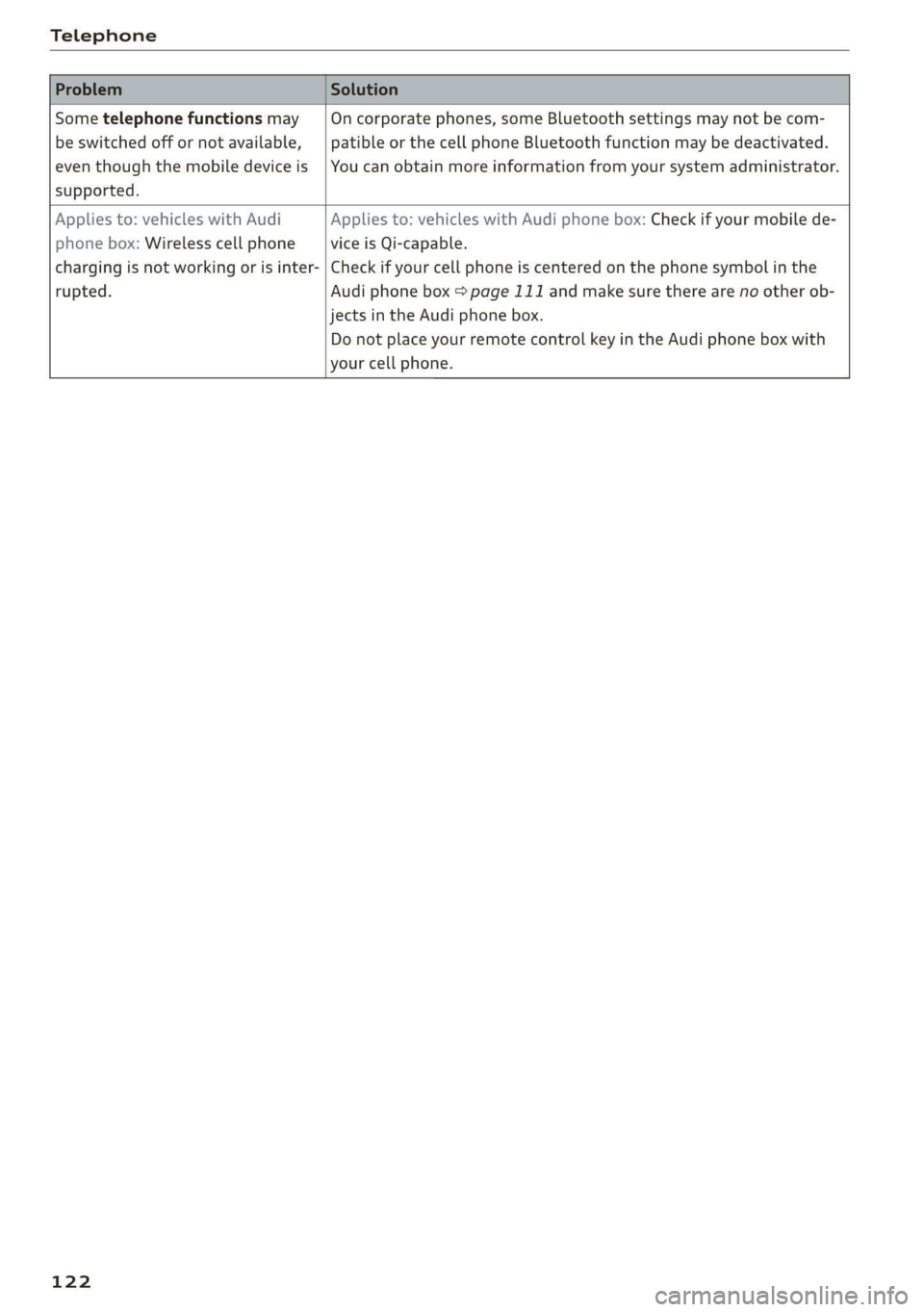
Telephone
Sometelephonefunctionsmay|Oncorporatephones,someBluetoothsettingsmaynot becom-
beswitchedoffornotavailable,|patibleorthecellphoneBluetoothfunctionmaybedeactivated.
eventhoughthemobiledeviceis|Youcanobtainmoreinformationfromyoursystemadministrator.
supported.
Appliesto:vehicleswithAudiAppliesto:vehicleswithAudiphonebox:Checkifyourmobilede-
phonebox:WirelesscellphoneviceisQi-capable.
chargingisnotworkingorisinter-|Checkifyourcellphoneiscenteredonthephonesymbolinthe
rupted.Audiphonebox=page111andmakesuretherearenootherob-
jectsinthe Audiphonebox.
DonotplaceyourremotecontrolkeyintheAudiphoneboxwith
yourcellphone.
122
Page 129 of 312
8S1012721BA
Audiconnect
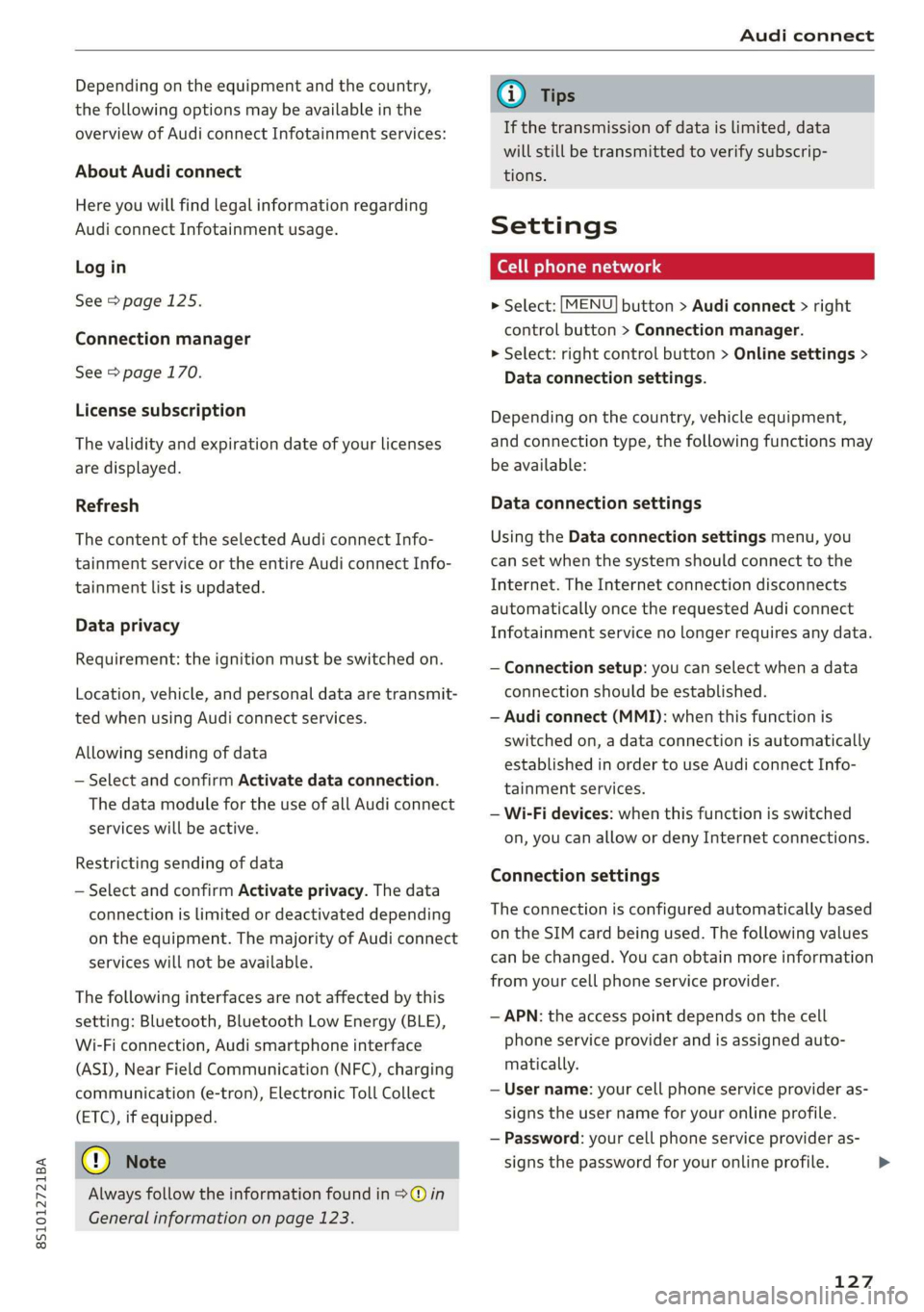
Dependingontheequipmentandthecountry,
thefollowingoptionsmaybeavailableinthe
overviewofAudiconnectInfotainmentservices:
AboutAudiconnect
Hereyouwillfindlegalinformationregarding
AudiconnectInfotainmentusage.
Login
See>page125.
Connectionmanager
See>page170.
Licensesubscription
Thevalidityandexpirationdateofyourlicenses
aredisplayed.
Refresh
ThecontentoftheselectedAudiconnectInfo-
tainmentserviceortheentireAudiconnectInfo-
tainmentlistisupdated.
Dataprivacy
Requirement:theignitionmustbe switchedon.
Location,vehicle,andpersonal dataaretransmit-
tedwhenusingAudiconnectservices.
Allowingsendingofdata
—SelectandconfirmActivatedataconnection.
ThedatamodulefortheuseofallAudiconnect
serviceswillbeactive.
Restrictingsendingofdata
—SelectandconfirmActivateprivacy.Thedata
connectionislimitedordeactivateddepending
ontheequipment.ThemajorityofAudiconnect
serviceswillnotbeavailable.
Thefollowinginterfacesarenotaffectedbythis
setting:Bluetooth,BluetoothLowEnergy(BLE),
Wi-Ficonnection,Audi smartphoneinterface
(ASI),NearFieldCommunication(NFC),charging
communication(e-tron),ElectronicTollCollect
(ETC),ifequipped.
@®Note
Alwaysfollowtheinformationfoundin9@in
Generalinformationonpage123.
@Tips
Ifthetransmissionofdataislimited,data
willstillbe transmittedtoverifysubscrip-
tions.
Settings
Ce)atelatmarian(ola4
>Select:[MENU]button>Audiconnect>right
controlbutton>Connectionmanager.
>Select:rightcontrolbutton>Onlinesettings>
Dataconnectionsettings.
Depending onthecountry,vehicleequipment,
andconnectiontype,thefollowingfunctionsmay
beavailable:
Dataconnectionsettings
UsingtheDataconnectionsettingsmenu,you
cansetwhenthesystemshouldconnecttothe
Internet.TheInternetconnectiondisconnects
automaticallyoncethe requested Audiconnect
Infotainmentservicenolongerrequiresanydata.
—Connectionsetup:youcanselectwhenadata
connection should beestablished.
—Audiconnect(MMI):whenthisfunctionis
switchedon,adataconnectionisautomatically
establishedinordertouseAudiconnectInfo-
tainmentservices.
—Wi-Fidevices:whenthisfunctionisswitched
on,youcanallowordenyInternet connections.
Connectionsettings
Theconnectionisconfiguredautomaticallybased
ontheSIMcardbeingused.Thefollowing values
canbechanged.Youcanobtainmoreinformation
fromyourcellphoneserviceprovider.
—APN:theaccesspointdependsonthecell
phoneserviceproviderandisassignedauto-
matically.
—Username:yourcellphoneserviceprovideras-
signstheuser nameforyouronlineprofile.
—Password:yourcellphoneserviceprovideras-
signsthepasswordforyouronlineprofile.>
127