change time AUDI TT COUPE 2019 User Guide
[x] Cancel search | Manufacturer: AUDI, Model Year: 2019, Model line: TT COUPE, Model: AUDI TT COUPE 2019Pages: 312, PDF Size: 83.95 MB
Page 102 of 312
MultiMediaInterface
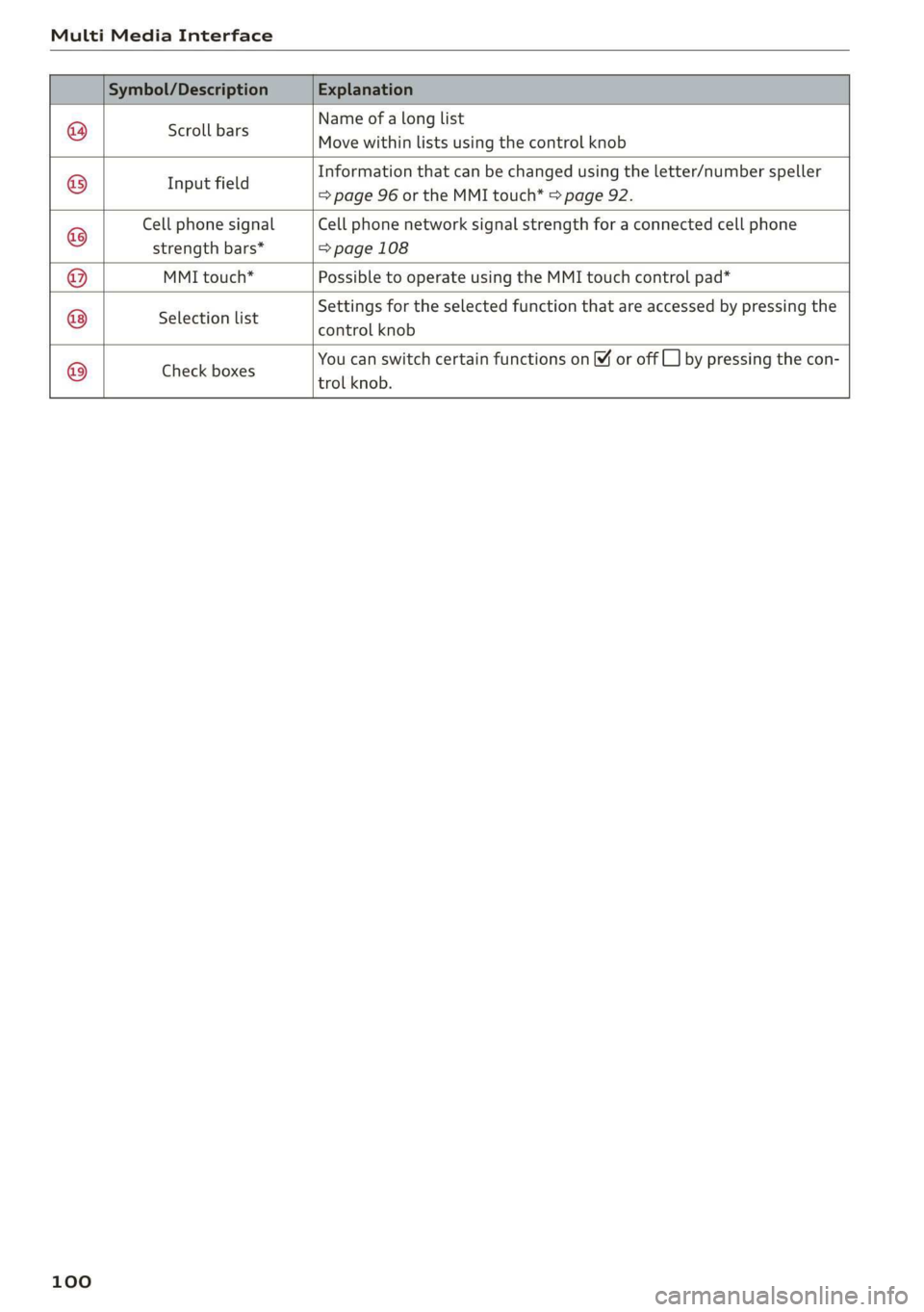
Nameofalonglist
Movewithinlistsusingthecontrolknob
Scrollbars
Informationthatcan bechangedusingtheletter/numberspeller
Ifi
ppeamels=>page96ortheMMItouch*>page92.
CellphonesignalCellphonenetworksignalstrengthforaconnectedcellphone
strengthbars*=>page108
MMItouch*PossibletooperateusingtheMMItouchcontrolpad*
Settingsfortheselectedfunctionthatareaccessed bypressingthe
SelectionlisteSREROLKROL
YoucanswitchcertainfunctionsonYoroffCL]bypressingthecon-
trolknob.
©®|®
|O;/O|O)/®
Checkboxes
100
Page 104 of 312
Voicerecognitionsystem
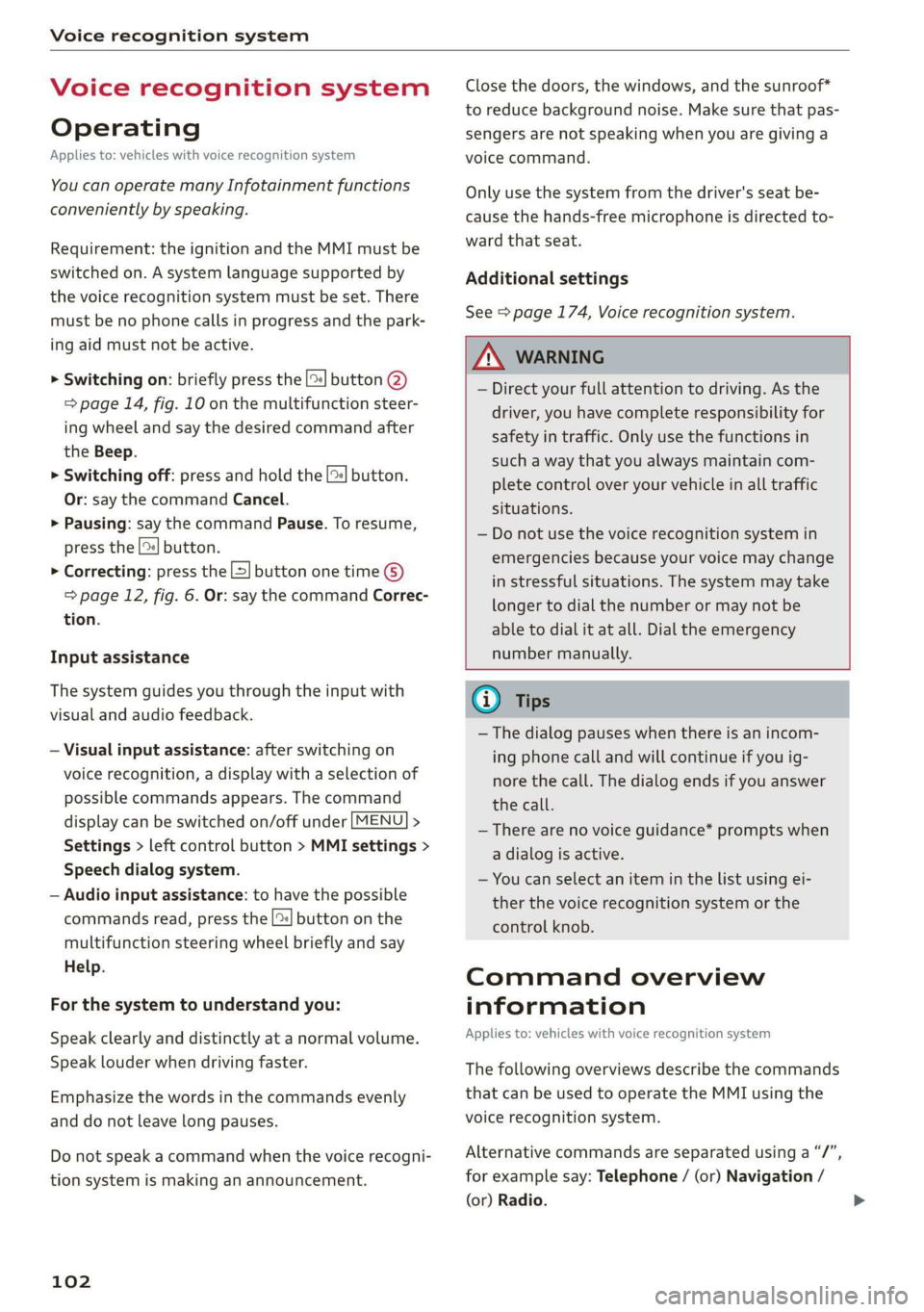
Voicerecognitionsystem
Operating
Appliesto:vehicleswithvoicerecognitionsystem
YoucanoperatemanyInfotainmentfunctions
convenientlybyspeaking.
Requirement:theignitionandtheMMImustbe
switched
on.Asystemlanguagesupportedby
thevoicerecognitionsystemmustbeset.There
mustbenophonecallsinprogressandthepark-
ingaidmustnotbeactive.
>Switchingon:brieflypressthe[2]button@)
=>page14,fig.10onthemultifunctionsteer-
ing
wheelandsaythedesiredcommandafter
theBeep.
>Switchingoff:pressandholdthe|™]button.
Or:saythecommandCancel.
>Pausing:saythecommandPause.Toresume,
pressthe|]button.
>Correcting:pressthe[>]buttononetime©
=>page12,fig.6.Or:saythecommandCorrec-
tion.
Inputassistance
Thesystemguidesyouthroughtheinputwith
visualandaudiofeedback.
—Visualinputassistance:afterswitchingon
voicerecognition,adisplaywithaselectionof
possiblecommandsappears.Thecommand
displaycanbe switchedon/offunder[MENU]>
Settings>leftcontrolbutton>MMIsettings>
Speechdialogsystem.
—Audioinputassistance: tohavethepossible
commandsread,pressthe[2]buttononthe
multifunctionsteeringwheelbrieflyandsay
Help.
Forthesystemtounderstandyou:
Speakclearlyanddistinctly atanormalvolume.
Speaklouderwhendrivingfaster.
Emphasizethewordsinthecommandsevenly
anddonotleavelongpauses.
Donotspeakacommandwhenthevoicerecogni-
tionsystemismakinganannouncement.
102
Closethedoors,thewindows,andthesunroof*
toreducebackgroundnoise.Makesurethatpas-
sengersarenot speakingwhenyouaregivinga
voicecommand.
Onlyusethesystemfromthedriver'sseatbe-
causethehands-freemicrophoneisdirectedto-
wardthatseat.
Additionalsettings
See>page174,Voicerecognitionsystem.
ZAWARNING
—Directyourfullattentiontodriving.Asthe
driver,youhavecompleteresponsibilityfor
safetyintraffic.Onlyuse thefunctionsin
suchawaythatyoualwaysmaintaincom-
pletecontroloveryourvehicleinalltraffic
situations.
—Donotuse thevoicerecognitionsystemin
emergenciesbecauseyourvoicemaychange
instressfulsituations.Thesystemmaytake
longertodialthenumberormaynotbe
abletodialitatall.Dialtheemergency
numbermanually.
G)Tips
— Thedialogpauseswhenthereisanincom-
ingphonecallandwillcontinueifyouig-
norethecall.Thedialogendsifyouanswer
thecall.
—Therearenovoiceguidance*promptswhen
adialogisactive.
—Youcanselectan iteminthelistusingei-
therthevoicerecognitionsystemorthe
controlknob.
Commandoverview
information
Appliesto:vehicleswithvoicerecognitionsystem
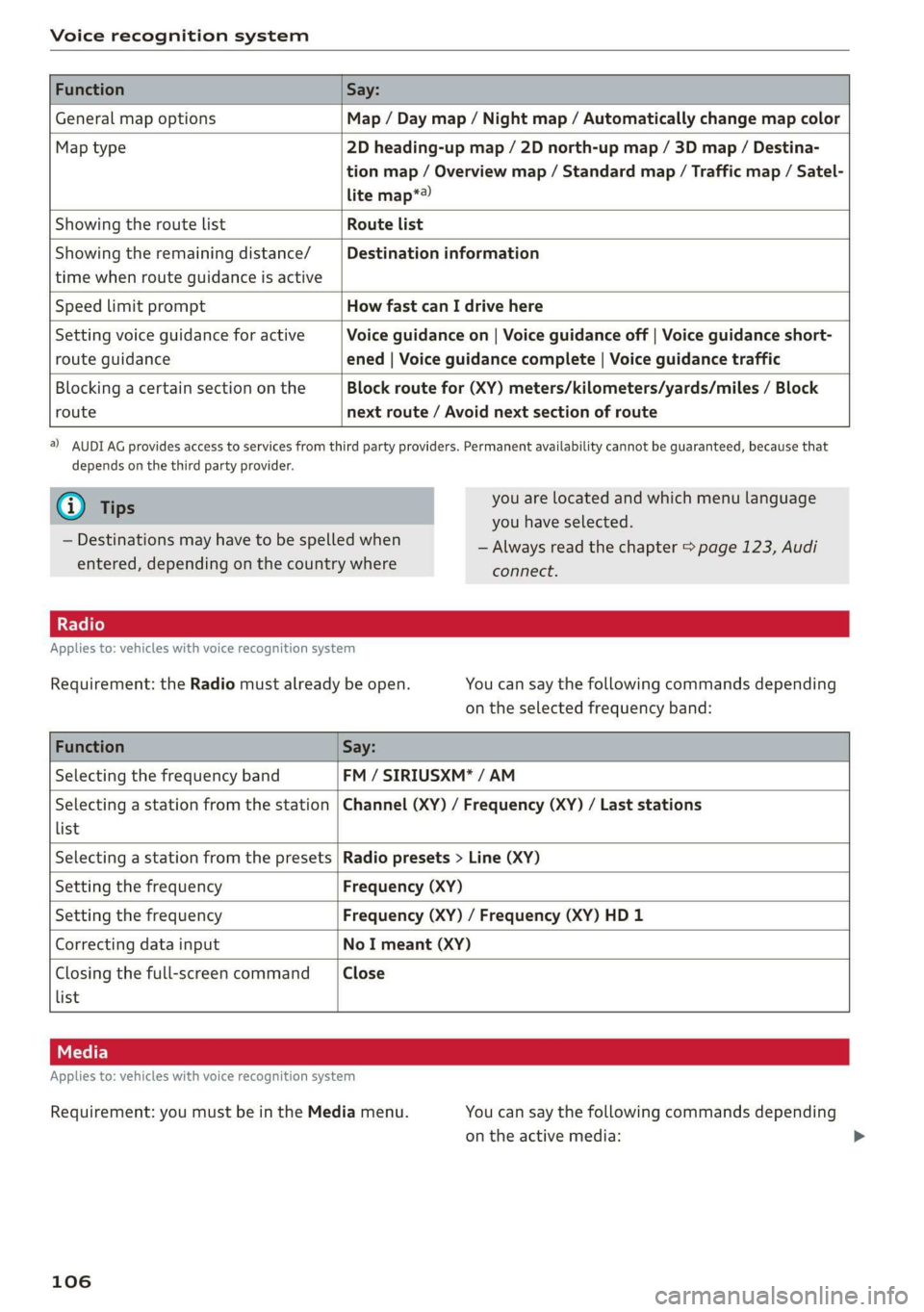
Thefollowingoverviewsdescribethecommands
thatcan beusedtooperatetheMMIusingthe
voicerecognitionsystem.
Alternativecommandsareseparatedusinga“/”,
forexamplesay:Telephone/(or)Navigation/
(or)Radio.
Page 108 of 312
Voicerecognitionsystem
FunctionSay:
GeneralmapoptionsMap/Daymap/Nightmap/Automaticallychangemapcolor
Maptype2Dheading-upmap/2Dnorth-upmap/3Dmap/Destina-
tionmap/Overviewmap/Standardmap/Trafficmap/Satel-
litemap*®)
Showingtheroute listRoutelist
Showingtheremainingdistance/
timewhenrouteguidanceisactive
Destinationinformation
SpeedlimitpromptHowfastcanIdrivehere
Settingvoiceguidanceforactive
routeguidance
Voiceguidanceon|Voiceguidanceoff|Voiceguidanceshort-
ened|Voiceguidancecomplete|Voiceguidancetraffic
Blockingacertainsectiononthe
route
Blockroutefor(XY)meters/kilometers/yards/miles/Block
nextroute/Avoidnextsectionofroute
)AUDIAGprovidesaccesstoservicesfromthirdpartyproviders.Permanentavailabilitycannotbeguaranteed,becausethat
dependsonthethirdpartyprovider.
@Tips
—Destinationsmayhavetobespelledwhen
entered,dependingonthecountrywhere
youarelocatedandwhichmenulanguage
youhaveselected.
—Alwaysreadthe chapter>page123,Audi
connect.
Appliesto:vehicleswithvoicerecognitionsystem
Requirement:theRadiomustalreadybeopen.Youcansaythefollowingcommandsdepending
ontheselectedfrequencyband:
FunctionSay:
SelectingthefrequencybandFM/SIRIUSXM*/AM
Selectingastationfromthestation
list
Channel(XY)/Frequency(XY)/Laststations
SelectingastationfromthepresetsRadiopresets>Line(XY)
SettingthefrequencyFrequency(XY)
SettingthefrequencyFrequency(XY)/Frequency(XY)HD1
CorrectingdatainputNoImeant(XY)
Closingthefull-screencommand
list
Close
Appliesto:vehicleswithvoicerecognitionsystem
Requirement:youmustbeintheMediamenu.
106
Youcansaythefollowingcommandsdepending
ontheactivemedia:
Page 111 of 312
8S1012721BA
Telephone
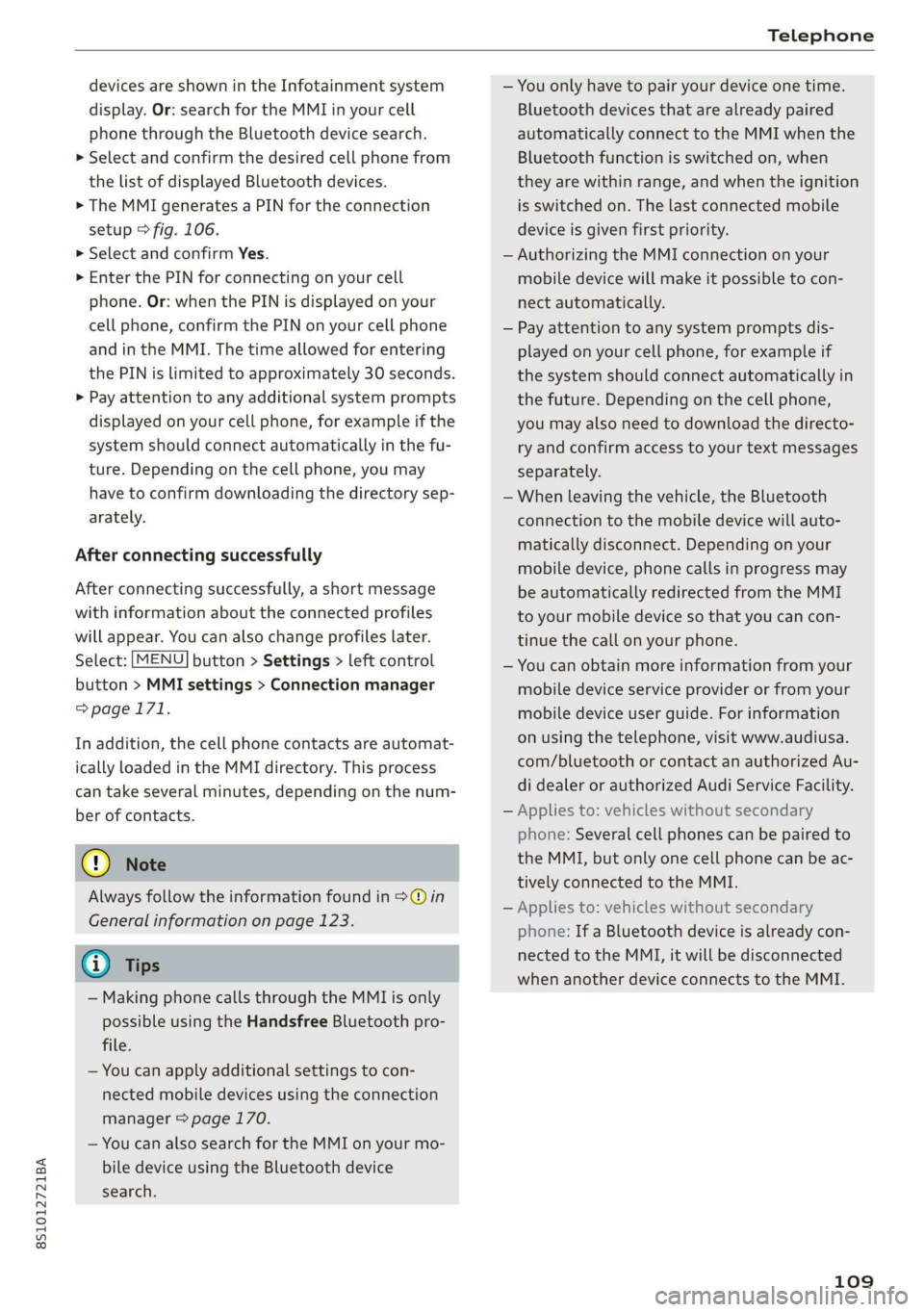
devicesareshownintheInfotainmentsystem
display.Or:searchfortheMMIinyourcell
phonethroughtheBluetoothdevicesearch.
>Selectandconfirmthedesiredcellphonefrom
thelistofdisplayedBluetoothdevices.
>TheMMIgeneratesaPINforthe connection
setup>fig.106.
>SelectandconfirmYes.
>»EnterthePINforconnectingonyourcell
phone.Or:whenthePINisdisplayedonyour
cellphone,confirmthePINonyourcellphone
andintheMMI.Thetimeallowedforentering
thePINislimitedtoapproximately30seconds.
>Payattentiontoanyadditionalsystemprompts
displayedonyourcellphone,forexampleifthe
systemshouldconnectautomaticallyinthefu-
ture.
Dependingonthecellphone,youmay
havetoconfirmdownloadingthedirectorysep-
arately.
Afterconnectingsuccessfully
Afterconnectingsuccessfully,ashortmessage
withinformationabouttheconnectedprofiles
willappear.Youcanalsochangeprofileslater.
Select:[MENU]button>Settings> leftcontrol
button>MMIsettings>Connectionmanager
=>page171.
Inaddition,thecellphonecontactsareautomat-
icallyloadedintheMMIdirectory.Thisprocess
cantakeseveralminutes,dependingonthenum-
berofcontacts.
@)Note
Alwaysfollowtheinformationfoundin>@in
Generalinformationonpage123.
@)Tips
— MakingphonecallsthroughtheMMIisonly
possibleusingtheHandsfreeBluetoothpro-
file.
—Youcan applyadditionalsettings tocon-
nectedmobiledevicesusingthe connection
manager©page170.
—YoucanalsosearchfortheMMIonyourmo-
biledeviceusingtheBluetoothdevice
search.
—Youonlyhavetopairyourdeviceonetime.
Bluetoothdevicesthatarealreadypaired
automaticallyconnecttotheMMIwhenthe
Bluetoothfunctionisswitchedon,when
theyarewithinrange,andwhentheignition
isswitchedon.Thelastconnectedmobile
deviceisgivenfirstpriority.
—AuthorizingtheMMIconnectiononyour
mobiledevicewillmakeitpossibletocon-
nectautomatically.
—Payattentiontoanysystempromptsdis-
playedonyourcellphone,forexampleif
thesystemshouldconnectautomaticallyin
thefuture.Dependingonthecellphone,
youmayalsoneedtodownloadthedirecto-
ryandconfirmaccesstoyourtextmessages
separately.
—Whenleavingthevehicle,theBluetooth
connectiontothemobiledevicewillauto-
maticallydisconnect.Depending onyour
mobiledevice,phonecallsinprogressmay
beautomaticallyredirectedfromtheMMI
toyourmobiledevice sothatyoucancon-
tinuethecallonyourphone.
—Youcanobtainmoreinformationfromyour
mobiledeviceserviceproviderorfromyour
mobiledeviceuserguide. Forinformation
onusingthetelephone,visitwww.audiusa.
com/bluetoothorcontactanauthorizedAu-
didealerorauthorizedAudiServiceFacility.
—Appliesto:vehicleswithoutsecondary
phone:Severalcellphonescanbepairedto
the MMI,butonlyonecellphonecanbeac-
tivelyconnectedtotheMMI.
—Appliesto:vehicleswithoutsecondary
phone:IfaBluetoothdeviceisalreadycon-
nectedtotheMMI,itwillbe disconnected
whenanotherdeviceconnectstotheMMI.
109
Page 128 of 312
Audiconnect
DependingontheequipmentandtheAudicon-
nectInfotainmentserviceselected,thefollowing
basicfunctionsmaybeavailable:
Saveaspreview
YoucanalsoseeapreviewoftheselectedAudi
connectInfotainmentservicesontheAudicon-
nectInfotainmenthomepage.
Showonmap
Youcanshowselectedcontentsonthemapand
usethemforrouteguidance.
Login
See>page125.
Readout!)
YoucanallowtheMMItoreadouttheselected
contents.
Call
If aphonenumberwasassignedtoanentry,you
cancallthenumber,forexampleto reservetick-
ets.
Refresh
ThecontentsfortheselectedAudiconnectInfo-
tainmentservicearerefreshed.
Startrouteguidance
If alocationwassavedwithanentry,youcan use
itasthenavigationdestination.Routeguidance
startsimmediately.
Changesearcharea
Thesetsearchareacanbechangedatanytime.
Additionalinformationonsearchareascan be
foundunder>page133.
ClosingAudiconnectInfotainmentservices
Regardlessofthefunctionselected,youcan
closean AudiconnectInfotainmentserviceat
anytimeandreturn tothehomescreen.
D_Notavailableinalllanguages.
126
Services
Appliesto:vehicleswith AudiconnectInfotainment
Dependingonthecountryandthevehicleequip-
ment,thefollowingservicesmaybeavailable:
Weather
Informationoncurrentweatherconditionsas
wellasweatherforecastsfortheselectedsearch
area.
>SelectandconfirmWeather.
News
>Select:Onlinenews>desirednewsfeed>a
headline.
IfyouloggedintomyAudiinyourvehicle
=>page125,personalizednewsfeedscanbedis-
played.
Twitter
Requirement:youmusthaveconnectedyourve-
hiclewithmyAudi>page125.Youmusthave
connectedyourmyAudiaccountwithTwitter.
YoucanonlyconnectoneTwitteraccountwith
yourmyAudiaccount.Notallsettingscanbead-
justedintheMMI.Somecanonlybeadjusted
throughtheTwitterwebsite.
>SelectTwitter>leftcontrolbutton>desired
function(forexample,Trends).
ZAWARNING
Alwaysfollowtheinformationfoundin>A\
inGeneralinformationonpage123.
()Note
Alwaysfollowtheinformationfoundin©in
Generalinformationonpage123.
Additionaloptions
Appliesto:vehicleswithAudiconnectInfotainment
»Select:[MENU]button>Audiconnect>right
controlbutton.
Page 132 of 312
Navigation
Navigation
Openingnavigation
Appliesto:vehicleswithnavigationsystem
Thenavigationsystemdirectsyoutoyourdestination,aroundtrafficincidents,andonalternative
routes,ifdesired.
Laledanlw-lee1g
“OO
JohnSmith
a2
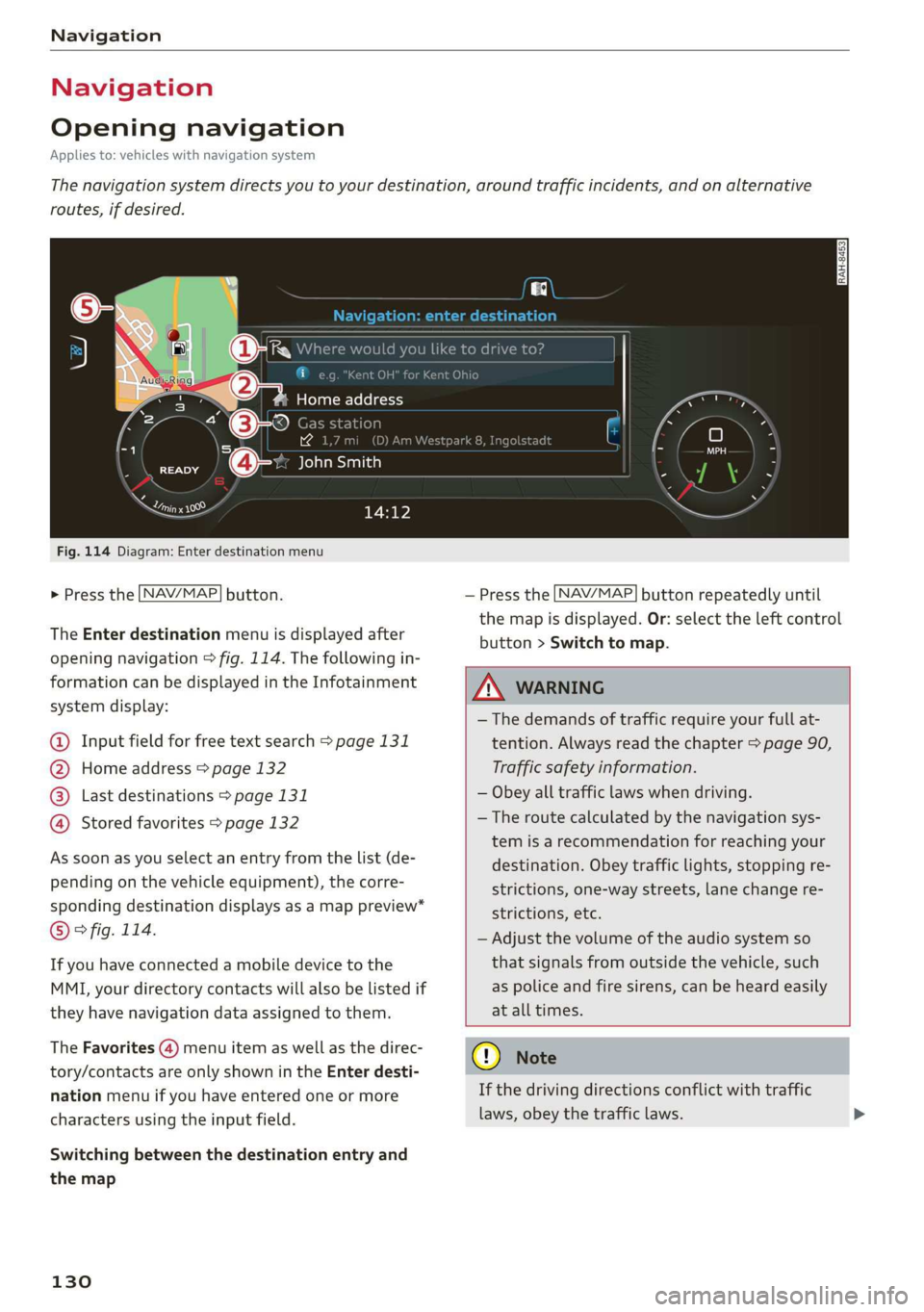
Fig.114Diagram:Enterdestinationmenu
>Pressthe [NAV/MAP]button.
TheEnterdestinationmenuisdisplayedafter
openingnavigation>fig.114.Thefollowingin-
formationcan bedisplayedintheInfotainment
systemdisplay:
@Inputfieldforfreetextsearch>page131
@Homeaddress>page132
Lastdestinations>page131pag
Storedfavorites>page132g'
Assoonasyouselectanentryfromthelist(de-
pendingonthevehicleequipment),thecorre-
spondingdestinationdisplaysasamappreview*
©°fig.114.
Ifyouhaveconnectedamobiledevicetothe
MMI,yourdirectorycontactswillalsobelistedif
they havenavigationdataassignedtothem.
TheFavorites(4)menuitemaswellasthedirec-
tory/contactsareonlyshownintheEnterdesti-
nationmenuifyouhaveenteredoneormore
charactersusingtheinputfield.
Switchingbetweenthedestinationentryand
themap
130
—Pressthe [NAV/MAP]buttonrepeatedlyuntil
themapisdisplayed.Or:selecttheleftcontrol
button>Switchtomap.
ZA\WARNING
— Thedemandsoftrafficrequireyourfullat-
tention.Alwaysreadthechapter>page90,
Trafficsafety information.
—Obeyalltrafficlawswhendriving.
— Theroutecalculatedbythenavigationsys-
temisarecommendationforreachingyour
destination.Obeytrafficlights,stoppingre-
strictions,one-waystreets,lanechangere-
strictions,etc.
—Adjustthevolumeoftheaudiosystemso
thatsignalsfromoutsidethevehicle,such
aspoliceandfiresirens,canbeheardeasily
atalltimes.
@)Note
Ifthedrivingdirectionsconflictwithtraffic
laws,obeythetrafficlaws.
Page 133 of 312
8S1012721BA
Navigation
@)Tips
—Youcanfindinformationaboutimportinga
mapupdatetoyourMMIusinganSDcard
atwww.audiusa.com/myaudi.
—SnowandobstructionsontheGPSantenna
orinterferencecausedbytreesandlarge
buildingscanimpairsatellitereceptionand
affectthesystem'sabilitytodeterminethe
vehicleposition.Severaldeactivatedormal-
functioningsatellitescanalsointerruptGPS
receptionandaffectthesystem'sabilityto
determine
thevehicleposition.
—Becausestreetnamessometimeschange,
thenamesstoredintheMMImayinrare
casesdifferfromtheactualstreetname.
Enteringadestination
Freetextsearchfordestinations
Appliesto:vehicleswithnavigationsystem
UsingtheMMItouchcontrolpad,youcanenter
thedataforanavigationdestinationallatonce
inanyorder(forexample,LosAngeles,
20MainSt.).Likewise,youcansearchforpoints
ofinterest,contacts,previousdestinationsorfa-
voritestonavigatetothedesiredaddress.
>Pressthe [NAV/MAP]buttonrepeatedlyuntil
the Enterdestinationmenuisdisplayed
=>page130,fig.114.
>Keepturningthecontrolknobtotheleftuntil
theinputfieldappears.
—Enteroneormoresearchtermsintotheinput
field.
—Ifavailable,confirmtheinputsuggestion*to
completetheentryorawordsuggestion”.See
=>page96,Letter/numberspeller.
—Turnthecontrolknobtotherighttochangethe
resultslist.
—Selectandconfirmadestinationfromthere-
sultslist.
Therouteisdisplayedasan overviewinthemap
andtherouteguidanceisalreadyactive.
Narrowingthesearcharea
Allcountries/statesareselectedatthefactory
forthefreetextsearch.
—Selecttherightcontrolbutton>Country/state
selectionintheinputfield@>page130,
fig.114.
—Selectthecountryorstate(@)thatshould be
searchedusingthefreetextsearchinorderto
narrowthenumberofresultsandincreasethe
searchspeed.Theselectedentryinthecoun-
try/stateselectionisstored.Or:selectAll
countries/states.
@Tips
—TheMMIinputsuggestionsdependonthe
lastnavigateddestinations.
—Upto50entriescanbestoredinthelast
destinationslist.
—Additionalinformationonfreetextsearches
canbefoundunder>page98.
Loadingpreviousdestinations
Appliesto:vehicleswithnavigationsystem
Yourlastdestinationsareautomaticallystored
andcanbeloadeddirectlyasadestination.
Requirement:adestinationwasalreadynavigat-
edto.
>Pressthe [NAV/MAP]buttonrepeatedlyuntil
theEnterdestinationmenuisdisplayed
=>page130,fig.114.
Yourlastdestinationswillbelisteddirectlyinthe
Enterdestinationmenuandaremarkedwiththe
symbol@)>page130,fig. 114.
—Selectandconfirmoneofthelastdestinations
fromthelist.
Deletingpreviousdestinations
—Selectoneofthelastdestinationsfromthelist.
—Select:rightcontrolbutton>Deletedestina-
tion>DeletethislastdestinationorDeleteall
lastdestinations.
Theselecteddestinationoralllastdestinations
is/aredeletedandnolongerdisplayedintheEn-
terdestinationmenu.
131
Page 136 of 312
Navigation
automatically.Thelistofpointsofinterest
thatwerefoundisnotresortedwhenthis
happens.
—Theremaybeentriesinthelistthatcannot
bedisplayedcompletelyduetotheirlength.
Ifyouselecttheselistentriesusingthecon-
trolknob,detailedinformationaboutthe
selectedlistentrywillbeshownautomati-
callyafterseveralseconds.
Onlinepointofinterestsearch(online
search)
Appliesto:vehicleswithnavigationsystem andAudiconnect
YoucansearchforpointsofinterestontheInter-
net.
Requirement:therequirementsforAudiconnect
servicesmustbemet>page123.
>Pressthe LNAV/MAP]buttonrepeatedlyuntil
the Enterdestinationmenuisdisplayed
=>page130,fig.114.
>Select:leftcontrolbutton>Onlinesearch.The
searcharealastsetisshownintheinputfield.
—Changingthesearcharea:selectandconfirm
Searcharea>asearchareafromthelist.
—Searchingforonlinedestinationsinthese-
lectedsearcharea:enteranewcityifnecessa-
ry.Enterasearchtermsuchasrestaurant.Se-
lectandconfirm anonlinedestination.Select
andconfirmStartrouteguidance.
—Searchingforanonlinedestinationinaspecif-
iccategory:select:Selectcategory>desired
category,suchasHotels.
Findwhichsearchareasareavailableunder
=page133,Pointofinterestsearch.
Youcansearchforonlinedestinationsusingthe
voicerecognitionsystem=>tableonpage105.
G@)Tips
Alwaysreadthechapter>page123.
134
AccessingdestinationsfromyourmyAudi
account
Appliesto:vehicleswithnavigationsystem andAudiconnect
Importdestinationsfrom yourmyAudiaccount
intotheMMI.
Requirement:youmusthavecreatedamyAudi
accountatwww.audiusa.com/myaudi.Youmust
haveavehiclestoredinyourmyAudiaccountand
youmusthaveadestinationstored.
>Pressthe [NAV/MAP]buttonrepeatedlyuntil
theEnterdestinationmenuisdisplayed
=>page130,fig.114.
>Select:leftcontrolbutton>myAudicontacts.
>Ifnecessary,enteryourmyAudiuserdataor
yourmyAudiPIN.ThecontactsstoredinmyAu-
diaredisplayed.
—Selectandconfirmacontact>desireddestina-
tion.
—SelectandconfirmStartrouteguidance.
(i)Tips
—YouonlyneedtoenterthemyAudiuserdata
onetime.
—YoucanreceiveyourmyAudiPINifyouhave
setupamyAudiaccount.
—Foradditionalinformation,seewww.
audiusa.com/myaudi.
Enteringadestinationusinggeo
coordinates
Appliesto:vehicleswithnavigationsystem
>Pressthe [NAV/MAP]buttonrepeatedlyuntil
theEnterdestinationmenuisdisplayed
=>page130,fig.114.
>Select:leftcontrolbutton>Geographicalcoor-
dinates.
—SelectandconfirmeitherLatitudeorLongi-
tude.
—Turn thecontrolknobto changethelatitude/
longitude.
—Pressthecontrolknobtoconfirmyourinput.
—SelectandconfirmStartrouteguidance.
Page 161 of 312
8S1012721BA
Media
—Selectingthepreviousornexttrack/chapter
D: presstheOn/OffknobontheMMIcontrol
panelbrieflytotheleftKdorrightDo.
—Fast-forwardingandrewindingaudio/video
files:pressandholdtheOn/Offknobonthe
MMIcontrolpaneltotheleftKdorrightDelfor
alongertime.
—Pausingorresumingplayback:pressthe
On/OffknobontheMMIcontrolpanelbriefly.
@)Tips
—Youcanscrollthroughlonglistsquicklyby
turningthecontrolknobquickly.Thescroll-
ingspeeddependsonthenumberoflisten-
tries.
—Forsafetyreasons,thevideoimageisonly
displayedwhenthevehicleisstationary.On-
lythesoundfromthevideoplayswhiledriv-
ing.
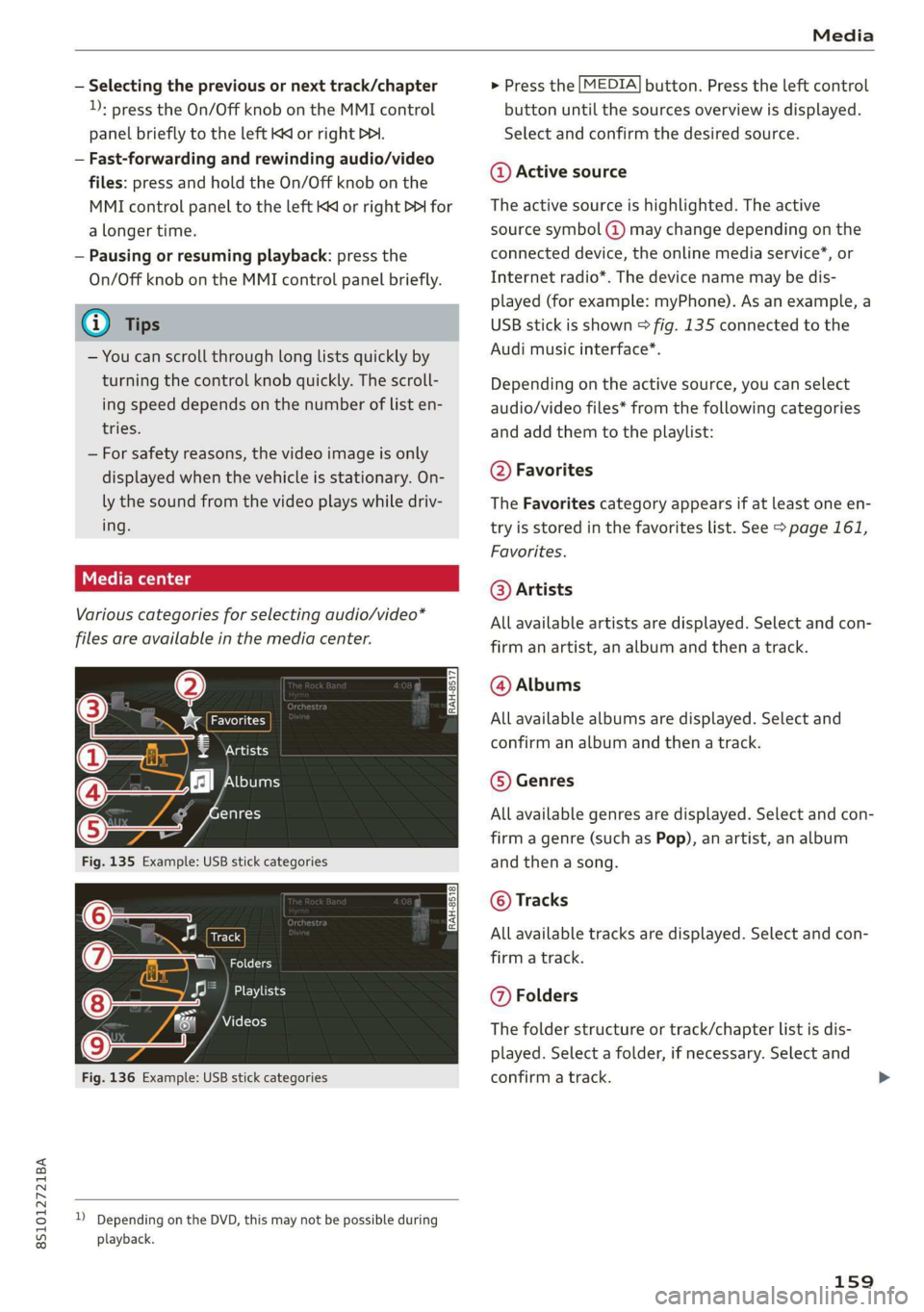
Variouscategoriesfor selectingaudio/video*
filesareavailableinthemediacenter.
ao
€Artists
(4)‘falNeyeraa
ogalg-t)
—
Fig.135Example:USBstickcategories
Track
(7)RNa
Fig.136Example:USBstickcategories
))DependingontheDVD,thismaynotbepossibleduring
playback.
>Pressthe[MEDIA]button.Presstheleftcontrol
buttonuntilthesourcesoverviewisdisplayed.
Selectandconfirmthedesiredsource.
@Activesource
Theactivesourceishighlighted.Theactive
sourcesymbol(@)maychangedependingonthe
connecteddevice,theonlinemediaservice*,or
Internetradio*.Thedevicenamemaybedis-
played(forexample:myPhone).Asanexample,a
USBstickisshown>fig.135connectedtothe
Audimusicinterface*.
Depending ontheactivesource,youcanselect
audio/videofiles*fromthefollowingcategories
andaddthemtotheplaylist:
@Favorites
TheFavoritescategoryappearsifatleastoneen-
tryisstoredinthefavoriteslist.See>page161,
Favorites.
@Artists
Allavailableartistsaredisplayed.Selectandcon-
firmanartist,analbumandthenatrack.
@Albums
Allavailablealbumsaredisplayed.Selectand
confirm analbumandthenatrack.
©Genres
Allavailablegenresaredisplayed.Selectandcon-
firm
agenre(suchasPop),anartist,analbum
andthenasong.
©Tracks
Allavailabletracksaredisplayed.Selectandcon-
firm
atrack.
@Folders
Thefolderstructureortrack/chapterlistisdis-
played.Selectafolder,ifnecessary. Selectand
confirmatrack.
159
Page 168 of 312
Media
ProblemSolution
Audimusicinterface*:theportable
deviceisnotrecognizedasasource.
Formanycellphonesormobiledevices,playbackisnotpossi-
ble
whenthebatterylevelistoolow(lessthan5%ofitsca-
pacity).Themobiledevicewillonlyberecognizedasamedia
sourceintheMMIafterconnectingifthebatterychargelevel
issufficient.
Audimusicinterface*:malfunctions
duringaudioplaybackthroughan
iPod/iPhone.
TheBluetoothaudioplayerfunctionisswitchedon.Switch
thisfunctionoff>page171whenyouarenotusingtheBlue-
toothaudioplayer.
AUXinput:thereisstaticwhencon-
nectinganddisconnectingtheAUX
connectioncable.
Whenconnectinganddisconnecting,theExternalaudioplay-
ersourceisalreadyselected.Beforeconnectingordisconnect-
ingthemobiledevice,eithermutethedevice(see
=>page173)orswitchtoadifferentaudiosource(forexam-
ple>page145,Openingtheradio).
Bluetoothaudioplayer*/Wi-Fiaudio
player*:audioplaybackinterference.
Onlyoneinterfaceshouldbeactivelyusedatatimetoensure
problem-freeplayback.
Wi-Fiaudioplayer*:audioplayback
interference.
Audioplaybackinterferencecanoccuronsomecellphonesif
theInternetconnectioninthevehiclewasnotestablished
throughtheSIMcardreader*ontheMMIcontrolpaneland
themobiledataoptiononthecellphoneisswitchedon.De-
activatethemobiledataoptiononyourcellphone.
Jukebox®*:tracks ontheimported
playlistaregrayedout.
Whenimportingplaylists,allofthefilesthemselvesmustbe
imported.
Jukebox*:importedtrackscannotbe
playedorfound.
Ifyoucannotfindimportedtracksinthemediacenter,they
maynotbesupported.Onlycopysupportedfiles>page164
totheJukebox.
Wi-Fiaudioplayer*:multipledevices
areconnectedtotheWi-Fihotspot.A
mediaplayer (such asasmartphone)
appearsasthemediasourceandcan-
not bechanged.
ClosethemyAudiappontheconnecteddevices(suchas
smartphones)thatarenotbeingusedastheWi-Fiaudioplay-
er*.Likewise,closetheUPnPserverappsorthemediapermis-
sionsontheintegratedUPnP/DLNAserver.Connectthede-
sireddevice asaWi-Fiaudioplayer*>page154.
Onlinemedia*:connectionfailedbe-
tweentheMMIandthemyAudiapp.
ToestablishaconnectiontotheMMI,theMMIconnection
switchmustbe switchedoninthemyAudiappstatusscreen.
Bluetoothaudioplayer*:interference
withtrackdisplayandaudioplayback.
PlaybackinterferencecanoccurwhenusingtheBluetoothau-
dioplayerifamusicplayerappfromathirdpartyprovideris
open.Audirecommendsusingtheintegratedmediaplayeron
yourBluetoothdevice(suchasasmartphone).
Wi-Fihotspot*:yourWi-Fideviceis
disconnectedfromtheWi-Fihotspot.
Makesurethenetworkoptimizationfunctionsareswitched
offintheWi-Fisettings orinthenetworksettingsforyour
Wi-Fidevice.Foradditionalinformationrefertotheuser
guideforyourWi-Fidevice.
166