phone AUDI TT COUPE 2019 User Guide
[x] Cancel search | Manufacturer: AUDI, Model Year: 2019, Model line: TT COUPE, Model: AUDI TT COUPE 2019Pages: 312, PDF Size: 83.95 MB
Page 104 of 312
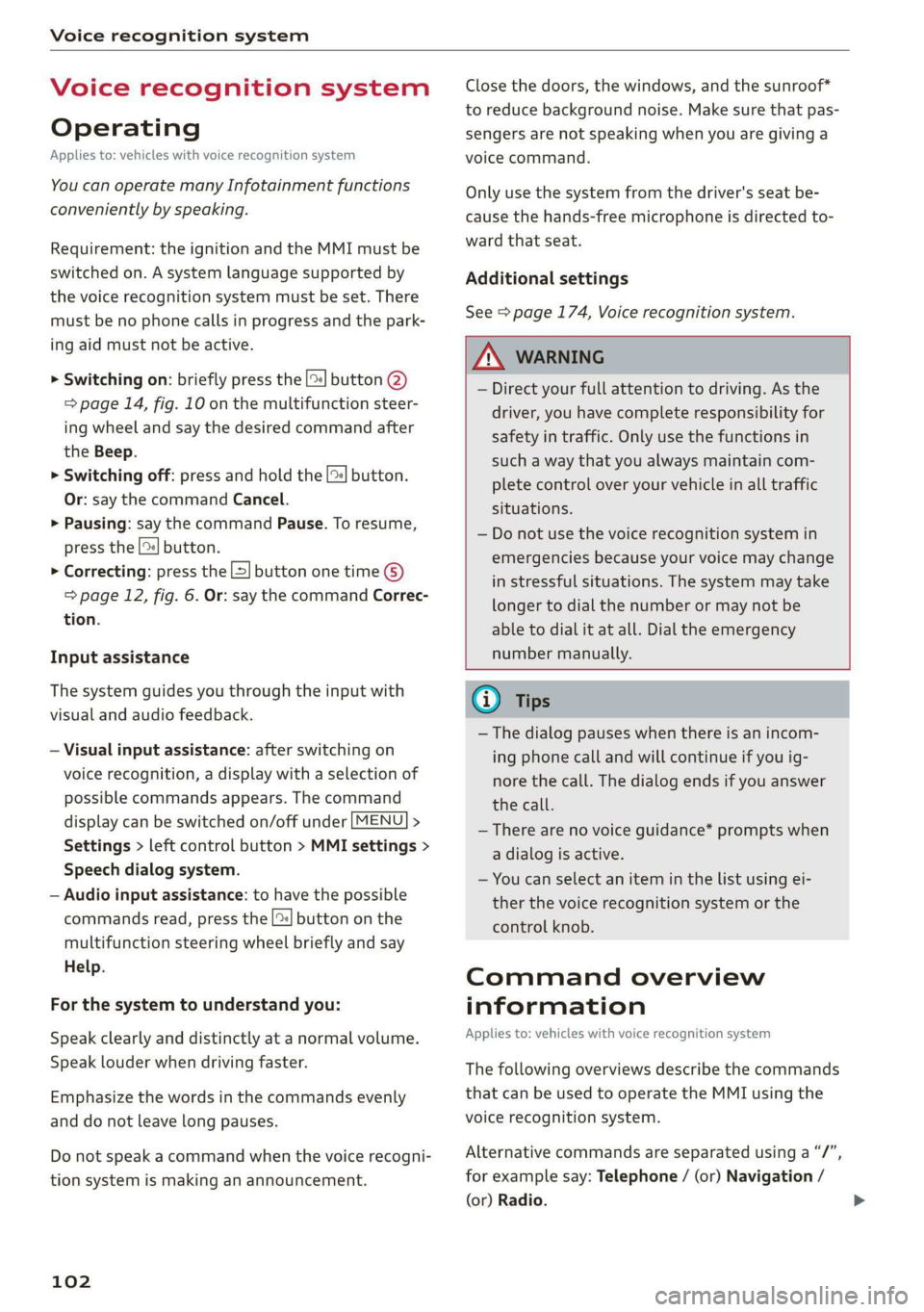
Voicerecognitionsystem
Voicerecognitionsystem
Operating
Appliesto:vehicleswithvoicerecognitionsystem
YoucanoperatemanyInfotainmentfunctions
convenientlybyspeaking.
Requirement:theignitionandtheMMImustbe
switched
on.Asystemlanguagesupportedby
thevoicerecognitionsystemmustbeset.There
mustbenophonecallsinprogressandthepark-
ingaidmustnotbeactive.
>Switchingon:brieflypressthe[2]button@)
=>page14,fig.10onthemultifunctionsteer-
ing
wheelandsaythedesiredcommandafter
theBeep.
>Switchingoff:pressandholdthe|™]button.
Or:saythecommandCancel.
>Pausing:saythecommandPause.Toresume,
pressthe|]button.
>Correcting:pressthe[>]buttononetime©
=>page12,fig.6.Or:saythecommandCorrec-
tion.
Inputassistance
Thesystemguidesyouthroughtheinputwith
visualandaudiofeedback.
—Visualinputassistance:afterswitchingon
voicerecognition,adisplaywithaselectionof
possiblecommandsappears.Thecommand
displaycanbe switchedon/offunder[MENU]>
Settings>leftcontrolbutton>MMIsettings>
Speechdialogsystem.
—Audioinputassistance: tohavethepossible
commandsread,pressthe[2]buttononthe
multifunctionsteeringwheelbrieflyandsay
Help.
Forthesystemtounderstandyou:
Speakclearlyanddistinctly atanormalvolume.
Speaklouderwhendrivingfaster.
Emphasizethewordsinthecommandsevenly
anddonotleavelongpauses.
Donotspeakacommandwhenthevoicerecogni-
tionsystemismakinganannouncement.
102
Closethedoors,thewindows,andthesunroof*
toreducebackgroundnoise.Makesurethatpas-
sengersarenot speakingwhenyouaregivinga
voicecommand.
Onlyusethesystemfromthedriver'sseatbe-
causethehands-freemicrophoneisdirectedto-
wardthatseat.
Additionalsettings
See>page174,Voicerecognitionsystem.
ZAWARNING
—Directyourfullattentiontodriving.Asthe
driver,youhavecompleteresponsibilityfor
safetyintraffic.Onlyuse thefunctionsin
suchawaythatyoualwaysmaintaincom-
pletecontroloveryourvehicleinalltraffic
situations.
—Donotuse thevoicerecognitionsystemin
emergenciesbecauseyourvoicemaychange
instressfulsituations.Thesystemmaytake
longertodialthenumberormaynotbe
abletodialitatall.Dialtheemergency
numbermanually.
G)Tips
— Thedialogpauseswhenthereisanincom-
ingphonecallandwillcontinueifyouig-
norethecall.Thedialogendsifyouanswer
thecall.
—Therearenovoiceguidance*promptswhen
adialogisactive.
—Youcanselectan iteminthelistusingei-
therthevoicerecognitionsystemorthe
controlknob.
Commandoverview
information
Appliesto:vehicleswithvoicerecognitionsystem
Thefollowingoverviewsdescribethecommands
thatcan beusedtooperatetheMMIusingthe
voicerecognitionsystem.
Alternativecommandsareseparatedusinga“/”,
forexamplesay:Telephone/(or)Navigation/
(or)Radio.
Page 105 of 312
8S1012721BA
Voicerecognitionsystem
Sequencesofcommandsusedtoperformanac-es.Forabusinessaddress,youcanalsosaybusi-
acy
tionareidentifiedwitha“>”,forexamplesay:ness,work,officeor attheoffice.
Enteraddress>(then)Entercountry/state.
Themajorityshownaremaincommands.This
systemalsorecognizessynonymsincertaincas-
Commands
Globalcommands
Appliesto:vehicleswithvoicerecognitionsystem
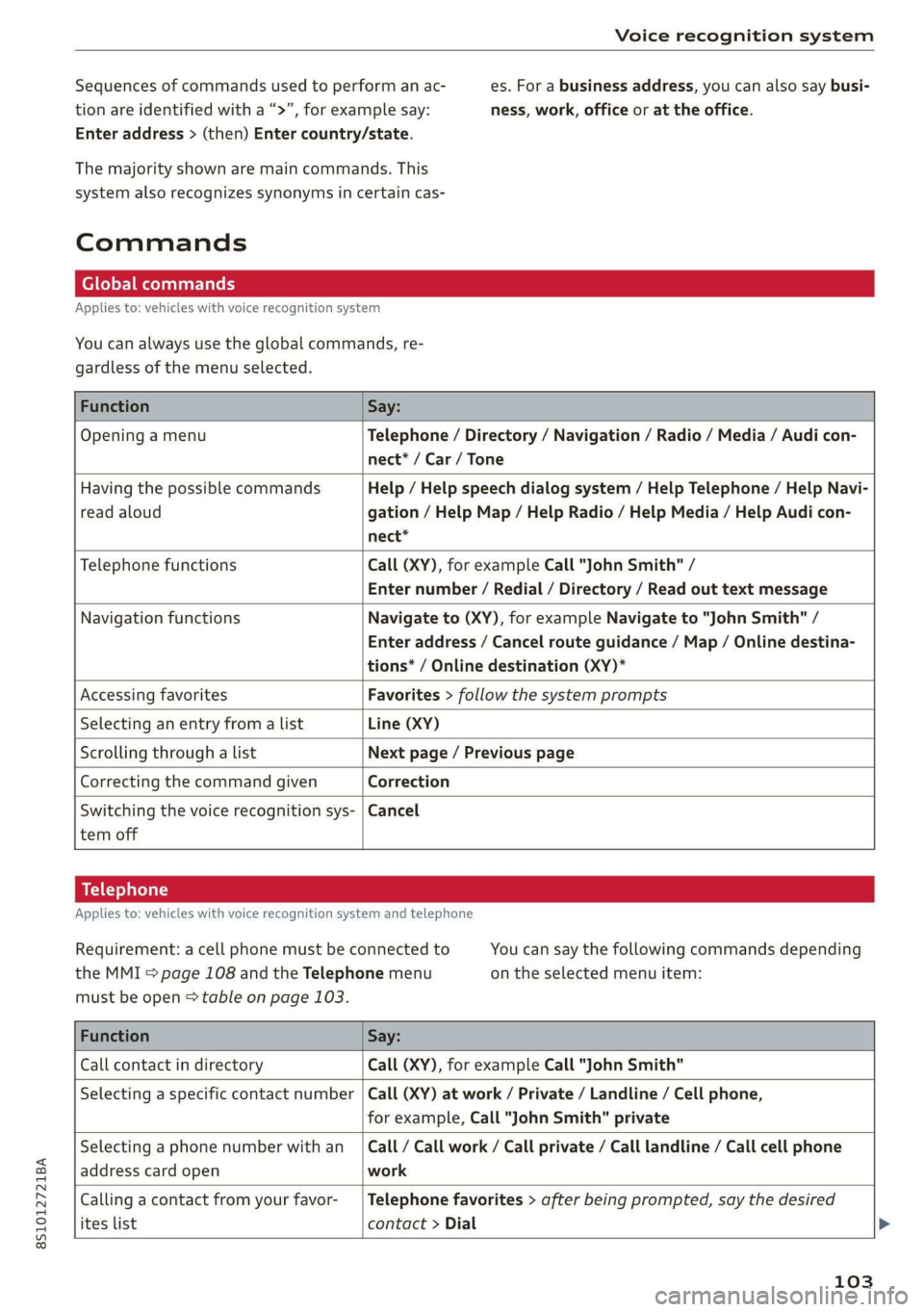
Youcanalwaysusetheglobalcommands,re-
gardlessofthemenuselected.
FunctionSay:
OpeningamenuTelephone/Directory/Navigation/Radio/Media/Audicon-
nect®*/Car/Tone
HavingthepossiblecommandsHelp/Helpspeechdialogsystem/HelpTelephone/HelpNavi-
readaloudgation/HelpMap/HelpRadio/HelpMedia/Help Audicon-
nect*
TelephonefunctionsCall(XY),forexampleCall"JohnSmith"/
Enternumber/Redial/Directory/Readouttextmessage
NavigationfunctionsNavigateto(XY),forexampleNavigateto"JohnSmith"/
Enteraddress/Cancelrouteguidance/Map/Onlinedestina-
tions*/Onlinedestination(XY)*
AccessingfavoritesFavorites>followthesystemprompts
SelectinganentryfromalistLine(XY)
Scrollingthroughalist Nextpage/Previouspage
CorrectingthecommandgivenCorrection
Switchingthevoicerecognitionsys-|Cancel
temoff
Telephone
Appliesto:vehicleswithvoicerecognitionsystemandtelephone
Requirement:acellphonemustbeconnectedtoYoucansaythefollowingcommandsdepending
theMMI>page108andtheTelephonemenuontheselectedmenuitem:
mustbeopen>tableonpage103.
FunctionSay:
CallcontactindirectoryCall(XY),forexampleCall"JohnSmith"
Selectinga specificcontactnumber|Call(XY)atwork/Private/Landline/Cellphone,
forexample,Call"JohnSmith"private
Selectingaphonenumberwithan_|Call/Callwork/Callprivate/Calllandline/Callcellphone
addresscardopenwork
Callingacontactfromyourfavor-|Telephonefavorites>afterbeingprompted,saythedesired
iteslistcontact>Dial
103
Page 106 of 312
Voicerecognitionsystem
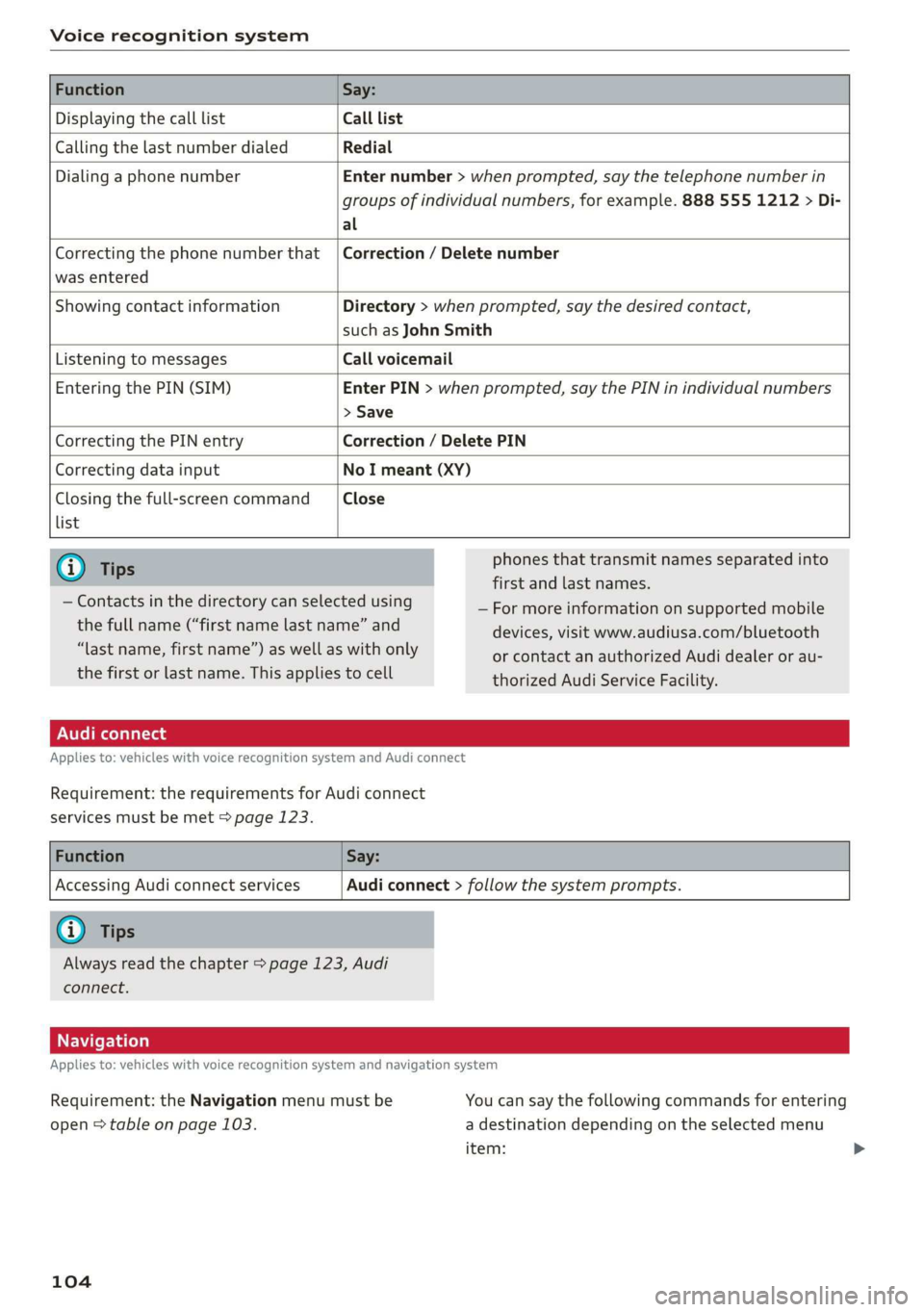
DisplayingthecalllistCalllist
CallingthelastnumberdialedRedial
DialingaphonenumberEnternumber>whenprompted,saythetelephonenumberin
groupsofindividualnumbers,forexample.8885551212>Di-
al
Correctingthephonenumberthat|Correction/Deletenumber
wasentered
ShowingcontactinformationDirectory>whenprompted,saythedesiredcontact,
suchasJohnSmith
ListeningtomessagesCallvoicemail
EnteringthePIN(SIM)EnterPIN>whenprompted,saythePINinindividualnumbers
>Save
CorrectingthePINentryCorrection/DeletePIN
CorrectingdatainputNoImeant(XY)
Closingthefull-screencommandClose
list
phonesthattransmit namesseparatedinto
firstandlastnames.
—Formoreinformationonsupportedmobile
unedoepasitpeteaneedanddevices,visitwww.audiusa.com/bluetooth
lastname,firstname”)aswellaswithonlyorcontactanauthorizedAudidealeror
au-
thefirstorlastname.This applies
tocellthorizedAudiServiceFacility,
—Contactsinthedirectorycanselectedusing
Audiconnect
Appliesto:vehicleswithvoicerecognitionsystemandAudiconnect
Requirement:therequirementsforAudiconnect
servicesmustbemet>page123.
AccessingAudiconnectservicesAudiconnect>followthesystemprompts.
|
Alwaysreadthechapter>page123,Audi
connect.
Navigation
Appliesto:vehicleswithvoicerecognitionsystemandnavigationsystem
Requirement:theNavigationmenumustbeYoucansay thefollowingcommandsforentering
open>tableonpage103.adestinationdependingontheselectedmenu
item:
104
Page 109 of 312
8S1012721BA
Voicerecognitionsystem
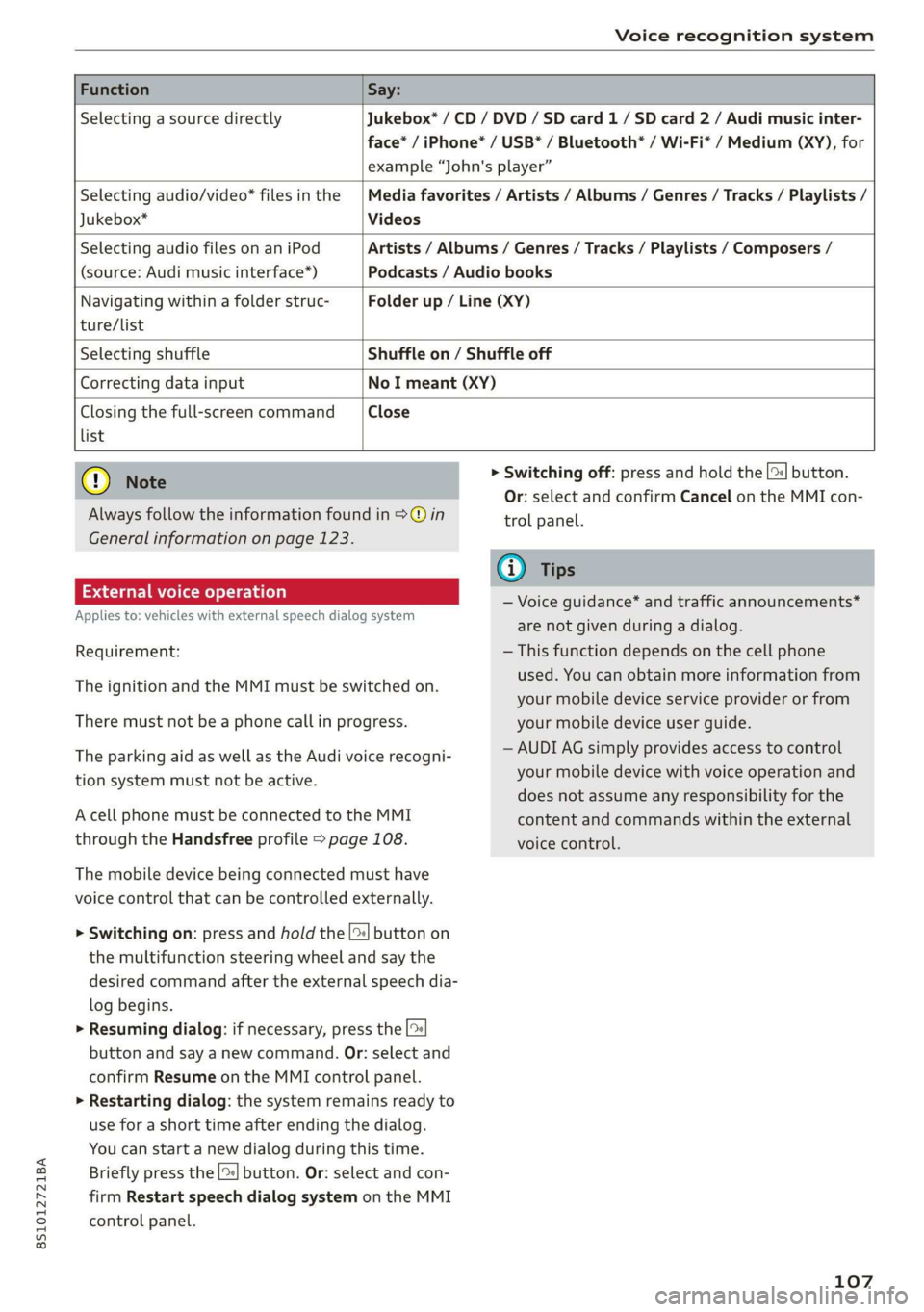
FunctionSay:
SelectingasourcedirectlyJukebox*/CD/DVD/SDcard1/ SDcard2/Audimusicinter-
face*/iPhone*/USB*/Bluetooth®/Wi-Fi*/Medium(XY),for
example“John'splayer”
Selectingaudio/video*filesinthe
Jukebox*
Mediafavorites/Artists/Albums/Genres/Tracks/Playlists/
Videos
SelectingaudiofilesonaniPod
(source:Audimusicinterface*)
Artists/Albums/Genres/Tracks/Playlists/Composers/
Podcasts/Audiobooks
Navigatingwithinafolderstruc-Folderup/Line(XY)
ture/list
SelectingshuffleShuffleon/Shuffleoff
CorrectingdatainputNoImeant(XY)
Closingthefull-screencommandClose
list
()Note
Alwaysfollowtheinformationfoundin>@in
Generalinformationonpage123.
Externalvoiceoperation
Appliesto:vehicleswithexternalspeechdialogsystem
Requirement:
TheignitionandtheMMImustbeswitchedon.
Theremustnot beaphonecallinprogress.
TheparkingaidaswellastheAudivoicerecogni-
tionsystemmustnotbeactive.
AcellphonemustbeconnectedtotheMMI
throughtheHandsfreeprofile>page108.
Themobiledevicebeingconnectedmusthave
voicecontrolthatcanbecontrolledexternally.
>Switchingon:pressandholdthe[>|buttonon
themultifunctionsteeringwheelandsaythe
desiredcommandaftertheexternalspeechdia-
logbegins.
>Resumingdialog:ifnecessary,pressthe|%
buttonandsayanewcommand.Or:selectand
confirmResumeontheMMIcontrolpanel.
>Restartingdialog:thesystemremainsreadyto
useforashorttimeafterendingthedialog.
Youcanstartanewdialogduringthistime.
Brieflypressthe[2]button.Or:selectandcon-
firm
RestartspeechdialogsystemontheMMI
controlpanel.
>Switchingoff:pressandholdthe|%]button.
Or:selectandconfirmCancelontheMMIcon-
trolpanel.
G)Tips
—Voiceguidance*andtrafficannouncements*
arenotgivenduringadialog.
—Thisfunctiondependsonthecellphone
used.Youcanobtainmoreinformationfrom
yourmobiledeviceserviceproviderorfrom
yourmobiledeviceuserguide.
—AUDIAGsimplyprovidesaccesstocontrol
yourmobiledevicewithvoiceoperationand
doesnotassumeanyresponsibilityforthe
contentandcommandswithintheexternal
voicecontrol.
107
Page 110 of 312
Telephone
Telephone
Introduction
Appliesto:vehicleswithtelephone
Tomakephonecallsinyourvehicleusingthe
MMI,connectyourcellphonetotheMMIvia
Bluetooth.
Handsfree
Afteryouhaveconnectedyourmobiledevice to
theMMIviaBluetooth,youcan use thehandsfree
systemandoperatetelephonefunctionsthrough
yourMMI.Youcanmakecallsusingtheantenna
onyourmobiledevice.
Z\WARNING
—Medicalexpertswarnthatmobiledevices
caninterferewiththefunctionofpacemak-
ers.Alwaysmaintainaminimumdistanceof
about8inches(20cm)betweenthecell
phoneantennaandthepacemaker.
—Donotcarrythemobiledeviceinapocket
directlyoverthepacemakerwhenthe
phoneisswitchedon.
—Switchthemobiledeviceoffimmediately
ifyoususpectitmaybeinterferingwith
thepacemaker.
—Donotusethevoicerecognitionsystem*
=page102inemergenciesbecauseyour
voicemaychangeinstressfulsituations.The
systemmaytakelongertodialthenumber
ormaynotbeabletodialitatall.Dialthe
emergencynumbermanually.
—Switchyourmobiledeviceoffinareaswhere
thereisariskofanexplosion.Theseloca-
tionsarenotalwaysclearlymarked.This
mayincludegasstations,fuelandchemical
storagefacilities ortransportvehicles,orlo-
cationswherefuelvapors(suchaspropane
orgasolinevaporinvehiclesorbuildings),
chemicalsorlargequantitiesofdustparti-
cles(suchasflour,sawdustormetal)may
bepresentintheair.Thisalsoappliestoall
otherlocationswhereyouwouldnormally
turnyourvehicleengineoff.
— Thedemandsoftrafficrequireyourfullat-
tention.Alwaysreadthechapter>page90,
Trafficsafety information.
108
@)Note
Alwaysfollowtheinformationfoundin>@in
Generalinformationonpage123.
@Tips
—TolearnwhichBluetoothconnectionsand
whichofthefunctionsinyourmobiledevice
aresupported,checkwithyourmobilede-
viceserviceproviderorthedatabaseformo-
biledevicesatwww.audiusa.com/
bluetooth.
— TheBluetooth connectionrangeislimited
toinsidethevehicle.Itcanalsobeaffected
bylocalconditionsandinterferencewith
otherdevices.
Setup
ConnectingacellphoneusingBluetooth
Appliesto:vehicleswithtelephone
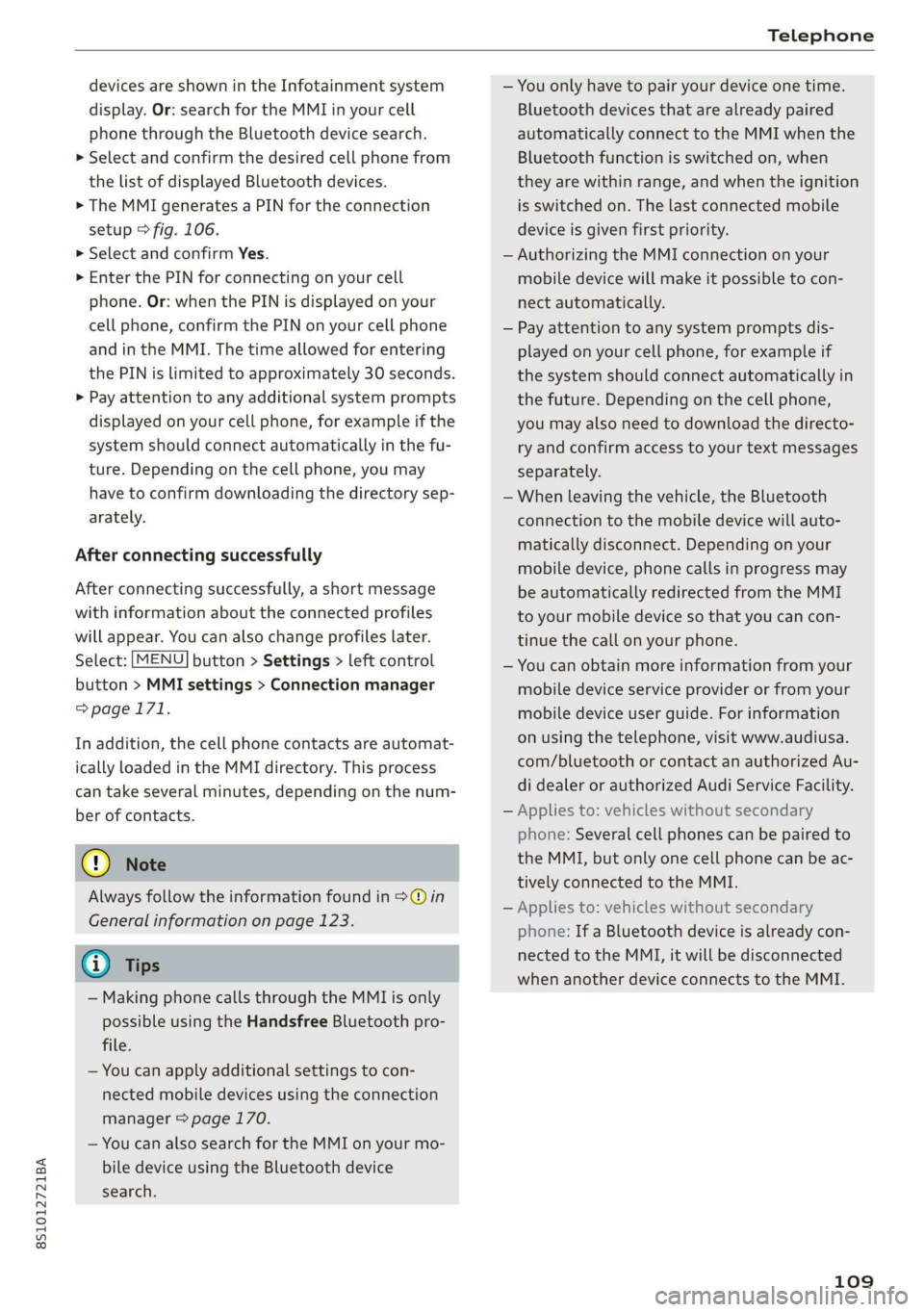
MyPhone
DoesthisPINmatchtheoneon your
Bluetoothdevice?PIN:967536
Fig.106DisplayingthePINforenteringinthecellphone
Requirement
Thevehiclemustbestationaryandtheignition
mustbe switchedon.
TheBluetoothsettingsmustbeopenonyour
mobiledeviceduringtheconnectionsetup.
TheBluetoothfunctionandvisibilityoftheMMI
=page171andmobiledevicemustbeswitched
on.
Themobiledevicetobeconnectedmustnotbe
activelyconnectedtoanyotherBluetoothdevice.
TheMMImustnotbeconnectedtoamobilede-
vice.
Connectingamobiledevice
>Select:[MENU]button>Telephone>Connect
mobiledevice>Next.TheavailableBluetooth>
Page 111 of 312
8S1012721BA
Telephone
devicesareshownintheInfotainmentsystem
display.Or:searchfortheMMIinyourcell
phonethroughtheBluetoothdevicesearch.
>Selectandconfirmthedesiredcellphonefrom
thelistofdisplayedBluetoothdevices.
>TheMMIgeneratesaPINforthe connection
setup>fig.106.
>SelectandconfirmYes.
>»EnterthePINforconnectingonyourcell
phone.Or:whenthePINisdisplayedonyour
cellphone,confirmthePINonyourcellphone
andintheMMI.Thetimeallowedforentering
thePINislimitedtoapproximately30seconds.
>Payattentiontoanyadditionalsystemprompts
displayedonyourcellphone,forexampleifthe
systemshouldconnectautomaticallyinthefu-
ture.
Dependingonthecellphone,youmay
havetoconfirmdownloadingthedirectorysep-
arately.
Afterconnectingsuccessfully
Afterconnectingsuccessfully,ashortmessage
withinformationabouttheconnectedprofiles
willappear.Youcanalsochangeprofileslater.
Select:[MENU]button>Settings> leftcontrol
button>MMIsettings>Connectionmanager
=>page171.
Inaddition,thecellphonecontactsareautomat-
icallyloadedintheMMIdirectory.Thisprocess
cantakeseveralminutes,dependingonthenum-
berofcontacts.
@)Note
Alwaysfollowtheinformationfoundin>@in
Generalinformationonpage123.
@)Tips
— MakingphonecallsthroughtheMMIisonly
possibleusingtheHandsfreeBluetoothpro-
file.
—Youcan applyadditionalsettings tocon-
nectedmobiledevicesusingthe connection
manager©page170.
—YoucanalsosearchfortheMMIonyourmo-
biledeviceusingtheBluetoothdevice
search.
—Youonlyhavetopairyourdeviceonetime.
Bluetoothdevicesthatarealreadypaired
automaticallyconnecttotheMMIwhenthe
Bluetoothfunctionisswitchedon,when
theyarewithinrange,andwhentheignition
isswitchedon.Thelastconnectedmobile
deviceisgivenfirstpriority.
—AuthorizingtheMMIconnectiononyour
mobiledevicewillmakeitpossibletocon-
nectautomatically.
—Payattentiontoanysystempromptsdis-
playedonyourcellphone,forexampleif
thesystemshouldconnectautomaticallyin
thefuture.Dependingonthecellphone,
youmayalsoneedtodownloadthedirecto-
ryandconfirmaccesstoyourtextmessages
separately.
—Whenleavingthevehicle,theBluetooth
connectiontothemobiledevicewillauto-
maticallydisconnect.Depending onyour
mobiledevice,phonecallsinprogressmay
beautomaticallyredirectedfromtheMMI
toyourmobiledevice sothatyoucancon-
tinuethecallonyourphone.
—Youcanobtainmoreinformationfromyour
mobiledeviceserviceproviderorfromyour
mobiledeviceuserguide. Forinformation
onusingthetelephone,visitwww.audiusa.
com/bluetoothorcontactanauthorizedAu-
didealerorauthorizedAudiServiceFacility.
—Appliesto:vehicleswithoutsecondary
phone:Severalcellphonescanbepairedto
the MMI,butonlyonecellphonecanbeac-
tivelyconnectedtotheMMI.
—Appliesto:vehicleswithoutsecondary
phone:IfaBluetoothdeviceisalreadycon-
nectedtotheMMI,itwillbe disconnected
whenanotherdeviceconnectstotheMMI.
109
Page 112 of 312

Telephone
Operatingtwomobiledevicesthroughthe
Ii
YoucanconnecttwocellphonestotheMMI,for
exampleyourbusinesscellphoneastheprimary
phoneandyourprivatecellphoneasthesecon-
dary phone.You canbereachedinyourvehicle
throughbothcellphones.
Thefirstconnectedcellphoneisdisplayedasthe
primaryphoneintheMMI.Thesecondcellphone
isconnectedasthesecondaryphone.
Thedirectoryfromtheconnectedprimaryphone
willalwaysbedisplayed.Ifyouwouldliketouse
thedirectoryfromthesecondary phone, you
mustswitchtheprimaryandsecondaryphone
=>page110.
Connectingacellphoneastheprimary
phone
ConnectyourcellphonetotheMMIviaBlue-
tooth.Thefirstconnectedcellphoneisdisplayed
asthePrimaryphoneintheMMI.
See>page108,Connectingacellphoneusing
Bluetooth.
Connectingacellphoneasthesecondary
phone
Requirement:acellphonemustbeconnectedto
theMMIastheprimaryphone.
Select:[MENU]button>Telephone>rightcon-
trolbutton>Connectsecondarytelephone.
See>page108,Connectingacellphoneusing
Bluetooth.
Example:youhaveconnectedyourbusinesscell
phonetotheMMIastheprimaryphoneandyour
privatecellphoneasthesecondaryphone.To be
abletocallcontactsfromyourprivatecellphone
directory,youmustswitchtheprimaryandsec-
ondaryphone,sincethedirectoryfromthepri-
maryphoneisalwaysdisplayed.
Switchingtheprimaryandsecondaryphone
Requirement:aprimaryphoneandasecondary
phonemustbeconnected.
110
Switchprimaryandsecond.phone:select:
MENU}button>Telephone>rightcontrolbut-
ton>Switchprimaryandsecond.phone.
G)Tips
—Pleasenotethatonlythedirectoryfromthe
primaryphoneisalwaysdisplayed.
—Toviewifyourcellphoneisconnectedas
theprimaryorsecondaryphone,gotothe
Connectionmanager>page170.Or:the
devicenameoftheconnectedprimary
phoneisshownintheTelephonemenu
(suchasmyPhone).
—Iftheprimaryphonedoesnotconnectauto-
maticallytotheMMIwhentheignitionis
switchedon, forexamplebecauseitisout
ofthevehiclerangeortheBluetoothfunc-
tionisswitchedoff,thenapreviously paired
secondaryphoneisautomaticallyconnected
astheprimaryphone.
—Youcansendandreceivemessagesonyour
primaryphoneaswellasonyoursecondary
phone>page112,fig. 108.You donot
needtoswitchyourprimaryphoneandsec-
ondaryphoneforthis.
—Youcanalsomakeyourconnectedcell
phonethedefaultphonebyselectingSetas
defaulttelephoneintheConnectionman-
ager>page171.
Page 113 of 312
8S1012721BA
Telephone
UsingtheAudiphone
box
Appliesto:vehicleswithAudiphonebox
Youcanchargeyourmobiledevicebatteryusing
theAudiphonebox.Youcanmakecallsthrough
theexteriorantenna*onthevehicle.Usingthe
externalantenna*helpswhenthereisalowsig-
nalandalsoprovidesbetterreceptionquality.
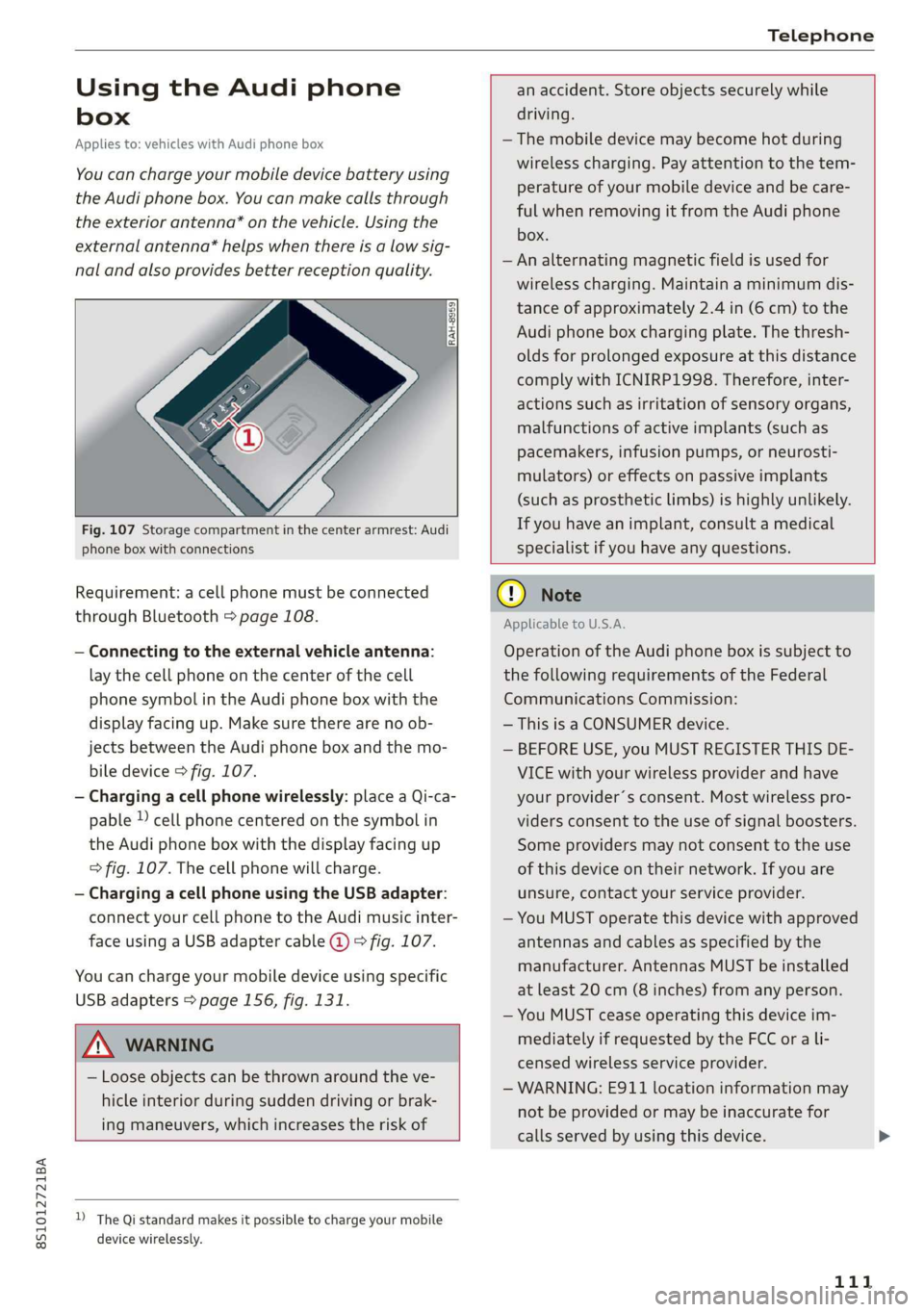
Fig.107Storagecompartmentinthe center armrest:Audi
phoneboxwithconnections
Requirement:acellphonemustbeconnected
throughBluetooth>page108.
—Connectingtotheexternalvehicleantenna:
laythecellphoneonthecenterofthecell
phonesymbolintheAudiphoneboxwiththe
displayfacingup.Makesuretherearenoob-
jectsbetweenthe Audiphoneboxandthemo-
biledevice>fig.107.
—Chargingacellphonewirelessly:placeaQi-ca-
pable»cellphonecenteredonthesymbolin
the Audiphoneboxwiththedisplayfacingup
>fig.107.Thecellphonewillcharge.
—ChargingacellphoneusingtheUSBadapter:
connectyourcellphonetotheAudimusicinter-
faceusingaUSBadaptercable@©fig.107.
Youcan chargeyourmobiledeviceusingspecific
USBadapters>page156,fig.131.
anaccident.Storeobjectssecurelywhile
driving.
—Themobiledevicemaybecomehotduring
wirelesscharging.Payattentiontothetem-
perature ofyourmobiledeviceandbecare-
fulwhenremovingitfromthe Audiphone
box.
—Analternatingmagneticfieldisusedfor
wirelesscharging.Maintainaminimumdis-
tanceofapproximately2.4in(6cm)tothe
Audi
phoneboxchargingplate.Thethresh-
oldsforprolongedexposureatthisdistance
complywithICNIRP1998.Therefore,inter-
actionssuchasirritationofsensoryorgans,
malfunctionsofactiveimplants(such as
pacemakers,infusionpumps,orneurosti-
mulators)oreffectsonpassiveimplants
(suchas prostheticlimbs)ishighlyunlikely.
Ifyouhaveanimplant,consultamedical
specialistifyouhaveanyquestions.
ZAWARNING
—Looseobjectscanbethrownaroundtheve-
hicleinteriorduringsuddendrivingorbrak-
ingmaneuvers, whichincreasestheriskof
D_TheQistandardmakesitpossibletocharge yourmobile
devicewirelessly.
oONote
ApplicabletoU.S.A.
Operationofthe Audiphoneboxissubjectto
thefollowingrequirementsoftheFederal
CommunicationsCommission:
—ThisisaCONSUMERdevice.
—BEFOREUSE,youMUSTREGISTERTHISDE-
VICEwithyourwirelessproviderandhave
yourprovider’sconsent.Mostwirelesspro-
vidersconsenttotheuseofsignalboosters.
Someprovidersmaynotconsenttothe use
ofthisdeviceontheirnetwork.Ifyouare
unsure,contactyourserviceprovider.
—YouMUSToperatethisdevicewithapproved
antennas
andcablesasspecifiedby the
manufacturer.AntennasMUSTbeinstalled
atleast20cm(8inches)fromanyperson.
—YouMUSTceaseoperatingthisdeviceim-
mediatelyifrequestedbytheFCCorali-
censedwirelessserviceprovider.
—WARNING:E911locationinformationmay
notbeprovidedormaybeinaccuratefor
callsservedbyusingthisdevice.
111
Page 114 of 312
Telephone
@)Note
ApplicabletoCanada
InCanada,operationofaZoneEnhancer,
suchasan AudiPhoneBox,issubjecttothe
followingrequirementsoftheInnovation,
ScienceandEconomicDevelopmentCanada
(ISED):
—ThisisaCONSUMERdevice.
—BEFOREUSE,youMUSTmeetallrequire-
mentssetoutinCPC-2-1-05.
—YouMUSToperatethisdevicewithapproved
antennas
andcablesasspecifiedbythe
manufacturer.AntennasMUSTNOTbein-
stalledwithin20cmofanyperson.
—YouMUSTceaseoperatingthisdeviceim-
mediatelyifrequestedbyISEDoralicensed
wirelessserviceprovider.
—WARNING:£911locationinformationmay
notbeprovidedormaybeinaccuratefor
callsservedbyusingthisdevice.
G)Tips
— TheAudiphoneboxisnotavailableinall
countries.Foradditionalinformation,con-
tactanauthorizedAudidealership.
—Placingthemobiledeviceinabagorprotec-
tivesleeveinsidetheAudiphoneboxcanin-
terferewiththeconnectiontotheexternal
antenna.
—MetalobjectscannotbelocatedintheAudi
phoneboxwhenusingtheexteriorantenna*
andtheAudiphoneboxchargingfunction.
— Thechargingtimeandtemperaturewillvary
dependingonthemobiledevicebeingused.
—Whentheignitionisswitchedon,youcan
chargeyourmobiledeviceinthe Audiphone
box.
—Toreducetheriskofmalfunctions,make
surethemobiledeviceispositionedcorrect-
lyintheAudiphonebox.
— Themaximumchargingoutputis5watts.
—Strongtransmissionqualitycannotbeguar-
anteedifmorethanonemobiledeviceisin
thebox.
—AudirecommendsusingAudiGenuineAc-
cessories.Audihasverifiedtheirreliability,
safety,andsuitability.
112
—YoucanpurchaseaUSBadapterfromanau-
thorizedAudidealerorauthorizedAudi
ServiceFacility,oratspecialtystores.
—Ifyouplaceyourremotecontrolkeytogeth-
erwithyourmobiledeviceintheAudiphone
box,itmaycauseyourmobiledevicetostop
chargingifwirelesschargingisactive.
Usingthetelephone
Openingthetelephone
Appliesto:vehicleswithtelephone
Calllist
(2Sa
©—Directory
@=4)EyerLlane
(=)eamessage(mobiledevice)
(Sy
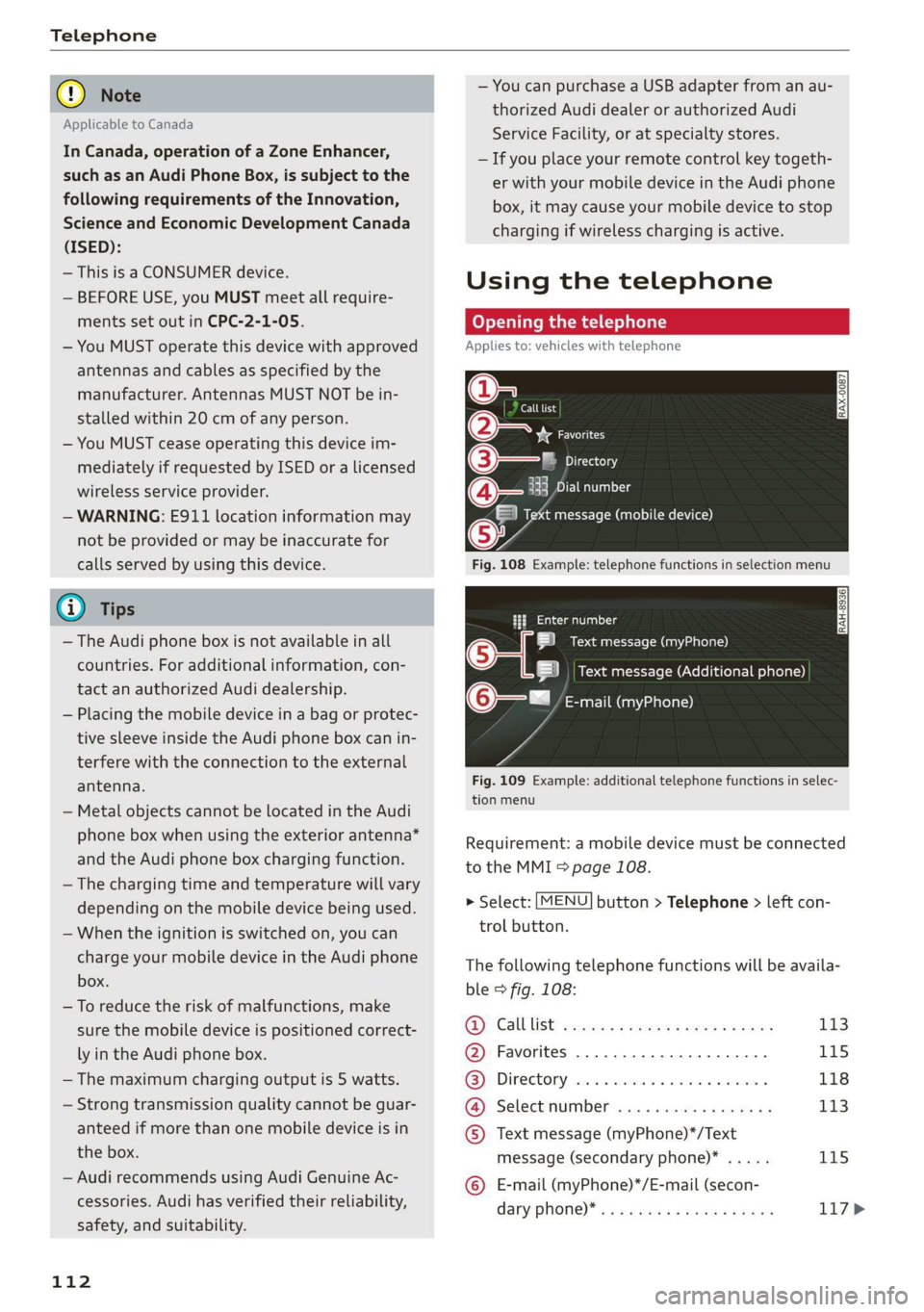
Fig.108Example:telephonefunctionsinselectionmenu
Hfemalg
i]Textmessage(myPhone)
i]Textmessage(Additionalphone)
@Q—=E-mail(myPhone)
Fig.109Example:additionaltelephonefunctionsinselec-
tionmenu
Requirement:amobiledevicemustbeconnected
totheMMI5page108.
>Select:[MENU]button>Telephone>leftcon-
trolbutton.
Thefollowingtelephonefunctionswillbeavaila-
ble>fig.108:
@Calllist:ssoysseeee4peesteeee113
@Favorites..............0.2..04115
@®Directory.......0...eeeeae118
@).Selectinumberiss
message(secondaryphone)*.....115
©E-mail(myPhone)*/E-mail(secon-
daryPhone)* ws«eaensswasnseeee117>
Page 115 of 312

8S1012721BA
Telephone
Thedevicenameforyourcellphoneisdisplayed
intheTelephonemenu,forexampletextmes-
sage(myPhone)©fig.108.
Dialingaphonenumber
Appliesto:vehicleswithtelephone
Calllist>
Pleaseenteratelephonenumber.
BA)‘|e4
O800AUDISERVI
Fig.110Numberspeller
a[Fatal12:25P
)118
®@Blake,Mary11:45AM
Green,Andrew
Fig.111Dialingaphonenumberfromthecalllist
>Select:[MENU]button>Telephone>leftcon-
trolbutton.
Calllist
Requirement:thecalllistmustcontainaphone
number.
Turnthecontrolknobtodisplaythecalllist.
Selectandconfirm thedesiredtelephonenumber
fromtherecentcallslist.
Calllistsymbols>fig.111:
@Missedcalls
@Dialednumbers
@Receivedcalls
Select:acontactfromthelist>rightcontrolbut-
ton.
—Call:calltheselectedcontact.
—Connectsecondarytelephone*/Switchprimary
andsecond.phone”:see>page110.
—Edit phoneno.beforecall:editaphonenum-
berbeforedialingit.SelectandconfirmOKto
edit.Or:presstheleftcontrolbuttontoreturn
withoutediting.
—Sendtextmessage:writeatextmessageto
the
selectedcontact.
—Deletecalllist:selectandconfirmifyouwould
liketoDeletethisentryorDeleteallentries.
—Storeasfavorite:storetheselectedcontactas
a favorite.
—Showcontactdetails:see>page119.
Connectionmanager
See>page170.
Bluetoothsettings
See>page171.
Onlinesettings
See>page172.
Wi-Fisettings
See>page128,Wi-Fisettings.
Telephonesettings
See>page120.
Favorites
Requirement:aphonenumberorcontactmust
bestoredasafavorite>page115.
Selectandconfirmafavoriteinthefavoriteslist.
Directory
Requirement:youmusthaveatleastonecontact
storedinyourcellphone.
Selectandconfirmaphonenumberfromthedi-
rectory>page118.
Enternumber
—Enteringaphonenumberasasequenceof
numbers:enterthenumberusingthenumber
speller>fig.110.
—Enteringthephonenumberasasequenceof
letters:selectandconfirm
ABC abovethe
numberspeller.Enterasequenceoflettersus-
ing
theletterspeller,forexampleAUDISER-
VICE.
113