radio AUDI TT COUPE 2019 User Guide
[x] Cancel search | Manufacturer: AUDI, Model Year: 2019, Model line: TT COUPE, Model: AUDI TT COUPE 2019Pages: 312, PDF Size: 83.95 MB
Page 108 of 312
Voicerecognitionsystem
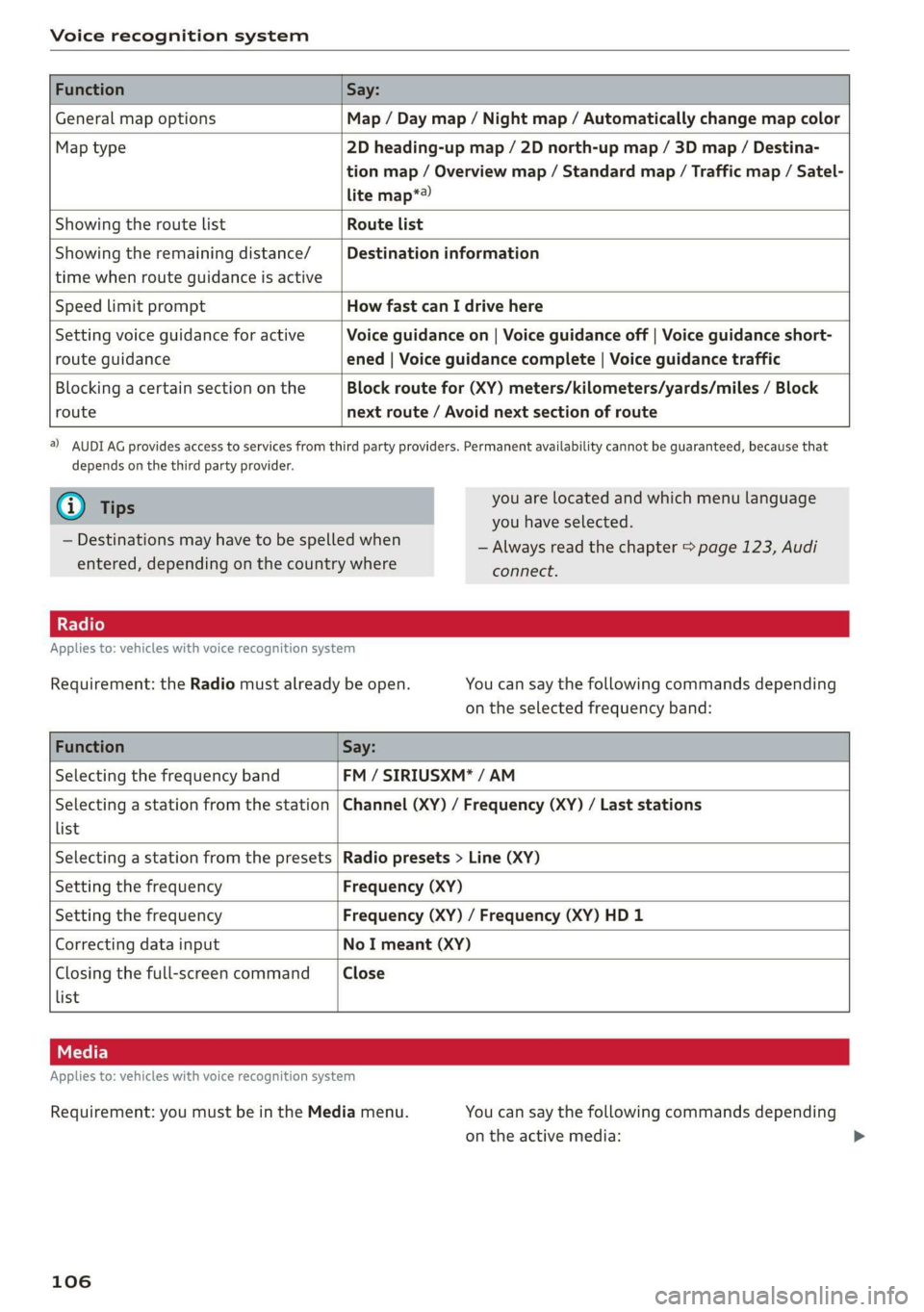
FunctionSay:
GeneralmapoptionsMap/Daymap/Nightmap/Automaticallychangemapcolor
Maptype2Dheading-upmap/2Dnorth-upmap/3Dmap/Destina-
tionmap/Overviewmap/Standardmap/Trafficmap/Satel-
litemap*®)
Showingtheroute listRoutelist
Showingtheremainingdistance/
timewhenrouteguidanceisactive
Destinationinformation
SpeedlimitpromptHowfastcanIdrivehere
Settingvoiceguidanceforactive
routeguidance
Voiceguidanceon|Voiceguidanceoff|Voiceguidanceshort-
ened|Voiceguidancecomplete|Voiceguidancetraffic
Blockingacertainsectiononthe
route
Blockroutefor(XY)meters/kilometers/yards/miles/Block
nextroute/Avoidnextsectionofroute
)AUDIAGprovidesaccesstoservicesfromthirdpartyproviders.Permanentavailabilitycannotbeguaranteed,becausethat
dependsonthethirdpartyprovider.
@Tips
—Destinationsmayhavetobespelledwhen
entered,dependingonthecountrywhere
youarelocatedandwhichmenulanguage
youhaveselected.
—Alwaysreadthe chapter>page123,Audi
connect.
Appliesto:vehicleswithvoicerecognitionsystem
Requirement:theRadiomustalreadybeopen.Youcansaythefollowingcommandsdepending
ontheselectedfrequencyband:
FunctionSay:
SelectingthefrequencybandFM/SIRIUSXM*/AM
Selectingastationfromthestation
list
Channel(XY)/Frequency(XY)/Laststations
SelectingastationfromthepresetsRadiopresets>Line(XY)
SettingthefrequencyFrequency(XY)
SettingthefrequencyFrequency(XY)/Frequency(XY)HD1
CorrectingdatainputNoImeant(XY)
Closingthefull-screencommand
list
Close
Appliesto:vehicleswithvoicerecognitionsystem
Requirement:youmustbeintheMediamenu.
106
Youcansaythefollowingcommandsdepending
ontheactivemedia:
Page 116 of 312

Telephone
—Dialingaphonenumber:selectandconfirm@.
Or:pushthecontrolknobdown.Selectand
confirmOK.
—Deletingindividualcharacters:selectandcon-
firm&l.
—Deletingallcharactersenteredatonce:turn
thecontrolknobwiththecharacterselectionto
landpressandholdthecontrolknob.Or:se-
lecttherightcontrolbutton>Clearinputfield.
Tonesequences(DTMF)canbeentereddirectly
intothespellerduringaphonecall.
Acceptingorendingacall
Appliesto:vehicleswithtelephone
—Acceptingacall:selectandconfirmAnswer.
—Decliningacall:selectandconfirmDecline.
—Mutingtheactivecall:selectandconfirm
Mute.
—Endinga phonecall/canceldialing:selectand
confirmEndcall.Or:pressthecontrolknob.
Acceptinganothercall:see>page114,Duringa
phonecall.
Callerinformation:thename, phonenumberor
UnknownappearsintheInfotainmentsystem
displaydependingonifthecallerhasbeenstored
inthedirectoryandifthephonenumberhas
beentransmitted.Apicturemayalsobedis-
played,dependingonwhetheryouhaveassigned
apicturetoacontactinyourdirectoryandifit
wastransferredtoyourMMI.Youcanfindoutif
yourmobiledevicesupportsthisfunctionfrom
yourmobiledevicenetworkprovider,yourmobile
deviceowner'smanual,oratwww.audiusa.com/
bluetooth.
@Tips
Theradioormediaplaybackismutedduringa
phonecall.
Duringaphonecall
Appliesto:vehicleswithtelephone
Requirement:
theremustbeacallinprogress.
>
Presstherightcontrolbutton.
114
Thefollowingoptionsmaybepossibleduringa
calldependingonthemobiledevicebeingused
andthetypeofconnection:
—Makinganadditionalcall:select:Findcontact
>Calllist/Directory/Favorites>anentryfrom
thelist.
—Acceptinganincomingcallwhenthereisan
activecallandacallonhold:selectReplace.
Theactivecallisreplacedwiththeincoming
call.
—Answeringanadditionalcall:ifthereisanin-
comingcallwhileanothercallisactive,youcan
selectAnswertoput theexistingcallonhold
andanswertheincomingcall.IfyouselectDe-
cline,theincomingcallwillbedeclined.
Additionalfunctionsinclude:
Mute:ifyouselectandconfirmthisfunction,the
otherpersononthephonecannothearyou.You
willstillbeabletoheartheotherperson.
Holdcall/Resume:youcanplacetheexistingcall
onholdandresumeitagain.Toresumethecall,
selectandconfirmthecallyouwouldliketore-
sume.
Transfercalltomobiledevice*:selectandcon-
firm
Transfercalltomobiledevicetotransfer
theexistingcallfromtheMMItoyourcellphone.
Switchtohands-freemode*:Requirement:you
musthaveaphonecallinprogressonyourcell
phone.SelectandconfirmSwitchtohands-free
modetotransferthecallfromyourcellphoneto
theMMI.
Swapcall:alternatebetweentwophonecalls
whileoneofthecallsisonhold.SelectingEnd
call willendtheactivephonecall.Aphonecall
onholdcanberesumedusingtherightcontrol
button>Resume.
Addtoconference:apartyonholdanduptofive
activeparties(dependingonthenetwork)canbe
addedtoaconferencecall.Tomakeanadditional
call,putallparticipantsinthecurrentconference
callonholdusingtherightcontrolbutton>Hold
conference.Presstheleftcontrolbutton.Select
andconfirmCalllist/Directory/Favorites>an
entryfromthelist.Youcanaddcalledcontacts
totheconferenceusingtherightcontrolbutton>
Page 120 of 312
Telephone
E-mailsettings*
Todisplaywhenanewe-mailisreceived,activate
theE-mailnotifications.Newe-mailsareindicat-
edwithanenvelope&intheInfotainmentsys-
temdisplaystatusline.
Connectionmanager
See>page170.
Bluetoothsettings
See>page171.
Onlinesettings
See>page172.
Wi-Fisettings
See>page128,Wi-Fisettings.
Telephonesettings
See>page120.
G)Tips
MessagesthataredeletedintheMMIarealso
automaticallydeletedintheconnectedcell
phone.
Listeningtovoicemail
Appliesto:vehicleswithtelephone
MENU >Select:button>Telephone>leftcon-
trolbutton.SelectandconfirmCalllist/Direc-
tory/Favorites>Voicemail.
—Enteringthevoicemailnumber:enterthede-
sirednumber.SelectandconfirmOK.
—Dialingthevoicemailnumber:selectandcon-
firm
Voicemail.
@)Tips
—Thisservicemustbesetupandactivatedin
advancebythecellphoneserviceprovider.
Youcanobtainmoreinformationfromyour
cellphoneserviceprovider.
— Thevoicemailnumberdependsonthecell
phoneserviceprovider.
118
Emergencycallfunctions
Appliesto:vehicleswithtelephone
MENU >Select:button>Telephone>leftcon-
trolbutton>Dialnumber>Enteremergency
callnumber(forexample,911)>OK.
ZAWARNING
—Becauseyourphoneworkswithradiosig-
nals,aconnectioncannotbeguaranteedun-
derallcircumstances.Donotrelyononly
yourphonewhenitcomestoessentialcom-
munication(suchasamedicalemergency).
—Alwaysfollowtheinstructionsgivenbythe
emergencypersonnelduringanemergency
callandonlyendthecallwhentheyinstruct
youtodoso.
@)Tips
Emergencynumbersarenot
thesameevery-
where.Findoutwhichemergencynumberis
usedinyourcurrentlocation.
Directory
Openingthedirectory
Appliesto:vehicleswithtelephone
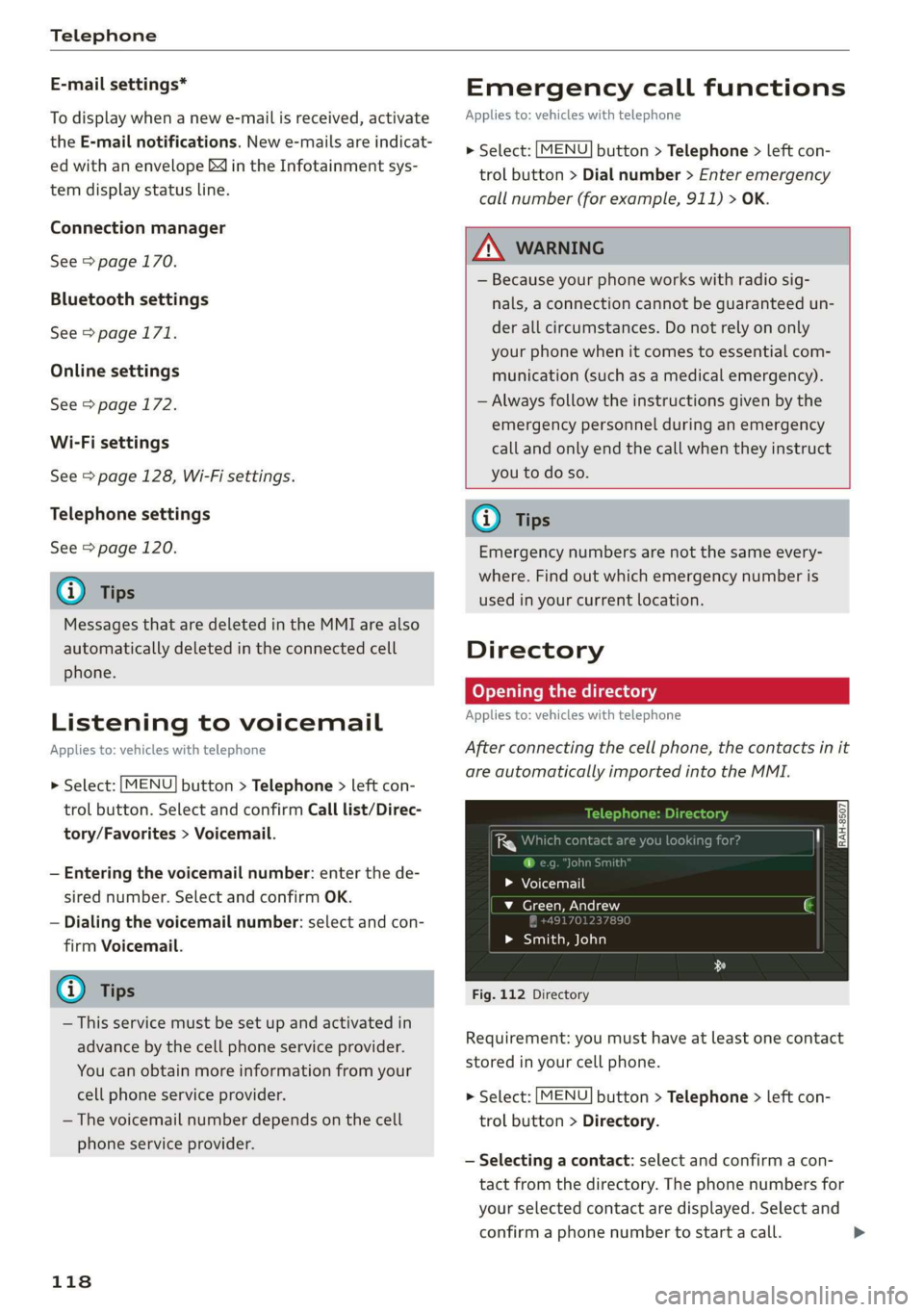
Afterconnectingthecellphone,thecontactsinit
areautomaticallyimportedintotheMMI.
>Voicemail
v_Green,Andrew
49170123789
>Smith,John
Fig.112Directory
Requirement:youmusthaveatleastonecontact
storedinyourcellphone.
>Select:[MENU]button>Telephone>leftcon-
trolbutton>Directory.
—Selectingacontact:selectandconfirmacon-
tactfromthedirectory.Thephonenumbersfor
yourselectedcontactaredisplayed.Selectand
confirmaphonenumbertostartacall.>
Page 147 of 312

8S1012721BA
Radio
Radio
Openingtheradio
TheradiosupportstheFM,AMandSiriusXM*
(satelliteradio)bands.UsingtheHDRadiore-
ceiveralsoallowsyoutoreceiveradiostationson
theFMandAMbandsindigitalformat.
(ier
ICSlesioncaU}VED
89.9WIBI-FMHD4
89.9WIBI-FMHD6
(2)90.3
Fig.123FMstationlist(HDRadiotechnologyFM)
RADIOro4.)
kVA
aliewea
|
RAH-8468
NoSignal
20on20
40son4
NoSignal NoSignal
Fig.124SiriusXMstationlist
>Pressthe[RADIO]button.
Afteropeningtheradio,thelastopenedstation
listisdisplayed.
Selectingastation:selectandconfirmastation
fromthestationlist.FM/AMstationsthatcan be
receivedbydigitalradioaremarkedwiththeHD
Radiotechnologysymbol)@)©fig.123.Ifre-
ceptionqualitydeclines,theradioautomatically
switchestotheanalogFM/AMstationdepending
onavailability.DigitalHDRadiostations*may
containmultipleadditionalstations*.Theavaila-
bleadditionalstations*arelistedundertheradio
station.Ifyoulosereception,theadditionalsta-
tions*aremutedsincetheycannolongerbere-
ceived.
Settingthefrequencyband:pressthe [RADIO
button
repeatedlyuntilthedesiredfrequency
bandisset.
Updatingthestationlist:stationlistsareupdat-
edautomatically.
Thefollowinginformationisdisplayedinthesta-
tionlists:
@Presets
Thestationisstoredasapreset.The symbol
showsthestoredlocationinthepresetslist(for
example,21).
@Radiotext(shorteneddisplay)
Ifavailable,programinformationabouttheset
stationisdisplayedinallofthestationlists.
@Frequency
@Stationname
©Channelnumber
Ifthereisa lossofradiosignal(SiriusXM*),the
followingsysteminformationisdisplayedinthe
stationlist:
NoSignal:thetuneriscurrentlynotreceivinga
satellitesignal®)>fig.124.
Thesysteminformationturnsoffwhentheradio
stationsarereceivedagain.
@Tips
—ContacttheSiriusXM*providerifyouwould
liketoreceivesatelliteprogramming.
—Buildings,tunnels,bridges,openareas,oth-
ervehiclesorobjectsonthevehicleroofcan
affectreception.
—SatelliteradioisnotavailableinAlaskaand
Hawaii.
—iTunestagging”isnotsupportedbyallradio
stations.
145
Page 148 of 312

Radio
Radiofunctions
ct-Ma-y4aett-Lai)
Usingthefreetextsearch,youcanselecttheor-
derthatthesearchtermsareenteredinthein-
putfield.Searchin allfrequencybandsforasta-
tionnameorprogramtype(suchasNews).
MYAUSCliDee
Mt)Bd
WIBI-FMHD6
Fig.125Inputfieldandresultslistforfreetextsearch
—Openingthefreetextsearch: wheninastation
list,keepturningthecontrolknobtotheleft
untilthefreetextsearchinputfieldisdis-
played.
—Usingthefreetextsearch:see>page98,Free
textsearch.
Youcanalsosearchforfrequencies.
Stationsfromthepresets(3)aredisplayedinthe
resultslist@>fig.125.Thesymbol@)indicates
whichstationlistyouswitchedtobasedonthe
stationselection.
Additionaloptions
>Select:[RADIO]button>rightcontrolbutton.
Thefollowingoptionsareavailabledependingon
thefrequencyband:
—Soundsettings:see>page173.
—Storeaspreset:see>page147,Presets.
—Deleteallentries:allentriesaredeletedinthe
Laststationsview.
—TagthissongforiTunes*):connectyourApple
devicetotheAudimusicinterface*onyour
MMI.SelectandconfirmTagthissongfor
iTunes.Thetrackthatiscurrentlyplayingis
storedonyourAppledevice.Synchronizeyour
)_Inpreparationatthetimeofprinting.
146
AppledevicewithiTunes.Thetaggedtrackwill
displaythenexttimeyouopenyouriTunesme-
diacenter.IfthereisnoAppledeviceconnect-
ed,thetaggedtracksarestoredtemporarilyin
theMMI(maximumof50tracks).Onceyou
connectyourAppledevice totheAudimusicin-
terface,thetagsarestoredonthedevice.
—Manualtuning:thefrequencybarsaredis-
played.Selectandconfirm thedesiredfrequen-
vy.
—Seek:theradiotunestothepreviousornextre-
ceivablestation.
—Scan:allstationsareplayedforseveralseconds
each.
—Radiosettings:see>page148.
Radiotext
>»Select:[RADIO]button>leftcontrolbutton>a
frequencyband(suchasFM)>astation.
>Select:rightcontrolbutton>Radiotext.
Browsingthroughradiotextentries:turnthe
controlknobtotheleftorright.
Requirement:aradiotextentrymustbedis-
playedandthestationmustbebroadcastinga
phonenumber,anavigationdestinationoratext
messagenumberasRadioTextPlusinformation.
If alocation,aphonenumberoratextmessage
numberisincludedwitharadiotextentry,thera-
diotextwillbeshownwithacoloredborder.You
havethefollowingoptions:
Call*/Start
routeguidance*/Writetextmes-
sage*:
—SelectaradiotextentrywithRadioTextPlusin-
formationandpressthecontrolknob.
—SelectandconfirmCall*/Startroute guid-
ance*/Writetextmessage”.Or:pressthe
BACK]buttontocancel.
(i)Tips
TheavailabilityofradiotextandRadioText
Plusdependsontheradiostation.
Page 149 of 312
![AUDI TT COUPE 2019 User Guide 8S1012721BA
Radio
View:Show"NowPlaying"screenSettingthefrequencyband:selectandconfirm
thedesiredfrequencybandintheradiomenu
>fig.127.Or:pressthe[RADIO]buttonrepeat-
edly
untilthedesiredfrequen](/img/6/57659/w960_57659-148.png "AUDI TT COUPE 2019 User Guide 8S1012721BA
Radio
View:Show\"NowPlaying\"screenSettingthefrequencyband:selectandconfirm
thedesiredfrequencybandintheradiomenu
>fig.127.Or:pressthe[RADIO]buttonrepeat-
edly
untilthedesiredfrequen")
8S1012721BA
Radio
View:Show"NowPlaying"screenSettingthefrequencyband:selectandconfirm
thedesiredfrequencybandintheradiomenu
>fig.127.Or:pressthe[RADIO]buttonrepeat-
edly
untilthedesiredfrequencybandisset.Dis-
playsthestationlist.
@Switchtomedia
TheMediamenuisdisplayed.See>page158,
Playingmedia.
Fig.126Radioview:additionalstationinformation@Favorites
Requirement:youmustbetunedtoaradiosta-Thefavoriteslistisdisplayed.See>page147,
tion.TheShow"NowPlaying"screen optionPresets.
mustbe switchedon>page148.©Laststations
Symbolsinthe"NowPlaying”screen>fig.126:Thelaststationslistenedtofromallfrequency
@Radiotextavailabilitybandsareshowninthelist.Selectandconfirma
stationforimmediateplayback.
Radiotextisavailable fortheselectedstation.
See>page146.@SiriusKM*
@)iTunestaggingTheSiriusXM*stationlistisdisplayed.
TheTagthissongforiTunesoptionisavailable@®FM
forthesetstation.See>page146,Additional
.TheFMstationlistisdisplayed.
options.
@FMHDRadiotechnologyAdditionalfrequencybands
Dependingonthevehicleequipment,youcanse-
lectadditionalfrequencybandsintheselection
menu>fig.127.
ThestationisreceivedthroughFMHDRadio
technology.
@Screenview
DisplayCoverartorStationlogo.SeePresets
=>page148.Youcanstoreyourfavoritestationsfromevery
Displayingastationlist:turnthecontrolknob.frequencybandinthepresetslist.
Or:pressthe[BACK]button.
>Select:the[RADIO]button>Presets.
RadiomenuRequirement:thepresetslistmustbedisplayed.
—Storingpresets:selectandconfirm afreepre-
(D)|changetomediatsetspace.Followthesysteminstructions.
Bees—Selectandconfirmastationfromthelistif
©—®o(Eateoltnecessary.
Satay)Requirement:astationlistmustbedisplayed.
—Storingpresets:select:anentryfromthelist>
rightcontrolbutton>Storeaspreset.Or:press
Fig.127Example:Radiomenuandholdthecontrolknobforseveralseconds.
—Displayingthepresetslist:select:[RADIO]but-
ton>Presets.>
>Select:[RADIO]button>leftcontrolbutton.
147
Page 150 of 312
Radio
Requirement:thefavoriteslistmustbedis-
played.
—Listeningtopresets:selectandconfirm apre-
setfromthelist.
—Moveapreset:selectapresetfromthelist>
rightcontrolbutton>Movepreset.Or:press
andholdthecontrolknobforseveralseconds.
Selectandconfirmthelocationoftheselected
preset.
—Deletingpresets:selecta presetfromthelist>
rightcontrolbutton>Deletepreset>Delete
thispresetorDeleteallpresets.
Additionalsettings
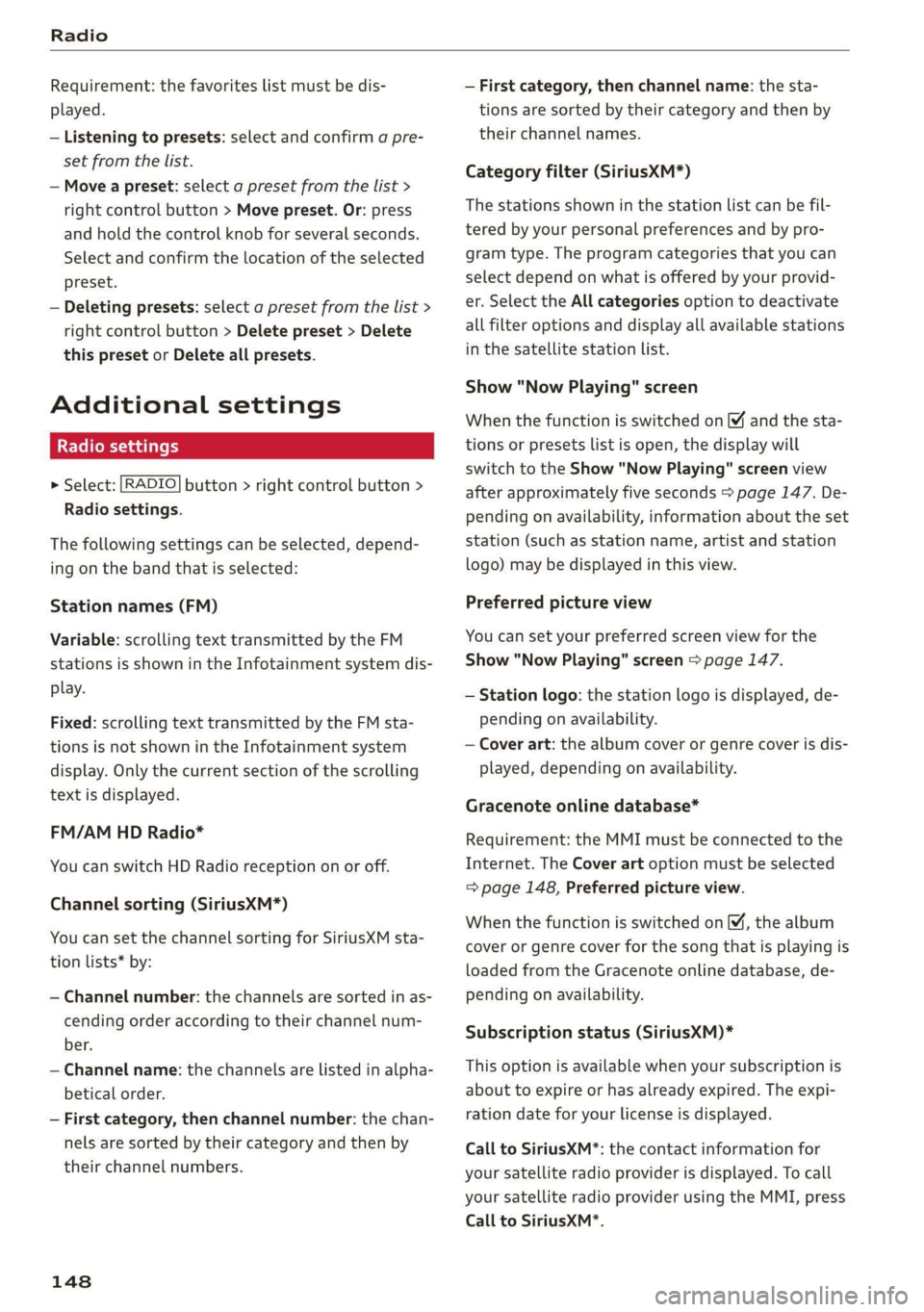
Radiosettings
>Select:[RADIO]button>rightcontrolbutton>
Radiosettings.
Thefollowingsettingscan beselected,depend-
ingonthebandthatisselected:
Stationnames(FM)
Variable:scrollingtexttransmittedby theFM
stationsisshownintheInfotainmentsystemdis-
play.
Fixed:scrollingtexttransmittedby theFMsta-
tionsisnotshownintheInfotainmentsystem
display.Onlythecurrentsectionofthescrolling
textisdisplayed.
FM/AMHDRadio*
YoucanswitchHDRadioreceptiononoroff.
Channelsorting(SiriusXM*)
YoucansetthechannelsortingforSiriusXMsta-
tionlists*by:
—Channelnumber:thechannelsaresortedinas-
cendingorderaccordingtotheirchannelnum-
ber.
—Channelname:thechannelsarelistedinalpha-
beticalorder.
—Firstcategory,thenchannelnumber:thechan-
nelsaresortedbytheircategoryandthenby
theirchannelnumbers.
148
—Firstcategory,thenchannelname:thesta-
tionsaresorted bytheircategoryandthenby
theirchannelnames.
Categoryfilter(SiriusXM*)
Thestationsshowninthestationlistcanbefil-
teredbyyourpersonalpreferencesandbypro-
gramtype.Theprogramcategoriesthatyoucan
selectdependonwhatisofferedbyyourprovid-
er.SelecttheAllcategoriesoptiontodeactivate
allfilteroptionsanddisplayallavailablestations
inthesatellitestationlist.
Show"NowPlaying"screen
Whenthefunctionisswitchedon¥andthesta-
tionsorpresetslistisopen, thedisplaywill
switchtotheShow"NowPlaying"screenview
afterapproximatelyfiveseconds>page147.De-
pendingonavailability,informationabouttheset
station(such asstationname,artistandstation
logo)maybedisplayedinthisview.
Preferredpictureview
Youcansetyourpreferredscreenviewforthe
Show "NowPlaying"screen>page147.
—Stationlogo:thestationlogoisdisplayed,de-
pendingonavailability.
—Coverart:thealbumcoverorgenrecoverisdis-
played,dependingonavailability.
Gracenoteonlinedatabase*
Requirement:theMMImustbeconnectedtothe
Internet.TheCoverartoptionmustbeselected
=page148,Preferredpictureview.
Whenthefunctionisswitchedon(¥,thealbum
coverorgenrecoverforthesongthatisplayingis
loadedfromtheGracenoteonlinedatabase,de-
pendingonavailability.
Subscriptionstatus(SiriusXM)*
Thisoptionisavailablewhenyoursubscriptionis
abouttoexpireorhasalreadyexpired.Theexpi-
rationdateforyourlicenseisdisplayed.
CalltoSiriusXM”*:thecontactinformationfor
yoursatelliteradioproviderisdisplayed.Tocall
yoursatelliteradioproviderusingtheMMI,press
CalltoSiriusXM”*.
Page 151 of 312
8S51012721BA
Radio
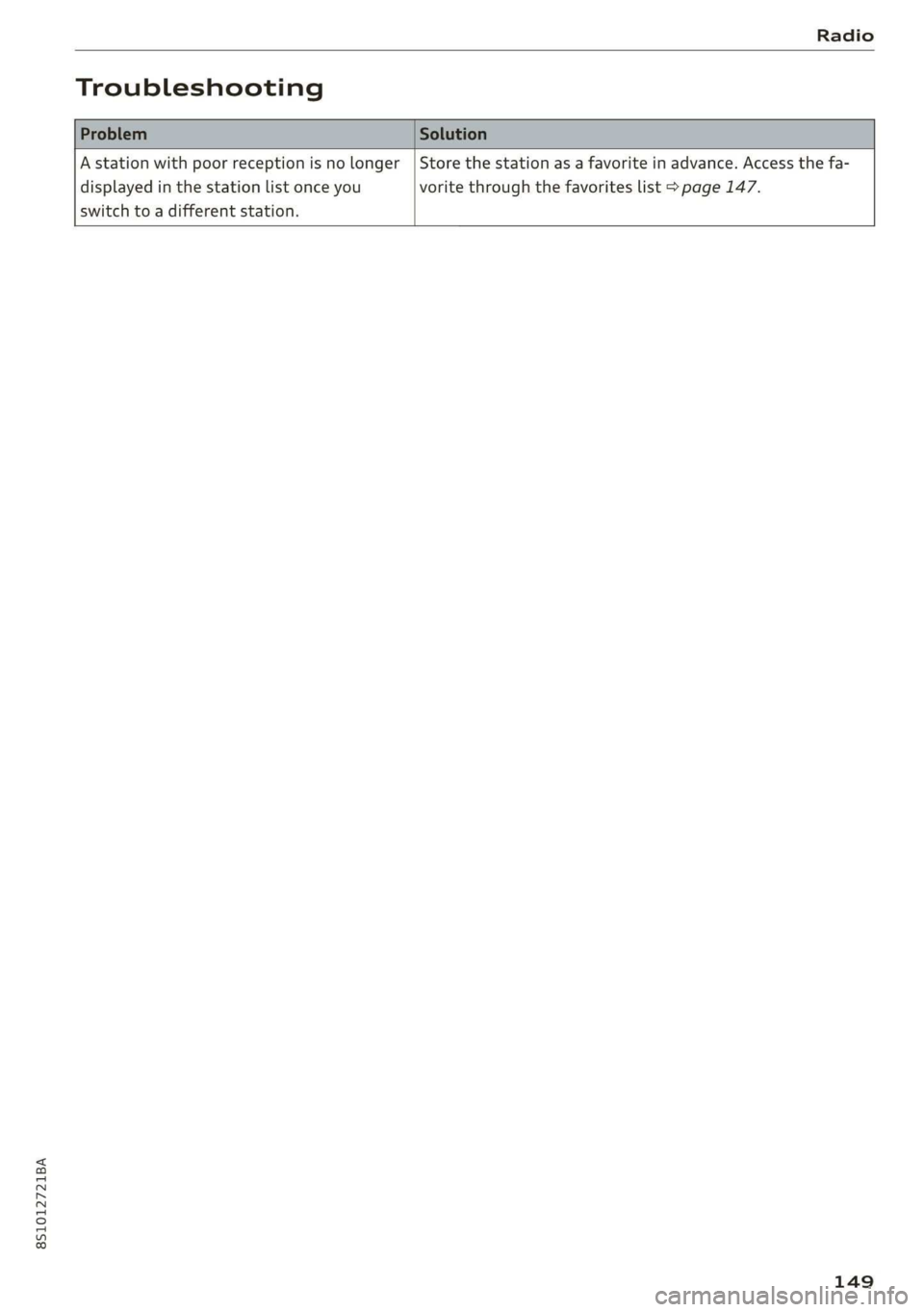
Troubleshooting
Astationwithpoorreceptionisnolonger
displayedinthestationlistonceyou
switchtoadifferentstation.
Storethestationasafavoriteinadvance.Accessthefa-
voritethroughthefavoriteslist>page147.
149
Page 156 of 312
—Checkforanyconnectionrequestsonyour
Bluetoothdevice.
—MultipleBluetoothaudioplayerscan be
connectedtotheMMI,butonlyonemobile
devicecanbeactive.
—BluetoothprotocolsAVRCP(1.0/1.3/1.4)
andA2DParesupported.
—NotethevolumesettingonyourBluetooth
device.Audirecommendssettingyourmo-
biledevicetothemaximumvolumewhen
usingitasaBluetoothaudioplayer.
— Thesupportedmediafunctions(suchas
shuffle)dependontheBluetoothdevicebe-
ingused.
—Formoreinformationonsupporteddevices,
visitwww.audiusa.com/bluetoothorcon-
tactanauthorizedAudidealerorauthorized
AudiServiceFacility.
Wi-Fiaudioplayer
Appliesto:vehicleswithWi-Fiaudioplayer
UsingtheWi-Fiaudioplayermediasourceonthe
MMI,youcanconnectandoperateyourWi-Fi-ca-
pablemediaplayer(suchasasmartphone)to
wirelesslyplaymusicfrom yourmediaplayerli-
brary.Themediaplayerisconnectedthroughthe
vehicle'sWi-Fihotspot.AUPnPServerapporan
integratedUPnP/DLNAserveronyourmedia
playerisrequiredtoaccessyourmediaplayerli-
brary.
Requirement:theWi-Fifunctiononyourmedia
playermustbe switchedon.ThemyAudiappora
UPnPserverappmustbeinstalledonyourmedia
player.Or:youmustbeusingamediaplayerwith
anintegratedUPnP/DLNAserver.
—Connectingamediaplayer:pressthe[MEDIA
button.Presstheleftcontrolbuttonuntilthe
sourcesoverview>page158isdisplayed.Se-
lectandconfirm Wi-Fiaudioplayer(7)
=>page158,fig. 134.
—Ifnecessary,selectandconfirmWi-Fiturned
off>TurnonWi-Fito activateWi-Fiinthe
MMI.SelectWi-Fisettings,ifnecessary.Select
thesamesettingsonthewirelessmediaplayer
thatareusedfortheWi-Fihotspot.
154
—StartingtheWi-Fiaudioplayer:startthe
myAudiapporaUPnPserverapp.Or:setme-
diapermissionsonyourmediaplayer.
Operatingthemediaplayer:themediaplayeris
operatedthroughtheMMI.
—Presstheleftcontrolbuttonrepeatedlyuntil
theFoldersmenuitemappears.Selectandcon-
firm
Folders.
—Playingmusicfromthemediaplayer:select
andconfirmMediacenter.
Webradio:see>page155.
ZAWARNING
—Asthedriver,donotallowusageoftheWi-
Fihotspottodistractyoufromdriving,as
thiscouldincreasetheriskofanaccident.
—Itisonlysafe tousetablets,laptops,mobile
devicesandothersimilardeviceswhenthe
vehicleisstationarybecause,likeallloose
objects,theycouldbethrownaroundthein-
sideofthevehicleinacrashandcauseseri-
ousinjuries.Storethesetypesofdevicesse-
curelywhiledriving.
—Donotuseanywirelessdevicesonthefront
seatswithinrangeoftheairbagswhiledriv-
ing.Also readthewarningsinthechapter
=>page188.
@)Note
Alwaysfollowtheinformationfoundin>@in
Generalinformationonpage123.
@Tips
— TheWi-Ficonnectionisreconfiguredwhen
insertingorremovingtheminiSIMcardin
theSIMcardreader*.Theremaybeatem-
poraryinterruptioninaudioplayback,de-
pendingonthemediaplayer.
—Alwaysreadthe chapter>page123,Audi
connect.
—PleasenotethataWi-Ficonnectiondoes
notautomaticallymakeitpossible touse
theInternet.Foradditionalinformation,
see>page123.
Page 157 of 312
8S1012721BA
Media
—Toavoidinterruptionsduringplayback,de-
activatethepowersavingfunctiononthe
mediaplayer orconnectittoacharger.
— Theloadingtimesfortheaudiodatadepend
onthemediaplayerusedandthenumberof
filesthatitcontains.
—Amaximumof2,000entriesperdirectory
aredisplayedintheMMI.
—Songsdownloadedforofflineuseusingmu-
sicstreamingservicesarestoredonyour
mobiledevice(suchasasmartphone)and
maybeDRMprotected.TheWi-Fiaudio
playerwillnotplayDRMprotectedfiles.
—ContactanauthorizedAudidealeror au-
thorizedAudiServiceFacilityforadditional
informationontheWi-Fiaudioplayer.
Onlinemediaand
Internetradio
Appliesto:vehicleswithAudiconnect
Youcanplaybackandoperatevariousonlineme-
diaservicesandInternetradiousingtheMMI.
>»Pressthe[MEDIA]button.Presstheleftcontrol
buttonuntilthesourcesoverview>page158,
fig.134isdisplayed.
Appliesto:usingonlinemediaandInternetradio
Requirement:
—ThemyAudiappmustbeinstalledandopenon
yourmobiledevice.
—YoumustbeloggedintoyourmyAudiaccount
inthemyAudiappandyoumusthaveselected
yourvehicle.
—TheWi-Fifunctiononthemobiledeviceandon
theMMImustbeswitchedon.
—Ifnecessary,checkinthe connectionmanager
=>page170ifthemobiledeviceyouconnected
isselectedundertheMMIconnectapp().
—TheMMImustbeconnectedtothenetwork.
—ThesymbolfortheOnlinemedia*source
=>page158,fig.134isshownintheMMI.
Appliesto:usingonlinemedia
Additionalrequirement:
—Asupportedonlinemediaservicemustbeavail-
ableinthecountrywherethevehicleisbeing
operated.
—Youmusthaveanaccountwithasupportedon-
linemediaservice.
—Dependingontheonlinemediaservice,you
mayneedtoinstallandopenanapponyour
mobiledevice.
StartingOnlinemedia
—Pressthe[MEDIA]button.Presstheleftcontrol
buttonuntilthesourcesoverview>page158is
displayed.
—Selectandconfirm anonlinemediaservice.
StartingInternetradio
—Pressthe|MEDIA]button.Presstheleftcontrol
buttonuntilthesourcesoverview>page158is
displayed.
—SelectandconfirmInternetradio.TheInternet
radiobrowserorthelaststationthatwasplay-
ingisshown.
—Selectingthestation:ifnecessary,selectand
confirmacategoryintheInternetradioBrows-
er>astation.
OnlinemediaandInternetradio::additionalop-
tions
—Presstherightcontrolbutton.
Thefollowingoptionsmaybeavailable,depend-
ingontheinformationshown(suchasthesta-
tion/trackthatiscurrentlyplaying):
—Soundsettings:see>page173.
—Wi-Fisettings:see>page128,Wi-Fisettings.
—Connectionmanager:see>page170.
—Additionaloptionsmaybeavailable,depending
ontheactiveonlinemediaserviceorInternet
radio.
ZA\WARNING
—Itisonlysafe tousetablets,laptops,mobile
devicesandothersimilardeviceswhenthe
vehicleisstationarybecause,likeallloose
objects,theycouldbethrownaroundthein-
sideofthevehicleinacrashandcauseseri-
ousinjuries.Storethesetypesofdevicesse-
curelywhiledriving.
—Donotuseanywirelessdevicesonthefront
seatswithinrangeoftheairbagswhiledriv-
ing.Also readthewarningsinthechapter
>page188.>
155