remote control AUDI TT COUPE 2019 User Guide
[x] Cancel search | Manufacturer: AUDI, Model Year: 2019, Model line: TT COUPE, Model: AUDI TT COUPE 2019Pages: 312, PDF Size: 83.95 MB
Page 33 of 312
8S1012721BA
Openingandclosing
9.Ifthegaragedoororothersystemsdonot
openwiththeHomeLinkbuttonsevenifthe
programmingwassuccessful,thesystem
mayusearollingcodeinsteadofafixed
code.Youmustalsothenperformrolling
codeprogramming>page31.
Theothertwobuttonsinthecontrolpanel can be
programmedusingtheinstructionsgivenabove.
Startwithstep3.
Deletingbuttonprogramming
Theprogrammedbuttonscannotbedeletedindi-
vidually.Theymustbedeletedallatonce.Repro-
gramthebuttonsifnecessary.
>Switchtheignitionon.
>Pressbothoftheouterbuttonsonthecontrol
unituntiltheyellowLED(2)turnsoffandthe
greenLED(@blinks.
Reprogrammingbuttons
>Switchtheignitionon.
>Toreprogramanindividualbutton,pressthe
desiredbuttonuntilthegreenLED@turnsoff
andtheyellowLED(2)startstoblink(afterap-
proximately20seconds).Releasethebutton
immediately.Theprogrammingmodeisactive
forfiveminutes.
>Continuewithstep5.
@)Tips
— Thedistanceneededbetweentheremote
controltransmitterandthegarage door
openermoduleintheradiatorgrille
=>fig.26dependsonthesystemyouare
programming.
—Dependingonthesystemmodel,youmay
needtoreleasethe buttonontheremote
controltransmitterwhileitisprogramming
andpressitagain.Holdeverypositionyou
trywhenprogrammingforatleast15sec-
ondsbeforetryinganewposition.Keepan
eyeonthevehicleturnsignalswhiledoing
this.
Rollingcodeprogramming
Appliesto:vehicleswithgaragedooropener
Onsomesystems,programmingarollingcodeis
alsonecessary.
Identifyinga rollingcode
>Pressthebuttoninthecontrolunitthatisal-
readyprogrammedagainandholditdown.
>»WatchthegreenLED@)>page30,fig.25.If
thegreenLEDblinksquickly,thesystem(such
asagaragedoor)hasarollingcode.
>Programtherollingcodeasfollows:
Activatingthesystemmotorunit
>Locate theprogrammingbuttononthesystem
motorunit.Theexactlocationandcolorofthe
buttonmayvarydependingonthebrand.
>»Presstheprogrammingbuttononthesystem
motorunit(usuallythiswillactivatea“display”
onthemotorunit).Younowhaveapproximate-
ly30secondstoprogramthebuttoninthe
controlpanel.
Programmingthebuttoninthecontrol
panel
>Pressandholdthepreviouslyprogrammedbut-
toninthecontrolpanelfortwoseconds.
>Tocompleterollingcodeprogramming,press
andholdthebuttonagainfortwoseconds.
>Onsomesystems,the buttonmightneedtobe
pressedathirdtimetoendtheprogramming
procedure.
Afterprogramming,thesystemshouldrecognize
thesignalandoperatewhenthebuttoninthe
controlpanelispressed.Nowyoumayprogram
theotherbuttonsasneeded.
(i)Tips
—Therollingcodecanbeprogrammedmore
quicklyandmoreeasilywiththehelpofa
secondperson.
—Ifanydifficultiesoccurwhenprogramming
therollingcode,itmaybehelpful toread
thesystemoperatingmanual.
31
Page 40 of 312
LightsandVision
Replacingwindshieldwiperblades
he
B8R-0379
Fig.35Removingwindshieldwiperblades
Windshieldwiperserviceposition/blade
replacementposition
>Tobringthewindshieldwipersintotheservice
position,turntheignitionoffandmovethe
windshieldwiperleverintoposition@)
=>page36,fig.34.
>Tobringthewipersintothestartingposition,
turntheignitiononandmovethewindshield
wiperleverintoposition@)foratleasttwosec-
onds>page36,fig.34.
Removingthewiperblade
> Foldthewindshieldwiperarmawayfromthe
windshield.
>Pressthelockingknob(@)©fig.35onthewiper
blade.Holdthewiperbladefirmly.
>Removethewiperbladeinthedirectionofthe
arrow.
Installingthewiperblade
>Insertthenewwiperbladeintothemounton
thewiperarm(2)untilyouhearitlatchinto
place.
» Placethewiperarmbackonthewindshield.
>Turn theservicepositionoff.
Z\WARNING
Forsafetyreasons,thewindshieldwiper
bladesshouldbereplacedonceortwiceeach
year.
@)Note
— Thewindshieldwipersmustonlybefolded
upwhenintheserviceposition!Otherwise,
338
youriskdamagingthepaintonthehoodor
thewindshieldwipermotor.
—Youshouldnotdriveyourvehicleorpress
thewindshieldwiperleverwhenthewiper
armsarefoldedawayfromthewindshield.
Thewindshieldwiperswouldmovebackin-
totheiroriginalpositionandcoulddamage
thehood andwindshield.
G)Tips
—Youcanalsousetheserviceposition,forex-
ample,ifyouwanttoprotectthewindshield
fromicingbyusingacover.
—Youcannotactivatetheserviceposition
whenthehoodisopen.
Digitalcompass
SicaatematmeelnieRniemela
Appliesto:vehicleswithdigitalcompass
BFV-0288
@
Fig.36Rearviewmirror:digitalcompassisswitchedon
>Toturnthecompassonoroff,pressthe button
@untilthecompassdisplayinthemirrorturns
onoroff.
Thedigitalcompassonlyworkswhentheignition
isturnedon.Thedirectionsareindicatedwithab-
breviations:N(north),NE(northeast),E(east),
SE(southeast),S(south),SW(southwest),W
(west),NW(northwest).
(i)Tips
Topreventinaccuratecompassreadings,do
notbringanyremotecontrols,electricaldevi-
ces or metallicobjectsnearthemirror.
Page 50 of 312
Warmandcold
Warmandcold
Climatecontrolsystem
Theclimatecontrolsystemwarms,coolsandre-
moveshumidityfromtheairinthevehicleinteri-
or.Itfunctionsmosteffectivelywhenthewin-
dowsareclosed.Ifthereisabuild-upofheatin-
sidethevehicle,ventilationcanhelptospeedup
thecoolingprocess.
Pollutantfilter
The
pollutantfilterremovespollutantssuchas
dustandpollenfromtheair.
Keyrecognition
Certain settings areautomaticallystoredandas-
signedtotheremotecontrolkeybeingused.
ZA\WARNING
Poorvisibilitycanleadtoaccidents.
—Forsaferdriving,keepallwindowsfreeof
ice,snowandfog.
—Becomefamiliarasquicklyaspossiblewith
thecorrectuseandfunction oftheclimate
controlsystem,especiallywiththedefrost-
inganddefoggingfunction.
—Whenthetemperatureisbelowfreezing,
onlyuse thewindshieldwashersystemafter
thewindshieldhasbeenwarmedbythecli-
matecontrolsystem.Thewasherfluidcould
freezeonthewindshieldandimpairvisibili-
ty.
@)Note
—Ifyoususpectthattheclimatecontrolsys-
temisdamaged,switchthesystemoffto
48
preventfurtherdamageandhaveitchecked
byanauthorizedAudidealerorauthorized
AudiServiceFacility.
—RepairstotheAudiclimatecontrolsystem
require specialtechnicalknowledgeand
specialtools.Haveitinspectedbyanau-
thorizedAudidealershiporaqualifiedelec-
tronicsstore.
()Forthesakeoftheenvironment
Reducingtheamountoffuelusedalsore-
ducestheamountofpollutantsthatenterthe
alr.
G)Tips
—Topreventinterferencewiththeheating
andcoolingoutput andtopreventthewin-
dowsfromfoggingover,theairintakein
front ofthewindshieldmustbefreeofice,
snow,orleaves.
—Condensationfromthecoolingsystemcan
dripandformapuddleofwaterunderthe
vehicle.Thisisnormalanddoesnotmean
thereisaleak.
— Theenergymanagementsystemmaytem-
porarilyswitchoffcertainfunctions,suchas
theseatheating*orrearwindowdefogger.
Thesesystemsareavailableagainassoonas
theenergysupplyhasbeenrestored.
— Theflowsthroughtheventsundertherear
window.Makesuretheopeningsarenot
coveredwhenplacingclothingonthelug-
gagecompartmentcover.
Page 57 of 312
![AUDI TT COUPE 2019 User Guide 8S1012721BA
Driving
Messages
Pressingthestart/stopbuttonagainwillswitch
offtheengine
Thismessageappearswhenyoupressthe
STARTENGINESTOP]buttonwhiledriving.
Enginestartsystem:malfunction!Pleasec](/img/6/57659/w960_57659-56.png "AUDI TT COUPE 2019 User Guide 8S1012721BA
Driving
Messages
Pressingthestart/stopbuttonagainwillswitch
offtheengine
Thismessageappearswhenyoupressthe
STARTENGINESTOP]buttonwhiledriving.
Enginestartsystem:malfunction!Pleasec")
8S1012721BA
Driving
Messages
Pressingthestart/stopbuttonagainwillswitch
offtheengine
Thismessageappearswhenyoupressthe
STARTENGINESTOP]buttonwhiledriving.
Enginestartsystem:malfunction!Pleasecon-
tactService
Theengineautomaticstartsystemhasamal-
function.DrivetoanauthorizedAudidealeror
authorizedAudiServiceFacilityimmediatelyto
havethemalfunctioncorrected.Tostarttheen-
gine,pressandholdthe[STARTENGINESTOP
button.
Remotecontrolkey:holdbackofkey
againstthedesignatedarea.Seeowner'sman-
ual
This
messageappearsifthereisnoconvenience
keyinsidethevehicleorifthesystemdoesnot
recognizethekey.Theconveniencekeymaynot
berecognized,forexample,ifitiscoveredbyan
objectthatdisruptsthesignal(suchasabrief-
case),orifthekeybatteryisweak.Electronicde-
vicessuchascellphonescanalsointerferewith
thesignal.
Tostillbeabletostartorstoptheengine,see
=page55,Startingtheenginewhenthereisa
malfunction.
BRemotecontrolkey:key notdetected.Isthe
keystillinthevehicle?
TheBSindicatorlightturnsonandthismessage
appearsiftheconveniencekeywasremovedfrom
thevehiclewhentheenginewasrunning.Ifthe
conveniencekeyisnolongerinthevehicle,you
cannotswitchtheignitiononorstarttheengine
onceyoustopit.Youalsocannotlockthevehicle
fromtheoutside.
Pleasepressthebrake pedal
Thismessageappearsifyoudonotpressthe
brakepedalwhenstartingtheengine.
PleaseselectNorP
Thismessageappearswhenstartingorstopping
theengineiftheselectorleverisnotinthe"N"or
"P"position.Theenginewillnotstart/stop.
Startingtheenginewhenthereisa
malfunction
Itmaynotbepossibletostarttheengineunder
certaincircumstances,forexample,ifthebat-
tery
inthevehiclekeyisdrained,ifinterferenceis
affectingthekeyorifthereisasystemmalfunc-
tion.
|
Fig.59Steeringcolumn/remotecontrolkey:startingthe
engineifthereisamalfunction
Aslongasthemessage?)Remotecontrolkey:
holdbackofkey againstthedesignatedarea.
Seeowner'smanualisdisplayed,youcanemer-
gencystartyourvehicle.
>Pressthebrakepedal.
>Pressthe[STARTENGINESTOP]button.
>Holdthemasterkeyinthelocationindicatedin
theillustrationP)©fig.59.Theenginewill
start.
>Iftheenginedoesnotautomaticallystart,
pressthe[STARTENGINESTOP]buttonagain.
@Tips
Youcanviewthemessageagainbypressing
the [STARTENGINESTOP]button.
Electromechanical
parkingbrake
The©)switchislocatedundertheselectorlever
inthecenterconsole.
Yourvehicleisequippedwithanelectromechani-
calparkingbrake.Theparkingbrakeisdesigned>
55
Page 72 of 312
Assistsystems
—Thecamerafieldofview>page69,fig.69is
dirtyorcoveredinice.Cleanthisareaonthe
windshield.
—Thecamerafieldofviewisfoggedover.Wait
untilthe foghasclearedbeforeswitchingthe
activelaneassistonagain.
—Thesystemhasbeenunabletodetectthelanes
foranextendedperiodoftimeduetoroad con-
ditions.Switchactivelaneassistbackonwhen
thelinesaremorevisible.
Audiactivelaneassist:currentlyunavailable.
Seeowner'smanual
Thereisatemporarymalfunctionthatmaypre-
vent theactivelaneassistfromswitchingon. Try
switchingtheactivelaneassistonagainlater.
Audiactivelaneassist:malfunction!Seeown-
er'smanual
DrivetoanauthorizedAudidealerorauthorized
AudiServiceFacilityimmediatelytohavethe
malfunctioncorrected.
Audiactivelaneassist:Pleasetakeoversteer-
ing!
Thismessageappearsifyouarenotsteeringby
yourself.Ifthisisthecase,activelaneassistdoes
notswitchoff,butitis“notready”toprovidea
warning.Thesystemcanhelpyoukeepthevehi-
cleinthelane.However,youareresponsiblefor
drivingthevehicleandmuststeerityourself.
ZXWARNING
Notethatmessagesmaybedelayedornot
displayedonvehicleswithaccessoriesmount-
edonthesteeringwheel,suchasasteering
wheelspinnerknob.Alwayskeepyourhands
onthesteeringwheel.
))Thecorrectivesteeringfunctionisnotavailableinallmar-
kets.
70
Adjustingthesteeringtimeandvibration
warning
Appliesto:vehicleswithAudiactivelaneassist
Youcanadjustindividualactivelaneassistset-
tingsintheInfotainmentsystem.
SelectintheInfotainmentsystem:[MENU]but-
ton>Vehicle>leftcontrolbutton>Driverassis-
tance>Audiactivelaneassist
Steeringtime)
Early:inthissetting,thecorrectivesteeringhap-
penscontinuouslytohelpkeepthevehicleinthe
centerofthelane.
Late:inthissetting,thesystemprovidescorrec-
tivesteeringjustbeforeavehiclewheeltouchesa
detectedlane markerline.
Vibrationwarning
Youcanswitchtheadditionalvibrationwarning
inthesteeringwheelonoroff.
@)Tips
Incertainmarkets:yoursettings arestored
automaticallyandassignedtotheremote
controlkeyinuse.
Laptimer
Appliesto:vehicleswithlaptimer
Laptimer
Youcanmeasureandanalyzelaptimeswiththe
laptimerinthedisplay.Thetimeismeasuredin
minutes,secondsand 1/10seconds.Withlap
timeslongerthan60minutes,thehourisalso
shownandthedisplayof1/10secondsisre-
moved.
Thetimemeasurementonanindividuallapends
after99hours59minutesand 59seconds.Anew
lap startsautomaticallyafterthat.
Page 77 of 312
8S1012721BA
Assistsystems
Thedisplaybrightnessadjustsautomaticallyto
thebrightnessofthesurroundings,bothinthe
informationandinthewarningstage.Invery
darkorverybrightsurroundings,theautomatic
adjustmentwillsetthedisplaytotheminimum
ormaximumlevel.Insuchcases,youmaynotice
nochangewhenadjustingthebrightness, orthe
changemayonlybenoticeableoncethesur-
roundingschange.
Adjustthebrightnesstoalevelwherethedisplay
intheinformationstagewillnotdisruptyour
view
ahead.Ifyouchangethebrightness,thedis-
playintheexteriormirrorwillbrieflyshowthe
brightnesslevelintheinformationstage.The
brightness ofthewarningstageislinkedtothe
brightnessintheinformationstageandisadjust-
edalongwiththeinformationstage.
@)Tips
—Sideassistisnotactivewhileyouaremak-
ingtheadjustment.
—Yoursettingsareautomaticallystoredand
assignedtotheremotecontrolkeybeing
used.
Messages
Appliesto:vehicleswithAudisideassist
Ifthesideassistswitchesoffautomatically,a
messageappearsintheInfotainmentsystemdis-
play.
Audisideassist:currentlyunavailable.
Sensorvisionrestrictedduetosurroundings.
Seeowner'smanual
Theradarsensorvisionisimpaired.Donotcover
theareainfront ofthesensorswithbikewheels,
stickers,dirtorotherobjects.Cleantheareacov-
eringthesensors,ifnecessary>page73,fig.77.
E]Audisideassist:currentlyunavailable.
Seeowner'smanual
Sideassistcannotbe switchedonatthistimebe-
causethereisamalfunction(forexample,the
batterychargelevelmaybetoolow).
Audisideassist:malfunction!Please
contactService
Thesystemcannotguaranteethatitwilldetect
vehiclescorrectlyandithasswitchedoff.The
sensorshavebeenmovedor arefaulty.Havethe
systemcheckedbyanauthorizedAudidealeror
authorizedAudiServiceFacilitysoon.
Audidriveselect(drive
settings)
Introduction
Appliesto:vehicleswithAudidriveselect
Driveselectmakesitpossibletoexperiencedif-
ferenttypesofvehiclecharacteristicsinonevehi-
cle.Thedrivercanselectfromthreemodes,
Comfort,Auto,andDynamic,usingthesistbut-
toninthecenterconsoleorbyusingtheInfotain-
mentsystem.Thisallowsyoutoswitchbetween
asportyandacomfortabledrivingmode,forex-
ample.IntheIndividualmode,thesettingscan
be
adjustedtoyourpersonalpreferences.This
makesitpossibletocombinesettingssuchasa
sportyenginesettingwithlightsteering.
ZA\WARNING
UsingAudidriveselectincorrectlycanlead to
collisions,otheraccidentsandseriousinju-
ries.
Appliesto:vehicleswithAudidriveselect
Thevehiclesetupineachmodedependsonthe
vehicle'sfeatures.
Engineandautomatictransmission
Dependingonthemode,theengineandauto-
matictransmissionrespondmorequicklyorina
morebalancedmannertoacceleratorpedal
movements.
Suspensioncontrol(Audimagneticride)*
Thesuspensioncontrolusessensorstorecordin-
formationregardingsteeringmovements,brak-
ingandaccelerationoperationsbythedriver,as
wellasinformationabouttheroadsurface,driv-
ingspeed,andload.Withdriveselect,youcan>
75
Page 79 of 312
8S1012721BA
Assistsystems
AdjustingtheIndividualmode
Appliesto:vehicleswithAudidriveselect
Youcanadjustthevehiclesettingstoyourpersonalpreferences.
>Pressthesistbutton>Individual>rightcon-
trolbutton,or
>SelectintheInfotainmentsystem:[MENU]but-
ton>Vehicle>leftcontrolbutton>Audidrive
select>Individual>rightcontrolbutton
Afteryouhaveclosedthesettings,youwillauto-
maticallydriveintheIndividual*mode.
Theequipmentinyourvehiclewilldetermine
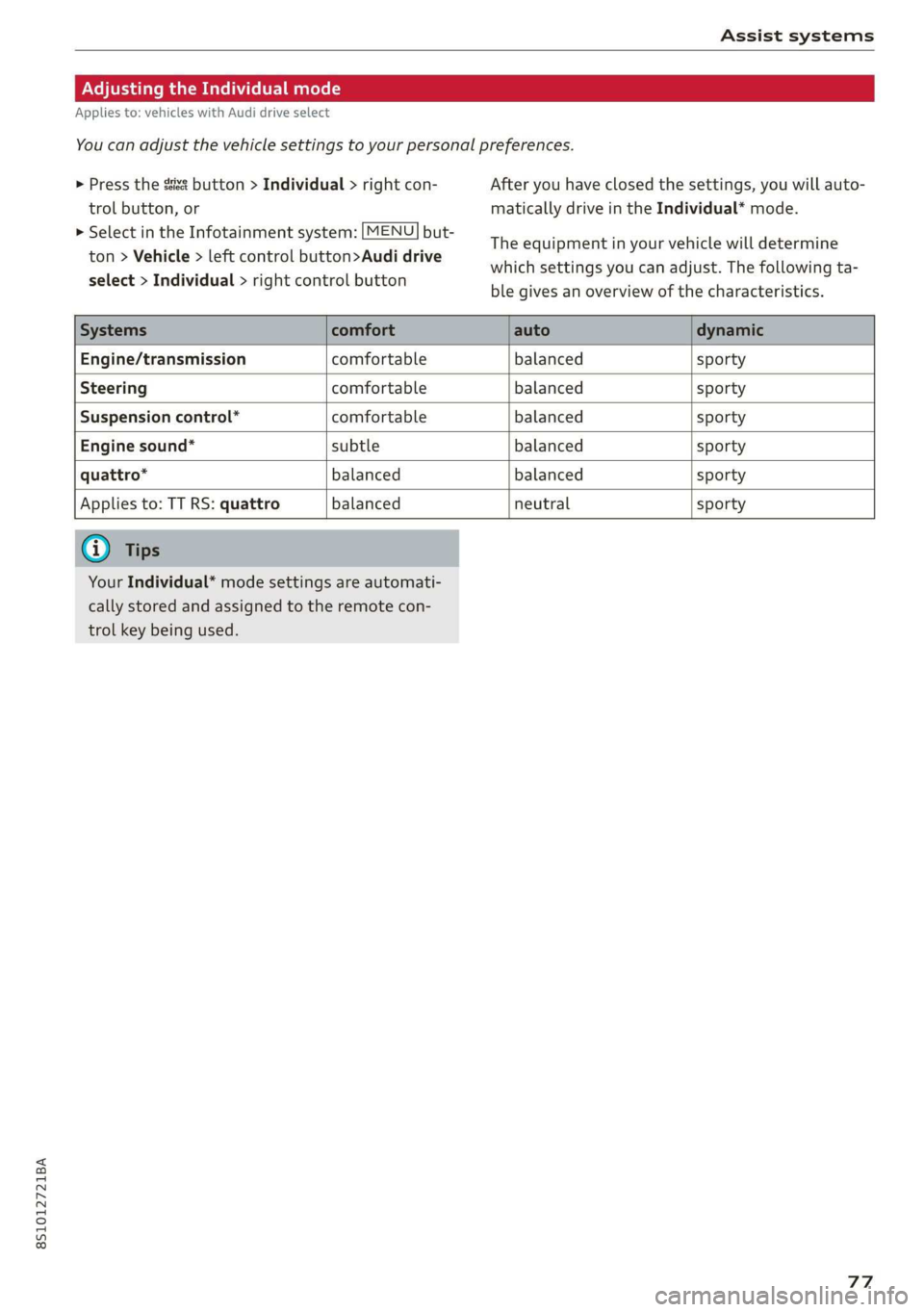
whichsettingsyoucanadjust.Thefollowingta-
blegivesanoverviewofthecharacteristics.
Systemscomfortautodynamic
Engine/transmissioncomfortablebalancedsporty
Steeringcomfortablebalancedsporty
Suspensioncontrol*comfortablebalancedsporty
Enginesound*subtlebalancedsporty
quattro*balancedbalancedsporty
Appliesto:TTRS:quattrobalancedneutralsporty
G)Tips
YourIndividual*modesettings areautomati-
callystoredandassignedtotheremotecon-
trolkeybeingused.
77
Page 84 of 312
Parkingaid
@®Tips
—Thevisualdisplayintheleftpartofthedis-
playshouldhelpyoudetectthecriticalvehi-
cleareas.
—Youcanchangethevolumeofthesignals
andthedisplay>page82.
Perpendicularparking
Appliesto:vehicleswithrearviewcamera
Thisviewmaybe usedwhenparkinginagarage
orinaparkingspace.
4d.Look!Safetomove?
Fig.87Infotainmentsystem:aligningthevehicle
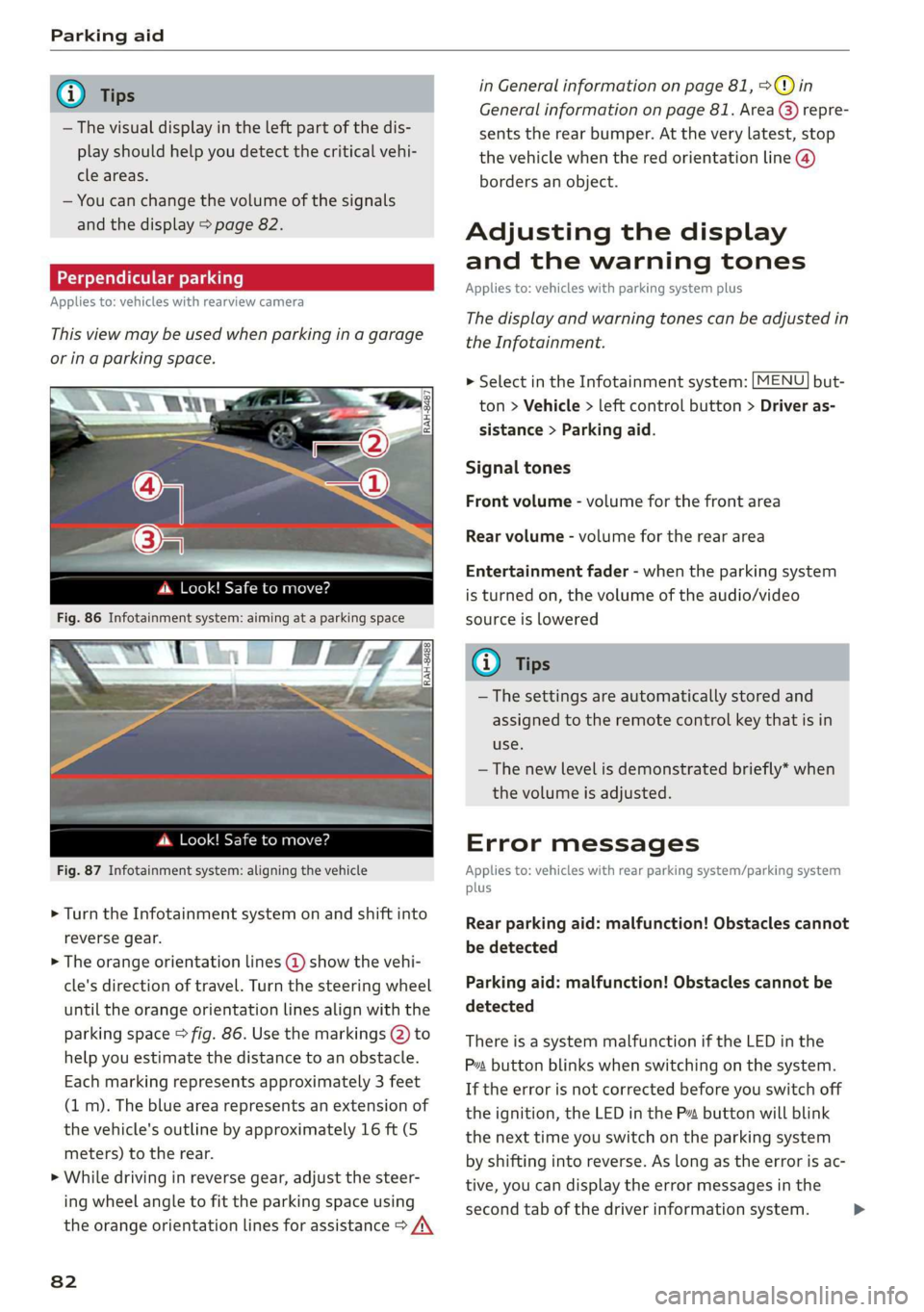
>Turn theInfotainmentsystemonandshiftinto
reversegear.
>Theorangeorientationlines@showthevehi-
cle'sdirectionoftravel.Turn thesteeringwheel
untiltheorangeorientationlinesalignwiththe
parkingspace>fig.86.Usethemarkings@)to
helpyouestimatethedistancetoanobstacle.
Eachmarkingrepresentsapproximately3 feet
(1m).Thebluearearepresentsanextensionof
thevehicle'soutlinebyapproximately16ft(5
meters)totherear.
>Whiledrivinginreversegear,adjustthesteer-
ingwheelangletofittheparkingspaceusing
theorangeorientationlinesforassistance>/\
82
inGeneralinformationonpage81,>@)in
Generalinformationonpage81.Area@)repre-
sentstherearbumper.Attheverylatest,stop
thevehiclewhentheredorientationline@)
bordersanobject.
Adjustingthedisplay
andthewarningtones
Appliesto:vehicleswithparkingsystemplus
Thedisplayandwarningtonescanbeadjustedin
theInfotainment.
MENU >SelectintheInfotainmentsystem:but-
ton>Vehicle> leftcontrolbutton>Driveras-
sistance>Parkingaid.
Signaltones
Frontvolume-volumeforthefrontarea
Rearvolume-volumeforthereararea
Entertainmentfader-whentheparkingsystem
isturnedon,thevolumeoftheaudio/video
sourceislowered
G)Tips
—Thesettings areautomaticallystoredand
assignedtotheremotecontrolkeythatisin
use.
— Thenewlevelisdemonstratedbriefly*when
thevolumeisadjusted.
Errormessages
Appliesto:vehicleswithrearparkingsystem/parkingsystem
plus
Rearparkingaid:malfunction!Obstaclescannot
bedetected
Parkingaid:malfunction!Obstaclescannotbe
detected
ThereisasystemmalfunctioniftheLEDinthe
Psbuttonblinkswhenswitchingonthe system.
Iftheerrorisnotcorrectedbeforeyouswitchoff
theignition,theLEDinthePbuttonwillblink
thenexttimeyouswitchontheparkingsystem
byshifting intoreverse.Aslongastheerrorisac-
tive,youcandisplaytheerrormessagesinthe
secondtabofthedriverinformationsystem.>
Page 114 of 312
Telephone
@)Note
ApplicabletoCanada
InCanada,operationofaZoneEnhancer,
suchasan AudiPhoneBox,issubjecttothe
followingrequirementsoftheInnovation,
ScienceandEconomicDevelopmentCanada
(ISED):
—ThisisaCONSUMERdevice.
—BEFOREUSE,youMUSTmeetallrequire-
mentssetoutinCPC-2-1-05.
—YouMUSToperatethisdevicewithapproved
antennas
andcablesasspecifiedbythe
manufacturer.AntennasMUSTNOTbein-
stalledwithin20cmofanyperson.
—YouMUSTceaseoperatingthisdeviceim-
mediatelyifrequestedbyISEDoralicensed
wirelessserviceprovider.
—WARNING:£911locationinformationmay
notbeprovidedormaybeinaccuratefor
callsservedbyusingthisdevice.
G)Tips
— TheAudiphoneboxisnotavailableinall
countries.Foradditionalinformation,con-
tactanauthorizedAudidealership.
—Placingthemobiledeviceinabagorprotec-
tivesleeveinsidetheAudiphoneboxcanin-
terferewiththeconnectiontotheexternal
antenna.
—MetalobjectscannotbelocatedintheAudi
phoneboxwhenusingtheexteriorantenna*
andtheAudiphoneboxchargingfunction.
— Thechargingtimeandtemperaturewillvary
dependingonthemobiledevicebeingused.
—Whentheignitionisswitchedon,youcan
chargeyourmobiledeviceinthe Audiphone
box.
—Toreducetheriskofmalfunctions,make
surethemobiledeviceispositionedcorrect-
lyintheAudiphonebox.
— Themaximumchargingoutputis5watts.
—Strongtransmissionqualitycannotbeguar-
anteedifmorethanonemobiledeviceisin
thebox.
—AudirecommendsusingAudiGenuineAc-
cessories.Audihasverifiedtheirreliability,
safety,andsuitability.
112
—YoucanpurchaseaUSBadapterfromanau-
thorizedAudidealerorauthorizedAudi
ServiceFacility,oratspecialtystores.
—Ifyouplaceyourremotecontrolkeytogeth-
erwithyourmobiledeviceintheAudiphone
box,itmaycauseyourmobiledevicetostop
chargingifwirelesschargingisactive.
Usingthetelephone
Openingthetelephone
Appliesto:vehicleswithtelephone
Calllist
(2Sa
©—Directory
@=4)EyerLlane
(=)eamessage(mobiledevice)
(Sy
Fig.108Example:telephonefunctionsinselectionmenu
Hfemalg
i]Textmessage(myPhone)
i]Textmessage(Additionalphone)
@Q—=E-mail(myPhone)
Fig.109Example:additionaltelephonefunctionsinselec-
tionmenu
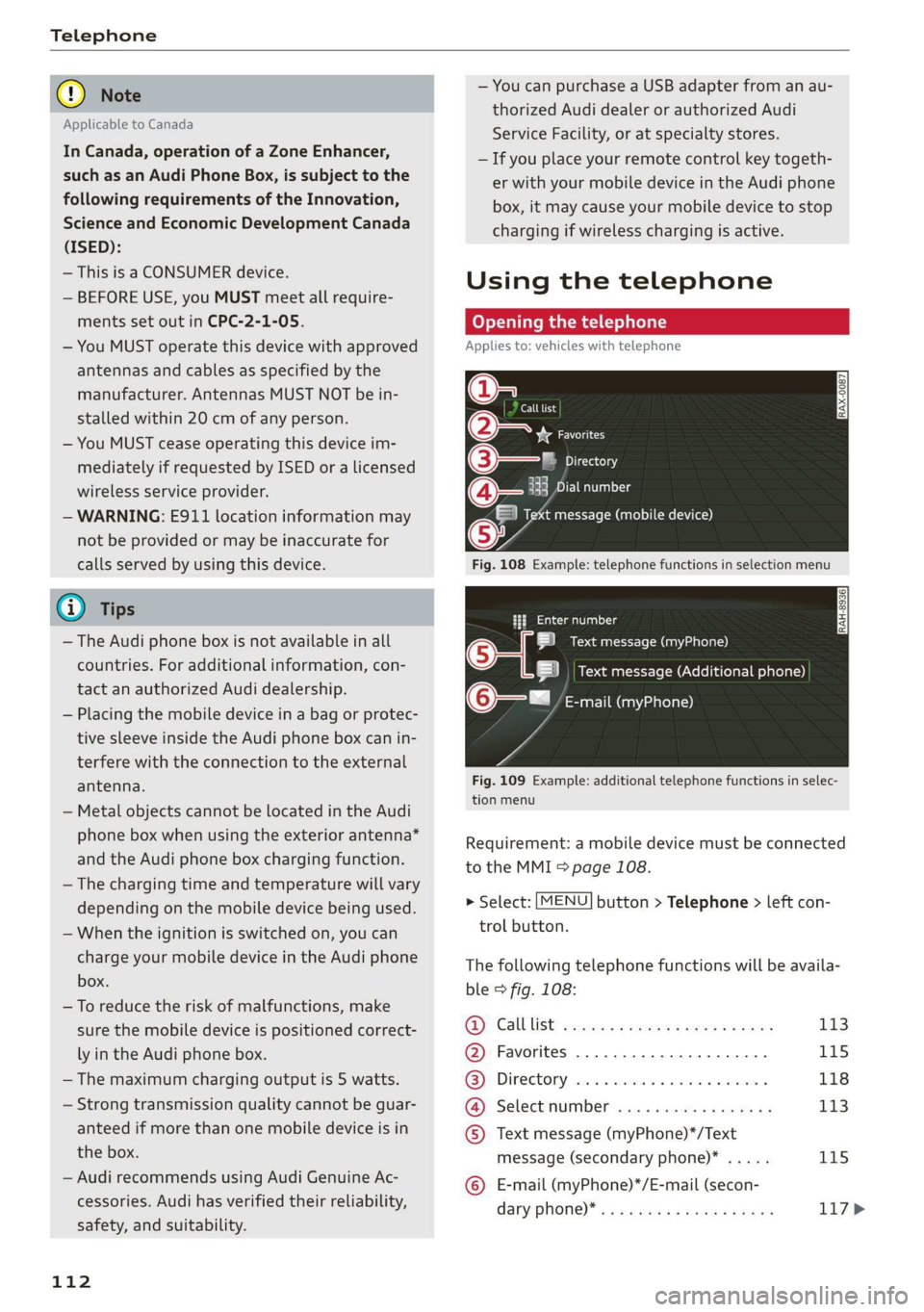
Requirement:amobiledevicemustbeconnected
totheMMI5page108.
>Select:[MENU]button>Telephone>leftcon-
trolbutton.
Thefollowingtelephonefunctionswillbeavaila-
ble>fig.108:
@Calllist:ssoysseeee4peesteeee113
@Favorites..............0.2..04115
@®Directory.......0...eeeeae118
@).Selectinumberiss
message(secondaryphone)*.....115
©E-mail(myPhone)*/E-mail(secon-
daryPhone)* ws«eaensswasnseeee117>
Page 124 of 312
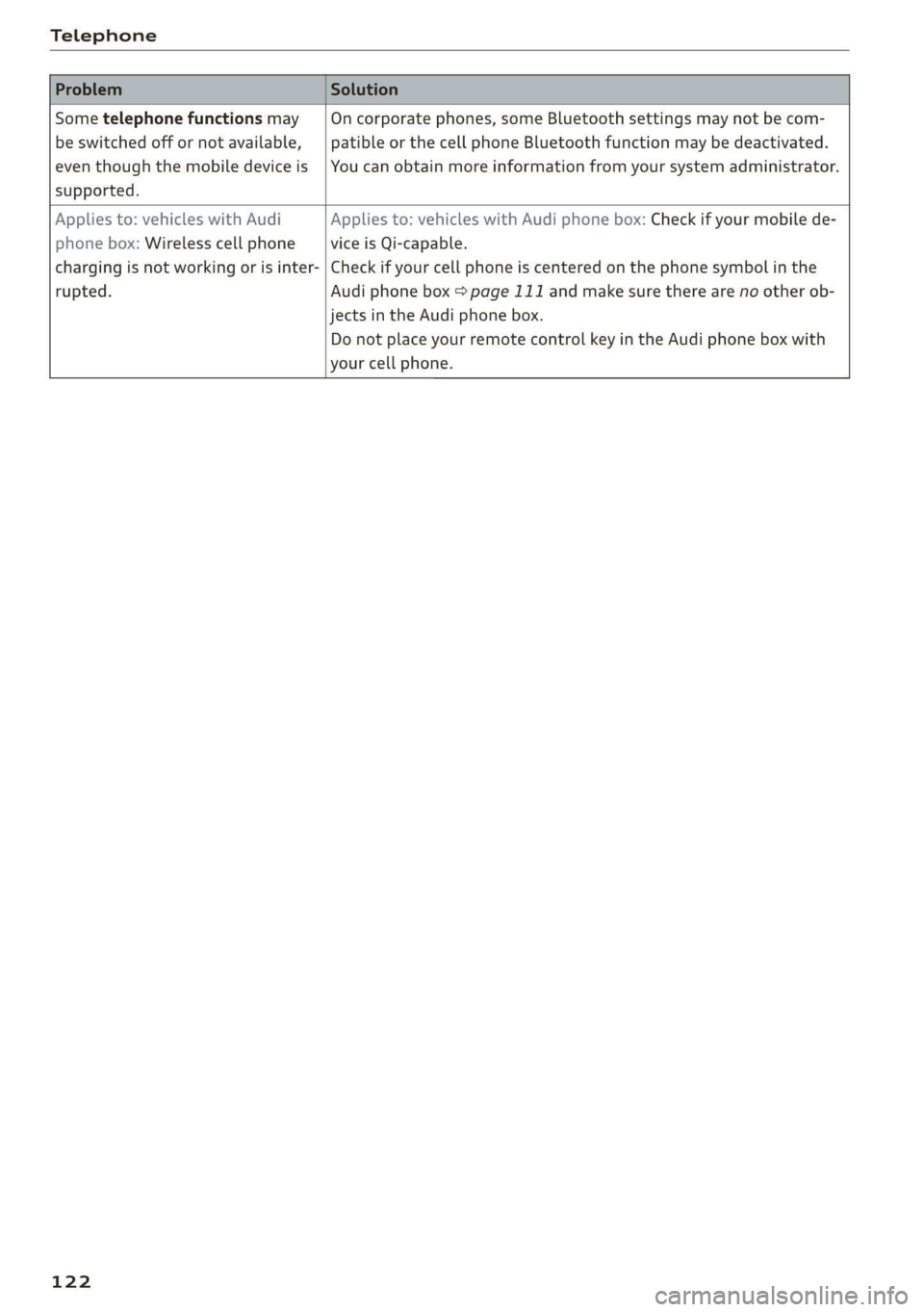
Telephone
Sometelephonefunctionsmay|Oncorporatephones,someBluetoothsettingsmaynot becom-
beswitchedoffornotavailable,|patibleorthecellphoneBluetoothfunctionmaybedeactivated.
eventhoughthemobiledeviceis|Youcanobtainmoreinformationfromyoursystemadministrator.
supported.
Appliesto:vehicleswithAudiAppliesto:vehicleswithAudiphonebox:Checkifyourmobilede-
phonebox:WirelesscellphoneviceisQi-capable.
chargingisnotworkingorisinter-|Checkifyourcellphoneiscenteredonthephonesymbolinthe
rupted.Audiphonebox=page111andmakesuretherearenootherob-
jectsinthe Audiphonebox.
DonotplaceyourremotecontrolkeyintheAudiphoneboxwith
yourcellphone.
122