lights AUDI TT COUPE 2019 Owner's Manual
[x] Cancel search | Manufacturer: AUDI, Model Year: 2019, Model line: TT COUPE, Model: AUDI TT COUPE 2019Pages: 312, PDF Size: 83.95 MB
Page 60 of 312
Driving
—Beforestopping thevehicle,allowtheengine
andbrakestocoolbackdowntoaregularoper-
atingtemperaturebydrivingnormally.
Ifnecessary,use thefollowingfunctions:
—dynamicAudidriveselect*mode>page75
—LaunchControl>page63
—LimitESC>page85
G)Tips
Wearcausedbyloaddoesnotconstituteave-
hiclefaultasdefinedby thetermsofthewar-
ranty.
Automatictransmission
Yourvehicleisequippedwithanelectronically-
controlledDSGtransmissioncalledStronic.Two
independentclutchestransferthepowerbe-
tweentheengineandtransmission.Itallows the
vehicletoacceleratewithoutanoticeableinter-
ruptionintraction.
Thetransmissionupshiftsordownshiftsauto-
matically.Thedrivingstylecontinuouslyinfluen-
cestheselectionofthedrivingprogram.
Whenamoderatedrivingstyleisused,the
transmissionselectsthemosteconomicaldriving
mode.ThetransmissionupshiftsatalowerRPM
anddownshiftsatahigherRPMtoimprovefuel
efficiency.
Thetransmission switchestoasportymodeafter
akick-downorwhenthedriverusesasportydriv-
ingstylecharacterizedbyquickacceleratorpedal
movements,heavyacceleration,frequent
changesinspeed,andtravelingatthemaximum
speed.
Ifdesired,thedrivercanalso selectthegears
manually(tiptronicmode).
58
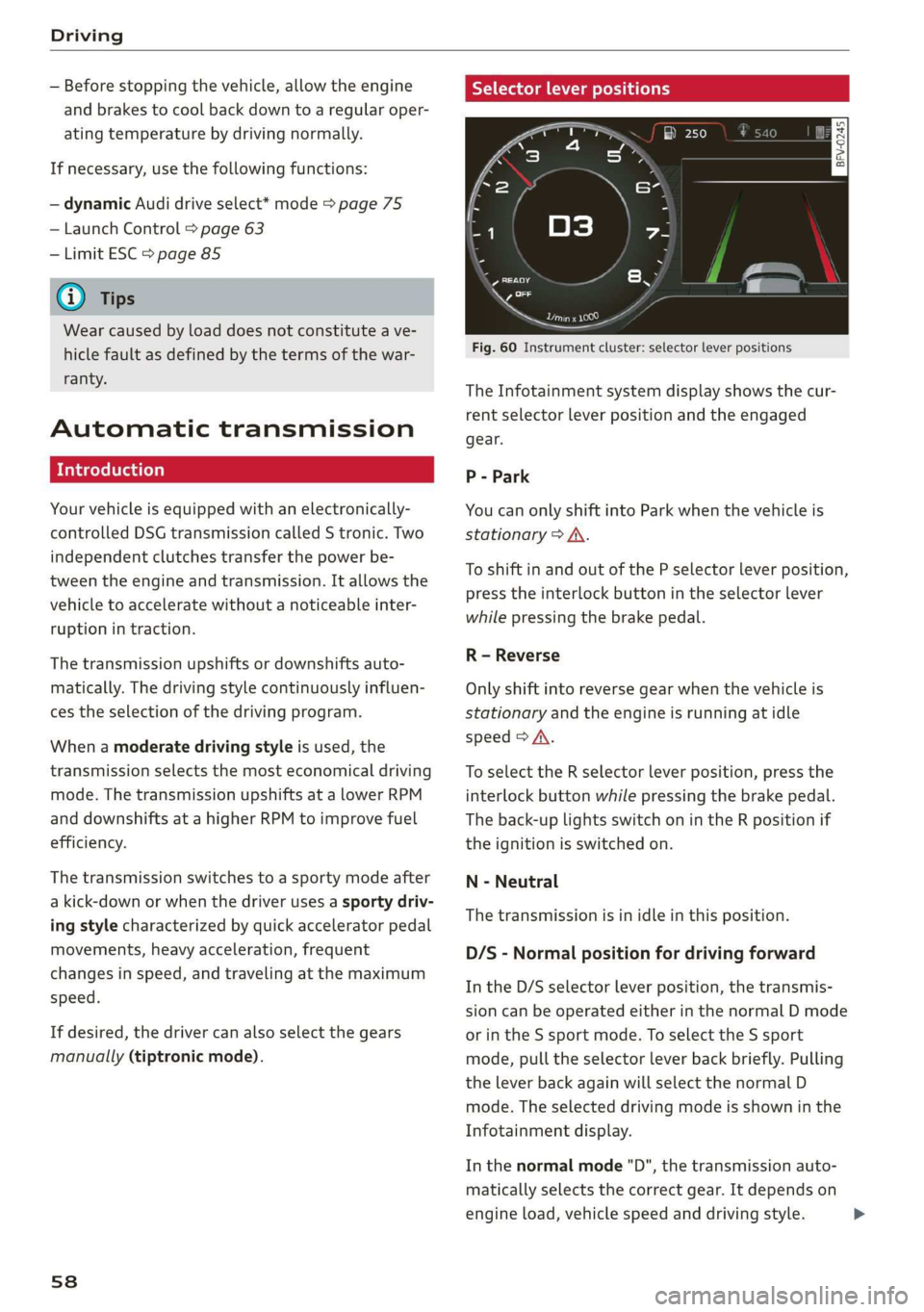
Selectorleverpositions
gSa
a
z 3
Fou
Preeae
Fig.60Instrumentcluster:selectorleverpositions
TheInfotainmentsystemdisplayshowsthecur-
rentselectorleverpositionandtheengaged
gear.
P-Park
YoucanonlyshiftintoParkwhenthevehicleis
stationary>A\.
ToshiftinandoutofthePselectorleverposition,
presstheinterlockbuttonintheselectorlever
whilepressingthebrakepedal.
R-Reverse
Onlyshiftintoreversegearwhenthevehicleis
stationaryandtheengineisrunningatidle
speed>A.
Toselectthe Rselectorleverposition,pressthe
interlockbuttonwhilepressingthebrakepedal.
Theback-uplightsswitchonintheRpositionif
theignitionisswitchedon.
N-Neutral
Thetransmissionisinidleinthisposition.
D/S-Normalpositionfordrivingforward
IntheD/Sselectorleverposition,thetransmis-
sioncan beoperatedeitherinthenormalDmode
orintheSsportmode.ToselecttheSsport
mode,pulltheselectorleverbackbriefly.Pulling
theleverbackagainwillselectthenormal D
mode.Theselecteddrivingmodeisshowninthe
Infotainmentdisplay.
Inthenormalmode"D",thetransmissionauto-
maticallyselectsthecorrectgear.Itdependson
engineload,vehiclespeedanddrivingstyle.
Page 62 of 312
Driving
followingmessageappearsinthedisplaywhen
theselectorleverisinthe"P"or "N"positionto
remindthedriver:
Toselectagear,pleasepressbrake pedaland
presslockbuttononselectorlever
Theautomaticshiftlockonlyfunctionswhenthe
vehicleisstationaryoratspeedsbelow1mph
(2km/h). Athigherspeeds,thelockisautomati-
callydeactivatedinthe"N"position.
Theselectorleverisnotlockedwhenshifting
quicklythrough"N",forexamplefrom"R"to"D".
Thismakesitpossibletofreethevehiclewhenit
isstuckby“rocking”it.Theselectorleverlocken-
gagesiftheleverstaysinthe"N"positionlonger
thanapproximatelytwosecondswhenthebrake
pedalisnotpressed.
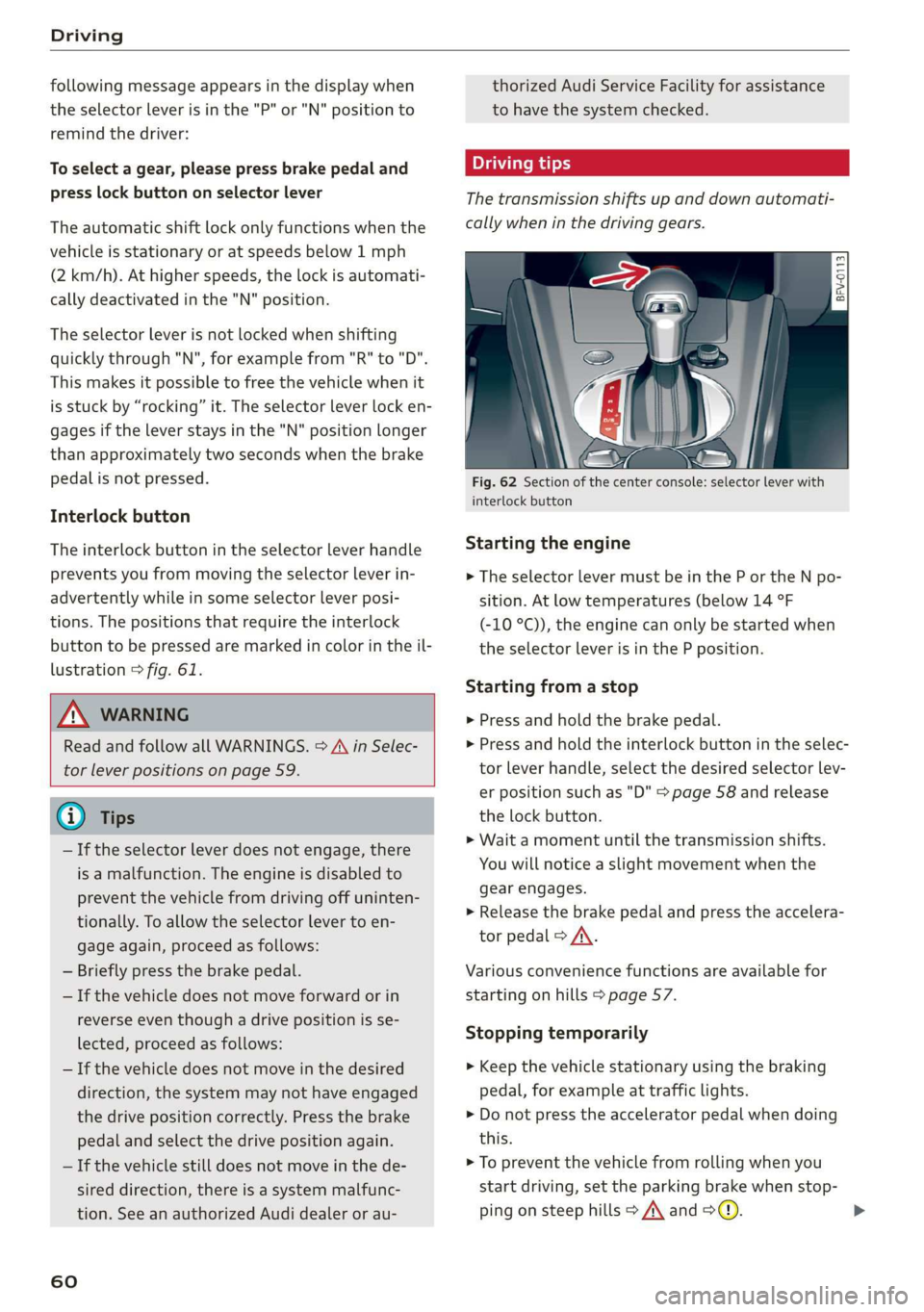
Interlockbutton
Theinterlockbuttonintheselectorleverhandle
preventsyoufrommovingtheselectorleverin-
advertentlywhileinsomeselectorleverposi-
tions.Thepositionsthatrequiretheinterlock
buttontobepressedaremarkedincolorintheil-
lustration>fig.61.
ZAWARNING
ReadandfollowallWARNINGS.>A\inSelec-
torleverpositionsonpage59.
@Tips
—Iftheselectorleverdoesnotengage,there
isamalfunction.Theengineisdisabledto
preventthevehiclefromdrivingoffuninten-
tionally.Toallowtheselectorleverto en-
gageagain,proceedasfollows:
—Brieflypressthebrakepedal.
—Ifthevehicledoesnotmoveforwardorin
reverseeventhoughadrivepositionisse-
lected,proceedasfollows:
—Ifthevehicledoesnotmoveinthedesired
direction,thesystemmaynothaveengaged
thedrivepositioncorrectly.Pressthebrake
pedalandselectthedrivepositionagain.
—Ifthevehiclestilldoesnotmoveinthede-
sireddirection,thereisasystemmalfunc-
tion.SeeanauthorizedAudidealerorau-
60
thorizedAudiServiceFacilityforassistance
tohavethesystemchecked.
Thetransmissionshiftsupanddownautomati-
callywheninthedrivinggears.
Fig.62Section ofthecenterconsole:selectorleverwith
interlockbutton
Startingtheengine
>TheselectorlevermustbeintheP ortheNpo-
sition.Atlow temperatures(below14°F
(-10°C)),theenginecanonlybestartedwhen
theselectorleverisinthePposition.
Startingfromastop
>Pressandholdthebrakepedal.
>Pressandholdtheinterlockbuttonintheselec-
torleverhandle,selectthedesiredselectorlev-
erpositionsuchas"D">page58andrelease
thelockbutton.
>Waitamomentuntilthetransmissionshifts.
Youwillnoticeaslightmovementwhenthe
gearengages.
>Releasethebrake pedalandpresstheaccelera-
torpedal>A\.
Variousconveniencefunctionsareavailablefor
startingonhills>page57.
Stoppingtemporarily
>Keepthevehiclestationary usingthebraking
pedal,forexampleattrafficlights.
>Donotpresstheacceleratorpedalwhendoing
this.
>Topreventthevehiclefromrollingwhenyou
startdriving,settheparkingbrakewhenstop-
pingonsteephills>A\and>@).
Page 67 of 312
8S1012721BA
Driving
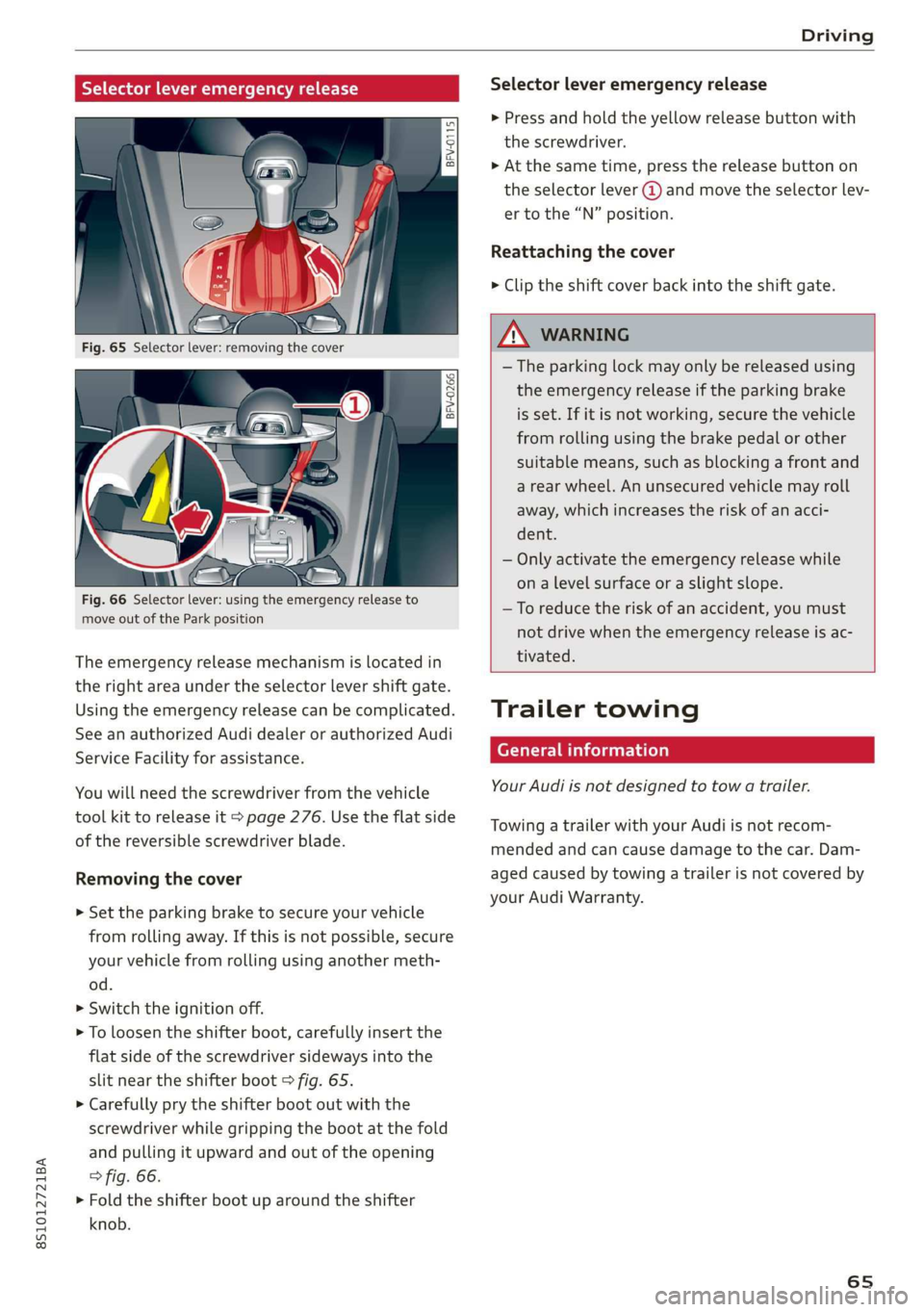
Selectorleveremergencyrelease
BFV-0266
Fig.66Selectorlever:usingtheemergencyreleaseto
moveoutoftheParkposition
Theemergencyreleasemechanismislocatedin
therightareaundertheselectorlevershiftgate.
Usingtheemergencyreleasecanbecomplicated.
SeeanauthorizedAudidealerorauthorizedAudi
ServiceFacilityforassistance.
Youwillneedthescrewdriverfromthevehicle
toolkittoreleaseit>page276.Usetheflatside
ofthereversiblescrewdriverblade.
Removingthecover
>Set theparkingbraketosecureyourvehicle
fromrollingaway.Ifthisisnotpossible,secure
yourvehiclefromrollingusinganothermeth-
od.
>Switchtheignitionoff.
>Toloosentheshifterboot,carefully insertthe
flatsideofthescrewdriversidewaysintothe
slitneartheshifterboot>fig.65.
>Carefullyprytheshifterbootoutwiththe
screwdriverwhilegrippingthebootatthefold
andpullingitupwardandoutoftheopening
>fig.66.
>Foldtheshifterboot uparoundtheshifter
knob.
Selectorleveremergencyrelease
>Pressandholdtheyellowreleasebuttonwith
thescrewdriver.
>Atthesametime,pressthereleasebuttonon
theselectorlever@andmovetheselectorlev-
ertothe“N”position.
Reattachingthecover
> Cliptheshiftcoverbackintotheshiftgate.
ZA\WARNING
—Theparkinglockmayonlybereleasedusing
the emergencyreleaseiftheparkingbrake
isset.Ifit isnotworking,securethevehicle
fromrollingusingthebrakepedalorother
suitablemeans,suchasblockingafrontand
arearwheel.Anunsecuredvehiclemayroll
away,whichincreasestheriskofanacci-
dent.
—Onlyactivatethe emergencyreleasewhile
onalevelsurfaceoraslightslope.
—Toreducetheriskofanaccident,youmust
notdrivewhentheemergencyreleaseisac-
tivated.
Trailertowing
Generalinformation
YourAudiisnotdesignedtotowatrailer.
TowingatrailerwithyourAudiisnotrecom-
mendedandcancausedamagetothecar.Dam-
agedcausedbytowingatrailerisnotcoveredby
yourAudi Warranty.
65
Page 68 of 312
Assistsystems
Assistsystems
Speedwarningsystem
Appliesto:vehicleswithspeedwarningsystem
Thespeedwarningsystemhelpsyoutostaybe-
low aspecifiedmaximumspeedthatcanbeset,
changedordeletedintheInfotainmentsystem.
Thespeedwarningsystemwarnsyouifyouare
exceeding themaximumspeedthatyouhaveset.
Awarningtonewillsoundassoonasyourspeed
exceedsthestoredvalueslightly.Theoe)in-
dicatorlightandamessagewillappearinthein-
strumentclusterdisplayatthesametime.The
oweindicatorlightandthemessageturnoffif
thespeedfallsbackbelowthestoredmaximum
speed.
Settingathresholdisrecommendedifyouwould
liketoberemindedwhenyoureachacertain
maximumspeed.Situationswhereyoumaywant
todosoincludedrivinginacountrywithagener-
alspeedlimitorifthereisaspecifiedmaximum
speedforwintertires.
Settingthewarningthreshold
> SelectintheInfotainmentsystem:MENUbut-
ton>Vehicle> leftcontrolbutton>Driveras-
sistance>Speedwarning>Manual.
G)Tips
Regardlessofthespeedwarningsystem,you
shouldalwaysmonitoryourspeedusingthe
speedometerandmakesureyouarefollowing
thelegalspeedlimit.
Cruisecontrolsystem
Appliesto:vehicleswithcruisecontrolsystem
Thecruisecontrolsystemassiststhedriverin
maintainingaconstantspeedaboveapproxi-
mately15mph(20km/h).Thesystemmaintains
thedesiredspeedbybrakingandaccelerating.
66
ZAWARNING
—Alwayspayattentiontothetrafficaround
yourvehiclewhenthecruisecontrolsystem
isinoperation.Asthedriver,youarealways
responsibleforcontrollingyourvehicle
speedandthedistancebetweenyourvehicle
andothervehicles.
—Forsafetyreasons,cruisecontrolshould not
beusedinthecity,instop-and-gotraffic,on
windingroads,andwhenroadconditionsare
poor(suchasice,fog,gravel,heavyrain,
andconditionsthatcouldlead tohydroplan-
ing),becausethisincreasestheriskofanac-
cident.
—Switchthecruisecontrolofftemporarily
whendrivinginturninglanes,highwayexits,
orinconstructionzones.
—Toreducetheriskofanaccident,youshould
onlyresumethestoredspeedifitissuitable
forthecurrenttrafficconditions.
()Note
Beforedrivingdownhillalong distanceona
steephill,decreaseyourspeedandselecta
lowergear.Thismakesuseoftheenginebrak-
ingeffectandreducestheloadplacedonthe
brakes.
G)Tips
Thebrakelightsturnonwhenthebrakesare
appliedautomatically.
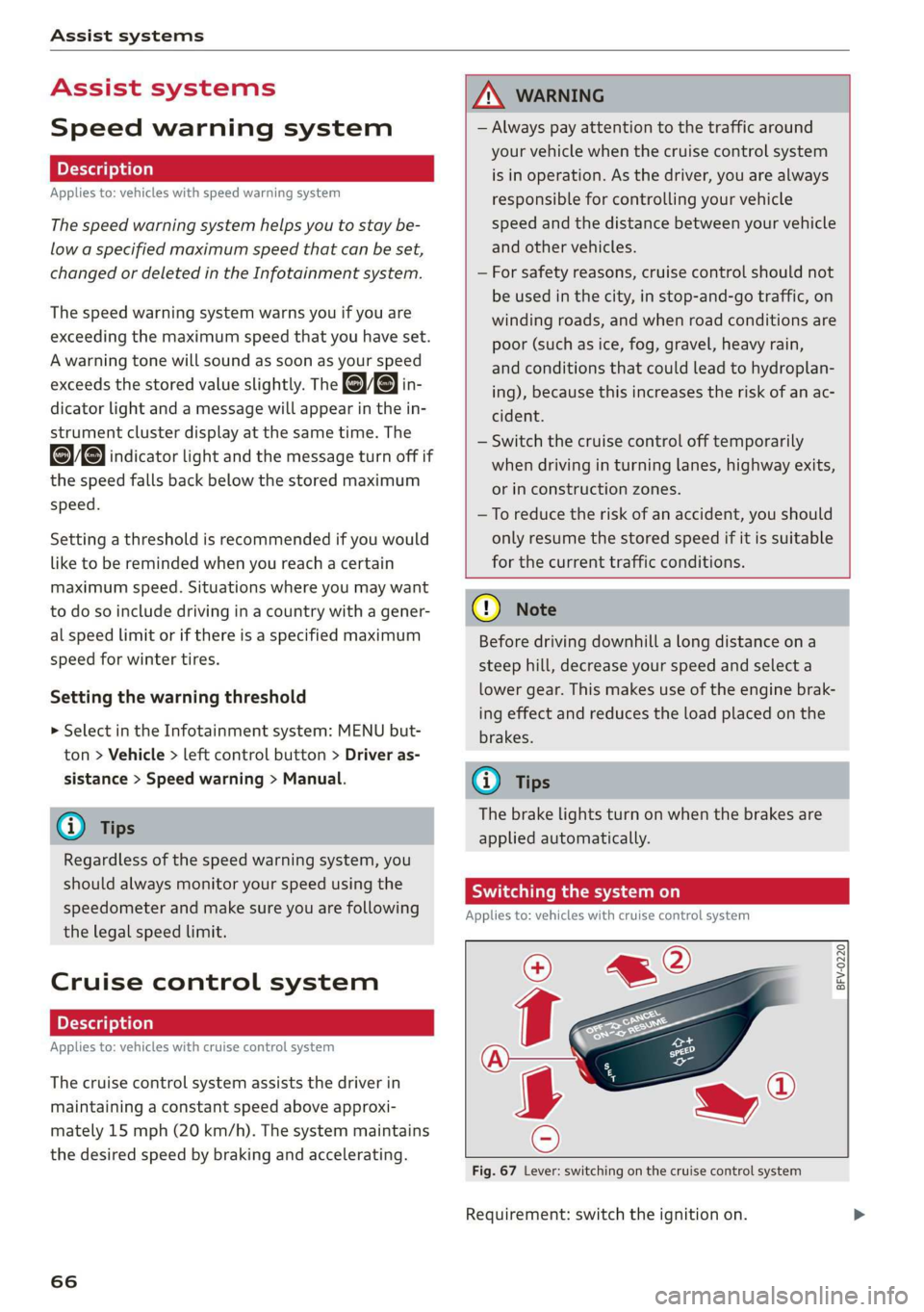
Switchingthesystemon
Appliesto:vehicleswithcruisecontrolsystem
@g
©
&©
Fig.67Lever:switchingonthecruisecontrolsystem
Requirement:switchtheignitionon.
Page 70 of 312
Assistsystems
Appliesto:vehicleswithcruisecontrolsystem
ICRUISE|/3)Speedcontrolsystem:currentlyun-
available.Seeowner'smanual
Iftheindicatorlightturnsonandthismessage
appears,thecruisecontrolsystemhasbeendeac-
tivated.Thereisatemporarymalfunction,forex-
amplethebrakesareoverheating.Switchthe
cruisecontrolsystemonagainlater.
Audiactivelaneassist
Appliesto:vehicleswithAudiactivelaneassist
Activelaneassistdetectslanemarkerlineswith-
inthelimitsofthesystemusingacamerainthe
windshield.Ifyouareapproachingadetected
lane markerlineanditappearslikelythatyou
willleavethelane,thesystemwillwarnyouwith
correctivesteering.Youcanoverridethissteering
atanytime.Ifyoupassoveraline,thesteering
wheelwillvibratelightly.Inorderforthiswarn-
ingvibrationtooccur,itmustfirstbe switched
onintheInfotainmentsystem.Activelaneassist
isreadyforoperationwhenthelanemarkerline
isdetectedonatleastonesideofthevehicle.
Thesystemisdesignedfordrivingonexpress-
waysandhighwaysandsoitonlyactivatesat
speedsaboveapproximately40mph(65km/h)
(dependingonthemarket).
Appliestovehicleswithsideassist*:Ifyouacti-
vateaturnsignalwhenactivelaneassistisready
anditclassifiesalanechangeascriticalbecause
ofvehiclestravelingalongsideyouorapproach-
ingyou,therewillbenoticeablecorrectivesteer-
ingshortlybeforeyouleavethelane.Thiswillat-
tempttokeepyourvehicleinthelane.
Appliestovehicleswithoutsideassist*:When
thesystemisready,itwillnotwarnyouifyouac-
tivatetheturnsignalbeforecrossingthelane
markerline.Inthiscase,itassumesthatyouare
changinglanesintentionally.
))Thecorrectivesteeringfunctionisnotavailableinallmar-
kets.
68
ZAWARNING
— The systemwarnsthedriverthatthevehicle
isleavingthelaneusingcorrectivesteering.
Thedriverisalwaysresponsibleforkeeping
thevehiclewithinthelane.
— The systemcanassistthedriverinkeeping
thevehicleinthelane,butitdoesnotdrive
byitself.Alwayskeep yourhandsonthe
steeringwheel.
—Correctivesteeringmaynotoccurincertain
situations,suchasduringheavybraking.
—Theremaybecaseswherethecameradoes
notrecognizealllanemarkerlines.Correc-
tivesteeringcanonlytakeplaceontheside
ofthevehiclewherelanemarkerlinesare
detected.
—Otherroadstructuresorobjectscouldpossi-
blybeidentifiedunintentionallyaslane
markerlines.Asaresult,correctivesteering
maybeunexpectedormaynotoccur.
— Thecameraviewcanberestricted,forexam-
plebyvehiclesdrivingaheadorbyrain,
snow,heavyspraylightshiningintothe
cameraorbydirtonthewindow.Thiscan
resultinactivelaneassistnotdetectingthe
lane markerlinesordetectingthemincor-
rectly.
—Incertainsituationswherevisibilityislow,
thevehiclemayswitchinternallyfrom“ear-
ly”to“late”steeringcorrection)).
—Undercertainconditionssuchasrutsinthe
road,aninclinedroadwayorcrosswinds,the
correctivesteeringalonemaynot beenough
tokeepthevehicleinthemiddleofthelane.
—Forsafetyreasons,activelaneassistmust
notbeusedwhentherearepoorroadand/or
weatherconditionssuchasslipperyroads,
fog,gravel,heavyrain,snowandthepoten-
tialforhydroplaning.Usingactivelaneas-
sistundertheseconditionsmayincreasethe
riskofacrash.
Page 71 of 312
8S1012721BA
Assistsystems
Sietemyo)ai
Appliesto:vehicleswithAudiactivelaneassist
B8V-0692
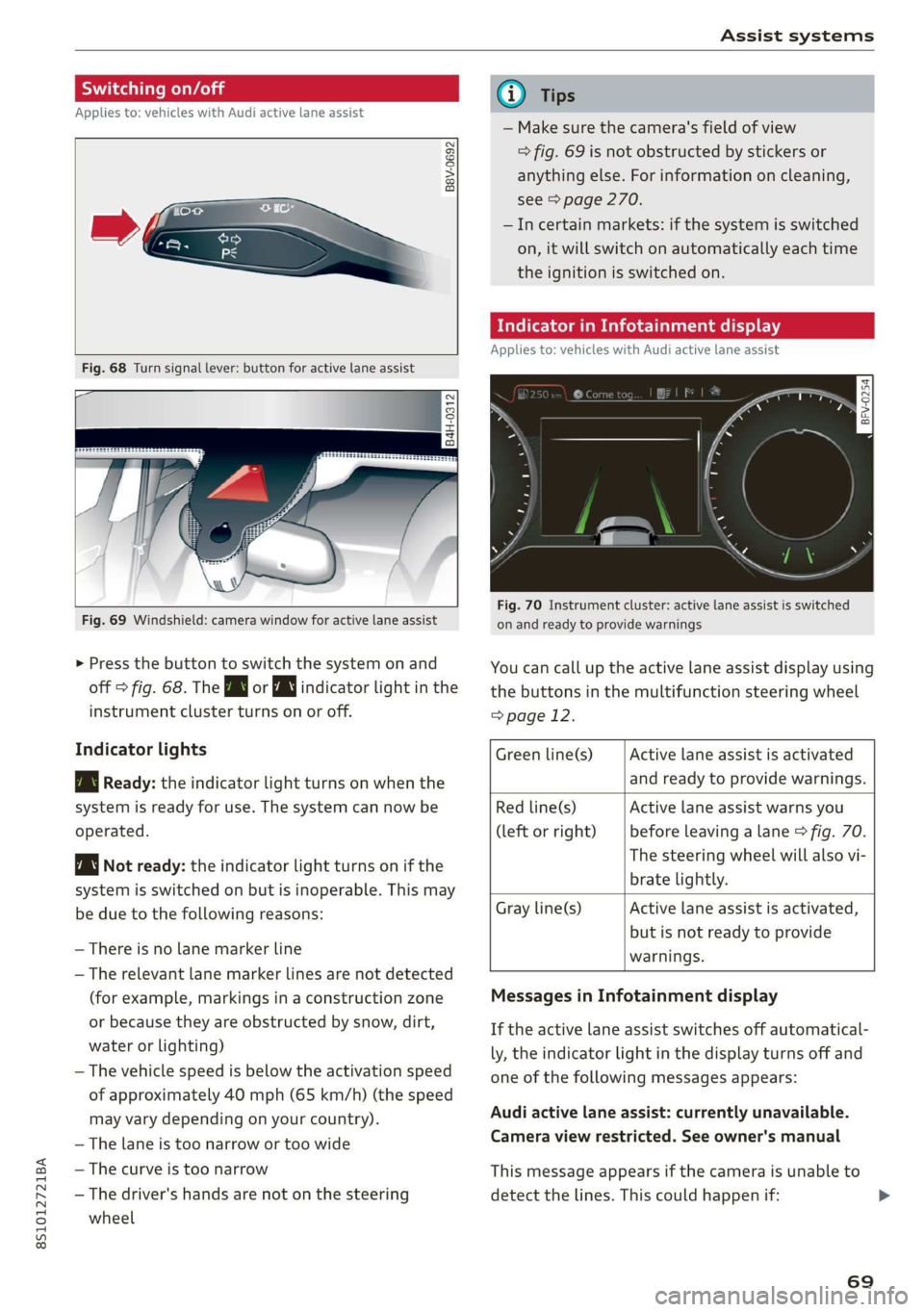
Fig.68Turnsignallever:buttonforactivelaneassist
B4H-0312
Fig.69Windshield:camerawindowforactivelaneassist
>Pressthebuttontoswitchthesystemonand
off>fig.68.TheBworindicatorlightinthe
instrumentclusterturnsonoroff.
Indicatorlights
BgReady:theindicatorlightturnsonwhenthe
systemisreadyforuse.Thesystemcannowbe
operated.
Notready:theindicatorlightturnsonifthe
systemisswitchedonbutisinoperable.Thismay
beduetothefollowingreasons:
—Thereisnolane markerline
—Therelevant lane markerlinesarenotdetected
(forexample,markingsinaconstructionzone
orbecausetheyareobstructedbysnow,dirt,
waterorlighting)
—Thevehiclespeedisbelowtheactivationspeed
ofapproximately40mph(65km/h)(thespeed
mayvarydependingonyourcountry).
—Thelaneistoonarrowortoowide
—Thecurveistoonarrow
—Thedriver'shandsarenotonthesteering
wheel
@Tips
— Makesurethecamera'sfieldofview
>fig.69isnotobstructedbystickersor
anythingelse.Forinformationoncleaning,
see>page270.
—Incertainmarkets:ifthesystemisswitched
on,itwillswitchonautomaticallyeachtime
theignitionisswitchedon.
Meeeclei
Appliesto:vehicleswithAudiactivelaneassist
=z
Ss
Beg
Fig.70Instrument cluster:activelaneassistisswitched
onandreadytoprovidewarnings
Youcancalluptheactivelaneassistdisplayusing
thebuttonsinthemultifunctionsteeringwheel
=>page12.
Activelaneassistisactivated
andreadytoprovidewarnings.
Greenline(s)
Redline(s)
(leftorright)
Activelaneassistwarnsyou
beforeleavingalane>fig.70.
Thesteeringwheelwillalsovi-
bratelightly.
Activelaneassistisactivated,
butisnotreadytoprovide
warnings.
Grayline(s)
MessagesinInfotainmentdisplay
Iftheactivelaneassistswitchesoffautomatical-
ly,theindicatorlightinthedisplayturnsoffand
oneofthefollowingmessagesappears:
Audiactivelaneassist:currentlyunavailable.
Cameraviewrestricted.Seeowner'smanual
Thismessageappearsifthecameraisunableto
detectthelines.Thiscouldhappenif:
69
Page 77 of 312
8S1012721BA
Assistsystems
Thedisplaybrightnessadjustsautomaticallyto
thebrightnessofthesurroundings,bothinthe
informationandinthewarningstage.Invery
darkorverybrightsurroundings,theautomatic
adjustmentwillsetthedisplaytotheminimum
ormaximumlevel.Insuchcases,youmaynotice
nochangewhenadjustingthebrightness, orthe
changemayonlybenoticeableoncethesur-
roundingschange.
Adjustthebrightnesstoalevelwherethedisplay
intheinformationstagewillnotdisruptyour
view
ahead.Ifyouchangethebrightness,thedis-
playintheexteriormirrorwillbrieflyshowthe
brightnesslevelintheinformationstage.The
brightness ofthewarningstageislinkedtothe
brightnessintheinformationstageandisadjust-
edalongwiththeinformationstage.
@)Tips
—Sideassistisnotactivewhileyouaremak-
ingtheadjustment.
—Yoursettingsareautomaticallystoredand
assignedtotheremotecontrolkeybeing
used.
Messages
Appliesto:vehicleswithAudisideassist
Ifthesideassistswitchesoffautomatically,a
messageappearsintheInfotainmentsystemdis-
play.
Audisideassist:currentlyunavailable.
Sensorvisionrestrictedduetosurroundings.
Seeowner'smanual
Theradarsensorvisionisimpaired.Donotcover
theareainfront ofthesensorswithbikewheels,
stickers,dirtorotherobjects.Cleantheareacov-
eringthesensors,ifnecessary>page73,fig.77.
E]Audisideassist:currentlyunavailable.
Seeowner'smanual
Sideassistcannotbe switchedonatthistimebe-
causethereisamalfunction(forexample,the
batterychargelevelmaybetoolow).
Audisideassist:malfunction!Please
contactService
Thesystemcannotguaranteethatitwilldetect
vehiclescorrectlyandithasswitchedoff.The
sensorshavebeenmovedor arefaulty.Havethe
systemcheckedbyanauthorizedAudidealeror
authorizedAudiServiceFacilitysoon.
Audidriveselect(drive
settings)
Introduction
Appliesto:vehicleswithAudidriveselect
Driveselectmakesitpossibletoexperiencedif-
ferenttypesofvehiclecharacteristicsinonevehi-
cle.Thedrivercanselectfromthreemodes,
Comfort,Auto,andDynamic,usingthesistbut-
toninthecenterconsoleorbyusingtheInfotain-
mentsystem.Thisallowsyoutoswitchbetween
asportyandacomfortabledrivingmode,forex-
ample.IntheIndividualmode,thesettingscan
be
adjustedtoyourpersonalpreferences.This
makesitpossibletocombinesettingssuchasa
sportyenginesettingwithlightsteering.
ZA\WARNING
UsingAudidriveselectincorrectlycanlead to
collisions,otheraccidentsandseriousinju-
ries.
Appliesto:vehicleswithAudidriveselect
Thevehiclesetupineachmodedependsonthe
vehicle'sfeatures.
Engineandautomatictransmission
Dependingonthemode,theengineandauto-
matictransmissionrespondmorequicklyorina
morebalancedmannertoacceleratorpedal
movements.
Suspensioncontrol(Audimagneticride)*
Thesuspensioncontrolusessensorstorecordin-
formationregardingsteeringmovements,brak-
ingandaccelerationoperationsbythedriver,as
wellasinformationabouttheroadsurface,driv-
ingspeed,andload.Withdriveselect,youcan>
75
Page 87 of 312
8S1012721BA
IntelligentTechnology
—Acceleratecarefullywhendrivingoncondition.Differenttiresizescanleadtoa
smooth,slipperysurfacessuchasiceandreductioninenginepower.
snow.Thedrivewheelscanspinevenwhen—Youmayhearnoiseswhenthesystemsde-
thesecontrolsystemsareinstalledandthisscribedareworking.
canaffectdrivingstabilityandincreasethe
riskofacollision.
G)Tips
— TheABSandASRonlyfunctioncorrectly
whenallfourwheelshaveasimilarwear
ScaleLiemelal
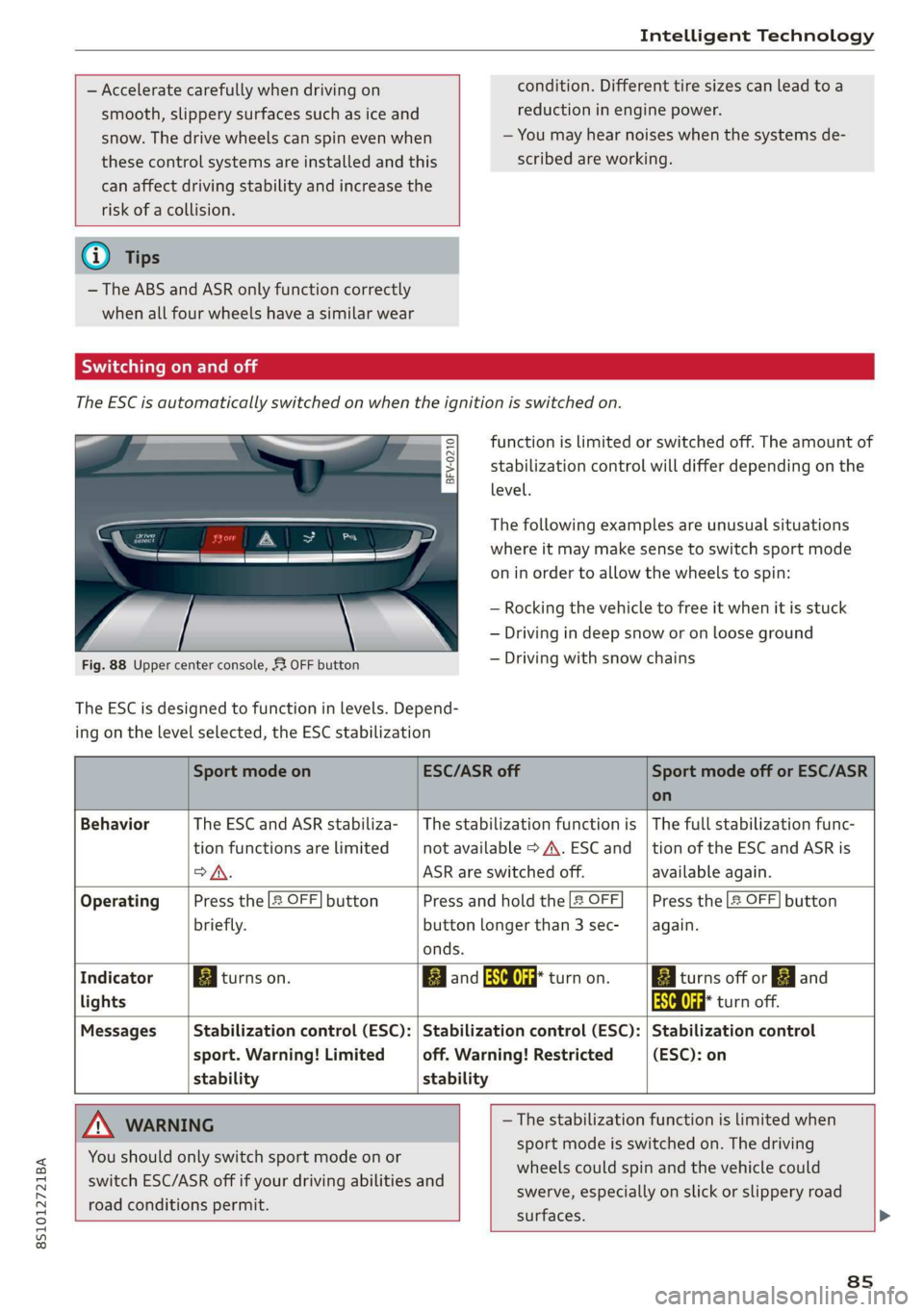
TheESCisautomaticallyswitchedonwhentheignitionisswitchedon.
functionislimitedorswitchedoff.Theamountof
stabilizationcontrolwilldifferdependingonthe
level.
eS
sgS$
= o
Thefollowingexamplesareunusualsituations
whereitmaymakesensetoswitchsportmode
oninordertoallowthewheelstospin:
—Rocking thevehicletofreeitwhenitisstuck
—Drivingindeepsnoworonlooseground
—Drivingwithsnowchains
Fig.88Uppercenterconsole,53OFFbutton
The ESCisdesignedtofunctioninlevels.Depend-
ingonthelevelselected,theESCstabilization
SportmodeonESC/ASRoffSportmodeofforESC/ASR
on
BehaviorThe ESC andASRstabiliza-|Thestabilizationfunctionis|Thefullstabilizationfunc-
tionfunctionsarelimitednotavailable>A\.ESCand_|tionoftheESC andASRis
>A.ASRareswitchedoff.availableagain.
OperatingPressthe2OFF]buttonPressandholdthe|&OFFPressthe2OFF]button
briefly.buttonlongerthan3sec-again.
onds.
IndicatorBiturnson.BBandaaturnon.BiturnsofforFJand
lightsaaturnoff.
MessagesStabilizationcontrol(ESC):|Stabilizationcontrol(ESC):|Stabilizationcontrol
sport.Warning!Limitedoff.Warning!Restricted(ESC):on
stabilitystability
AWARNING—Thestabilizationfunctionislimitedwhen
sportmodeisswitchedon.Thedriving
wheelscouldspinandthevehiclecould
swerve,especiallyonslickorslipperyroad
surfaces.
Youshouldonly switchsportmodeonor
switchESC/ASRoffifyourdrivingabilitiesand
roadconditionspermit.
8s
Page 90 of 312
IntelligentTechnology
Isthisanoffroadvehicle?
YourAudiisnot anoffroadvehicle-thereisnot
enoughgroundclearance.Forthisreason,avoid
difficultterrain.
Z\WARNING
—Also,invehicleswithallwheeldrive,adapt
yourdrivingstyletothecurrentroadand
trafficconditions.Donotlettheincreased
safetyprovidedtemptyouintotakingrisks,
becausethisincreasestheriskofanacci-
dent.
— Thebrakingabilityofyourvehicleislimited
tothetractionofthewheels.In thisway,it
isnotdifferentfromatwowheeldrivevehi-
cle.Donot betemptedtoacceleratetoa
highspeedwhentheroadisslippery,be-
causethisincreasestheriskofanaccident.
—Notethatonwetstreets,thefrontwheels
can“hydroplane’”ifdrivingatspeedsthat
aretoohigh.Unlikefrontwheeldrivevehi-
cles,theengineRPMdoesnotincreasesud-
denlywhenthevehiclebeginshydroplaning.
Forthisreason,adaptyourspeedtothe
roadconditionstoreducetheriskofanacci-
dent.
Rearspoiler
Appliesto:vehicleswithretractablerearspoiler
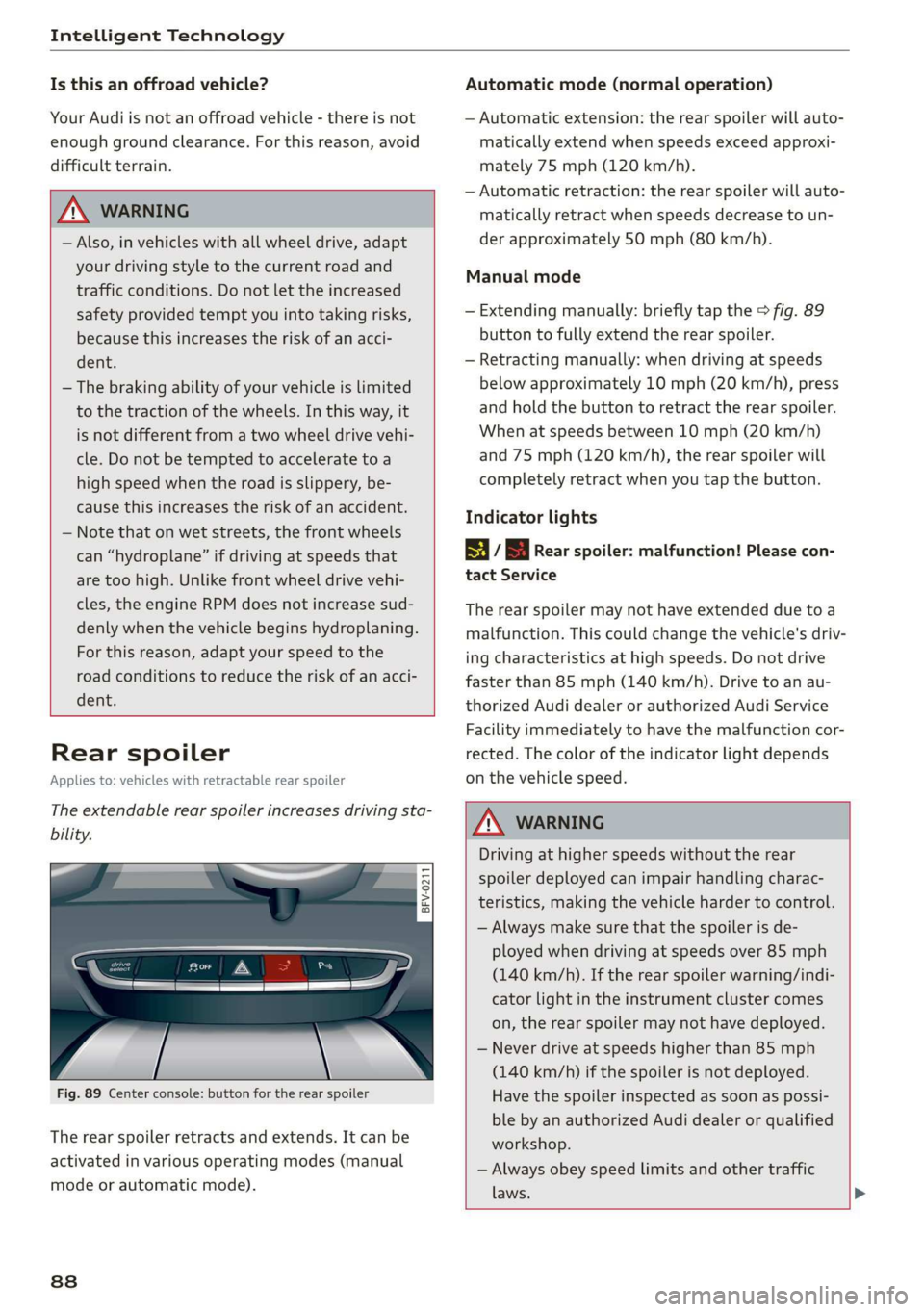
Theextendablerearspoilerincreasesdrivingsta-
bility.
a
g|> z
a.
Fig.89Centerconsole:buttonfortherearspoiler
Therearspoilerretractsandextends.Itcanbe
activatedinvariousoperatingmodes(manual
modeorautomaticmode).
838
Automaticmode(normaloperation)
—Automaticextension:therearspoilerwillauto-
maticallyextendwhenspeedsexceedapproxi-
mately75mph(120km/h).
—Automaticretraction:therearspoilerwillauto-
maticallyretractwhenspeedsdecreasetoun-
derapproximately50mph(80km/h).
Manualmode
—Extendingmanually:brieflytapthe>fig.89
buttontofullyextendtherearspoiler.
—Retractingmanually:whendrivingatspeeds
belowapproximately10mph(20km/h),press
andholdthebuttontoretracttherearspoiler.
Whenatspeedsbetween10mph(20km/h)
and75mph(120km/h),therearspoilerwill
completelyretractwhenyoutap thebutton.
Indicatorlights
8if8Rearspoiler:malfunction!Pleasecon-
tactService
Therearspoilermaynot haveextendedduetoa
malfunction.Thiscouldchangethevehicle'sdriv-
ingcharacteristicsathighspeeds.Donotdrive
fasterthan85mph(140km/h).Drivetoanau-
thorizedAudidealerorauthorizedAudiService
Facilityimmediatelytohavethemalfunctioncor-
rected.Thecoloroftheindicatorlightdepends
onthevehiclespeed.
ZAWARNING
Drivingathigherspeedswithouttherear
spoilerdeployedcanimpairhandlingcharac-
teristics,makingthevehiclehardertocontrol.
—Alwaysmakesurethatthespoilerisde-
ployedwhendrivingatspeedsover85mph
(140km/h).Iftherearspoilerwarning/indi-
catorlightintheinstrumentclustercomes
on,therearspoilermaynot havedeployed.
—Neverdriveatspeedshigherthan85mph
(140km/h)ifthespoilerisnotdeployed.
Havethespoilerinspectedassoonaspossi-
blebyanauthorizedAudidealerorqualified
workshop.
—Alwaysobeyspeedlimitsandothertraffic
laws.
Page 99 of 312
8S1012721BA
MultiMediaInterface
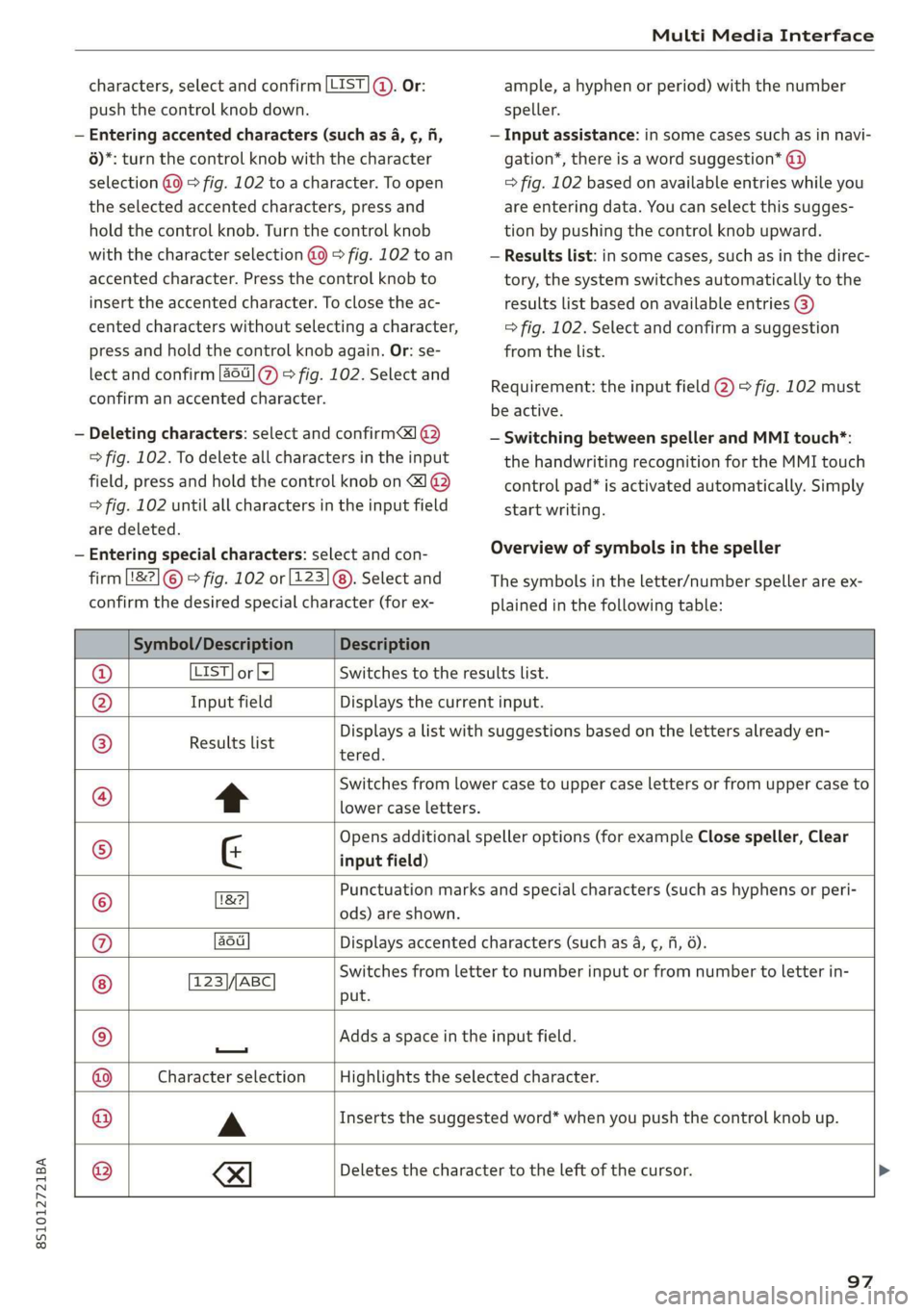
characters,selectandconfirm[LIST©.Or:
pushthecontrolknobdown.
—Enteringaccentedcharacters (suchas4,¢,fi,
6)*:turnthecontrolknobwiththecharacter
selection@9>fig.102toacharacter.Toopen
theselectedaccentedcharacters,pressand
holdthecontrolknob.Turnthecontrolknob
withthecharacterselection@0>fig.102toan
accentedcharacter.Pressthecontrolknobto
inserttheaccentedcharacter.Toclosetheac-
centedcharacterswithoutselectingacharacter,
pressandholdthecontrolknobagain.Or:se-
lectandconfirm[a6]7)>fig.102.Selectand
confirmanaccentedcharacter.
—Deletingcharacters:selectandconfirm]@
=>fig.102.Todeleteallcharactersintheinput
field,pressandholdthecontrolknobon&]@
>fig.102untilallcharactersintheinputfield
aredeleted.
—Enteringspecial characters:selectandcon-
firm[82]©©fig.102or[123]@).Selectand
confirm thedesiredspecialcharacter(forex-
ample,ahyphenorperiod)withthenumber
speller.
—Inputassistance:insomecasessuchasinnavi-
gation*,thereisawordsuggestion*@)
=>fig.102basedonavailableentrieswhileyou
areenteringdata.Youcanselectthissugges-
tionbypushingthecontrolknobupward.
—Resultslist:insomecases,suchasinthedirec-
tory,thesystemswitchesautomaticallytothe
resultslistbasedonavailableentries@)
=>fig.102.Selectandconfirmasuggestion
fromthelist.
Requirement:theinputfield@)>fig.102must
beactive.
—SwitchingbetweenspellerandMMItouch*:
the handwritingrecognitionfortheMMItouch
controlpad*isactivatedautomatically.Simply
startwriting.
Overviewofsymbolsinthespeller
Thesymbolsintheletter/numberspellerareex-
plainedinthefollowingtable:
Symbol/DescriptionDescription
LIST]orlzSwitchestotheresultslist.
InputfieldDisplaysthecurrentinput.
Resultslist
tered.
Displaysalistwithsuggestionsbasedonthelettersalreadyen-
t
Switchesfromlowercasetouppercaselettersorfromuppercaseto
lowercaseletters.
&
Opensadditionalspelleroptions(forexampleClosespeller,Clear
inputfield)
Punctuationmarksandspecialcharacters(suchashyphensorperi-
©
|E}
©}
@}]O)]
©
EO
18?
ods)areshown.
auDisplaysaccentedcharacters(suchas4,¢,fi,6).
TSS/ABCSwitchesfromlettertonumberinputorfromnumbertoletterin-
put.
Addsaspaceintheinputfield.
—
CharacterselectionHighlightstheselectedcharacter.
A
Insertsthesuggestedword*whenyoupushthecontrolknobup.
®
|
©
|O|
©
XI
Deletesthecharactertotheleftofthecursor.
97