steering AUDI TT COUPE 2019 Owner's Manual
[x] Cancel search | Manufacturer: AUDI, Model Year: 2019, Model line: TT COUPE, Model: AUDI TT COUPE 2019Pages: 312, PDF Size: 83.95 MB
Page 73 of 312
8S1012721BA
Assistsystems
Themeasurementendsafteramaximumof30
laps.Youcanthenevaluatethelaptimesorstart
anewtimemeasurement.
Youcancontrolthelaptimerusingthecontrols
onthemultifunctionsteeringwheel>page71.
ZA\WARNING
Yourfocusshouldalways beondrivingyour
vehiclesafely.Asthedriver,youhavecom-
pleteresponsibilityforsafetyintraffic.Only
use thefunctionssuchasthelaptimerinsuch
awaythatyoualwaysmaintaincompletecon-
troloveryourvehicleinalltrafficsituations.
@Tips
Youcanretrieveinformationfromthetrip
computerwhilethelaptimerstopwatchis
running.
Openingthelaptimerandmeasuringtime
Appliesto:vehicleswithlaptimer
IRAH-8493|
Bestlap
Lap3
NewLap
Fig.72Instrument cluster:laptimer
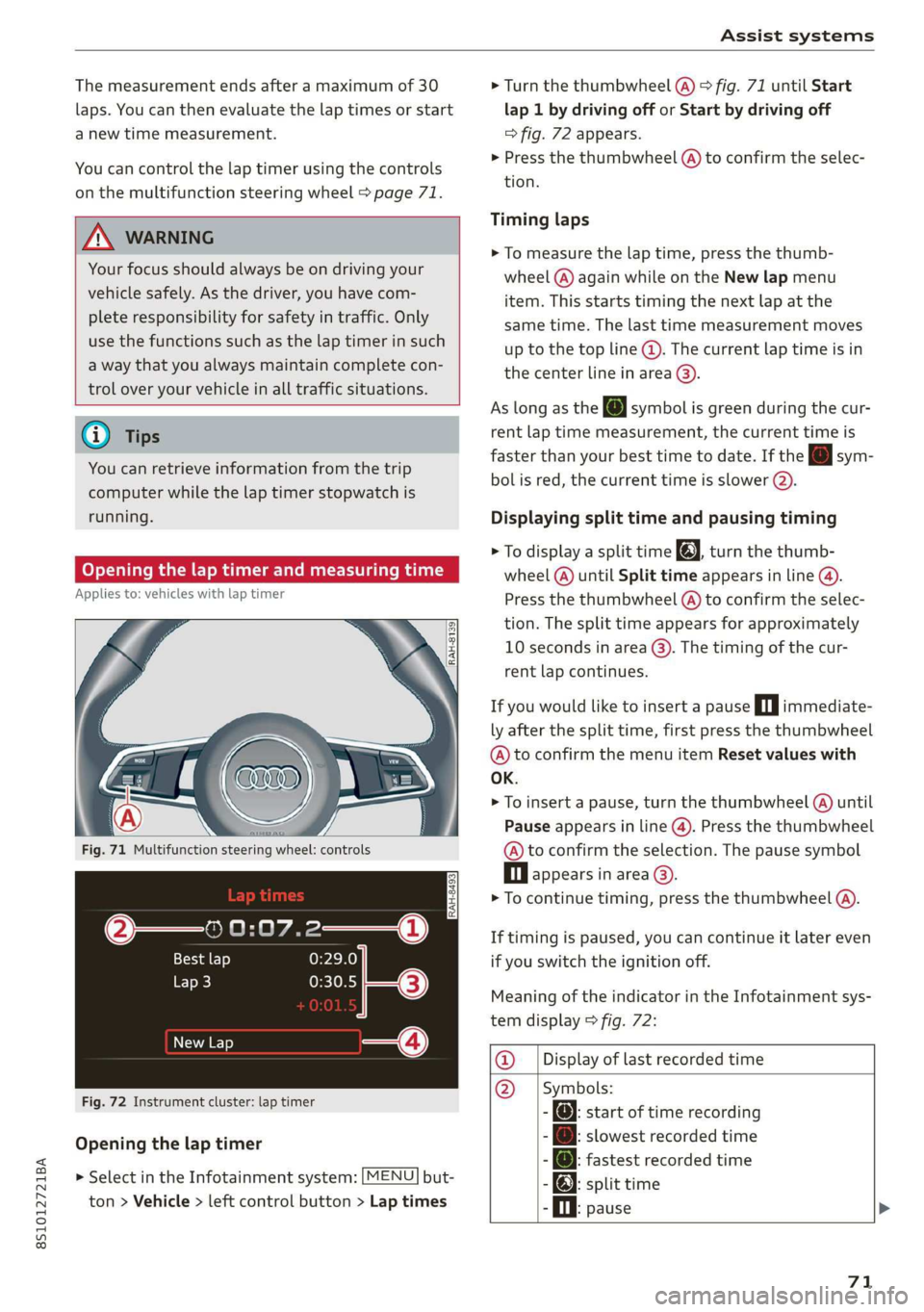
Openingthelaptimer
> SelectintheInfotainmentsystem:[MENU]but-
ton>Vehicle> leftcontrolbutton>Laptimes
>Turn thethumbwheel(@)>fig.71untilStart
lap 1bydrivingofforStartbydrivingoff
=>fig.72appears.
>Pressthethumbwheel(A)toconfirmtheselec-
tion.
Timinglaps
>Tomeasurethelaptime,pressthethumb-
wheel(@)againwhileontheNewlapmenu
item. Thisstartstimingthenextlapatthe
sametime.Thelasttimemeasurementmoves
[email protected]
thecenterlineinarea@).
AslongastheJsymbolisgreenduring thecur-
rentlaptimemeasurement,thecurrenttimeis
fasterthanyourbesttimetodate.Ifthe[Jsym-
bolisred,thecurrenttimeisslower().
Displayingsplittimeandpausingtiming
>[email protected]
wheel(@)untilSplittimeappearsinline@).
Pressthethumbwheel(@)toconfirmtheselec-
tion.Thesplittimeappearsforapproximately
10secondsinarea@).Thetimingofthecur-
rentlapcontinues.
Ifyouwouldliketoinsertapausein|immediate-
lyafterthesplittime,firstpressthethumbwheel
@)toconfirm themenuitemResetvalueswith
OK.
>Toinsertapause, turnthethumbwheel(@)until
Pauseappearsinline(@).Pressthethumbwheel
@toconfirmtheselection.Thepausesymbol
Dlappearsinarea©.
>Tocontinuetiming,pressthethumbwheel(A).
Iftimingispaused,youcancontinueitlatereven
ifyouswitchtheignitionoff.
MeaningoftheindicatorintheInfotainmentsys-
temdisplay>fig.72:
@_|Displayoflastrecordedtime
@_|Symbols:
-:startoftimerecording
[email protected]
-@:fastestrecordedtime
-):splittime
.Oi.pause>
71
Page 74 of 312
Assistsystems
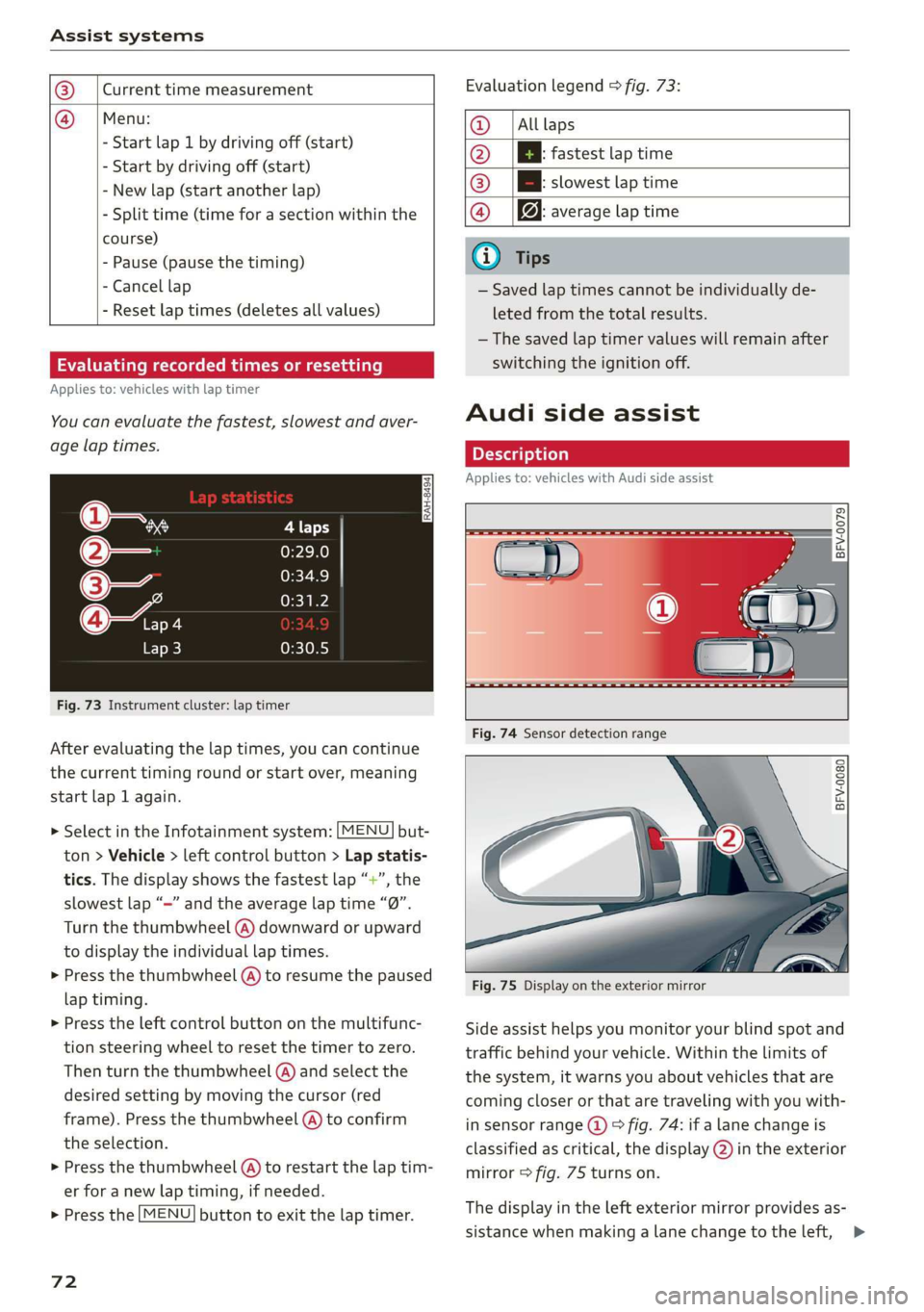
@_|Currenttimemeasurement
@=|Menu:
-Startlap1bydrivingoff(start)
-Startbydrivingoff(start)
-Newlap(startanotherlap)
-Splittime(timeforasectionwithinthe
course)
-Pause(pausethetiming)
-Cancellap
-Resetlaptimes(deletesallvalues)
Evaluatingrecordedtimesorresetting
Appliesto:vehicleswithlaptimer
Youcanevaluatethefastest,slowestandaver-
agelaptimes.
is
3
z
ss
Fig.73Instrumentcluster:laptimer
Afterevaluatingthelaptimes,youcancontinue
thecurrenttimingroundorstartover,meaning
startlap1again.
> SelectintheInfotainmentsystem:[MENU]but-
ton>Vehicle> leftcontrolbutton>Lapstatis-
tics.Thedisplayshowsthefastestlap“+”,the
slowestlap“—”andtheaveragelaptime“0”.
Turnthethumbwheel(A)downwardorupward
to displaytheindividuallaptimes.
>Pressthethumbwheel(A)toresumethepaused
laptiming.
>»Presstheleftcontrolbuttononthemultifunc-
tionsteeringwheeltoresetthetimertozero.
Thenturnthethumbwheel(@)andselectthe
desiredsettingbymovingthecursor(red
frame).Pressthethumbwheel@)toconfirm
the
selection.
>Pressthethumbwheel(@)torestartthelaptim-
erforanewlaptiming,ifneeded.
>Pressthe[MENU]buttontoexitthelaptimer.
72
Evaluationlegend9fig.73:
@|Alllaps
@|Bfastestlaptime
@|Bslowestlaptime
@|f@averagelaptime
G)Tips
—Savedlaptimescannotbeindividuallyde-
letedfromthetotalresults.
—Thesavedlaptimervalueswillremainafter
switchingtheignitionoff.
Audisideassist
Appliesto:vehicleswithAudisideassist
BFV-0079
BFV-0080
Fig.75Displayontheexteriormirror
Sideassisthelpsyoumonitoryourblindspotand
trafficbehindyourvehicle.Withinthelimitsof
thesystem,itwarnsyouaboutvehiclesthatare
coming
closerorthataretravelingwithyouwith-
insensorrange@)>fig.74:ifalanechangeis
classifiedascritical,thedisplay@)intheexterior
mirror>fig.75turnson.
Thedisplayintheleftexteriormirrorprovidesas-
sistancewhenmakingalanechangetotheleft,>
Page 77 of 312
8S1012721BA
Assistsystems
Thedisplaybrightnessadjustsautomaticallyto
thebrightnessofthesurroundings,bothinthe
informationandinthewarningstage.Invery
darkorverybrightsurroundings,theautomatic
adjustmentwillsetthedisplaytotheminimum
ormaximumlevel.Insuchcases,youmaynotice
nochangewhenadjustingthebrightness, orthe
changemayonlybenoticeableoncethesur-
roundingschange.
Adjustthebrightnesstoalevelwherethedisplay
intheinformationstagewillnotdisruptyour
view
ahead.Ifyouchangethebrightness,thedis-
playintheexteriormirrorwillbrieflyshowthe
brightnesslevelintheinformationstage.The
brightness ofthewarningstageislinkedtothe
brightnessintheinformationstageandisadjust-
edalongwiththeinformationstage.
@)Tips
—Sideassistisnotactivewhileyouaremak-
ingtheadjustment.
—Yoursettingsareautomaticallystoredand
assignedtotheremotecontrolkeybeing
used.
Messages
Appliesto:vehicleswithAudisideassist
Ifthesideassistswitchesoffautomatically,a
messageappearsintheInfotainmentsystemdis-
play.
Audisideassist:currentlyunavailable.
Sensorvisionrestrictedduetosurroundings.
Seeowner'smanual
Theradarsensorvisionisimpaired.Donotcover
theareainfront ofthesensorswithbikewheels,
stickers,dirtorotherobjects.Cleantheareacov-
eringthesensors,ifnecessary>page73,fig.77.
E]Audisideassist:currentlyunavailable.
Seeowner'smanual
Sideassistcannotbe switchedonatthistimebe-
causethereisamalfunction(forexample,the
batterychargelevelmaybetoolow).
Audisideassist:malfunction!Please
contactService
Thesystemcannotguaranteethatitwilldetect
vehiclescorrectlyandithasswitchedoff.The
sensorshavebeenmovedor arefaulty.Havethe
systemcheckedbyanauthorizedAudidealeror
authorizedAudiServiceFacilitysoon.
Audidriveselect(drive
settings)
Introduction
Appliesto:vehicleswithAudidriveselect
Driveselectmakesitpossibletoexperiencedif-
ferenttypesofvehiclecharacteristicsinonevehi-
cle.Thedrivercanselectfromthreemodes,
Comfort,Auto,andDynamic,usingthesistbut-
toninthecenterconsoleorbyusingtheInfotain-
mentsystem.Thisallowsyoutoswitchbetween
asportyandacomfortabledrivingmode,forex-
ample.IntheIndividualmode,thesettingscan
be
adjustedtoyourpersonalpreferences.This
makesitpossibletocombinesettingssuchasa
sportyenginesettingwithlightsteering.
ZA\WARNING
UsingAudidriveselectincorrectlycanlead to
collisions,otheraccidentsandseriousinju-
ries.
Appliesto:vehicleswithAudidriveselect
Thevehiclesetupineachmodedependsonthe
vehicle'sfeatures.
Engineandautomatictransmission
Dependingonthemode,theengineandauto-
matictransmissionrespondmorequicklyorina
morebalancedmannertoacceleratorpedal
movements.
Suspensioncontrol(Audimagneticride)*
Thesuspensioncontrolusessensorstorecordin-
formationregardingsteeringmovements,brak-
ingandaccelerationoperationsbythedriver,as
wellasinformationabouttheroadsurface,driv-
ingspeed,andload.Withdriveselect,youcan>
75
Page 78 of 312
Assistsystems
adjustthesuspensioncontroltosporty(dynam-
ic),comfortable(comfort)orbalanced(auto).
Steering
Thepowersteeringadapts.Indirectsteeringthat
moveseasilyasincomfortmodeisespecially
suited tolongdrivesonahighway.Thedynamic
modeprovidessporty,directsteering.
Enginesound*
Theenginesoundadaptstothecurrentmode
andcan besubtletosporty.
Insomemodels,themaximumvehiclespeed
canonlybe reachedintheautoanddynamic
modes.
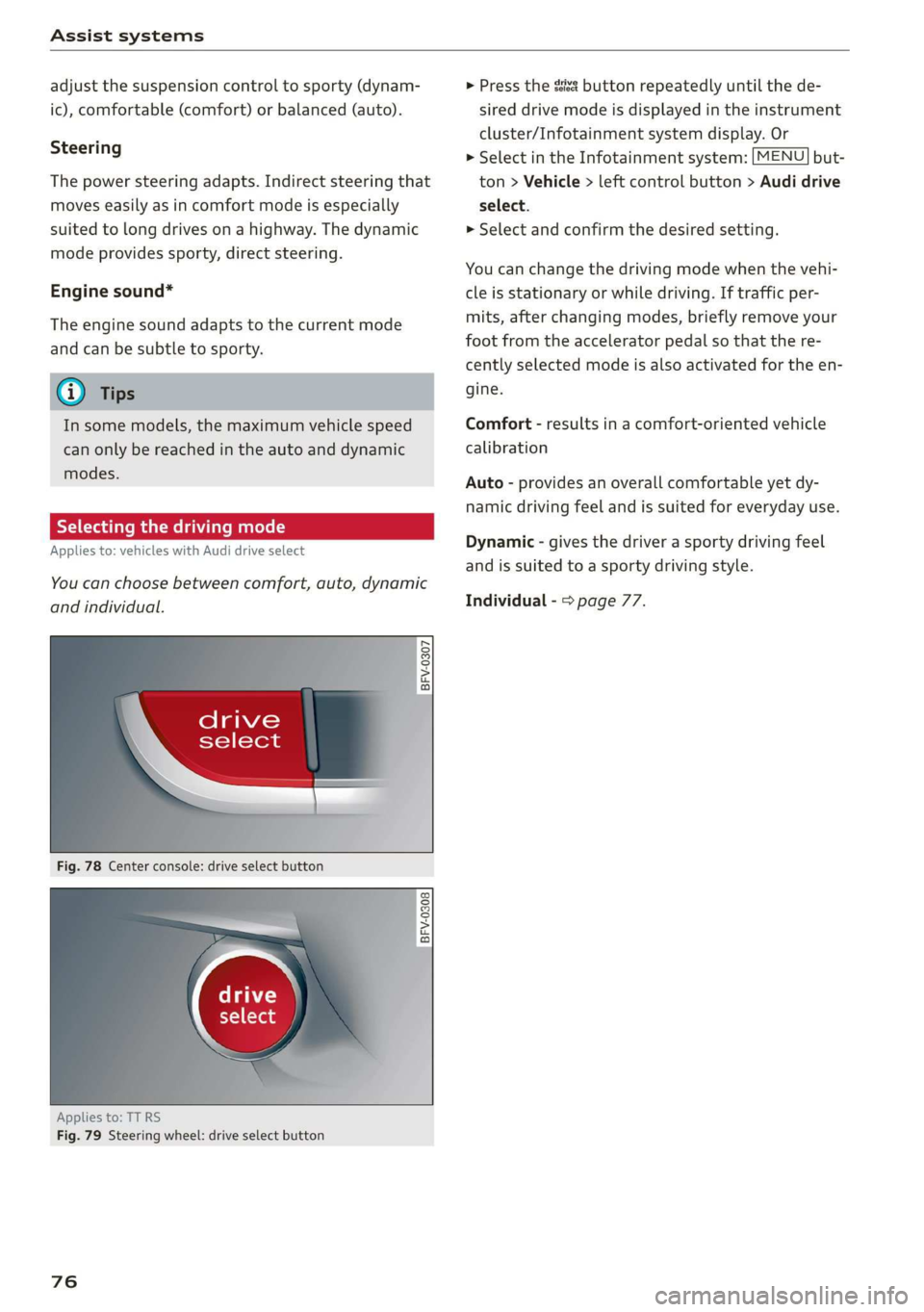
Selectingthedrivingmode
Appliesto:vehicleswith Audidriveselect
You can choosebetweencomfort,auto,dynamic
andindividual.
BFV-0307
,drive
\select
Fig.78Centerconsole:driveselectbutton
BFV-0308
Appliesto:TT RS
Fig.79Steeringwheel:driveselectbutton
76
>Pressthesssbuttonrepeatedlyuntilthede-
sireddrivemodeisdisplayedintheinstrument
cluster/Infotainmentsystemdisplay.Or
>SelectintheInfotainmentsystem:[MENU]but-
ton>Vehicle>leftcontrolbutton>Audidrive
select.
»Selectandconfirmthedesiredsetting.
Youcanchangethedrivingmodewhenthevehi-
cleisstationaryorwhiledriving.Iftrafficper-
mits,afterchangingmodes,brieflyremoveyour
footfromtheacceleratorpedalsothatthere-
centlyselectedmodeisalsoactivatedfortheen-
gine.
Comfort-resultsinacomfort-orientedvehicle
calibration
Auto-providesanoverallcomfortableyetdy-
namicdrivingfeelandissuitedforeverydayuse.
Dynamic-givesthedriverasportydrivingfeel
andissuited toasportydrivingstyle.
Individual->page77.
Page 79 of 312
8S1012721BA
Assistsystems
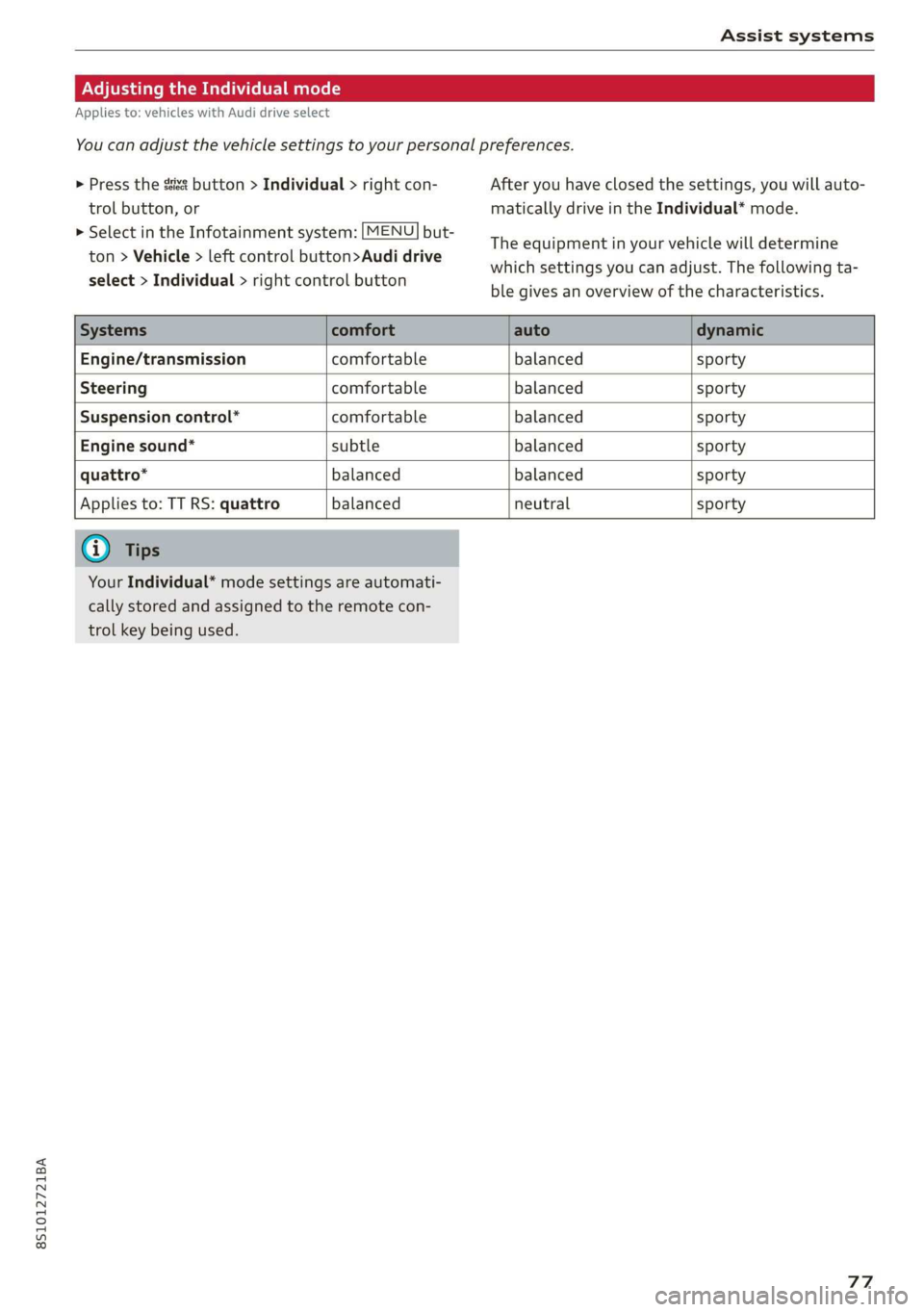
AdjustingtheIndividualmode
Appliesto:vehicleswithAudidriveselect
Youcanadjustthevehiclesettingstoyourpersonalpreferences.
>Pressthesistbutton>Individual>rightcon-
trolbutton,or
>SelectintheInfotainmentsystem:[MENU]but-
ton>Vehicle>leftcontrolbutton>Audidrive
select>Individual>rightcontrolbutton
Afteryouhaveclosedthesettings,youwillauto-
maticallydriveintheIndividual*mode.
Theequipmentinyourvehiclewilldetermine
whichsettingsyoucanadjust.Thefollowingta-
blegivesanoverviewofthecharacteristics.
Systemscomfortautodynamic
Engine/transmissioncomfortablebalancedsporty
Steeringcomfortablebalancedsporty
Suspensioncontrol*comfortablebalancedsporty
Enginesound*subtlebalancedsporty
quattro*balancedbalancedsporty
Appliesto:TTRS:quattrobalancedneutralsporty
G)Tips
YourIndividual*modesettings areautomati-
callystoredandassignedtotheremotecon-
trolkeybeingused.
77
Page 82 of 312
Parkingaid
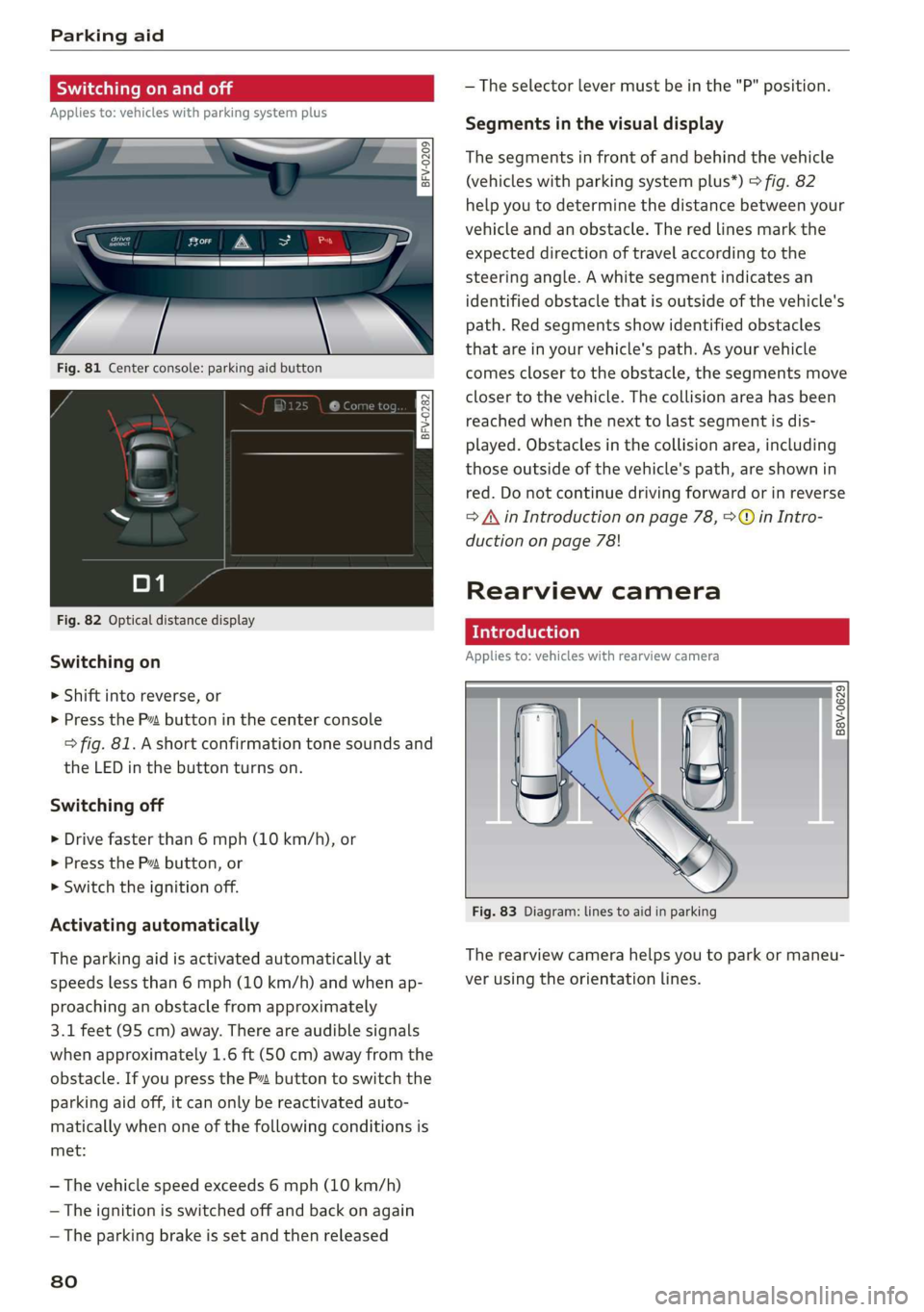
Switchingonandoff
Appliesto:vehicleswith parkingsystemplus
a 3q | >
zoO
Fig.81Centerconsole:parkingaidbutton
Fig.82Opticaldistancedisplay
Switchingon
>Shiftintoreverse,or
>PressthePvbuttoninthe centerconsole
>fig.81.Ashortconfirmationtonesoundsand
theLEDinthebuttonturnson.
Switchingoff
>Drivefasterthan6mph(10km/h),or
>PressthePbutton,or
>Switchtheignitionoff.
Activatingautomatically
The
parkingaidisactivatedautomaticallyat
speedslessthan6mph(10km/h) andwhenap-
proachinganobstaclefromapproximately
3.1feet(95cm)away.Thereareaudiblesignals
whenapproximately1.6ft(50cm)awayfromthe
obstacle.IfyoupresstheP”buttontoswitchthe
parkingaidoff,itcanonly bereactivatedauto-
maticallywhenoneofthefollowingconditionsis
met:
—Thevehiclespeedexceeds6mph(10km/h)
—Theignitionisswitchedoffandbackonagain
—Theparkingbrakeissetandthenreleased
80
—Theselectorlevermustbeinthe"P"position.
Segmentsinthevisualdisplay
Thesegmentsinfront ofandbehindthevehicle
(vehicleswithparkingsystemplus*)>fig.82
helpyoutodeterminethedistancebetweenyour
vehicleandanobstacle.Theredlinesmarkthe
expecteddirectionoftravelaccordingtothe
steering angle.Awhitesegmentindicatesan
identifiedobstacle thatisoutsideofthevehicle's
path.Redsegmentsshowidentifiedobstacles
thatareinyourvehicle'spath.Asyourvehicle
comesclosertotheobstacle,thesegmentsmove
closertothevehicle.Thecollisionareahasbeen
reachedwhenthenexttolastsegmentisdis-
played.Obstaclesinthecollisionarea,including
thoseoutsideofthevehicle'spath,areshownin
red.Donotcontinuedrivingforwardorinreverse
=AinIntroductiononpage78,>@inIntro-
ductiononpage78!
Rearviewcamera
Introduction
Appliesto:vehicleswithrearviewcamera
B8V-0629
Fig.83Diagram:linestoaidinparking
Therearviewcamerahelpsyoutoparkormaneu-
verusingtheorientationlines.
Page 83 of 312
8S1012721BA
Parkingaid
Ceeace1od}
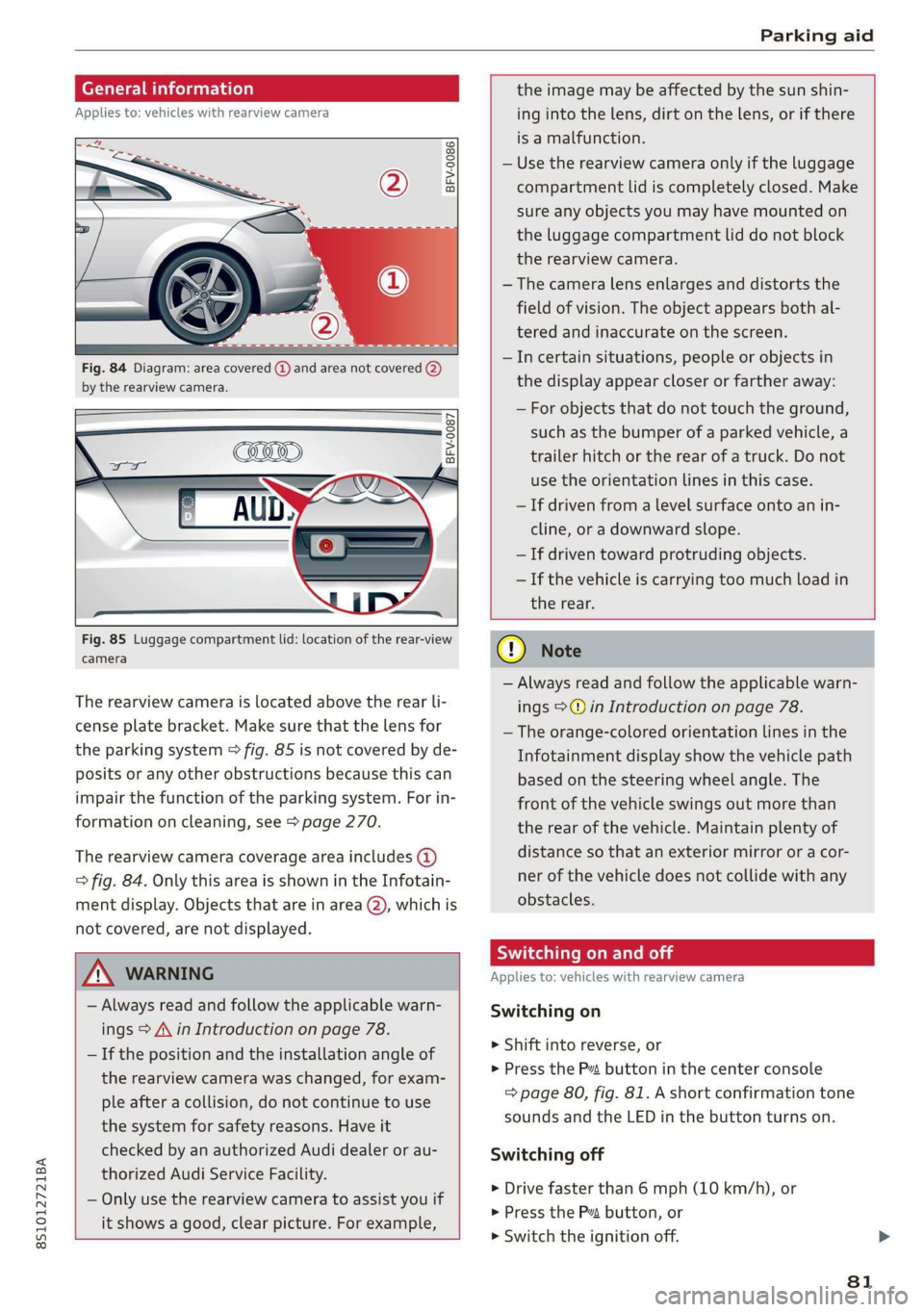
Appliesto:vehicleswithrearviewcamera
BFV-0086
Fig.84Diagram:areacovered@)andareanotcovered(2)
bythe rearviewcamera.
BFV-0087
Fig.85Luggagecompartmentlid:locationoftherear-view
camera
Therearviewcameraislocatedabovetherearli-
censeplatebracket.Makesurethatthelensfor
theparkingsystem>fig.85isnotcoveredbyde-
positsoranyotherobstructionsbecausethiscan
impairthefunctionoftheparkingsystem.Forin-
formationoncleaning,see>page270.
Therearviewcameracoverageareaincludes(4)
=>fig.84.OnlythisareaisshownintheInfotain-
mentdisplay.Objectsthatareinarea(2),whichis
notcovered,arenotdisplayed.
Z\WARNING
—Alwaysreadandfollowtheapplicablewarn-
ings>A\inIntroductiononpage78.
—Ifthepositionandtheinstallationangleof
therearviewcamerawaschanged,forexam-
pleafteracollision,donotcontinuetouse
thesystemforsafetyreasons.Haveit
checkedbyanauthorizedAudidealerorau-
thorizedAudiServiceFacility.
—Onlyuse therearviewcameratoassistyouif
itshowsagood,clearpicture.Forexample,
theimagemaybeaffectedbythesunshin-
ingintothelens,dirtonthelens,orifthere
isamalfunction.
—Usetherearviewcameraonlyiftheluggage
compartmentlidiscompletelyclosed.Make
sureanyobjectsyoumayhavemountedon
theluggagecompartmentliddonotblock
therearviewcamera.
— Thecameralensenlargesanddistortsthe
fieldofvision.Theobjectappearsbothal-
teredandinaccurateonthescreen.
—Incertainsituations,peopleor objectsin
thedisplayappearcloserorfartheraway:
—Forobjectsthatdonottouchtheground,
suchasthebumperofaparkedvehicle,a
trailerhitchortherearofatruck.Donot
usetheorientationlinesinthiscase.
—Ifdrivenfromalevelsurfaceontoanin-
cline,oradownwardslope.
—Ifdriventowardprotrudingobjects.
—Ifthevehicleiscarryingtoomuchloadin
therear.
CG)Note
—Alwaysreadandfollowtheapplicablewarn-
ings>@inIntroductiononpage78.
—Theorange-coloredorientationlinesinthe
Infotainmentdisplayshowthevehiclepath
basedonthesteeringwheelangle.The
front ofthevehicleswingsoutmorethan
therearofthevehicle.Maintainplentyof
distanceso thatanexteriormirrororacor-
nerofthevehicledoesnotcollidewithany
obstacles.
SicLeRoi
Appliesto:vehicleswithrearviewcamera
Switchingon
>Shiftintoreverse,or
>PresstheP”buttoninthecenterconsole
=>page80,fig.81.Ashortconfirmationtone
soundsandtheLEDinthebuttonturnson.
Switchingoff
>Drivefasterthan6mph(10km/h),or
>PressthePvbutton,or
>»Switchtheignitionoff.
81
Page 84 of 312
Parkingaid
@®Tips
—Thevisualdisplayintheleftpartofthedis-
playshouldhelpyoudetectthecriticalvehi-
cleareas.
—Youcanchangethevolumeofthesignals
andthedisplay>page82.
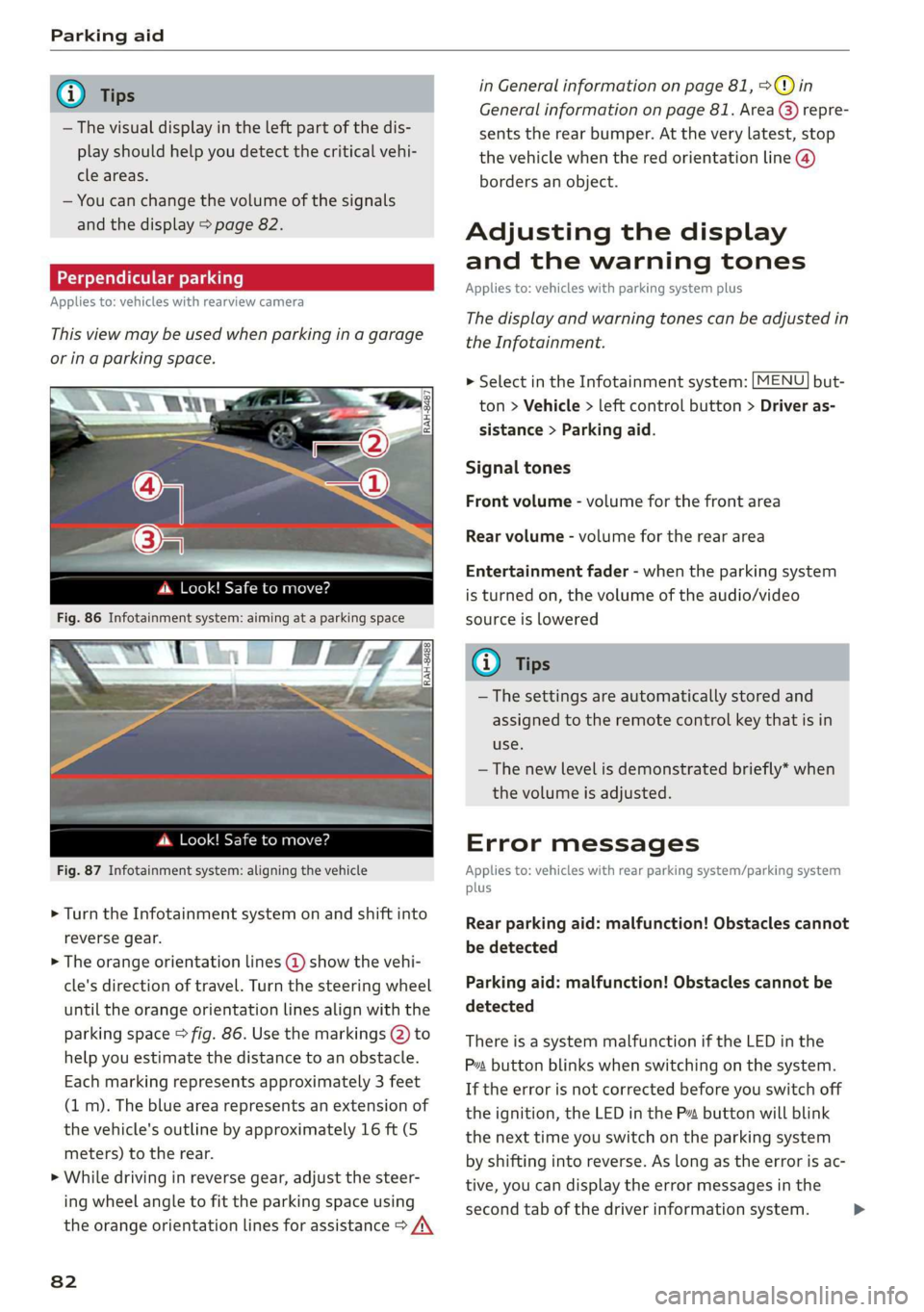
Perpendicularparking
Appliesto:vehicleswithrearviewcamera
Thisviewmaybe usedwhenparkinginagarage
orinaparkingspace.
4d.Look!Safetomove?
Fig.87Infotainmentsystem:aligningthevehicle
>Turn theInfotainmentsystemonandshiftinto
reversegear.
>Theorangeorientationlines@showthevehi-
cle'sdirectionoftravel.Turn thesteeringwheel
untiltheorangeorientationlinesalignwiththe
parkingspace>fig.86.Usethemarkings@)to
helpyouestimatethedistancetoanobstacle.
Eachmarkingrepresentsapproximately3 feet
(1m).Thebluearearepresentsanextensionof
thevehicle'soutlinebyapproximately16ft(5
meters)totherear.
>Whiledrivinginreversegear,adjustthesteer-
ingwheelangletofittheparkingspaceusing
theorangeorientationlinesforassistance>/\
82
inGeneralinformationonpage81,>@)in
Generalinformationonpage81.Area@)repre-
sentstherearbumper.Attheverylatest,stop
thevehiclewhentheredorientationline@)
bordersanobject.
Adjustingthedisplay
andthewarningtones
Appliesto:vehicleswithparkingsystemplus
Thedisplayandwarningtonescanbeadjustedin
theInfotainment.
MENU >SelectintheInfotainmentsystem:but-
ton>Vehicle> leftcontrolbutton>Driveras-
sistance>Parkingaid.
Signaltones
Frontvolume-volumeforthefrontarea
Rearvolume-volumeforthereararea
Entertainmentfader-whentheparkingsystem
isturnedon,thevolumeoftheaudio/video
sourceislowered
G)Tips
—Thesettings areautomaticallystoredand
assignedtotheremotecontrolkeythatisin
use.
— Thenewlevelisdemonstratedbriefly*when
thevolumeisadjusted.
Errormessages
Appliesto:vehicleswithrearparkingsystem/parkingsystem
plus
Rearparkingaid:malfunction!Obstaclescannot
bedetected
Parkingaid:malfunction!Obstaclescannotbe
detected
ThereisasystemmalfunctioniftheLEDinthe
Psbuttonblinkswhenswitchingonthe system.
Iftheerrorisnotcorrectedbeforeyouswitchoff
theignition,theLEDinthePbuttonwillblink
thenexttimeyouswitchontheparkingsystem
byshifting intoreverse.Aslongastheerrorisac-
tive,youcandisplaytheerrormessagesinthe
secondtabofthedriverinformationsystem.>
Page 86 of 312
IntelligentTechnology
IntelligentTechnology
Electronicstabilization
control (ESC)
ElectronicStabilizationControl(ESC)supports
driversafety.Itreducestheriskofslippingand
improvesdrivingstability.ESCdetectscriticalsit-
uationssuchasthevehicleoversteeringandun-
dersteeringorthewheelsarespinning.The
brakesareappliedortheenginetorqueisre-
ducedinordertostabilizethevehicle.Whenthe
ESCengages,theBindicatorlightblinksinthe
instrumentcluster.
ThefollowingsystemsareintegratedintheESC:
Anti-lockbrakingsystem(ABS)
ABSpreventsthewheelsfromlockingwhenbrak-
ing.Thevehiclecanstillbesteeredevenduring
hardbraking.Applysteadypressuretothebrake
pedal.Donotpumpthepedal.Apulsinginthe
brakepedalindicatesthatthesystemisacting to
stabilizethevehicle.
Brakeassistsystem
Thebrakeassistsystemcandecreasebrakingdis-
tance.Itincreasesbrakingpowerwhenthe driver
pressesthebrakepedalquicklyinemergencysit-
uations.Youmustpressandholdthebrakepedal
untilthedangeroussituationisover.
Anti-SlipRegulation(ASR)
ASRreducesdrivepowerwhenthedrivewheels
beginspinningandadaptsthepowertotheroad
conditions.Thismakesiteasiertostart,acceler-
ateanddriveuphills.
ElectronicDifferentialLock(EDL)
TheEDLappliesthe brakestowheelsthatare
slippingandtransfersthedrivepowertotheoth-
erwheels.Thisfunctionisnotavailableathigher
speeds.
Inextremecases,EDLautomaticallyswitchesoff
tokeepthebrakeonthebrakedwheelfromover-
heating.Thevehicleisstillfunctioningcorrectly.
84
EDLwillswitchonagainautomaticallywhencon-
ditionshavereturnedtonormal.
Powersteering
The ESCcanalsosupportvehiclestability
throughsteering.
Selectivewheeltorquecontrol
Selectivewheeltorquecontrolisusedwhendriv-
ingoncurves.Brakingistargetedtowardthe
wheelsontheinsideofthecurveasneeded.This
allowsmoreprecisedrivingincurves.
Automaticpost-collisionbrakingsystem
Theautomaticpost-collisionbrakingsystemcan
helptoreducetheriskofslidingandofaddition-
alcollisionsafteranaccident.Iftheairbagcon-
trolmoduledetectsacollisionaboveacertainve-
hiclespeed, thevehicleisbraked by theESC.
Thevehicledoesnotbrakeautomaticallyifoneof
thefollowingoccurs:
—Thedriverpressestheacceleratorpedal
—Thebrakingforcegeneratedbythepressed
brakepedalisgreaterthanthebrakingforce
thatwouldbeinitiatedbythesystem
—TheESC,thebrakesystem,orthevehicleelec-
tricalsystemisnotfunctioning
ZAWARNING
—TheESCanditsintegratedsystemscannot
overcomethelimitsimposedbynatural
physicallaws.Thisisespeciallyimportanton
slipperyorwetroads.Ifthesystemsbegin
acting tostabilizeyourvehicle,youshould
immediatelyalteryourspeedtomatchthe
roadandtrafficconditions.Donotletthein-
creasedsafetyprovidedtemptyouintotak-
ingrisks.Thiscouldincreaseyourriskofa
collision.
—Pleasenotetheriskofacollisionincreases
whendrivingfast,especiallythroughcurves
andonslipperyorwetroads,andwhendriv-
ingtooclosetoobjectsahead.The ESC and
itsintegratedsystemscannotalwayspre-
ventcollisions-thereisstillariskofacci-
dents!
Page 89 of 312
8S1012721BA
IntelligentTechnology
@)Note
—Neverletthebrakes“rub”bypressingthe
pedallightlywhenbrakingisnotactually
necessary.Thiscancause thebrakestoover-
heatandincreasesbrakingdistanceand
causeswear.
—Beforedrivingonlongstretcheswithsteep
hills,reduce thevehiclespeedandshifttoa
lowergeartouse theenginebrakingeffect.
Thisreducestheloadonthebrakes.Ifyou
needtobrakeadditionally,brakeinintervals
andnotcontinuously.
G)Tips
—Ifyouretrofityourvehiclewithafrontspoil-
er,wheelcoversorsimilaritems,makesure
thattheairflowtothebrakesisnotob-
structed.Otherwisethebrakesystemcan
overheat.
—Alsorefertotheinformationaboutbrake
fluid>page243.
Steering
Electromechanicalsteeringsupportsthedriver's
steeringmovementsbyelectronicallyadapting
thepowersteeringdependingonthevehicle
speed.ThesettingsdependontheselectedAudi
driveselect*mode.
aSteering:malfunction!Pleasestopvehicle
Thepowersteeringmayhavefailed.Adaptyour
drivingstyleimmediatelytocompensateforthe
factthatitmaybemoredifficulttoturnthe
steeringwheel,andstopyourvehicleinasafelo-
cationassoonaspossible.Donotcontinuedriv-
ing.SeeanauthorizedAudidealerorauthorized
AudiServiceFacilityforassistance.
&Steering:malfunction!Youcancontinue
driving
Thereisamalfunction.Steeringmaybemoredif-
ficultormoresensitive.Adaptyourdrivingstyle.
Havethesteeringsystemcheckedimmediately
byanauthorizedAudidealerorauthorizedAudi
ServiceFacility.Pleasenotethatthered indicator
lightmayturnonafterrestartingtheengine.Do
notcontinuedrivingifitdoes.
@)Tips
Ifthe1orlindicatorlightonlystayson
forashorttime,youmaycontinuedriving.
ALLwheeldrive(quattro)
Appliesto:vehicleswithallwheeldrive
Inallwheeldrive,allfourwheelsarepowered.
Generalinformation
Inallwheeldrive,thedrivingpowerisdividedbe-
tweenallfourwheels.Thishappensautomatical-
lydependingonyourdrivingbehavioraswellas
thecurrentroadconditions.Alsosee>page84,
Electronicstabilizationcontrol(ESC).
Theallwheeldriveconceptisdesignedforhigh
enginepower.Yourvehicleisexceptionallypow-
erfulandhasexcellentdrivingcharacteristics
bothundernormaldrivingconditionsandon
snowandice.Alwaysreadandfollowsafetypre-
cautions>A\.
Wintertires
Byusingallwheeldrive,yourvehiclehasgood
forwardmotionwithstandardtiresinwintercon-
ditions.However,inwinterwerecommendusing
winterorallseasontiresonallfourwheels,be-
causethiswillimprovethebrakingeffect.
Snowchains
Iftherearesnowchainlaws,snowchainsmust
alsobe usedonvehicleswithallwheeldrive
=>page263,Snowchains.
Replacingtires
Forvehicleswithallwheeldrive,onlywheelswith
thesamerollingcircumference should beused.
Avoidusingtireswithdifferenttreaddepths
=>page255,Newtiresorwheels.
87