tow AUDI TT COUPE 2019 Owner's Manual
[x] Cancel search | Manufacturer: AUDI, Model Year: 2019, Model line: TT COUPE, Model: AUDI TT COUPE 2019Pages: 312, PDF Size: 83.95 MB
Page 75 of 312
8S1012721BA
Assistsystems
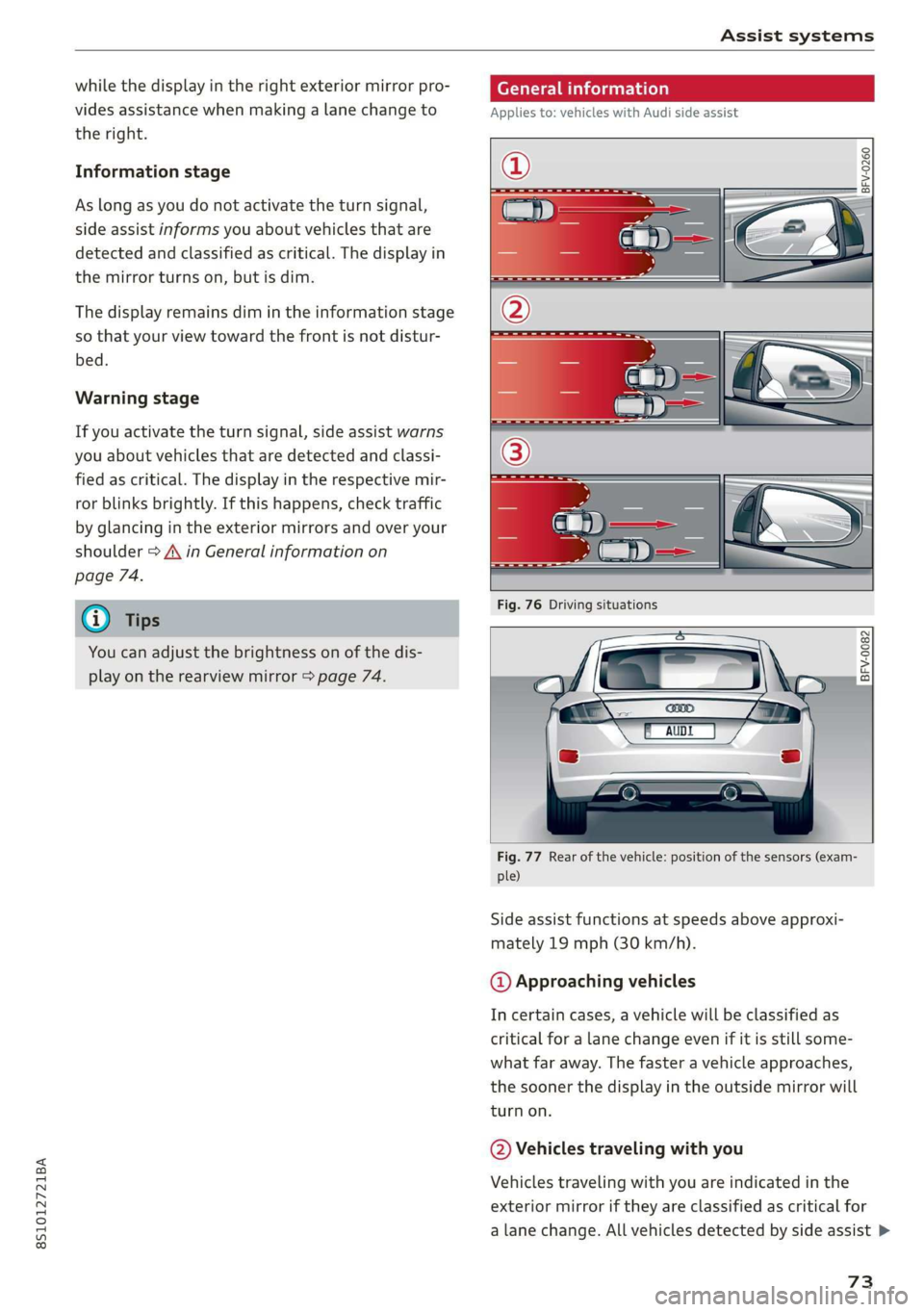
whilethedisplayintherightexteriormirrorpro-
videsassistancewhenmakingalanechangeto
theright.
Informationstage
Aslongasyoudonotactivatetheturnsignal,
sideassistinformsyouaboutvehiclesthatare
detectedandclassifiedascritical.Thedisplayin
themirrorturnson,butisdim.
Thedisplayremainsdimintheinformationstage
sothatyourviewtowardthefrontisnotdistur-
bed.
Warningstage
Ifyouactivatetheturnsignal,sideassistwarns
youaboutvehiclesthataredetectedandclassi-
fiedascritical.Thedisplayintherespectivemir-
rorblinksbrightly.Ifthishappens,checktraffic
by glancingintheexteriormirrorsandoveryour
shoulder>A\inGeneralinformationon
page74.
@)Tips
Youcanadjustthebrightnessonofthedis-
playontherearviewmirror>page74.
Generalinformation
Appliesto:vehicleswithAudisideassist
BFV-0260
BFV-0082
Fig.77Rearofthevehicle:positionofthesensors(exam-
ple)
Sideassistfunctionsatspeedsaboveapproxi-
mately19mph(30km/h).
@Approachingvehicles
Incertaincases,avehiclewillbeclassifiedas
criticalforalanechangeevenifitisstillsome-
whatfaraway.Thefasteravehicleapproaches,
the
soonerthedisplayintheoutsidemirrorwill
turnon.
@Vehiclestravelingwithyou
Vehiclestravelingwithyouareindicatedinthe
exteriormirroriftheyareclassifiedascriticalfor
alane change.Allvehiclesdetectedbysideassist>
73
Page 83 of 312
8S1012721BA
Parkingaid
Ceeace1od}
Appliesto:vehicleswithrearviewcamera
BFV-0086
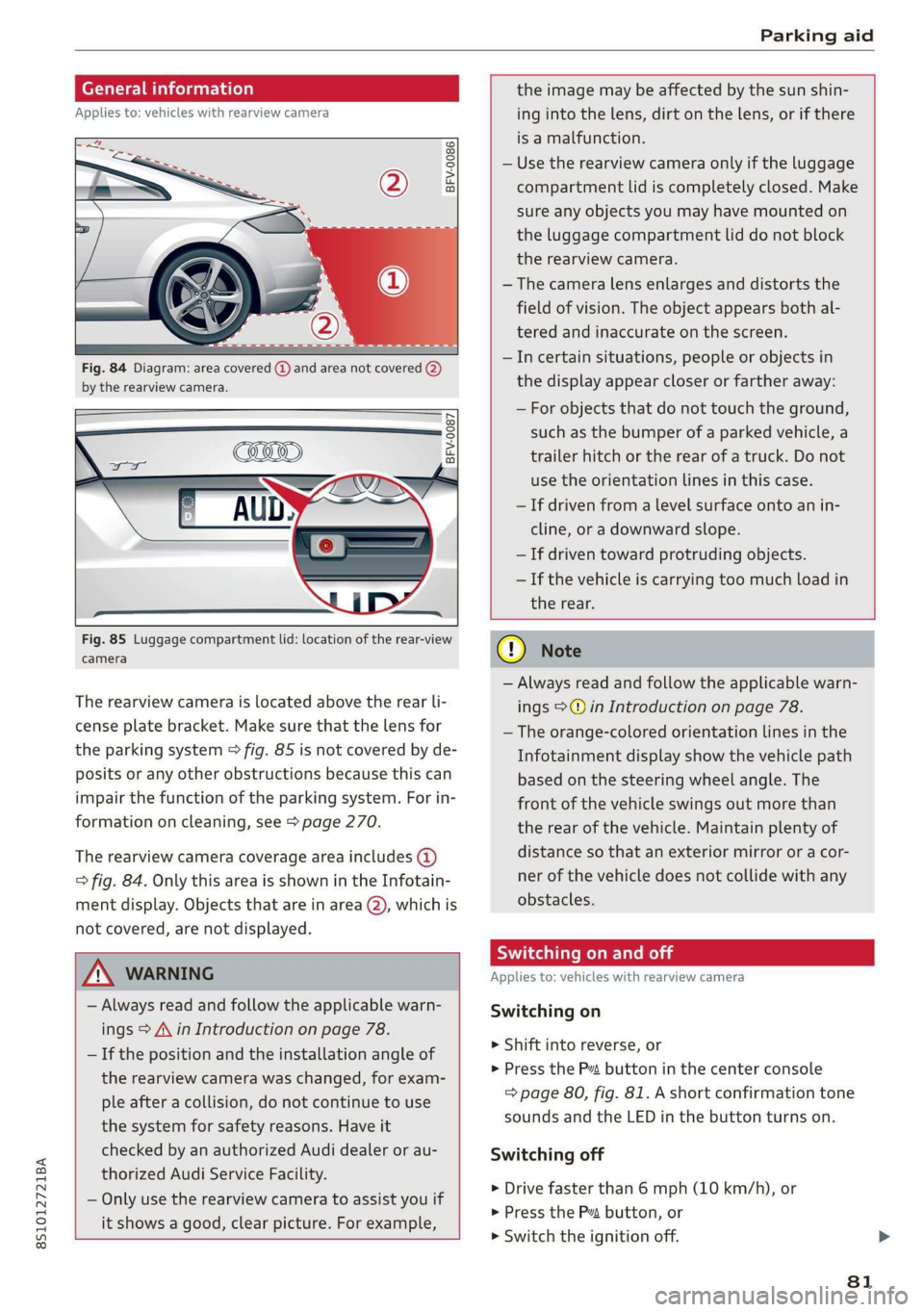
Fig.84Diagram:areacovered@)andareanotcovered(2)
bythe rearviewcamera.
BFV-0087
Fig.85Luggagecompartmentlid:locationoftherear-view
camera
Therearviewcameraislocatedabovetherearli-
censeplatebracket.Makesurethatthelensfor
theparkingsystem>fig.85isnotcoveredbyde-
positsoranyotherobstructionsbecausethiscan
impairthefunctionoftheparkingsystem.Forin-
formationoncleaning,see>page270.
Therearviewcameracoverageareaincludes(4)
=>fig.84.OnlythisareaisshownintheInfotain-
mentdisplay.Objectsthatareinarea(2),whichis
notcovered,arenotdisplayed.
Z\WARNING
—Alwaysreadandfollowtheapplicablewarn-
ings>A\inIntroductiononpage78.
—Ifthepositionandtheinstallationangleof
therearviewcamerawaschanged,forexam-
pleafteracollision,donotcontinuetouse
thesystemforsafetyreasons.Haveit
checkedbyanauthorizedAudidealerorau-
thorizedAudiServiceFacility.
—Onlyuse therearviewcameratoassistyouif
itshowsagood,clearpicture.Forexample,
theimagemaybeaffectedbythesunshin-
ingintothelens,dirtonthelens,orifthere
isamalfunction.
—Usetherearviewcameraonlyiftheluggage
compartmentlidiscompletelyclosed.Make
sureanyobjectsyoumayhavemountedon
theluggagecompartmentliddonotblock
therearviewcamera.
— Thecameralensenlargesanddistortsthe
fieldofvision.Theobjectappearsbothal-
teredandinaccurateonthescreen.
—Incertainsituations,peopleor objectsin
thedisplayappearcloserorfartheraway:
—Forobjectsthatdonottouchtheground,
suchasthebumperofaparkedvehicle,a
trailerhitchortherearofatruck.Donot
usetheorientationlinesinthiscase.
—Ifdrivenfromalevelsurfaceontoanin-
cline,oradownwardslope.
—Ifdriventowardprotrudingobjects.
—Ifthevehicleiscarryingtoomuchloadin
therear.
CG)Note
—Alwaysreadandfollowtheapplicablewarn-
ings>@inIntroductiononpage78.
—Theorange-coloredorientationlinesinthe
Infotainmentdisplayshowthevehiclepath
basedonthesteeringwheelangle.The
front ofthevehicleswingsoutmorethan
therearofthevehicle.Maintainplentyof
distanceso thatanexteriormirrororacor-
nerofthevehicledoesnotcollidewithany
obstacles.
SicLeRoi
Appliesto:vehicleswithrearviewcamera
Switchingon
>Shiftintoreverse,or
>PresstheP”buttoninthecenterconsole
=>page80,fig.81.Ashortconfirmationtone
soundsandtheLEDinthebuttonturnson.
Switchingoff
>Drivefasterthan6mph(10km/h),or
>PressthePvbutton,or
>»Switchtheignitionoff.
81
Page 86 of 312
IntelligentTechnology
IntelligentTechnology
Electronicstabilization
control (ESC)
ElectronicStabilizationControl(ESC)supports
driversafety.Itreducestheriskofslippingand
improvesdrivingstability.ESCdetectscriticalsit-
uationssuchasthevehicleoversteeringandun-
dersteeringorthewheelsarespinning.The
brakesareappliedortheenginetorqueisre-
ducedinordertostabilizethevehicle.Whenthe
ESCengages,theBindicatorlightblinksinthe
instrumentcluster.
ThefollowingsystemsareintegratedintheESC:
Anti-lockbrakingsystem(ABS)
ABSpreventsthewheelsfromlockingwhenbrak-
ing.Thevehiclecanstillbesteeredevenduring
hardbraking.Applysteadypressuretothebrake
pedal.Donotpumpthepedal.Apulsinginthe
brakepedalindicatesthatthesystemisacting to
stabilizethevehicle.
Brakeassistsystem
Thebrakeassistsystemcandecreasebrakingdis-
tance.Itincreasesbrakingpowerwhenthe driver
pressesthebrakepedalquicklyinemergencysit-
uations.Youmustpressandholdthebrakepedal
untilthedangeroussituationisover.
Anti-SlipRegulation(ASR)
ASRreducesdrivepowerwhenthedrivewheels
beginspinningandadaptsthepowertotheroad
conditions.Thismakesiteasiertostart,acceler-
ateanddriveuphills.
ElectronicDifferentialLock(EDL)
TheEDLappliesthe brakestowheelsthatare
slippingandtransfersthedrivepowertotheoth-
erwheels.Thisfunctionisnotavailableathigher
speeds.
Inextremecases,EDLautomaticallyswitchesoff
tokeepthebrakeonthebrakedwheelfromover-
heating.Thevehicleisstillfunctioningcorrectly.
84
EDLwillswitchonagainautomaticallywhencon-
ditionshavereturnedtonormal.
Powersteering
The ESCcanalsosupportvehiclestability
throughsteering.
Selectivewheeltorquecontrol
Selectivewheeltorquecontrolisusedwhendriv-
ingoncurves.Brakingistargetedtowardthe
wheelsontheinsideofthecurveasneeded.This
allowsmoreprecisedrivingincurves.
Automaticpost-collisionbrakingsystem
Theautomaticpost-collisionbrakingsystemcan
helptoreducetheriskofslidingandofaddition-
alcollisionsafteranaccident.Iftheairbagcon-
trolmoduledetectsacollisionaboveacertainve-
hiclespeed, thevehicleisbraked by theESC.
Thevehicledoesnotbrakeautomaticallyifoneof
thefollowingoccurs:
—Thedriverpressestheacceleratorpedal
—Thebrakingforcegeneratedbythepressed
brakepedalisgreaterthanthebrakingforce
thatwouldbeinitiatedbythesystem
—TheESC,thebrakesystem,orthevehicleelec-
tricalsystemisnotfunctioning
ZAWARNING
—TheESCanditsintegratedsystemscannot
overcomethelimitsimposedbynatural
physicallaws.Thisisespeciallyimportanton
slipperyorwetroads.Ifthesystemsbegin
acting tostabilizeyourvehicle,youshould
immediatelyalteryourspeedtomatchthe
roadandtrafficconditions.Donotletthein-
creasedsafetyprovidedtemptyouintotak-
ingrisks.Thiscouldincreaseyourriskofa
collision.
—Pleasenotetheriskofacollisionincreases
whendrivingfast,especiallythroughcurves
andonslipperyorwetroads,andwhendriv-
ingtooclosetoobjectsahead.The ESC and
itsintegratedsystemscannotalwayspre-
ventcollisions-thereisstillariskofacci-
dents!
Page 92 of 312
MultiMediaInterface
MultiMediaInterface
Trafficsafety
information
AudirecommendsperformingcertainInfotain-
mentsystemfunctions,suchasenteringa desti-
nation,onlywhenthevehicleisstationary.Al-
waysbe preparedtostopoperating theInfotain-
mentsystemintheinterestofyoursafetyand
thesafety ofotherroadusers.
Z\WARNING
Onlyuse theInfotainmentsystemwhenroad,
traffic,weather,andvisibilityconditionsper-
mitandalwaysinawaythatallowsyouto
maintaincompletecontroloveryourvehicle.
@Tips
Certainfunctionsarenotavailablewhiledriv-
ing.
Introduction
TheMultiMediaInterface,orMMIforshort,
combinesvarioussystemsforcommunication,
navigation*andentertainmentinyourAudi.You
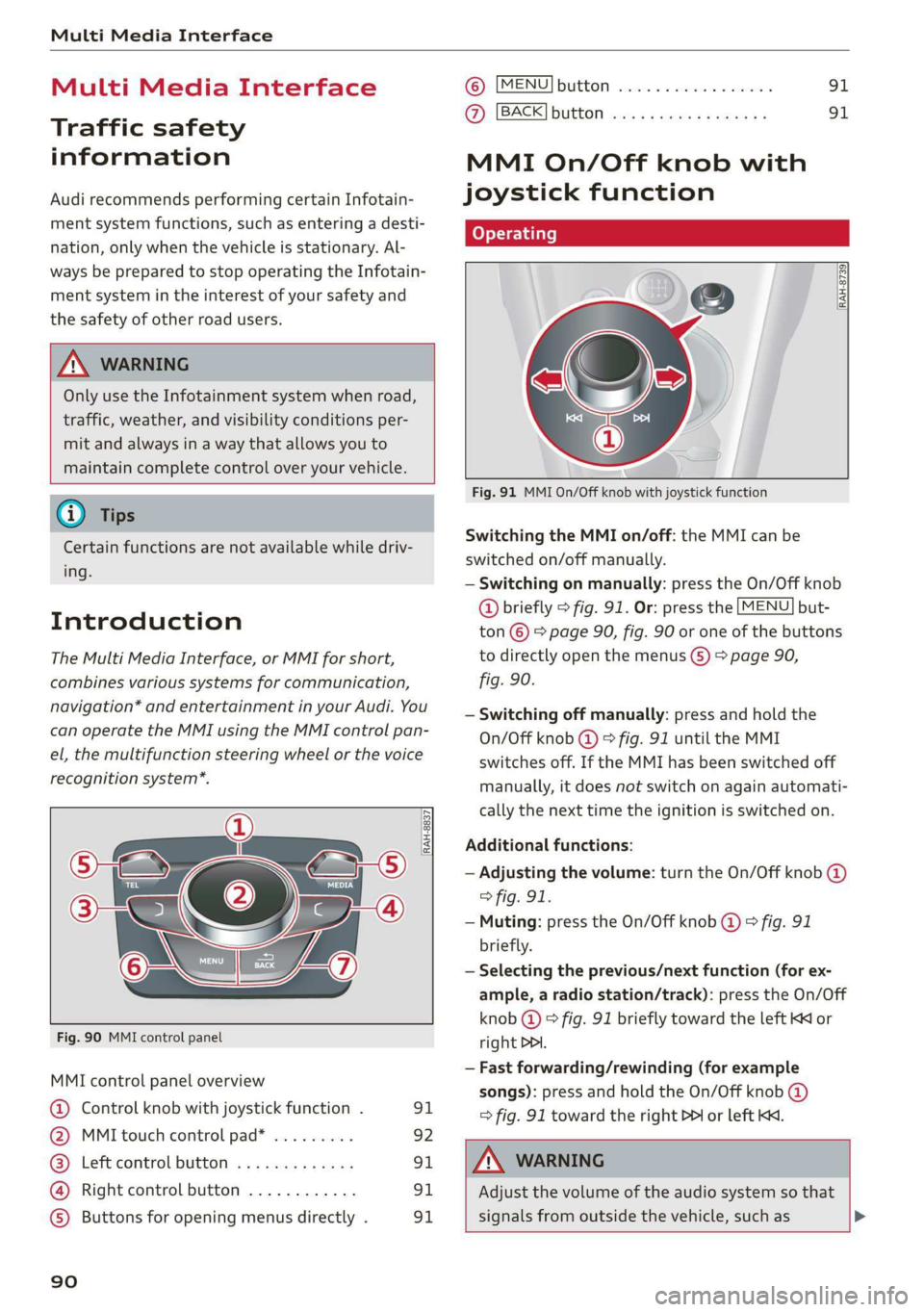
canoperatetheMMIusingtheMMIcontrolpan-
el,themultifunctionsteeringwheelorthevoice
recognitionsystem*.
@-TaNDr:
Se2
[RAH-8837|
:
Fig.90MMIcontrolpanel
MMIcontrolpanel overview
@Controlknobwithjoystickfunction.91
@MMItouchcontrolpad*.........92
@®Leftcontrolbutton.............91
@Rightcontrolbutton............91
©)Buttonsforopeningmenusdirectly.91
90
©)[MENU]buttonwc...cosevestan91
AZ):[BACK]buttOoss+ «saysseemusae91
MMIOn/Offknobwith
joystickfunction
Operating
[RAH-8739
Fig.91MMIOn/Offknobwithjoystickfunction
SwitchingtheMMIon/off:theMMIcanbe
switched
on/offmanually.
—Switchingonmanually:presstheOn/Offknob
@briefly>fig.91.Or:pressthe[MENU]but-
ton©>page90,fig.90oroneofthebuttons
todirectlyopenthemenus()>page90,
fig.90.
—Switchingoffmanually:pressandholdthe
On/Offknob@©fig.91untiltheMMI
switchesoff.IftheMMIhasbeenswitchedoff
manually,itdoesnotswitchonagainautomati-
callythenexttimetheignitionisswitchedon.
Additionalfunctions:
—Adjustingthevolume:turntheOn/Offknob@)
>fig.91.
—Muting:presstheOn/Offknob@©fig.91
briefly.
—Selectingtheprevious/nextfunction(forex-
ample,aradiostation/track):presstheOn/Off
knob@)°fig.91brieflytowardtheleftKKor
rightDDI.
—Fastforwarding/rewinding(forexample
songs):pressandholdtheOn/Offknob@)
=>fig.91towardtherightPPIorleftKd.
Z\WARNING
Adjustthevolumeoftheaudiosystemso that
signalsfromoutsidethevehicle,suchas>
Page 97 of 312
8S1012721BA
MultiMediaInterface
@)Tips
ThevolumeofthepromptsfortheMMItouch
canbeadjustedseparately>page174.
Controlknobwith
joystickfunction
RAH-8515|
©»
&
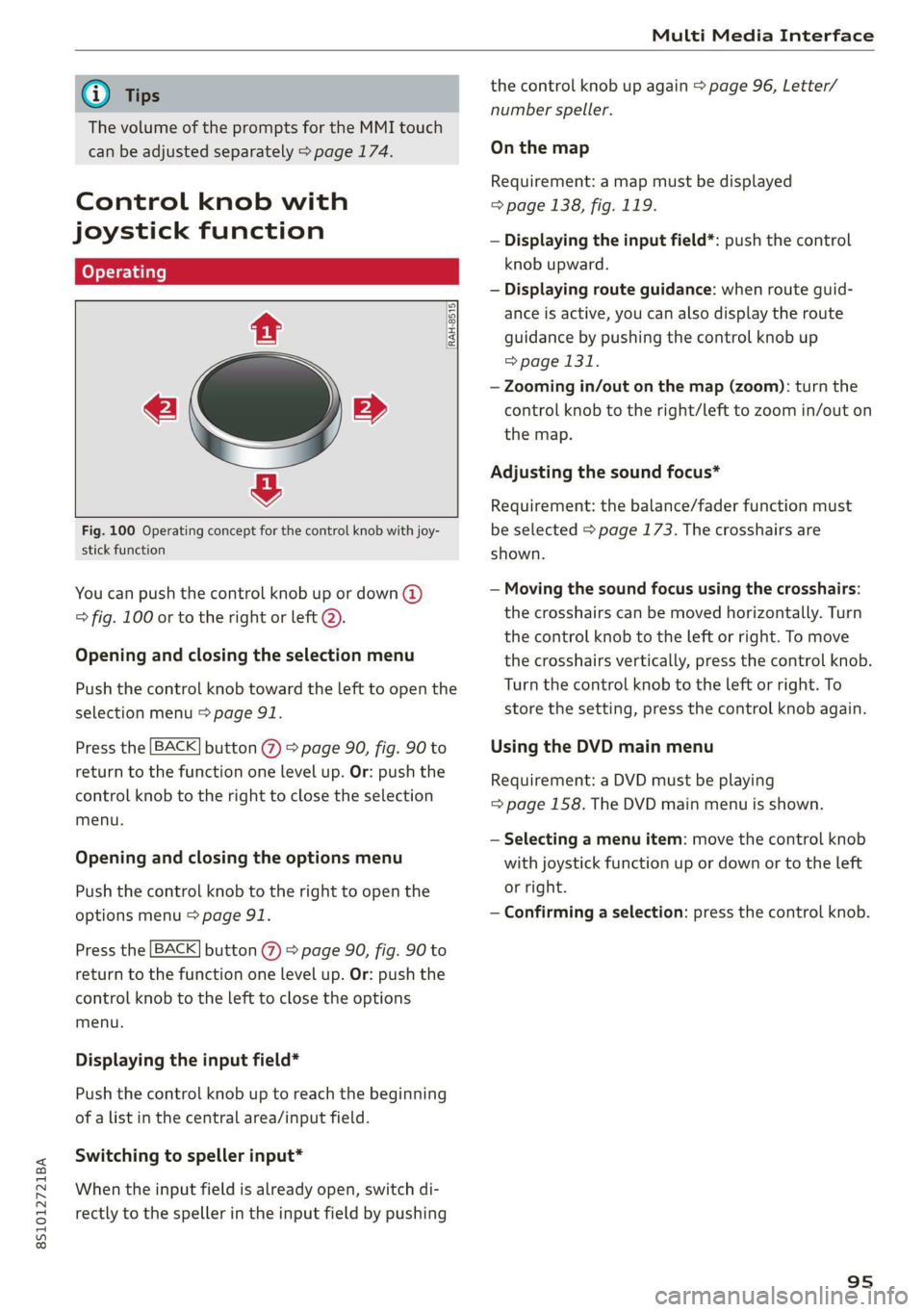
Fig.100Operatingconceptforthecontrolknobwithjoy-
stickfunction
Youcanpushthecontrolknobupordown(@)
>fig.100ortotherightorleft@).
Openingandclosingtheselectionmenu
Pushthecontrolknobtowardthelefttoopenthe
selectionmenu>page91.
Pressthe[BACK]button()>page90,fig.90to
returntothefunctiononelevelup. Or:pushthe
controlknobtotherighttoclosetheselection
menu.
Openingandclosingthe optionsmenu
Pushthecontrolknobtotherighttoopenthe
optionsmenu>page91.
Pressthe[BACK]button()>page90,fig.90to
returntothefunctiononelevelup. Or:pushthe
controlknobtothelefttoclosetheoptions
menu.
Displayingtheinputfield*
Pushthecontrolknobuptoreachthebeginning
ofalistinthecentralarea/inputfield.
Switchingtospellerinput*
Whentheinputfieldisalreadyopen,switchdi-
rectlytothespellerintheinputfieldbypushing
thecontrolknobupagain>page96,Letter/
numberspeller.
Onthemap
Requirement:amapmustbedisplayed
=>page138,fig.119.
—Displayingtheinputfield*:pushthecontrol
knobupward.
—Displayingrouteguidance:whenrouteguid-
anceisactive,youcanalsodisplaytheroute
guidancebypushingthecontrolknob up
=>page131.
—Zoomingin/outonthemap(zoom):turnthe
controlknobtotheright/lefttozoomin/outon
themap.
Adjustingthesoundfocus*
Requirement:thebalance/faderfunctionmust
beselected>page173.Thecrosshairsare
shown.
—Movingthesoundfocususingthecrosshairs:
thecrosshairscanbemovedhorizontally.Turn
thecontrolknobtotheleftorright.Tomove
thecrosshairsvertically,pressthecontrolknob.
Turn thecontrolknobtotheleftorright.To
storethesetting,pressthecontrolknobagain.
UsingtheDVDmainmenu
Requirement:aDVDmustbeplaying
=>page158.TheDVDmainmenuisshown.
—Selectingamenuitem:movethecontrolknob
withjoystickfunctionupordownortotheleft
orright.
—Confirmingaselection:pressthecontrolknob.
95
Page 103 of 312
8S1012721BA
Voicerecognitionsystem
OBARECOMMANDS
RAH-8462|
*Telephone+FavoritesCY»
+Audiconnect*Call(XY)SDS
*Navigation*Enternumber
*Directory*Redial
*Radio*Readnewtextmessage
*Media+Navigateto(XY)
+Sound+Enteraddress/destination
*Help+Onlinedestinations
+HelpSpeechdialogsystem*Cancelrouteguidance
*HelpTelephone*Map
*HelpAudiconnect+Line(XY)
*HelpNavigation*Next page/previouspage
*HelpMap*Cancel
*HelpRadio*No,Imeant(XY)
*HelpMedia*Correction
TELEPHONE:;
+EnternumberCalllistH.
+Deletenumber/correctionRedialsie
+DirectoryCallmailbox
*Call(XY)EnterPIN/deletePIN
*business/private/landline/mobileTelephonefavorites
NAVIGATION
+Navigateto(XY)+Excludenextroutesection/Exclude
*Businessaddress/Privateaddressnextstreet
+Start/cancelrouteguidance*Routelist
+Directory*Calculatealternativeroutes
+Lastdestinations*Onlinedestinations
+Navigationfavorites*Specialdestination
+»Drivehome
-Enteraddress
+Entercountry/town/street/state
+Excluderoute/Excluderoutefor(XY)km/m
MAP.
+Map
*Daymap/Nightmap
*2Ddrivingpositionmap/2Dnorthpositionmap/3Dmap/Destinationmap/Overviewmap
AUDICONNECT
*Audiconnect*Flightinformation/Traininformation
*Travelinformation/Parkinginformation*Cityevents
*Fuelprices*Onlinenews
*Weather+Twitter
+Radiopresets«Jukeboxsy}
+Laststations*CD/DVDMEDIA
*FM+SDcard1/SDcard2
*FM/AM/SIRIUSXM-Audimusicinterface/iPod/USB/Bluetooth/
+Station(XY)/Frequency(XY)Wi-Fi/Medium(XY)
*Trafficannouncementon/off*Mediafavorites/Artists/Albums/Genres/
Tracks/Playlists/Videos
*Folderup
*Randomplaybackon/off
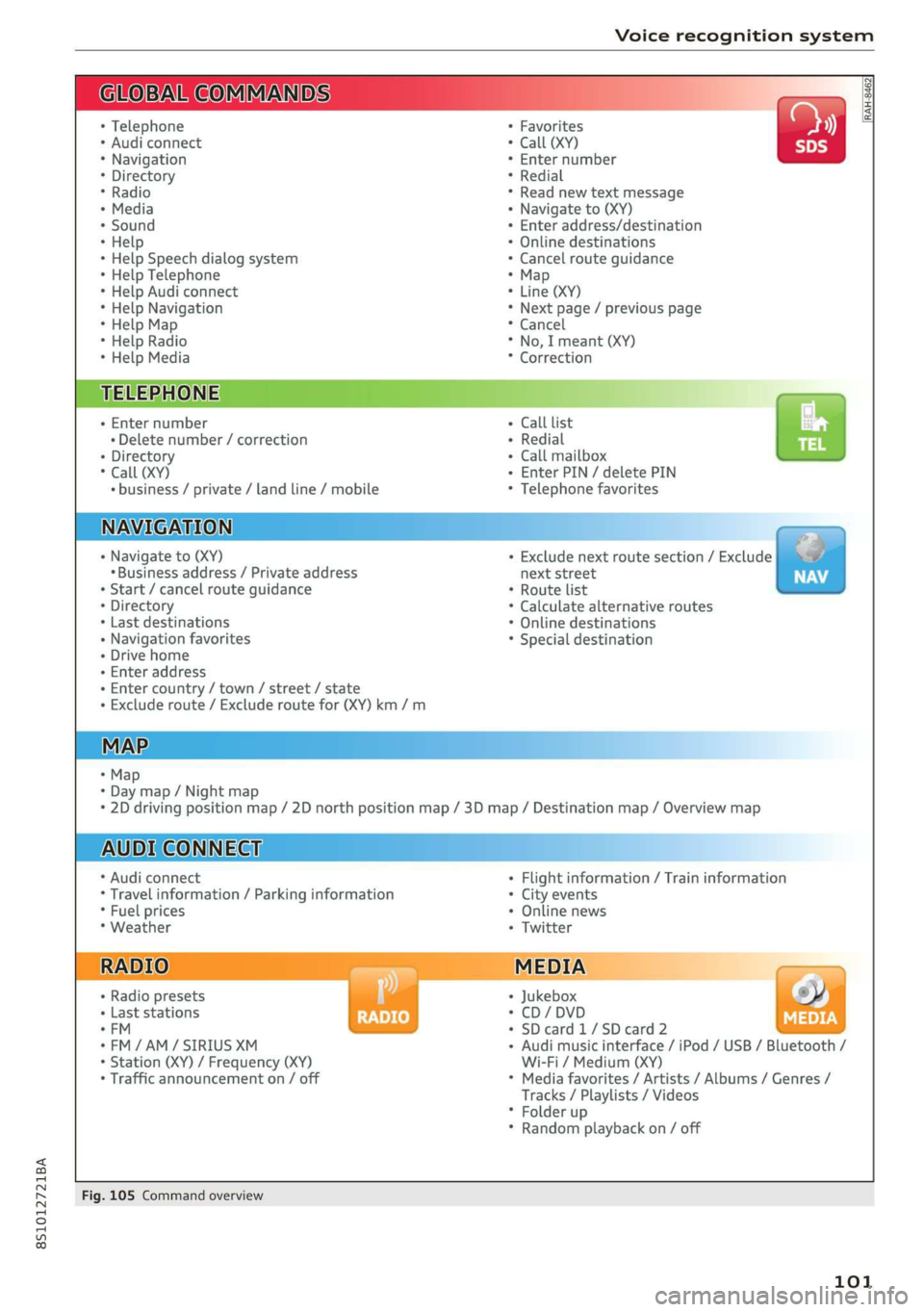
Fig.105Commandoverview
101
Page 153 of 312
8S1012721BA
Media
(CO)6/VDE0837.Thevarioustypesofaudio
equipmentinstalledconformtosafetyclass1.
The
laserusessolittlepowerorisshieldedso
thereisnodangerwhenitisusedcorrectly.
Mediadrives
SDcardreader
RAH-7103
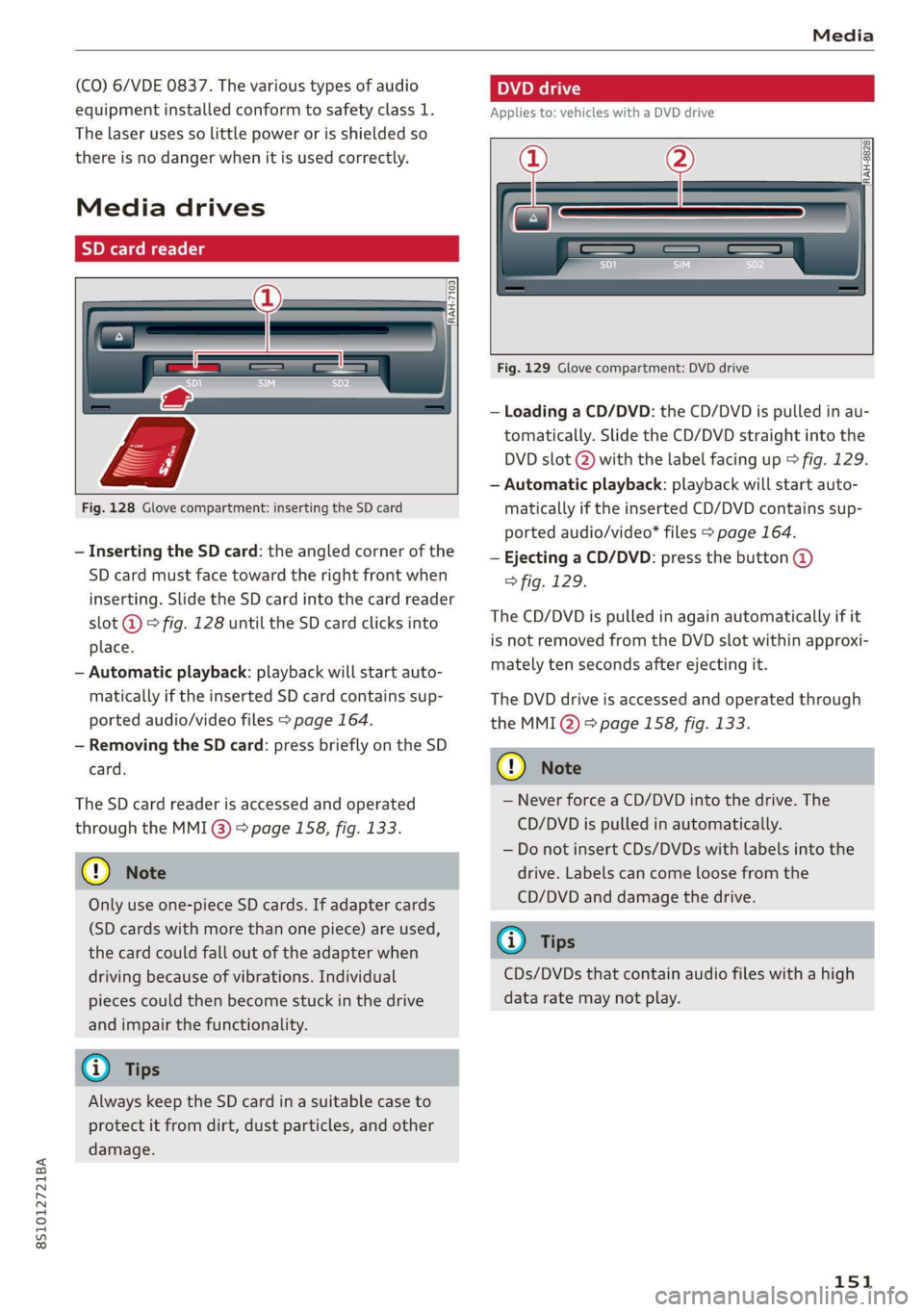
Fig.128Glovecompartment:insertingtheSDcard
—InsertingtheSDcard:theangledcornerofthe
SDcard mustfacetowardtherightfrontwhen
inserting.SlidetheSDcardintothecardreader
slot@°fig.128untiltheSDcardclicksinto
place.
—Automaticplayback:playbackwillstartauto-
maticallyiftheinsertedSDcardcontains sup-
portedaudio/videofiles>page164.
—RemovingtheSDcard: pressbrieflyontheSD
card.
TheSDcardreaderisaccessedandoperated
throughtheMMI@)>page158,fig.133.
@Note
Onlyuseone-pieceSDcards.Ifadaptercards
(SDcardswithmorethanonepiece)areused,
thecardcouldfalloutoftheadapterwhen
driving becauseofvibrations.Individual
piecescouldthenbecomestuckinthedrive
andimpairthefunctionality.
@)Tips
AlwayskeeptheSDcardinasuitablecaseto
protectitfromdirt,dustparticles,andother
damage.
peel
Appliesto:vehicleswithaDVDdrive
==
RAH-8828
Fig.129Glovecompartment:DVDdrive
—LoadingaCD/DVD:theCD/DVDispulledinau-
tomatically.SlidetheCD/DVDstraightintothe
DVDslot@)withthelabelfacingup>fig.129.
—Automaticplayback:playbackwillstartauto-
maticallyiftheinsertedCD/DVDcontains sup-
portedaudio/video*files>page164.
—EjectingaCD/DVD:pressthebutton@
>fig.129.
TheCD/DVDispulledinagainautomaticallyifit
isnotremovedfromtheDVDslotwithinapproxi-
matelytensecondsafterejectingit.
TheDVDdriveisaccessedandoperatedthrough
theMMI@)>page158,fig.133.
@)Note
—NeverforceaCD/DVDintothedrive.The
CD/DVDispulledinautomatically.
—DonotinsertCDs/DVDswithlabelsintothe
drive.Labelscancomeloosefromthe
CD/DVDanddamagethedrive.
IG).Tips
CDs/DVDsthatcontainaudiofileswithahigh
dataratemaynotplay.
151
Page 169 of 312
8S1012721BA
Audismartphoneinterface
Audismartphone
interface
Setup
Appliesto:vehicleswithAudismartphoneinterface
YoucanconnectyoursmartphonetotheMMIus-
ingtheAudismartphoneinterface.Certaincon-
tenton yoursmartphoneisadaptedtotheInfo-
tainmentsystemdisplaywhiledrivingandcan
beoperatedthroughtheMMIcontrolpanel.
Requirement:
Thevehiclemustbestationaryandtheignition
mustbe switchedon.
iPhonegeneration5orhigher withLightning
connectorandiOS7.1.2operatingsystemor
higher.Or:
AsmartphonewiththeAndroidAutoapp andAn-
droid5.0Lollipopoperatingsystemorhigheris
required.
>Connectyour smartphonetotheAudimusicin-
terface>page157usingtheapplicableUSB
adapter>page156,fig. 131.
> SelectandconfirmActivateAppleCarPlayor
ActivateAndroidAutonow.
>Follow thesysteminstructions.
>Payattentiontoanyadditionalsystemprompts
onyoursmartphone,ifapplicable.
IfyouchosenottouseAppleCarPlayorAndroid
Autowhenconnectingyoursmartphoneforthe
firsttime,youcanstarttheAudismartphonein-
terfacelateronusingtheConnectionmanager.
>Select:[MENU]button>Audismartphonein-
terface>Changetoconnectionmanager.
>Connectyour smartphonetotheAudimusicin-
terface>page157usingtheapplicableUSB
adapter>page156,fig. 131.
>SelectandconfirmAudismartphoneinterface
intheConnectionmanager>page170.You
canselectyoursmartphoneinthelistofdevi-
cesthatarealreadypaired>page171.
>Follow thesysteminstructions.
)Inpreparationatthetimeofprinting.
ZAWARNING
Drivingrequiresyourcompleteandundivided
attention.Asthedriver,youhavecompletere-
sponsibilityforsafetyintraffic.Neveroperate
mobiledeviceswhiledriving,becausethisin-
creasestheriskofanaccident.
@)Note
Alwaysfollowtheinformationfoundin>@in
Generalinformationonpage123.
@)Tips
—Thefunctionsthatcan beuseddependon
thefollowingfactors,amongothers:
—Thebrandofyoursmartphone
~Theversionoftheoperatingsystemin
yoursmartphone
—Thesoftwareversionoftheappused
—TheUSBadaptercableandcorrectconnec-
tion
—Yourcellphoneserviceprovider
—Thecustomizedsettingson yoursmart-
phone
—Oneofthefactorsaboveoracombination
ofanyofthemcouldcauseyoursmart-
phonetobe incompatiblewiththeAudi
smartphoneinterface.Compatibilitycannot
beguaranteedforalltypesofsmartphones.
Formoreinformationandassistance,refer
totheuserguideandthemanufacturerof
yoursmartphone.
—Iftheconnectedsmartphonehasvoicecon-
trol,youcan operateyoursmartphoneusing
theexternalvoicerecognitionsystem*
=>page107.
— ThemenulanguageshownintheMMIis
basedonthesettingsinyoursmartphone.
—ThetimedisplayedintheMMIisbasedon
thesettingsinyoursmartphone.
—SomeMMIfunctionsarenotavailablewhen
AppleCarPlayorAndroidAutoisactive.
—Youcannotconnectanymobiledevicesvia
BluetoothwhenanAppleCarPlayconnec-
tionisactive.
167
Page 178 of 312
Safedriving
>Take frequentbreaksonlongtrips.Donotdrive
formorethantwohoursatastretch.
>DoNOTdrivewhenyouaretired,underpres-
sureor whenyouarestressed.
Z\WARNING
Impaireddrivingsafetyincreasestheriskof
seriouspersonalinjuryanddeathwhenevera
vehicleisbeingused.
>Graspthetopofthesteeringwheelwithyour
elbow(s)slightlybent.
>Fastenandwearsafetybeltscorrectly
>page184.
>Always keepbothfeetinthefootwell so that
youareincontrolofthevehicleatalltimes.
Fordetailedinformationonhowtoadjustthe
driver'sseat,see>page40,Frontseats.
Correctpassenger
seatingpositions
Properseatingpositionforthedriver
Theproperdriverseatingpositionisimportant
forsafe,relaxeddriving.
BFV-0183
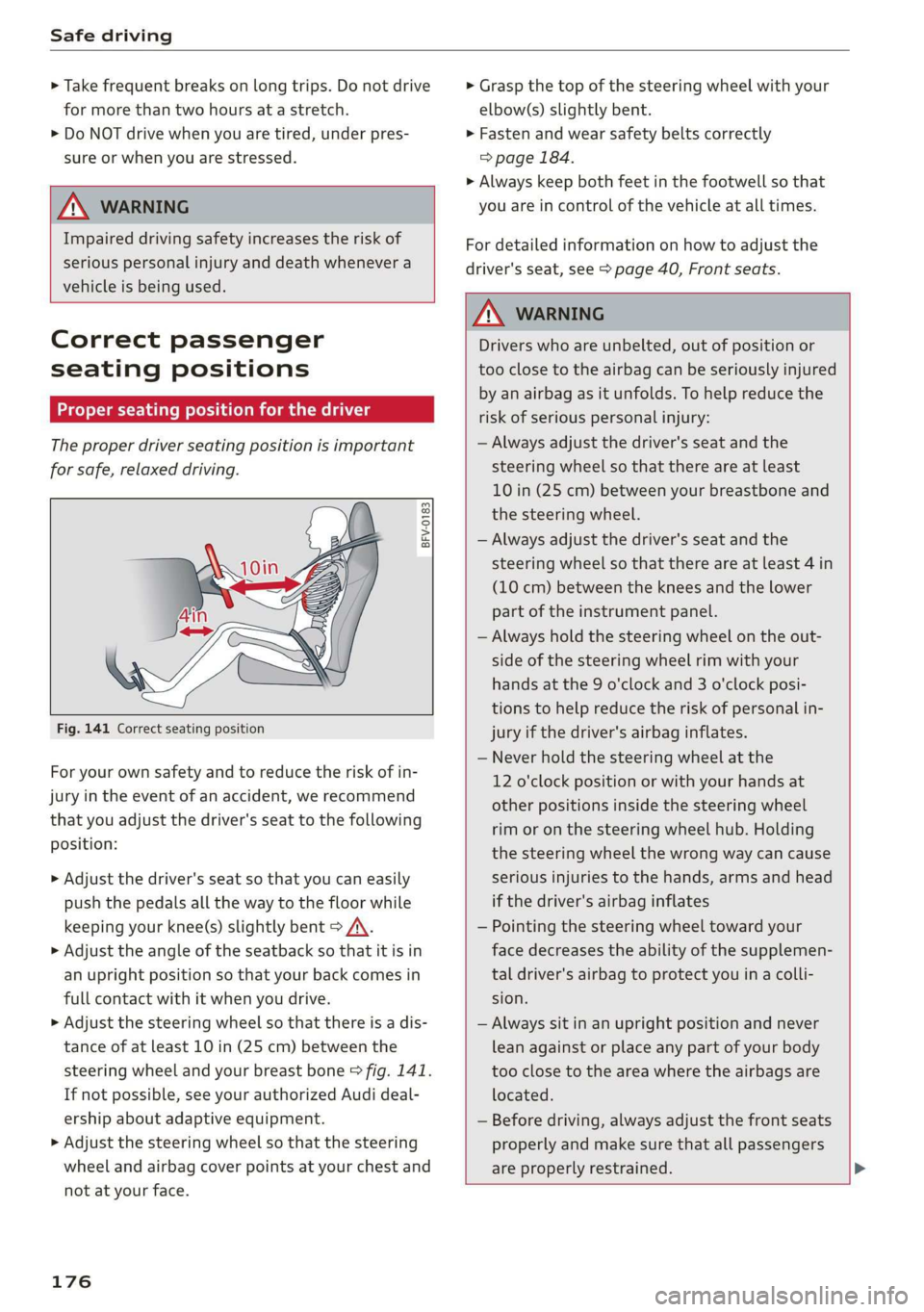
Fig.141Correct seatingposition
Foryourownsafetyandtoreducetheriskofin-
juryinthe eventofanaccident,werecommend
thatyouadjustthedriver'sseattothefollowing
position:
>Adjustthedriver'sseat so thatyoucaneasily
pushthepedalsallthewaytothefloorwhile
keepingyourknee(s)slightlybent>A\.
>Adjusttheangleoftheseatbacksothatitisin
anuprightpositionsothatyour backcomesin
fullcontactwithitwhenyoudrive.
>Adjustthesteeringwheelsothatthereisadis-
tanceofatleast10in(25cm)betweenthe
steeringwheelandyourbreastbone>fig.141.
Ifnotpossible,seeyourauthorizedAudideal-
ershipaboutadaptiveequipment.
>Adjust thesteeringwheelso thatthesteering
wheelandairbagcoverpointsatyourchestand
notatyourface.
176
Z\WARNING
Driverswhoareunbelted,outofpositionor
tooclose totheairbagcanbeseriouslyinjured
by anairbagasitunfolds.To helpreduce the
riskofseriouspersonalinjury:
—Alwaysadjustthedriver'sseatandthe
steeringwheelsothatthereareatleast
10in(25cm)betweenyourbreastboneand
thesteeringwheel.
—Alwaysadjustthedriver'sseatandthe
steeringwheelsothatthereareatleast4in
(10cm)betweenthekneesandthe lower
partoftheinstrumentpanel.
—Alwaysholdthesteeringwheelontheout-
sideofthesteeringwheelrimwithyour
handsatthe9o'clockand3o'clockposi-
tionstohelpreducetheriskofpersonalin-
juryifthedriver'sairbaginflates.
—Neverholdthesteeringwheelatthe
12o'clockpositionorwithyourhandsat
otherpositionsinsidethesteeringwheel
rimoronthesteeringwheelhub.Holding
the
steeringwheelthewrongwaycancause
seriousinjuriestothehands,armsandhead
ifthedriver'sairbaginflates
—Pointingthesteeringwheeltowardyour
facedecreasestheabilityofthesupplemen-
taldriver'sairbagtoprotectyouinacolli-
sion.
—Alwayssitinanuprightpositionandnever
leanagainstor placeanypartofyourbody
tooclosetotheareawheretheairbagsare
located.
—Beforedriving,alwaysadjustthefront seats
properlyandmakesurethatallpassengers
areproperlyrestrained.
Page 185 of 312
8S1012721BA
Safetybelts
Althoughtheseexamplesarebasedonafrontal
collision,safetybeltscanalsosubstantiallyre-
ducetheriskofinjuryinotherkinds ofcrashes.
So,whetheryou'reonalongtripor justgoingto
thecornerstore,alwaysbuckleupandmakesure
othersdo,too.Accidentstatisticsshowthatvehi-
cleoccupantsproperlywearingsafetybeltshave
alowerriskofbeinginjuredandamuchbetter
chanceofsurvivinganaccident.Properlyusing
safetybeltsalsogreatlyincreasestheabilityof
thesupplementalairbagstodotheirjobinacol-
lision.Forthisreason,wearingasafetybeltisle-
gallyrequiredinmostcountriesincludingmuch
oftheUnitedStatesandCanada.
AlthoughyourAudiisequippedwithairbags,you
stillhavetowearthesafetybeltsprovided.Front
airbags,forexample,areactivatedonlyinsome
frontalcollisions.Thefrontairbagsarenotacti-
vatedinallfrontalcollisions,insideandrearcol-
lisions,inrolloversorincaseswherethereisnot
enoughdecelerationthroughimpacttothefront
of
thevehicle.Thesamegoesfortheotherairbag
systemsinyourAudi.So,alwayswearyoursafety
beltandmakesureeverybodyinyourvehicleis
properlyrestrained!
TanXelaeeetLiamidedlace]LeUatLilalg
rth)
Safetybeltsmustalwaysbecorrectlypositioned
across thestrongestbonesofyourbody.
>Alwayswearsafetybeltsasillustratedandde-
scribed
inthischapter.
>Makesurethatyoursafetybeltsarealways
readyforuseandarenotdamaged.
ZAWARNING
Notwearingsafetybeltsorwearingthemim-
properlyincreasestheriskof seriouspersonal
injuryanddeath.Safetybeltscanworkonly
whenusedcorrectly.
—Alwaysfastenyoursafetybeltscorrectlybe-
foredrivingoffandmakesureallpassen-
gersarecorrectlyrestrained.
—Formaximumprotection,safetybeltsmust
always bepositionedproperlyonthebody.
—Neverstrapmorethanoneperson,including
smallchildren,intoanybelt.
—Neverplaceasafetybeltovera childsitting
onyourlap.
—Alwayskeepfeetinthefootwellinfrontof
theseatwhilethevehicleisbeingdriven.
—Neverletanypersonridewiththeirfeeton
theinstrumentpanelorstickingoutthe
windoworontheseat.
—Neverremoveasafetybeltwhilethevehicle
ismoving.Doingsowillincreaseyourriskof
beinginjuredorkilled.
—Neverwearbeltstwisted.
—Neverwearbeltsoverrigidorbreakableob-
jectsinoronyourclothing,suchaseye
glasses,pens,keys,etc.,asthesemaycause
injury.
—Neverallowsafetybeltstobecomedam-
agedbybeingcaughtindoororseathard-
ware.
—Donotweartheshoulderpartofthebelt
underyourarmorotherwiseoutofposition.
—Severallayersofheavyclothingmayinter-
ferewithcorrectpositioningofbeltsandre-
ducetheoveralleffectiveness ofthesystem.
—Alwayskeepbeltbucklesfreeofanything
thatmaypreventthe bucklefromlatching
securely.
—Neverusecomfortclipsordevicesthatcre-
ateslackintheshoulderbelt.However,spe-
cialclipsmayberequiredfortheproper use
ofsomechildrestraintsystems.
—Tornorfrayedsafetybeltscantearand
damagedbelthardwarecanbreakinanacci-
dent.Inspectbeltsregularly.Ifwebbing,
bindings,buckles,orretractorsaredam-
aged,havebeltsreplacedby anauthorized
Audidealerorqualifiedworkshop.
—Safetybeltsthathavebeenwornandloaded
inanaccidentmustbereplacedwiththe
correctreplacementsafetybeltby anau-
thorizedAudidealer.Replacementmaybe
necessaryevenifdamagecannotbeclearly
seen.Anchoragesthatwereloadedmustal-
sobeinspected.
—Neverremove,modify,disassemble,ortry
torepairthesafetybeltsyourself.
183