lock AUDI TT COUPE 2019 Owner's Guide
[x] Cancel search | Manufacturer: AUDI, Model Year: 2019, Model line: TT COUPE, Model: AUDI TT COUPE 2019Pages: 312, PDF Size: 83.95 MB
Page 69 of 312
![AUDI TT COUPE 2019 Owners Guide 8S1012721BA
Assistsystems
>Toswitchthesystemon,pullthelevertoward
youtoposition@).
TheGgor{§]indicatorlightandthecorre-
spondingmessagewillappearintheinstrument
cluster.
Z\WARNING
Ifthebrakesarem](/img/6/57659/w960_57659-68.png "AUDI TT COUPE 2019 Owners Guide 8S1012721BA
Assistsystems
>Toswitchthesystemon,pullthelevertoward
youtoposition@).
TheGgor{§]indicatorlightandthecorre-
spondingmessagewillappearintheinstrument
cluster.
Z\WARNING
Ifthebrakesarem")
8S1012721BA
Assistsystems
>Toswitchthesystemon,pullthelevertoward
youtoposition@).
TheGgor{§]indicatorlightandthecorre-
spondingmessagewillappearintheinstrument
cluster.
Z\WARNING
Ifthebrakesaremalfunctioning(forexample,
overheating)whilethecruisecontrolsystem
isswitchedon,itmayshutoffautomatically.
Preselectingoractivatingacruisecontrol
ey-t-fe)
Appliesto:vehicleswithcruisecontrolsystem
Whenthevehicleisstationary,youcanpreselect
thecruisecontrolspeedoractivatethespeed
whiledriving.
Requirement:thesystemmustbe switchedon.
>Topreselectacruisecontrolspeedwhentheve-
hicleisstationary,tapthelevertoward@)/G)
=>page66,fig.67.
>Toactivatethecruisecontrolspeed,pullthe
levertowardposition@whiledriving,or
>Tosetthecurrentdrivingspeedasthecruise
controlspeed,pressthebutton(@)onthelever.
Theactive cruisecontrolspeedisindicatedwith
theGgorBSindicatorlightintheinstrument
cluster.
Changingthecruisecontrolspeed
Appliesto:vehicleswithcruisecontrolsystem
>Toincrease ordecreasethecruisecontrolspeed
insmallincrements,tap theleveruptothe
firstleveltoward@/@)>page66,fig.67.
>Toincrease ordecreasethecruisecontrolspeed
inlargerincrements,taptheleveruptothe
secondleveltoward@)/G).
>Toincrease ordecreasethecruisecontrolspeed
continuously,tapandholdtheleveratthefirst
orsecondleveltoward(#)/).
Overridingordeactivatingthecruise
controlspeed
Appliesto:vehicleswithcruisecontrolsystem
Youcanoverride ordeactivatethecruisecontrol
system.Whenyoudeactivatethesystem,your
cruisecontrolspeedwillbestoredandyoucan
resumethatspeed.
Requirement:thesystemmustbeswitchedon
andactivated.
Overriding
>Totemporarilyoverridethecruisecontrol
speed,presstheacceleratorpedal.
>Onceyoureleasetheacceleratorpedal,thesys-
temwilladjustbacktothestoredcruisecontrol
speed.
Ifyouoverridethecruisecontrolsystemfora
longperiodoftime,thecruisecontrolsystem
willbedeactivated.Thesystemindicatorlight
willturnoffandthecruisecontrolspeedwillbe
stored.
Deactivating
>Todeactivatethecruisecontrolspeed,press
thelevertoward@)(notlockedintoplace)
=>page66,fig.67.
>Pressthebrakepedal.
Z\WARNING
Restingyourfootontheacceleratorpedal
couldoverridethecruise control.Thiswillpre-
ventbrakinginterventionsby the system.
Siemeel
Appliesto:vehicleswithcruisecontrolsystem
Whenyouswitchthesystemoffcompletely,the
cruisecontrolspeedwillbedeleted.
Requirement:thesystemmustbeswitchedon.
>Toswitchthesystemoff,pressthelevertoward
@(lockedintoplace)>page66,fig.67,or
>Switchtheignitionoff.
67
Page 83 of 312
8S1012721BA
Parkingaid
Ceeace1od}
Appliesto:vehicleswithrearviewcamera
BFV-0086
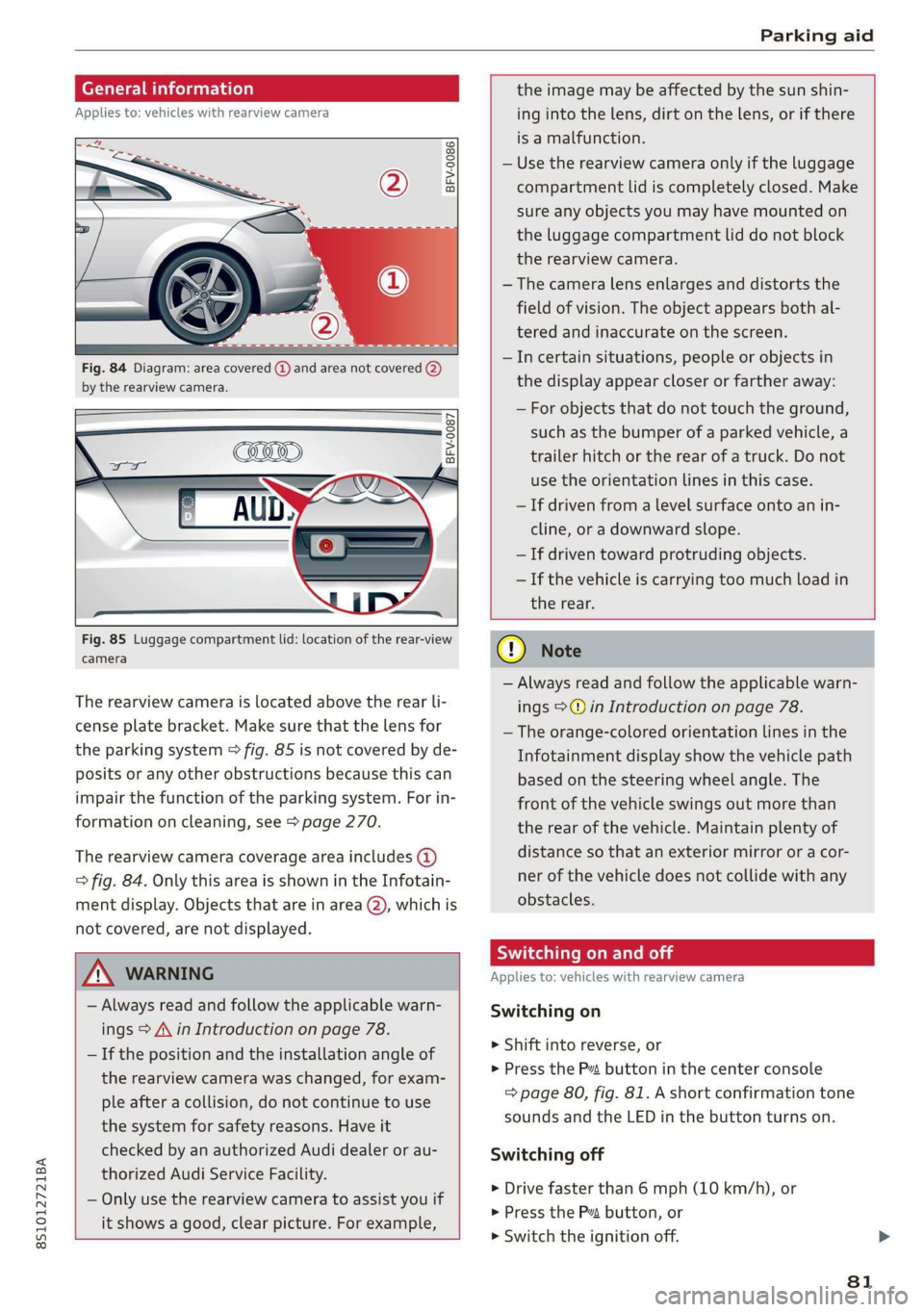
Fig.84Diagram:areacovered@)andareanotcovered(2)
bythe rearviewcamera.
BFV-0087
Fig.85Luggagecompartmentlid:locationoftherear-view
camera
Therearviewcameraislocatedabovetherearli-
censeplatebracket.Makesurethatthelensfor
theparkingsystem>fig.85isnotcoveredbyde-
positsoranyotherobstructionsbecausethiscan
impairthefunctionoftheparkingsystem.Forin-
formationoncleaning,see>page270.
Therearviewcameracoverageareaincludes(4)
=>fig.84.OnlythisareaisshownintheInfotain-
mentdisplay.Objectsthatareinarea(2),whichis
notcovered,arenotdisplayed.
Z\WARNING
—Alwaysreadandfollowtheapplicablewarn-
ings>A\inIntroductiononpage78.
—Ifthepositionandtheinstallationangleof
therearviewcamerawaschanged,forexam-
pleafteracollision,donotcontinuetouse
thesystemforsafetyreasons.Haveit
checkedbyanauthorizedAudidealerorau-
thorizedAudiServiceFacility.
—Onlyuse therearviewcameratoassistyouif
itshowsagood,clearpicture.Forexample,
theimagemaybeaffectedbythesunshin-
ingintothelens,dirtonthelens,orifthere
isamalfunction.
—Usetherearviewcameraonlyiftheluggage
compartmentlidiscompletelyclosed.Make
sureanyobjectsyoumayhavemountedon
theluggagecompartmentliddonotblock
therearviewcamera.
— Thecameralensenlargesanddistortsthe
fieldofvision.Theobjectappearsbothal-
teredandinaccurateonthescreen.
—Incertainsituations,peopleor objectsin
thedisplayappearcloserorfartheraway:
—Forobjectsthatdonottouchtheground,
suchasthebumperofaparkedvehicle,a
trailerhitchortherearofatruck.Donot
usetheorientationlinesinthiscase.
—Ifdrivenfromalevelsurfaceontoanin-
cline,oradownwardslope.
—Ifdriventowardprotrudingobjects.
—Ifthevehicleiscarryingtoomuchloadin
therear.
CG)Note
—Alwaysreadandfollowtheapplicablewarn-
ings>@inIntroductiononpage78.
—Theorange-coloredorientationlinesinthe
Infotainmentdisplayshowthevehiclepath
basedonthesteeringwheelangle.The
front ofthevehicleswingsoutmorethan
therearofthevehicle.Maintainplentyof
distanceso thatanexteriormirrororacor-
nerofthevehicledoesnotcollidewithany
obstacles.
SicLeRoi
Appliesto:vehicleswithrearviewcamera
Switchingon
>Shiftintoreverse,or
>PresstheP”buttoninthecenterconsole
=>page80,fig.81.Ashortconfirmationtone
soundsandtheLEDinthebuttonturnson.
Switchingoff
>Drivefasterthan6mph(10km/h),or
>PressthePvbutton,or
>»Switchtheignitionoff.
81
Page 86 of 312
IntelligentTechnology
IntelligentTechnology
Electronicstabilization
control (ESC)
ElectronicStabilizationControl(ESC)supports
driversafety.Itreducestheriskofslippingand
improvesdrivingstability.ESCdetectscriticalsit-
uationssuchasthevehicleoversteeringandun-
dersteeringorthewheelsarespinning.The
brakesareappliedortheenginetorqueisre-
ducedinordertostabilizethevehicle.Whenthe
ESCengages,theBindicatorlightblinksinthe
instrumentcluster.
ThefollowingsystemsareintegratedintheESC:
Anti-lockbrakingsystem(ABS)
ABSpreventsthewheelsfromlockingwhenbrak-
ing.Thevehiclecanstillbesteeredevenduring
hardbraking.Applysteadypressuretothebrake
pedal.Donotpumpthepedal.Apulsinginthe
brakepedalindicatesthatthesystemisacting to
stabilizethevehicle.
Brakeassistsystem
Thebrakeassistsystemcandecreasebrakingdis-
tance.Itincreasesbrakingpowerwhenthe driver
pressesthebrakepedalquicklyinemergencysit-
uations.Youmustpressandholdthebrakepedal
untilthedangeroussituationisover.
Anti-SlipRegulation(ASR)
ASRreducesdrivepowerwhenthedrivewheels
beginspinningandadaptsthepowertotheroad
conditions.Thismakesiteasiertostart,acceler-
ateanddriveuphills.
ElectronicDifferentialLock(EDL)
TheEDLappliesthe brakestowheelsthatare
slippingandtransfersthedrivepowertotheoth-
erwheels.Thisfunctionisnotavailableathigher
speeds.
Inextremecases,EDLautomaticallyswitchesoff
tokeepthebrakeonthebrakedwheelfromover-
heating.Thevehicleisstillfunctioningcorrectly.
84
EDLwillswitchonagainautomaticallywhencon-
ditionshavereturnedtonormal.
Powersteering
The ESCcanalsosupportvehiclestability
throughsteering.
Selectivewheeltorquecontrol
Selectivewheeltorquecontrolisusedwhendriv-
ingoncurves.Brakingistargetedtowardthe
wheelsontheinsideofthecurveasneeded.This
allowsmoreprecisedrivingincurves.
Automaticpost-collisionbrakingsystem
Theautomaticpost-collisionbrakingsystemcan
helptoreducetheriskofslidingandofaddition-
alcollisionsafteranaccident.Iftheairbagcon-
trolmoduledetectsacollisionaboveacertainve-
hiclespeed, thevehicleisbraked by theESC.
Thevehicledoesnotbrakeautomaticallyifoneof
thefollowingoccurs:
—Thedriverpressestheacceleratorpedal
—Thebrakingforcegeneratedbythepressed
brakepedalisgreaterthanthebrakingforce
thatwouldbeinitiatedbythesystem
—TheESC,thebrakesystem,orthevehicleelec-
tricalsystemisnotfunctioning
ZAWARNING
—TheESCanditsintegratedsystemscannot
overcomethelimitsimposedbynatural
physicallaws.Thisisespeciallyimportanton
slipperyorwetroads.Ifthesystemsbegin
acting tostabilizeyourvehicle,youshould
immediatelyalteryourspeedtomatchthe
roadandtrafficconditions.Donotletthein-
creasedsafetyprovidedtemptyouintotak-
ingrisks.Thiscouldincreaseyourriskofa
collision.
—Pleasenotetheriskofacollisionincreases
whendrivingfast,especiallythroughcurves
andonslipperyorwetroads,andwhendriv-
ingtooclosetoobjectsahead.The ESC and
itsintegratedsystemscannotalwayspre-
ventcollisions-thereisstillariskofacci-
dents!
Page 91 of 312
8S1012721BA
IntelligentTechnology
ZA\WARNING
Improperoperationoftherearspoilercan
causecrushinginjuries.
—Alwaysmakesure thatnobody,especially
children,isinthewaywhentherearspoiler
isdeployedorretracted.
()Note
—Neverpushonthevehicleontherearspoil-
er.Thiscouldcausedamage.
—Topreventdamagetotherearspoilerdo
notleanorplaceanythingonit.
—Onlyoperatetherearspoilermanuallywhen
theluggagecompartmentlidiscloseand
therearspoilermovingpartsarenot
blocked.Otherwise,damagecouldoccur.
@Tips
Cleantherearspoilercompartmentevery2 to
3
months.Tofunctioncorrectly,therear
spoilermustbefreeofice,snowandleaves.
Energymanagement
Yourvehicleisequippedwithanintelligentener-
gymanagementsystemfordistributingelectrici-
ty.Thissignificantlyimprovesthestartingability
andincreasesthevehiclebatterylife.
@Tips
—Ifyoudriveshortdistancesfrequently,the
vehiclebatterymaynotchargeenough
whiledriving.Asaresult,conveniencefunc-
tionsforelectricalequipmentmaybetem-
porarilyunavailable.
—Thevehiclebatterywillgraduallydrainif
thevehicleisnotdrivenforlongperiodsof
time,orifelectricalequipmentisused
whentheengineisnotrunning.Toensure
thatthevehiclecanstillbestarted,the
electricalequipmentwillbelimitedor
switchedoff.
Informationaboutdata
recordedbyvehicle
controlmodules
Yourvehicleisnotequippedwithacrashdatare-
corder.Thisdeviceisinstalledbysomevehicle
manufacturersto recorddataaboutcrashesso
thatitcanbeanalyzedlater.Crashdatarecorders
arealsocalled“EventDataRecorders(EDR)”.
Insomelegaljurisdictions,itisnotpermittedto
accessordownloaddatarecordedbypre-instal-
ledcrashdatarecordersinordertoevaluatea
crashwithoutclearconsentofthevehicleowner.
Yourvehicleisnotequippedwithacrashdatare-
corder.Howeveritdoescontainavarietyofelec-
troniccontrolmodulesforvariousvehiclesys-
temssuchasenginefunction,exhausttreatment
orairbagsandsafetybelts.
Theseelectroniccontrolmodulesrecordvehicle
dataduringnormaldrivingfordiagnosisandre-
pairpurposes.Therecordingcapabilityofthe
electroniccontrolmodulesislimitedtodataonly
-nosoundisrecorded.Ifthecontrolmodulede-
tectsasystemmalfunctionorotherchangein
status,averylimitedamountofdataisrecorded
foranextremelysmallperiodoftime.Datathat
isrecordedinsuchacasemayincludevehicle
speed,drivingdirection,theloadonthe brakes
andheadrestraintsandperformanceintheevent
ofanaccidentorotherchangeinstatus.Thestor-
eddatacanonlybereadordownloadedwithspe-
cialdevices.
89
Page 108 of 312
Voicerecognitionsystem
FunctionSay:
GeneralmapoptionsMap/Daymap/Nightmap/Automaticallychangemapcolor
Maptype2Dheading-upmap/2Dnorth-upmap/3Dmap/Destina-
tionmap/Overviewmap/Standardmap/Trafficmap/Satel-
litemap*®)
Showingtheroute listRoutelist
Showingtheremainingdistance/
timewhenrouteguidanceisactive
Destinationinformation
SpeedlimitpromptHowfastcanIdrivehere
Settingvoiceguidanceforactive
routeguidance
Voiceguidanceon|Voiceguidanceoff|Voiceguidanceshort-
ened|Voiceguidancecomplete|Voiceguidancetraffic
Blockingacertainsectiononthe
route
Blockroutefor(XY)meters/kilometers/yards/miles/Block
nextroute/Avoidnextsectionofroute
)AUDIAGprovidesaccesstoservicesfromthirdpartyproviders.Permanentavailabilitycannotbeguaranteed,becausethat
dependsonthethirdpartyprovider.
@Tips
—Destinationsmayhavetobespelledwhen
entered,dependingonthecountrywhere
youarelocatedandwhichmenulanguage
youhaveselected.
—Alwaysreadthe chapter>page123,Audi
connect.
Appliesto:vehicleswithvoicerecognitionsystem
Requirement:theRadiomustalreadybeopen.Youcansaythefollowingcommandsdepending
ontheselectedfrequencyband:
FunctionSay:
SelectingthefrequencybandFM/SIRIUSXM*/AM
Selectingastationfromthestation
list
Channel(XY)/Frequency(XY)/Laststations
SelectingastationfromthepresetsRadiopresets>Line(XY)
SettingthefrequencyFrequency(XY)
SettingthefrequencyFrequency(XY)/Frequency(XY)HD1
CorrectingdatainputNoImeant(XY)
Closingthefull-screencommand
list
Close
Appliesto:vehicleswithvoicerecognitionsystem
Requirement:youmustbeintheMediamenu.
106
Youcansaythefollowingcommandsdepending
ontheactivemedia:
Page 158 of 312
Alwaysfollowtheinformationfoundin>@in
Generalinformationonpage123.
@)Tips
— Depending ontheInternetconnectionand
networktraffic,theconnectionmaydiscon-
nectedwhenonlinemediasourcesareplay-
ing.
—OnlinemediaandInternetradiousagede-
pendsontheserviceavailabilityofthethird
partyprovider.
—AudiAGsimplymakestheaccesstoonline
mediaservicespossiblethroughtheMMI
anddoesnottakeanyresponsibilityforthe
contentsoftheonlinemediaservices.
—Alwaysreadthechapter>page123,Audi
connect.
— Dependingonthemobiledevicebeingused,
theremaybeinterruptionsduringmedia
playbackandwhenusingthemyAudiapp.
Topreventinterruptionswhenusingamo-
biledevice,donotlockthescreenonyour
mobiledeviceandkeepthemyAudiappin
theforeground.
—ContactanauthorizedAudidealeror au-
thorizedAudiServiceFacilityforadditional
informationaboutonlinemedia.
156
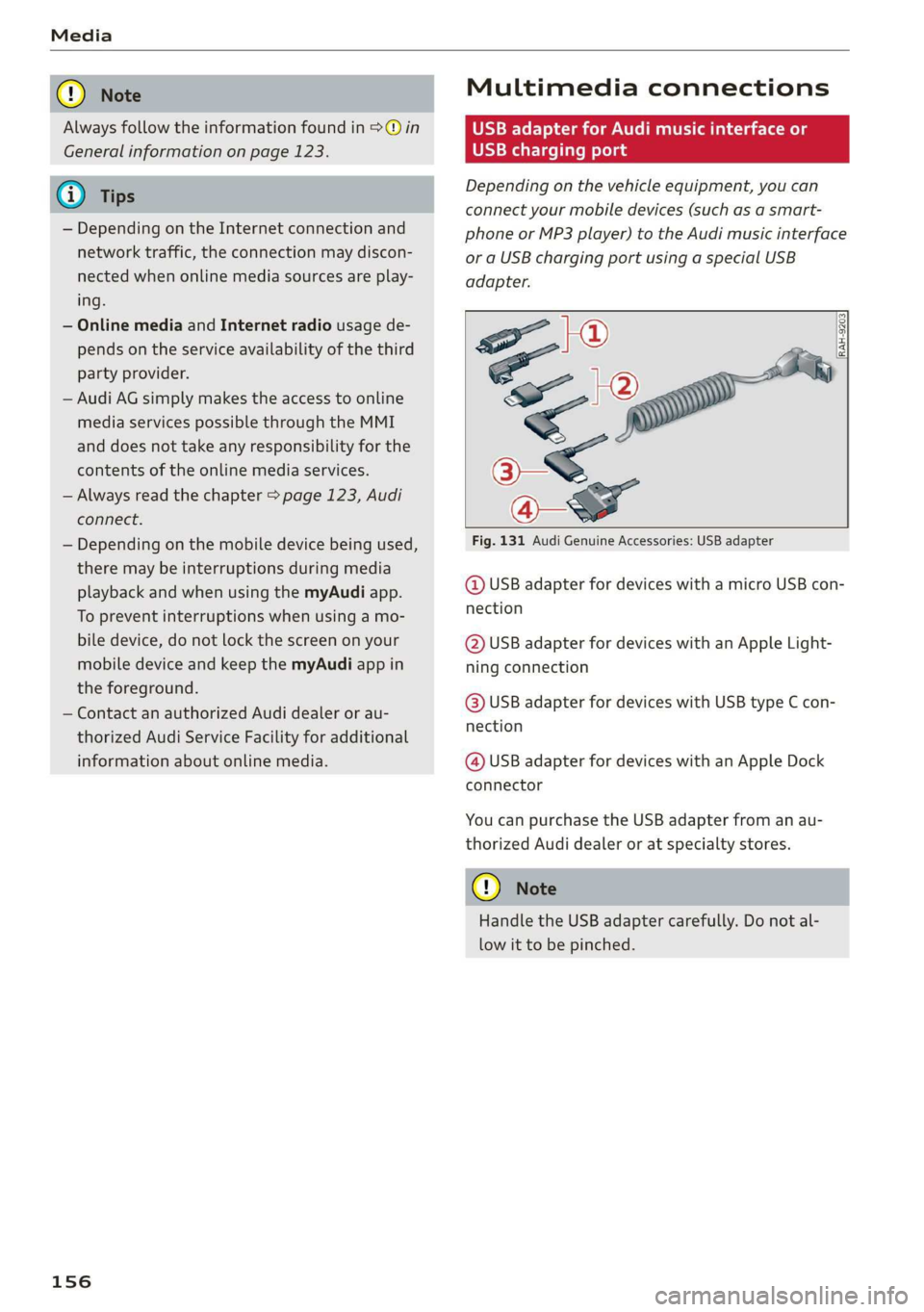
Multimediaconnections
OMFeeTomeNemeatsKole
USBchargingport
Dependingonthevehicleequipment,youcan
connectyourmobiledevices(suchasasmart-
phoneorMP3player)totheAudimusicinterface
oraUSBchargingportusingaspecialUSB
adapter.
oe|®
SO2
<
7
Fig.131AudiGenuineAccessories:USBadapter
RAH-9203|
@USBadapterfordeviceswithamicroUSBcon-
nection
@USBadapterfordeviceswithanAppleLight-
ningconnection
@USBadapterfordeviceswithUSBtypeCcon-
nection
@USBadapterfordeviceswithanAppleDock
connector
YoucanpurchasetheUSBadapterfromanau-
thorizedAudidealeroratspecialtystores.
()Note
HandletheUSBadaptercarefully.Donotal-
lowittobepinched.
Page 165 of 312
8S1012721BA
Media
Audiotrack!)
Youcanmanuallysettheaudiotrack(language
andaudioformat).Thelanguageandaudiofor-
matoptionsdependonthevideoDVD.
Subtitles!)
Youcanmanuallyselectsubtitlesforplayback.
ThelanguagesavailabledependontheDVD.
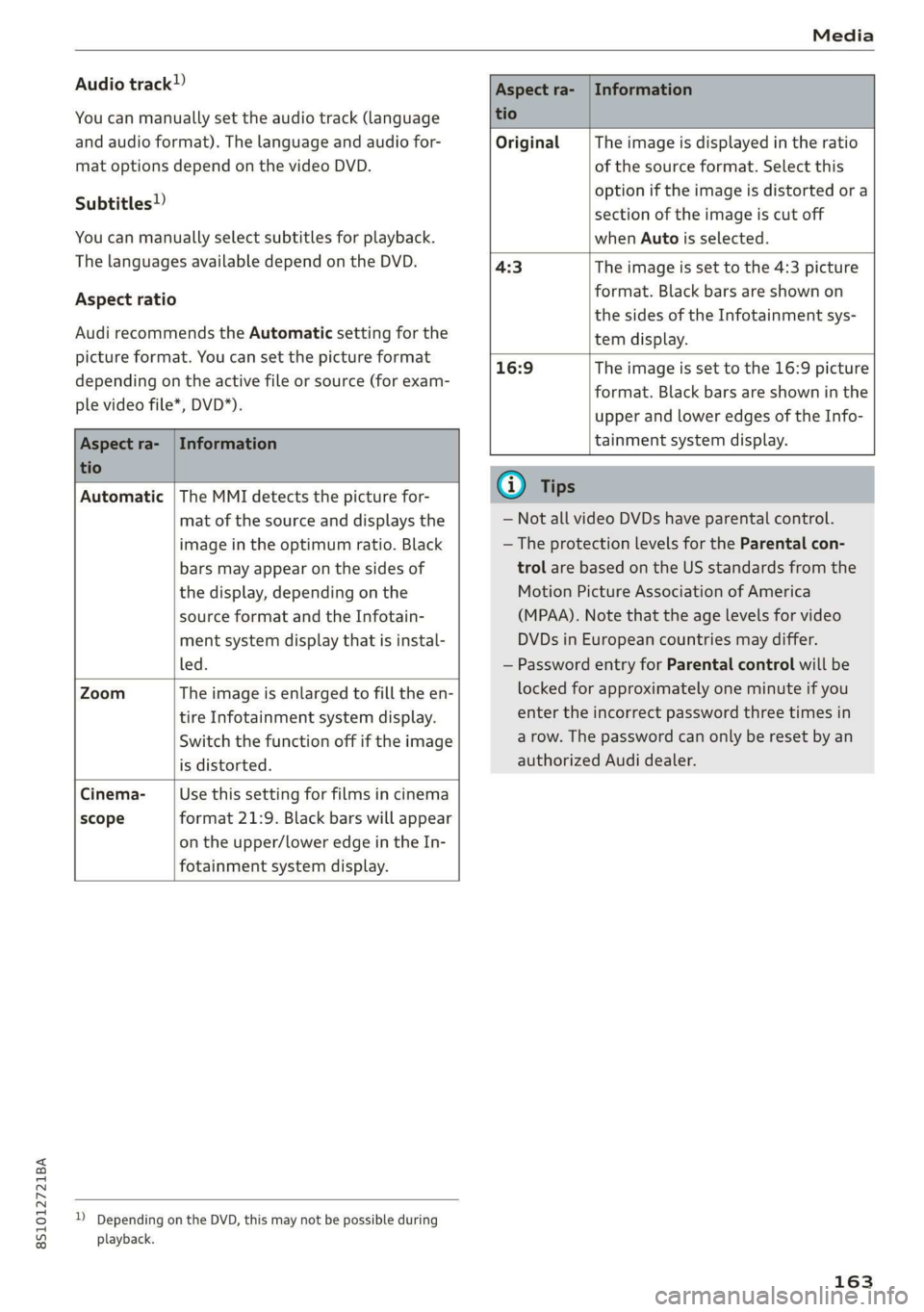
Aspectratio
AudirecommendstheAutomaticsettingforthe
pictureformat.Youcansetthepictureformat
dependingontheactivefileorsource(forexam-
plevideofile*,DVD*).
Aspectra-|Information
tio
OriginalTheimageisdisplayedintheratio
ofthesourceformat.Selectthis
optioniftheimageisdistorted ora
sectionoftheimageiscutoff
whenAutoisselected.
4:3Theimageissettothe 4:3picture
format.Blackbarsareshownon
thesidesoftheInfotainmentsys-
temdisplay.
Aspectra-|Information
tio
16:9 Theimageissettothe16:9picture
format.Blackbarsareshowninthe
upperandloweredgesoftheInfo-
tainmentsystemdisplay.
Automatic|TheMMIdetectsthepicturefor-
matofthesourceanddisplaysthe
imageintheoptimumratio.Black
barsmayappearonthesidesof
thedisplay,dependingonthe
sourceformatandtheInfotain-
mentsystemdisplaythatisinstal-
led.
ZoomTheimageisenlargedtofilltheen-
tireInfotainmentsystemdisplay.
Switchthefunctionoffiftheimage
isdistorted.
Cinema-Usethissettingforfilmsincinema
scopeformat21:9. Blackbarswillappear
ontheupper/loweredgeintheIn-
fotainmentsystemdisplay.
DDependingontheDVD,thismaynotbepossibleduring
playback.
@Tips
—NotallvideoDVDshaveparentalcontrol.
—TheprotectionlevelsfortheParentalcon-
trolarebasedontheUSstandardsfromthe
MotionPictureAssociationofAmerica
(MPAA).Notethattheagelevelsforvideo
DVDsinEuropeancountriesmaydiffer.
—PasswordentryforParentalcontrolwillbe
lockedforapproximatelyoneminuteifyou
entertheincorrectpasswordthreetimesin
arow.Thepasswordcanonlyberesetbyan
authorizedAudidealer.
163
Page 171 of 312
![AUDI TT COUPE 2019 Owners Guide 8S1012721BA
Systemsettings
Systemsettings
Settingthedateand
time
Youcanset theclocktimemanuallyorusingthe
GPS.
>Select:[MENU]button>Settings>leftcontrol
button>MMIsettings>Date&time.
>Or:select:](/img/6/57659/w960_57659-170.png "AUDI TT COUPE 2019 Owners Guide 8S1012721BA
Systemsettings
Systemsettings
Settingthedateand
time
Youcanset theclocktimemanuallyorusingthe
GPS.
>Select:[MENU]button>Settings>leftcontrol
button>MMIsettings>Date&time.
>Or:select:")
8S1012721BA
Systemsettings
Systemsettings
Settingthedateand
time
Youcanset theclocktimemanuallyorusingthe
GPS.
>Select:[MENU]button>Settings>leftcontrol
button>MMIsettings>Date&time.
>Or:select:[MENU]button>Vehicle>leftcon-
trolbutton>Vehiclesettings>Date&time.
Automaticsetting
Whenthisfunctionisswitchedon©,thetime
anddateareautomaticallyset.
Time
Requirement:theAutomaticsettingmustbe
switchedoff.
Pressthecontrolknob.YoucansettheTime
manuallybyturningandpressingthecontrol
knob.
Date
Requirement:theAutomaticsettingmustbe
switchedoff.
Pressthecontrolknob.YoucansettheDate
manuallybyturningandpressingthecontrol
knob.
Timezone
Whenselectingtheappropriatetimezone,a
samplingofcountriesinthiszonewillbelisted.
Automatictimezone*
Whenthisfunctionisswitchedon@,thetime
willautomaticallyadjusttothecorresponding
timezone.
Timeformat
Ifyouselect24h,theclockwilldisplay,forexam-
ple,13:00.IfyouselectAM/PM,theclockwill
display,forexample,1:00PM.
D_TheQistandardmakesitpossibletocharge yourmobile
devicewirelessly.
Dateformat
IfyouselectDD.MM.YYYY,thedatedisplaywill
show,forexample,31.08.2017.Ifyouselect
MM/DD/YYVY,thedatedisplaywillshow,forex-
ample,08/31/2017.IfyouselectYYYY-MM-DD,
thedatedisplaywillshow,forexample,
2017-08-31.
MMIsettings
>Select:[MENU]button>Settings>leftcontrol
button>MMIsettings.
Language
Youcanchangethedisplaylanguageaswellas
thelanguageforthevoiceguidance*andvoice
recognitionsystem*.
Thenumberoflanguagesavailabledependson
themarket.
Measurementunits
Thefollowingmeasurementunitscanbesetde-
pendingonavailability:Speed,Distance,Tem-
perature,Fuelconsumption,Volume,Pressure.
Mobiledeviceremindersignal
Appliesto:vehicleswithAudiphonebox
Requirement:yourcellphonemustbeQi-capa-
ble)orconnectedtotheAudimusicinterface@
withaUSBadaptercable>page111,fig.107.
Whenthedeviceremindersignalisswitchedon,
youwillbenotifiedthatyourmobiledeviceisstill
intheAudiphonebox*whenyouleavethevehi-
cle.YoucanselectbetweenSpokencue,Signal
toneandOff.
Mobiledeviceremindersignalvolume:youcan
adjusttheremindersignalvolumebyturningthe
controlknob.
Switchoffpop-up:whenthefunctionisswitched
on[M,themessagesintheInfotainmentsystem
displayregardingthechargingstatusofyourcell
phoneinthe Audiphonebox*arehidden.There-
mindernottoforgetyourcellphonewhenleav-
ingthevehicleislikewiseswitchedoff.
169
Page 178 of 312
Safedriving
>Take frequentbreaksonlongtrips.Donotdrive
formorethantwohoursatastretch.
>DoNOTdrivewhenyouaretired,underpres-
sureor whenyouarestressed.
Z\WARNING
Impaireddrivingsafetyincreasestheriskof
seriouspersonalinjuryanddeathwhenevera
vehicleisbeingused.
>Graspthetopofthesteeringwheelwithyour
elbow(s)slightlybent.
>Fastenandwearsafetybeltscorrectly
>page184.
>Always keepbothfeetinthefootwell so that
youareincontrolofthevehicleatalltimes.
Fordetailedinformationonhowtoadjustthe
driver'sseat,see>page40,Frontseats.
Correctpassenger
seatingpositions
Properseatingpositionforthedriver
Theproperdriverseatingpositionisimportant
forsafe,relaxeddriving.
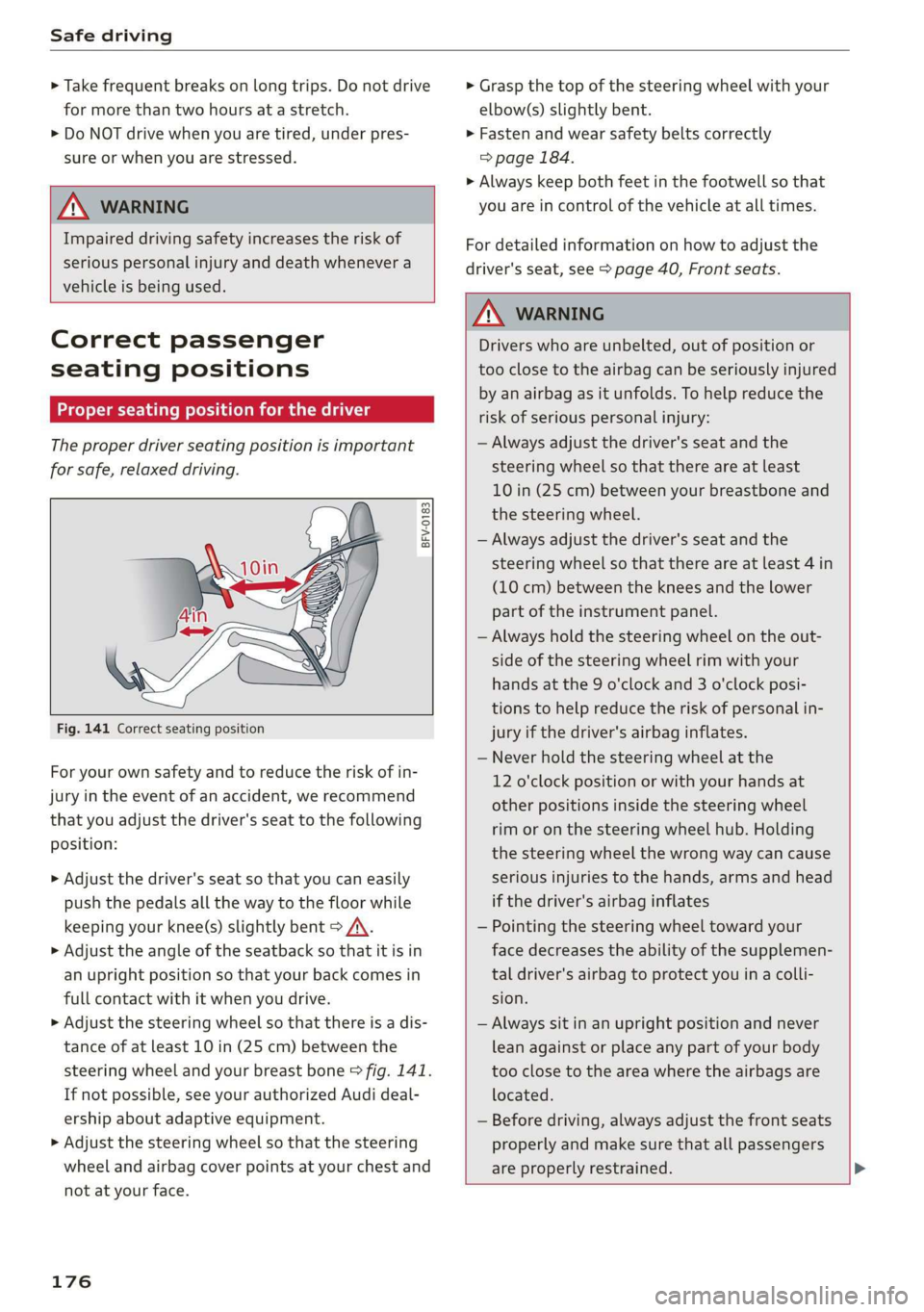
BFV-0183
Fig.141Correct seatingposition
Foryourownsafetyandtoreducetheriskofin-
juryinthe eventofanaccident,werecommend
thatyouadjustthedriver'sseattothefollowing
position:
>Adjustthedriver'sseat so thatyoucaneasily
pushthepedalsallthewaytothefloorwhile
keepingyourknee(s)slightlybent>A\.
>Adjusttheangleoftheseatbacksothatitisin
anuprightpositionsothatyour backcomesin
fullcontactwithitwhenyoudrive.
>Adjustthesteeringwheelsothatthereisadis-
tanceofatleast10in(25cm)betweenthe
steeringwheelandyourbreastbone>fig.141.
Ifnotpossible,seeyourauthorizedAudideal-
ershipaboutadaptiveequipment.
>Adjust thesteeringwheelso thatthesteering
wheelandairbagcoverpointsatyourchestand
notatyourface.
176
Z\WARNING
Driverswhoareunbelted,outofpositionor
tooclose totheairbagcanbeseriouslyinjured
by anairbagasitunfolds.To helpreduce the
riskofseriouspersonalinjury:
—Alwaysadjustthedriver'sseatandthe
steeringwheelsothatthereareatleast
10in(25cm)betweenyourbreastboneand
thesteeringwheel.
—Alwaysadjustthedriver'sseatandthe
steeringwheelsothatthereareatleast4in
(10cm)betweenthekneesandthe lower
partoftheinstrumentpanel.
—Alwaysholdthesteeringwheelontheout-
sideofthesteeringwheelrimwithyour
handsatthe9o'clockand3o'clockposi-
tionstohelpreducetheriskofpersonalin-
juryifthedriver'sairbaginflates.
—Neverholdthesteeringwheelatthe
12o'clockpositionorwithyourhandsat
otherpositionsinsidethesteeringwheel
rimoronthesteeringwheelhub.Holding
the
steeringwheelthewrongwaycancause
seriousinjuriestothehands,armsandhead
ifthedriver'sairbaginflates
—Pointingthesteeringwheeltowardyour
facedecreasestheabilityofthesupplemen-
taldriver'sairbagtoprotectyouinacolli-
sion.
—Alwayssitinanuprightpositionandnever
leanagainstor placeanypartofyourbody
tooclosetotheareawheretheairbagsare
located.
—Beforedriving,alwaysadjustthefront seats
properlyandmakesurethatallpassengers
areproperlyrestrained.
Page 186 of 312
Safetybelts
—Alwayskeepthebeltsclean.Dirtybeltsmay
notworkproperlyandcanimpairthefunc-
tionoftheinertiareel>tableInterior
cleaningonpage272.
Safetybelts
eetLiamhay
Safetyfirst-everybodybuckleup!
|
B4H-0462
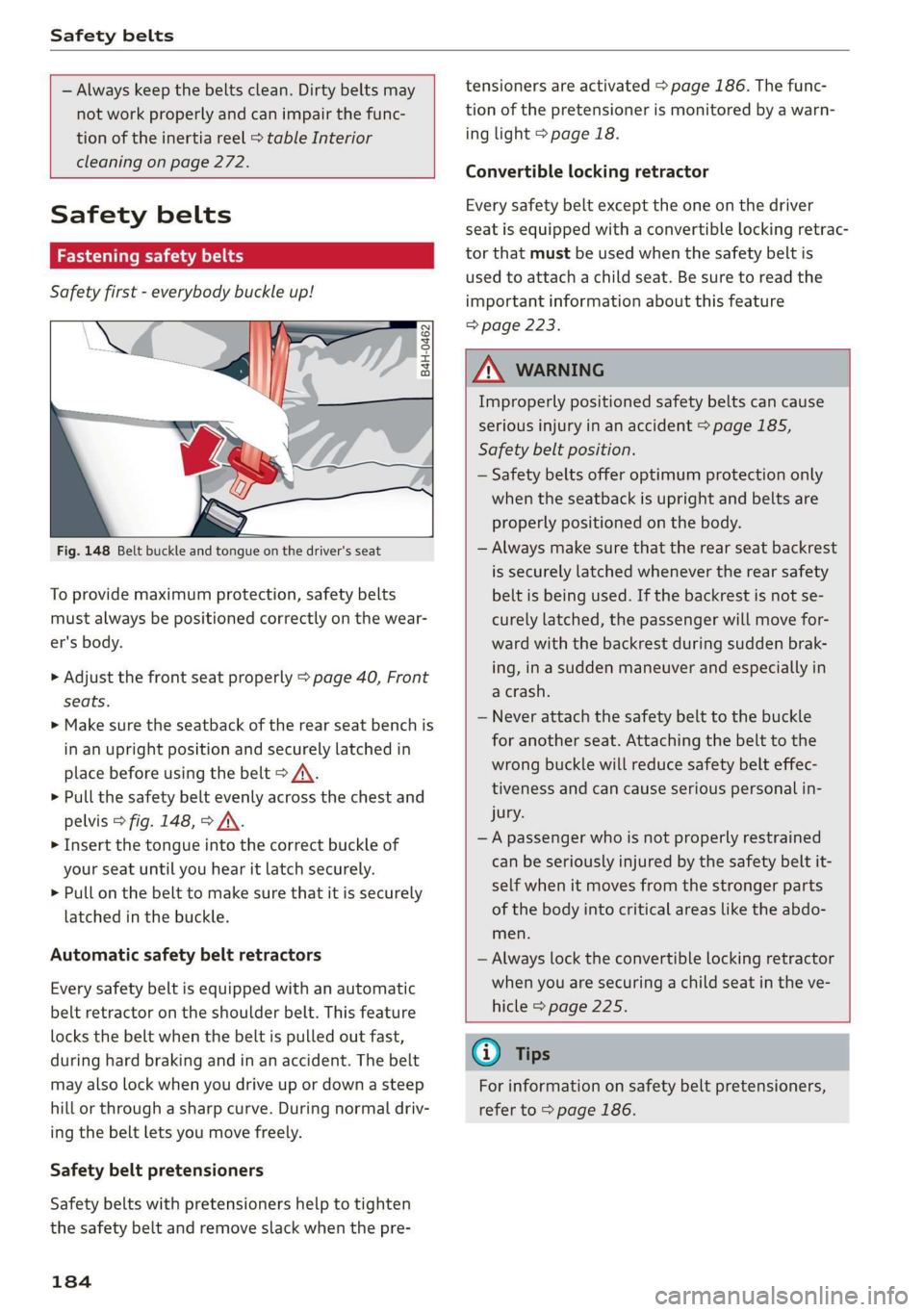
Fig.148Beltbuckleandtongueonthedriver'sseat
Toprovidemaximumprotection,safetybelts
mustalways bepositionedcorrectlyonthewear-
er'sbody.
>Adjustthefrontseatproperly>page40,Front
seats.
>Makesuretheseatbackoftherearseatbenchis
inanuprightpositionandsecurelylatchedin
placebeforeusingthebelt>/\.
>Pullthesafetybeltevenlyacrossthechestand
pelvis>fig.148,>A\.
> Insertthetongueintothecorrectbuckle of
yourseatuntilyouhearitlatchsecurely.
>Pullonthebelttomakesurethatitissecurely
latchedinthebuckle.
Automaticsafetybeltretractors
Everysafetybeltisequippedwithanautomatic
beltretractorontheshoulderbelt.Thisfeature
locksthebeltwhenthebeltispulledoutfast,
duringhardbrakingandinanaccident.Thebelt
mayalsolockwhenyoudriveupordownasteep
hillorthroughasharpcurve.Duringnormaldriv-
ingthebeltletsyoumovefreely.
Safetybeltpretensioners
Safetybeltswithpretensionershelptotighten
thesafetybeltandremoveslackwhenthepre-
184
tensionersareactivated>page186.Thefunc-
tionofthepretensionerismonitoredbyawarn-
inglight>page18.
Convertiblelockingretractor
Everysafetybeltexcepttheoneonthedriver
seatisequippedwithaconvertiblelockingretrac-
torthatmustbeusedwhenthesafetybeltis
usedtoattachachildseat.Besuretoreadthe
importantinformationaboutthisfeature
=>page223.
Z\WARNING
Improperlypositionedsafetybeltscancause
seriousinjuryinanaccident>page185,
Safetybeltposition.
—Safetybelts offeroptimumprotectiononly
whentheseatbackisuprightandbeltsare
properlypositionedonthebody.
—Alwaysmakesurethattherearseatbackrest
issecurelylatchedwhenever therearsafety
beltisbeingused.Ifthebackrestisnotse-
curelylatched,thepassengerwillmovefor-
wardwiththebackrestduringsuddenbrak-
ing,inasuddenmaneuverandespeciallyin
acrash.
—Neverattachthesafetybelt tothe buckle
foranotherseat.Attachingthebelttothe
wrongbucklewillreducesafetybelteffec-
tivenessandcancauseseriouspersonalin-
jury.
—Apassengerwhoisnotproperlyrestrained
canbeseriouslyinjuredbythesafetybeltit-
selfwhenitmovesfromthestrongerparts
ofthebodyintocriticalareasliketheabdo-
men.
—Alwayslocktheconvertiblelockingretractor
whenyouaresecuringachildseatintheve-
hicle>page225.
G)Tips
Forinformationonsafetybeltpretensioners,
referto>page186.