sat AUDI TT COUPE 2019 Owner's Guide
[x] Cancel search | Manufacturer: AUDI, Model Year: 2019, Model line: TT COUPE, Model: AUDI TT COUPE 2019Pages: 312, PDF Size: 83.95 MB
Page 143 of 312

8S1012721BA
Navigation
trafficinformationorpointsofinterestalongthe
routecan beswitchedon/off.
Automaticzoom
On:themapscaleisadaptedautomaticallyde-
pendingonthetypeofroadbeingtraveled(ex-
pressway,highway,otherroads)sothatyoual-
wayshaveanoptimaloverviewoftheroadahead.
Thescalewillalsobeautomaticallyadapted
whenthereareupcomingmaneuverstoprovidea
betterdetailedview.
Off:themapscaleyouhavechosenismain-
tained.
Mapcontent
Mapcontent,suchastrafficinformation,favor-
itesorrestaurants,canbedisplayedorhidden
(0
Satellitemap
Appliesto:vehicleswithnavigationsystemandAudiconnect
Youcandisplaythenavigationmapwithsatel-
liteimages.
SFigueroaSt
WWashingtonBlvd%
LosAngelesobi
Fig.121Example:satellitemap
Requirement:therequirementsforAudiconnect
mustbemet>page123.
>Pressthe [NAV/MAP]buttonrepeatedlyuntil
themapisdisplayed.
>Select:rightcontrolbutton>Mapsettings>
Mapdisplay>Satellitemap!).
))AUDIAGprovidesaccesstoservicesfromthirdpartypro-
viders.Permanentavailabilitycannotbeguaranteed,be-
causethatdependsonthethirdpartyprovider.
Themapviewisbasedondatapacketsreceived
fromtheInternetintheformofsatelliteimages,
whicharethencombinedwiththeroadwaysfrom
theStandardmapview.Therearetwogigabytes
ofmemoryspaceintheMMImemorythatcan be
usedtotemporarilystorethemapornavigation
datathatwasreceived.Thisisroughlythe
amountrequiredforthemap/navigationdatafor
a2,485mile(4,000km)route.Aslongasthe
satelliteimagesloadedforrouteguidanceare
stored,youcan usethemwithouthavinganac-
tivedataconnection.
G)Tips
—Thestoredsatellitemapdata)can bede-
letedthroughFactorysettings>Navigation
andonlinememory>page170.
—Thesatellitemap)isupdatedregularly
wheneverthefunctionisopened.Theproc-
essmaytakeseveralseconds.
—Whenthesatellitemap”)displayisswitched
onwiththe3Dpositionmaptype,themap
displayautomaticallyswitchestothe2D
maptypewhendrivingthroughtunnels.
—Alwaysreadthe chapter>page123.
—Foradditionalinformation,visitwww.
audiusa.com.
Accessingtraffic
information
Autorerouting(traffic)
Appliesto:vehicleswithnavigationsystem
When
receivingtrafficinformationthroughTMC/
online-dependingonavailability-youcanhave
theMMInavigateyouaroundtrafficincidents,if
possible.
Receptionoftrafficinformationisindicatedby
the[TMC]or[ONLINE]symbolonthemap
=>page142,fig.122.
141
Page 144 of 312

Navigation
Onlinetrafficinformation
Appliesto:vehicleswithnavigationsystemandAudiconnect
TheMMIcanreceivereal-timeonlinetrafficinformationaboutcongestion,accidents,roadconstruc-
tion,andotherincidents.
[RAH-8613]
7iccbetterrouteisavailable.—@
alongtheroute:Omin
NogalesSt,Northbound
@Northbound
Northbound
eel
\.
Cerys
@
Fig.122Example:onlinetrafficinformationdisplay*withoutbetterroute
Requirement:therequirementsforAudiconnect
mustbemet>page123.
> Pressthe[NAV/MAP
themapisdisplayed.
>Select:rightcontrolbutton>Onlinetrafficda-
ta>On(™).
>Select:leftcontrolbutton>Trafficmessages.
Thetrafficinformationoverviewisshown.
buttonrepeatedlyuntil
Dependingonvehicleequipment,thefollowing
informationmaybeshowninthetrafficinforma-
tionoverview>fig.122:
@AmessagewillappeariftheMMIcalculatesa
betterrouteforthecurrentrouteguidance.
Moreinformationcanbefound under
=>page143.
@ThestatuslineintheInfotainmentdisplay
indicatesthereceptionoftrafficinformation
TMC]or[ONLINE]).
@®)Thecurrentselectedtrafficmessageisalso
shownasamappreviewintheInfotainment
systemdisplay.
@Color-codedmarkingsalongtherouteindi-
catethetrafficflow.
Trafficdisplay
Green:trafficisflowingfreely.
Yellow:stop-and-gotraffic.
142
Red:congestion.
Shadedmarkingsindicatethelength ofthearea
withcongestion.
Coloredwarningsymbols:thereisatrafficinci-
dentimmediatelyaheadontheroute.
Grayedoutwarningsymbols:trafficincidents
thatarenotonyourroute.
Redwarningsymbols:allwarningsymbolswill
beredwhenrouteguidanceisnotactive.
Thedisplayofcoloredmarkings,warningsym-
bols,etc.canbesetintheMapcontentmenu
>page141.
Youcanswitchoffthereceptionofonlinetraffic
informationatanytime>page142.
Switchingthetrafficmapdisplayon
Foranoptimumtrafficinformationdisplay:
NAV/MAP]button>rightcontrolbutton>Map
settings>Mapdisplay>Traffic.
Page 145 of 312

8S1012721BA
Navigation
Youcanalsodisplaytheonlinetrafficinforma-
tioninthesatellitemap*»)>page141orthe
standardmap>page138,fig.119
G)Tips
—Onlinetrafficinformationisnotavailablein
Canada.
—Alwaysreadthe chapter>page123,Audi
connect.
—HavingtheOnlinetrafficdatafunction
switchedonprovidesthemostaccuratere-
portsoftrafficsituationsaswellastraffic
forecasting.Yourvehicletransmitsand
processesitsanonymous,encryptedposi-
tioninformationatregularintervalstothe
trafficdataprovider.Ifyoudonotwantto
usethis,youcanswitchofftheonlinetraf-
ficinformationfunctionatanytime.
— Theonlinetrafficinformationnetworkis
currentlynotavailableinallcountries,and
thecoverageisnotnationwide.Foraddi-
tionalinformation,visitwww.audiusa.com.
Trafficinformation(TMC)
Appliesto:vehicleswithnavigationsystem
>Pressthe [NAV/MAP|buttonrepeatedlyuntil
themapisdisplayed.
>Select:leftcontrolbutton>Trafficmessages.
TMCtrafficmessagesareswitchedonatthefac-
tory.
Multipletrafficmessagesaresummarizedinthe
overviewunderthecorrespondingstreetnames
orhighwaynames.
—Displayingalltrafficmessagesforastreet/
highway:selectandconfirm the|¢symbol.A
listofallthetrafficmessagesfortheselected
street/highwayisdisplayed.
—Openingthedetailedviewofatrafficmes-
sage:ifyouselectanentryfromthelist,the
trafficinformationwillbeshownasa mappre-
view@)>page142,fig.122.Selectandcon-
2)AUDIAGprovidesaccesstoservicesfromthirdpartypro-
viders.Permanentavailabilitycannotbeguaranteed,be-
causethatdependsonthethirdpartyprovider.
firmatrafficmessagetodisplaythedetailsfor
thatmessage.
—Displayingtheselectedtrafficmessageonthe
map:selecttherightcontrolbutton>Showon
map.
—Displayingthenexttrafficmessageonthe
map:pressthecontrolknob.
Trafficinformationdisplay
Coloredwarningsymbols:trafficincidentson
yourrouteareshownintheuppersectionofthe
listandaresortedaccordingtodistance.
Warningsymbolswith+:avoidedtrafficinci-
dents.
Grayedoutwarningsymbols:trafficincidents
thatarenotonyourroute.Theyaresortedac-
cordingtoroadtype(expressway,highway,other
road),countryandname.
Shadedmarkingsindicatethelength ofthearea
withcongestion.
@)Tips
Criticaltrafficinformation,suchaswarnings
aboutwrong-waydrivers,isautomaticallydis-
played.Tohidethetrafficinformation,press
the[BACK] buttonorthecontrolknob.
—TMCtrafficreportsarenotavailableinCan-
ada.Formoreinformation,pleasecontact
SiriusCanada.
Betterroute
Appliesto:vehicleswithnavigationsystem
ByreceivingtrafficinformationthroughTMC,
yourMMIcalculatesabetterrouteifavailable
andthepossibletimesavedcomparedtothe
currentroute.You candecidewhichrouteyou
wouldliketouse.
NAV/MAP >Pressthe
the
mapisdisplayed.
buttonrepeatedlyuntil
Requirement:routeguidancemustbeactive.
143
>
Page 147 of 312

8S1012721BA
Radio
Radio
Openingtheradio
TheradiosupportstheFM,AMandSiriusXM*
(satelliteradio)bands.UsingtheHDRadiore-
ceiveralsoallowsyoutoreceiveradiostationson
theFMandAMbandsindigitalformat.
(ier
ICSlesioncaU}VED
89.9WIBI-FMHD4
89.9WIBI-FMHD6
(2)90.3
Fig.123FMstationlist(HDRadiotechnologyFM)
RADIOro4.)
kVA
aliewea
|
RAH-8468
NoSignal
20on20
40son4
NoSignal NoSignal
Fig.124SiriusXMstationlist
>Pressthe[RADIO]button.
Afteropeningtheradio,thelastopenedstation
listisdisplayed.
Selectingastation:selectandconfirmastation
fromthestationlist.FM/AMstationsthatcan be
receivedbydigitalradioaremarkedwiththeHD
Radiotechnologysymbol)@)©fig.123.Ifre-
ceptionqualitydeclines,theradioautomatically
switchestotheanalogFM/AMstationdepending
onavailability.DigitalHDRadiostations*may
containmultipleadditionalstations*.Theavaila-
bleadditionalstations*arelistedundertheradio
station.Ifyoulosereception,theadditionalsta-
tions*aremutedsincetheycannolongerbere-
ceived.
Settingthefrequencyband:pressthe [RADIO
button
repeatedlyuntilthedesiredfrequency
bandisset.
Updatingthestationlist:stationlistsareupdat-
edautomatically.
Thefollowinginformationisdisplayedinthesta-
tionlists:
@Presets
Thestationisstoredasapreset.The symbol
showsthestoredlocationinthepresetslist(for
example,21).
@Radiotext(shorteneddisplay)
Ifavailable,programinformationabouttheset
stationisdisplayedinallofthestationlists.
@Frequency
@Stationname
©Channelnumber
Ifthereisa lossofradiosignal(SiriusXM*),the
followingsysteminformationisdisplayedinthe
stationlist:
NoSignal:thetuneriscurrentlynotreceivinga
satellitesignal®)>fig.124.
Thesysteminformationturnsoffwhentheradio
stationsarereceivedagain.
@Tips
—ContacttheSiriusXM*providerifyouwould
liketoreceivesatelliteprogramming.
—Buildings,tunnels,bridges,openareas,oth-
ervehiclesorobjectsonthevehicleroofcan
affectreception.
—SatelliteradioisnotavailableinAlaskaand
Hawaii.
—iTunestagging”isnotsupportedbyallradio
stations.
145
Page 149 of 312
![AUDI TT COUPE 2019 Owners Guide 8S1012721BA
Radio
View:Show"NowPlaying"screenSettingthefrequencyband:selectandconfirm
thedesiredfrequencybandintheradiomenu
>fig.127.Or:pressthe[RADIO]buttonrepeat-
edly
untilthedesiredfrequen](/img/6/57659/w960_57659-148.png "AUDI TT COUPE 2019 Owners Guide 8S1012721BA
Radio
View:Show\"NowPlaying\"screenSettingthefrequencyband:selectandconfirm
thedesiredfrequencybandintheradiomenu
>fig.127.Or:pressthe[RADIO]buttonrepeat-
edly
untilthedesiredfrequen")
8S1012721BA
Radio
View:Show"NowPlaying"screenSettingthefrequencyband:selectandconfirm
thedesiredfrequencybandintheradiomenu
>fig.127.Or:pressthe[RADIO]buttonrepeat-
edly
untilthedesiredfrequencybandisset.Dis-
playsthestationlist.
@Switchtomedia
TheMediamenuisdisplayed.See>page158,
Playingmedia.
Fig.126Radioview:additionalstationinformation@Favorites
Requirement:youmustbetunedtoaradiosta-Thefavoriteslistisdisplayed.See>page147,
tion.TheShow"NowPlaying"screen optionPresets.
mustbe switchedon>page148.©Laststations
Symbolsinthe"NowPlaying”screen>fig.126:Thelaststationslistenedtofromallfrequency
@Radiotextavailabilitybandsareshowninthelist.Selectandconfirma
stationforimmediateplayback.
Radiotextisavailable fortheselectedstation.
See>page146.@SiriusKM*
@)iTunestaggingTheSiriusXM*stationlistisdisplayed.
TheTagthissongforiTunesoptionisavailable@®FM
forthesetstation.See>page146,Additional
.TheFMstationlistisdisplayed.
options.
@FMHDRadiotechnologyAdditionalfrequencybands
Dependingonthevehicleequipment,youcanse-
lectadditionalfrequencybandsintheselection
menu>fig.127.
ThestationisreceivedthroughFMHDRadio
technology.
@Screenview
DisplayCoverartorStationlogo.SeePresets
=>page148.Youcanstoreyourfavoritestationsfromevery
Displayingastationlist:turnthecontrolknob.frequencybandinthepresetslist.
Or:pressthe[BACK]button.
>Select:the[RADIO]button>Presets.
RadiomenuRequirement:thepresetslistmustbedisplayed.
—Storingpresets:selectandconfirm afreepre-
(D)|changetomediatsetspace.Followthesysteminstructions.
Bees—Selectandconfirmastationfromthelistif
©—®o(Eateoltnecessary.
Satay)Requirement:astationlistmustbedisplayed.
—Storingpresets:select:anentryfromthelist>
rightcontrolbutton>Storeaspreset.Or:press
Fig.127Example:Radiomenuandholdthecontrolknobforseveralseconds.
—Displayingthepresetslist:select:[RADIO]but-
ton>Presets.>
>Select:[RADIO]button>leftcontrolbutton.
147
Page 150 of 312
Radio
Requirement:thefavoriteslistmustbedis-
played.
—Listeningtopresets:selectandconfirm apre-
setfromthelist.
—Moveapreset:selectapresetfromthelist>
rightcontrolbutton>Movepreset.Or:press
andholdthecontrolknobforseveralseconds.
Selectandconfirmthelocationoftheselected
preset.
—Deletingpresets:selecta presetfromthelist>
rightcontrolbutton>Deletepreset>Delete
thispresetorDeleteallpresets.
Additionalsettings
Radiosettings
>Select:[RADIO]button>rightcontrolbutton>
Radiosettings.
Thefollowingsettingscan beselected,depend-
ingonthebandthatisselected:
Stationnames(FM)
Variable:scrollingtexttransmittedby theFM
stationsisshownintheInfotainmentsystemdis-
play.
Fixed:scrollingtexttransmittedby theFMsta-
tionsisnotshownintheInfotainmentsystem
display.Onlythecurrentsectionofthescrolling
textisdisplayed.
FM/AMHDRadio*
YoucanswitchHDRadioreceptiononoroff.
Channelsorting(SiriusXM*)
YoucansetthechannelsortingforSiriusXMsta-
tionlists*by:
—Channelnumber:thechannelsaresortedinas-
cendingorderaccordingtotheirchannelnum-
ber.
—Channelname:thechannelsarelistedinalpha-
beticalorder.
—Firstcategory,thenchannelnumber:thechan-
nelsaresortedbytheircategoryandthenby
theirchannelnumbers.
148
—Firstcategory,thenchannelname:thesta-
tionsaresorted bytheircategoryandthenby
theirchannelnames.
Categoryfilter(SiriusXM*)
Thestationsshowninthestationlistcanbefil-
teredbyyourpersonalpreferencesandbypro-
gramtype.Theprogramcategoriesthatyoucan
selectdependonwhatisofferedbyyourprovid-
er.SelecttheAllcategoriesoptiontodeactivate
allfilteroptionsanddisplayallavailablestations
inthesatellitestationlist.
Show"NowPlaying"screen
Whenthefunctionisswitchedon¥andthesta-
tionsorpresetslistisopen, thedisplaywill
switchtotheShow"NowPlaying"screenview
afterapproximatelyfiveseconds>page147.De-
pendingonavailability,informationabouttheset
station(such asstationname,artistandstation
logo)maybedisplayedinthisview.
Preferredpictureview
Youcansetyourpreferredscreenviewforthe
Show "NowPlaying"screen>page147.
—Stationlogo:thestationlogoisdisplayed,de-
pendingonavailability.
—Coverart:thealbumcoverorgenrecoverisdis-
played,dependingonavailability.
Gracenoteonlinedatabase*
Requirement:theMMImustbeconnectedtothe
Internet.TheCoverartoptionmustbeselected
=page148,Preferredpictureview.
Whenthefunctionisswitchedon(¥,thealbum
coverorgenrecoverforthesongthatisplayingis
loadedfromtheGracenoteonlinedatabase,de-
pendingonavailability.
Subscriptionstatus(SiriusXM)*
Thisoptionisavailablewhenyoursubscriptionis
abouttoexpireorhasalreadyexpired.Theexpi-
rationdateforyourlicenseisdisplayed.
CalltoSiriusXM”*:thecontactinformationfor
yoursatelliteradioproviderisdisplayed.Tocall
yoursatelliteradioproviderusingtheMMI,press
CalltoSiriusXM”*.
Page 160 of 312
Media
—Audirecommendssettingthevolumeofa
mobiledeviceconnectedtotheAUXinputto
approximately70%ofthemaximumvol-
ume.
—Functionalityisnotguaranteedformobile
devicesthatdonotconformtotheUSB2.0
specification.
—USBhubsarenotsupported.
—SomeversionsoftheiPodsuchastheiPod
shufflecannotbeconnectedtotheUSB
adapterfordeviceswithAppleDockconnec-
tor.ConnectthesedevicesusingaAUXcon-
nectorcable.
—Videoplaybackthroughthe Audimusicin-
terfaceisonlysupportediftheconnected
deviceisrecognizedasaUSBstoragedevice
(forexampleaUSBstick).Appledevicesand
MTPdevices(such assmartphones)arenot
recognizedasUSBstoragedevices.
—iPod oriPhonemalfunctionsalsoaffectthe
operationoftheMMI.ResetyouriPod or
iPhoneifthishappens.
—Forimportantinformationonoperating
youriPodoriPhone,refertotheuserguide
forthedevice.Audirecommendsupdating
theiPodoriPhonesoftwaretothelatest
version.
—Formoreinformationaboutthe Audimusic
interfaceandsupporteddevices,checkthe
Audidatabaseformobiledevicesatwww.
audiusa.com/mp3orcontactanauthorized
AudidealerorauthorizedAudiServiceFa-
cility.
Playingmedia
Accessingmedia
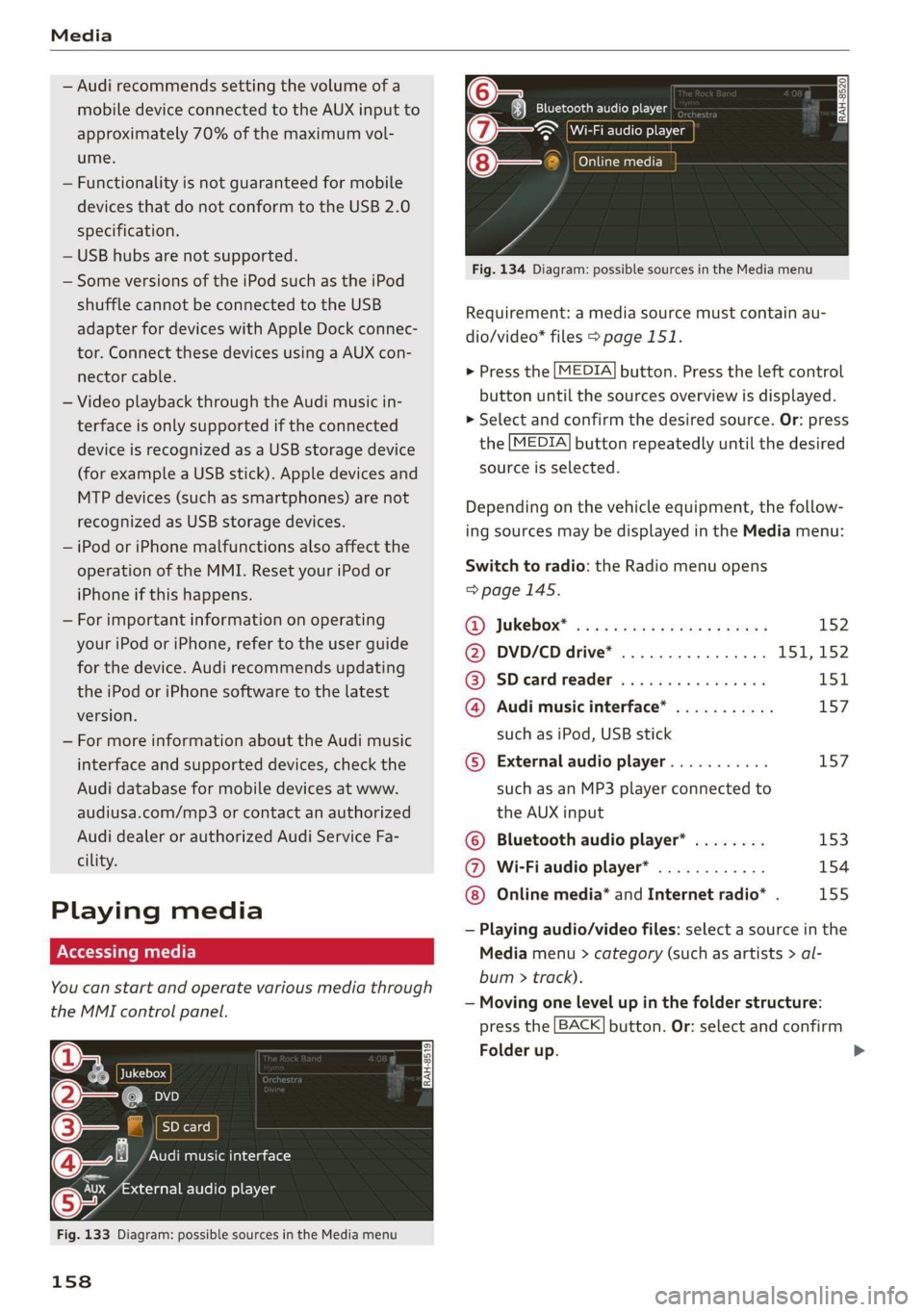
Youcanstartandoperatevariousmediathrough
theMMIcontrolpanel.
Ue@@|Jukebox
@—eies
[RAH-8519]
@—§Audimusicinterface
evaudioplayer
Fig.133Diagram:possiblesourcesintheMediamenu
158
RAH-8520Bluetoothaudioplayer
=~Wi-Fiaudioplayer
Onlinemedia
Fig.134Diagram:possiblesourcesintheMediamenu
Requirement:amediasourcemustcontainau-
dio/video*files>page151.
>Pressthe[MEDIA]button.Presstheleftcontrol
buttonuntilthesourcesoverviewisdisplayed.
>Selectandconfirmthedesiredsource.Or:press
the[MEDIA]buttonrepeatedlyuntilthedesired
sourceisselected.
Dependingonthevehicleequipment,thefollow-
ingsourcesmaybedisplayedintheMediamenu:
Switchtoradio:the Radiomenuopens
=>page145.
RD):JUKEDOX®wesssserex xsemeveeee152
@DVD/CDdrive*................ISI,152
@SDeardreader................151
@Audimusicinterface*...........157
suchasiPod,USBstick
©Externalaudioplayer...........157
suchasanMP3playerconnectedto
theAUXinput
©Bluetoothaudioplayer*........153
@Wi-Fiaudioplayer*............154
Onlinemedia*andInternetradio”.155
—Playingaudio/videofiles:selectasourceinthe
Mediamenu>category(suchasartists>al-
bum>track).
—Movingonelevelupinthefolderstructure:
pressthe[BACK]button.Or:selectandconfirm
Folderup.
>
Page 167 of 312
8S1012721BA
Media
—SomeMTPplayerfunctionsarenotsupport-
ed,suchasratingmusictracksandvideo
playback.
Appliesto:vehicleswithaCDdrive
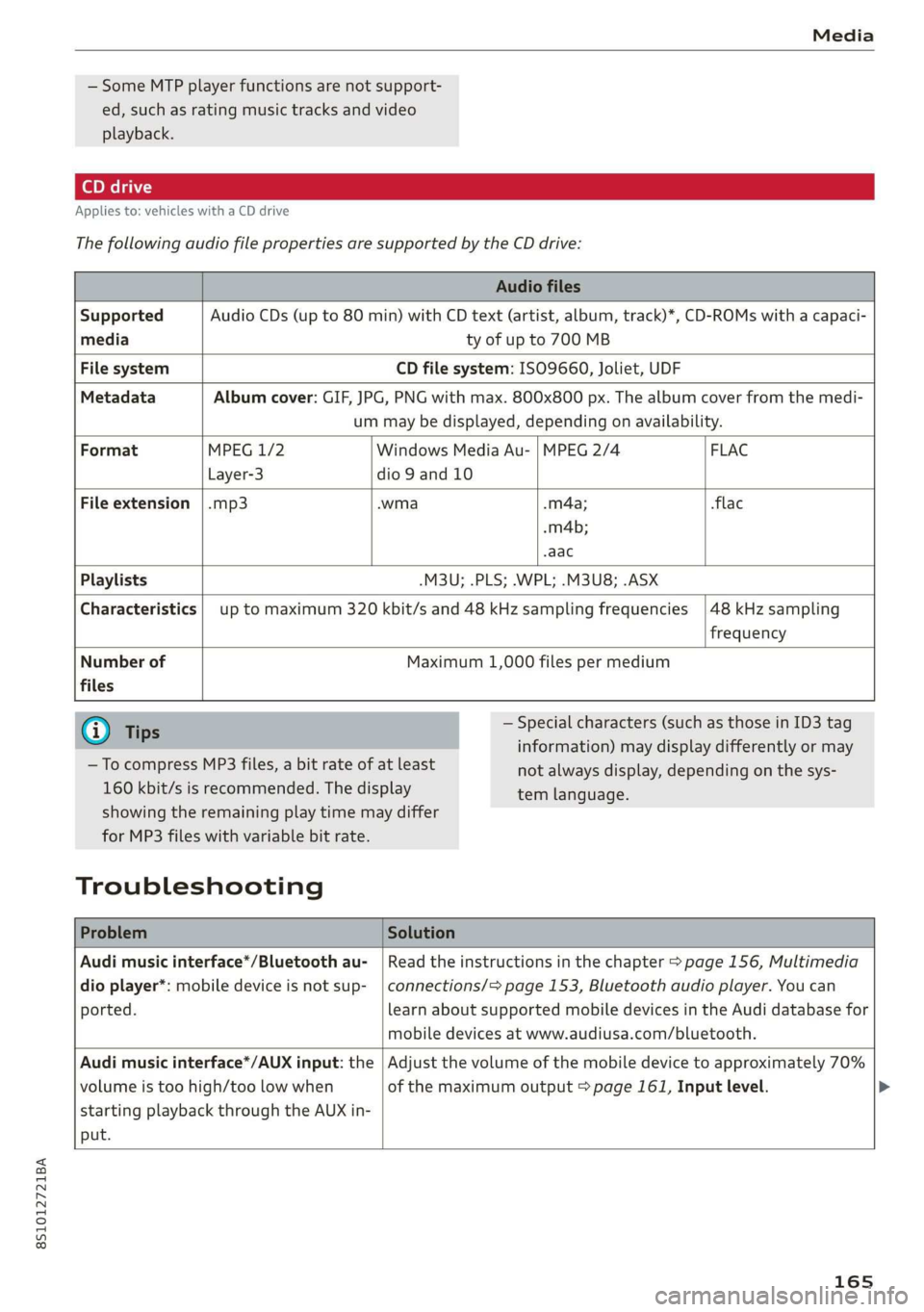
ThefollowingaudiofilepropertiesaresupportedbytheCDdrive:
Audiofiles
SupportedAudioCDs(upto80min)withCDtext(artist,album,track)*,CD-ROMswithacapaci-
mediatyofupto700MB
FilesystemCDfilesystem:ISO9660,Joliet,UDF
MetadataAlbumcover:GIF,JPG,PNGwithmax.800x800px.Thealbumcoverfromthemedi-
ummaybedisplayed,dependingonavailability.
FormatMPEG1/2WindowsMediaAu-|MPEG2/4 FLAC
Layer-3dio9and10
Fileextension|.mp3.wma.m4a;flac
-m4b;
aac
Playlists-M3U;.PLS;.WPL;.M3U8;.ASX
Characteristicsuptomaximum320kbit/sand48kHzsamplingfrequencies
48kHzsampling
frequency
Numberof
files
Maximum1,000filespermedium
@)Tips
—TocompressMP3files,abitrateofatleast
160kbit/sisrecommended.Thedisplay
—Specialcharacters(suchasthoseinID3tag
information)maydisplaydifferentlyormay
temlanguage.
showingtheremainingplaytimemaydiffer
forMP3fileswithvariablebitrate.
Troubleshooting
notalwaysdisplay,dependingonthesys-
ProblemSolution
Audimusicinterface*/Bluetoothau-
dioplayer*:mobiledeviceisnotsup-
ported.
Readtheinstructionsinthechapter>page156,Multimedia
connections/=>page153,Bluetoothaudioplayer.Youcan
learnaboutsupportedmobiledevicesintheAudidatabasefor
mobiledevicesatwww.audiusa.com/bluetooth.
Audimusicinterface*/AUXinput:the
volumeistoohigh/toolowwhen
startingplaybackthroughtheAUXin-
put.
Adjustthevolumeofthemobiledevicetoapproximately70%
ofthemaximumoutput>page161,Inputlevel.>
165
Page 172 of 312
Systemsettings
Tooltips
WhenthisfunctionisswitchedonM,yourMMI
showsyoutipsforinput.Thefrequencyofhow
oftenitdisplaysdecreaseswithtime.Youcan
switchoffthe operatingtipsatanytime.
Speechdialogsystem
Appliesto:vehicleswithvoicerecognitionsystem
Commanddisplay:whenthisfunctionisswitch-
edon,theMMIwillshowyouthepossible
commandsforvoiceinputintherespective
menu.Youcanswitchthefunctionoffatany
time.
Shortdialog:whenthisfunctionisswitchedon
,ashorterformofthepromptsisused.You
canswitchthefunctionoffatanytime.
Speechdialogsystemvolume:youcanadjust
thevolumeofthepromptsbyturningthecontrol
knob.
Individualspeechtraining(onlywhenthevehi-
cleisstationary):youcanadaptthevoicerecog-
nitionsystemtoyourvoiceorpronunciationinor-
dertoimprovethesystem'sabilitytorecognize
yourspeech.Individualspeechtrainingiscom-
prisedof20speechentriesthatconsistofcom-
mandsand sequencesofnumbers.Youcande-
letetheprogrammedvoicetrainingwiththeRe-
setindividualspeechtrainingfunction.
Factorysettings
Thefollowingfunctionscanberesettothefacto-
rydefaultsettings:
—Soundsettings
—Radio
—Mediasettings
—Jukebox*
—Directory*
—Telephone*
—BluetoothandWi-Fi*
—Navigationsettings*
—Navigationandonlinememory*
—Voicerecognitionsystem*
—Messagesettings*
—Apps*
—Tooltips
—
Audiconnect*
170
Youcanselectthedesiredfunctionsindividually
orallatoncewiththeoptionSelectallentries.
Selectandconfirm Restorefactorysettings.
G)Tips
Makesurethatnotonlythesettingswerede-
letedbutalsothestoreddata,ifnecessary.
Connectionmanager
Introduction
Theconnectionmanagerprovidesanoverviewof
yourconnecteddevicesandtheirnetworkstatus.
>Select:[MENU]button>Settings>leftcontrol
button>MMIsettings>Connectionmanager.
»Selectandconfirmamenuitem.
If amobiledevicewasalreadyconnectedandyou
selectandconfirmthecorrespondingmenuitem,
thedevicenameandconnectionstatusaredis-
playedunderthemenuitem.
YoucanindividuallyConnect(M)orDisconnect
(_)apaireddevice.
Requirement:
—Thevehiclemustbestationaryandtheignition
mustbeswitchedon.
—TheBluetoothsettingswillopenonyourmo-
biledeviceduringtheconnectionsetup.
—TheBluetoothfunctionandvisibility oftheMMI
=page171andmobiledevicemustbeswitch-
edon.
—Themobiledevicetobeconnectedmustnot be
connectedtoanyotherBluetoothdevice.
Primaryphone
Appliesto:vehicleswithtelephone
—Connectnewdevice:searchforandconnecta
cellphone.
—Listofdevicesalreadypaired:selectyourcell
phonefromthelistofallthedevicesthatare
alreadypaired.
Page 175 of 312
8S1012721BA
Systemsettings
—Resetdriverinstallation:theselectedmedia
driverpackageisresettothesettingsatthe
timeofdelivery.
—Versioninformation:informationontheMMI
softwareversionandthenavigationdatabase*
softwareversionisdisplayed.TheSoftwarein-
formationfunctionalsoprovidesinformation
onthesoftwarecontainedintheMMIandthe
licensingagreement.
Soundsettings
ThesounddistributionandvolumeoftheMMI
canbeadjustedindividually.Thesettingsdepend
onthevehicleequipment.
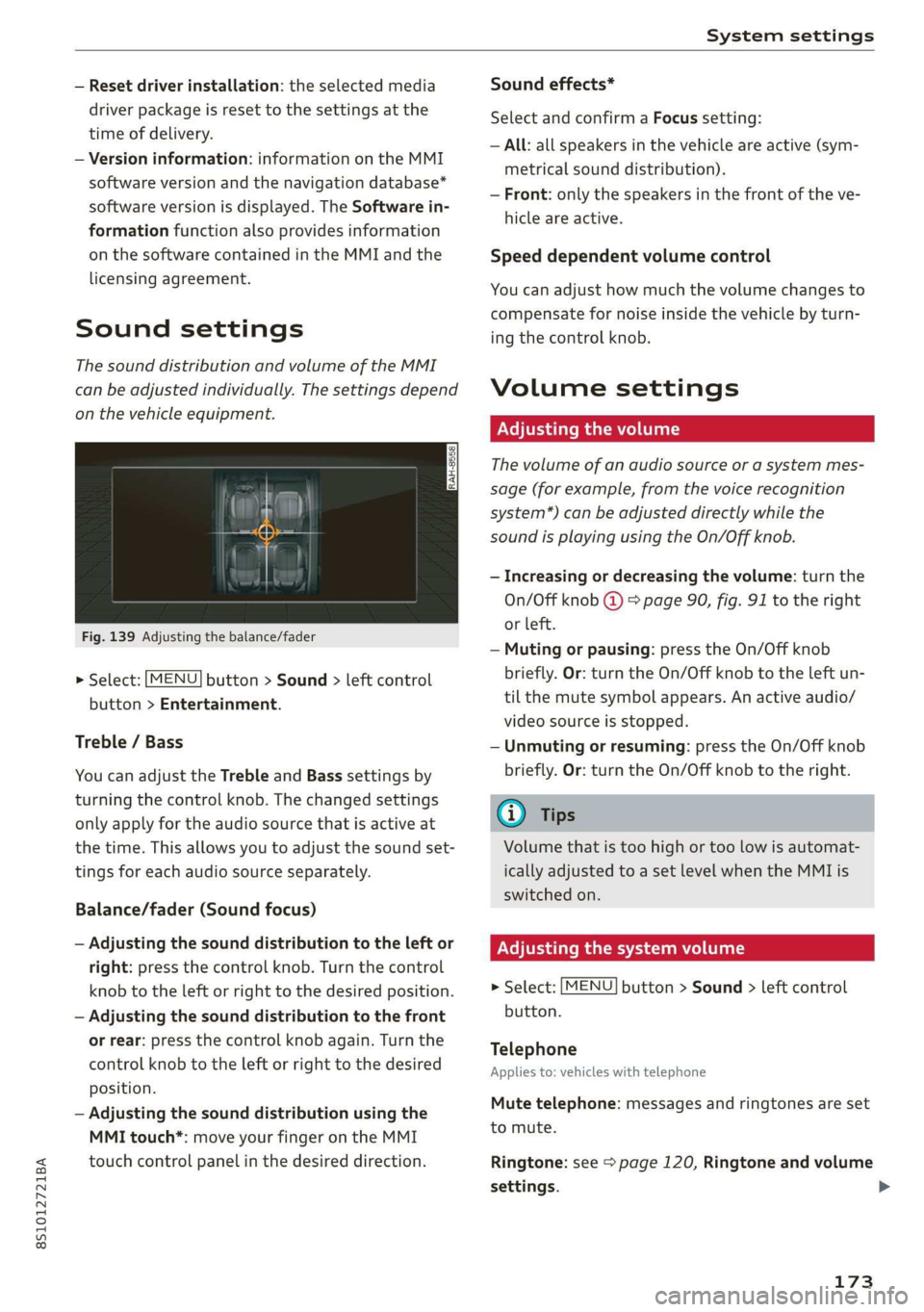
Fig.139Adjusting thebalance/fader
>Select:[MENU]button>Sound>leftcontrol
button>Entertainment.
Treble/Bass
YoucanadjusttheTrebleandBasssettingsby
turningthecontrolknob.Thechangedsettings
onlyapplyfortheaudiosourcethatisactiveat
thetime.Thisallowsyoutoadjustthesoundset-
tingsforeachaudiosourceseparately.
Balance/fader(Soundfocus)
—Adjustingthesounddistributiontotheleftor
right:pressthecontrolknob.Turnthecontrol
knobtotheleftorrighttothedesiredposition.
—Adjustingthesounddistributiontothefront
orrear:pressthecontrolknobagain.Turnthe
controlknobtotheleftorrighttothedesired
position.
—Adjustingthesounddistributionusingthe
MMItouch*:moveyourfingerontheMMI
touchcontrolpanelinthedesireddirection.
Soundeffects*
SelectandconfirmaFocussetting:
—All:allspeakersinthevehicleareactive(sym-
metricalsounddistribution).
—Front:onlythespeakersinthefrontoftheve-
hicleareactive.
Speeddependentvolumecontrol
Youcanadjusthowmuchthevolumechangesto
compensatefornoiseinsidethevehiclebyturn-
ingthecontrolknob.
Volumesettings
Adjusting thevolume
Thevolumeofanaudiosourceorasystemmes-
sage(forexample,fromthevoicerecognition
system*)canbeadjusteddirectlywhilethe
soundisplayingusingtheOn/Offknob.
—Increasingordecreasing thevolume:turnthe
On/Offknob@)9page90,fig.91totheright
orleft.
—Mutingorpausing:presstheOn/Offknob
briefly.Or:turntheOn/Offknobtotheleftun-
tilthemutesymbolappears.Anactiveaudio/
videosourceisstopped.
—Unmutingorresuming:presstheOn/Offknob
briefly.Or:turntheOn/Offknobtotheright.
G)Tips
Volumethatistoohighortoolowisautomat-
icallyadjustedtoasetlevelwhentheMMIis
switchedon.
Adjusting thesystemvolume
>Select:[MENU]button>Sound>leftcontrol
button.
Telephone
Appliesto:vehicleswithtelephone
Mutetelephone:messagesandringtonesareset
tomute.
Ringtone:see=page120,Ringtoneandvolume
settings.
173