display AUDI TT COUPE 2019 Workshop Manual
[x] Cancel search | Manufacturer: AUDI, Model Year: 2019, Model line: TT COUPE, Model: AUDI TT COUPE 2019Pages: 312, PDF Size: 83.95 MB
Page 117 of 312

8S1012721BA
Telephone
>Addtoconference.Resumetakesallpartiesoff
hold.
Multi-partycalling:selecttherightcontrolbut-
ton>Telephonesettings>Calloptions.When
thefunctionisswitchedon¥youcanacceptan
additionalcallusingAnswerordeclineacallus-
ingDecline.Whenthefunctionisswitchedoff,
youcanReplacethecallorDecline.
Connectionmanager:see>page170.
Telephonesettings:see>page120.
G)Tips
—To benotifiedofanincomingcallduringa
phonecall,thecallwaitingfunctioninyour
cellphonemustbe switchedonwhenusing
thehands-freeprofile(Handsfree).
—Youcanobtainmoreinformationfromyour
mobiledeviceserviceproviderorfromyour
mobiledeviceuserguide.
—Whenleavingthevehicle,theBluetooth
connectiontothemobiledevicewillauto-
maticallydisconnect.Depending onyour
mobiledevice,phonecallsinprogressmay
beautomaticallyredirectedfromtheMMI
toyourmobiledevicesothatyoucancon-
tinuethecallonyourphone.
— Thedisplay ofan incomingphonecallinthe
Infotainmentsystemdisplaymaystill be
visibleforafewsecondsdependingonthe
cellphoneinuse.UsingtheReplaceorDe-
clinefunctionsmaythenendtheactive
phonecall.
Favorites
Appliesto:vehicleswithtelephone
Upto50contacts,inadditiontothe voicemail
number,canbestoredinanyorderinthefavor-
iteslist.
>Select:[MENU]button>Telephone>leftcon-
trolbutton.
—Storinganexistingphonenumber asafavor-
ite:selectandconfirmCalllist/Directory.Se-
lectandconfirmacontactorphonenumber
fromthelist.Select:rightcontrolbutton>
Store asfavorite.Enteranameforthefavorite
orselectasuggestion.SelectandconfirmSave.
—Renamingastoredfavorite:selectandconfirm
Favorites>selectafavoritefromthelist.Se-
lecttherightcontrolbutton>Renamefavor-
ite.
—Movingastoredfavorite:selectandconfirm
Favorites>selectafavoritefromthelist.Se-
lecttherightcontrolbutton>Movefavorite.
Selectandconfirmthelocationoftheselected
favorite.
—Deletingastoredfavorite:selectandconfirm
Favorites>selectafavoritefromthelist.Se-
lect:rightcontrolbutton>Deletefavorite>
DeletethisentryorDeleteallentries.
Messages
Textmessages
Appliesto:cellphoneswithBluetoothMessageAccessProfile
(MAP)
Dependingonthemobiledevicebeingusedand
themobilenetworkcontract,youmaybeableto
receiveandsendtextmessagesusingtheMMI.
Requirement
AcellphonemustbeconnectedtotheMMIvia
BluetoothMAP(MessageAccessProfile)
=>page108.
>Select:[MENU]button>Telephone>leftcon-
trolbutton>textmessage(myPhone)/text
message(secondaryphone)*.
Inbox
Allreceivedtextmessagesaredisplayed.
Sent
Allsenttextmessagesaredisplayed.
Outbox
Alltextmessagestobesentaredisplayed.
Drafts
Displaysalltextmessagesthathavenotyetbeen
sentandstoredtextmessages.
Deleted
Displaysalldeletedtextmessages.
115
Page 118 of 312

Telephone
@Tips
—Pleasenotethatyoumayhavetoactivate
thereceivingandsendingoftextmessages
inyourcellphonedependingontheSIM
cardbeingused(forexample,whenusinga
Multi-SIM).Youcanobtainmoreinforma-
tionfromyourmobiledeviceserviceprovid-
erorfromyourmobiledeviceuserguide.
—Formoreinformationonsupportedmobile
devices,visitwww.audiusa.com/bluetooth
orcontactanauthorizedAudidealerorau-
thorizedAudiServiceFacility.
—YouneedamobiledevicewithMessageAc-
cess
Profilethatalsosupportsthesending
functiontobeabletosendtextmessages
throughtheMMI.
Writetextmessage
Appliesto: cellphoneswithBluetoothMessageAccessProfile
(MAP)
>Select:[MENU]button>Telephone>leftcon-
trolbutton>textmessage(myPhone)/text
message(secondaryphone)*.
Writenewtextmessage
Selectandconfirm thedesiredtemplatefromthe
list.Enterarecipient.SelectandconfirmSend.
Reply*
Selectandconfirm thedesiredtemplatefromthe
list.SelectandconfirmSend.
Messageoptions
Appliesto:cellphoneswithBluetoothMessageAccessProfile
(MAP)
>Select:[MENU]button>Telephone>leftcon-
trolbutton>textmessage(myPhone)/text
message(secondaryphone)*>Inbox/Sent/
Outbox>rightcontrolbutton.
Thefollowingoptionsmaybeavailabledepend-
ingontheselectedmenu.
Notavailableinalllanguages.
116
Reply*
Areplycanbesentfortheselectedmessagein
the Inbox.
Forward
Theselectedtextmessagecanbeforwardedtoa
differentrecipient.
Sendagain*
Theselectedtextmessagecanberesent.
Deletethistextmessage*
Theselectedtextmessagecanbedeleted.
Readout)
YoucanhavetheMMIreadanopentextmes-
sage.
Textmessagingsettings*
Todisplaywhenanewtextmessageisreceived,
enabletheTextmessagenotifications.Newtext
messagesareindicatedwithanenvelope&in
theInfotainmentsystemdisplaystatusline.
Connectionmanager
See>page170.
Bluetoothsettings
See>page171.
Onlinesettings
See>page172.
Wi-Fisettings
See>page128,Wi-Fisettings.
Telephonesettings
See>page120.
@)Tips
MessagesthataredeletedintheMMIarealso
deletedinthemobiledeviceautomatically.
Page 119 of 312
8S1012721BA
Telephone
Appliesto: cellphoneswithBluetoothMessageAccessProfile
(MAP)
Dependingonthetypeofcellphoneused,you
canreceiveandsende-mailsthroughtheMMI.
Requirement:theMessageAccessProfile(MAP)
mustbeactivatedintheBluetoothsettingson
yourcellphoneandyourcellphonemustbecon-
nectedtotheMMI>page108.Youcanfindout
ifyourmobiledevicesupportsthisfunctionby
checkingyourmobiledeviceowner'smanual.
>Select:[MENU]button>Telephone>leftcon-
trolbutton>e-mail(myPhone)/e-mail(secon-
daryphone)*.
Writenewe-mail
—Usingatemplate:selectandconfirmthede-
siredtemplatefromthelist.
—Enteroneormorerecipients.
—SelectandconfirmSend.
Inbox
Allreceivede-mailsaredisplayed.
Sent
Allsente-mailsaredisplayed.
Outbox
Alle-mailsthatwillbesentaredisplayed.
Drafts
Allsavede-mailsthathavenotbeensentyetare
displayed.
@)Note
Alwaysfollowtheinformationfoundin>@in
Generalinformationonpage123.
@)Tips
—Formoreinformationonsupportedmobile
devices,visitwww.audiusa.com/bluetooth
orcontactanauthorizedAudidealeror au-
thorizedAudiServiceFacility.
Notavailableinalllanguages.
—Ifyouarestill notreceivinge-mailseven
thoughyouhaveasuccessfulconnection,
thencontactyoure-mailserviceprovideror
yourcellphoneserviceprovider.
Messageoptions
Appliesto: cellphoneswithBluetoothMessageAccessProfile
(MAP)
>Select:[MENU]button>Telephone>leftcon-
trolbutton>e-mail(myPhone)/e-mail(secon-
daryphone)*>Inbox/Sent/Outbox>right
controlbutton.
Thefollowingoptionsmaybeavailabledepend-
ingontheselectedmenu.
Storeastemplate
Tene-mailtemplatesarestoredintheMMI.You
cansaveupto10additionaltemplatesofyour
own.
—Createane-mail.
—Selectandconfirm Storeastemplate.
Resumelasteditede-mail
Thelaste-mailinprogresscanberesumed.
Reply*
Areplycanbesentfortheselectede-mailinthe
Inbox.
Replytoall*
Areplycanbesentfortheselectede-mailinthe
Inboxanditwillbesenttoalloftheenteredre-
cipients.
Forward
Theselectede-mailcanbeforwardedtoadiffer-
entrecipient.
Deletethismessage*
Theselectede-mailcanbedeleted.
Readout)
Youcan have theMMIreadanopene-mail.
117
Page 120 of 312
Telephone
E-mailsettings*
Todisplaywhenanewe-mailisreceived,activate
theE-mailnotifications.Newe-mailsareindicat-
edwithanenvelope&intheInfotainmentsys-
temdisplaystatusline.
Connectionmanager
See>page170.
Bluetoothsettings
See>page171.
Onlinesettings
See>page172.
Wi-Fisettings
See>page128,Wi-Fisettings.
Telephonesettings
See>page120.
G)Tips
MessagesthataredeletedintheMMIarealso
automaticallydeletedintheconnectedcell
phone.
Listeningtovoicemail
Appliesto:vehicleswithtelephone
MENU >Select:button>Telephone>leftcon-
trolbutton.SelectandconfirmCalllist/Direc-
tory/Favorites>Voicemail.
—Enteringthevoicemailnumber:enterthede-
sirednumber.SelectandconfirmOK.
—Dialingthevoicemailnumber:selectandcon-
firm
Voicemail.
@)Tips
—Thisservicemustbesetupandactivatedin
advancebythecellphoneserviceprovider.
Youcanobtainmoreinformationfromyour
cellphoneserviceprovider.
— Thevoicemailnumberdependsonthecell
phoneserviceprovider.
118
Emergencycallfunctions
Appliesto:vehicleswithtelephone
MENU >Select:button>Telephone>leftcon-
trolbutton>Dialnumber>Enteremergency
callnumber(forexample,911)>OK.
ZAWARNING
—Becauseyourphoneworkswithradiosig-
nals,aconnectioncannotbeguaranteedun-
derallcircumstances.Donotrelyononly
yourphonewhenitcomestoessentialcom-
munication(suchasamedicalemergency).
—Alwaysfollowtheinstructionsgivenbythe
emergencypersonnelduringanemergency
callandonlyendthecallwhentheyinstruct
youtodoso.
@)Tips
Emergencynumbersarenot
thesameevery-
where.Findoutwhichemergencynumberis
usedinyourcurrentlocation.
Directory
Openingthedirectory
Appliesto:vehicleswithtelephone
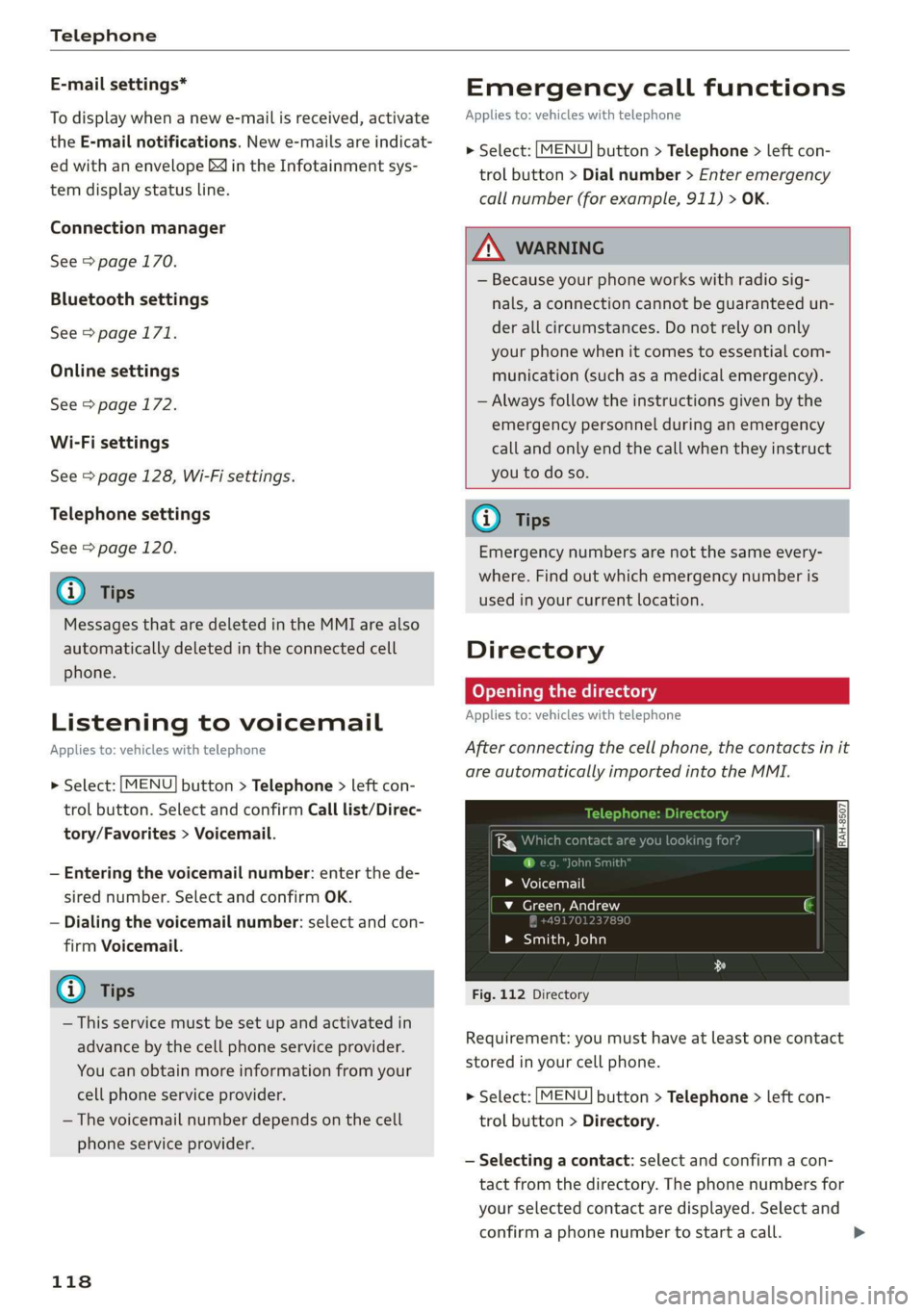
Afterconnectingthecellphone,thecontactsinit
areautomaticallyimportedintotheMMI.
>Voicemail
v_Green,Andrew
49170123789
>Smith,John
Fig.112Directory
Requirement:youmusthaveatleastonecontact
storedinyourcellphone.
>Select:[MENU]button>Telephone>leftcon-
trolbutton>Directory.
—Selectingacontact:selectandconfirmacon-
tactfromthedirectory.Thephonenumbersfor
yourselectedcontactaredisplayed.Selectand
confirmaphonenumbertostartacall.>
Page 121 of 312
8S1012721BA
Telephone
—Freetextsearchforacontact:see>page98.
Contactsaredisplayedinalphabeticalorderand
canbesortedbyfirstorlastname>page121.
ThedirectorycanbeopenedthroughtheTele-
phone*menuaswellasthroughtheNavigation*
menu.
()Tips
—Checkforapossiblerequesttosynchronize
onyourcellphone.Requeststosynchronize
thedirectorymustbeconfirmedso that
yourcellphonecontactscan beloadedinto
theMMI.
— ThecontactdisplayintheMMIdependson
themobiledevicebeingused.Formorein-
formationonsupportedmobiledevices,vis-
itwww.audiusa.com/bluetoothorcontact
anauthorizedAudidealerorauthorizedAu-
diServiceFacility.
— Thedirectoryfromthecellphonewiththe
activeconnectionwillalwaysbedisplayed.
— Thecontactsfromthemobiledevicemay
notbetransferredinalphabeticalorder.If
therearetoomanyentries,contactswith
differentfirstlettersmaybemissinginthe
MMI.
— ThecontactsinthelocalMMImemoryare
alwaysvisibleandcan beaccessedbyother
users.
iedaayetalmlahtraey
Appliesto:vehicleswithtelephone
>Select:[MENU]button>Telephone>leftcon-
trolbutton>Directory.
>Tolimitthesearch,entertheinitialsofthecon-
tactbeingsearchedwitheachinitialseparated
byaspace.Enteradditionallettersifnecessary.
> Selectandconfirmacontactfromthedirectory.
Thephonenumbersfortheselectedcontactare
displayed.
>Tomakethecall,selectandconfirmaphone
number.
@)Tips
—Youcanscrollthroughlonglistsquicklyby
turningthecontrolknobquickly.Thescroll-
ingspeeddependsonthenumberoflisten-
tries.
—Additionalinformationonfreetextsearches
canbefoundunder>page98.
Showingcontactdetails*
Appliesto:vehicleswithtelephone
aCeyealtan)
LaeeYi--YSRPTT.)
®001701239873
aaa)
{[email protected]
Fig.113Diagram:showingcontactdetails
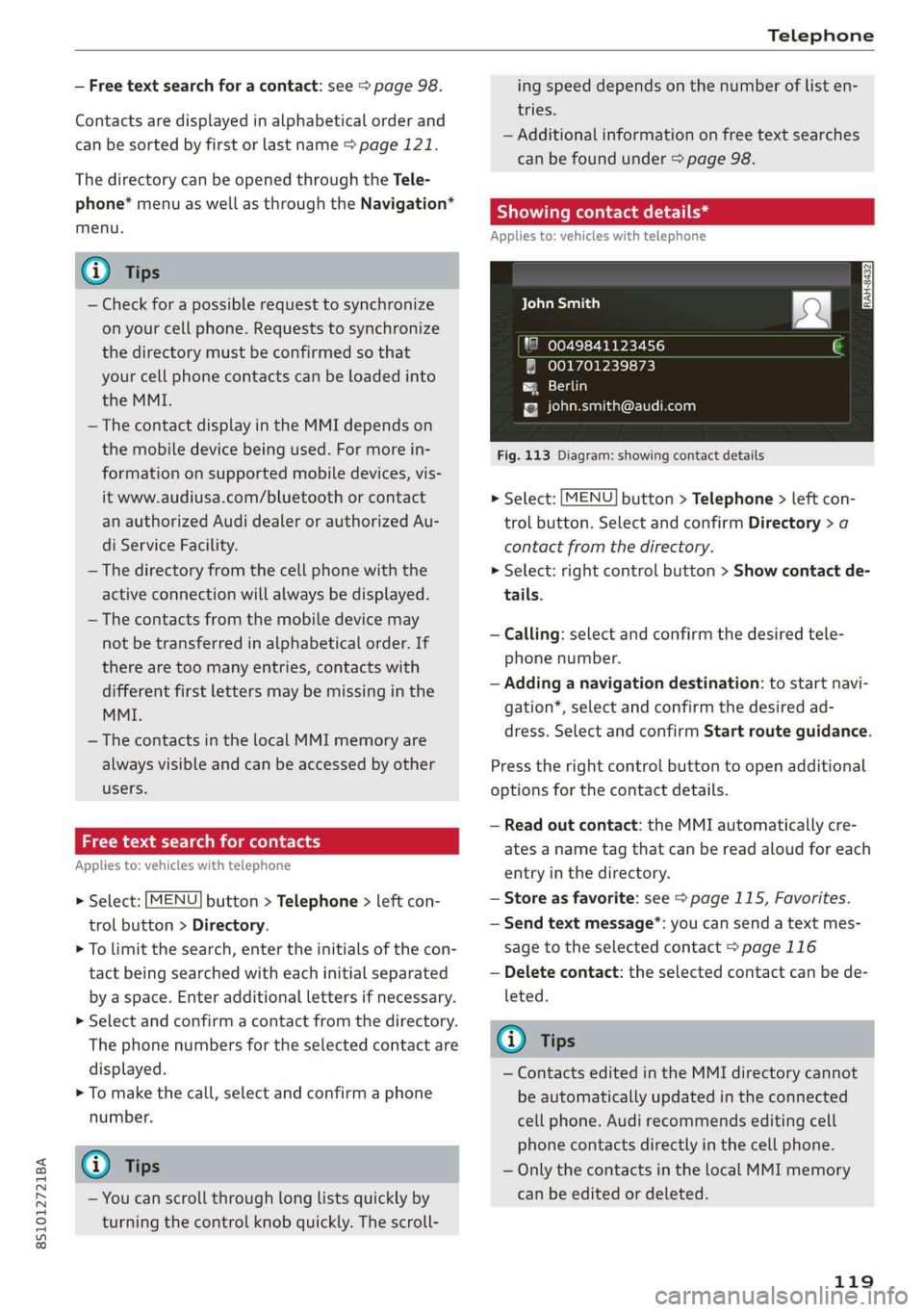
>Select:[MENU]button>Telephone>leftcon-
trolbutton.SelectandconfirmDirectory>a
contactfromthedirectory.
>Select:rightcontrolbutton>Showcontactde-
tails.
—Calling: selectandconfirmthedesiredtele-
phonenumber.
—Addinganavigationdestination:tostartnavi-
gation*,selectandconfirmthedesired ad-
dress.SelectandconfirmStartrouteguidance.
Presstherightcontrolbuttontoopenadditional
optionsforthecontactdetails.
—Readoutcontact:theMMIautomaticallycre-
atesanametagthatcan bereadaloudforeach
entryinthedirectory.
—Storeasfavorite:see>page115,Favorites.
—Sendtextmessage”:youcansendatextmes-
sagetotheselectedcontact>page116
—Deletecontact:theselectedcontactcanbede-
leted.
@Tips
—ContactseditedintheMMIdirectorycannot
beautomaticallyupdatedintheconnected
cellphone.Audirecommendseditingcell
phonecontactsdirectlyinthecellphone.
—OnlythecontactsinthelocalMMImemory
canbeeditedor deleted.
119
Page 125 of 312
8S1012721BA
Audiconnect
Audiconnect
Generalinformation
Dependingonthecountryandthevehicleequip-
ment,thefollowing functionsmaybeavailable:
—AudiconnectInfotainment
YoucanalsofindmoreinformationonAudicon-
nectonlineatwww.audiusa.com.
Z\WARNING
—Toreducetheriskofanaccident,onlyuse
Audiconnectserviceswhenroadandtraffic
conditionspermit.Alwaysreadandfollow
the
notesin>page90,Trafficsafetyinfor-
mation.
—Itisonlysafe tousetablets,laptops,mobile
devicesandothersimilardeviceswhenthe
vehicleisstationarybecause,likeallloose
objects,theycouldbethrownaroundthein-
sideofthevehicleinacrashandcauseseri-
ousinjuries.Storethesetypesofdevicesse-
curelywhiledriving.
—Asthedriver,donotallowusageoftheWi-
Fihotspottodistractyoufromdriving,as
thiscouldincreasetheriskofanaccident.
—Donotuseanywirelessdevicesonthefront
seatswithinrangeoftheairbagswhiledriv-
ing.Alsoreadthewarningsinthechapter
=>page188.
—Toreducetheriskofanaccident,use theAu
diconnectInfotainmentserviceswithaWi-
Fihotspotonlyintherearseatwhentheve-
hicleisinmotion,oronlywhenthevehicleis
stationary.
()Note
—Appliesto:useofseparateSIMcardinthe
SIMcardreaderorSIMcardintheWi-Fide-
viceviapersonalhotspot:Ifyouuseyour
ownSIMcard,alldataconnectionsforall
AudiconnectInfotainmentserviceswillrun
throughyourSIMcard.Thiscouldresultin
additionalcosts,dependingonyourcell
phoneserviceproviderandespeciallywhen
usinginothercountries.Aflatratedata
planisstronglyrecommended.Youcanob-
tainmoreinformationfromyourcellphone
serviceprovider.
—Incertainsituations,theWi-Fihotspotdata
connectionmaybeestablishedasareplace-
mentfortheSIMcardonyourWi-Fidevice.
Thisfeature dependsontheconfiguration
ofyourWi-Fideviceandoperatingsystem.
Thiscouldresultinfeesdependingonyour
cellphoneserviceprovider,especiallyifyou
areusingthisfeaturewhileabroad.Aflat
ratedataplanisstronglyrecommended.For
moreinformation,contactyourcellphone
serviceproviderorrefertotheowner'sman-
ualforyourWi-Fidevice.
—Youareresponsibleforallprecautionstaken
fordataprotection,anti-virusprotection,
andprotectionagainstlossofdataonmo-
biledevicesthatareused,forexample,to
accesstheInternetthroughtheWi-Fihot-
spot.
@)Tips
—Theavailabilityofservicesdependsonthe
subscription.
—AUDIAGprovidesaccesstoservicesfrom
thirdpartyproviders.Permanentavailability
cannotbe guaranteed,becausethatde-
pendsonthethirdpartyprovider.
—Useofthemostup-to-datemobilenetwork
standardisnotavailableineverycountry.
ContactanauthorizedAudidealeror au-
thorizedAudiServiceFacilityoryourcell
phoneserviceproviderforadditionalinfor-
mation.
—AudiconnectInfotainmentservicesareonly
availablewithinthecellphonenetworkcov-
eragefromyourcellphoneserviceprovider.
—Availability,scope,providers,screendisplay,
andcosts ofservicesmayvarydependingon
thecountry,model,modelyear,enddevice
andrates.
123
Page 126 of 312
Audiconnect
Audiconnect
Infotainment
Appliesto:vehicleswithAudiconnectInfotainment
WithAudiconnectInfotainmentservices,online
informationistransmitteddirectlytothevehicle.
AnInternetconnectionisrequiredtouseAudi
connectInfotainment.Dependingonthecountry
andthevehicleequipment,thefollowingoptions
maybeavailable:
—SIMcardreader
—PersonalWi-Fihotspot
Z\WARNING
Alwaysfollowtheinformationfoundin>AV
inGeneralinformationonpage123.
C)Note
Alwaysfollowtheinformationfoundin>@in
Generalinformationonpage123.
oy1eeetele
Appliesto:vehicleswithAudiconnectInfotainmentanda
SIMcardreader
Alldataconnectionswillbemadethroughthe
SIMcardinthecardreader,ifaSIMcardisinsert-
ed>@)inGeneralinformationonpage123.
Requirement:thevehiclemustbestationaryand
theignitionmustbe switchedon.Adataconnec-
tionmustbeconfiguredforAudiconnectInfo-
tainmentservices.YourpersonalSIMcardmust
beaminiSIMcard>@)andhaveadataoption.
InsertingaSIMcard
TheSIMcardreaderislocatedintheglovecom-
partment.
>TheangledcorneroftheSIMcardmustfaceto-
ward
the leftfrontsidewhenbeinginserted.
>SlidetheSIMcardintotheSIMcardreaderslot
untilyoufeeltheSIMcardclickintoplace.
> SelectandconfirmEnterPINontheMMI.En-
terthePINforyourSIMcard.
> SelectandconfirmOK.
124
>ToconnecttotheInternetautomaticallyinthe
future,selectandconfirmYes;seealso
>page127.
Afterconnectingsuccessfully,thesignalstrength
@andconnectiontype@)willbedisplayedin
theMMIstatusbar>page99,fig.104.
RemovingtheSIMcard
>PressontheSIMcardbriefly.
@)Note
—Alwaysfollowtheinformationfoundin>®
inGeneralinformationonpage123.
—ToreducetheriskofdamagingtheSIMcard
reader,onlyuseminiSIMcards(25mmx
15mm).Contactyourcellphoneservice
providerformoreinformationonminiSIM
cards.
—IfaSIMcardofadifferentsizeisinsertedin
theSIMcardreader,donotunderany cir-
cumstancesremovethiscardyourselfdue
totheriskofdamagingtheSIMcardreader.
ContactanauthorizedAudidealeror au-
thorizedAudiServiceFacility.
—ThereisariskofdamagingtheSIMcard
readerifyouuseaSIMcardadapter,be-
causevibrationscancausetheSIMcardto
falloutoftheadapterwhiledriving.
G)Tips
—AdditionalInternetconnectionsettingscan
befoundunder>page127.
—DonotremovetheSIMcardfromtheSIM
cardreaderwhenusingthe AudiconnectIn-
fotainmentservices.
UsingpersonalWi-Fihotspot
Appliesto:vehicleswithAudiconnectInfotainmentanda
personalWi-Fihotspot
Dependingonthecountryandthevehicleequip-
ment,theMMIcanusetheestablishedInternet
connectiononyourmobiledevicethroughaWi-Fi
connection.
Requirement:thevehiclemustbestationaryand
theignitionmustbe switchedon.Yourmobile
deviceandyourcellphoneserviceprovidermust>
Page 127 of 312
8S1012721BA
Audiconnect
supportthepersonalWi-Fihotspotfunction.The
personalWi-Fihotspotmustbeactivatedonyour
mobiledevice.Accessbyotherdevicesmustbe
permitted
onthepersonalhotspot.Yourown
SIMcardinthemobiledevicemusthaveadata
option.NoSIMcardisinsertedintheSIMcard
reader.
ConnectingtheMMIwiththepersonal
hotspot
>Select:[MENU]button>Telephone>rightcon-
trolbutton>Wi-Fisettings>Wi-Fi>On.
>ThenselectandconfirmNetworksearch.The
devicesthatarefoundareshownintheInfo-
tainmentsystemdisplay.
> SelectandconfirmyourpersonalWi-Fihotspot
fromthelist.
>Enterthepasswordthatyourmobiledevice
provides,ifnecessary.
> Select
andconfirmOK.
ZAWARNING
Alwaysfollowtheinformationfoundin>AV
inGeneralinformationonpage123.
@)Note
Alwaysfollow theinformationfoundin>@in
Generalinformationonpage123.
@Tips
—Yourcellphoneserviceprovidercandeter-
minewhichfunctionsaresupportedbyyour
mobiledevice.
—Yourcellphonedatapackagedeterminesif
otherdeviceswillbeabletouse theperson-
alWi-Fihotspot.
—Audirecommendsprotectingyourmobile
wirelessnetworkwithapasswordtoprevent
unauthorizedaccess.
Audiconnect
Infotainmentservices
Configuration
Appliesto:vehicleswithAudiconnectInfotainment
Requirement:yourvehiclemustbeconnectedto
theInternet>page124.
SomeAudiconnectInfotainmentservicesmust
beconfiguredthroughyourpersonalmyAudiac-
countbeforeusingthemforthefirsttime.
>Registeratwww.audiusa.com/myaudi.
>AddyourvehicletoyourmyAudiaccount.
>Select:[MENU]button>Audiconnect>right
controlbutton>Login.
>LogintomyAudiinthevehicleusingyoure-
mailaddressandpassword.
@)Tips
—ForsomeAudiconnectInfotainmentserv-
ices,youmayalsohavetoenteryourmyAu-
diaccessinformationwhenaccessingserv-
icesintheMMI.
—SomeAudiconnectInfotainmentservices
mustbeactivatedatwww.audiusa.com/
myaudi.
—Tomakeloggingineasierinthevehicle,you
willreceivean8-digitmyAudiPINasanal-
ternative toyourmyAudipasswordafteryou
havecreatedamyAudiaccount.
—Fordetailedinformationonconfiguration,
visitwww.audiusa.com/myaudi.
AccessingAudiconnectInfotainment
Appliesto:vehicleswith AudiconnectInfotainment
>Select:the[MENU]button>Audiconnect.
AlistofalloftheavailableAudiconnectInfotain-
mentservicesisshownontheInfotainmentsys-
temdisplay.
YoucanalsofiltertheAudiconnectInfotainment
servicesbycategory:
>Select:[MENU]button>Audiconnect>left
controlbutton>forexample,Navigationfor
theAudiconnectInfotainmentservicesinthe
Navigationmenu.
Emiatte)
Appliesto:vehicleswith AudiconnectInfotainment
>Select:[MENU]button>Audiconnect>desired
AudiconnectInfotainmentservice>rightcon-
trolbutton.
125
>
Page 129 of 312
8S1012721BA
Audiconnect
Dependingontheequipmentandthecountry,
thefollowingoptionsmaybeavailableinthe
overviewofAudiconnectInfotainmentservices:
AboutAudiconnect
Hereyouwillfindlegalinformationregarding
AudiconnectInfotainmentusage.
Login
See>page125.
Connectionmanager
See>page170.
Licensesubscription
Thevalidityandexpirationdateofyourlicenses
aredisplayed.
Refresh
ThecontentoftheselectedAudiconnectInfo-
tainmentserviceortheentireAudiconnectInfo-
tainmentlistisupdated.
Dataprivacy
Requirement:theignitionmustbe switchedon.
Location,vehicle,andpersonal dataaretransmit-
tedwhenusingAudiconnectservices.
Allowingsendingofdata
—SelectandconfirmActivatedataconnection.
ThedatamodulefortheuseofallAudiconnect
serviceswillbeactive.
Restrictingsendingofdata
—SelectandconfirmActivateprivacy.Thedata
connectionislimitedordeactivateddepending
ontheequipment.ThemajorityofAudiconnect
serviceswillnotbeavailable.
Thefollowinginterfacesarenotaffectedbythis
setting:Bluetooth,BluetoothLowEnergy(BLE),
Wi-Ficonnection,Audi smartphoneinterface
(ASI),NearFieldCommunication(NFC),charging
communication(e-tron),ElectronicTollCollect
(ETC),ifequipped.
@®Note
Alwaysfollowtheinformationfoundin9@in
Generalinformationonpage123.
@Tips
Ifthetransmissionofdataislimited,data
willstillbe transmittedtoverifysubscrip-
tions.
Settings
Ce)atelatmarian(ola4
>Select:[MENU]button>Audiconnect>right
controlbutton>Connectionmanager.
>Select:rightcontrolbutton>Onlinesettings>
Dataconnectionsettings.
Depending onthecountry,vehicleequipment,
andconnectiontype,thefollowingfunctionsmay
beavailable:
Dataconnectionsettings
UsingtheDataconnectionsettingsmenu,you
cansetwhenthesystemshouldconnecttothe
Internet.TheInternetconnectiondisconnects
automaticallyoncethe requested Audiconnect
Infotainmentservicenolongerrequiresanydata.
—Connectionsetup:youcanselectwhenadata
connection should beestablished.
—Audiconnect(MMI):whenthisfunctionis
switchedon,adataconnectionisautomatically
establishedinordertouseAudiconnectInfo-
tainmentservices.
—Wi-Fidevices:whenthisfunctionisswitched
on,youcanallowordenyInternet connections.
Connectionsettings
Theconnectionisconfiguredautomaticallybased
ontheSIMcardbeingused.Thefollowing values
canbechanged.Youcanobtainmoreinformation
fromyourcellphoneserviceprovider.
—APN:theaccesspointdependsonthecell
phoneserviceproviderandisassignedauto-
matically.
—Username:yourcellphoneserviceprovideras-
signstheuser nameforyouronlineprofile.
—Password:yourcellphoneserviceprovideras-
signsthepasswordforyouronlineprofile.>
127
Page 130 of 312
Audiconnect
ZA\WARNING
Alwaysfollowtheinformationfoundin>AV
inGeneralinformationonpage123.
©)Note
Alwaysfollowtheinformationfoundin9@in
Generalinformationonpage123.
G@)Tips
Formoreinformationonroamingcharges,
contactyourcellphoneserviceprovider.
Appliesto:vehicleswithWi-Fihotspot
Youcan use theMMIasaWi-Fihotspottocon-
nect
uptoeight Wi-FidevicestotheInternet.
Requirement:theignitionmustbeswitchedon.
>Select:[MENU]button>Telephone>rightcon-
trolbutton>Wi-Fisettings.
Dependingonthecountryandthevehicleequip-
ment,thefollowing functionsmaybeavailable:
Wi-Fi
Whenthisfunctionisswitchedon,theMMIWi-Fi
hotspotisactiveandvisibletootherdevices(for
example,laptopsandcellphones).Youcancon-
nectyourWi-FidevicetotheMMIandusetheIn-
ternetconnectionifnecessary.Ifyouswitchoff
theWi-FiintheMMI,theWi-Fihotspotwillbe
deactivated.Therefore,anyotherdevicesaccess-
ingtheWi-Fihotspotwillnolongerbeconnected
totheWi-Fi.
Networkkey
TheWi-Ficonnectionbetweenyourvehicleand
yourWi-Fideviceisencrypted.Toestablishacon-
nection,youmustenterthefollowingvalues
whensettingupyourwirelessdevice.Youcan
changethemifnecessary.
—Accesspoint(SSID):nameoftheWi-Finet-
work.
—Password:arandompasswordwassetatthe
factoryintheMMI.Thepasswordcanbe
changed.Theencryptionmethodrequiresa
128
passwordtobeatleasteightcharacterslong.
Chooseasecurepassword.
—Visibletoothers:yourWi-Finetworkvisibility
can be switchedonoroff.
Networksearch
AlistofavailableWi-Finetworksinyourareais
displayed.
Connectiontopersonalhotspot
TheMMIWi-Fihotspotisactivated.AnMMIIn-
ternetconnectiontoapersonalWi-Fihotspot
(suchasasmartphone)canbeestablished.For
additionalinformation,see>page124.
ZAWARNING
Alwaysfollow theinformationfoundin>A\
inGeneralinformationonpage123.
C)Note
Alwaysfollowtheinformationfoundin>@in
Generalinformationonpage123.
@Tips
InvehicleswithoutAudiconnectInfotain-
ment,the useoftheWi-Fihotspotisonly
possiblefortheWi-Fiaudioplayer*.Adata
connectiontotheInternetcannotbeestab-
lished.
DataPrivacy
Appliesto:vehicleswith AudiconnectInfotainment
AUDIAGcollects,uses,storesandsharesyour
personalinformation,suchascontactdata,vehi-
cledata,usagedata,drivingdataandprecisege-
olocation,inordertoprovideyouwiththeprod-
uctsandservicesyouhavepurchasedorrequest-
ed,andforanumberofotherpurposes,forex-
ample,totrackqualityissues,toperformance
andsafety,tomeetourinternalcomplianceorle-
galrequirementsandtomarkettocustomers
andpotentialcustomers.Foramorecomplete
listofthedatawecollect,howweuseitandwith
whomweshareit,pleasevisityourAudination-
al/salesregionwebsiteatwww.audi.com.
Thecollection,useandsharingmayvarydepend-
ingonyourmodelandmodelyear,your