USB AUDI TT COUPE 2020 User Guide
[x] Cancel search | Manufacturer: AUDI, Model Year: 2020, Model line: TT COUPE, Model: AUDI TT COUPE 2020Pages: 280, PDF Size: 98.79 MB
Page 180 of 280
Media
Audi dealer or authorized Audi Service Fa-
cility.
Playing media
Jukebox @-
>< @ ovo
=
PNT tarte
CA ,
(Sa audio player
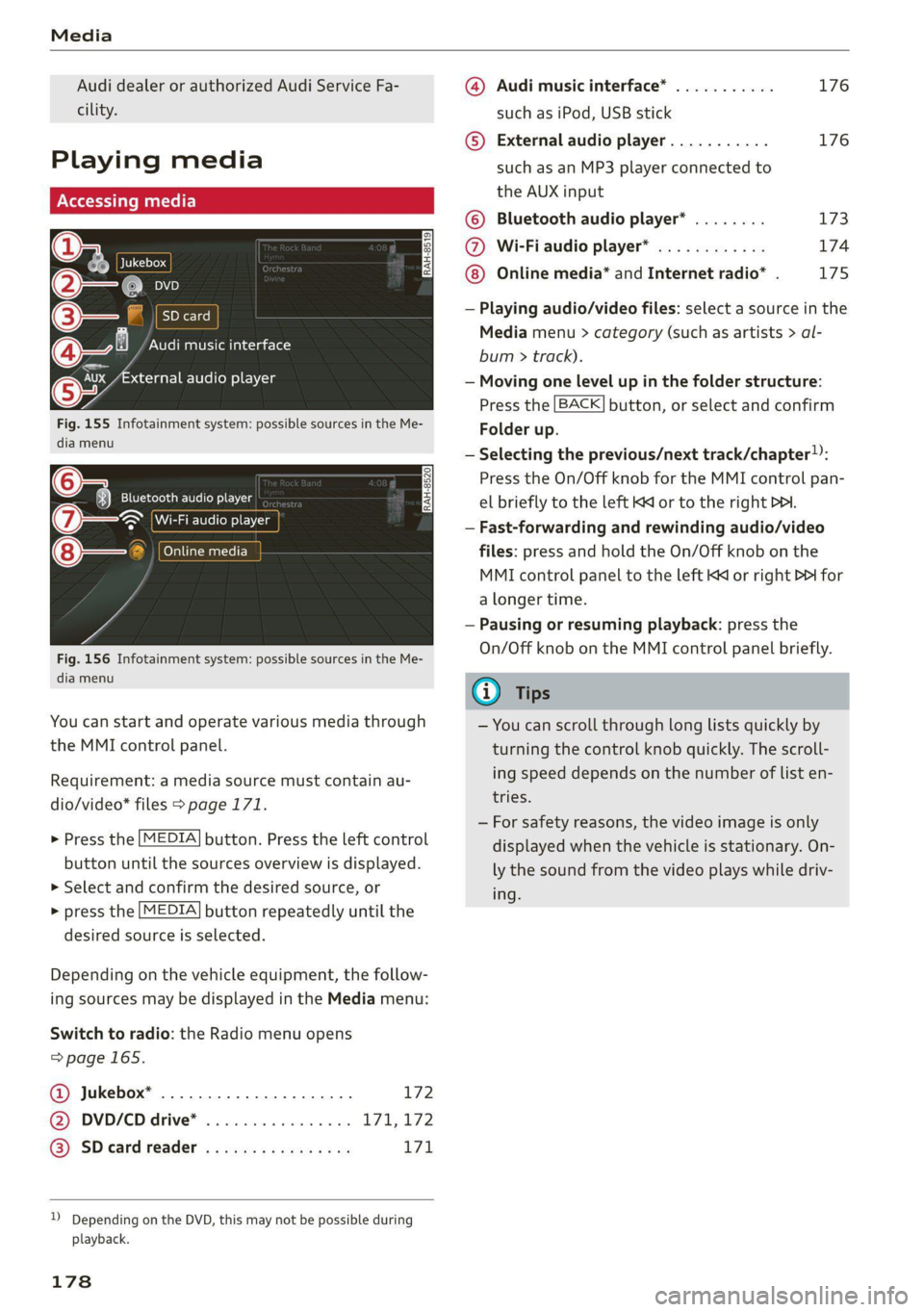
Fig. 155 Infotainment system: possible sources in the Me-
dia menu
6 3} Bluetooth audio player
> Wi-Fi audio player
foyal atwaatel-)
Fig. 156 Infotainment system: possible sources in the Me-
dia menu
You can start and operate various media through
the MMI control panel.
Requirement: a media source must contain au-
dio/video* files > page 171.
> Press the [MEDIA] button. Press the left control
button until the sources overview is displayed.
> Select and confirm the desired source, or
> press the [MEDIA] button repeatedly until the
desired source is selected.
Depending on the vehicle equipment, the follow-
ing sources may be displayed in the Media menu:
Switch to radio: the Radio menu opens
=>page 165.
Jukebox* ................0000. 172 ®
@ DVD/CD drive* ................ L711, 172
@) SD card reader « s eces ss eee ys oe 171
)) Depending on the DVD, this may not be possible during
playback.
178
@ Audi music interface* ........... 176
such as iPod, USB stick
© External audio player........... 176
such as an MP3 player connected to
the AUX input
© Bluetooth audio player* ........ 173
@ Wi-Fiaudio player* ............ 174
Online media* and Internet radio* . 175
— Playing audio/video files: select a source in the
Media menu > category (such as artists > al-
bum > track).
— Moving one level up in the folder structure:
Press the [BACK] button, or select and confirm
Folder up.
— Selecting the previous/next track/chapter)):
Press the On/Off knob for the MMI control pan-
el briefly to the left Kd or to the right Pe.
— Fast-forwarding and rewinding audio/video
files: press and hold the On/Off knob on the
MMI control panel to the left Kd or right Pb for
a longer time.
— Pausing or resuming playback: press the
On/Off knob on the MMI control panel briefly.
G) Tips
— You can scroll through long lists quickly by
turning the control knob quickly. The scroll-
ing speed depends on the number of list en-
tries.
— For safety reasons, the video image is only
displayed when the vehicle is stationary. On-
ly the sound from the video plays while driv-
ing.
Page 181 of 280
8S1012721BB
Media
Ob Lc
Nga)
( La |
(4) | Pts
enres
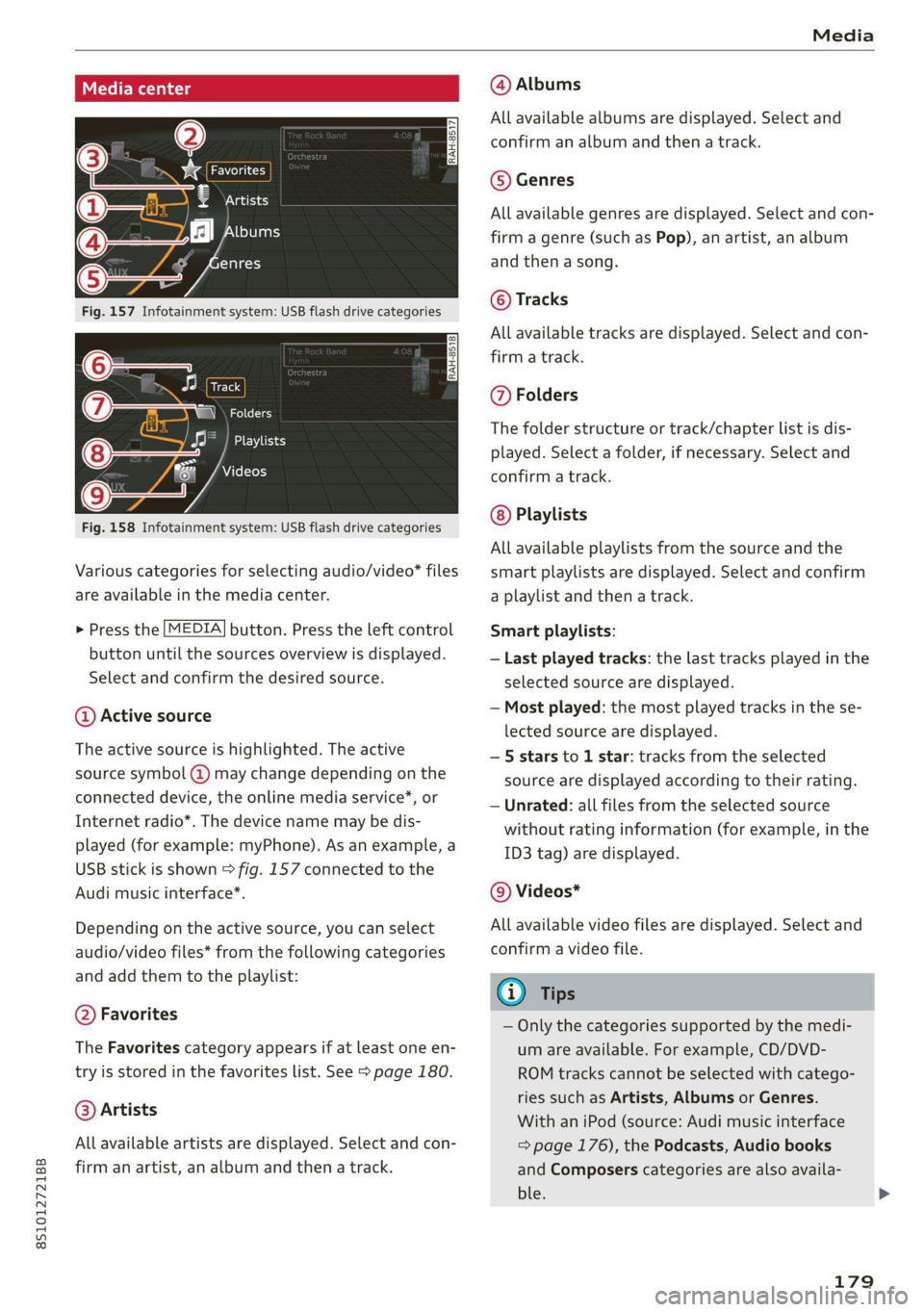
Fig. 157 Infotainment system: USB flash drive categories
Track
(7) \ NGC
Playlists
Videos
Fig. 158 Infotainment system: USB flash drive categories
Various categories for selecting audio/video files
are available in the media center.
> Press the [MEDIA] button. Press the left control
button until the sources overview is displayed.
Select and confirm the desired source.
@ Active source
The active source is highlighted. The active
source symbol (2) may change depending on the
connected device, the online media service*, or
Internet radio*. The device name may be dis-
played (for example: myPhone). As an example, a
USB stick is shown > fig. 157 connected to the
Audi music interface*.
Depending on the active source, you can select
audio/video files* from the following categories
and add them to the playlist:
@ Favorites
The Favorites category appears if at least one en-
try is stored in the favorites list. See > page 180.
@ Artists
All available artists are displayed. Select and con-
firm an artist, an album and then a track.
@ Albums
All available albums are displayed. Select and
confirm an album and then a track.
© Genres
All available genres are displayed. Select and con-
firm
a genre (such as Pop), an artist, an album
and then a song.
© Tracks
All available tracks are displayed. Select and con-
firm
a track.
@ Folders
The folder structure or track/chapter list is dis-
played. Select a folder, if necessary. Select and
confirm a track.
Playlists
All available playlists from the source and the
smart playlists are displayed. Select and confirm
a playlist and then a track.
Smart playlists:
— Last played tracks: the last tracks played in the
selected source are displayed.
— Most played: the most played tracks in the se-
lected source are displayed.
— 5 stars to 1 star: tracks from the selected
source are displayed according to their rating.
— Unrated: all files from the selected source
without rating information (for example, in the
ID3 tag) are displayed.
© Videos*
All available video files are displayed. Select and
confirm a video file.
(i) Tips
— Only the categories supported by the medi-
um are available. For example, CD/DVD-
ROM tracks cannot be selected with catego-
ries such as Artists, Albums or Genres.
With an iPod (source: Audi music interface
=> page 176), the Podcasts, Audio books
and Composers categories are also availa-
ble.
179
Page 183 of 280
8S1012721BB
Media
— Move favorite: select the desired entry from
the favorites list. Select the right control but-
ton > Move favorite. Select and confirm the de-
sired favorites location.
— Deleting a favorite: select the desired entry
from the favorites list. Select the right control
button > Delete favorite > Delete this favorite
or Delete all favorites.
Additional settings
Context-specific functions and settings are avail-
able depending on the selected source.
> Press the right control button.
Sound settings
See > page 193.
Input level
Requirement: a mobile device must be connected
to the AUX connection cable or to a USB adapter
=>page 176.
The volume of the mobile device is adapted to
the MMI. Audi recommends adjusting the volume
on the mobile device to 70% of the maximum
volume output.
Bluetooth settings
See > page 192.
Wi-Fi settings
See > page 147, Wi-Fi settings.
Connection manager
See > page 190.
Show "Now Playing" screen
With the function switched on ¥ and a playlist
open, various information about the current track
(such as artist, album and album cover*) as well
as the playing time and the remaining playing
time are displayed.
) The function automatically switches off when the source is
changed.
2) This function is not available for all cell phones.
Jukebox memory capacity*
Information on the Jukebox memory capacity and
the number of stored tracks in the Jukebox is dis-
played.
Rewind/Fast forward
Turn the control knob to the left or right, or move
your finger on the MMI touch control pad from
the left to the right.
Shuffle»)
With the function switched on, all files in the
playlist are played and shown in random order.
Repeat track!)
When the function is switched on, the current
track repeats.
Back to 'Playback'
The options menu is closed. The track currently
playing appears in the playlist > page 180,
fig. 160.
Play similar music*
The track currently playing is quickly analyzed for
features such as artist, genres, mood, and beat,
and a smart playlist with similar tracks will be
shown.
Play more...
A smart playlist is shown based on the track cur-
rently playing. You can select between a playlist
with more tracks by this artist, from this album
or of this genre.
Set as ringtone*”)
Requirement: a mobile device must be connected
to the MMI. The track currently playing must be
in the Jukebox* > page 172.
The selected track will be used as the ringtone
for incoming calls.
181
Page 185 of 280
8S1012721BB
Media
Information — The protection levels for the Parental con-
trol are based on the US standards from the
Motion Picture Association of America
(MPAA). Note that the age levels for video
DVDs in European countries may differ.
— Password entry for Parental control will be
Aspect ra-
tio
4:3 The image is set to the 4:3 picture
format. Black bars are shown on
the sides of the Infotainment sys-
tem display.
16:9 The image is set to the 16:9 picture
format. Black bars are shown in the
upper and lower edges of the Info-
tainment system display.
locked for approximately one minute if you
enter the incorrect password three times in
a row. The password can only be reset by an
authorized Audi dealer.
G) Tips
— Not all video DVDs have parental control.
Supported media and file formats
LO TaV TN]
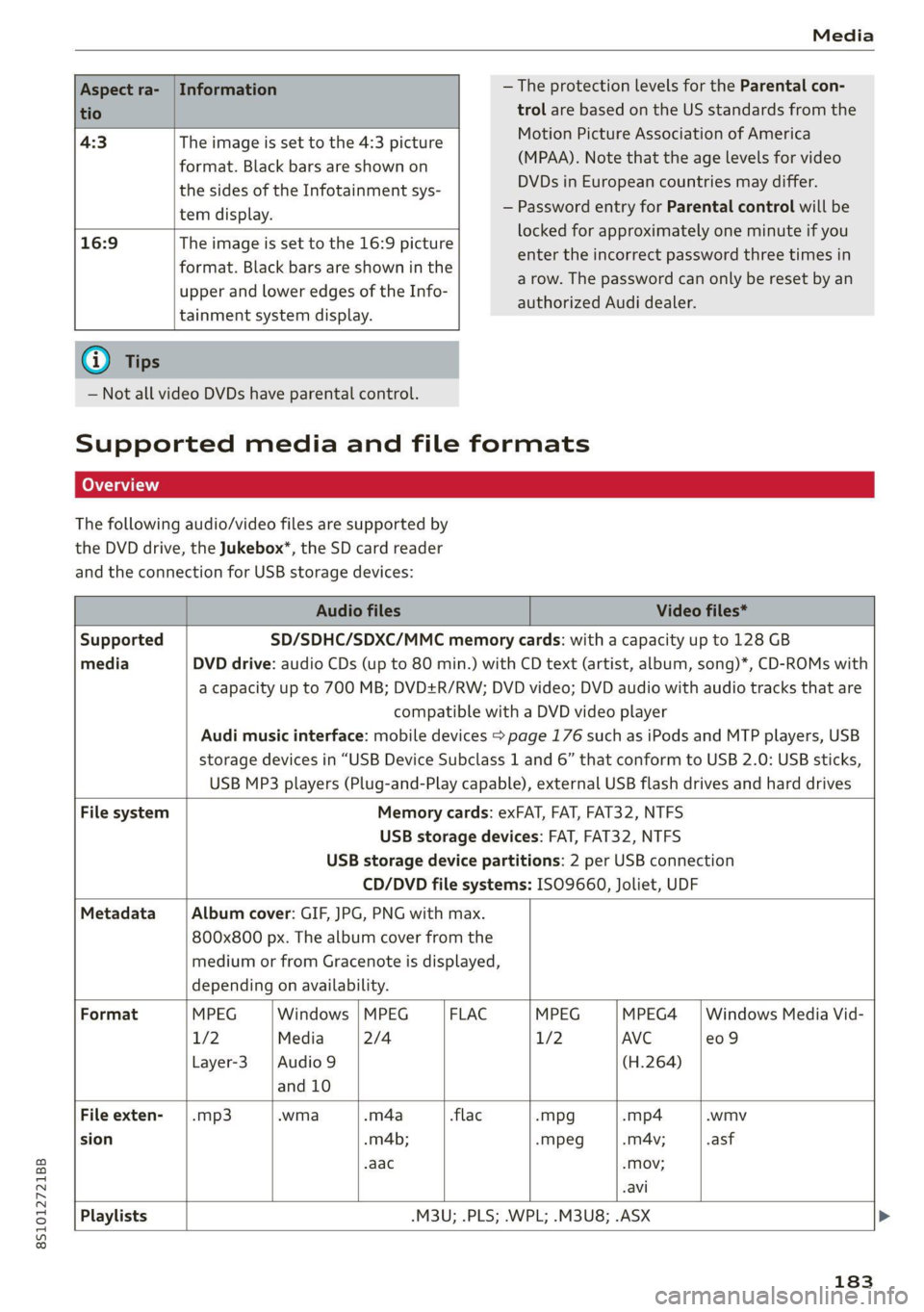
The following audio/video files are supported by
the DVD drive, the Jukebox*, the SD card reader
and the connection for USB storage devices:
Audio files Video files*
Supported SD/SDHC/SDXC/MMC memory cards: with a capacity up to 128 GB
media DVD drive: audio CDs (up to 80 min.) with CD text (artist, album, song)*, CD-ROMs with
a capacity up to 700 MB; DVD+R/RW; DVD video; DVD audio with audio tracks that are
compatible with a DVD video player
Audi music interface: mobile devices > page 176 such as iPods and MTP players, USB
storage devices in “USB Device Subclass 1 and 6” that conform to USB 2.0: USB sticks,
USB MP3 players (Plug-and-Play capable), external USB flash drives and hard drives
File system Memory cards: exFAT, FAT, FAT32, NTFS
USB storage devices: FAT, FAT32, NTFS
USB storage device partitions: 2 per USB connection
CD/DVD file systems: ISO9660, Joliet, UDF
Metadata Album cover: GIF, JPG, PNG with max.
800x800 px. The album cover from the
medium or from Gracenote is displayed,
depending on availability.
Format MPEG Windows | MPEG FLAC MPEG MPEG4 | Windows Media Vid-
1/2 Media 2/4 1/2 AVC e09
Layer-3 |Audio 9 (H.264)
and 10
File exten- | .mp3 .wma -m4a flac -mpg -mp4 .wmv
sion -m4b; -mpeg -mA4v; .asf
aac -Mov;
.avi
Playlists -M3U; .PLS; .WPL; .M3U8; .ASX
183
Page 186 of 280
Media
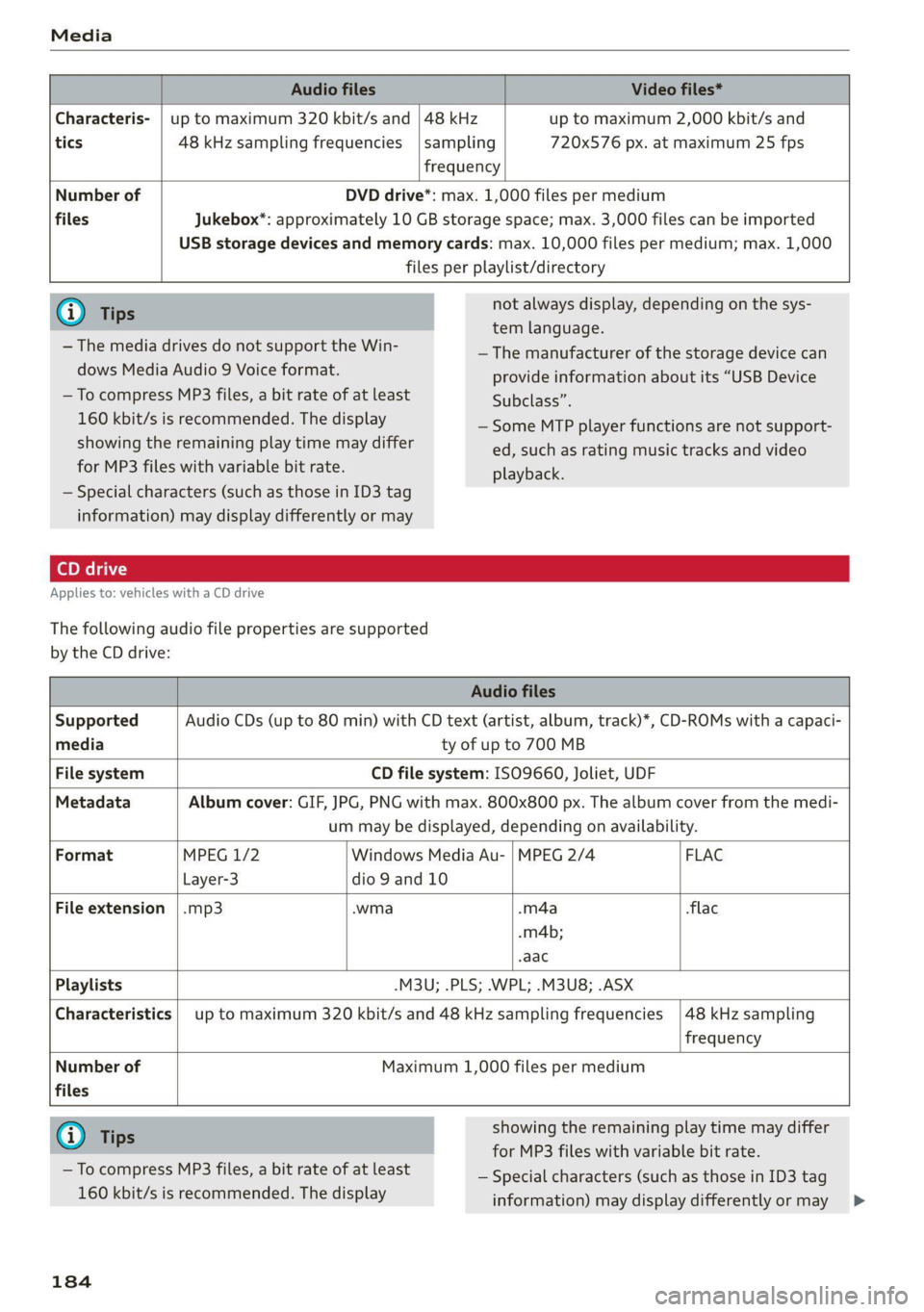
Audio files Video files*
Characteris- | up to maximum 320 kbit/s and | 48 kHz up to maximum 2,000 kbit/s and
tics 48 kHz sampling frequencies |sampling 720x576 px. at maximum 25 fps
frequency
Number of DVD drive*: max. 1,000 files per medium
files Jukebox*: approximately 10 GB storage space; max. 3,000 files can be imported
USB storage devices and memory cards: max. 10,000 files per medium; max. 1,000
files per playlist/directory
@) Tips not always display, depending on the sys-
tem language.
— The manufacturer of the storage device can
provide information about its “USB Device
Subclass”.
— Some MTP player functions are not support-
ed, such as rating music tracks and video
playback.
— The media drives do not support the Win-
dows Media Audio 9 Voice format.
— To compress MP3 files, a bit rate of at least
160 kbit/s is recommended. The display
showing the remaining play time may differ
for MP3 files with variable bit rate.
— Special characters (such as those in ID3 tag
information) may display differently or may
Applies to: vehicles with a CD drive
The following audio file properties are supported
by the CD drive:
Audio files
Supported Audio CDs (up to 80 min) with CD text (artist, album, track)*, CD-ROMs with a capaci-
media ty of up to 700 MB
File system CD file system: ISO9660, Joliet, UDF
Metadata Album cover: GIF, JPG, PNG with max. 800x800 px. The album cover from the medi-
um may be displayed, depending on availability.
Format MPEG 1/2 Windows Media Au- | MPEG 2/4 FLAC
Layer-3 dio 9 and 10
File extension |.mp3 .wma -m4a flac
.m4b;
-aac
Playlists -M3U; .PLS; .WPL; .M3U8; .ASX
Characteristics | up to maximum 320 kbit/s and 48 kHz sampling frequencies |48 kHz sampling
frequency
Number of Maximum 1,000 files per medium
files
G@) Tips showing the remaining play time may differ
for MP3 files with variable bit rate.
— Special characters (such as those in ID3 tag
information) may display differently or may >
— To compress MP3 files, a bit rate of at least
160 kbit/s is recommended. The display
184
Page 189 of 280

8S1012721BB
Audi smartphone interface
Audi smartphone
interface
Setup
Applies to: vehicles with Audi smartphone interface
You can connect your smartphone to the MMI us-
ing the Audi smartphone interface. Certain con-
tent on your smartphone is adapted to the Info-
tainment system display while driving and can be
operated through the MMI control panel.
Requirement
The vehicle must be stationary and the ignition
must be switched on.
iPhone generation 5 or higher with Lightning
connector and iOS 7.1.2 operating system or
higher, or
A smartphone with the Android Auto app and An-
droid 5.0 Lollipop operating system or higher is
required.
> Connect your smartphone to the Audi music in-
terface > page 176 using the applicable USB
adapter > page 176, fig. 153.
> Select and confirm Activate Apple CarPlay or
Activate Android Auto now.
> Follow the system instructions.
> Pay attention to any additional system prompts
on your smartphone, if applicable.
If you chose not to use Apple CarPlay or Android
Auto when connecting your smartphone for the
first time, you can start the Audi smartphone in-
terface later on using the Connection manager.
> Select: [MENU] button > Audi smartphone in-
terface > Change to connection manager.
> Connect your smartphone to the Audi music in-
terface > page 176 using the applicable USB
adapter > page 176, fig. 153.
> Select and confirm Audi smartphone interface
in the Connection manager > page 190. You
can select your smartphone in the list of devi-
ces that are already paired > page 191.
> Follow the system instructions.
ZA WARNING
Driving requires your complete and undivided
attention. As the driver, you have complete re-
sponsibility for safety in traffic. Never operate
mobile devices while driving, because this in-
creases the risk of an accident.
) In preparation at the time of printing.
@) Note
Always follow the information found in >@ in
General information on page 142.
@ Tips
— The functions that can be used depend on
the following factors, among others:
—The brand of your smartphone
~The version of the operating system in
your smartphone
— The software version of the app used
— The USB adapter cable and correct connec-
tion
— Your cell phone service provider
— The customized settings on your smart-
phone
— One of the factors above or a combination
of any of them could cause your smart-
phone to be incompatible with the Audi
smartphone interface. Compatibility cannot
be guaranteed for all types of smartphones.
For more information and assistance, refer
to the user guide and the manufacturer of
your smartphone.
— If the connected smartphone has voice con-
trol, you can operate your smartphone using
the external voice recognition system*
=> page 128.
— The menu language shown in the MMI is
based on the settings in your smartphone.
— The time displayed in the MMI is based on
the settings in your smartphone.
— Some MMI functions are not available when
Apple CarPlay or Android Auto is active.
— You cannot connect any mobile devices via
Bluetooth when an Apple CarPlay connec-
tion is active.
187
Page 190 of 280

Audi smartphone interface
— When the Apple CarPlay connection is ac- Android Auto: to go back to the Android Auto
tive, Tag this song for iTunes*» js not avail- menu bar, push the control knob down.
able > page 166.
Operating
Opening a menu item
Select and confirm a menu item using the MMI
Applies to: vehicles with Audi smartphone interface control panel.
Opening a menu
Apple CarPlay: you can go back to the Apple Car-
Play main menu regardless of the selected menu
item by pressing and holding the [BACK] button.
Troubleshooting
Applies to: vehicles with Audi smartphone interface
Problem Solution
Audi smartphone
interface cannot be
opened.
Check the battery charge level on your smartphone.
Check the USB cable and use a different one if necessary.
Check if Android Auto or Apple CarPlay is available in the country where the vehi-
cle is being operated.
Android Auto: check if the Android Auto app is installed on your smartphone.
Connecting the
smartphone to the
MMI failed.
Make sure that you are using the correct USB adapter and check if the USB
adapter is connected correctly to your smartphone and the Audi music interface
=> page 176.
Apple CarPlay: check if Apple CarPlay is activated on your smartphone.
Android Auto: check in the Android Auto app if Android Auto permits new
vehicles.
The smartphone is
not automatically
detected.
Make sure that you are using the correct USB adapter and check if the USB
adapter
is connected correctly to your smartphone and the Audi music interface
=> page 176.
Check if the requirements needed to connect a smartphone have been met.
D_ In preparation at the time of printing.
188
Page 191 of 280
![AUDI TT COUPE 2020 User Guide 8S1012721BB
System settings
System settings
Setting the date and
time
You can set the clock time manually or using the
GPS.
> Select: [MENU] button > Settings > left control
button >](/img/6/57658/w960_57658-190.png "AUDI TT COUPE 2020 User Guide 8S1012721BB
System settings
System settings
Setting the date and
time
You can set the clock time manually or using the
GPS.
> Select: [MENU] button > Settings > left control
button >")
8S1012721BB
System settings
System settings
Setting the date and
time
You can set the clock time manually or using the
GPS.
> Select: [MENU] button > Settings > left control
button > MMI settings > Date & time, or
> Select: [MENU] button > Vehicle > left control
button > Vehicle settings > Date & time.
Automatic setting
When this function is switched on M, the time
and date are automatically set.
Time
Requirement: the Automatic setting must be
switched off.
Press the control knob. You can set the Time
manually by turning and pressing the control
knob.
Date
Requirement: the Automatic setting must be
switched off.
Press the control knob. You can set the Date
manually by turning and pressing the control
knob.
Time zone
When selecting the appropriate time zone, a
sampling of countries in this zone will be listed.
Automatic time zone*
When this function is switched on M, the time
will automatically adjust to the corresponding
time zone.
Time format
If you select 24h, the clock will display, for exam-
ple, 13:00. If you select AM/PM, the clock will
display, for example, 1:00 PM.
D_ The Qi standard makes it possible to charge your mobile
device wirelessly.
Date format
If you select DD.MM.YYYY, the date display will
show, for example, 31.03.2019. If you select
MM/DD/YYVY, the date display will show, for ex-
ample, 03/31/2019. If you select YYYY-MM-DD,
the date display will show, for example,
2019-03-31.
MMI settings
> Select: [MENU] button > Settings > left control
button > MMI settings.
Language
You can change the display language as well as
the language for the voice guidance* and voice
recognition system*.
Measurement units
The following measurement units can be set de-
pending on availability: Speed, Distance, Tem-
perature, Fuel consumption, Volume, Pressure.
Mobile device reminder signal
Applies to: vehicles with Audi phone box
Requirement: your cell phone must be Qi-capa-
ble ) or connected to the Audi music interface @
with a USB adapter cable > page 131, fig. 131.
When the device reminder signal is switched on,
you will be notified that your mobile device is still
in the Audi phone box when you leave the vehicle.
You can select between Spoken cue, Signal tone
and Off.
Mobile device reminder signal volume: you can
adjust the reminder signal volume by turning the
control knob.
Switch off pop-up: when the function is switched
on [M, the messages in the Infotainment system
display regarding the charging status of your cell
phone in the Audi phone box are hidden. The re-
minder not to forget your cell phone when leav-
ing the vehicle is also switched off.
189
Page 193 of 280
8S1012721BB
System settings
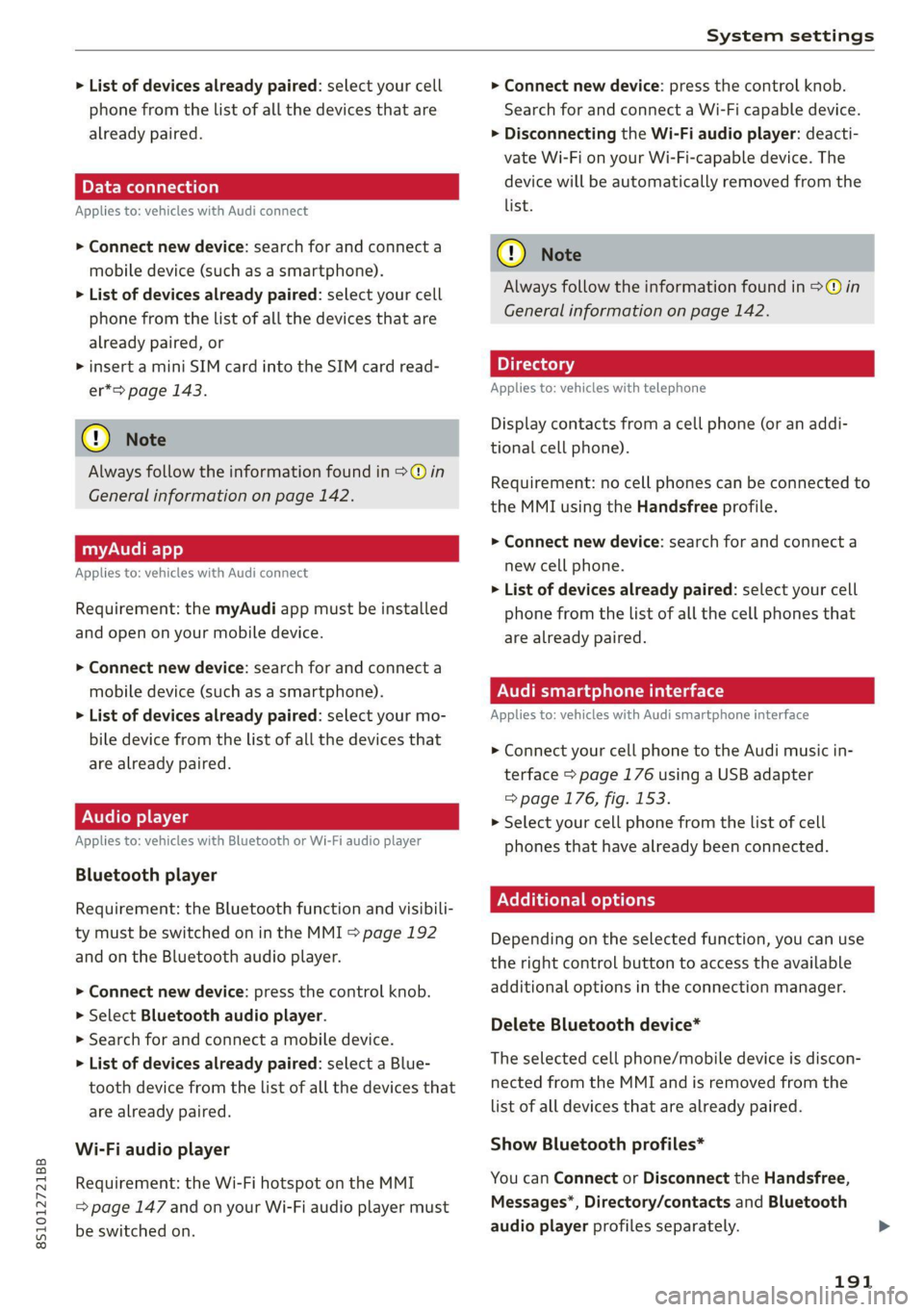
> List of devices already paired: select your cell
phone from the list of all the devices that are
already paired.
ELE Meola Tata lela)
Applies to: vehicles with Audi connect
> Connect new device: search for and connect a
mobile device (such as a smartphone).
> List of devices already paired: select your cell
phone from the list of all the devices that are
already paired, or
> insert a mini SIM card into the SIM card read-
er*=> page 143.
@) Note
Always follow the information found in >@ in
General information on page 142.
myAudi app
Applies to: vehicles with Audi connect
Requirement: the myAudi app must be installed
and open on your mobile device.
> Connect new device: search for and connect a
mobile device (such as a smartphone).
> List of devices already paired: select your mo-
bile device from the list of all the devices that
are already paired.
Audio player
Applies to: vehicles with Bluetooth or Wi-Fi audio player
Bluetooth player
Requirement: the Bluetooth function and visibili-
ty must be switched on in the MMI > page 192
and on the Bluetooth audio player.
> Connect new device: press the control knob.
> Select Bluetooth audio player.
> Search for and connect a mobile device.
> List of devices already paired: select a Blue-
tooth device from the list of all the devices that
are already paired.
Wi-Fi audio player
Requirement: the Wi-Fi hotspot on the MMI
= page 147 and on your Wi-Fi audio player must
be switched on.
> Connect new device: press the control knob.
Search for and connect a Wi-Fi capable device.
> Disconnecting the Wi-Fi audio player: deacti-
vate Wi-Fi on your Wi-Fi-capable device. The
device will be automatically removed from the
list.
@) Note
Always follow the information found in S>@ in
General information on page 142.
Applies to: vehicles with telephone
Display contacts from a cell phone (or an addi-
tional cell phone).
Requirement: no cell phones can be connected to
the MMI using the Handsfree profile.
> Connect new device: search for and connect a
new cell phone.
> List of devices already paired: select your cell
phone from the list of all the cell phones that
are already paired.
Audi smartphone interface
Applies to: vehicles with Audi smartphone interface
> Connect your cell phone to the Audi music in-
terface > page 176 using a USB adapter
=> page 176, fig. 153.
> Select your cell phone from the list of cell
phones that have already been connected.
Additional options
Depending on the selected function, you can use
the
right control button to access the available
additional options in the connection manager.
Delete Bluetooth device*
The selected cell phone/mobile device is discon-
nected from the MMI and is removed from the
list of all devices that are already paired.
Show Bluetooth profiles*
You can Connect or Disconnect the Handsfree,
Messages”, Directory/contacts and Bluetooth
audio player profiles separately.
191
Page 194 of 280

System settings
Bluetooth settings
— Bluetooth: select and confirm a setting for the
Bluetooth connection visibility. Select Visible
for the MMI to be visible to other devices. Se-
lect Invisible for the MMI to not be visible to
other devices. However, it is still possible to es-
tablish a Bluetooth connection with paired de-
vices when the visibility is switched off. Select
Off to turn visibility off. Then a Bluetooth con-
nection is not possible.
— Bluetooth audio player: when this function is
switched on M, the Bluetooth audio player is
available as a source in the Media menu.
— Bluetooth name: the MMI Bluetooth name (for
example "AUDI MMI") is displayed and can be
changed.
Online settings*
— Data connection settings: See > page 146, Cell
phone network.
— Data usage counter: the amount of data pack-
ets that are sent and received through the MMI
is displayed. You can reset the data usage infor-
mation to zero using the Reset data counter
option.
— Network status: the mobile network provider
for data service as well as the network status
are displayed.
Wi-Fi settings*
See > page 147.
SIM PIN settings*
— Automatic PIN entry: when this function is
switched on [M, the SIM PIN is automatically
saved in the MMI after it is entered for the first
time. The SIM PIN for four different SIM cards
can be saved in the MMI. With the function
switched off {_J, the SIM PIN that is currently
stored will be deleted from the MMI. When the
automatic PIN entry is switched on, there are
no SIM PIN prompts.
— Disable PIN query: when switched on, there are
no SIM PIN queries. The automatic PIN entry is
not used in this case.
— Change PIN: you can change the PIN on your
SIM card. First enter the current SIM PIN. The
SIM PIN may only contain digits 0-9. The new
192
SIM PIN must be entered twice for security and
then it will be saved to the SIM card.
Apple CarPlay sound settings/Android Auto
sound settings
Applies to: vehicles with Audi smartphone interface
See > page 193.
About Apple CarPlay/About Android Auto
Applies to: vehicles with Audi smartphone interface
Here you will find legal information regarding the
use of Apple CarPlay or Android Auto and infor-
mation about device-specific data exchange.
Delete Apple CarPlay device/Delete Android
Auto device
Applies to: vehicles with Audi smartphone interface
Requirement: your cell phone must not be con-
nected to the Audi music interface with a USB
adapter.
Select: Audi smartphone interface > a device
from the list > right control button.
To remove your mobile device from the list, select
and confirm Delete Apple CarPlay device or De-
lete Android Auto device.
(i) Tips
Some SIM cards do not allow the SIM PIN
queries to be switched off.
System update
> Select: [MENU] button > Settings > left control
button > System maintenance.
— System update: insert the storage device with
the update data into the appropriate drive
= page 171. Select and confirm: the respective
drive > Start update. The length of the process
depends on the size of the update.
— Reset driver installation: the selected media
driver package is reset to the settings at the
time of delivery.
— Version information: information on the MMI
software version and the navigation database*
software version is displayed. The Software in-
formation function also provides information >