turn signal AUDI TT COUPE 2020 Owner's Manual
[x] Cancel search | Manufacturer: AUDI, Model Year: 2020, Model line: TT COUPE, Model: AUDI TT COUPE 2020Pages: 280, PDF Size: 98.79 MB
Page 195 of 280
8S1012721BB
System settings
on the software contained in the MMI and the
licensing agreement.
Sound settings
The sound distribution and volume of the MMI
can be adjusted individually. The settings depend
on the vehicle equipment.
> Select: [MENU] button > Sound > left control
button > Entertainment.
Treble/Bass
You can adjust the Treble and Bass settings by
turning the control knob. The changed settings
only apply for the audio source that is active at
the time. This allows you to adjust the sound set-
tings for each audio source separately.
Balance/fader (Sound focus)
— Adjusting the sound distribution to the left or
right: press the control knob. Turn the control
knob to the left or right to the desired position.
— Adjusting the sound distribution to the front
or rear: press the control knob again. Turn the
control knob to the left or right to the desired
position.
— Adjusting the sound distribution using the
MMI touch: move your finger on the MMI touch
control panel in the desired direction.
Sound effects
Select and confirm a Focus setting:
— All: all speakers in the vehicle are active (sym-
metrical sound distribution).
— Front: only the speakers in the front of the ve-
hicle are active.
Speed dependent volume control
Turn the control knob to adjust the playback vol-
ume to the noise inside the vehicle.
Volume settings
Adjusting the volume
The volume of an audio source or a system mes-
sage (for example, from the voice recognition
system*) can be adjusted directly while the sound
is playing using the On/Off knob.
> Increasing or decreasing the volume: turn the
On/Off knob @) > page 111, fig. 116 to the
right or left.
> Muting or pausing: Press the On/Off knob
briefly, or:
> Turn the On/Off knob to the left until the sym-
bol @ > page 120 appears. An active audio/
video source is stopped.
> Unmuting or resuming: Press the On/Off knob
briefly, or:
> Turn the On/Off knob to the right.
ZA WARNING
To reduce the risk of an accident, adjust the
volume of the audio system so that audible
signals from outside the vehicle, such as po-
lice and fire sirens, can be heard easily at all
times.
@) Tips
The volume is automatically adjusted to a pre-
set level when the MMI is switched on.
Adjusting the system volume
> Select: [MENU] button > Sound > left control
button.
Telephone
Applies to: vehicles with telephone
Mute telephone: messages and ringtones are set
to mute.
Ringtone: see > page 140, Ringtone and volume
settings.
Ringtone volume: you can adjust the volume of
the selected ringtone by turning the control
knob.
Message volume: you can adjust the volume of
the notification for an incoming text message by
turning the control knob.
Microphone input level: you can adjust the call
volume during a phone call by turning the control
knob. >
193
Page 196 of 280
System settings
Navigation
Applies to: vehicles with navigation system
Voice guidance: See > page 157.
Voice guidance during phone call: See
=> page 157.
Voice guidance volume: you can adjust the voice
guidance volume by turning the control knob or
you can adjust it while route guidance is active by
turning the On/Off knob.
Entertainment fader: the volume of audio play-
back can be temporarily lowered when the park-
ing system or voice guidance is active.
Voice recognition system
Applies to: vehicles with voice recognition system
Short dialog: prompts in a shorter format can be
switched on or off.
Speech dialog system volume: you can adjust
the volume of the prompts by turning the control
knob.
Parking aid*
You can adjust the volume of the signal tone by
turning the control knob.
— Adjusting the Front volume: select and con-
firm High, Medium or Low.
— Adjusting the Rear volume: select and confirm
High, Medium or Low.
MMI touch volume*
Turn the control knob to adjust the volume of the
spoken prompts from the MMI touch*.
Audi Heartbeat
You can adjust the volume of Audi Heartbeat by
turning the control knob.
194
Restarting the MMI
(reset)
RAH-8611
ev
= ‘=
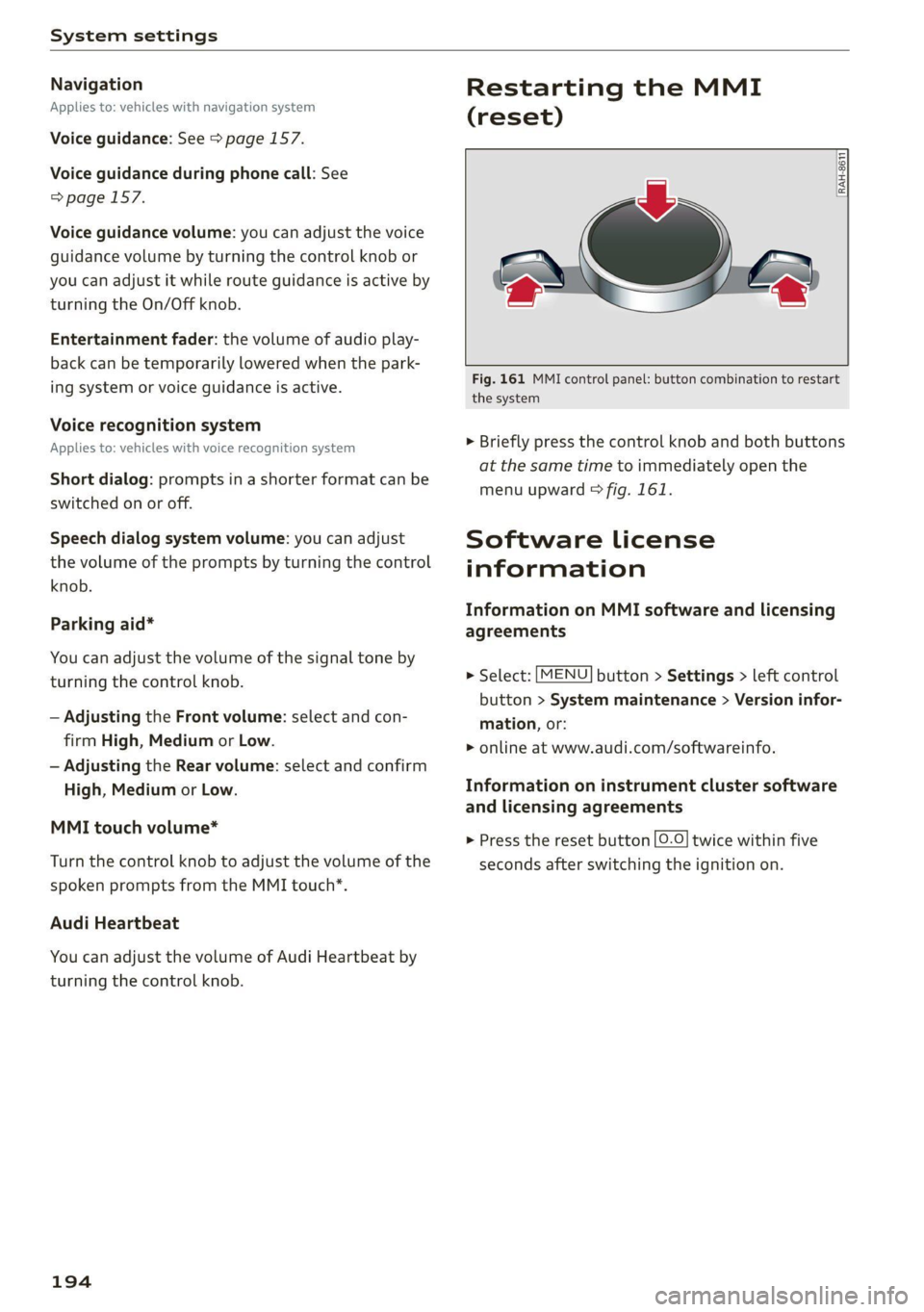
Fig. 161 MMI control panel: button combination to restart
the system
> Briefly press the control knob and both buttons
at the same time to immediately open the
menu upward > fig. 161.
Software License
information
Information on MMI software and licensing
agreements
> Select: [MENU] button > Settings > left control
button > System maintenance > Version infor-
mation, or:
> online at www.audi.com/softwareinfo.
Information on instrument cluster software
and licensing agreements
> Press the reset button [0-0] twice within five
seconds after switching the ignition on.
Page 236 of 280

Wheels
ZA WARNING
Read and follow the important information
and notes > page 232.
Storing new tire pressures
Applies to: vehicles with tire pressure monitoring system
The tire pressure specifications must be stored
correctly for the tire pressure monitoring system
to function reliably.
It is always necessary to store the tire pressures
when the tire pressures are modified, for exam-
ple due to a change in load or when new sensors
are installed.
> Before storing the tire pressures, make sure the
tire pressures of all four tires meet the speci-
fied values and are adapted to the load
=> page 223, fig. 180. Only correct and store
the pressure in tires whose temperature is ap-
proximately the same as the ambient tempera-
ture. If the temperature of the tire is higher
than the ambient air temperature, the tire
pressure must be increased approximately
3.0 PSI (0.2 bar) above the value on the sticker.
> Switch the ignition on.
> Select in the Infotainment system: [MENU] but-
ton > Service & checks > Tire pressure monitor-
ing > Store tire pressure > Yes, store now. Af-
ter storing the tire pressures, the tire pressure
monitoring system measures the current pres-
sures while driving and stores them as the new
specified pressures.
> If the changed tire pressures are not displayed
in the Infotainment system, drive the vehicle
for approximately 10 minutes so that the sen-
sor signal from the wheels is received again.
During this adaptation phase, --.-- is displayed
for the pressure and temperature and the tire
pressure monitoring system is only partially
available. It only provides a warning if one or
more tire pressures is below the minimum per-
mitted specified pressure.
If the @ indicator light turns on and the mes-
sage Tire pressure: wheel change detected.
Please check all tires and store pressures in
MMI also appears, the system has detected that
234
the position of the sensors has changed because
of a tire rotation, or that new sensors were instal-
led. Store the new tire pressures.
Z\ WARNING
Read and follow the important information
and notes > page 232.
Malfunctions
Applies to: vehicles with tire pressure monitoring system
If the tire pressure monitoring system is not
available, the is indicator light appears in the
instrument cluster display along with the mes-
sage Tire pressure: malfunction! See owner's
manual.
If the iis indicator light appears after switching
the ignition on or while driving and the @ indi-
cator light also blinks for approximately one mi-
nute and then stays on, there is system malfunc-
tion. The following are examples of situations
that could cause a malfunction:
— If the message appears at the end of the adap-
tation phase, the system may not detect one or
several of the wheel sensors necessary for pres-
sure monitoring. This may result from one or
more wheels without wheel sensors or with in-
compatible wheel sensors being installed.
—Awheel sensor or another component has
failed.
— Using snow chains can affect the function of
the system because of the shielding effect of
the chains.
— The tire pressure monitoring system is not
available due to a malfunction.
— Transmitters with the same frequency, such as
headphones or remote-controlled devices, may
cause a temporary system malfunction due to
the strong electromagnetic field.
The iis indicator light and the message turn off
once the tire pressure monitoring system is avail-
able again. If you cannot correct the malfunction
and the iis indicator light stays on, drive imme-
diately to an authorized Audi dealer or author-
ized Audi Service Facility to have the malfunction
repaired.
Page 252 of 280

Emergency assistance
coupling becoming overloaded when driving off-
road.
For the most safety and security, drive with a tow
bar. You should use a towing cable only if a tow
bar is not available. Use a towing cable made of
synthetic elastic cable similar elastic material.
ZX WARNING
— Towing highly increases the risk of an acci-
dent, for example from colliding with the
towing vehicle.
— To reduce the risk of an accident, do not al-
low anyone to remain inside the vehicle
when it is being transported by a tow truck
or a special transporter.
@) Note
— If normal towing is not possible, for exam-
ple if the transmission is faulty or if the
towing distance is greater than 30 miles
(50 km), then transport the vehicle on a
special carrier.
— If the vehicle is towed by a tow truck at the
axle that is not permitted, this can cause se-
vere damage to the transmission.
— The vehicle must not be tow started for
technical reasons.
@) Tips
— If there is a power failure, the selector lever
will not move out of the "P" position. The
parking lock must be released using the
emergency release before towing the vehi-
cle > page 86.
— Follow the local legal regulations for tow-
ing.
Read and follow the important information under
=> page 249.
Preparations
> Only secure the towing cable or tow bar at the
designated towing loops > page 250,
=>page 251.
250
>» Make sure the towing cable is not twisted. Oth-
erwise it could disconnect from the towing loop
while towing.
> Switch the emergency flashers on in both
vehicles > page 38. However, do not do this if it
prohibited by law.
Towing vehicle (front)
> Only start to drive when the towing cable is
taut.
> Be especially careful when accelerating.
» Avoid sudden braking or driving maneuvers.
Vehicle being towed (rear)
> Make sure the ignition is switched on so that
the steering wheel is not locked and so that you
can use the turn signals, the horn, and the
windshield wipers if needed > /A\.
> Switching it off before the vehicle has stopped
may impair the function of the brake booster
and power steering. You would then need to
use more force to steer and brake the vehicle.
> Release the parking brake > page 77.
> Select the “N” selector lever position.
> Make sure the towing cable is always taut.
ZA WARNING
Never tow a vehicle using a tow bar or towing
cable if the vehicle does not have electrical
power.
Front towing loop
BFV-0309
Fig. 196 Front bumper: installing the towing loop
The threaded opening for the towing loop is lo-
cated on the right side of the front bumper.
> Remove the towing loop from the vehicle tool
kit > page 241.
Page 260 of 280
Accessories and technical changes
Usually maintenance and repair work requires
special tools, measuring devices, and other
equipment that is available to trained vehicle
technicians in order to help ensure that your vehi-
cle and all of its systems operate correctly, relia-
bly, and safely. Performing work on the vehicle
incorrectly can impair the operation and reliabili-
ty of your vehicle and may void one or more of
your vehicle's warranties.
Technical Modifications
Interference with electronic components, their
software, the wiring, and data transfer may cause
malfunctions. Because of the way electronic com-
ponents are interconnected, such malfunctions
can also impair systems that are not directly in-
volved. This means that you risk both a substan-
tial reduction in the operational safety of your ve-
hicle and increased wear of vehicle components.
Some convenience functions, such as the conven-
ience turn signal function, individual door open-
ing function, and displays, can be reprogrammed
using special workshop equipment. If functions
are reprogrammed, the information and descrip-
tions about these functions in this Owner's Man-
ual may no longer apply to the changed func-
tions. Audi recommends that an authorized Audi
dealer or authorized Audi Service Facility perform
and verify any reprogramming procedures.
carry out the job and have the correct tech-
nical information and the correct tools.
— If you are uncertain about what to do, have
the work performed by an authorized Audi
dealer, an authorized Audi Service Facility,
or another qualified workshop. Serious per-
sonal injury may result from improperly per-
formed work.
ZA WARNING
Maintenance procedures, repairs, or technical
modifications that are performed incorrectly
increase the risk of an accident and can lead
to serious injuries.
ZA WARNING
The engine compartment of any motor vehicle
is a potentially dangerous area and can cause
serious personal injury.
— Always use extreme caution when doing any
work in the engine compartment. Always
follow commonly accepted safety practices
and use common sense. Never risk personal
injury.
— Never perform any work in the engine com-
partment unless you know exactly how to
258
C) Note
— Maintenance procedures, repairs or techni-
cal modifications that are performed incor-
rectly can cause damage to the vehicle, such
as corrosion.
— If emergency repairs must be performed,
take your vehicle to an authorized Audi deal-
er or authorized Audi Service Facility as soon
as possible.
— Audi is not liable for damage to the vehicle
resulting from failure to comply with these
guidelines.
@) For the sake of the environment
— Regular maintenance can help protect the
environment.
— Technical modifications to the vehicle can
have a negative impact on fuel consumption
and vehicle emissions.
@) For the sake of the environment
Undeployed airbag modules and pretension-
ers are classified as Perchlorate Material -
special handling may apply, See www.dtsc.ca.
gov/hazardouswaste/perchlorate. When the
vehicle or parts of the restraint system includ-
ing airbag modules and safety belts with pre-
tensioners are scrapped, all applicable laws
and regulations must be observed. Your au-
thorized Audi dealer is familiar with these re-
quirements and we recommend that you have
your dealer perform this service for you.
G) Tips
Because of your vehicle's aluminum body de-
sign, all service and repair procedures affect-
ing the body should be performed by an au-
thorized Audi dealer or authorized Audi
Page 276 of 280

Index
Treadwear indicators................0. 222
Unidirectional...............-00- 215, 246
Uniform tire quality grading............ 229
Tires and wheels
Glossary of tire and loading terminology .. 216
Tires and vehicle load limits............ 226
Tone (sound)
refer to Adjusting the sound............ 193
oo) 241
Top tether anchor (securing the child safety
S@at) 0. eee ee 62
Touch
refer to MMI touch sss <= ees ss ees ss oe 113
TOWinGise < s awe = ease € 8 Saat s 1 Bam & yaa 249
Towing loop............. eee e seas 250, 251
Towing protection monitoring............. 24
TPMS
TNGICatOrlUGHE « seae < s eee s oem = Hae a 234
Tire pressure monitoring system.... 231, 232
Trafficinformation « sas»: = » esas s 2 swe & oo 162
Tratfl@ reports « ses ¢ ¢ eeews ¢ ¢ mews ¢ © nee ee 159
Transmission malfunction (indicator light)... 85
Treble (Sound)... 1... 0. cece cece e eee es 193
Turn signals ........... 5... e cece eee eee 37
U
Uniform tire quality grading............. 229
Unlocking and locking
By remote control..............-.00005 21
Using the lock cylinder................. 23
With the central locking switch.......... 22
With the convenience key..............- 21
Updating stations (radio)................ 165
USB charging port..........0 es ee eee eee 63
USB stick
refer to Audi music interface........... 176
V
Vanity Mirror... ke ee eee 41
Vehicle
Care/cleaning..........-..0 0c eee eee 235
DIMeCNSIONS sce s 2 een o 2 eeow v wees & Be 262
Identification data...............0085 262
Out of service... 2... eee eee eee eee 240
Raising « ¢ cess + 2 mean + 2 ames 5 2 gees ¥ eee 245
274
Vehicle battery
Charge level... .... 0... eee eee eee 110
Vehicle care... eee eee eee 235
Vehicle identification number............ 262
Vehicle jacks. 2 2 cscs ss emene vo soncne ¥ os 241, 247
Lifting points...............0 eee eee 245
Vehicle toolkit... 0.0.0... eee eee eee 241
Version information.................04. 192
VIEW Dutt Misese a 2 cme 2 crcnene a 2 aceon a 2 arenes x 12
Voice quidance:s « « sve <2 meas es een se eee 157
also refer to Multifunction
steering wheel..............--.00-- 12,14
Voicemail... . 6... eee ee eee ee eee 138
Voice recognition system............ 14, 123
Gomitniands: « = eax « «mace se sees cosas: 124
External scion 5% acon & & eam wo come ¥ & maces
Settings............. 0.0.0... . eee eee
NOIUIMG sceas x = suse ¥ a pewe se eee Y Hate
Volume...
Multifunction steering wheel............ 14
Voice recognition system........... 14, 123
WwW
Warning lights
refer to Indicator lights.................. 7
Washing matte finish paint.............. 235
Wave band
refer to Frequency band............... 165
Weights... 0... cece cece ee eee eee 263
Wheel bolts........... 0.00.00. e eee 228
anti-theft........................00. 244
Removing the cover............ esse 244
Tightening specification............... 247
Whieelst. « srcsise 6 a aveveus a 2 neveana © a cownems a 6 ainane 213
Changing............. see eee eee eee 246
Cleaning ws < & ewe + eaews 2 bean ss Hews es 236
Glossary of tire and loading terminology.. 216
Replacing .......... 6.00 cece cece eee 243
Tire pressure monitoring system.... 231, 232
Tires and vehicle load limits............ 226
Wheeliwrench ss ss cess sa ees oe were ae es 241
Wi-Fi
Audi musicistreamis «6 vse ao sess a a wcenivn 174
Audio player.............0 eee eee eee 174
HOtSPOUSEttINOS:s y s caves x 2 cues 2k ROR 147
Onlinetmediats oa scsi wo swans 3 w avers 6 ween 175