phone AUDI TT COUPE 2020 Workshop Manual
[x] Cancel search | Manufacturer: AUDI, Model Year: 2020, Model line: TT COUPE, Model: AUDI TT COUPE 2020Pages: 280, PDF Size: 98.79 MB
Page 195 of 280
8S1012721BB
System settings
on the software contained in the MMI and the
licensing agreement.
Sound settings
The sound distribution and volume of the MMI
can be adjusted individually. The settings depend
on the vehicle equipment.
> Select: [MENU] button > Sound > left control
button > Entertainment.
Treble/Bass
You can adjust the Treble and Bass settings by
turning the control knob. The changed settings
only apply for the audio source that is active at
the time. This allows you to adjust the sound set-
tings for each audio source separately.
Balance/fader (Sound focus)
— Adjusting the sound distribution to the left or
right: press the control knob. Turn the control
knob to the left or right to the desired position.
— Adjusting the sound distribution to the front
or rear: press the control knob again. Turn the
control knob to the left or right to the desired
position.
— Adjusting the sound distribution using the
MMI touch: move your finger on the MMI touch
control panel in the desired direction.
Sound effects
Select and confirm a Focus setting:
— All: all speakers in the vehicle are active (sym-
metrical sound distribution).
— Front: only the speakers in the front of the ve-
hicle are active.
Speed dependent volume control
Turn the control knob to adjust the playback vol-
ume to the noise inside the vehicle.
Volume settings
Adjusting the volume
The volume of an audio source or a system mes-
sage (for example, from the voice recognition
system*) can be adjusted directly while the sound
is playing using the On/Off knob.
> Increasing or decreasing the volume: turn the
On/Off knob @) > page 111, fig. 116 to the
right or left.
> Muting or pausing: Press the On/Off knob
briefly, or:
> Turn the On/Off knob to the left until the sym-
bol @ > page 120 appears. An active audio/
video source is stopped.
> Unmuting or resuming: Press the On/Off knob
briefly, or:
> Turn the On/Off knob to the right.
ZA WARNING
To reduce the risk of an accident, adjust the
volume of the audio system so that audible
signals from outside the vehicle, such as po-
lice and fire sirens, can be heard easily at all
times.
@) Tips
The volume is automatically adjusted to a pre-
set level when the MMI is switched on.
Adjusting the system volume
> Select: [MENU] button > Sound > left control
button.
Telephone
Applies to: vehicles with telephone
Mute telephone: messages and ringtones are set
to mute.
Ringtone: see > page 140, Ringtone and volume
settings.
Ringtone volume: you can adjust the volume of
the selected ringtone by turning the control
knob.
Message volume: you can adjust the volume of
the notification for an incoming text message by
turning the control knob.
Microphone input level: you can adjust the call
volume during a phone call by turning the control
knob. >
193
Page 196 of 280
System settings
Navigation
Applies to: vehicles with navigation system
Voice guidance: See > page 157.
Voice guidance during phone call: See
=> page 157.
Voice guidance volume: you can adjust the voice
guidance volume by turning the control knob or
you can adjust it while route guidance is active by
turning the On/Off knob.
Entertainment fader: the volume of audio play-
back can be temporarily lowered when the park-
ing system or voice guidance is active.
Voice recognition system
Applies to: vehicles with voice recognition system
Short dialog: prompts in a shorter format can be
switched on or off.
Speech dialog system volume: you can adjust
the volume of the prompts by turning the control
knob.
Parking aid*
You can adjust the volume of the signal tone by
turning the control knob.
— Adjusting the Front volume: select and con-
firm High, Medium or Low.
— Adjusting the Rear volume: select and confirm
High, Medium or Low.
MMI touch volume*
Turn the control knob to adjust the volume of the
spoken prompts from the MMI touch*.
Audi Heartbeat
You can adjust the volume of Audi Heartbeat by
turning the control knob.
194
Restarting the MMI
(reset)
RAH-8611
ev
= ‘=
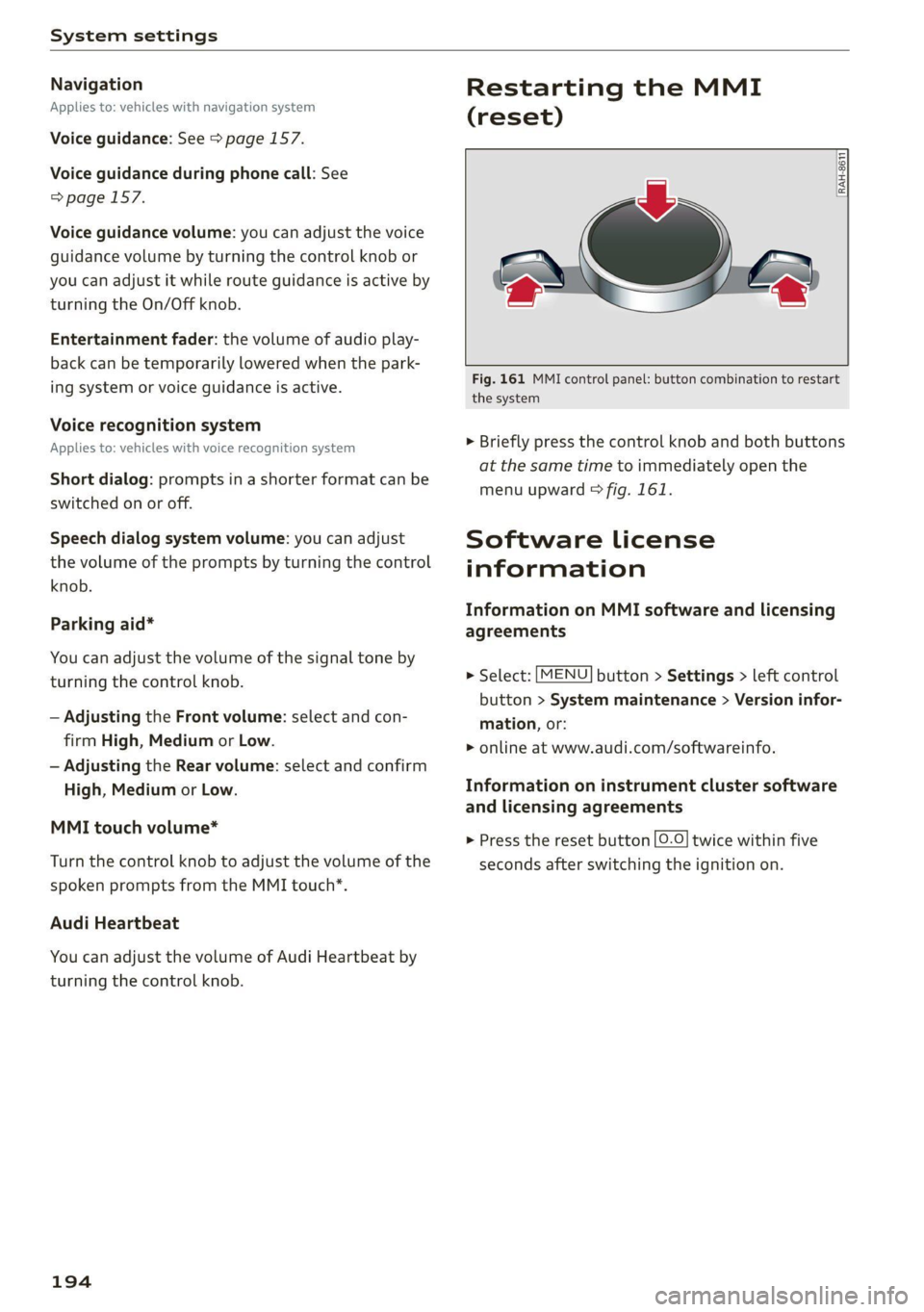
Fig. 161 MMI control panel: button combination to restart
the system
> Briefly press the control knob and both buttons
at the same time to immediately open the
menu upward > fig. 161.
Software License
information
Information on MMI software and licensing
agreements
> Select: [MENU] button > Settings > left control
button > System maintenance > Version infor-
mation, or:
> online at www.audi.com/softwareinfo.
Information on instrument cluster software
and licensing agreements
> Press the reset button [0-0] twice within five
seconds after switching the ignition on.
Page 236 of 280

Wheels
ZA WARNING
Read and follow the important information
and notes > page 232.
Storing new tire pressures
Applies to: vehicles with tire pressure monitoring system
The tire pressure specifications must be stored
correctly for the tire pressure monitoring system
to function reliably.
It is always necessary to store the tire pressures
when the tire pressures are modified, for exam-
ple due to a change in load or when new sensors
are installed.
> Before storing the tire pressures, make sure the
tire pressures of all four tires meet the speci-
fied values and are adapted to the load
=> page 223, fig. 180. Only correct and store
the pressure in tires whose temperature is ap-
proximately the same as the ambient tempera-
ture. If the temperature of the tire is higher
than the ambient air temperature, the tire
pressure must be increased approximately
3.0 PSI (0.2 bar) above the value on the sticker.
> Switch the ignition on.
> Select in the Infotainment system: [MENU] but-
ton > Service & checks > Tire pressure monitor-
ing > Store tire pressure > Yes, store now. Af-
ter storing the tire pressures, the tire pressure
monitoring system measures the current pres-
sures while driving and stores them as the new
specified pressures.
> If the changed tire pressures are not displayed
in the Infotainment system, drive the vehicle
for approximately 10 minutes so that the sen-
sor signal from the wheels is received again.
During this adaptation phase, --.-- is displayed
for the pressure and temperature and the tire
pressure monitoring system is only partially
available. It only provides a warning if one or
more tire pressures is below the minimum per-
mitted specified pressure.
If the @ indicator light turns on and the mes-
sage Tire pressure: wheel change detected.
Please check all tires and store pressures in
MMI also appears, the system has detected that
234
the position of the sensors has changed because
of a tire rotation, or that new sensors were instal-
led. Store the new tire pressures.
Z\ WARNING
Read and follow the important information
and notes > page 232.
Malfunctions
Applies to: vehicles with tire pressure monitoring system
If the tire pressure monitoring system is not
available, the is indicator light appears in the
instrument cluster display along with the mes-
sage Tire pressure: malfunction! See owner's
manual.
If the iis indicator light appears after switching
the ignition on or while driving and the @ indi-
cator light also blinks for approximately one mi-
nute and then stays on, there is system malfunc-
tion. The following are examples of situations
that could cause a malfunction:
— If the message appears at the end of the adap-
tation phase, the system may not detect one or
several of the wheel sensors necessary for pres-
sure monitoring. This may result from one or
more wheels without wheel sensors or with in-
compatible wheel sensors being installed.
—Awheel sensor or another component has
failed.
— Using snow chains can affect the function of
the system because of the shielding effect of
the chains.
— The tire pressure monitoring system is not
available due to a malfunction.
— Transmitters with the same frequency, such as
headphones or remote-controlled devices, may
cause a temporary system malfunction due to
the strong electromagnetic field.
The iis indicator light and the message turn off
once the tire pressure monitoring system is avail-
able again. If you cannot correct the malfunction
and the iis indicator light stays on, drive imme-
diately to an authorized Audi dealer or author-
ized Audi Service Facility to have the malfunction
repaired.
Page 255 of 280

8S1012721BB
Fuses and bulbs
fuse assignme
No. | Equipment
RAZ-0795)
PO ee
15°16°17-18 19 20 21
Pr ily ip y ips :}
3839 |4142
32°33:34 35:36 37
40 49
74
F20 | Power lumbar support adjustment
Front passenger's side neck heating (Road-
F22
ster)
Right vehicle electrical system control
F24
module
F25 | Driver side door
F26 | Seat heating
Vehicle electrical system control module
bad (terminal 30)
F28 | AMI High media port
F29 | Vehicle electrical system control module
F32 | Driver assistance systems
F33 | Airbag
Sockets, interior sound, tail light switch,
F34 | temperature sensor, oil level sensor, neck
heating, garage door opener
Fig. 200 Vehicle interior: fuse assignment
No. Equipment
Diagnosis, headlight range control, air
quality sensor, automatic dimming rear-
view mirror, center instrument panel
switch module
F35
F4 Central computer processor (MIB-2) F36 | Right cornering light / right LED headlight
FS: Gateway (diagnostics) F37 | Left cornering light / left LED headlight
Fo Selector lever (automatic transmission)
F7
Climate control system controls, rear win-
dow defogger, tire pressure monitoring
Engine control module, ESC control mod-
F38
ule
F39 | Front passenger side door
F8
Switch for the electromechanical parking
brake, light switch, rain/light sensor, inte-
rior lighting, diagnostic connector, roof
electronics F40
| Cigarette lighter, sockets
F41 | Fuel tank diagnosis
F42 | Central locking area
FQ Steering column switch module
F44 | All wheel drive clutch control module
F10 Vehicle positioning
F45 | Power adjustable driver's side seat
Fil
All wheel drive clutch, left vehicle electri-
cal system control module
F46 | Driver's side neck heating (Roadster)
F49 | Engine start, clutch sensor
FI2 Infotainment components
F52 | Control module for suspension control
F1l4 Climate control system blower fan
F53 | Rear window defogger
Fis Electronic steering column lock
F16
Infotainment system components, safety
belt microphone
PL? Instrument cluster
F18 Rearview camera
F19
Convenience access control module
The power seats* are protected via circuit break-
ers that automatically switch on after a few sec-
onds after the overload has been reduced.
253
Page 258 of 280
![AUDI TT COUPE 2020 Workshop Manual Data privacy
Transmitted information
Privacy settings
Applies to: vehicles with Audi connect
> Select: [MENU] button > Audi connect > right
control button > Privacy.
Requirement: th](/img/6/57658/w960_57658-257.png "AUDI TT COUPE 2020 Workshop Manual Data privacy
Transmitted information
Privacy settings
Applies to: vehicles with Audi connect
> Select: [MENU] button > Audi connect > right
control button > Privacy.
Requirement: th")
Data privacy
Transmitted information
Privacy settings
Applies to: vehicles with Audi connect
> Select: [MENU] button > Audi connect > right
control button > Privacy.
Requirement: the ignition must be switched on.
Location, vehicle, and personal data are transmit-
ted when using Audi connect services.
Allowing sending of data
— Select and confirm Activate data connection.
The data module for the use of all Audi connect
services will be active.
Restricting sending of data
— Select and confirm Activate privacy. The data
connection is limited or deactivated depending
on the equipment. The majority of Audi connect
services will not be available.
The following interfaces are not affected by this
setting: Bluetooth, Bluetooth Low Energy (BLE),
Wi-Fi connection, Audi smartphone interface
(ASI), Near Field Communication (NFC), charging
communication (high-voltage system), Electronic
Toll Collect (ETC), On-Board Diagnostic System
(OBD), if equipped.
@) Note
You are responsible for all precautions taken
for data protection, anti-virus protection, and
protection against loss of data on mobile de-
vices that are used to access the Internet
through the Wi-Fi hotspot.
G) Tips
If the transmission of data is limited, data
will still be transmitted to verify subscrip-
tions.
Applies to: vehicles with Audi connect Infotainment
AUDI AG collects, uses, stores and shares your
personal information, such as contact data, vehi-
cle data, usage data, driving data and precise ge-
olocation, in order to provide you with the prod-
256
ucts and services you have purchased or request-
ed, and for a number of other purposes, for ex-
ample, to track quality issues, to performance
and safety, to meet our internal compliance or le-
gal requirements and to market to customers
and potential customers. For a more complete
list of the data we collect, how we use it and with
whom we share it, please visit your Audi nation-
al/sales region website at www.audi.com.
The collection, use and sharing may vary depend-
ing on your model and model year, your subscrip-
tion status, or the service offering. For example,
collection, use and sharing may vary between
Audi connect services, if you have designated a
key user, or if you are driving a model equipped
with persistent data logging. Please review the
complete Privacy Statement to understand our
data handling practices with respect to a particu-
lar service.
You can find additional information about our da-
ta privacy practices in your MMI.
> Select: [MENU] button > Audi connect > right
control button > About Audi connect.
Information about our privacy practices in con-
junction with the mobile Audi connect applica-
tion can be found in the Application’s Privacy
Statement.
For additional information about the privacy
practices relating to Audi connect, myAudi, or
other websites, applications or online services as
well as your obligations with respect to using
these services, and for additional information re-
garding Audi connect terms and conditions,
please visit your Audi national/sales region web-
site at www.audi.com.
Page 261 of 280

8S1012721BB
Accessories and technical changes
Service Facility, who will perform the work ac-
cording to Audi factory specifications. Only
Audi Genuine Parts are used when Audi ex-
perts perform repair or service procedures.
Failure to use Audi Genuine Parts or Audi Gen-
uine Accessories or performing repairs incor-
rectly may result in severe vehicle damage,
such as corrosion.
Accessories and parts
Consult with an authorized Audi dealer or author-
ized Audi Service Facility before purchasing ac-
cessories or replacement parts. We recommend
that you have your vehicle serviced by an author-
ized Audi dealer or authorized Audi Service Facili-
ty and that Audi Genuine Parts and Audi Genuine
Accessories are used.
Audi does not endorse the use of products and
accessories that it has not evaluated, even if the
product is approved by a certified testing agency
or government agency.
ZA WARNING
— Installing unapproved accessories or incor-
rect replacement parts can cause vehicle
damage and can increase the risk of an acci-
dent.
— Never attach accessories, such as telephone
holders or cup holders, to the airbag covers
or within the airbag deployment zone, be-
cause this increases the risk of injury if the
airbag deploys.
— Do not use a license plate bracket different
from the one installed by the factory in the
front of the vehicle, because it may impair
the function of some systems.
() Note
A correctly-installed exterior antenna is re-
quired for operating radio equipment in the
vehicle. Otherwise, the increased electromag-
netic waves can cause malfunctions in the ve-
hicle. Observe the regulations in the country
where the vehicle is being operated and the
instructions from the radio equipment manu-
facturer.
Reporting Safety Defects
Applicable to U.S.A.
If you believe that your vehicle
has a defect which could cause a
crash or could cause injury or
death, you should immediately in-
form the National Highway Traffic
Safety Administration (NHTSA) in
addition to notifying
Audi of America, Inc.
2200 Ferdinand Porsche Drive
Herndon, VA 20171
If NHTSA receives similar com-
plaints, it may open an investiga-
tion, and if it finds that a safety
defect exists in a group of
vehicles, it may order a recall and
remedy campaign. However,
NHTSA cannot become involved in
individual problems between you,
your dealer, or Audi of America,
Inc.
To contact NHTSA, you may call
the Vehicle Safety Hotline toll-
free at 1-888-327-4236 (TTY: 1-
800-424-9153); go to http://
www.safercar.gov;
259
Page 262 of 280
Accessories and technical changes
or write to:
Administrator NHTSA
1200 New Jersey Ave.,
S.E. West Building
Washington, DC
20590.
You can also obtain other infor-
mation about motor vehicle safe-
ty from http://www.safercar.gov.
Applicable to Canada
If you live in Canada and you be-
lieve that your vehicle has a de-
fect that could cause a crash, in-
jury or death, you should immedi-
ately inform Transport Canada,
Defect Investigations and Recalls.
You should also notify Audi Cana-
da.
Canadian customers who wish to
report a safety-related defect to
Transport Canada, Defect Investi-
gations and Recalls, may either
call Transport Canada toll-free at:
Tel.: 1-800-333-0510 or
Tel.: 1-819-994-3328 (Ottawa re-
gion and from other countries)
TTY for hearing impaired:
1-888-675-6863
or contact Transport Canada by
mail at:
260
Transport Canada
Motor Vehicle Safety Investiga-
tions Laboratory
80 Noel Street
Gatineau, QC
J8Z OA1
For additional road safety infor-
mation, please visit the Road
Safety website at:
English:
http://www.tc.gc.ca/eng/
motorvehiclesafety/menu.htm
French:
http://www.tc.gc.ca/fra/
securiteautomobile/menu.htm
Declaration of
compliance for telecom-
munications equipment
and electronic systems
The manufacturer is not liable for radio malfunc-
tions that are caused by unauthorized changes to
the equipment.
Equipment
The following equipment complies with FCC sec-
tion 15 and RSS-Gen:
— Audi side assist*
— Remote control key
— Cell phone package*
— Garage door opener (HomeLink)*
— Tire pressure monitoring system*
— WLAN hotspot*
FCC Part 15.19
This device complies with part 15 of the FCC
Rules. Operation is subject to the following two
conditions: (1) This device may not cause harmful
interference, and (2) this device must accept any >
Page 266 of 280

Index
A
A/C (climate control system) .............. 70
ACCESSOFIES .. 0... eee 63, 259
Active lame'assistyes « . serie so sucesso emmice 2 0 89
Activating vibration warning............. 91
Adjusting steering time................. 91
Cleaning the camera area.............. 236
Indicator light.......... 2.0.00 ee eee eee 90
M@SSAGES eeews » « sous & 5 see Y & ewe e Bees 90
Switching ON/OFF. « essere so ana + vor ve ow 90
Adaptive light « eis: . sisin as nae a 6 came oo as 96
Adjusting the additional display........... 14
Adjusting the air distribution............. 70
Adjusting the center console lighting....... 39
Adjusting the sound..............-..00- 193
Adjusting the temperature............... 70
Adjusting the vents..............--.000- 71
Airbag system... .. eee eee eee 52
Alarm system
refer to Anti-theft alarm system.......... 24
Alignment pin (tire change) .............. 241
All-weather lights.................00000- 36
ALL:S@aSON TNeS iiss so comers oe veausin & asennes a e ae 228
All Whee lOrive soon so ioe « a asus ¥ & amines 109
Alternative
routes . cscs scan ei cae ee bere 156
AMbISntliGhting!s « = sess = = mews ov sows « 2 ee 39
AMI
refer to Audi music interface........... 176
Android Auto
refer to Audi smartphone interface...... 187
Announcements (settings)
refer to Voice guidance. ...........0005 157
Anti-freeze
Windshield washer system............. 211
Anti-lock braking system (ABS)........... 105
Anti-Slip Regulation.................05. 105
Anti-theft alarm system............000008 24
Anti-theft wheel bolts.................. 244
Apple CarPlay
refer to Audi smartphone interface...... 187
APIMIROSE. csconere « 0 ccusece 0 © sonsee a 0 anesera «oi miaeern « » 47
Aspect ratio (Video) ...... 6... cece eee eee 181
ASR
refer to Anti-Slip Regulation............ 105
264
Audi connect
refer toconnect....... 0. eee eee eee eee 142
Audi connect Infotainment
Personal hotspot.............e0ee cece 143
Services overview. ............0000005 145
Audi magnetic ride
refer to Suspension control.............. 96
Audi music interface. .............0000- 176
Audi music stream
refer to Wi-Fi...............00 ee 147,174
Audiosiles, coves «x suncaws x x sane w a ctayave « erenene 178
Audio player
Bluetooth audio player................ 173
Wi-Fi audio players.: ss esses eesse specs 174
Audio track. ...... 0. cece eee eee eee 181
Audi phone box.............-.000 eee 131
Audi smartphone interface.......... 187,191
Audi virtual cockpit
refer to Instrument cluster.............. 10
AUTO
Automatic climate control system........ 70
Automatic headlights.................. 36
Auto Lock (central locking) ............... 18
Automatic climate control system
refer to Climate control system (automatic) . 70
Automatic post-collision braking system... 105
Automatic transmission............-...5- 79
Driving tips..... 6... 0. cee eee eee eee 81
Emergency mode............-...000005 85
Hilldeseent control spews x 2 cxwn 2 a wows « was 83
KKIGKSG OWN sczssis 0 oncies «a openius « syescem 2 cnerte 84
Malfunction... 0.0... 0... eee e eee 81
Selector lever emergency release......... 86
Selector: lever LOK scazee + x sesinae + 6 sevens a 6 ssn 81
Selector lever positions................. 79
ShIPEING MANUALLY’: asus « ¢ neues a e eee & ex 83
Steering wheel with shift paddles........ 83
tiptronic.. 2... eee eee eee 83
Automatic wiper/washer system........... 41
Automatic zoom (navigation) ............ 160
AUXANPUE « swcsinn o ceswae ¥ eames as eM ao auDe 176
Average fuel consumption..............05 15
Average speed .... cs ec ccc eee cc eens ees 15
B
BACK button ; « exes s news s + Baws =v eee 9 ve 111
Page 267 of 280

8S1012721BB
Balanice:(SOUNG), swasi = sisvine se wv wecius ws erases oo 193
Band
refer to Frequency band............... 165
Bassi(SOunad), cus 5 2 semsere © x srens 2 seme a 0 om 193
Battenyisicas wv exsweue 3 x wisueee 3 v cmsamus 2 0 muses 2 a « 209
Charging ........ 6.0. c cece cece eens 210
WinterOperation s ava: « x sews « 2 eews 2 ewe 209
Better route (navigation)................ 163
Blower... 2.2... cece cece ee eee eee eee 70
Bluetooth
Audio playét occ <2 seus 3 e ees ge een ees 173
Connecting acellphone............... 129
Settings........... 00.02 ee eee eee 192
BOOSt:. « ciwseis 6 6 cease 0 0, oramne wo aoncaiie ww antes 8 8 15
Boost pressure indicator................. 15
Brake fluid
Checking the brake fluid level........... 208
BrakeStass oo ssc: a 3 aise so coc 6 comees 3 eee 107
Brake assist... 2.0... 0. eee eee ee eee 105
Brake assist systeM.............0--005 105
Brake fllid....... ee eee eee eee 208
Electromechanical parking brake......... 77
Emergency braking function............. 77
New brake pads cass cee es omen ao cee 107
Break-in security feature..............0.. 24
Breaking in
New brake pads................-.00-- 107
Newtires......... 0.00.00. cece eee eee 220
Browser
refer to Media center .............0000- 179
Bulbireplacenienith: s « accu s © mews 3 ¢ mere sve 254
Buttons
Control.panel (MMI) ws « sews ss wows so 4 111,
Cc
Cable (USB adapter/AUX connector cable).. 176
California Proposition 65 Warning........ 201
Battery specific:. = 2 csevs se sewn 2s wewe 2 os 209
Calllist vous: » x sagem 5 2 que og AWE Ye ee 133
Cal
OpeOnSic: « « sees x o mew se eee 2 eee 140
Capacities
Fuebtankia coccass oo comms «a verve wo suena @ 2 oe 263
Washer fluid reservoir............00005 263
Gar keys + « snes % « snes © o arava © ¥ onenemn © o seoo 19
Garwash s icca ss mews + wai vv owen we ee 235
Catalytic‘converter « cess 2 wees 2 2 wewe es wes 199
CD drive (media drives) ...........0..006 172
Cell phone
Playing music.............. 0c eee eee 173
also refer to Telephone................ 129
Cell phone compartment
refer to Audi phone box............... 131
Centerartiirests: « 2 wes s 2 ewes 2 o oe ¢ » ees 47
Céftral lOCKING’: s = secs s 5 eaves & ¥ ace & eee 18
AULO LOK « ccinss 2 o seen 2 sens 2 o eerie 2 wees 18
Convenience key.......... 0.00 eee eee 21
Convenience opening and closing......... 27
Mechanically unlocking and locking....... 23
Remote control key.............--000-5 21
Setting... 6.6... e cece 23
Central locking switch.................-. 22
Ceramic brakes. 1.1... . cee eee ee eee ee 107
Gentifications s « sucscm oo snawere wo mene so oma 5 260
Changing light bulbs................... 254
Charging
refer to Power sourceS...... 0.0.00 0 eee 63
Charging the battery (mobile devices). 131, 176
Child -safety‘seats:. . nw 6c eve ae eee ee eee 58
Securing to the top tether anchor........ 62
Securing with a safety belt.............. 60
Securing with LATCH .........0ceeeeveee 60
ClaSSIOVIEW is ¢ » nawin = 2 news + awn ws Wane 8 & 13
GLEAMING sows « « sew 5 2 Rou: ae ee ee wR 235
Cleaning Alcantara.............-.00005. 238
Cleaning artificial leather............... 238
Cleaning carbon components........ 237, 238
Cleaning controls.................2.00. 238
Cleaning decorative parts andtrim........ 237
Cleaning exhaust tail pipes.............. 236
Cleaning plastic parts.................. 238
Cleaning taiblights's s ces x s may ao ewe oo: 236
Cleaning textiles = cars + & exes s = aces s ¢ ees 238
Cleaning the wind deflector............. 237
Climate control system (automatic)........ 70
Drive SQlCCEcsis x says 5 2 ones x 2 owes 3 2 gare 96
GLOGK sim < nan 3 5 pemR aE REE & x OEE
Closing
Convenience closing..............-+.-. 27
HOOd ... eee eee eee 201
Luggage compartment lid............... 24
WINKOWS!. 2 cscs: 2 iorsm ou aamewe oo eee a 288 26
Cockpit (OVERVIEW): « sss 2 seme 2 gems = ee 6
Page 269 of 280

8S1012721BB
EDL
refer to Electronic Differential Lock...... 105
EDR
Event Data Recorder.... 2.0.0. ccceua es 255
Electrical systeM .. 6... cee eee 208
Electromechanical parking brake.......... 77
Electronic Differential Lock.............. 105
Electronic immobilizer................... 19
Electronic Stabilization Control (ESC) ...... 105
Indicator light... 2... eee ee eee eee 17
Sporttnode sexx ss wees cv een y s oR os Be 106
Emergency assistance.................. 241
Emergency braking function.............. 77
Emergency flashers..............--00 eee 38
Emergency fueling...............000005 198
Emergency operation
DOOrs .. 0... eee eee 23
Fuel fillerdoOr's = s sees =e aeme + naewe 3 oe 199
Luggage compartment lid........... 25,26
Power top... ... ee eee eee eee eee 33
Emergency release
SGlECtOr leVEluis ¢ < seme 7c Hees 3D Ree YB 86
Emissions control system ...........000- 199
Energy consumers.........---0-s eee eeee 15
Energy management.............-..05- 110
Engine
Breaking in.......... 0c cece cece eee 74
CoOlafitiwcy: sy wows s ¥ sews Gy new ee Ree FE 206
JUMP SEALING « cise + cence so wave ve meren s 247
Starting
Starting and stopping.................. 76
Engine compartment
Opening and closing the hood.......... 201
Overview... .. cece eee ee eee
Safety precautions...
Engine control (indicator light)............ 17
Engine data
refer to Sport displays.................. 15
Engine oil
AQGING coon ¢ cows s news 2 y ews be ews 97 203
Changing......... cee eee eee eee 205
Checking oillevel...............00002. 203
Consumption s ¢ sce s + eeme s+ eee 5 ones 203
Indicator light..............00-.000 ee 203
Replacement interval...............0. 212
Temperature display.............-...0- 15
Enhanced VieW sae < » seme 2 2 gee = yaees < Be 13
Entering characters/numbers (speller) ..... 117
Entering
letters (speller)................ 117
Environment
Unleaded gasoline.................00. 195
ESC
refer to Electronic Stabilization
Control: (ESC)’s s » cas ¢ s yom « uses x ree 105
ESP
refer to Electronic Stabilization
ComtroOCES Qs. « «enzo 0 ssemane « 0 muagons « oxen 105
Event Data Recorder (EDR).............. 255
Exteriomlighting’s os cssai se enum s wenn © ¥ isan 36
Exterior mirrors
Adjusting... 0.0... . cece eee eee eee 40
Dimming ......... 00 cece cece eee 40
Folding:settingS cis + ¢ sea ss sees ee eee e ee 23
FCAT & census 2 © ceanesn 2 om renme © uncon wo eee 40
External voice operation................ 128
FE
Factory default settings (MMI)........... 190
Fader (SOUND) cw + aaron o 2 yoo & & meee 8c eo 193
Fast forwarding and rewinding (audio/video
FIO) sciooe 2 x seevae wo exeavce os eunnens vv eonuene ve sete 178
Fast forwarding (audio/video file)......... 178
FaStHOUtE + sees x = cere x 2 see 4 2 awa 9 8 eS 156
Favorites
Medias: « 3 scien « o nae 2 & aonene so omar 2 2 aves 180
Navigation... ..... 0... cece e eee eee 151
Telephone es < = sees ¢ = wen ee ees eg eee 135
Federal Communications Commission (FCC) . 260
File formats (media drives) .............. 183
Fog lights/rear fog light(s)............... 36
Folding the rearseats........ 0.00. e eee 66
Footwell lightingjess + sass © snare is w sense a x a 39
For the sake of the environment
Disposing of engine oil................ 205
FUCLINGl: = = wavs: ¢ ¢ same xv cee os eee sx 196
ES) eee ee 201
Free text'search casi se cas + were « + emo x 119
Media... 2... eee 180
Navigation ..... 0.00... 0c eee eee eee 150
RadiO:wsss = ¢ pews = ¢ eee + © ees pc eee zee 166
TELE PROM ccesie cosaves wo eneuwue © comes © @ cose 139
Freeze protection
Coolant... 0.6... cee eee eee eee 206