night AUDI TT COUPE 2020 Owners Manual
[x] Cancel search | Manufacturer: AUDI, Model Year: 2020, Model line: TT COUPE, Model: AUDI TT COUPE 2020Pages: 280, PDF Size: 98.79 MB
Page 77 of 280
8S1012721BB
Driving
— Utilize the engine braking effect.
— Avoid driving short distances when possible.
G) Tips
The amount of noise produced by the vehicle
can increase significantly when driving with a
sporty style. Show respect to others around
you and the environment with the way you op-
erate your vehicle, especially at night.
Starting and stopping
the engine
Starting the engine
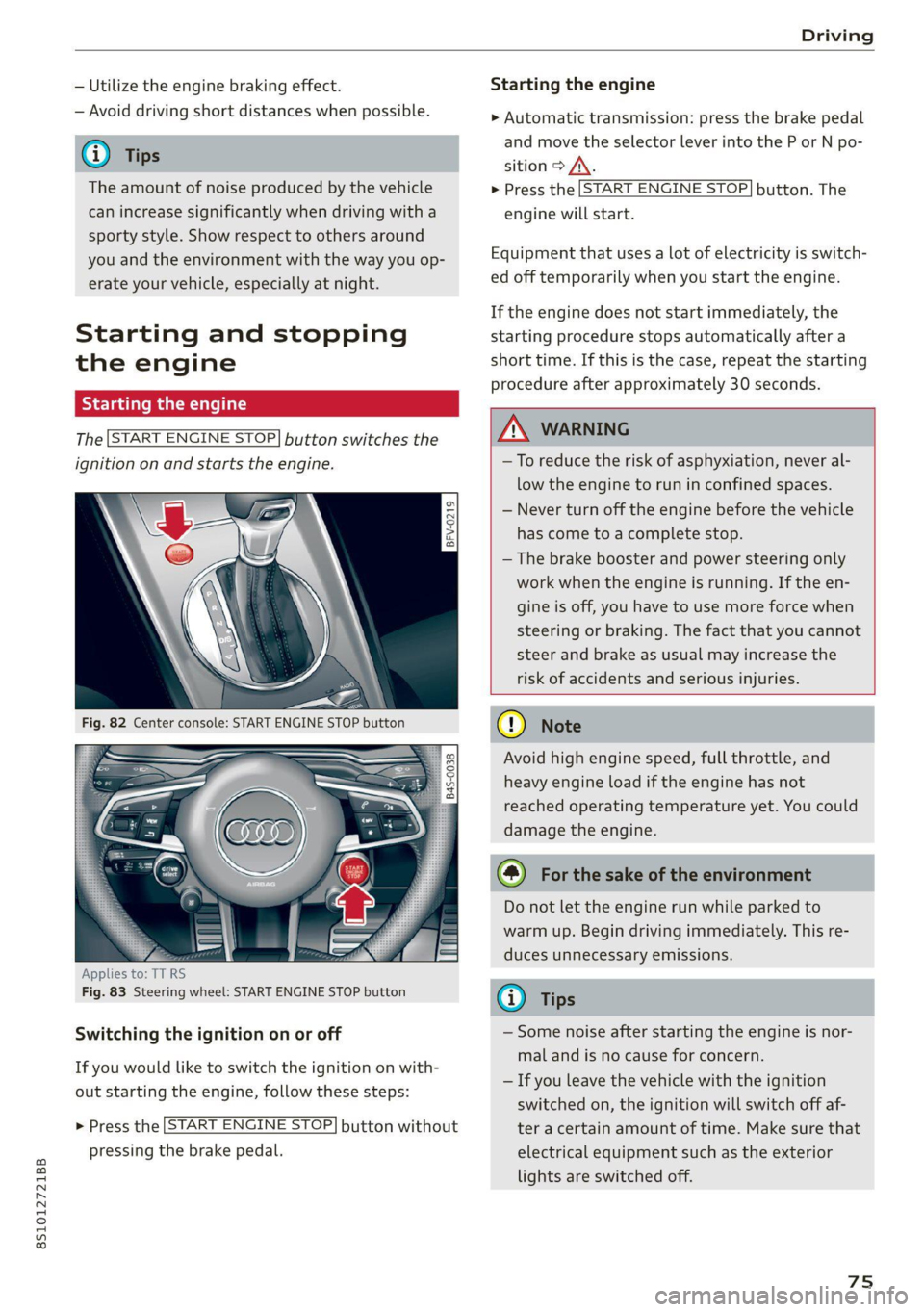
The [START ENGINE STOP] button switches the
ignition on and starts the engine.
a
Sg
x > ie o
Applies to: TT RS
Fig. 83 Steering wheel: START ENGINE STOP button
Switching the ignition on or off
If you would like to switch the ignition on with-
out starting the engine, follow these steps:
> Press the [START ENGINE STOP] button without
pressing the brake pedal.
Starting the engine
> Automatic transmission: press the brake pedal
and move the selector lever into the P or N po-
sition > A\.
> Press the [START ENGINE STOP] button. The
engine will start.
Equipment that uses a lot of electricity is switch-
ed off temporarily when you start the engine.
If the engine does not start immediately, the
starting procedure stops automatically after a
short time. If this is the case, repeat the starting
procedure after approximately 30 seconds.
ZA WARNING
—To reduce the risk of asphyxiation, never al-
low the engine to run in confined spaces.
— Never turn off the engine before the vehicle
has come to a complete stop.
— The brake booster and power steering only
work when the engine is running. If the en-
gine is off, you have to use more force when
steering or braking. The fact that you cannot
steer and brake as usual may increase the
risk of accidents and serious injuries.
() Note
Avoid high engine speed, full throttle, and
heavy engine load if the engine has not
reached operating temperature yet. You could
damage the engine.
@) For the sake of the environment
Do not let the engine run while parked to
warm up. Begin driving immediately. This re-
duces unnecessary emissions.
(i) Tips
— Some noise after starting the engine is nor-
mal and is no cause for concern.
— If you leave the vehicle with the ignition
switched on, the ignition will switch off af-
ter a certain amount of time. Make sure that
electrical equipment such as the exterior
lights are switched off.
75
Page 124 of 280
Voice recognition system
GLOEYAL COMMI/ANN
+ Telephone + Favorites
+ Audi connect * Call (XY)
* Navigation * Enter number
* Directory * Redial
* Radio * Read new text message
+ Media + Navigate to (XY)
+ Sound + Enter address/destination
* Help + Online destinations
+ Help Speech dialog system * Cancel route guidance
* Help Telephone * Map
* Help Audi connect * Line (XY)
* Help Navigation * Next page / previous page
* Help Map * Cancel
* Help Radio * No, I meant (XY)
* Help Media * Correction
TELEPHONE al
+ Enter number Call list
+ Delete number / correction Redial
+ Directory Call mailbox
* Call (XY) Enter PIN / delete PIN
«business / private / land line / mobile Telephone favorites
NAVIGATION i
+ Navigate to (XY) + Exclude next route section / Exclude
*Business address / Private address next street
+ Start / cancel route guidance * Route list
+ Directory * Calculate alternative routes
+ Last destinations * Online destinations
+ Navigation favorites * Special destination
+ Drive home
+» Enter address
+ Enter country / town / street / state
+ Exclude route / Exclude route for (XY) km /m
* Map
* Day map / Night map
* 2D driving position map / 2D north position map / 3D map / Destination map / Overview map
AUDI CONNECT
* Audi connect Flight information / Train information
* Travel information / Parking information * City events
* Fuel prices * Online news
* Weather + Twitter
RADIO)
+ Radio presets * Jukebox 6}
+ Last stations + CD/DVD aay e
*FM + SDcard1/SDcard2
*FM/AM/ SIRIUS XM « Audi music interface / iPod / USB / Bluetooth /
+ Station (XY) / Frequency (XY) Wi-Fi / Medium (XY)
* Traffic announcement on / off * Media favorites / Artists / Albums / Genres /
Tracks / Playlists / Videos
* Folder up
* Random playback on / off
RAH-8462|
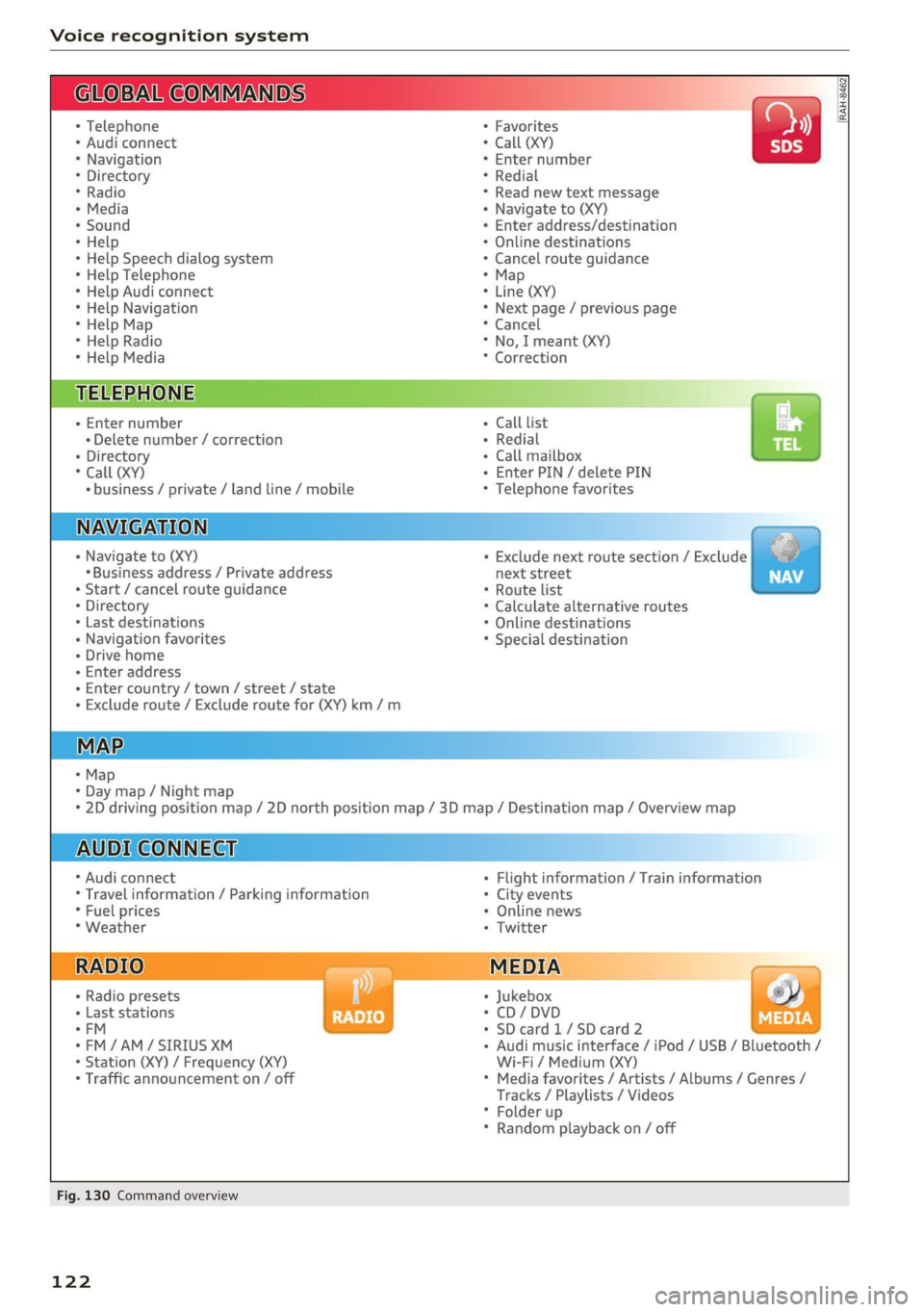
Fig. 130 Command overview
122
Page 129 of 280

8S1012721BB
Voice recognition system
Requirement: you must be in the Navigation or Depending on the vehicle equipment and the se-
Map menu. lected menu item, you can say the following com-
mands for additional settings in navigation:
Function Say:
General map options Map / Day map / Night map / Automatically change map color
Map type 2D heading-up map / 2D north-up map / 3D map / Destina-
tion map / Overview map / Standard map / Traffic map / Satel-
lite map*?)
Showing the route list Route list
Showing the remaining distance/ Destination information
time when route guidance is active
Speed limit prompt How fast can I drive here
Setting voice guidance for active Voice guidance on / Voice guidance off / Voice guidance short-
route guidance ened / Voice guidance complete / Voice guidance traffic
Blocking a certain section on the Block route for (XY) meters/kilometers/yards/miles / Block
route next route / Avoid next section of route
a) AUDI AG provides access to services from third party providers. Permanent availability cannot be guaranteed, because that
depends on the third party provider.
® Note are located and which menu language you
have selected.
Read the information about Audi connect, and
be sure to note the connectivity costs section
=@ in General information on page 142.
G) Tips
Destinations may have to be spelled when en-
tered, depending on the country where you
Applies to: vehicles with voice recognition system
Requirement: the Radio must already be open. Depending on the vehicle equipment and the se-
lected frequency band, you can say the following
commands:
Function Say:
Selecting the frequency band FM / SiriusXM* / AM
Selecting a station from the station | Channel (XY) / Frequency (XY) / Last stations
list
Selecting a station from the presets | Radio presets > Line (XY)
Setting the frequency Frequency (XY)
Setting the frequency Frequency (XY) / Frequency (XY) HD 1
Correcting data input No I meant (XY)
Closing the full-screen command Close
list
127
Page 162 of 280

Navigation
Parking along the route: parking options along
the route will be displayed.
Save current position: you can save your current
vehicle position as a favorite > page 155 or save
it as a contact in the directory > page 155.
Audi connect at this location*: allows you to
search for travel information at the entered loca-
tion (events, weather at the destination, etc.).
Country information: you can display the appli-
cable urban and rural speed limits for any coun-
try/state. This information will be automatically
shown to you in the route information (5)
=> page 158, fig. 142 when the speed limit is ex-
ceeded, if this function is activated > page 160.
Avoid route*: when route guidance is active, the
calculated route will avoid the area you have
specified (maximum: 12 mi (20 km)), if possible.
The navigation system calculates an alternative
route. The route to be avoided that you have en-
tered applies only to the current route and must
be set again, if needed. The areas you have se-
lected to avoid will appear with red and white
shading on the map.
Map settings
Applies
to: vehicles with navigation system
> Press the [NAV/MAP] button repeatedly until
the map is displayed > page 158, fig. 142.
> Select: right control button > Map settings.
Depending on the selected function, the follow-
ing settings can be selected:
Map colors
Day/Night: the map is displayed with a light/
dark background.
Automatic: when the lights switch on, the map
colors switch from day to night.
Map display
Standard > page 158, fig. 141.
Satellite map*)) > page 161, fig. 143.
2) AUDI AG provides access to services from third party pro-
viders. Permanent availability cannot be guaranteed, be-
cause that depends on the third party provider.
160
Traffic > page 162.
Map orientation
Destination map: the map indicates the destina-
tion and is oriented to the north.
2D heading up map/2D north up map: the cur-
rent vehicle position is displayed. The map is ori-
ented in the direction of travel or to the north.
3D heading-up map: when this function is
switched on, the current vehicle position is
shown on a three-dimensional map and oriented
in the direction of travel. At a scale of 62 mi
(100 km) and larger, the map orientation is to
the north.
Overview map: the entire route from the vehicle
position to the destination or the next stopover is
displayed on the map. The map scale depends on
the length of the route and adapts automatically.
The map is oriented to the north.
Route information
The display of route information such as the cur-
rent road being driven on, upcoming maneuvers,
traffic information or points of interest along the
route can be switched on/off.
Automatic zoom
On: the map scale is adapted automatically de-
pending on the type of road being traveled (ex-
pressway, highway, other roads) so that you al-
ways have an optimal overview of the road ahead.
The scale will also be automatically adapted
when there are upcoming maneuvers to provide a
better detailed view.
Off: the map scale you have chosen is main-
tained.
Map content
Map content, such as traffic information, favor-
ites or restaurants, can be displayed or hidden
(™).