battery AUDI TT ROADSTER 2008 User Guide
[x] Cancel search | Manufacturer: AUDI, Model Year: 2008, Model line: TT ROADSTER, Model: AUDI TT ROADSTER 2008Pages: 316, PDF Size: 70.1 MB
Page 59 of 316
When w ill the anti th eft ala rm sys te m be trigge re d ?
When the vehicle is locked, the alarm system mon itors and protects
the following parts of the vehicle :
• engine compartment
• luggage compartment
• doors
• ignition
When the system is activated, the alarm will be triggered if one of the doors , the engine hood or the rear lid are opened, or if the igni
tion is turned on .
The anti -theft alarm sys tem will also go off when the battery is
disconnected .
You can also trigger the alarm by pressing the PANIC button on your remo te -control key . This will alert other people in case of emer
gency. Press the
PANIC button again to turn off the a larm.
H ow is the ant i-th eft al arm s witche d o ff wh en
t riggered ?
The alarm system is switched off when you unlock the vehic le using
t he remote -con tro l key or when the ignition is swi tched on . The
alarm will also switch itse lf off when it comes to the end of its cycle .
Emerg en cy fla sher
The emergency flasher wil l b link brief ly when the doors, engine
hood and rear lid are properly closed .
If the emergency flashers do not blink, check the doors, engine hood
and rear lid to make sure they are properly closed. If you close a
door, the hood or the rear lid with the anti-theft alarm switched on,
the emergency flashers will blink only after you have closed the
door or lid.
[ i ] Tips
• For the ant i-theft a larm system to function properly, make sure
all vehicle doors and windows are closed before leaving the vehicle.
Con tro ls and eq uip
ment
Op ening and clo sing
• When you open the vehicle from the driver's door using the key,
the central locking swi tch wi ll work only after you have swi tched on
the ignition .•
Power windows
Controls
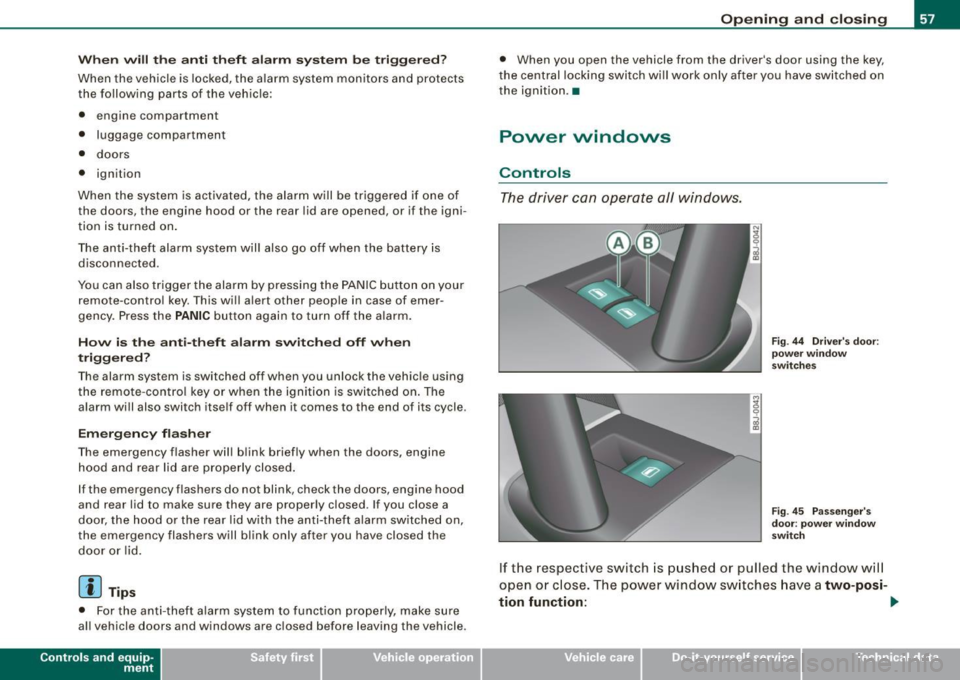
The driver can operate all windows.
M ;g 0
i
F ig . 44 Dri ver's door:
p ow er w in dow
swi tc hes
Fi g. 4 5 Passe nger's
d oor : p ow er window
swi tch
If the respective switch is pushed or pulled the window wil l
open or close. The power window sw itches have a
two-posi -
tion fun ction :
1)1,
Vehicle care I I Technical data
Page 61 of 316
-Turn and hold the key in the lock pos ition @=>fig. 46
until the w indows are completely closed.
Opening the windows
- Insert the key into the lock of the dr iver's door .
- Turn and hold the key in the open position
@.
Opening/closing power top
- See => page 63, "Conven ience open ing and c losing of
power top " to operate power top with the key.
The automatic close function will cease if the key is released . For
sa fety reasons it is not poss ibl e to open and close the power top
with the remote control key.
& WARNING
• Be careful when closing the windows. Check to see that no one
is in the way, or serious injury could result!
• Always read and heed WARNING~
/.1 in "General description"
on
page 50. •
Reactivating the system after battery
disconnection
Reactivating the convenience close/open feature
If the vehicle battery is disconnected and then reconnected,
the automatic closing and opening function will not work until it is reactivated. To reactivate this feature, perform the
following steps:
Controls and equip
ment
Opening and closing
Reactivating close/open feature
- Pull and hold the power window switch until the window
is completely closed.
- Release the switch.
- Pull the switch again for one second. The automatic
closing/opening is now reactivated. •
I • •
Page 65 of 316
-Press and hold the switch down throughout the closing
procedure.
The folding top is completely open or closed when the indicator
light <:-in the instrument cluster goes out. The door windows are
automatically lowered about 20 mm while the top is opening .
& WARNING
Never drive the vehicle with the top not properly latched! Other
wise there is a risk that the top will be opened by the wind. This
can result in injuries and damage to the vehicle.
[ i] Tips
• Opening and closing the automatic convertible top is possible
below posted speed limits in city driving . At speeds above 4 mph (6
km/h), you can use the "convenience opening" function. The folding
top is completely opened by briefly pulling on the switch.
• The indicator light for the folding top goes out as soon as it is
correctly latched .
• In order not to discharge the battery unnecessarily, the top
should not be lowered or raised several times in succession with the
engine not running.
• I f the indicator light for the folding top flashes when the switch
is actuated, there is a malfunction. •
Controls and equip
ment
Folding top
Ap plies to vehic les: with power fo lding top
Convenience opening and closing of power
top
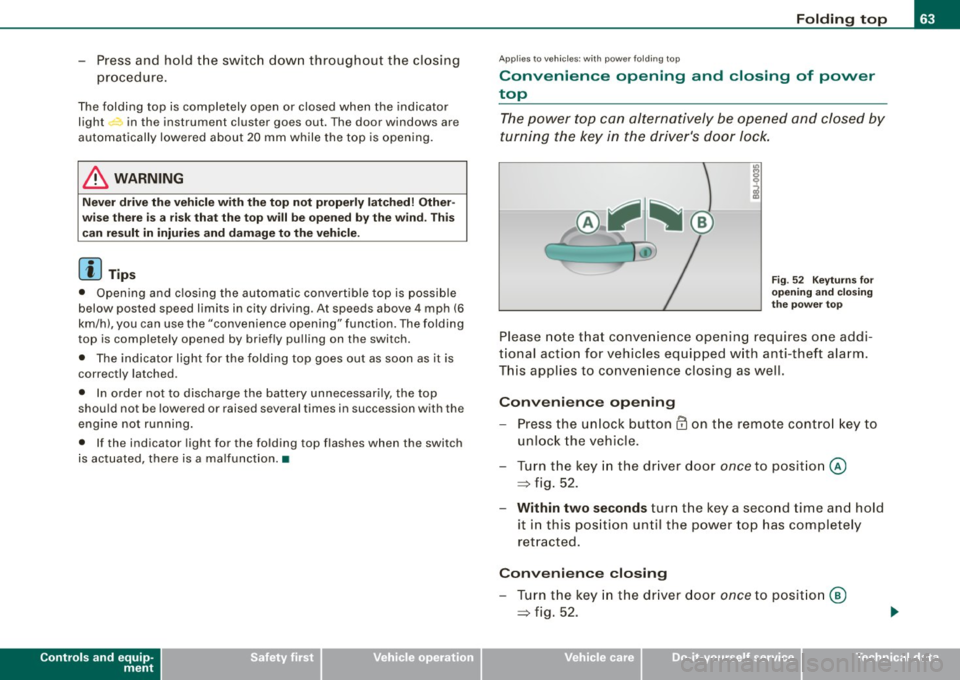
The power top can alternatively be opened and closed by
turning the key in the driver's door Jock.
Fig. 52 Keyturns for
opening and closing
the power top
Please note that convenience opening requires one addi
tional action for vehicles equipped with anti-theft alarm.
This applies to convenience closing as well.
Convenience opening
-Press the unlock button CD on the remote control key to
unlock the vehicle.
- Turn the key in the driver door
once to position @
=> fig. 52.
- Within two seconds turn the key a second time and hold
it in this position until the power top has completely
retracted.
Convenience closing
- Turn the key in the driver door once to position @
=> fig. 52.
I • •
Page 76 of 316
Clear vision
Coming home situation
In
darkness, the activated system will turn on the headlights, side
marker lights , rear side marker lights , tail lights, and rear license
plate light as soon as the driver's door is opened from inside.
As long as one of the doors or the rear lid remains open, the set of
external lights will keep burning for about four minutes maximum.
To provide light for departure, the set of vehicle lights will keep
burning for about another 30 seconds after all doors and the rear lid
have been closed.
The factory-set time of 30 seconds until the lights are switched off can be adjusted if you prefer a longer or shorter duration. Have the
adjustment done by your authorized Audi dealer or a qualified work
shop. The system can be adjusted to keep the lights burning for a
maximum of 60 seconds.
Leaving home situation
As soon as the vehicle is unlocked by pressing the
ti button on your
remot e control, the set of external l ights is switched on .
The external lights are switched off as soon as the driver's door is
opened from outside . Even if you had the system readjusted to keep
the lights burning for an extended time for coming home, the
external lights will be turned off if you do not open the driver's door
within 60 seconds after unlocking. See chapter "Opening and
Closing" in your Owner's Manual. If the lights are switched off
before you reach the driver's door, press the
a button once more to
turn them on again.
[ i] Tips
• Do not attach any stickers to the windshield in front of the two
light sensors, as this would interfere with both the automatic oper
ation of the headlights and the automatic dimming of the inside
mirror(s). • If
the vehicle is remotely unlocked and locked three times in
succession, leaving home will not turn on the lights a fourth time to
safeguard the battery and lights.
• If you wish to use the coming home/leaving home function regu
larly, you can leave it activated at all times without risking perma
nent strain on the electrical system. As the system is controlled by
light sensors, it will only be energized in darkness .
• Frequent use of the coming home/leaving home function for
approaching and departing a vehicle parked in the dark will strain
the battery. This applies particularly if only short distances are
driven between stops . Occasionally drive longer distances to make
sure the battery is recharged sufficiently.
• If the fog lights have been switched on by the coming
home/leaving home function, they will always be switched off when
you switch on the ignition. •
Instrument panel illumination
The illumination of the instruments, displays and the
center console can be adjusted.
Fig. 67 Instrument
panel illumination
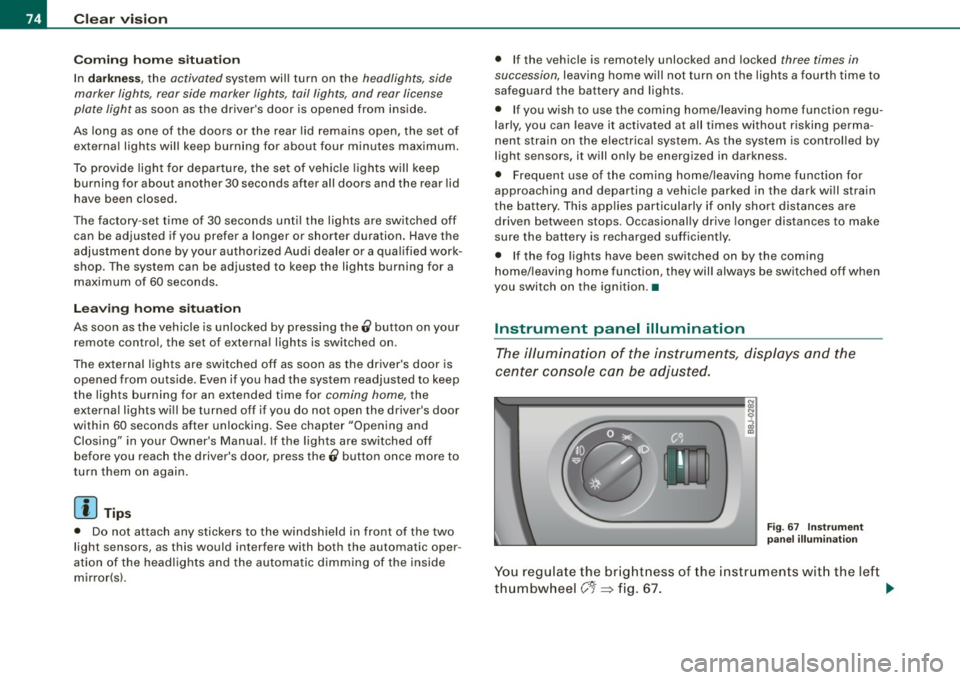
You regulate the brightness of the instruments with the left
thumbwheel
C J=> fig. 67. ~
Page 79 of 316
Interior lights
Interior lights
The interior lights include the reading lights for the driver
and the front passenger.
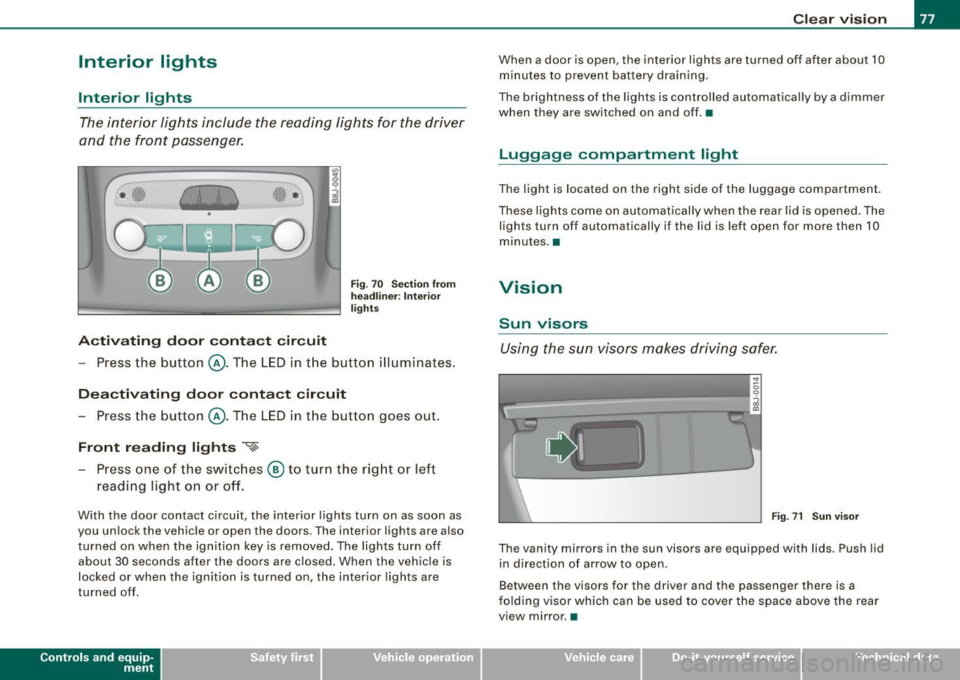
Activating door contact circuit
Fig. 70 Section from
headliner: Interior
lights
- Press the button @. The LED in the button illuminates.
Deactivating door contact circuit
- Press the button @. The LED in the button goes out.
Front reading lights ~
- Press one of the switches @ to turn the right or left
reading light on or off.
With the door contact circuit, the interior lights turn on as soon as
you unlock the vehicle or open the doors. The interior lights are also
turned on when the ignition key is removed. The lights turn off
about 30 seconds after the doors are closed. When the vehicle is
locked or when the ignition is turned on, the interior lights are
turned off .
Contro ls and eq uip
ment
Clear vision
When a door is open, the interior lights are turned off after about 10
minutes to prevent battery draining.
The brightness of the lights is controlled automatically by a dimmer
when they are switched on and off. •
Luggage compa rtm ent light
The light is located on the right side of the luggage compartment.
These lights come on automatically when the rear lid is opened. The
lights turn off automatically if the lid is left open for more then 10
minutes. •
Vision
Sun visors
Using the sun visors makes driving safer.
•
Fig. 71 Sun visor
The vanity mirrors in the sun visors are equipped with lids . Push lid
in direction of arrow to open.
Between the visors for the driver and the passenger there is a
folding visor which can be used to cover the space above the rear
view mirror .•
Vehicle care I I irechnical data
Page 97 of 316
Cigarette lighter/socket
Cigarette lighter
The socket of the cigarette lighter may be used for 12 volt
appliances.
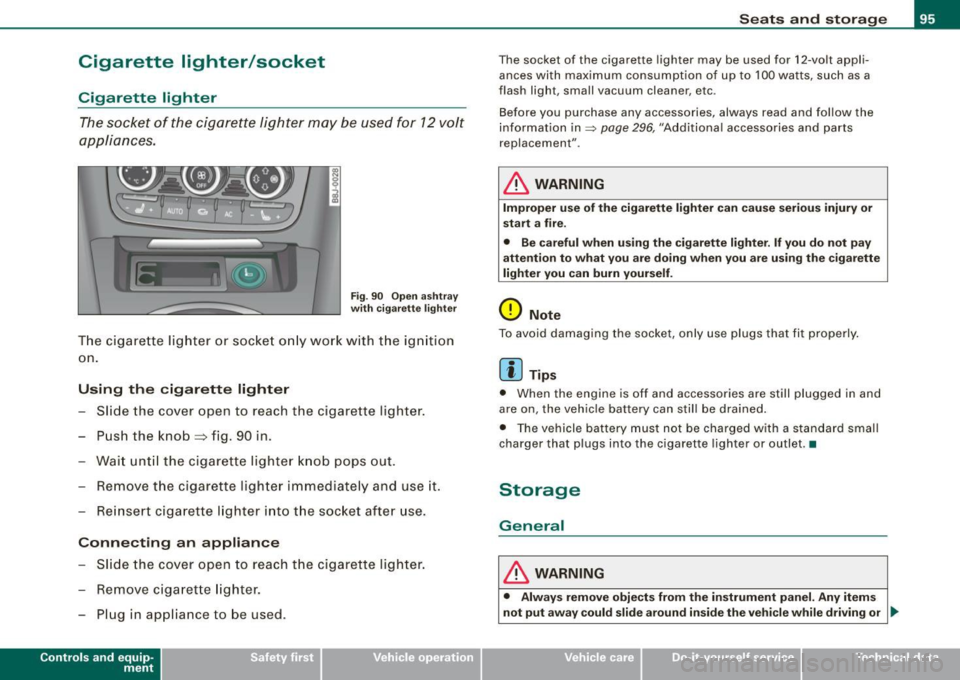
Fig . 90 Open ashtray
with cigarette lighter
The cigarette lighter or socket only work with the ignition
on.
Using the cigarette lighter
- Slide the cover open to reach the c igarette lighter.
- Push the knob=> fig. 90 in .
- Wait until the cigarette lighter knob pops out.
- Remove the cigarette lighter immediately and use it.
- Reinsert cigarette lighter into the socket after use.
Connecting an appliance
- Slide the cover open to reach the cigarette lighter.
- Remove cigarette lighter.
- Plug in appliance to be used .
Contro ls and eq uip
ment
Seats and storage
The socket of the cigarette lighter may be used for 12-volt appli
ances with maximum consumption of up to 100 watts , such as a
flash ligh t, small vacuum cleaner, etc.
Before you purchase any accessories, always read and follow the
information in=>
page 296, "Additional accessories and parts
replacement" .
& WARNING
Improper use of the cigarette lighter can cause serious injury or
start a fire.
• Be careful when using the cigarette lighter. If you do not pay
attention to what you are doing when you are using the cigarette
lighter you can burn yourself.
0 Note
To avoid damaging the socket, only use plugs that fit properly.
[ i] Tips
• When the engine is off and accessories are still plugged in and
are on, the vehicle battery can still be drained.
• The vehicle battery must not be charged with a standard small
charger that plugs into the cigarette lighter or outlet .•
Storage
General
& WARNING
• Always remove objects from the instrument panel. Any items
not put away could slide around inside the vehicle while driving or
~
Vehicle care I I irechnical data
Page 108 of 316
• ..__O_ n_ t_h _ e_ r_ o_ a_ d ____________________________________________________ _
Ignition lock and ignition switch
Ignition lock
The igniti on key starts or s tops the eng ine.
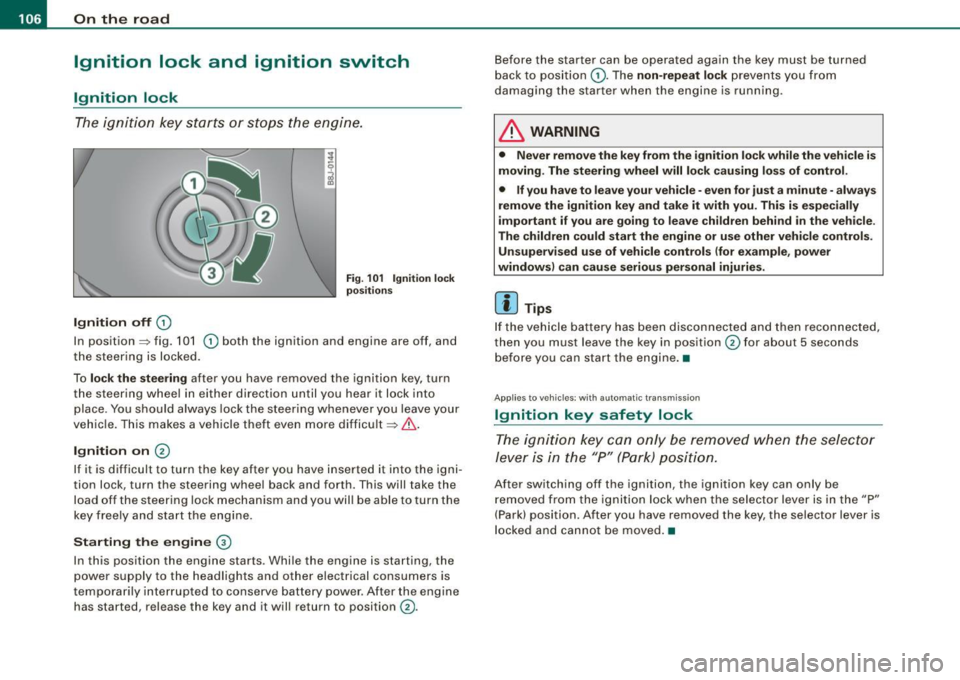
Ignition off G)
Fi g. 1 01 Ign it io n lock
po sition s
In posit ion => fig. 101 G) both the ignition and engine are off, and
t he steering is locked.
To
lo ck the steering after you have removed the ignition key, turn
the steering whee l in either direction until you hear it lock into
place . You should always lock the steering whenever you leave your
vehic le. This makes a vehicle theft even more difficult =>& .
Ignition on 0
If it is difficult to turn the key after you have inserted it into the igni
tion lock, turn the steering wheel back and forth. This will take the
load off the steering lock mechanism and you wil l be able to turn the
key freely and start the engine.
Starting the engine ®
In this position the engine starts . Whi le the engine is starting, the
power supply to the headlights and other electrical consumers is
temporari ly interrupted to conserve battery power . After the engine
has started, release the key and it will return to position
G) .
Before the starter can be operated again the key must be turned
back to posi tion
G) . The non -repeat lock prevents you from
damaging the starter when the engine is running.
& WARNING
• Never remove the key from the ignition lo ck while the veh icle is
moving. The steering wheel will lo ck causing lo ss of control .
• If you have to leave your vehicle -even for just a minute -always
remove the ign ition key and take it with you . This i s especially
i mportant if you are going to l eave children behind in the vehi cle .
The children could start the eng ine or u se other vehi cle control s.
Unsupe rv ised use of vehicle controls (for e xample , power
window s) can cau se serious per sonal injurie s.
[ i ] Tips
If the veh icle ba ttery has been disconnected a nd then reconnected,
then you must leave the key in position
G) for about 5 seconds
bef ore you can start the engine .•
Appl ies to vehicles: with automat ic trans miss io n
Ignition key safety lock
The ig nition ke y can only be rem oved when the selec tor
le ver i s in the "P" (Par k) p osition.
After switching off the ignition, the ignition key can only be
r emoved from the igni tio n lock w hen the se lector leve r is in the "P"
(Park) position . After you have removed the key, the selector lever is
l ocked and cannot be moved. •
Page 122 of 316
• ..__T_ ra_ n_s_ m_ i_ s _s_ i_ o _n ___________________________________________________ _
Applies t o vehi cles: with S tr oni c®
Emergency release for selector lever
If the vehicle's power supply fails, the selector lever can
be released in an emergency.
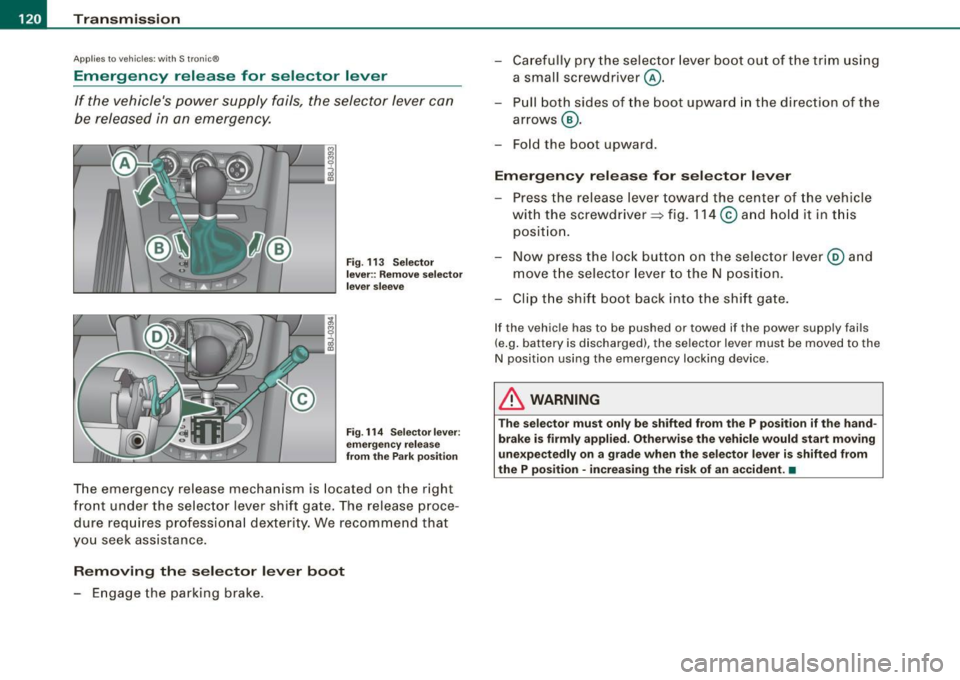
Fig. 113 Selector
lever:: Remove selector
lever sleeve
Fig. 114 Selector lever:
emergency release
from the Park position
The emergency release mechanism is located on the right
front under the selector lever shift gate. The release proce
dure requires professional dexterity. We recommend that
you seek assistance.
Removing the selector lever boot
- Engage the parking brake. -
Carefully pry the selector lever boot out of the trim using
a small screwdriver @.
- Pull both sides of the boot upward in the direct ion of the
arrows @.
- Fold the boot upward.
Emergency release for selector lever
- Press the release lever toward the center of the vehicle
with the screwdriver ~ fig. 114
© and hold it in this
position.
- Now press the lock button on the selector lever@ and
move the selector lever to the N position.
- Clip the shift boot back into the shift gate.
If the vehicle has to be pushed or towed if the power supply fails
(e.g. battery is discharged), the selector lever must be moved to the
N position using the emergency locking device .
& WARNING
The selector must only be shifted from the P position if the hand
brake is firmly applied. Otherwise the vehicle would start moving
unexpectedly on a grade when the selector lever is shifted from
the P position · increasing the risk of an accident. •
Page 222 of 316
-~_C_ h_e _c _ k_ i_n ...:::g::;...._ a_n_ d_ f_ i_ll _in -'g:::;.._ ___________________________________________ _
Closing the engine hood
- Pull the hood down until the pressure from the struts is
reduced.
- Let the hood
drop down and latch in place. Do not try to
push it shut;
it may fail to engage~& .
& WARNING
A hood that is not completely latched could fly up and block your
view while driving.
• When you close the engine hood, check it to make sure the
safety catch has properly engaged. The hood should be flush with
the surrounding vehicle body parts.
• If you notice while driving that the hood is not secured prop
erly, stop at once and close it. •
Working in the engine compartment
Be especially careful whenever you work in the engine
compartment!
Whenever you must perform any work in the engine compartment,
for example checking and filling the different fluids, there is a risk of injury, burns and accidents. To prevent personal injury always
observe the following WARNINGS. The engine compartment of any
vehicle is a hazardous area!
=> &
& WARNING
To help avoid injury, before you check anything under the hood :
• Switch off the engine.
• Remove the ignition key.
• Apply the parking brake.
& WARNING (continued)
• Move selector lever of automatic transmission to "P" {Park);
put manual transmission in Neutral.
• Always let the engine cool down. Hot components will burn
skin on contact.
• To reduce the risk of being burned, never open the hood if you
see or hear steam or coolant escaping from the engine compart
ment. Wait until no steam or coolant can be seen or heard before
carefully opening the hood .
• Keep children away from the engine compartment.
• Never spill fluids on hot engine components. They can cause a
fire.
• Never touch the radiator fan. The auxiliary electric fan is
temperature controlled and can switch on suddenly.
• Never open the coolant reservoir cap when the engine is still
warm. The coolant system is pressurized and hot coolant could
spray out.
• Protect your face, hands and arm from steam or hot engine
coolant by placing a thick rag over the cap when you open the
coolant reservoir.
• If work on the fuel system or the electrical system is necessary:
- Always disconnect the battery .
- Never smoke or work near heaters or open flames. Fluids in
the engine compartment could start a fire.
- Keep an approved fire extinguisher immediately available.
• To avoid electrical shock and personal injury while the engine
is running or being started, never touch :
- Ignition cables
- Other components of the high voltage electronic ignition
system.
• If you must perform a check or repair with the engine running: .,_
Page 223 of 316
_____________________________________________ C_h_ e;::..:. c:..:..k :..:..in ;..:..= g:.....:.; a:..:..n :....:d :..:....:. f.:.:il .:.:li :..:..n :.::g:!-_ ___,J-
& WA RNING !continued )
-First, fully apply the parking br ake , move selector lev er of
automatic tran smi ssion to "P " (P a rk ); put manu al tran smi ssio n
in Neutral.
- Alw ays use extreme c aution to p revent clothing, j ewelry , or
long hair from getting caught in the radi ator fan , V -belts or
other moving pa rt s, or from c onta cting hot parts. Tie b ack hair
before starting , and wear no cloth ing th at will hang or droop
into the engine.
• Minimize exposure to emi ssion and ch emical hazards
:=> & .
& WARNING
California Propo sition 65 Warning :
• Engine exha ust , some of its constituent s, and certa in vehi cle
c omponents contain or emit chemical s known to the State of Cali
fornia to cause cancer and birth defe cts and reprodu ctive harm . In
addition , certain fluid s cont ained in vehicle s and certain produ cts
of compone nt wear contain or emit chemi cals known to the State
of Cal ifornia to cause cancer and birth defe cts or oth er repr oduc
tive ha rm.
• Battery post s, terminals and related ac cess ori es conta in lead
and le ad compou nds , c hemic als kno wn to th e St ate of California
to c ause cancer and reproductive harm s. Wa sh hand s after
ha ndling.
0 Note
When adding fluids , always make sure that they are poured into the
proper container o r filler opening, otherwise ser ious damage to
vehicle systems will occur .
ffi For the sake of the environment
To detect leaks in time, inspect the vehic le floor pan from under
neath regularly. If you see spots from oil or other vehicle fluids, have
your vehicle inspected by an authorized Aud i dealer .•
Engine compartment
Ap plies to vehic le s: wit h 1.8 I1 80-h p engi ne
2.01 200 -hp engine
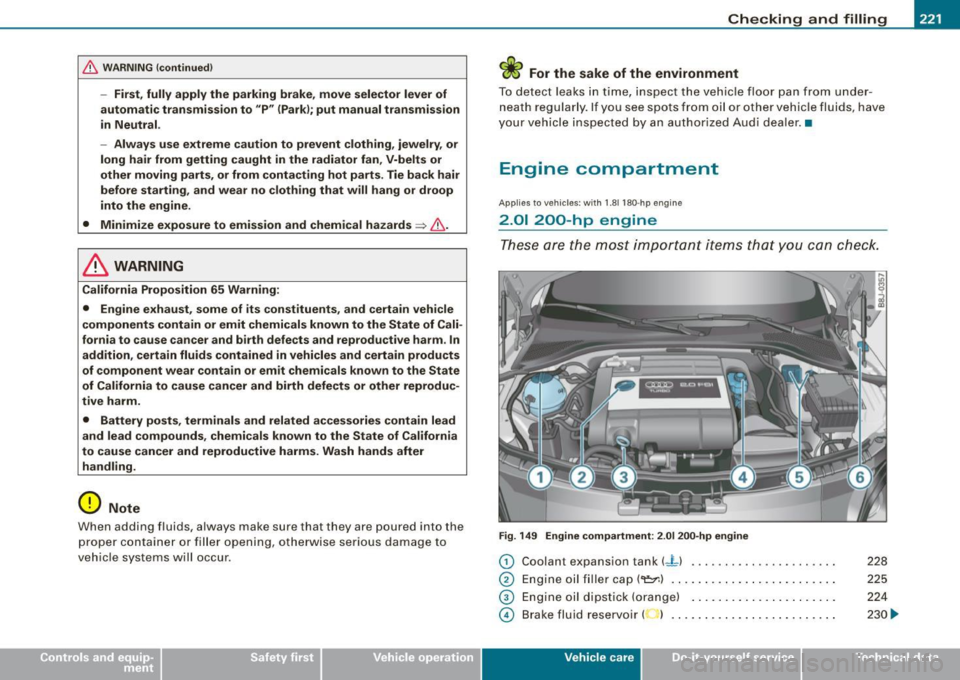
These ar e the most im por tant i tems tha t yo u can check.
Fig . 149 En gine c omp art men t: 2.01 200 -hp engine
0 Coolan t expansion tank (J_ ) ..... .... ........ ..• ..
0 Engine oil filler cap(~) ... ... .. .. .... .... ... ... .
© Engine oil dipstick (orange) ........ ....... ..... . .
© Brake fluid reservoir ( ) . .... .. ... .. ...... ... ... .
Vehic le care I I
228
225
224
230 .,.
irechnical data