oil level AUDI TT ROADSTER 2008 Owners Manual
[x] Cancel search | Manufacturer: AUDI, Model Year: 2008, Model line: TT ROADSTER, Model: AUDI TT ROADSTER 2008Pages: 316, PDF Size: 70.1 MB
Page 16 of 316
Instruments and warning/indicator lights
& WARNING
• Always observe the warning in=;, page 212, " Engine compart
ment" before opening the engine hood and checking the engine
coolant level.
• Never open the engine hood if you see or hear steam , or if you
see engine coolant dripping from the engine compartment . You
c ould burn your self. Let the engine cool off first so that you cannot
hear or see any steam or engine coolant .
0 Note
• Mounting additiona l lights or accessories in front of the a ir inlets
reduces the co oling effect of the radiat or. At high outside tempera
tures or h igh engi ne load, the eng ine could overheat.
• The fron t spoile r has been designed t o properly dis trib ute the
coo ling air when the veh icle is mov ing . If the spo iler is damaged,
this could red uce the coo ling effect and the engine co uld then ove r
heat. Ask your authorized Audi deale r for assistance. •
Fuel gauge
The fuel gauge wor ks only when the ignition is on .
When the needle reaches the red area, the warning light in the i nstrument cluster w ill illu m ina te =;,
page 35 . Thi s means yo u
have approx imate ly 1.9 gallons (7 litres) of fuel left in the tank.
Time
to refuel!
The tota l tank capacity of your vehicle is listed in=;, page 297. Be
awa re of the diffe rent ta nk capaci ties of front -wheel a nd q uat tro®
a ll- w hee l d ri ve models .
0 Note
Never run the tank comple tely dry! An irre gular suppl y of fuel can
cause engine m isf iring and fuel could enter into the exhaust system.
The catalytic converter could then overheat and be
damag ed. •
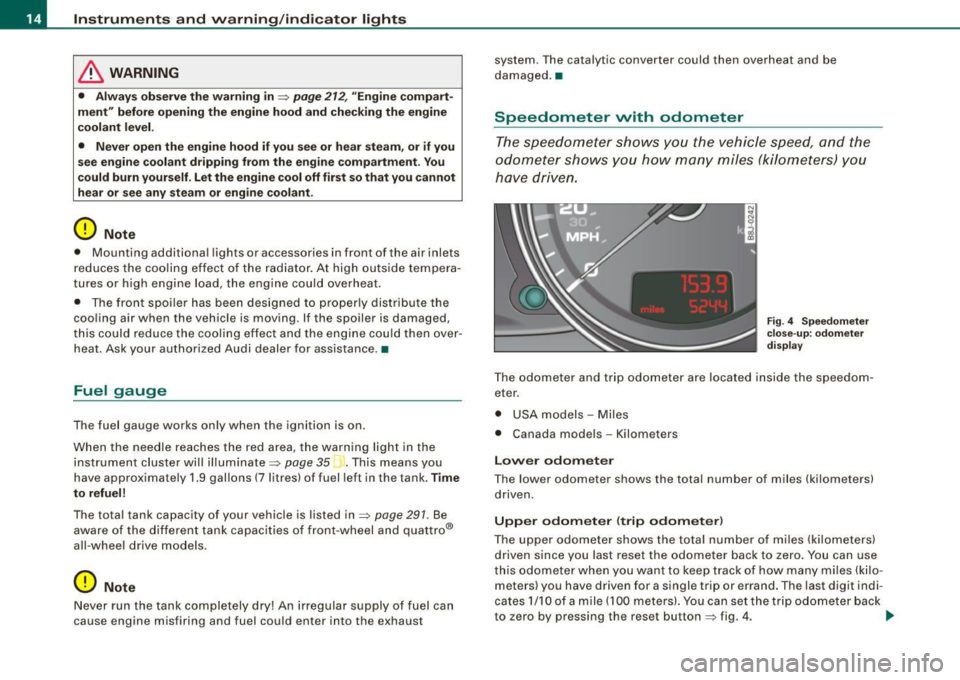
Speedometer with odometer
The speedometer shows y ou t he vehic le speed, and the
o dome ter sho ws you ho w ma ny m iles (kilo meters) yo u
have dri ven.
Fig . 4 Speedomete r
close -up : odomet er
displ ay
T he od ometer an d trip odo mete r are locate d insid e th e spe edom
eter .
• USA model s - Miles
• Canada mode ls - Kilometers
Lower odometer
The lower odometer shows the total number of miles (kilometers)
d riven.
Upper odometer (trip odometer )
The upper o dometer shows the tota l number o f mi les ( kilom eters)
driven since you last reset the odometer bac k to ze ro . You can use
thi s odomete r w hen you want to keep track of how ma ny m iles ( kilo
meters) you have driven for a single trip or errand. The last digit indi
cates 1/10 of a m ile (10 0 meters). You ca n set t he trip od o meter back
to zero by pressing the reset button
=;, fig . 4 . ..,,
Page 32 of 316
Driver inf ormation sy ste m
If Auto Check senses an irregu lar condition or a malfunction
requiring urgent repair, it generates a specific symbol or short message in the instrument cluster center display . You will also hear
an audible warning tone. The displays are color coded in either red
or yellow depending on their level of priority.
The red symbols indicate a
d angerou s conditio n which is addition
a lly signal led by
th ree warning tones. Whereas the ye llow symbols
represent a
W arning which is signalled by one warning tone. In
specific situations, messages for the driver appear in addition to the red symbols~
page 30. •
Driver information messages
Along with some particular warning/indic ator lights and
instrument cluster symbols, additional messages will
appear in the display .
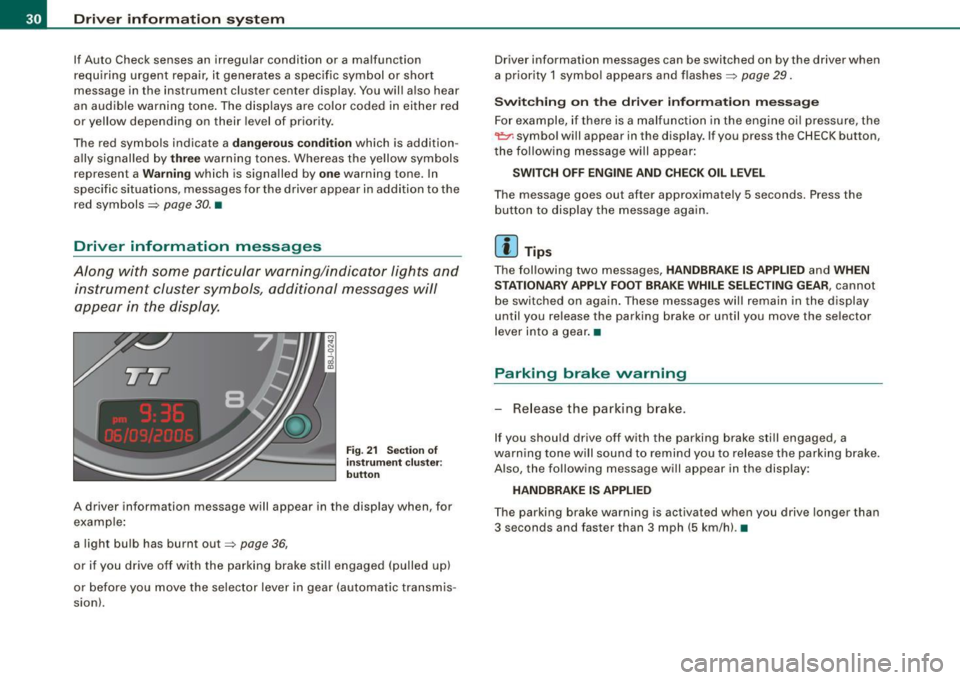
Fig. 21 Sectio n of
i n strum ent c luster:
b utton
A driver information message will appear in the disp lay when, for
example :
a light bulb has burnt out~
page 36,
or if you drive off with the parking brake still engaged (pulled up)
or before you move the se lector lever in gear (automatic transmis
sion). Driver information messages can be switched on by the driver when
a priority 1 symbo
l appears and flashes~
page 29.
Sw itc hing on th e driv e r inf orm ation m ess ag e
For example, if there is a malfunction in the engine oi l pressure, the
~ symbo l will appear in the display. If you press the CHECK button,
the fo llowing message will appear :
SWITCH O FF ENG IN E AND CHE CK OIL LE VEL
The message goes out after approximately 5 seconds. Press the
button to disp lay the message again.
[ i ] Tips
The fol lowing two messages, HANDBRAKE IS APPLIED and WHEN
S TA TIONARY APPLY FOOT BRA KE WHILE SELE CTIN G G EAR ,
cannot
be switched on again . These messages will remain in the display
until you release the parking brake or until you move the selector
l ever into a gear .•
Parking brake warning
- Release the parking brake.
If you should drive off with the parking brake still engaged, a
warning tone w ill sound to remind you to release the parking brake.
A lso, the following message will appear in the display:
HANDBR AKE IS APPLIED
The parking brake warning is activated when you drive longer than
3 seconds and faster than 3 mph (5 km/h). •
Page 33 of 316
Applies to vehi cles : wi th m anua l tra nsmi ssion
Function test: manual transmission
When the ignition is switched on, the Auto-Check Control automati
cally performs an operational check . If the functions tested are O .K .,
no message is shown in the display.
If one or more faul ts exist, the driver information disappears
approximately 15 seconds after the engine has been started and the
appropriate fault symbol appears in the display.
If malfunctions exist , this is indicat ed by r ed (prio rity
1) or yellow
(priority
2) symbols. A warning signal sounds at the same time. •
Applies to vehicle s: with autom ati c tra nsm iss io n
Function test: automatic transmission
Th e Auto-Check Con trol will automatically p erform a test each tim e
you switch on the ignition. When the selector lever in
P or N, the
following message appears in the display :
WHEN STATIONARY APPLY FOOTBRAKE WHILE SELECTING GEAR.
When you a select a different gear (for example: R, D, etc.), the
messag e will disappear and th e Auto-Check function is display ed .
If the functions tested are O.K., no message is shown in the display .
If there is a malfunction, then the malfunction message will appear
about 15 seconds after the you start the vehicle. At the same time
you will hear a warning tone.
[ i] Tips
On vehicles with automatic transmission*, the driver message
WHEN STATIONARY APPLY FOOTBRAKE WHILE SELECTING GEAR
cannot be shown again. This driver message appears in the display
only un til a gear is engaged. •
Controls and equip
ment
Driver information system
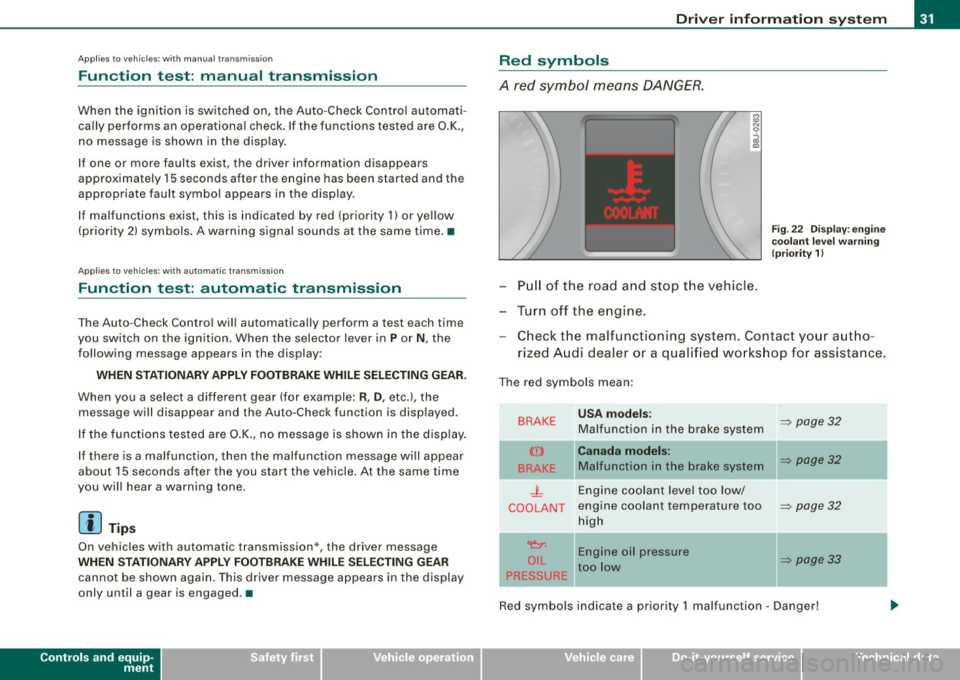
Red symbols
A red symbol means DANGER.
Pull of the road and stop the vehicle.
Turn off the engine.
Fig . 22 Display : engine
coolant level warning
(priority 1)
Check the malfunctioning system . Contact your autho
rized Audi dealer or a qualified workshop for assistance.
The red symbols mean :
BRAKE
(Ci)
BRAKE
.J_
COOLANT
'e:1:
O IL
PRESSURE
-
USA models:
Malfunction in the brake system
Canada models:
Malfunction in the brake system
Engine coolant level too low/
engine coolant tempera ture too
high
Engine oil pressure
too low
-
~ page 32
~ page32
~ page32
~ page33
Red symbols indicate a priority 1 malfunc tion - Danger!
I • •
Page 35 of 316
-Contact your authorized Audi dealer for assistance if
necessary.
If the engine coolant level is correct, then the radiator fan may be
the cause of the malfunction.
If the generator warning/indicator light should also illuminate
=> page 19 , then the fan belt may be damaged.
& WARNING
• If your vehicle should break down for mechanical or other
reasons, park at a safe distance from moving traffic, turn off the
engine and turn on the hazard warning lights
=> page 75, "Emer
gency flasher A".
• Never open the hood if you see or hear steam or coolant
escaping from the engine compartment -you risk being scalded.
Wait until you can no longer see or hear steam or coolant
escaping.
• The engine compartment of any vehicle is a dangerous area.
Before you perform any work in the engine compartment, turn of
the engine and allow it to cool. Follow the warning stickers
=> page 212, "Engine compartment".
0 Note
Do not continue driving if the _F_ symbol illuminates. There is a
malfunction in the engine cooling system -you could damage your
engine. •
Controls and equip
ment
Driver information system
Engine oil pressure malfunction 'l=;:f.
The red engine oil pressure warning symbol requires
immediate service or repair. Driving with a low-oil-pres
sure indication is likely to result in serious damage to the
engine.
If the ~ symbol appears in the display and flashes, the oil
pressure is too low. In addition to the symbol, the following
message also appears in the display:
SWITCH OFF ENGINE AND CHECK OIL LEVEL
Immediate actions
- Pull off the road and stop the vehicle.
- Shut the engine down.
- Check the engine oil level with the dipstick=> page 224.
Dipstick reading checks too low
- Top off oil to the proper level
=> page 225.
- Make sure that the oil pressure warning symbol ~
appears no longer in the display before you start driving
again.
Dipstick reading checks OK
- If the ~ symbol starts flashing again even though the
engine oil level checks OK on the dipstick ,
do not start
driving again and do not let the engine run at idle .
Instead, contact your authorized Audi dealer for assis
tance.
I • •
Page 36 of 316
![AUDI TT ROADSTER 2008 Owners Manual Driver information system
[ i] Tips
• The engine oil pressure symbol 9:::r. is not an indicator for a low
engine oil level. Do not rely on it. Instead, check the oil level](/img/6/57671/w960_57671-35.png "AUDI TT ROADSTER 2008 Owners Manual Driver information system
[ i] Tips
• The engine oil pressure symbol 9:::r. is not an indicator for a low
engine oil level. Do not rely on it. Instead, check the oil level")
Driver information system
[ i] Tips
• The engine oil pressure symbol 9:::r. is not an indicator for a low
engine oil level. Do not rely on it. Instead, check the oil level in your
engine at regular intervals, preferably each time you refuel, and
always before going on a long trip.
• The yellow oil level warning indication · requires oil refill or
workshop service without delay. Do not wait until the red oil pres
sure warning symbol
9:::r. starts to flash before you respond to the
low oil level warning . By then, your engine may already have
suffered serious damage. •
Yellow symbols
A yellow symbol means WARNING.
Yellow symbols mean:
Low fuel level
Check engine oil level Engine oil sensor malfunction
-
Worn brake pads
USA models:
Speed warning 1
Canada models:
Speed warning 1
-
USA models:
Speed warning 2
-Canada models:
Speed warning 2 =>
pag
e35
=> page35
=> page35
-
=> page35
=> page35
=> page35
=> page35
-
=> page35
Dynamic headlight range con
trol* defective => page35
Windshield washer fluid level low
=> page 35
Battery voltage too high or too
low
Defective light bulb
USA models:
Defective brake light
Canada models:
Defective brake light =>
page35
=> page36
=> page36
=> page36
Light/rain
sensor defective (auto-=> page 36
matic headlights) * defective
Adaptive Light* defective =>
page 36
Tire pressure monitoring system * => page 37
Yellow symbols indicate a priority 2 malfunction -Warning!
When a yellow symbol appears, a warning tone will sound
once .
Check the displayed function as soon as possible . If more than one
priority 2 malfunction is detected, all symbols will appear one after
the other for about two seconds.
To display driver information
As an example, the[} symbol appears in the display . If you now
press the button =>
page 12, fig. 2 ©, the following driver message
appears in the display:
PLEASE REFUEL
The driver message in the display goes out after about 5 seconds.
You can display the driver message again by briefly p ressing the
button. •
Page 37 of 316
Fuel supply too low [J
When the J symbol illuminates, this means there is about 1.8
gal lons
(7 l iters) o f fue l left in the fuel ta nk. T ime to re fuel!
=>
page 275.
I f the symbo l lights up, even when there is ample fuel in the tank,
and the text
TANK SYSTEM MA LFUN CTION! CON TACT WORKSHOP
appears in the display, there is a fau lt in the system. Contact a qual
ified workshop to have the fau lt rectified. •
Checking the engine oil level _,;.
When the -= symbol illuminates, check the engine oil leve l as soon
as possib le =>
page 224. Top off the oil at your ear liest opportun ity
=>
page 225. •
Engine oil sensor defective
-
If the _ symbol illuminates, contact your authorized Audi dealer
and have the oil sensor inspected . Unti l you have this done, check
the oi l leve l each time you re fue l jus t to be on the sa fe s ide
=>
page 224 . •
Worn brake pads .)
If the symbo l illuminates, contact your authorized Audi dea ler to
have the front bra ke pads inspected (on that occasion have the rear
brakes inspected as wel l to be safe). •
Controls and equip
ment
Driver inform ation system
Speed warning 1
~ (USA models) / ~ (Canada
models)
I f the ~ symbo l illuminates, this means you are d riving faste r than
the set vehicle speed . Slow down!=>
page 37. •
Speed warning 2
-.... (USA models) /
l.,... (Canada models)
If the C) symbol il luminates, this means you have driven faster than
the sec ond set vehic le s peed. Slow d own! =>
page 37. •
Applies to veh icles : wi th dynami c he ad light r ange ad just ment
Headlight range control defective
If the il luminates, the dynamic head light range control is no
longer working pr ope rly. Have the syste m checked and repa ired at
your authorized Audi dea ler .•
Windshield washer fluid level too low .-_j
If the ~ symbol illuminates, add windshie ld washer fluid to the
washer sys tem =>
page 236 . •
Battery voltage low ~
If the C sy mb ol illu min ates, co ntact your au thori ze d Audi dealer
and have the following components inspected:
• drive belt
• generator
• b att e ry charge
I • •
Page 191 of 316
Faults in the brake syst em
If you shou ld notice a sudden i ncrease in brake pedal travel, then
one of the two brake circuits may have failed=>
& -
Low brake fluid level
Ma lfunctions can occur in the brake system if the brake fluid leve l is
t oo low. The brake fluid level is moni tored e lect ronica lly .
Brake pow er assist unit
The brake p ow er assist un it increas es th e pressure that you
generate with the brake peda l. It works only when the engine is
running.
& WARNING
• You should perform braking maneuver s for the purpose of
c leaning the brake system only if road conditions permit . Other
road users must not be put at ri sk -you may cause an accident!
• Before des cending a steep grade , redu ce speed and sh ift trans
mi ssion into a lower gear or lower driving position . Do not ride the
br akes or hold the pedal down too long or too often . This could
cause the brakes to get hot and diminish braking efficiency .
• Do not "ride the brakes " by resting your foot on the pedal when
you do not intend to brake . Thi s may cause the brakes to overheat,
premature we ar and increased stopping distan ce .
• Under certain cl imatic and operating condit ions such as
pas sing through water , driv ing in heavy rain or after washing the
vehicle, the effectiveness of the brake s can be reduced . In winter ,
ice can ac cumulate on the brake pads , linings , discs and drums .
Cautiously apply brakes for a te st. Brakes will dry and ice coatings
will be cleaned off after a few cautious brake appli cations .
• Driving for an extended period of time on salt -covered road s
without using your brakes can also affect brak ing effic iency . Clean
off accumulated salt coating from brake discs and pads with a few
c autiou s brake applications .
Controls and equip ment Safety first Vehicle operation
Intelligent technology
& W
ARNING (continued )
• If you damage the front spo iler , or if you install a different
s poiler , be sure the air flow to the front brakes is not obstructed.
Otherwise the brake system could overheat redu cing the effective
ness of the entire br ake system.
• Failure of one brake circuit will impair the braking capability
resulting in an increa sed stopping distance. Avoid driving the
vehicle and have it towed to the nearest Audi dealer or qualified
workshop.
• Never let the veh icle roll to a stop with the engine shut off .
• If the b rake booster is not working , for e xample when towing
your vehicle, or because the brake booster has somehow been
damaged , the brake pedal must be pre ssed considerably harder to
make up for the lack of booster assistance . •
Anti- lock brake system (ABS)
ABS p revents the wheel s from loc king unde r br ak ing.
The anti -lock brake sys te m (ABS) makes a major contri but ion to
i ncreasing act ive d riv in g sa fety . You should not expect that brakin g
distances wi ll be
shortened unde r all c ircums tances wi th ABS.
B rak in g distance may even become somewhat
longer , for e xa m ple ,
on gravel or in new snow on s lippery ground, even if you are driving
carefully and slowly.
ABS operation
W hen a veh icle speed o f about 10 mph (20 km/ h) is reac hed , an au to
matic test sequence is run. Some noise from the pum p may be
audible.
I f the speed of a wheel s lows down too much re lative to vehicle
speed and i t starts to lock, br ake pressu re to th is whee l is reduce d.
T his adjustment process can be felt as a
pulsing motion of the b rake
pedal ,
accompanied by some noises. Yo u as the d rive r are in tent io n
a lly being g iven the in fo rmation that the wh eels a re tendin g to lock
Vehicle care Do-it-yourself service Technical data
Page 195 of 316
New brake pads
Remember that new brake pads do not have a full braking
effec t during the first 250 miles (400 kilometres) after they
are installed.
New brake pads have to be "burnished in" before they have optima l
grab=> &.
During the break -in period, you should avoid putting severe loads
on the brakes. Severe loads include, for example, sudden hard
braking, in particular at very high speeds or, for example, on moun
tain passes.
& WARNING
U ntil the y develop the m axim um "b ite " fo r be st stoppi ng p owe r,
th e s urfaces on new br ake p ads re quir e some " brea king -in " during
th e ini tia l 100 to 150 miles 1 150 to 200 k ilom etres) of nor ma l c ity
driving . You can comp ensa te fo r thi s by press ing the brak e ped al
more fi rml y. T his appl ie s w henev e r ne w pad s a re in sta lled . •
Catalytic converter
It is very important that your emission control system
(catalytic converter) is fu nctioning properly to ensure that
y o ur vehicle is running in an environmentally s ound
manner.
- Always use lead-free gasoline~ page 214, "Fuel supply".
- Never run the tank down a ll the way to empty.
- Never put too much motor o il in your engine~
page 225,
"Adding engine oi l 'l=:;r\11
•
- Neve r try to push -or tow -s tart your ve hicle.
Controls and equip
ment Safety first Vehicle operation
Dri
ving and environm ent
The catalytic converter is an efficient "clean-up" device built into the
exhaust system of the vehicle . The cataly tic converter burns many
of the pollutants in the exhaust gas before they are re leased into the
atmosphere.
The exclusive use of un leaded fuel is critica lly important for the l ife
of the catalytic converter and proper functioning of the engine.
& WARNING
• Do not park or oper ate th e ve hi cle in are a s whe re the hot
exha ust sys te m may c ome in conta ct wi th dr y grass, bru sh , fu el
s pill or other mat eri al which can cau se a fi re.
• Do not app ly a dditi onal u nder co at ing or ru stpr oofing on or
near the exhau st m anifold , exh au st pipe s, cata ly tic convert er or
he at shi elds. During dri ving, the s ubstance use d f or und ercoa ting
c ould ov erheat an d ca u se a fire.
0 Note
• Be aware that just one tank fi lling with
le ad ed fuel wi ll a lready
seriously degrade the performance of the catalytic converter.
• Do not exceed the correct engine oil level =>
page 225.
• Do not drive until the fuel tank becomes completely empty. The
engine could misfire . Unburned fuel could a lso get into the exhaust
system and this could cause the catalytic converter to overheat .
• Do not turn off the igni tion wh ile the vehicle is moving.
• Do not continue to operate your vehicle under these conditions,
as otherwise fue l can reach the cata lytic converter. This could resu lt
in overheating of the converter, requiring its replacement .
• To assure efficient operation of the Emiss ion Control System:
- Have your vehicle maintained properly and in accordance with
the service recommendations in your Maintenance & Warranty
booklet.
Vehicle care Do-it-yourself service Technical data
Page 196 of 316
___ D_ r_ iv _i_ n-' g"'""'- a_ n_d_ e_ n _ v_i_r _ o _n_ m_ e_ n_t _____________________________________________ _
- Lack of proper maintenance as well as improper use of the
vehicle will impair the function of the emission con trol system
and could lead to damage.
exhaust gas can have a su lfur -like exhaust gas smell under some
operating states . This depends on the su lfur content of the fuel
being used. Using a different brand of fuel may he lp, or filling the
tank with lead-free super grade gasoline. •
Avoid damaging the vehicle
When you are driving on poor roads, or over curbs, steep ramps,
etc., make certain that low-lying parts such as spoilers and exhaust
system parts do not bottom out and get damaged.
This is especially true for vehicles with low-slung chassis (sports
chassis) and fully loaded vehicles. •
Operate your vehicle economically
and minimize pollution
General
Your personal style of driving will determine the economy
of your vehicle, as well as exhaust and noise levels.
Fuel economy, environmental impact, and wear on your engine,
brakes and t ires largely depend on three factors:
• your personal driving style
• operating condit ions
• technical limitations If
you anticipate what you need to do next and drive economically,
you can easily cut your fuel consumption by 10-15 percent . This
section will give you some tips on how you can he lp the environ
ment and your pocketbook .
[ i ] Tips
The consumption estimates as published by ENVIRONMENTAL
PROTECTION AGENCY (EPA) and Transport Canada may not corre
spond to your actua l consumption on the road, which will vary
depend ing upon vehicle load and speed, road and weather condi
tions, trip length, etc. •
Drive smoothly and keep a lookout ahead
Vehicles use the most fuel when they are accelerating.
Avoid unnecessary accelerating and braking.
Vehicles use the most fue l when they are accelerating . If you antici
pate what is going to happen next, you will need to brake less and,
thus, accelerate less. Let the vehicle coast whenever possible -for
example when you see that the next traffic light is red. •
Avoid full throttle
Driving at moderate speeds saves fuel and improves your
mileage.
- Try and keep well below your car's maximum speed.
Acce lerating gently reduces fuel consumption, engine wear, and
does not disturb the environment.
Fuel consumption, exhaust emissions and engine noise increase
disproportionately at high speeds. If you drive at approximately
three quarters of top speed, fuel consumption wil l be reduced by
9J,,
Page 225 of 316
Checkin g and fillin g -
--------------~-
•
At the time of printing, engine oils available in the U.S . and Canada
t hat meet the exacting specifications of Audi oil standard VW 502 00
are synthetic engine oils . This does not mean, however, that every
synthetic engine oil will meet Audi oil standard VW 502 00. So
always be sure that you use an approved oil.
To help prevent the formation of harmful deposits use only oil with
the follow ing spec ifica tions pr inted on the oil container:
Au di oi l stan dar d VW 502 00
Oil container labels may carry the specification singly or in combi
nation with other designations and o il quality standards.
V isc osit y
Engine oils are graded according to their viscosity . The proper
viscosity grade oi l for your engine depends on climactic or seasona l
conditions where you drive . You can use oil with a v iscosity grade of
SAE 5W40 across all temperature ranges for normal driving condi
tions.
However, if eng ine oil viscosity grade SAE 5W40 is not available, you
can a lso use viscosity grade SAE 5W-30 or SAE 0W-40 as long as it
meets Audi oil qua lity standard VW 502 00 specifications .
Because engine oil that meets the Audi oil standard may not be
available everywhere when you need it, we s trong ly recommend
that you a lways carry with you an extra quart ( liter) of oil that
expressly conforms to the VW 502 00 specification, in case you have
to top off the o il while on the road.
On ly if the level of the oil is at or below the minimum mark on the
oi l dipstick -and no oil that express ly conforms to Audi oi l standa rd
VW 502 00 specifications is available -may you top off with a high
qual ity engine oi l, preferably synthetic -based, t hat meets ACEA A3,
ACEA A5 or ACEA 85, API SL or ILSAC GF -3 specifications, but even
then, only in viscosity grades SAE 5W -40, SAE 5W -30, or SAE 0W -40.
However, dur ing the entire time between oi l change intervals, never
top off w ith more than a total of 0.5 qt/liter engine oil that does not
confo rm to Audi oil specificat ion VW 502 00. For more information about engine oil that has been approved for
your vehicle, p lease con tac t ei the r your authorized Audi dea ler or
Aud i Customer Relations at 1 (800) 822-2834 or visit our web site at
www .audiusa .com or www .audicanada.ca. Here you will a lso find a
current list of oils (manufacturers, brand names etc.l that conform
to Audi oi l standard VW 502 00 .
Changing the engine oil
The engine oil and oil filter must be changed according to the
mi leage (k ilometers) and time intervals specified in your vehic le's
Maintenance
& Warranty booklet. Do not exceed these intervals -
harmfu l deposits from old engine oil can reduce engine perfor
mance and can lead to expens ive eng ine repairs.
Changing the oil at the recommended interva ls is so very important
because the lub ricating properties of oi l decrease gradua lly during
normal vehicle use. If you are not sure when you have your oil
changed, ask you r authorized Audi Service Advisor .
Under some circumstances the engine oil should even be changed
more frequently. Change oi l mo re often if you drive mostly short
distances, operate the vehicle in dusty areas o r mostly under stop
and -go traffic conditions, or when you use your vehicle where
temperatures stay below freezing point for long per iods.
Detergent additives in the oil will make fresh oi l look dark after the
engine has been running for a sho rt time. Th is is normal and is not
a reason to change the oil more often than recommended.
D amag e or malfun ctions due to la ck of mai nten ance
It is essential that you change your oi l at the recommended interva ls
using on ly engine oil that complies with Audi oil standard
VW 502 00. Your Limited New Vehicle War ranty does not cover
damage or malfunctions due to failure to fol low recommended
maintenance and use requirements as set forth in the Audi Owner's
Manual and Maintenance
& Warranty booklet . Your dealer wi ll have
to deny warranty coverage unless you present to the dealer proof in
the form of Service or Repair Orders that all scheduled maintenance
was performed in a timely manner. •
Vehicle care I t •