remote control AUDI TT ROADSTER 2016 User Guide
[x] Cancel search | Manufacturer: AUDI, Model Year: 2016, Model line: TT ROADSTER, Model: AUDI TT ROADSTER 2016Pages: 306, PDF Size: 31.82 MB
Page 42 of 306
Downloaded from www.Manualslib.com manuals search engine Soft
top (folding roof)
� Note
- To avoid draining the vehicle battery, do not
operate the soft top repeatedly with the en
gine switched off.
-A message will be displayed in the instru
ment cluster if a soft top malfunction oc
curs ¢ page 40.
- The soft top can also be operated manually
in the event of a malfunction ¢page 41,
Manual operation of the soft top. The cause
of the fault should be traced and rectified
by a qualified workshop as soon as possible.
- If you park the car with the soft top open,
remember that this leaves the interior ex
posed to intruders and to potential damage
in sudden adverse weather. Lock any be
longings you leave behind in the luggage
compartment. Close the soft top before you
leave the vehicle unattended.
- The windows in the doors are automatically
lowered slightly while the soft top is open
ing/closing.
Convenience open/close function for soft
top
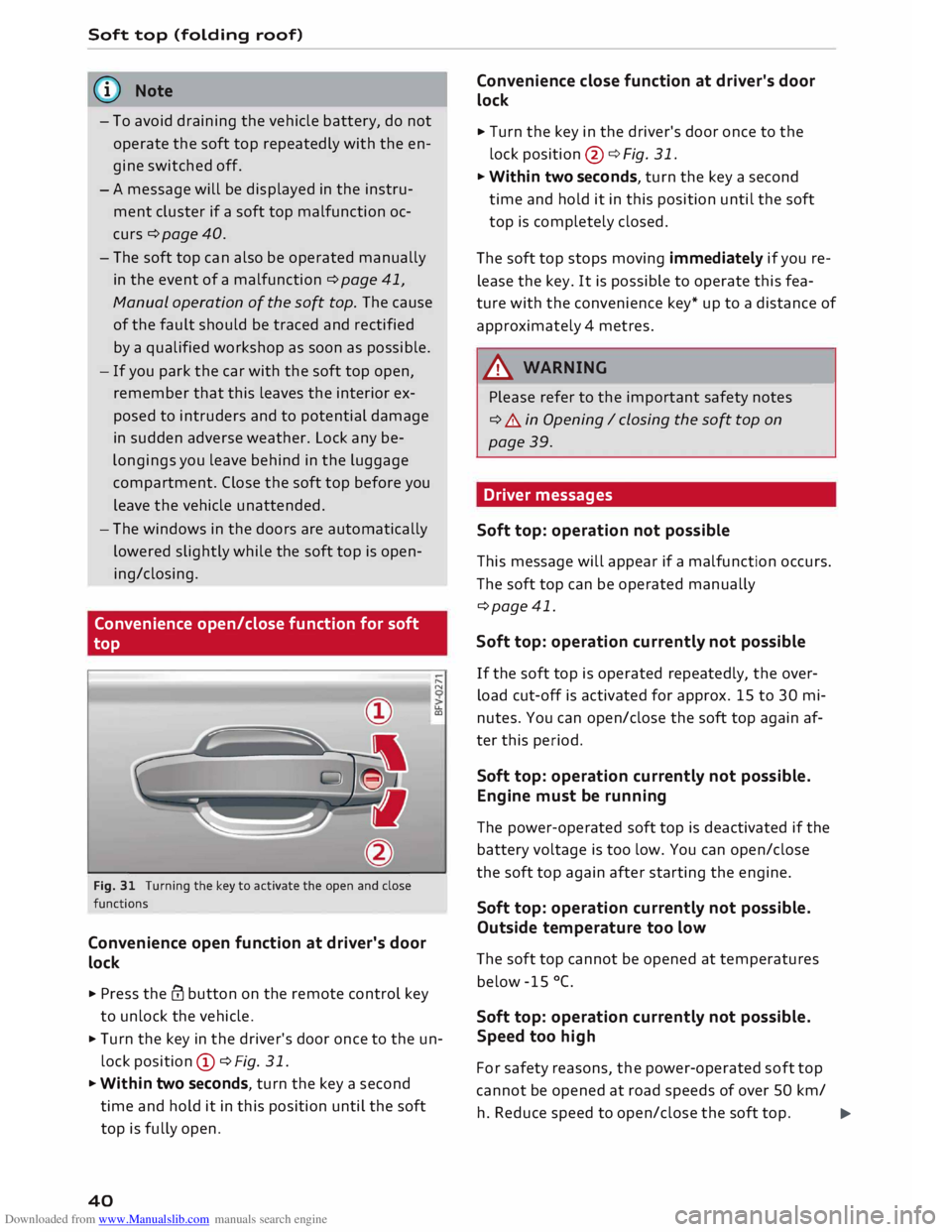
Fig. 31 Turning the key to activate the open and close
functions
Convenience open function at driver's door
lock
.. Press the@ button on the remote control key
to unlock the vehicle. .....
N
u..
a:,
.. Turn the key in the driver's door once to the un
lock position CD ¢Fig. 31.
.. Within two seconds, turn the key a second
time and hold it in this position until the soft
top is fully open.
40 Convenience
close function at driver's door
lock
.. Turn the key in the driver's door once to the
lock position @¢ Fig. 31.
.. Within two seconds, turn the key a second
time and hold it in this position until the soft
top is completely closed.
The soft top stops moving immediately if you re
lease the key. It is possible to operate this fea
ture with the convenience key* up to a distance of
approximately 4 metres.
A WARNING
Please refer to the important safety notes
¢ A in Opening I closing the soft top on
page 39.
Driver messages
Soft top: operation not possible -
This message will appear if a malfunction occurs.
The soft top can be operated manually
¢page 41.
Soft top: operation currently not possible
If the soft top is operated repeatedly, the over
load cut-off is activated for approx. 15 to 30 mi
nutes. You can open/close the soft top again af
ter this period.
Soft top: operation currently not possible.
Engine must be running
The power-operated soft top is deactivated if the
battery voltage is too low. You can open/close
the soft top again after starting the engine.
Soft top: operation currently not possible.
Outside temperature too low
The soft top cannot be opened at temperatures
below -15 °C.
Soft top: operation currently not possible.
Speed too high
For safety reasons, the power-operated soft top
cannot be opened at road speeds of over 50 km/
h. Reduce speed to open/close the soft top.
�
Page 50 of 306
![AUDI TT ROADSTER 2016 User Guide Downloaded from www.Manualslib.com manuals search engine Lights
and vision
[i]- Courtesy light position. The interior lights are
switched on and off automatically when this
function is acti](/img/6/57670/w960_57670-49.png "AUDI TT ROADSTER 2016 User Guide Downloaded from www.Manualslib.com manuals search engine Lights
and vision
[i]- Courtesy light position. The interior lights are
switched on and off automatically when this
function is acti")
Downloaded from www.Manualslib.com manuals search engine Lights
and vision
[i]- Courtesy light position. The interior lights are
switched on and off automatically when this
function is activated.
It is no longer necessary to operate a switch to
turn on the reading lights. Simply swipe or tap
your finger on the light to switch it on or off. The
light can be dimmed by keeping your finger in
contact with the reading light after switching it
on.
Interior lights
Various optional lighting functions are available
for the vehicle interior. The settings for certain
functions can be adjusted on the infotainment
system. Select the following on the infotainment
system: I MENU I button > Car > left control but
ton > Vehicle settings> Background lighting.
Instrument lighting
Fig. 44 Instrument lighting
The brightness of the lighting in the instrument
cluster and the centre console can be adjusted as
required.
.,. Briefly press the knob to release it.
.,. Turn the knob towards "-" or"+" to reduce or in
crease the brightness of the lighting.
.,. Briefly press the knob again to engage it.
48 Clear
vision
Adjusting the exterior mirrors
Fig. 45 Driver's door: Adjuster knob for exterior mirrors
Turn the knob to the appropriate position:
Q/P - To adjust the exterior mirror (left or right
side). Move the knob in the desired direction.
(fill - To heat the mirrors (depends on the outside
temperature).
8 - To fold in the exterior mirrors*. One of the
infotainment settings allows you to control
whether or not the mirrors are folded in when
you lock the vehicle �page 31.
Tilt function for exterior mirror on passenger
side*
The mirror is tilted slightly to provide a better
view of the kerb when parking backwards. This
feature only works when the knob is in the posi
tion for adjusting the mirror on the passenger
side.
You can adjust the tilted mirror surface by mov
ing the knob in the desired direction. This new
position is automatically stored and assigned to
the remote control key when you take the car out
of reverse .
The mirror returns to its original position as soon
as you drive forwards at over 15 km/h or switch
off the ignition.
A WARNING
Convex or wide-angle* exterior mirrors give a
larger field of vision. However, they make ob-
jects look smaller and further away than they
�
Page 54 of 306
Downloaded from www.Manualslib.com manuals search engine Lights
and vision
Digital compass
Activating and deactivating the compass
Applies to: vehicles with digital compass
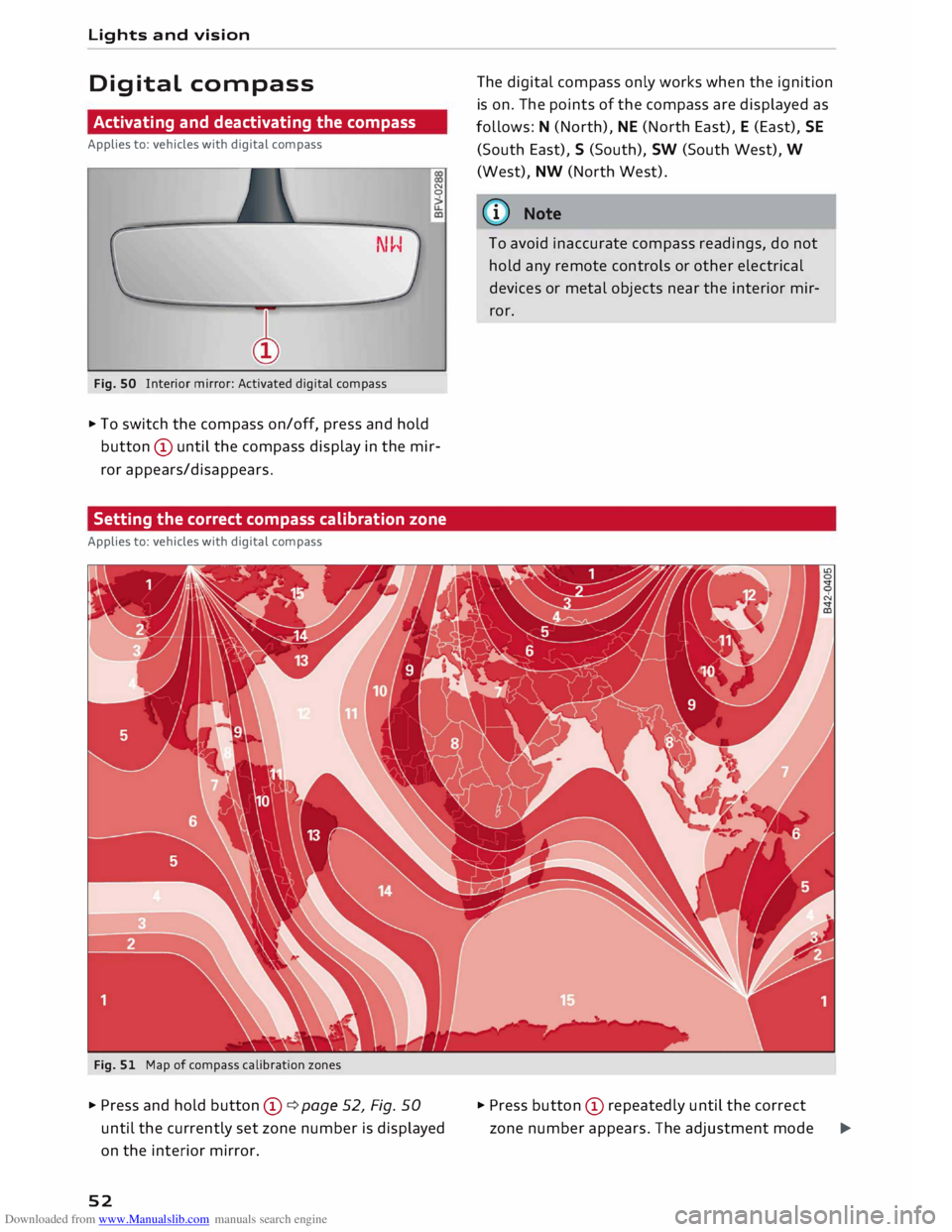
Fig. SO Interior mirror: Activated digital compass N
0
.,. To switch the compass on/off, press and hold
button © until the compass display in the mir
ror appears/disappears.
Setting the correct compass calibration zone
Applies to: vehicles with digital compass
Fig. 51 Map of compass calibration zones
.,. Press and hold button ©¢ page 52, Fig. 50
until the currently set zone number is displayed
on the interior mirror.
52 The
digital compass only works when the ignition
is on. The points of the compass are displayed as
follows: N (North), NE (North East), E (East), SE
(South East), S (South), SW (South West), W
(West), NW (North West).
ij)) Note
To avoid inaccurate compass readings, do not
hold any remote controls or other electrical
devices or metal objects near the interior mir
ror.
.,. Press button © repeatedly until the correct
zone number appears. The adjustment mode
�
Page 62 of 306
Downloaded from www.Manualslib.com manuals search engine Heating
and cooling
Heating and cooling
Air conditioner
Description
The air conditioner heats, cools and dehumidifies
the air inside the vehicle. It operates most effec
tively with the windows closed. If the vehicle has
been standing in the sun, it may cool down faster
if you open the windows briefly to let the hot air
escape.
Pollution filter
The pollution filter removes impurities, such as
dust and pollen, from the air.
Key-coded settings
Certain settings will be automatically stored and
assigned to the remote control key in use.
® For the sake of the environment
If you wish to save fuel, switch off the cooling
mode on the air conditioner by pressing the
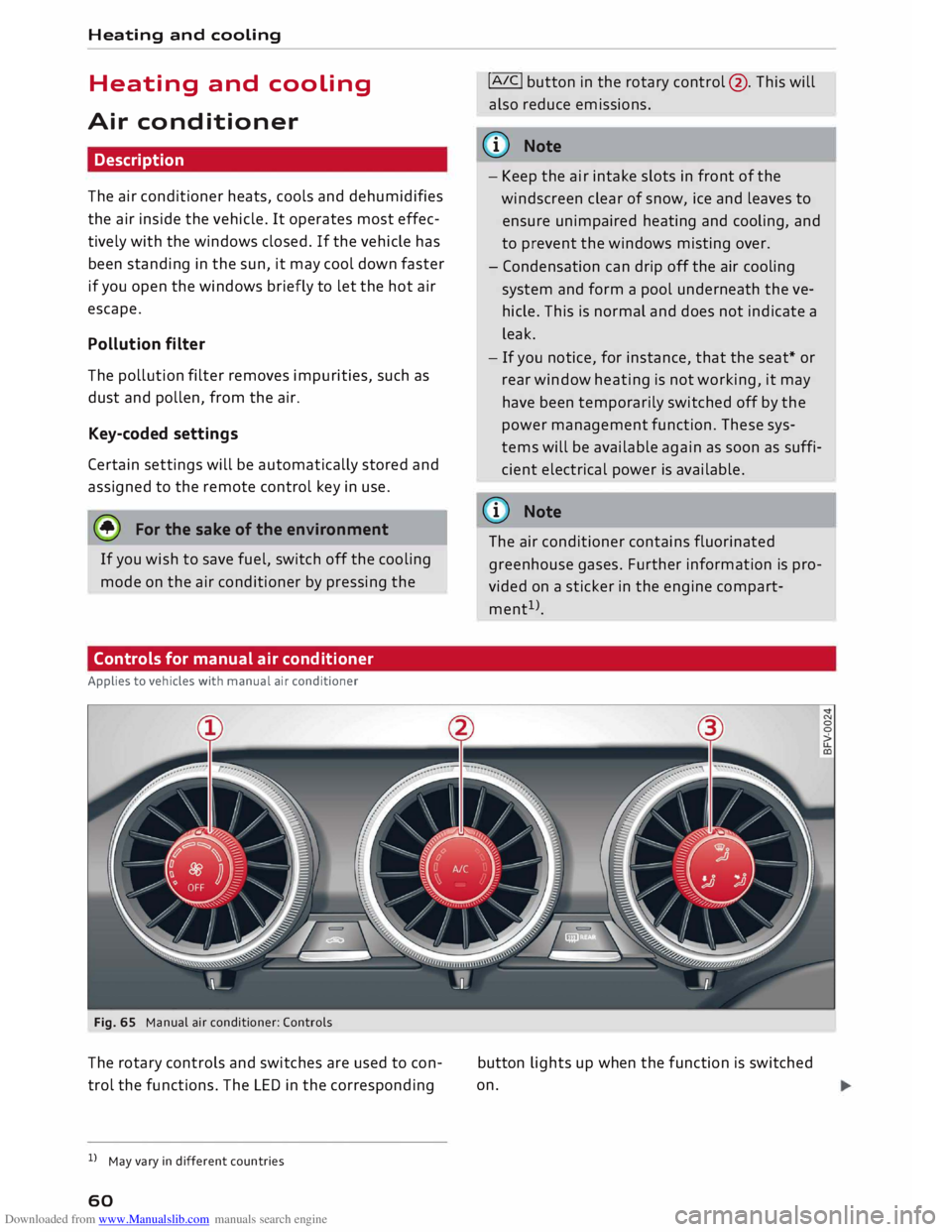
Controls for manual air conditioner
Applies to vehicles with manual air conditioner
Fig. 65 Manual air conditioner: Controls
The rotary controls and switches are used to con
trol the functions. The LED in the corresponding
l l
May vary in different countries
60 !AIC!
button in the rotary control@. This will
also reduce emissions.
@ Note
- Keep the air intake slots in front of the
windscreen clear of snow, ice and leaves to
ensure unimpaired heating and cooling, and
to prevent the windows misting over.
- Condensation can drip off the air cooling
system and form a pool underneath the ve
hicle. This is normal and does not indicate a
leak.
- If you notice, for instance, that the seat* or
rear window heating is not working, it may
have been temporarily switched off by the
power management function. These sys
tems will be available again as soon as suffi
cient electrical power is available.
@ Note
The air conditioner contains fluorinated
greenhouse gases. Further information is pro
vided on a sticker in the engine compart
ment 1
>.
button lights up when the function is switched
on.
Page 72 of 306
Downloaded from www.Manualslib.com manuals search engine Driving
CD CAUTION
If the engine has been working hard for a long
time, there is a risk of heat building up in the
engine compartment after the engine has
been switched off; this could cause engine
damage. For this reason, you should leave the
engine idling for about 2 minutes before
switching it off.
{(D Note
After the engine is stopped, the radiator fan
may remain on or turn itself back on for up to
10 minutes, even if the ignition is switched
off. This may occur for the following reasons:
- Residual heat has raised the coolant tem-
perature.
- Direct sunlight has additionally heated up
the engine compartment while the engine is
warm.
-Applies to vehicles with diesel particulate
filter: The emission control system is hot
because of the regeneration process, even
though the engine has not yet reached oper
ating temperature.
Driver messages
Switch off ignition before leaving car. Battery is
being discharged
This message appears and the buzzer sounds if
you open the driver's door while the ignition is
switched on. Switch off the ignition to prevent
the battery from being discharged.
Pressing start/stop button again will switch off
engine.
This message appears if you press the
!START ENGINE STOP!
button while the vehicle is
moving.
Engine start system: fault. Please contact work
shop
A fault has occurred when starting the engine au
tomatically (automatic start function). Drive to a
qualified workshop soon and have the fault recti
fied. Press and hold
the !START
ENGINE STOP!
button to start the engine.
70 II
Remote control key: hold back of key
against marked area. See owner's manual
This message appears if there is no convenience
key inside the vehicle or if the system cannot de
tect or identify the key. This can happen, for ex
ample, if the radio signal from the key is obstruc
ted by a metal briefcase or similar, or if the key
battery is weak. Electronic equipment, such as
mobile phones, can also interfere with the radio
signal from the key.
The engine can still be started or stopped if this
happens (please refer to �page 71, Starting
the engine after a malfunction).
Ill Remote control key: key not recognised. Is
key still in vehicle?
If the indicator lamp Ill lights up and the mes
sage appears, the convenience key was removed
from the vehicle while the engine was running. If
the convenience key is not in the vehicle you will
not be able to switch on the ignition or restart
the engine after it has been switched off. You will
also not be able to lock the vehicle from the out
side.
Please press brake pedal
This message appears on vehicles with an auto
matic gearbox if you try to start the engine with
out first pressing the brake pedal.
Please press clutch pedal
This message appears on vehicles with a manual
gearbox if you try to start the engine without
first pressing the clutch pedal. The engine will
only start if you press the clutch pedal.
Please engage N or P
This message will appear if you try to start or
switch off the engine when the selector lever is
not in Nor P. The engine can then not be started
or switched off.
Shift to P, otherwise vehicle can roll away.
Doors do not lock if lever is not in P
For safety reasons, this message will appear and
a warning buzzer will sound if the selector lever
of the automatic gearbox is not in position P
when you switch off the ignition with the
�
Page 73 of 306
Downloaded from www.Manualslib.com manuals search engine !START
E
NGIN E
STOP!
button. Put the selector
lever in position P; otherwise the vehicle can roll
away. If the lever is not in position P you will not
be able to lock the vehicle using the locking sen
sor on the door handle or the convenience key.
Starting the engine after a malfunction
If the remote control key battery is exhausted or
if radio interference or a system malfunction oc
curs, extra steps may be necessary in order to
start the engine.
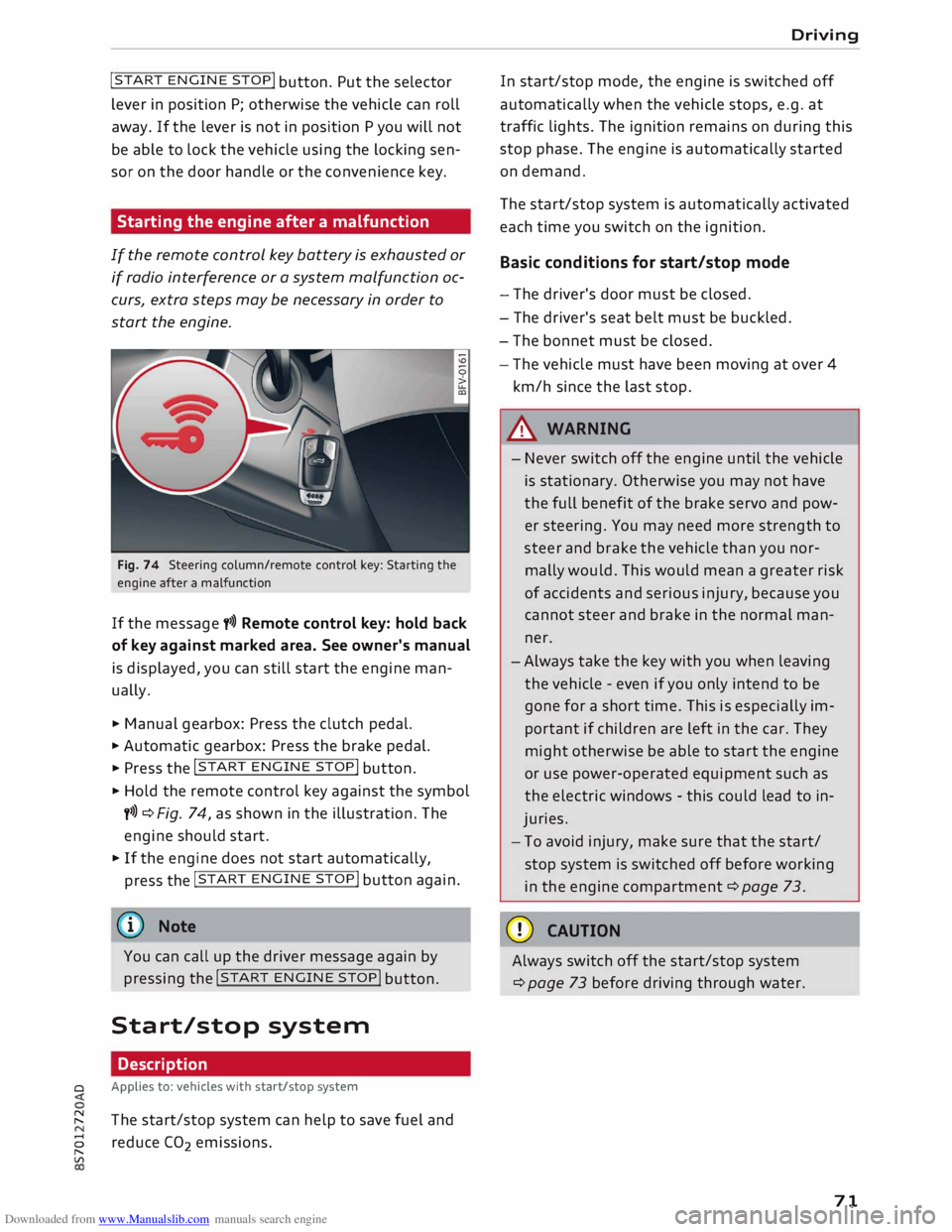
Fig. 74 Steering column/remote control key: Starting the
engine after a malfunction
If the message t>>) Remote control key: hold back
of key against marked area. See owner's manual
is displayed, you can still start the engine man
ually.
� Manual gearbox: Press the clutch pedal.
� Automatic gearbox: Press the brake pedal.
� Press the !START
ENGINE STOP!
button.
� Hold the remote control key against the symbol
y>>) ¢Fig. 74, as shown in the illustration. The
engine should start.
� If the engine does not start automatically,
press the !START
E
NGINE STOP!
button again.
@ Note
You can call up the driver message again by
pressing the !START
ENGINE STOP!
button.
Start/stop system Description
0 Applies
to: vehicles with start/stop system
� The start/stop system can help to save fuel and
8 reduce CO
2 emissions.
"
Vl Driving
In start/stop mode, the engine is switched off
automatically when the vehicle stops, e.g. at
traffic lights. The ignition remains on during this
stop phase. The engine is automatically started
on demand.
The start/stop system is automatically activated
each time you switch on the ignition.
Basic conditions for start/stop mode
- The driver's door must be closed.
- The driver's seat belt must be buckled.
- The bonnet must be closed.
- The vehicle must have been moving at over 4
km/h since the last stop.
A WARNING
- Never switch off the engine until the vehicle
is stationary. Otherwise you may not have
the full benefit of the brake servo and pow
er steering. You may need more strength to
steer and brake the vehicle than you nor
mally would. This would mean a greater risk
of accidents and serious injury, because you
cannot steer and brake in the normal man
ner.
- Always take the key with you when leaving
the vehicle -even if you only intend to be
gone for a short time. This is especially im
portant if children are left in the car. They
might otherwise be able to start the engine
or use power-operated equipment such as
the electric windows -this could lead to in
juries.
- To avoid injury, make sure that the start/
stop system is switched off before working
in the engine compartment ¢page 73.
CD CAUTION
Always switch off the start/stop system
¢page 73 before driving through water.
71
Page 96 of 306
Downloaded from www.Manualslib.com manuals search engine Driver
assist systems
This message is displayed when the camera is no
longer functional after the system has continu
ously failed to detect the lane markings. This can
have the following causes:
- The outside of the camera window¢ page 93,
Fig. 95 is dirty or frosted. Remove dirt or ice
from this area of the windscreen.
- The inside of the camera window is misted up.
In this case, wait for the camera window to de
mist before switching on the active lane assist
system again.
- Due to the road conditions, the system has not
been able to detect the lane markings for a
long period. Do not switch the active lane assist
system on again before the lane markings are
discernible.
Audi active lane assist: currently unavailable.
See owner's manual
A temporary fault is preventing the active lane
assist system from being switched on. Try switch
ing on the active lane assist system again later.
Audi active lane assist: fault. See owner's man
ual
Drive to a qualified workshop soon and have the
fault rectified.
Audi active lane assist: please take over steering
This message will appear if you do not steer the
vehicle yourself. In this case, the active lane as
sist will switch to "not ready for warning" but will
not be deactivated completely. The system can
assist you to keep the vehicle in the lane. Howev
er it is your own responsibility to steer and con
trol the vehicle.
A WARNING
Please note that the messages only appear
with a delay or are not displayed at all on
vehicles with additional equipment (such as
steering wheel knobs) fitted on the steering
wheel. Always keep your hands on the steer
ing wheel.
l l
The steering input function is not available on all export
versions.
94 Setting
the steering input time and
vibration warning
Applies to: vehicles with Audi active lane assist
You can change the active Lane assist settings on
the infotainment system to suit your individual
preferences.
Select the following
on the infotainment system:
!MENU! button> Car > left control button> Driv
er assist > Audi active lane assist.
Steering input1
)
early: If this setting is selected, a continuous
steering input assists the driver to keep the vehi
cle in the middle of the lane.
late: If this setting is selected, the steering is not
corrected until just before a wheel touches a de
tected lane marking.
Vibration warning
You can switch the additional steering wheel vi
bration warning on/off.
(Q'j) Note
Your personal settings are stored automati
cally and assigned to the remote control key
which is being used (only applies to some
countries).
Lap timer
Introduction
Applies to: vehicles with lap timer
Lap timer
You can use the lap timer in the display to record
and evaluate lap times. The times are recorded in
minutes, seconds and tenths of a second. The
hour will appear in the display and the tenths of a
second will disappear if the session lasts for over
60 minutes.
Individual lap times stop automatically after
99 hours 59 minutes and 59 seconds. A new lap
will then start automatically.
�
Page 101 of 306
Downloaded from www.Manualslib.com manuals search engine 0
N
,.....
N
......
0
,.....
Vl
CX) -
In certain situations, the system may not
function properly, or the functionality of the
system may be restricted. For example:
- If other vehicles are approaching very
quickly, or if you are overtaking other
vehicles quickly. The warning lamp may
not light up in time.
- In poor weather conditions, such as heavy
rain, snow or road spray.
- If you are travelling in very wide lanes, in
tight bends or over crests. The system
may not detect vehicles in the adjacent
lane because they are outside the area
covered by the sensors.
CD CAUTION
Impacts or damage to the bumper, wheel
arches or underbody can cause misalignment
of the sensors. This can impair the functional
ity of the system. Have the systems checked
by a qualified workshop.
(D} Note
The warning lamps on the exterior mirrors
may not be properly visible if tinted foil is af
fixed to the side windows on the driver's or
passenger's side.
Switching on and off
Applies to: vehicles with Audi side assist
The system can be switched on and off on the in
fotainment system.
"' Select the following on the infotainment sys
tem: I MENU I button >Car> left control button
> Driver assist> Audi side assist.
The warning lamps in the exterior mirrors light
up briefly each time the ignition is switched on to
indicate that the system is activated. Driver
assist systems
Adjusting brightness of warning lamp
Applies to: vehicles with Audi side assist
The brightness of the warning lamp can be ad
justed on the infotainment system.
"' Select the following on the infotainment sys
tem: I MENU I button >Car> left control button
> Driver assist> Audi side assist.
The brightness of the warning lamp in both the
information and warning modes is regulated au
tomatically according to the ambient light level.
If you are in very dark or very light surroundings
when you adjust the brightness of the warning
lamp, the automatic brightness control may al
ready have reached the lowest or the brightest
setting. In such a case it is possible that you
won't notice a difference while you are adjusting
the brightness or that you will only notice it once
the light surroundings have changed.
Please adjust the brightness of the warning lamp
for the information mode so that it does not dis
tract you while you are looking at the road in
front. When you change the brightness, the
warning lamp on the exterior mirror will light up
briefly with the intensity set for the information
mode. The intensity of the lamp in the warning
mode is linked to the intensity in the information
mode and is adjusted automatically.
(CD) Note
- The side assist is not active while the set
tings are being adjusted.
- Your personal settings are stored automati
cally and assigned to the remote control key
which is being used.
Driver messages
Applies to: vehicles with Audi side assist
Should the side assist be deactivated automati
cally, a driver message will appear on the info
tainment display.
@j Audi
side assist: currently unavailable.
Sensor view restricted due to surroundi ngs.
See owner's manual
The radar sensors are blocked. The area in front
of the sensors must not be obstructed by bicycle
..,..
99
Page 104 of 306
Downloaded from www.Manualslib.com manuals search engine Driver
assist systems
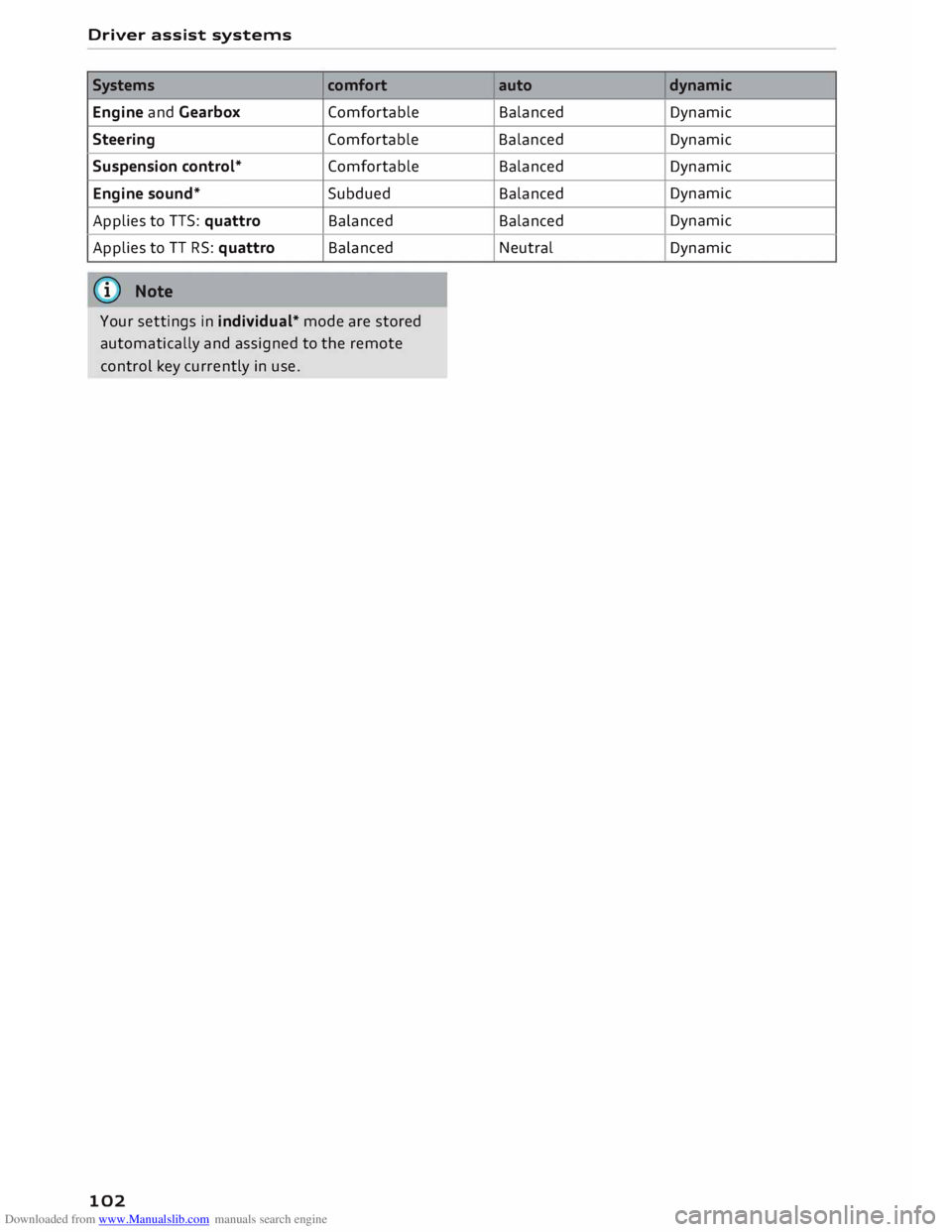
Systems comfort
Engine and Gearbox Comfortable
Steering Comfortable
Suspension control* Comfortable
Engine sound* Subdued
Applies to TTS: quattro Balanced
Applies to TT RS: quattro Balanced
(I)) Note
Your settings in individual* mode are stored
automatically and assigned to the remote
control key currently in use.
102 auto
dynamic
Balanced Dynamic
Balanced Dynamic
Balanced Dynamic
Balanced Dynamic
Balanced Dynamic
Neutral Dynamic
Page 114 of 306
Downloaded from www.Manualslib.com manuals search engine Parking
aids
After you select reverse gear, the vehicle has to
remain stationary for a moment so that the park
assist can activate the steering. Follow the direc
tions given in the display.
II Park assist: fault. Please contact workshop
Ill Park assist: fault. Continue steering vehicle!
Please contact workshop
Please contact a qualified workshop. The park as
sist cannot be used to park the vehicle if a system
fault occurs.
II Park assist: cancelled. Space too small. Con
tinue steering vehicle!
The park assist cannot be used to park the vehicle
in this space. Park the vehicle without using the
park assist or look for a bigger space.
Adjusting graphic display
and warning beeps
Applies to: vehicles with parking system plus/park assist
The settings for the graphic display and acoustic
signals are controlled via the infotainment sys
tem.
.. Select the following on the infotainment sys
tem: I MENU I button > Car > left control button
> Driver assist> Parking aid.
Warning beeps
Front volume -Volume for the front and side*
zones
Rear volume -Volume for the rear zone
In-car entertainment fader -The volume of the
current audio or video source is reduced when the
parking aid is switched on.
You will hear a short test tone each time you
make a new setting.
� Note
The settings will be automatically stored and
assigned to the remote control key in use.
112 Fault
warnings
Applies to: vehicles with rear parking aid/parking system
plus/park assist
Rear parking aid: fault. Obstacles cannot be de
tected
Parking aid: fault. Obstacles cannot be detected
If the LED in the P,J1A button starts flashing when
you switch the system on, a system fault has oc
curred. If the fault is not corrected before you
switch off the ignition, it will only be indicated by
the flashing LED in the P'),IA button the next time
you switch on the parking aid by engaging re
verse gear. The fault warning can be displayed in
the second tab of the driver information system
as long as the fault is active.
Parking system plus*/parking system plus
and park assist*
If a sensor or loudspeaker malfunctions, the�
symbol will be shown on the infotainment sys
tem in front of or behind the vehicle. If a rear
sensor malfunctions, obstacles will only be dis
played in zones (D and @ ¢page 104, Fig. 106.
If a front sensor malfunctions, obstacles will only
be displayed in zones @ and @ .
Drive to a qualified workshop soon and have the
fault rectified.