ECO mode AUDI TT ROADSTER 2016 Owner's Manual
[x] Cancel search | Manufacturer: AUDI, Model Year: 2016, Model line: TT ROADSTER, Model: AUDI TT ROADSTER 2016Pages: 306, PDF Size: 31.82 MB
Page 168 of 306
Downloaded from www.Manualslib.com manuals search engine Audi
connect
Netwo rk search*
A List of the Wi-Fi networks available near you is
displayed.
Connection to personal hotspot1
)
The Wi-Fi hotspot of the MMI is activated. The
MMI can establish an Internet connection to a
personal Wi-Fi hotspot (e.g. smartphone). You
can search for your personal hotspot and connect
to the MMI using Network search. For more in
formation, please refer to ¢ page 161.
This mode is not available if your own SIM card is
inserted in the SIM card reader.
A WARNING
- Do not allow the features of the Wi-Fi hot
spot to distract you from watching the traf
fic -taking your eyes off the road can cause
an accident.
- Mobile devices, tablet and laptop computers
and devices of a similar weight can only be
operated safely when the vehicle is station
ary. Like any loose object, they can be cata
pulted through the vehicle in an accident
and cause serious injuries. Always make sure
that such devices are securely stowed while
you are driving.
- No Wi-Fi devices may be used in the areas
around the airbags while the vehicle is being
driven. Please also observe the safety warn
ings in the chapter on¢ page 235.
- Depending on the configuration of the Wi-Fi
device you are using (refer to the operating
manual of your Wi-Fi device for more de
tails), the SIM card of the device may be
used in certain
cases
to provide the data
connection for Internet-supported apps and
services which use the MMI Wi-Fi hotspot.
Depending on your network provider, you
may be charged for this service, especially if
you are using the system abroad. We there
fore strongly recommend that you use an
unlimited data plan. For more information,
l l
Not available in all markets.
166 contact
your service provider. Some exam
ple cases are described below:
- Data plan expired/used up
- Data plan not valid abroad
- SIM card in the card reader* is not a data
SIM card
- SIM card in the card reader* is defective/
not valid
- Network is switched automatically due to
a low signal strength/data rate of the Wi
Fi hotspot, the eSIM* or the SIM card in
the card reader*
- Connection to Wi-Fi hotspot interrupted
- Please note that it is your responsibility to
. take
precautions regarding data protection,
anti-virus protection and protection against
loss of data on mobile devices used to con
nect to the Internet via the Wi-Fi hotspot.
1 Note
- You might require a separate mobile phone
contract with extra costs before you can use
the Wi-Fi hotspot. For more information,
contact your service provider.
- In vehicles without Audi connect*, the Wi-Fi
hotspot can only be used for the Wi-Fi audio
player*. A data connection to the Internet
cannot be established.
- Further information can be found on the In
ternet at www.audi.com.
Configuring the data
connection
Applies to: vehicles with Audi connect
You must configure a data connection before you
can use Audi connect services.
� Select: I MENU
I button > right control button >
Connection manager.
� Select: right control button > Online settings >
Data connection settings.
You can select when you would Like the system to
establish an Internet connection in the Data con
nection settings menu. The online connection is �
Page 183 of 306
Downloaded from www.Manualslib.com manuals search engine 0
N
,.....
N
......
0
,.....
Vl
CX) off:
The map scale you have set will remain unal
tered.
Map content
The display of map content such as traffic infor
mation, favourite destinations or restaurants can
be switched on (�) and off.
Google Earth map
display
Applies to: vehicles with navigation system and Audi connect
You can have the map display satellite images
using the Google Earth map display.
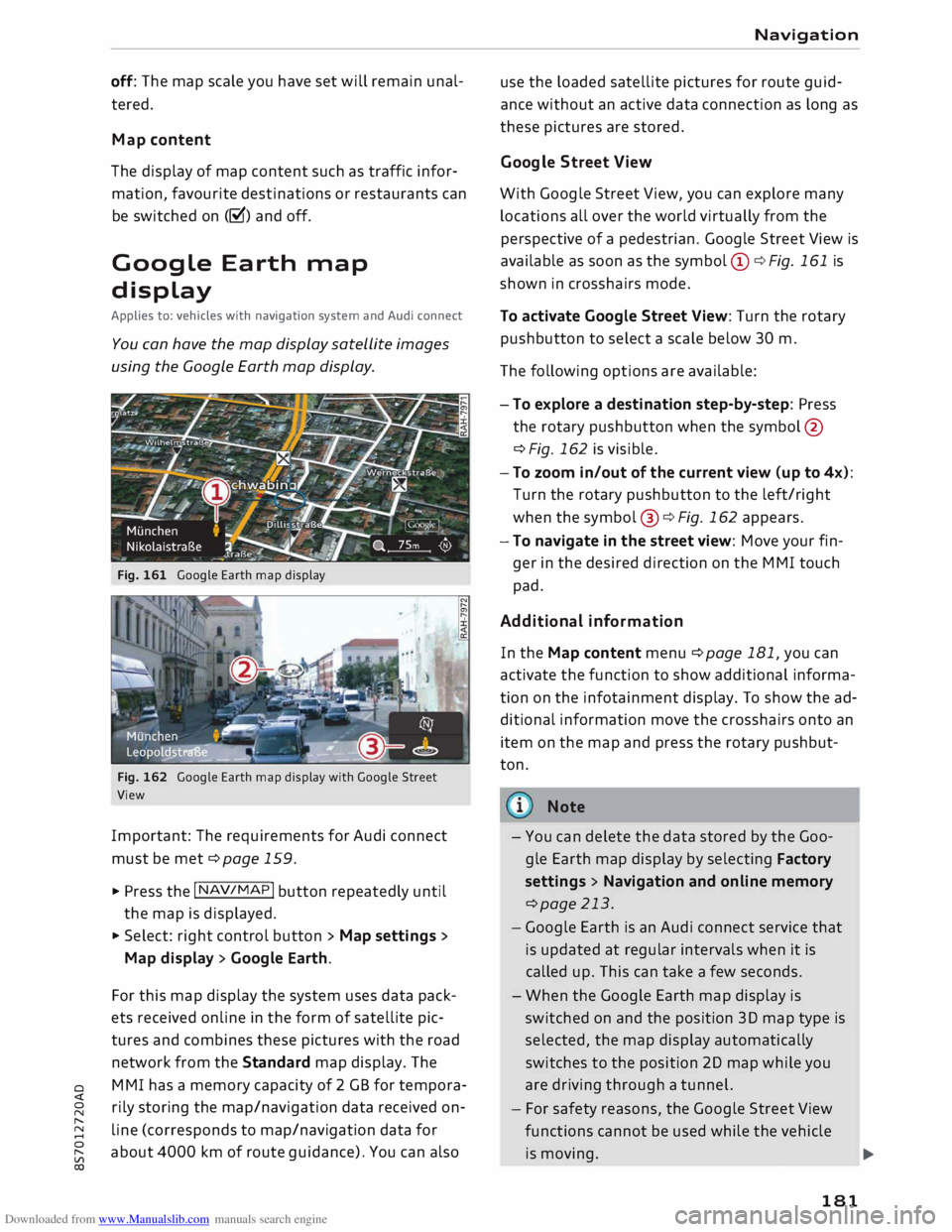
Fig. 161 Google Earth map display
Fig. 162 Google Earth map display with Google Street
View
Important: The requirements for Audi connect
must be met ¢page 159.
.., Press the I NAV/MAP! button repeatedly until
the map is displayed.
.., Select: right control button > Map settings >
Map display > Google Earth.
For this map display the system uses data pack
ets received on line in the form of satellite pic
tures and combines these pictures with the road
network from the Standard map display. The
MMI has a memory capacity of 2 GB for tempora
rily storing the map/navigation data received on
line (corresponds to map/navigation data for
about 4000 km of route guidance). You can also Navigation
use the loaded satellite pictures for route guid
ance without an active data connection as long as
these pictures are stored.
Google Street View
With Google Street View, you can explore many
locations all over the world virtually from the
perspective of a pedestrian. Google Street View is
available as soon as the symbol (D ¢ Fig. 161 is
shown in crosshairs mode.
To activate Google Street View: Turn the rotary
pushbutton to select a scale below 30 m.
The following options are available:
- To explore a destination step-by-step: Press
the rotary pushbutton when the symbol @
¢Fig. 162 is visible.
- To zoom in/out of the current view (up to 4x):
Turn the rotary pushbutton to the left/right
when the symbol @¢ Fig. 162 appears.
-To navigate in the street view: Move your fin
ger in the desired direction on the MMI touch
pad.
Additional informat ion
In the Map content menu¢ page 181, you can
activate the function to show additional informa
tion on the infotainment display. To show the ad
ditional information move the crosshairs onto an
item on the map and press the rotary pushbut
ton.
Note
- You can delete the data stored by the Goo
gle Earth map display by selecting Factory
settings > Navigation and online memory
¢page 213.
- Google Earth is an Audi connect service that
is updated at regular intervals when it is
called up. This can take a few seconds.
- When the Google Earth map display is
switched on and the position 30 map type is
selected, the map display automatically
switches to the position 20 map while you
are driving through a tunnel.
- For safety reasons, the Google Street View
functions cannot be used while the vehicle
is moving.
..,.
181
Page 193 of 306

Downloaded from www.Manualslib.com manuals search engine Media
Introduction
The MMI system includes various media drives
and provides various options for connecting devi
ces. For example, you can play audio/video* files
from the jukebox or connect a mobile device to
the Audi music interface* and operate it via the
MMI.
Notes General
Media and format limitations: The MMI system
(including the SD card reader and the connection
for the USB mass storage device*) has been tes
ted for use with many of the products and media
currently available on the market. However,
there may be some devices/media and audio/vid
eo* files that are not supported or cannot be
played, or the functionality may be limited under
certain circumstances.
Digital rights management: Please note that
copyright law applies to audio/video files.
The MMI media drives do not support ORM-pro
tected files; these files are marked with the sym
bol rn.
Data storage: Never store important data on SD
cards, the jukebox*, CDs/DVDs or mobile devices.
AUDI AG shall not accept any liability whatsoever
for the loss of files and media.
Loading times: The more files, folders or play
lists are stored on a storage device, the longer it
will take to load the audio files/video* files. We
recommend using a storage device which con
tains only audio/video* files. If you want to re
duce the time it takes to load the audio/video*
files, you can create subfolders (e.g. for an artist
or album). The loading time will be extended ad
ditionally if you are importing data.
Metadata: Metadata stored on audio files (e.g.
artists, tracks, album covers) will be displayed
� automatically
when the files are played. If this
� information is not stored on the relevant medi-
8 um,
the MMI system will use the database of
"
Vl Media
metadata from Gracenote. Nevertheless, meta
data may not be displayed in some cases.
Restricted performance: If you experience re
stricted performance, reset the Media settings
to the factory defaults ¢page 213.
If you experience restricted performance from
the Jukebox*, reset it to the factory settings
¢page 213.
For information on the characteristics of the sup
ported media and file formats, please refer to
¢page 206 onwards.
CD CAUTION
Please always observe the information ¢(Din
Wi-Fi hotspot on page 166.
CD/DVD mode
CD/DVD and format limitations: In view of the
variety of CDs/DVDs and the difference in memo
ry capacities, the functionality may be restricted
in the case of some storage devices. Under cer
tain circumstances, audio CDs/video DVDs that
are copy-protected or CDs/DVDs that do not com
ply with the standard audio format, and multi
session CDs cannot be played at all, or the func
tionality may be limited. We recommend always
finalising the burning process when creating
multisession CDs. Multisession is not supported
for DVDs.
Handling CDs/DVDs, the CD drive or the DVD
drive: To ensure perfect, high-quality playback
and avoid scanning errors or damage to the me
dia drive, always store CDs/DVDs in a suitable
case and do not expose them to direct sunlight.
Do not use:
- Damaged, dirty or scratched CDs/DVDs
- Single CDs/DVDs (diameter 8 cm)
- Non-circular CDs/DVDs (shape CDs)
- CDs/DVDs with stickers
- Protective rings
- Cleaning discs
Thermal cut-out: In the case of unusually hot or
cold outside temperatures, it is possible that CD/
DVD playback will temporarily not be possible. A
IJll,,
191
Page 215 of 306
Downloaded from www.Manualslib.com manuals search engine 0
N
,.....
N
......
0
,.....
Vl
CX) -
spoken: The reminder signal is spoken by the
system.
Reminder signal volume: You can adjust the vol
ume of the reminder signal by turning the rotary
pushbutton.
Switch off pop-up: This function is switched off
at the factory. When this function is switched on
� , the messages about the charging status of
the mobile phone in the Audi phone box* on the
infotainment display will not appear. The re
minder not to forget the mobile phone when
leaving the vehicle will also be switched off.
Usage tips
Your MMI displays usage tips when this function
is switched on�
. They will appear less often as
time goes by. You can switch the usage tips off at
any time.
Speech dialogue system
Applies to: vehicles with speech dialogue system
Command display: The MMI displays possible
voice commands in the corresponding menu
when this function is switched on�
. You can
switch this function off at any time.
Short dialogue: When this function is switched
on �
, the spoken cues are shortened. You can
switch this function off at any time.
Speech dialogue system volume: You can adjust
the volume of the spoken cues by turning the ro
tary pushbutton.
Individual speech training (only possible when
the vehicle is stationary): You can use the individ
ual speech training to adapt the speech dialogue
system to your voice or pronunciation so that the
speech dialogue system can then better recog
nise what you are saying. The individual speech
training prompts you to repeat 20 spoken phra
ses that consist of certain commands and blocks
of digits. If you would like to delete the stored
speech training setup, you can use the function
Reset individual speech training.
Factory settings
You can reset the following functions to the fac
tory settings: System
settings
- Sound settings
- Radio
- Media settings
-Jukebox*
- Directory*
- Telephone*
- Bluetooth and Wi-Fi*
- Navigation settings*
- Navigation and online memory*
- Speech dialogue system*
- Message settings*
-Apps*
- Usage tips
-Audi connect*
You can select the desired options individually or
mark Select all entries. Select and confirm Re
store factory settings.
ijj) Note
- Please note that not only settings will be
deleted when you do this; saved data may
also be erased.
- If you set Navigation and on line memory*
or Audi connect* to the factory settings, the
system will restart after approx. 20 sec
onds. During the restart, the infotainment
display
will
be black for a few minutes.
- Please note that the speech dialogue sys
tem* is not available as a factory option for
Cabriolet models without a seat belt micro
phone.
Connection manager
Introduction
The connection manager gives you an overview
of your connected devices and their connection
status.
.., Select: I MENU I button > Settings > left control
button > MMI settings > Connection manager.
.., Select and confirm a menu option.
If a mobile device has already been connected
and you then select and confirm the correspond
ing menu item, the device's name and connection
mode is displayed under this menu item.
...,.
213
Page 227 of 306
Downloaded from www.Manualslib.com manuals search engine 0
N
,.....
N
......
0
,.....
Vl
CX) safely
possible. Our recommendation: Audi child
seat with ISOFIX base.
Child seats: categories 2 and 3
Child seats with backrests used in conjunction
with seat belts are most appropriate for these
categories (15 to 36 kg). Our recommendation:
Audi child seat "youngster plus".
A WARNING
- Categories 0, O+ and 1 (rearward-facing):
Never install a rearward-facing child seat on
the passenger's seat unless the passenger's
airbag has been deactivated -this can result
in potentially fatal injuries to the child. If
you have no alternative but to let a child
travel on the passenger's seat, the passeng
er's airbag must be deactivated* beforehand
¢page 237.
- Categories 1 (forward-facing), 2 and 3: The
back of the child seat should be flush with
the backrest of the vehicle seat.
- Categories 2 and 3: The shoulder section of
the belt must be fitted across the centre of
the child's collar bone close to the torso. It
must never run against or across the neck.
The lap belt must be worn tightly across the
hips, and not over the stomach or abdomen.
Pull the belt tight if necessary to take up
any slack.
- Wait for as long as possible before changing
up to the next child seat group.
¢1) Note
We recommend child seats from the range of
Audi Genuine Accessories: www.audi.com/
child seats . Safe
driving
Securing a child seat
Securing child seats with ISOFIX
Applies to: vehicles with ISOFIX
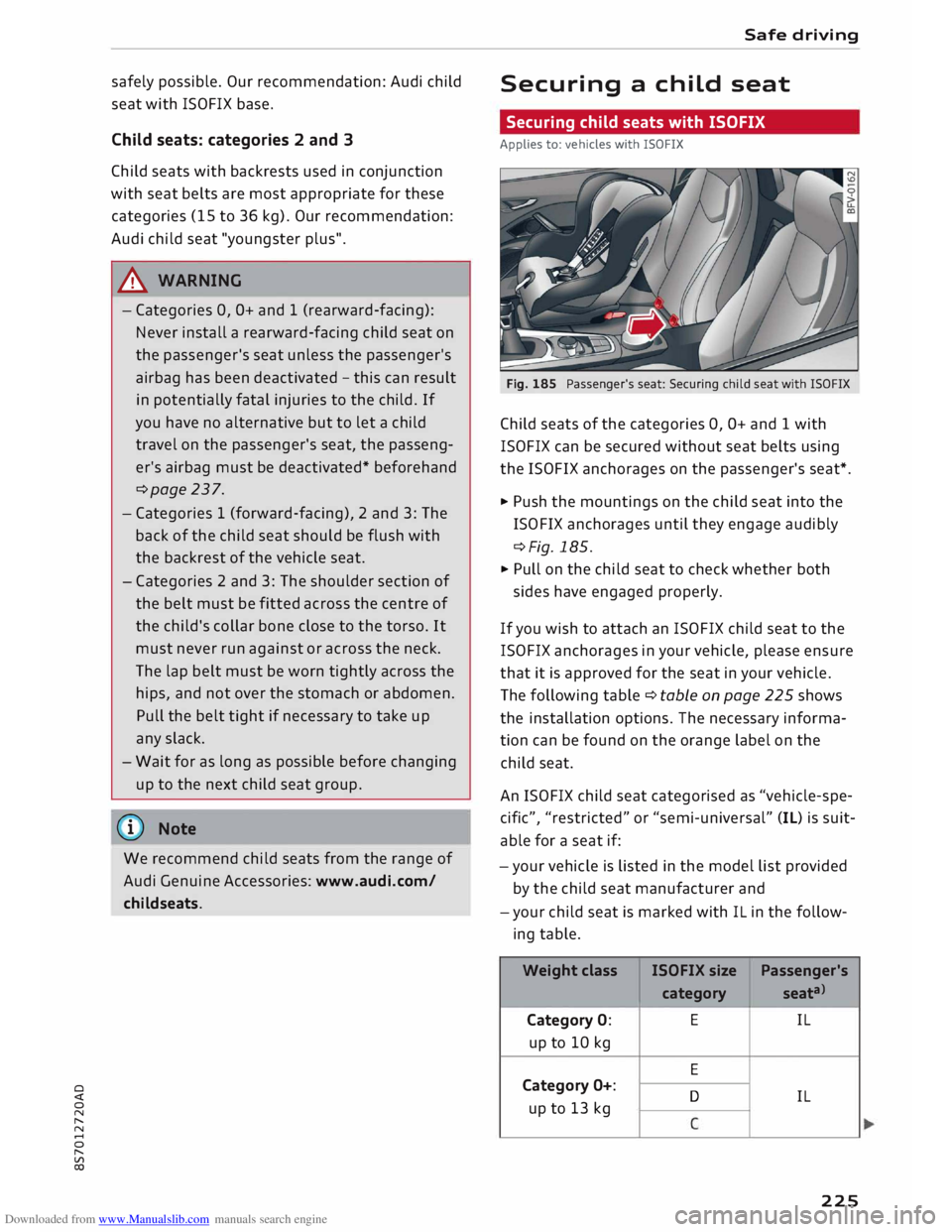
Fig. 185 Passenger's seat: Securing child seat with ISOFIX
Child seats of the categories 0, O+ and 1 with
ISOFIX can be secured without seat belts using
the ISOFIX anchorages on the passenger's seat*.
� Push the mountings on the child seat into the
ISO FIX anchorages until they engage audibly
¢Fig. 185.
� Pull on the child seat to check whether both
sides have engaged properly.
If you wish to attach an ISO FIX child seat to the
ISOFIX anchorages in your vehicle, please ensure
that it is approved for the seat in your vehicle.
The following table¢ table on page 225 shows
the installation options. The necessary informa
tion can be found on the orange label on the
child seat.
An ISOFIX child seat categorised as "vehicle-spe
cific", "restricted" or "semi-universal" (IL) is suit
able for a seat if:
-your vehicle is listed in the model list provided
by the child seat manufacturer and
-your child seat is marked with IL in the follow
ing table.
Weight class ISOFIX
size
Passenger's
category seata>
Category 0: E
IL
up to 10 kg
E
Category O+:
D IL
up to 13 kg
225
Page 243 of 306
Downloaded from www.Manualslib.com manuals search engine 0
N
,.....
N
......
0
,.....
Vl
CX) Checking
and topping up
fluids
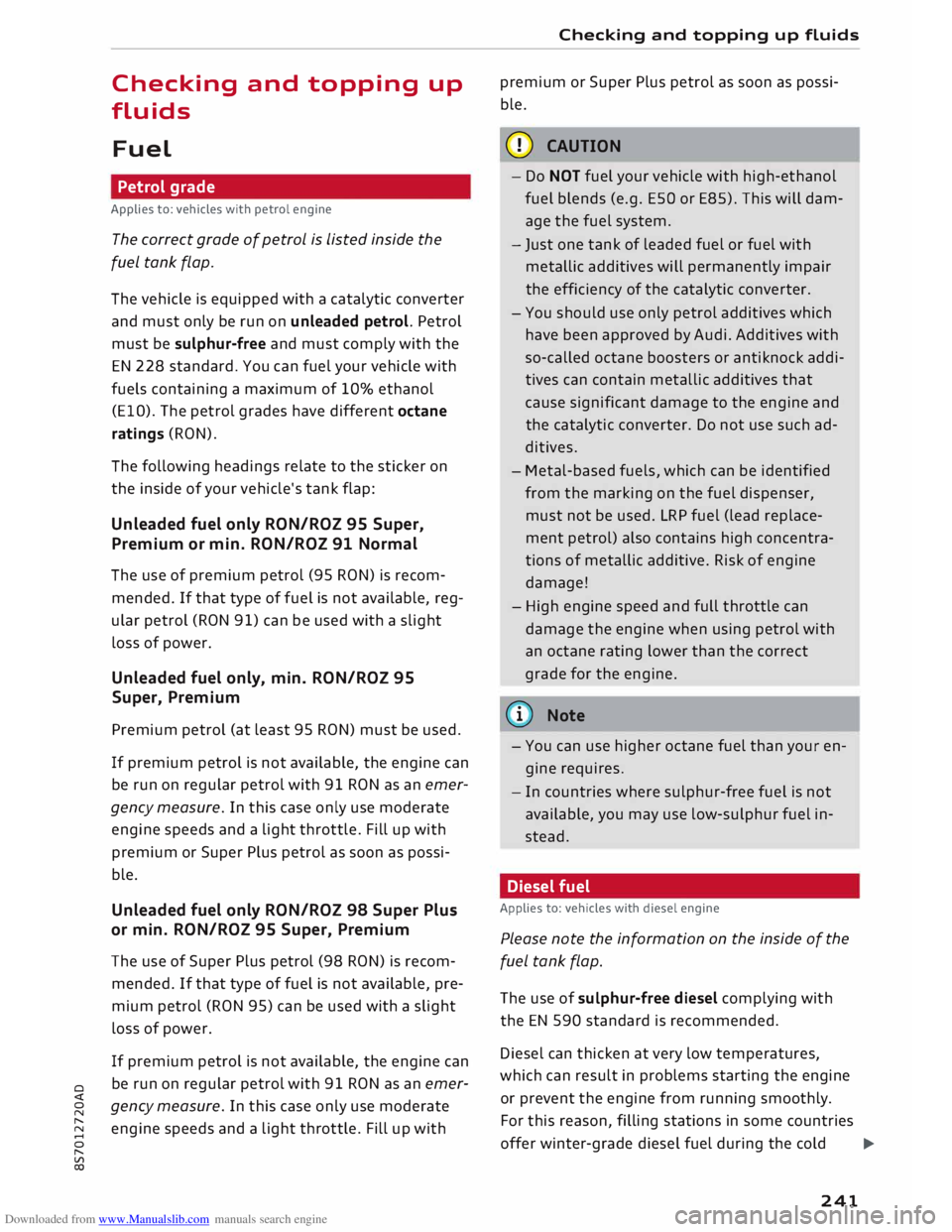
Fuel Petrol grade
Applies to: vehicles with petrol engine
The correct grade of petrol is Listed inside the
fuel tank flap.
The vehicle is equipped with a catalytic converter
and must only be run on unleaded petrol. Petrol
must be sulphur-free and must comply with the
EN 228 standard. You can fuel your vehicle with
fuels containing a maximum of 10% ethanol
(ElO). The petrol grades have different octane
ratings (RON).
The following headings relate to the sticker on
the inside of your vehicle's tank flap:
Unleaded fuel only RON/ROZ 95 Super,
Premium or min. RON/ROZ 91 Normal
The use of premium petrol (95 RON) is recom
mended. If that type of fuel is not available, reg
ular petrol (RON 91) can be used with a slight
loss of power.
Unleaded fuel only, min. RON/ROZ 95
Super, Premium
Premium petrol (at least 95 RON) must be used.
If premium petrol is not available, the engine can
be run on regular petrol with 91 RON as an emer
gency measure. In this case only use moderate
engine speeds and a light throttle. Fill up with
premium or Super Plus petrol as soon as possi
ble.
Unleaded fuel only RON/ROZ 98 Super Plus
or min. RON/ROZ 95 Super, Premium
The use of Super Plus petrol (98 RON) is recom
mended. If that type of fuel is not available, pre
mium petrol (RON 95) can be used with a slight
loss of power.
If premium petrol is not available, the engine can
be run on regular petrol with 91 RON as an emer
gency measure. In this case only use moderate
engine speeds and a light throttle. Fill up with Checking
and topping up fluids
premium or Super Plus petrol as soon as possi
ble.
CD CAUTION
- Do NOT fuel your vehicle with high-ethanol
fuel blends (e.g. ESQ or E85). This will dam
age the fuel system.
- Just one tank of leaded fuel or fuel with
metallic additives will permanently impair
the efficiency of the catalytic converter.
- You should use only petrol additives which
have been approved by Audi. Additives with
so-called octane boosters or antiknock addi
tives can contain metallic additives that
cause significant damage to the engine and
the catalytic converter. Do not use such ad
ditives.
- Metal-based fuels, which can be identified
from the marking on the fuel dispenser,
must not be used. LRP fuel (lead replace
ment petrol) also contains high concentra
tions of metallic additive. Risk of engine
damage!
- High engine speed and full throttle can
damage the engine when using petrol with
an octane rating lower than the correct
grade for the engine.
((D Note
- You can use higher octane fuel than your en
gine requires.
- In countries where sulphur-free fuel is not
available, you may use low-sulphur fuel in
stead.
Diesel fuel
Applies to: vehicles
with
diesel engine
Please note the information on the inside of the
fuel tank flap.
The use of sulphur-free diesel complying with
the EN 590 standard is recommended.
Diesel can thicken at very low temperatures,
which can result in problems starting the engine
or prevent the engine from running smoothly.
For this reason, filling stations in some countries
offer winter-grade diesel fuel during the cold 1)11,,
241
Page 249 of 306
Downloaded from www.Manualslib.com manuals search engine 0
N
,.....
N
......
0
,.....
Vl
CX) ®
Fuse box¢ page 282
0 Windscreen washer container {�)
c:::>page 252
The positions of the engine oil dipstick and en
gine oil filler cap¢ Fig. 214 (items @and @)
may be different on some engine versions.
Engine oil
Choosing the correct engine oil grade
The service interval display in the instrument
cluster of your vehicle will inform you when it is
time for an oil change. We recommend having
the oil changed by a qualified workshop.
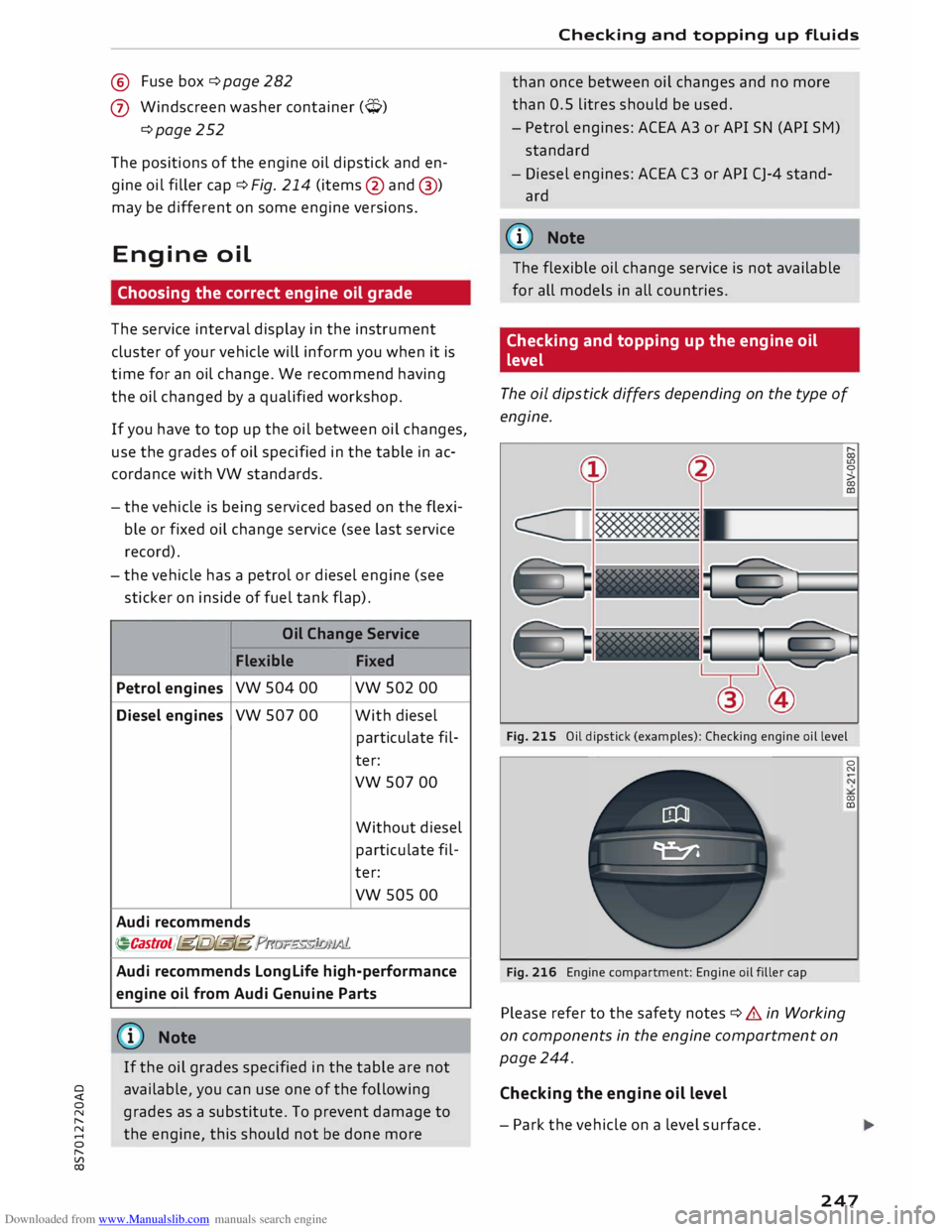
If you have to top up the oil between oil changes,
use the grades of oil specified in the table in ac
cordance with VW standards.
- the vehicle is being serviced based on the flexi
ble or fixed oil change service (see last service
record).
- the vehicle has a petrol or diesel engine (see
sticker on inside of fuel tank flap).
Oil Change Service
Flexible Fixed
Petrol engines vw
504 00 vw 502 00
Diesel engines
vw 507 00 With
diesel
particulate fil-
ter:
vw 507 00
Without diesel
particulate fil-
ter:
vw sos 00
Audi recommends
�Castrol )g[Ij)@[g ?m»E«!JJ1)JJ.lf..
Audi recommends Longlife high-performance
engine oil from Audi Genuine Parts
(© Note
If the oil grades specified in the table are not
available, you can use one of the following
grades as a substitute. To prevent damage to
the engine, this should not be done more Checking
and topping up fluids
than once between oil changes and no more
than 0.5 litres should be used.
- Petrol engines: ACEA A3 or API SN (API SM)
standard
- Diesel engines: ACEA C3 or API CJ-4 stand
ard
((!)) Note
The flexible oil change service is not available
for all models in all countries.
Checking and topping up the engine oil
level
The oil dipstick differs depending on the type of
engine.
Fig. 215 Oil dipstick (examples): Checking engine oil level
Fig. 216 Engine compartment: Engine oil filler cap
Please refer to the safety notes ¢ .& in Working
on components in the engine compartment on
page 244.
Checking the engine oil level
- Park the vehicle on a level surface. 0
N
00
a:,
247
Page 256 of 306
Downloaded from www.Manualslib.com manuals search engine Wheels
Wheels
Tyres and rims
General notes
� Inspect the tyres regularly for damage (cuts,
cracks or blisters, etc.). Remove any foreign
bodies embedded in the treads.
� If you have to drive over a kerb or similar obsta
cle, drive very slowly and as near as possible at
a right angle to the kerb.
� Damaged rims or tyres must be replaced imme
diately.
� Keep grease, oil and fuel off the tyres.
� Mark
the wheels before taking them off so that
they rotate in the same direction when refitted.
� When removed, the wheels should be stored
flat in a cool, dry and preferably dark place.
CD CAUTION
- Please note that summer and winter tyres
are optimised for the prevailing road condi
tions at different times of year. We recom
mend that you use winter tyres during the
winter months. At low temperatures, sum
mer tyres lose their elasticity and grip, and
braking performance also suffers as a re
sult. Cracks can form in the tread block on
summer tyres if they are used at very cold
temperatures, and this can cause perma
nent damage to the tyres. An increase in
rolling noise and tyre imbalance may result
from this damage.
- Machined, polished or chrome-plated rims
must not be used in winter conditions. The
process used to manufacture these types of
wheel rim does not provide adequate sur
face protection against corrosion, and the
rims can be permanently damaged by road
salt or similar.
New wheels or tyres
It is best to have all servicing of wheels and tyres
performed by a qualified workshop, since they
l l
COC = Certificate of conformity
254 have
the necessary special tools and replacement
parts in addition to trained personnel.
� New tyres do not yet give maximum grip. When
driving with new tyres, drive at moderate
speeds and be especially careful during the first
500 km.
� All four wheels must be fitted with tyres of the
same type, size (rolling circumference) and
preferably the same tread pattern.
� Tyres should be replaced in pairs and not indi
vidually (i.e. both front tyres or both rear tyres
together).
� We recommend the use of Audi Genuine Tyres.
If you wish to use other tyres, please note that
the actual size can differ from the nominal size
marked on the tyre ¢ A .
� If you wish to purchase a different combination
of rims and tyres than the ones fitted on the ve
hicle during production, it is advisable to con
sult a qualified workshop beforehand ¢ A.
The sizes of the rims and tyres approved for your
vehicle are listed in the vehicle's documents (e.g.
EC Certificate of Conformity or COC document l)).
The vehicle documents vary depending on the
country in which the vehicle is registered.
If the spare wheel* is not the same type as the
tyres fitted on the car (for example if the car has
winter tyres or wide-section tyres) you should on
ly use the spare wheel* if a puncture occurs, and
then only for a short period of time. In this case,
please drive with extra care. Refit a normal road
wheel as soon as possible.
On vehicles with four-wheel drive, all four wheels
must always be fitted with tyres of the same
type, make and tread pattern, as the driveline
could otherwise be damaged by variations in the
wheel speeds. For the same reason, only use a
spare wheel* which has the same rolling circum
ference as the normal road wheels.
Manufacturing date
The manufacturing date is indicated on the tyre
sidewall (possibly only on the inner side of the
wheel): ..,.
Page 295 of 306
Downloaded from www.Manualslib.com manuals search engine 0
N
,.....
N
......
0
,.....
Vl
CX) Cup
holders . . . . . . . . . . . . . . . . . . . . . . . . . . .
57
D
Data connection . . . . . . . . . . . . . . . . . . . . . .
166
Data protection . . . . . . . . . . . . . . . . . . . . . . . 168
Date . . . . . . . . . . . . . . . . . . . . . . . . . . . . . . . .
212
Daytime running lights . . . . . . . . . . . . . . . . . 44
Deactivating passenger's airbag . . . . . . . . . 237
Defrosting windows . . . . . . . . . . . . . . . . . 61, 63
DEF (instrument cluster) . . . . . . . . . . . . . . . . 24
Deluxe automatic air conditioner
see Air conditioner (automatic) . . . . . . . . . . 62
Diagnostic connection . . . . . . . . . . . . . . . . . 119
Diesel Diesel particulate filter . . . . . . . . . . . . . . . 244
Draining fuel filter . . . . . . . . . . . . . . . . . . . . 18
Engine oil . . . . . . . . . . . . . . . . . . . . . . . . . . 247
Fuel............................... 241
Indicator lamp . . . . . . . . . . . . . . . . . . . . . . .
17
Preheating (glow plugs) . . . . . . . . . . . . . . .
68
Digital compass . . . . . . . . . . . . . . . . . . . . . . .
52
Dimensions Vehicle dimensions . . . . . . . . . . . . . . . . . .
288
Dipped headlights . . . . . . . . . . . . . . . . . . . . . 44
Directional tread (tyres) . . . . . . . . . . . . . . . . 275
Directory see Contacts . . . . . . . . . . . . . . . . . . . . . . . .
153
Display see Audi virtual cockpit (instrument
cluster) . . . . . . . . . . . . . . . . . . . . . . . . . .
21, 23
Distance covered . . . . . . . . . . . . . . . . . . . . . . . 25
Doors Locking doors manually . . . . . . . . . . . . . . . . 32
Door safelock . . . . . . . . . . . . . . . . . . . . . . . . . 32
Downhill speed control . . . . . . . . . . . . . . . . .
80
Draining fuel filter (diesel) . . . . . . . . . . . . . . . 18
Driver information system . . . . . . . . . . . . 21, 23
Driver messages . . . . . . . . . . . . . . . . . . . . . .
11
On-board computer . . . . . . . . . . . . . . . . . . .
25
Outside temperature display. . . . . . . . . . . .
20
Service interval display . . . . . . . . . . . . . . . 252
Warning and indicator lamps . . . . . . . . . . . 11
Drives see Media . . . . . . . . . . . . . . . . . . . . . . 191,
200
Drive select . . . . . . . . . . . . . . . . . . . . . . . . . . 100
Driving on left . . . . . . . . . . . . . . . . . . . . . . . . . 47 Index
Driving on right . . . . . . . . . . . . . . . . . . . . . . . . 47
Driving on right/left . . . . . . . . . . . . . . . . . . . . 44
Driving through water . . . . . . . . . . . . . . . . . .
66
Driving time . . . . . . . . . . . . . . . . . . . . . . . . . .
25
Dust filter
see Pollution filter . . . . . . . . . . . . . . . . . . . . 60
DVD drive (media drives) . . . . . . . . . . . . . . . 192
Dynamic volume control
see System volume .................. 217
E
E-mail
ElO 151
see Ethanol (fuel) .
. . . . . . . . . . . . . . . . . . .
241
Economical driving . . . . . . . . . . . . . . . . . . . . . 67
Economical route . . . . . . . . . . . . . . . . . . . . . 177
EDL see Electronic differential lock . . . . . . . . . 113
Electrical socket . . . . . . . . . . . . . . . . . . . . . . .
56
Electric seat adjustment . . . . . . . . . . . . . . . .
54
Electric windows . . . . . . . . . . . . . . . . . . . . . . . 34
Convenience open/close . . . . . . . . . . . . . . . 35
Malfunction . . . . . . . . . . . . . . . . . . . . . . . . .
35
Electro-mechanical parking brake . . . . . . . . . 74
Electro-mechanical power steering . . . . . . .
116
Indicator lamp . . . . . . . . . . . . . . . . . . . . . . 116
Electronic differential lock . . . . . . . . . . . . . . 113
Electronic immobiliser . . . . . . . . . . . . . . . . . . 27
Electronic stabilisation control (ESC) . . . . . 113
Indicator lamp . . . . . . . . . . . . . . . . . . . . . . . 16
Multicollision brake assist system . . . . . . 113
Sport mode . . . . . . . . . . . . . . . . . . . . . . . . 114
Emergency braking function . . . . . . . . . . . . . 74
Emergency call, making . . . . . . . . . . . . . . . . 152
Emergency key . . . . . . . . . . . . . . . . . . . . . 27, 28
Emission control systems
Catalytic converter . . . . . . . . . . . . . . . . . . .
244
Diesel particulate filter . . . . . . . . . . . . . . .
244
Emission control system (indicator lamp) . . . 17
Emissions . . . . . . . . . . . . . . . . . . . . . . . . . . . 287
Engine Coolant . . . . . . . . . . . . . . . . . . . . . . . . . . . . 249
Jump-starting . . . . . . . . . . . . . . . . . . . . . . .
277
Letting engine warm up/cool down . . . . . . 66
Power output . . . . . . . . . . . . . . . . . . . . . . . 289
Preheating (glow plugs) . . . . . . . . . . . . . . . 68
293
Page 296 of 306
Downloaded from www.Manualslib.com manuals search engine Index
Start/stop system . . . . . . . . . . . . . . . . . . . . 71
Starting . . . . . . . . . . . . . . . . . . . . . . . . . 68, 70
Switching off . . . . . . . . . . . . . . . . . . . . . . . . 69
Engine compartment
Layout ............................. 246
Opening/closing bonnet . . . . . . . . . . . . . .
245
Safety notes . . . . . . . . . . . . . . . . . . . . . . . .
244
Engine data
see Sport displays . . . . . . . . . . . . . . . . . . . . 96
Engine management (indicator lamp) . . . . . .
17
Engine oil . . . . . . . . . . . . . . . . . . . . . . . . . . .
247
Changing . . . . . . . . . . . . . . . . . . . . . . . . . .
247
Checking oil level . . . . . . . . . . . . . . . . . . . .
247
Consumption . . . . . . . . . . . . . . . . . . . . . . .
247
Dipstick . . . . . . . . . . . . . . . . . . . . . . . . . . . .
247
Indicator lamp . . . . . . . . . . . . . . . . . . . . . . . 18
Oil change service . . . . . . . . . . . . . . . . . . .
247
Service intervals . . . . . . . . . . . . . . . . . . . . .
247
Temperature gauge . . . . . . . . . . . . . . . . . . . 26
Topping up . . . . . . . . . . . . . . . . . . . . . . . . . 247
Warning lamp . . . . . . . . . . . . . . . . . . . . . . .
14
Engine speed governing (indicator lamp) 17
Engine start/stop mode
see Start/stop system . . . . . . . . . . . . . . . . . 73
Entering information
Using MMI touch . . . . . . . . . . . . . . . . . . . . 124
Using the speller . . . . . . . . . . . . . . . . . . . . 128
Entry Using MMI touch 124
Environmental tips
Filling the tank . . . . . . . . . . . . . . . . . . . . . . 242
Leaks.............................. 245
Minimising pollution . . . . . . . . . . . . . . . . . . 67
ESC see Electronic stabilisation control (ES() . 113
ESP see Electronic stabilisation control (ES() . 113
Ethanol (fuel) . . . . . . . . . . . . . . . . . . . . . . . .
241
Event data recorder . . . . . . . . . . . . . . . . . . . 119
Event memory. . . . . . . . . . . . . . . . . . . . . . . .
119
Exterior lights . . . . . . . . . . . . . . . . . . . . . . . . . 44
Exterior mirrors
Adjusting . . . . . . . . . . . . . . . . . . . . . . . . . . .
48
Anti-dazzle setting . . . . . . . . . . . . . . . . . . .
49
Heating . . . . . . . . . . . . . . . . . . . . . . . . . . . . .
48
External speech dialogue system . . . . . . . . 139
294 F
Factory settings (MMI) . . . . . . . . . . . . . . . . .
213
Fader(sound) ........................ 217
FAME (fuel) . . . . . . . . . . . . . . . . . . . . . . . . . . 241
Fastening rings . . . . . . . . . . . . . . . . . . . . . . . 228
Fast forward/rewind (audio/video file) . . . . 200
Fast route
177
Favourites Media ............................. 203
Navigation . . . . . . . . . . . . . . . . . . . . . . . . . 171
Telephone . . . . . . . . . . . . . . . . . . . . . . . . . .
149
File formats (media drives) . . . . . . . . . . . . .
206
Filling the tank . . . . . . . . . . . . . . . . . . . . . . . 242
Fuel gauge . . . . . . . . . . . . . . . . . . . . . . . . . . 10
Opening fuel tank flap . . . . . . . . . . . . . . . . 242
Releasing tank flap manually . . . . . . . . . . 244
Tank capacity . . . . . . . . . . . . . . . . . . . . . . .
288
Using spare fuel canister . . . . . . . . . . . . . . 243
Finding entries
see Search function . . . . . . . . . . . . . . . . . .
129
Fire extinguisher . . . . . . . . . . . . . . . . . . . . . .
269
First-aid kit . . . . . . . . . . . . . . . . . . . . . . . . . .
269
Fixed oil change service . . . . . . . . . . . . . . . . 247
Flexible oil change service . . . . . . . . . . . . . . 247
Floor mats . . . . . . . . . . . . . . . . . . . . . . . . . . . 227
Fog lights . . . . . . . . . . . . . . . . . . . . . . . . . . . . 44
Footwell light . . . . . . . . . . . . . . . . . . . . . . . . .
48
Four-wheel drive . . . . . . . . . . . . . . . . . . . . . . 116
Frequency band
see Waveband 185
Front seats
see Seats . . . . . . . . . . . . . . . . . . . . . . . . . . .
54
Front window
see Windscreen . . . . . . . . . . . . . . . . . . . . . . SO
Fuel . . . . . . . . . . . . . . . . . . . . . . . . . . . . . . . .
241
Consumption . . . . . . . . . . . . . . . . . . . . 25, 287
Ethanol . . . . . . . . . . . . . . . . . . . . . . . . . . . . 241
Fuel gauge . . . . . . . . . . . . . . . . . . . . . . . . . . 10
Saving fuel ...................... 67, 100
Tank capacity . . . . . . . . . . . . . . . . . . . . . . . 288
Warning light . . . . . . . . . . . . . . . . . . . . . . . . 18
Fuel economy
Coasting mode . . . . . . . . . . . . . . . . . . . . . . .
82
Fuel range . . . . . . . . . . . . . . . . . . . . . . . . . . . . 25