stop start AUDI TT ROADSTER 2017 Owner's Manual
[x] Cancel search | Manufacturer: AUDI, Model Year: 2017, Model line: TT ROADSTER, Model: AUDI TT ROADSTER 2017Pages: 314, PDF Size: 76.54 MB
Page 161 of 314
co
co
.... N
" N .... 0
" "' c:o
When importing, the audio files a re automatical
l y sorted into the media center categor ies based
on the stored addit ional info rmation
c:> page 165. The copied video files are stored in
the media ce nter under the
Videos category.
Playing the Ju kebo x
Req uirement: the J ukebox must contain audio/
vi deo fi les
c:> page 158, Adding files to the Juke
box.
The Jukebox is a ccesse d and ope rated thr ou gh
the MMI
(D c:> page 164, fig . 144.
Displaying Jukebox memory capacity
Select: r igh t control button > Jukebox memory
capacity .
Inform ation abou t the J ukebox memory
c a pacity an d the numbe r of store d tra cks is dis
p layed .
Deleting tracks from the Jukebox1
)
Req uirement: the Ju kebox must contain audio/
video fi les.
- Deleting an entry : select an entry from the
Jukebox media center. Select: rig ht cont ro l but
ton
> Delete from Jukebox > This entry or En
tire list .
- The s tatus of the de leti ng p rocess is shown in
the MMI. Jukebox playback stops d uring the de
l eting process a nd starts again au tomatically
on ce the dele tio n i s comp lete.
(D Note
D o not import au dio/video files when the en
g in e is t urned off because this will d rain the
ve hicl e battery.
(D Tips
-Tracks fro m aud io C Ds cannot be impo rted
t o the Jukebox for leg al re as ons.
- Files that have al rea dy been import ed are
a utomat ica lly r ecogn ized and ca n not be
cop ied to the Juk eb ox again.
- It is no t possib le to play audio/v ideo* files
i n the C D/D V D* drive while import ing the m.
l) Not in th e Playba ck view .
Media
-The Jukebox does not provi de a n export
function d ue to legal reasons .
- F iles o r trac ks w ithout store d ad di tional in
formatio n are listed as
Unknown . Audi rec
ommends adding a dditio nal info rmation
(such as ID3 tags) to a udio f iles.
- Reset the J ukebox to t he factory default set
tings when selling your vehicle
c:> page 176 .
Bluetooth audio player
Applies to: vehicles with Bluetooth
With the Bluetooth audio player, you con ploy
music wirelessly from your Bluetooth-capable
device (such as a cell phone) through the MMI.
Requirement: the vehicle must be stationa ry and
the Bluetooth function on your Bl uetooth device
and the
Bluetooth audio player c:> page 177 in
t h e MMI m ust both be switched on .
-Connecting a Bluetooth de vice : press the
! MEDI Ai button. Press the left control button
until t he source overv iew is d isp layed. Select
and confirm
Bluetooth audio player @
Gpoge 164, fig. 145.
-If necessa ry, select and co nfirm, Not connected
> Connect Bluetooth audio player . The Blue
t ooth dev ice searc h starts . Fo llow the inst ruc
tions in the M MI.
- Select and confirm the des ired Bluetooth de
vice from the list. The M MI generates a PIN fo r
t he co nne ction.
- Select and confirm
Yes .
-Enter the PIN for connect ing on your Bl uetooth
dev ice.
Or : if the PIN is already displayed on
your Bl uetoo th device, confi rm it in the Blue
t ooth device and in the MMI. The t ime a llowed
for e ntering the P IN is lim ite d t o ap prox ima tely
3 0 seconds.
T he media is s tarted and operated thro ugh the
mobile device o r the MMI, de pending on t he de
vice be ing used.
@ Tips
- Check fo r any connection reques ts on you r
B lu etoo th devi ce .
159
Page 236 of 314
Checking and Filling
(D Tips
If adverse weat her conditio ns cause the fuel
filler door to freeze shut, p ress on the center
of the f iller door with the heel of your hand
and then try opening it again.
(!) Tips
- Your vehicle is equipped with a misfueling
guard. It allows the veh icle to be fueled on
l y w ith the correct fuel pump nozzle .
- A worn or damaged nozzle or a nozzle that
is too small may not be able to open the
diesel misfueling guard . If this is the case,
try turning the nozzle before insert ing it in
the fuel filler neck, use a different fuel p ump, o r see an a uthorized Audi deale r or
a uthorized Audi Serv ice Facility fo r ass is
ta nce.
- T he misfueling guard does not open when
adding fue l from a fue l conta iner. When re
fueling with a reserve can ister, you must
use the funne l stored in the luggage com
partment
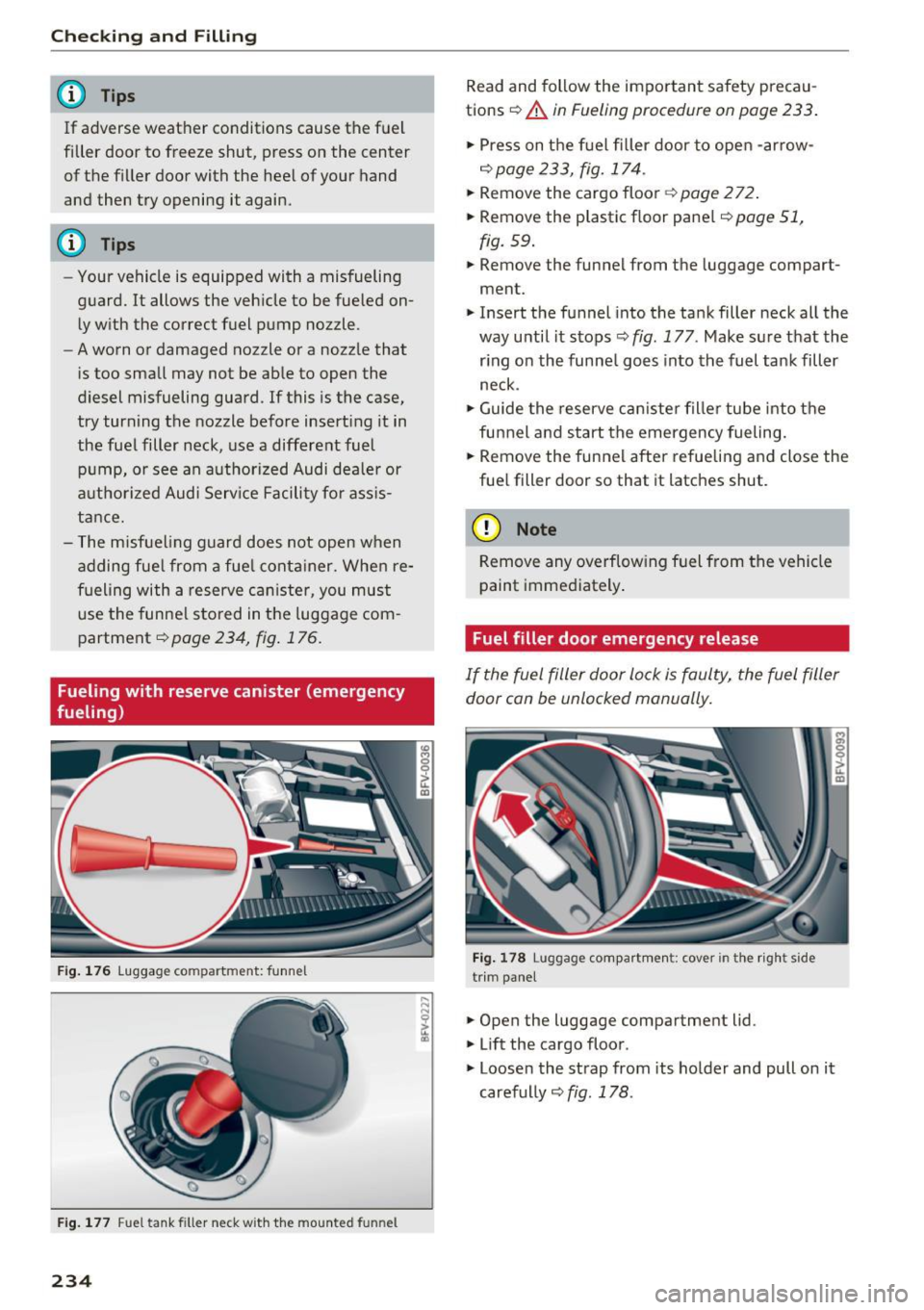
¢ page 234, fig . 176 .
Fueling with reserve canister (emergency
fueling)
F ig . 1 76 lu ggag e co mpar tme nt: funn el
Fig. 1 77 Fu el t ank filler neck w it h th e m ounted funnel
234
Read and follow the important safety precau
tions ¢
A in Fueling procedure on page 233 .
.,. Press on t he fuel filler door to open -arrow-
¢ page 233, fig. 174 .
.,. Remove the cargo floor~ page 2 72 .
.,. Remove the plastic f loor pane l¢
page 51 ,
fig. 59 .
.,. Remove the funnel from the luggage compart
ment.
.,. Insert the funnel into the tank filler neck all the
way until it stops ¢
fig. 177 . Make sure t hat the
r ing on the funne l goes into the fuel tank filler
neck .
.,. Guide the reserve can iste r fille r tube into the
funnel a nd start the emergency fueling.
.,. Remove the funnel after re fueling and close the
fue l fill er door so that it latches shut .
(D Note
Remove any overflowing fuel from the vehicle
paint immediately .
Fuel filler door emergency release
If the fuel filler door lock is faulty, the fuel filler
door can be unlocked manually.
Fig. 178 lu gga ge compar tm en t: cover in the rig ht side
tr im pa nel
.,. Open the luggage compartment lid .
.,. Lift the cargo floor .
M
"'
~ u. m
.,. Loosen the strap from its holder and pull on it
carefully ¢
fig. 178.
Page 265 of 314
co
co
.... N
" N .... 0
" "' c:o
Traction
The traction grades, from highest to lowest, are
AA, A, B and
C. Those grades represent the tire's
ability to stop on wet pavement as measured un
der controlled conditions on specified govern
ment test surfaces of asphalt and concrete . A tire
marked C may have poor traction performance
¢ _& .
Temperature
The temperature grades are A (the highest), B ,
and
C, representing the tire's resistance to the
generation of heat and its ability to dissipate
heat when tested under controlled conditions on
a specified indoor laboratory test wheel.
Sustained high temperature can cause the mate rial of the tire to degenerate and reduce tire life,
and excessive temperature can lead to sudden
tire failure
c:> .& .
The grade C corresponds to a level of perform
ance which all passenger car tires must meet un
der the Federal Motor Vehicle Safety Standard No.
109 . Grades Band A represent higher levels
of performance on the laboratory test wheel than
the minimum required by law.
A WARNING
The traction grade assigned to this tire is
based on straight -ahead braking traction
tests, and does not include acceleration, cor
nering, hydroplaning or peak traction charac
teristics.
A WARNING
The temperature grade for this tire is estab
lished for a tire that is properly inflated and
not overloaded . Excessive speed, underinfla
tion, or excessive loading, either separately or
in combination, can cause heat buildup and
possible tire failure.
A WARNING
Temperature grades apply to tires that are properly inflated and not over or underinflat
ed.
Wheels
Tire pressure monitoring system
ill General notes
Each tire, including the spare (if provided),
should be checked monthly when cold and inflat
ed to the inflation pressure recommended by the
vehicle manufacturer on the vehicle placard or
tire inflation pressure label. (If your vehicle has
tires of a different size than the size ind icated on
the vehicle placard or tire inflation pressure la bel, you should determine the proper tire infla
tion pressure for those tires).
As an added safety feature, your vehicle has been equipped with a tire pressure monitoring system
(TPMS) that illuminates a low tire pressure tell
tale when one or more of your tires is significant
ly under-inflated. Accordingly, when the low tire
pressure telltale illuminates, you should stop and
check your tires as soon as possible, and inflate
them to the proper pressure . Driving on a signifi
cantly under-inflated tire causes the tire to over
heat and can lead to tire failure . Under-inflation
also reduces fuel efficiency and tire tread life,
and may affect the vehicle's handling and stop
ping ability .
Please note that the TPMS is not a substitute for
proper tire maintenance, and it is the driver's re
sponsibility to maintain correct tire pressure, even if under-inflation has not reached the level
to trigger illumination of the TPMS low tire pres
sure telltale .
Your vehicle has also been equipped with a TPMS malfunction indicator to indicate when the sys
tem is not operating properly . The TPMS mal
function indicator is combined with the low tire
pressure telltale. When the system detects a
malfunction, the telltale will flash for approxi
mately one minute and then remain continuously
illuminated. This sequence will continue upon
subsequent vehicle start-ups as long as the mal
function exists.
When the malfunction indicator is illuminated,
the system may not be able to detect or signal low tire pressure as intended. TPMS malfunctions
may occur for a variety of reasons, including the .,.
263
Page 266 of 314
Wheels
installation of replacement or alternate tires or
wheels on the vehicle that prevent the TPMS
from functioning properly. Always check the
TPMS malfunction telltale after replacing one or
more tires or wheels on your vehicle to ensure
that the replacement or alternate tires and
wheels allow the TPMS to continue to function
proper ly .
If the Tire Pressure Monitoring System
indicator appears
The tire pressure indicator in the instrument
cluster informs you if the tire pressure is too low
or if there is a system malfunction.
Using the ABS sensors, the tire pressure monitor
ing system compares the tire tread circumfer
ence and vibration characteristics of the individu
al tires. If the pressure changes in one or more
tires, this is indicated in the Infotainment system
disp lay with an indicator light
RR and a message.
If only one tire is affected , the location of that
tire will be indicated.
The tire pressures must be stored in the Infotain
ment system again each time the pressures
change (switching between partial and full load pressure) or after changing or replacing a tire on
your vehicle ¢
page 265 . The tire pressure moni
toring system only monitors the tire pressure you
have stored. Refer to the tire pressure label for
the recommended tire pressure for your vehicle
¢ page 256, fig.191.
Tire tread circumference and vibration character
istics can change and cause a tire pressure warn
ing if:
- the tire pressure in one or more tires is too low.
- the tire has structural damage .
- the tire was replaced or the tire pressure was
changed and it was not stored¢
page 265.
-the spare tire* is installed.
Indicator lights
RR -Loss of pressure in at least one tire ¢ ,& .
Check the tires and replace o r repair if necessary.
Check/correct the p ressures of a ll four tires and
store the pressure again in the Infotainment sys
tem ¢
page 265.
264
mm (T ire Pressure Monitoring System) Tire
pressure: malfunction! See owner's manual -
If
mm appears after switching on the ignit ion or
while driving and then the indicator light
RR in
the instrument cluster also starts to blink for
about one minute and then stays on permanent ly, there is a system malfunction. Try to store the
correct tire pressures¢
page 265. If the indica
tor light does turn off or turns on again after a
short period of time , drive to an authorized A udi
dealer or authorized Audi Service Facility immedi
ate ly to have the ma lfunction corrected.
_& WARNING
-If the tire pressure indicator appears in the
disp lay, reduce your speed immediately and
avoid any hard steering or brak ing maneu
vers. Stop as soon as poss ible and check the
tires and their pressure .
- The driver is responsible for maintain ing the
correct tire pressures . You must check the
tire pressures regularly .
- Under certain cond it ions (such as a sporty
driving style, w inter condit ions or unpaved
roads), the pressure monitor indicator may
be delayed.
- Do not use run-flat tires on your vehicle . Us
ing them when not perm itted can lead to
vehicle damage or accidents.
(D Tips
- The tire pressure monitoring system can al
so stop working when there is an ESC mal
function.
- Us ing snow chains may result in a system
ma lfunction.
- The tires w ith the identification "AO"
¢
page 253 have been matched w ith your
Audi t ire pressure monitoring system. We
recommend that you use these tires.
Page 268 of 314
Care and cleaning
Care and cleaning
General information
Regular, proper care helps to maintain your vehi
cle's value.
It can also be a requirement when
submitting warranty claims for corrosion damage
and paint defects on the body.
The necessary care products can be obtained
from an authorized Audi dealer or authorized
Audi Service Facility. Read and follow the instruc
tions for use on the packaging.
A WARNING
- Using cleaning and care products incorrectly
can be dangerous to your health .
- Always store cleaning and care products out
of reach of children to reduce the risk of poi
soning .
@ For the sake of the environment
- Preferably purchase environmentally-friend ly cleaning products.
- Do not dispose of leftover cleaning and care
products with household trash.
Car washes
The longer that deposits remain on the vehicle,
the more the surface may be damaged. High
temperatures such as those caused by sunlight
increase the damaging effect.
Before washing, rinse
off heavy deposits with
plenty of water.
Stubborn deposits such as bird droppings or tree
sap are best removed with plenty of water and a microfiber cloth.
Also, wash the underside of your vehicle once
road salt stops being used for the season.
Pressure washers
When washing your vehicles with a pressure
washer, always follow the operating instructions
provided with the pressure washer. This is espe
cially important in regard to the pressure and
spraying distance . Do not direct the stream of
water directly onto seals for the side windows,
266
doors, luggage compartment lid or hood or onto
the tires, rubber hoses, insulating material, sen
sors* or camera lenses*. Keep a distance of at
least 16 in (40 cm).
Do not remove snow and ice with a pressure
washer.
Never use cone nozzles or high pressure nozzles.
The water temperature must not be above 140 °F
(60 °().
Automatic car washes
Spray
off the vehicle before washing.
Make sure that the windows are closed and the
windshield wipers are
off. Follow instructions
from the car wash operator, especially if there
are accessories attached to your vehicle.
If possible, use car washes that do not have
brushes.
Washing
by hand
Clean the vehicle starting from the top and work
ing down using a soft sponge or cleaning brush.
Use solvent-free cleaning products.
Washing vehicles with matte finish paint
by
hand
To avoid damaging the paint when washing, first
remove dust and large particles from your vehi
cle. Insects, grease spots and fingerprints are
best removed with a special cleaner for matte
finish paint .
Apply the product using a microfiber cloth. To
avoid damaging the paint surface, do not use too
much pressure.
Rinse the vehicle thoroughly with water. Then
clean using a neutral shampoo and a soft micro
fiber cloth .
Rinse the vehicle thoroughly again and let it air
dry. Remove any water residue using a chamois .
A WARNING
-
- Only wash the vehicle when the ignition is
off and follow the instructions from the car
Page 288 of 314
Emergency situations
(D Note
Improper hook -up of ju mper cables can r uin
the generato r.
- Always con nect P OSITIVE( +) to POS ITI VE
( + ), and NEG ATI VE( -) to NEGATIVE( -)
ground post of t he battery manage r contro l
u nit .
- Check that a ll sc rew p lugs on the battery
cells are sc rewed in firmly . If not, t ighten
plugs p rior to connect ing clamp o n negat ive
b attery t erminal.
- Please note t hat the procedure fo r con nect
i ng a jumper cable as desc rib ed above ap
plies specifica lly to the case of yo ur vehicle
being jum p starte d. When you a re giv ing a
ju mp sta rt to anothe r vehicle, do
not con
n e ct t he neg ative( -) ca b le to the neg ative
(- ) termin al o n t he dis ch arged battery @
¢
fig . 21 1. In ste ad, securely connec t the
negative (-) cab le to either a so lid metal
compo nent that is f irm ly bolted to the e n
gine block o r to the engine bloc k itself. If
the battery that is bei ng cha rged does not
vent to the outside, escap ing battery gas
could ignite an d exp lode!
Towing with a tow truck
General hints
Your Audi requires special handling for towing.
The fo llow ing informa tion is to be used by com
mercial tow truck operators who know how to op
era te the ir equipmen t sa fe ly .
- Never tow your Audi. Towing will cause dam
age to the engine and transmi ssion.
- Never wrap the safety chains or winch cables
around the brake l ines .
- To prevent unnecessary damage, your Audi
must be transported with a flat bed truck.
- To load the vehicle on to the flat bed , use the
towing loop found in the vehicle tools and at
tach to the front or rear anchorage
¢ page 286 and ¢ page 287.
286
A WARNING
A veh icle being towed is not safe for passe n
ge rs . Neve r allow a nyone to ride in a vehicle
be ing towed, fo r any reason .
Front towing loop
Fig. 212 Fron t bumper : cover
Fi g. 2 13 Fron t bumper : install ing the tow ing loop
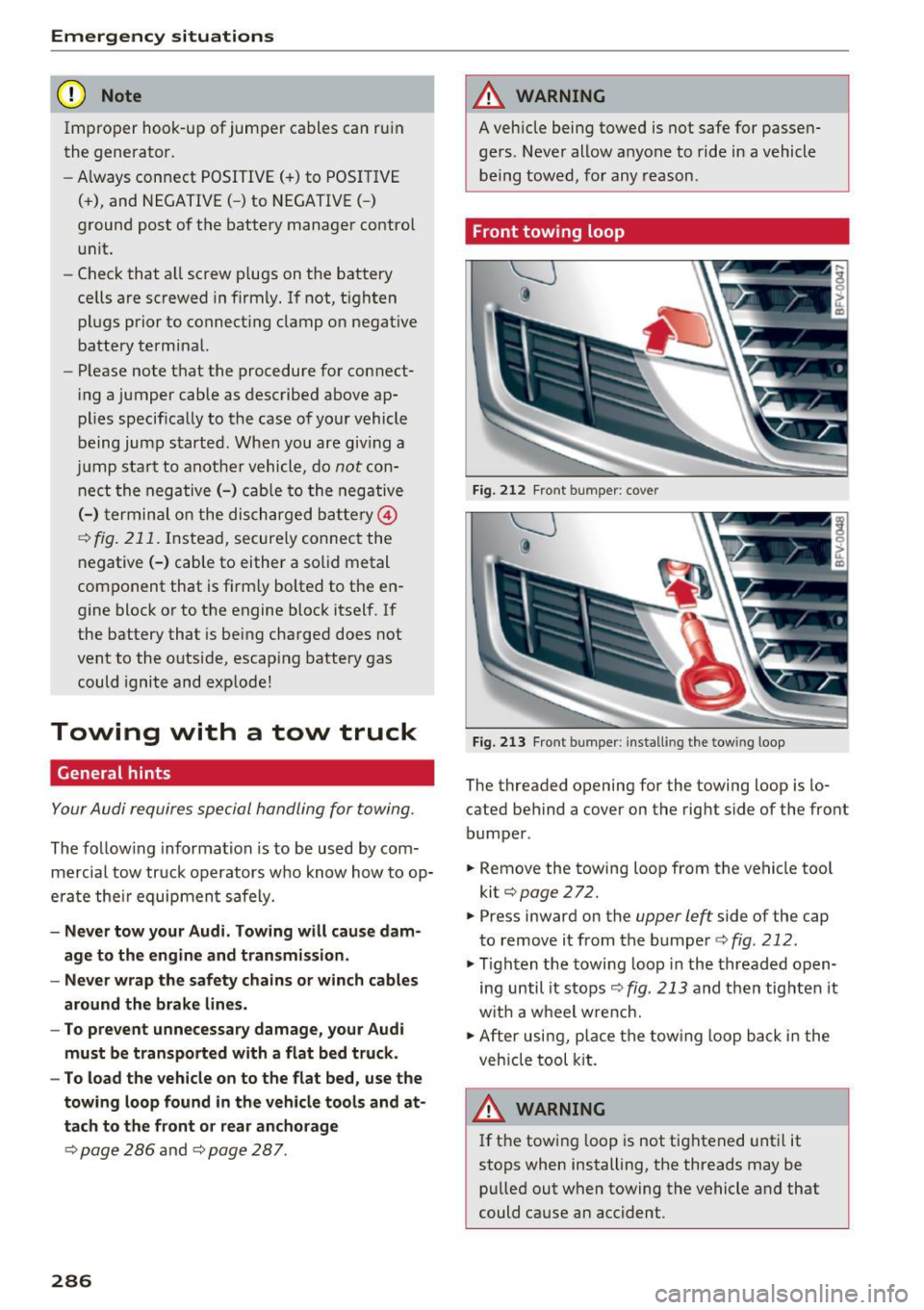
The threaded opening for the towing loop is lo
cated behind a cover on the rig ht side of the front
bumper .
.. Remove the towing loop f rom the vehicle too l
kit¢
page 272.
.. Press inward on the
upper left side of the cap
to remove i t from the bumper ¢
fig. 212 .
.,. Tighten the towing loop in the threaded o pen
ing until it s tops ¢
fig. 213 and then tig hten it
w it h a wheel w re nch.
.,. After usi ng, p lace the tow ing loop b ack in the
veh icle tool kit.
A WARNING
If t he t ow ing l oop is not tig htened unt il it
stops when installing, the threads may be pu lled out when towing the vehicle and that
could cause an accident .
-
Page 301 of 314
co
co
.... N
" N .... 0
" "' c:o
Certification . . . . . . . . . . . . . . . . . . . . . . . . . 29 6
Changing e ng ine o il . . . . . . . . . . . . . . . . . . . 240
Changing light bulbs . . . . . . . . . . . . . . . . . . 283
C harg ing the b attery (mob ile dev ices) . . . . 16 2
C hi ld restraint
Danger of us ing ch ild restraints in the front
seat . . . . . . . . . . . . . . . . . . . . . . . . . . . . . . . 197
C hi ld restraints
Where can I get additional informat io n
about ch ild restrai nts and their use? . . . . 230
Chi ld safety . ... .... .. .... ... .. .. .... . 2 18
Important safety instructions for using chi ld
safety seats . . . . . . . . . . . . . . . . . . . . . . . . 221
C hi ld safety sea ts
Booste r seats . . . . . . . . . . . . . . . . . . . . . . . 225
Convertible c hild seats . . . . . . . . . . . . . . . 224
H ow do I proper ly install a child safety seat
. h' l ? inmyve ice ................. .. .. .. . 221
Infant seats . . . . . . . . . . . . . . . . . . . . . . . . 223
Safety instructions . . . . . . . . . . . . . . . . . . . 221
C hild seats . . . . . . . . . . . . . . . . . . . . . . . . . . 223
Securing . . . . . . . . . . . . . . . . . . . . . . . . . . . 227
C igare tte lighte r . . . . . . . . . . . . . . . . . . . . . . . 48
C lea ning . . . . . . . . . . . . . . . . . . . . . . . . . . . .
266
C lea ning/ removing ice from windows . . . . . 268
C lea ning Alcanta ra . . . . . . . . . . . . . . . . . . . . 269
C leaning artificia l leather . . . . . . . . . . . . . . . 269
C le anin g ca rbon parts . . . . . . . . . . . . . 268, 269
C lea ning contro ls . . . . . . . . . . . . . . . . . . . . . 269
C leaning decorative parts and trim . . . . . . . 268
C lea ning displays . . . . . . . . . . . . . . . . . . . . . 268
C leaning exhaust tail p ipes . . . . . . . . . . . . . 267
C lean ing plast ic parts . . . . . . . . . . . . . . . . . . 268
C lea ning rims . . . . . . . . . . . . . . . . . . . . . . . . 267
C leaning seat covers . . . . . . . . . . . . . . . . . . . 269
C le ani ng ta il lights . . . . . . . . . . . . . . . . . . . . 267
C lea ning text iles . . . . . . . . . . . . . . . . . . . . . . 269
C leaning the A udi virt ual cockpit . . . . . . . . . 268
C lea ning the instrument cluster . . . . . . . . . 268
C lean ing the wind deflector . . . . . . . . . . . . . 268
C lima te con trol system (automatic)
Ad justing ai r ven ts . . . . . . . . . . . . . . . . . . . . 53
Ad justing the air vents . . . . . . . . . . . . . . . . . 54
Ad justing the temperature . . . . . . . . . . . . . 53
A ir dist ribution, air vents . . . . . . . . . . . . . . . 53
AUTO (automatic mode) . . . . . . . . . . . . . . . 53
Index
B lower . . . . . . . . . . . . . . . . . . . . . . . . . . . . . 53
Cont rols . . . . . . . . . . . . . . . . . . . . . . . . . . . . 53
Defrosting the windows . . . . . . . . . . . . . . . 54
Drive select . . . . . . . . . . . . . . . . . . . . . . . . . . 80
Rear w indow defogger . . . . . . . . . . . . . . . . . 54
Recirculation mode . . . . . . . . . . . . . . . . . . . 54
C limate contro l system (manua l)
Adjusting the a ir vents . . . . . . . . . . . . . . . . . 54
Clock .... .. .... .. .. ................. 175
Clos ing
Hood . ........ .. .. ................. 236
Windows ..... .. .. .................. 30
Closing/open ing
By remote control . . . . . . . . . . . . . . . . . . . . 26
With the centra l locki ng switch . . . . . . . . . 28
With the conven ience key . . . . . . . . . . . . . . 27
Closing a nd opening
With the door loc k . . . . . . . . . . . . . . . . . . . . 29
Coc kp it (overview) . . . . . . . . . . . . . . . . . . . . . . 6
Coming home . . . . . . . . . . . . . . . . . . . . . . . . . 41
Command (vo ice recogn ition system) . . . . . 108
Compartments . . . . . . . . . . . . . . . . . . . . . . . . 49
Compass in the mirror . . . . . . . . . . . . . . . . . . 45
C ompliance . . . . . . . . . . . . . . . . . . . . . . . . . . 2 96
Conference call . . . . . . . . . . . . . . . . . . . . . . . 118
Connect ion manager
176
Connections
refer to M edi a . . . . . . . . . . . . . . . . . . 156, 164
Connect ion settings . . . . . . . . . . . . . . . . . . . 176
Cons umer i nfo rmation . . . . . . . . . . . . . . . . . 293
Cons ume r Information . . . . . . . . . . . . . . . . . 18 7
Consumption (fuel) . . . . . . . . . . . . . . . . 23, 290
Contacting NH TSA . . . . . . . . . . . . . . . . . . . . 187
Contacts Additional directory . . . . . . . . . . . . . . . . . . 177
I m po rting/expo rting . . . . . . . . . . . . . . . . . 123
Memo ry c apacity . . . . . . . . . . . . . . . . . . . . 1 24
Sea rching . . . . . . . . . . . . . . . . . . . . . . . . . . 122
Showing details . . . . . . . . . . . . . . . . . . . . . 123
Storing as destination . . . . . . . . . . . . . . . . 142
Cont rol bu ttons . . . . . . . . . . . . . . . . . . . . . . . 98
Cont rol knob with joyst ick function . . . . . . . 101
Convenience key Indicator light . . . . . . . . . . . . . . . . . . . . . . . 60
Stopping the eng ine (START ENGINE STOP
button) . . . . . . . . . . . . . . . . . . . . . . . . . . . . . 60
299
Page 303 of 314
co
co
.... N
" N .... 0
" "' c:o
Luggage compartment lid . . . . . . . . . . . . . . 30
Power top . . . . . . . . . . . . . . . . . . . . . . . . . . . 37
E me rgency release
Selec to r l eve r . . . . . . . . . . . . . . . . . . . . . . . . 7 1
Emergency starting . . . . . . . . . . . . . . . . . . . 284
Emi ssions data . . . . . . . . . . . . . . . . . . . . . . . 290
E nergy management . . . . . . . . . . . . . . . . . . . 93
Eng ine
Coolant . . . . . . . . . . . . . . . . . . . . . . . . . . . . 241
Starting . . . . . . . . . . . . . . . . . . . . . . . . . 59, 60
Starting w it h jumper cables . . . . . . . . . . . 284
Stopping . . . . . . . . . . . . . . . . . . . . . . . . . . . . 60
Eng ine compartment
Opening/closing the hood . . . . . . . . . . . . . 236
Ove rview. ...................... ... . 237
Safety preca utions . . . . . . . . . . . . . . . . . . . 235
Engine control (indicato r light) . . . . . . . . . . . 1 5
E ng ine oi l . . . . . . . . . . . . . . . . . . . . . . . . . . . 237
Adding .. .. .. ............... .. ..... 239
Changing . . . . . . . . . . . . . . . . . . . . . . . . . . 24 0
Checking the oil leve l . . . . . . . . . . . . . . . . . 239
Consumption . . . . . . . . . . . . . . . . . . . . . . . 239
Dipstick . . . . . . . . . . . . . . . . . . . . . . . . . . . . 239
Indicator light . . . . . . . . . . . . . . . . . . . . . . . 12
O il consumption . . . . . . . . . . . . . . . . . . . . . 238
Specification and viscos ity . . . . . . . . . . . . . 23 7
Engine speed limitatio n (indicator light) . . . 15
E nter ing characters/numbers (speller) . . . . 102
Enter ing letters (speller) . . . . . . . . . . . . . . . 102
E nvironment
Proper disposal of d rained engine oil . . . . 24 0
Unleaded gaso line . . . . . . . . . . . . . . . . . . . 231
E xte rio r ligh ting . . . . . . . . . . . . . . . . . . . . . . . 39
Exterior mirrors
Adj ust ing . . . . . . . . . . . . . . . . . . . . . . . . . . . 42
D immi ng . ..... ........... ...... ... .. 43
H eating .. .. .. ............... .. .... .. 42
External voice operat ion................ 113
F
Factory default settings (MMI)
176
F ader (so und) . . . . . . . . . . . . . . . . . . . . . . . . 179
Fasten ing
Booster seats . . . . . . . . . . . . . . . . . . . . . . . 225
Conve rtible c hild safety sea ts . . . . . . . . . . 224
Infant seats . . . . . . . . . . . . . . . . . . . . . . . . 223
Index
Fast forwarding/rewind ing (a udio/video
file) . . . . . . . . . . . . . . . . . . . . . . . . . . . . . . . . 164
F ast forwarding (audio/video file) . . . . . . . . 164
Fast route . . . . . . . . . . . . . . . . . . . . . . . . . . . 143
F avorites
Media . . . . . . . . . . . . . . . . . . . . . . . . . . . . . 166
Nav igation . . . . . . . . . . . . . . . . . . . . . . . . . 138
Telephone.......................... 119
F ile fo rmats (media d rives) . . . . . . . . . . . . . 169
Floor mats . . . . . . . . . . . . . . . . . . . . . . . . . . . 18S
F og lights/rea r fog light(s) . . . . . . . . . . . . . . 39
Foot peda ls . . . . . . . . . . . . . . . . . . . . . . . . . . 184
Footwell lighting . . . . . . . . . . . . . . . . . . . . . . 41
F or the sake o f the env ironmen t
Environmentally -friend ly driving . . . . . . . . 57
Fueling . . . . . . . . . . . . . . . . . . . . . . . . . . . . 233
Leaks. .... .... ................... .. 236
F ree text search . . . . . . . . . . . . . . . . . . . . . . 104
Medi a . . . . . . . . . . . . . . . . . . . . . . . . . . . . . 166
Navigation . . . . . . . . . . . . . . . . . . . . . . . . . 137
Radio . . . . . . . . . . . . . . . . . . . . . . . . . . . . . 152
Telephone. . . . . . . . . . . . . . . . . . . . . . . . . . 122
F ree ze p ro tection
Coo lant . . . . . . . . . . . . . . . . . . . . . . . . . . . . 2 41
Freq uency band .... .............. 151, 153
F ront airbags
Description . . . . . . . . . . . . . . . . . . . . . . . . . 200
How they work . . . . . . . . . . . . . . . . . . . . . . 205
F rontal collisions and the laws o f physics . . 190
Front seats Adjusting . . . . . . . . . . . . . . . . . . . . . . . . . . 183
Child restra ints in the fron t sea t . . . . . . . . 1 97
also refer to Seats . . . . . . . . . . . . . . . . . . . . 47
Fuel . . . . . . . . . . . . . . . . . . . . . . . . . . . . . . . . 231
Additives . . . . . . . . . . . . . . . . . . . . . . . . . . . 231
B lended gaso line ... .. ... ..... .... ... 231
Cons umption . . . . . . . . . . . . . . . . . . . . . . . 290
C urren t fu el consum ption . . . . . . . . . . . . . . 23
E thano l . . . . . . . . . . . . . . . . . . . . . . . . . . . . 2 31
F uel fi lle r nec k . . . . . . . . . . . . . . . . . . . . . . 232
Fuel gauge . . . . . . . . . . . . . . . . . . . . . . . . . . . 8
Fuel tank capacity . . . . . . . . . . . . . . . . . . . 291
Gasoline addit ives . . . . . . . . . . . . . . . . . . . 232
Indicator light . . . . . . . . . . . . . . . . . . . . . . . 16
Sav ing fuel . . . . . . . . . . . . . . . . . . . . . . . 57, 80
301
Page 309 of 314
co
co
.... N
" N .... 0
" "' c:o
Seating position Driver . . . . . . . . . . . . . . . . . . . . . . . . . . . . . 182
Front passenger . . . . . . . . . . . . . . . . . . . . . 183
How to adjust the front seats . . . . . . . . . . 183
Incorrect seat position . . . . . . . . . . . . . . . 184
Occupants . . . . . . . . . . . . . . . . . . . . . . . . . . 182
Seats adjusting . . . . . . . . . . . . . . . . . . . . . . . . . . . 47
Correct seating position . . . . . . . . . . . . . . 182
Number of seats . . . . . . . . . . . . . . . . . . . . 189
Selecting a source Multifunction steering wheel ......... 22, 0
Selecting a source (media) . . . . . . . . . . . . . . 164
Selection menu . . . . . . . . . . . . 20, 98, 101, 102
Multifunction steering wheel . . . . . . . . . . . 22
Selective wheel torque control . . . . . . . . . . . 88
Selector lever (automatic transmission)
E mergency operat ion . . . . . . . . . . . . . . . . . . 71
Position . . . . . . . . . . . . . . . . . . . . . . . . . . . . 64
Service and disposal Safety belt pretensioner . . . . . . . . . . . . . . 195
Service interval display . . . . . . . . . . . . . . . . . 245
Settings Directory. . . . . . . . . . . . . . . . . . . . . . . . . . . 124
Map. .. .. .. .. ................. .... . 146
Media . . . . . . . . . . . . . . . . . . . . . . . . . . . . . 167
Navigation . . . . . . . . . . . . . . . . . . . . . . . . . 142
Radio . . . . . . . . . . . . . . . . . . . . . . . . . . . . . 154
System . . . . . . . . . . . . . . . . . . . . . . . . . . . . 175
Telephone . . . . . . . . . . . . . . . . . . . . . . . . . . 124
Setting the language ............ ..... . 175
Shift paddles (automatic transmission) . . . . 68
Shuffle . . . . . . . . . . . . . . . . . . . . . . . . . . . . . 167
Side airbags Description ... ................ ..... . 214
How they work ...................... 215
Side assist . . . . . . . . . . . . . . . . . . . . . . . . . . . . 76
Adjusting the brightness . . . . . . . . . . . . . . . 79
C leaning the sensors . . . . . . . . . . . . . . . . . 267
Sensor range . . . . . . . . . . . . . . . . . . . . . . . . 77
switching on and off . . . . . . . . . . . . . . . . . . 79
SIM card reader . . . . . . . . . . . . . . . . . . . . . . 127
Ski bag .... ................... .. ...... SO
Snowboard bag . . . . . . . . . . . . . . . . . . . . . . . . SO
Snow chains . . . . . . . . . . . . . . . . . . . . . . . . . 261
Socket . . . . . . . . . . . . . . . . . . . . . . . . . . . . . . . 48
Index
Software update
refer to System update (MMI) . . . . . . . . . . 178
Software (MMI) License . . . . . . . . . . . . . . . . . . . . . . . . . . . . 180
Update . . . . . . . . . . . . . . . . . . . . . . . . . . . . 178
Version . . . . . . . . . . . . . . . . . . . . . . . . . . . . 178
Sources of information about child restraints
and their use . . . . . . . . . . . . . . . . . . . . . . . . . 230
Spare tire . . . . . . . . . . . . . . . . . . . . . . . . . . . 279
Speed-dependent volume increase . . . . . . . 179
Speed limiter . . . . . . . . . . . . . . . . . . . . . . . . . 72
Speedometer . . . . . . . . . . . . . . . . . . . . . . . . . 19
Speed warning system . . . . . . . . . . . . . . . . . . 72
Speller . . . . . . . . . . . . . . . . . . . . . . . . . . . . . . 102
Sport mode . . . . . . . . . . . . . . . . . . . . . . . . . . . 89
START Engine STOP button . . . . . . . . . . . . . . 59
Starting (engine) . . . . . . . . . . . . . . . . . . . . . . 59
Stee ring
Electromechanical steering .......... . 91, 0
Indicator light . . . . . . . . . . . . . . . . . . . . . . . 13
also refer to Electromechanical steering 91
Steering wheel Adjusting . . . . . . . . . . . . . . . . . . . . . . . . . . . 59
Shift paddles (automatic transmission) . . . 68
also refer to Multifunction
steering wheel . . . . . . . . . . . . . . . . . 20, 21, 22
Steps for determin ing correct load limit . . . 259
Stopover (navigation) . . . . . . . . . . . . . . . . . . 141
Stopping (engine) . . . . . . . . . . . . . . . . . . . . . . 60
Storage compartments . . . . . . . . . . . . . . . . . 49
Stored stations
refer to Favorites . . . . . . . . . . . . . . . . . . . . 153
Streaming
refer to Online media . . . . . . . . . . . . . . . . . 161
Street View . . . . . . . . . . . . . . . . . . . . . . . . . . 147
S tronic (automatic transmission) . . . . . . . . . 63
Subtitles (DVD) . . . . . . . . . . . . . . . . . . . . . . . 167
Subwoofer (sound) . . . . . . . . . . . . . . . . . . . . 179
Sun visors . . . . . . . . . . . . . . . . . . . . . . . . . . . . 43
Swapping calls . . . . . . . . . . . . . . . . . . . . . . . 118
Switching daytime running lights on and off 40
Switching tabs
refer to Mult ifunction
steering wheel . . . . . . . . . . . . . . . . . 20, 21, 22
Switching the ignition on . . . . . . . . . . . . . . . . 59
307