alarm AUDI TT ROADSTER 2017 Owners Manual
[x] Cancel search | Manufacturer: AUDI, Model Year: 2017, Model line: TT ROADSTER, Model: AUDI TT ROADSTER 2017Pages: 314, PDF Size: 76.54 MB
Page 28 of 314
Opening and clo sin g
LED and batteries in the remote control key
fr=-~=;;;;- --~
I
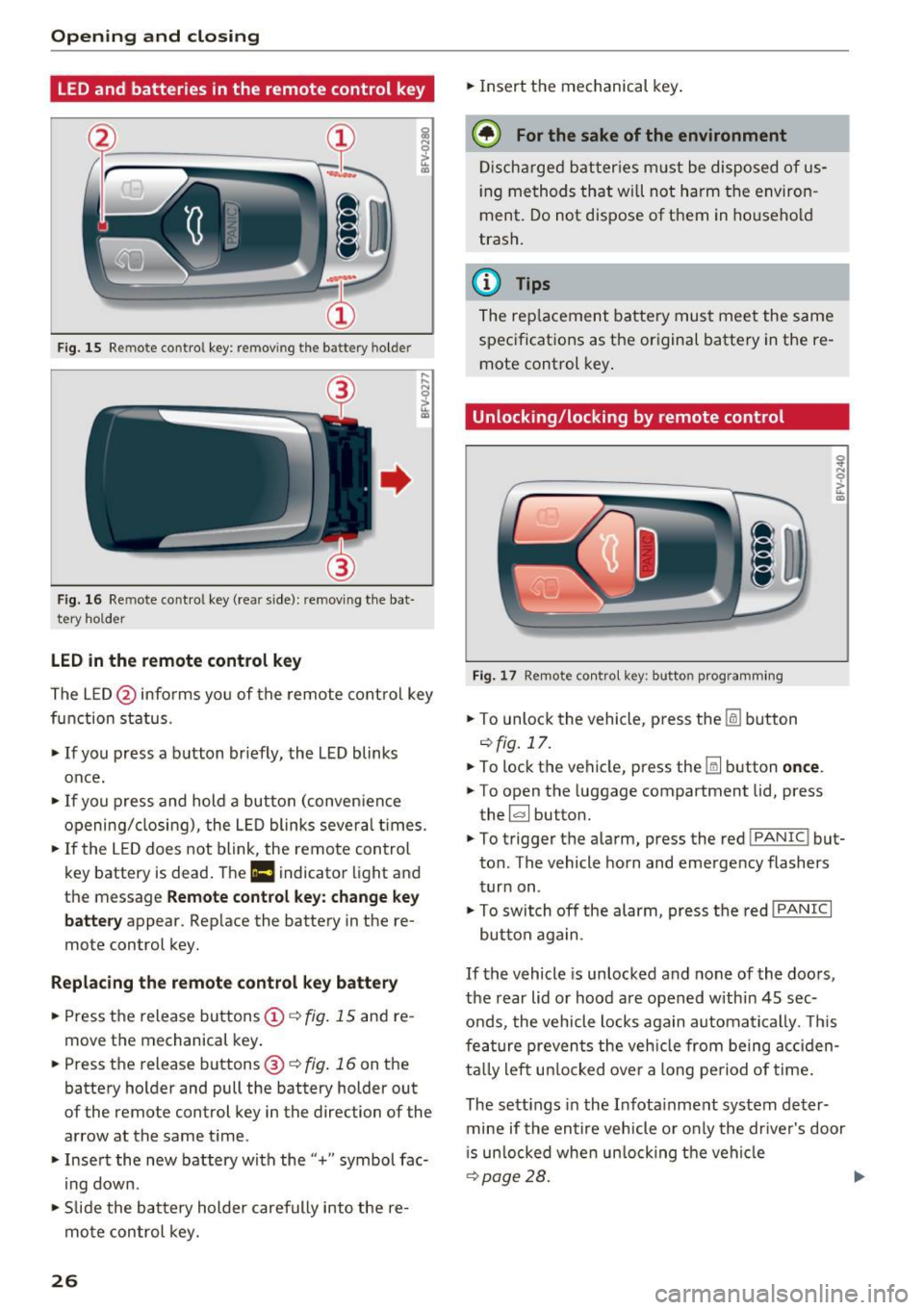
Fig . 15 Re mote contro l key : rem ov ing the ba ttery h olde r
F ig. 16 Re mote cont ro l key (re ar side ): re m ovi ng the bat
tery ho lder
LED in the remote control k ey
The LE D @ info rms you of the remote control key
function status .
.,. If you press a b utton briefly, the LED blinks
once.
.,. If you press and hold a button (conven ience
opening/closing), the LED blinks several t imes .
.,. If the L ED does not blink , the remote control
key battery is dead . The
Ill indicator light and
th e m essag e
Rem ote control key : cha nge ke y
b att ery
appea r. Rep lace the battery in the re
mote con trol key.
R eplacing th e remot e co ntrol k ey batt ery
.,. Press the release buttons@¢ fig. 15 and re
move the mechanical key .
.,. Pre ss the r ele as e buttons @¢
fig. 16 on th e
battery holder and pull the battery holde r out
of the remo te control key in the dire ction o f the
arrow at the same t ime .
.,. Insert the new battery with the"+" symbol fac·
ing down .
.,. Slide the batte ry holder carefully into the re
mote control key.
26 .,.
Insert the mechanical key .
@ For the sake of the environment
Discharged batter ies m ust be disposed of us
ing methods that wi ll not harm the environ
ment. Do not dispose of them in ho usehold
trash.
(D Tips
The rep lacement battery must meet the same
spec ificat ions as the or iginal battery in the re
mote control key .
Unlocking/locking by remote control
Fig. 17 Remot e con tro l key: butt on programming
.,. To unlock the vehicle , pr ess the lil button
¢fig.17 .
.,. To lock the vehicle, press th e Iii button once .
.,. To open the luggage compartment lid, press
the ~ button.
.,. To trigger the alarm, press the red
!PAN IC! but·
ton . The vehicle horn and emergency flashers
turn on .
.,. To switch off the alarm, press the red
! PANIC I
button aga in .
If the vehicle is unlocked and none of the doors,
the rear lid or hood are opened within 45 sec
onds, the vehicle locks again automatically . T his
fea ture prevents the veh icle from being acc iden
ta lly left un locked over a long period of time .
The sett ings in the Infota inment system deter·
mine if the entire vehicle o r only the dr iver's door
i s un locked whe n un locking the veh icle
¢ page 28. .,.
Page 29 of 314
co
co
.... N
" N .... 0
" "' c:o
A WARNING ,~
No one, especially children, sho uld stay in the
veh icle w he n i t is locked from the outside, be
cause the w indows can no longer be opened
from th e inside
c::> page 29. Locked doors
ma ke it more difficult for eme rgency workers
t o get into the vehicle, which puts lives at
r isk.
@ Tips
- Only use the remote control key when you
are within view of the vehicle.
- Do not use the remote control when you are
inside the vehicle. Otherwise, yo u could un
i ntent io nally loc k the vehicle. If you then
tried to start the eng ine or open a door, the
alarm wou ld be triggered . If this happens,
press the un lock button@ .
- The selector leve r must be in the P position
on vehicles with a convenience key*. Other
wise the vehicle will not be ab le to lock .
- Only use the panic function in an emergen
cy .
Unlocking and locking with the
convenience key
Appl ies to: ve hicles with co nve nien ce key
The doors and luggage compartment lid can be
unlocked/locked without using the remote con
trol key.
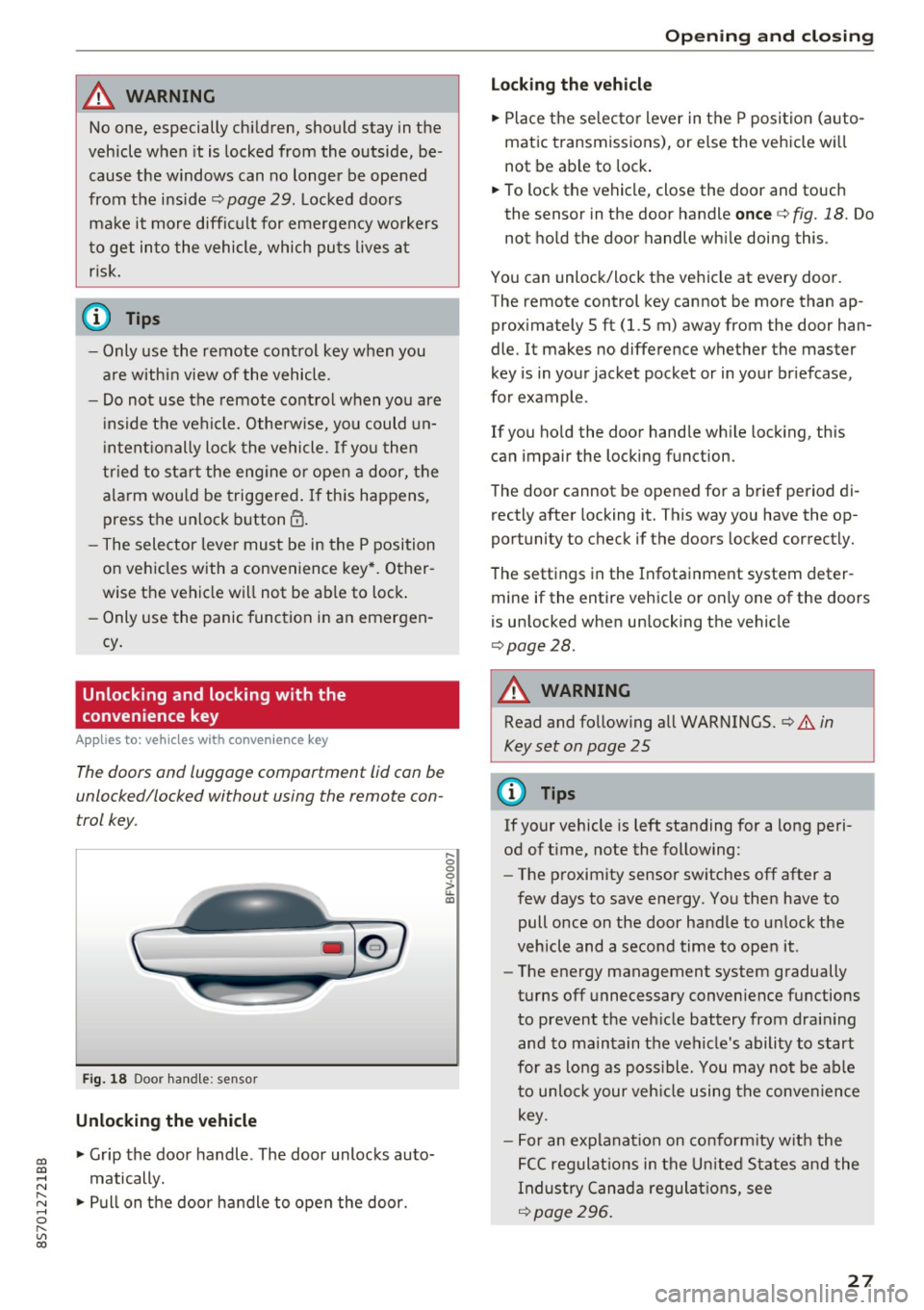
F ig . 18 Door han dle: senso r
Unlocking the vehicle
.,. Grip the door handle . The door unlocks auto
matically .
.,. Pull on the door handle to open the door.
.... 0 0 0
ii: IXl
Op ening and cl osing
Locking the v ehicle
.,. Place the se lecto r lever in t he P posi tion (a uto
matic transmiss ions), or else the vehicle wi ll
not be able to lock .
.,. To lock the vehicle, close the door and touch
the sensor in the door handle
once c::> fig. 18. Do
not hold the door handle wh ile doing this .
You can unlock/lock the ve hicle at every door.
The remote control key cannot be more than ap
prox imately 5 ft (1.5 m) away from the door han
dle. It makes no difference whether the master
key is in your jacket pocket or in your br iefcase,
for example .
If you ho ld the door handle wh ile lock ing, this
can impair the locking function.
The door cannot be opened for a brief period di rectly after locking it. This way you have the op
portunity to check if the doors locked correctly.
The settings in the Infotainment system deter mine if the entire vehicle or only one of the doors
is unlocked when un locking the vehicle
c::> page28.
A WARNING
-Read and follow ing all WARNINGS. c::> .&. in
Key set on page 25
0) Tips
If your vehicle is left standing for a long peri
od of t ime, note the follow ing:
- The proximity sensor sw itches off after a
few days to save energy. You then have to
pull once on the door handle to un lock the
vehicle and a second time to open it.
- The energy management system gradually
turns off unnecessary convenience functions
to prevent the veh icle battery from drain ing
and to ma intain the vehicle's ability to start
for as lo ng as poss ible. You may no t be ab le
to un lo ck your veh icle using the conve nience
key.
- For an explanat ion on co nfo rm ity w ith the
FCC regulat ions in the U nited S ta tes an d the
Indus try Canad a regulat ions, see
c::> page296 .
27
Page 31 of 314
CD
CD
.... N
" N .... 0 r--. V, co
Emergency unlocking and locking the doors
-
----
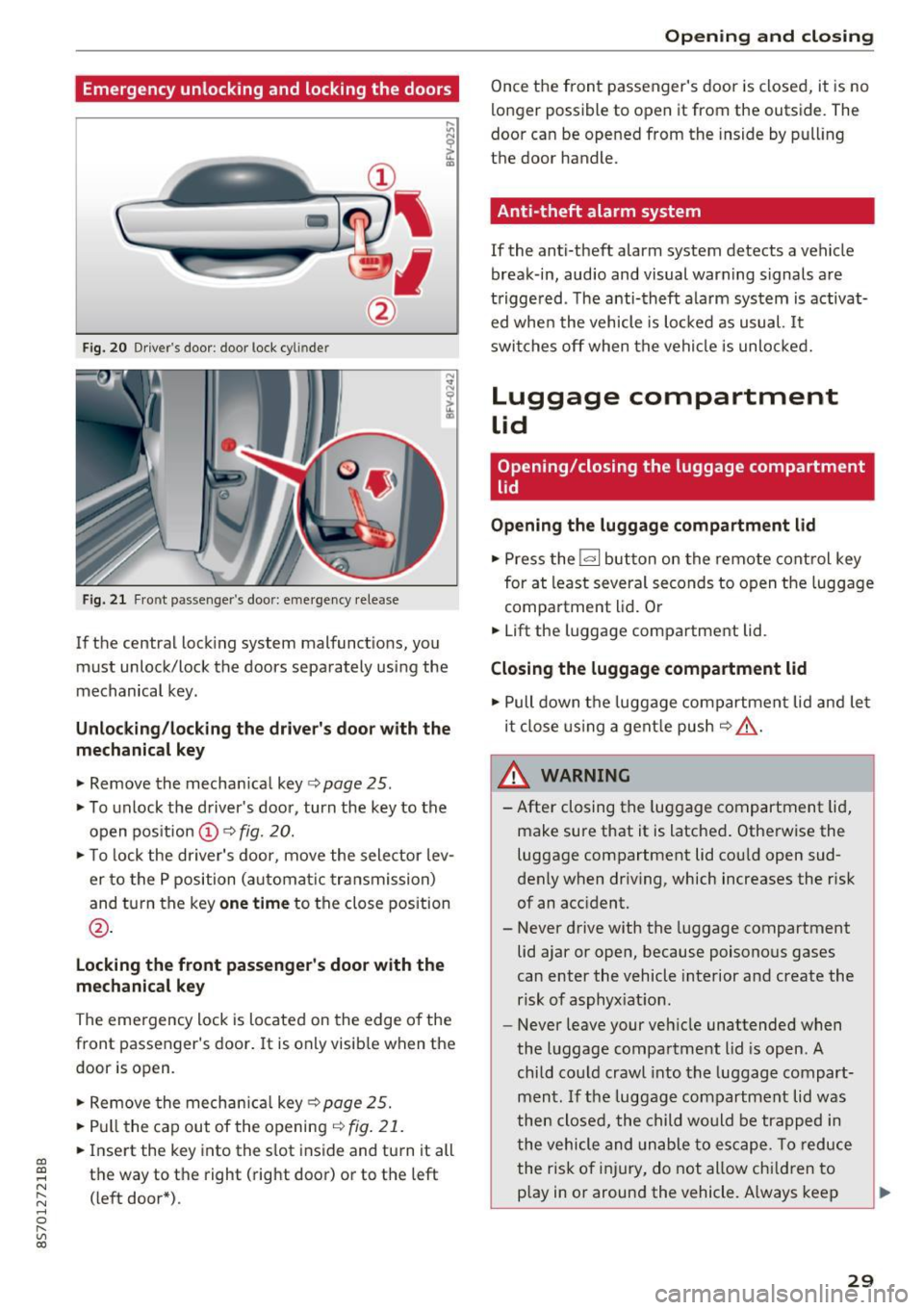
F ig. 20 Drive r's door : door lock cy lin de r
Fig. 21 Front passenger 's doo r: emergency release
If the central lock ing system malfunctions, you
must unlock/lock the doors separately us ing the
mechanical key .
Unlocking/locking the driver's door with the
mechanical key
• Remove the mechan ical key ¢ page 25.
• To unlock the driver's doo r, turn the key to the
open position @¢
fig. 20.
• To lock the driver's door, move the selector lev
er to the P position (automat ic transmission)
and turn the key
one time to the close position
@.
Locking the front passenger's door with the
mechanical key
The emergency lock is located on the edge o f the
front passenger's door. It is only visib le when the
door is open.
• Remove the mechan ical key ¢
page 25.
• Pull the cap out of the opening ¢
fig. 21.
• Insert the key into the s lot inside and turn it all
the way to the right (right door) or to the left
(left door*) .
Opening and closing
Once the front passenger's door is closed, it is no
longer possible to open it from the outside. The
door can be opened from the inside by pull ing
the door handle.
Anti-theft alarm system
If the anti-theft alarm system detects a vehicle
break -in, audio and visual warning s ignals are
triggered . T he anti-theft alarm system is activat
ed whe n the vehicle is locked as usual.
It
switches off when the vehicle is unlocked.
Luggage compartment
Lid
Opening/closing the luggage compartment
lid
Opening the luggage compartment lid
• Press the l«=> I but ton on the remote control key
for at least several seconds to open the luggage
compartment lid. Or
• Lift the luggage compartment lid .
Closing the luggage compartment lid
• Pull down the luggage compartment lid and let
it close using a gentle push
C? .&, .
_.&. WARNING
-After closing the luggage compartment lid,
make sure that it is latched. Otherwise the
luggage compartment lid cou ld open sud
denly when driving, which increases the risk
of an accident.
- Never drive with the luggage compartment
lid ajar or open, because poisonous gases
can enter the vehicle interior and create the
risk of asphyx iat ion.
- Never leave your vehicle unattended when
the luggage compartment lid is open. A
child could crawl into the luggage compart
ment .
If the luggage compartment lid was
then closed, the child would be trapped in
the vehicle and unable to escape. To reduce
the risk of injury, do not allow chi ldren to
p lay in or around the vehicle. A lways keep
29
Page 284 of 314

Fuses and bulbs
Interior fuse assignment
Fig. 208 Vehicle inter ior: fuse assignme nt
No. Equipment
Fl Power top control modu
le (Roadster)
F2 Power top control module (Roadster)
F3 ESC control module
F4 Central computer processor (MIB-2)
FS Gateway
F6 Anti-theft alarm system Climate control system, selector lever (au-
F7 tomatic transmission), parking heater,
rear window heater relay coil
Diagnos is, electrical parking brake switch,
F8 light swi tch, rain/light sensor, interior
lighting
F9 Steering column switch module
Fl0 Display
F ll Haldex clutch
F12 MMI area
F 13 Adaptive dampers control module
F14 Climate control system blower
FlS Electronic steering co lumn lock
F16 MMI components, safety be
lt microphone
(Roadster)
282
No . Equipment
F17 Instrument cluster
F18 Rearview camera
F19 Convenience key system control module
F20 Power lumbar support adjustment
F22 Front passenger's side neck heating (Road-
ster)
F23 R
ig ht exterior lighting, on-board compute r
(right)
F 25 Driver's s
ide door (for example power win-
dows)
F26 Seat heating
F28 AMI H igh med ia port
F29 On-board computer
F31 Left on-board computer
F32 Driver assistance systems
F33 Airbag
Socket relay, interior sound, back-up light
F34 switch, temperature sensor, oil level sen-
sor
Diagnosis, headlight range control system,
F35 air quality sensor, automatic dimming
rearview mirror
F36 Right cornering light/ r ight LED-h eadlight
F37 Left cornering light/ left LED-headlight
F38 E
ng ine control module, ESC control mod-
ul e
F39 Front passenger's side door (for example
power windows)
F40 Cigarette lighter, sockets
F41 SCR relay and delivery unit
F42 Central locking area
F43 On-board computer
F45 Power adjustable driver's side seat
F46 Driver's side neck heat ing (Roadster)
F49 Starter, clutch sensor
FS0 ESC valves
F53 Rear window defogger
The power seats* are protected v ia
circuit break
ers
that automatically switch on after a few sec
onds after the overload has been reduced.
Page 299 of 314
co
co
.... N
" N .... 0
" "' c:o
A
A/C (climate control system) . . . . . . . . . . . . . 53
Accessories . . . . . . . . . . . . . . . . . . . . . . . . . . 295
Active lane assist . . . . . . . . . . . . . . . . . . . . . . 7 4
Activating vibration warning . . . . . . . . . . . .
76
Adjusting steering time . . . . . . . . . . . . . . . . 76
Cleaning the camera area . . . . . . . . . . . . . 267
Indicator light . . . . . . . . . . . . . . . . . . . . . . . 75
Messages . . . . . . . . . . . . . . . . . . . . . . . . . . . 75
Switching on/off . . . . . . . . . . . . . . . . . . . . . 75
Adaptive dampers . . . . . . . . . . . . . . . . . . . . . . 80
Adaptive light . . . . . . . . . . . . . . . . . . . . . . . . . 80
Adapt ive light (indicator light) . . . . . . . . . . . 16
Additional phone ............ .. .. . 115, 176
Adjusting a ir distribution (Cl imate control sys-
tem) . . . . . . . . . . . . . . . . . . . . . . . . . . . . . . . .
53
Adjusting the air vents . . . . . . . . . . . . . . . . . . 54
Adjusting the center console lighting . . . . . . 42
Adjusting the sound . . . . . . . . . . . . . . . . . . . 179
Adjusting the temperature (climate control
system) . . . . . . . . . . . . . . . . . . . . . . . . . . . . . .
53
Advanced Airbag System
Children . . . . . . . . . . . . . . . . . . . . . . . . . . . 220
Componen ts . . . . . . . . . . . . . . . . . . . . . . . .
203
Front airbags . . . . . . . . . . . . . . . . . . . . . . . 201
How the components work together . . . . 204
Airbag . . . . . . . . . . . . . . . . . . . . . . . . . . . . . . 196
Indicator light . . . . . . . . . . . . . . . . . . . . . . . 14
Airbag system . . . . . . . . . . . . . . . . . . . . . . . . 215
Advanced Airbag-System . . . . . . . . . . . . . . 200
Care . . . . . . . . . . . . . . . . . . . . . . . . . . . . . . 210
Child restraints . . . . . . . . . . . . . . . . . . . . . 220
Components (front airbags) . . . . . . . . . . . 203
Danger of fitting a child safety seat on the
front passenger seat . . . . . . . . . . . . . . . . .
197
Disposal . . . . . . . . . . . . . . . . . . . . . . . . . . . 210
Front airbags . . . . . . . . . . . . . . . . . . . . . . . 200
H ow do the front airbags work? . . . . . . . . 205
H ow many airbags does my vehicle have? 203
Important information . . . . . . . . . . . . . . . 196
Important safety instructions on the knee
airbag system ................. ..... .
213
Knee airbags. ....................... 212
Monitoring . . . . . . . . . . . . . . . . . . . . . . . . . 207
PASSENGER AIR BAG light . . . . . . . . . . . . 208
Repairs ... . .. .. ............. .. .. .. . 210
Safety instructions . . . . . . . . . . . . . . . . . . . 209
Index
Side airbags . . . . . . . . . . . . . . . . . . . . . . . . 214
Warning/Indicator lights . . . . . . . . . . . . . 207
When must the system be inspected? . . . 207
Alarm system
refer to Anti-theft alarm system . . . . . . 24, 29
Alignment pin (changing the wheel) . . . . . . 272
All season tires . . . . . . . . . . . . . . . . . . . . . . . 260
All weather lights . . . . . . . . . . . . . . . . . . . . . . 39
All wheel drive . . . . . . . . . . . . . . . . . . . . . . . . 91
Alternative routes .. .. ................. 143
Ambient lighting . . . . . . . . . . . . . . . . . . . . . . 41
AMI
refer to Audi music interface . . . . . . . . . . . 162
Android Auto
refer to Audi smartphone interface
Announcements (settings)
refer to Voice guidance ........... .. . .
Anti-freeze
173
143
Windshield washer system . . . . . . . . . . . . 244
Anti-lock braking system (ABS) . . . . . . . . . . . 88
Anti-s lip regulat ion . . . . . . . . . . . . . . . . . . . . 88
Anti-theft alarm system . . . . . . . . . . . . . . . . . 29
Apple CarPlay
refer to Audi smartphone interface . . . . . 173
Armrest .......... .. .................. 48
Ashtray . . . . . . . . . . . . . . . . . . . . . . . . . . . . . . 48
Aspect rat io (video) . . . . . . . . . . . . . . . . . . .
167
Audi connect . . . . . . . . . . . . . . . . . . . . . . . . . 127
Data connection . . . . . . . . . . . . . . . . . . . . . 132
Data protection . . . . . . . . . . . . . . . . . . . . . 134
Services (overview) . . . . . . . . . . . . . . . . . . 129
Setup . . . . . . . . . . . . . . . . . . . . . . . . . . . . . 127
Audi magnetic ride
refer to Adaptive dampers . . . . . . . . . . . . . 80
Audi music interface . . . . . . . . . . . . . . . . . . . 162
Audi music stream
refer to W i- Fi . . . . . . . . . . . . . . . . . . . . . . . 160
Audio files . . . . . . . . . . . . . . . . . . . . . . . . . . . 164
Audio player
Bluetooth audio player . . . . . . . . . . . . . . .
159
Wi-Fi aud io player . . . . . . . . . . . . . . . . . . . 160
Audio track . . . . . . . . . . . . . . . . . . . . . . . . . . 167
Audi Service Repair Manuals and Literature 293
Audi smartphone interface ......... 173, 177
Audi virtual cockpit (instrument cluster) . . . . 8
297