audio AUDI TT ROADSTER 2018 Owner's Manual
[x] Cancel search | Manufacturer: AUDI, Model Year: 2018, Model line: TT ROADSTER, Model: AUDI TT ROADSTER 2018Pages: 310, PDF Size: 46.95 MB
Page 166 of 310
Media
@Tracks
All available tracks are displayed. Se lect and con
f ir m a track.
(J) Folders
The fo lder structu re or track/chapter list is dis
p layed. Select a folder, if necessary. Select and
confirm a track.
@ Playlists
All available playlists from the source and the
smart playlists are displayed. Select and confirm
a playlist and then a track.
Smart playlists :
- Last played tracks :
the last tracks played in the
selected source are disp layed.
- Most played tracks : the most played tracks in
the selected sou rce a re displayed.
- S stars to 1 star : tracks from the se lected
source are displayed acco rding to their rating.
-Unrated : all files from the selected source
without rat ing information (for example, i n the
103 tag) are displayed .
@Videos*
All available video files are displayed . Select and
confirm a v ideo file .
(D Tips
-Only the categories supported by the med i
um are available. For example, CD/DVD
ROM tracks cannot be selected w ith catego
ries such as
Artists , Albums or Genres .
With an iPod (sou rce: Audi music inte rface
¢ page 160), th e Pod casts , Audio books
and Composers categories are also availa
ble.
- For safety reasons, the video image is only
displayed when the vehicle is stationary . On
l y the sound from the video p lays while driv
ing.
- When synchronizing a portable device with
"Cloud" services, p laylists may display incor
rectly in the MMI. Use the media center in
the device.
164
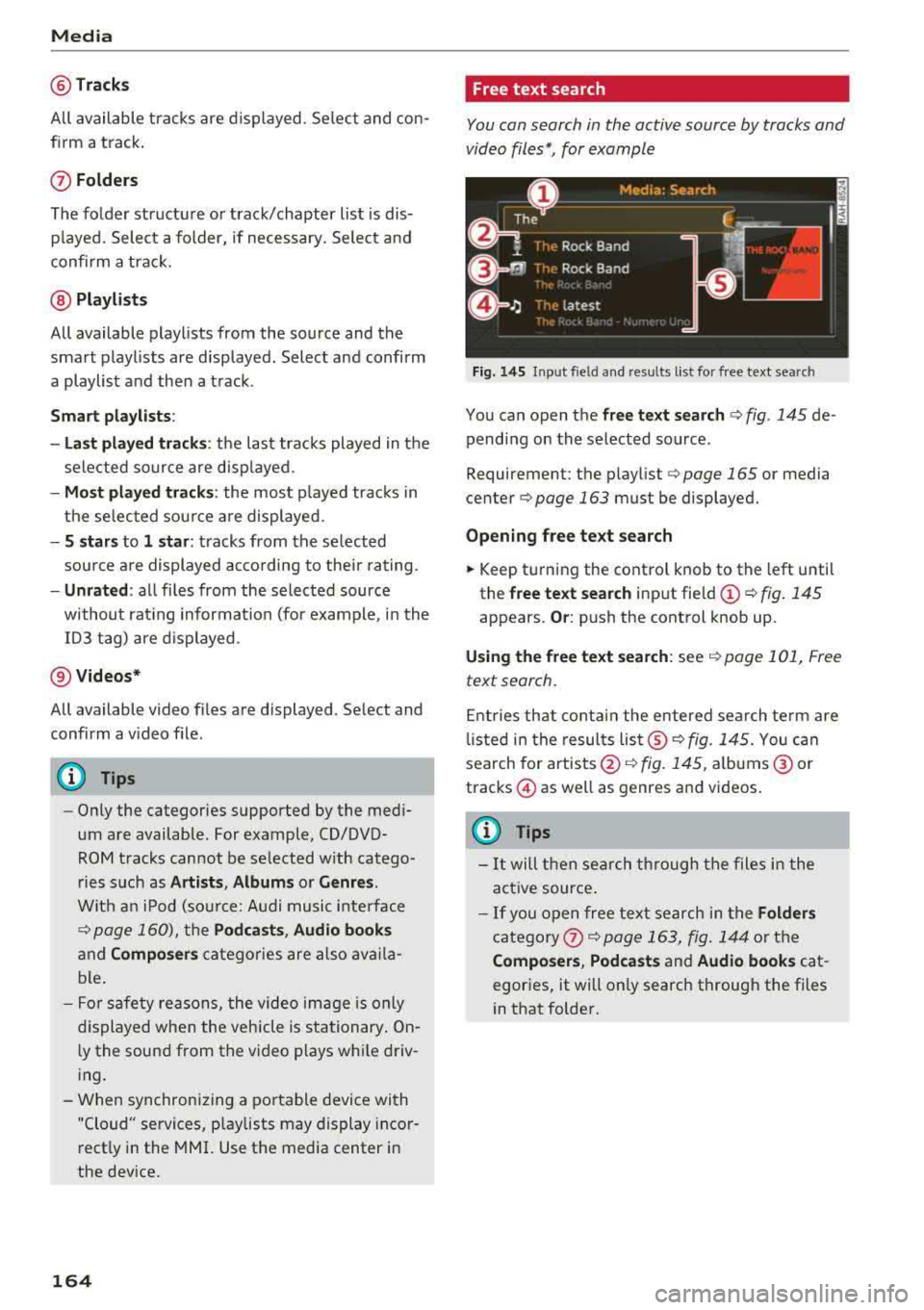
Free text search
You can search in the active source by tracks and
video files*, for example
Fig. 145 Input field and resu lts list for free text searc h
You can open the free text search ¢ fig. 145 de
pending on the selected source .
Requirement: the play list
¢ page 165 or media
cente r
¢page 163 must be displayed.
Opening free text search
.,. Keep turning the control knob to the left until
the
free text search input fie ld (!) ¢ fig. 145
appears. Or: push the control knob up.
Using the free text search: see¢ page 101, Free
text search.
Entries that contain the entered search term are
li sted in the results
list ®¢ fig. 145. You can
search for artists @¢
fig. 145, albums @ or
tracks @as well as genres and videos .
(D Tips
-It will then search through the files i n the
act ive source .
-If you open free text search in the Folders
category 0 ¢ page 163, fig. 144 or the
Composers , Podcasts and Audio books cat
egories, it will only search through the files
in that folder.
Page 169 of 310
Cl 00 .-< N r-N .-< 0 r-Vl 00
Audio track1)
You can manually set the audio track (language
and audio format). The language and audio
format options depend on the video DVD.
Subtitles1
)
You can set subtitles for playback manually. The
langu ages available depend on the DVD.
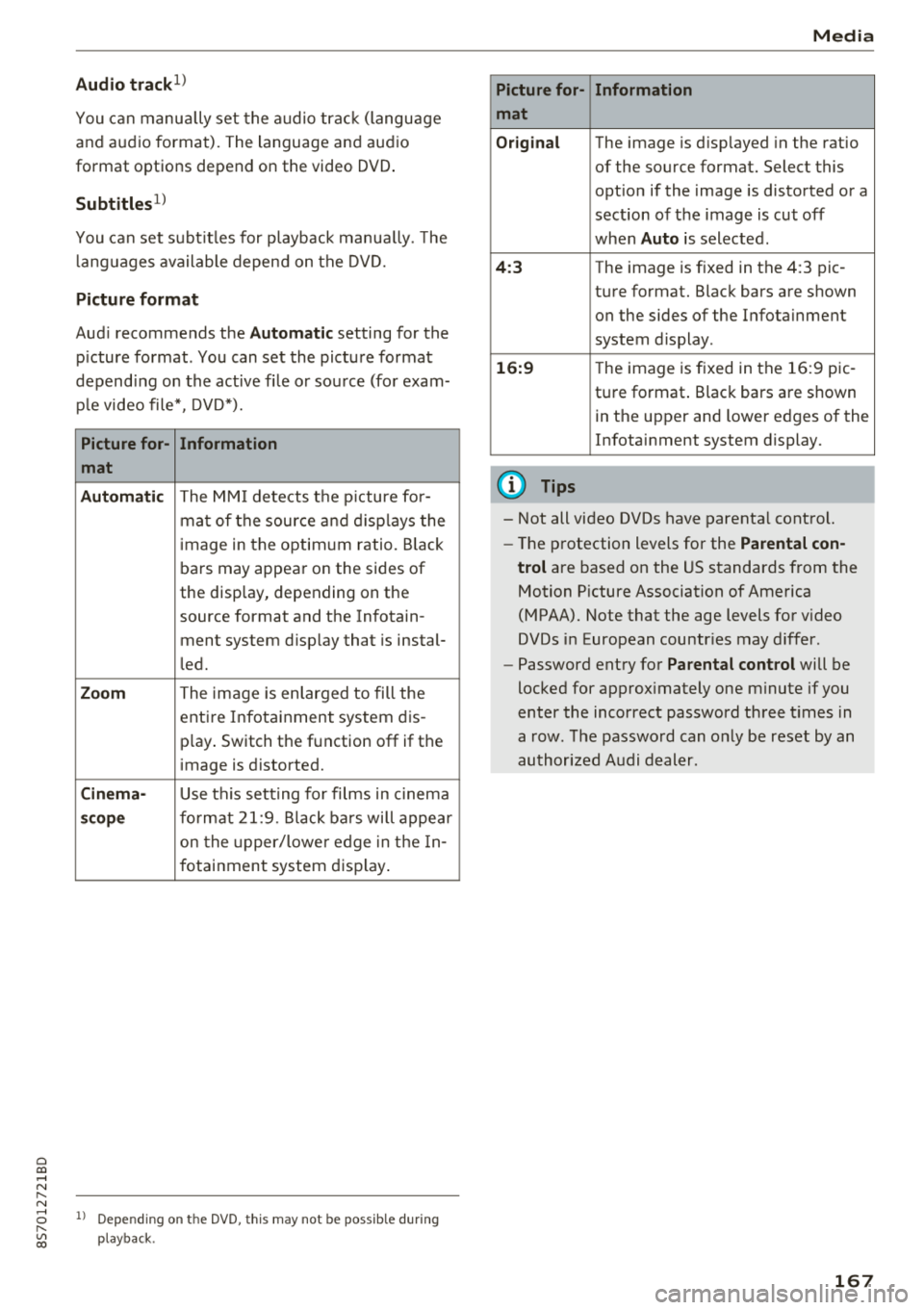
Picture format
Audi recommends the Automatic setting for the
p icture format . You can set the picture format
depending on the active fi le or source (for exam
ple video file*, DVD*).
Picture for-
Information
mat
Automatic
The MMI detects the picture for-
mat of the source and displays the
image in the optimum ratio. Black
bars may appear on the sides of
the display, depending on the
source format and the Infotain -
ment system d isp lay that is instal-
led.
Zoom The image is enlarged to fill the
entire Infotainment system dis-
p lay . Switch the function
off if the
image is distorted.
Cinema-Use th is setting for films in cinema
scope format 21:9. Black bars will appear
on the up per/lower edge in the In-
fotainment system display.
l) Depe ndi ng o n th e DVD, this may not be possib le during
playback.
Media
Picture for- Information
mat
Original
The image is d isp layed in the ratio
of the source format. Select this
opt ion if the image is distorted or a
section of the image is cut
off
when Auto is selected .
4:3 The image is f ixed in the 4:3 pie -
ture format. Black bars are shown on the sides of the Infotainment
system display .
16:9 The image is fixed in the 16:9 pie-
ture format . Black bars are shown
in the upper and lower edges of the
Infotainment system display.
(D Tips
- Not all video DVDs have parental control.
- Th e protection levels for the
Parental con-
trol
are based on the US standards from the
Motion Picture Association of America
(MPAA). Note that the age levels for v ideo
DVDs in European countr ies may differ.
- Password entry for
Parental control will be
locked for approx imately one minute if you
enter the incorrect password three times in
a row. The password can only be reset by an
authorized Audi dealer.
167
Page 170 of 310
Media
Supported media and file formats
Overview
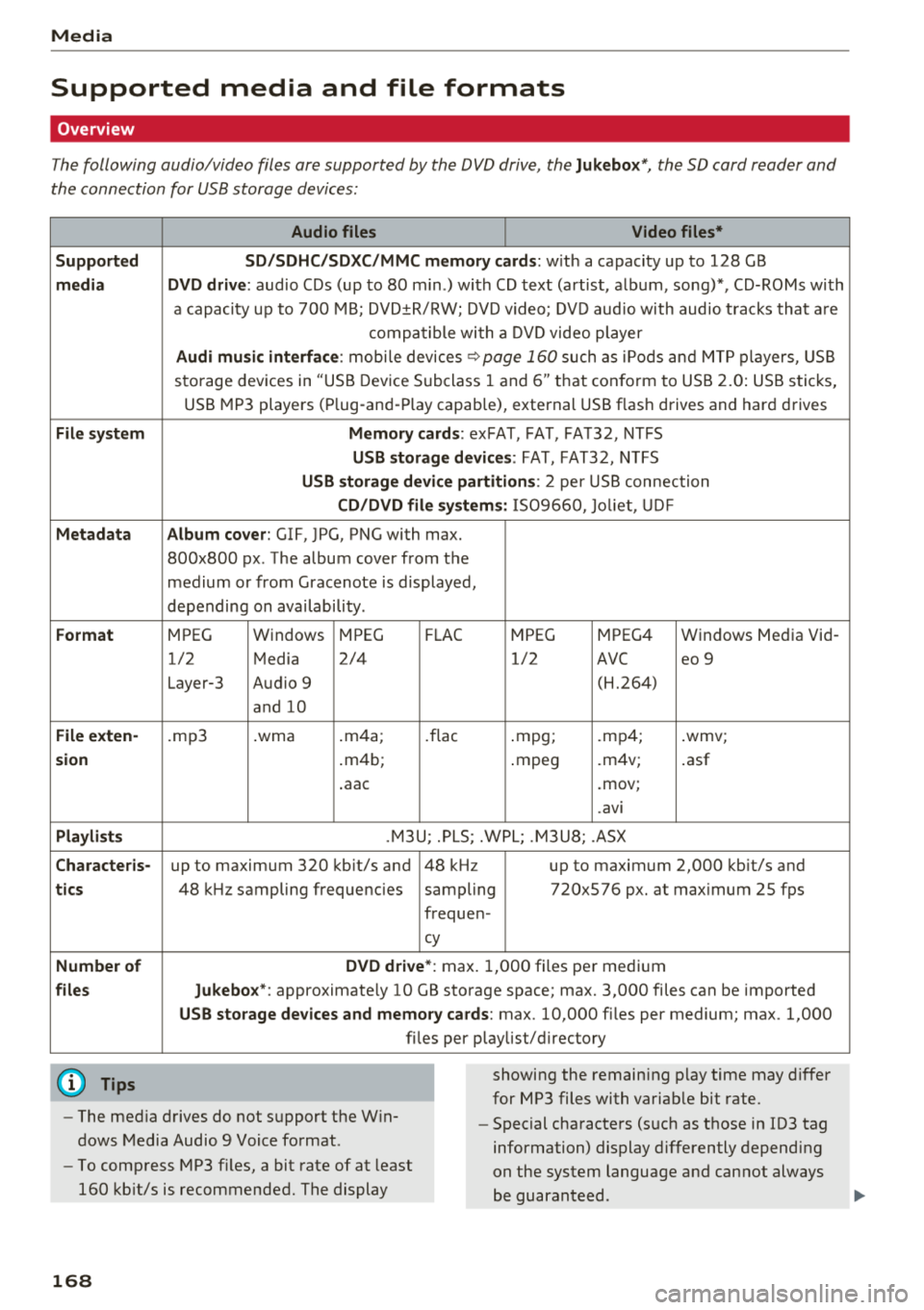
The following audio/video files are supported by the DVD drive, the Jukebox*, the SO card reader and
the connection for USB storage devices:
Supported
medi a
File system
Metadat a
Format
File e xten-
s ion
Pla ylist s
C haracter is -
ti cs
Numbe r of
file s
(D Tips Audio files
Video files*
S D /S DH C/S DXC/MM C mem 1or y ca rds:
with a capacity up to 128 GB
DVD dri ve : audio CDs (up to 80 m in .) with CD text (artist, album, song)*, CD-ROMs with
a capacity up to 700 MB; DVD±R/RW; DVD v ideo; DVD aud io with audio tracks that a re
compatible with a DV D video player
Audi mu sic interface : mobi le devices ~page 160 such as iPods and MTP players, USB
storage devices in "USB Device Subclass 1 and
6" th at con form to USB 2.0: USB stic ks,
USB MP3 players (P lug-and -P lay cap.ab le), external USB flash drives and hard drives
Memory card s: exFAT, FAT, FAT32, NTFS
USB storage d evices: FAT, FAT32, NTFS
USB storage de vice partiti ons: 2 per USB connection
CD /DVD fil e sy stem s: 1S09660, Jo liet, UD F
Album co ver : GIF, JPG, PNG with max.
800x800 px . The album cover from the
medium or from Gracenote is displayed,
depending on availability .
MPEG Windows MPEG F
LAC
MPEG MPEG4 Windows Media Vid
-
1/2 Media 2/4 1/2
AVC eo 9
Layer-3 Audio 9 (H.264)
and 10
.mp3 .wma .
m4a;
.flac .mpg; .mp4; .wmv;
. m4b;
.mpeg .m4v; .asf
. aac .mov;
. avi
.M3U; .PLS; .WPL; .M3U8; .ASX
up to maximum 320 kb it/s and 48 kHz up to maximum 2,000 kb it/s and
48 k Hz sampling frequencies sampling 720x576 px. at max imum 25 fps
frequen-
cy
DVD drive *: max. 1,000 files per medium
Jukebo x*: approximate ly 10 GB storage space; max. 3,000 files can be imported
USB storage de vices and memo ry card s: max. 10,000 files per medium; max. 1,000
fi les pe r playlist/ directory
showing the remain ing p lay time may differ
for MP3 files with variab le bit rate.
- The med ia drives do not support the W in
dows Media Audio 9 Voice format . -
Special characters (s uch as those in ID3 tag
information) display differently depending
on the system language and cannot always
be guaran teed .
-
To comp ress MP3 f iles, a bit rate of at least
160 kb it/s is recommended. The display
16 8
Page 171 of 310
Cl 00 ... N r-N ... 0 r-Vl 00
Media
-The manufactu rer of the stora ge device can
provide information about its "USB Device
Subclass" . -Some MTP p laye r fu nct ions are not s upport
ed, s uch as rating music tracks and video
playback.
CD drive
App lies to: ve hicles with a CD d rive
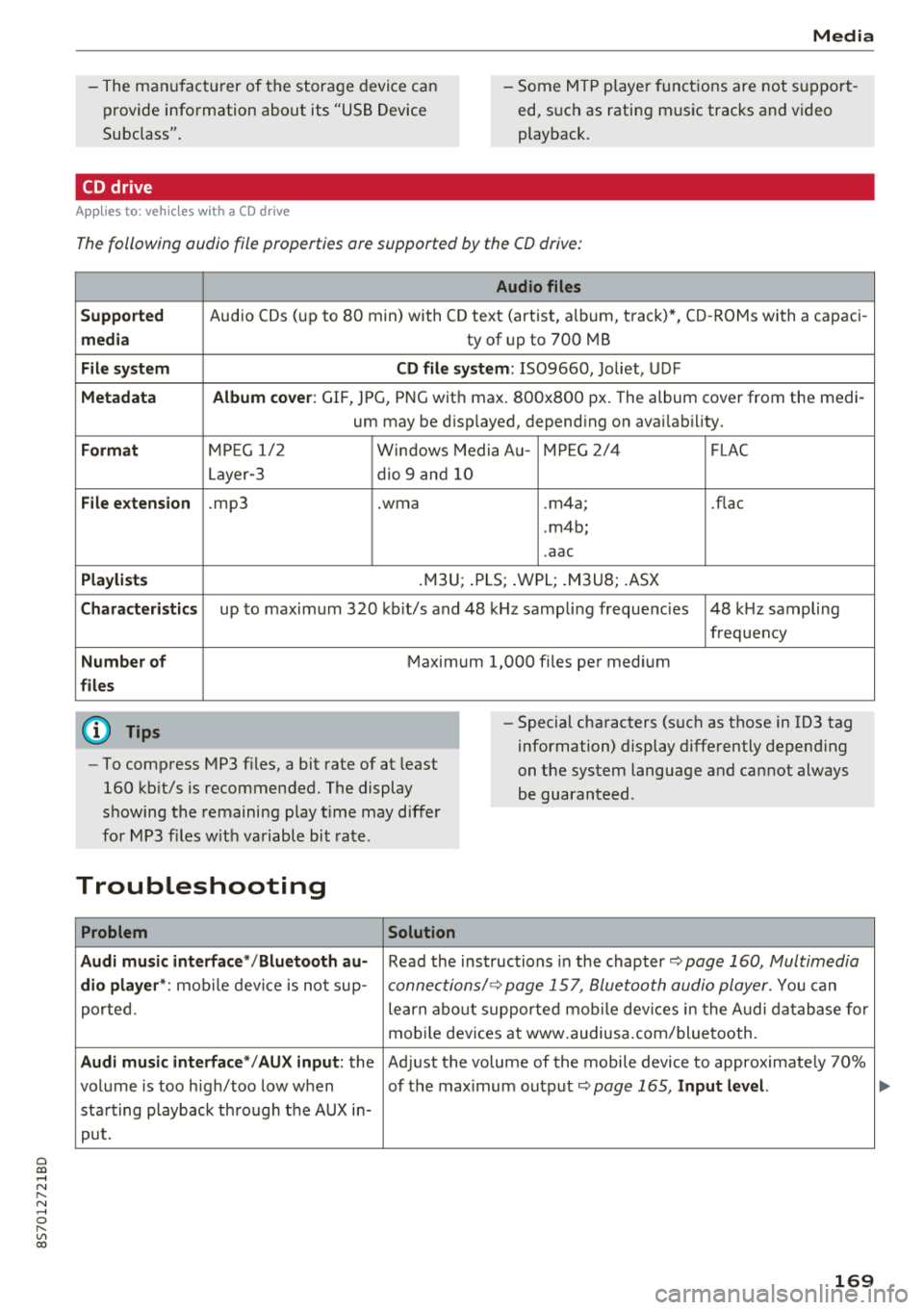
The following audio file properties are supported by the CD drive:
Audio files
Supported
Audio CDs (up to 80 min) with CD tex t (artist, a lbum, t rack) *, CD -ROMs with a capac i-
media ty of up to 700 MB
File system CD file system: IS09660, Joliet, UDF
Metadata Album cover : GIF, JPG, PNG wit h max. 800x800 px. The album cover from the medi -
um may be d isp layed, depend ing on avai lab ility.
Format M PE G 1/ 2 Windows Media A u- M PEG 2/4 FLAC
Layer -3 dio 9 and 10
File extension .mp3 .wma .m4a; .flac
. m4b;
. aac
Playlists .M3U; .PLS ; .WPL; .M3U8; .ASX
Characteristics up to maximum 3 20 kb it/s and 48 k Hz sampli ng freque ncies 48 k Hz sampling
frequency
Number of M aximum 1,000 files pe r med ium
files
(D Tips
-To comp ress MP3 files, a bit rate of at least
160 kb it/s is recommended. The display
showing the remaining p lay t ime may d iffer
fo r MP3 f iles w it h va riable bi t rate.
-Special cha racters (s uch as those in 1D3 tag
information) display differently depend ing
on the system language a nd cannot always
be guaranteed .
Troubleshooting
Problem Solution
Audi music interface */Bluetooth au-
Read the ins truc tions in the chapter q page 160, Multimedia
dio player *: mobile dev ice is not sup-c onne ctions/ 9 page 157, Bluetooth audio player. You can
porte d. learn abo ut supporte d mo bile dev ices in the A udi da tabase fo r
mo bile dev ices a t www.audius a.com/blue tooth.
Audi music interface */AU X input: the Ad just the volume of the mobile device to approximate ly 70%
vol ume is too h igh/too low w hen of the max imum ou tp ut
9page 165, Input level.
sta rting playback th rough the AUX in-
pu t.
169
Page 172 of 310
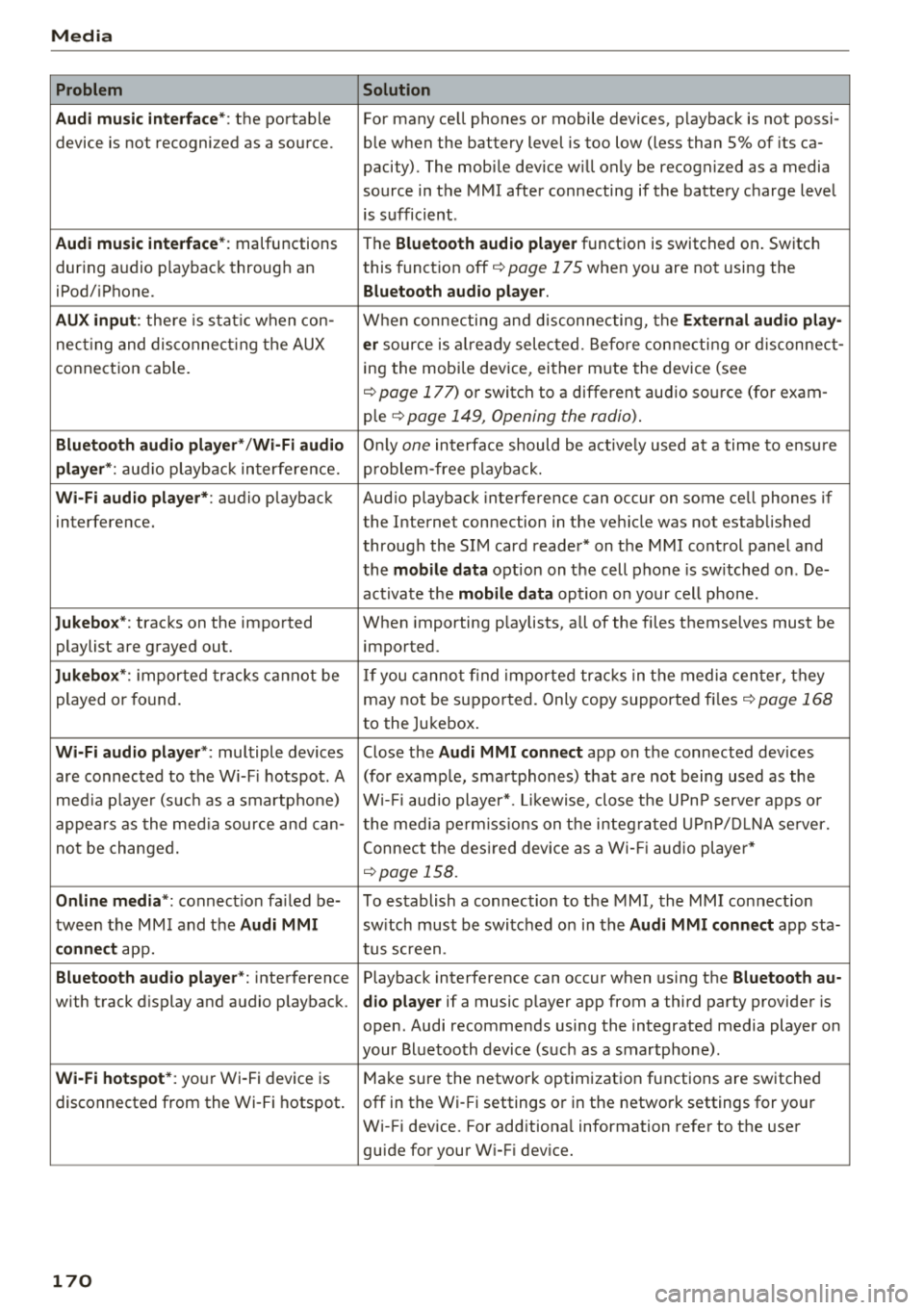
Media Problem Solution
Audi music interface* :
the portable For many cell phones or mobile devices, playback is not possi-
device is not recognized as a source. ble when the battery level is too low (less than 5% of its ca-
pacity) . The mobile device w ill only be recognized as a media
source in the MMI after connecting if the battery charge level
is sufficient .
Audi music interface* : malfunctions
The Bluetooth audio player function is switched on . Switch
dur ing audio p layback throug h an this
funct ion off
i::> page 175 when you are not using the
iPod/ iPhone.
Bluetooth audio player.
AUX input :
there is stat ic when con- When connecting and disconnecting, the External audio play-
necting and disconnect ing the AUX er source is al ready selected . Before connecting or disconnect-
connection cable. ing
the mobi le device, either m ute the device (see
<=:>page 177) or switch to a different audio source (for exam -
ple
i::> page 149, Opening the radio) .
Bluetooth audio player* /Wi-Fi audio Only one interface should be act ive ly used at a time to ensu re
player *: audio playback interfe re nc e. problem -free playback.
Wi-Fi audio player* : audio playback Aud io playback interference can occur on some cell phones if
interference. the Internet connection in the ve hicle was no t established
through the SIM card reader* on the MMI control panel and
the
mobile data option on the cell phone is sw itched on . De-
activate the
mobile data option on your cell phone.
Jukebox* : tracks on the imported When importing playlists, all of the files themselves must be
playlist are grayed out. imported
.
Jukebox*: imported tracks cannot be If you cannot find imported tracks in the media center, they
played or found. may not be supported. Only copy supported files
i::> page 168
to the Jukebox .
Wi-Fi audio player *: multiple devices Close the Audi MMI connect app on the connected devices
are connected to the Wi-Fi hotspot. A (for example, smartphones) that are not being used as the
media pla ye r (suc h as a smartphone) Wi-Fi audio player*. Likewise , close the UPn P serve r apps or
appears as the media source and can- t he media permissions on the integ rated UPnP/DLNA server.
not be changed. Connect the desired device as a Wi-Fi audio player*
<=:> page 158.
Online media *: connection fa iled be- To establish a connection to the MMI, the MMI connection
tween the MMI and the
Audi MMI switch must be switched on in the Audi MMI connect app sta-
connect app. tus screen .
Bluetooth audio player *: interference Playback interference can occur when using the Bluetooth au-
with track d isplay and audio p layback. dio player if a music player app from a third party provider is
open . Audi recommends using the integrated media player on
your Bluetoo th device (such as a smartphone) .
Wi-Fi hotspot*: your Wi-Fi device is
Make sure the network optimization functions are switched
disconnected from the Wi-Fi hotspot. off in the Wi- Fi settings or in the network settings for your
Wi-Fi device. For additiona l information refer to the user
guide for your W i-F i dev ice.
170
Page 177 of 310
Cl 00 .-< N r--N .-< 0 r--Vl 00
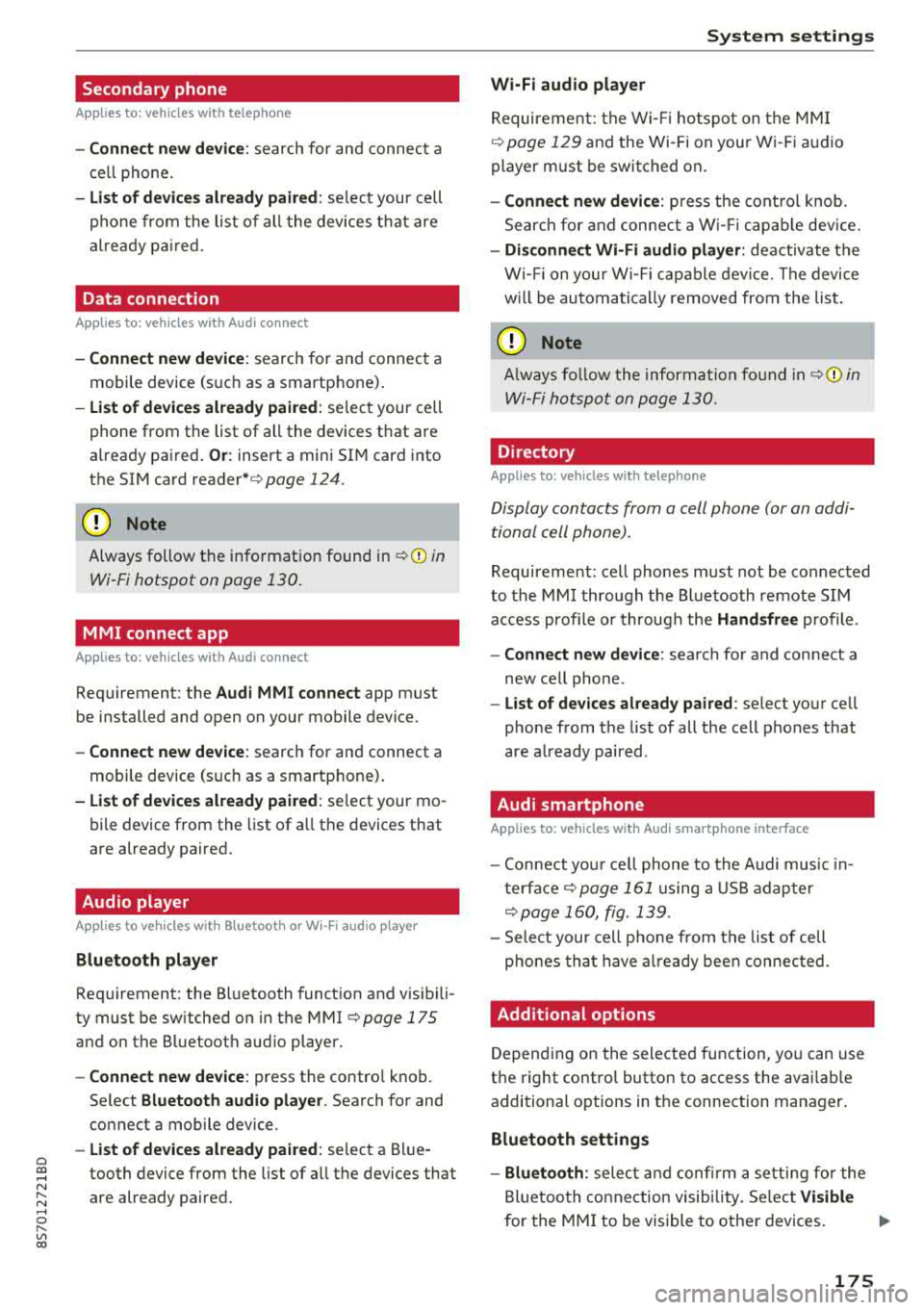
Secondary phone
Applies to: vehicles with telephone
-Connect new device : search for and connec t a
c e ll phone.
- List of devices already paired : selec t your cell
p hone fro m the lis t of all the devices t hat are
al re ad y p aired.
Data connection
Applies to: vehicles with Audi connect
-Connect new device : search for and connec t a
mobile device (s uch as a smartp hone) .
-List of devices already paired : selec t your cell
p hone from the list of all the devices t hat are
al ready pa ired .
Or : insert a mini SI M card into
the S IM ca rd
reader* c> page 124.
({;D) Note
Always follow t he i nfo rmat ion foun d in c> (0) in
W i-F i hotspot on page 130 .
MMI connect app
Applies to: vehicles with Audi connect
Requirement: the Audi MMI connect app m ust
be i nstalled and open on your mobile device.
- Connect new device : search for and connect a
mobile device (s uch as a smartp hone) .
-List of devices already paired : select your mo
b ile device from the list of a ll the devices that
are already paired.
Audio player
Applies to vehicles with Bluetooth or Wi-Fi audio player
Bluetooth player
Requirement: the Bl uetooth funct ion and v is ibi li
ty must be sw itched on in the MMI
c> page 175
and on the B luetoot h aud io player.
- Connect new device : press the control knob.
Se lect
Bluetooth audio player . Search fo r and
connect a mobile device .
-List of devices already paired : select a Bl ue
tooth device from the list of a ll the devices that
are already paired.
System settings
Wi-Fi audio player
Re quiremen t: th e W i-Fi h otspo t on the M MI
c> page 1 29 an d the Wi -Fi on you r W i-Fi audio
player m ust be switched on .
-Connect new device : pres s t he co ntrol knob.
Se arch for and conne ct a Wi-Fi ca pabl e dev ice.
- Disconnect Wi-Fi audio player: deactivate t he
Wi-Fi on you r W i-Fi capa ble dev ice. The devi ce
w ill be au tom atic a lly removed from the lis t.
@ Note
Alway s follow the infor mation foun d in c> @ in
W i-F i ho tspo t on p age 130.
Directory
Applies to: vehicles with telephone
Display contacts from a cell phone (or an addi
tiona l cell phone).
Requirement: cell phones must not be connected
to the M MI t hro ugh the Blue too th remote SI M
ac cess profi le or throug h th e
Handsfree p ro file.
- Connect new device: search for and connect a
new ce ll phone .
-List of devices already paired : select yo ur cell
p ho ne from the list of all the cell phones that
are a lready paired .
Audi smartphone
Applies to: vehicles with Audi smartphone interface
-Con nect yo ur cell phone to the A udi music in
t erfa ce
c> p age 161 using a USB a dap ter
c> page 160, fig. 139 .
-Sele ct your cell p ho ne fro m th e list of cell
p hon es th at h ave alread y bee n connec ted.
Additional options
D epen ding o n the sele cte d fu nction, yo u can use
t h e right contro l button to access the avai la bl e
additional opt ions in t he connection mana ger.
Bluetooth settings
- Bluetooth:
selec t and co nfi rm a s etti ng for the
Bl uetoo th conne ct ion visib ility. Se lec t
Visible
for the MM I to be visib le to othe r devices . ..,.
175
Page 178 of 310
System settings
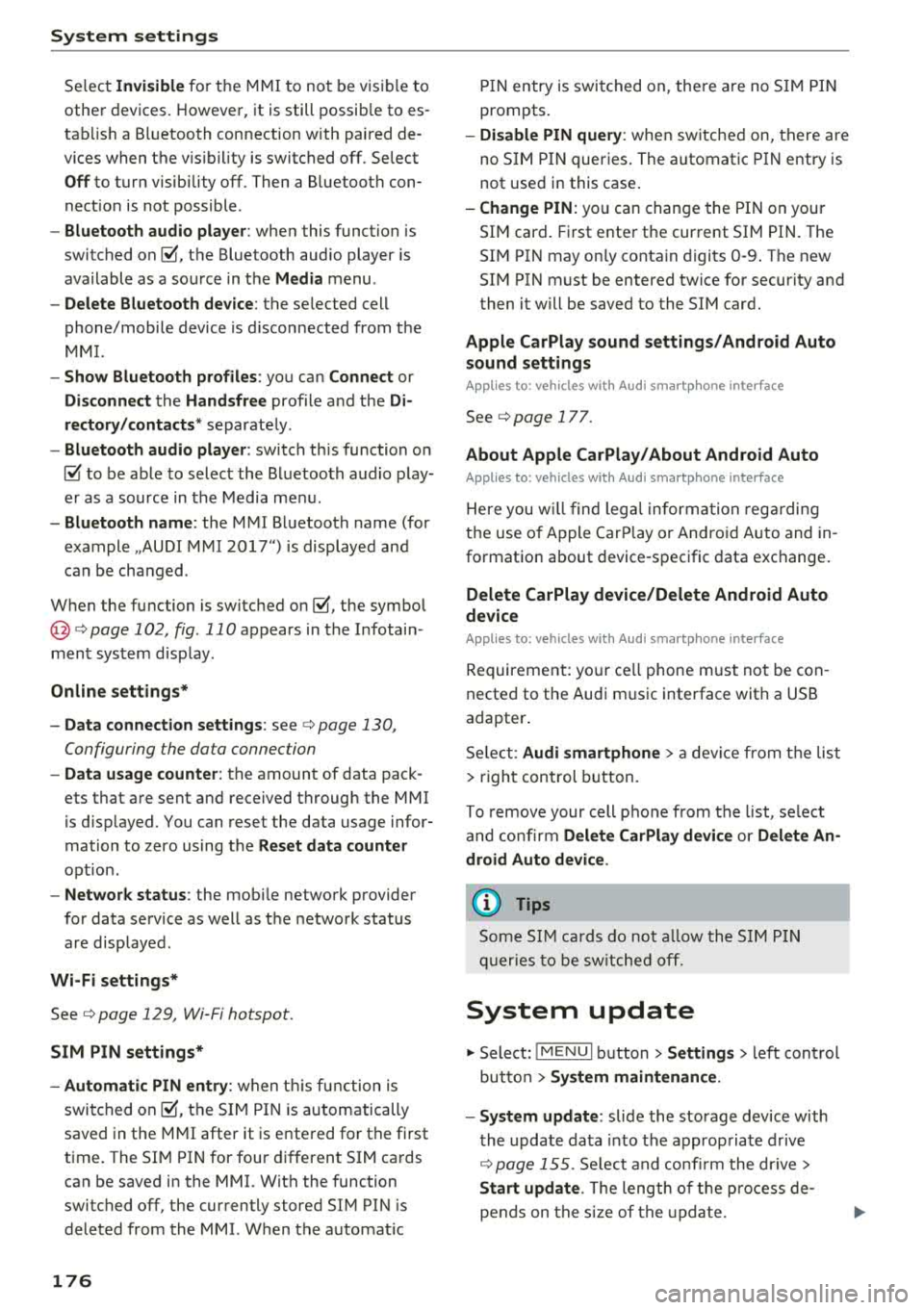
Select Invisible for t he MMI to not be v is ibl e to
othe r devices. Howeve r, it is still possib le to es
ta bli sh a B luetooth con nection with paired de
vices when the v is ibility is switched off . Se lect
Off to turn visibi lity off . Then a B luetooth con
nect io n is not possible .
-Bluetooth audio player : when this function is
switched on
g, t h e Blue tooth aud io player is
available as a so urce in t he
Media menu .
-Delete Bluetooth device : th e se lected cell
phone/mobile device is d isconnected from t he
MMI.
- Show Bluetooth profiles : you ca n Connect or
Disconnect the Handsfree profi le a nd the Di
rectory /contacts *
separately.
- Bluetooth audio player : switch th is function on
g to be a ble to selec t the B luetoo th a udio p lay
er as a source in t he M edia me nu.
-Bluetooth name : the MMI B luetoo th name (for
example ,,AUDI M MI 2017") is displayed and
can be changed .
W hen the function is switched on
g , the symbo l
@<=>page 102, fig . 110 appears in the Infotain
ment sys tem disp lay.
Online settings*
- Data connection settings :
see<=> page 130,
Configuring the data connection
- Data usage counter : th e amount of data pack
ets that a re sent and received throug h the MMI
is d isp layed. You can reset the data usage infor
mation to zero using the
Reset data counter
opt ion.
- Network status : the mobile netwo rk p rovider
for data se rvice as well as the network status
are disp layed .
Wi-Fi settings*
See <=> page 129, Wi -Fi hotspot.
SIM PIN settings*
- Automatic PIN entry:
when this funct ion is
swi tched on
g , th e S IM PIN is automatically
saved in the MMI after it is entered for t he first
time. The SI M PIN for four d ifferent SIM ca rds
can be saved i n the MMI. With the function
switched off, the cur rently stored SI M PIN i s
dele ted from the MMI. When the a utomat ic
176
P IN entry is swi tched on, the re a re no S IM P IN
prompts .
-Disable PIN query : when sw itche d on, there are
no SIM PIN queries . The a utomatic PIN entry is
not use d in this case .
-Change PIN : you can change the P IN on you r
SI M card . First ente r th e cur rent SI M PIN. T he
SI M PIN may on ly conta in digits 0 -9 . T he new
SI M PIN must be entered twice for security a nd
then it w ill be saved to the SI M card .
Apple CarPlay sound settings/ Android Auto
sound settings
App lies to : vehicles wit h Audi s m artph one interface
See<=> page 177.
About Apple CarPlay/ About Android Auto
App lies to : vehicles wi th Audi sma rtphone interface
Here you w ill find leg al inform ation reg arding
t h e use o f A pple Car Play o r And ro id Auto and in
fo rmat ion about devi ce -s p ecific data exc han ge.
Delete CarPlay device/Delete Android Auto
device
App lies to : vehicles wi th Audi s m artph one interface
Requirement: yo ur cell phone m ust not be con
necte d to the Au di music interface with a USB
adapter.
S e le ct :
Audi smartphone > a d evice from th e list
> righ t con trol button .
To re m ove your cell p ho ne from the list, se lect
a nd con firm
Delete CarPlay device or Delete An
droid Auto device .
© Tips
Some SIM cards do not allo w the SIM PIN
qu eri es to be sw itch ed off .
System update
.,. Selec t: !ME NUI butt on> Settings > left cont rol
bu tton >
System maintenance.
- System update :
slide the storage device with
t he upda te da ta into the a pprop ria te d rive
r=;, page 155. Selec t an d co nfirm t he drive>
Start update . The leng th of the p rocess de
pe nd s on the s ize of the up dat e.
Page 179 of 310
-Rese t driver in stallat ion: the selected media
driver package is reset to the settings at the
t ime of de livery.
- Ver sion inf orm ation : information on the MMI
software version and the navigat ion database *
software version is displayed. The
S oftwa re in
format io n
function a lso provides information
on the software contained in the MMI and the licens ing agreement .
Sound settings
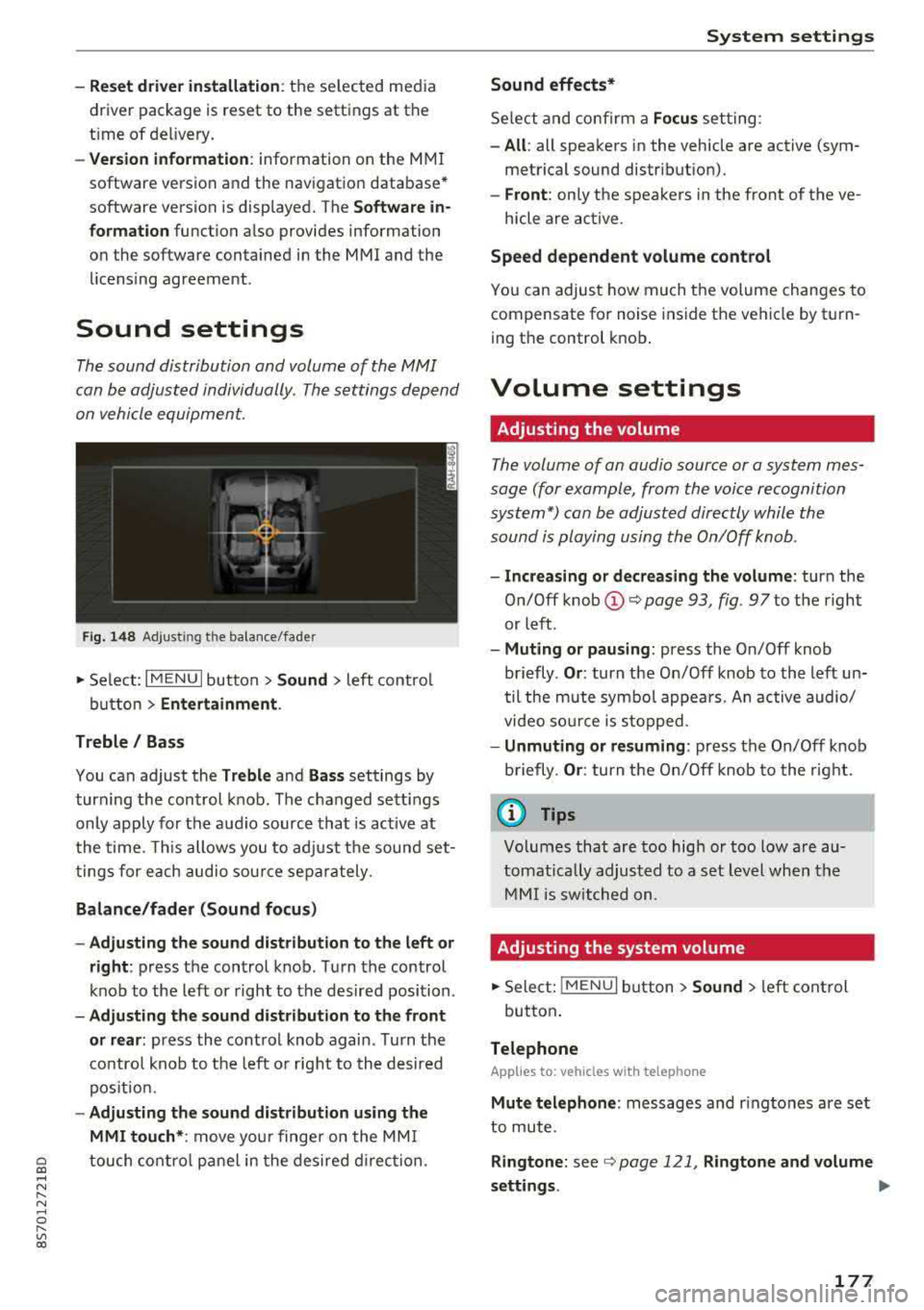
The sound distribution and volume of the MMI
can be adjusted individually . The settings depend
on vehicle equipment.
F ig . 1 48 Adj ustin g the balance /fade r
~ Select : I MENU I button >Sound > left contro l
button
> Ent ertainm ent .
Treble / Bass
You can adjust the Treble and Ba ss settings by
turn ing t he control knob . The changed sett ings
only apply for the audio source that is act ive at
the time. This allows you to ad just the sound set
t ings for each audio sour ce separately .
Bal ance /fader (Sound focus )
- Adju sting th e sound d istribution to the left or
right :
press the control knob . Turn the control
knob to the left or right to the desired position .
-Ad ju sting th e sound d istribution to the front
or rear :
press the control knob again . Turn the
contro l knob to the left o r right to the desired
pos ition.
- Adjusting the so und d istribution u sing th e
MMI touch* :
move your finger on the MM I
~ touch contro l panel in the desired d irec tion.
.... N ,....
N ...... 0 ,....
Vl co
S ys tem settings
Sound effects*
Select and confirm a Focu s setting:
-All : all speakers in the vehicle are active (sym
metrical sound distribut ion).
- Front : only the speakers in the front of the ve -
hicle are active .
Speed depend ent v olume control
You can adjust how much t he volume changes to
compensate for noise inside the vehicle by turn
ing t he control knob .
Volume settings
Adjusting the volume
The volume of an audio source or a system mes
sage (for example, from the voice recognition
system*) can be adjusted directly while the
sound is playing using the On/Off knob .
-Incr easing or decr eas ing the volume : turn the
O n/Off knob
(D ¢ page 93 , fig. 97 to t he right
or left .
-Muting or p au sing : press the On/Off knob
briefly .
Or: turn the On/Off knob to the left un
til the mute symbol appea rs. An active audio/
video so urce is stopped.
- Unmuting o r re suming : press the On/Off knob
briefly .
Or: turn the O n/Off knob to the right.
(D Tips
Volumes that are too high or too low are au
tomatically adjus ted to a set level when the
MM I is switched on.
Adjusting the system volume
~ Sele ct: ! MENU I button> Sound> le ft control
button .
Telephone
Applies to: vehicles with telephone
Mute t elephone : messages and r ingtones are set
to mute.
Ringtone : see ¢ page 121, Rin gton e and volume
s ettings .
.,.
177
Page 180 of 310
System settings
Ringtone volume: you can adjust the volume of
the selected ringtone by turning the contro l
knob.
Message volume: you can adjust the volume of
the notification for an incoming text message by
turning the control knob.
Microphone input level : you can adjust the vol
ume during a phone call by turning the control
knob.
Navigation
A pp lies to: ve hicles w ith navigation system
Voice guidance: see¢ page 141, Voice guidance.
Voice guidance during phone call: see
¢ page 141, Voice guidance.
Voice guidance volume: you can adjust the voice
gu idance volume during active route guidance by
turn ing the control knob.
Entertainment fader : the volume of audio play
back can be temporarily lowered when the park
ing system or voice guidance is active.
Voice recognition system
App lies to: ve hicles w ith vo ice recogni tion sys te m
Short dialog : prompts in a shorte r format can be
switched on or o ff.
Speech dialog system volume: you can adjust
the volume of the prompts by turning the control
knob.
Parking aid*
You can adjust the signal tone volume by turning
the control knob.
-Adjusting the Front volume: select and con
firm
High , Medium or Low .
- Adjusting
the Rear volume: select and confirm
High, Medium or Low .
MMI touch volume*
You can adjust the vo lume of the prompts for the
MMI to uch* by turning the contro l knob.
Audi Heartbeat
You can adjust the volume of Aud i Heartbeat by
t ur nin g the control knob.
178
(D Tips
Please note that the voice recognition sys
tem* is not available in Cabr io lets t hat do not
have a factory-installed safety belt micro
phone.
Restarting the MMI
(Reset)
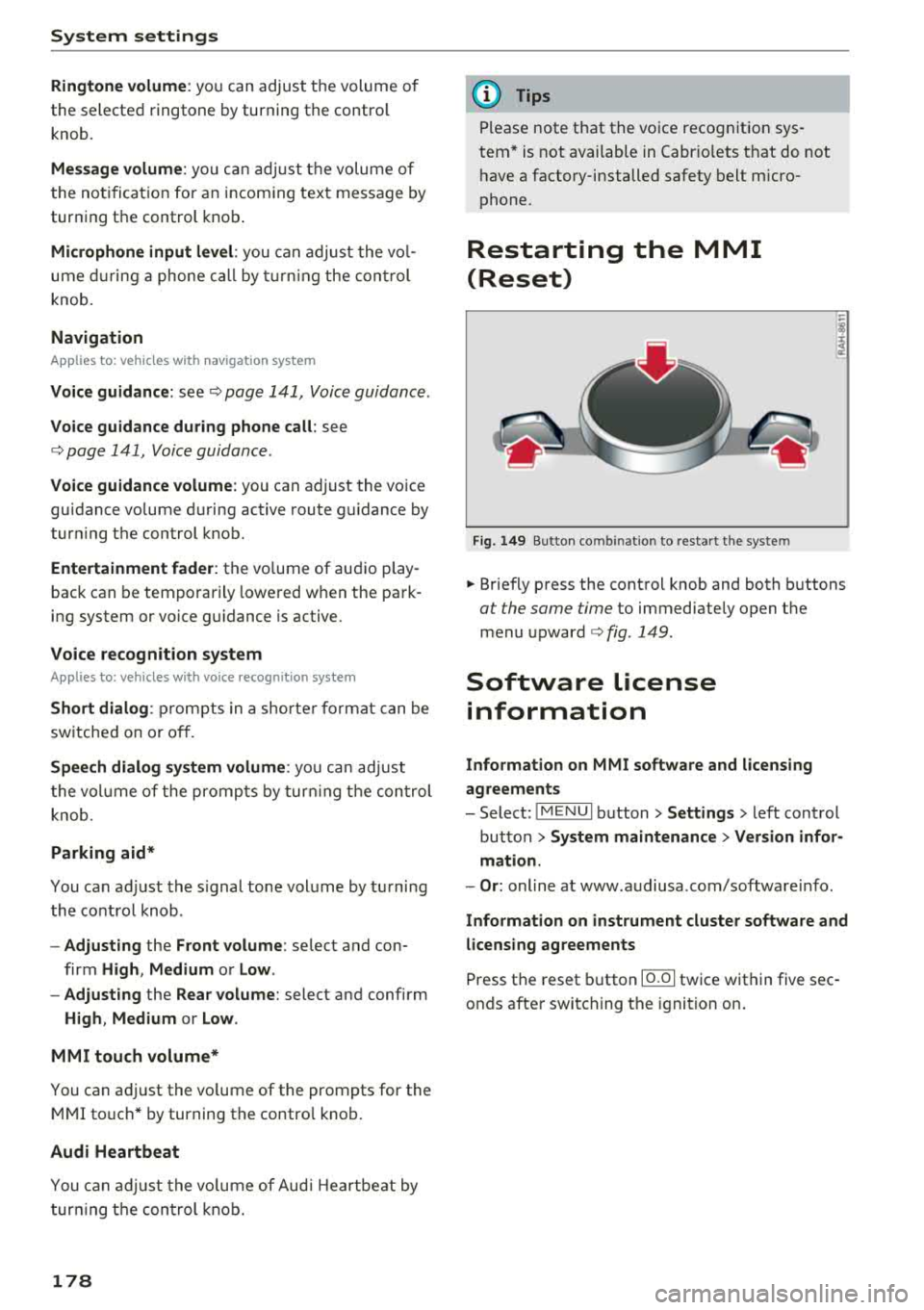
Fig. 149 Button co mbin ation to res tart the syste m
.. Briefly press the control knob and both buttons
at the same time to immediately open the
menu
upward ¢ fig. 149.
Software License
information
Information on MMI software and licensing
agreements
- Select: ~
I M _ E_N_ U~ I button> Settings > left control
button >
System maintenance > Version infor
mation.
- Or : online at www .audiusa .com/software info .
Information on instrument cluster software and
licensing agreements
Press the reset button 10.01 twice within five sec
onds after switching the ignition on.
Page 296 of 310
Index
A
A/C (climate control system) . . . . . . . . . . . . . 52
Accessories . . . . . . . . . . . . . . . . . . . . . . . . . . 292
Active lane assist . . . . . . . . . . . . . . . . . . . . . . 72
Activating vibration warning . . . . . . . . . . . . 75
Adjusting steering time . . . . . . . . . . . . . . . . 75
Cleaning the camera area . . . . . . . . . . . . . 267
Indicator l ight . . . . . . . . . . . . . . . . . . . . . . . 73
Messages . . . . . . . . . . . . . . . . . . . . . . . . . . . 74
Switching on/off . . . . . . . . . . . . . . . . . . . . . 73
Adaptive light . . . . . . . . . . . . . . . . . . . . . . . . . 78
Adaptive light (indicator light) . . . . . . . . . . . 16
Adjusting the air d istr ibut ion (climate control
system) . . . . . . . . . . . . . . . . . . . . . . . . . . . . . . 52
Adjusting the air vents . . . . . . . . . . . . . . . . . . 53
Adjusting the center console lighting . . . . . . 41
Adjusting the sound . . . . . . . . . . . . . . . . . . . 177
Adjusting the temperature (climate contro l
system) . . . . . . . . . . . . . . . . . . . . . . . . . . . . . . 52
Advanced Airbag System Children
....... .. .............. ....
Components ...... .............. ... .
Front airbags ..... .............. ... .
How the components work together ... .
Ai rba g .. .. .. .. .. ............. .. .. .. .
I ndicator light .... .............. .... .
Airbag system .. .. .. .............. ... .
Advanced Airbag System ....... .. .. .. .
Care
. . .. .. .. .. ............. .. .. .. .
Ch ild rest raints .............. .... .. .
Components (front airbags) .......... .
Danger of fitting a child safety seat on the
front passenger seat ................ .
Disposal ... .. .. ............. .... .. .
Front airbags ... ............. .... .. .
H ow do the front airbags work? . .. .. .. .
H ow many airbags does my vehicle have?
Important information .............. .
I mportant safety instructions on the knee
airbag system . .. ............. .. .. .. .
Knee airbags .. .. ............. .... .. .
Monitoring ....... .............. ... .
PASSENGER AIR BAG light ........... .
Repairs
Safety instructions ................ .. .
Side airbags .. .. ............. .... .. .
294
218
201
199
202
194 14
213 198
208
218
201
195
208 198
203 201
194
211
210
205
206 208
207
212 Warning/Indicator
lights . . . . . . . . . . . . . 205
When must the system be inspected? . . . 205
Ala rm system
refer to Anti-theft ala rm system . . . . . . 22, 27
Alignment pin (tire change) . . . . . . . . . . . . . 272
All-weather lights . . . . . . . . . . . . . . . . . . . . . . 38
All season tires . . . . . . . . . . . . . . . . . . . . . . . 259
All wheel drive . . . . . . . . . . . . . . . . . . . . . . . . 89
Alte rnative routes . . . . . . . . . . . . . . . . . . . . . 141
Ambient lighting . . . . . . . . . . . . . . . . . . . . . . 40
AMI
refer to Audi music interface . . . . . . . 160, 161
Android Auto
refer to Audi smartphone interface . . . . . 171
Announcements (sett ings)
refer to Voice guidance . . . . . . . . . . . . . . . 141
Anti-freeze Windshield washer system . . . . . . . . . . . . 243
Anti- lock braking system (ABS) . . . . . . . . . . . 86
Ant i-slip regulat ion . . . . . . . . . . . . . . . . . . . . 86
Anti-theft alarm system . . . . . . . . . . . . . . . . . 27
Apple CarPlay
refer to Audi smartphone interface . . . . . 171
Armrest . . . . . . . . . . . . . . . . . . . . . . . . . . . . . . 47
Ashtray . . . . . . . . . . . . . . . . . . . . . . . . . . . . . . 47
Aspect ratio (video) . . . . . . . . . . . . . . . . . . . 165
Audi connect . . . . . . . . . . . . . . . . . . . . . . . . . 124
Data connection . . . . . . . . . . . . . . . . . . . . . 130
Data protection . . . . . . . . . . . . . . . . . . . . . 132
Services (overview) . . . . . . . . . . . . . . . . . . 126
Setup . . . . . . . . . . . . . . . . . . . . . . . . . . . . . 124
Audi magnetic ride
refer to Suspension control . . . . . . . . . . . . . 78
Audi music interface . . . . . . . . . . . . . . . . . . . 160
Audi music stream
refer to Wi-Fi . . . . . . . . . . . . . . . . . . . . . . . 158
Audio files . . . . . . . . . . . . . . . . . . . . . . . . . . . 162
Audio player
B luetooth audio player . . . . . . . . . . . . . . . 157
Wi-Fi audio player . . . . . . . . . . . . . . . . . . . 158
Audio track . . . . . . . . . . . . . . . . . . . . . . . . . . 165
Audi Service Repair Manuals and Literature 290
Audi smartphone interface ......... 171,175
Audi virtual cockpit (instrument cluster) . . . . 8