brake light AUDI TT ROADSTER 2018 Owner's Manual
[x] Cancel search | Manufacturer: AUDI, Model Year: 2018, Model line: TT ROADSTER, Model: AUDI TT ROADSTER 2018Pages: 310, PDF Size: 46.95 MB
Page 90 of 310
Intelligent Technology
Wear
Brake pad wear depends largely on the way the
vehicle is driven and on operating conditions.
This is especially true if you are driving frequently
in the city and on curves or with a sporty driving
style.
Operating noise
Noises may occur when braking depending on the
speed, braking force and outside conditions such
as temperature and humidity.
Wet conditions or road salt
I n certain situations, for example after dr iving
through water, in heavy ra in or after washing
your car, the braking effect may be reduced due
to moisture or ice on the brake rotors and brake
pads . The brakes must be "dried" first with a few
careful brake applications.
At higher speeds and with the windshie ld wipers
turned on, the brake pads press against the brake
rotors for a short amount of time . This action,
which is not felt by the driver, happens at regular
intervals and ensures a better reaction time for
the brakes in wet weather .
The braking effect can also be reduced if you are
driving on sa lted roads and you do not apply the
brakes for long periods of time. The layer of salt
on the brake rotors and pads must be worn off
first when the brakes are applied.
Corrosion
Leaving the vehicle parked for long periods of
time, low mi leage and avoiding heavy braking
can contribute to corrosion on the brake rotors
and to dirty brake pads.
If you usually avoid heavy braking or if there is
corrosion present, occasional heavy braking at
h igh speeds is recommended to clean the brake
rotors and
pads¢ &.
Brake system malfunction
If you notice that the brake pedal travel has sud
denly increased, then a brake circuit in the dual
circuit brake system may have malfunctioned. Drive to an authorized Aud i dea ler or authorized
Aud i Serv ice Facility immediately to have the
88
problem corrected. On the way there, drive with
reduced speed and keep in mind that you will
need a longer distance to stop and you will need
to press the brake pedal harder.
Low brake fluid level
When the brake fluid level is low, malfunctions in
t h e brake system may occur . The brake fluid leve l
is electronically monitored .
Brake booster
The brake booster amplifies the pressure you ap
ply to the brake pedal.
& WARNING
- New brake pads do not achieve their full
braking effect during the first 250 mi
-
(400 km). They must be "broken in" first .
However, you can compensate for the
slightly reduced braking force by pressing
firm ly on the brake pedal. Avoid heavy brak
ing during the break-in period.
- On ly app ly the brakes for the purpose of
cleaning the brake system when road and
traffic conditions permit. You must not en
danger other road users . This increases the
r is k of an accident.
- On steep slopes, reduce the speed and se
lect a lower gea r or lower selector leve r po
sition. Drive as lit tl e as possible while press
ing the brake pedal and avo id putting yo ur
left foot on the brake pedal while driv ing .
This could ca use the brakes to overheat and
impair the efficiency of th e brakes.
- Do not let the brakes "grind" by always
keeping your foot on the brake pedal. This
can cause the brakes to overheat, increase
wear and increase braking distance unneces
sarily.
- Certain weather and operating conditions such as driving through water, dr iv in g in
heavy rain or driv ing after wash ing your ve
h icle can impair the effectiveness of the
brakes. In the winter, ice may build up on
the brake pads, rotors and drums. Check
these compon ents by braking carefully. Ap
plying the brakes carefully several times
dries the brakes and removes ice build-up.
Page 91 of 310
Cl 00 .-< N r-N .-< 0 r-Vl 00
-The efficiency of the brakes can also be im
paired by driving for long stretches on roads
covered with salt without using the brakes .
You can remove salt deposits from the
brake rotors and pads by carefully applying
the brakes severa l t imes .
- If the front spoiler is damaged or you install
another spoiler, make sure the front wheel
brakes are vent ilated proper ly . Otherwise,
the b rake system could overheat, w hich re
duces the ir effectiveness.
- Failure of a brake c ircuit impa irs b raking
perfo rman ce , which increases brak ing dis
tan ce. Avoid d riving the vehicle and have it
towed it to the nearest authorized Audi
dealer or authorized Audi Service Facility .
- Never let the vehicle roll while t he engine is
stopped because this increases the risk of an
accident.
- If the brake booster is not working, you will
have to press much harder on the brake
peda l to compensate for the lack of the
booster.
@ Note
- Never let the brakes "rub" by pressing the
pedal light ly when braking is not actually
necessary. This causes the brakes to over
heat and increases braking d istance and
causes wear.
- Before driving downhi ll a long distance on a
steep h ill, decrease your speed and select a
lower gear. This makes use of the engine
braking effect and relieves the brakes . If
you need to brake additionally, brake in in
tervals and not conti nuous ly .
0) Tips
- If the brake booster is not working, you
must press the brake pedal with much more
fo rce t han normal.
- If you retrofit your vehicle with a front spoil
er, whee l covers o r similar items, make sure
t h at the a ir flow to the front whee ls is not
i nte rru pted. Ot herw ise the brake system
ca n become too ho t.
In tellig ent T echn olo gy
Electromechanical
steering
The electromechanical steering supports the
driver 's steering movements .
Power steering adap ts elec troni cally based on
the vehicle speed .
Indicator li ghts and me ssages
• Stee ring: m alfun ction! Ple ase stop vehicle
If this indica to r li ght tur ns on and stays on and
this message appears, the powe r steering may
have failed.
Stop the veh icle in a safe location as soon as pos
s ible. Do
n o t cont inue d riving. See an autho rized
Audi dealer or authorized A udi Service Facility for
assistance .
(;r,ij Ste ering : malfun cti on! You may con tinu e
dri vin g
If the indicator l ight turns on, the steering wheel
may be more d ifficult to move or more sensit ive
t h an usual. The steer ing whee l may also be at an
angle when d riving stra ight.
Drive slowly to an authorized Aud i dealer or au
thorized Aud i Serv ice Facility to have the mal
funct ion corrected.
(D Tips
If the . or (;r,ij ind icator light only stays on
fo r a short t ime, yo u may continue d riving.
All wheel drive (quattro)
In all wheel drive, all four wheels are powered.
Gener al informat ion
In all wheel dr ive, the dr iving power is divided be
tween all four wheels . This happens automatical
ly depending on your dr iv ing behavior as well as
t h e cur rent road condit ions. A lso
see ~ page 86,
Electronic stabilization control (ESC).
The all wheel dr ive concept is des igned for high
engine power . You r vehicle is except ionally pow
erfu l and has excellent driv ing cha racter istics
bot h unde r normal d riving conditions and o n
89
Page 235 of 310
Cl co .... N ,....
N .... 0 ,....
Vl co
Emissions control
systems
Catal ytic conve rt er
The vehicle may on ly be driven with unleaded
gasoline, otherwise the catalyt ic converter will be
destroyed.
Never drive until the tank is completely empty.
The irregular supply of f uel that results from that
can cause engine m isfires. Uncombusted fuel will
enter the exhaust system, wh ich can cause over
heat ing and damage to the catalyt ic converter .
A WARNING
The temperature of the exhaust system is
high, both when d riving and after stopping
the engine.
-
- Never touch the exhaust tail pipes once they
have become ho t. This could result in bu rns.
- Do not park your vehicle ove r flammable
materials such as g rass or leaves because
the high temperat ure of the em iss ions con
trol system co uld s tart a fire.
- Do not apply underbody p rotectant in the
exha ust system area, because this inc reases
the risk of fi re.
On Board Diagnostic
System (OBD)
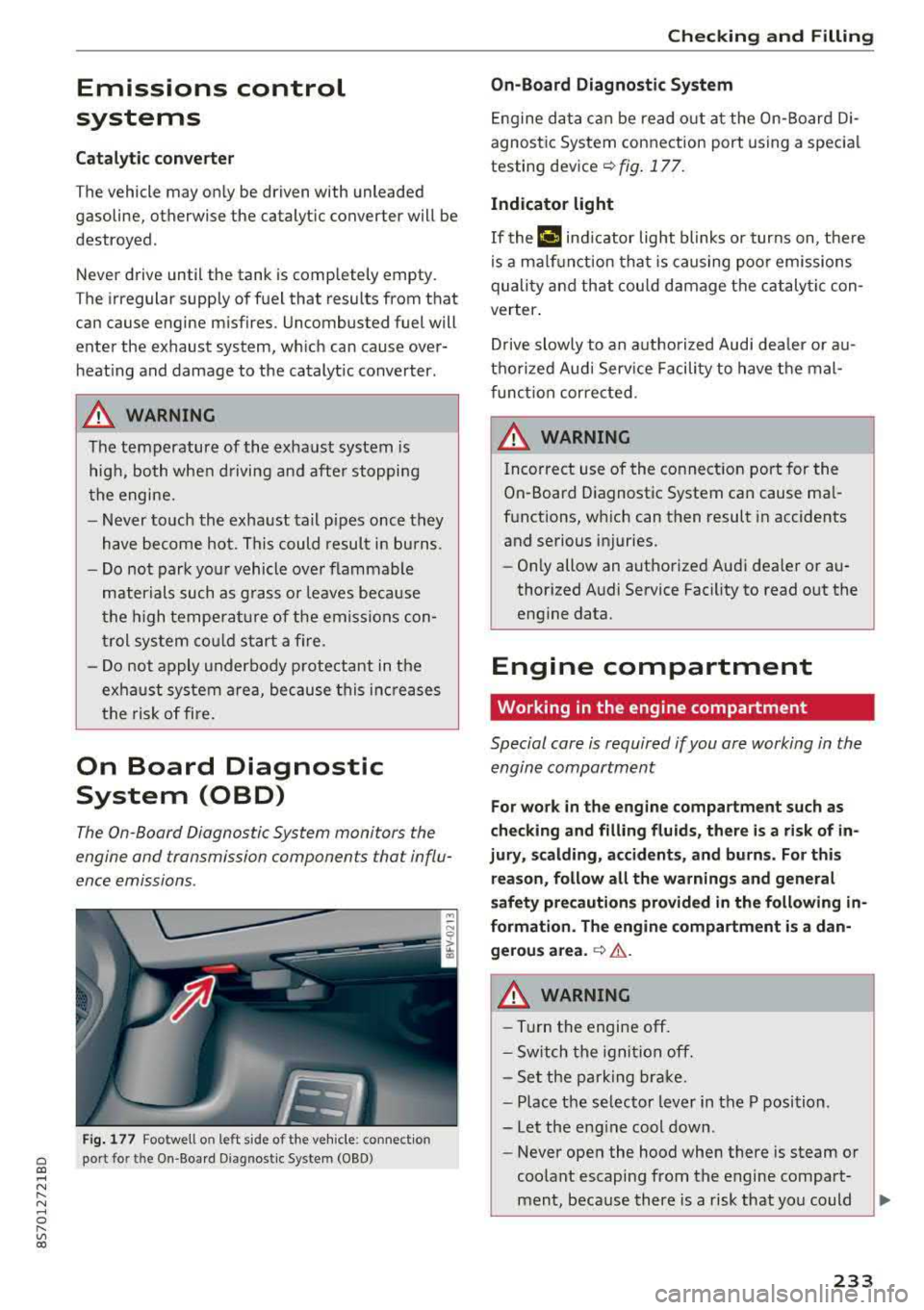
The On -Board Diagnostic System monitors the
engine and transmission components that influ
ence emissions.
F ig . 177 Footwell on left side of the vehicle : connect ion
port for the On-Board Diagnostic System (OBD)
Chec king and Filling
On -Board Diagnostic System
Engine da ta can be read out at the On-Board Di
agnost ic System connection port using a spec ia l
testing
dev ice~ fig. 177 .
Indicator light
If thP ¢'4 ind icator light blinks or turns on, there
is a ma lf u nction that is caus ing poo r emissions
quality and that cou ld damage the catalytic con
verter .
Drive slowly to an a uthorized Aud i dea ler or au
t h orized Audi Serv ice Facili ty to have t he mal
f unct ion corrected.
A WARNING ..
Incorrect use of the connection port for the
On-Board D iagnostic System can cause ma l
f u nctions, which can then result in accidents
and serious injuries.
- Only allow an authorized Audi dea ler or au
thor ized Audi Service Fac ility to read out the
engine data.
Engine compartment
Working in the engine compartment
Special care is required if you are working in the
engine compartment
-
F o r work in the engine compa rtment such as
checking and fill ing fl uids , there i s a risk of in
jury , scalding, accident s, and b urn s. For thi s
re ason , follow all the warnings and general
safety pre cautions prov ided in the following
in
formati on. The engine compartm ent i s a dan
gerou s area .
~ .&..
A WARNING
-----Turn the engine off.
- Sw itch the igni tio n off.
- Set the parking brake.
- P lace the se lector lever in the P position.
-Let the eng ine cool down.
-Never open the hood when there is steam or
coolant escaping from the engine compart
ment, because there is a risk that you could
233
Page 269 of 310
Cl 00 .-< N r--N .-< 0 r--Vl 00
wash operator to reduce the risk of acci
dents.
- To reduce the risk of cuts, protect yourself
from sharp metal components when wash ing the underbody or the inside of the wheel
hous ings.
- After wash ing the vehicle, the brak ing effect
may be delayed due to mo isture on the
brake rotors or ice in the w inter . This in
c reases the risk of an acc ident. The brakes
must be d ried fi rst w it h a few careful b rake
applications.
@ Note
- If you wash the vehicle in an automatic car
wash, you m ust retract the extendable rear
spo ile r* if necessary, and fold the exter ior
mir rors in to red uce the r isk of damage.
Power folding exte rior m irrors* must o nly
be fo lde d in a nd out u sing the power folding
f unct ion .
- To reduce the risk of p ain t d amage, do no t
wash the vehi cle i n di rect sunlig ht.
Care and cleaning
- T o red uce the risk of damage, do not was h
the power top with a pressure washer.
- T o red uce the risk of damage to the s urface,
do not use insect removing sponges, kitchen
sponges or similar items .
- Mat te finish painted veh icle components:
- To reduce the risk of damage to t he sur-
face, do not use po lish ing agents or hard
wax.
- Never use protective wax. It can destroy
the matte finish effect .
- Do not place any stickers or magnetic
signs on vehicle parts painted with matte
finish paint. The paint cou ld be damaged
when the stickers or magnets are re
moved.
@ For the sake of the environment
Only wash the vehicle in facilities spec ially de
s igned for that pu rpose . This will reduce the
r isk of di rty wate r contam inated with o il from
ente ring the sewe r sys tem.
Cleaning and care information
When cleani ng and ca ring for individua l vehicle
components, refer to the following tables . The
information contained there is simp ly recom
mendations. For questions or for components t
h at are not l isted, cons ult an autho rized Aud i
dealer or authorized A udi Se rvice Fac ility . Also
fo llow the information fo und
in ¢& .
Ext erior cleaning
Component Situation Solution
Windshield wiper
Deposits soft cloth with glass cleaner, ¢ page 43
blades
Headli ghts/
Deposits Soft sponge with a m
ild soap so lutiona )
Tail light s
Se nsors /
Deposits Sensors: soft cloth with solvent-free cleaning solut ion
Cam era len ses Camera lenses: soft cloth w ith alcohol -free cleaning solu -
tion
Snow/ice Hand brush/solvent-free de-icing spray
Wheels Road salt Water
Brake dust Acid-free special clean ing solution
Exhaust tai l pipes Road salt Water, clea ning solution su itab le for stainless stee l, if nee-
essa ry
267
Page 283 of 310
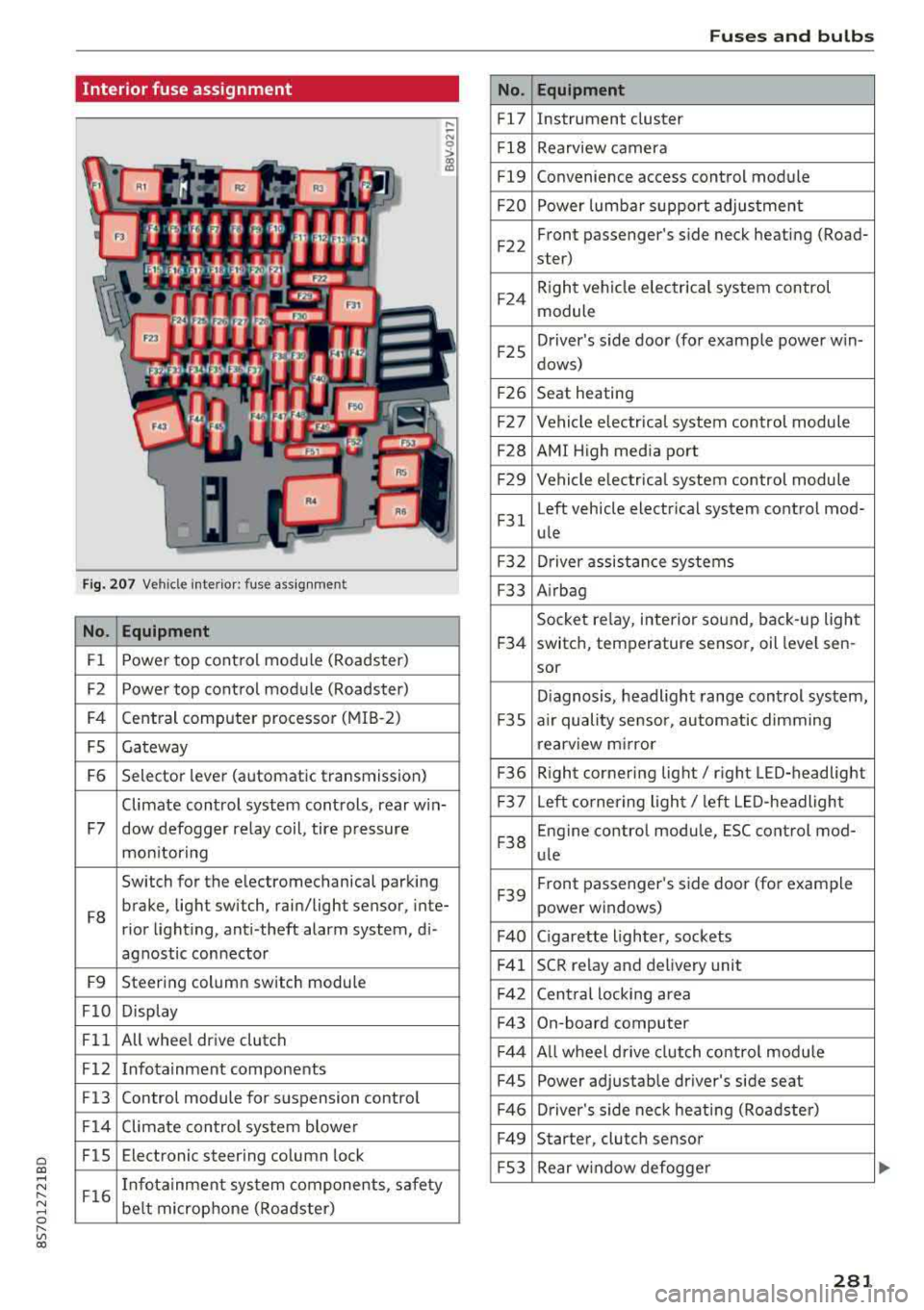
Cl co .... N ,....
N ...... 0 ,....
Vl co
Interior fuse assignment
Fig. 207 Vehicle interior: fuse assignmen t
No. Equipment
Fl Power top cont
rol module (Roadster)
F2 Power top control module (Roadster)
F4 Central computer processor (MIB
-2)
FS Gateway
F6 Selector lever (automatic transmission)
Climate control system controls, rear w in-
F7 dow defogger relay coil, tire pressure
mon itoring
Switch for the electromechanical parking
F8 brake, light switch, rain/light sensor, inte-
rior lighting, anti -theft alarm system, di -
agnostic connector
F9 Steering column switch module
FlO Display
Fll All whee
l drive clutch
F12 Infotainment components
F13 Control module for suspension control
F14 Climate control system blowe r
FlS Electronic steering column
lock
F16 I
nfotainment system components, safety
be lt microphone (Roadster)
No.
Fl7
F1 8
Fl9
F20
F 22
F24
F 25
F 26
F 27
F28
F2 9
F 31
F3 2
F33
F 34
F 35
F36
F37
F3 8
F39
F40
F41
F 42
F43
F44
F45
F46
F49
F S3
Fuses and bulbs
Equipment
Instrument cluster
Rearview camera
Convenience access control module
Power lumbar support adjustment
Front passenger's side neck heating (Road-
ster)
R ight vehicle electrica l system control
module
Driver's s ide door (for example power w in-
dows)
Seat heating
Vehicle electrical system control module
AMI High media port
Vehicle e lectr ical system control module
Left vehicle electrical system contro l mod-
ule
Driver assistance systems
Airbag
Socket relay, inte rior sound , back-up light
switch, temperature sensor, oil leve l sen -
sor
Diagnosis, headlight range control system,
a ir quality sensor, automatic dimming
rearview mirror
R ight cornering light/ right LED-headlight
L eft cornering light/ left LED-headlight
Engine control module, ESC control mod-
ule
Front passenger's side door (for example
power windows)
C igarette lighter, sockets
SCR relay and delivery unit
Central locking area
On-board computer
A ll wheel d rive clutch control module
Power adjustable driver's side seat
Driver's side neck heating (Roadster)
Starter, clutch sensor
Rear window defogger
281
Page 284 of 310
Fuses and bulbs
The power seats* are protected via circuit break
ers
that automatically switch on after a few sec
onds after the overload has been reduced.
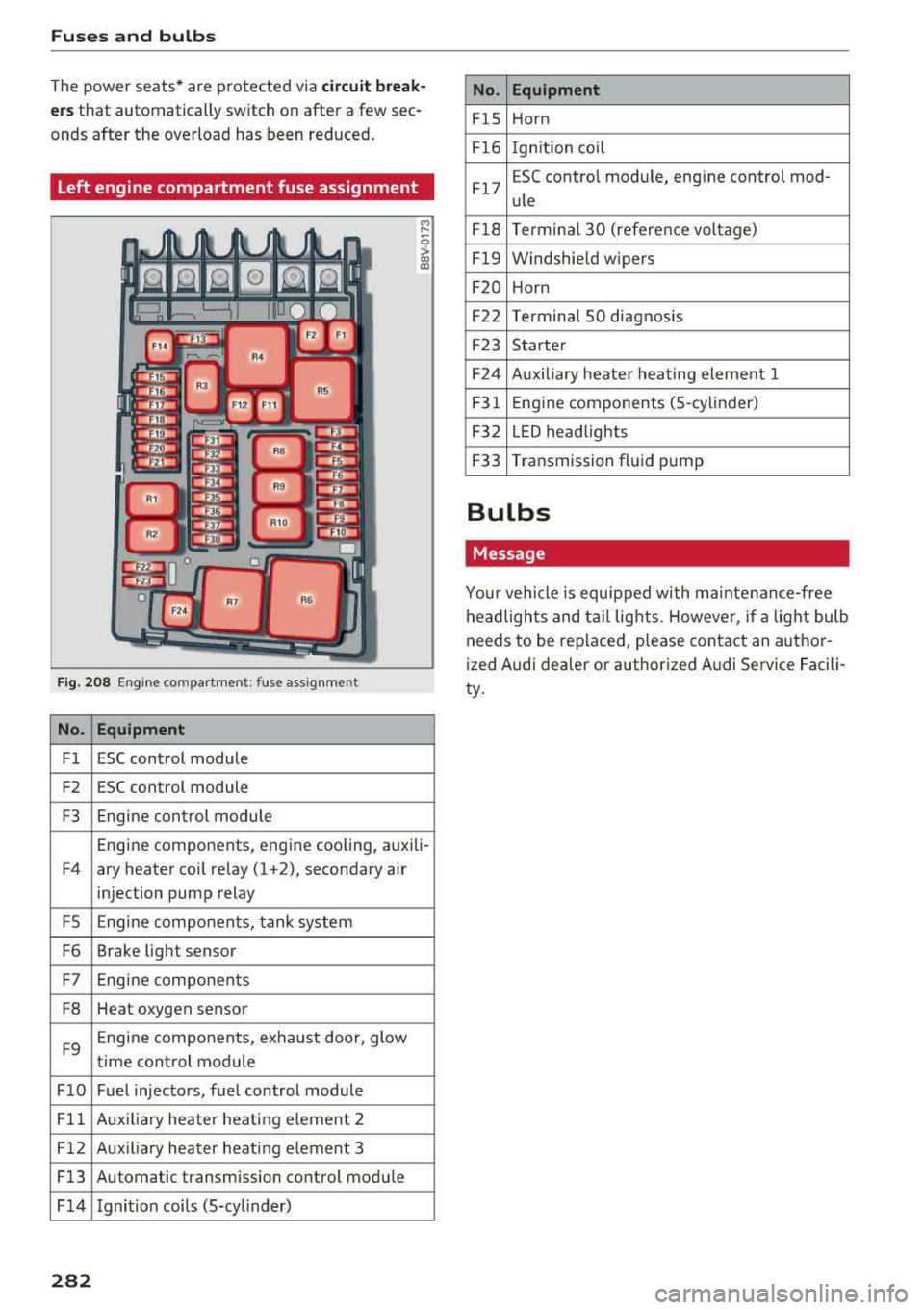
Left engine compartment fuse assignment
F ig. 208 Engine co mpartment : fuse assignment
No. Equipment
Fl ESC control module
F2 ESC control module
F3 Engine control module
M
" 0 > a, m
Engine components, engine cooling, auxili-
F4 ary heater coil relay (1 +2), secondary air
injection pump relay
FS Engine components, tank system
F6 Brake light sensor
F7 Engine components
F8 Heat oxygen sensor
F9 Engine components, exhaust door, glow
time control module
FlO Fuel injectors, fuel control module
Fll Auxiliary heater heating e lement 2
F 12 Aux iliary heater heat ing element 3
Fl3 Automatic transmission control module
F 14 Ignition coils (5-cylinder)
282
No. Equipment
FlS Horn
Fl6 Ignition coil
Fl7 E
SC contro l module, engine control mod-
ule
Fl8 Terminal
30 (reference voltage)
Fl9 Windshield wipers
F20 Horn
F22 Terminal SO diagnosis
F23 Starter
F24 Auxiliary heater heating element 1
F31 Engine
components (5 -cylinder)
F32 LED headlights
F33 Transmission fluid pump
Bulbs
Message
Your vehicle is equipped with ma intenance-free
headlights and tail lights. However, if a light bulb
needs to be replaced, please contact an author
ized Audi dealer or authorized Audi Service Facili
ty.
Page 297 of 310
Cl 00 .-< N r-N .-< 0 r-Vl 00
AUTO Automatic climate control system . . . . . . . 52
Automatic headlights . . . . . . . . . . . . . . . . . 38
Auto Lock (central locking) . . . . . . . . . . . . . . 22
Automatic belt retractor . . . . . . . . . . . . . . .
190
Automatic climate control system
refer to Climate control system (automatic) .52
Automatic key . . . . . . . . . . . . . . . . . . . . . . . . . 22
Automatic transmission . . . . . . . . . . . . . . . . . 63
Driving tips . . . . . . . . . . . . . . . . . . . . . . . . . . 65
Emergency mode . . . . . . . . . . . . . . . . . . . . . 68
Hill descent control . . . . . . . . . . . . . . . . . . . 67
Kick-down . . . . . . . . . . . . . . . . . . . . . . . . . . . 68
La unch Control Program . . . . . . . . . . . . . . . 68
malfunction . . . . . . . . . . . . . . . . . . . . . . . . . 64
Selector lever emergency release . . . . . . . .
69
Selector lever lock . . . . . . . . . . . . . . . . . . . . 64
Selector lever positions . . . . . . . . . . . . . . . . 63
Shifting manually . . . . . . . . . . . . . . . . . . . . 67
Steering wheel with shift paddles . . . . . . . . 67
tiptronic . . . . . . . . . . . . . . . . . . . . . . . . . . . . 67
Automatic wipe/wash system . . . . . . . . . . . . 42
Automatic zoom (navigation) . . . . . . . . . . . 144
Index
Brakes . . . . . . . . . . . . . . . . . . . . . . . . . . . . . . . 87
Brake assist . . . . . . . . . . . . . . . . . . . . . . . . . 86
Brake assist system . . . . . . . . . . . . . . . . . . . 86
Brake booster . . . . . . . . . . . . . . . . . . . . . . . . 87
Brake fluid . . . . . . . . . . . . . . . . . . . . . . . . . 241
Electromechanical parking brake . . . . . . . . 61
Emergency braking function . . . . . . . . . . . . 61
Indicator light . . . . . . . . . . . . . . . . . . . . . . .
10
New brake pads . . . . . . . . . . . . . . . . . . . . . . 87
Worn brake pads . . . . . . . . . . . . . . . . . . . . . 14
Break-in security feature . . . . . . . . . . . . . 22, 2 7
Breaking in New brake pads . . . . . . . . . . . . . . . . . . . . . . 87
New engine . . . . . . . . . . . . . . . . . . . . . . . . . 56
New tires 251
Browser
refer to Media center . . . . . . . . . . . . . . . . . 163
Bulb failure (indicator light) . . . . . . . . . . . . . 16
Bulb replacement . . . . . . . . . . . . . . . . . . . . . 282
Buttons Control panel (MMI) . . . . . . . . . . . . . . . . . .
93
Multifunction steering wheel . . . . . . . . 18, 20
Auto Safety Hotline . . . . . . . . . . . . . . . . . . . 18S C
AUX input
Average fuel consumption ........... .. . . 161
21
Average speed . . . . . . . . . . . . . . . . . . . . . . . . 21
B
BACK button . . . . . . . . . . . . . . . . . . . . . . . . . . 93
Balance (sound) . . . . . . . . . . . . . . . . . . . . . . 177
Bass (sound) . . . . . . . . . . . . . . . . . . . . . . . . . 177
Battery Jump starting . . . . . . . . . . . . . . . . . . . . . . . 283
Before driving .. ................ ... .. .
Better route (navigation) ........ .. .. .. .
Blended gasoline
179
147
229
Blower (climate control system) . . . . . . . . . . 52
Bluetooth Audio player . . . . . . . . . . . . . . . . . . . . . . . . 157
Connecting a cell phone . . . . . . . . . . . . . . 111
Settings . . . . . . . . . . . . . . . . . . . . . . . . . . . 175
Booster seats
Brake fluid 223
Checking the brake flu id leve l . . . . . . . . . .
241
Cable (USB adapter/AUX connector cable) 160
California Proposition 65 Warning . . . . . . . 234
Battery specific . . . . . . . . . . . . . . . . . . . . . 242
Call list . . . . . . . . . . . . . . . . . . . . . . . . . . . . . 114
Call options . . . . . . . . . . . . . . . . . . . . . . . . . . 121
Capacities Fuel tank . . . . . . . . . . . . . . . . . . . . . . . . . . . 288
Washer fluid reservoir . . . . . . . . . . . . . . . . 288
Cargo area
refer to Luggage compartment. . . . . . . . . 183
Catalytic converter ... ................ . 233
CD drive (media drives) ............... . 156
Cell phone Pl
. · aying music . . . . . . . . . . . . . . . . . . . . . . . 157
also refer to Telephone . . . . . . . . . . . . . . . 111
Center armrest . . . . . . . . . . . . . . . . . . . . . . . .
47
Central locking . . . . . . . . . . . . . . . . . . . . . . . . 22
Luggage compartment lid . . . . . . . . . . . . . . 27
Mechanically locking . . . . . . . . . . . . . . . . . . 27
Power windows . . . . . . . . . . . . . . . . . . . . . . 29
Remote control key . . . . . . . . . . . . . . . . . . . 24
Setting . . . . . . . . . . . . . . . . . . . . . . . . . . . . . 26
295
Page 299 of 310
Convertible locking retractor
Activating . . . . . . . . . . . . . . . . . . . . . . . . . . 226
Deactivating . . . . . . . . . . . . . . . . . . . . . . . . 227
Using to secure a child safety seat . . . . . . 226
Cooling mode (climate control system) . . . . 52
Cooling system Adding coolant . . . . . . . . . . . . . . . . . . . . . . 240
Coolant . . . . . . . . . . . . . . . . . . . . . . . . . . . . 239
Coolant level checking . . . . . . . . . . . . . . . . 240
Coolant temperature indicator . . . . . . . . . . . 8
I ndicator light . . . . . . . . . . . . . . . . . . . . . . . 12
Crank (power top emergency operation) . . . . 36
Crash data recorder ( EDR) . . . . . . . . . . . . . . . 91
Crosshairs . . . . . . . . . . . . . . . . . . . . . . . . . . . 136
Cruise control system Changing speed . . . . . . . . . . . . . . . . . . . . . . 72
Preselecting speed . . . . . . . . . . . . . . . . . . . . 72
Switching off . . . . . . . . . . . . . . . . . . . . . . . . 72
Switching on.. ............. .. .. .. .. .. 71
Cup holders . . . . . . . . . . . . . . . . . . . . . . . . . . . 48
Current fuel consumption . . . . . . . . . . . . . . . 21
D
Data connection . . . . . . . . . . . . . . . . . . . . . . 130
Data protection . . . . . . . . . . . . . . . . . . . . . . . 132
Data recorder . . . . . . . . . . . . . . . . . . . . . . . . . 91
Date .. .. .. .. .. ............. .. .. .. .. . 173
Date display . . . . . . . . . . . . . . . . . . . . . . . . . 173
Daytime running light . . . . . . . . . . . . . . . . . . 38
Declaration of compliance . . . . . . . . . . . . . . 293
Defrosting (windows) . . . . . . . . . . . . . . . . . . . 53
DEF (instrument cluster) . . . . . . . . . . . . . . . . 21
Deluxe automatic climate control
refer to Climate control system (automatic) .S2
Determining correct load limit . . . . . . . . . . 257
Digital compass . . . . . . . . . . . . . . . . . . . . . . . 44
Digital Rights Management . . . . . . . . . . . . . 154
Dimensions . . . . . . . . . . . . . . . . . . . . . . . . . . 288
Dimming the rearview mirror . . . . . . . . . . . . 42
Directory
refer to Contacts . . . . . . . . . . . . . . . . . . . . 119
Display
c refer to Audi virtua l cockpit (instrument 00
;::: cluster) . . . . . . . . . . . . . . . . . . . . . . . . . . 18, 20 r--
~ Distance driven . . . . . . . . . . . . . . . . . . . . . . . . 21 0 r--Vl 00
Index
Driver information system . . . . . . . . . . . . 18 , 20
Indicator lights . . . . . . . . . . . . . . . . . . . . . . . 9
Messages . . . . . . . . . . . . . . . . . . . . . . . . . . . . 9
On -board computer . . . . . . . . . . . . . . . . . . . 21
Outside temperature display. . . . . . . . . . . . 17
Service interval display . . . . . . . . . . . . . . . 243
Drives
refer to Media . . . . . . . . . . . . . . . . . . 154, 162
Drive select . . . . . . . . . . . . . . . . . . . . . . . . . . . 78
Driving economically . . . . . . . . . . . . . . . . . . . 56
Driving safely . . . . . . . . . . . . . . . . . . . . . . . . 179
Driving through water . . . . . . . . . . . . . . . . . . 56
Driving time . . . . . . . . . . . . . . . . . . . . . . . . . . 21
Dust filter
refer to Pollutant filter
DVD drive (media drives)
Dynamic volume 51
155
refer to System volume . . . . . . . . . . . . . . . 177
E
E-mail
117
Economical route . . . . . . . . . . . . . . . . . . . . . 141
Electromechanical parking brake . . . . . . . . . 61
Electromechanical steering . . . . . . . . . . . . . . 89
Indicator light . . . . . . . . . . . . . . . . . . . . . . . 89
Electronic differentia l lock . . . . . . . . . . . . . . . 86
Electronic immobili zer . . . . . . . . . . . . . . . . . . 22
Electronic stabilization control (ESC) . . . . . . 86
Indicator light . . . . . . . . . . . . . . . . . . . . . . . 13
Sport mode . . . . . . . . . . . . . . . . . . . . . . . . . 87
Emergency assistance . . . . . . . . . . . . . . . . . 272
Emergency braking function . . . . . . . . . . . . . 61
Emergency flashers . . . . . . . . . . . . . . . . . . . . 40
Emergency fueling . . . . . . . . . . . . . . . . . . . . 232
Emergency operation Fuel filler door . . . . . . . . . . . . . . . . . . . . . . 232
Luggage compartment lid . . . . . . . . . . . . . . 28
Power top . . . . . . . . . . . . . . . . . . . . . . . . . . . 36
Emergency release
Se lector lever . . . . . . . . . . . . . . . . . . . . . . . . 69
Emergency starting . . . . . . . . . . . . . . . . . . . 283
Emissions control system Catalytic converter . . . . . . . . . . . . . . . . . . . 233
Energy managem ent . . . . . . . . . . . . . . . . . . . 91
297
Page 303 of 310
Cl 00 ... N r-N ... 0 r-Vl 00
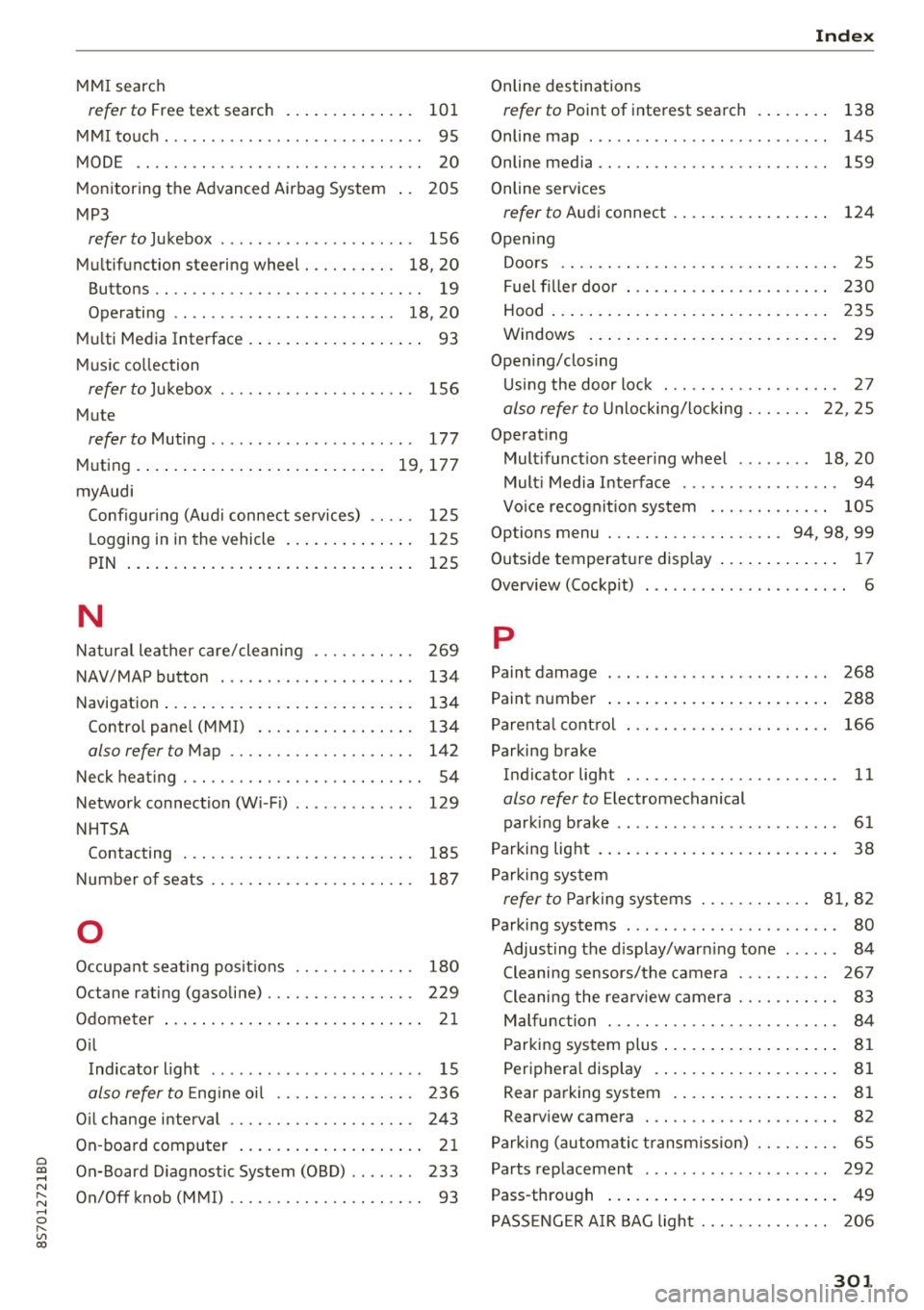
MMI search
refer to Free text search . . . . . . . . . . . . . . 101
MMI touch . . . . . . . . . . . . . . . . . . . . . . . . . . . . 95
MODE .. .. .. .. ............... .. .. .. .. 20
Monitoring the Advanced Airbag System 205
MP3
refer to Jukebox . . . . . . . . . . . . . . . . . . . . . 156
Multifunction steering wheel . . . . . . . . . . 18, 20
Buttons . . . . . . . . . . . . . . . . . . . . . . . . . . . . . 19
Operating . . . . . . . . . . . . . . . . . . . . . . . . 18, 20
Multi Media Interface . . . . . . . . . . . . . . . . . . . 93
Music collection
refer to Jukebox . . . . . . . . . . . . . . . . . . . . . 156
Mute
refer to Muting . . . . . . . . . . . . . . . . . . . . . . 177
Muting .. .... .. ................ ... 19, 177
myAudi Configur ing (Audi connect services) . . . . . 125
L ogging in in the vehicle . . . . . . . . . . . . . . 125
PIN . . . . . . . . . . . . . . . . . . . . . . . . . . . . . . . 125
N
Natural leather care/cleaning . . . . . . . . . . . 269
NAV/MAP button . . . . . . . . . . . . . . . . . . . . . 134
Navigation . . . . . . . . . . . . . . . . . . . . . . . . . . . 134
Control pane l (MMI) . . . . . . . . . . . . . . . . . 134
also refer to Map . . . . . . . . . . . . . . . . . . . . 142
Neck heating . . . . . . . . . . . . . . . . . . . . . . . . . . 54
Network connection (Wi -Fi) . . . . . . . . . . . . . 129
NHTSA Contacting . . . . . . . . . . . . . . . . . . . . . . . . . 185
Number of seats . . . . . . . . . . . . . . . . . . . . . . 187
0
Occupant seating posit ions . . . . . . . . . . . . . 180
Octane rating (gasoline) . . . . . . . . . . . . . . . . 229
Odometer . . . . . . . . . . . . . . . . . . . . . . . . . . . . 21
Oil Indicator light . . . . . . . . . . . . . . . . . . . . . . . 15
also refer to Eng ine oi l . . . . . . . . . . . . . . . 236
Oil change interval . . . . . . . . . . . . . . . . . . . . 243
On-board computer . . . . . . . . . . . . . . . . . . . . 21
On-Board Diagnostic System (OBD) . . . . . . . 233
On/Off knob (MMI) . . . . . . . . . . . . . . . . . . . . . 93
Index
Online destinations
refer to Point of interest search
138
Online map . . . . . . . . . . . . . . . . . . . . . . . . . . 145
Online media . . . . . . . . . . . . . . . . . . . . . . . . . 159
Online services
refer to Audi connect . . . . . . . . . . . . . . . . . 124
Opening Doors . . . . . . . . . . . . . . . . . . . . . . . . . . . . . . 25
Fuel filler door . . . . . . . . . . . . . . . . . . . . . . 230
Hood . . . . . . . . . . . . . . . . . . . . . . . . . . . . . . 235
Windows ........................... 29
Opening/closing Using the door lock . . . . . . . . . . . . . . . . . . . 27
also refer to Unlocking/locking . . . . . . . 22, 25
Operating Multifunction steering wheel . . . . . . . . 18, 20
Multi Media Interface . . . . . . . . . . . . . . . . . 94
Vo ice recognit ion system . . . . . . . . . . . . . 105
Options menu . . . . . . . . . . . . . . . . . . . 94, 98, 99
Outside temperature display . . . . . . . . . . . . . 17
Overview (Cockpit) . . . . . . . . . . . . . . . . . . . . . . 6
p
Paint damage
Paint number 268
288
Parenta l control . . . . . . . . . . . . . . . . . . . . . . 166
Parking brake Indicator light . . . . . . . . . . . . . . . . . . . . . . . 11
also refer to Electromechanical
parking brake . . . . . . . . . . . . . . . . . . . . . . . . 61
Parking light . . . . . . . . . . . . . . . . . . . . . . . . . . 38
Parking system
refer to Parking systems . . . . . . . . . . . . 81, 82
Parking systems . . . . . . . . . . . . . . . . . . . . . . . 80
Adjusting the display/warning tone . . . . . . 84
Cleaning sensors/the camera . . . . . . . . . . 267
Cleaning the rearview camera . . . . . . . . . . . 83
Malfunction . . . . . . . . . . . . . . . . . . . . . . . . . 84
Parking system plus . . . . . . . . . . . . . . . . . . . 81
Peripheral disp lay . . . . . . . . . . . . . . . . . . . . 81
R ear parking system . . . . . . . . . . . . . . . . . . 81
Rearview camera . . . . . . . . . . . . . . . . . . . . . 82
Parking (automatic transm ission) . . . . . . . . . 65
Parts replacement . . . . . . . . . . . . . . . . . . . . 292
Pass-through . . . . . . . . . . . . . . . . . . . . . . . . . 49
PASSENGER AIR BAG light . . . . . . . . . . . . . . 206
301