abs AUDI TT ROADSTER 2018 Owners Manual
[x] Cancel search | Manufacturer: AUDI, Model Year: 2018, Model line: TT ROADSTER, Model: AUDI TT ROADSTER 2018Pages: 310, PDF Size: 46.95 MB
Page 11 of 310
Cl 00 .-< N r-N .-< 0 r-Vl 00
@ Note
Never drive until the tank is completely emp
ty. The irregular supply of fuel that results
from that can cause engine misfires. Uncom
busted fuel will then enter the exhaust sys
tem. Th is can cause overheating and damage
to the catalytic converter.
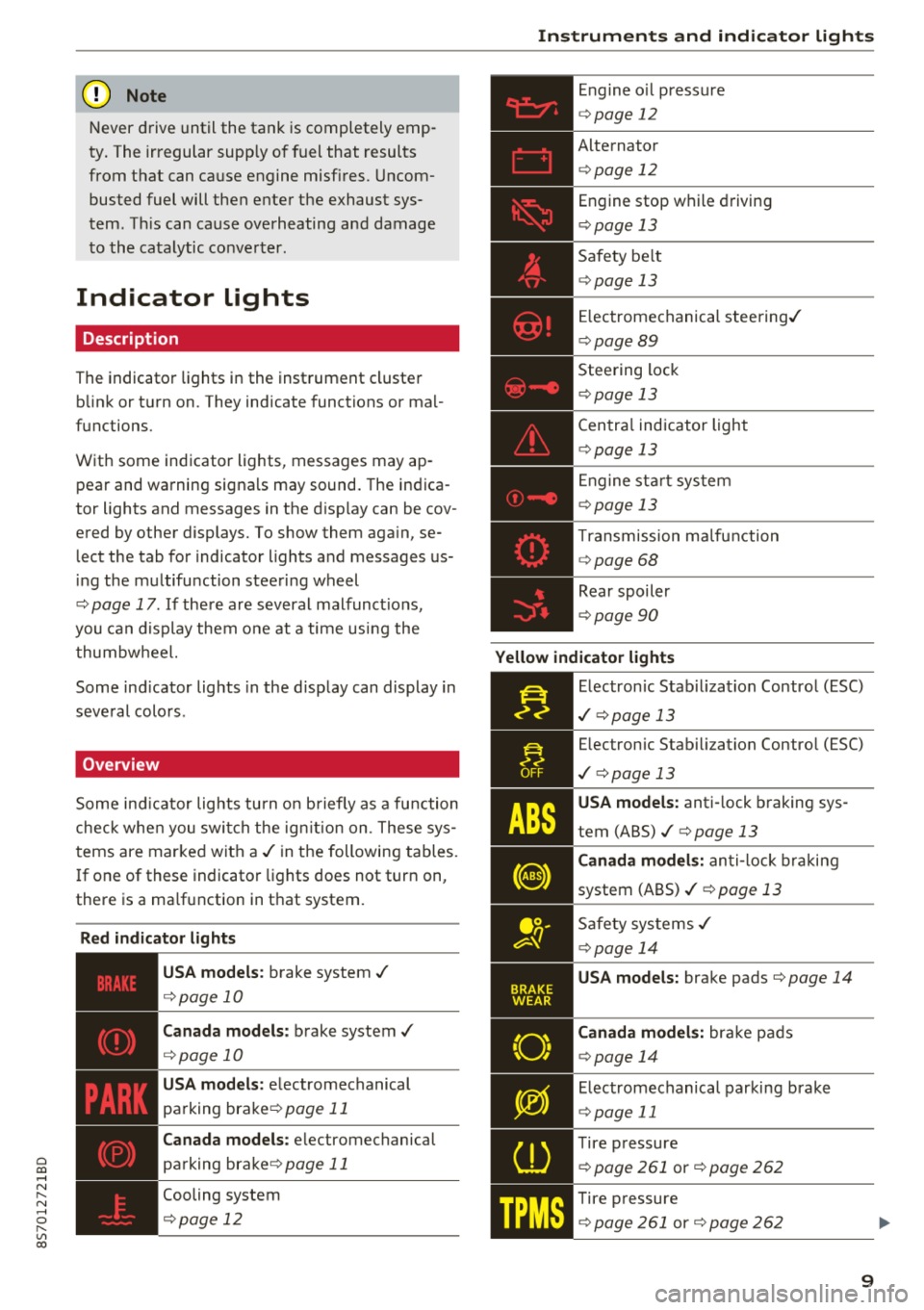
Indicator lights
Description
The indicator lights in the instrument cluster
blink or turn on. They indicate functions or mal
functions.
With some indicator lights, messages may ap
pear and warning signals may sound. The indica
tor lights and messages in the display can be cov
ered by other displays. To show them again, se
lect the tab for indicator lights and messages us
ing the multifunction steering wheel
¢ page 17. If there are several malfunct ions,
you can display them one at a time us ing the
thumbw heel.
Some ind icator lights in the d isplay can display in
several colors .
Overview
Some indicator lights turn on briefly as a function
check when you switch the ign ition on. These sys
tems are marked with a
./ in the following tables.
I f one of these indicator lights does not turn on,
there is a ma lfunction in that system.
Red indicator lights
---------------
US A models : brake system ./
¢page 10
Canada models: brake system ./
¢page 10
USA models: electromechanical
parking
brake¢ page 11
Canada models: electromechanical
parking
brake¢ page 11
Cooling system
¢ page 12
Instruments and indicator lights
Engine oil pressure
¢ page 12
Alternator
¢p age 12
Engine stop while driving
¢page 13
Safety be lt
¢ page 13
Electromechanical steering./
¢page 89
Steering lock
¢page 13
Central indicator light
¢page 13
En gine start system
¢page 13
Transmission ma lfunction
¢ page 68
Rear spoiler
¢page 90
Yellow indicator lights
Electronic Stabil iz ation Control (ESC)
./ ¢p age 13
Electronic Stabilization Contro l (ESC)
./ ¢pag e 13
USA models: anti-lock braking sys
tem
(ABS)./¢ page 13
Canada models: anti-lock braking
system
(ABS)./ ¢ page 13
Safety systems ./
¢page 14
USA models: brake pads ¢page 14
Canada models: bra ke pads
¢ page 14
Electromechanical parking brake
¢page 11
Tire pressure
¢ page 261 or¢ page 262
Tire pressure
¢ page 261 or¢ page 262
9
Page 13 of 310
Cl 00 .-< N r-N .-< 0 r-Vl 00
If brake assist (brake booster) is not working, you
have to use much more force when braking the
vehicle. See an authorized Audi dealer or author
i zed Audi Service Facility for assistance.
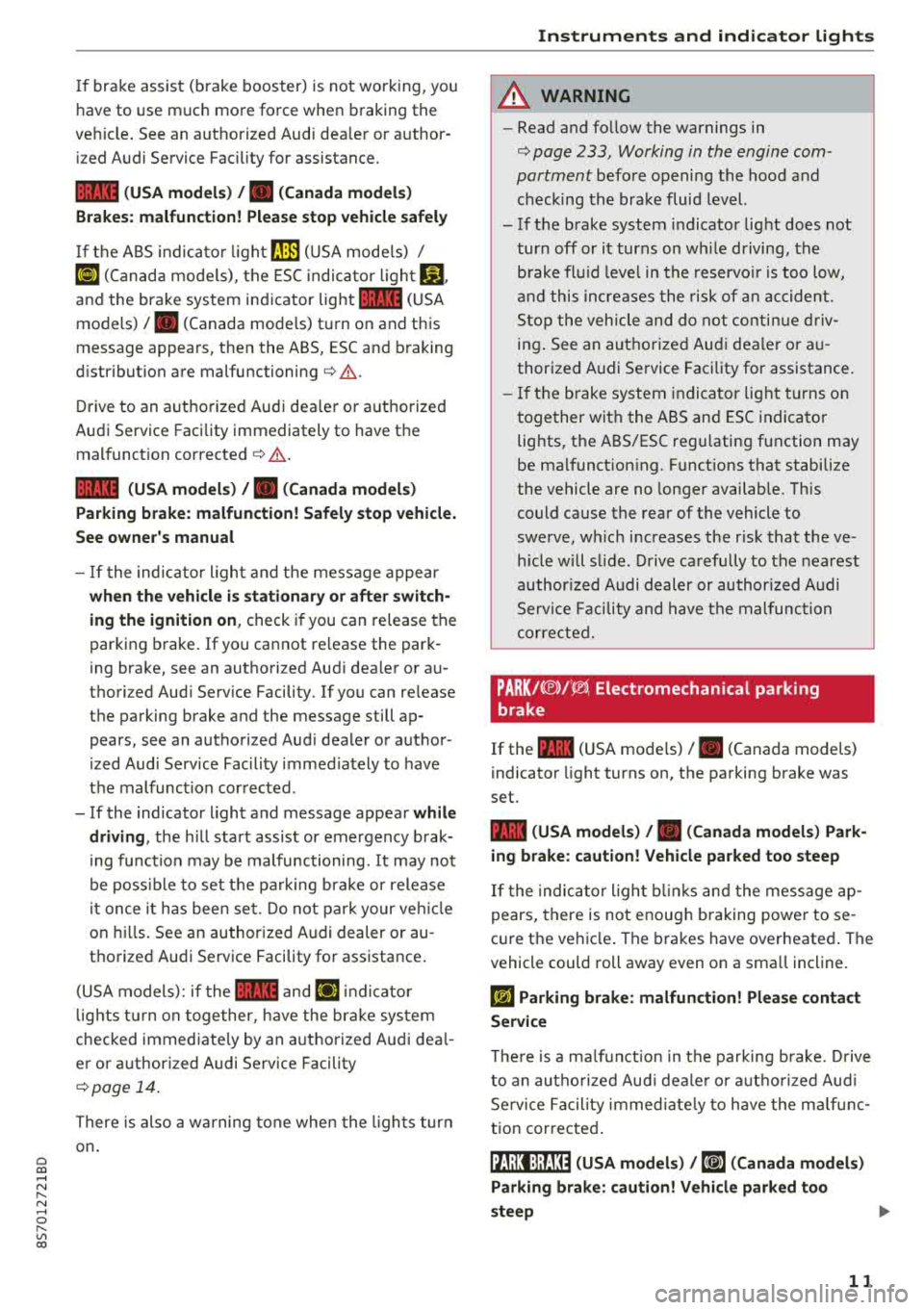
1111 (USA models) /. (Canada models)
Brakes: malfunction! Please stop vehicle safely
If the ABS indicator light rJ]) (USA models) /
¢e'A (Canada models), the ESC indicator light GJ.
and the brake system indicator light 1111 (USA
models)/ . (Canada models) turn on and this
message appears, then the ABS, ESC and braking
distribution are
malfunctioning¢ &.
Drive to an authorized Audi dealer or authorized
Audi Service Facility immediately to have the
malfunction corrected
¢ & .
1111 (USA models) /. (Canada models)
Parking brake: malfunction! Safely stop vehicle.
See owner's manual
- If the indicator light and the message appear
when the vehicle is stationary or after switch
ing the ignition on,
check if you can release the
parking brake. If you cannot release the park
ing brake, see an authorized Audi dealer or au
thorized Audi Service Facility. If you can release
the parking brake and the message still ap pears, see an authorized Audi dealer or author
ized Audi Service Facility immediately to have
the malfunction corrected.
- If the indicator light and message appear
while
driving,
the hill start assist or emergency brak
ing function may be malfunctioning. It may not
be possible to set the parking brake or release
it once it has been set. Do not park your vehicle
on hills. See an authorized Audi dealer or au
thorized Audi Service Facility for assistance.
(USA models): if the
1111 and Ei] indicator
lights turn on together, have the brake system
checked immediately by an authorized Audi deal
er or authorized Audi Service Facility
¢page 14.
There is also a warning tone when the lights turn
on.
Instruments and indicator lights
A WARNING
-- Read and follow the warnings in
¢ page 233, Working in the engine com
partment
before opening the hood and
checking the brake fluid level.
- If the brake system indicator light does not
turn off or it turns on while driving, the
brake fluid level in the reservoir is too low,
and this increases the risk of an accident .
Stop the vehicle and do not continue driv
ing. See an authorized Audi dealer or au
thorized Audi Service Facility for assistance.
- If the brake system indicator light turns on
together with the ABS and ESC indicator
lights, the ABS/ESC regulating function may
be malfunctioning. Functions that stabilize
the vehicle are no longer available. This
could cause the rear of the vehicle to
swerve, which increases the risk that the ve
hicle will slide. Drive carefully to the nearest
authorized Audi dealer or authorized Audi
Service Facility and have the malfunction
corrected.
PARK/(®)f 'i®5, Electromechanical parking
brake
If the -(USA models) / . (Canada models)
indicator light turns on, the parking brake was
set.
-(USA models) / . (Canada models) Park
ing brake: caution! Vehicle parked too steep
If the indicator light blinks and the message ap
pears, there is not enough braking power to se
cure the vehicle. The brakes have overheated. The
vehicle could roll away even on a small incline.
fcdA Parking brake: malfunction! Please contact
Service
There is a malfunction in the parking brake. Drive
to an authorized Audi dealer or authorized Audi
Service Facility immediately to have the malfunc
tion corrected.
!il];!J:l;H3~ (USA models) / [iJ (Canada models)
Parking brake: caution! Vehicle parked too
steep
11
Page 15 of 310
Cl 00 .-< N r-N .-< 0 r-Vl 00
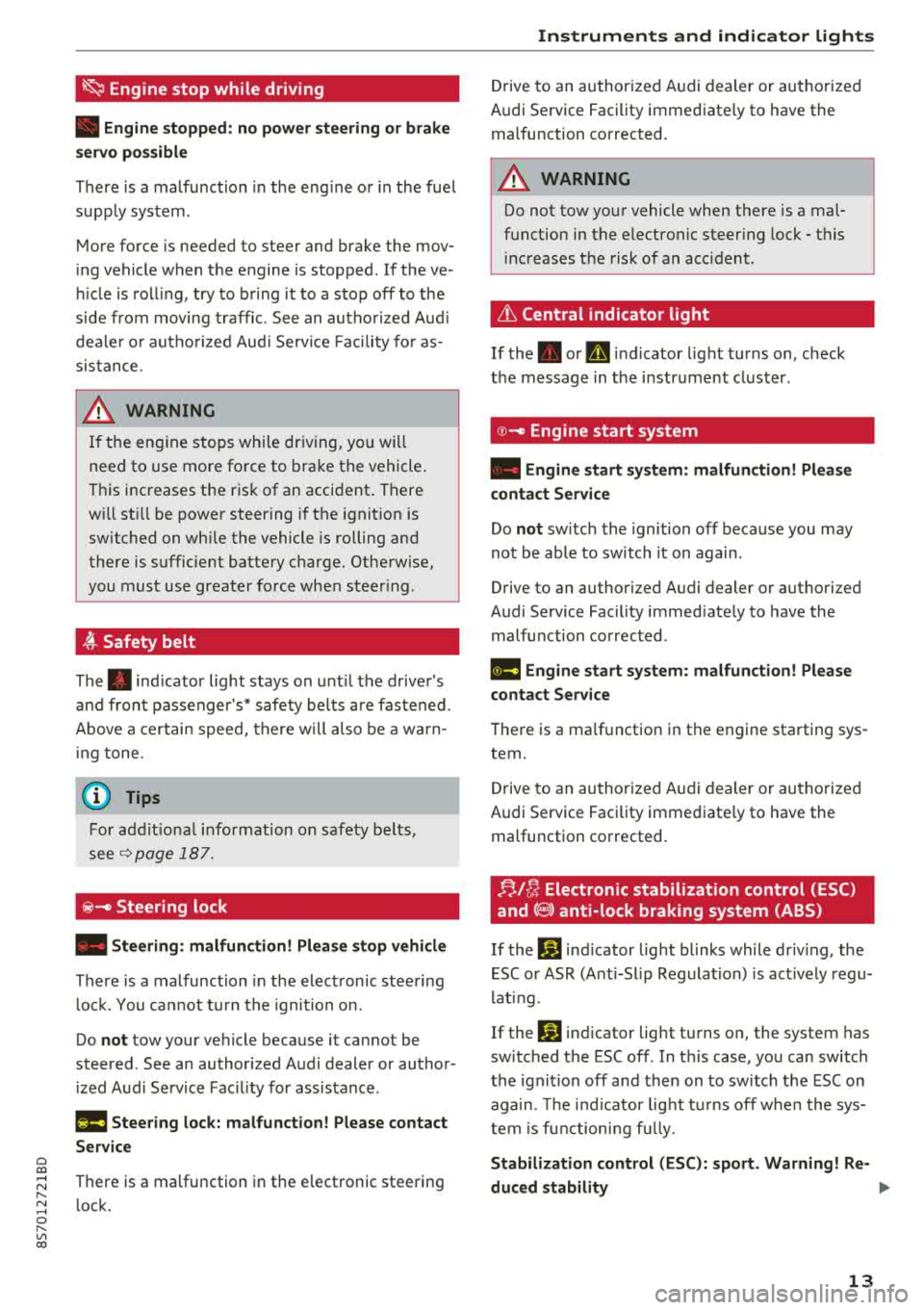
~ Engine stop while driving
• Engine stopped: no power steering or brake
s e rvo pos sible
There is a malfunc tion in the eng ine o r in the fue l
supp ly sys tem .
M ore fo rce is needed to steer and bra ke the mov
in g vehicle w hen the engine is stopped . If the ve
hi cle is roll ing, try to b ring it to a stop off to the
side from moving traffic. See an aut ho riz ed Aud i
dea le r or aut ho rize d Aud i Serv ice Faci lity fo r as
sis tance .
A WARNING
-
If the en gine sto ps while dr iving, yo u will
nee d to use more fo rce to bra ke the vehicle .
T hi s increases the r is k of an acci dent . T here
w ill st ill be power steering i f the i gnit ion is
switched on whi le the vehicle is rolling and
ther e is sufficient batt ery c harg e. Oth erwise,
you must use greate r force when steer ing .
~ Safety belt
The . indicator light stays on unt il t he drive r's
a nd fron t passenger's* safety bel ts are fastened .
Above a cer tain spee d, th ere w ill also be a w arn
in g tone .
@ Tips
For additional i nformation on safety b elts,
see
Q page 187 .
@-Steering lock
• Steering: malfunction! Please stop vehicle
There is a malfunc tion in the elec tronic stee ring
l o ck. Y ou ca nnot t urn the igni tion o n.
Do
not tow your vehicle because it ca nnot be
steered . See an author ized A udi dealer or au thor
iz ed A udi Service Fac il ity for assis tance .
l!ia Steering lock: malfunction! Please contact
Service
There is a malfunction in the elect ronic stee ring
l ock .
Instruments and indicator lights
Drive to an au thor ized A udi dealer or au tho riz e d
A udi Se rvice Fac ility immed iate ly to have the
malfu nction corrected.
A WARNING "---
Do not tow yo ur vehicle when there is a mal
f u nction in the electro nic steer ing lock - t his
in creas es the risk of an acc ident.
& Central indicator light
If t he . or D in d icator light turns on, check
t h e message in t he i nstr ument clus ter .
© -Engine start system
• Engine start system : malfunction! Please
contact Service
Do not switch th e igni tion off beca use you may
not be able to switch it on again.
Drive to an author ized A udi dealer or autho rized
A udi Se rvice Fac ility immed iate ly to have the
malfu nction corrected .
11111 Engine start system: malfunction! Please
contact Service
T he re is a ma lf u nction in the engine sta rting sys
tem.
Dr ive to an au thor ized A udi dealer or au thoriz ed
Audi Se rvice Fac ility immed iate ly to have the
malfu nction corrected.
FJ,/!r, Electronic stabilization control (ESC)
and
(8) anti-lock braking system (ABS)
If the If] indicator light blinks while driv ing, the
E SC o r ASR (Anti-Slip Regula tion) is ac tively regu
l at ing.
Ifthc
If] ind icator light tu rns o n, the system has
swi tched the ESC off . In t his case, yo u can switch
the ignit io n off and then on to switch the ESC on
agai n. Th e indi cator lig ht t urns off whe n the sys
tem is f unc tioni ng full y.
Stabilization control (ESC): sport . Warning! Re-
duced stability
.,.
13
Page 16 of 310
Instruments and indicator lights
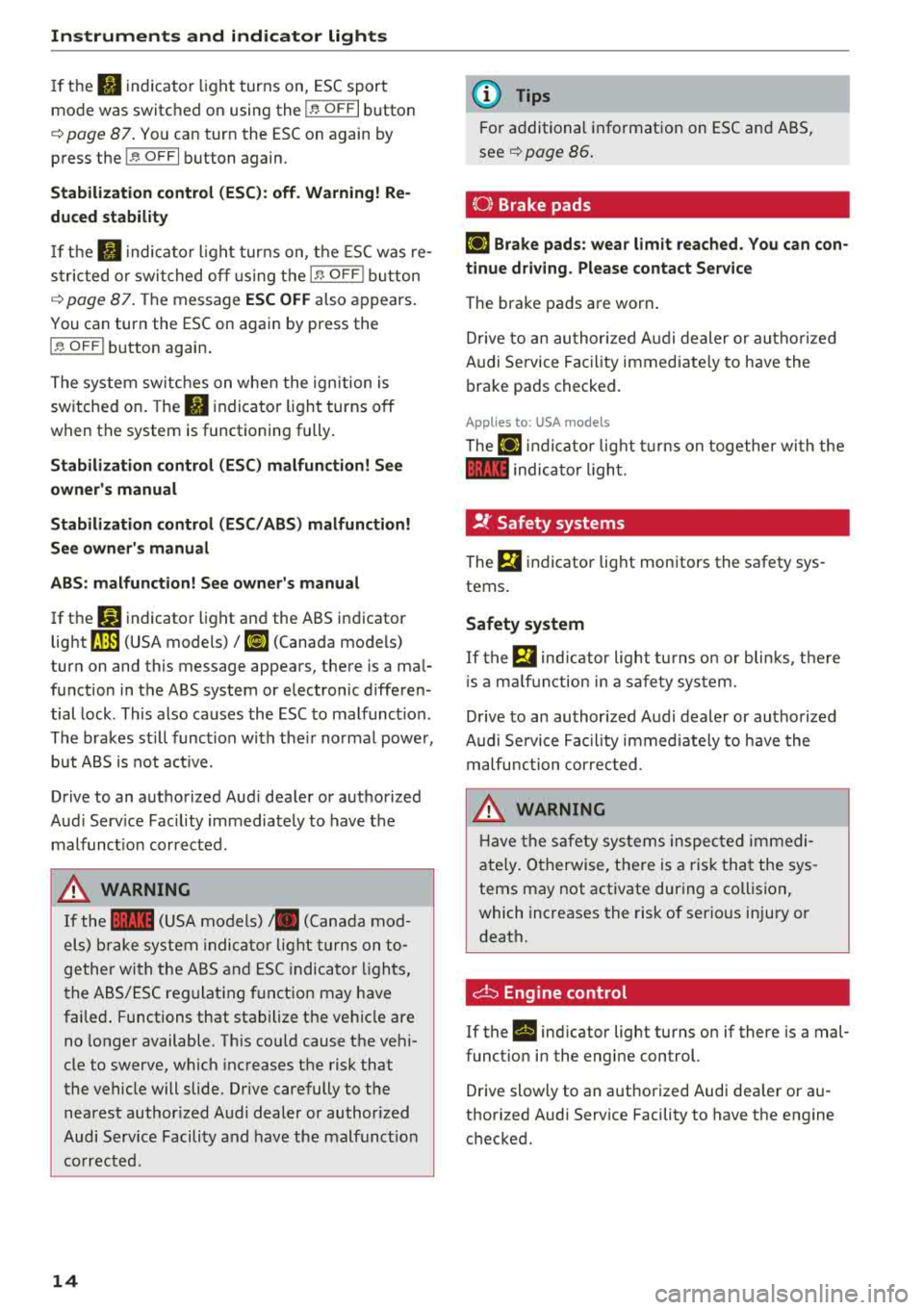
If th e II indica to r li gh t turns on, ESC sport
mo de was switched on using the
I~ O FF I button
¢ page
87 . You ca n tur n the ESC on again by
press the
I ~ O FF I button again.
Stabilization control (ESC): off . Warning! Re
duced stability
If th e II in dic ator li ght t urns on, t he ES C was re
s tric ted o r swi tched o ff using the
I~ OF FI butt on
¢ page
87. Th e message ESC OFF also ap pears .
You can turn the ESC on again by press the
I ~ OFF I button agai n.
Th e sys tem swit ches on whe n the ign ition is
sw itche d on . The
II indica to r lig ht t urns off
when t he system is functioning fully .
Stabilization control (ESC) malfun ction! See
owner 's manual
Stabilization control (ESC/ ABS) malfunction!
See owner's manual
ABS: malfunction! See owner's manual
If t he D.J indicato r light and the ABS i ndicator
light
rJ] (USA models) 1 11] (Canada mo dels)
tur n on and this message appea rs, the re is a ma l
f un ction in t he ABS system or e lectron ic diffe ren
tial lock . This also ca uses the ESC to malfunc tion.
The brakes st ill func tion wi th the ir no rma l powe r,
but A BS is not a ct ive.
Drive to an a uth orized Aud i dea le r or a uth orized
Aud i Serv ice Facility immediately to have t he
malfunc tion corrected.
A WARNING
If the 1111 (U SA mod els) ,. (C anad a mod
el s) bra ke sy stem in dicator light tu rns on to
ge the r wi th the A BS and ESC ind icat or lig hts,
th e A BS/ES C re gulat ing f unctio n may have
fai le d. Functions that sta bilize the ve hicl e are
n o l on ger available. T his co uld cause t he ve hi
cle to swerve, w hich inc reases t he risk that
the vehicle will slide. Dr ive carefully to the
n ea rest author ized A udi dealer or author iz e d
Audi Serv ic e Facili ty a nd have the malf unc tion
co rrect ed.
14
(D Tips
Fo r additio nal info rmat io n on ESC an d ABS,
see ¢ page
86 .
{0) Brake pads
El] Brake pads: wear limit reached. You can con
tinue driving . Please contact Service
The brake pads a re worn .
Dr ive to an au thor ized A udi d ealer or au tho riz ed
Audi Se rvice Faci lity immed iate ly to h ave the
b ra ke pads checked.
Applies to: USA models
The El] ind ic at or lig ht tur ns o n to gether wi th the
1111 indica to r ligh t.
!f Safety systems
The El in dicator lig ht mon itors the safety sys
tems .
Safety system
If the Bl ind ic a to r lig ht t urns o n or bli nks, t he re
i s a m alfu nction in a s afety sys tem.
D rive to an au thor ized A udi dealer or au tho riz ed
Audi Se rvice Fac il ity i mme diately to have the
m alfunc tio n cor rec ted .
A WARNING
-
Ha ve the s afety sy stem s in sp ecte d imm ed i
ate ly. Oth erwise, t he re is a r is k th at the sys
tems may not activate during a collisi on,
wh ich inc reases the risk of serio us inju ry or
d eat h.
d:::i Engine control
If the II ind icator light turns on if there is a mal
funct io n in the eng ine control.
D rive slowly to an a uth orized Audi dea ler or au
t h orized Audi Serv ice Facility to have t he engine
c h ecke d.
Page 20 of 310
Driver information system
Multifunction steering
wheel plus
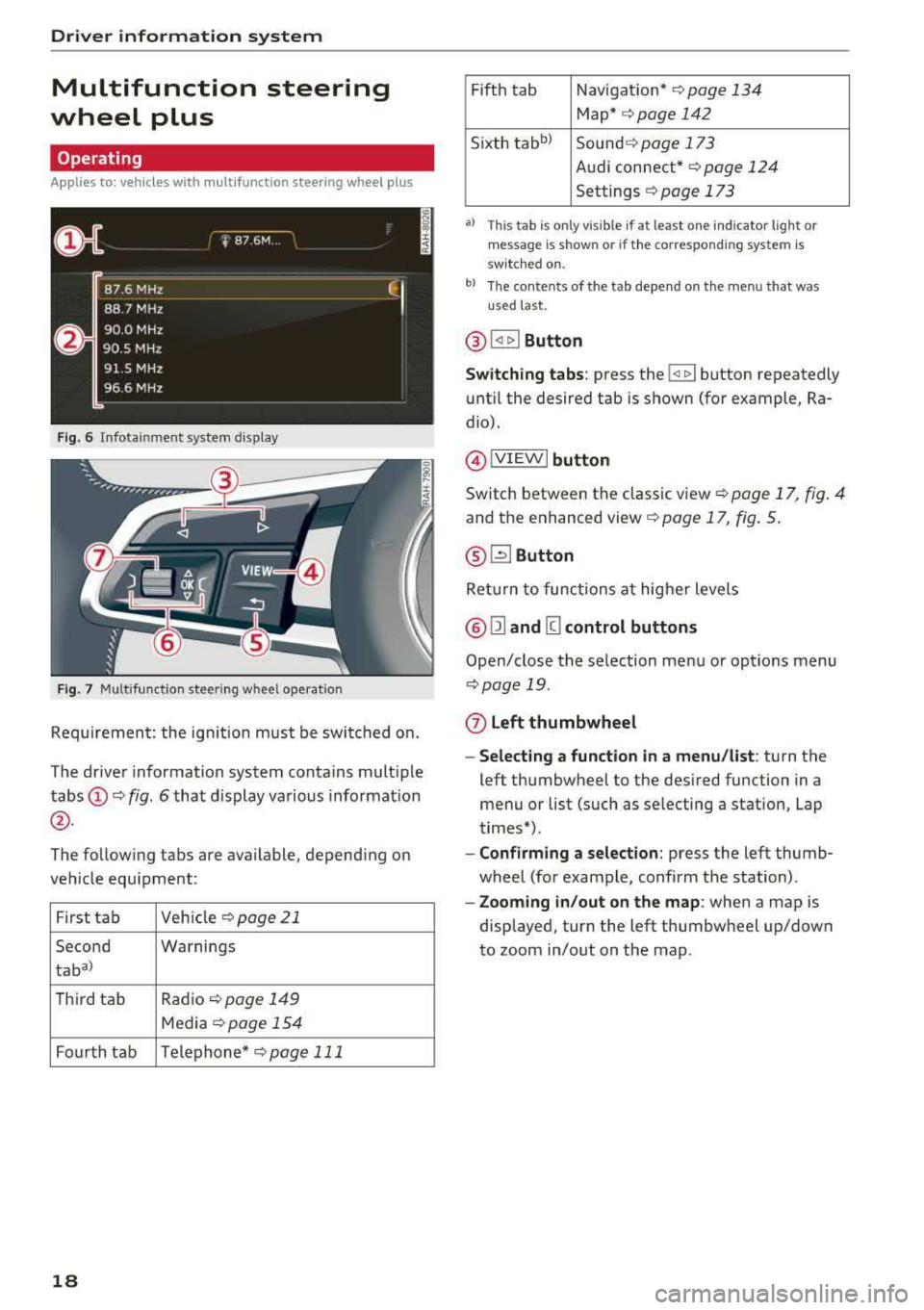
Operating
Applies to: vehicles with multifunction steering wheel plus
F ig. 6 Infotainment system display
Fig. 7 Multifunction steering wheel operation
Requirement: the ign ition must be switched on.
The driver information system contains multiple
tabs
(D ¢ fig. 6 that display various information
@.
The following tabs are available, depend ing on
vehicle equipment:
First tab Veh
icle ¢page21
Second Warnings
taba)
T
hird tab Radio ¢page 149
Media ¢page 154
Fourth tab Telephone*
¢pag e 111
18
Fifth tab Navigat ion* ¢page 134
Map* ¢ page 142
Sixth
tabb ) Sound ¢ page 173
Audi connect*
¢page 124
Settings ¢ page 173
a) This tab is only visible if at least o ne indicator lig ht or
mes sage is shown or if the correspon ding system is
sw itc hed on.
b) The contents of the tab depend on the menu that was
u se d last.
® I<] t>I Button
Switching tabs: press the !
until the desired tab is shown (for example, Ra
dio).
@ !VIEWI button
Switch between the classic view¢ page 17, fig. 4
and the enhanced
view¢ page 17, fig. 5.
® G2J Button
Ret urn to functions at higher levels
@ Ill and [g control buttons
Open/close the selection menu or options menu
¢page 19.
(z) Left thumbwheel
- Selecting a function in a menu/list : turn the
left thumbwheel to the desired function in a
menu or list (such as se lecting a station, Lap
times*).
- Confirming a selection: press the left thumb
wheel (for example, confirm the station) .
-Zooming in/out on the map : when a map is
displayed, turn the left thumbwheel up/down
to zoom in/out on the map.
Page 22 of 310
Driver information system
@l1<1
- Selecting the previous/next track or station :
press the l1<1<1! or l1:>1>1 I button.
-Fast forwarding/rewinding audio files : press
and hold the
!1<1<1 1 or 11:>1:> 1! bu tton un til the desired
location in the file is reached.
@lilButton
- Programmable steering wheel button
-open
ing a function :
press the@ button.
-Programmable steering wheel button - re
questing a function :
press and hold the@ but
ton.
- Programmable steering wheel button - chang
ing a function :
select the first tab > Vehicle
settings
> Steering wheel button assignment .
@l~w l Button
- Repeating the last navigation prompt :
press
the
l ~"'v l button when route guidance is act ive.
- Changing the voice guidance volume : when
route gu idance is active, turn the right thumb
whee l upward or downward during a navigation
prompt.
Multifunction steering
wheel
Operating
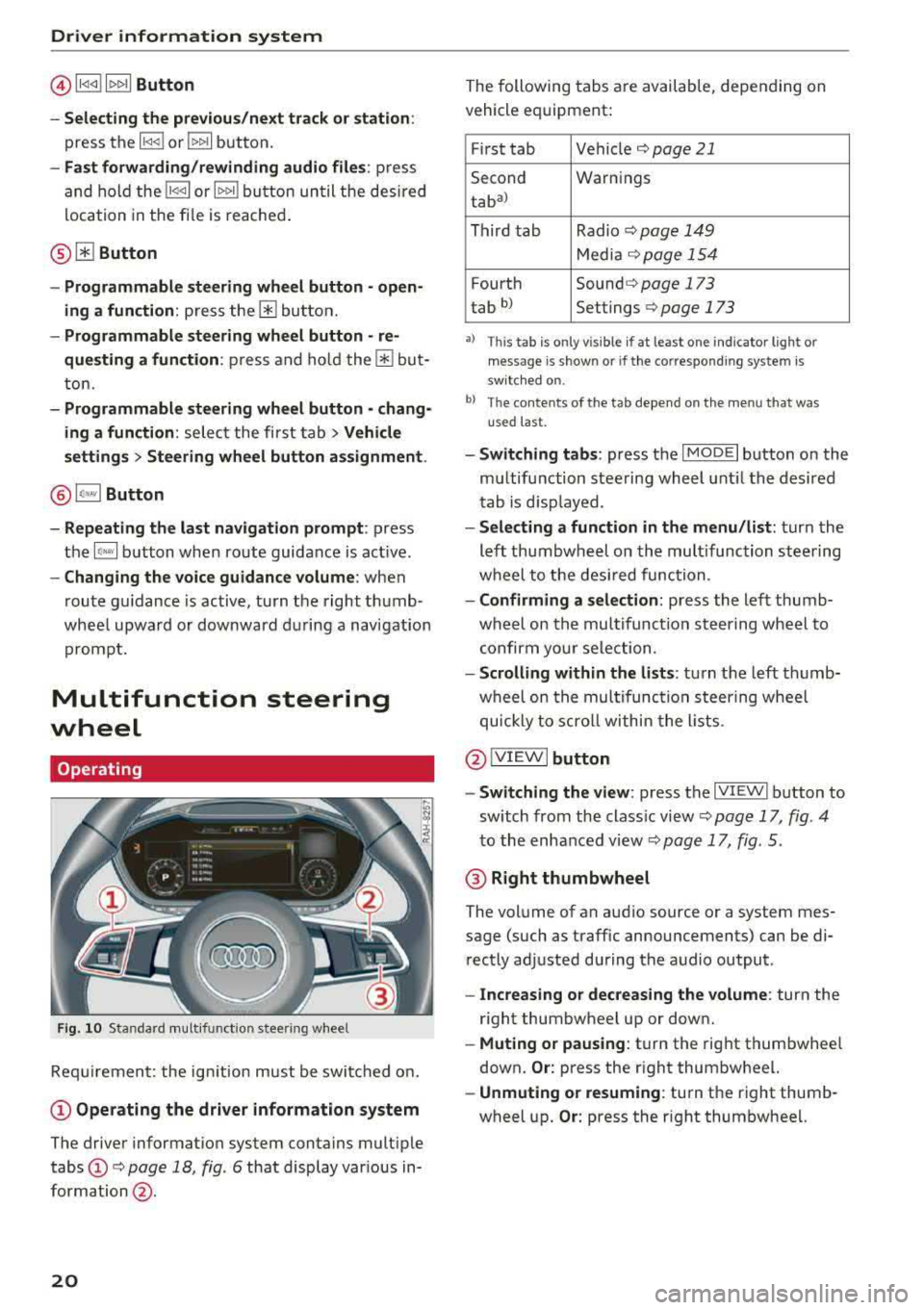
F ig . 10 Standard multifunct ion stee ring wheel
Requirement: the ign ition must be swi tched on.
(D Operating the driver information system
The driver information system contains multiple
tabs
(D c> page 18 , fig. 6 that display various in
formation @.
20
The following tabs are available, depending on
vehicle equipment:
First tab Vehicle
c> page 21
Second Warnings
tab
a)
Third tab Radio c> page 149
Media c>page 154
Fourth Sound c> page 173
tab b) Settings c> page 173
•> This tab is onl y visi ble if at least on e indi ca tor ligh t o r
mess age is show n or if the co rres pond ing sys te m is
s w it ch ed o n.
bl Th e conten ts of the t ab depe nd on the men u th at wa s
u se d las t.
- Switching tabs: press the I MOD E I button on the
multifunction steering wheel until the desired
tab is disp layed .
-Selecting a function in the menu /list: turn the
left thumbwheel on the multifunction steering
wheel to the desired function.
-Confirming a selection: press the left thumb
wheel on the multifunc tion steering wheel to
confirm your selection .
-Scrolling within the lists : turn the left thumb
wheel on the multifunction steering wheel
quickly to scroll within the lists .
@IVIEWI button
- Switching the view :
press the IV IEWI button to
sw itch from the class ic view
c> page 17, fig . 4
to the enhanced view c> page 17, fig. 5.
@ Right thumbwheel
The volume of an audio source or a system mes
sage (such as traffic announcements) can be di
rectly adjusted during the audio output .
-Increasing or decreasing the volume : turn the
right thumbwheel up or down.
-Muting or pausing : turn the right thumbwhee l
down.
Or: press the right thumbwheel.
-Unmuting or resuming : turn the right thumb
wheel up.
Or: press the right thumbwheel.
Page 61 of 310
Cl 00 .-< N r--N .-< 0 r--Vl 00
-Never turn off the engine before the vehicle
has come to a complete stop.
- The brake booster and power steering only
work when the engine is running. If the en gine is off, you have to use more force when
steering or braking. Because you cannot
steer and brake as you usually would, this
could lead to accidents and serious injuries.
@ Note
Avoid high engine speed, full throttle, and
heavy engine load if the engine has not
reached operating temperature yet. You could
damage the engine.
@ For the sake of the environment
Do not let the engine run while parked to
warm up. Begin driving immediately . This re
duces unnecessary emissions.
(D Tips
-Some noise after starting the engine is nor
mal and is no cause for concern.
- If you leave the vehicle with the ignition
switched on, the ignition will switch off af
ter a certain amount of time. Make sure that
electrical equipment such as the exterior
lights are switched off.
Stopping the engine
.,. Bring the vehicle to a full stop.
.,. Move the selector lever into the P position .
... Press the I START ENGINE STOPI button.
Emergency off function*
If it is absolutely necessary, the engine can also
be turned off while driving at speeds starting at
4 mph (7 km/h). To switch the engine off, press
the
I START ENGINE STOPI button twice in a row
br iefly or press and hold for longer than two sec
onds.
A WARNING
- Never turn off the engine before the vehicle has come to a complete stop.
Driving
-Please note that the brake booster and pow
er steering only work when the engine is
running. When the engine off, you must use
more force to steer or brake the vehicle. Be
cause the usual steering and braking capa
bility is not available, the risk of accidents or
. . . . mJunes increases.
-For safety reasons, always park the vehicle
with the selector lever in the P position.
Otherwise, there is the risk that the vehicle
could roll.
- After the engine has been switched off, the
radiator fan can continue to run for up to 10
minutes
-even with the ignition switched
off. It can also switch on again after some
time if the coolant temperature rises as the result of heat buildup or if the engine is al
ready warm and the engine compartment is
also heated by the sun's rays.
@ Note
If the engine has been under heavy load for
an extended period of time, heat builds up in
the engine compartment after the
engine is
switched off and there is a risk of damaging
the engine . For this reason, let the engine run
at idle for approximately two minutes before
shutting it off.
(D Tips
For up to 10 minutes after stopping the en
gine, the radiator fan may turn on again auto matically or it may continue to run (even if
the ignition is switched off) for the following
reasons :
- The coolant temperature is increasing due
to trapped heat.
- If the engine is warm and the engine com
partment also heats up from strong sun
light.
Messages
Turn off ignition before leaving vehicle. Battery
is discharging
This message appears and a warning tone sounds
if you open the driver's door when the ignition is
..,
59
Page 63 of 310
Cl co .... N ,....
N .... 0 ,....
Vl co
(D Tips
You can view the message again by pressing
the
I START ENGINE S T OP ! button.
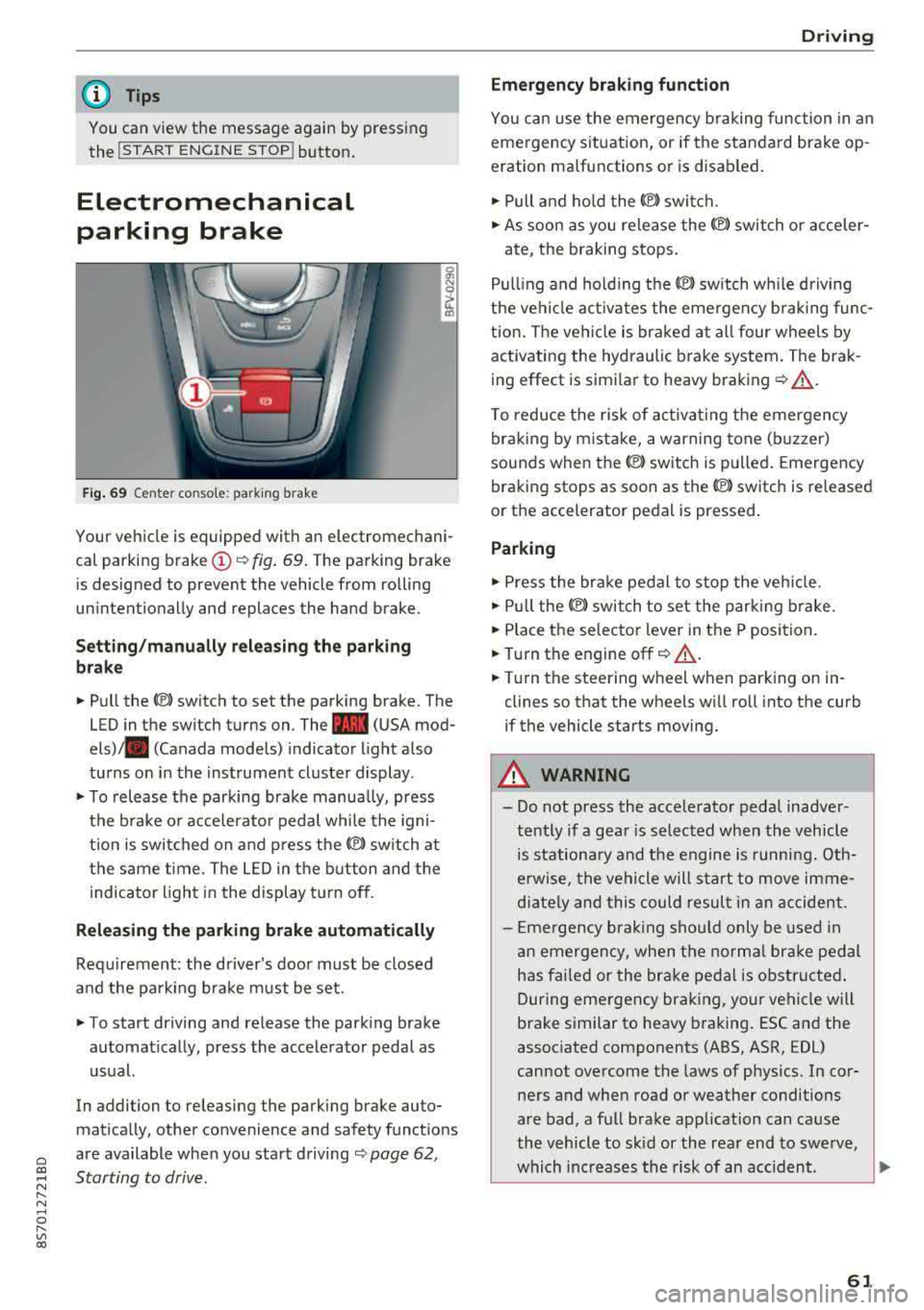
Electromechanical
parking brake
Fig. 69 C ent er co n so le : pa rking brake
Your vehicle is equipped with an electromechani
cal parking brake
(D <¢ fig. 69. The parking brake
is designed to prevent the vehicle from rolling
unintention ally and replaces the hand brake.
Setting/manually releasing the parking
brake
.. Pull the(®) switch to set the parking brake. The
LED in the switch turns on. The
-(USA mod
els) . (Canada models) indicator light also
turns on in the instrument cluster display .
.. To release the parking brake manually, press
the brake or acce lerator pedal while the igni
t ion is switched on and press
the®) switch at
the same time. The LED in the button and the
indicator light in the display turn off .
Releasing the parking brake automatically
Requirement: the driver's door must be closed
and the parking brake must be set.
.. To start driving and release the parking brake
automatically, press the accelerator pedal as
usual.
In addi tion to releasing the parking brake au to
mat ically, other convenience and safety funct ions
are available when you start driving
<¢ page 62,
Starting to drive .
Driving
Emergency braking function
You can use the emergency braking function in an
emergency situation, or if the standard brake op
eration malfunctions or is disabled.
.. Pull and hold the ®l switch .
.. As soon as you release the ®) switch or acceler-
ate, the braking stops.
Pulling and holding the
®l sw itch wh ile driving
the vehicle activates the emergency braking func
tion. The vehicle is braked at all four wheels by
activating the hydraulic brake system. The brak
ing effect is similar to heavy braking
r¢ &_ .
To reduce the risk of activating the emergency
braking by mistake, a warning tone (buzzer)
sounds when
the(®) switch is pulled. Emergency
braking stops as soon as
the(®) sw itch is released
or the accelerator pedal is pressed.
Parking
.,.. Press the brake pedal to stop the vehicle.
.. Pull the®> switch to set the parking brake .
.. Place the selector lever in the P position.
.. Turn the engine off r¢ &_ .
.. Turn the steering whe el wh en parking on in
clines so that the wheels will roll into the curb
if the vehicle starts moving.
A WARNING
-- Do not press the accelerator pedal inadver-
tently if a gear is selected when the vehicle
is stationary and the engine is running. Oth
erwise, the vehicle will start to move imme
diately and this could result in an accident.
- Emergency braking should only be used in
an emergency, when the normal brake pedal
has fai led or the brake pedal is obstructed .
During emergency braking, your vehicle will
brake similar to heavy braking . ESC and the
associated components (ABS, ASR, EDL)
cannot overcome the laws of physics . In cor
ners and when road or weather conditions
are bad, a full brake application can cause
the vehicle to skid or the rear end to swerve,
which increases the risk of an accident .
~
61
Page 88 of 310
Intelligent Technology
Intelligent Technology Electronic stabilization
control (ESC)
Description
Elect ronic stabili zation control ( ESC) suppo rts
driver safety. It red uces the risk of slipping and
improves dr iving stabi lity. ESC detects crit ica l sit
uations such as the vehicle overstee ring and un
dersteeri ng or the w heels are sp inning. The vehi
cle is stabilized by app lying the brakes or reduc
i n g e ngine torque . When the ESC engages, the
liJ indicato r light bli nks in t he instr ument clus
t er.
The fo llow ing systems are in tegrated in the ESC:
Anti-lock braking system (ABS)
ABS p reve nts the whee ls from lock ing whe n brak
ing. The vehicle can st ill be steered even d uring
hard brak ing. Apply steady press ure to the bra ke
pedal. Do not pump the pedal. A puls ing in t he
b rake pedal indicates that the system is act ing to
s tabili ze the vehicle .
Brake assist system
The brake assist system can decrease brak ing dis
tance . It inc reases brak ing power when the d river
presses the brake pedal q uick ly in eme rgency sit
uations . You must press and hold t he b rake pedal
until the dangerous si tuatio n is ove r.
Anti-slip regulation (ASR)
ASR red uces eng ine power when the d rive wheels
begin sp inning a nd adapts the force to the road
conditions . This makes it easie r to start, acceler
ate and dr ive u p hill s.
Electronic differential lock (EDL)
E DL applies the brakes to a wheel that sta rts
spi nning and t ransfe rs the d rive power to the
other driving wheels. This f unction is not availa
b le at higher speeds.
In extreme cases, EDL automatically sw itches off
to keep the brake on the b raked wheel from over
heati ng. The vehicle is st ill work ing correctly. EDL
86
will swi tc h on again automatically when condi
tions have retu rned to normal.
Power steering
The ESC can also support veh icle stab ility
t hr ough stee rin g.
Selective wheel torque control
Se lective wheel to rque con trol is used when d riv
i ng on curves . The front whee l on the ins ide of
t h e curve or bo th whee ls on the i nside of th e
cu rve are braked se lective ly as needed. This al
l ows mo re pre cise dr iving in curves .
_&. WARNING
-The E SC and i ts in teg ra ted systems cannot
overcome the lim its imposed by natura l
phys ica l laws. This is es pec ially important
on s lippery or wet roa ds.
If the systems be
gin acting to stabilize yo ur vehicle, you
should immediately a lter your speed to
match the road and traffic conditions. Do
no t le t the inc reased safety p rovi ded tempt
you into taking risks. This could increase
y o ur r is k of a c oll is ion.
- Please note the r is k of a coll is ion increases
w hen dr iv in g fast, especially t hrough curves
a nd on sl ippery or wet r oads, and w hen dr iv
ing to o cl ose to obje cts ahead. T he ES C and
it s i ntegrated systems cannot a lways pre
vent co llisions
-there is st ill a risk of acci
dents!
- Press the accelerator peda l caref ully when
accelerating on even, slippery sur faces such
as ice and snow. The drive wheels can spin
even when these control systems a re instal
led and this can affect driving stability and
increase the risk of a collision.
(0 Tips
- The ABS and ASR only funct ion correctly
when a ll four wheels have a sim ila r wear
co nditio n. D iffere nt tire sizes can lead to a
red uction in engin e power.
- You may hear noises when the systems de
sc ribed are working .
Page 163 of 310
Cl co ..... N ,....
N ..... 0 ,....
Vl co
Audi music interface
Applies to: ve hicles with Audi m usic in terface
Connect your mobile devices to the Audi music
interface in order to operate them through the
MMI and charge the battery.
'" •.I 'I'
1 .
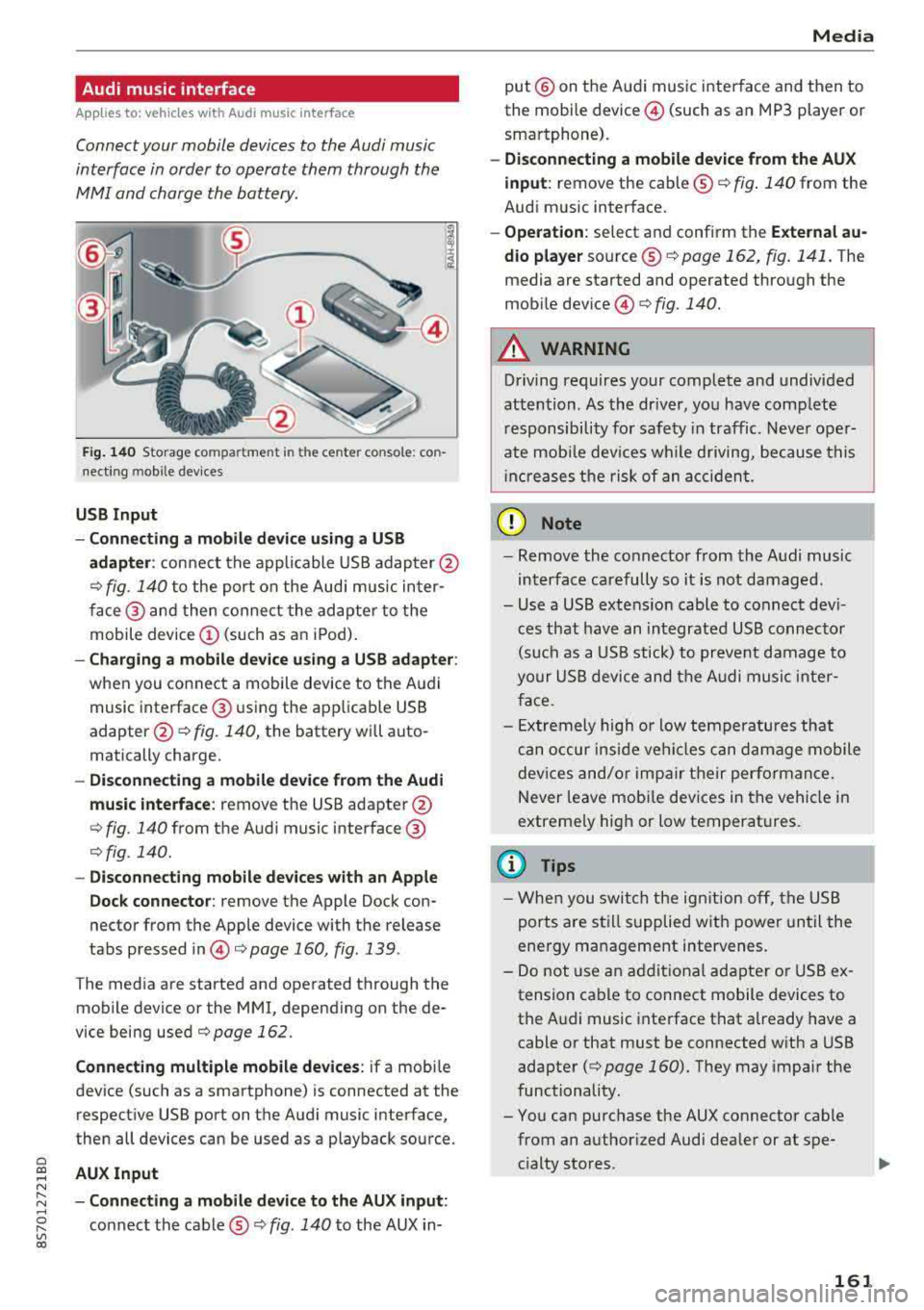
Fig. 140 S torage co mpa rtment in the ce nte r conso le: co n
nect ing m ob ile dev ices
USB Input
- Connecting a mobile device using a
USB
adapter : connect the applicable USB adap ter @
¢ fig. 140 to the port on the Audi music inter
face @ and then connect the adapter to the
mobile device
(D (such as an iPod).
-Charging a mobile device using a USB adapter :
when you connect a mobile device to the Audi
music interface @ using the app licab le USB
adapter @¢ fig. 140, the battery will auto
matically charge .
-Disconnecting a mobile device from the Audi
music interface :
remove the USB adapter @
¢ fig. 140 from the Audi music interface @
¢fig . 140.
-Disconnecting mobile devices with an Apple
Dock connector:
remove the Apple Dock con
nector from the Apple device with the release
tabs pressed
in @ ¢page 160, fig .139 .
The media are started and operated through the
mobile device or the MMI , depending on the de
vice being used
¢page 162 .
Connecting multiple mobile devices: if a mobile
device (such as a smartphone) is connected at the respect ive USB port on the Audi music interface,
then all devices can be used as a playback source .
AUX Input
-Connecting a mobile device to the AUX input:
connect the cable®¢ fig. 140 to the AUX in-
Media
put @ on the Audi music interface and then to
the mobile
device @ (such as an MP3 player or
smartphone).
- Disconnecting a mobile device from the AUX
input :
remove the cable ®¢ fig. 140 from the
Audi music interface.
- Operation : select and confirm the External au
dio player
source ®¢ page 162, fig . 141. The
media are started and operated through the
mob ile
device @) ¢fig. 140.
A WARNING
-
Driving requires your complete and undivided
attention . As the driver, you have complete
responsibility for safety in traffic. Never oper
ate mobile devices wh ile d riving, because this
i nc reases the risk of an accident.
(D Note
-Remove the connector from the Audi music
interface carefully so it is not damaged.
- Use a USB extens ion cable to connect devi
ces that have an integrated USB connector
(such as a USB stick) to prevent damage to
your USB device and the Audi music inter
face .
- E xtremely high or low temperatures that
can occur inside vehi cles can damage mobile
devices and/or impair their performance.
Never leave mobi le dev ices in the vehicle in
extreme ly high or low temperat ures.
@ Tips
- When you switch the ignitio n off, the USB
ports are still supplied with power until the
energy management intervenes.
- Do not u se an additional adapter or USB ex
tension cable to connect mobile devices to
the Audi music interface that already have a
cable or that must be connected with a USB
adapter
( ¢ page 160). They may impair the
functionality.
- You can purchase the AUX connector cable from an authorized Audi dealer or at spe
cialty stores .
161