CD player AUDI TT ROADSTER 2019 User Guide
[x] Cancel search | Manufacturer: AUDI, Model Year: 2019, Model line: TT ROADSTER, Model: AUDI TT ROADSTER 2019Pages: 304, PDF Size: 80.77 MB
Page 169 of 304
8S8012721BA
Media
— Some MTP player functions are not support-
ed, such as rating music tracks and video
playback.
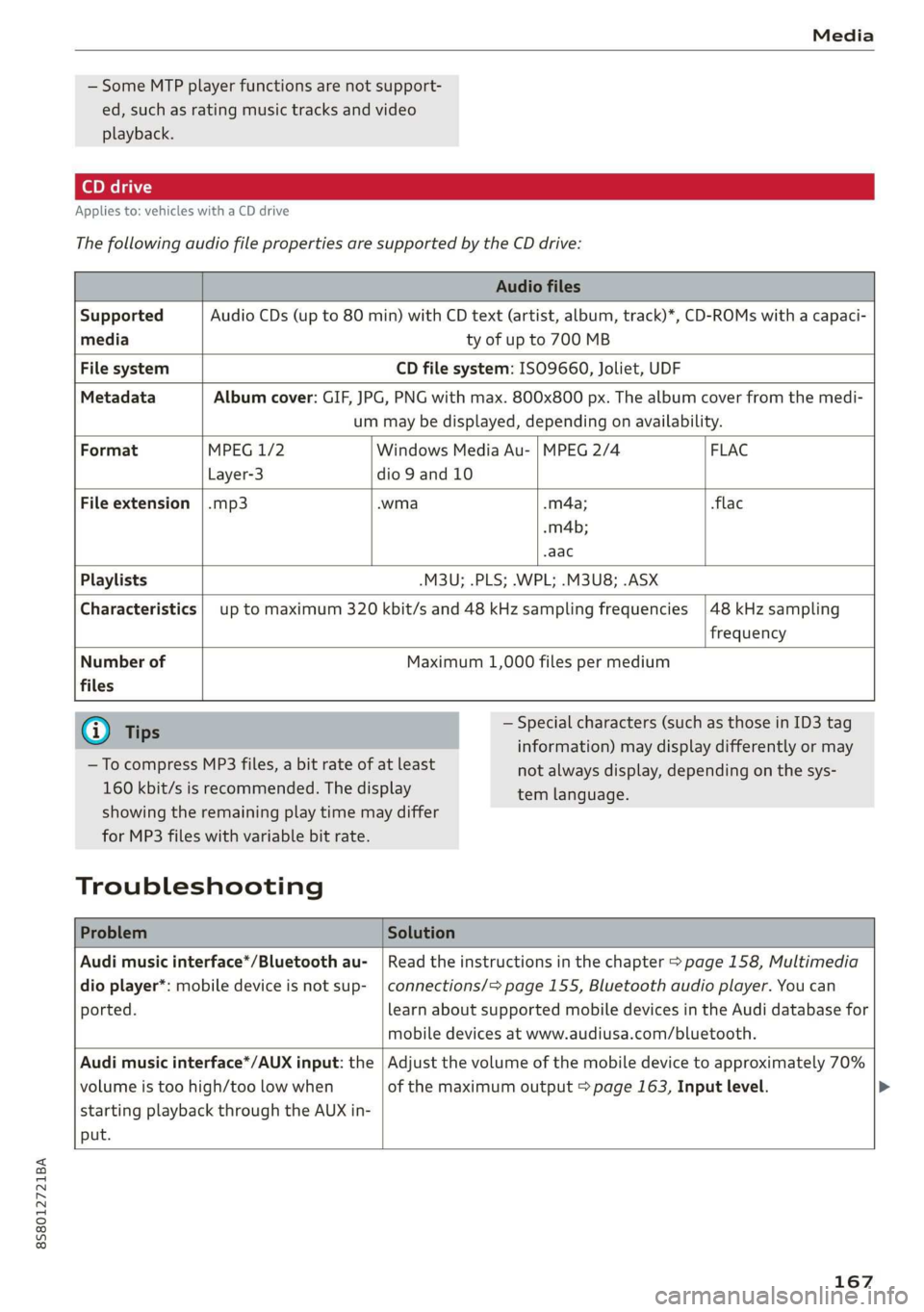
Applies to: vehicles with a CD drive
The
following audio file properties are supported by the CD drive:
Audio files
Supported Audio CDs (up to 80 min) with CD text (artist, album, track)*, CD-ROMs with a capaci-
media ty of up to 700 MB
File system CD file system: ISO9660, Joliet, UDF
Metadata Album cover: GIF, JPG, PNG with max. 800x800 px. The album cover from the medi-
um may be displayed, depending on availability.
Format MPEG 1/2 Windows Media Au- | MPEG 2/4 FLAC
Layer-3 dio 9 and 10
File
extension |.mp3 .wma .m4a; flac
-m4b;
aac
Playlists -M3U; .PLS; .WPL; .M3U8; .ASX
Characteristics up to maximum 320 kbit/s and 48 kHz sampling frequencies
48 kHz sampling
frequency
Number of
files
Maximum 1,000 files per medium
@) Tips
— To compress MP3 files, a bit rate of at least
160 kbit/s is recommended. The display
— Special characters (such as those in ID3 tag
information) may display differently or may
tem language.
showing the remaining play time may differ
for MP3 files with variable bit rate.
Troubleshooting
not always display, depending on the sys-
Problem Solution
Audi music interface*/Bluetooth au-
dio player*: mobile device is not sup-
ported.
Read the instructions in the chapter > page 158, Multimedia
connections/=> page 155, Bluetooth audio player. You can
learn about supported mobile devices in the Audi database for
mobile devices at www.audiusa.com/bluetooth.
Audi music interface*/AUX input: the
volume is too high/too low when
starting playback through the AUX in-
put.
Adjust the volume of the mobile device to approximately 70%
of the maximum output > page 163, Input level. >
167
Page 170 of 304
Media
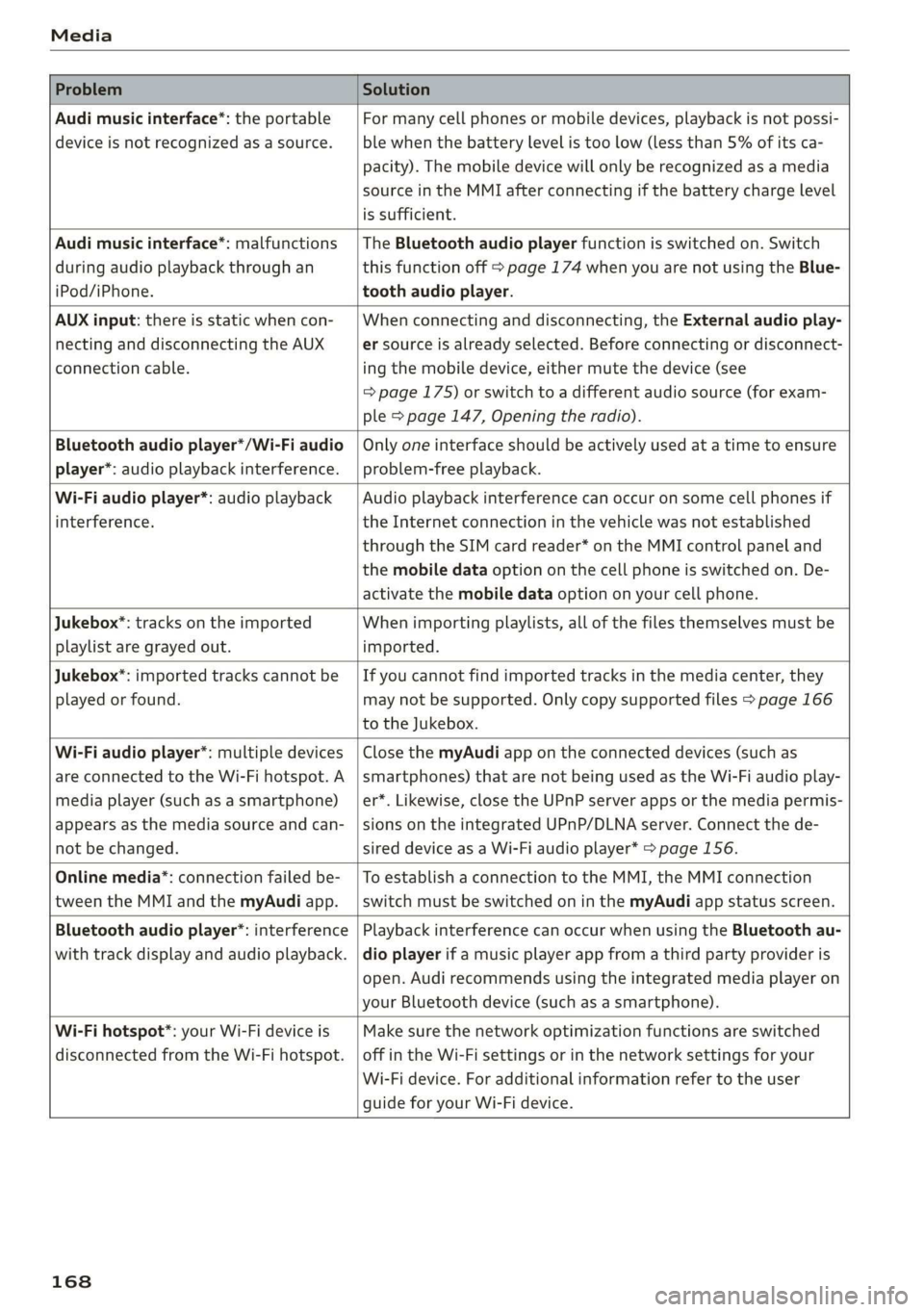
Problem Solution
Audi music interface*: the portable
device is not recognized as a source.
For many cell phones or mobile devices, playback is not possi-
ble when the battery level is too low (less than 5% of its ca-
pacity). The mobile device will only be recognized as a media
source in the MMI after connecting if the battery charge level
is sufficient.
Audi music interface*: malfunctions
during audio playback through an
iPod/iPhone.
The Bluetooth audio player function is switched on. Switch
this function off > page 174 when you are not using the Blue-
tooth audio player.
AUX input: there is static when con-
necting and disconnecting the AUX
connection cable.
When connecting and disconnecting, the External audio play-
er source is already selected. Before connecting or disconnect-
ing the mobile device, either mute the device (see
=> page 175) or switch to a different audio source (for exam-
ple > page 147, Opening the radio).
Bluetooth audio player*/Wi-Fi audio
player*: audio playback interference.
Only one interface should be actively used at a time to ensure
problem-free playback.
Wi-Fi audio player*: audio playback
interference.
Audio playback interference can occur on some cell phones if
the Internet connection in the vehicle was not established
through the SIM card reader* on the MMI control panel and
the mobile data option on the cell phone is switched on. De-
activate the mobile data option on your cell phone.
Jukebox®*: tracks on the imported
playlist are grayed out.
When importing playlists, all of the files themselves must be
imported.
Jukebox*: imported tracks cannot be
played or found.
If you cannot find imported tracks in the media center, they
may not be supported. Only copy supported files > page 166
to the Jukebox.
Wi-Fi audio player*: multiple devices
are connected to the Wi-Fi hotspot. A
media player (such as a smartphone)
appears as the media source and can-
not be changed.
Close the myAudi app on the connected devices (such as
smartphones) that are not being used as the Wi-Fi audio play-
er*. Likewise, close the UPnP server apps or the media permis-
sions on the integrated UPnP/DLNA server. Connect the de-
sired device as a Wi-Fi audio player* > page 156.
Online media*: connection failed be-
tween the MMI and the myAudi app.
To establish a connection to the MMI, the MMI connection
switch must be switched on in the myAudi app status screen.
Bluetooth audio player": interference
with track display and audio playback.
Playback interference can occur when using the Bluetooth au-
dio player if a music player app from a third party provider is
open. Audi recommends using the integrated media player on
your Bluetooth device (such as a smartphone).
Wi-Fi hotspot*: your Wi-Fi device is
disconnected from the Wi-Fi hotspot.
Make sure the network optimization functions are switched
off in the Wi-Fi settings or in the network settings for your
Wi-Fi device. For additional information refer to the user
guide for your Wi-Fi device.
168
Page 175 of 304
8S8012721BA
System settings
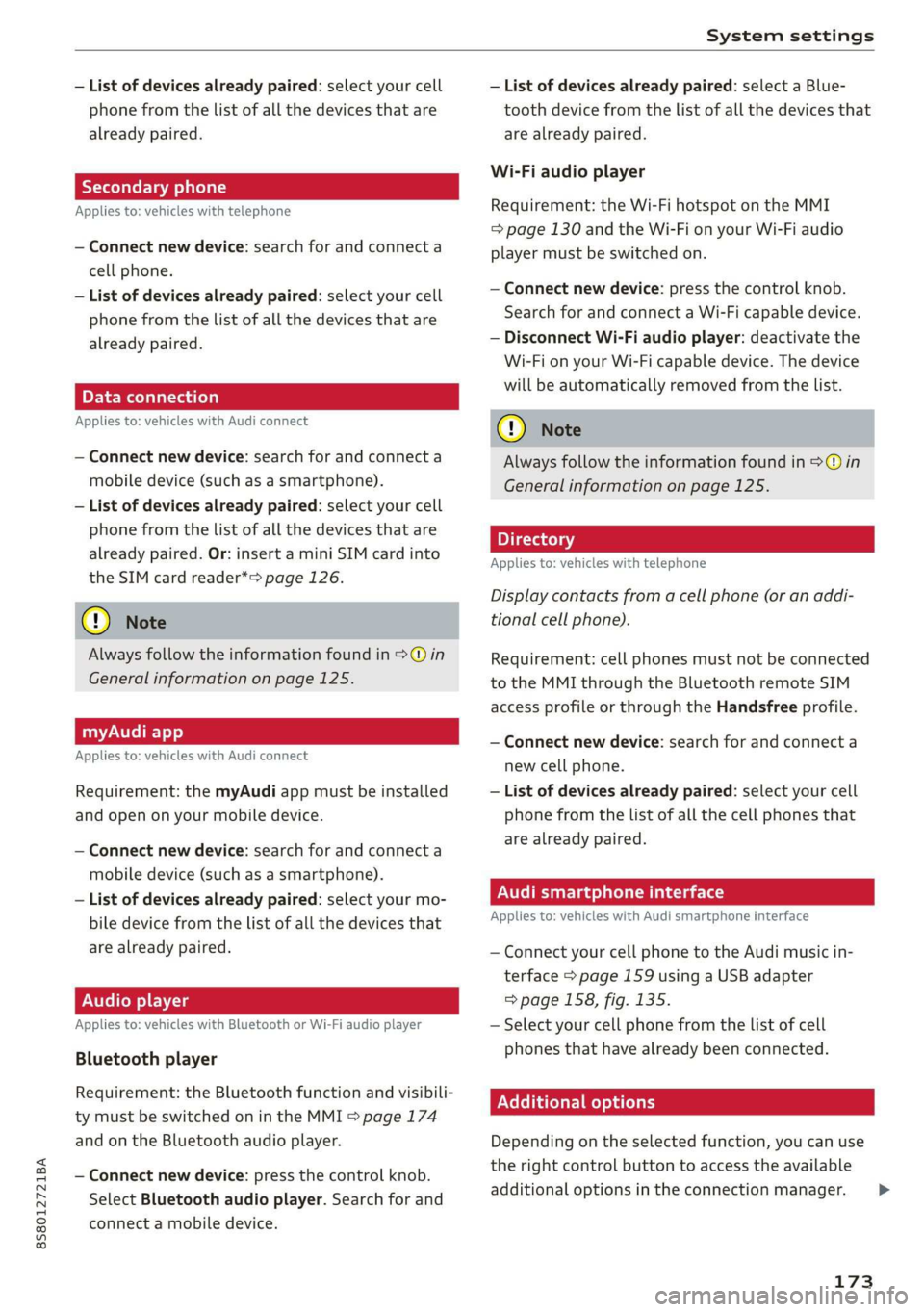
— List of devices already paired: select your cell — List of devices already paired: select a Blue-
phone from the list of all the devices that are tooth device from the list of all the devices that
already paired. are already paired.
Wi-Fi audio player
Applies to: vehicles with telephone Requirement: the Wi-Fi hotspot on the MMI
= page 130 and the Wi-Fi on your Wi-Fi audio
— Connect new device: search for and connect a player must be switched on.
cell phone.
— List of devices already paired: select your cell
phone from the list of all the devices that are
already paired. — Disconnect Wi-Fi audio player: deactivate the
Wi-Fi on your Wi-Fi capable device. The device
will be automatically removed from the list.
— Connect new device: press the control knob.
Search for and connect a Wi-Fi capable device.
PELE Mela a-\a a le)a)
Applies to: vehicles with Audi connect @) N
ote
— Connect new device: search for and connect a Always follow the information found in >@ in
mobile device (such as a smartphone). General information on page 125.
— List of devices already paired: select your cell
phone from the list of all the devices that are 7
. : aa . Directory
already paired. Or: insert a mini SIM card into Applies tor vehicles with telephone
the SIM card reader*> page 126.
Display contacts from a cell phone (or an addi-
(@) Note tional cell phone).
Always follow the information found in >@ in Requirement: cell phones must not be connected
General information on page 125. to the MMI through the Bluetooth remote SIM
access profile or through the Handsfree profile.
myAudi app
Applies to: vehicles with Audi connect
— Connect new device: search for and connect a
new cell phone.
Requirement: the myAudi app must be installed — List of devices already paired: select your cell
and open on your mobile device. phone from the list of all the cell phones that
. are already paired.
— Connect new device: search for and connect a yP
mobile device (such as a smartphone).
— List of devices already paired: select your mo- Audi smartphone interface
bile device from the list of all the devices that Applies to: vehicles with Audi smartphone interface
are already paired. — Connect your cell phone to the Audi music in-
terface > page 159 using a USB adapter
Audio player => page 158, fig. 135.
Applies to: vehicles with Bluetooth or Wi-Fi audio player — Select your cell phone from the list of cell
phones that have already been connected.
Bluetooth player
Requirement: the Bluetocth function and visibili- EER
ty must be switched on in the MMI > page 174
and on the Bluetooth audio player. Depending on the selected function, you can use
the
right control button to access the available
— Connect new device: press the control knob. 3 : . i
additional options in the connection manager. >
Select Bluetooth audio player. Search for and
connect a mobile device.
173
Page 176 of 304
System settings
Bluetooth settings
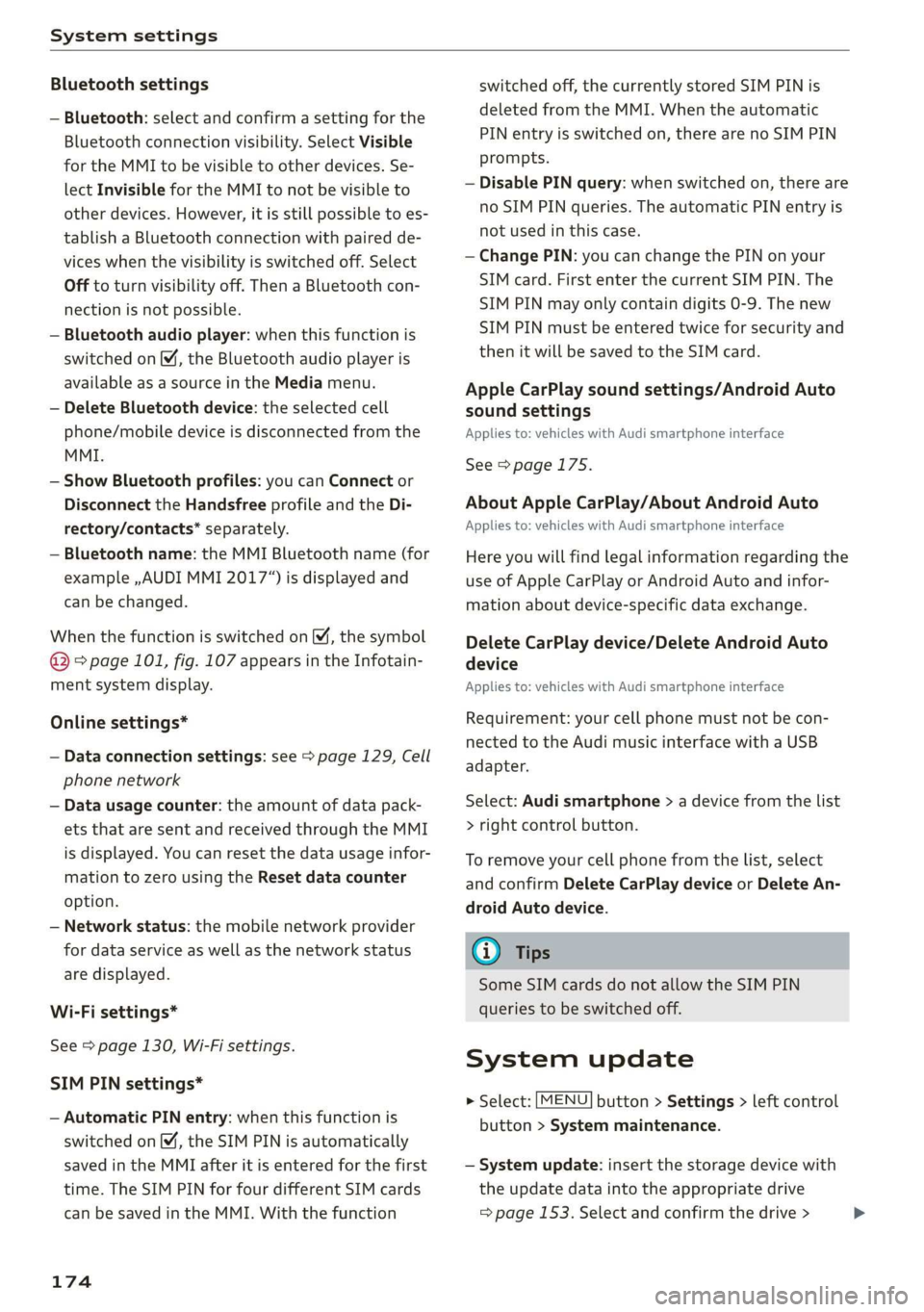
— Bluetooth: select and confirm a setting for the
Bluetooth connection visibility. Select Visible
for the MMI to be visible to other devices. Se-
lect Invisible for the MMI to not be visible to
other devices. However, it is still possible to es-
tablish a Bluetooth connection with paired de-
vices when the visibility is switched off. Select
Off to turn visibility off. Then a Bluetooth con-
nection is not possible.
— Bluetooth audio player: when this function is
switched on M, the Bluetooth audio player is
available as a source in the Media menu.
— Delete Bluetooth device: the selected cell
phone/mobile device is disconnected from the
MMI.
— Show Bluetooth profiles: you can Connect or
Disconnect the Handsfree profile and the Di-
rectory/contacts* separately.
— Bluetooth name: the MMI Bluetooth name (for
example ,AUDI MMI 2017“) is displayed and
can be changed.
When the function is switched on M, the symbol
@ © page 101, fig. 107 appears in the Infotain-
ment system display.
Online settings*
— Data connection settings: see > page 129, Cell
phone network
— Data usage counter: the amount of data pack-
ets that are sent and received through the MMI
is displayed. You can reset the data usage infor-
mation to zero using the Reset data counter
option.
— Network status: the mobile network provider
for data service as well as the network status
are displayed.
Wi-Fi settings*
See > page 130, Wi-Fi settings.
SIM PIN settings*
— Automatic PIN entry: when this function is
switched on, the SIM PIN is automatically
saved in the MMI after it is entered for the first
time. The SIM PIN for four different SIM cards
can be saved in the MMI. With the function
174
switched off, the currently stored SIM PIN is
deleted from the MMI. When the automatic
PIN entry is switched on, there are no SIM PIN
prompts.
— Disable PIN query: when switched on, there are
no SIM PIN queries. The automatic PIN entry is
not used in this case.
— Change PIN: you can change the PIN on your
SIM card. First enter the current SIM PIN. The
SIM PIN may only contain digits 0-9. The new
SIM PIN must be entered twice for security and
then it will be saved to the SIM card.
Apple CarPlay sound settings/Android Auto
sound settings
Applies to: vehicles with Audi smartphone interface
See > page 175.
About Apple CarPlay/About Android Auto
Applies to: vehicles with Audi smartphone interface
Here you will find legal information regarding the
use of Apple CarPlay or Android Auto and infor-
mation about device-specific data exchange.
Delete CarPlay device/Delete Android Auto
device
Applies to: vehicles with Audi smartphone interface
Requirement: your cell phone must not be con-
nected to the Audi music interface with a USB
adapter.
Select: Audi smartphone > a device from the list
> right control button.
To remove your cell phone from the list, select
and confirm Delete CarPlay device or Delete An-
droid
Auto device.
(i) Tips
Some SIM cards do not allow the SIM PIN
queries to be switched off.
System update
> Select: [MENU] button > Settings > left control
button > System maintenance.
— System update: insert the storage device with
the update data into the appropriate drive
= page 153. Select and confirm the drive > >
Page 196 of 304
Airbag system
these areas and you or any other person in
the vehicle.
— Never attach objects to the windshield
above the passenger front airbag, such as
accessory GPS navigation units or music
players. Such objects could cause serious in-
jury in a collision, especially when the air-
bags inflate.
ZA\ WARNING
A person on the front passenger seat, espe-
cially infants and small children, will receive
serious injuries and can even be killed by be-
ing too close to the airbag when it inflates.
— Although the Advanced Airbag System in
your vehicle is designed to turn off the front
passenger airbag if an infant or a small child
is on the front passenger seat, nobody can
absolutely guarantee that deployment un-
der these special conditions is impossible in
all conceivable situations that may happen
during the useful life of your vehicle.
— The Advanced Airbag System can deploy in
accordance with the “Low risk” option under
the U.S. Federal Standard if a child that is
heavier than the typical one-year old child is
on the front passenger seat and the other
conditions for airbag deployment are met.
— For its own safety, a child should always ride
properly restrained for its age and size.
Advanced front airbag system
Your vehicle is equipped with a front Advanced
Airbag System in compliance with United States
Federal Motor Vehicle Safety Standard (FMVSS)
208, as well as Canada Motor Vehicle Safety
Standard (CMVSS) 208 as applicable at the time
your vehicle was manufactured.
The front Advanced Airbag System supplements
the safety belts to provide additional protection
for the driver's and front passenger's heads and
upper bodies in frontal crashes. The airbags in-
flate only in frontal impacts when the vehicle de-
celeration is high enough.
The front Advanced Airbag System for the front
seat occupants is not a substitute for your safety
194
belts. Rather, it is part of the overall occupant re-
straint system in your vehicle. Always remember
that the airbag system can only help to protect
you, if you are sitting upright, wearing your safe-
ty belt and wearing it properly. This is why you
and
your passengers must always be properly re-
strained, not just because the law requires you to
be.
The Advanced Airbag System in your vehicle has
been certified to meet the “low risk” require-
ments for 3 and 6 year-old children on the pas-
senger side and very small adults on the driver
side. The low risk deployment criteria are intend-
ed to help reduce the risk of injury through inter-
action with the front airbag that can occur, for
example, by being too close to the steering wheel
and instrument panel when the airbag inflates.
In addition, the system has been certified to
comply with the “suppression” requirements of
the Safety Standard, to turn off the front airbag
for infants 12 months old and younger who are
restrained on the front passenger seat in child re-
straints that are listed in the Standard
= page 212, Child restraints and Advanced front
airbag system.
“Suppression” requires the front airbag on the
passenger side to be turned off if:
—a child up to about one year of age is restrained
on the front passenger seat in one of the rear-
facing or forward-facing infant restraints listed
in Federal Motor Vehicle Safety Standard 208
with which the Advanced Airbag System in your
vehicle was certified. For a listing of the child
restraints that were used to certify your vehi-
cle's compliance with the US Safety Standard
=>page 212,
— When a person is detected on the front passen-
ger seat that has an electrical capacitance that
is more than the total electrical capacitance of
a child that is about 1 year old restrained in one
of the rear-facing or forward-facing infant re-
straints (listed in Federal Motor Vehicle Safety
Standard 208 with which the Advanced Airbag
System in your vehicle was certified), the front
airbag on the passenger side may or may not
deploy.
Page 199 of 304
8S8012721BA
Airbag system
— Never remove the upholstery from the front
passenger Seat.
— Never disassemble or remove parts from the
seat or disconnect wires from it.
— Never carry sharp objects in your pockets or
put them on the seat. The capacitive passen-
ger detection mat in the front passenger
seat will not function properly if it is punc-
tured.
— Never carry things on your lap or carry ob-
jects on the front passenger seat. Such ob-
jects can
influence the capacitance regis-
tered by the capacitive passenger detection
system, so that incorrect information is pro-
vided to the airbag control unit.
— Never store items under the front passenger
seat. Parts of the Advanced Airbag System
under the passenger seat could be dam-
aged, preventing them and the airbag sys-
tem from working properly.
— Never place seat covers or replacement up-
holstery that have not been specifically ap-
proved by Audi on the front seats.
— Seat covers can prevent the Advanced Airbag
System from recognizing child restraints or
occupants on the front passenger seat and
prevent the side airbag in the seat backrest
from deploying properly.
— If a seat heater has been retrofitted or oth-
erwise added to the front passenger seat,
never install any child restraint system on
this seat.
— Never use cushions, pillows, blankets, or
similar items on the front passenger seat.
The additional layers prevent the capacitive
passenger detection system from accurately
measuring the capacitance of the child safe-
ty seat and/or the person on the seat and
thus keep the Advanced Airbag System from
working properly.
— Never place or use any electrical device
(such as a laptop, CD player, electronic
games device, power inverter or seat heater
for child seats) on the front passenger seat
if the device is connected to the 12-volt
socket or the cigarette lighter socket. Such
devices can influence the capacitance regis-
tered by the capacitive passenger detection
system, so that incorrect information is pro-
vided to the airbag control unit.
— If you must use a child restraint on the front
passenger seat and the child restraint man-
ufacturer's instructions require the use of a
towel, foam cushion or something else to
properly position the child restraint, make
certain that the PASSENGER AIR BAG OFF
#; light comes on and stays on whenever
the child restraint is installed on the front
passenger seat.
— If the PASSENGER AIR BAG OFF %; light
does not come on and stay on, have the air-
bag system inspected by your Audi dealer.
ZA WARNING
If the front passenger seat gets wet, dry it im-
mediately.
— If liquid soaks into the front passenger seat,
this can keep the airbag system from work-
ing properly and may, for instance, deacti-
vate the passenger frontal airbag. If this
happens, the PASSENGER AIR BAG OFF ¥,
light will come on and stay on together with
the airbag indicator light ka in the instru-
ment cluster.
— If liquid is pooled on the seat, but has not
soaked in, this may also keep the airbag sys-
tem from working properly and cause the
passenger frontal airbag to be enabled
(turned on), even though there is a properly
installed child restraint system on the seat.
Wet towels or other wet things on the seat
cushion can have the same effect. If the
front passenger frontal airbag is turned on,
the PASSENGER AIR BAG OFF #; light will
turn off.
How the Advanced Airbag System
oYpa) Ma Cel (Laas
The front Advanced Airbag System and the side
airbags supplement the protection offered by the
front
three-point safety belts to help reduce the
risk of injury in a wide range of accident and crash
situations. Be sure to read the important infor-
mation about safety and heed the WARNINGS in
this chapter.
197
>
Page 203 of 304
8S8012721BA
Airbag system
will not change the way the front passenger's
frontal airbag works, it will no longer be possible
to use the PASSENGER AIR BAG OFF %; ON @
light to make sure that the airbag on/off status is
correct for the occupant on the front passenger
seat. Have the airbag system inspected immedi-
ately by your authorized Audi dealer.
The PASSENGER AIR BAG OFF 3%; ON @ light
will blink for about 5 seconds when:
— the capacitive passenger detection system,
which switches the front seat passenger's fron-
tal Advanced Airbag on and off, detects a
change in the status of the front passenger
seat.
As soon as the PASSENGER AIR BAG OFF 7¥; ON
® light stops blinking, always make sure that the
airbag status (on or off) as shown by the light is
proper for the age, size and electrical capacitance
of the person occupying the front passenger seat.
Always make sure that the safety belt for the
front passenger seat is properly fastened.
The PASSENGER AIR BAG OFF %¥; / PASSENGER
AIR BAG ON @ light will show the status of the
front seat passenger's frontal Advanced Airbag.
The PASSENGER AIR BAG OFF %; light:
—will come on if the front passenger seat is not
occupied;
— will come on if the electrical capacitance meas-
ured by the capacitive passenger detection sys-
tem for the front passenger seat equals the
combined capacitance of an infant up to about
one year of age and one of the rearward-facing
or forward-facing child restraints listed in Fed-
eral Motor Vehicle Safety Standard 208 with
which the Advanced Airbag System in your vehi-
cle was certified; For a listing of the child re-
straints that were used to certify your vehicle's
compliance with the U.S. Safety Standard
> page 212.
— will go out if the front passenger seat is occu-
pied by an adult as registered by the capacitive
passenger detection system.
— The PASSENGER AIR BAG OFF #; light must
come on and stay on if the ignition is on and...
—acar bed has been installed on the front pas-
senger seat, or
—arearward-facing child restraint has been in-
stalled on the front passenger seat, or
—a forward-facing child restraint has been instal-
led on the front passenger seat,
—and if the electrical capacitance registered on
the front passenger seat is equal to or less than
the combined capacitance of a typical 1 year-
old infant and one of the rearward-facing or
forward-facing child restraints listed in Federal
Motor Vehicle Safety Standard 208 with which
the Advanced Airbag System in your vehicle was
certified.
If the front passenger seat is not occupied, the
front airbag will not deploy, and the PASSENGER
AIR BAG OFF 3; light will stay on.
Never install a rearward-facing child restraint on
the front passenger seat > page 190, Child re-
straints on the front seat - some important
things to know and & page 210, Child safety.
If the PASSENGER AIR BAG OFF #; light
comes on...
If the PASSENGER AIR BAG OFF 3%; light comes
on when one of the conditions listed above is
met, be sure to check the light regularly to make
certain that the PASSENGER AIR BAG OFF #;
light stays on continuously whenever the ignition
is on. If the PASSENGER AIR BAG OFF %; light
does not appear on and does not stay on all the
time, stop as soon as it is safe to do so and
— reactivate the system by turning the ignition off
for more than 4 seconds and then turning it on
again;
— remove and reinstall the child restraint. Make
sure that the child restraint is properly installed
and that the safety belt for the front passenger
seat has been correctly routed through the
child restraint as described in the child restraint
manufacturer's instructions;
— make sure that the convertible locking retractor
on the safety belt for the front passenger seat
has been activated and that the safety belt has
been pulled tight.
— make sure that no electrical device (such as a
laptop, CD player, electronic games device,
power inverter or seat heater for child seats) is
placed or used on the front passenger seat if
201
>
Page 213 of 304
8S8012721BA
Child safety
— Never install a rearward facing child safety
seat on the front passenger seat if the PAS-
SENGER AIR BAG OFF 3%; light does not
turn on and stay on. Have the system in-
spected immediately by an authorized Audi
dealer or authorized Audi Service Facility.
ZA\ WARNING
— Forward-facing child seats installed on the
front passenger seat may interfere with the
deployment of the airbag and cause serious
personal injury to the child.
— If exceptional circumstances require the use
of a forward-facing child restraint on the
front passenger's seat, the child's safety and
well-being require the following special pre-
cautions to be taken:
— Always make sure that the forward-facing
seat has been designed and certified by its
manufacturer for use on a front passenger
seat with a front and side airbag.
— Always carefully follow the manufacturer's
instructions provided with the child seat or
infant carrier.
— Never put the forward-facing child re-
straint up against or very near the instru-
ment panel.
— Always move the front passenger seat to
the highest position in the up and down
adjustment range and move it back to the
rearmost position in the seat's fore and aft
adjustment range, as far away from the
airbag as possible, before installing the
forward-facing child restraint.
— Always make sure that the safety belt up-
per anchorage is behind the child restraint
and not next to or in front of the child re-
straint so that the safety belt will be prop-
erly positioned.
— Always make sure that nothing prevents
the front passenger's seat from being
moved to the rearmost position in its fore
and aft adjustment range.
— Never place objects on the seat (such as a
laptop, CD player, electronic games device,
power inverter or seat heater for child
seats). These may influence the electrical
capacitance measured by the capacitive
passenger detection system and can also
fly around in an accident and cause serious
personal injury.
— Never place or use any electrical device
(such as a laptop, CD player, electronic
games device, power inverter or seat heat-
er for child seats) on the front passenger
seat if the device is connected to the 12-
volt socket or the cigarette lighter socket.
— Ifa seat heater has been retrofitted or
otherwise added to the front passenger
seat, never install any child restraint sys-
tem on this seat.
— Make sure that there are no wet objects
(such as a wet towel) and no water or oth-
er liquids on the front passenger seat
cushion.
— Always make sure that the PASSENGER
AIR BAG OFF #; light comes on and stays
on all the time whenever the ignition is
switched on.
— Never install a forward-facing child safety
seat on the front passenger seat if the
PASSENGER AIR BAG OFF %; light does
not turn on and stay on. Have the system
inspected immediately by an authorized
Audi dealer or authorized Audi Service Fa-
cility.
— Always buckle the child seat firmly in place
even if a child is not sitting in it. A loose
child seat can fly around during a sudden
stop or in a collision.
— Always read and heed all WARNINGS
whenever using a child restraint in a vehi-
cle > page 182, Safety belts, > page 189,
Airbag system and > page 210, Important
information.
G) Tips
Always replace child restraints that were in-
stalled in a vehicle during a crash. Damage to
a child restraint that is not visible could cause
it to fail in another collision situation.
211
Page 216 of 304
Child safety
> Push the child safety seat down with your full
weight to get the safety belt really tight so that
the seat cannot move forward and sideways
more than 1 in (2.5 cm).
Always remember: Even though your vehicle is
equipped with an Advanced Airbag system, a
child should always ride in the seat properly re-
strained for its age and size.
Z\ WARNING
Not using a child safety seat, using the wrong
child safety seat or improperly installing a
child restraint increases the risk of serious
personal injury and death.
— All vehicle occupants and especially children
must be restrained properly whenever riding
in a vehicle. An unrestrained or improperly
restrained child could be injured by striking
the interior or by being ejected from the ve-
hicle during a sudden maneuver or impact.
An unrestrained or improperly restrained
child is also at greater risk of injury or death
through contact with an inflating airbag.
— Commercially available child safety seats are
required to comply with U.S. Federal Motor
Vehicle Safety Standard (FMVSS) 213 (in
Canada CMVSS 213).
— When buying a child restraint, select one
that fits your child and the vehicle.
— Only use child restraint systems that fully
contact the flat portion of the seat cush-
ion. The child restraint must not tip or
lean to either side. Audi does not recom-
mend using child safety seats that rest on
legs or tube-like frames. They do not pro-
vide adequate contact with the seat.
— Always heed all legal requirements per-
taining to the installation and use of child
safety seats and carefully follow the in-
structions provided by the manufacturer
of the seat you are using.
— Never let more than one child occupy a child
safety seat.
— Never let babies or older children ride ina
vehicle while sitting on the lap of another
passenger.
214
— Holding a child in your arms is never a sub-
stitute for a child restraint system.
— The strongest person could not hold the
child with the forces that exist in an acci-
dent. The child will strike the interior of
the vehicle and can also be struck by the
passenger.
— The child and the passenger can also injure
each other in an accident.
Never install rear-facing child safety seats or
infant carriers on the front passenger seat.
A child will be seriously injured and can be
killed when the passenger airbag inflates -
even with an Advanced Airbag System.
The inflating airbag will hit the child safety
seat or infant carrier with great force and
will smash the child safety seat and child
against the backrest, center armrest, door
or roof.
If exceptional circumstances require the use
of a forward-facing child restraint on the
front passenger's seat, the child's safety and
well-being require that the following special
precautions be taken:
— Make sure the forward-facing seat has
been designed and certified by its manu-
facturer for use on a front seat with a pas-
senger front and side airbag.
— Always carefully follow the manufacturer's
instructions provided with the child safety
seat or carrier.
— Always move the front passenger seat into
the rearmost position of the passenger
seat's fore and aft adjustment range, and
as far away from the airbag as possible be-
fore installing the child restraint.
— Always make sure that nothing prevents
the front passenger's seat from being
moved to the rearmost position in its fore
and aft adjustment range.
— Always make sure that the backrest is in
the upright position.
— Never place or use any electrical device
(such as a laptop, CD player, electronic
games device, power inverter or seat heat-
er for child seats) on the front passenger
seat if the device is connected to the 12-
volt socket or the cigarette lighter socket.
Page 217 of 304
8S58012721BA
Child safety
— If a seat heater has been retrofitted or
otherwise added to the front passenger
seat, never install any child restraint sys-
tem on this seat.
— Make sure that there are no wet objects
(such as a wet towel) and no water or oth-
er liquids on the front passenger seat
cushion.
— Never place objects on the seat (such as a
laptop, CD player, electronic games device,
power inverter or seat heater for child
seats). These may influence the electrical
capacitance measured by the capacitive
passenger detection system and can also
fly around in an accident and cause serious
personal injury.
— Always buckle the child safety seat firmly in
place even if a child is not sitting in it. A
loose child safety seat can fly around during
a sudden stop or ina collision.
— Always read and heed all WARNINGS when-
ever using a child restrained in a vehicle is
being used > page 182, Safety belts,
=> page 189, Airbag system and > page 210,
Child safety.
ZA WARNING
To reduce the risk of serious injury, make sure
that the PASSENGER AIR BAG OFF 3%; light
comes on and stays on whenever a child re-
straint is installed on the front passenger seat
and the ignition is switched on.
— Never install a reward facing child safety
seat on the front passenger seat if the PAS-
SENGER AIR BAG OFF %; light does not
turn on and stay on.
— Have the airbag system inspected by your
authorized Audi dealer immediately.
Child safety seats
Tat h
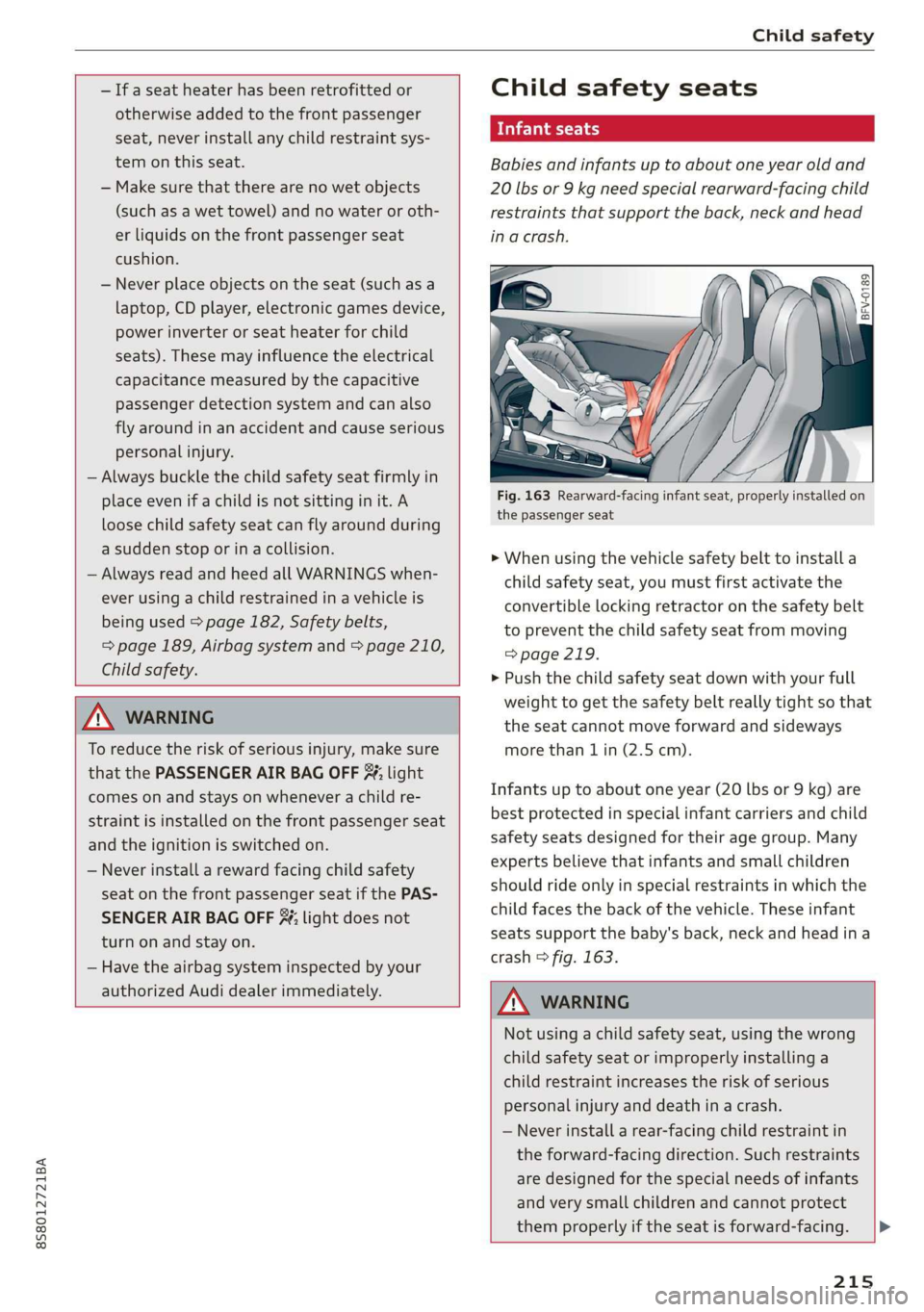
Babies and infants up to about one year old and
20 lbs or 9 kg need special rearward-facing child
restraints that support the back, neck and head
in a crash.
2 ©
S
> c a
the passenger seat
> When using the vehicle safety belt to install a
child safety seat, you must first activate the
convertible locking retractor on the safety belt
to prevent the child safety seat from moving
=> page 219.
» Push the child safety seat down with your full
weight to get the safety belt really tight so that
the seat cannot move forward and sideways
more than 1 in (2.5 cm).
Infants up to about one year (20 lbs or 9 kg) are
best protected in special infant carriers and child
safety seats designed for their age group. Many
experts believe that infants and small children
should ride only in special restraints in which the
child faces the back of the vehicle. These infant
seats support the baby's back, neck and head ina
crash > fig. 163.
ZA\ WARNING
Not using a child safety seat, using the wrong
child safety seat or improperly installing a
child restraint increases the risk of serious
personal injury and death in a crash.
— Never install a rear-facing child restraint in
the forward-facing direction. Such restraints
are designed for the special needs of infants
and
very small children and cannot protect
them properly if the seat is forward-facing.
215