display AUDI TT ROADSTER 2019 User Guide
[x] Cancel search | Manufacturer: AUDI, Model Year: 2019, Model line: TT ROADSTER, Model: AUDI TT ROADSTER 2019Pages: 304, PDF Size: 80.77 MB
Page 46 of 304
Lights and Vision
Replacing windshield wiper blades
he
B8R-0379
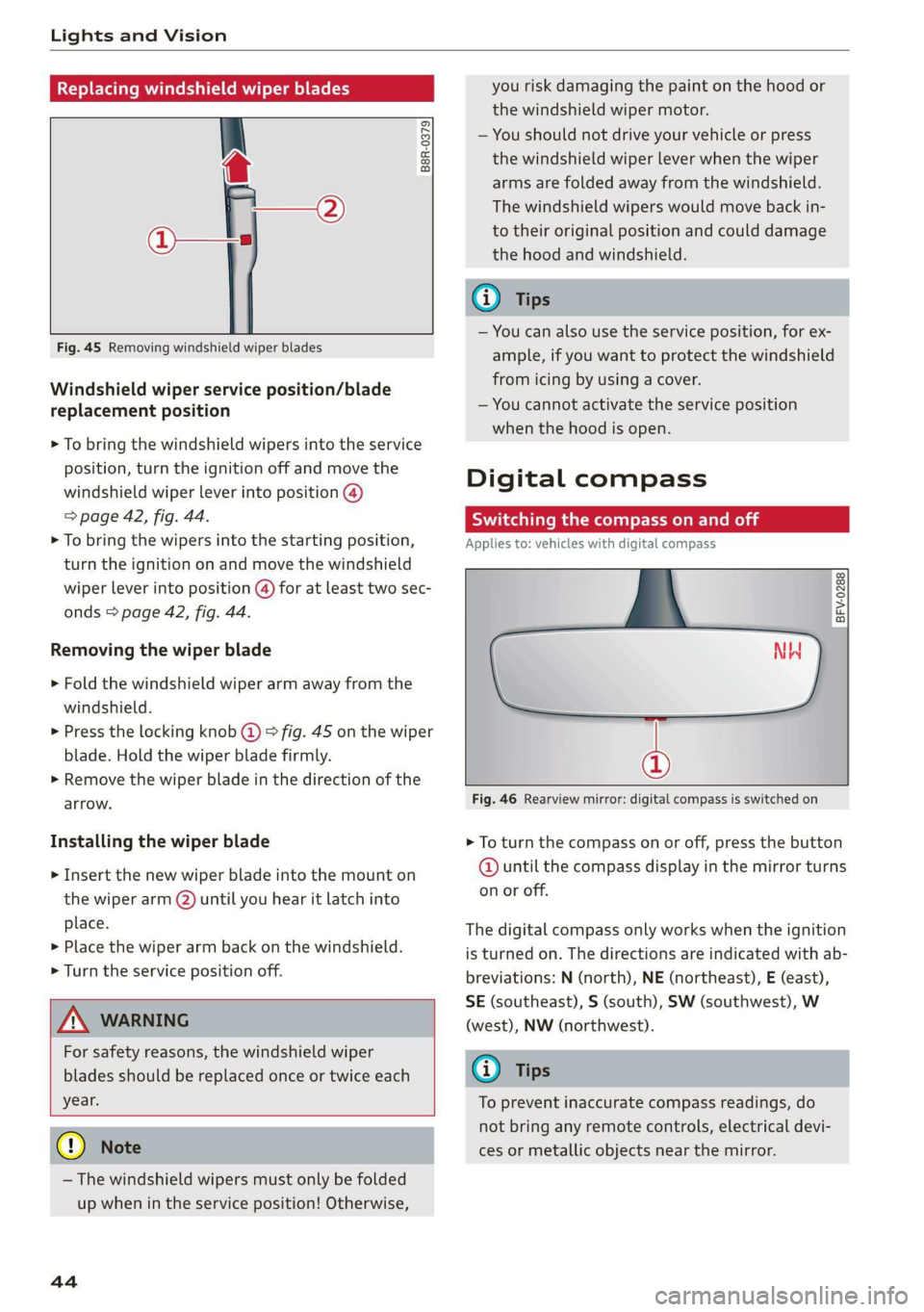
Fig. 45 Removing windshield wiper blades
Windshield wiper service position/blade
replacement position
> To bring the windshield wipers into the service
position, turn the ignition off and move the
windshield wiper lever into position @)
> page 42, fig. 44.
> To bring the wipers into the starting position,
turn the ignition on and move the windshield
wiper lever into position (@) for at least two sec-
onds > page 42, fig. 44.
Removing the wiper blade
> Fold the windshield wiper arm away from the
windshield.
> Press the locking knob (@) > fig. 45 on the wiper
blade. Hold the wiper blade firmly.
> Remove the wiper blade in the direction of the
arrow.
Installing the wiper blade
> Insert the new wiper blade into the mount on
the wiper arm (2) until you hear it latch into
place.
» Place the wiper arm back on the windshield.
> Turn the service position off.
Z\ WARNING
For safety reasons, the windshield wiper
blades should be replaced once or twice each
year.
@) Note
— The windshield wipers must only be folded
up when in the service position! Otherwise,
44
you risk damaging the paint on the hood or
the windshield wiper motor.
— You should not drive your vehicle or press
the windshield wiper lever when the wiper
arms are folded away from the windshield.
The windshield wipers would move back in-
to their original position and could damage
the hood and windshield.
G) Tips
— You can also use the service position, for ex-
ample, if you want to protect the windshield
from icing by using a cover.
— You cannot activate the service position
when the hood is open.
Digital compass
Scale ma meel eR meme a
Applies to: vehicles with digital compass
BFV-0288
NW
@
Fig. 46 Rearview mirror: digital compass is switched on
> To turn the compass on or off, press the button
@ until the compass display in the mirror turns
on or off.
The digital compass only works when the ignition
is turned on. The directions are indicated with ab-
breviations: N (north), NE (northeast), E (east),
SE (southeast), S (south), SW (southwest), W
(west), NW (northwest).
(i) Tips
To prevent inaccurate compass readings, do
not bring any remote controls, electrical devi-
ces or metallic objects near the mirror.
Page 47 of 304
8S58012721BA
Lights and Vision
Adjusting the magnetic zone
Applies to: vehicles with digital compass
BFV-0293
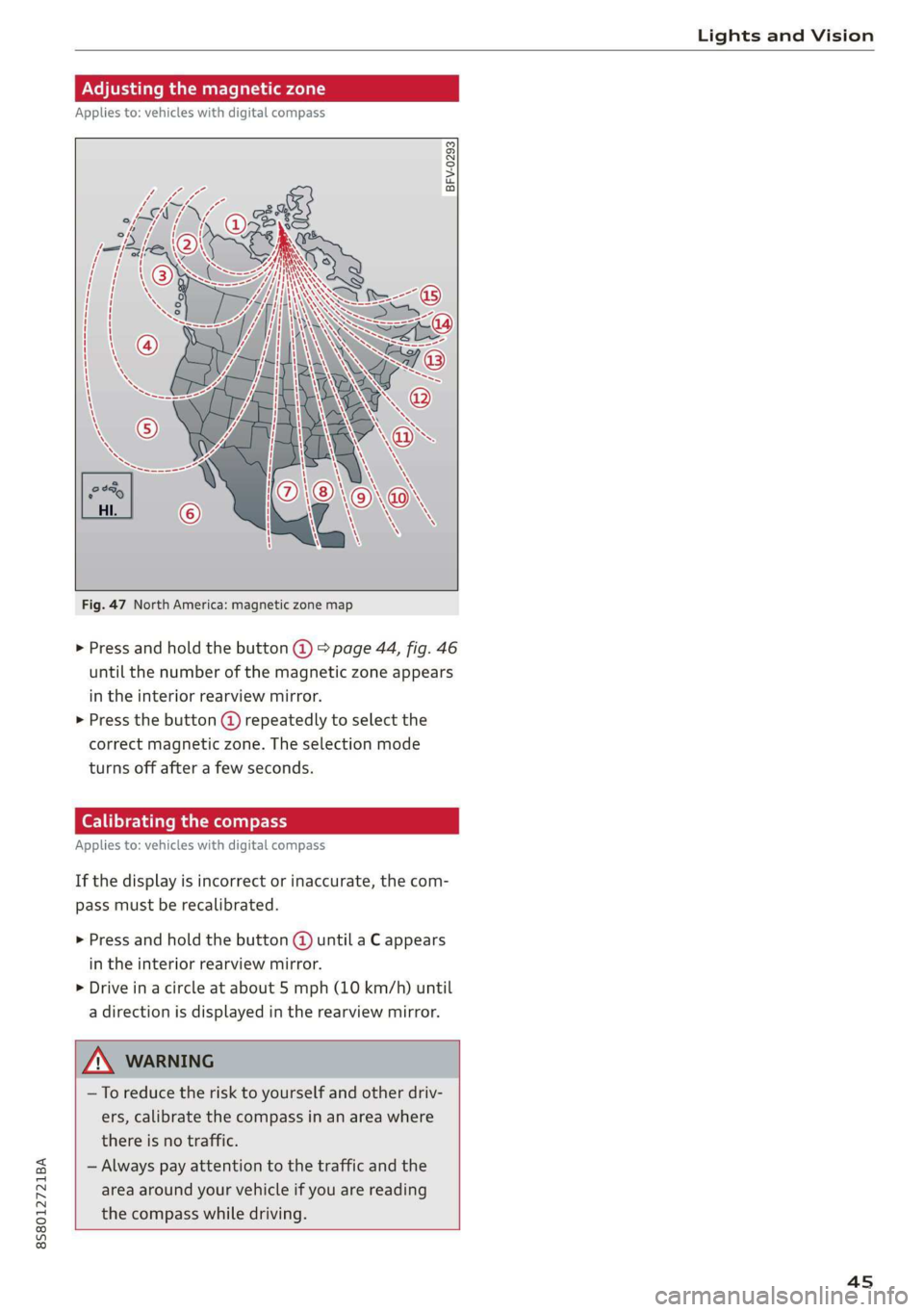
Fig. 47 North America: magnetic zone map
> Press and hold the button @) > page 44, fig. 46
until the number of the magnetic zone appears
in the interior rearview mirror.
> Press the button @) repeatedly to select the
correct magnetic zone. The selection mode
turns off after a few seconds.
Calibrating the compass
Applies to: vehicles with digital compass
If the display is incorrect or inaccurate, the com-
pass must be recalibrated.
> Press and hold the button @ until a C appears
in the interior rearview mirror.
> Drive in a circle at about 5 mph (10 km/h) until
a direction is displayed in the rearview mirror.
—To reduce the risk to yourself and other driv-
ers, calibrate the compass in an area where
there is no traffic.
— Always pay attention to the traffic and the
area around your vehicle if you are reading
the compass while driving.
45
Page 61 of 304
8S58012721BA
Driving
authorized Audi Service Facility immediately to
have the malfunction corrected. To start the en-
gine, press and hold the [START ENGINE STOP
button.
Remote control key: hold back of key
against the designated area. See owner's man-
ual
This message appears if there is no convenience
key inside the vehicle or if the system does not
recognize the key. The convenience key may not
be recognized, for example, if it is covered by an
object that disrupts the signal (such as a brief-
case), or if the key battery is weak. Electronic de-
vices such as cell phones can also interfere with
the signal.
To still be able to start or stop the engine, see
= page 59, Starting the engine when there is a
malfunction.
B Remote control key: key not detected. Is the
key still in the vehicle?
The BSB indicator light turns on and this message
appears if the convenience key was removed from
the vehicle when the engine was running. If the
convenience key is no longer in the vehicle, you
cannot switch the ignition on or start the engine
once you stop it. You also cannot lock the vehicle
from the outside.
Please press the brake pedal
This message appears if you do not press the
brake pedal when starting the engine.
Please select N or P
This message appears when starting or stopping
the engine if the selector lever is not in the "N" or
"P" position. The engine will not start/stop.
Starting the engine when there is a
Tare iira dea)
It may not be possible to start the engine under
certain circumstances, for example, if the bat-
tery
in the vehicle key is drained, if interference is
affecting the key or if there is a system malfunc-
tion.
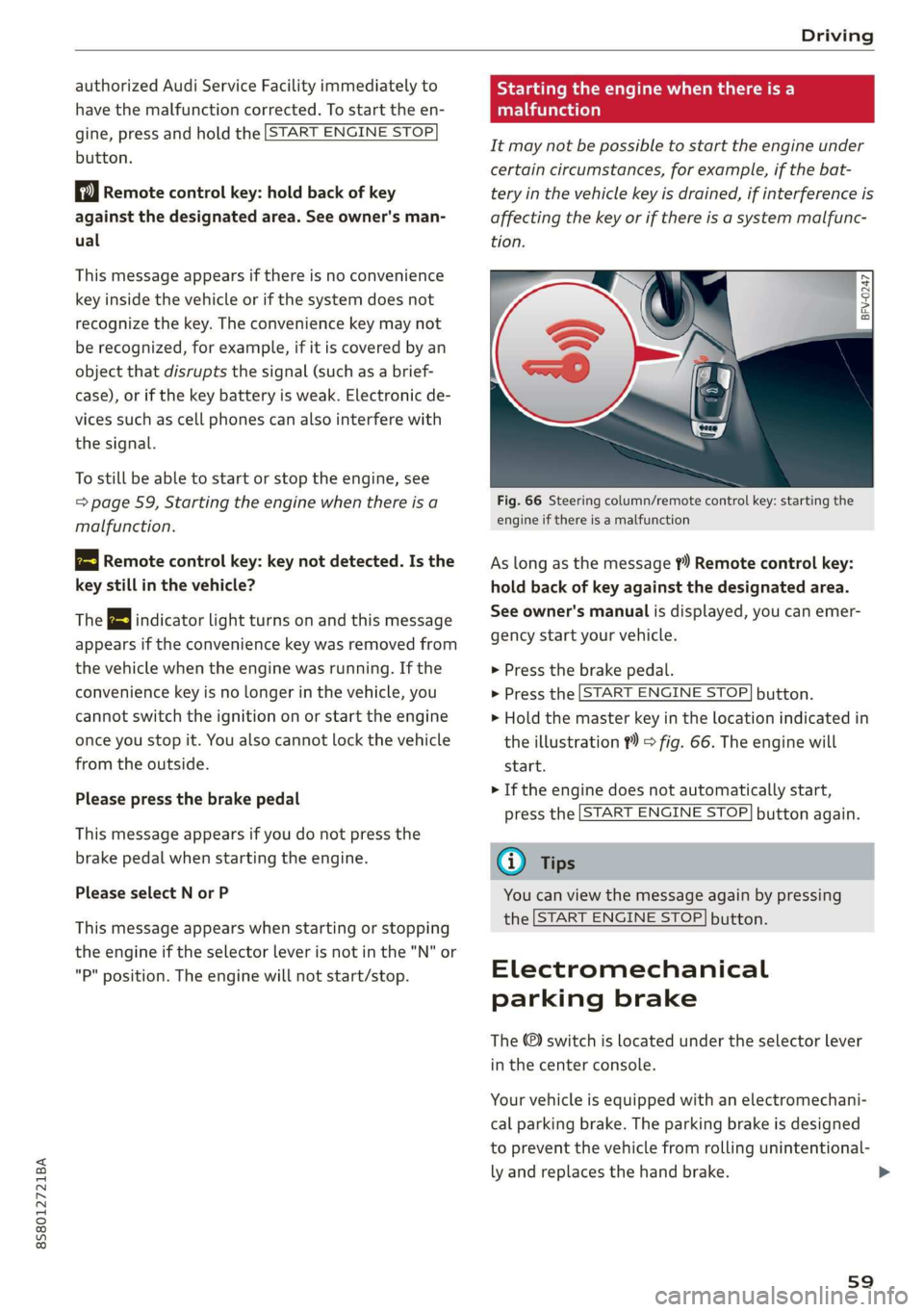
Fig. 66 Steering column/remote control key: starting the
engine if there is a malfunction
As long as the message ?) Remote control key:
hold back of key against the designated area.
See owner's manual is displayed, you can emer-
gency start your vehicle.
> Press the brake pedal.
> Press the [START ENGINE STOP] button.
> Hold the master key in the location indicated in
the illustration ?) © fig. 66. The engine will
start.
> If the engine does not automatically start,
press the [START ENGINE STOP] button again.
(i) Tips
You can view the message again by pressing
the [START ENGINE STOP] button.
Electromechanical
parking brake
The ©) switch is located under the selector lever
in the center console.
Your vehicle is equipped with an electromechani-
cal parking brake. The parking brake is designed
to prevent the vehicle from rolling unintentional-
ly and replaces the hand brake.
59
Page 62 of 304
Driving
Setting/manually releasing the parking
brake
> Pull the ©) switch to set the parking brake. The
LED in the switch turns on. The PARK (USA mod-
els) (Canada models) indicator light also
turns on in the instrument cluster display.
> To release the parking brake manually, press
the brake or accelerator pedal while the igni-
tion is switched on and press the ©) switch at
the same time. The LED in the button and the
indicator light in the display turn off.
Releasing the parking brake automatically
Requirement: the driver's door must be closed.
> To start driving and release the parking brake
automatically, press the accelerator pedal as
usual.
In addition to releasing the parking brake auto-
matically, other convenience and safety functions
are available when you start driving > page 61,
Starting to drive.
Emergency braking function
You can use the emergency braking function in an
emergency situation, or if the standard brakes
are malfunctioning or the pedal is obstructed.
> Pull and hold the ©) switch.
> As soon as you release the ©) switch or acceler-
ate, the braking stops.
Pulling
and holding the ©) switch while driving
the vehicle activates the emergency braking func-
tion. The hydraulic brake system will brake all
four wheels. The braking effect is similar to heavy
braking > A\.
To reduce the risk of activating the emergency
braking by mistake, a warning tone (buzzer)
sounds when the ©) switch is pulled. Emergency
braking stops as soon as the ©) switch is released
or the accelerator pedal is pressed.
Parking
> Press the brake pedal to stop the vehicle.
> Pull the © switch to set the parking brake.
>» Place the selector lever in the “P” position.
> Turn the engine off > A\.
60
> Turn the steering wheel when parking on in-
clines so that the wheels will roll into the curb
if the vehicle starts moving.
ZA WARNING
— Ifa gear is engaged while the vehicle is sta-
tionary and the engine is running, do not
press the accelerator pedal inadvertently.
Otherwise, the vehicle will start to move im-
mediately and this could result in an acci-
dent.
— Emergency braking should only be used in
an emergency, when the when the standard
brake pedal is malfunctioning or obstructed.
During emergency braking, your vehicle will
brake similar to heavy braking. ESC and the
associated components (ABS, ASR, EDL) can-
not overcome the laws of physics. In corners
and when road or weather conditions are
bad, a full brake application can cause the
vehicle to skid or the rear end to swerve,
which increases the risk of an accident.
— If the power supply fails, you cannot set the
parking brake once it is released. In this
case, park the vehicle on level ground and
secure it by placing the selector lever in the
P position. See an authorized Audi dealer or
authorized Audi Service Facility for assis-
tance.
— If you leave the vehicle, switch the ignition
off and take the vehicle key with you. This
applies particularly when children remain in
the vehicle. Otherwise children could start
the engine, release the parking brake or op-
erate electrical equipment such as power
windows, which increases the risk of an acci-
dent.
— No one should remain in the vehicle when it
is locked - especially children. Locked doors
make it more difficult for emergency work-
ers to get into the vehicle, which puts lives
at risk.
C) Note
Do not leave your vehicle unattended while
the engine is running, because this increases
the risk of an accident.
Page 64 of 304
Driving
changes in speed, and traveling at the maximum
speed.
If desired, the driver can also select the gears
manually (tiptronic mode).
RY ta cela (Oa eid
7
BFV-0245
a
Lee
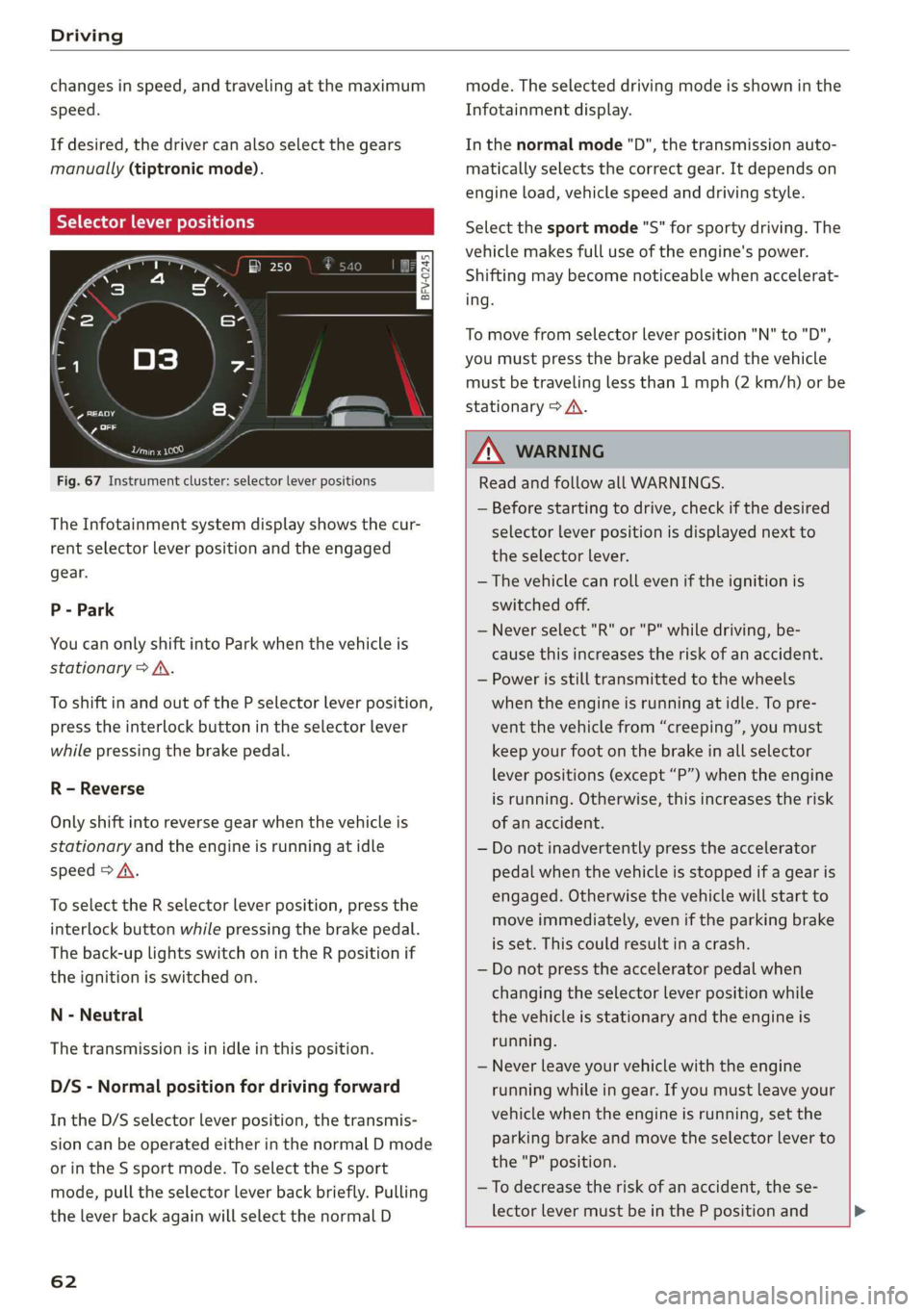
Fig. 67 Instrument cluster: selector lever positions
The Infotainment system display shows the cur-
rent selector lever position and the engaged
gear.
P - Park
You can only shift into Park when the vehicle is
stationary > A.
To shift in and out of the P selector lever position,
press the interlock button in the selector lever
while pressing the brake pedal.
R - Reverse
Only shift into reverse gear when the vehicle is
stationary and the engine is running at idle
speed > A\.
To select the R selector lever position, press the
interlock button while pressing the brake pedal.
The back-up lights switch on in the R position if
the ignition is switched on.
N - Neutral
The transmission is in idle in this position.
D/S - Normal position for driving forward
In the D/S selector lever position, the transmis-
sion can be operated either in the normal D mode
or in the S sport mode. To select the S sport
mode, pull the selector lever back briefly. Pulling
the lever back again will select the normal D
62
mode. The selected driving mode is shown in the
Infotainment display.
In the normal mode "D", the transmission auto-
matically selects the correct gear. It depends on
engine load, vehicle speed and driving style.
Select the sport mode "S" for sporty driving. The
vehicle makes full use of the engine's power.
Shifting may become noticeable when accelerat-
ing.
To move from selector lever position "N" to "D",
you must press the brake pedal and the vehicle
must be traveling less than 1 mph (2 km/h) or be
stationary > A.
Z\ WARNING
Read and follow all WARNINGS.
— Before starting to drive, check if the desired
selector lever position is displayed next to
the selector lever.
— The vehicle can roll even if the ignition is
switched off.
— Never select "R" or "P" while driving, be-
cause this increases the risk of an accident.
— Power is still transmitted to the wheels
when the engine is running at idle. To pre-
vent the vehicle from “creeping”, you must
keep your foot on the brake in all selector
lever positions (except “P”) when the engine
is running. Otherwise, this increases the risk
of an accident.
— Do not inadvertently press the accelerator
pedal when the vehicle is stopped if a gear is
engaged. Otherwise the vehicle will start to
move immediately, even if the parking brake
is set. This could result in a crash.
— Do not press the accelerator pedal when
changing the selector lever position while
the vehicle is stationary and the engine is
running.
— Never leave your vehicle with the engine
running while in gear. If you must leave your
vehicle when the engine is running, set the
parking brake and move the selector lever to
the "P" position.
—To decrease the risk of an accident, the se-
lector lever must be in the P position and
Page 65 of 304
8S8012721BA
Driving
the parking brake must be set before open-
ing the hood and working ona running en-
gine. Always read and follow the applicable
warnings > page 227, General information.
@) Note
Never let the vehicle roll downhill with engine
off and the selector lever in the "N" position,
because this could damage the automatic
transmission and catalytic converter.
G) Tips
— Drive select: sporty shifting characteristics
can be selected using the Dynamic driving
mode. The Infotainment display shows S as
the selector lever position instead of D.
— If you accidentally select "N" while driving,
take your foot off the accelerator pedal im-
mediately and wait for the engine to slow
down to idle before selecting "D" or "S".
— If there is a power failure, the selector lever
will not move out of the "P" position. The
emergency release can be used if this hap-
pens. Left-hand drive vehicles > page 68.
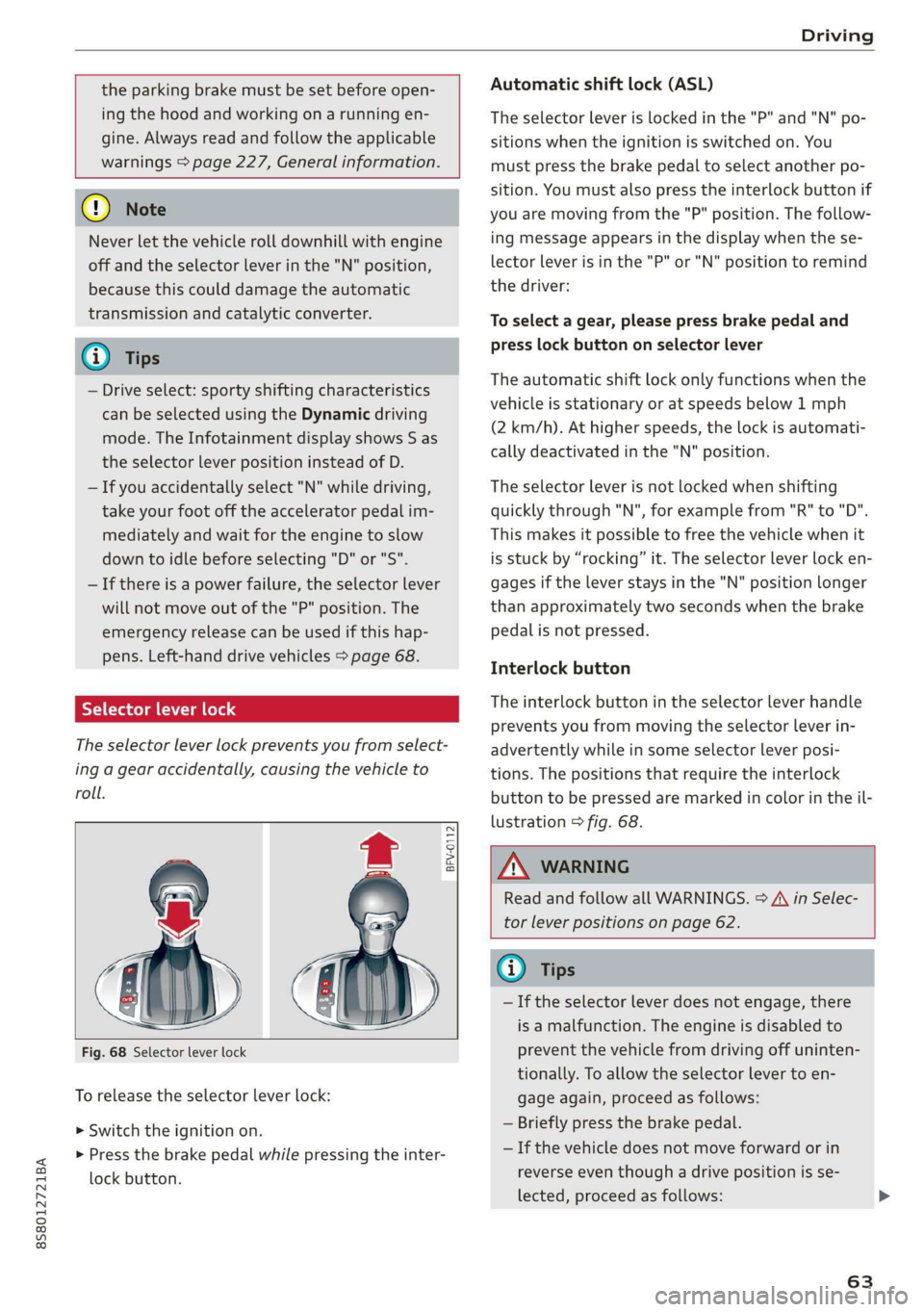
Selector lever lock
The selector lever lock prevents you from select-
ing a gear accidentally, causing the vehicle to
roll.
BFV-0112
Fig. 68 Selector lever lock
To release the selector lever lock:
> Switch the ignition on.
> Press the brake pedal while pressing the inter-
lock button.
Automatic shift lock (ASL)
The selector Lever is locked in the "P" and "N" po-
sitions when the ignition is switched on. You
must press the brake pedal to select another po-
sition. You must also press the interlock button if
you are moving from the "P" position. The follow-
ing message appears in the display when the se-
lector lever is in the "P" or "N" position to remind
the driver:
To select a gear, please press brake pedal and
press lock button on selector lever
The automatic shift lock only functions when the
vehicle is stationary or at speeds below 1 mph
(2 km/h). At higher speeds, the lock is automati-
cally deactivated in the "N" position.
The selector lever is not locked when shifting
quickly through "N", for example from "R" to "D".
This makes it possible to free the vehicle when it
is stuck by “rocking” it. The selector lever lock en-
gages if the lever stays in the "N" position longer
than approximately two seconds when the brake
pedal is not pressed.
Interlock button
The interlock button in the selector lever handle
prevents you from moving the selector lever in-
advertently while in some selector lever posi-
tions. The positions that require the interlock
button to be pressed are marked in color in the il-
lustration > fig. 68.
Z\ WARNING
Read and follow all WARNINGS. > A\ in Selec-
tor lever positions on page 62.
@) Tips
—If the selector lever does not engage, there
is a malfunction. The engine is disabled to
prevent the vehicle from driving off uninten-
tionally. To allow the selector lever to en-
gage again, proceed as follows:
— Briefly press the brake pedal.
— If the vehicle does not move forward or in
reverse even though a drive position is se-
lected, proceed as follows:
63
Page 68 of 304
Driving
case, shift manually into 1st or 2nd gear in tip-
tronic mode to use the engine's braking force to
relieve the brakes.
Hill descent control switches off once the hill lev-
els out or if you press the accelerator pedal.
On vehicles with a cruise control system*
= page 70, hill descent control is also activated
when the speed is set.
Z\ WARNING
Hill descent control may not be able to main-
tain a constant speed under all conditions. Al-
ways be ready to apply the brakes.
Shifting manually (tiptronic mode)
The tiptronic mode allows the driver to shift the
gears manually.
= g
i 5
BFV-0104
paddles*
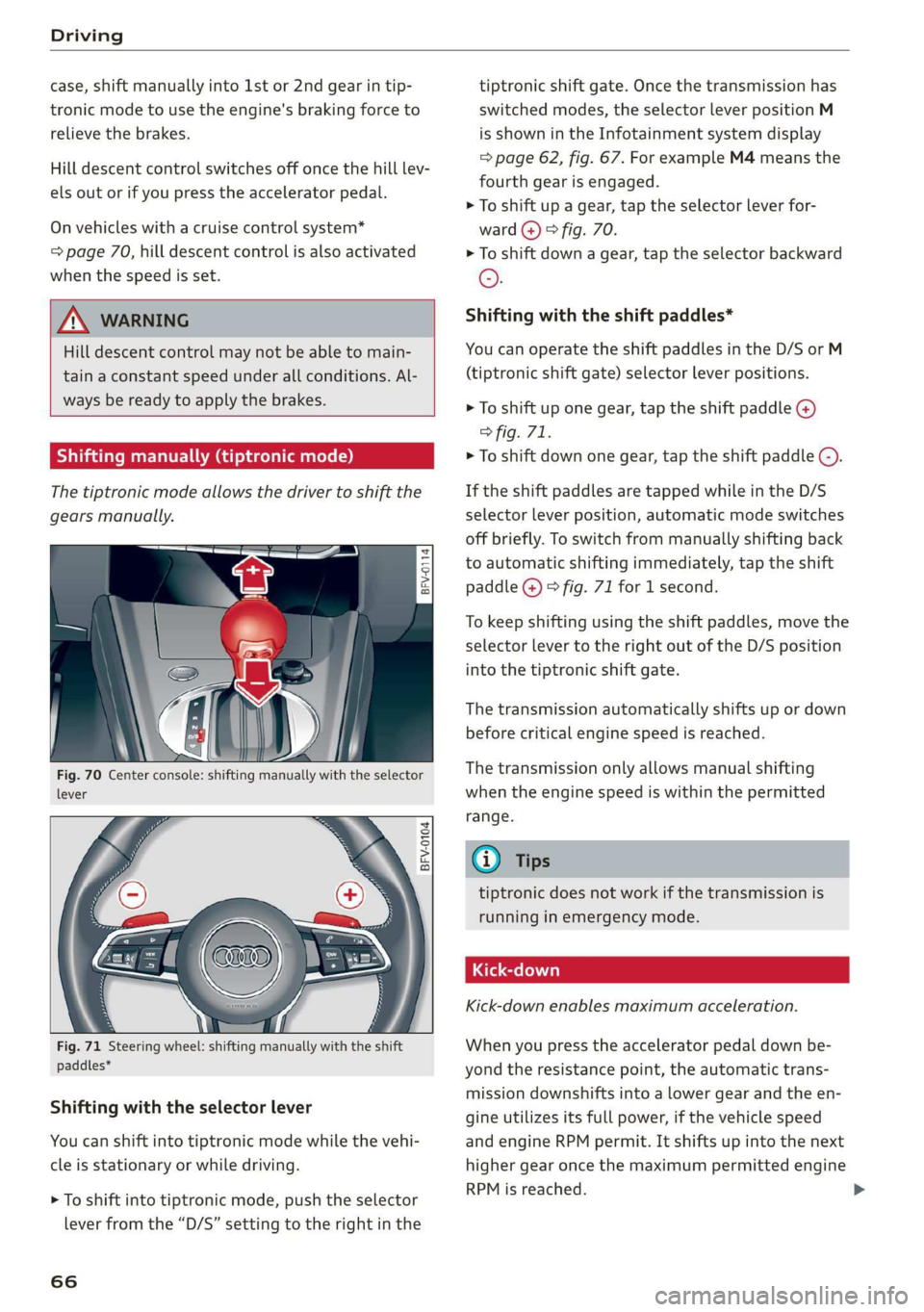
Shifting with the selector lever
You can shift into tiptronic mode while the vehi-
cle is stationary or while driving.
> To shift into tiptronic mode, push the selector
lever from the “D/S” setting to the right in the
66
tiptronic shift gate. Once the transmission has
switched modes, the selector lever position M
is shown in the Infotainment system display
=> page 62, fig. 67. For example M4 means the
fourth gear is engaged.
> To shift up a gear, tap the selector lever for-
ward @) © fig. 70.
> To shift down a gear, tap the selector backward
©.
Shifting with the shift paddles*
You can operate the shift paddles in the D/S or M
(tiptronic shift gate) selector lever positions.
> To shift up one gear, tap the shift paddle @)
> fig. 71.
> To shift down one gear, tap the shift paddle ©).
If the shift paddles are tapped while in the D/S
selector lever position, automatic mode switches
off briefly. To switch from manually shifting back
to automatic shifting immediately, tap the shift
paddle @) © fig. 71 for 1 second.
To keep shifting using the shift paddles, move the
selector lever to the right out of the D/S position
into the tiptronic shift gate.
The transmission automatically shifts up or down
before critical engine speed is reached.
The transmission only allows manual shifting
when the engine speed is within the permitted
range.
@) Tips
tiptronic does not work if the transmission is
running in emergency mode.
Kick-down enables maximum acceleration.
When you press the accelerator pedal down be-
yond the resistance point, the automatic trans-
mission downshifts into a lower gear and the en-
gine utilizes its full power, if the vehicle speed
and engine RPM permit. It shifts up into the next
higher gear once the maximum permitted engine
RPM is reached.
Page 72 of 304
Assist systems
Assist systems
Speed warning system
Applies to: vehicles with speed warning system
The speed warning system helps you to stay be-
low a specified maximum speed that can be set,
changed or deleted in the Infotainment system.
The speed warning system warns you if you are
exceeding the maximum speed that you have set.
A warning tone will sound as soon as your speed
exceeds the stored value slightly. The oe) in-
dicator light and a message will appear in the in-
strument cluster display at the same time. The
owe indicator light and the message turn off if
the speed falls back below the stored maximum
speed.
Setting a threshold is recommended if you would
like to be reminded when you reach a certain
maximum speed. Situations where you may want
to do so include driving in a country with a gener-
al speed limit or if there is a specified maximum
speed for winter tires.
Setting the warning threshold
> Select in the Infotainment system: MENU but-
ton > Vehicle > left control button > Driver as-
sistance > Speed warning > Manual.
G) Tips
Regardless of the speed warning system, you
should always monitor your speed using the
speedometer and make sure you are following
the legal speed limit.
Cruise control system
Applies to: vehicles with cruise control system
The cruise control system assists the driver in
maintaining a constant speed above approxi-
mately 15 mph (20 km/h). The system maintains
the desired speed by braking and accelerating.
70
Z\ WARNING
— Always pay attention to the traffic around
your vehicle when the cruise control system
is in operation. As the driver, you are always
responsible for controlling your vehicle
speed and the distance between your vehicle
and
other vehicles.
— For safety reasons, cruise control should not
be used in the city, in stop-and-go traffic, on
winding roads, and when road conditions are
poor (such as ice, fog, gravel, heavy rain,
and conditions that could lead to hydroplan-
ing), because this increases the risk of an ac-
cident.
— Switch the cruise control off temporarily
when driving in turning lanes, highway exits,
or in construction zones.
—To reduce the risk of an accident, you should
only resume the stored speed if it is suitable
for the current traffic conditions.
() Note
Before driving downhill a long distance on a
steep hill, decrease your speed and select a
lower gear. This makes use of the engine brak-
ing effect and reduces the load placed on the
brakes.
G) Tips
The brake lights turn on when the brakes are
applied automatically.
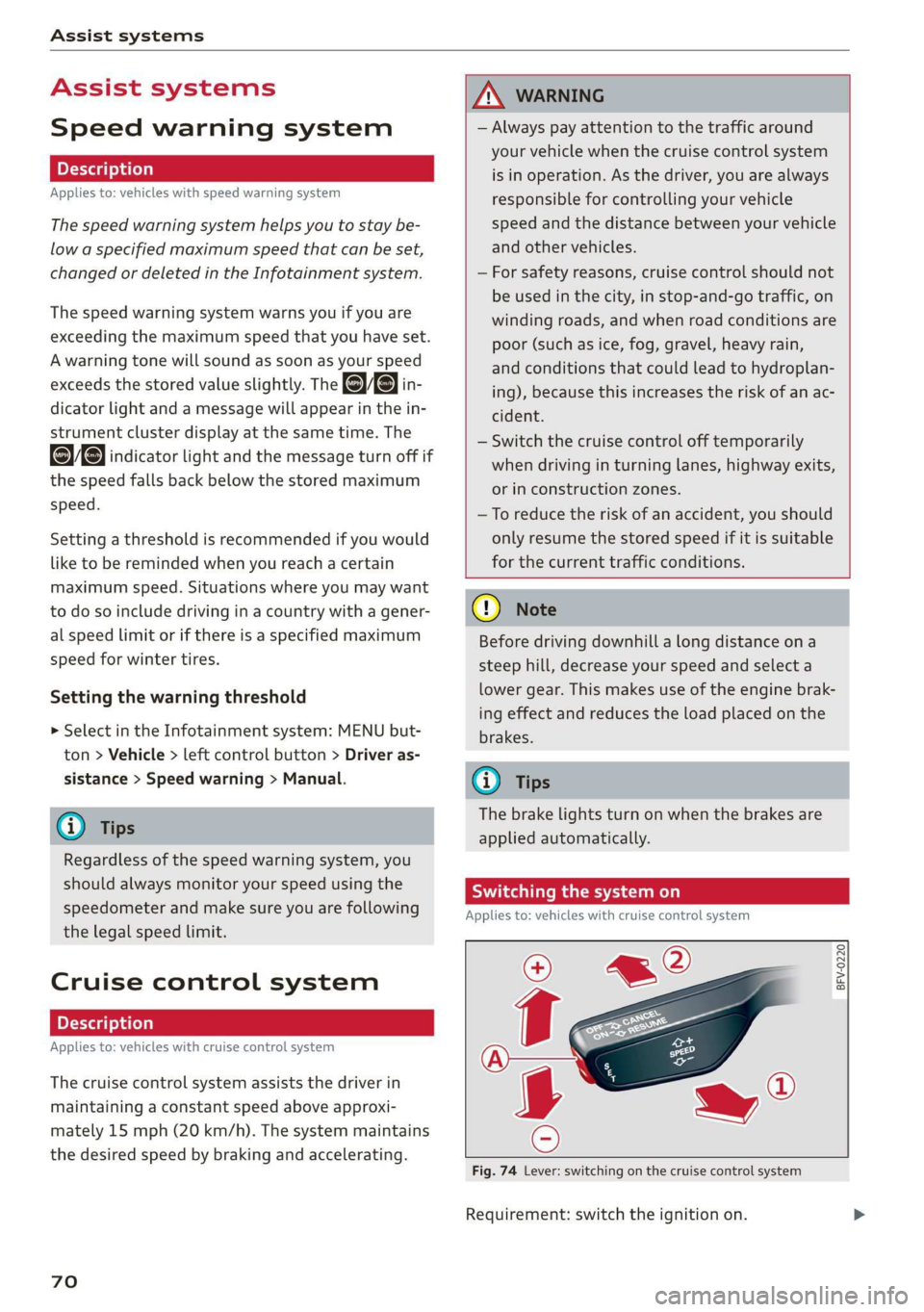
Switching the system on
Applies to: vehicles with cruise control system
@ g
©
f ©
Fig. 74 Lever: switching on the cruise control system
Requirement: switch the ignition on.
Page 75 of 304
8S8012721BA
Assist systems
Switching on/off
Applies to: vehicles with Audi active lane assist
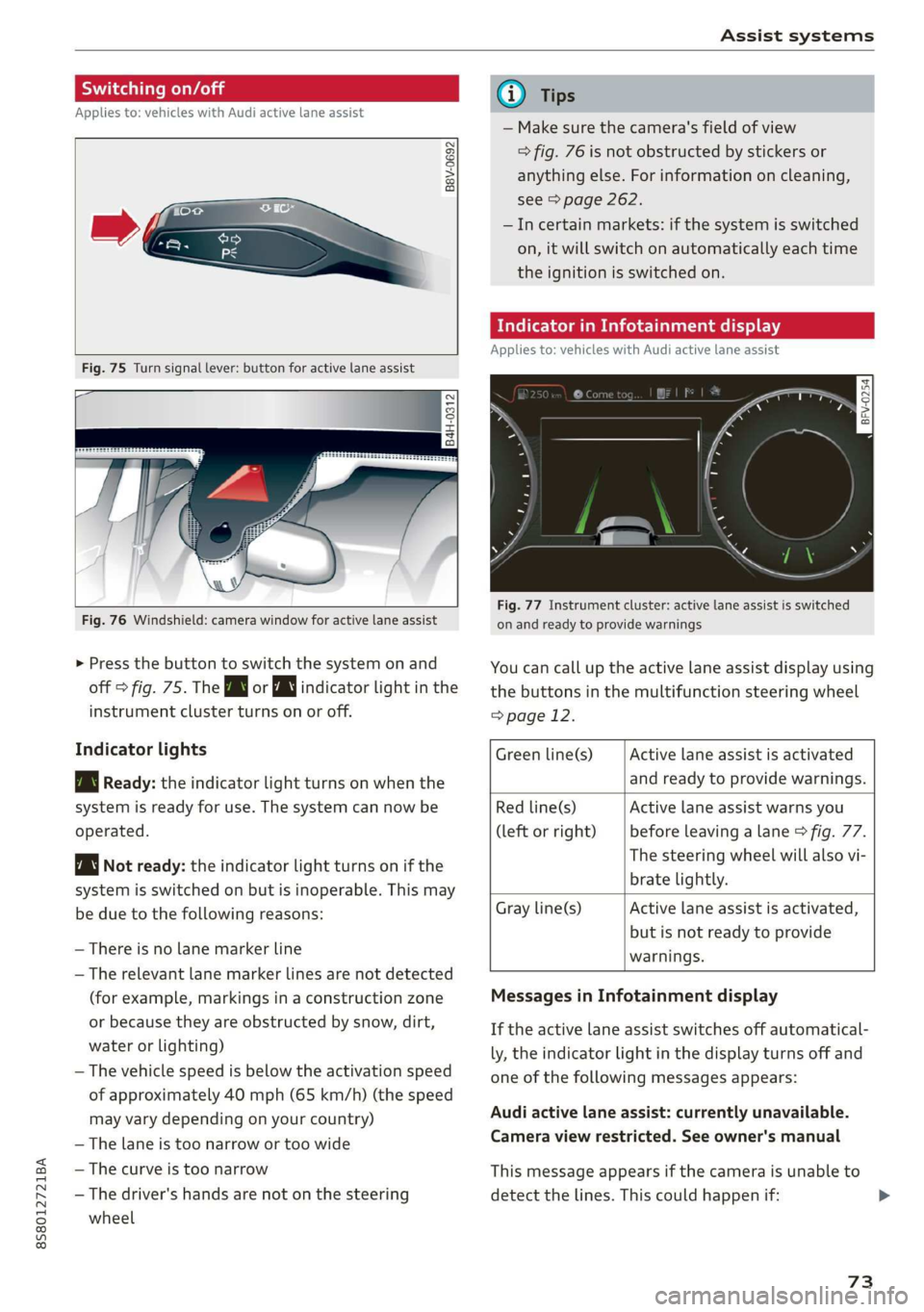
B8V-0692
Fig. 75 Turn signal lever: button for active lane assist
B4H-0312
Fig. 76 Windshield: camera window for active lane assist
> Press the button to switch the system on and
off > fig. 75. The Bw or indicator light in the
instrument cluster turns on or off.
Indicator lights
Bg Ready: the indicator light turns on when the
system is ready for use. The system can now be
operated.
Not ready: the indicator light turns on if the
system is switched on but is inoperable. This may
be due to the following reasons:
— There is no lane marker line
— The relevant lane marker lines are not detected
(for example, markings in a construction zone
or because they are obstructed by snow, dirt,
water or lighting)
— The vehicle speed is below the activation speed
of approximately 40 mph (65 km/h) (the speed
may vary depending on your country)
— The lane is too narrow or too wide
— The curve is too narrow
— The driver's hands are not on the steering
wheel
@) Tips
— Make sure the camera's field of view
> fig. 76 is not obstructed by stickers or
anything else. For information on cleaning,
see > page 262.
—Incertain markets: if the system is switched
on, it will switch on automatically each time
the ignition is switched on.
Mee MUM clei meele
Applies to: vehicles with Audi active lane assist
= z
aS
Be g
Fig. 77 Instrument cluster: active lane assist is switched
on and ready to provide warnings
You can call up the active lane assist display using
the buttons in the multifunction steering wheel
=> page 12.
Active lane assist is activated
and ready to provide warnings.
Green line(s)
Red line(s)
(left or right)
Active lane assist warns you
before leaving a lane > fig. 77.
The steering wheel will also vi-
brate lightly.
Active lane assist is activated,
but is not ready to provide
warnings.
Gray line(s)
Messages in Infotainment display
If the active lane assist switches off automatical-
ly, the indicator light in the display turns off and
one
of the following messages appears:
Audi active lane assist: currently unavailable.
Camera view restricted. See owner's manual
This message appears if the camera is unable to
detect the lines. This could happen if:
73
Page 76 of 304
Assist systems
— The camera field of view > page 73, fig. 76 is
dirty or covered in ice. Clean this area on the
windshield.
— The camera field of view is fogged over. Wait
until the fog has cleared before switching the
active lane assist on again.
— The system has been unable to detect the lanes
for an extended period of time due to road con-
ditions. Switch active lane assist back on when
the lines are more visible.
Audi active lane assist: currently unavailable.
See owner's manual
There is a temporary malfunction that may pre-
vent the active lane assist from switching on. Try
switching the active lane assist on again later.
Audi active lane assist: malfunction! See own-
er's manual
Drive to an authorized Audi dealer or authorized
Audi Service Facility immediately to have the
malfunction corrected.
Audi active lane assist: Please take over steer-
ing!
This message appears if you are not steering by
yourself. If this is the case, active lane assist does
not switch off, but it is “not ready” to provide a
warning. The system can help you keep the vehi-
cle in the lane. However, you are responsible for
driving the vehicle and must steer it yourself.
Z\ WARNING
Note that messages may be delayed or not
displayed on vehicles with accessories mount-
ed on the steering wheel, such as a steering
wheel spinner knob. Always keep your hands
on the steering wheel.
)) The corrective steering function is not available in all mar-
kets.
74
Adjusting the steering time and vibration
warning
Applies to: vehicles with Audi active lane assist
You can adjust individual active lane assist set-
tings in the Infotainment system.
Select in the Infotainment system: [MENU] but-
ton > Vehicle > left control button >Driver assis-
tance > Audi active lane assist
Steering time)
Early: in this setting, the corrective steering hap-
pens continuously to help keep the vehicle in the
center of the lane.
Late: in this setting, the system provides correc-
tive steering just before a vehicle wheel touches a
detected lane marker line.
Vibration warning
You can switch the additional vibration warning
in the steering wheel on or off.
G) Tips
In certain markets: your settings are stored
automatically and assigned to the remote
control key in use.