navigation AUDI TT ROADSTER 2019 User Guide
[x] Cancel search | Manufacturer: AUDI, Model Year: 2019, Model line: TT ROADSTER, Model: AUDI TT ROADSTER 2019Pages: 304, PDF Size: 80.77 MB
Page 109 of 304
8S58012721BA
Voice recognition system
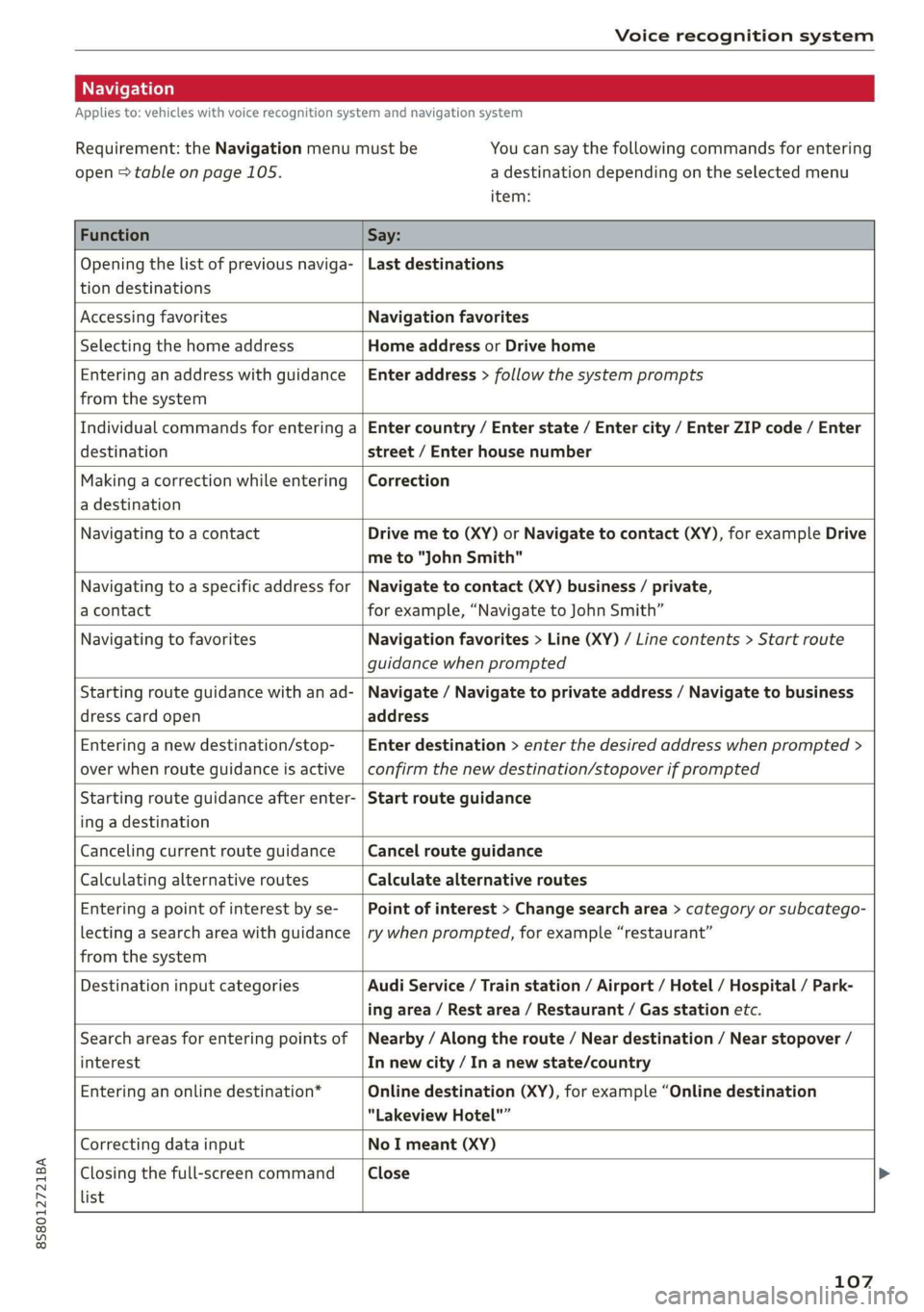
Applies to: vehicles with voice recognition system and navigation system
Requirement: the Navigation menu must be
open > table on page 105.
You can say the following commands for entering
a destination depending on the selected menu
item:
Function Say:
Opening the list of previous naviga-
tion destinations
Last destinations
Accessing favorites Navigation favorites
Selecting the home address Home address or Drive home
Entering an address with guidance
from the system
Enter address > follow the system prompts
Individual commands for entering a
destination
Enter country / Enter state / Enter city / Enter ZIP code / Enter
street / Enter house number
Making a correction while entering
a destination
Correction
Navigating to a contact Drive me to (XY) or Navigate to contact (XY), for example Drive
me to "John Smith"
Navigating to a specific address for
a contact
Navigate to contact (XY) business / private,
for example, “Navigate to John Smith”
Navigating to favorites Navigation favorites > Line (XY) / Line contents > Start route
guidance when prompted
Starting route guidance with an ad-
dress card open
Navigate / Navigate to private address / Navigate to business
address
Entering a new destination/stop-
over when route guidance is active
Enter destination > enter the desired address when prompted >
confirm the new destination/stopover if prompted
Starting route guidance after enter-
ing a destination
Start route guidance
Canceling current route guidance Cancel route guidance
Calculating alternative routes Calculate alternative routes
Entering a point of interest by se-
lecting a search area with guidance
from the system
Point of interest > Change search area > category or subcatego-
ry when prompted, for example “restaurant”
Destination input categories Audi Service / Train station / Airport / Hotel / Hospital / Park-
ing area / Rest area / Restaurant / Gas station etc.
Search areas for entering points of
interest
Nearby / Along the route / Near destination / Near stopover /
In new city / In a new state/country
Entering an online destination* Online destination (XY), for example “Online destination
"Lakeview Hotel"”
Correcting data input No I meant (XY)
Closing the full-screen command
list
Close
107
Page 110 of 304
Voice recognition system
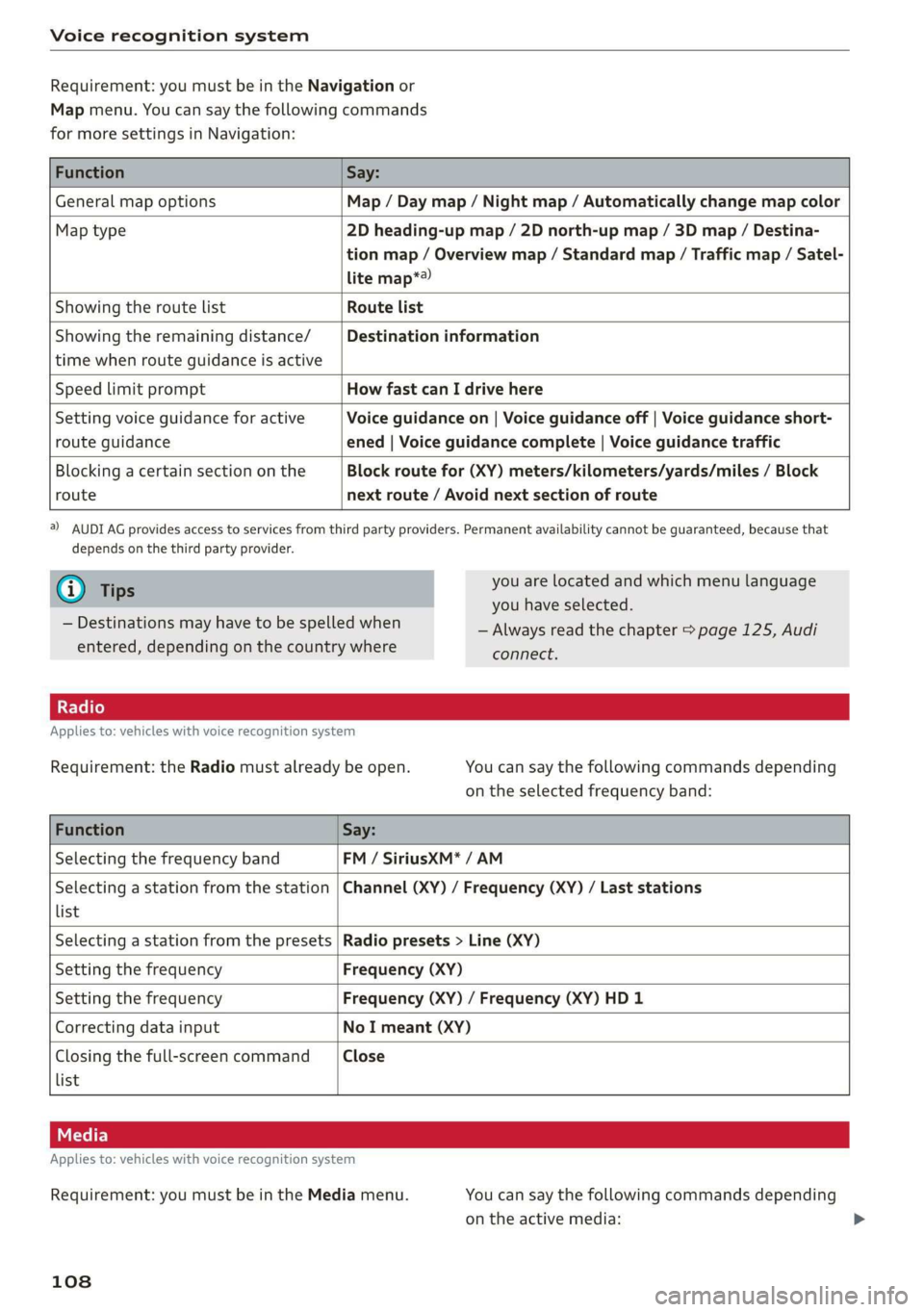
Requirement: you must be in the Navigation or
Map menu. You can say the following commands
for more settings in Navigation:
Function Say:
General map options Map / Day map / Night map / Automatically change map color
Map type 2D heading-up map / 2D north-up map / 3D map / Destina-
tion map / Overview map / Standard map / Traffic map / Satel-
lite map*?
Showing the route list Route list
Showing the remaining distance/ Destination information
time when route guidance is active
Speed limit prompt How fast can I drive here
Setting voice guidance for active Voice guidance on | Voice guidance off | Voice guidance short-
route guidance ened | Voice guidance complete | Voice guidance traffic
Blocking a certain section on the Block route for (XY) meters/kilometers/yards/miles / Block
route next route / Avoid next section of route
a) AUDI AG provides access to services from third party providers. Permanent availability cannot be guaranteed, because that
depends on the third party provider.
@) Tips you are located and which menu language
= you have selected.
— Always read the chapter > page 125, Audi
connect.
— Destinations may have to be spelled when
entered, depending on the country where
Applies to: vehicles with voice recognition system
Requirement: the Radio must already be open. You can say the following commands depending
on the selected frequency band:
Function Say:
Selecting the frequency band FM / SiriusXM* / AM
Selecting a station from the station | Channel (XY) / Frequency (XY) / Last stations
list
Selecting a station from the presets | Radio presets > Line (XY)
Setting the frequency Frequency (XY)
Setting the frequency Frequency (XY) / Frequency (XY) HD 1
Correcting data input No I meant (XY)
Closing the full-screen command Close
list
Applies to: vehicles with voice recognition system
Requirement: you must be in the Media menu. You can say the following commands depending
on the active media:
108
Page 123 of 304
8S8012721BA
Telephone
— Free text search for a contact: see > page 100.
Contacts are displayed in alphabetical order and
can be sorted by first or last name > page 123.
The directory can be opened through the Tele-
phone* menu as well as through the Navigation*
menu.
G) Tips
— Check for a possible request to synchronize
on your cell phone. Requests to synchronize
the directory must be confirmed so that
your cell phone contacts can be loaded into
the MMI.
— The contact display in the MMI depends on
the mobile device being used. For more in-
formation on supported mobile devices, vis-
it www.audiusa.com/bluetooth or contact
an authorized Audi dealer or authorized Au-
di Service Facility.
— The directory from the cell phone with the
active connection will always be displayed.
— The contacts from the mobile device may
not be transferred in alphabetical order. If
there are too many entries, contacts with
different first letters may be missing in the
MMI.
— The contacts in the local MMI memory are
always visible and can be accessed by other
users.
Free text search for contacts
Applies to: vehicles with telephone
> Select: [MENU] button > Telephone > left con-
trol button > Directory.
> To limit the search, enter the initials of the con-
tact being searched with each initial separated
by a space. Enter additional letters if necessary.
> Select and confirm a contact from the directory.
The phone numbers for the selected contact are
displayed.
> To make the call, select and confirm a phone
number.
@) Tips
— You can scroll through long lists quickly by
turning the control knob quickly. The scroll-
ing speed depends on the number of list en-
tries.
— Additional information on free text searches
can be found under = page 100.
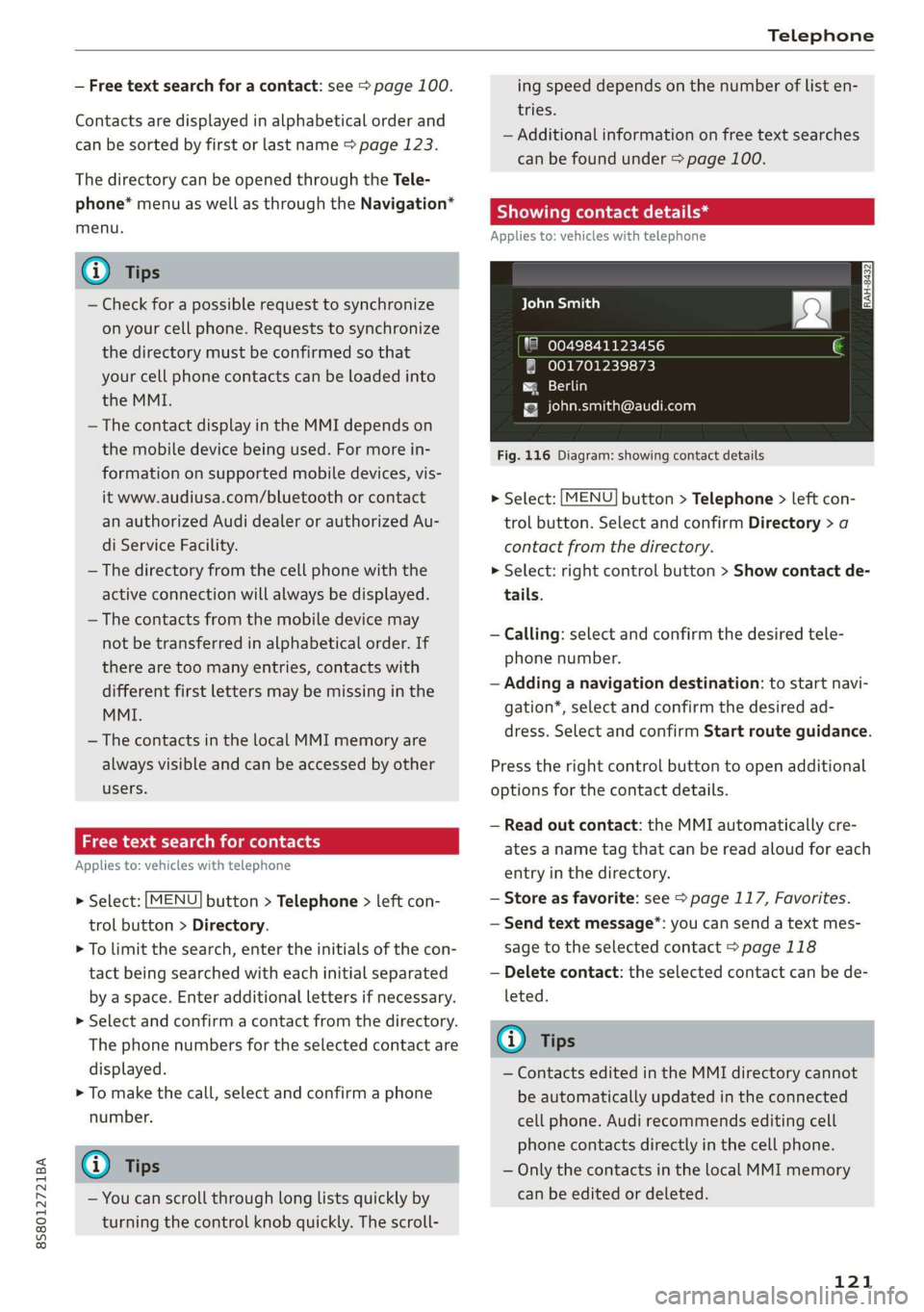
Showing contact details*
Applies to: vehicles with telephone
aCe yeal ban)
"8 0049841123456
001701239873
{g [email protected]
Fig. 116 Diagram: showing contact details
> Select: [MENU] button > Telephone > left con-
trol button. Select and confirm Directory > a
contact from the directory.
> Select: right control button > Show contact de-
tails.
— Calling: select and confirm the desired tele-
phone number.
— Adding a navigation destination: to start navi-
gation*, select and confirm the desired ad-
dress. Select and confirm Start route guidance.
Press the right control button to open additional
options
for the contact details.
— Read out contact: the MMI automatically cre-
ates a name tag that can be read aloud for each
entry in the directory.
— Store as favorite: see > page 117, Favorites.
— Send text message”: you can send a text mes-
sage to the selected contact > page 118
— Delete contact: the selected contact can be de-
leted.
@) Tips
— Contacts edited in the MMI directory cannot
be automatically updated in the connected
cell phone. Audi recommends editing cell
phone contacts directly in the cell phone.
— Only the contacts in the local MMI memory
can be edited or deleted.
121
Page 129 of 304
![AUDI TT ROADSTER 2019 User Guide 8S8012721BA
Audi connect
Connecting the MMI with the personal
hotspot
> Select: [MENU] button > Telephone > right con-
trol button > Wi-Fi settings > Wi-Fi > On.
> Then select and conf](/img/6/57667/w960_57667-128.png "AUDI TT ROADSTER 2019 User Guide 8S8012721BA
Audi connect
Connecting the MMI with the personal
hotspot
> Select: [MENU] button > Telephone > right con-
trol button > Wi-Fi settings > Wi-Fi > On.
> Then select and conf")
8S8012721BA
Audi connect
Connecting the MMI with the personal
hotspot
> Select: [MENU] button > Telephone > right con-
trol button > Wi-Fi settings > Wi-Fi > On.
> Then select and confirm Network search. The
devices that are found are shown in the Info-
tainment system display.
> Select and confirm your personal Wi-Fi hotspot
from the list.
> Enter the password that your mobile device
provides, if necessary.
> Select and confirm OK.
Z\ WARNING
Always follow the information found in > AV
in General information on page 125.
C) Note
Always follow the information found in >@ in
General information on page 125.
@ Tips
— Your cell phone service provider can deter-
mine which functions are supported by your
mobile device.
— Your cell phone data package determines if
other devices will be able to use the person-
al Wi-Fi hotspot.
— Audi recommends protecting your mobile
wireless network with a password to prevent
unauthorized access.
Audi connect
Infotainment services
Applies to: vehicles with Audi connect Infotainment
Requirement: your vehicle must be connected to
the Internet > page 125.
Some Audi connect Infotainment services must
be configured through your personal myAudi ac-
count before using them for the first time.
> Register at www.audiusa.com/myaudi.
>» Add your vehicle to your myAudi account.
> Select: [MENU] button > Audi connect > right
control button > Log in.
> Log in to myAudi in the vehicle using your e-
mail address and password.
@) Tips
— For some Audi connect Infotainment serv-
ices, you may also have to enter your myAu-
di access information when accessing serv-
ices inthe MMI.
— Some Audi connect Infotainment services
must be activated at www.audiusa.com/
myaudi.
—To make logging in easier in the vehicle, you
will receive an 8-digit myAudi PIN as an al-
ternative to your myAudi password after you
have created a myAudi account.
— For detailed information on configuration,
visit www.audiusa.com/myaudi.
Accessing Audi connect Infotainment
Applies to: vehicles with Audi connect Infotainment
> Select: the [MENU] button > Audi connect.
A list of all of the available Audi connect Infotain-
ment services is shown on the Infotainment sys-
tem display.
You can also filter the Audi connect Infotainment
services by category:
> Select: [MENU] button > Audi connect > left
control button > for example, Navigation for
the Audi connect Infotainment services in the
Navigation menu.
EE mia teli ry
Applies to: vehicles with Audi connect Infotainment
> Select: [MENU] button > Audi connect > desired
Audi connect Infotainment service > right con-
trol button.
Depending on the equipment and the Audi con-
nect Infotainment service selected, the following
basic functions may be available:
Save as preview
You can also see a preview of the selected Audi
connect Infotainment services on the Audi con-
nect
Infotainment home page.
127
Page 130 of 304
Audi connect
Show on map
You can show selected contents on the map and
use them for route guidance.
Log in
See > page 127.
Read out)
You can allow the MMI to read out the selected
contents.
Call
If a phone number was assigned to an entry, you
can call the number, for example to reserve tick-
ets.
Refresh
The contents for the selected Audi connect Info-
tainment service are refreshed.
Start route guidance
If a location was saved with an entry, you can use
it as the navigation destination. Route guidance
starts immediately.
Change search area
The set search area can be changed at any time.
Additional information on search areas can be
found under > page 135.
Closing Audi connect Infotainment services
Regardless of the function selected, you can
close an Audi connect Infotainment service at
any time and return to the home screen.
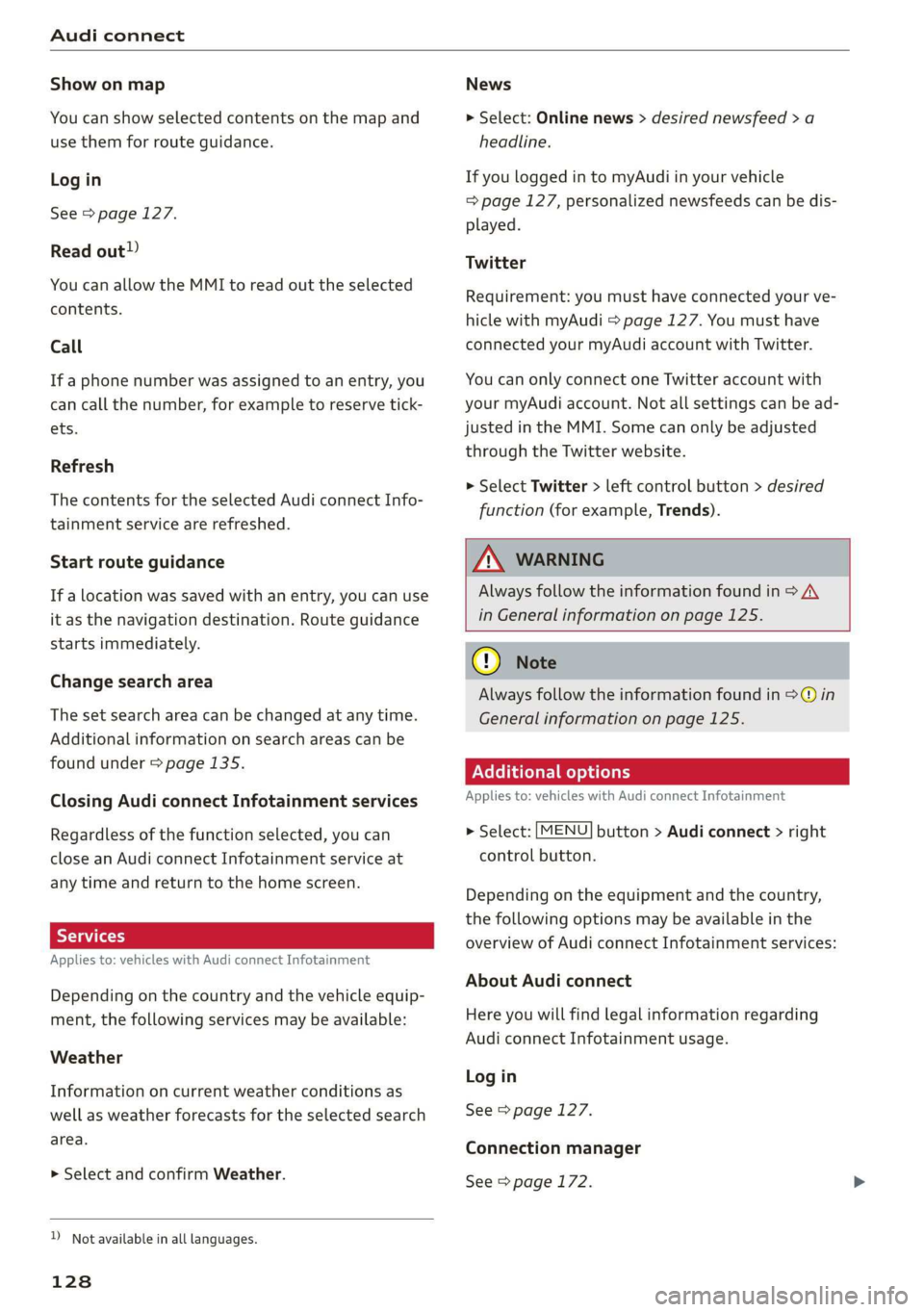
Services
Applies to: vehicles with Audi connect Infotainment
Depending on the country and the vehicle equip-
ment, the following services may be available:
Weather
Information on current weather conditions as
well as weather forecasts for the selected search
area.
> Select and confirm Weather.
D_ Not available in all languages.
128
News
> Select: Online news > desired newsfeed > a
headline.
If you logged in to myAudi in your vehicle
= page 127, personalized newsfeeds can be dis-
played.
Twitter
Requirement: you must have connected your ve-
hicle with myAudi > page 127. You must have
connected your myAudi account with Twitter.
You can only connect one Twitter account with
your myAudi account. Not all settings can be ad-
justed in the MMI. Some can only be adjusted
through the Twitter website.
> Select Twitter > left control button > desired
function (for example, Trends).
ZA WARNING
Always follow the information found in > A\
in General information on page 125.
@) Note
Always follow the information found in @ in
General information on page 125.
Additional options
Applies to: vehicles with Audi connect Infotainment
> Select: [MENU] button > Audi connect > right
control button.
Depending on the equipment and the country,
the following options may be available in the
overview of Audi connect Infotainment services:
About Audi connect
Here you will find legal information regarding
Audi connect Infotainment usage.
Log in
See > page 127.
Connection manager
See > page 172.
Page 134 of 304
Navigation
Navigation
Opening navigation
Applies to: vehicles with navigation system
The navigation system directs you to your destination, around traffic incidents, and on alternative
routes, if desired.
ae 2
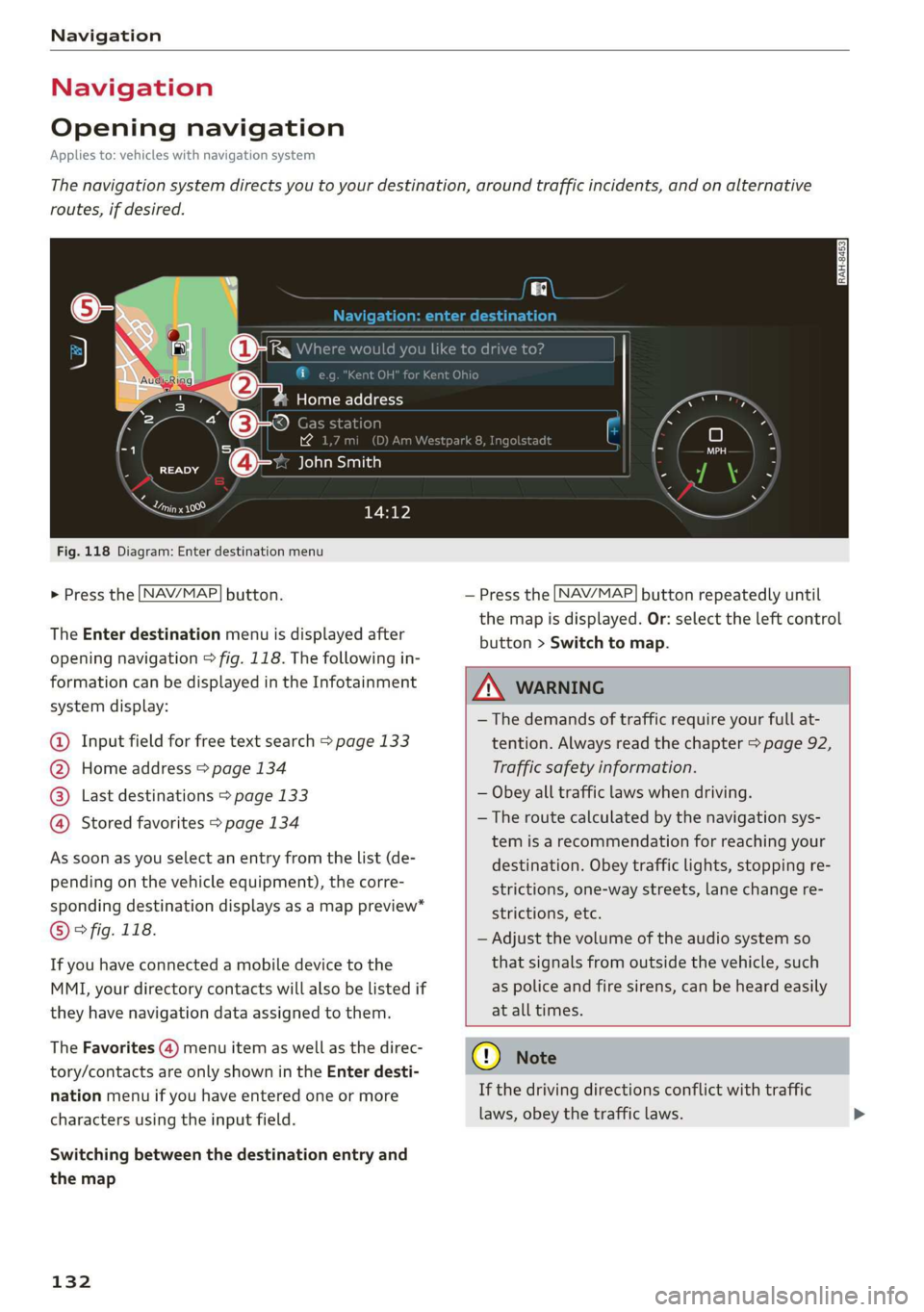
Fig. 118 Diagram: Enter destination menu
> Press the [NAV/MAP] button.
The Enter destination menu is displayed after
opening navigation > fig. 118. The following in-
formation can be displayed in the Infotainment
system display:
@ Input field for free text search > page 133
@ Home address > page 134
Last destinations > page 133 pag
Stored favorites > page 134 pag
As soon as you select an entry from the list (de-
pending on the vehicle equipment), the corre-
sponding destination displays as a map preview*
© ° fig. 118.
If you have connected a mobile device to the
MMI, your directory contacts will also be listed if
they have navigation data assigned to them.
The Favorites (4) menu item as well as the direc-
tory/contacts are only shown in the Enter desti-
nation menu if you have entered one or more
characters using the input field.
Switching between the destination entry and
the map
132
— Press the [NAV/MAP] button repeatedly until
the map is displayed. Or: select the left control
button > Switch to map.
ZA\ WARNING
— The demands of traffic require your full at-
tention. Always read the chapter > page 92,
Traffic safety information.
— Obey all traffic laws when driving.
— The route calculated by the navigation sys-
tem is a recommendation for reaching your
destination. Obey traffic lights, stopping re-
strictions, one-way streets, lane change re-
strictions, etc.
— Adjust the volume of the audio system so
that signals from outside the vehicle, such
as police and fire sirens, can be heard easily
at all times.
) Note
If the driving directions conflict with traffic
laws, obey the traffic laws.
Page 135 of 304
8S8012721BA
Navigation
@) Tips
— You can find information about importing a
map update to your MMI using an SD card
at www.audiusa.com/myaudi.
— Snow and obstructions on the GPS antenna
or interference caused by trees and large
buildings can impair satellite reception and
affect the system's ability to determine the
vehicle position. Several deactivated or mal-
functioning satellites can also interrupt GPS
reception and affect the system's ability to
determine the vehicle position.
— Because street names sometimes change,
the names stored in the MMI may in rare
cases differ from the actual street name.
Entering a destination
aaa ae Tm (dle acy
Applies to: vehicles with navigation system
Using the MMI touch control pad, you can enter
the data for a navigation destination all at once
in any order (for example, Los Angeles,
20 Main St.). Likewise, you can search for points
of interest, contacts, previous destinations or fa-
vorites to navigate to the desired address.
> Press the [NAV/MAP] button repeatedly until
the Enter destination menu is displayed
=> page 132, fig. 118.
> Keep turning the control knob to the left until
the input field appears.
— Enter one or more search terms into the input
field.
— If available, confirm the input suggestion* to
complete the entry or a word suggestion”. See
=> page 98, Letter/number speller.
— Turn the control knob to the right to change the
results list.
— Select and confirm a destination from the re-
sults list.
The route is displayed as an overview in the map
and the route guidance is already active.
Narrowing the search area
All countries/states are selected at the factory
for the free text search.
— Select the right control button > Country/state
selection in the input field @ > page 132,
fig. 118.
— Select the country or state (@) that should be
searched using the free text search in order to
narrow the number of results and increase the
search speed. The selected entry in the coun-
try/state selection is stored. Or: select All
countries/states.
@ Tips
—The MMI input suggestions depend on the
last navigated destinations.
— Up to 50 entries can be stored in the last
destinations list.
— Additional information on free text searches
can be found under > page 100.
Loading previous destinations
Applies to: vehicles with navigation system
Your last destinations are automatically stored
and can be loaded directly as a destination.
Requirement: a destination was already navigat-
ed to.
> Press the [NAV/MAP] button repeatedly until
the Enter destination menu is displayed
=> page 132, fig. 118.
Your last destinations will be listed directly in the
Enter destination menu and are marked with the
symbol @) > page 132, fig. 118.
— Select and confirm one of the last destinations
from the list.
Deleting previous destinations
— Select one of the last destinations from the list.
— Select: right control button > Delete destina-
tion > Delete this last destination or Delete all
last destinations.
The selected destination or all last destinations
is/are deleted and no longer displayed in the En-
ter destination menu.
133
Page 136 of 304
![AUDI TT ROADSTER 2019 User Guide Navigation
Entering an address
Applies to: vehicles with navigation system
As an alternative to free text search, you can al-
so enter an address in stages.
> Press the LNAV/MAP] button](/img/6/57667/w960_57667-135.png "AUDI TT ROADSTER 2019 User Guide Navigation
Entering an address
Applies to: vehicles with navigation system
As an alternative to free text search, you can al-
so enter an address in stages.
> Press the LNAV/MAP] button")
Navigation
Entering an address
Applies to: vehicles with navigation system
As an alternative to free text search, you can al-
so enter an address in stages.
> Press the LNAV/MAP] button repeatedly until
the Enter destination menu is displayed
=> page 132, fig. 118.
> Select: left control button > Enter address.
— Select and confirm a line (such as Street, House
number or Country/state) and enter the de-
sired information.
— Select and confirm Start route guidance.
Tae eRe Medellin the map
Applies to: vehicles with navigation system
A point on the map can be used as the destina-
tion.
> Press the LNAV/MAP] button repeatedly until
the map is displayed.
— Adjusting the scale: turn the control knob to
the left or right.
— Activating crosshairs: press the control knob.
The
crosshairs are shown on the map.
— Moving the crosshairs: move the crosshairs to
the destination using the MMI touch control
pad.
— Hiding the crosshairs: press the [BACK] button.
— Setting as destination: press the control knob
when the crosshairs are shown. Select and con-
firm
Start route guidance.
Additional information about the location of
the crosshairs: if you select map content with
crosshairs, the available information is displayed
(such as the name of the city or points of inter-
est) © > page 140, fig. 123.
134
Setting a home address/favorite as the
Odea)
Applies to: vehicles with navigation system
You can quickly and easily start route guidance
to your home address using the home address
function. Favorites allow easier access to fre-
quently used destinations.
> Press the [NAV/MAP| button repeatedly until
the Enter destination menu is displayed
=> page 132, fig. 118.
Setting a home address as the destination
Requirement: a home address must be stored
=> page 138.
Your
Home address is shown directly in the Enter
destination menu @) > page 132, fig. 118.
— Select: Home address.
Setting a favorite as the destination
Requirement: a destination must be stored as a
favorite > page 138.
— Enter one or more letters into the free text
search input field. The favorites that are found
are shown in the Infotainment system display
and
marked with the symbol @) > page 132,
fig. 118.
— Select and confirm the desired favorite.
G) Tips
— Additional settings for the home address
can be found under = page 138.
— Additional settings for the favorites can be
found under > page 138.
Page 137 of 304
8S8012721BA
Navigation
Transferring a destination from the
directory
Applies to: vehicles with navigation system
You can navigate directly to destinations in the
directory.
Options — Show contact details
Bayelsa)
PAN RTO a aL
Hawthorn Ave, Los Angeles, CA
® Wilshire Blvd, Beverly Hills, CA
34°03°12.7°°N, 118°14°43.2°°W
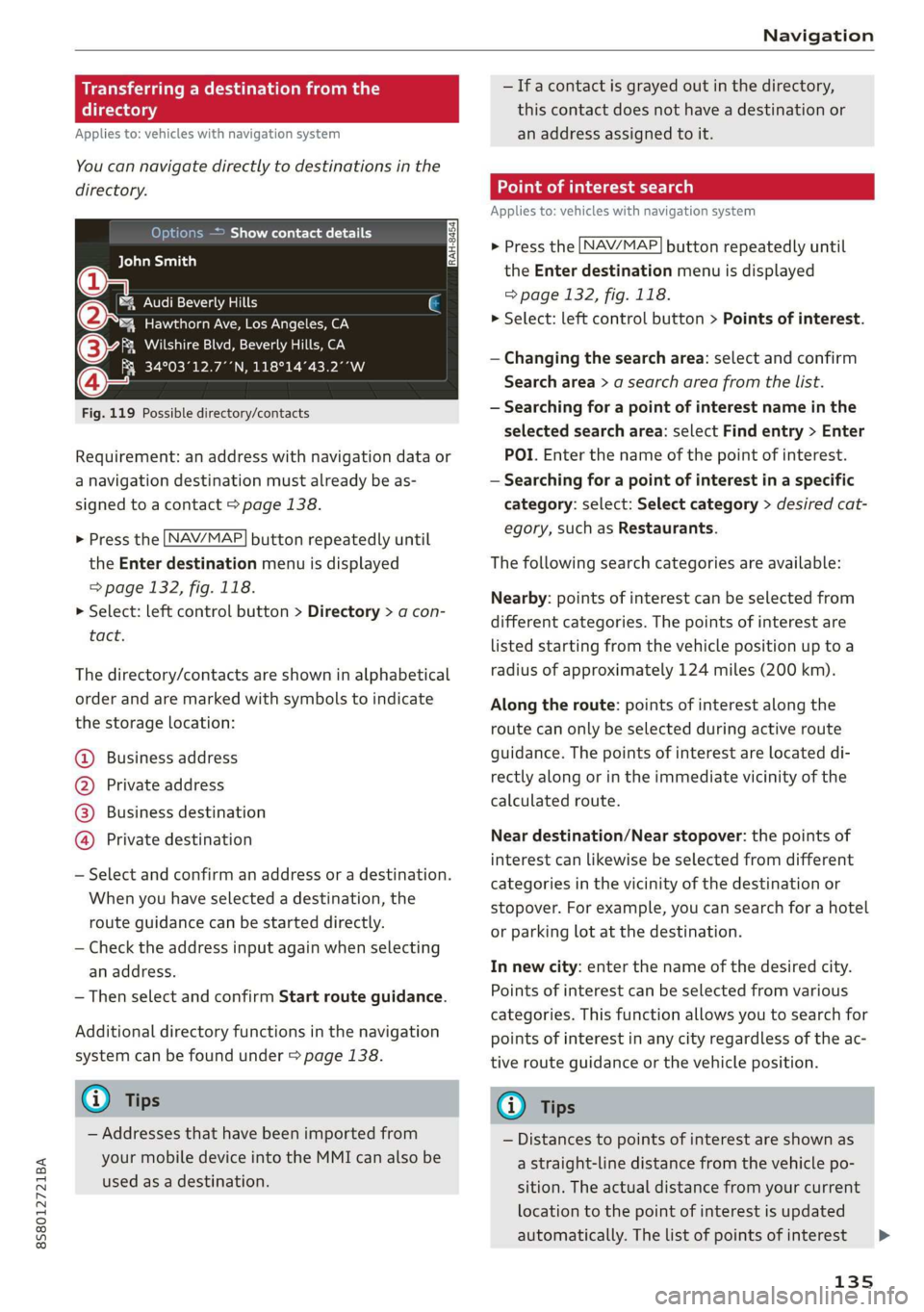
Fig. 119 Possible directory/contacts
Requirement: an address with navigation data or
a navigation destination must already be as-
signed to a contact > page 138.
> Press the LNAV/MAP] button repeatedly until
the Enter destination menu is displayed
=> page 132, fig. 118.
> Select: left control button > Directory > a con-
tact.
The directory/contacts are shown in alphabetical
order and are marked with symbols to indicate
the storage location:
@ Business address
@ Private address
@® Business destination
@ Private destination
— Select and confirm an address or a destination.
When you have selected a destination, the
route guidance can be started directly.
— Check the address input again when selecting
an address.
— Then select and confirm Start route guidance.
Additional directory functions in the navigation
system can be found under > page 138.
@ Tips
— Addresses that have been imported from
your mobile device into the MMI can also be
used as a destination.
— Ifa contact is grayed out in the directory,
this contact does not have a destination or
an address assigned to it.
meats)
Applies to: vehicles with navigation system
> Press the [NAV/MAP] button repeatedly until
the Enter destination menu is displayed
=> page 132, fig. 118.
> Select: left control button > Points of interest.
— Changing the search area: select and confirm
Search area > a search area from the list.
— Searching for a point of interest name in the
selected search area: select Find entry > Enter
POI. Enter the name of the point of interest.
— Searching for a point of interest in a specific
category: select: Select category > desired cat-
egory, such as Restaurants.
The following search categories are available:
Nearby: points of interest can be selected from
different categories. The points of interest are
listed starting from the vehicle position up toa
radius of approximately 124 miles (200 km).
Along the route: points of interest along the
route can only be selected during active route
guidance. The points of interest are located di-
rectly along or in the immediate vicinity of the
calculated route.
Near destination/Near stopover: the points of
interest can likewise be selected from different
categories in the vicinity of the destination or
stopover. For example, you can search for a hotel
or parking lot at the destination.
In new city: enter the name of the desired city.
Points of interest can be selected from various
categories. This function allows you to search for
points of interest in any city regardless of the ac-
tive route guidance or the vehicle position.
@) Tips
— Distances to points of interest are shown as
a straight-line distance from the vehicle po-
sition. The actual distance from your current
location to the point of interest is updated
automatically. The list of points of interest
135
>
Page 138 of 304
Navigation
that were found is not resorted when this
happens.
— There may be entries in the list that cannot
be displayed completely due to their length.
If you select these list entries using the con-
trol knob, detailed information about the
selected list entry will be shown automati-
cally after several seconds.
Online point of interest sear
search)
Applies to: vehicles with navigation system and Audi connect
(online
You can search for points of interest on the Inter-
net.
Requirement: the requirements for Audi connect
services must be met > page 125.
> Press the LNAV/MAP] button repeatedly until
the Enter destination menu is displayed
=> page 132, fig. 118.
> Select: left control button > Online search. The
search area last set is shown in the input field.
— Changing the search area: select and confirm
Search area > a search area from the list.
— Searching for online destinations in the se-
lected search area: enter a new city if necessa-
ry. Enter a search term such as restaurant. Se-
lect and confirm an online destination. Select
and confirm Start route guidance.
— Searching for an online destination in a specif-
ic category: select: Select category > desired
category, such as Hotels.
Find which search areas are available under
=> page 135, Point of interest search.
You can search for online destinations using the
voice recognition system = table on page 107.
G) Tips
Always read the chapter > page 125.
136
OXee Te Melee el mA e |
account
Applies to: vehicles with navigation system and Audi connect
Import destinations from your myAudi account
into the MMI.
Requirement: you must have created a myAudi
account at www.audiusa.com/myaudi. You must
have a vehicle stored in your myAudi account and
you must have a destination stored.
> Press the [NAV/MAP] button repeatedly until
the Enter destination menu is displayed
=> page 132, fig. 118.
> Select: left control button > myAudi contacts.
> If necessary, enter your myAudi user data or
your myAudi PIN. The contacts stored in myAu-
di are displayed.
— Select and confirm a contact > desired destina-
tion.
— Select and confirm Start route guidance.
(i) Tips
— You only need to enter the myAudi user data
one time.
— You can receive your myAudi PIN if you have
set up a myAudi account.
— For additional information, see www.
audiusa.com/myaudi.
Entering a destination using geo
coordinates
Applies to: vehicles with navigation system
> Press the [NAV/MAP] button repeatedly until
the Enter destination menu is displayed
=> page 132, fig. 118.
> Select: left control button > Geographical coor-
dinates.
— Select and confirm either Latitude or Longi-
tude.
— Turn the control knob to change the latitude/
longitude.
— Press the control knob to confirm your input.
— Select and confirm Start route guidance.