change wheel AUDI TT ROADSTER 2019 Owner's Manual
[x] Cancel search | Manufacturer: AUDI, Model Year: 2019, Model line: TT ROADSTER, Model: AUDI TT ROADSTER 2019Pages: 304, PDF Size: 80.77 MB
Page 261 of 304
8S8012721BA
Wheels
installation of replacement or alternate tires or
wheels on the vehicle that prevent the TPMS
from functioning properly. Always check the
TPMS malfunction telltale after replacing one or
more tires or wheels on your vehicle to ensure
that the replacement or alternate tires and
wheels allow the TPMS to continue to function
properly.
Applies to: vehicles with tire pressure monitoring system
The tire pressure monitoring system monitors
the pressure in the four tires when driving.
The system uses sensors that measure the tem-
perature and pressure in the tires. The data is
sent from these sensors to the control module by
radio frequency.
The tire pressure monitoring system shows the
current pressures and temperatures of the tires
in the Infotainment system while driving
= page 259. It also compares the current tire
pressures with the stored tire pressures and gives
a warning if the tire pressure is different from
what is stored > page 260.
The system does not detect if the stored tire
pressures match the recommended tire pres-
sures. You must store the tire pressures again in
each of the following situations > page 260:
— Each time the tire pressures change, for exam-
ple when the load in the vehicle changes
— After replacing a tire
— If wheels with new wheel sensors are used
Z\ WARNING
— The tire pressure monitoring system assists
the driver in monitoring tire pressures. The
driver is responsible for having the tires in-
flated to the correct pressure.
— Do not change the tire pressure when the
temperature of the tire is extremely high.
This could result in serious damage to the
tire and even cause the tire to burst, increas-
ing the risk of an accident.
— A tire with low pressure flexes more. This
heats the tire up too much. This could cause
the tread to separate and even cause the tire
to burst, increasing the risk of an accident.
—The tire pressure monitoring system does
not warn about damage or defects in the
tire construction that could cause the tire to
burst, for example. Inspect your tires regu-
larly.
@ Tips
—If tires are replaced, the sensors and valves
do not need to be removed or replaced. Only
replace the valve stem and, if necessary, the
valve and the wheel electronics. If you have
questions, see an authorized Audi dealer or
authorized Audi Service Facility.
—An incorrect display or a malfunction in the
tire pressure monitoring system can occur
after using the tire mobility kit. Have the
sensors replaced by an authorized Audi
dealer or authorized Audi Service Facility.
— For an explanation on conformity with the
FCC regulations in the United States and the
Industry Canada regulations, see
=> page 283.
Displaying tire pressures and temperatures
Applies to: vehicles with tire pressure monitoring system
Requirement: you must be driving the vehicle.
> Select in the Infotainment system: [MENU] but-
ton > Service & checks > Tire pressure monitor-
ing > Display tire pressure.
— Green: the current tire pressure and the speci-
fied tire pressure are approximately the same.
— Yellow: the current tire pressure is lower than
the specified tire pressure.
The specified tire pressure is the last tire pressure
that was stored > page 260.
Note that the tire pressure also depends on the
temperature of the tire. The tire pressure increas-
es as the engine becomes warmer while driving.
ZA\ WARNING
Read and follow the important information
and notes > page 259. >
259
Page 262 of 304
The tire pressure or temperature is not dis-
played while the vehicle is stationary and in
adaptation mode. Dashes --.-- are shown in
place of the pressure and temperature.
OW iw este ort
Applies to: vehicles with tire pressure monitoring system
If the @ indicator light turns on, the pressure in
at least one tire is too low or new sensors were
not adapted:
@ indicator lights turns on after turning the
ignition on
The tire pressure is too low compared to the
specified pressure.
> Check and store the tire pressure(s) the next
time it is possible > page 260.
@ indicator light turns on while driving
Wheels with new sensors were not adapted or
the tire pressure has reached a critical level com-
pared to the specified pressure.
> Avoid unnecessary steering and braking maneu-
vers.
> Adapt your driving style to the situation.
>» Stop as soon as possible and check the tire(s).
> If it is possible to continue driving, see an au-
thorized Audi dealer or authorized Audi Service
Facility immediately and have your tire(s) re-
paired or replaced.
ZA WARNING
Read and follow the important information
and notes > page 259.
Storing new tire pressures
Applies to: vehicles with tire pressure monitoring system
The tire pressure specifications must be stored
correctly for the tire pressure monitoring system
to function reliably.
It is always necessary to store the tire pressures
when the tire pressures are modified, for exam-
ple due to a change in load or when new sensors
are installed.
260
> Before storing the tire pressures, make sure the
tire pressures of all four tires meet the speci-
fied values and are adapted to the load
=> page 250, fig. 184. Only correct and store
the pressure in tires whose temperature is ap-
proximately the same as the ambient tempera-
ture. If the temperature of the tire is higher
than the ambient air temperature, the tire
pressure must be increased approximately
3.0 PSI (0.2 bar) above the value on the sticker.
>» Switch the ignition on.
> Select in the Infotainment system: [MENU] but-
ton > Service & checks > Tire pressure monitor-
ing > Store tire pressure > Yes, store now. Af-
ter storing the tire pressures, the tire pressure
monitoring system measures the current pres-
sures while driving and stores them as the new
specified pressures.
> If the changed tire pressures are not displayed
in the Infotainment system, drive the vehicle
for approximately 10 minutes so that the sen-
sor signal from the wheels is received again.
During this adaptation phase, --.-- is displayed
for the pressure and temperature and the tire
pressure monitoring system is only partially
available. It only provides a warning if one or
more tire pressures is below the minimum per-
mitted specified pressure.
If the @ indicator light turns on and the mes-
sage Tire pressure: wheel change detected.
Please check all tires and store pressures in
MMT also appears, the system has detected that
the position of the sensors has changed because
of a tire rotation, or that new sensors were instal-
led. Store the new tire pressures.
ZA WARNING
Read and follow the important information
and notes > page 259.
Malfunctions
Applies to: vehicles with tire pressure monitoring system
If the tire pressure monitoring system is not
available, the [iS indicator light appears inthe >
Page 274 of 304
Emergency assistance
Raising the vehicle
Applies to: vehicles with vehicle jack
A,
BFV-0151
ry oS
a
S| > in oO
Fig. 194 Sill: positioning the vehicle jack
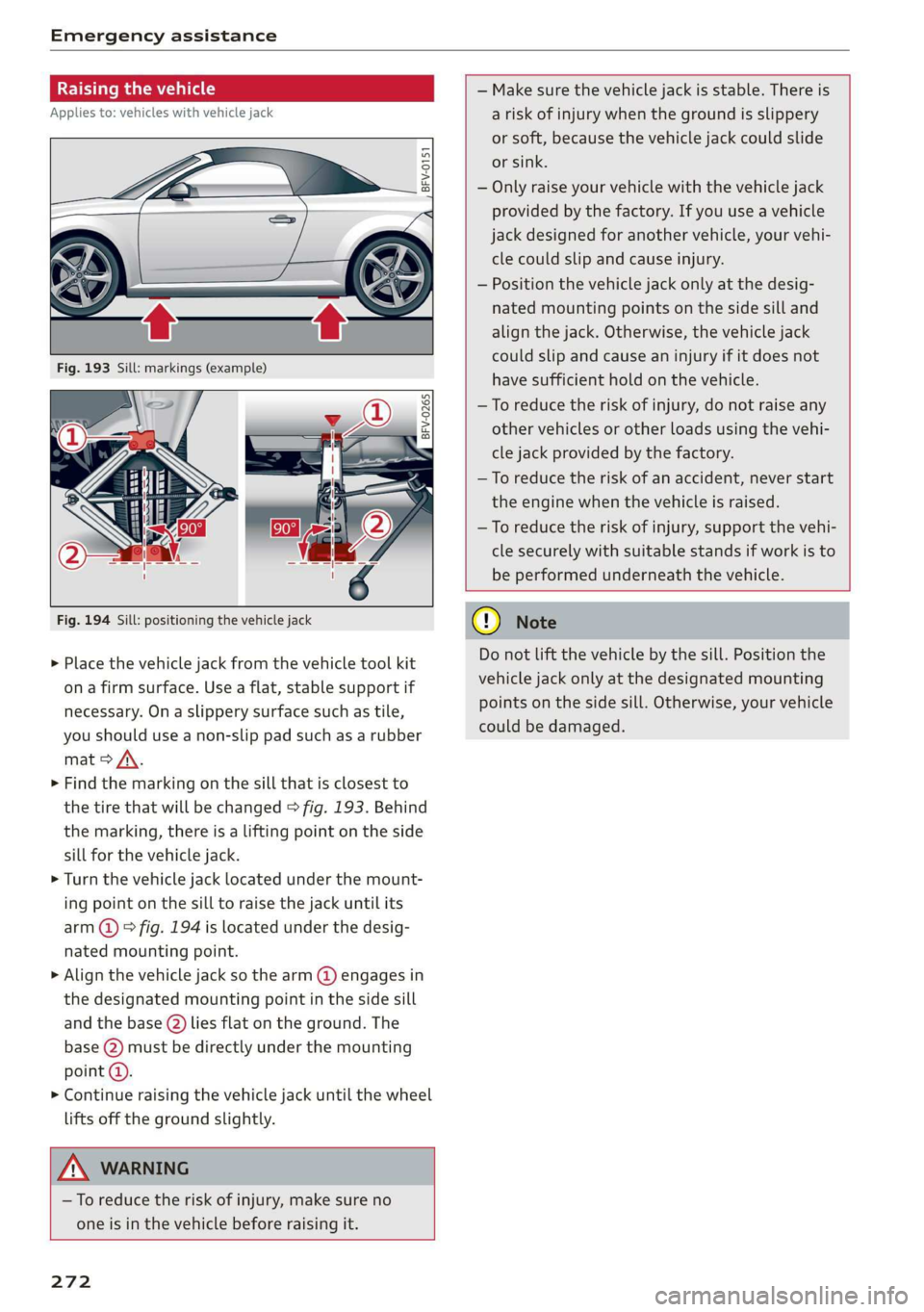
> Place the vehicle jack from the vehicle tool kit
ona firm surface. Use a flat, stable support if
necessary. On a slippery surface such as tile,
you should use a non-slip pad such as a rubber
mat > /\.
> Find the marking on the sill that is closest to
the tire that will be changed > fig. 193. Behind
the marking, there is a lifting point on the side
sill for the vehicle jack.
> Turn the vehicle jack located under the mount-
ing point on the sill to raise the jack until its
arm @) ° fig. 194 is located under the desig-
nated mounting point.
> Align the vehicle jack so the arm (@) engages in
the designated mounting point in the side sill
and the base (2) lies flat on the ground. The
base (2) must be directly under the mounting
point @).
> Continue raising the vehicle jack until the wheel
lifts off the ground slightly.
— Make sure the vehicle jack is stable. There is
a risk of injury when the ground is slippery
or soft, because the vehicle jack could slide
or sink.
— Only raise your vehicle with the vehicle jack
provided by the factory. If you use a vehicle
jack designed for another vehicle, your vehi-
cle could slip and cause injury.
— Position the vehicle jack only at the desig-
nated mounting points on the side sill and
align the jack. Otherwise, the vehicle jack
could slip and cause an injury if it does not
have sufficient hold on the vehicle.
—To reduce the risk of injury, do not raise any
other vehicles or other loads using the vehi-
cle jack provided by the factory.
—To reduce the risk of an accident, never start
the engine when the vehicle is raised.
—To reduce the risk of injury, support the vehi-
cle securely with suitable stands if work is to
be performed underneath the vehicle.
Z\ WARNING
—To reduce the risk of injury, make sure no
one is in the vehicle before raising it.
272
@) Note
Do not lift the vehicle by the sill. Position the
vehicle jack only at the designated mounting
points on the side sill. Otherwise, your vehicle
could be damaged.
Page 289 of 304
8S58012721BA
Index
A
A/C (climate control system) .............. 53
ACCESSOFIES . 6... ee eee 48, 282
Active lane assist... . owes. ss sesmen «oes ee ave 72
Activating vibration warning............. 74
Adjusting steering time................. 74
Cleaning the camera area.............. 263
Indicator light........... 0.00 eee ee eee 73
MO@SSAQGS wees 2 2 wars 5 ¥ sees & ¥ BOS & Eo 73
Switching on/off. « ccsiss «season o 6 wasn e 6 enaew 73
Adaptive UIght seiics 6 eva oo nears os was ¥ wee 78
Adaptive light (indicator light)............ 20
Adjusting the additional display........... 14
Adjusting the air distribution. ............ 53
Adjusting the center console lighting....... 41
Adjusting the sound..............-..00- 175
Adjusting the temperature............... 53
Adjusting the vents............. 0. eee ee 54
Advanced Airbag System
Children... 0.2... eee eee ee 212
GOMPONENUS’. ¢ wees » o eae 4 e eee a vee 196
Frontsairbagse. « ser + 2 ccesn vous eo recon x 194
How the components work together... .. 197
UEDA Gin 1 « sunsce « o vsiscete 0 0 siete ao anmene © exettome 189
Indicator light...........-...0--00 000: 18
Airbag system... 2... eee eee 208
Advanced Airbag System............... 193
CaRC bcs ow averiue 6 ¥ wxicend wo tandeDe Bo ewexare wa aie 203
Child restraints..................000. 212
Components (front airbags)............ 196
Danger of fitting a child safety seat on the
front passenger seat..............00.. 190
Disposal zee: ¢ ¢ ees 2 x seen ¢ » eews 2 2 ees 203
Frontiairbagss. « wee oo wae 6 wamen 6 3 saxon 193
How do the front airbags work?......... 198
How many airbags does my vehicle have?. 196
Important information................ 189
Important safety instructions on the knee
airbagisySteM« « aces s ¢ eaiae & x eae 5 x Bee 206
Kneeiairbagsias = 2 saw 2s cin sue es wo 204
MON
ILOFING weenie 5 ceerese a 6 sonnets a 8 ene © 0! oe 200
PASSENGER AIR BAG light............- 200
Repairs’: = seses + & seine & eeoreys « ¥ caves vo Hare 203
Safety instructions................00- 202
Side airbags .......... 00. sce e eee 206
Warning/Indicator lights.............. 200
When must the system be inspected?.... 200
Alarm system
refer to Anti-theft alarm system.......... 27
Alignment pin (tire change) .............. 268
All-weather lights.................00000. 38
AlUSeaSON tiN@Sbercis ss sce ee ers oo mene ve 254
All wheelidrive wes. 2 ose0 22 cee oe even so 89
Alternative routes........... 0... e eee 139
Ambient lighting'ss « esex + eee 3 s eames so oe 40
AMI
refer to Audi music interface....... 158,159
Android Auto
refer to Audi smartphone interface...... 169
Announcements (settings)
refer to Voice guidance..............-. 139
Anti-freeze
Windshield washer system............. 238
Anti-lock braking system (ABS) ............ 86
Anti-Slip Regulation.................0005 86
Anti-theft alarm system .............0000- 27
Anti-theft wheel bolts..............564. 271
Apple CarPlay
refer to Audi smartphone interface...... 169
ARIINCSE:. cxsusne » 5 swsuins 9 0 snamens oo saree % ¥ omeeete @ » 47
ASAE AY": & esware © & enmee @ a eaves ao esecuae a @ eoasare 48
Aspect ratio (Vid@0) wisi si ieee s aaa see 163
ASR
refer to Anti-Slip Regulation............. 86
Audi connect
refer toconnect....... 0.0 e eee eee eee 125
Audi connect Infotainment
Personal hotspot...............000055 126
Services:overview o.. 6 ci sb ee es ees 127
Audi magnetic ride
refer to Suspension control.............. 78
Audi music interface..............0000- 158
Audi music stream
refer to Wi-Fi... 0.2... cee eee eee eee 156
AUdIO FILS resis «6 arene xe cancers xo wrecene ao eenane & 160
Audio player
Bluetooth audio player................ 155
Wi-Fi audio players. « s was ss sees se ees 156
Audio track. ...... cece eee eee
Audi phone box
Audi smartphone interface.......... 169, 173
Audi virtual cockpit
refer to Instrument cluster.............. 10
287