navigation system AUDI TT ROADSTER 2019 Owner's Manual
[x] Cancel search | Manufacturer: AUDI, Model Year: 2019, Model line: TT ROADSTER, Model: AUDI TT ROADSTER 2019Pages: 304, PDF Size: 80.77 MB
Page 142 of 304
Navigation
If available, the following information will ap- The route that was calculated according to the
pear on the route suggestions: route criteria you selected is shown on the map.
— Route type (fast (, fast alternative (2), eco-
nomic route @))
— Distance to the destination and the calculated
arrival time
The special properties of the route (such as ferry
connections) may be displayed (4) > fig. 122. Ad-
ditional information about individual route crite-
ria can be found in > page 139.
— Traffic congestion along the route including
time
delays
Map
Operating the map
Applies to: vehicles with navigation system
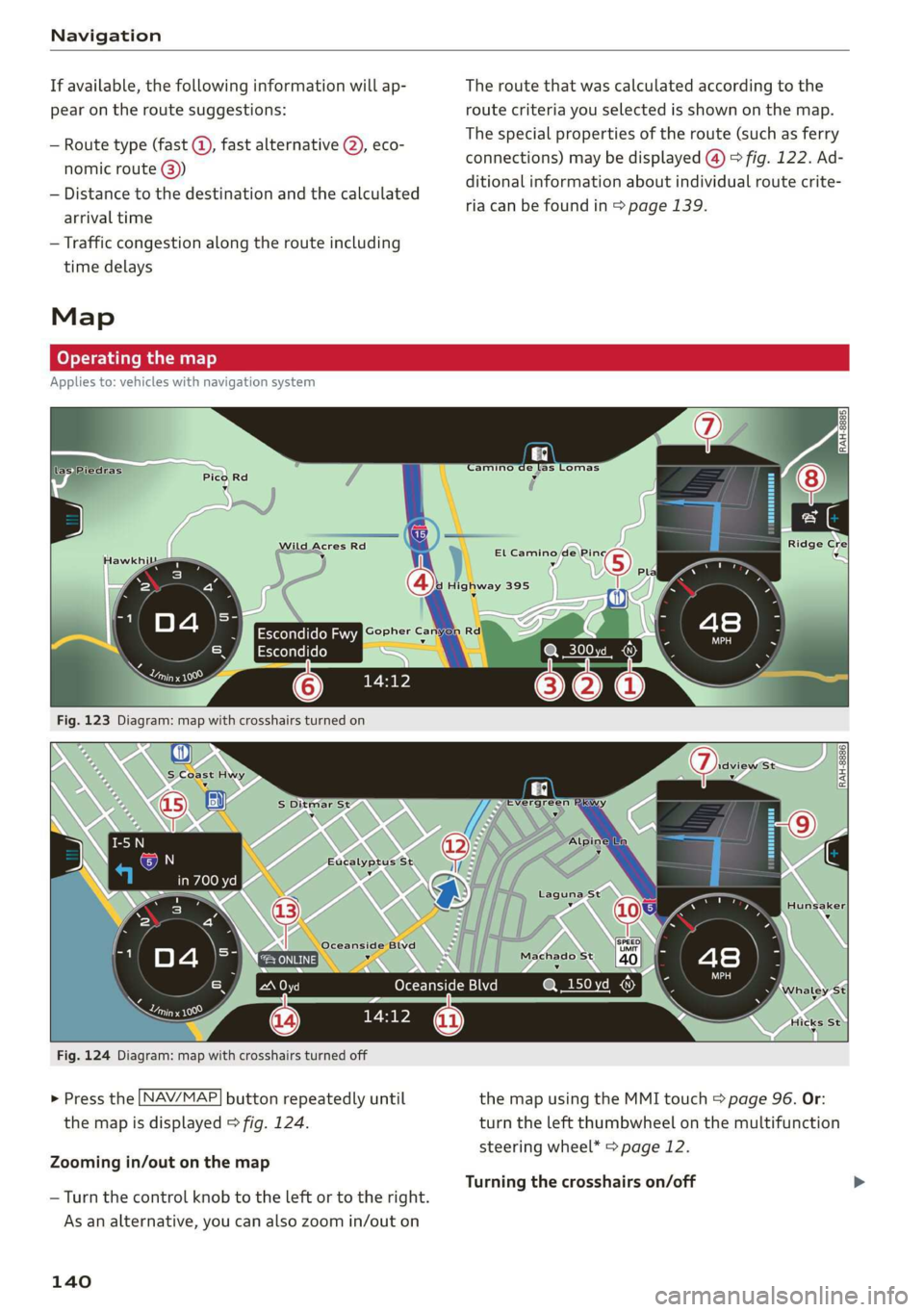
Fig. 124 Diagram: map with crosshairs turned off
> Press the
NAV/MAP button repeatedly until the map using the MMI touch > page 96. Or:
the map is displayed > fig. 124. turn the left thumbwheel on the multifunction
steering wheel* > page 12.
Zooming in/out on the map
Turning the crosshairs on/off
— Turn the control knob to the left or to the right.
As an alternative, you can also zoom in/out on
140
Page 143 of 304
8S58012721BA
Navigation
— Switching the crosshairs on: press the control
knob in the map view.
— Switching the crosshairs off: press the [BACK
button.
When the crosshairs are switched on > fig. 123:
@ Orientation: the map is either displayed as a
2D north-up map or a 2D heading-up map.
@) Scale: turn the control knob to the left or
right to decrease or increase the scale.
@ Zoom: when the Automatic zoom function is
switched on, an “A” for “Automatic” is dis-
played in the magnifying glass.
@ Crosshairs: move the crosshairs in the desired
direction using the MMI touch control pad
and set a point on the map as the destination
or have information about the focal point dis-
played.
© Map content (points of interest, favorites): if
there are multiple POIs in the immediate vi-
cinity, they will be shown stacked on the
map.
© Additional information on the crosshairs po-
sition: if you move the crosshairs to a loca-
tion on the map, available information for
the current crosshairs position is displayed.
Press the control knob to open destination
details or to start route guidance. When the
crosshairs are turned off, the road being cur-
rently driven on is shown.
@ Display of an upcoming maneuver. If there is
no upcoming maneuver, the distance and cal-
culated arrival time to the destination/stop-
over is displayed in this location.
Display of a better route. See > page 145.
When the crosshairs are switched off > fig. 124:
@) Ifa turn arrow is displayed, a bar graph turns
on. The fewer the bars that are shown, the
shorter the distance is until the turn.
Speed limit display): display of the maxi-
mum permitted speed on the expressways
and highways.
D_ Only applies to vehicles without camera-based speed limit
display.
@ Road currently being driven on. When the ve-
hicle is stationary, “offroad” is displayed
here.
Vehicle location (@)
Display of active traffic information
ONLINE} or [TMC
Altitude display (2)
Route information: various information will
be displayed during active route guidance
(for example, the upcoming maneuver in-
cluding calculated distance and street
names). The display also provides traffic in-
formation or points of interest on the current
route.
Applies to: vehicles with navigation system
®® O®
> Press the [NAV/MAP] button repeatedly until
the map is displayed > page 140, fig. 124.
> Select: left control button > desired function.
Switch to destination input
The Enter destination menu is displayed
=> page 132, fig. 118.
Traffic reports
Current traffic information is displayed in the In-
fotainment system display. See > page 143.
Route list
The route list can only be displayed when route
guidance is active and contains information re-
garding the route, the names of the streets and
the length of the route sections. When traveling
on highways, possible parking lots and rest areas
are shown, which you can select as a stopover.
POIs along the route
Requirement: route guidance must be active.
Searching for points of interest along your cur-
rent route See > page 135.
141
Page 144 of 304
![AUDI TT ROADSTER 2019 Owners Manual Navigation
Additional options on the map
Applies to: vehicles with navigation system
> Press the LNAV/MAP] button repeatedly until
the map is displayed > page 140, fig. 124.
> Press](/img/6/57667/w960_57667-143.png "AUDI TT ROADSTER 2019 Owners Manual Navigation
Additional options on the map
Applies to: vehicles with navigation system
> Press the LNAV/MAP] button repeatedly until
the map is displayed > page 140, fig. 124.
> Press")
Navigation
Additional options on the map
Applies to: vehicles with navigation system
> Press the LNAV/MAP] button repeatedly until
the map is displayed > page 140, fig. 124.
> Press the right control button.
Depending on the function selected, the follow-
ing options can also be selected under the Map
menu:
Cancel route guidance: see > page 137.
Map settings: see > page 142.
Route criteria: see > page 139.
Voice guidance: see > page 139.
Navigation settings: see > page 138.
Online traffic data*: see > page 143.
Show alternative routes: see > page 139.
Parking along the route: parking options near
the vehicle are displayed.
Save current position: you can save your current
vehicle position as a favorite > page 138 or save
it as a contact in the directory > page 138.
Audi connect at this location*: allows you to
search for City Events or Weather at the entered
location.
Country information: you can display the appli-
cable urban and rural speed limits for any coun-
try/state. This information will be automatically
shown to you in the route information @)
=> page 140, fig. 124 when the speed limit is ex-
ceeded, if this function is activated > page 142.
Avoid route*: when route guidance is active, the
calculated route will avoid the area you have
specified (maximum: 12 mi (20 km)), if possible.
The navigation system calculates an alternative
route. The route to be avoided that you have en-
tered applies only to the current route and must
be set again, if needed. The areas you have se-
lected to avoid will appear with red and white
shading on the map.
2) AUDI AG provides access to services from third party pro-
viders. Permanent availability cannot be guaranteed, be-
cause that depends on the third party provider.
142
Map settings
Applies to: vehicles with navigation system
> Press the [NAV/MAP] button repeatedly until
the map is displayed > page 140, fig. 124.
> Select: right control button > Map settings.
Depending on the selected function, the follow-
ing settings can be selected:
Map colors
Day/Night: the map is displayed with a light/
dark background.
Automatic: when the lights switch on, the map
colors switch from day to night.
Map display
Standard > page 140, fig. 123.
Satellite map*)) > page 143, fig. 125.
Traffic > page 143.
Map orientation
Destination map: the map indicates the destina-
tion and is oriented to the north.
2D heading-up map/2D north-up map: the cur-
rent vehicle position is displayed. The map is ori-
ented in the direction of travel or to the north.
3D heading-up map: when this function is
switched on, the current vehicle position is
shown on a three-dimensional map and oriented
in the direction of travel. At a scale of 62 mi
(100 km) and larger, the map orientation is to
the north.
Overview map: the entire route from the vehicle
position to the destination or the next stopover is
displayed on the map. The map scale depends on
the length of the route and adapts automatically.
The map is oriented to the north.
Route information
The display of route information such as the cur-
rent road being driven on, upcoming maneuvers, >
Page 145 of 304
8S58012721BA
Navigation
traffic information or points of interest along the
route can be switched on/off.
Automatic zoom
On: the map scale is adapted automatically de-
pending on the type of road being traveled (ex-
pressway, highway, other roads) so that you al-
ways have an optimal overview of the road ahead.
The scale will also be automatically adapted
when there are upcoming maneuvers to provide a
better detailed view.
Off: the map scale you have chosen is main-
tained.
Map content
Map content, such as traffic information, favor-
ites or restaurants, can be displayed or hidden
(™).
Satellite map
Applies to: vehicles with navigation system and Audi connect
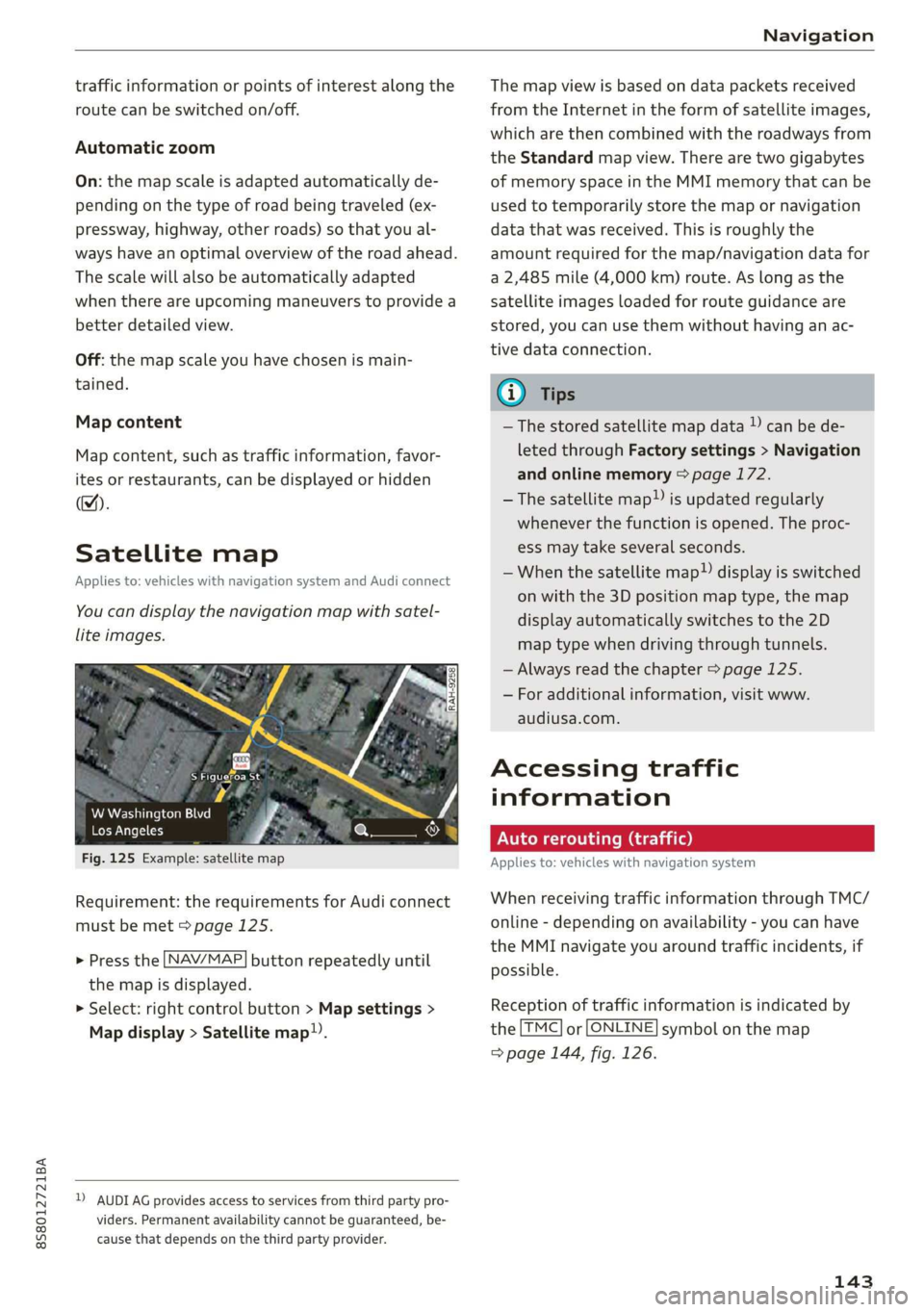
You can display the navigation map with satel-
lite images.
S Figueroa St
W Washington Blvd %
Los Angeles ero
Fig. 125 Example: satellite map
Requirement: the requirements for Audi connect
must be met > page 125.
> Press the [NAV/MAP] button repeatedly until
the map is displayed.
> Select: right control button > Map settings >
Map display > Satellite map!).
D) AUDI AG provides access to services from third party pro-
viders. Permanent availability cannot be guaranteed, be-
cause that depends on the third party provider.
The map view is based on data packets received
from the Internet in the form of satellite images,
which are then combined with the roadways from
the Standard map view. There are two gigabytes
of memory space in the MMI memory that can be
used to temporarily store the map or navigation
data that was received. This is roughly the
amount required for the map/navigation data for
a 2,485 mile (4,000 km) route. As long as the
satellite images loaded for route guidance are
stored, you can use them without having an ac-
tive data connection.
G) Tips
—The stored satellite map data ) can be de-
leted through Factory settings > Navigation
and online memory > page 172.
—The satellite map”) is updated regularly
whenever the function is opened. The proc-
ess may take several seconds.
—When the satellite map”) display is switched
on with the 3D position map type, the map
display automatically switches to the 2D
map type when driving through tunnels.
— Always read the chapter > page 125.
— For additional information, visit www.
audiusa.com.
Accessing traffic
information
Auto rerouting (traffic)
Applies to: vehicles with navigation system
When receiving traffic information through TMC/
online - depending on availability - you can have
the MMI navigate you around traffic incidents, if
possible.
Reception of traffic information is indicated by
the [TMC] or [ONLINE] symbol on the map
=> page 144, fig. 126.
143
Page 146 of 304
Navigation
Online traffic information
Applies to: vehicles with navigation system and Audi connect
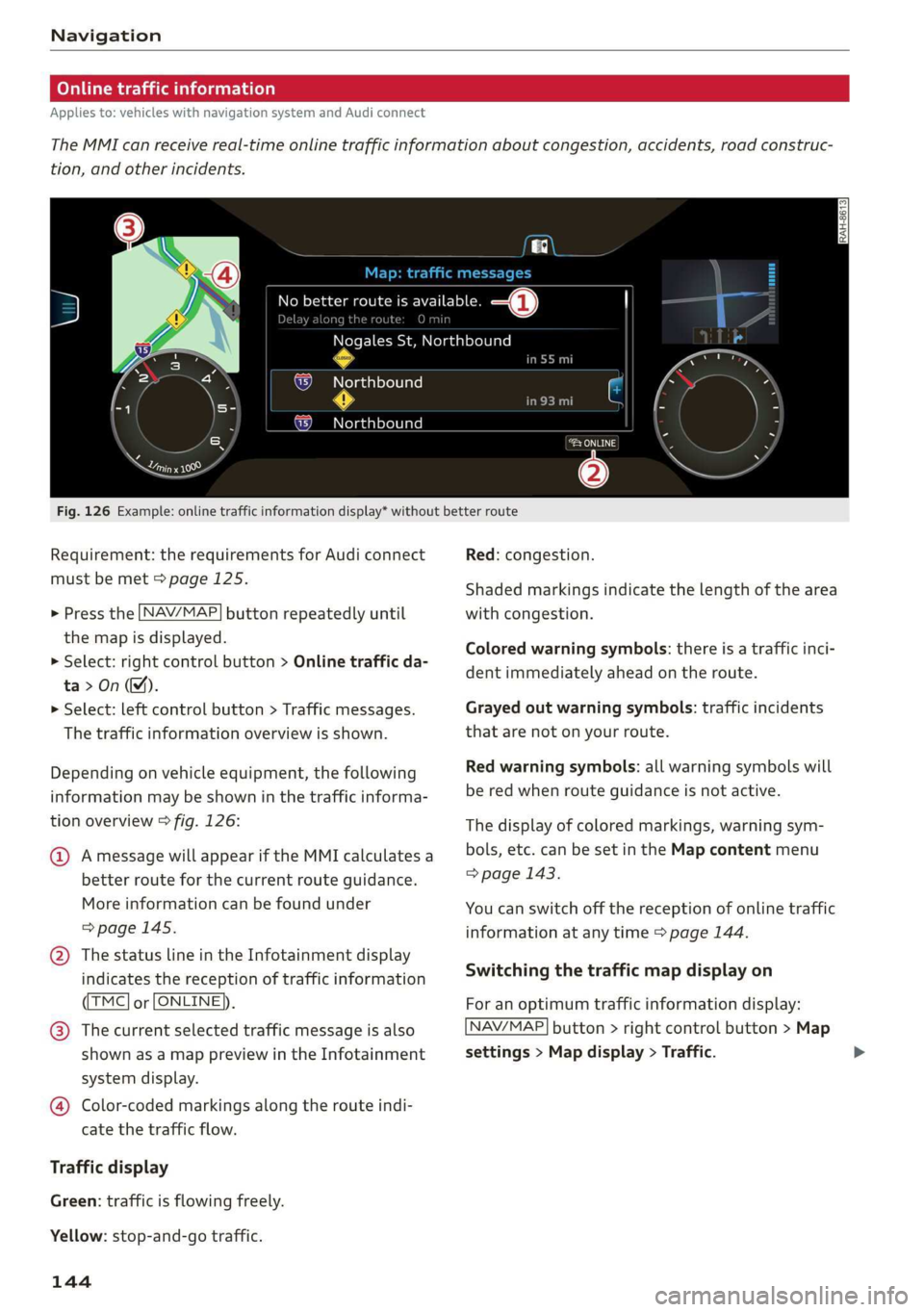
The MMI can receive real-time online traffic information about congestion, accidents, road construc-
tion, and other incidents.
[RAH-8613]
Ky Ricca better route is available. —@
along the route O min
Nogales St, Northbound
Northbound
Northbound
eeu
.
Cerys
@
Fig. 126 Example: online traffic information display* without better route
Requirement: the requirements for Audi connect
must be met > page 125.
> Press the [NAV/MAP
the map is displayed.
> Select: right control button > Online traffic da-
ta>On(M).
> Select: left control button > Traffic messages.
The traffic information overview is shown.
button repeatedly until
Depending on vehicle equipment, the following
information may be shown in the traffic informa-
tion overview > fig. 126:
@ Amessage will appear if the MMI calculates a
better route for the current route guidance.
More
information can be found under
=> page 145.
@ The status line in the Infotainment display
indicates the reception of traffic information
TMC] or [ONLINE]).
@® The current selected traffic message is also
shown as a map preview in the Infotainment
system display.
@ Color-coded markings along the route indi-
cate the traffic flow.
Traffic display
Green: traffic is flowing freely.
Yellow: stop-and-go traffic.
144
Red: congestion.
Shaded markings indicate the length of the area
with congestion.
Colored warning symbols: there is a traffic inci-
dent immediately ahead on the route.
Grayed out warning symbols: traffic incidents
that are not on your route.
Red warning symbols: all warning symbols will
be red when route guidance is not active.
The display of colored markings, warning sym-
bols, etc. can be set in the Map content menu
> page 143.
You can switch off the reception of online traffic
information at any time > page 144.
Switching the traffic map display on
For an optimum traffic information display:
NAV/MAP] button > right control button > Map
settings > Map display > Traffic.
Page 147 of 304
8S8012721BA
Navigation
You can also display the online traffic informa-
tion in the satellite map*») > page 143 or the
standard map > page 140, fig. 123
G) Tips
— Online traffic information is not available in
Canada.
— Always read the chapter > page 125, Audi
connect.
— Having the Online traffic data function
switched on provides the most accurate re-
ports of traffic situations as well as traffic
forecasting. Your vehicle transmits and
processes its anonymous, encrypted posi-
tion information at regular intervals to the
traffic data provider. If you do not want to
use this, you can switch off the online traf-
fic information function at any time.
— The online traffic information network is
currently not available in all countries, and
the coverage is not nationwide. For addi-
tional information, visit www.audiusa.com.
Traffic information (TMC)
Applies to: vehicles with navigation system
> Press the LNAV/MAP| button repeatedly until
the map is displayed.
> Select: left control button > Traffic messages.
TMC traffic messages are switched on at the fac-
tory.
Multiple traffic messages are summarized in the
overview under the corresponding street names
or highway names.
— Displaying all traffic messages for a street/
highway: select and confirm the |¢ symbol. A
list of all the traffic messages for the selected
street/highway is displayed.
— Opening the detailed view of a traffic mes-
sage: if you select an entry from the list, the
traffic information will be shown as a map pre-
view @) > page 144, fig. 126. Select and con-
2) AUDI AG provides access to services from third party pro-
viders. Permanent availability cannot be guaranteed, be-
cause that depends on the third party provider.
firm a traffic message to display the details for
that message.
— Displaying the selected traffic message on the
map: select the right control button > Show on
map.
— Displaying the next traffic message on the
map: press the control knob.
Traffic information display
Colored warning symbols: traffic incidents on
your route are shown in the upper section of the
list and are sorted according to distance.
Warning symbols with +: avoided traffic inci-
dents.
Grayed out warning symbols: traffic incidents
that are not on your route. They are sorted ac-
cording to road type (expressway, highway, other
road), country and name.
Shaded markings indicate the length of the area
with congestion.
G@) Tips
Critical traffic information, such as warnings
about wrong-way drivers, is automatically dis-
played. To hide the traffic information, press
the [BACK] button or the control knob.
— TMC traffic reports are not available in Can-
ada. For more information, please contact
Sirius Canada.
12{oh ea col th a)
Applies to: vehicles with navigation system
By receiving traffic information through TMC,
your MMI calculates a better route if available
and the possible time saved compared to the
current route. You can decide which route you
would like to use.
NAV/MAP > Press the
the
map is displayed.
button repeatedly until
Requirement: route guidance must be active.
145
>
Page 148 of 304
Navigation
If your MMI has calculated a better route than
the current route guidance, the message A better
route is available. appears on the map along
with the time that may be saved. A better route is
indicated in the map view by the symbol #
=> page 140, fig. 123.
Apply better route
— Press the right control button in the map view.
Or: select the left control button > Traffic mes-
sages. The better route with the calculated ar-
rival time is displayed.
Troubleshooting
Applies to: vehicles with navigation system
— Select and confirm the better route. Or: Select
and confirm Details to display details about the
better route. You can zoom in or out on the
map using the MMI touch control pad. Require-
ment: there must be more than one optimized
route calculated. Press the control knob to
switch to the next route in the detailed view.
Closing the detailed view: press the [BACK
button.
— After you have selected a better route, the
route will be recalculated.
Problem Solution
Free text search: the desired des-
tination cannot be found.
tries/states.
The destination might not be entered in the navigation database.
Or: check the spelling of the term that was searched. Check if the
desired country/state was selected for the free text search using
the Country/state selection > page 133 or the option All coun-
146
Page 174 of 304
System settings
Tool tips
When this function is switched on M, your MMI
shows you tips for input. The frequency of how
often it displays decreases with time. You can
switch off the operating tips at any time.
Speech dialog system
Applies to: vehicles with voice recognition system
Command display: when this function is switch-
ed on, the MMI will show you the possible
commands for voice input in the respective
menu. You can switch the function off at any
time.
Short dialog: when this function is switched on
, a shorter form of the prompts is used. You
can switch the function off at any time.
Speech dialog system volume: you can adjust
the volume of the prompts by turning the control
knob.
Individual speech training (only when the vehi-
cle is stationary): you can adapt the voice recog-
nition system to your voice or pronunciation in or-
der to improve the system's ability to recognize
your speech. Individual speech training is com-
prised of 20 speech entries that consist of com-
mands and sequences of numbers. You can de-
lete the programmed voice training with the Re-
set individual speech training function.
Factory settings
The following functions can be reset to the facto-
ry default settings:
— Sound settings
— Radio
— Media settings
—Jukebox*
— Directory*
— Telephone*
— Bluetooth and Wi-Fi*
— Navigation settings*
— Navigation and online memory*
— Voice recognition system*
— Message settings*
— Apps*
— Tool tips
— Audi connect*
172
You can select the desired functions individually
or all at once with the option Select all entries.
Select and confirm Restore factory settings.
G) Tips
— Make sure that not only the settings were
deleted but also the stored data, if necessa-
ry.
— Please note that the voice recognition sys-
tem* is not available in Cabriolets that do
not have a factory-installed safety belt mi-
crophone.
Connection manager
Introduction
The connection manager provides an overview of
your connected devices and their network status.
> Select: [MENU] button > Settings > left control
button > MMI settings > Connection manager.
> Select and confirm a menu item.
If a mobile device was already connected and you
select and confirm the corresponding menu item,
the
device name and connection status are dis-
played under the menu item.
You can individually Connect (M) or Disconnect
(_) a paired device.
Requirement:
— The vehicle must be stationary and the ignition
must be switched on.
— The Bluetooth settings will open on your mo-
bile device during the connection setup.
— The Bluetooth function and visibility of the MMI
= page 174 and mobile device must be switch-
ed on.
— The mobile device to be connected must not be
connected to any other Bluetooth device.
Primary phone
Applies to: vehicles with telephone
— Connect new device: search for and connect a
cell phone.
Page 177 of 304
8S8012721BA
System settings
Start update. The length of the process de-
pends on the size of the update.
— Reset driver installation: the selected media
driver package is reset to the settings at the
time of delivery.
— Version information: information on the MMI
software version and the navigation database*
software version is displayed. The Software in-
formation function also provides information
on the software contained in the MMI and the
licensing agreement.
Sound settings
The sound distribution and volume of the MMI
can be adjusted individually. The settings depend
on the vehicle equipment.
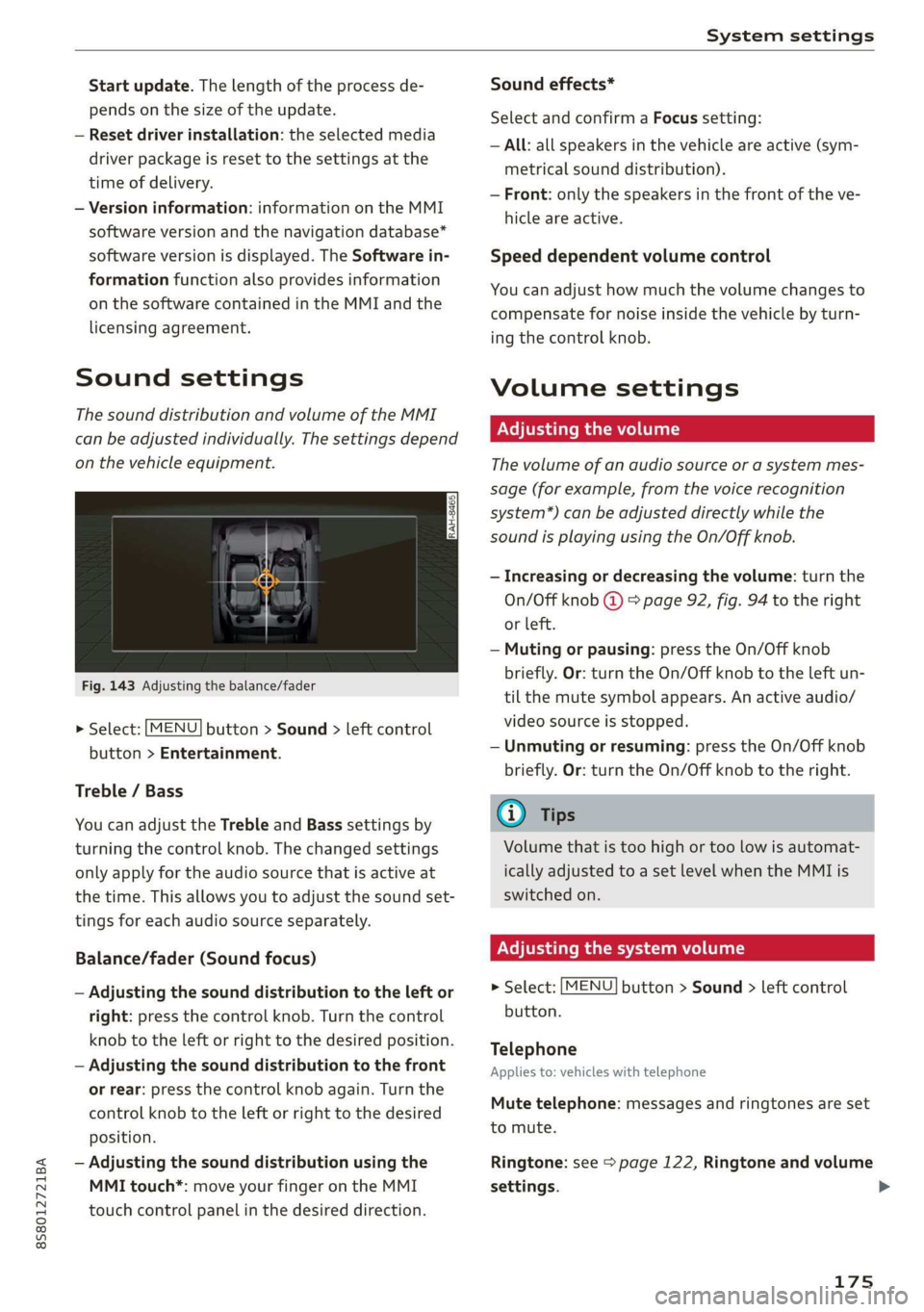
Fig. 143 Adjusting the balance/fader
> Select: [MENU] button > Sound > left control
button > Entertainment.
Treble / Bass
You can adjust the Treble and Bass settings by
turning the control knob. The changed settings
only apply for the audio source that is active at
the time. This allows you to adjust the sound set-
tings for each audio source separately.
Balance/fader (Sound focus)
— Adjusting the sound distribution to the left or
right: press the control knob. Turn the control
knob to the left or right to the desired position.
— Adjusting the sound distribution to the front
or rear: press the control knob again. Turn the
control knob to the left or right to the desired
position.
— Adjusting the sound distribution using the
MMI touch*: move your finger on the MMI
touch control panel in the desired direction.
Sound effects*
Select and confirm a Focus setting:
— All: all speakers in the vehicle are active (sym-
metrical sound distribution).
— Front: only the speakers in the front of the ve-
hicle are active.
Speed dependent volume control
You can adjust how much the volume changes to
compensate for noise inside the vehicle by turn-
ing the control knob.
Volume settings
Adjusting the volume
The volume of an audio source or a system mes-
sage (for example, from the voice recognition
system*) can be adjusted directly while the
sound is playing using the On/Off knob.
— Increasing or decreasing the volume: turn the
On/Off knob @) 9 page 92, fig. 94 to the right
or left.
—Muting or pausing: press the On/Off knob
briefly. Or: turn the On/Off knob to the left un-
til the mute symbol appears. An active audio/
video source is stopped.
—Unmuting or resuming: press the On/Off knob
briefly. Or: turn the On/Off knob to the right.
G@) Tips
Volume that is too high or too low is automat-
ically adjusted to a set level when the MMI is
switched on.
Adjusting the system volume
> Select: [MENU] button > Sound > left control
button.
Telephone
Applies to: vehicles with telephone
Mute telephone: messages and ringtones are set
to mute.
Ringtone: see => page 122, Ringtone and volume
settings.
175
Page 178 of 304
System settings
Ringtone volume: you can adjust the volume of
the selected ringtone by turning the control
knob.
Message volume: you can adjust the volume of
the notification for an incoming text message by
turning the control knob.
Microphone input level: you can adjust the vol-
ume during a phone call by turning the control
knob.
Navigation
Applies to: vehicles with navigation system
Voice guidance: see > page 139, Voice guidance.
Voice guidance during phone call: see
=> page 139, Voice guidance.
Voice guidance volume: you can adjust the voice
guidance volume during active route guidance by
turning the control knob.
Entertainment fader: the volume of audio play-
back can be temporarily lowered when the park-
ing system or voice guidance is active.
Voice recognition system
Applies to: vehicles with voice recognition system
Short dialog: prompts in a shorter format can be
switched on or off.
Speech dialog system volume: you can adjust
the volume of the prompts by turning the control
knob.
Parking aid*
You can adjust the signal tone volume by turning
the control knob.
— Adjusting the Front volume: select and con-
firm High, Medium, or Low.
— Adjusting the Rear volume: select and confirm
High, Medium, or Low.
MMI touch volume*
You can adjust the volume of the prompts for the
MMI touch* by turning the control knob.
Audi Heartbeat
You can adjust the volume of Audi Heartbeat by
turning the control knob.
176
G) Tips
Please note that the voice recognition sys-
tem* is not available in Cabriolets that do not
have a factory-installed safety belt micro-
phone.
Restarting the MMI
(reset)
RAH-8611
g
=
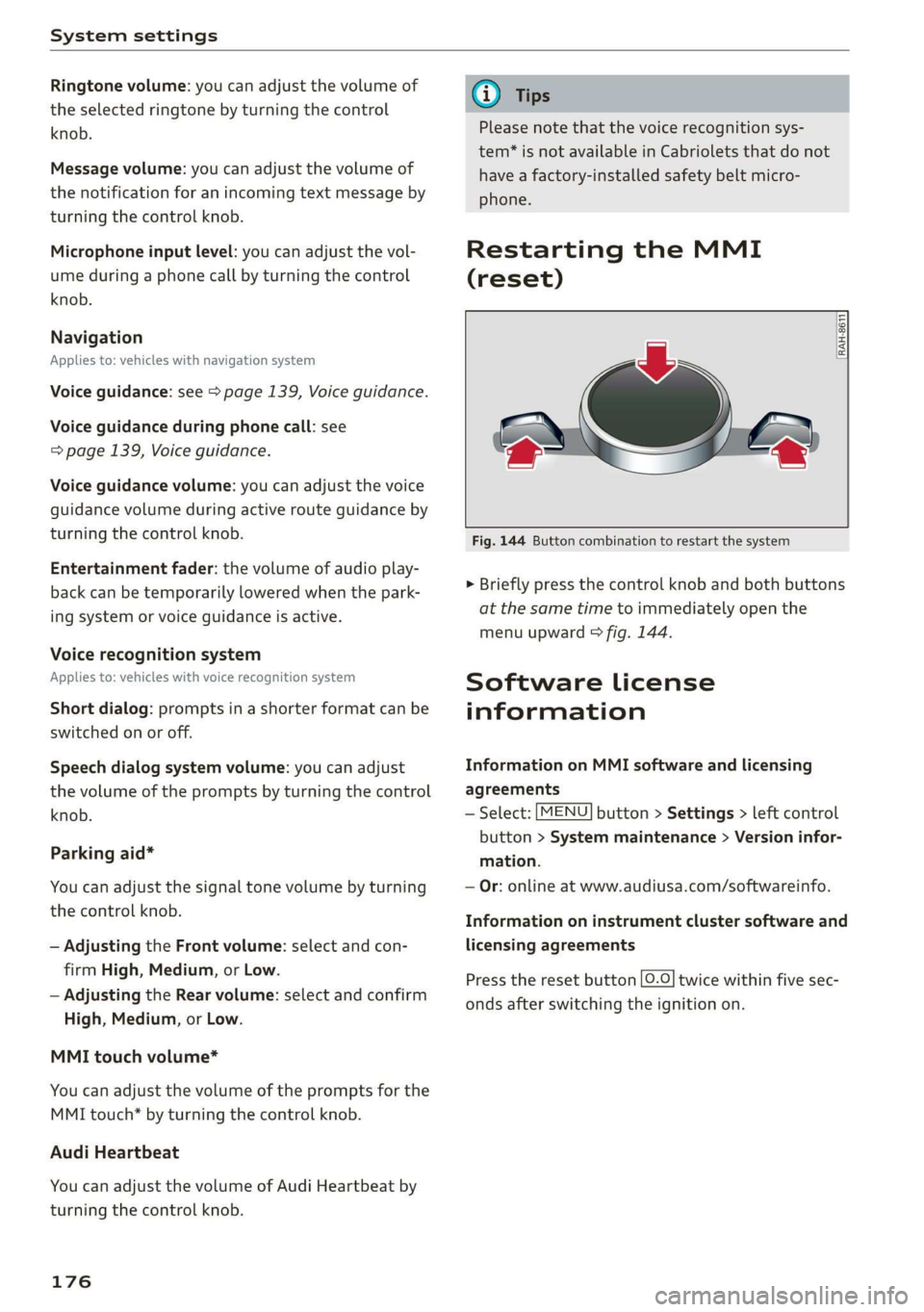
Fig. 144 Button combination to restart the system
> Briefly press the control knob and both buttons
at the same time to immediately open the
menu upward > fig. 144.
Software License
information
Information on MMI software and licensing
agreements
— Select: [MENU] button > Settings > left control
button > System maintenance > Version infor-
mation.
— Or: online at www.audiusa.com/softwareinfo.
Information on instrument cluster software and
licensing agreements
Press the reset button [0.0] twice within five sec-
onds after switching the ignition on.