warning lights AUDI TT ROADSTER 2019 Owner's Manual
[x] Cancel search | Manufacturer: AUDI, Model Year: 2019, Model line: TT ROADSTER, Model: AUDI TT ROADSTER 2019Pages: 304, PDF Size: 80.77 MB
Page 134 of 304
Navigation
Navigation
Opening navigation
Applies to: vehicles with navigation system
The navigation system directs you to your destination, around traffic incidents, and on alternative
routes, if desired.
ae 2
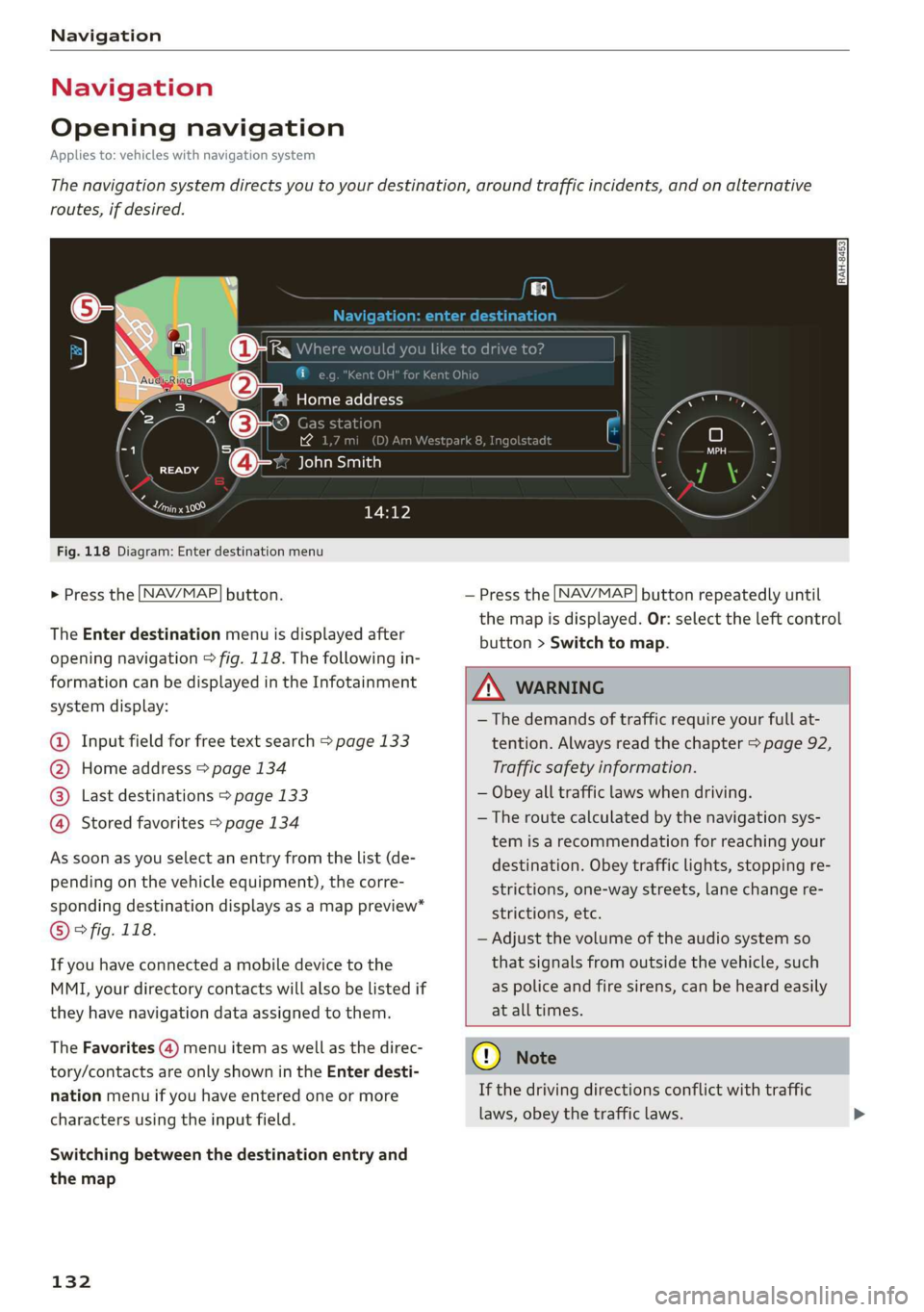
Fig. 118 Diagram: Enter destination menu
> Press the [NAV/MAP] button.
The Enter destination menu is displayed after
opening navigation > fig. 118. The following in-
formation can be displayed in the Infotainment
system display:
@ Input field for free text search > page 133
@ Home address > page 134
Last destinations > page 133 pag
Stored favorites > page 134 pag
As soon as you select an entry from the list (de-
pending on the vehicle equipment), the corre-
sponding destination displays as a map preview*
© ° fig. 118.
If you have connected a mobile device to the
MMI, your directory contacts will also be listed if
they have navigation data assigned to them.
The Favorites (4) menu item as well as the direc-
tory/contacts are only shown in the Enter desti-
nation menu if you have entered one or more
characters using the input field.
Switching between the destination entry and
the map
132
— Press the [NAV/MAP] button repeatedly until
the map is displayed. Or: select the left control
button > Switch to map.
ZA\ WARNING
— The demands of traffic require your full at-
tention. Always read the chapter > page 92,
Traffic safety information.
— Obey all traffic laws when driving.
— The route calculated by the navigation sys-
tem is a recommendation for reaching your
destination. Obey traffic lights, stopping re-
strictions, one-way streets, lane change re-
strictions, etc.
— Adjust the volume of the audio system so
that signals from outside the vehicle, such
as police and fire sirens, can be heard easily
at all times.
) Note
If the driving directions conflict with traffic
laws, obey the traffic laws.
Page 179 of 304
8S8012721BA
Safe driving
Safe driving
Basics
SER Nails mali
Please remember - safety first!
The individual safety features of your vehicle can
work together as a system to help protect you
and
your passengers in a wide range of accidents.
These features cannot work as a system if they
are not always correctly adjusted and correctly
used.
This chapter contains important information,
tips, instructions and warnings that you need to
read and observe for your own safety, the safety
of your passengers and others. We have summar-
ized here what you need to know about safety
belts, airbags, child restraints as well as child
safety. Your safety is for us priority number 1. Al-
ways observe the information and warnings in
this section - for your own safety as well as that
of your passengers.
The information in this section applies to all
model versions of your vehicle. Some of the fea-
tures described in this sections may be standard
equipment on some models, or may be optional
equipment on others. If you are not sure, ask
your authorized Audi dealer.
ZA WARNING
— Always make sure that you follow the in-
structions and heed the WARNINGS in this
Manual. It is in your interest and in the in-
terest of your passengers.
— Always keep the complete Owner's Litera-
ture in your Audi when you lend or sell your
vehicle so that this important information
will always be available to the driver and
passengers.
— Always keep the Owner's literature handy so
that you can find it easily if you have ques-
tions.
Important things to do before driving
Safety is everybody's job! Vehicle and occupant
safety always depends on the informed and care-
ful driver.
For your safety and the safety of your passenger,
before driving always:
> Make sure that all lights and signals are operat-
ing correctly.
> Make sure that the tire pressure is correct.
> Make sure that all windows are clean and afford
good visibility to the outside.
> Secure all luggage and other items carefully
= page 50, > page 49.
> Make sure that nothing can interfere with the
pedals.
> Adjust seat and mirrors correctly for your
height.
> Make sure to use the right child restraint cor-
rectly to protect children > page 210, Child
safety.
> Sit properly in your seat and make sure that
your passenger do the same © page 46, Front
seats.
> Fasten your safety belt and wear it properly. Al-
so instruct your passenger to fasten his safety
belt properly > page 182.
What impairs driving safety?
Safe driving is directly related to the condition of
the vehicle, the driver as well as the driver’s abili-
ty to concentrate on the road without being dis-
tracted.
The driver is responsible for the safety of the ve-
hicle and all of its occupants. If your ability to
drive is impaired, safety risks for everybody in the
vehicle increase and you also become a hazard to
everyone else on the road > /\. Therefore:
> Do not let yourself be distracted by passenger
or by using a cellular telephone.
> NEVER drive when your driving ability is im-
paired (by medications, alcohol, drugs, etc.).
> Observe all traffic laws, rules of the road and
speed limits and plain common sense.
> ALWAYS adjust your speed to road, traffic and
weather conditions.
177
>
Page 184 of 304
Safety belts
Safety belts
General notes
Always wear safety belts!
Wearing safety belts correctly saves lives!
This chapter explains why safety belts are neces-
sary, how they work and how to adjust and wear
them correctly.
> Read all the information that follows and heed
all of the instructions and WARNINGS.
ZA\ WARNING
Not wearing safety belts or wearing them im-
properly increases the risk of serious personal
injury and death.
— Safety belts are the single most effective
means available to reduce the risk of serious
injury and death in automobile accidents.
For your protection and that of your passen-
gers, always correctly wear safety belts
when the vehicle is moving.
— Pregnant women, injured, or physically im-
paired persons must also use safety belts.
Like all vehicle occupants, they are more
likely to be seriously injured if they do not
wear Safety belts. The best way to protect a
fetus is to protect the mother - throughout
the entire pregnancy.
NT tet)
Your vehicle has two seating positions. Each seat-
ing position has a safety belt.
ZA\ WARNING
Not wearing safety belts or wearing them im-
properly increases the risk of serious personal
injury and death.
— Never strap more than one person, including
small children, into any belt. It is especially
dangerous to place a safety belt over a child
sitting on your lap.
— Never let more people ride in the vehicle
than there are safety belts available.
182
— Be sure everyone riding in the vehicle is
properly restrained with a separate safety
belt or child restraint.
yr ae Caen Chi
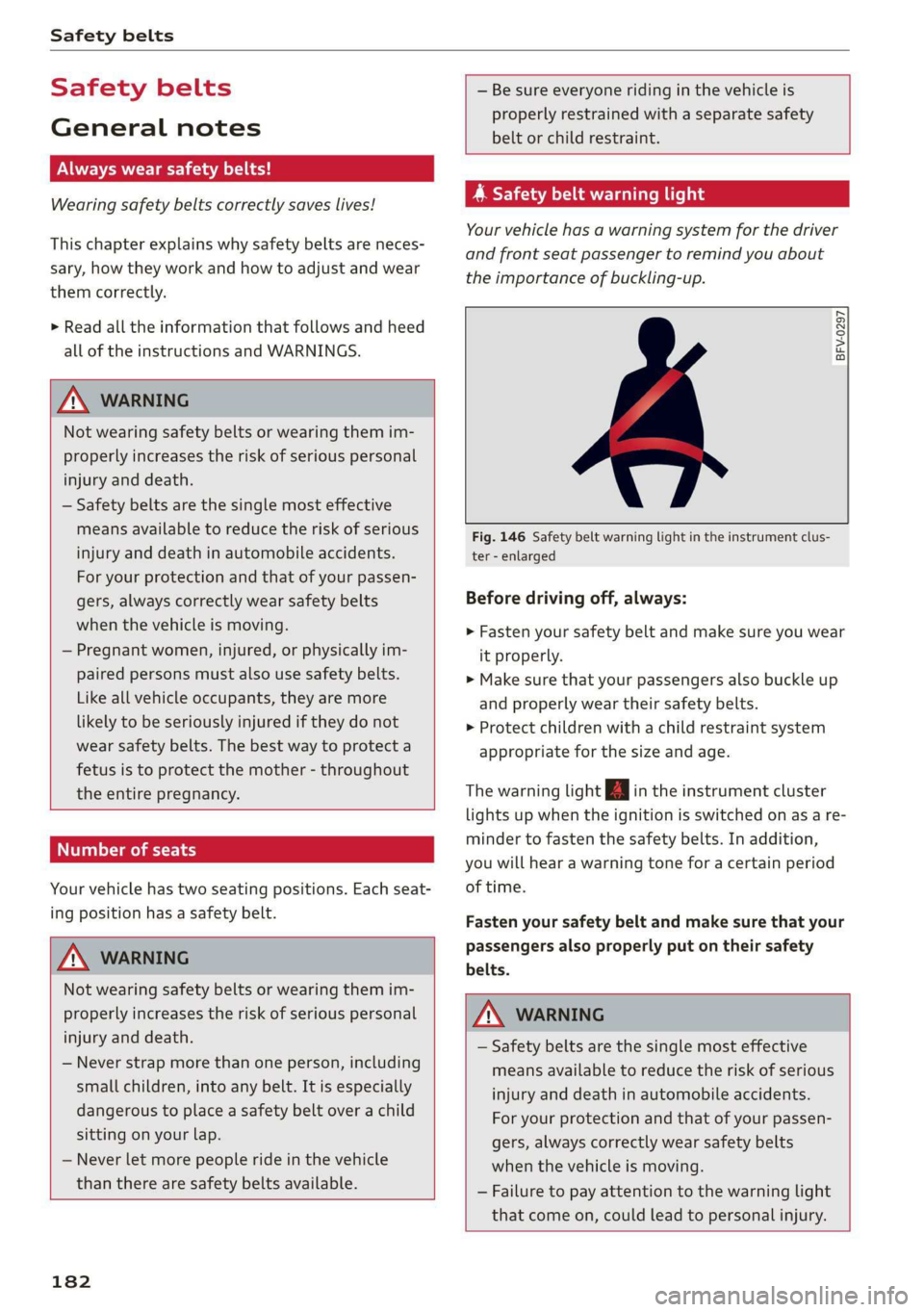
Your vehicle has a warning system for the driver
and front seat passenger to remind you about
the importance of buckling-up.
BFV-0297
Fig. 146 Safety belt warning light in the instrument clus-
ter - enlarged
Before driving off, always:
> Fasten your safety belt and make sure you wear
it properly.
> Make sure that your passengers also buckle up
and properly wear their safety belts.
> Protect children with a child restraint system
appropriate for the size and age.
The warning light in the instrument cluster
lights up when the ignition is switched on as a re-
minder to fasten the safety belts. In addition,
you will hear a warning tone for a certain period
of time.
Fasten your safety belt and make sure that your
passengers also properly put on their safety
belts.
Z\ WARNING
— Safety belts are the single most effective
means available to reduce the risk of serious
injury and death in automobile accidents.
For your protection and that of your passen-
gers, always correctly wear safety belts
when the vehicle is moving.
— Failure to pay attention to the warning light
that come on, could lead to personal injury.
Page 259 of 304
8S8012721BA
Wheels
overheat and can lead to tire failure. Under-infla-
tion also reduces fuel efficiency and tire tread
life, and may affect the vehicle's handling and
stopping ability.
Please note that the TPMS is not a substitute for
proper tire maintenance, and it is the driver's re-
sponsibility to maintain correct tire pressure,
even if under-inflation has not reached the level
to trigger illumination of the TPMS low tire pres-
sure telltale.
Your vehicle has also been equipped with a TPMS
malfunction indicator to indicate when the sys-
tem is not operating properly. The TPMS mal-
function indicator is combined with the low tire
pressure telltale. When the system detects a
malfunction, the telltale will flash for approxi-
mately one minute and then remain continuously
illuminated. This sequence will continue upon
subsequent vehicle start-ups as long as the mal-
function exists.
When the malfunction indicator is illuminated,
the system may not be able to detect or signal
low tire pressure as intended. TPMS malfunctions
may occur for a variety of reasons, including the
installation of replacement or alternate tires or
wheels on the vehicle that prevent the TPMS
from functioning properly. Always check the
TPMS malfunction telltale after replacing one or
more tires or wheels on your vehicle to ensure
that the replacement or alternate tires and
wheels allow the TPMS to continue to function
properly.
If the Tire Pressure Monitoring System
indicator appears
Applies to: vehicles with Tire Pressure Monitoring System in-
dicator
The tire pressure indicator in the instrument
cluster informs you if the tire pressure is too low
or if there is a system malfunction.
Using the ABS sensors, the tire pressure monitor-
ing system compares the tire tread circumference
and vibration characteristics of the individual
tires. If the pressure changes in one or more
tires, this is indicated in the Infotainment system
display with an indicator light @ and a message.
If only one tire is affected, the location of that
tire will be indicated.
The tire pressures must be stored in the Infotain-
ment system again each time the pressures
change (switching between partial and full load
pressure) or after changing or replacing a tire on
your vehicle > page 258. The tire pressure moni-
toring system only monitors the tire pressure you
have stored. Refer to the tire pressure label for
the recommended tire pressure for your vehicle
=> page 250, fig. 184.
Tire tread circumference and vibration character-
istics can change and cause a tire pressure warn-
ing if:
— The tire pressure in one or more tires is too low
— The tire has structural damage
— The tire was replaced or the tire pressure was
changed and it was not stored > page 258
— The spare tire* is installed
Indicator lights
@® - Loss of pressure in at least one tire > A\.
Check the tires and replace or repair if necessary.
Check/correct the pressures of all four tires and
store the pressure again in the Infotainment sys-
tem > page 258.
ia (Tire Pressure Monitoring System) Tire pres-
sure: malfunction! See owner's manual - if io
appears after switching on the ignition or while
driving and then the @) indicator light in the in-
strument cluster also starts to blink for about
one minute and then stays on permanently, there
is a system malfunction. Try to store the correct
tire pressures > page 258. If the indicator light
does turn off or turns on again after a short peri-
od of time, drive to an authorized Audi dealer or
authorized Audi Service Facility immediately to
have the malfunction corrected.
ZA WARNING
— If the tire pressure indicator appears in the
display, reduce your speed immediately and
avoid any hard steering or braking maneu-
vers. Stop as soon as possible and check the
tires and their pressure.
257
Page 262 of 304
The tire pressure or temperature is not dis-
played while the vehicle is stationary and in
adaptation mode. Dashes --.-- are shown in
place of the pressure and temperature.
OW iw este ort
Applies to: vehicles with tire pressure monitoring system
If the @ indicator light turns on, the pressure in
at least one tire is too low or new sensors were
not adapted:
@ indicator lights turns on after turning the
ignition on
The tire pressure is too low compared to the
specified pressure.
> Check and store the tire pressure(s) the next
time it is possible > page 260.
@ indicator light turns on while driving
Wheels with new sensors were not adapted or
the tire pressure has reached a critical level com-
pared to the specified pressure.
> Avoid unnecessary steering and braking maneu-
vers.
> Adapt your driving style to the situation.
>» Stop as soon as possible and check the tire(s).
> If it is possible to continue driving, see an au-
thorized Audi dealer or authorized Audi Service
Facility immediately and have your tire(s) re-
paired or replaced.
ZA WARNING
Read and follow the important information
and notes > page 259.
Storing new tire pressures
Applies to: vehicles with tire pressure monitoring system
The tire pressure specifications must be stored
correctly for the tire pressure monitoring system
to function reliably.
It is always necessary to store the tire pressures
when the tire pressures are modified, for exam-
ple due to a change in load or when new sensors
are installed.
260
> Before storing the tire pressures, make sure the
tire pressures of all four tires meet the speci-
fied values and are adapted to the load
=> page 250, fig. 184. Only correct and store
the pressure in tires whose temperature is ap-
proximately the same as the ambient tempera-
ture. If the temperature of the tire is higher
than the ambient air temperature, the tire
pressure must be increased approximately
3.0 PSI (0.2 bar) above the value on the sticker.
>» Switch the ignition on.
> Select in the Infotainment system: [MENU] but-
ton > Service & checks > Tire pressure monitor-
ing > Store tire pressure > Yes, store now. Af-
ter storing the tire pressures, the tire pressure
monitoring system measures the current pres-
sures while driving and stores them as the new
specified pressures.
> If the changed tire pressures are not displayed
in the Infotainment system, drive the vehicle
for approximately 10 minutes so that the sen-
sor signal from the wheels is received again.
During this adaptation phase, --.-- is displayed
for the pressure and temperature and the tire
pressure monitoring system is only partially
available. It only provides a warning if one or
more tire pressures is below the minimum per-
mitted specified pressure.
If the @ indicator light turns on and the mes-
sage Tire pressure: wheel change detected.
Please check all tires and store pressures in
MMT also appears, the system has detected that
the position of the sensors has changed because
of a tire rotation, or that new sensors were instal-
led. Store the new tire pressures.
ZA WARNING
Read and follow the important information
and notes > page 259.
Malfunctions
Applies to: vehicles with tire pressure monitoring system
If the tire pressure monitoring system is not
available, the [iS indicator light appears inthe >
Page 267 of 304
8S58012721BA
Care and cleaning
Component Situation Solution
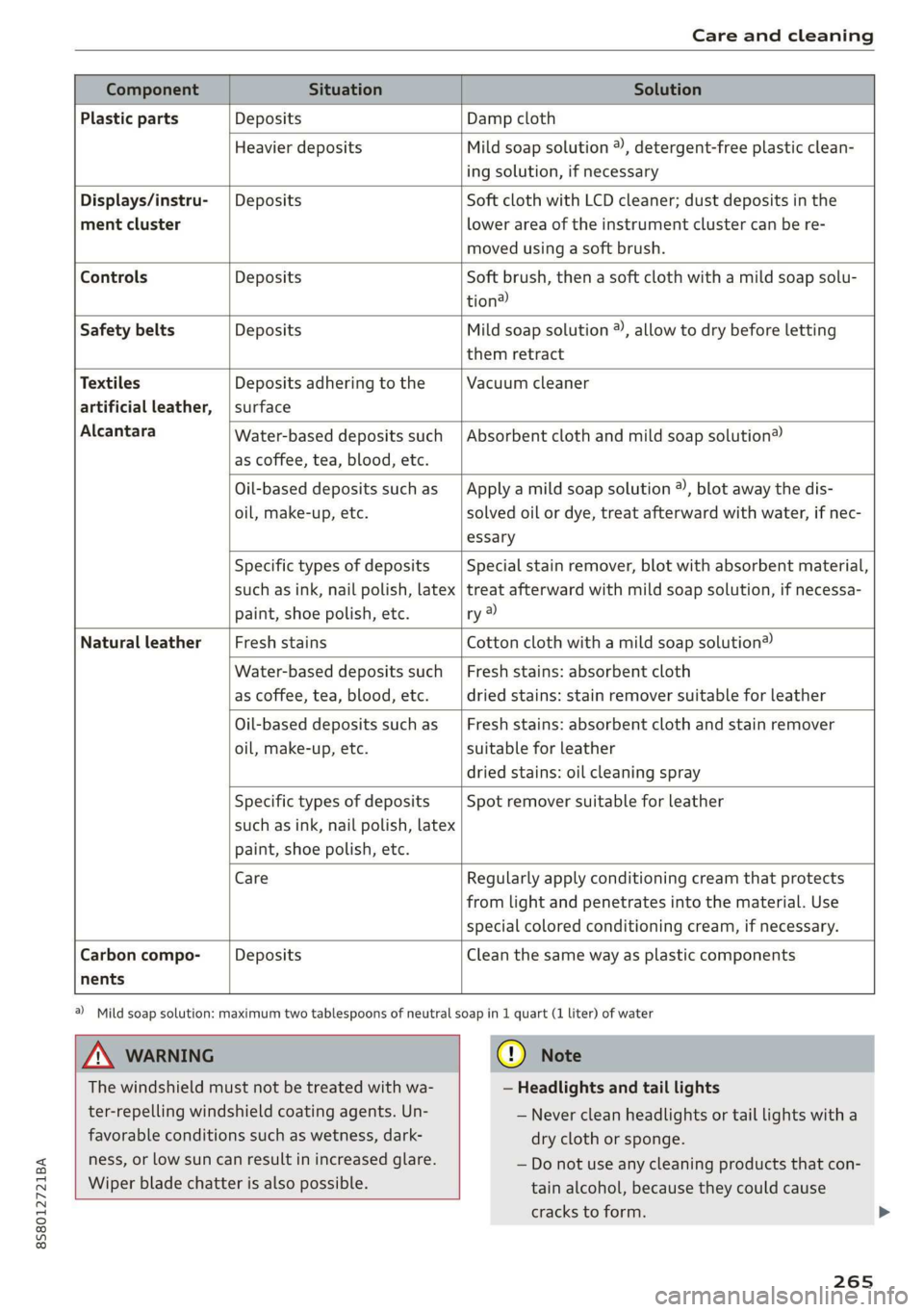
Plastic parts Deposits Damp cloth
Heavier deposits Mild soap solution ®), detergent-free plastic clean-
ing solution, if necessary
Displays/instru- | Deposits Soft cloth with LCD cleaner; dust deposits in the
ment cluster lower area of the instrument cluster can be re-
moved using a soft brush.
Controls Deposits Soft brush, then a soft cloth with a mild soap solu-
tion)
Safety belts Deposits Mild soap solution ®, allow to dry before letting
them retract
Textiles Deposits adhering to the Vacuum cleaner
artificial leather, | surface
Alcantara Absorbent cloth and mild soap solution® Water-based deposits such
as coffee, tea, blood, etc.
Oil-based deposits such as
oil, make-up, etc.
Apply a mild soap solution ®), blot away the dis-
solved oil or dye, treat afterward with water, if nec-
essary
Specific types of deposits
such as ink, nail polish, latex
paint, shoe polish, etc.
Special stain remover, blot with absorbent material,
treat afterward with mild soap solution, if necessa-
ry a)
Natural leather Fresh stains Cotton cloth with a mild soap solution®
Water-based deposits such
as coffee, tea, blood, etc.
Fresh stains: absorbent cloth
dried stains: stain remover suitable for leather
Oil-based deposits such as
oil, make-up, etc.
Fresh stains: absorbent cloth and stain remover
suitable for leather
dried stains: oil cleaning spray
Specific types of deposits
such as ink, nail polish, latex
paint, shoe polish, etc.
Spot remover suitable for leather
nents
Care Regularly apply conditioning cream that protects
from light and penetrates into the material. Use
special colored conditioning cream, if necessary.
Carbon compo- Deposits Clean the same way as plastic components
A WARNING
The windshield must not be treated with wa-
ter-repelling windshield coating agents. Un-
favorable conditions such as wetness, dark-
ness, or low sun can result in increased glare.
Wiper blade chatter is also possible.
a) Mild soap solution: maximum two tablespoons of neutral soap in 1 quart (1 liter) of water
(@) Note
— Headlights and tail lights
— Never clean headlights or tail lights with a
dry cloth or sponge.
— Do not use any cleaning products that con-
tain alcohol, because they could cause
cracks to form.
265
Page 289 of 304
8S58012721BA
Index
A
A/C (climate control system) .............. 53
ACCESSOFIES . 6... ee eee 48, 282
Active lane assist... . owes. ss sesmen «oes ee ave 72
Activating vibration warning............. 74
Adjusting steering time................. 74
Cleaning the camera area.............. 263
Indicator light........... 0.00 eee ee eee 73
MO@SSAQGS wees 2 2 wars 5 ¥ sees & ¥ BOS & Eo 73
Switching on/off. « ccsiss «season o 6 wasn e 6 enaew 73
Adaptive UIght seiics 6 eva oo nears os was ¥ wee 78
Adaptive light (indicator light)............ 20
Adjusting the additional display........... 14
Adjusting the air distribution. ............ 53
Adjusting the center console lighting....... 41
Adjusting the sound..............-..00- 175
Adjusting the temperature............... 53
Adjusting the vents............. 0. eee ee 54
Advanced Airbag System
Children... 0.2... eee eee ee 212
GOMPONENUS’. ¢ wees » o eae 4 e eee a vee 196
Frontsairbagse. « ser + 2 ccesn vous eo recon x 194
How the components work together... .. 197
UEDA Gin 1 « sunsce « o vsiscete 0 0 siete ao anmene © exettome 189
Indicator light...........-...0--00 000: 18
Airbag system... 2... eee eee 208
Advanced Airbag System............... 193
CaRC bcs ow averiue 6 ¥ wxicend wo tandeDe Bo ewexare wa aie 203
Child restraints..................000. 212
Components (front airbags)............ 196
Danger of fitting a child safety seat on the
front passenger seat..............00.. 190
Disposal zee: ¢ ¢ ees 2 x seen ¢ » eews 2 2 ees 203
Frontiairbagss. « wee oo wae 6 wamen 6 3 saxon 193
How do the front airbags work?......... 198
How many airbags does my vehicle have?. 196
Important information................ 189
Important safety instructions on the knee
airbagisySteM« « aces s ¢ eaiae & x eae 5 x Bee 206
Kneeiairbagsias = 2 saw 2s cin sue es wo 204
MON
ILOFING weenie 5 ceerese a 6 sonnets a 8 ene © 0! oe 200
PASSENGER AIR BAG light............- 200
Repairs’: = seses + & seine & eeoreys « ¥ caves vo Hare 203
Safety instructions................00- 202
Side airbags .......... 00. sce e eee 206
Warning/Indicator lights.............. 200
When must the system be inspected?.... 200
Alarm system
refer to Anti-theft alarm system.......... 27
Alignment pin (tire change) .............. 268
All-weather lights.................00000. 38
AlUSeaSON tiN@Sbercis ss sce ee ers oo mene ve 254
All wheelidrive wes. 2 ose0 22 cee oe even so 89
Alternative routes........... 0... e eee 139
Ambient lighting'ss « esex + eee 3 s eames so oe 40
AMI
refer to Audi music interface....... 158,159
Android Auto
refer to Audi smartphone interface...... 169
Announcements (settings)
refer to Voice guidance..............-. 139
Anti-freeze
Windshield washer system............. 238
Anti-lock braking system (ABS) ............ 86
Anti-Slip Regulation.................0005 86
Anti-theft alarm system .............0000- 27
Anti-theft wheel bolts..............564. 271
Apple CarPlay
refer to Audi smartphone interface...... 169
ARIINCSE:. cxsusne » 5 swsuins 9 0 snamens oo saree % ¥ omeeete @ » 47
ASAE AY": & esware © & enmee @ a eaves ao esecuae a @ eoasare 48
Aspect ratio (Vid@0) wisi si ieee s aaa see 163
ASR
refer to Anti-Slip Regulation............. 86
Audi connect
refer toconnect....... 0.0 e eee eee eee 125
Audi connect Infotainment
Personal hotspot...............000055 126
Services:overview o.. 6 ci sb ee es ees 127
Audi magnetic ride
refer to Suspension control.............. 78
Audi music interface..............0000- 158
Audi music stream
refer to Wi-Fi... 0.2... cee eee eee eee 156
AUdIO FILS resis «6 arene xe cancers xo wrecene ao eenane & 160
Audio player
Bluetooth audio player................ 155
Wi-Fi audio players. « s was ss sees se ees 156
Audio track. ...... cece eee eee
Audi phone box
Audi smartphone interface.......... 169, 173
Audi virtual cockpit
refer to Instrument cluster.............. 10
287
Page 290 of 304
Index
AUTO
Automatic climate control system........ 53
Automatic headlights...............0.. 38
Auto Lock (central locking) ............... 21
Automatic belt retractor..............-. 185
Automatic climate control system
refer to Climate control system (automatic) . 53
Automatic post-collision braking system.... 86
Automatic transmission................5- 61
DYING tPSiss s caus s 2 eee ss deme se ee ae 64
Emergency: Mode: « sieves «eens a emma se ow 67
Hill descent control................000. 65
Kicked OWiirews x 2 sews « & meee © eames « RoE 66
Malfumetionjans = cvs cw waseews a 6 wrawsos ot ancnnus & 63
Selector lever emergency release......... 68
Selector lever lO¢K ow « « sees = 2 capes y yee 63
Selector lever positions.............000- 62
Shifting manually.................000. 66
Steering wheel with shift paddles........ 66
LiptrOnies. « sass ss wows ¥ wane wo eae « + vam 66
Automatic wiper/washer system..........- 42
Automatic zoom (navigation)............ 142
AUX iNPUt sows s 5 epee so veme s pee es ees 159
Average fuel consumption................ 15
Average speed..... 0.2... cee ee eee eee 15
B
BACK button... 2.6.6... cece eee eee eee 92
Balance(SOUNG) wiesvise « crevice so sistas oxenize « 175
Band
refer to Frequency band............... 147
Bass (sound) .............00.00e eee eee 175
Battery. sors » x sows 2 « seme 9 « acomaee oo camsem 4 236
Charging.................0. cece eae 238
Winter operation. ..........0e eee e eee 237
Before rivitig, swiss = x zavex s » aw 2 x saree 4 oe 177
Better route (navigation)................ 145
Blower... 2... eee eee eee 53)
Bluetooth
Audio player « sean se cgay se eee e pawn vee 155
Connecting acell phone............... 110
SettingS
00... 0. cece eee eee ee eee 174
Boost... eee eee 15
Booster'seats:, « cscs + + wvosse a 0 wssnass oo micas + 217
Boost pressure indicator.............-00. 15
288
Brake fluid
Checking the brake fluid level........... 235
Brakes... 2... eee eee 88
Brak@assist:: « sais 2 < meas ss Raa 2 Bee aS 86
Brake assist systeM...........000--008. 86
Brake: booster’, «cscs» 0 scngee sx cncacn 0 « scuenen 88
Brake fluid
Electromechanical parking brake......... 59
Emergency braking function............. 60
Indicator lights. ...............0 eee eee 16
New brake pads............ ee eee eres 88
Break-in security feature..............0-. 27
Breaking in
New brake pads: «cca. ocean as wee es wee 88
Newtires.. 0.0.0... c cee eee eee 247
Browser
refer to Media center...............0.. 161
Bulb failure (indicator light).............. 19
Bulb replacement..............00 ee eee 279
Buttons
Control panel (MMI)...............---. 92
Cc
Cable (USB adapter/AUX connector cable).. 158
California Proposition 65 Warning........ 228
Battery specific.................-.00. 237
Calllist.. 0.0... eee eee eee Ls
Calloptions.......... 0.0.0 cece eee eee 122
Capacities
Fueltank.....................0.0000. 285
Washer fluid reservoir... ......... 00000 285
Cat K6Yisae + paca g = sete ss ome se dows § eRe 22
Car WaShi's = « wows = ¢ mews ¢ teens xo eg cs 262
Catalytic converter.................000. 227
CD drive (media drives) ................. 154
Cell phone
PlSYING IMUSIC ¢ saese « ¢ seme Fo ROR ¢ 5 eR: 155
also refer to Telephone................ 110
Cell phone compartment
refer to Audi phone box............... 113
Center armrest res: «5 wo vo wmnen ¥ wramen ev oe 47
Central: lockingiecs «= cece oo anaes o seatane vv vee 21
Auto Lock... 2.2... eee eee 21
Convenience key..........-.002- 000 eee 24
Convenience opening and closing......... 29
Mechanically unlocking and locking....... 26
Page 297 of 304
8S58012721BA
Index
Parking systems
Adjusting the display/warning tone....... 84
Cleaning sensors/the camera........... 263
Cleaning the rearview camera............ 83
Parking system plus...........0..00 0 eee 81
Peripheral display...............--00.. 81
Rear parking systeM.........0 ee eee eee 81
Rearview camera...... 0.2... eee eee eee 82
Parking (automatic transmission) .......... 64
Pass@throughissice 2 & encase a a wnnsene + @ asnenie 0 © sone 50
PASSENGER AIR BAG light............... 200
Pause (audio/video file).............. 14, 160
PédalSioc 5 2 case « = enw « ¢ amy < HeweR Fs REED 180
Perchlorate s was 5 = sees 5 ¢ eee ¢ 2 eee Yo ee 280
Performance/torque display
refer to Sport displays ..........00000005 15
Peripheral display. ... 0.0... .0 eee eee eee 81
Personal hotspots « s sews ys ene xe eee a oe 126
Phonebook
refer to Contacts =: <. cess ss pee as eeeea: 120
Physical principles of a frontal collision.... 183
Playback (media) « seis s » aeros 4 ¢ sasam a 6 xe 160
Playlist... cc cee cece cece eee eee 163
Point of interest........ 2.0.0... e eee eee 135
Point of interest search.............00.. 136
POLISH G ioe. x cemeons + 5 saan wo memes = 9 enone we 264
Pollen filter
refer to Pollutant filter
Pollutant filter... 00... . eee eee eee eee
Power
Seat adjustment.............0 eee eae
Power sources........-..-.0-0-
Power top........ cece eee eee eee eee 33
Cleaning......... cece eee eee eee 264
GlOSING ¢ « wean ¢ » wewm 4» ners 2 ree ¢ a 33
Convenience closing..............-.05. 34
Convenience opening...............005. 34
Emergency operation.................. 35
Generalinformation..............00005 33:
Malfunction .......... 0.00 e eee eee ee 34
M@SSAQES acs = ¢ saws & ¢ swe Fo ewe +e eee 34
OPOMIMG passin ss sicesie oo sreseve © ¥ arene ww ever + 33
Wind deflector..................000008 35
Power windows ..............0ee eee ee eeee 28
MalfUnction's « < seas ¢ s news ¢ 2 eewe : Hates 29
Pregnant women
Special considerations when wearing a safe-
EY DOLE waves s = senwn s 2 crew * eee ze see ge 186
PRESEES (FAdIO) cx ¢ » main a 2 maven & e ReRIS s Se 149
Pressure
Tire pressure monitoring system........ 258
TINOSts = 2 cranes x cansete ov aeeenns © © eneoans & © ome 250
Pressures(Gines) ics x 0 wus + 8 swasaes ow sctens © oom 257
Program guide
RaAGiGiasens 6 u wisnnns » 1 ovanane + 4 annstons 0 6 wantnue #0 148
Programming (steering wheel button)...... 14
Prompt
refer to Commands (voice recognition sys-
TET) s = xcees = 3 Boo © K SORE 5X eeRG ec See 103
Proper occupant seating positions........ 178
Proper safety belt position.............. 186
Proper seating position
Front passenger.........-...ee eee eeee 179
OCCUPANtS « scsi os wsemn 3 2 a = we Oo 178
PROT@CtING
ie. » © ques 4 3 caw 5 eee gs ewe se 264
Pyrotechnic elements..........0.-:00 es 280
Q
quattro (all wheel drive) .................. 89
Question
What happens to unbelted occupants?... 183
Radio communications equipment........ 282
Radio equipment...............2--008- 282
Radio Standards Specification (RSS) ....... 283
Rain/light sensor
Headlights....... 0... cece eee eee eee
Indicator light
Intermittent (windshield wipers) ......... 42
Random
refer to Shuffle... ..... cece cece eee ae 163
RANGES: 2 cusses & a ceieims © serra wv sereES ae oe a 15
Reading lightSics « 2 evan + «coos v news ay cows 40
Rear lid
Escapelatel « ccssiie 2 6 cosa « svauens we & arate © ome 28
also refer to Luggage compartment lid.... 27
295
Page 299 of 304
8S58012721BA
Index
Seating position
Driver... ee ee eee 178
Front Passenger ies « » wives 3 ¥ asws oo ey & 179
How to adjust the front seats........... 179
Incorrect seat position................ 179
OGCUBANUS vem: « s wee 5 5 weER Fy Bee Ee 178
Seats
AGJUStING a: « 9 soos x 3 wees a ¢ caus 2 2 oem <9 46
Correct seating position............... 178
Number of seats................00008 182
Secondary phone..............200. 112,173
Selecting a source (media).............. 160
Selection menu..............0005 93,97,98
Selective door unlocking................. 21,
Selective wheel torque control............ 86
Selector lever (automatic transmission)
Emergency operation.................. 68
Position... 2.2... 0.5... c cece eee eee eee 62
Service and disposal
Safety belt pretensioner............... 188
Service interval display................. 239
Settings
Dir@GtOLy aces < = sees « 3 tees x 5 see ee eee 123
Ma Piss so soesia ow airenice © waivers «2 oenane wo ene 142
Media...... 0... eee eee eee eee eee 163
Navigation): « s sews s < exw x & eees 3 x ewe 138
RadiGise x crouse a i cwswaus 2 v comune a cuexene w 8 ao 150
SYStEM occ eee eee eee eee 171
Shift paddles (automatic transmission) .... . 66
Shuffle... 2... eee eee ee 163
Side airbags
Description...............0..02.0002 206
How theywork:: » s wea s 9 sees & o Hoes ¥ bow 208
Sidé assists zs swe : naam ¢ 2 mewem es em eo Be 75
Adjusting the brightness................ 77
Cleaning the sensors..............0--- 263
SeMSOPr Fane wesc s casa ss Hawes s ¥ Heres 5 ewe 75
Switching on and off................... 76
SIM Card r@ade@Pins «x ways : sane gs were « x ee 126
Ski DdGisw « x aeew « o meee « o eee s BeER os pe 50
Snowboatd, bag « ccs ss eeas xe eeea co RekS ee 50
Snow chains... .... 00. e eee eee eee ees 255
Socket
refer to Power sourceS.........-+--00+-- 48
Software update
refer to System update (MMI).......... 174
Software (MMI)
LIGGHSES « ssc & ¢ See & ¥ Rae & % HETES 3 £ er 176
Updates = sve es meme sean es wee ae ee 174
VERSION, «+ ewosase « « mmiomon © « wresnie w 6 poncene ev wx 174
Sources of information about child restraints
and theiruse............... eee eee ee 222
Spare tire... .... eee eee eee 274
Speed dependent volume control......... 175
Speedometer. consis x + emcee x « susie s v aves 9 6 a 10
Speed warning systeMisescs ows oo ssiae ao one 70
Speller's s « sess x x sews « ¥ saves vo Heres e Rees 98
SPOFUGISPIBYS « sus « x seme 2 2 wee sy eee we 15
SpOrtode-: « s sees ¢ » wees cs wees so wees 87
Sport view...........0 0.00. 13
Stabilization program
refer to Electronic Stabilization
Comtroli(ESO):. x sscoons w 0 avescos ow awcvane w seawness 86
START Engine STOP button............... 57
START ENGINE STOP (button)............. 58
Starting to-drive:s «ease ss news xs Hes ss Bene 61
Starting (CNgine) «=< soe st owes sy ee se ws 57
Steering... 6. cece eee 89
Indicator light « sacs ¢ ¢ ames ¥ gee se cos 18
also refer to Steering..............0005 89
Steering wheel
AdjUStINg . 0. eee eee eee 57
Shift paddles (automatic transmission) .... 66
also refer to Multifunction
steering wheel..............-..000-- 12,14
Steps for determining correct load limit... 253
Stopover (navigation) ................4 137
Storage compartments............0.0005 49
Streaming
refer to Online media................. 157
S tronic (automatic transmission) .......... 61
Subtitles (DVD) « assswe 3 « wasn ov soe ¥ « ees 163
SUTVISONS 2 same 2 2 qason = ¥ eee + eee us we @ 42
SUSPENSION CONOliss ¢ s new s ¥ wares s & wows ¥ 78
Swapping calls; < sews ss agus ss sees 5 tees 116
Switching daytime running lights on and off. 40
Switching the ignitionon................. 57
297