infotainment AUDI TT ROADSTER 2019 Owner's Guide
[x] Cancel search | Manufacturer: AUDI, Model Year: 2019, Model line: TT ROADSTER, Model: AUDI TT ROADSTER 2019Pages: 304, PDF Size: 80.77 MB
Page 96 of 304
Multi Media Interface
Selection menu: through the selection menu,
you can open additional functions within a menu
item (such as Radio).
Requirement: the selection menu symbol must
be displayed in the Infotainment system display
> fig. 97.
Opening and closing the selection menu: press
the left control button > fig. 97. Then you can se-
lect and confirm a function using the control
knob.
Options menu: using the options menu, you can
select and confirm context-dependent functions
as well as settings within a menu item (such as
Radio).
Requirement: the options menu symbol [+] must
be displayed in the Infotainment system display
> fig. 97.
Opening and closing the options menu: press
the right control button > fig. 97. Then you can
select and confirm a function using the control
knob.
Information about menu paths
This guide shows you at a glance the paths for
opening a desired menu and its settings and
functions.
Example of a path
> Select: [RADIO] button > left control button >
FM.
Following the path
> Press the [RADIO] button.
> Press the left control button.
> Turn the control knob to the FM menu item to
select it.
> Press the control knob to confirm the selected
FM menu item.
> The selected and confirmed function is execut-
ed. In this example, the FM frequency band is
set.
94
MMI touch
MMI touch control pad
Applies to: vehicles with MMI touch
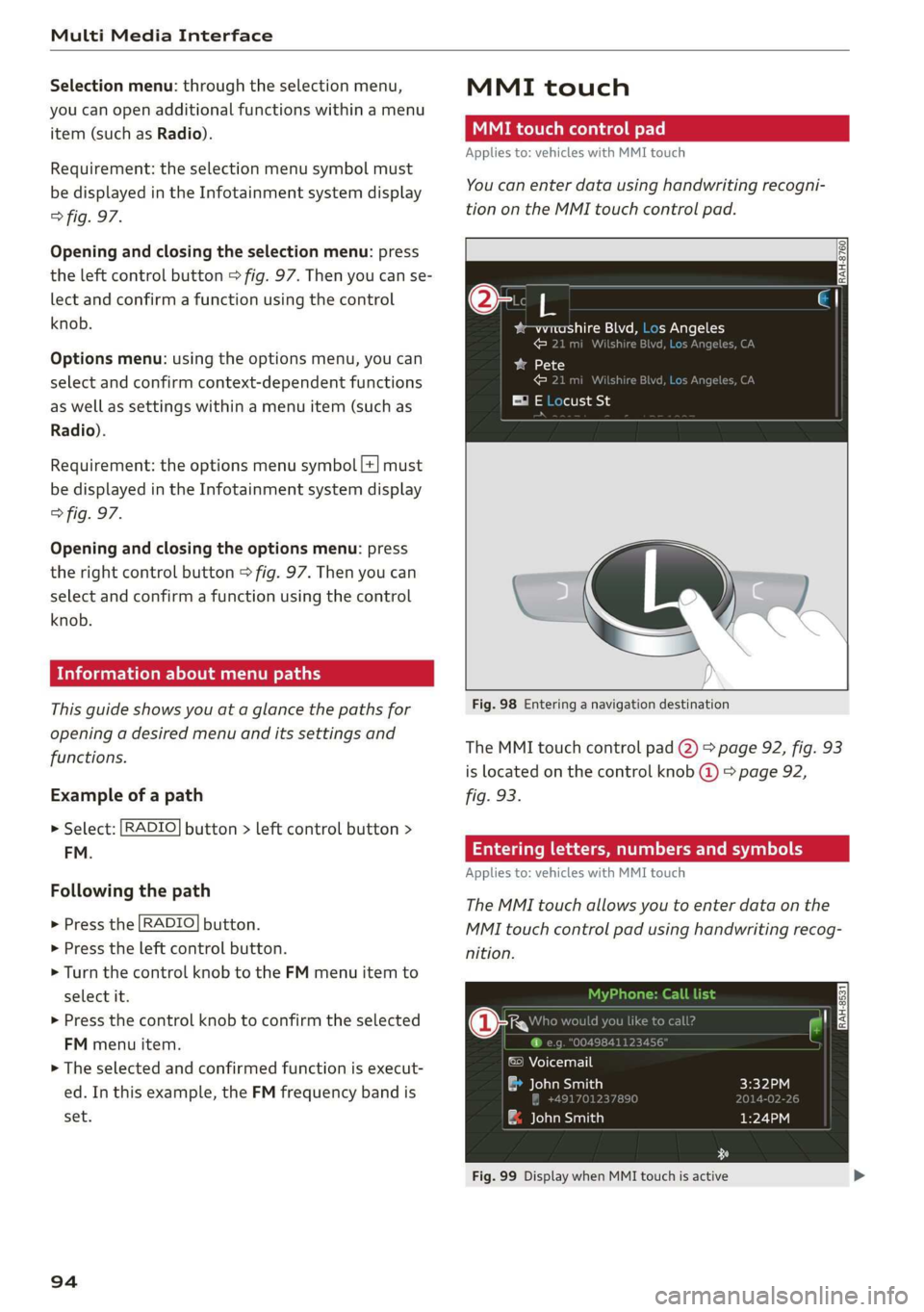
You can enter data using handwriting recogni-
tion on the MMI touch control pad.
2
bam pale al eM =1 he) s Angeles
ose .
Fig. 98 Entering a navigation destination
The MMI touch control pad @) > page 92, fig. 93
is located on the control knob @) > page 92,
fig. 93.
Entering letters, numbers and symbols
Applies to: vehicles with MMI touch
The MMI touch allows you to enter data on the
MMI touch control pad using handwriting recog-
nition.
©) Voicemail
eae)
| ae avaesantien)
Fig. 99 Display when MMI touch is active
Page 97 of 304
8S58012721BA
Multi Media Interface
Requirement: it must be possible to enter text or
numbers and the symbol (@) © fig. 99 must ap-
pear in the Infotainment system display.
— Initial entry: write an individual upper case or
lower case letter or number/symbol on the
MMI touch control pad using your finger. A
symbol that is recognized clearly by the system
is displayed in the Infotainment system display
@ > page 94, fig. 98, confirmed with an audi-
ble signal if necessary, and transferred to the
input field.
— Entering spaces: move your finger across the
MMI touch control pad from left to right.
— Deleting characters: move your finger across
the MMI touch control pad from right to left.
— Deleting characters quickly: move your finger
quickly across the MMI touch control pad from
right to left.
— Selecting the input suggestion: press the con-
trol knob.
— Switching directly to the results list: turn the
control knob to the right.
— Opening the speller: select the right control
button > Open speller. Text or numbers are en-
tered using the speller > page 98.
CMe meee
Applies to: vehicles with MMI touch
Fig. 100 Moving the crosshairs
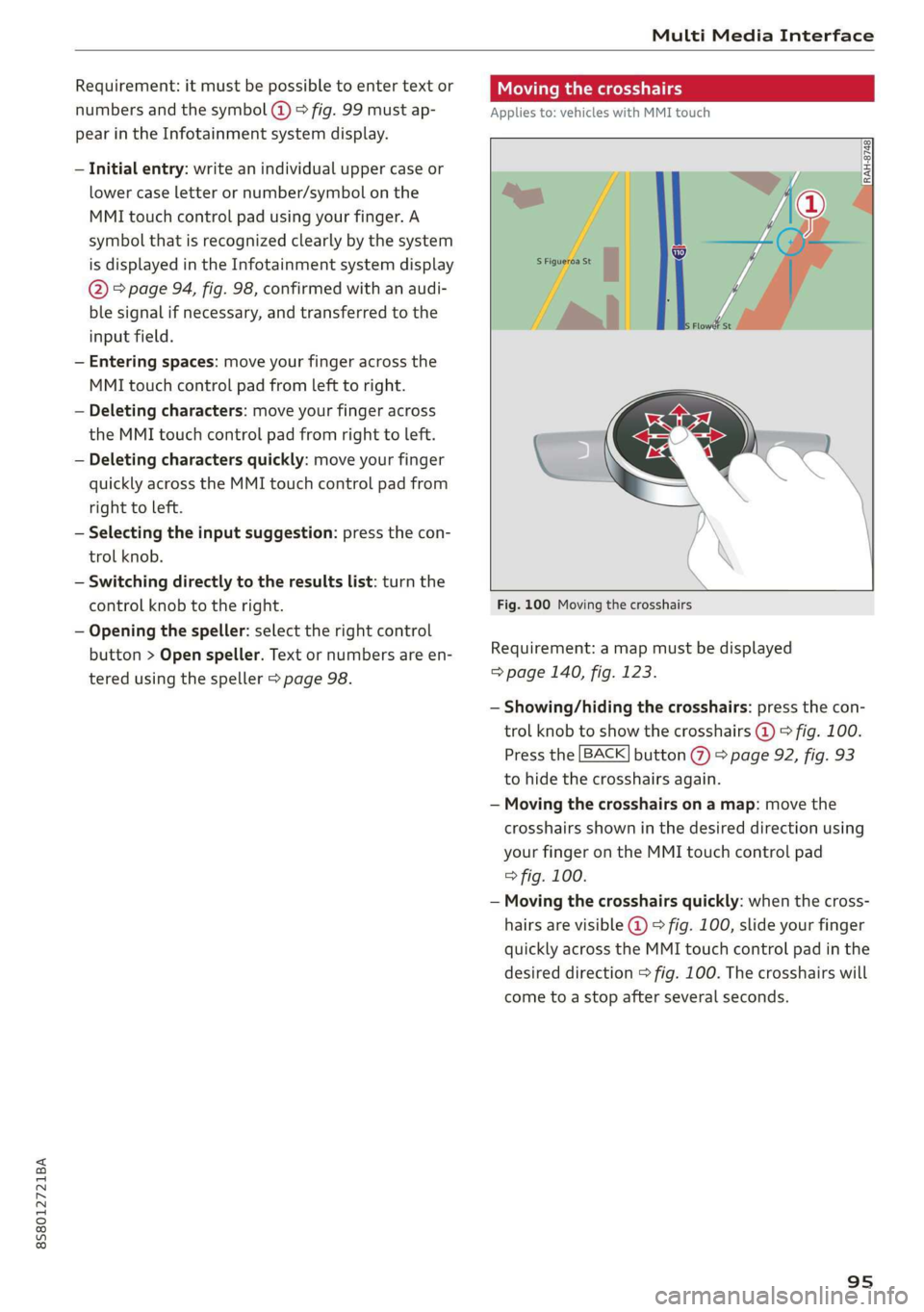
Requirement: a map must be displayed
=> page 140, fig. 123.
— Showing/hiding the crosshairs: press the con-
trol knob to show the crosshairs @) © fig. 100.
Press the [BACK] button %) > page 92, fig. 93
to hide the crosshairs again.
— Moving the crosshairs on a map: move the
crosshairs shown in the desired direction using
your finger on the MMI touch control pad
=> fig. 100.
— Moving the crosshairs quickly: when the cross-
hairs are visible @ > fig. 100, slide your finger
quickly across the MMI touch control pad in the
desired direction > fig. 100. The crosshairs will
come to a stop after several seconds.
95
Page 103 of 304
8S8012721BA
Multi Media Interface
Menus and Symbols
eis
Additional station information
Preferred picture view
Treble
Radio settings
v Slide show
RAH-9139)
ee ard
Telephone
ba oad sa
Ralf Schmidt
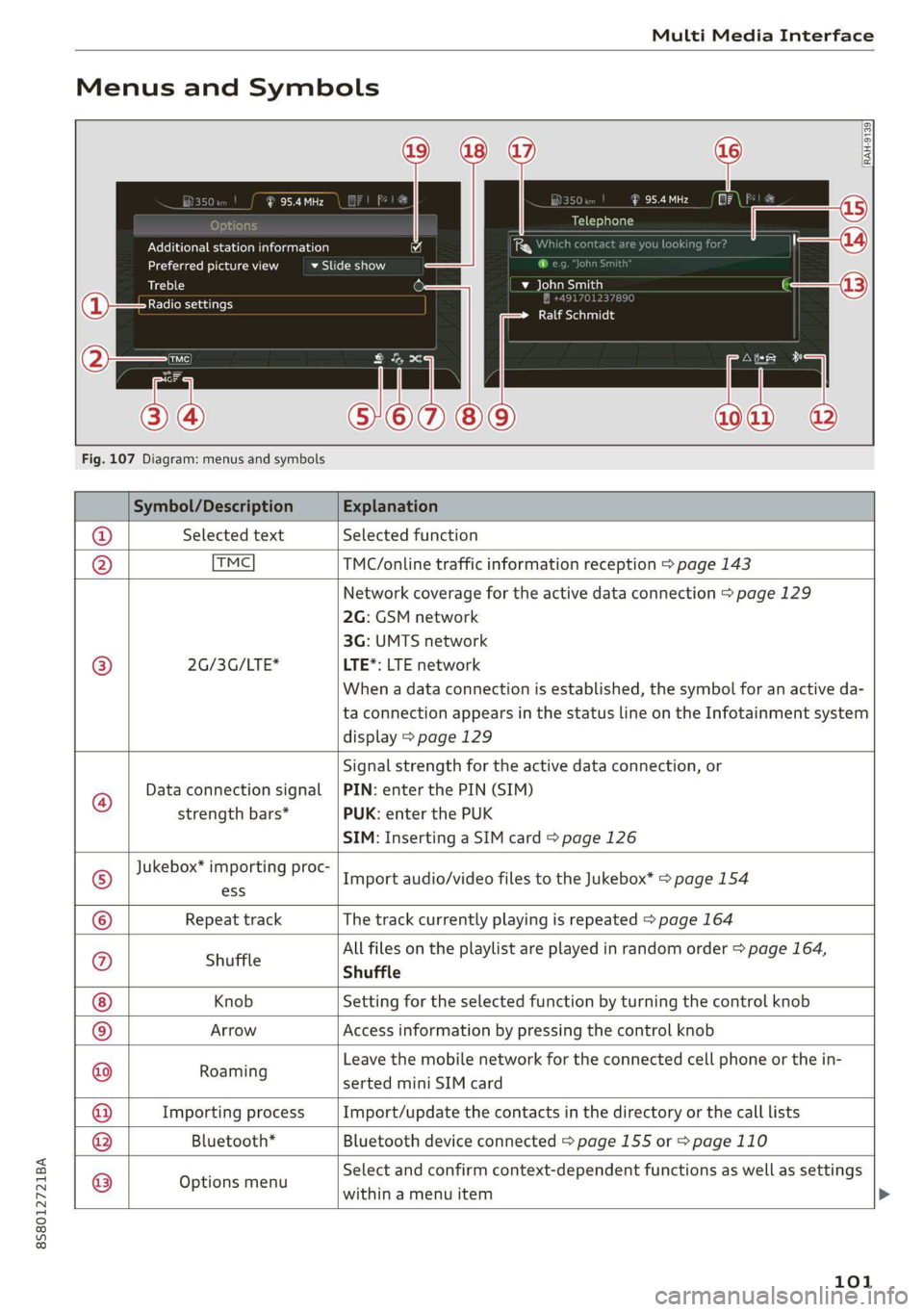
Fig. 107 Diagram: menus and symbols
Symbol/Description Explanation
@ Selected text Selected function
@ TMC TMC/online traffic information reception > page 143
Network coverage for the active data connection > page 129
2G: GSM network
3G: UMTS network
® 2G/3G/LTE* LTE*: LTE network
When a data connection is established, the symbol for an active da-
ta connection appears in the status line on the Infotainment system
display > page 129
®
Data connection signal
strength bars*
Signal strength for the active data connection, or
PIN: enter the PIN (SIM)
PUK: enter the PUK
SIM: Inserting a SIM card > page 126
Jukebox* importing proc-
® a Import audio/video files to the Jukebox” > page 154
© Repeat track The track currently playing is repeated > page 164
All files on the playlist are played in random order > page 164,
@ shuffle Shuffle
Knob Setting for the selected function by turning the control knob
© Arrow Access information by pressing the control knob
Rearing Leave the mobile network for the connected cell phone or the in-
serted mini SIM card
Importing process Import/update the contacts in the directory or the call lists
Bluetooth* Bluetooth device connected > page 155 or > page 110
®
|O|©
Options menu
Select and confirm context-dependent functions as well as settings
within a menu item
101
Page 106 of 304
Voice recognition system
Voice recognition system
Operating
Applies to: vehicles with voice recognition system
You can operate many Infotainment functions
conveniently by speaking.
Requirement: the ignition and the MMI must be
switched on. A system language supported by
the voice recognition system must be set. There
must be no phone calls in progress and the park-
ing aid must not be active.
> Switching on: briefly press the [2] button @)
=> page 14, fig. 10 on the multifunction steer-
ing wheel and say the desired command after
the Beep.
> Switching off: press and hold the |™] button.
Or: say the command Cancel.
> Pausing: say the command Pause. To resume,
press the |] button.
> Correcting: press the [>] button one time ©
=> page 12, fig. 6. Or: say the command Correc-
tion.
Input assistance
The system guides you through the input with
visual and audio feedback.
— Visual input assistance: after switching on
voice recognition, a display with a selection of
possible commands appears. The command
display can be switched on/off under [MENU] >
Settings > left control button > MMI settings >
Speech dialog system.
— Audio input assistance: to have the possible
commands read, press the [2] button on the
multifunction steering wheel briefly and say
Help.
For the system to understand you:
Speak clearly and distinctly at a normal volume.
Speak louder when driving faster.
Emphasize the words in the commands evenly
and do not leave long pauses.
Do not speak a command when the voice recogni-
tion system is making an announcement.
104
Close the doors, the windows, and the sunroof*
to reduce background noise. Make sure that pas-
sengers are not speaking when you are giving a
voice command.
Do not direct the vents toward the handsfree mi-
crophone, which is near the front interior lights
on the roof headliner or on the driver's safety
belt*. For additional information on the safety
belt microphone, see > page 123.
Only
use the system from the driver's seat be-
cause the hands-free microphone is directed to-
ward that seat.
Additional settings
See > page 176, Voice recognition system.
ZA\ WARNING
— Direct your full attention to driving. As the
driver, you have complete responsibility for
safety in traffic. Only use the functions in
such a way that you always maintain com-
plete control over your vehicle in all traffic
situations.
— Do not use the voice recognition system in
emergencies because your voice may change
in stressful situations. The system may take
longer to dial the number or may not be
able to dial it at all. Dial the emergency
number manually.
G) Tips
—The dialog pauses when there is an incom-
ing phone call and will continue if you ig-
nore the call. The dialog ends if you answer
the call.
— There are no voice guidance* prompts when
a dialog is active.
— You can select an item in the list using ei-
ther the voice recognition system or the
control knob.
Page 113 of 304
8S8012721BA
Telephone
devices are shown in the Infotainment system
display. Or: search for the MMI in your cell
phone through the Bluetooth device search.
> Select and confirm the desired cell phone from
the list of displayed Bluetooth devices.
> The MMI generates a PIN for the connection
setup > fig. 109.
> Select and confirm Yes.
>» Enter the PIN for connecting on your cell
phone. Or: when the PIN is displayed on your
cell phone, confirm the PIN on your cell phone
and in the MMI. The time allowed for entering
the PIN is limited to approximately 30 seconds.
> Pay attention to any additional system prompts
displayed on your cell phone, for example if the
system should connect automatically in the fu-
ture. Depending on the cell phone, you may
have to confirm downloading the directory sep-
arately.
After connecting successfully
After connecting successfully, a short message
with information about the connected profiles
will appear. You can also change profiles later.
Select: [MENU] button > Settings > left control
button > MMI settings > Connection manager
=> page 174.
In addition, the cell phone contacts are automat-
ically loaded in the MMI directory. This process
can take several minutes, depending on the num-
ber of contacts.
@) Note
Always follow the information found in >@ in
General information on page 125.
@) Tips
— Making phone calls through the MMI is only
possible using the Handsfree Bluetooth pro-
file.
— You can apply additional settings to con-
nected mobile devices using the connection
manager = page 172.
— You can also search for the MMI on your mo-
bile device using the Bluetooth device
search.
— You only have to pair your device one time.
Bluetooth devices that are already paired
automatically connect to the MMI when the
Bluetooth function is switched on, when
they are within range, and when the ignition
is switched on. The last connected mobile
device is given first priority.
— Authorizing the MMI connection on your
mobile device will make it possible to con-
nect automatically.
— Pay attention to any system prompts dis-
played on your cell phone, for example if
the system should connect automatically in
the future. Depending on the cell phone,
you may also need to download the directo-
ry and confirm access to your text messages
separately.
— When leaving the vehicle, the Bluetooth
connection to the mobile device will auto-
matically disconnect. Depending on your
mobile device, phone calls in progress may
be automatically redirected from the MMI
to your mobile device so that you can con-
tinue the call on your phone.
— You can obtain more information from your
mobile device service provider or from your
mobile device user guide. For information
on using the telephone, visit www.audiusa.
com/bluetooth or contact an authorized Au-
di dealer or authorized Audi Service Facility.
— Applies to: vehicles without secondary
phone: Several cell phones can be paired to
the MMI, but only one cell phone can be ac-
tively connected to the MMI.
— Applies to: vehicles without secondary
phone: If a Bluetooth device is already con-
nected to the MMI, it will be disconnected
when another device connects to the MMI.
111
Page 118 of 304
Telephone
— Dialing a phone number: select and confirm &.
Or: push the control knob down. Select and
confirm OK.
— Deleting individual characters: select and con-
firm &l.
— Deleting all characters entered at once: turn
the control knob with the character selection to
land press and hold the control knob. Or: se-
lect the right control button > Clear input field.
Tone sequences (DTMF) can be entered directly
into the speller during a phone call.
Accepting or ending a call
Applies to: vehicles with telephone
— Accepting a call: select and confirm Answer.
— Declining a call: select and confirm Decline.
— Muting the active call: select and confirm
Mute.
— Ending a phone call/cancel dialing: select and
confirm End call. Or: press the control knob.
Accepting another call: see > page 116, During a
phone call.
Caller information: the name, phone number or
Unknown appears in the Infotainment system
display depending on if the caller has been stored
in the directory and if the phone number has
been transmitted. A picture may also be dis-
played, depending on whether you have assigned
a picture to a contact in your directory and if it
was transferred to your MMI. You can find out if
your mobile device supports this function from
your mobile device network provider, your mobile
device owner's manual, or at www.audiusa.com/
bluetooth.
@) Tips
The radio or media playback is muted during a
phone call.
During a phone call
Applies to: vehicles with telephone
Requirement: there must be a call in progress.
> Press the right control button.
116
The following options may be possible during a
call depending on the mobile device being used
and the type of connection:
— Making an additional call: select: Find contact
> Call list/Directory/Favorites > an entry from
the list.
— Accepting an incoming call when there is an
active call and a call on hold: select Replace.
The active call is replaced with the incoming
call.
— Answering an additional call: if there is an in-
coming call while another call is active, you can
select Answer to put the existing call on hold
and answer the incoming call. If you select De-
cline, the incoming call will be declined.
Additional functions include:
Mute: if you select and confirm this function, the
other person on the phone cannot hear you. You
will still be able to hear the other person.
Hold call/Resume: you can place the existing call
on hold and resume it again. To resume the call,
select and confirm the call you would like to re-
sume.
Transfer call to mobile device*: select and con-
firm
Transfer call to mobile device to transfer
the existing call from the MMI to your cell phone.
Switch to hands-free mode*: Requirement: you
must have a phone call in progress on your cell
phone. Select and confirm Switch to hands-free
mode to transfer the call from your cell phone to
the MMI.
Swap call: alternate between two phone calls
while one of the calls is on hold. Selecting End
call will end the active phone call. A phone call
on hold can be resumed using the right control
button > Resume.
Add to conference: a party on hold and up to five
active parties (depending on the network) can be
added to a conference call. To make an additional
call, put all participants in the current conference
call on hold using the right control button > Hold
conference. Press the left control button. Select
and confirm Call list/Directory/Favorites > an
entry from the list. You can add called contacts
to the conference using the right control button >
Page 119 of 304
8S8012721BA
Telephone
> Add to conference. Resume takes all parties off
hold.
Multi-party calling: select the right control but-
ton > Telephone settings > Call options. When
the function is switched on ¥ you can accept an
additional call using Answer or decline a call us-
ing Decline. When the function is switched off,
you can Replace the call or Decline.
Connection manager: see > page 172.
Telephone settings: see > page 122.
@ Tips
— To be notified of an incoming call during a
phone call, the call waiting function in your
cell phone must be switched on when using
the hands-free profile (Handsfree).
— You can obtain more information from your
mobile device service provider or from your
mobile device user guide.
— When leaving the vehicle, the Bluetooth
connection to the mobile device will auto-
matically disconnect. Depending on your
mobile device, phone calls in progress may
be automatically redirected from the MMI
to your mobile device so that you can con-
tinue the call on your phone.
— The display of an incoming phone callin the
Infotainment system display may still be
visible for a few seconds depending on the
cell phone in use. Using the Replace or De-
cline functions may then end the active
phone call.
Favorites
Applies to: vehicles with telephone
Up to 50 contacts, in addition to the voicemail
number, can be stored in any order in the favor-
ites list.
> Select: [MENU] button > Telephone > left con-
trol button.
— Storing an existing phone number as a favor-
ite: select and confirm Call list/Directory. Se-
lect and confirm a contact or phone number
from the list. Select: right control button >
Store as favorite. Enter a name for the favorite
or select a suggestion. Select and confirm Save.
— Renaming a stored favorite: select and confirm
Favorites > select a favorite from the list. Se-
lect the right control button > Rename favor-
ite.
— Moving a stored favorite: select and confirm
Favorites > select a favorite from the list. Se-
lect the right control button > Move favorite.
Select and confirm the location of the selected
favorite.
— Deleting a stored favorite: select and confirm
Favorites > select a favorite from the list. Se-
lect: right control button > Delete favorite >
Delete this entry or Delete all entries.
Messages
Text messages
Applies to: cell phones with Bluetooth Message Access Profile
(MAP)
Depending on the mobile device being used and
the mobile network contract, you may be able to
receive and send text messages using the MMI.
Requirement
A cell phone must be connected to the MMI via
Bluetooth MAP (Message Access Profile)
=> page 110.
> Select: [MENU] button > Telephone > left con-
trol button > text message (myPhone)/text
message (secondary phone)*.
Inbox
All received text messages are displayed.
Sent
All sent text messages are displayed.
Outbox
All text messages to be sent are displayed.
Drafts
Displays all text messages that have not yet been
sent and stored text messages.
Deleted
Displays all deleted text messages.
117
Page 120 of 304
Telephone
@ Tips
— Please note that you may have to activate
the receiving and sending of text messages
in your cell phone depending on the SIM
card being used (for example, when using a
Multi-SIM). You can obtain more informa-
tion from your mobile device service provid-
er or from your mobile device user guide.
— For more information on supported mobile
devices, visit www.audiusa.com/bluetooth
or contact an authorized Audi dealer or au-
thorized Audi Service Facility.
— You need a mobile device with Message Ac-
cess Profile that also supports the sending
function to be able to send text messages
through the MMI.
Write text message
Applies to: cell phones with Bluetooth Message Access Profile
(MAP)
> Select: [MENU] button > Telephone > left con-
trol button > text message (myPhone)/text
message (secondary phone)*.
Write new text message
Select and confirm the desired template from the
list. Enter a recipient. Select and confirm Send.
Reply*
Select and confirm the desired template from the
list. Select and confirm Send.
Message options
Applies to: cell phones with Bluetooth Message Access Profile
(MAP)
> Select: [MENU] button > Telephone > left con-
trol button > text message (myPhone)/text
message (secondary phone)* > Inbox/Sent/
Outbox > right control button.
The following options may be available depend-
ing on the selected menu.
) Not available in all languages.
118
Reply*
A reply can be sent for the selected message in
the Inbox.
Forward
The selected text message can be forwarded to a
different recipient.
Send again*
The selected text message can be resent.
Delete this text message*
The selected text message can be deleted.
Read out)
You can have the MMI read an open text mes-
sage.
Text messaging settings*
To display when a new text message is received,
enable the Text message notifications. New text
messages are indicated with an envelope & in
the Infotainment system display status line.
Connection manager
See > page 172.
Bluetooth settings
See > page 174.
Online settings
See > page 174.
Wi-Fi settings
See > page 130, Wi-Fi settings.
Telephone settings
See > page 122.
@ Tips
Messages that are deleted in the MMI are also
deleted in the mobile device automatically.
Page 122 of 304
Telephone
E-mail settings*
To display when a new e-mail is received, activate
the E-mail notifications. New e-mails are indicat-
ed with an envelope & in the Infotainment sys-
tem display status line.
Connection manager
See > page 172.
Bluetooth settings
See > page 174.
Online settings
See > page 174.
Wi-Fi settings
See > page 130, Wi-Fi settings.
Telephone settings
See > page 122.
G) Tips
Messages that are deleted in the MMI are also
automatically deleted in the connected cell
phone.
Listening to voicemail
Applies to: vehicles with telephone
MENU > Select: button > Telephone > left con-
trol button. Select and confirm Call list/Direc-
tory/Favorites > Voicemail.
— Entering the voicemail number: enter the de-
sired number. Select and confirm OK.
— Dialing the voicemail number: select and con-
firm
Voicemail.
@ Tips
— This service must be set up and activated in
advance by the cell phone service provider.
You can obtain more information from your
cell phone service provider.
— The voicemail number depends on the cell
phone service provider.
120
Emergency call functions
Applies to: vehicles with telephone
MENU > Select: button > Telephone > left con-
trol button > Dial number > Enter emergency
call number (for example, 911) > OK.
ZA WARNING
— Because your phone works with radio sig-
nals, a connection cannot be guaranteed un-
der all circumstances. Do not rely on only
your phone when it comes to essential com-
munication (such as a medical emergency).
— Always follow the instructions given by the
emergency personnel during an emergency
call and only end the call when they instruct
you to do so.
@) Tips
Emergency numbers are not
the same every-
where. Find out which emergency number is
used in your current location.
Directory
Opening the directory
Applies to: vehicles with telephone
After connecting the cell phone, the contacts in it
are automatically imported into the MMI.
uno
i ce h
> Voicemail
v_ Green, Andrew
> Smith, John
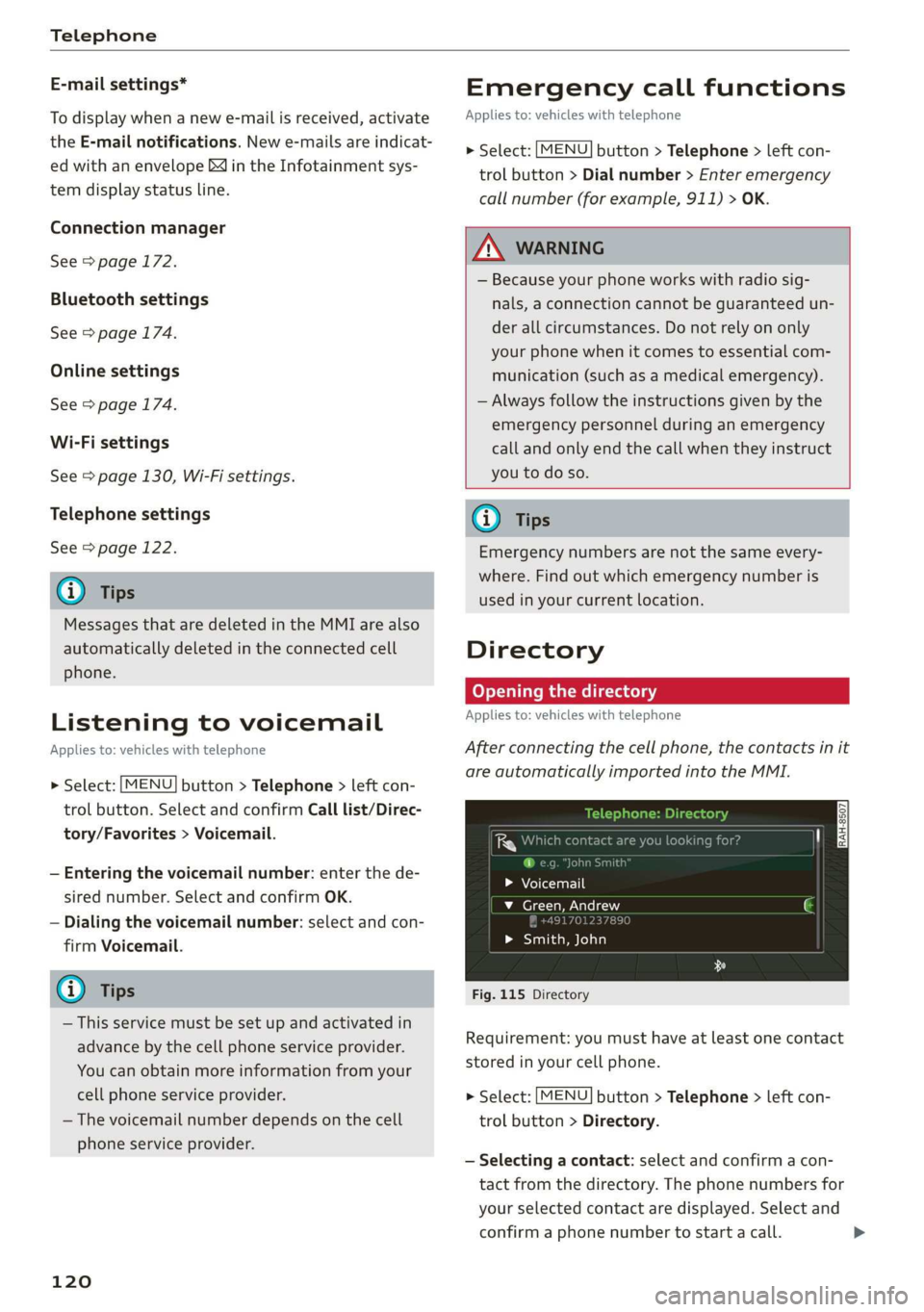
Fig. 115 Directory
Requirement: you must have at least one contact
stored in your cell phone.
> Select: [MENU] button > Telephone > left con-
trol button > Directory.
— Selecting a contact: select and confirm a con-
tact from the directory. The phone numbers for
your selected contact are displayed. Select and
confirm a phone number to start a call. >
Page 127 of 304
8S8012721BA
Audi connect
Audi connect
General information
Depending on the country and the vehicle equip-
ment, the following functions may be available:
— Audi connect Infotainment
You can also find more information on Audi con-
nect online at www.audiusa.com.
Z\ WARNING
—To reduce the risk of an accident, only use
Audi connect services when road and traffic
conditions permit. Always read and follow
the notes in > page 92, Traffic safety infor-
mation.
— It is only safe to use tablets, laptops, mobile
devices and other similar devices when the
vehicle is stationary because, like all loose
objects, they could be thrown around the in-
side of the vehicle in a crash and cause seri-
ous injuries. Store these types of devices se-
curely while driving.
— As the driver, do not allow usage of the Wi-
Fi hotspot to distract you from driving, as
this could increase the risk of an accident.
— Do not use any Wi-Fi devices within range of
the airbags while driving. Also read the
warnings in the chapter > page 189.
—To reduce the risk of an accident, only use
Audi connect Infotainment services using a
Wi-Fi hotspot when the vehicle is stationary.
@) Note
— Applies to: use of separate SIM card in the
SIM card reader or SIM card in the Wi-Fi de-
vice via personal hotspot: If you use your
own SIM card, all data connections for all
Audi connect Infotainment services will run
through your SIM card. This could result in
additional costs, depending on your cell
phone service provider and especially when
using in other countries. A flat rate data
plan is strongly recommended. You can ob-
tain more information from your cell phone
service provider.
—Incertain situations, the Wi-Fi hotspot data
connection may be established as a replace-
ment for the SIM card on your Wi-Fi device.
This feature depends on the configuration
of your Wi-Fi device and operating system.
This could result in fees depending on your
cell phone service provider, especially if you
are using this feature while abroad. A flat
rate data plan is strongly recommended. For
more information, contact your cell phone
service provider or refer to the owner's man-
ual for your Wi-Fi device.
— You are responsible for all precautions taken
for data protection, anti-virus protection,
and protection against loss of data on mo-
bile devices that are used, for example, to
access the Internet through the Wi-Fi hot-
spot.
@) Tips
— The availability of services depends on the
subscription.
— AUDI AG provides access to services from
third party providers. Permanent availability
cannot be guaranteed, because that de-
pends on the third party provider.
— Use of the most up-to-date mobile network
standard is not available in every country.
Contact an authorized Audi dealer or au-
thorized Audi Service Facility or your cell
phone service provider for additional infor-
mation.
— Audi connect Infotainment services are only
available within the cell phone network cov-
erage from your cell phone service provider.
— Availability, scope, providers, screen display,
and costs of services may vary depending on
the country, model, model year, end device
and rates.
Audi connect
Infotainment
Applies to: vehicles with Audi connect Infotainment
With Audi connect Infotainment services, online
information is transmitted directly to the vehicle. >
125