child lock AUDI TT ROADSTER 2019 Owners Manual
[x] Cancel search | Manufacturer: AUDI, Model Year: 2019, Model line: TT ROADSTER, Model: AUDI TT ROADSTER 2019Pages: 304, PDF Size: 80.77 MB
Page 24 of 304
Opening and closing
BFV-0278
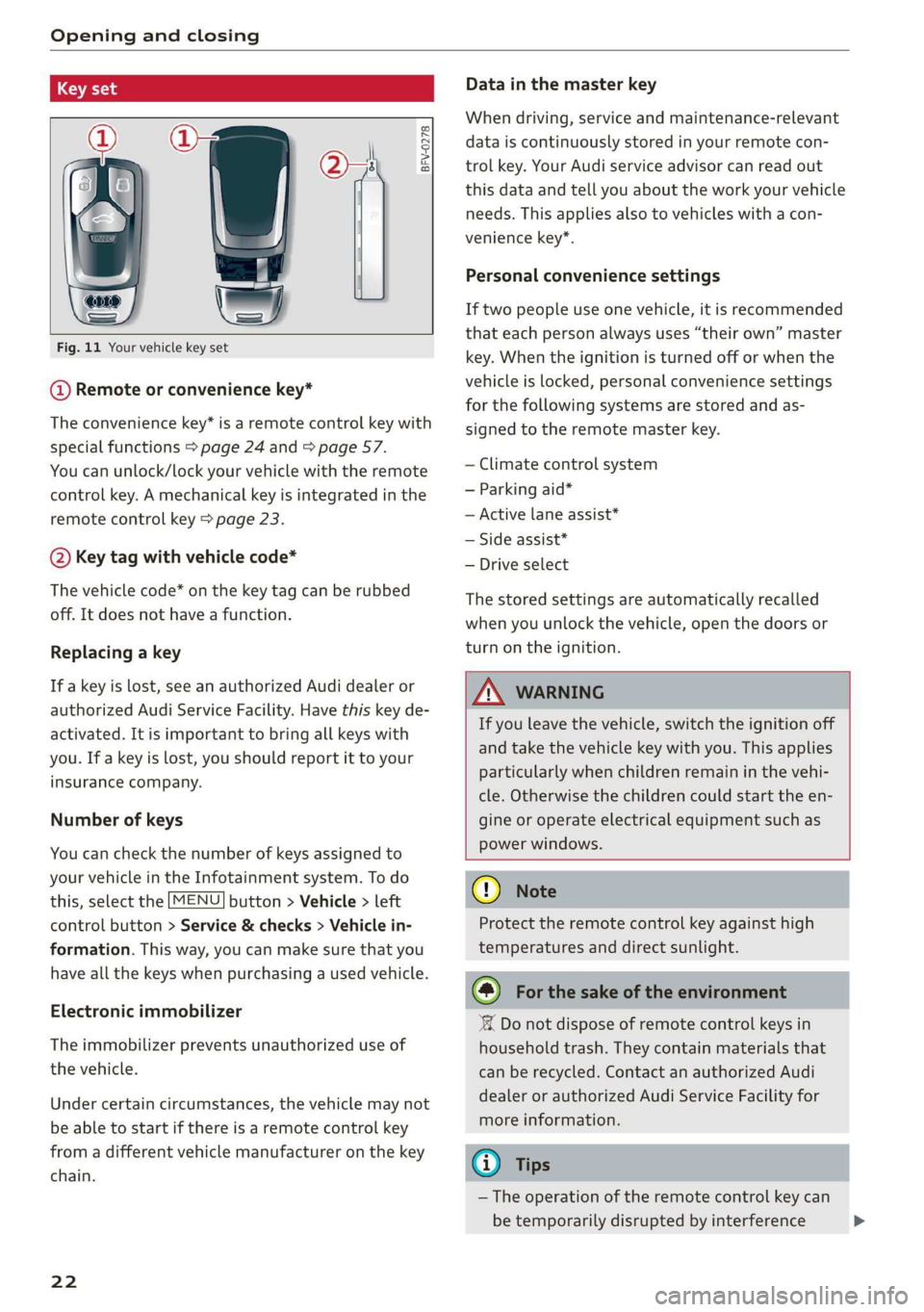
Fig. 11 Your vehicle key set
@ Remote or convenience key*
The convenience key* is a remote control key with
special functions > page 24 and > page 57.
You can unlock/lock your vehicle with the remote
control key. A mechanical key is integrated in the
remote control key > page 23.
@ Key tag with vehicle code*
The vehicle code* on the key tag can be rubbed
off. It does not have a function.
Replacing a key
If a key is lost, see an authorized Audi dealer or
authorized Audi Service Facility. Have this key de-
activated. It is important to bring all keys with
you. If a key is lost, you should report it to your
insurance company.
Number of keys
You can check the number of keys assigned to
your vehicle in the Infotainment system. To do
this, select the [MENU] button > Vehicle > left
control button > Service & checks > Vehicle in-
formation. This way, you can make sure that you
have all the keys when purchasing a used vehicle.
Electronic immobilizer
The immobilizer prevents unauthorized use of
the vehicle.
Under certain circumstances, the vehicle may not
be able to start if there is a remote control key
from a different vehicle manufacturer on the key
chain.
22
Data in the master key
When driving, service and maintenance-relevant
data is continuously stored in your remote con-
trol key. Your Audi service advisor can read out
this data and tell you about the work your vehicle
needs. This applies also to vehicles with a con-
venience key*.
Personal convenience settings
If two people use one vehicle, it is recommended
that each person always uses “their own” master
key. When the ignition is turned off or when the
vehicle is locked, personal convenience settings
for the following systems are stored and as-
signed to the remote master key.
— Climate control system
— Parking aid*
— Active lane assist*
— Side assist*
— Drive select
The stored settings are automatically recalled
when you unlock the vehicle, open the doors or
turn on the ignition.
ZA WARNING
If you leave the vehicle, switch the ignition off
and take the vehicle key with you. This applies
particularly when children remain in the vehi-
cle. Otherwise the children could start the en-
gine or operate electrical equipment such as
power windows.
() Note
Protect the remote control key against high
temperatures and direct sunlight.
@) For the sake of the environment
XX Do not dispose of remote control keys in
household trash. They contain materials that
can be recycled. Contact an authorized Audi
dealer or authorized Audi Service Facility for
more information.
G) Tips
— The operation of the remote control key can
be temporarily disrupted by interference >
Page 26 of 304
Opening and closing
@ Tips
Replacement batteries for the remote control
key must meet the same specifications as the
original battery.
Unlocking and locking by remote control
BFV-0240
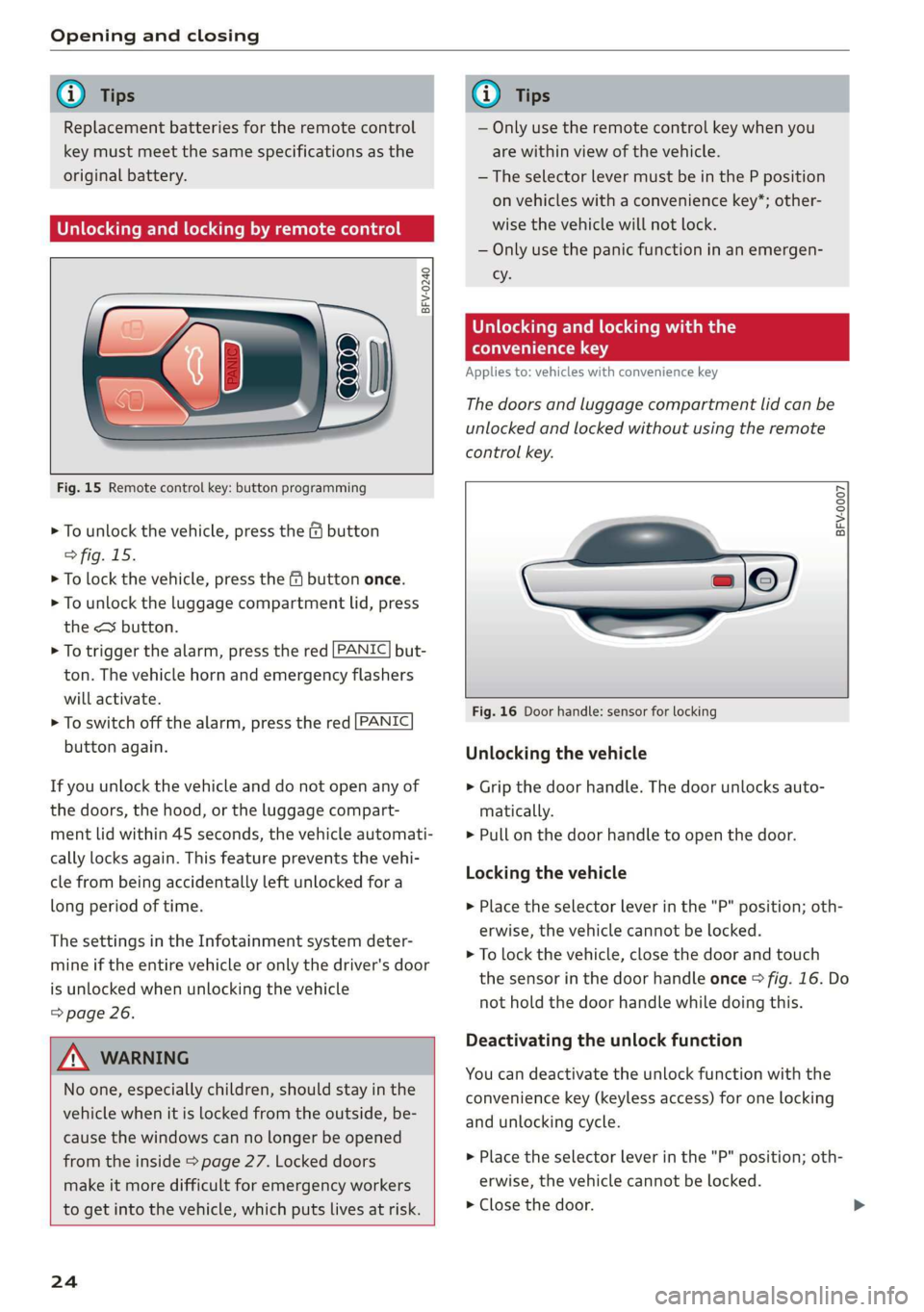
Fig. 15 Remote control key: button programming
> To unlock the vehicle, press the & button
> fig. 15.
> To lock the vehicle, press the f9 button once.
> To unlock the luggage compartment lid, press
the <3 button.
> To trigger the alarm, press the red [PANIC] but-
ton.
The vehicle horn and emergency flashers
will activate.
> To switch off the alarm, press the red [PANIC
button again.
If you unlock the vehicle and do not open any of
the doors, the hood, or the luggage compart-
ment lid within 45 seconds, the vehicle automati-
cally locks again. This feature prevents the vehi-
cle from being accidentally left unlocked for a
long period of time.
The settings in the Infotainment system deter-
mine if the entire vehicle or only the driver's door
is unlocked when unlocking the vehicle
=> page 26.
ZX WARNING
No one, especially children, should stay in the
vehicle when it is locked from the outside, be-
cause the windows can no longer be opened
from the inside > page 27. Locked doors
make it more difficult for emergency workers
to get into the vehicle, which puts lives at risk.
24
G) Tips
— Only use the remote control key when you
are within view of the vehicle.
—The selector lever must be in the P position
on vehicles with a convenience key*; other-
wise the vehicle will not lock.
— Only use the panic function in an emergen-
cy.
Unlocking and locking with the
convenience key
Applies to: vehicles with convenience key
The doors and luggage compartment lid can be
unlocked and locked without using the remote
control key.
BFV-0007
Fig. 16 Door handle: sensor for locking
Unlocking the vehicle
> Grip the door handle. The door unlocks auto-
matically.
> Pull on the door handle to open the door.
Locking the vehicle
> Place the selector lever in the "P" position; oth-
erwise, the vehicle cannot be locked.
> To lock the vehicle, close the door and touch
the sensor in the door handle once > fig. 16. Do
not hold the door handle while doing this.
Deactivating the unlock function
You can deactivate the unlock function with the
convenience key (keyless access) for one locking
and unlocking cycle.
> Place the selector lever in the "P" position; oth-
erwise, the vehicle cannot be locked.
> Close the door.
Page 27 of 304
8S58012721BA
Opening and closing
> Press the ff lock button on the convenience key
and touch the sensor on the door handle (driv-
er's door) one time within five seconds of press-
ing the button > fig. 16. Do not grasp the door
handle while locking the vehicle, or else the ve-
hicle will not lock.
> To check if the function has been deactivated,
wait at least 10 seconds and pull the door han-
dle again. The door should not open.
After that, it will only be possible to unlock the
vehicle using the remote control key or by me-
chanically unlocking the lock cylinder. Keyless ac-
cess will be active again after the next time the
vehicle is locked/unlocked.
You can unlock/lock the vehicle at every door. The
convenience key must no be more than approxi-
mately 5 feet (1.5 m) away from the door handle.
The function should not be impaired if the con-
venience key is in your jacket pocket or in your
briefcase, for example.
If you hold the door handle while locking, this
can impair the locking function.
The door cannot be opened for a brief period di-
rectly after locking it. This way you have the op-
portunity to check if the doors locked correctly.
The settings in the Infotainment system deter-
mine if the entire vehicle or only one of the doors
is unlocked when unlocking the vehicle
=> page 26.
ZA\ WARNING
No one, especially children, should stay in the
vehicle when it is locked from the outside, be-
cause the windows can no longer be opened
from the inside > page 27. Locked doors
make it more difficult for emergency workers
to get into the vehicle, which puts lives at risk.
Z\ WARNING
Read and following all WARNINGS. > A in
Key set on page 22
@) Tips
If your vehicle is left standing for a long peri-
od
of time, note the following:
—To prevent the vehicle battery from dis-
charging, the energy management gradual-
ly switches off convenience functions that
are not needed. You then may no longer be
able to unlock your vehicle with the sensors.
— For an explanation on conformity with the
FCC regulations in the United States and the
Industry Canada regulations, see
=> page 283.
Central locking switch
©) 3 S
2 s x
oo
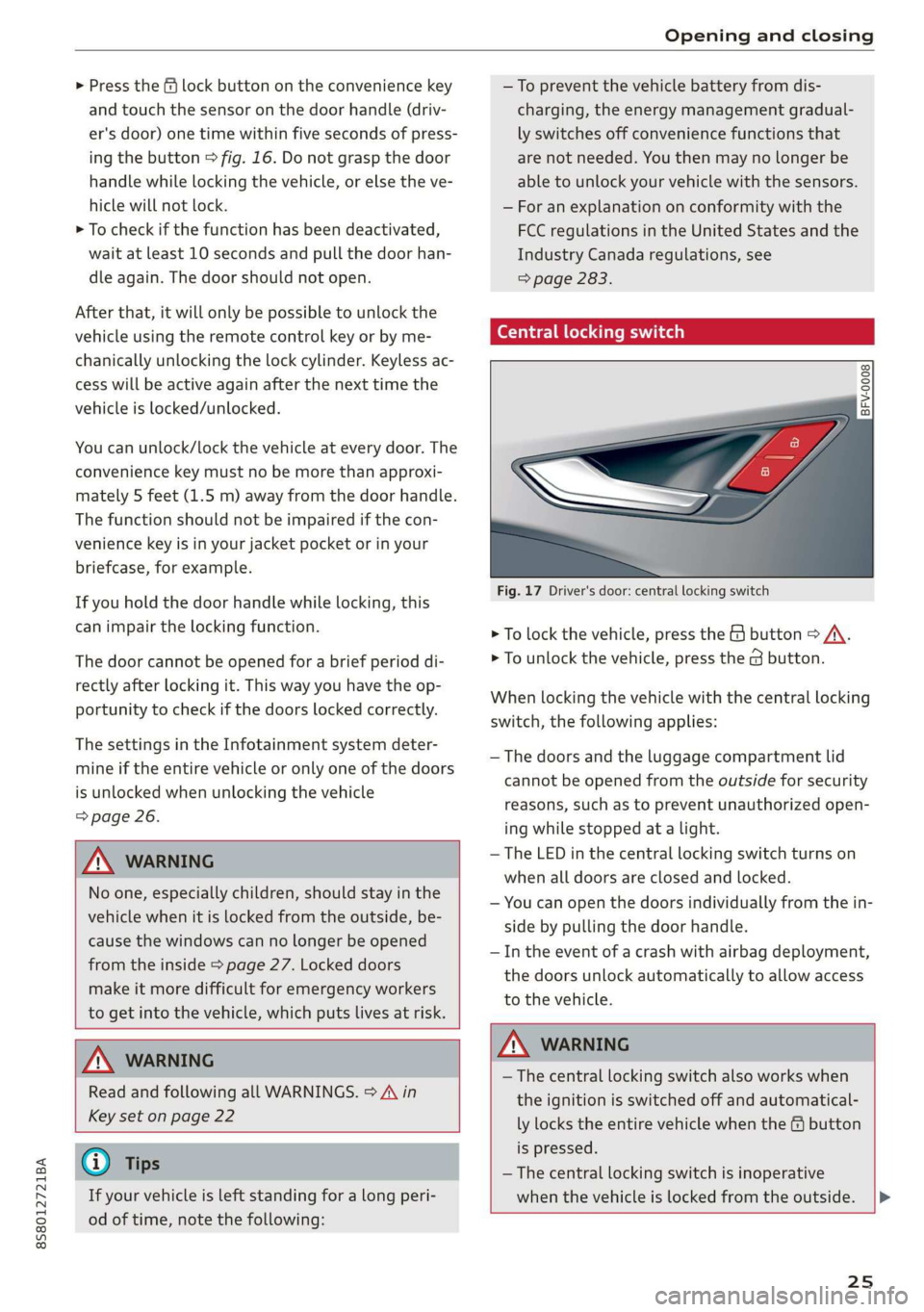
Fig. 17 Driver's door: central locking switch
> To lock the vehicle, press the & button > A\.
> To unlock the vehicle, press the @ button.
When locking the vehicle with the central locking
switch, the following applies:
— The doors and the luggage compartment lid
cannot be opened from the outside for security
reasons, such as to prevent unauthorized open-
ing while stopped at a light.
— The LED in the central locking switch turns on
when all doors are closed and locked.
— You can open the doors individually from the in-
side by pulling the door handle.
— In the event of a crash with airbag deployment,
the doors unlock automatically to allow access
to the vehicle.
Z\ WARNING
—The central locking switch also works when
the ignition is switched off and automatical-
ly locks the entire vehicle when the & button
is pressed.
— The central locking switch is inoperative
when the vehicle is locked from the outside. |>
25
Page 28 of 304
Opening and closing
— Locked doors make it more difficult for
emergency workers to get into the vehicle,
which puts lives at risk. Do not leave anyone
behind in the vehicle, especially children.
@ Tips
Your vehicle locks automatically when it
reaches a speed of 9 mph (15 km/h) (Auto
Lock) = page 21. You can unlock the vehicle
again using the @ button in the central lock-
ing switch.
Setting the central locking system
You can adjust the central locking system to your
preferences. The settings depend on the vehicle
equipment.
> Select in the Infotainment system: [MENU] but-
ton > Vehicle > left control button >Vehicle set-
tings.
Door unlocking - you can decide if All doors or
only the Driver door should unlock. The luggage
compartment lid also unlocks when All is select-
ed. If you select Driver in a vehicle with a conven-
ience key*, only the door whose handle you pull
will unlock.
Long press to open windows - you can select if
all windows should open using the vehicle key
=> page 29, Convenience opening and closing. If
you press and hold the f button on the vehicle
key, all of the windows will close.
If you select Driver, all the doors and luggage
compartment lid will unlock if you press the @
button on the remote control key twice.
Lock when driving”) - if you select On, all doors
and the luggage compartment lid will be locked
automatically when driving (Auto Lock).
Fold mirrors - if you select On, the exterior rear-
view mirrors fold will in automatically when you
press the f button on the remote control key or
touch the sensor* in the handle.
D This function is not available in all countries.
26
Mechanically unlocking and locking the
doors
If the central locking fails, you must unlock or
lock the doors separately.
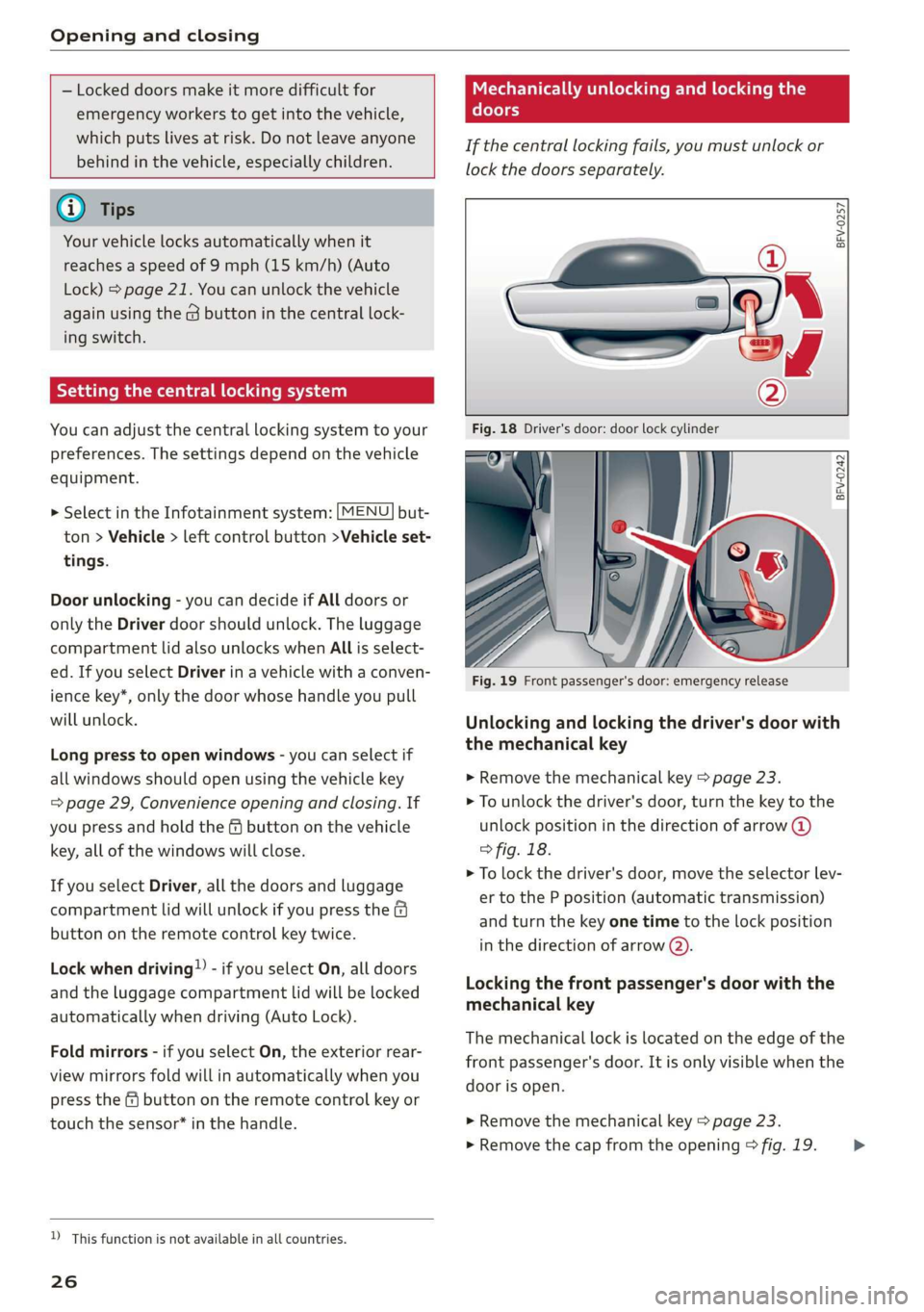
BFV-0257
BFV-0242
Fig. 19 Front passenger's door: emergency release
Unlocking and locking the driver's door with
the mechanical key
>» Remove the mechanical key > page 23.
> To unlock the driver's door, turn the key to the
unlock position in the direction of arrow @)
° fig. 18.
> To lock the driver's door, move the selector lev-
er to the P position (automatic transmission)
and turn the key one time to the lock position
in the direction of arrow @).
Locking the front passenger's door with the
mechanical key
The
mechanical lock is located on the edge of the
front passenger's door. It is only visible when the
door is open.
> Remove the mechanical key > page 23.
> Remove the cap from the opening > fig. 19. >
Page 29 of 304
8S8012721BA
Opening and closing
> Insert the key into the slot inside and turn it all
the way to the right (right door) or to the left
(left door*).
Once the front passenger's door is closed, it is no
longer possible to open it from the outside. The
door can be opened from the inside by pulling
the door handle.
PV ae Te
If the anti-theft alarm system detects a vehicle
break-in, audio and visual warning signals are
triggered. The anti-theft alarm system is switch-
ed on or off when locking or unlocking your vehi-
cle. If the alarm is triggered, it will shut off auto-
matically after a certain amount of time.
Switching the alarm off manually
> To switch the alarm off, press the G button on
the remote control key or switch the ignition
on.
Break-in security feature
The alarm will sound if there is a break-in at the
doors, hood, and/or luggage compartment lid.
Luggage compartment
lid
Opening and closing the luggage
compartment lid
Opening the luggage compartment lid
> To unlock the luggage compartment lid, press
the < button on the remote control key. Or
> Lift the luggage compartment lid.
Closing the luggage compartment lid
>» Use the inside grip to pull the luggage com-
partment lid down and allow it to close using a
gentle push > A\.
Z\ WARNING
— After closing the luggage compartment lid,
make sure that it is latched. Otherwise the
luggage compartment lid could open sud-
denly when driving, which increases the risk
of an accident.
— Never drive with the luggage compartment
lid ajar or open, because poisonous gases
can enter the vehicle interior and create the
risk of asphyxiation.
— Never leave your vehicle unattended when
the luggage compartment lid is open. A
child could crawl into the luggage compart-
ment. If the luggage compartment lid was
then closed, the child would be trapped in
the vehicle and unable to escape. To reduce
the risk of injury, do not allow children to
play in or around the vehicle. Always keep
the luggage compartment lid and the doors
closed when the vehicle is not in use.
— Always make sure no one is in the luggage
compartment lid's range of motion when it
is closing, especially near the hinges. Fin-
gers or hands could be pinched.
@) Tips
— When the vehicle is locked, the luggage
compartment lid can be unlocked separately
by pressing the << button on the remote
control key. The luggage compartment lid
locks automatically when it is closed again.
— Incase of an emergency or a faulty handle,
the luggage compartment lid can be opened
manually from the inside > page 28.
27
Page 52 of 304
Stowing and using
Luggage compartment
General information
All pieces of luggage or objects must be securely
fastened in the luggage compartment. Note the
following to maintain good vehicle handling:
> Distribute the load evenly in the luggage com-
partment.
> Stow heavy luggage as far forward in the lug-
gage compartment as possible.
» Use non-elastic cords attached to the tie-downs
to secure objects.
Z\ WARNING
— Loose objects can be thrown around the ve-
hicle interior during sudden driving or brak-
ing maneuvers, which increases the risk of
an accident. Always stow objects securely in
the luggage compartment and secure them
at the tie-downs. Use straps suitable for
heavy objects.
— If pieces of luggage or objects are secured
to the tie-downs with unsuitable or dam-
aged straps, this can increase the risk of in-
jury during braking maneuvers or accidents.
— When transporting heavy objects, the vehi-
cle characteristics will change due to the
shift in the center of gravity, which increases
the risk of an accident. You may need to
adapt your driving style and speed to the
current conditions.
— The cargo net is only strong enough to se-
cure light objects. Heavy objects are not ade-
quately secured. Attempting to secure heavy
objects increases the risk of injury.
— Never exceed the permitted axle and load
and vehicle weight > page 286.
— Never secure a child safety seat to the tie-
downs.
— Never leave your vehicle unattended, espe-
cially if the luggage compartment lid is
open. Children could enter the luggage com-
partment and close the luggage compart-
ment lid from the inside. This creates the
risk of fatal injury, since the children would
be locked in and may not be able to escape
by themselves.
sO
— Do not allow children to play in or on the ve-
hicle. Close and lock the luggage compart-
ment lid as well as all other doors when you
leave the vehicle.
— Never transport passengers in the luggage
compartment. Every passenger must be cor-
rectly secured with the safety belts in the
vehicle > page 182.
() Note
Make sure that the heating grid strips for the
rear window defogger are not damaged by
abrasive objects.
G) Tips
— The tire pressure must be adapted to the
load > page 250.
— You can purchase straps at specialty stores.
Pass-through with bag
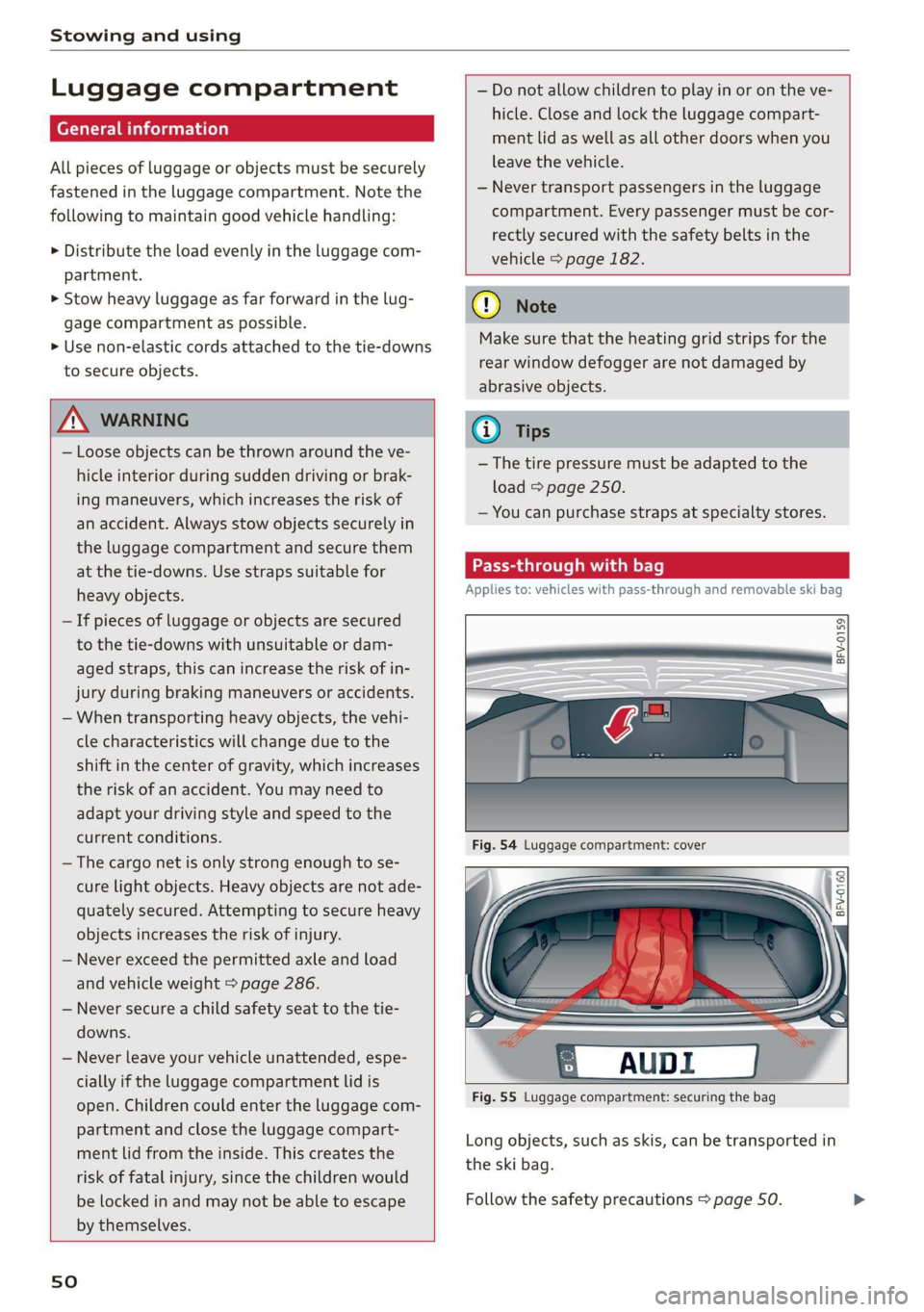
Applies to: vehicles with pass-through and removable ski bag
BFV-0159
Fig. 55 Luggage compartment: securing the bag
Long objects, such as skis, can be transported in
the ski bag.
Follow the safety precautions > page 50.
Page 62 of 304
Driving
Setting/manually releasing the parking
brake
> Pull the ©) switch to set the parking brake. The
LED in the switch turns on. The PARK (USA mod-
els) (Canada models) indicator light also
turns on in the instrument cluster display.
> To release the parking brake manually, press
the brake or accelerator pedal while the igni-
tion is switched on and press the ©) switch at
the same time. The LED in the button and the
indicator light in the display turn off.
Releasing the parking brake automatically
Requirement: the driver's door must be closed.
> To start driving and release the parking brake
automatically, press the accelerator pedal as
usual.
In addition to releasing the parking brake auto-
matically, other convenience and safety functions
are available when you start driving > page 61,
Starting to drive.
Emergency braking function
You can use the emergency braking function in an
emergency situation, or if the standard brakes
are malfunctioning or the pedal is obstructed.
> Pull and hold the ©) switch.
> As soon as you release the ©) switch or acceler-
ate, the braking stops.
Pulling
and holding the ©) switch while driving
the vehicle activates the emergency braking func-
tion. The hydraulic brake system will brake all
four wheels. The braking effect is similar to heavy
braking > A\.
To reduce the risk of activating the emergency
braking by mistake, a warning tone (buzzer)
sounds when the ©) switch is pulled. Emergency
braking stops as soon as the ©) switch is released
or the accelerator pedal is pressed.
Parking
> Press the brake pedal to stop the vehicle.
> Pull the © switch to set the parking brake.
>» Place the selector lever in the “P” position.
> Turn the engine off > A\.
60
> Turn the steering wheel when parking on in-
clines so that the wheels will roll into the curb
if the vehicle starts moving.
ZA WARNING
— Ifa gear is engaged while the vehicle is sta-
tionary and the engine is running, do not
press the accelerator pedal inadvertently.
Otherwise, the vehicle will start to move im-
mediately and this could result in an acci-
dent.
— Emergency braking should only be used in
an emergency, when the when the standard
brake pedal is malfunctioning or obstructed.
During emergency braking, your vehicle will
brake similar to heavy braking. ESC and the
associated components (ABS, ASR, EDL) can-
not overcome the laws of physics. In corners
and when road or weather conditions are
bad, a full brake application can cause the
vehicle to skid or the rear end to swerve,
which increases the risk of an accident.
— If the power supply fails, you cannot set the
parking brake once it is released. In this
case, park the vehicle on level ground and
secure it by placing the selector lever in the
P position. See an authorized Audi dealer or
authorized Audi Service Facility for assis-
tance.
— If you leave the vehicle, switch the ignition
off and take the vehicle key with you. This
applies particularly when children remain in
the vehicle. Otherwise children could start
the engine, release the parking brake or op-
erate electrical equipment such as power
windows, which increases the risk of an acci-
dent.
— No one should remain in the vehicle when it
is locked - especially children. Locked doors
make it more difficult for emergency work-
ers to get into the vehicle, which puts lives
at risk.
C) Note
Do not leave your vehicle unattended while
the engine is running, because this increases
the risk of an accident.
Page 93 of 304
8S8012721BA
Intelligent Technology
ZA\ WARNING
Improper operation of the rear spoiler can
cause crushing injuries.
— Always make sure that nobody, especially
children, is in the way when the rear spoiler
is deployed or retracted.
() Note
— Never push on the vehicle on the rear spoil-
er. This could cause damage.
— To prevent damage to the rear spoiler do
not lean or place anything on it.
— Only operate the rear spoiler manually when
the luggage compartment lid is close and
the rear spoiler moving parts are not
blocked. Otherwise, damage could occur.
@ Tips
Clean the rear spoiler compartment every 2 to
3 months. To function correctly, the rear
spoiler must be free of ice, snow and leaves.
Energy management
Your vehicle is equipped with an intelligent ener-
gy management system for distributing electrici-
ty. This significantly improves the starting ability
and increases the vehicle battery life.
@ Tips
— If you drive short distances frequently, the
vehicle battery may not charge enough
while driving. As a result, convenience func-
tions for electrical equipment may be tem-
porarily unavailable.
— The vehicle battery will gradually drain if
the vehicle is not driven for long periods of
time, or if electrical equipment is used
when the engine is not running. To ensure
that the vehicle can still be started, the
electrical equipment will be limited or
switched off.
Information about data
recorded by vehicle
control modules
Your vehicle is not equipped with a crash data re-
corder. This device is installed by some vehicle
manufacturers to record data about crashes so
that it can be analyzed later. Crash data recorders
are also called “Event Data Recorders (EDR)”.
In some legal jurisdictions, it is not permitted to
access or download data recorded by pre-instal-
led crash data recorders in order to evaluate a
crash without clear consent of the vehicle owner.
Your vehicle is not equipped with a crash data re-
corder. However it does contain a variety of elec-
tronic control modules for various vehicle sys-
tems such as engine function, exhaust treatment
or airbags and safety belts.
These electronic control modules record vehicle
data during normal driving for diagnosis and re-
pair purposes. The recording capability of the
electronic control modules is limited to data only
- no sound is recorded. If the control module de-
tects a system malfunction or other change in
status, a very limited amount of data is recorded
for an extremely small period of time. Data that
is recorded in such a case may include vehicle
speed, driving direction, the load on the brakes
and head restraints and performance in the event
of an accident or other change in status. The stor-
ed data can only be read or downloaded with spe-
cial devices.
91
Page 187 of 304
8S8012721BA
Safety belts
— Never remove a safety belt while the vehicle
is moving. Doing so will increase your risk of
being injured or killed.
— Never wear belts twisted.
— Never wear belts over rigid or breakable ob-
jects in or on your clothing, such as eye
glasses, pens, keys, etc., as these may cause
injury.
— Never allow safety belts to become dam-
aged by being caught in door or seat hard-
ware.
— Do not wear the shoulder part of the belt
under your arm or otherwise out of position.
— Several layers of heavy clothing may inter-
fere with correct positioning of belts and re-
duce the overall effectiveness of the system.
— Always keep belt buckles free of anything
that may prevent the buckle from latching
securely.
— Never use comfort clips or devices that cre-
ate slack in the shoulder belt. However, spe-
cial clips may be required for the proper use
of some child restraint systems.
— Torn or frayed safety belts can tear and
damaged belt hardware can break in an acci-
dent. Inspect belts regularly. If webbing,
bindings, buckles, or retractors are dam-
aged, have belts replaced by an authorized
Audi dealer or qualified workshop.
— Safety belts that have been worn and loaded
in an accident must be replaced with the
correct replacement safety belt by an au-
thorized Audi dealer. Replacement may be
necessary even if damage cannot be clearly
seen. Anchorages that were loaded must al-
so be inspected.
— Never remove, modify, disassemble, or try
to repair the safety belts yourself.
— Always keep the belts clean. Dirty belts may
not work properly and can impair the func-
tion of the inertia reel > table Interior
cleaning on page 264.
Safety belts
Fastening safety belts
Safety first - everybody buckle up!
|
B4H-0462
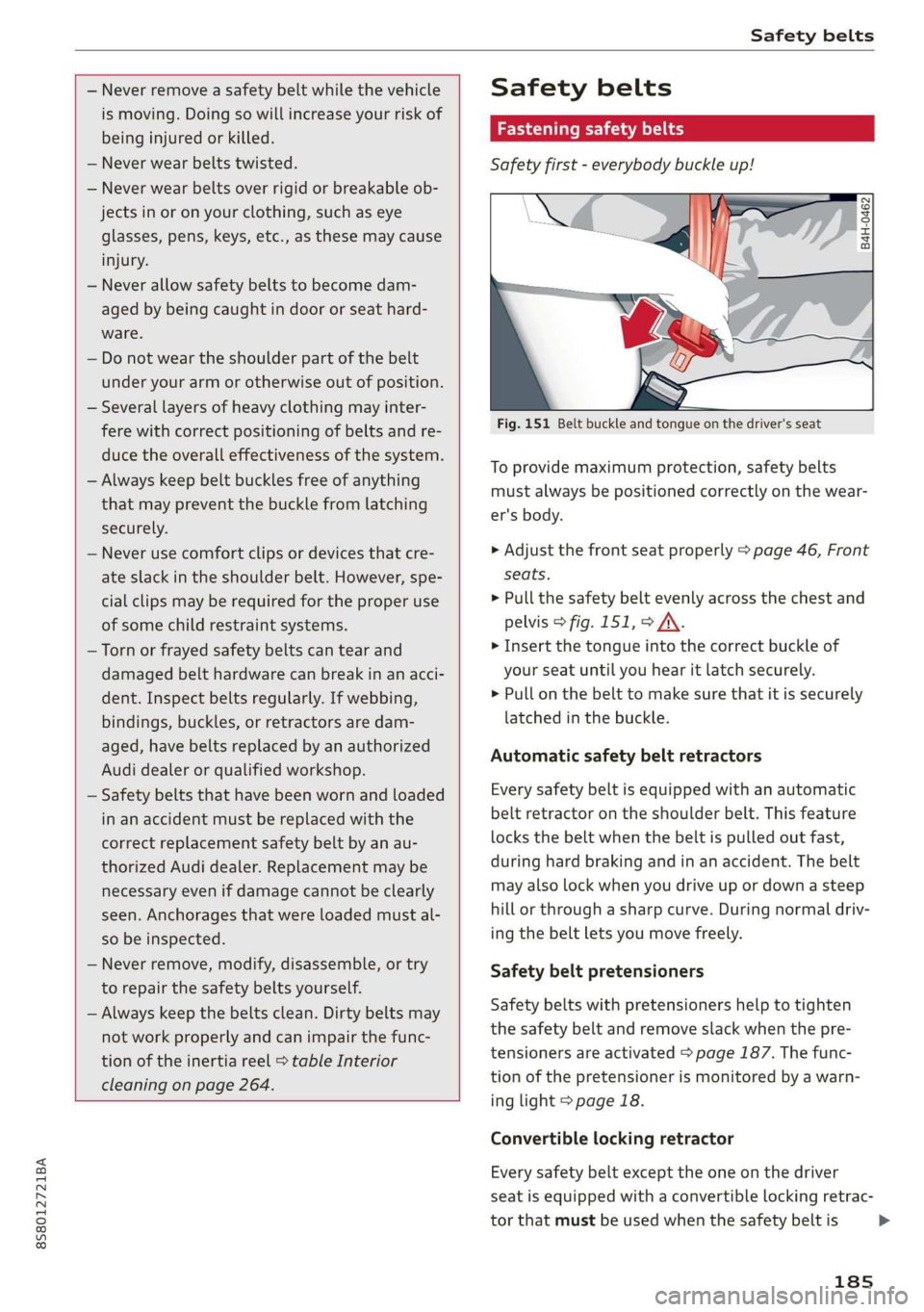
Fig. 151 Belt buckle and tongue on the driver's seat
To provide maximum protection, safety belts
must always be positioned correctly on the wear-
er's body.
> Adjust the front seat properly > page 46, Front
seats.
> Pull the safety belt evenly across the chest and
pelvis > fig. 151, > A\.
> Insert the tongue into the correct buckle of
your seat until you hear it latch securely.
> Pull on the belt to make sure that it is securely
latched in the buckle.
Automatic safety belt retractors
Every safety belt is equipped with an automatic
belt retractor on the shoulder belt. This feature
locks the belt when the belt is pulled out fast,
during hard braking and in an accident. The belt
may also lock when you drive up or down a steep
hill or through a sharp curve. During normal driv-
ing the belt lets you move freely.
Safety belt pretensioners
Safety belts with pretensioners help to tighten
the safety belt and remove slack when the pre-
tensioners are activated > page 187. The func-
tion of the pretensioner is monitored by a warn-
ing light > page 18.
Convertible locking retractor
Every safety belt except the one on the driver
seat is equipped with a convertible locking retrac-
tor that must be used when the safety belt is
185
>
Page 188 of 304
Safety belts
used to attach a child seat. Be sure to read the
important information about this feature
=> page 219.
ZA WARNING
Improperly positioned safety belts can cause
serious injury in an accident > page 186,
Safety belt position.
— Safety belts offer optimum protection only
when the seatback is upright and belts are
properly positioned on the body.
— Never attach the safety belt to the buckle
for another seat. Attaching the belt to the
wrong buckle will reduce safety belt effec-
tiveness and can cause serious personal in-
jury.
— A passenger who is not properly restrained
can be seriously injured by the safety belt it-
self when it moves from the stronger parts
of the body into critical areas like the abdo-
men.
— Always lock the convertible locking retractor
when you are securing a child seat in the ve-
hicle > page 220.
@) Tips
For information on safety belt pretensioners,
refer to > page 187.
Safety belt position
Correct belt position is the key to getting maxi-
mum protection from safety belts.
B4H-0751
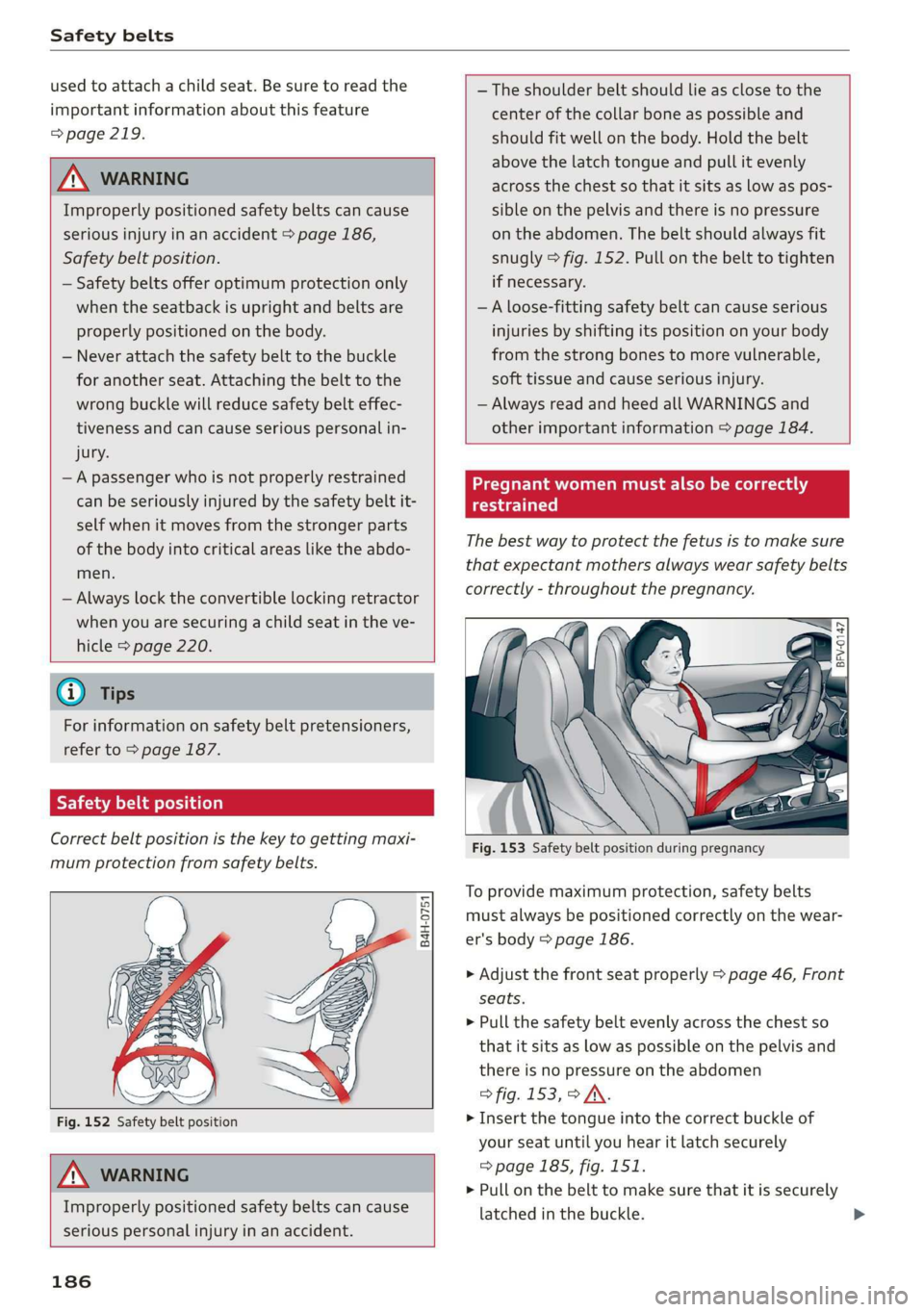
Fig. 152 Safety belt position
Z\ WARNING
Improperly positioned safety belts can cause
serious personal injury in an accident.
186
— The shoulder belt should lie as close to the
center of the collar bone as possible and
should fit well on the body. Hold the belt
above the latch tongue and pull it evenly
across the chest so that it sits as low as pos-
sible on the pelvis and there is no pressure
on the abdomen. The belt should always fit
snugly > fig. 152. Pull on the belt to tighten
if necessary.
—A loose-fitting safety belt can cause serious
injuries by shifting its position on your body
from the strong bones to more vulnerable,
soft tissue and cause serious injury.
— Always read and heed all WARNINGS and
other important information > page 184.
Pregnant women must also be correctly
restrained
The best way to protect the fetus is to make sure
that expectant mothers always wear safety belts
correctly - throughout the pregnancy.
A ee
Fig. 153 Safety belt position during pregnancy
To provide maximum protection, safety belts
must always be positioned correctly on the wear-
er's body > page 186.
> Adjust the front seat properly > page 46, Front
seats.
> Pull the safety belt evenly across the chest so
that it sits as low as possible on the pelvis and
there is no pressure on the abdomen
> fig. 153, > JV.
> Insert the tongue into the correct buckle of
your seat until you hear it latch securely
=> page 185, fig. 151.
> Pull on the belt to make sure that it is securely
latched in the buckle.