cooling AUDI TT ROADSTER 2019 Owners Manual
[x] Cancel search | Manufacturer: AUDI, Model Year: 2019, Model line: TT ROADSTER, Model: AUDI TT ROADSTER 2019Pages: 304, PDF Size: 80.77 MB
Page 6 of 304
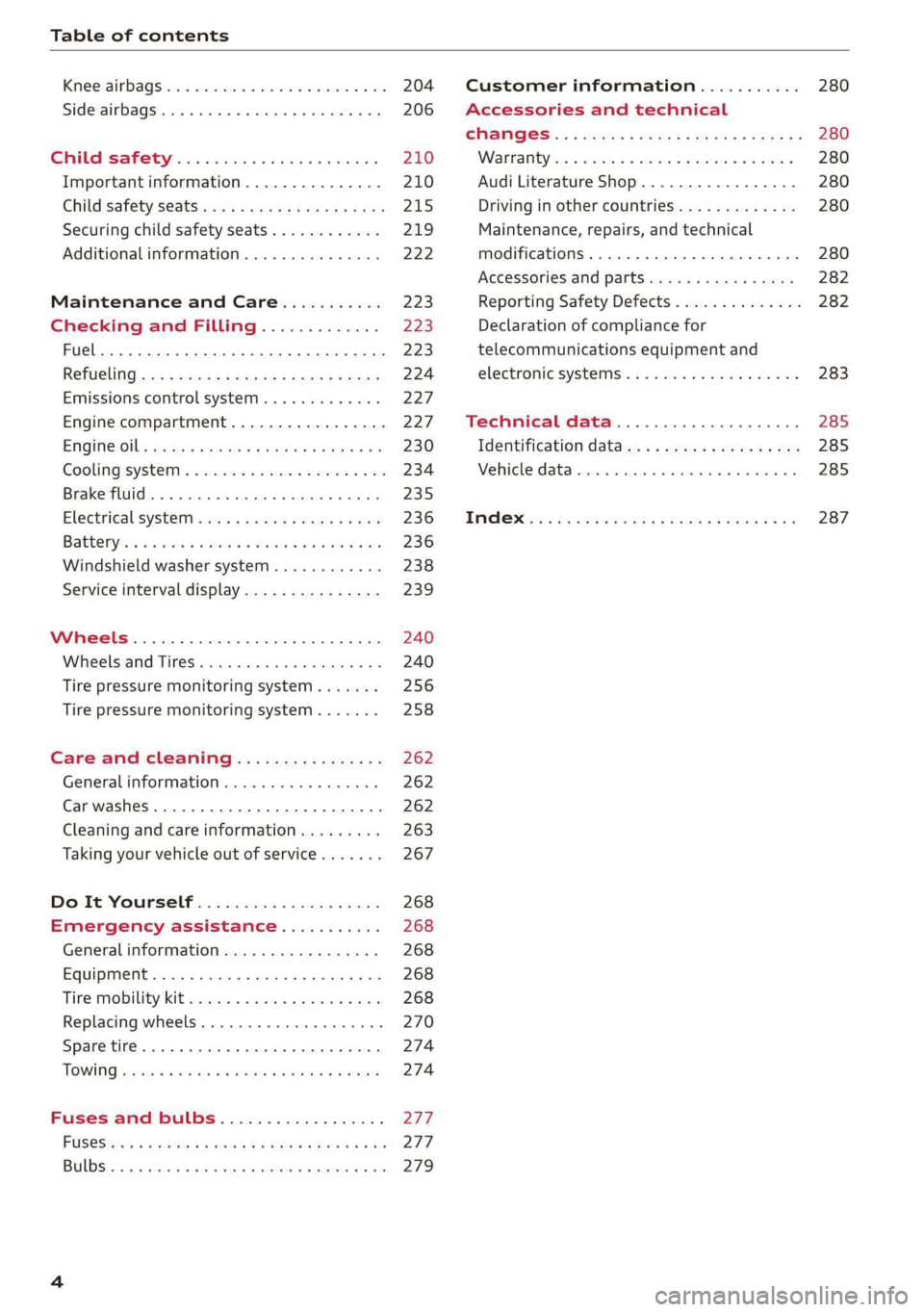
Table of contents
Kiteerairbagsicc 2 secs ee esac a w anaes ¥ vo 204
Side airbags. ........... eee eee eee 206
SRC SARSEY ois i ese se ween 4 & ese a 210
Important information............... 210
Child 'safety S@atSiivec 2s gcan
Additional information............... 222
Maintenance and Care........... 223
Checking and Filling............. 223
Fuel... 2. cece eee eee eee eee 223
Refuelingjecs ss sees se ane + eeee § s peme 224
Emissions control system...........4. 227
Engine compartment................. 227
ERGINGOtls seus 2 x seme « ¥ neue =e oRBER Fae 230
Cooling:system . « sscses v < ssesens vo eevee so ave 234
Brake fluid... 2... eee eee eee 235
Electrical SySteMi wis ¢ scm ae mews eg ey 236
Battery: « & cess 6 6 ceva © 5 mews « wenn ¥ © oi 236
Windshield washer system...........- 238
Service interval display............... 239
Wheels ........ 0... eee 240
Wheels and Tires . . 240
Tire pressure monitoring system....... 256
Tire pressure monitoring system....... 258
Care and cleaning................ 262
General information wo. ceo saeco es 262
Car washes...............2..20.00005 262
Cleaning and care information......... 263
Taking your vehicle out of service....... 267
Do-It YOUrSEUT v5 ¢ «gee8 & peas es eee 268
Emergency assistance........... 268
General
information................. 268
EQUIPITICNE sass ¢ ¢ eens + eeen a 3 ces 3s He 268
Tire mobility kit ose: <2 cere ae eee se ees 268
Replacing wheels..............000005 270
Sparetire........... 0.00.0 20.000000. 274
TOWING scsvss = ¢ wesos « § eeons & 2 Keres 4 = HES 274
Fuses and bulbs.................. 277
FUSES an + x css 5 © ames + © eRe = Beem He 277
BULDSisi0e svowave 4 6 oniuen a a stants a Hanon w 8 ave 279
Customer information........... 280
Accessories and technical
CHANGES: « s seve + a wees ¢ s eee oe ee Ze 280
Warratttys: < s wexsas os menus vo oncans © 0 sence 280
Audi Literature Shop.............005- 280
Driving in other countries............. 280
Maintenance, repairs, and technical
modifications...............02.-00 280
Accessories and parts..............-. 282
Reporting Safety Defects.............. 282
Declaration
of compliance for
telecommunications equipment and
electroniesystemss: + - seca ss sec oo waren 283
Technical data.................... 285
Identification data................0.. 285
Ne@hicle’datiabaccic = 2 cms » @ canseae » 1 sumone a oo 285
TWAS Rey + xaos 5c owe co UE a eee se 287
Page 10 of 304
Quick access
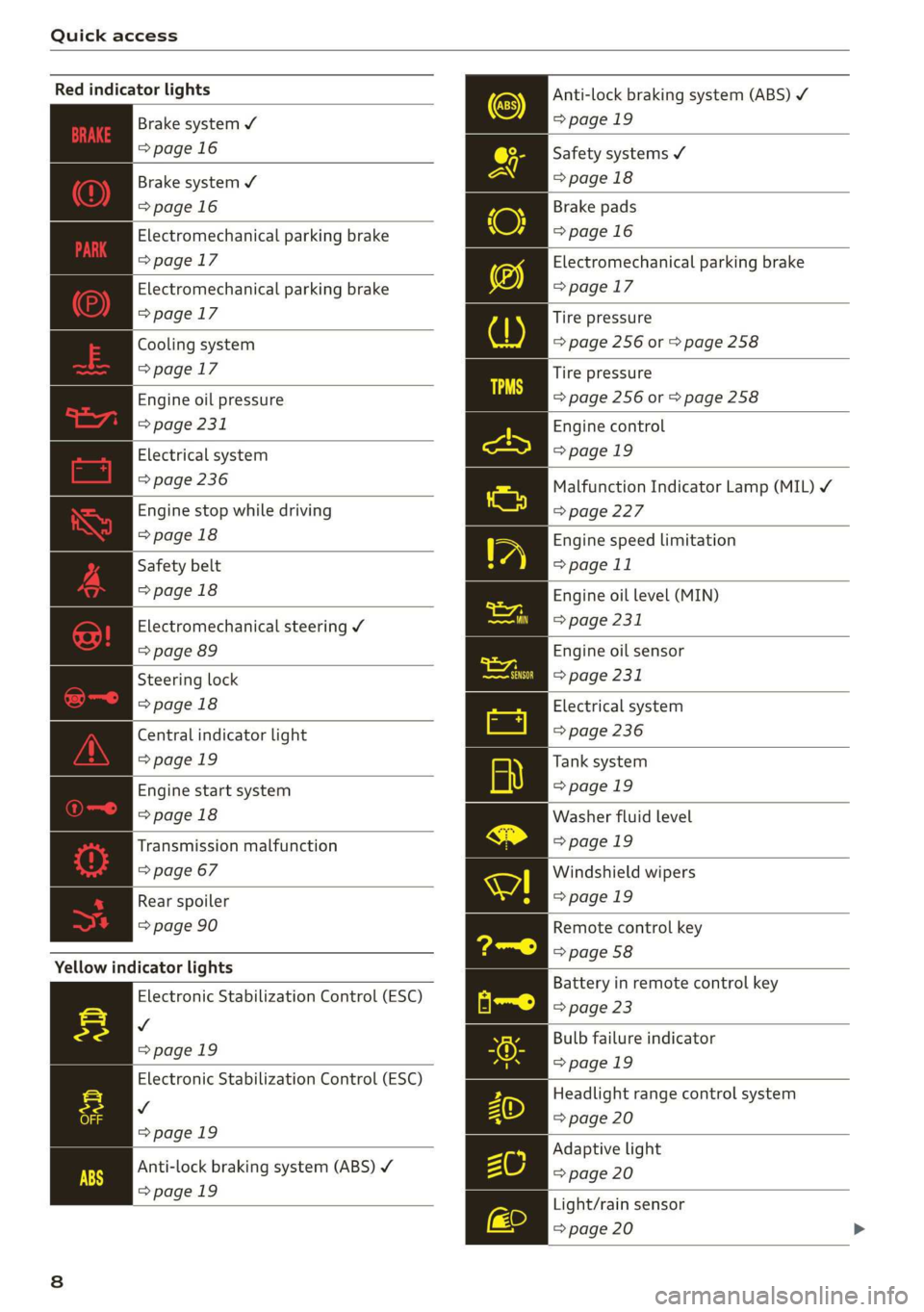
Red indicator lights
Anti-lock braking system (ABS)
=>page 19
Safety systems ¥
>page 18
Brake pads
=>page 16
Electromechanical parking brake
>page 17
Tire pressure
=> page 256 or > page 258
Brake system ¥
=>page 16
Brake system 4
=>page 16
Electromechanical parking brake
=>page 17
Electromechanical parking brake
=>page 17
Cooling system
=>page 17
Tire pressure
Engine oil pressure => page 256 or © page 258
> page 231
Electrical system
=> page 236
Engine stop while driving
>page 18
Safety belt
>page 18
Electromechanical steering Y
=> page 89
Steering lock
>page 18
Central indicator light
=>page 19
Engine start system
>page 18
Transmission malfunction
=> page 67
Engine control
>page 19
Malfunction Indicator Lamp (MIL) ¥
=>page 227
Engine speed limitation
=> page 11
Engine oil level (MIN)
=> page 231
Engine oil sensor
=> page 231
Electrical system
=> page 236
Tank system
>page 19
Washer fluid level
>page 19
Windshield wipers
Rear spoiler = page 19
=> page 90 Remote control key
=> page 58
Yellow indicator lights
Electronic Stabilization Control (ESC)
v
=>page 19
Electronic Stabilization Control (ESC)
Vv
=>page 19
Battery in remote control key
=> page 23
Bulb failure indicator
=>page 19
Headlight range control system
=> page 20
Adaptive light
Anti-lock braking system (ABS) ¥ > page 20
=>page 19
Light/rain sensor
=> page 20
Page 12 of 304
Instrument cluster
Instrument cluster
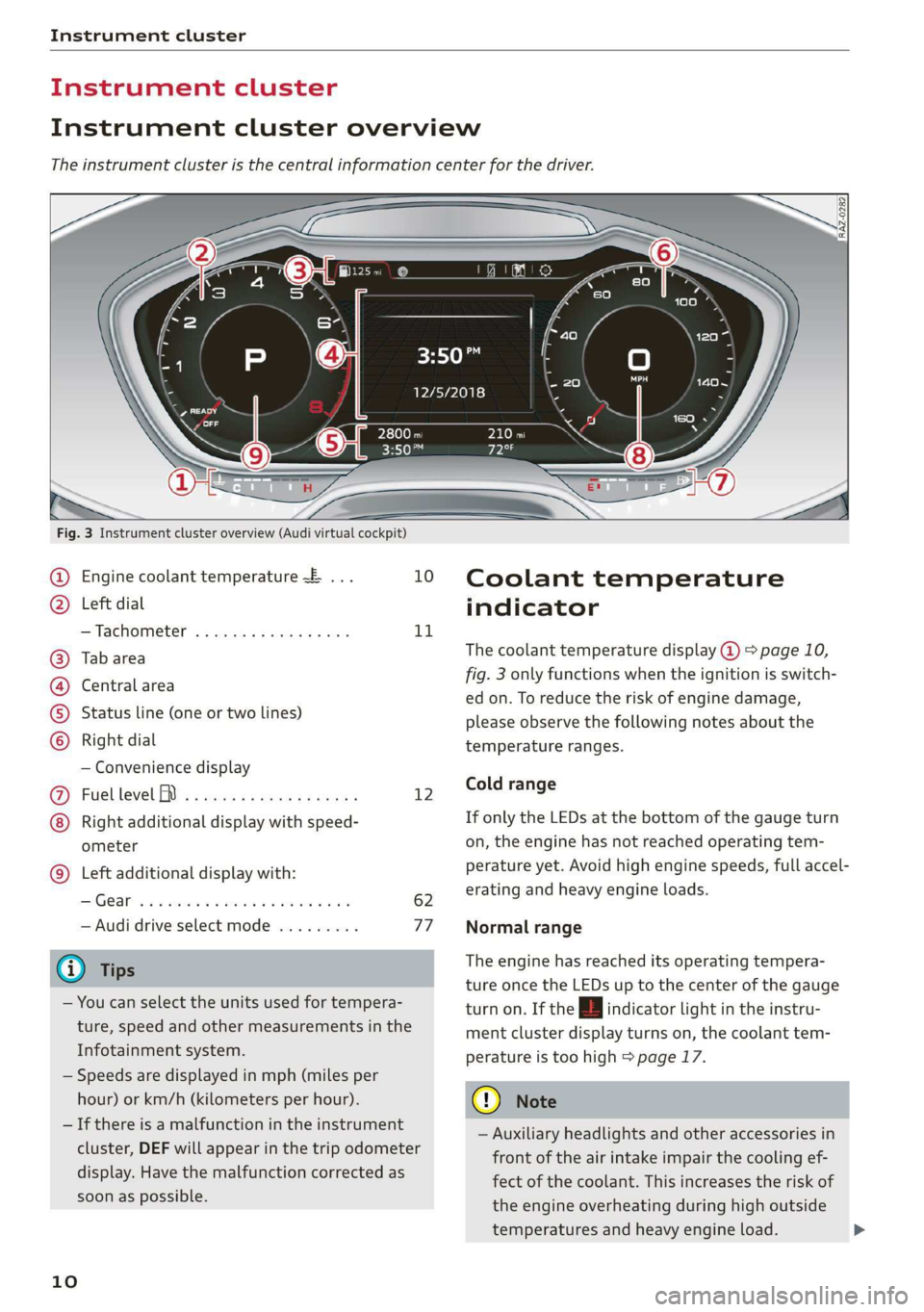
Instrument cluster overview
The instrument cluster is the central information center for the driver.
3:50™
12/5/2018
Fig. 3 Instrument cluster overview (Audi virtual cockpit)
Engine coolant temperature ~E ... 10
Left dial
—Tachometer ..........-...00- 11
Tab area
Central area
Status line (one or two lines)
Right dial
— Convenience display
Fuel level MD) .........0e eee e eee 12
Right additional display with speed-
ometer
Left additional display with:
SIGEAP sss sieves oo seme ow oaRe sw He 62
— Audi drive select mode ......... 77
@ Tips
— You can select the units used for tempera-
ture, speed and other measurements in the
Infotainment system.
— Speeds are displayed in mph (miles per
hour) or km/h (kilometers per hour).
— If there is a malfunction in the instrument
cluster, DEF will appear in the trip odometer
display. Have the malfunction corrected as
soon as possible.
©8
©OHO©
CO
©
10
Coolant temperature
indicator
The coolant temperature display @ > page 10,
fig. 3 only functions when the ignition is switch-
ed on. To reduce the risk of engine damage,
please observe the following notes about the
temperature ranges.
Cold range
If only the LEDs at the bottom of the gauge turn
on, the engine has not reached operating tem-
perature yet. Avoid high engine speeds, full accel-
erating and heavy engine loads.
Normal range
The engine has reached its operating tempera-
ture once the LEDs up to the center of the gauge
turn on. If the | indicator light in the instru-
ment cluster display turns on, the coolant tem-
perature is too high > page 17.
@) Note
— Auxiliary headlights and other accessories in
front of the air intake impair the cooling ef-
fect of the coolant. This increases the risk of
the engine overheating during high outside
temperatures and heavy engine load.
Page 13 of 304
8S8012721BA
Instrument cluster
— The front spoiler also helps to distribute
cooling air correctly while driving. If the
spoiler is damaged, the cooling effect will
be impaired and the risk of the engine over-
heating will increase. See an authorized Au-
di dealer or authorized Audi Service Facility
for assistance.
Tachometer
The tachometer (2) > page 10, fig. 3 displays the
engine speed in revolutions per minute (RPM).
The beginning of the red zone in the tachometer
indicates the maximum permissible engine speed
for all gears once the engine has been broken in.
Before reaching the red zone, you should shift in-
to the next higher gear, choose the "D" or "S" se-
lector lever position, or remove your foot from
the accelerator pedal.
Engine speed limitation
Applies to: vehicles with engine speed limitation
If the BB indicator light turns on, the engine will
be automatically limited to the RPM displayed in
the instrument cluster. This protects the engine
from overheating.
The engine speed limitation deactivates once the
engine is no Longer in the critical temperature
range and you have released the accelerator ped-
al once.
If the engine speed limitation was activated by
an engine control malfunction, the B indicator
light also turns on. Make sure the engine speed
does not go above the speed displayed, for exam-
ple when downshifting. Drive to an authorized
Audi dealer or authorized Audi Service Facility im-
mediately to have the malfunction corrected.
@) Note
The needle in the tachometer may only be in
the red area of the gauge for a short period of
time before there is a risk of damaging the
engine. The location where the red zone be-
gins varies depending on the engine.
Odometer
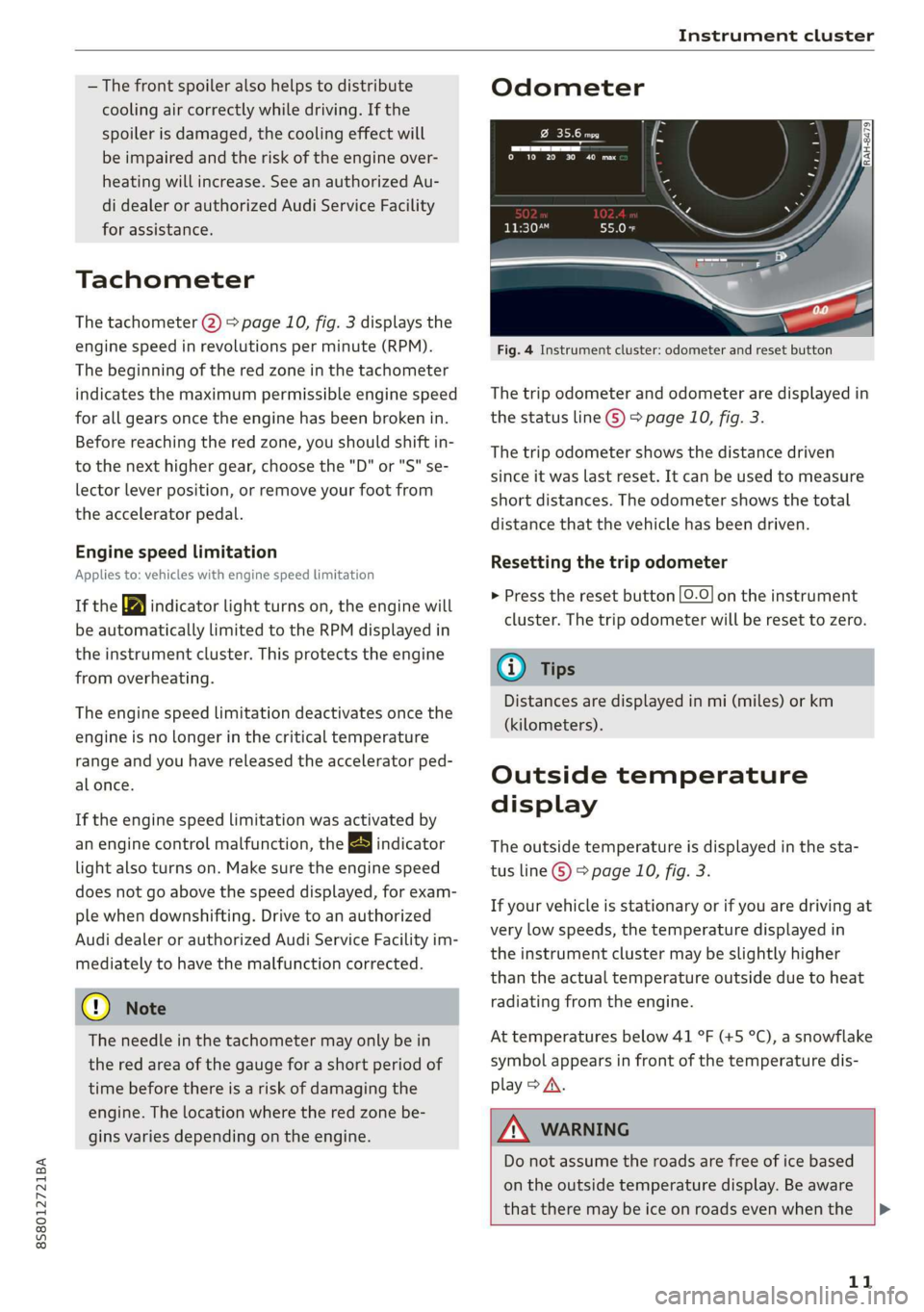
Fig. 4 Instrument cluster: odometer and reset button
The trip odometer and odometer are displayed in
the status line ©) > page 10, fig. 3.
The trip odometer shows the distance driven
since it was last reset. It can be used to measure
short distances. The odometer shows the total
distance that the vehicle has been driven.
Resetting the trip odometer
> Press the reset button [0-9] on the instrument
cluster. The trip odometer will be reset to zero.
@) Tips
Distances are displayed in mi (miles) or km
(kilometers).
Outside temperature
display
The outside temperature is displayed in the sta-
tus line ® page 10, fig. 3.
If your vehicle is stationary or if you are driving at
very low speeds, the temperature displayed in
the instrument cluster may be slightly higher
than the actual temperature outside due to heat
radiating from the engine.
At temperatures below 41 °F (+5 °C), a snowflake
symbol appears in front of the temperature dis-
play > A.
ZA\ WARNING
Do not assume the roads are free of ice based
on the outside temperature display. Be aware
that there may be ice on roads even when the
11
Page 54 of 304
Warm and cold
Warm and cold
Climate control system
The climate control system warms, cools and re-
moves humidity from the air in the vehicle interi-
or. It functions most effectively when the win-
dows are closed. If there is a build-up of heat in-
side the vehicle, ventilation can help to speed up
the cooling process.
Pollutant filter
The pollutant filter removes pollutants such as
dust and pollen from the air.
Key recognition
Certain settings are automatically stored and as-
signed to the remote control key being used.
ZA WARNING
Poor visibility can lead to accidents.
— For safer driving, keep all windows free of
ice, snow and fog.
— Become familiar as quickly as possible with
the correct use and function of the climate
control system, especially with the defrost-
ing and defogging function.
— When the temperature is below freezing,
only use the windshield washer system after
the
windshield has been warmed by the cli-
mate control system. The washer fluid could
freeze on the windshield and impair visibili-
ty.
@) Note
— If you suspect that the climate control sys-
tem is damaged, switch the system off to
52
prevent further damage and have it checked
by an authorized Audi dealer or authorized
Audi Service Facility.
— Repairs to the Audi climate control system
require special technical knowledge and
special tools. Have it inspected by an au-
thorized Audi dealership or a qualified elec-
tronics store.
(@) For the sake of the environment
Reducing the amount of fuel used also re-
duces the amount of pollutants that enter the
alr.
G) Tips
—To prevent interference with the heating
and cooling output and to prevent the win-
dows from fogging over, the air intake in
front of the windshield must be free of ice,
snow, or leaves.
— Condensation from the cooling system can
drip and form a puddle of water under the
vehicle. This is normal and does not mean
there is a leak.
— The energy management system may tem-
porarily switch off certain functions, such as
the seat heating* or rear window defogger.
These systems are available again as soon as
the energy supply has been restored.
— The flows through the vents under the rear
window. Make sure the openings are not
covered when placing clothing on the lug-
gage compartment cover.
Page 55 of 304
8S58012721BA
Warm and cold
PNT erates elem icel eT)
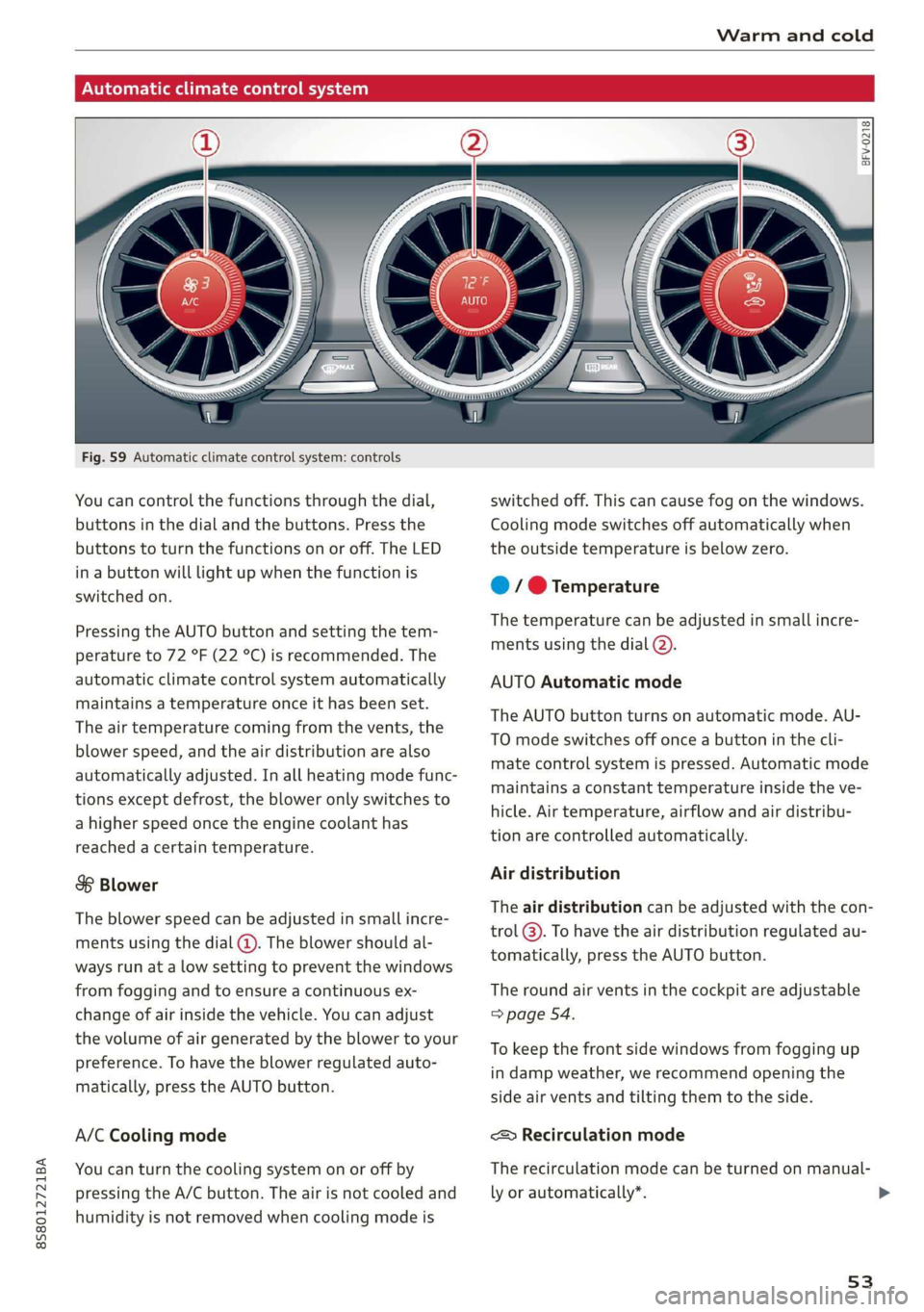
Fig. 59 Automatic climate control system: controls
You can control the functions through the dial,
buttons in the dial and the buttons. Press the
buttons to turn the functions on or off. The LED
in a button will light up when the function is
switched on.
Pressing the AUTO button and setting the tem-
perature to 72 °F (22 °C) is recommended. The
automatic climate control system automatically
maintains a temperature once it has been set.
The air temperature coming from the vents, the
blower speed, and the air distribution are also
automatically adjusted. In all heating mode func-
tions except defrost, the blower only switches to
a higher speed once the engine coolant has
reached a certain temperature.
8 Blower
The blower speed can be adjusted in small incre-
ments using the dial (@). The blower should al-
ways run at a low setting to prevent the windows
from fogging and to ensure a continuous ex-
change of air inside the vehicle. You can adjust
the volume of air generated by the blower to your
preference. To have the blower regulated auto-
matically, press the AUTO button.
A/C Cooling mode
You can turn the cooling system on or off by
pressing the A/C button. The air is not cooled and
humidity is not removed when cooling mode is
BFV-0218
switched off. This can cause fog on the windows.
Cooling mode switches off automatically when
the outside temperature is below zero.
@ / @ Temperature
The temperature can be adjusted in small incre-
ments using the dial (2).
AUTO Automatic mode
The AUTO button turns on automatic mode. AU-
TO mode switches off once a button in the cli-
mate control system is pressed. Automatic mode
maintains a constant temperature inside the ve-
hicle. Air temperature, airflow and air distribu-
tion are controlled automatically.
Air distribution
The air distribution can be adjusted with the con-
trol @). To have the air distribution regulated au-
tomatically, press the AUTO button.
The round air vents in the cockpit are adjustable
=> page 54.
To keep the front side windows from fogging up
in damp weather, we recommend opening the
side air vents and tilting them to the side.
<> Recirculation mode
The recirculation mode can be turned on manual-
ly or automatically*.
53
>
Page 230 of 304
Checking and Filling
reason, follow all the warnings and general
safety precautions provided in the following in-
formation. The engine compartment is a dan-
gerous area. > /\.
ZA WARNING
— Turn the engine off.
— Switch the ignition off.
— Set the parking brake.
— Select the “P” (Park) selector lever position.
— Allow the engine to cool.
— Keep children away from the engine com-
partment.
— Never spill fluids on a hot engine. These flu-
ids (such as the freeze protection contained
in the coolant) can catch fire.
— Avoid short circuits in the electrical system.
— Never reach into the radiator fan. The fan is
temperature-controlled and can turn on
suddenly, even when the ignition is switched
off.
— Never open the hood when there is steam or
coolant escaping from the engine compart-
ment, because there is a risk that you could
be burned. Wait until no steam or coolant is
escaping.
— Never open the cap on the coolant expan-
sion tank when the engine is warm. The
cooling system is under pressure.
— To protect your face, hands, and arms from
hot steam or coolant, cover the cap with a
thick cloth when opening.
— Do not remove the engine cover under any
circumstances. This increases the risk of
burns.
— Due to the risk of electric shock, never touch
the ignition cable or other components in
the electronic high-voltage ignition system
when the engine is running or is starting.
— If a gear is engaged while the vehicle is sta-
tionary and the engine is running, do not
press the accelerator pedal inadvertently.
Pressing the accelerator pedal will cause the
vehicle to move, and this could result in an
accident.
— If inspections or repairs must be performed
while the engine is running, moving compo-
nents (such as the ribbed belt, generator,
and radiator fan) pose an additional risk.
— Set the parking brake first and select the
“P” (Park) selector lever position.
— Always make sure that no parts of the
body, jewelry, ties, loose clothing, and
long hair can be caught in moving engine
components. Before any work, always re-
move any jewelry and ties, tie back long
hair, and make sure all clothing fits close
to the body to to reduce the risk of any-
thing becoming caught in engine compo-
nents.
— Pay attention to the following warnings list-
ed when work on the fuel system or on the
electrical equipment is required.
— Do not smoke.
— Never work near open flames.
— Always have a working fire extinguisher
nearby.
— All work on the battery or electrical system
in your vehicle can result in injuries, chemi-
cal burns, accidents, or burns. Because of
this, all work must be performed only by an
authorized Audi dealer or authorized Audi
Service Facility.
— Limit your exposure to exhaust and chemi-
cals to as short a time as possible.
ZA WARNING
California Proposition 65 Warning:
— Engine exhaust, some of its constituents,
and certain vehicle components contain or
emit chemicals known to the State of Cali-
fornia to cause cancer and birth defects and
reproductive harm. In addition, certain flu-
ids contained in vehicles and certain prod-
ucts of component wear contain or emit
chemicals known to the State of California
to cause cancer and birth defects or other
reproductive harm.
— Battery posts, terminals and related acces-
sories contain lead and lead compounds,
chemicals known to the State of California
to cause cancer and reproductive harms.
Wash hands after handling.
228
Page 234 of 304
![AUDI TT ROADSTER 2019 Owners Manual Checking and Filling
> Add engine oil if necessary > page 232.
Areas on the oil dipstick > fig. 175.
@)] If the engine oil level is just before the
marking (@, then engine oil must be add](/img/6/57667/w960_57667-233.png "AUDI TT ROADSTER 2019 Owners Manual Checking and Filling
> Add engine oil if necessary > page 232.
Areas on the oil dipstick > fig. 175.
@)] If the engine oil level is just before the
marking (@, then engine oil must be add")
Checking and Filling
> Add engine oil if necessary > page 232.
Areas on the oil dipstick > fig. 175.
@)] If the engine oil level is just before the
marking (@, then engine oil must be added.
See.
@]|Do not add engine oil.
©) Note
— The engine oil level must not be below the
marking @), because this increases the risk
of engine damage.
— After adding engine oil, the oil level must
not be above the marking @) > fig. 175, be-
cause this increases the risk of catalytic con-
verter and/or engine damage. If the oil level
is above the marking @, drive to an author-
ized Audi dealer or authorized Audi Service
Facility immediately to have any engine oil
extracted. Avoid high engine speeds, full ac-
celeration, and heavy engine loads.
@) Tips
The engine oil consumption may be up to
0.5 quart/600 miles (0.5 liter/1,000 km), de-
pending on driving style and operating condi-
tions. Consumption may be higher during the
first 3,000 miles (5,000 km). The engine oil
level must be checked regularly. It is best to
check each time you refuel your vehicle and
before long drives.
— Because of the lubrication and cooling of
the engine, combustion engines consume
oil. The oil consumption varies depending
on the engine and may change during the
service life of the engine. Engines generally
consume more oil at the beginning during
the break-in period. Then oil consumption
stabilizes after the break-in period.
— Under normal conditions, oil consumption
depends on the quality and viscosity of the
oil, the engine RPM, the climate conditions,
and the road conditions. The dilution of oil
from condensation or fuel residue as well as
the age of the oil also play a role. Because
engine wear increases with mileage, oil con-
sumption will increase again over time until
232
it may be necessary to replace worn compo-
nents.
— Because all these variables play a role, it is
not possible to define an oil consumption
standard. Therefore, the oil level must be
checked regularly.
— If you believe that your engine has in-
creased its oil consumption, contact an au-
thorized Audi dealer or authorized Audi
Service Facility to determine the cause.
Please note that an exact oil consumption
measurement must be done with the neces-
sary care and accuracy and may take time.
An authorized Audi dealer or authorized Au-
di Service Facility is trained in accurately
measuring the oil consumption.
— You can find information on engine oil and
engine oil capacities for the USA at www.
audiusa.com/help/maintenance, or for Can-
ada at www.audi.ca/ca/web/en/
customer-area/care-and-maintenance/
audi-service-schedules.html, or call
800-822-2834.
Adding engine oil
B8K-2120
Fig. 176 Engine compartment: engine oil filler opening
cover
Observe the safety precautions > A\ in General
information on page 228.
> Turn the engine off.
> Open the hood > page 229.
>» Unscrew the cap %~ for the engine oil filler
opening > fig. 176.
> Carefully add 0.5 quart (0.5 liter) of the correct
oil > page 230.
> Check the oil level again after two minutes
= page 231, Checking the engine oil level. >
Page 236 of 304
Checking and Filling
— Drain the oil into a container designed for
this purpose that is large enough to hold the
full amount of oil in your engine.
— Engine oil is poisonous. Always store out of
reach of children.
— Prolonged contact of used engine oil with
the skin may cause skin damage. Always
wash oil off immediately with soap and wa-
ter to protect your skin.
@ Note
Do not mix any additives with the engine oil.
Additives may cause engine damage that is
not covered by your New Vehicle Limited War-
ranty.
@ For the sake of the environment
— Before changing the engine oil, make sure
you can dispose of the used engine oil cor-
rectly.
— Engine oil must always be disposed of cor-
rectly. Do not dump it in the yard, in the for-
est, or in open water, river channels, or sew-
ers.
— Have your used engine oil recycled by bring-
ing it to a used oil collection site or contact
a gas station.
Cooling system
The engine cooling system is filled with a mixture
of purified water and coolant additive at the fac-
tory. This coolant must not be not changed.
The coolant level is monitored through the B in-
dicator light > page 17. However, occasionally
checking the coolant level manually is recom-
mended.
Coolant additive
The coolant additive is made of anti-freezing and
corrosion protection agents. Only use the follow-
ing coolant additives. These additives may be
mixed with each other.
234
Coolant additive Specification
G12++ TL774G
G13 TL774)
The amount of coolant additive that needs to be
mixed with water depends on the climate where
the vehicle will be operated. If the coolant addi-
tive percentage is too low, the coolant can freeze
and damage the engine.
Coolant Freeze protec-
additive tion
Warm min. 40% min. -13 °F
regions max. 45% (-25 °C)
Cold min. 50% max. -40 °F
regions max. 55% (-40 °C)
(1) Note
— Before the start of winter, have an author-
ized Audi dealer or authorized Audi Service
Facility check if the coolant additive in your
vehicle matches the percentage appropriate
for the climate. This is especially important
when driving in colder climates.
—If the appropriate coolant additive is not
available in an emergency, do not add any
other additive. You could damage the en-
gine. If this happens, only use water and re-
store the correct mixture ratio with the
specified coolant additive as soon as possi-
ble.
— Only refill with new coolant.
— Radiator sealant must not be mixed with
the coolant.
Adding coolant
RAZ-0539
MIN
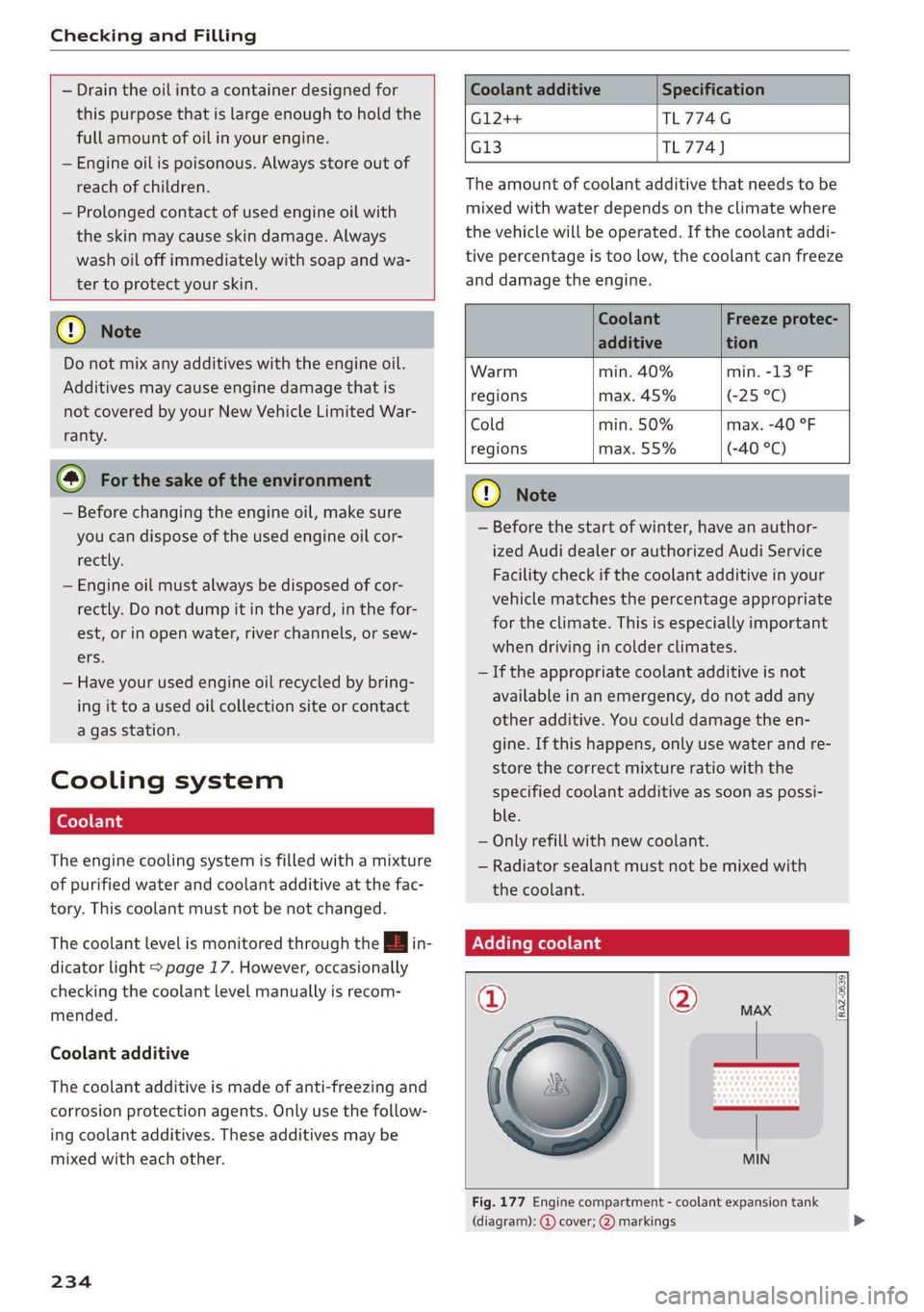
Fig. 177 Engine compartment - coolant expansion tank
(diagram): @ cover; @) markings
Page 237 of 304
8S58012721BA
Checking and Filling
Observe the safety precautions > page 227, Gen-
eral information.
Checking the engine coolant level
>» Park the vehicle on a level surface.
> Switch the ignition off.
> Read the coolant level on the coolant expansion
tank > page 230, fig. 174. The coolant level
must be between the markings @) 9 fig. 177
when the engine is cold. When the engine is
warm it can be slightly above the upper mark-
ing.
Adding coolant
Requirement: there must be a residual amount of
coolant in the expansion tank >@.
If you must add coolant, use a mixture of water
and coolant additive. Mixing the coolant additive
with distilled water is recommended.
> Allow the engine to cool.
>» Place a large, thick towel on the coolant expan-
sion tank cover.
> Remove the cover (@) 9 fig. 177 carefully to the
left > AX.
> Add the correct mixture ratio of coolant
> page 234 up to the upper marking @)
> fig. 177.
> Make sure that the fluid level remains stable.
Add more coolant if necessary.
> Close the cap securely.
Coolant loss usually indicates that there is a leak.
Immediately drive your vehicle to an authorized
Audi dealer or authorized Audi Service Facility
and have the cooling system inspected. If the
cooling system is not leaking, coolant loss can re-
sult from the coolant boiling due overheating
and then being forced out of the cooling system.
compartment. This increases the risk of
burns. The cooling system is under pressure.
When you no longer see or hear steam or
coolant escaping, you may open the engine
compartment with caution.
— When working in the engine compartment,
remember that the radiator fan can switch
on even if the ignition is switched off, which
increases the risk of injury.
— Coolant additive and coolant can be danger-
ous to your health. For this reason, store the
coolant in the original container and away
from children. There is a risk of poisoning.
@) Note
Do not add coolant if the expansion tank is
empty. Air could enter the cooling system and
damage the engine. If this is the case, do not
continue driving. See an authorized Audi deal-
er or authorized Audi Service Facility for assis-
tance.
Brake fluid
BFV-0229)
Z\ WARNING
— The engine compartment in any vehicle can
be a dangerous area. Stop the engine and al-
low it to cool before working in the engine
compartment. Always follow the informa-
tion found in > page 227, General informa-
tion.
— Never open the hood if you can see or hear
steam or coolant escaping from the engine
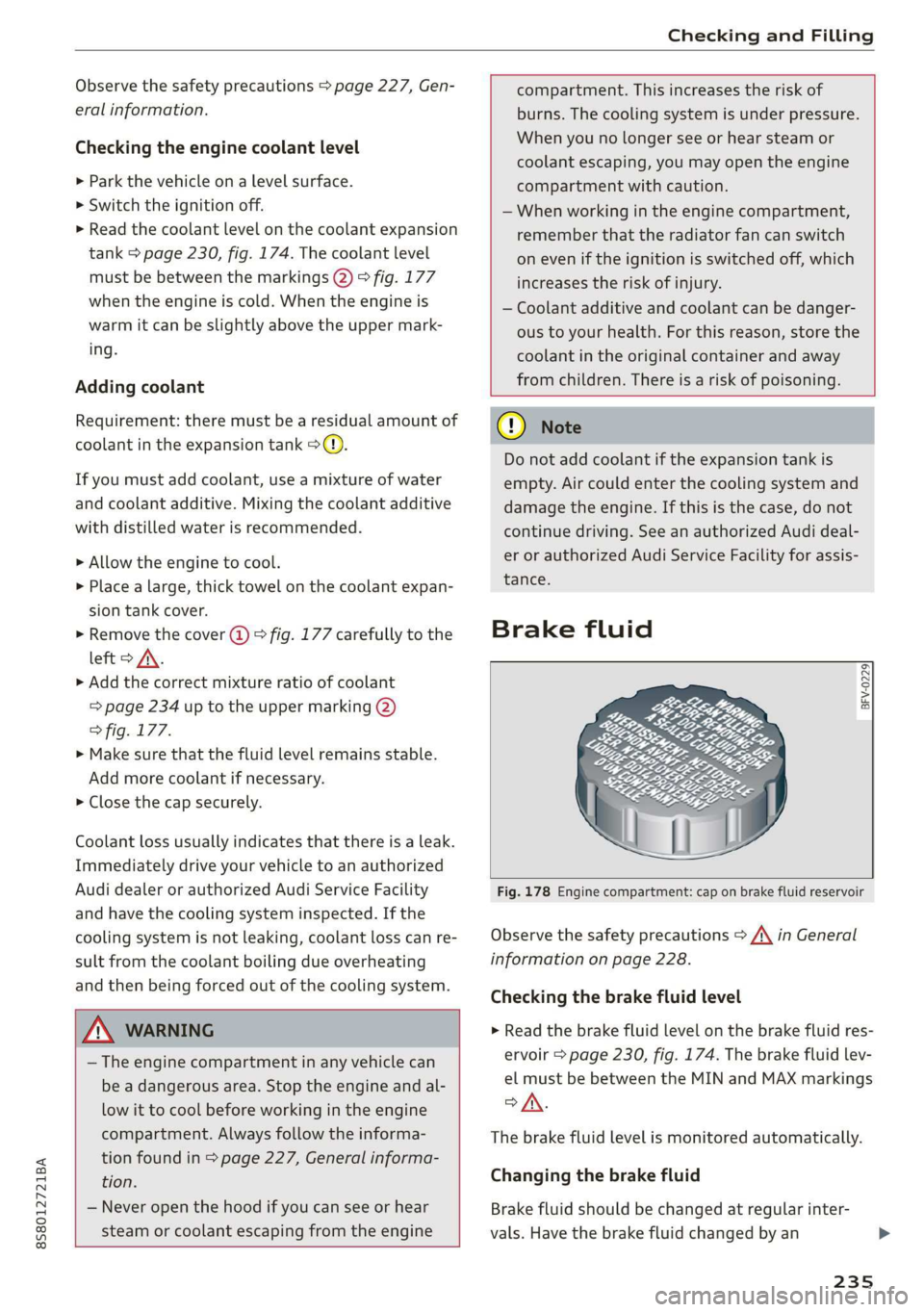
Fig. 178 Engine compartment: cap on brake fluid reservoir
Observe the safety precautions > /A\ in General
information on page 228.
Checking the brake fluid level
> Read the brake fluid level on the brake fluid res-
ervoir > page 230, fig. 174. The brake fluid lev-
el must be between the MIN and MAX markings
oA.
The brake fluid level is monitored automatically.
Changing the brake fluid
Brake fluid should be changed at regular inter-
vals. Have the brake fluid changed by an
235