horn AUDI TT ROADSTER 2019 Owners Manual
[x] Cancel search | Manufacturer: AUDI, Model Year: 2019, Model line: TT ROADSTER, Model: AUDI TT ROADSTER 2019Pages: 304, PDF Size: 80.77 MB
Page 9 of 304
8S8012721BA
Quick access
OOOO
©
OOOOGOOOO
©
O
®OOO®
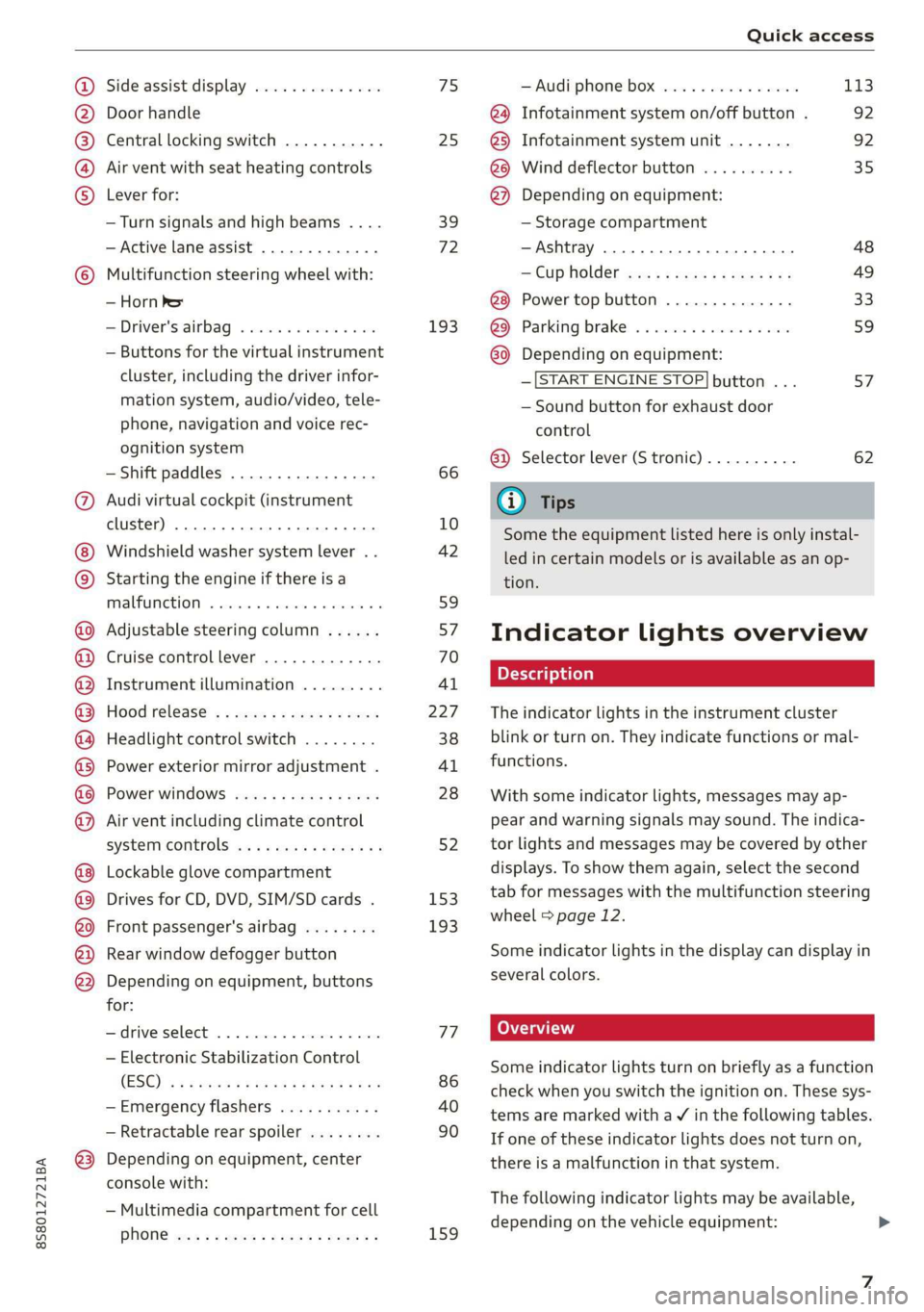
Side assist display ..............
Door handle
Central locking switch ...........
Air vent with seat heating controls
Lever for:
—Turn signals and high beams ....
— Active lane assist .............
Multifunction steering wheel with:
— Horn Pe
— Driver's airbag ...............
— Buttons for the virtual instrument
cluster, including the driver infor-
mation system, audio/video, tele-
phone, navigation and voice rec-
ognition system
—Shift paddles ................
Audi virtual cockpit (instrument
cluster) 22... 0... eee eee eee
Windshield washer system lever . .
Starting the engine if there is a
malfunction ..............00 00
Adjustable steering column ......
Cruise control lever .............
Instrument illumination .........
Hood release! » « wae ¢ s eae vs setee
Headlight control switch ........
Power exterior mirror adjustment .
Power windows ............005-
Air vent including climate control
system controls ................
Lockable glove compartment
Drives for CD, DVD, SIM/SD cards .
Front passenger's airbag ........
Rear window defogger button
Depending on equipment, buttons
for:
sdriverselect oc. seins 6 + cgies oo neve
— Electronic Stabilization Control
(ESC) «5 « cows ss owen 4 ¢ ee a8 i vee
—Emergency flashers ...........
— Retractable rear spoiler ........
Depending on equipment, center
console with:
— Multimedia compartment for cell
PNONG aces cs ees s Ree se BER es
75 25
39
72
193
66
10
42
59 57 70
Al
227
38
Al
28
52
153,
193
TT
86
40
90
159
= Audi phone box sessie ss owe oo cee 113
@) Infotainment system on/off button . 92
@5) Infotainment system unit ....... 92
@8 Wind deflector button .......... 35
@) Depending on equipment:
— Storage compartment
—Ashtray 0.2... 00. eee eee eee 48
—CUPHGIDES wis 5 2 wens s x eee 5 2: 49
Power top button .............. 33
@ Parking’ brake: « + cs ss wows so sors 59
G0 Depending on equipment:
—[START ENGINE STOP] button ... 57
— Sound button for exhaust door
control
@) Selector lever (S tronic).......... 62
@) Tips
Some the equipment listed here is only instal-
led in certain models or is available as an op-
tion.
Indicator lights overview
The indicator lights in the instrument cluster
blink or turn on. They indicate functions or mal-
functions.
With some indicator lights, messages may ap-
pear and warning signals may sound. The indica-
tor lights and messages may be covered by other
displays. To show them again, select the second
tab for messages with the multifunction steering
wheel © page 12.
Some indicator lights in the display can display in
several colors.
Some indicator lights turn on briefly as a function
check when you switch the ignition on. These sys-
tems are marked with a V in the following tables.
If one of these indicator lights does not turn on,
there is a malfunction in that system.
The following indicator lights may be available,
depending on the vehicle equipment:
Page 26 of 304
Opening and closing
@ Tips
Replacement batteries for the remote control
key must meet the same specifications as the
original battery.
Unlocking and locking by remote control
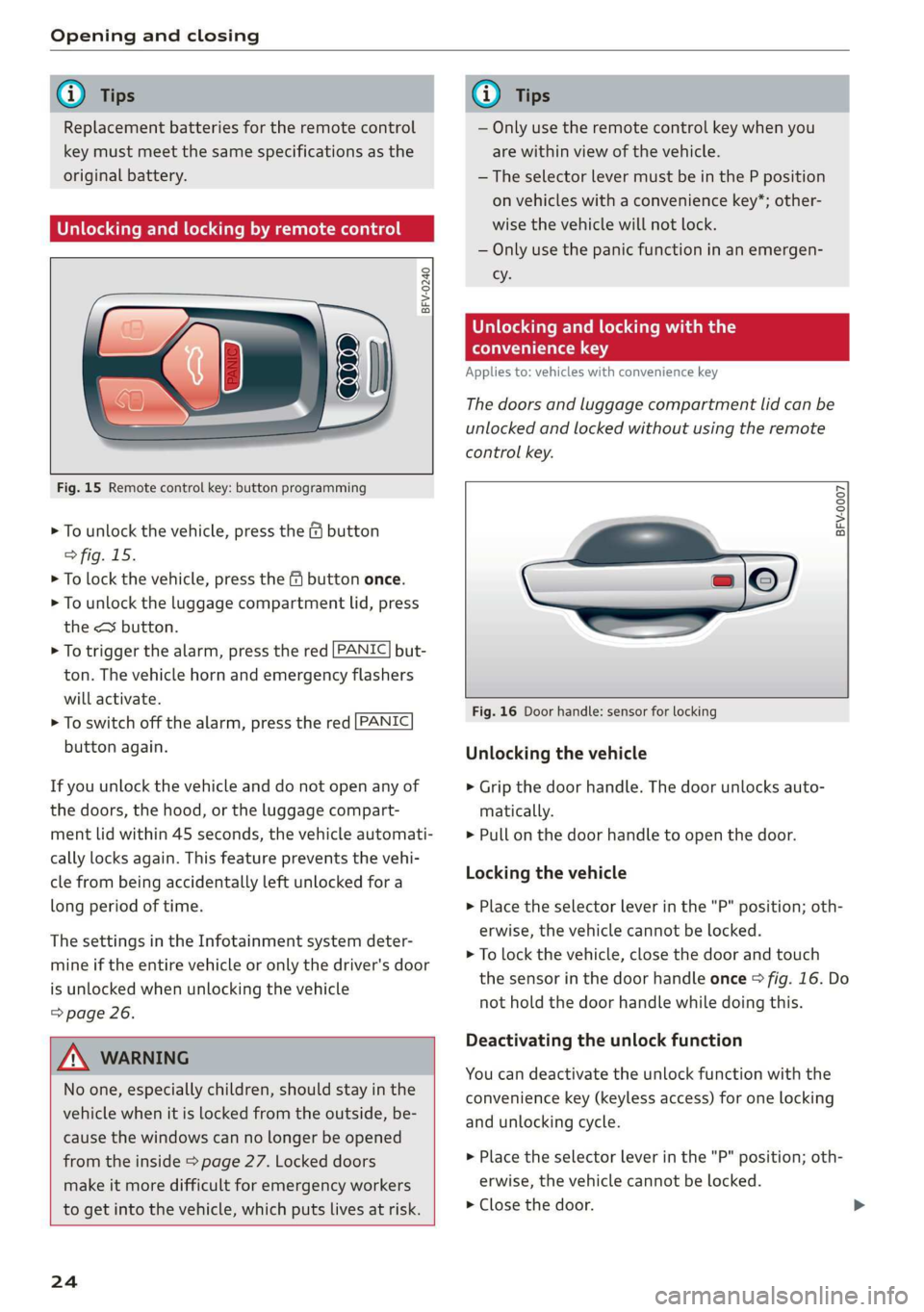
BFV-0240
Fig. 15 Remote control key: button programming
> To unlock the vehicle, press the & button
> fig. 15.
> To lock the vehicle, press the f9 button once.
> To unlock the luggage compartment lid, press
the <3 button.
> To trigger the alarm, press the red [PANIC] but-
ton.
The vehicle horn and emergency flashers
will activate.
> To switch off the alarm, press the red [PANIC
button again.
If you unlock the vehicle and do not open any of
the doors, the hood, or the luggage compart-
ment lid within 45 seconds, the vehicle automati-
cally locks again. This feature prevents the vehi-
cle from being accidentally left unlocked for a
long period of time.
The settings in the Infotainment system deter-
mine if the entire vehicle or only the driver's door
is unlocked when unlocking the vehicle
=> page 26.
ZX WARNING
No one, especially children, should stay in the
vehicle when it is locked from the outside, be-
cause the windows can no longer be opened
from the inside > page 27. Locked doors
make it more difficult for emergency workers
to get into the vehicle, which puts lives at risk.
24
G) Tips
— Only use the remote control key when you
are within view of the vehicle.
—The selector lever must be in the P position
on vehicles with a convenience key*; other-
wise the vehicle will not lock.
— Only use the panic function in an emergen-
cy.
Unlocking and locking with the
convenience key
Applies to: vehicles with convenience key
The doors and luggage compartment lid can be
unlocked and locked without using the remote
control key.
BFV-0007
Fig. 16 Door handle: sensor for locking
Unlocking the vehicle
> Grip the door handle. The door unlocks auto-
matically.
> Pull on the door handle to open the door.
Locking the vehicle
> Place the selector lever in the "P" position; oth-
erwise, the vehicle cannot be locked.
> To lock the vehicle, close the door and touch
the sensor in the door handle once > fig. 16. Do
not hold the door handle while doing this.
Deactivating the unlock function
You can deactivate the unlock function with the
convenience key (keyless access) for one locking
and unlocking cycle.
> Place the selector lever in the "P" position; oth-
erwise, the vehicle cannot be locked.
> Close the door.
Page 137 of 304
8S8012721BA
Navigation
Transferring a destination from the
directory
Applies to: vehicles with navigation system
You can navigate directly to destinations in the
directory.
Options — Show contact details
Bayelsa)
PAN RTO a aL
Hawthorn Ave, Los Angeles, CA
® Wilshire Blvd, Beverly Hills, CA
34°03°12.7°°N, 118°14°43.2°°W
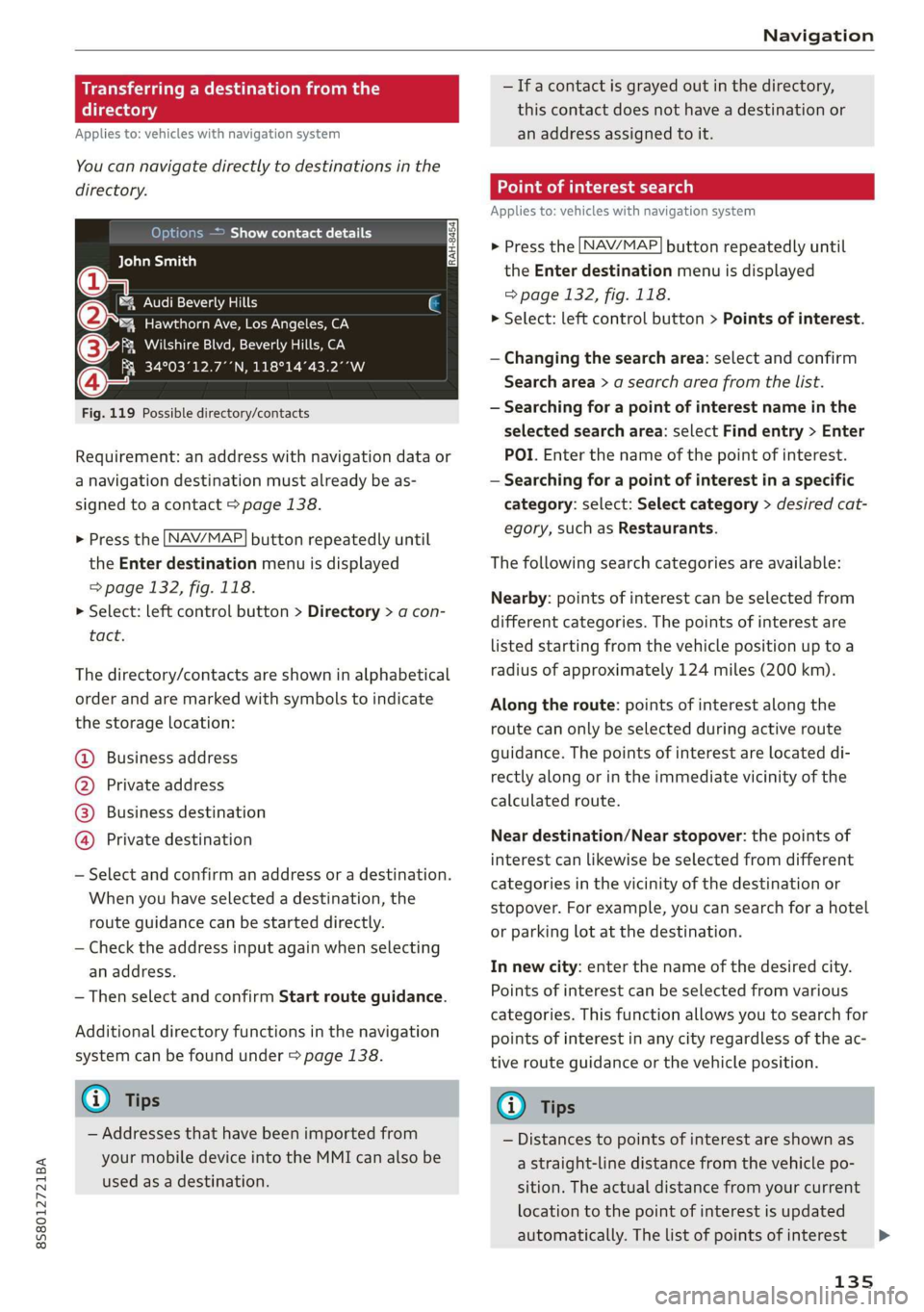
Fig. 119 Possible directory/contacts
Requirement: an address with navigation data or
a navigation destination must already be as-
signed to a contact > page 138.
> Press the LNAV/MAP] button repeatedly until
the Enter destination menu is displayed
=> page 132, fig. 118.
> Select: left control button > Directory > a con-
tact.
The directory/contacts are shown in alphabetical
order and are marked with symbols to indicate
the storage location:
@ Business address
@ Private address
@® Business destination
@ Private destination
— Select and confirm an address or a destination.
When you have selected a destination, the
route guidance can be started directly.
— Check the address input again when selecting
an address.
— Then select and confirm Start route guidance.
Additional directory functions in the navigation
system can be found under > page 138.
@ Tips
— Addresses that have been imported from
your mobile device into the MMI can also be
used as a destination.
— Ifa contact is grayed out in the directory,
this contact does not have a destination or
an address assigned to it.
meats)
Applies to: vehicles with navigation system
> Press the [NAV/MAP] button repeatedly until
the Enter destination menu is displayed
=> page 132, fig. 118.
> Select: left control button > Points of interest.
— Changing the search area: select and confirm
Search area > a search area from the list.
— Searching for a point of interest name in the
selected search area: select Find entry > Enter
POI. Enter the name of the point of interest.
— Searching for a point of interest in a specific
category: select: Select category > desired cat-
egory, such as Restaurants.
The following search categories are available:
Nearby: points of interest can be selected from
different categories. The points of interest are
listed starting from the vehicle position up toa
radius of approximately 124 miles (200 km).
Along the route: points of interest along the
route can only be selected during active route
guidance. The points of interest are located di-
rectly along or in the immediate vicinity of the
calculated route.
Near destination/Near stopover: the points of
interest can likewise be selected from different
categories in the vicinity of the destination or
stopover. For example, you can search for a hotel
or parking lot at the destination.
In new city: enter the name of the desired city.
Points of interest can be selected from various
categories. This function allows you to search for
points of interest in any city regardless of the ac-
tive route guidance or the vehicle position.
@) Tips
— Distances to points of interest are shown as
a straight-line distance from the vehicle po-
sition. The actual distance from your current
location to the point of interest is updated
automatically. The list of points of interest
135
>
Page 205 of 304
8S8012721BA
Airbag system
from the airbag as possible. The backrest
must be adjusted to an upright position.
Make sure that the PASSENGER AIR BAG
OFF %; light comes on and stays on all the
time whenever the ignition is switched on.
ZA WARNING
If the PASSENGER AIR BAG OFF %; light does
not go out when an adult is sitting on the
front passenger seat after taking the steps
described above, have the airbag system in-
spected by your Audi dealer before transport-
ing anyone on the front passenger seat.
@ Tips
If the capacitive passenger detection system
determines that the front passenger seat is
empty, the frontal airbag on the passenger
side will be turned off, and the PASSENGER
AIR BAG OFF 3; light will stay on.
Repair, care and disposal of the airbags
Parts of the airbag system are installed at many
different places on your Audi. Installing, remov-
ing, servicing or repairing a part in an area of the
vehicle can damage a part of an airbag system
and prevent that system from working properly
in a collision.
There are some important things you have to
know to make sure that the effectiveness of the
system will not be impaired and that discarded
components do not cause injury or pollute the
environment.
ZA WARNING
Improper care, servicing and repair proce-
dures can increase the risk of personal injury
and death by preventing an airbag from de-
ploying when needed or deploying an airbag
unexpectedly:
— Never cover, obstruct, or change the steer-
ing wheel horn pad or airbag cover or the in-
strument panel or modify them in any way.
— Never attach any objects such as cup holders
or telephone mountings to the surfaces cov-
ering the airbag units.
— For cleaning the horn pad or instrument
panel, use only a soft, dry cloth or one mois-
tened with plain water. Solvents or cleaners
could damage the airbag cover or change
the stiffness or strength of the material so
that the airbag cannot deploy and protect
properly.
— Never repair, adjust, or change any parts of
the airbag system.
— All work on the steering wheel, instrument
panel, front seats or electrical system (in-
cluding the installation of audio equipment,
cellular telephones and CB radios, etc.)
must be performed by a qualified technician
who has the training and special equipment
necessary.
— For any work on the airbag system, we
strongly recommend that you see your au-
thorized Audi dealer or qualified workshop.
— Never modify the front bumper or parts of
the vehicle body.
— Always make sure that the side airbag can
inflate
without interference:
— Never install seat covers or replacement
upholstery over the front seatbacks that
have not been specifically approved by Au-
di.
— Never use additional seat cushions that
cover the areas where the side airbags in-
flate.
— Damage to the original seat covers or to
the seam in the area of the side airbag
module must always be repaired immedi-
ately by an authorized Audi dealer.
— The airbag system can deploy only once. Af-
ter an airbag has been deployed, it must be
replaced with new replacement parts de-
signed and approved especially for your Audi
model version. Replacement of complete
airbag systems or airbag components must
be performed by qualified workshops only.
Make sure that any airbag service action is
entered in your Audi Warranty & Mainte-
nance booklet under AIRBAG REPLACEMENT
RECORD.
— For safety reasons in severe accidents, the
alternator and starter are separated from
203
Page 277 of 304
8S8012721BA
Emergency assistance
If the vehicle should be towed with the axle
raised, then the ignition must be switched off to
reduce the risk of damage to the drivetrain.
Tow bar and towing cable
The vehicle can be towed with a tow bar or tow-
ing cable. Both drivers should be familiar with
the special considerations when towing, especial-
ly when using a towing cable.
Always make sure the traction force does not ex-
ceed the permitted level and there are no shock
loading conditions. There is always the risk of the
coupling becoming overloaded when driving off-
road.
For the most safety and security, drive with a tow
bar. You should use a towing cable only if a tow
bar is not available. Use a towing cable made of
synthetic elastic cable similar elastic material.
ZA\ WARNING
— Towing highly increases the risk of an acci-
dent, for example from colliding with the
towing vehicle.
— To reduce the risk of an accident, do not al-
low anyone to remain inside the vehicle
when it is being transported by a tow truck
or a special transporter.
@) Note
— If normal towing is not possible, for exam-
ple if the transmission is faulty or if the
towing distance is greater than 30 miles
(50 km), then transport the vehicle on a
special carrier.
— If the vehicle is towed by a tow truck at the
axle that is not permitted, this can cause se-
vere damage to the transmission.
— The vehicle must not be tow started for
technical reasons.
@) Tips
—If there is a power failure, the selector lever
will not move out of the "P" position. The
parking lock must be released using the
D_ Requirement: the vehicle battery must have a sufficient
charge level.
emergency release before towing the vehi-
cle > page 68.
— Follow the local legal regulations for tow-
ing.
Read and follow the important information under
=> page 274.
Preparations
> Only secure the towing cable or tow bar at the
designated towing loops > page 276,
=> page 276.
> Make sure the towing cable is not twisted. Oth-
erwise it could disconnect from the towing loop
while towing.
» Switch the emergency flashers on in both vehi-
cles > page 40. However, do not do this if it
prohibited by law.
Towing vehicle (front)
> Only start to drive when the towing cable is
taut.
> Be especially careful when accelerating.
> Avoid sudden braking or driving maneuvers.
Vehicle being towed (rear)
» Make sure the ignition is switched on so that
the steering wheel is not locked and so that you
can use the turn signals, the horn, and the
windshield wipers if needed > A\.
> The brake booster only works when the engine
is running. Power steering only works when the
ignition is switched on and the vehicle is roll-
ing )). If the brake booster and power steering
are not functioning, you must press the brake
pedal much harder and use more force to steer.
> Release the parking brake > page 59.
> Select the "N" selector lever position.
> Make sure the towing cable is always taut.
275
>
Page 281 of 304
8S58012721BA
Fuses and bulbs
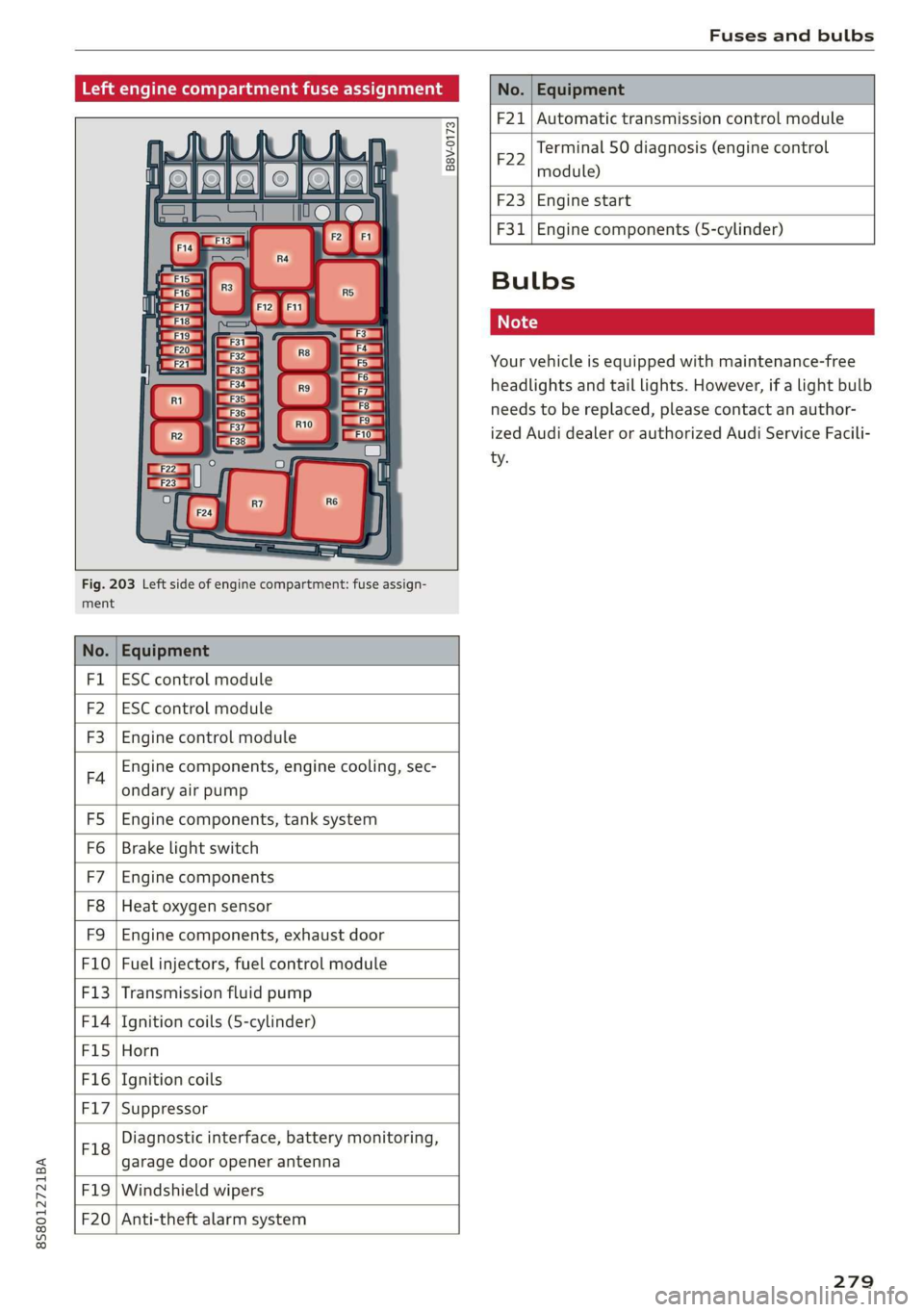
Left engine compartment fuse assignment
B8V-0173
ment
Fig. 203 Left side of engine compartment: fuse assign-
No. Equipment
Fl ESC control module
F2 ESC control module
F3 Engine control module
F4
Engine components, engine cooling, sec-
ondary air pump
FS Engine components, tank system
Fo Brake light switch
F7 Engine components
F8 Heat oxygen sensor
F9 Engine components, exhaust door
F10 Fuel injectors, fuel control module
F13 Transmission fluid pump
F1l4 Ignition coils (5-cylinder)
Fis Horn
F16 Ignition coils
F17 Suppressor
F18
Diagnostic interface, battery monitoring,
garage door opener antenna
F19 Windshield wipers
F20
Anti-theft alarm system
No. Equipment
F21 Automatic transmission control module
F22
Terminal 50 diagnosis (engine control
module)
F23 Engine start
F31
Engine components (5-cylinder)
Bulbs
Cs
Your vehicle is equipped with maintenance-free
headlights and tail lights. However, if a light bulb
needs to be replaced, please contact an author-
ized Audi dealer or authorized Audi Service Facili-
ty.
279