load capacity AUDI TT ROADSTER 2019 Owners Manual
[x] Cancel search | Manufacturer: AUDI, Model Year: 2019, Model line: TT ROADSTER, Model: AUDI TT ROADSTER 2019Pages: 304, PDF Size: 80.77 MB
Page 124 of 304
Telephone
Importing and exporting contacts
Applies to: vehicles with telephone
Contacts in vCard format (.vcf) can be imported
into the directory or exported.
Requirement: an SD card must be in the SD card
reader > page 153 or a USB storage device must
be connected to the Audi music interface*
=> page 158.
> Select: [MENU] button > Telephone > left con-
trol button > Directory.
> Select: right control button > Contact settings.
— Importing contacts from a storage device: se-
lect and confirm Import contacts > SD card
1/SD card 2 or USB device 1/USB device 2 >
desired contacts > Start import.
— Exporting contacts to a storage device: select
and confirm Export contacts > SD card 1/SD
card 2 or USB device 1/USB device 2 > desired
contacts > Start export.
— Selecting all contacts at once to import/
export: select and confirm Import contacts/Ex-
port contacts > SD card 1/SD card 2 or USB de-
vice 1/USB device 2 > All > Start import/Start
export.
G) Tips
— Always read the chapter > page 125, Audi
connect.
— For additional information on the myAudi
account, visit www.audiusa.com/myaudi.
— The imported contacts are stored in the lo-
cal memory of the directory.
—A maximum of 1,000 contacts can be im-
ported. You can check the directory memory
capacity at any time > page 123.
— Never save important data on memory cards
or USB storage devices. Audi is not responsi-
ble for damaged or lost files and media.
— Contacts that were downloaded from a mo-
bile device cannot be exported.
— There should be no other files or folders on
the storage medium containing the contacts
to be imported.
)) Depends on the connected cell phone.
122
Settings
Telephone settings
Applies
to: vehicles with telephone
> Select: [MENU] button > Telephone > right con-
trol button > Telephone settings.
Call options*
Multi-party calling: can be switched On/Off.
Ringtone and volume settings!)
Using the Mute telephone function, you can
switch the ringtone on your MMI on or off. You
can play the ringtones using the Ringtone func-
tion. Select and confirm an entry from the list.
For the Ringtone volume/Message volume set-
tings, see > page 175. The Microphone input
level can be adjusted during a phone call using
the control knob.
G) Tips
— Several mobile devices can be paired with
the MMI, but only two* mobile devices can
be actively connected.
—To delete all paired Bluetooth devices, the
Bluetooth function can be reset to the fac-
tory default settings > page 172.
Pelee Cola] Mey Lalor}
Applies to: vehicles with telephone
> Select: [MENU] button > Telephone > right con-
trol button.
Connection manager
See > page 172.
Bluetooth settings
See > page 174.
Online settings*
See > page 174.
Wi-Fi settings
See > page 130, Wi-Fi settings.
Page 125 of 304
![AUDI TT ROADSTER 2019 Owners Manual 8S58012721BA
Telephone
Directory settings
Applies to: vehicles with telephone
> Select: [MENU] button > Telephone > left con-
trol button > Directory > right control button >
Contact s](/img/6/57667/w960_57667-124.png "AUDI TT ROADSTER 2019 Owners Manual 8S58012721BA
Telephone
Directory settings
Applies to: vehicles with telephone
> Select: [MENU] button > Telephone > left con-
trol button > Directory > right control button >
Contact s")
8S58012721BA
Telephone
Directory settings
Applies to: vehicles with telephone
> Select: [MENU] button > Telephone > left con-
trol button > Directory > right control button >
Contact settings.
Memory capacity
Shows the Memory capacity for the directory.
You can manage up to 17,000 contacts with the
MMI directory. You can load up to 4,000 contacts
from your cell phone into each directory. You can
also import up to 1,000 contacts from a storage
device.
Sort order
You can sort the contacts in your directory alpha-
betically according to Last name or First name.
Import contacts
See > page 122, Importing and exporting con-
tacts.
Export contacts
See > page 122, Importing and exporting con-
tacts.
Download directory
To update the contacts in the MMI, you can man-
ually download your mobile device contacts. De-
pending on the mobile device, you may need to
disconnect and reconnect the Bluetooth connec-
tion to update the contacts.
Hide contacts without phone number
When this function is switched on, grayed-out
contacts that have no phone numbers stored for
them will be hidden in the directory.
Safety belt microphone
Applies to: vehicles with safety belt microphone
The safety belt microphone is positioned in the
ideal location to provide the best hands-free call
quality regardless of body size and seat position.
Fig. 117 Safety belt microphone
The safety belt microphone activates when you
buckle the safety belt. Make sure that the micro-
phone is on the side of the safety belt that is fac-
ing outward > fig. 117.
If you unbuckle the driver's safety belt, the sys-
tem switches from the safety belt microphone to
the roof microphone.
@ Tips
— If you deactivate* the front passenger's air-
bag, the front passenger's safety belt micro-
phone will be deactivated regardless of
whether the front passenger's safety belt is
buckled or not.
—A dirty microphone opening can affect
hands-free call quality. If this happens,
clean the safety belt microphone using a
brush.
123
Page 156 of 304
Media
Applies to: vehicles with a CD drive
re
RAH-8826|
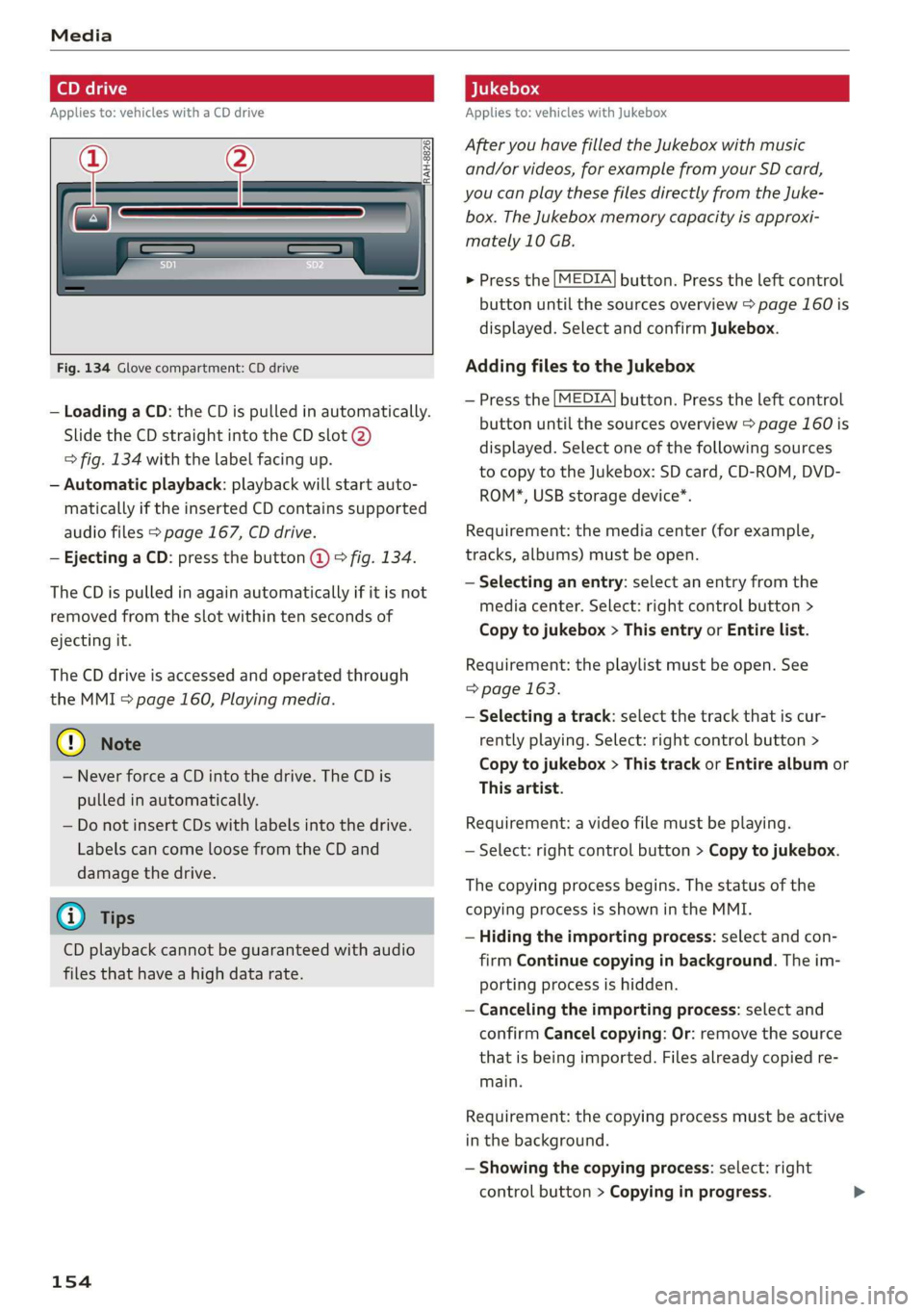
Fig. 134 Glove compartment: CD drive
— Loading a CD: the CD is pulled in automatically.
Slide the CD straight into the CD slot @)
=> fig. 134 with the label facing up.
— Automatic playback: playback will start auto-
matically if the inserted CD contains supported
audio files > page 167, CD drive.
— Ejecting a CD: press the button @ © fig. 134.
The CD is pulled in again automatically if it is not
removed from the slot within ten seconds of
ejecting it.
The CD drive is accessed and operated through
the MMI > page 160, Playing media.
@) Note
— Never force a CD into the drive. The CD is
pulled in automatically.
— Do not insert CDs with labels into the drive.
Labels can come loose from the CD and
damage the drive.
@) Tips
CD playback cannot be guaranteed with audio
files that have a high data rate.
154
Applies to: vehicles with Jukebox
After you have filled the Jukebox with music
and/or videos, for example from your SD card,
you can play these files directly from the Juke-
box. The Jukebox memory capacity is approxi-
mately 10 GB.
> Press the [MEDIA] button. Press the left control
button until the sources overview > page 160 is
displayed. Select and confirm Jukebox.
Adding files to the Jukebox
— Press the [MEDIA] button. Press the left control
button until the sources overview > page 160 is
displayed. Select one of the following sources
to copy to the Jukebox: SD card, CD-ROM, DVD-
ROM*, USB storage device*.
Requirement: the media center (for example,
tracks, albums) must be open.
— Selecting an entry: select an entry from the
media center. Select: right control button >
Copy to jukebox > This entry or Entire list.
Requirement: the playlist must be open. See
=> page 163.
— Selecting a track: select the track that is cur-
rently playing. Select: right control button >
Copy to jukebox > This track or Entire album or
This artist.
Requirement: a video file must be playing.
— Select: right control button > Copy to jukebox.
The copying process begins. The status of the
copying process is shown in the MMI.
— Hiding the importing process: select and con-
firm
Continue copying in background. The im-
porting process is hidden.
— Canceling the importing process: select and
confirm Cancel copying: Or: remove the source
that is being imported. Files already copied re-
main.
Requirement: the copying process must be active
in the background.
— Showing the copying process: select: right
control button > Copying in progress.
Page 243 of 304
8S58012721BA
Wheels
Tire designations
B8K-2316
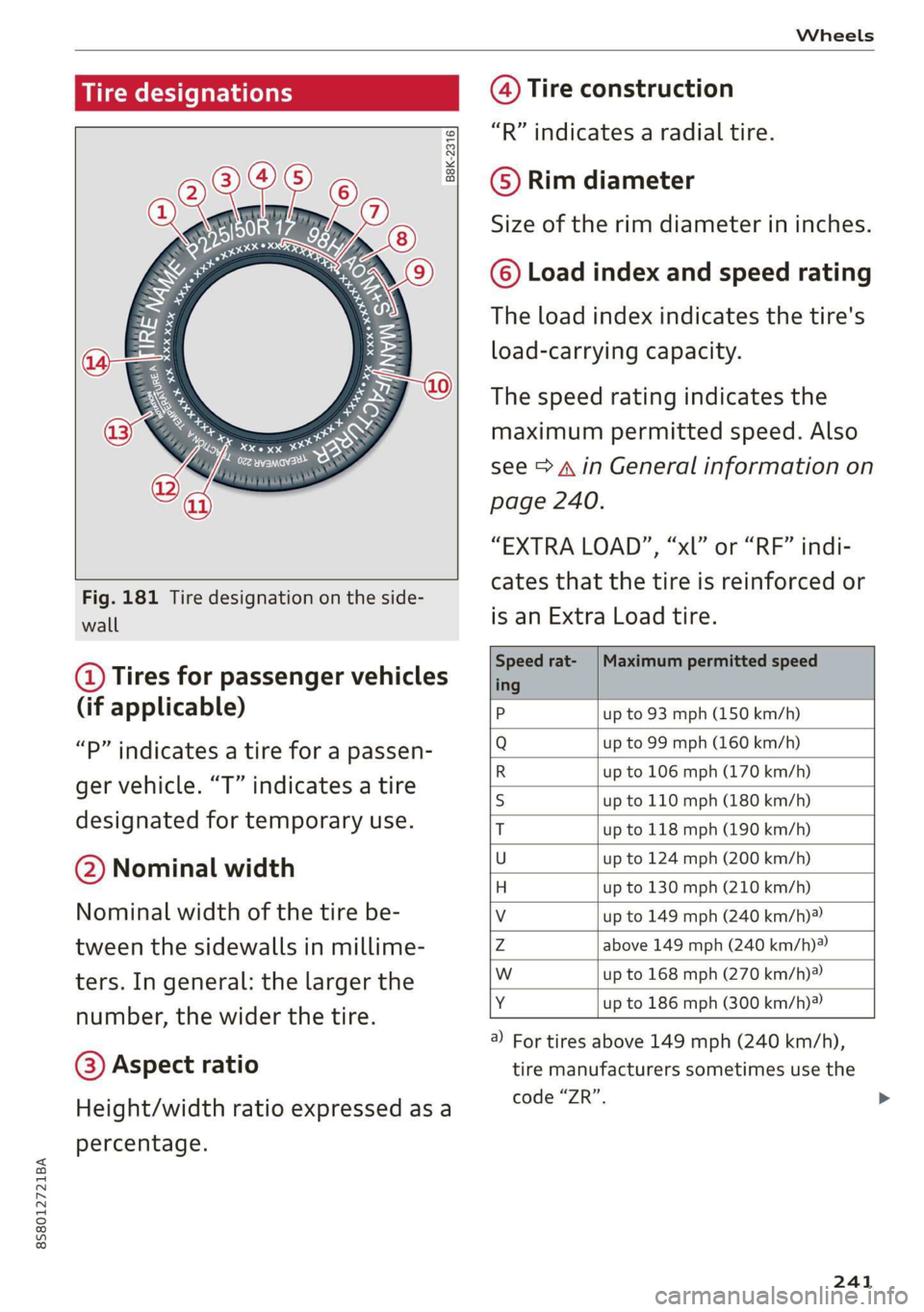
Fig. 181 Tire designation on the side-
wall
@ Tires for passenger vehicles
(if applicable)
“P” indicates a tire for a passen-
ger vehicle. “T” indicates a tire
designated for temporary use.
@ Nominal width
Nominal width of the tire be-
tween the sidewalls in millime-
ters. In general: the larger the
number, the wider the tire.
@) Aspect ratio
Height/width ratio expressed as a
percentage.
@ Tire construction
“R” indicates a radial tire.
©) Rim diameter
Size of the rim diameter in inches.
© Load index and speed rating
The load index indicates the tire's
load-carrying capacity.
The speed rating indicates the
maximum permitted speed. Also
see > A in General information on
page 240.
“EXTRA LOAD”, “xl” or “RF” indi-
cates that the tire is reinforced or
is an Extra Load tire.
Speed rat- /Maximum permitted speed
ing
P up to 93 mph (150 km/h)
Q up to 99 mph (160 km/h)
R up to 106 mph (170 km/h)
S up to 110 mph (180 km/h)
T up to 118 mph (190 km/h)
U up to 124 mph (200 km/h)
H up to 130 mph (210 km/h)
Vv up to 149 mph (240 km/h)?
Zz above 149 mph (240 km/h)?
w up to 168 mph (270 km/h)?
Y up to 186 mph (300 km/h)®)
) For tires above 149 mph (240 km/h),
tire manufacturers sometimes use the
code “ZR”.
241
Page 245 of 304
8S8012721BA
Wheels
windows, power seats, radio, and
heater, to the extent that these
items are available as factory-in-
stalled equipment (whether in-
stalled or not).
Aspect ratio
means the ratio of the height to
the width of the tire in percent.
Numbers of 55 or lower indicate a
low sidewall for improved steer-
ing response and better overall
handling on dry pavement.
Bead
means the part of the tire that is
made of steel wires, wrapped or
reinforced by ply cords and that is
shaped to fit the rim.
Bead separation
means a breakdown of the bond
between components in the bead.
Cord
means the strands forming the
plies in the tire.
Cold tire inflation pressure
means the tire pressure recom-
mended by the vehicle manufac-
turer for a tire of a designated
size that has not been driven for
more than a couple of miles (kilo-
meters) at low speeds in the three
hour period before the tire pres-
sure is measured or adjusted.
Curb weight
means the weight of a motor ve-
hicle with standard equipment in-
cluding the maximum capacity of
fuel, oil, and coolant, air condi-
tioning and additional weight of
optional equipment.
Extra load tire
means a tire designed to operate
at higher loads and at higher in-
flation pressures than the corre-
sponding standard tire. Extra load
tires may be identified as “XL”,
“xl”, “EXTRA LOAD”, or “RF” on
the sidewall.
Gross Axle Weight Rating
(“GAWR”)
means the load-carrying capacity
of a single axle system, measured
at the tire-ground interfaces.
Gross Vehicle Weight Rating
(“GVWR”)
means the maximum total loaded
weight of the vehicle.
Groove
means the space between two ad-
jacent tread ribs.
243
>
Page 246 of 304
Wheels
Load rating (code)
means the maximum load that a
tire is rated to carry for a given in-
flation pressure. You may not find
this information on all tires be-
cause it is not required by law.
Maximum load rating
means the load rating for a tire at
the maximum permissible infla-
tion pressure for that tire.
Maximum loaded vehicle
weight
means the sum of:
(a) Curb weight
(b) Accessory weight
(c) Vehicle capacity weight, and
(d) Production options weight
Maximum (permissible)
inflation pressure
means the maximum cold infla-
tion pressure to which a tire may
be inflated. Also called “maxi-
mum inflation pressure.”
Normal occupant weight
means 150 lbs (68 kg) times the
number of occupants seated in
the vehicle up to the total seating
capacity of your vehicle.
244
Occupant distribution
means distribution of occupants
in a vehicle.
Outer diameter
means the overall diameter of an
inflated new tire.
Overall width
means the linear distance be-
tween the exteriors of the side-
walls of an inflated tire, including
elevations due to labeling, deco-
rations, or protective bands or
ribs.
Ply
means a layer of rubber-coated
parallel cords.
Production options weight
means the combined weight of
those installed regular production
options weighing over 5 lbs
(2.3 kg) in excess of those stand-
ard items which they replace, not
previously considered in curb
weight or accessory weight, in-
cluding heavy duty brakes, ride
levelers, roof rack, heavy duty
battery, and special trim.
Radial ply tire
means a pneumatic tire in which
the ply cords that extend to the >
Page 248 of 304
Wheels
Tread separation
means pulling away of the tread
from the tire carcass.
Treadwear indicators (TWI)
means the projections within the
principal grooves designed to give
a visual indication of the degrees
of wear of the tread. See
=> page 249, Treadwear indicator
for more information on measur-
ing tire wear.
Uniform Tire Quality Grading
is a tire information system devel-
oped by the United States Nation-
al Highway Traffic Safety Adminis-
tration (NHTSA) that is designed
to help buyers make relative com-
parisons among tires. The UTQG is
not a safety rating and not a guar-
antee that a tire will last fora
prescribed number of miles (kilo-
meters) or perform in a certain
way. It simply gives tire buyers
additional information to com-
bine with other considerations,
such as price, brand loyalty and
dealer recommendations. Under
UTQG, tires are graded by the tire
manufacturers in three areas:
treadwear, traction, and tempera-
ture resistance. The UTQG infor-
246
mation on the tires, molded into
the sidewalls.
U.S. DOT Tire Identification
Number (TIN)
This is the tire’s “serial number”.
It begins with the letters “DOT”
and indicates that the tire meets
all federal standards. The next
two numbers or letters indicate
the plant where it was manufac-
tured, and the last four numbers
represent the week and year of
manufacture. For example,
DOT... 2218...
means that the tire was produced
in the 22nd week of 2018. The
other numbers are marketing co-
des that may or may not be used
by the tire manufacturer. This in-
formation is used to contact con-
sumers if a tire defect requires a
recall.
Vehicle capacity weight
means the rated cargo and lug-
gage load plus 150 lbs (68 kg)
times the vehicle's designated
seating capacity.
Vehicle maximum load on the
tire
means that load on an individual
tire that is determined by
Page 252 of 304
Wheels
the nearest authorized Audi deal-
er or authorized Audi Service Fa-
cility to have the vehicle inspect-
ed.
Z\ WARNING
Tread that has worn too low or
uneven tread depths on the
tires can reduce driving safety.
This can increase the risk of an
accident because it has a nega-
tive effect on handling, driving
through curves, and braking,
and because it increases the
risk of hydroplaning when driv-
ing through deep puddles.
SUT C=w yee)
BFV-0295
2)
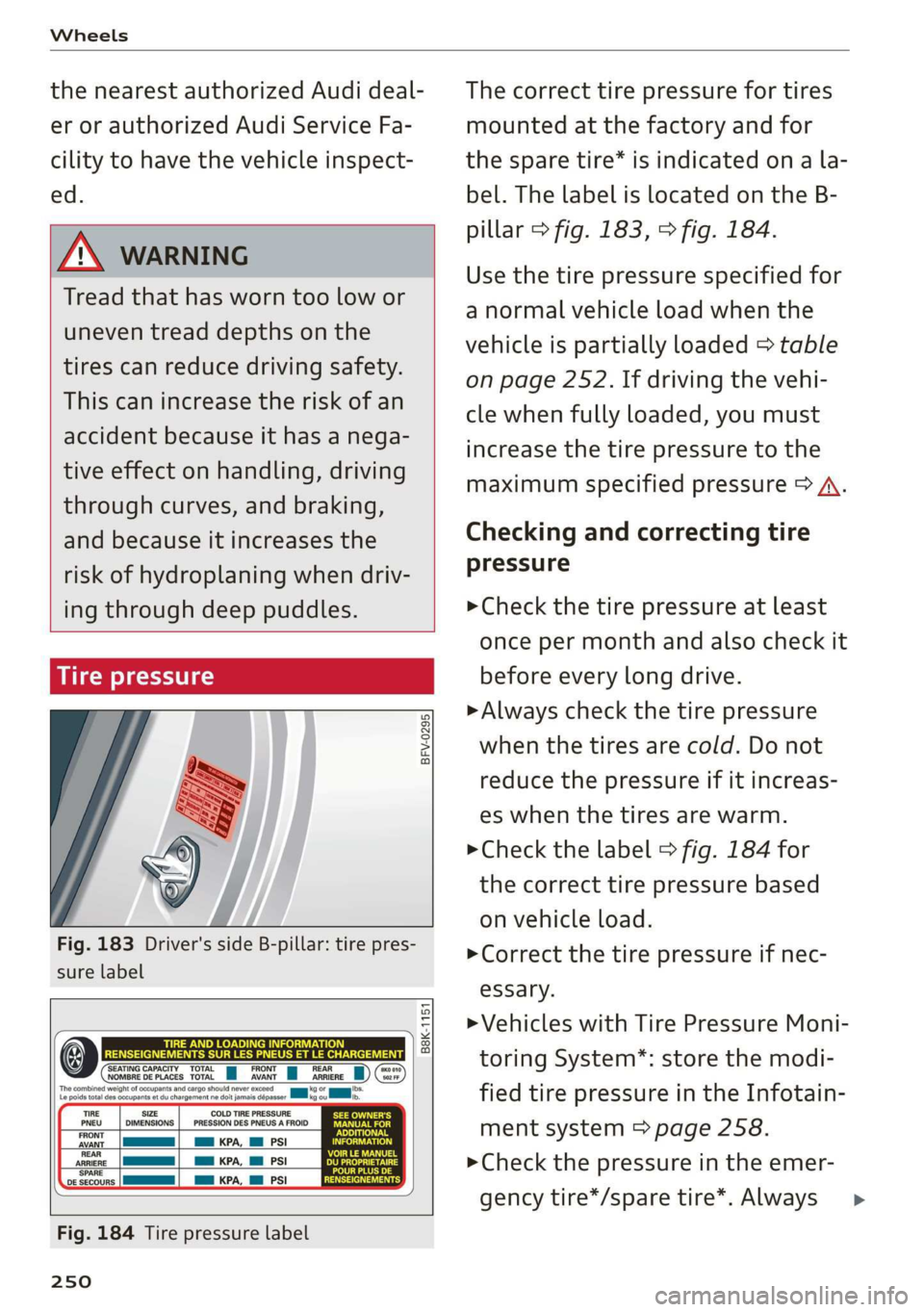
Fig. 183 Driver's side B-pillar: tire pres-
sure label
B8K-1151
‘SEATING CAPACITY TOTAL FRONT i REAR NOMBRE DE PLACES TOTAL AVANT ARRIERE
TIRE SIZE
DIMENSIONS
COLD TIRE PRESSURE
PRESSION DES PNEUS A FROID
am KPA, Ml PSI
a KPA, Ml PSI
REAR
ARRIERE
‘SPARE
a
SE
ve secours |
Fig. 184 Tire pressure label
250
The correct tire pressure for tires
mounted at the factory and for
the spare tire* is indicated on a la-
bel. The label is located on the B-
pillar > fig. 183, > fig. 184.
Use the tire pressure specified for
a normal vehicle load when the
vehicle is partially loaded > table
on page 252. If driving the vehi-
cle when fully loaded, you must
increase the tire pressure to the
maximum specified pressure > A.
Checking and correcting tire
pressure
>Check the tire pressure at least
once per month and also check it
before every long drive.
> Always check the tire pressure
when the tires are cold. Do not
reduce the pressure if it increas-
es when the tires are warm.
> Check the label > fig. 184 for
the correct tire pressure based
on vehicle load.
>Correct the tire pressure if nec-
esSary.
> Vehicles with Tire Pressure Moni-
toring System*: store the modi-
fied tire pressure in the Infotain-
ment system > page 258.
> Check the pressure in the emer-
gency tire*/spare tire*. Always >
Page 256 of 304
Wheels
pounds shown on the sticker Wheel bolts and rims
=> page 250, fig. 183. Wheel bolts
4. The resulting figure equals the Wheel bolts must be clean and loosen/tighten
. ily.
available amount of cargoand =“
luggage load capacity. For ex-
ample if the “XXX” amount Rims with a bolted rim ring* or with bolted wheel
, . covers* consist of multiple pieces. These compo-
equals 1400 lbs and there will nents were bolted together using special bolts
be five 150 lbs passengers in and a special procedure. You must not repair or
. disassemble them > A.
your vehicle, the amount of .
available cargo and luggage ZX WARNING
tee Wheel bolts that are tightened or repaired in-
load capacity is 650 lbs correctly can become loose and result in loss
(1400-750 (5 X 150) = 650 lbs) of vehicle control, which increases the risk of
5. Determine the combined an accident. For the correct tightening specifi-
, cation, see > page 273, Finishing.
Rims
weight of luggage and cargo — Always keep the wheel bolts and the threads
being loaded on the vehicle. in the wheel hub clean and free of grease.
3 — Only use wheel bolts that fit the rim.
That weight may not safely ex: — Always have damaged rims repaired by an
ceed the available cargo and authorized Audi dealer or authorized Audi
. Service Facility. Never repair or disassemble
luggage load capacity calculat- rims yourself, because this increases the risk
edin Step 4. of an accident.
6. If your vehicle will be towing a
. . Winter ti trailer, load from your trailer
will be transferred to your vehi- Winter tires significantly improve the vehicle's
handling when driving in winter conditions. Be-
cle. Consult this manual to de- cause of their construction (width, compound,
termine how this reduces the tread pattern), summer tires provide less traction
: on ice and snow.
available cargo and luggage
i 5 >» Use winter tires on all four wheels.
load capacity of your vehicle. > Only use winter tires that are approved for your
>Check the tire sidewall vehicle.
. > Please note that the maximum permitted
(> page 241, fig. 181) to deter- speed may be lower with winter tires > A\ in
mine the designated load rating General information on page 240. An author-
ized Audi dealer or authorized Audi Service Fa-
cility can inform you about the maximum per-
mitted speed for your tires.
> Check the tire pressure after installing wheels
=> page 250.
for a specific tire.
254
Page 294 of 304
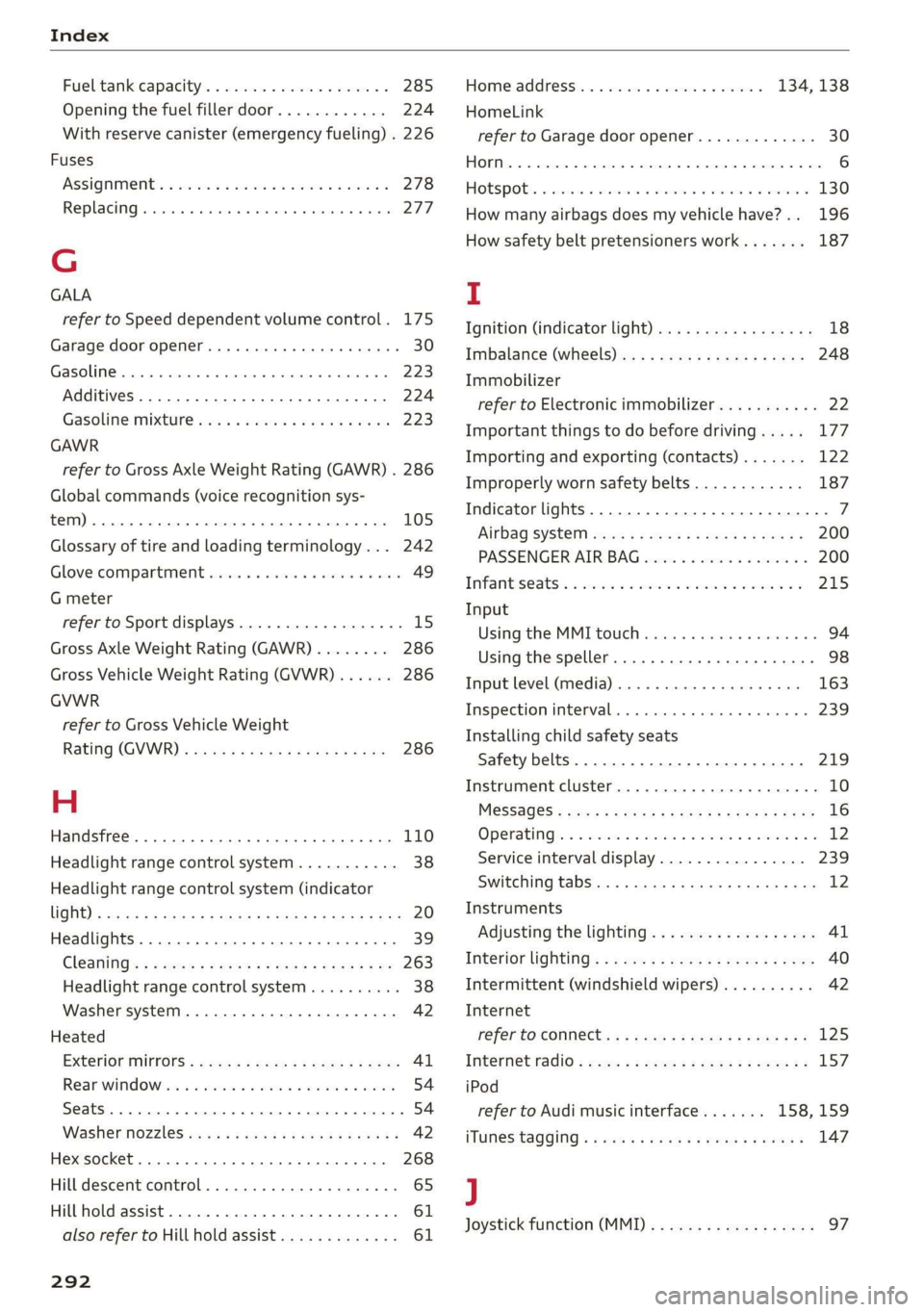
Index
Fueltank:capacity’. « csccex 2 mewn ee cme 285
Opening the fuel filler door............ 224
With reserve canister (emergency fueling) . 226
Fuses
ASSIQNIMENE. & cori: so comme 9 w soem © a sere 9 278
Replacing. ....... cece eee eee eee eee 277
G
GALA
refer to Speed dependent volume control. 175
Garage door opener... ...... cee eee ee eee 30
Gasoline... 2... eee eee 223
Additives... 2.0.0.2... 00. c cece eee 224
Gasoline: mixture wees s eiceas s wees os Howe 223
GAWR
refer to Gross Axle Weight Rating (GAWR) . 286
Global commands (voice recognition sys-
teM) 2. eee 105
Glossary of tire and loading terminology... 242
Glove compartment............ ee eee eee 49
G meter
refer to Sport displays.................. 15
Gross Axle Weight Rating (GAWR)........ 286
Gross Vehicle Weight Rating (GVWR)...... 286
GVWR
refer to Gross Vehicle Weight
Rating (GVWR) « scene < = eases 4 e Hams a eee 286
H
Handsfree... 1... eee eee eee
Headlight range control system
Headlight range control system (indicator
WGN) s sean ¢ s sews xs Hem ao Soe 2 2 Bae 2 a 20
Headlights .......... 00. cece 39
Cleaning’s < « ese =» gews ts ees e Sawn a ewe 263
Headlight range control system.......... 38
Washer system.......... 0.00 eee eee eee 42
Heated
EXteriGrMitrors: scm s : cum = + nome & : neues 41
Rear Wind OW 2s wes 5 wes 2 wenn ee omen 54
Seats... eee 54
Washer nozzles ......:ccseesecteeeeeee 42
Hex socket... 2.20... e eee eee eee 268
Hill descent control.................000. 65
Hill hold assist... 2.2.0.0... eee eee eee 61
also refer to Hill hold assist............. 61
292
Home address.............0000005 134, 138
HomeLink
refer to Garage door opener............. 30
FORM ac & csonene 2 6 sramne © wares oo cyaseas we © sirewere © 0 ae 6
THOESPOL 5 cxcwens w eeawens av rasenwe i & eeeoes © v anmueE 130
How many airbags does my vehicle have?.. 196
How safety belt pretensioners work....... 187
I
Ignition (indicator light)................- 18
Imbalance (wheels) ............000 eee ee 248
Immobilizer
refer to Electronic immobilizer........... 22
Important things to do before driving..... 177
Importing and exporting (contacts)....... 122
Improperly worn safety belts............ 187
Indicator lights............0.00020 22 eeee 7
‘Airbag SYSteM sau 2s eas so eee ae ween 200
PASSENGER AIR BAG ccc a x ces a x ewes » 200
INTANESEAatS s « cxcnscs ss asa oo come o wacioon oo 215
Input
Using the MME tOuUCR cies « « sos « 2 eon 3 os 94
Using the speller.......... 0.000.000 ee 98
Input level (media)................200- 163
Inspection interval..............0e eee ee 239
Installing child safety seats
Safety belts..................000000- 219
Instrument cluster.................0005- 10
M@SSAQES « sees is eee8 bv ose ey Pe es Hee 16
Operating’ « = esses 2 mason «2 en 6 eae a Os 12
Service interval display................ 239
Switching
tabs»... e008. cees sewn e cee 12
Instruments
Adjusting the lighting.................. 41
Interior lighting’: < 2 exe « = sees © s ness ¢ x seem 40
Intermittent (windshield wipers).......... 42
Internet
refer to CONhect. <2 zes5 ss wows = v Sewn a ee 125
Intertiet radio + seme: x s ween: 2 oem es eee ge 157
iPod
refer to Audi music interface....... 158,159
ITUNES tagGiNg « «ces ss peas ss pews vo ews 147
J
Joystick function (MMI) « » sms zs meen 2 yee 97