turn signal BMW 1 SERIES 2010 Owners Manual
[x] Cancel search | Manufacturer: BMW, Model Year: 2010, Model line: 1 SERIES, Model: BMW 1 SERIES 2010Pages: 166, PDF Size: 5.31 MB
Page 13 of 166
At a glance
Controls
Driving tips
Mobility Reference
11
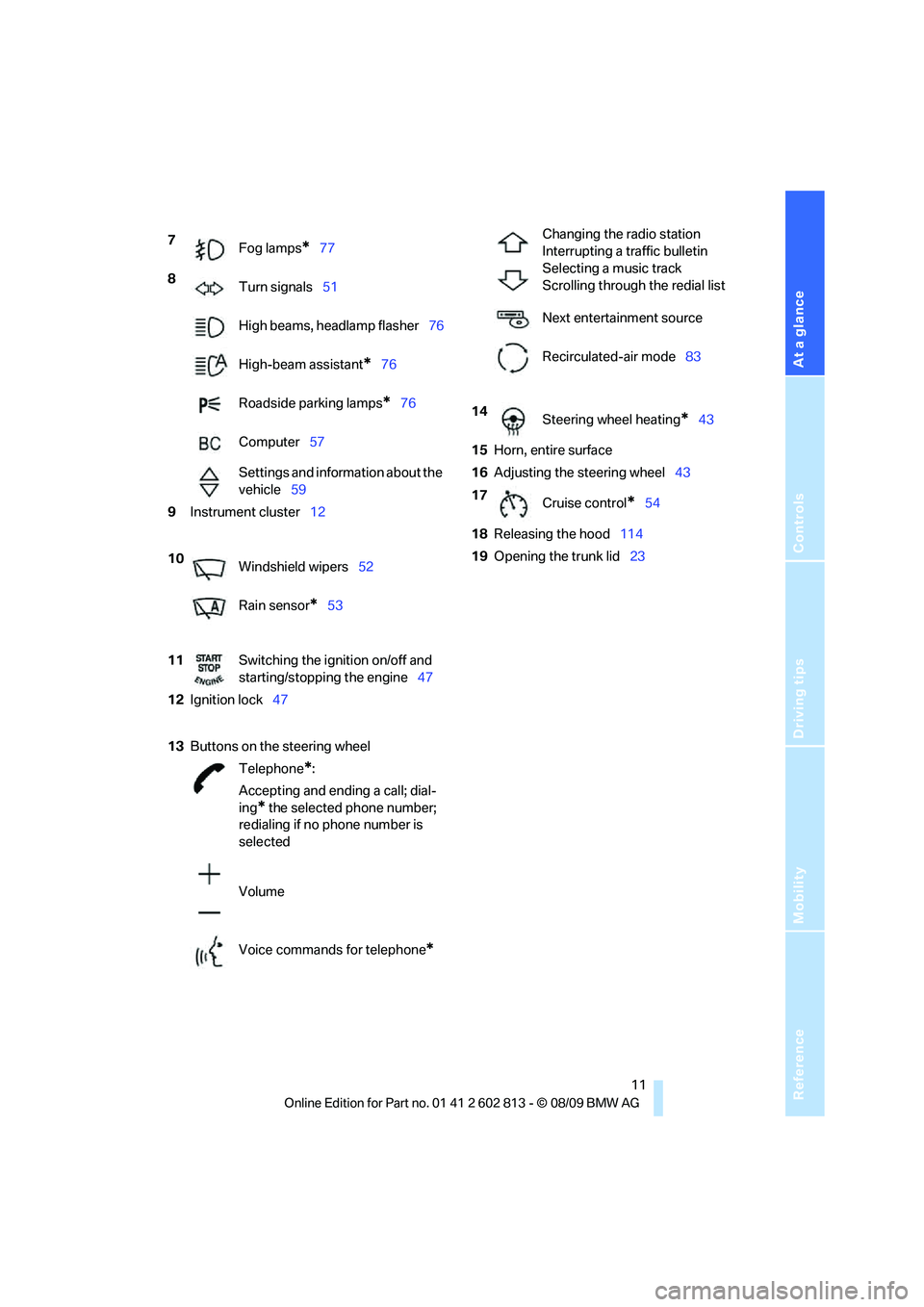
7
Fog lamps*77
8
Turn signals51
High beams, headlamp flasher76
High-beam assistant
*76
Roadside parking lamps
*76
Computer57
Settings and information about the
vehicle59
9Instrument cluster12
10
Windshield wipers52
Rain sensor
*53
11Switching the ignition on/off and
starting/stopping the engine47
12Ignition lock47
13Buttons on the steering wheel
Telephone
*:
Accepting and ending a call; dial-
ing
* the selected phone number;
redialing if no phone number is
selected
Volume
Voice commands for telephone
*
Changing the radio station
Interrupting a traffic bulletin
Selecting a music track
Scrolling through the redial list
Next entertainment source
Recirculated-air mode83
14
Steering wheel heating
*43
15Horn, entire surface
16Adjusting the steering wheel43
17
Cruise control
*54
18Releasing the hood114
19Opening the trunk lid23
Page 14 of 166
Cockpit
12
Instrument cluster
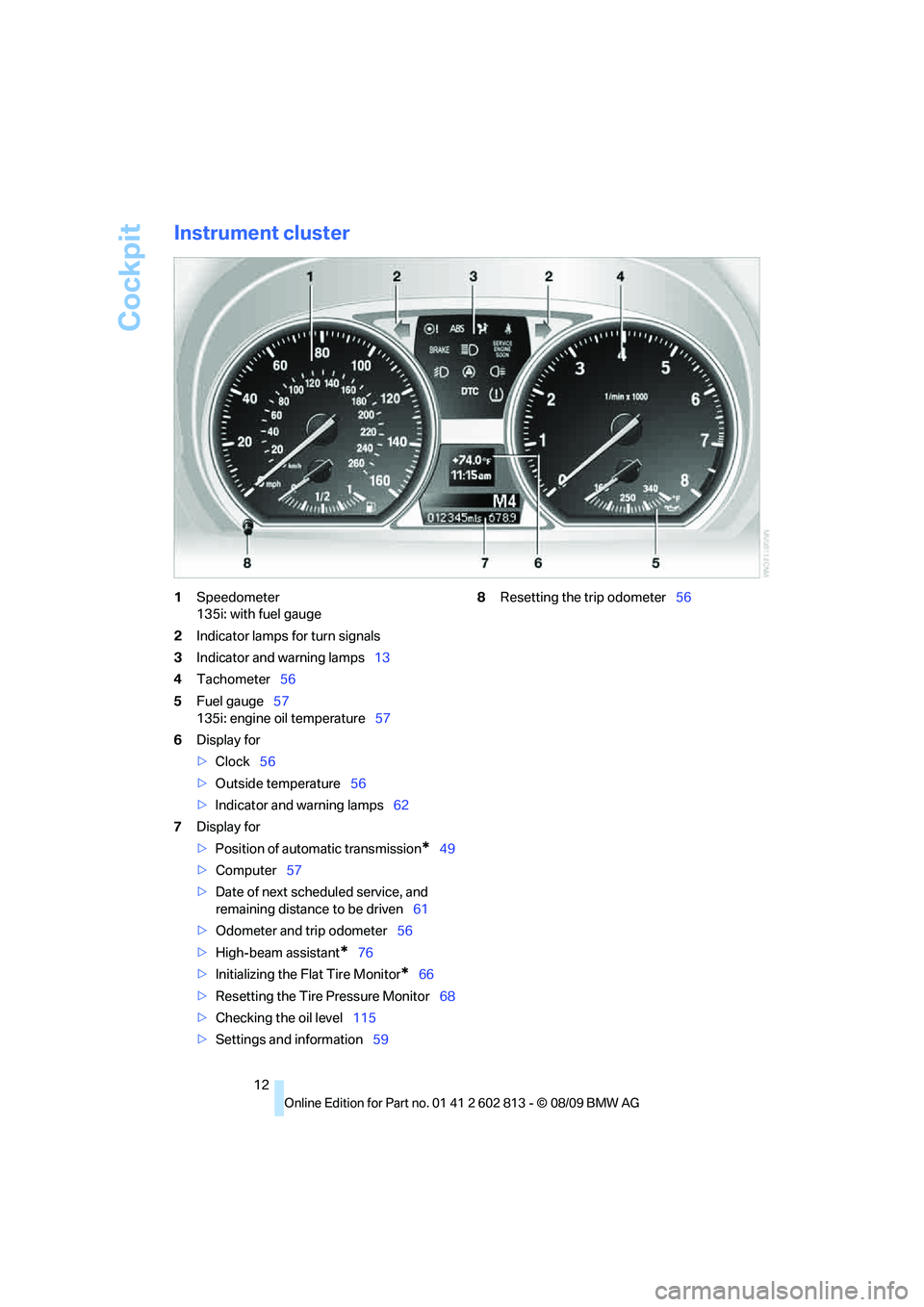
1Speedometer
135i: with fuel gauge
2Indicator lamps for turn signals
3Indicator and warning lamps13
4Tachometer56
5Fuel gauge57
135i: engine oil temperature57
6Display for
>Clock56
>Outside temperature56
>Indicator and warning lamps62
7Display for
>Position of automatic transmission
*49
>Computer57
>Date of next scheduled service, and
remaining distance to be driven61
>Odometer and trip odometer56
>High-beam assistant
*76
>Initializing the Flat Tire Monitor
*66
>Resetting the Tire Pressure Monitor68
>Checking the oil level115
>Settings and information598Resetting the trip odometer56
Page 20 of 166
Opening and closing
18
Opening and closing
Remote control
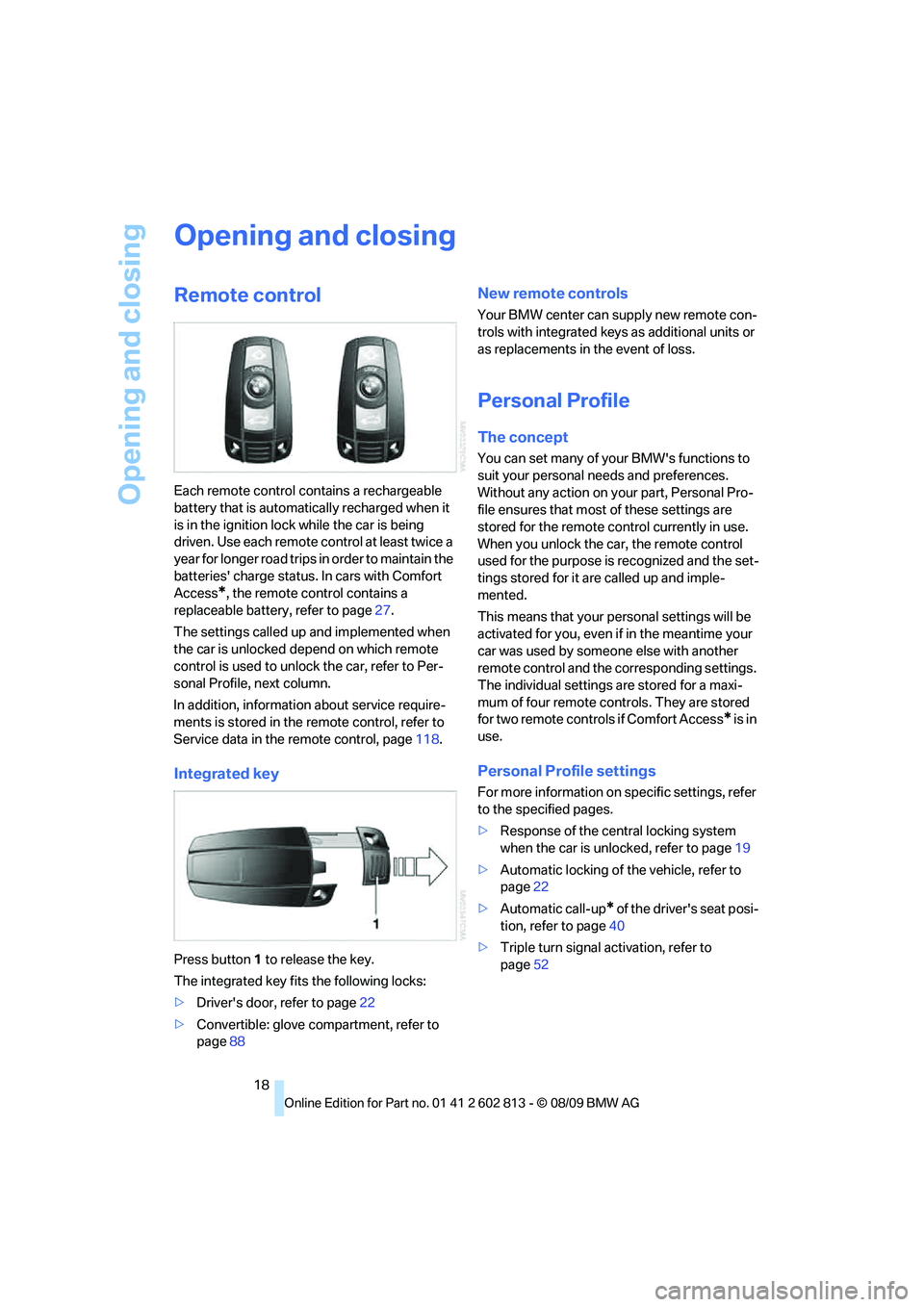
Each remote control contains a rechargeable
battery that is automatically recharged when it
is in the ignition lock while the car is being
driven. Use each remote control at least twice a
year for longer road trips in order to maintain the
batteries' charge status. In cars with Comfort
Access
*, the remote control contains a
replaceable battery, refer to page27.
The settings called up and implemented when
the car is unlocked depend on which remote
control is used to unlock the car, refer to Per-
sonal Profile, next column.
In addition, information about service require-
ments is stored in the remote control, refer to
Service data in the remote control, page118.
Integrated key
Press button1 to release the key.
The integrated key fits the following locks:
>Driver's door, refer to page22
>Convertible: glove compartment, refer to
page88
New remote controls
Your BMW center can supply new remote con-
trols with integrated keys as additional units or
as replacements in the event of loss.
Personal Profile
The concept
You can set many of your BMW's functions to
suit your personal needs and preferences.
Without any action on your part, Personal Pro-
file ensures that most of these settings are
stored for the remote control currently in use.
When you unlock the car, the remote control
used for the purpose is recognized and the set-
tings stored for it are called up and imple-
mented.
This means that your personal settings will be
activated for you, even if in the meantime your
car was used by someone else with another
remote control and the corresponding settings.
The individual settings are stored for a maxi-
mum of four remote controls. They are stored
for two remote controls if Comfort Access
* is in
use.
Personal Profile settings
For more information on specific settings, refer
to the specified pages.
>Response of the central locking system
when the car is unlocked, refer to page19
>Automatic locking of the vehicle, refer to
page22
>Automatic call-up
* of the driver's seat posi-
tion, refer to page40
>Triple turn signal activation, refer to
page52
Page 22 of 166
Opening and closing
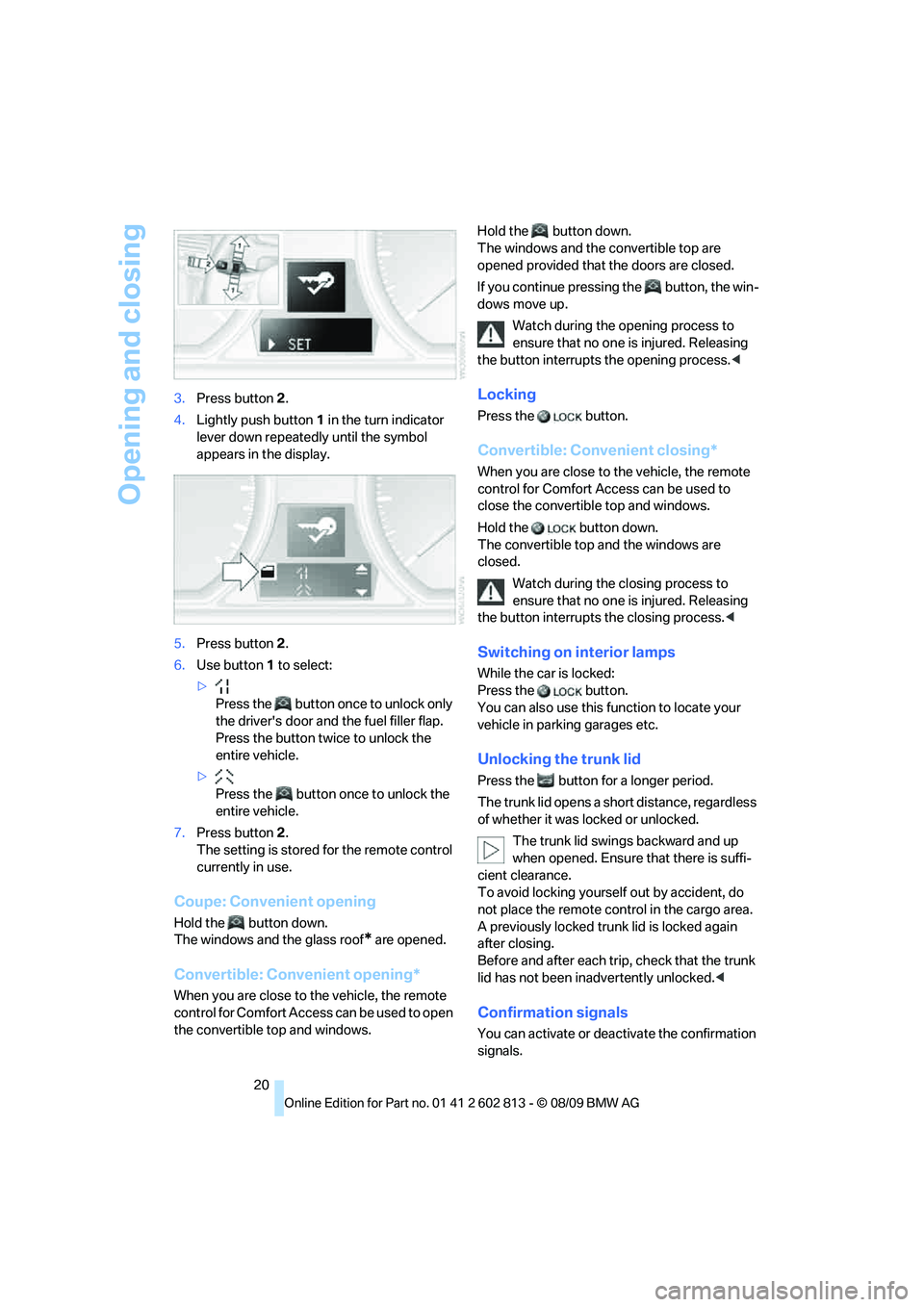
20 3.Press button 2.
4.Lightly push button1 in the turn indicator
lever down repeatedly until the symbol
appears in the display.
5.Press button 2.
6.Use button 1 to select:
>
Press the button once to unlock only
the driver's door and the fuel filler flap.
Press the button twice to unlock the
entire vehicle.
>
Press the button once to unlock the
entire vehicle.
7.Press button 2.
The setting is stored for the remote control
currently in use.
Coupe: Convenient opening
Hold the button down.
The windows and the glass roof
* are opened.
Convertible: Convenient opening*
When you are close to the vehicle, the remote
control for Comfort Access can be used to open
the convertible top and windows.Hold the button down.
The windows and the convertible top are
opened provided that the doors are closed.
If you continue pressing the button, the win-
dows move up.
Watch during the opening process to
ensure that no one is injured. Releasing
the button interrupts the opening process.<
Locking
Press the button.
Convertible: Convenient closing*
When you are close to the vehicle, the remote
control for Comfort Access can be used to
close the convertible top and windows.
Hold the button down.
The convertible top and the windows are
closed.
Watch during the closing process to
ensure that no one is injured. Releasing
the button interrupts the closing process.<
Switching on interior lamps
While the car is locked:
Press the button.
You can also use this function to locate your
vehicle in parking garages etc.
Unlocking the trunk lid
Press the button for a longer period.
The trunk lid opens a short distance, regardless
of whether it was locked or unlocked.
The trunk lid swings backward and up
when opened. Ensure that there is suffi-
cient clearance.
To avoid locking yourself out by accident, do
not place the remote control in the cargo area.
A previously locked trunk lid is locked again
after closing.
Before and after each trip, check that the trunk
lid has not been inadvertently unlocked.<
Confirmation signals
You can activate or deactivate the confirmation
signals.
Page 23 of 166
Reference
At a glance
Controls
Driving tips
Mobility
21
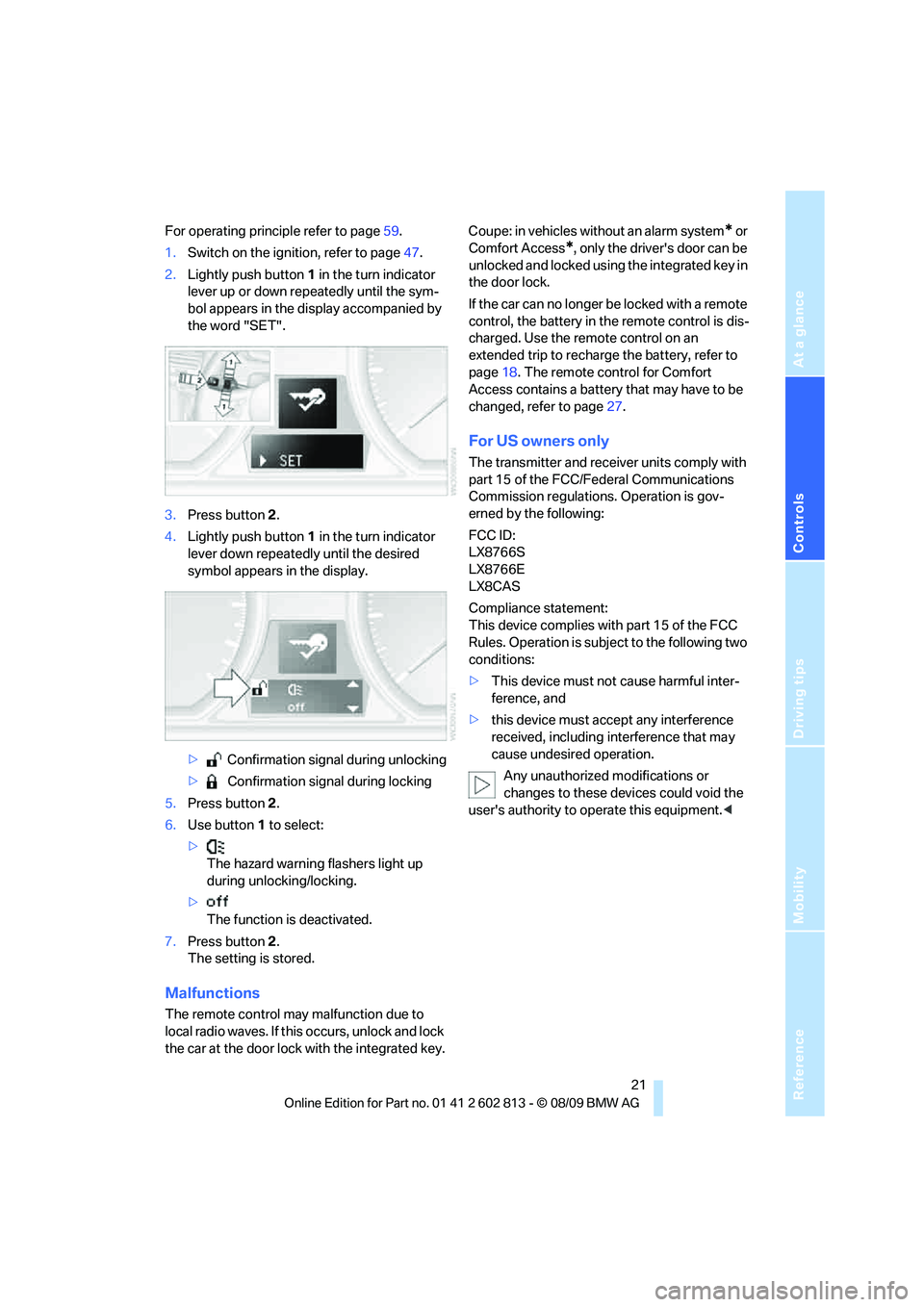
For operating principle refer to page59.
1.Switch on the ignition, refer to page47.
2.Lightly push button1 in the turn indicator
lever up or down repeatedly until the sym-
bol appears in the display accompanied by
the word "SET".
3.Press button 2.
4.Lightly push button1 in the turn indicator
lever down repeatedly until the desired
symbol appears in the display.
> Confirmation signal during unlocking
> Confirmation signal during locking
5.Press button 2.
6.Use button 1 to select:
>
The hazard warning flashers light up
during unlocking/locking.
>
The function is deactivated.
7.Press button 2.
The setting is stored.
Malfunctions
The remote control may malfunction due to
local radio waves. If this occurs, unlock and lock
the car at the door lock with the integrated key.Coupe: in vehicles without an alarm system
* or
Comfort Access
*, only the driver's door can be
unlocked and locked using the integrated key in
the door lock.
If the car can no longer be locked with a remote
control, the battery in the remote control is dis-
charged. Use the remote control on an
extended trip to recharge the battery, refer to
page18. The remote control for Comfort
Access contains a battery that may have to be
changed, refer to page27.
For US owners only
The transmitter and receiver units comply with
part 15 of the FCC/Federal Communications
Commission regulations. Operation is gov-
erned by the following:
FCC ID:
LX8766S
LX8766E
LX8CAS
Compliance statement:
This device complies with part 15 of the FCC
Rules. Operation is subject to the following two
conditions:
>This device must not cause harmful inter-
ference, and
>this device must accept any interference
received, including interference that may
cause undesired operation.
Any unauthorized modifications or
changes to these devices could void the
user's authority to operate this equipment.<
Page 53 of 166

Reference
At a glance
Controls
Driving tips
Mobility
51
Steptronic changes gear. M1 through M6 are
displayed on the instrument cluster.
Upshifts and downshifts are executed only
when they will result in a plausible combination
of engine and vehicle speed; thus, for example,
a downshift that would cause the engine to
overrev will not be executed by the system. The
gear selected is briefly displayed in the instru-
ment cluster, followed by the gear actually in
use.
Shifting gears via shift paddles* on the
steering wheel
The shift paddles allow you to shift gears
quickly since both hands can remain on the
steering wheel.
>When you use the shift paddles on the
steering wheel to shift gears in automatic
mode, the transmission switches to manual
mode.
>If you do not accelerate or shift gears using
the shift paddles for a certain amount of
time, the transmission switches back to
automatic mode.
If the selector lever is in the M/S gear
plane, manual mode remains active.<
>To shift up: pull one of the shift paddles.
>To shift down: press one of the shift pad-
dles.
Upshifts and downshifts are executed only
when they will result in a plausible combination
of engine and vehicle speed; thus, for example,
a downshift that would cause the engine to
overrev will not be executed by the system. The
gear selected is briefly displayed in the instru-
ment cluster, followed by the gear actually in
use.
Overriding selector lever lock
Should the selector lever refuse to move out of
position P even though the ignition is switched
on, the brake is depressed and the button on
the selector lever is pressed, the selector lever
lock can be overridden:
1.Unclip the sleeve of the selector lever.
2.Pull the sleeve up over the selector lever
until the sleeve is inside out.
3.Using the screwdriver from the onboard
vehicle tool kit, refer to page124, press the
red lever, see arrow, while moving the
selector lever to the desired position.
Turn signals/
headlamp flasher
1High beams
2Headlamp flasher
3Turn signals
Using turn signals
Press the lever beyond the resistance point.
To turn off manually, press the lever to the
resistance point.
Page 54 of 166
Driving
52 Unusually rapid flashing of the indicator
lamp and the turn signals indicates that
one of the turn signal bulbs has failed.<
Indicating a turn briefly
Press the lever as far as the resistance point for
as long as you wish to indicate a turn.
Triple turn signal activation
Press the lever as far as the resistance point.
The turn signals flash three times.
You can activate or deactivate this function.
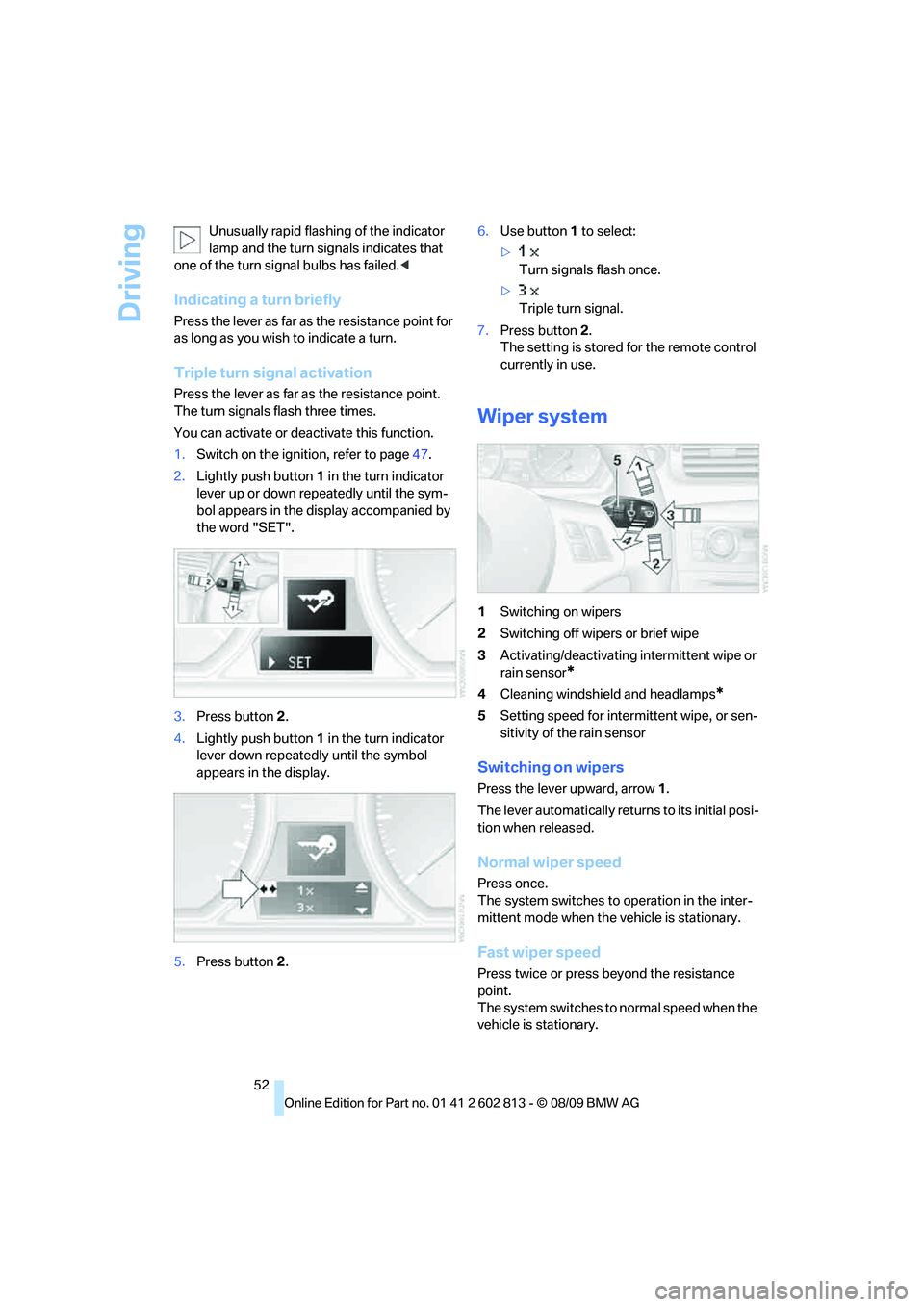
1.Switch on the ignition, refer to page47.
2.Lightly push button1 in the turn indicator
lever up or down repeatedly until the sym-
bol appears in the display accompanied by
the word "SET".
3.Press button 2.
4.Lightly push button1 in the turn indicator
lever down repeatedly until the symbol
appears in the display.
5.Press button 2.6.Use button 1 to select:
>
Turn signals flash once.
>
Triple turn signal.
7.Press button 2.
The setting is stored for the remote control
currently in use.
Wiper system
1Switching on wipers
2Switching off wipers or brief wipe
3Activating/deactivating intermittent wipe or
rain sensor
*
4Cleaning windshield and headlamps*
5Setting speed for intermittent wipe, or sen-
sitivity of the rain sensor
Switching on wipers
Press the lever upward, arrow 1.
The lever automatically returns to its initial posi-
tion when released.
Normal wiper speed
Press once.
The system switches to operation in the inter-
mittent mode when the vehicle is stationary.
Fast wiper speed
Press twice or press beyond the resistance
point.
The system switches to normal speed when the
vehicle is stationary.
Page 61 of 166

Reference
At a glance
Controls
Driving tips
Mobility
59
Settings and information
Operating principle
Certain settings and information can only be
made or called up when the ignition is switched
on. A number of settings cannot be made while
driving.
1Button for:
>Selecting display
>Setting values
2Button for:
>Confirming selected display or set val-
ues
>Calling up computer information57
3When the lights are on: instrument lighting
brightness78
4Calling up Check Control62
5Checking oil level115
6Initializing the Flat Tire Monitor66
Resetting the Tire Pressure Monitor68
7Setting the time62
8Setting the date629Viewing service requirement display61
10Setting formats and units of measure,
resetting to factory settings60
11Adjusting settings
>Confirmation signals when locking and
unlocking the vehicle20
>Response during unlocking
procedure19
>Automatic locking22
>Pathway lighting74
>Daytime running lights75
>Triple turn signal activation52
>Seat and mirror memory
*40
Exiting displays
The outside temperature reading and the time
reappear when you press button2 or if you
make no entries within approx. 15 seconds. If
required, complete the current setting first.
Page 64 of 166

Controls overview
62 The sequence of displayed service items may
vary. The data for the next service appointment
is shown first.
Clock
Setting the time
In the instrument cluster
To set the 12h/24h format, refer to Formats and
units of measure on page60.
1.Push button 1 in the turn indicator lever up
or down repeatedly until the appropriate
symbol appears in the display, accompa-
nied by the time and the word "SET".
2.Press button 2.
3.Use button 1 to set the hours.
4.Press button 2 to confirm the entry.
5.Use button 1 to set the minutes.
6.Press button 2 to confirm the entry.
7.Press button 2.
The system accepts the new time.
Date
Setting the date
In the instrument cluster
To set the dd/mm or mm/dd date format, refer
to Formats and units of measure on page60.
1.Push button 1 in the turn indicator lever up
or down repeatedly until the appropriate symbol appears in the display, accompa-
nied by the date and the word "SET".
2.Press button 2.
3.Use button 1 to set the day of the month.
4.Press button 2 to confirm the entry.
5.Set the month and the year in the same way.
6.Press button 2.
The system stores the new date.
Check Control
The concept
The Check Control monitors vehicle functions
and alerts you to any malfunctions in the sys-
tems monitored. Such a Check Control mes-
sage includes indicator or warning lamps in the
instrument cluster and, in some circumstances,
an acoustic signal.
Indicator and warning lamps can light up in a
variety of combinations and colors.
Several of the lamps are checked for proper
functioning and light up temporarily when the
engine is started or the ignition is switched on.
Page 69 of 166

Reference
At a glance
Controls
Driving tips
Mobility
67
1.Start the engine immediately before pulling
away, but do not drive off yet.
2.Lightly push button 1 in the turn indicator
lever up or down repeatedly until the corre-
sponding symbol appears in the display
accompanied by the word "RESET".
3.Press button 2 to confirm your choice of the
Flat Tire Monitor.
4.Press button 2 for approx. 5 seconds, until
the reading shown below is displayed:
5.Start driving.
Initialization is completed while the car is on
the move, without any feedback.
Indication of a flat tire
The warning lamps come on in yellow
and red. In addition, a signal sounds.
There is a flat tire or substantial loss
of tire pressure.
1.Cautiously reduce speed to below 50 mph/
80 km/h. Avoid sudden braking and steer-
ing maneuvers. Do not exceed a speed of
50 mph/80 km/h.
If the car is not equipped with run-flat
tires, refer to page112, the standard
equipment by design, do not continue driv-ing. A severe accident could result if you
continue driving after a tire puncture.<
2.At the next opportunity, check the air pres-
sure in all four tires.
If all four tires are inflated to the cor-
rect pressures, the Flat Tire Monitor
might not have been initialized. The system
must then be initialized.<
3.In the event of complete tire pressure loss,
0 psi/0 kPa, you can estimate the distance
for which you can continue driving on the
basis of the following guidelines:
>With a light load:
1 to 2 persons without luggage:
approx. 155 miles/250 km
>With a medium load:
2 persons, cargo area full, or 4 persons
without luggage:
approx. 90 miles/150 km
>With a full load:
4 persons, cargo area full:
approx. 30 miles/50 km
Drive cautiously and do not exceed a
speed of 50 mph/80 km/h; otherwise,
there is a risk of an accident. In the event of
pressure loss, vehicle handling changes. This
includes reduced tracking stability in braking,
extended braking distance and altered natural
steering characteristics.
If unusual vibration or loud noises occur during
the journey, this may be an indication that the
damaged tire has finally failed. Reduce your
speed and pull over as soon as possible at a
suitable location. Otherwise, parts of the tire
could come loose, resulting in an accident. Do
not continue driving. Instead, contact your
BMW center.<
Tire Pressure Monitor TPM*
The concept
RDC monitors the tire inflation pressure in the
four mounted tires during a trip. The system
notifies you if there is a significant loss of pres-
sure in one or more tires.