navigation BMW 1 SERIES 2011 User Guide
[x] Cancel search | Manufacturer: BMW, Model Year: 2011, Model line: 1 SERIES, Model: BMW 1 SERIES 2011Pages: 256, PDF Size: 8.41 MB
Page 23 of 256
At a glance
21Reference
Controls
Driving tips
Communications
Navigation
Entertainment
Mobility
Letters and numbers
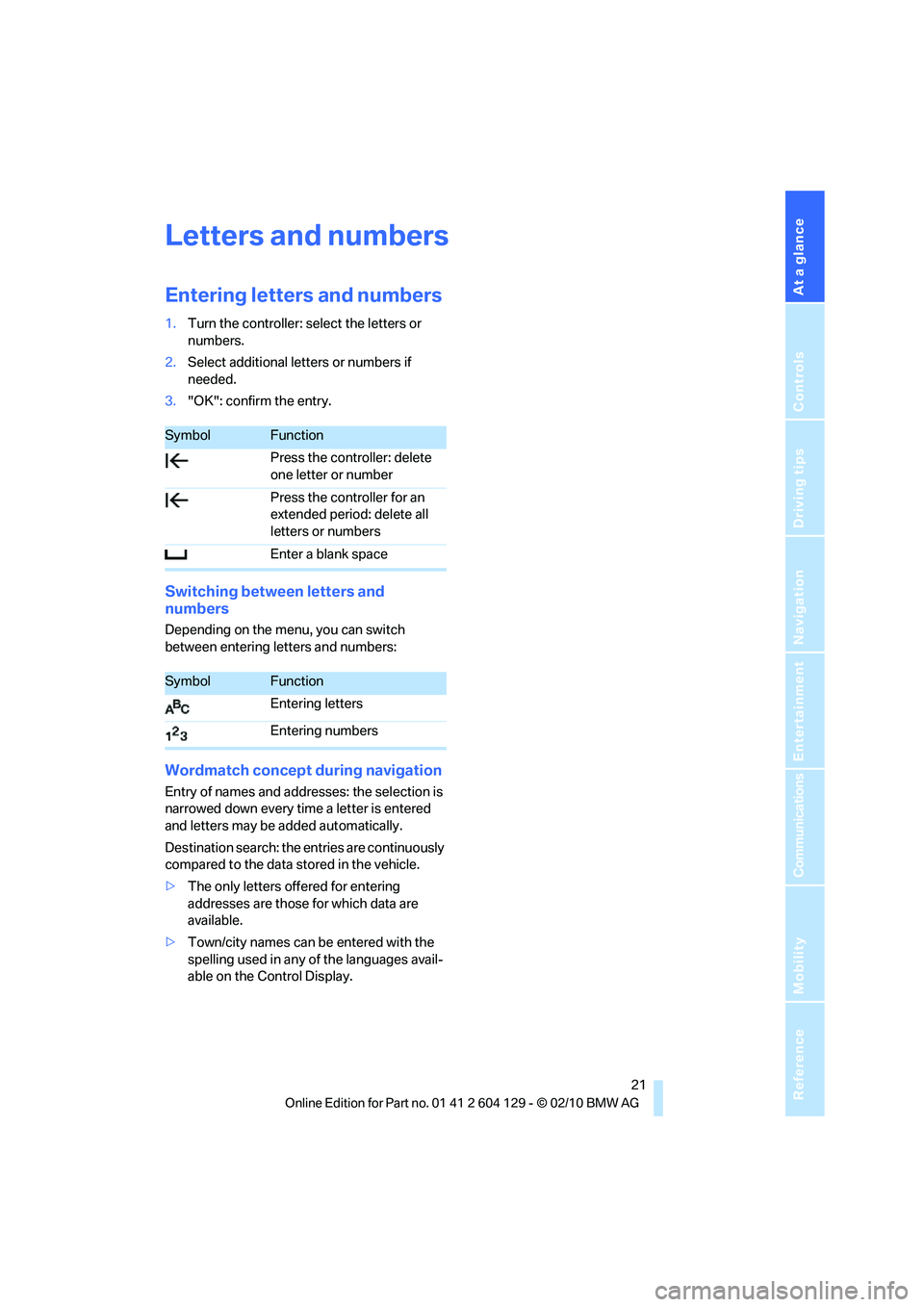
Entering letters and numbers
1.Turn the controller: select the letters or
numbers.
2.Select additional letters or numbers if
needed.
3."OK": confirm the entry.
Switching between letters and
numbers
Depending on the menu, you can switch
between entering letters and numbers:
Wordmatch concept during navigation
Entry of names and addresses: the selection is
narrowed down every time a letter is entered
and letters may be added automatically.
Destination search: the entries are continuously
compared to the data stored in the vehicle.
>The only letters offered for entering
addresses are those for which data are
available.
>Town/city names can be entered with the
spelling used in any of the languages avail-
able on the Control Display.
SymbolFunction
Press the controller: delete
one letter or number
Press the controller for an
extended period: delete all
letters or numbers
Enter a blank space
SymbolFunction
Entering letters
Entering numbers
Page 25 of 256
At a glance
23Reference
Controls
Driving tips
Communications
Navigation
Entertainment
Mobility
In dialogs that call for a text of your choice, the
procedure can only be canceled using the but-
ton on the steering wheel.
Possible commands
The commands available in each case depend
on the menu item selected on the Control Dis-
play.
To have the available commands read aloud:
For example, if "CD" is selected, the commands
for operating CD/Multimedia are read aloud.
Calling up functions immediately via
short commands
With short commands you can run certain func-
tions directly, regardless of which menu item is
selected, refer to page231.
Example: selecting the track of a CD
1.If necessary, switch on entertainment audio
output.
2.Press the button on the steering wheel.
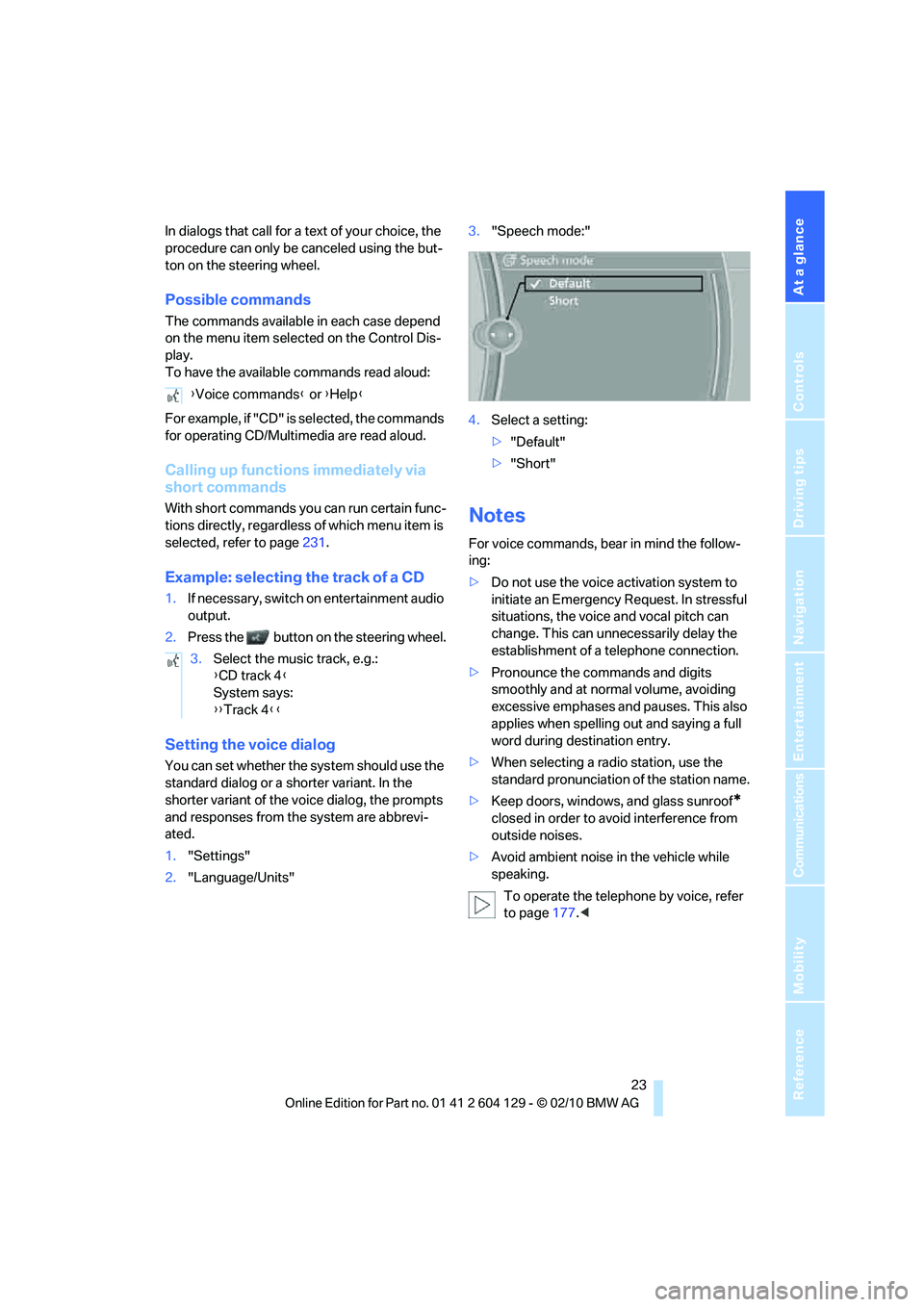
Setting the voice dialog
You can set whether the system should use the
standard dialog or a shorter variant. In the
shorter variant of the voice dialog, the prompts
and responses from the system are abbrevi-
ated.
1."Settings"
2."Language/Units"3."Speech mode:"
4.Select a setting:
>"Default"
>"Short"
Notes
For voice commands, bear in mind the follow-
ing:
>Do not use the voice activation system to
initiate an Emergency Request. In stressful
situations, the voice and vocal pitch can
change. This can unnecessarily delay the
establishment of a telephone connection.
>Pronounce the commands and digits
smoothly and at normal volume, avoiding
excessive emphases and pauses. This also
applies when spelling out and saying a full
word during destination entry.
>When selecting a radio station, use the
standard pronunciation of the station name.
>Keep doors, windows, and glass sunroof
*
closed in order to avoid interference from
outside noises.
>Avoid ambient noise in the vehicle while
speaking.
To operate the telephone by voice, refer
to page177.< {Voice commands} or {Help}
3.Select the music track, e.g.:
{CD track 4}
System says:
{{Track 4}}
Page 29 of 256
Controls
27Reference
At a glance
Driving tips
Communications
Navigation
Entertainment
Mobility
>Settings for the display on the Control Dis-
play and in the instrument cluster:
>12h/24h format of the clock, refer to
page74
>Date format, refer to page76
>Brightness of the Control Display, refer
to page79
>Language of the Control Display, refer to
page79
>Units of measure for fuel consumption,
distance covered/remaining distances,
and temperature, refer to page72
>Show visual warning for Park Distance Con-
trol PDC, refer to page80
>Light settings:
>Welcome lamps, refer to page91
>Pathway lighting, refer to page92
>Daytime running lights, refer to page92
>High-beam assistant
*, refer to page93
>Automatic climate control: activating/deac-
tivating AUTO program, cooling function
and automatic recirculated-air control, set-
ting temperature, air volume and distribu-
tion, refer to page97 ff
>Entertainment:
>Tone control, refer to page140
>Speed-dependent volume control, refer
to page140
Central locking system
The concept
The central locking system functions when the
driver's door is closed.
The system simultaneously engages and
releases the locks on the following:
>Doors
>Trunk lid
>Fuel filler flap
Operating from outside
>Via the remote control
>Via the door lock
*
>In cars with Comfort Access*, via the han-
dles on the driver's and front passenger
doors
In addition, if the remote control is used, the
welcome lamps
*, interior lamps and the door's
courtesy lamps
* are switched on or off. The
alarm system
* is also armed or disarmed.
For further details on the alarm system
*, refer
to page32.
Operating from inside
By means of the button for central locking, refer
to page30.
In the event of a sufficiently severe accident, the
central locking system unlocks automatically. In
addition, the hazard warning flashers and inte-
rior lamps come on.
Opening and closing:
Using the remote control
Persons or animals in a parked vehicle
could lock the doors from the inside. You
should therefore take the remote control with
you when you leave the vehicle so that the latter
can be opened from outside.<
Convertible: to operate the convertible
top with the remote control, the doors and
trunk lid must be closed and the cargo area par-
tition must be folded down and engaged on
both sides. Refer also to page40.<
Unlocking
Press the button.
The interior lamps, the courtesy lamps
* and the
welcome lamps come on.
Setting unlocking characteristics
You can set whether only the driver's door or
the entire vehicle is to be unlocked when the
button is pressed for the first time.
Page 31 of 256
Controls
29Reference
At a glance
Driving tips
Communications
Navigation
Entertainment
Mobility
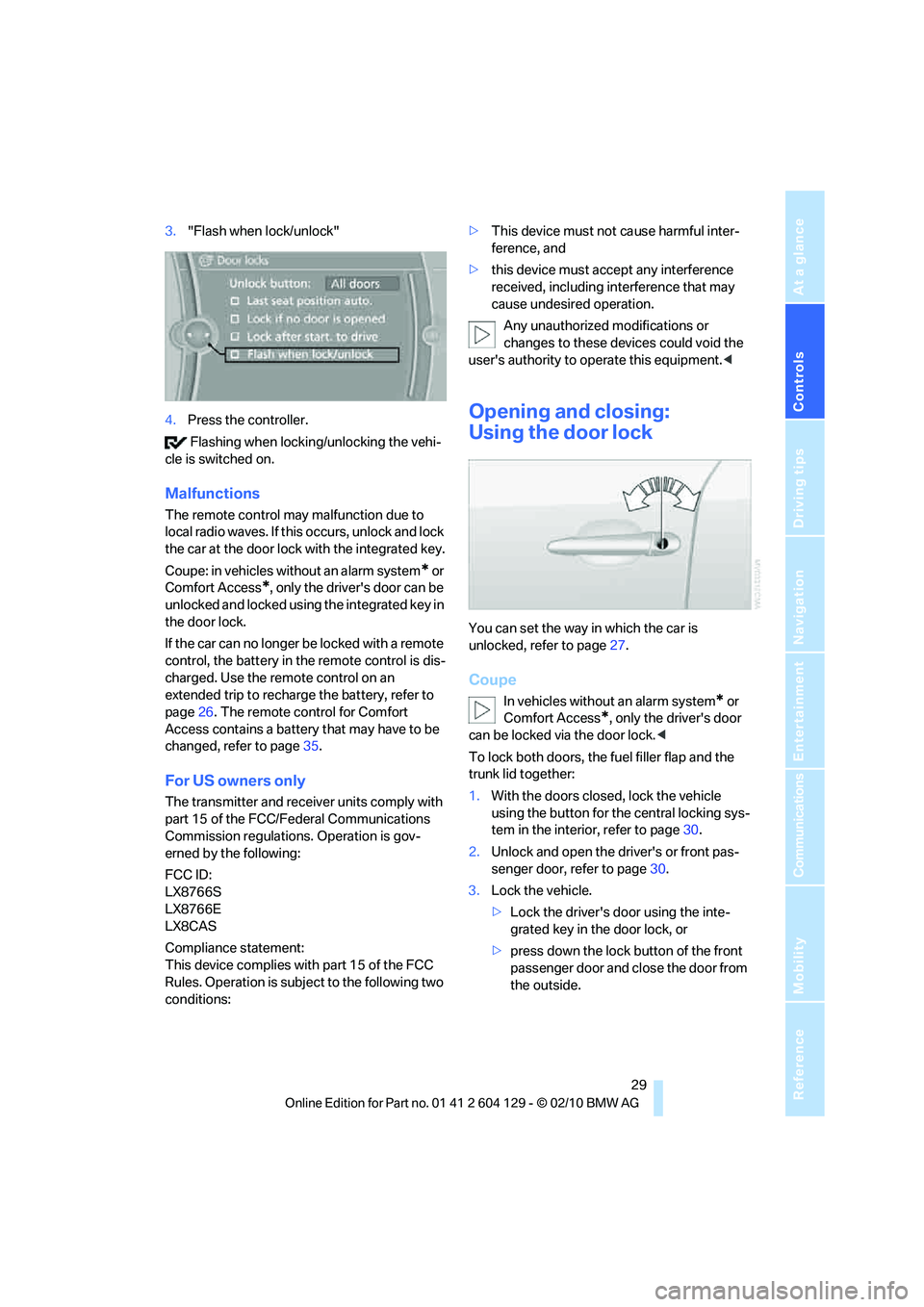
3."Flash when lock/unlock"
4.Press the controller.
Flashing when locking/unlocking the vehi-
cle is switched on.
Malfunctions
The remote control may malfunction due to
local radio waves. If this occurs, unlock and lock
the car at the door lock with the integrated key.
Coupe: in vehicles without an alarm system
* or
Comfort Access
*, only the driver's door can be
unlocked and locked using the integrated key in
the door lock.
If the car can no longer be locked with a remote
control, the battery in the remote control is dis-
charged. Use the remote control on an
extended trip to recharge the battery, refer to
page26. The remote control for Comfort
Access contains a battery that may have to be
changed, refer to page35.
For US owners only
The transmitter and receiver units comply with
part 15 of the FCC/Federal Communications
Commission regulations. Operation is gov-
erned by the following:
FCC ID:
LX8766S
LX8766E
LX8CAS
Compliance statement:
This device complies with part 15 of the FCC
Rules. Operation is subject to the following two
conditions:>This device must not cause harmful inter-
ference, and
>this device must accept any interference
received, including interference that may
cause undesired operation.
Any unauthorized modifications or
changes to these devices could void the
user's authority to operate this equipment.<
Opening and closing:
Using the door lock
You can set the way in which the car is
unlocked, refer to page27.
Coupe
In vehicles without an alarm system* or
Comfort Access
*, only the driver's door
can be locked via the door lock.<
To lock both doors, the fuel filler flap and the
trunk lid together:
1.With the doors closed, lock the vehicle
using the button for the central locking sys-
tem in the interior, refer to page30.
2.Unlock and open the driver's or front pas-
senger door, refer to page30.
3.Lock the vehicle.
>Lock the driver's door using the inte-
grated key in the door lock, or
>press down the lock button of the front
passenger door and close the door from
the outside.
Page 33 of 256
Controls
31Reference
At a glance
Driving tips
Communications
Navigation
Entertainment
Mobility
Trunk lid
In order to avoid damage, make sure there
is sufficient clearance before opening the
trunk lid.<
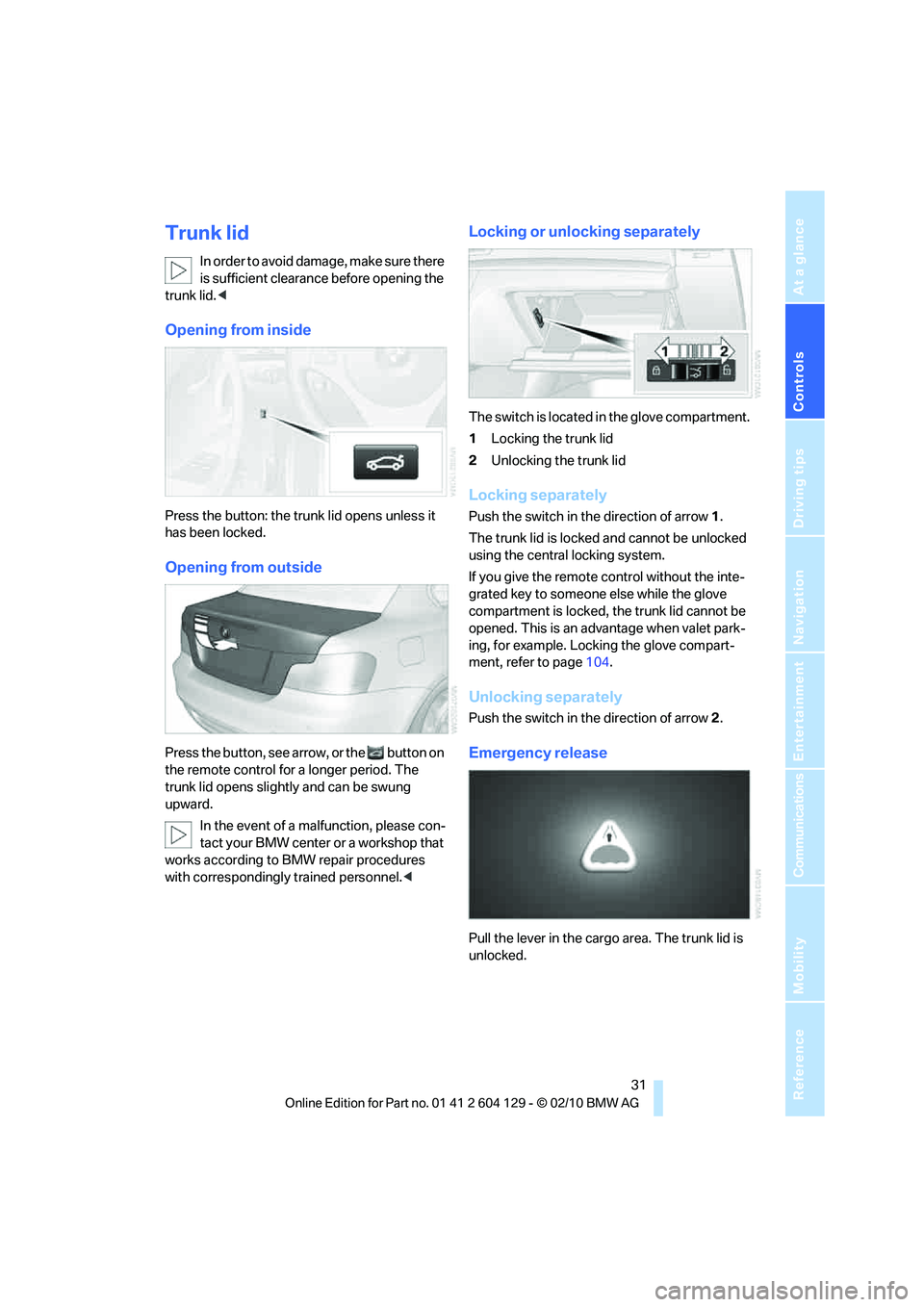
Opening from inside
Press the button: the trunk lid opens unless it
has been locked.
Opening from outside
Press the button, see arrow, or the button on
the remote control for a longer period. The
trunk lid opens slightly and can be swung
upward.
In the event of a malfunction, please con-
tact your BMW center or a workshop that
works according to BMW repair procedures
with correspondingly trained personnel.<
Locking or unlocking separately
The switch is located in the glove compartment.
1Locking the trunk lid
2Unlocking the trunk lid
Locking separately
Push the switch in the direction of arrow 1.
The trunk lid is locked and cannot be unlocked
using the central locking system.
If you give the remote control without the inte-
grated key to someone else while the glove
compartment is locked, the trunk lid cannot be
opened. This is an advantage when valet park-
ing, for example. Locking the glove compart-
ment, refer to page104.
Unlocking separately
Push the switch in the direction of arrow 2.
Emergency release
Pull the lever in the cargo area. The trunk lid is
unlocked.
Page 35 of 256
Controls
33Reference
At a glance
Driving tips
Communications
Navigation
Entertainment
Mobility
Tilt alarm sensor
The tilt of the vehicle is monitored. The alarm
system reacts, e.g. to attempts to steal a wheel
or tow the vehicle.
Interior motion sensor
Coupe
In order for the interior motion sensor to func-
tion properly, the windows and glass roof must
be completely closed
*.
Convertible
The interior of the car is monitored up to the
height of the seat cushions. Thus the alarm sys-
tem is activated together with the interior
motion sensor even if the convertible top is
open. An alarm can be triggered unintentionally
by falling objects such as leaves, refer to Avoid-
ing unintentional alarms.
Avoiding unintentional alarms
The tilt alarm sensor and interior motion sensor
may be switched off at the same time. This pre-
vents unintentional alarms, e.g. in the following
situations:
>In duplex garages
>During transport on car-carrying trains,
boats/ships or on a trailer
>When animals are to remain in the vehicle
Switching off tilt alarm sensor and
interior motion sensor
Press the button on the remote control
again as soon as the vehicle is locked.
The indicator lamp lights up briefly and then
flashes continuously. The tilt alarm sensor and
the interior motion sensor are switched off until
the next time the vehicle is unlocked and subse-
quently locked again.
Comfort Access*
Comfort Access enables you to enter your vehi-
cle without needing to hold the remote control
in your hand. All you need to do is wear the
remote control close to your body, e.g. in your
jacket pocket. The vehicle detects the corre-
sponding remote control within the immediate
vicinity or in the passenger compartment.
Comfort Access supports the following func-
tions:
>Unlocking/locking the vehicle
>Unlocking the trunk lid separately
>Engine starting
>Convenient closing
Functional requirement
>The vehicle or the trunk lid can only be
locked when the vehicle detects that the
remote control currently in use is outside of
the vehicle.
>The vehicle cannot be locked or unlocked
again until after approx. 2 seconds.
>The engine can only be started when the
vehicle detects that the remote control cur-
rently in use is inside the vehicle.
Comparison to the standard remote
control
In general, there is no difference between using
Comfort Access or pressing the buttons on the
remote control to carry out the functions men-
tioned above. You should therefore first famil-
iarize yourself with the instructions on opening
and closing starting on page26.
Special features regarding the use of Comfort
Access are described below.
If you notice a brief delay while opening or
closing windows, the glass roof or the
convertible top, the system is checking whether
a remote control is inside the vehicle. Please
repeat the opening or closing procedure, if nec-
essary.<
Page 37 of 256
Controls
35Reference
At a glance
Driving tips
Communications
Navigation
Entertainment
Mobility
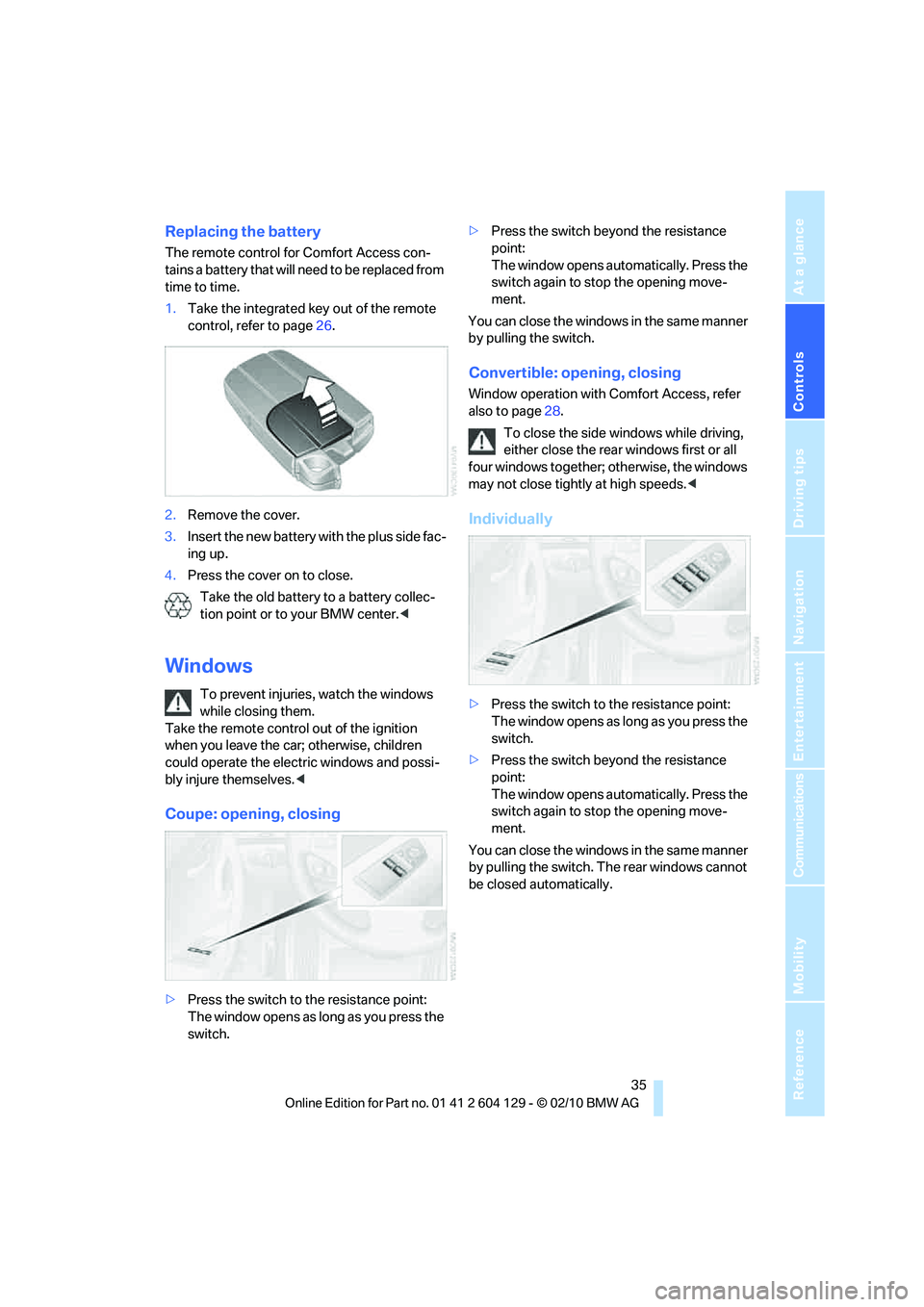
Replacing the battery
The remote control for Comfort Access con-
tains a battery that will need to be replaced from
time to time.
1.Take the integrated key out of the remote
control, refer to page26.
2.Remove the cover.
3.Insert the new battery with the plus side fac-
ing up.
4.Press the cover on to close.
Take the old battery to a battery collec-
tion point or to your BMW center.<
Windows
To prevent injuries, watch the windows
while closing them.
Take the remote control out of the ignition
when you leave the car; otherwise, children
could operate the electric windows and possi-
bly injure themselves.<
Coupe: opening, closing
>Press the switch to the resistance point:
The window opens as long as you press the
switch.>Press the switch beyond the resistance
point:
The window opens automatically. Press the
switch again to stop the opening move-
ment.
You can close the windows in the same manner
by pulling the switch.
Convertible: opening, closing
Window operation with Comfort Access, refer
also to page28.
To close the side windows while driving,
either close the rear windows first or all
four windows together; otherwise, the windows
may not close tightly at high speeds.<
Individually
>Press the switch to the resistance point:
The window opens as long as you press the
switch.
>Press the switch beyond the resistance
point:
The window opens automatically. Press the
switch again to stop the opening move-
ment.
You can close the windows in the same manner
by pulling the switch. The rear windows cannot
be closed automatically.
Page 39 of 256
Controls
37Reference
At a glance
Driving tips
Communications
Navigation
Entertainment
Mobility
Opening, closing
>Press the switch backwards to the resis-
tance point.
The glass roof and the sliding visor open
together as long as you hold the switch in
this position.
>Press the switch backwards past the resis-
tance point.
The glass roof and the sliding visor open
automatically. Briefly press the switch again
to stop the opening movement.
You can close the glass roof in a similar manner
by pressing the switch forwards. The sliding
visor remains open and can be closed by hand.
For information on Convenient operation via the
remote control or the door lock, refer to page27
or30. For information on Convenient closing
with Comfort Access, refer to Locking on
page34.
After switching off the ignition
When the remote control is removed or the igni-
tion is switched off, you can still operate the roof
for approx. 1 minute as long as no door has
been opened.
Pinch protection system
If the glass roof encounters an obstruction dur-
ing closing from approximately the middle of
the opening in the roof, or during closing from
the raised position, the closing movement is
interrupted and the glass roof is opened again
slightly.
Despite the pinch protection system
check and clear the roof's travel path prior
to closing it; otherwise, the safety system might
fail to detect certain kinds of obstructions, such
as very thin objects, and the roof would con-
tinue closing.<
Closing without pinch protection
If there is an external danger, press the switch
forward past the resistance point and hold it
there. The roof closes without pinch protection.
Following interruptions in electrical
power supply
After a power failure, there is a possibility that
the glass roof can only be raised. The system
must be initialized. BMW recommends having
this work done by your BMW center.
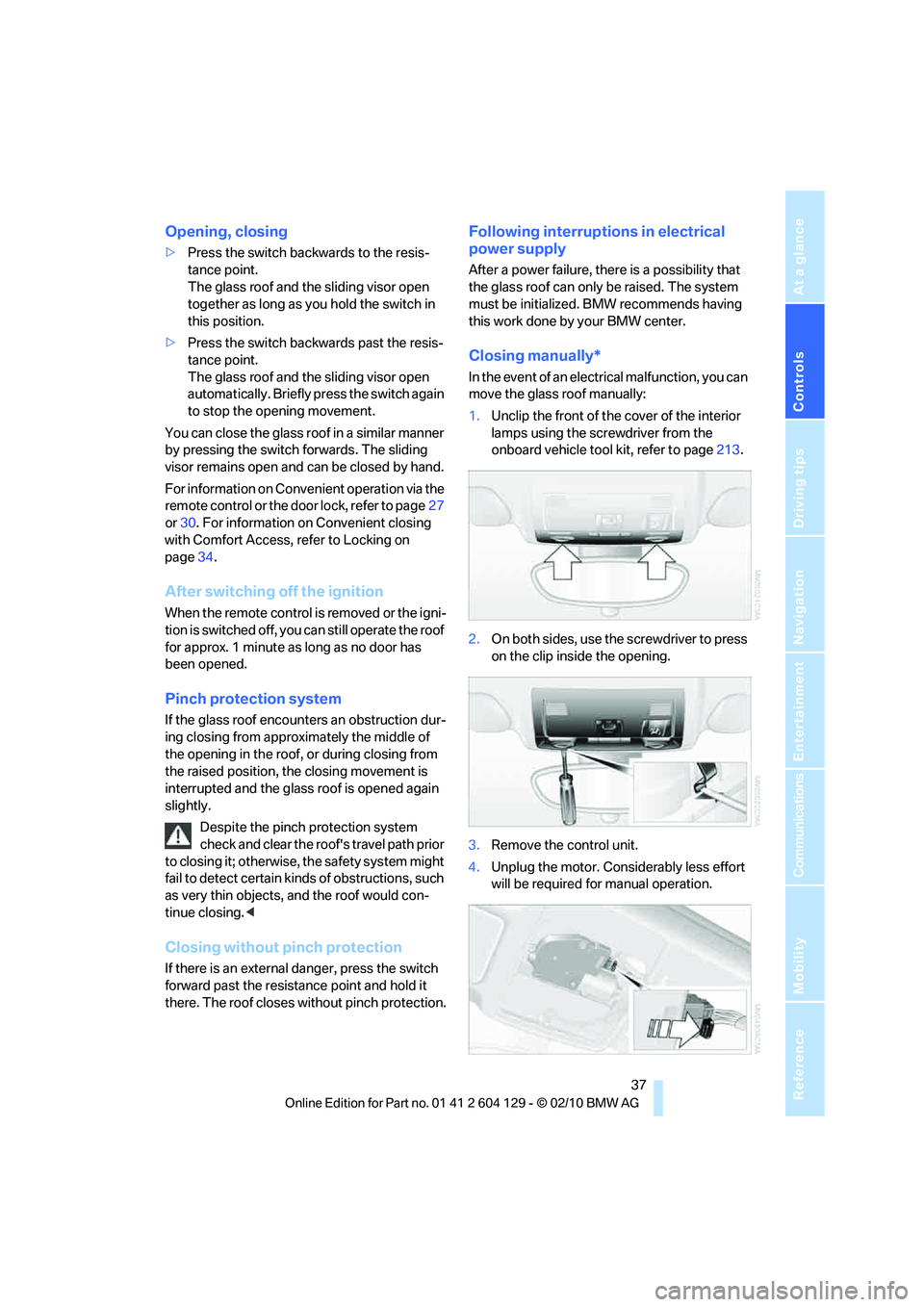
Closing manually*
In the event of an electrical malfunction, you can
move the glass roof manually:
1.Unclip the front of the cover of the interior
lamps using the screwdriver from the
onboard vehicle tool kit, refer to page213.
2.On both sides, use the screwdriver to press
on the clip inside the opening.
3.Remove the control unit.
4.Unplug the motor. Considerably less effort
will be required for manual operation.
Page 41 of 256
Controls
39Reference
At a glance
Driving tips
Communications
Navigation
Entertainment
Mobility
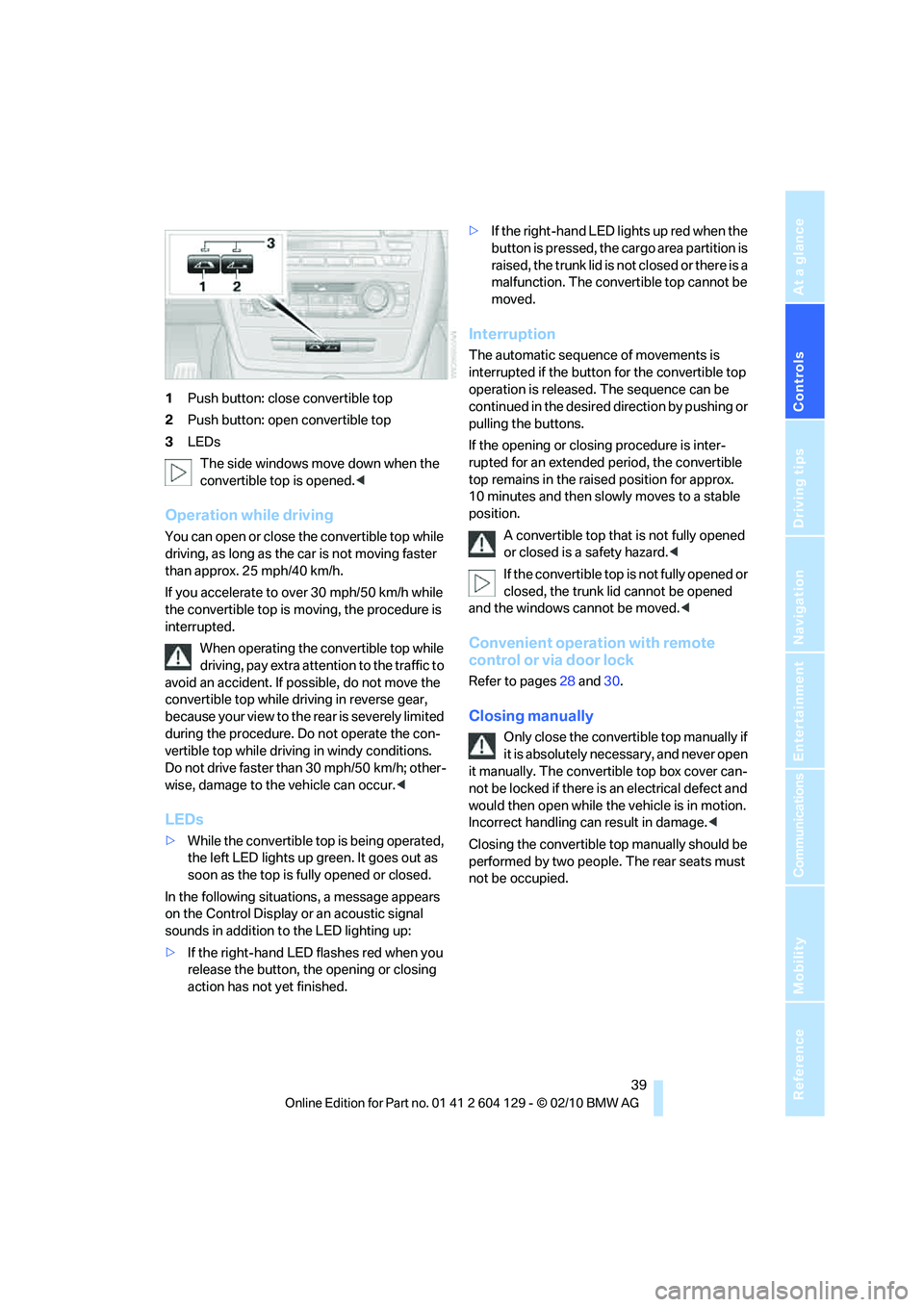
1Push button: close convertible top
2Push button: open convertible top
3LEDs
The side windows move down when the
convertible top is opened.<
Operation while driving
You can open or close the convertible top while
driving, as long as the car is not moving faster
than approx. 25 mph/40 km/h.
If you accelerate to over 30 mph/50 km/h while
the convertible top is moving, the procedure is
interrupted.
When operating the convertible top while
driving, pay extra attention to the traffic to
avoid an accident. If possible, do not move the
convertible top while driving in reverse gear,
b e c a u s e yo u r v ie w t o t h e r ea r is s e v e re ly li m i t ed
during the procedure. Do not operate the con-
vertible top while driving in windy conditions.
Do not drive faster than 30 mph/50 km/h; other-
wise, damage to the vehicle can occur.<
LEDs
>While the convertible top is being operated,
the left LED lights up green. It goes out as
soon as the top is fully opened or closed.
In the following situations, a message appears
on the Control Display or an acoustic signal
sounds in addition to the LED lighting up:
>If the right-hand LED flashes red when you
release the button, the opening or closing
action has not yet finished.>If the right-hand LED lights up red when the
button is pressed, the cargo area partition is
raised, the trunk lid is not closed or there is a
malfunction. The convertible top cannot be
moved.
Interruption
The automatic sequence of movements is
interrupted if the button for the convertible top
operation is released. The sequence can be
continued in the desired direction by pushing or
pulling the buttons.
If the opening or closing procedure is inter-
rupted for an extended period, the convertible
top remains in the raised position for approx.
10 minutes and then slowly moves to a stable
position.
A convertible top that is not fully opened
or closed is a safety hazard.<
If the convertible top is not fully opened or
closed, the trunk lid cannot be opened
and the windows cannot be moved.<
Convenient operation with remote
control or via door lock
Refer to pages28 and30.
Closing manually
Only close the convertible top manually if
it is absolutely necessary, and never open
it manually. The convertible top box cover can-
not be locked if there is an electrical defect and
would then open while the vehicle is in motion.
Incorrect handling can result in damage.<
Closing the convertible top manually should be
performed by two people. The rear seats must
not be occupied.
Page 43 of 256
Controls
41Reference
At a glance
Driving tips
Communications
Navigation
Entertainment
Mobility
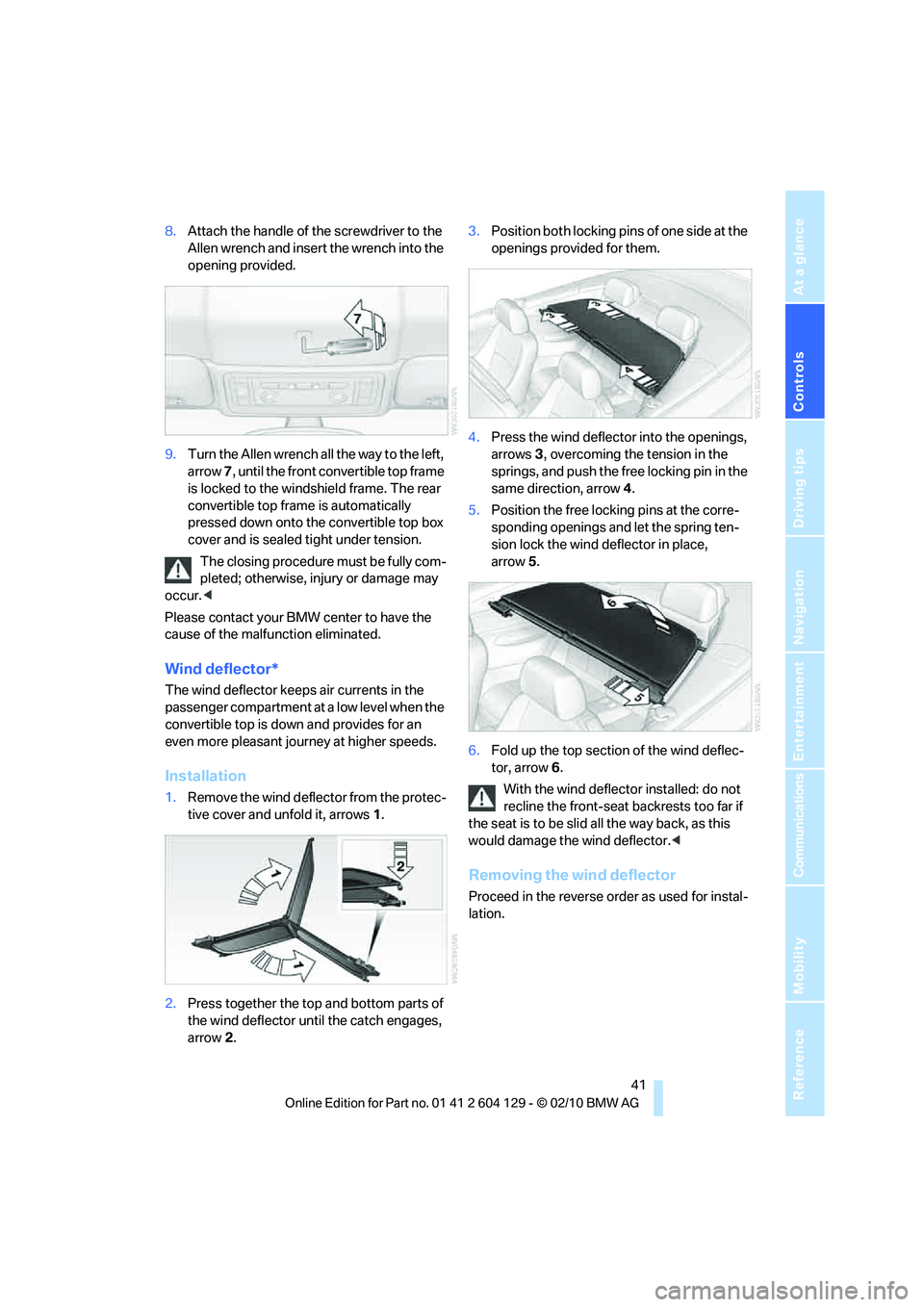
8.Attach the handle of the screwdriver to the
Allen wrench and insert the wrench into the
opening provided.
9.Turn the Allen wrench all the way to the left,
arrow 7, until the front convertible top frame
is locked to the windshield frame. The rear
convertible top frame is automatically
pressed down onto the convertible top box
cover and is sealed tight under tension.
The closing procedure must be fully com-
pleted; otherwise, injury or damage may
occur.<
Please contact your BMW center to have the
cause of the malfunction eliminated.
Wind deflector*
The wind deflector keeps air currents in the
passenger compartment at a low level when the
convertible top is down and provides for an
even more pleasant journey at higher speeds.
Installation
1.Remove the wind deflector from the protec-
tive cover and unfold it, arrows1.
2.Press together the top and bottom parts of
the wind deflector until the catch engages,
arrow 2.3.Position both locking pins of one side at the
openings provided for them.
4.Press the wind deflector into the openings,
arrows3, overcoming the tension in the
springs, and push the free locking pin in the
same direction, arrow4.
5.Position the free locking pins at the corre-
sponding openings and let the spring ten-
sion lock the wind deflector in place,
arrow 5.
6.Fold up the top section of the wind deflec-
tor, arrow6.
With the wind deflector installed: do not
recline the front-seat backrests too far if
the seat is to be slid all the way back, as this
would damage the wind deflector.<
Removing the wind deflector
Proceed in the reverse order as used for instal-
lation.