parking BMW 1 SERIES 2013 E82 Owner's Guide
[x] Cancel search | Manufacturer: BMW, Model Year: 2013, Model line: 1 SERIES, Model: BMW 1 SERIES 2013 E82Pages: 288, PDF Size: 6.73 MB
Page 247 of 288
242
MobilityCare
Carpet and floor mats
Keep floor mats, carpet, and other objects
out of the movement range of the pedals;
otherwise, they may inhi bit the function of the
pedals during driving.
Do not place additional floor mats onto an
existing one or onto other objects.
Only use floor mats that have been approved for
the vehicle and can be appropriately fastened.
Make sure that the floo r mats are securely fas-
tened again after they ha ve been removed, e.g.
for cleaning. <
Floor mats can be removed for the cleaning of
the passenger compartment.
When inserting the floor mats, secure them
again to prevent slippage.
When carpets are heavily soiled, clean with a
microfibre cloth and water or textile cleaner.
When doing so, rub back and forth in the direc-
tion of travel; otherwise, the carpet may
become matted.
Sensors/cameras
Use a microfibre cloth moistened with some
glass cleaner for cleani ng sensors or cameras.
Displays/screens
Use an antistatic microfibre cloth for cleaning
displays.
Do not use chemical or abrasive house-
hold cleaning agents. Keep all types of
fluid and moisture away from the device. Other-
wise, surfaces or electrical components may be
corroded or damaged. When cleaning, avoid
excessive pressure and do not use abrasive
materials; otherwise, you may damage them. <
Convertible top care
The appearance and service life of the convert-
ible top largely depends on its proper care and
operation.
Please follow these instructions:
>Never attempt to fold and stow the convert-
ible top in the convertible compartment
when the top is wet or frozen. Otherwise,
water stains, mildew, and chafe marks may
occur.
> If water spots occur on the inside headliner
despite precautions, remove them using a
microfiber cloth and interior cleaner.
> If the vehicle is parked in an enclosed area
for a longer period of time, make sure that
there is sufficient ventilation.
> Remove any bird droppings immediately,
since they have corrosive properties which
will corrode the conver tible top and damage
the rubber seals.
To remove stains from the convertible
top, do not use stain removers, paint thin-
ners, solvents, benzine or similar substances.
These cleaners may damage the rubber seals.
The improper care or cleaning methods may
cause the convertible top and its seams to
leak. <
To remove heavy soiling, use a special convert-
ible top cleaner.
Always read and follow the manufacturer's
instructions.
After washing the convertible top three to five
times, treat it with an impregnating agent.
Vehicle storage
Your BMW center will be happy to advise you on
preparatory steps for parking the vehicle for
more than three months.
00320051004F004C00510048000300280047004C0057004C005200510003
Page 250 of 288
245
Replacing components
Mobility
Parking lamps, roadside parking lamps
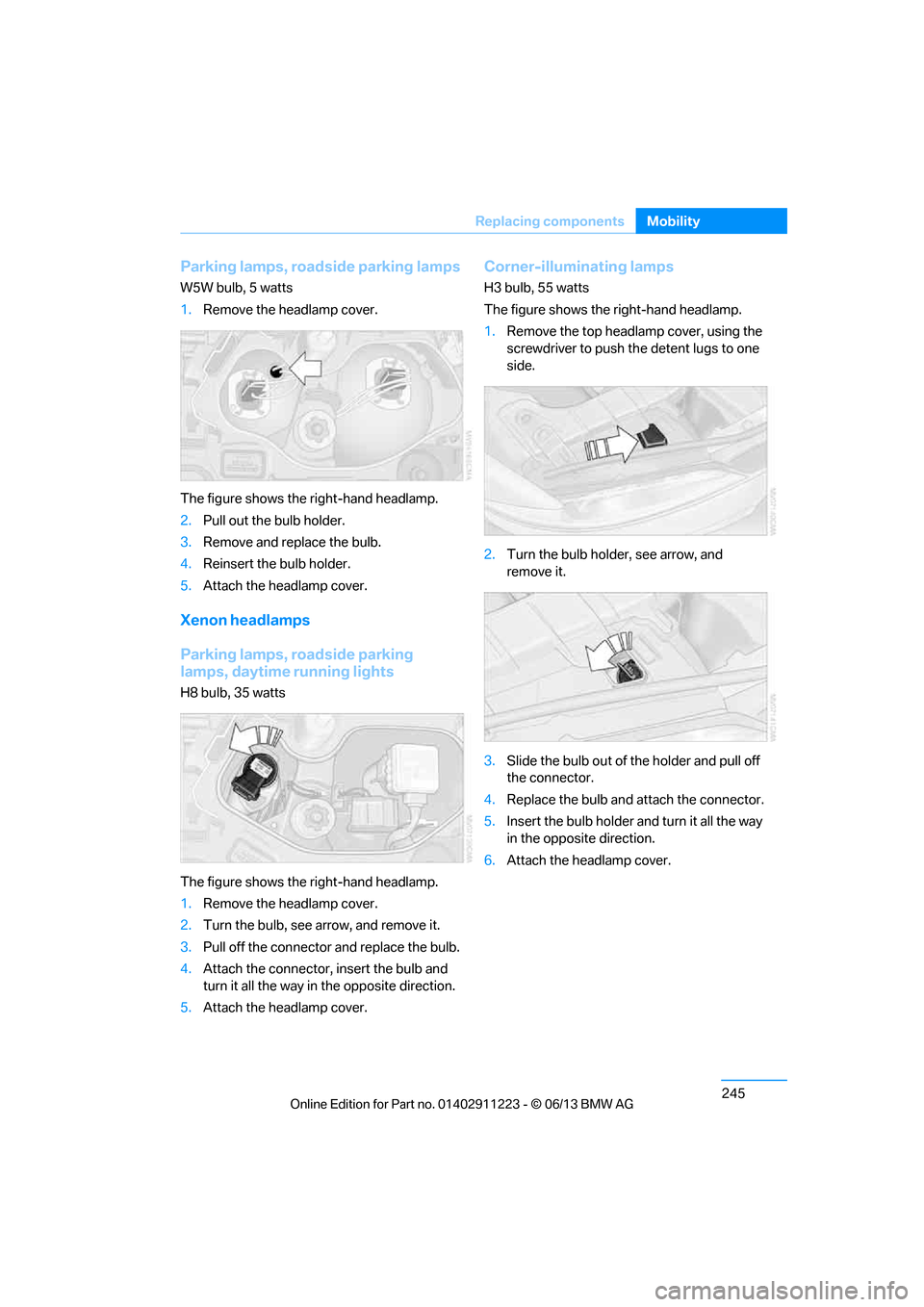
W5W bulb, 5 watts
1.
Remove the headlamp cover.
The figure shows the right-hand headlamp.
2. Pull out the bulb holder.
3. Remove and replace the bulb.
4. Reinsert the bulb holder.
5. Attach the headlamp cover.
Xenon headlamps
Parking lamps, roadside parking
lamps, daytime running lights
H8 bulb, 35 watts
The figure shows the right-hand headlamp.
1.Remove the headlamp cover.
2. Turn the bulb, see arrow, and remove it.
3. Pull off the connector and replace the bulb.
4. Attach the connector, insert the bulb and
turn it all the way in the opposite direction.
5. Attach the headlamp cover.
Corner-illuminating lamps
H3 bulb, 55 watts
The figure shows the right-hand headlamp.
1.Remove the top headlamp cover, using the
screwdriver to push th e detent lugs to one
side.
2. Turn the bulb holder, see arrow, and
remove it.
3. Slide the bulb out of the holder and pull off
the connector.
4. Replace the bulb and attach the connector.
5. Insert the bulb holder and turn it all the way
in the opposite direction.
6. Attach the headlamp cover.
00320051004F004C00510048000300280047004C0057004C005200510003
Page 251 of 288
246
MobilityReplacing components
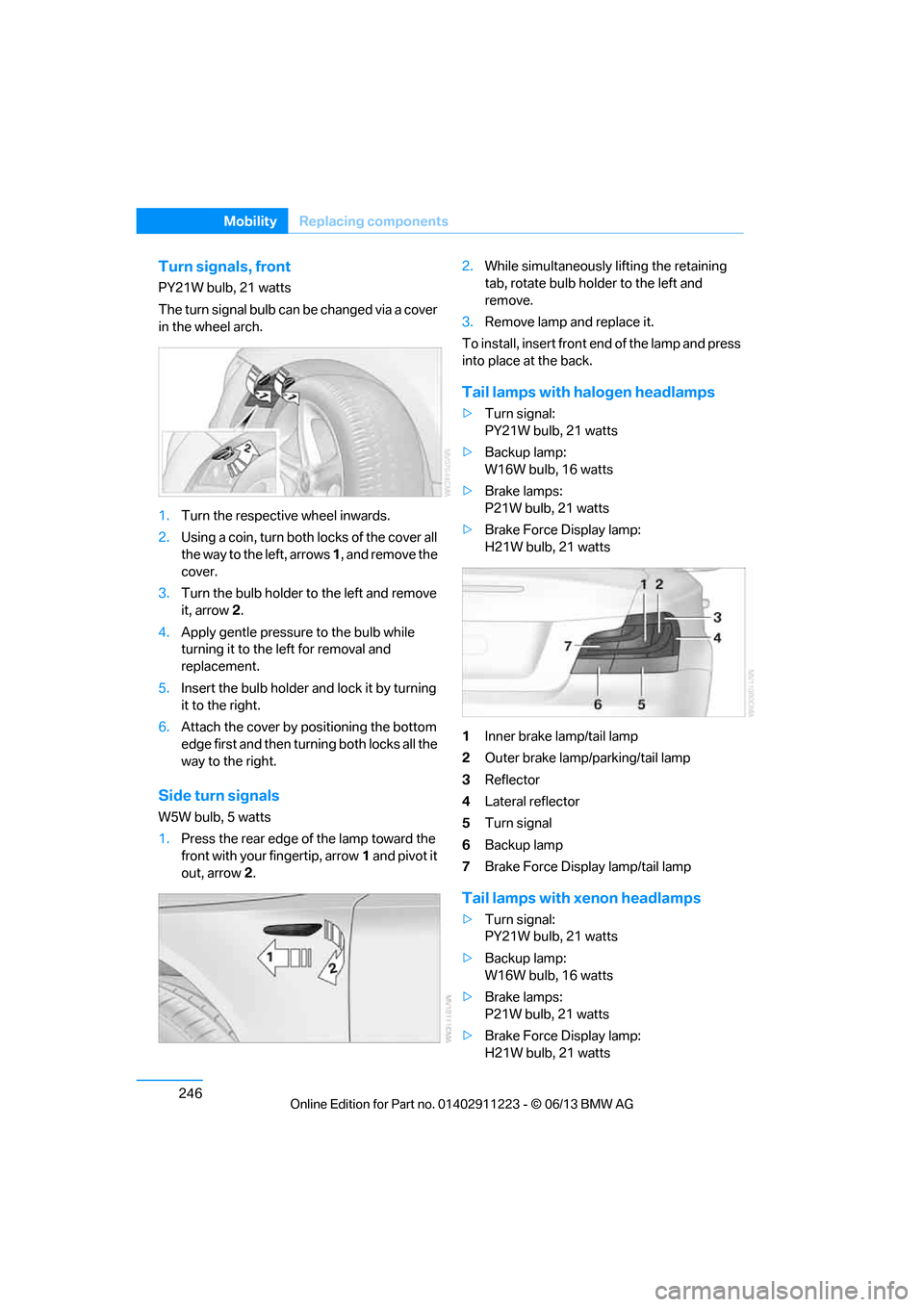
Turn signals, front
PY21W bulb, 21 watts
The turn signal bulb can be changed via a cover
in the wheel arch.
1.Turn the respecti ve wheel inwards.
2. Using a coin, turn both locks of the cover all
the way to the left, arrows 1, and remove the
cover.
3. Turn the bulb holder to the left and remove
it, arrow 2.
4. Apply gentle pressure to the bulb while
turning it to the left for removal and
replacement.
5. Insert the bulb holder and lock it by turning
it to the right.
6. Attach the cover by positioning the bottom
edge first and then turn ing both locks all the
way to the right.
Side turn signals
W5W bulb, 5 watts
1. Press the rear edge of the lamp toward the
front with your fingertip, arrow 1 and pivot it
out, arrow 2. 2.
While simultaneously lifting the retaining
tab, rotate bulb hold er to the left and
remove.
3. Remove lamp and replace it.
To install, insert front end of the lamp and press
into place at the back.
Tail lamps with halogen headlamps
> Turn signal:
PY21W bulb, 21 watts
> Backup lamp:
W16W bulb, 16 watts
> Brake lamps:
P21W bulb, 21 watts
> Brake Force Display lamp:
H21W bulb, 21 watts
1 Inner brake lamp/tail lamp
2 Outer brake lamp/parking/tail lamp
3 Reflector
4 Lateral reflector
5 Turn signal
6 Backup lamp
7 Brake Force Display lamp/tail lamp
Tail lamps with xenon headlamps
>Turn signal:
PY21W bulb, 21 watts
> Backup lamp:
W16W bulb, 16 watts
> Brake lamps:
P21W bulb, 21 watts
> Brake Force Display lamp:
H21W bulb, 21 watts
00320051004F004C00510048000300280047004C0057004C005200510003
Page 252 of 288
247
Replacing components
Mobility
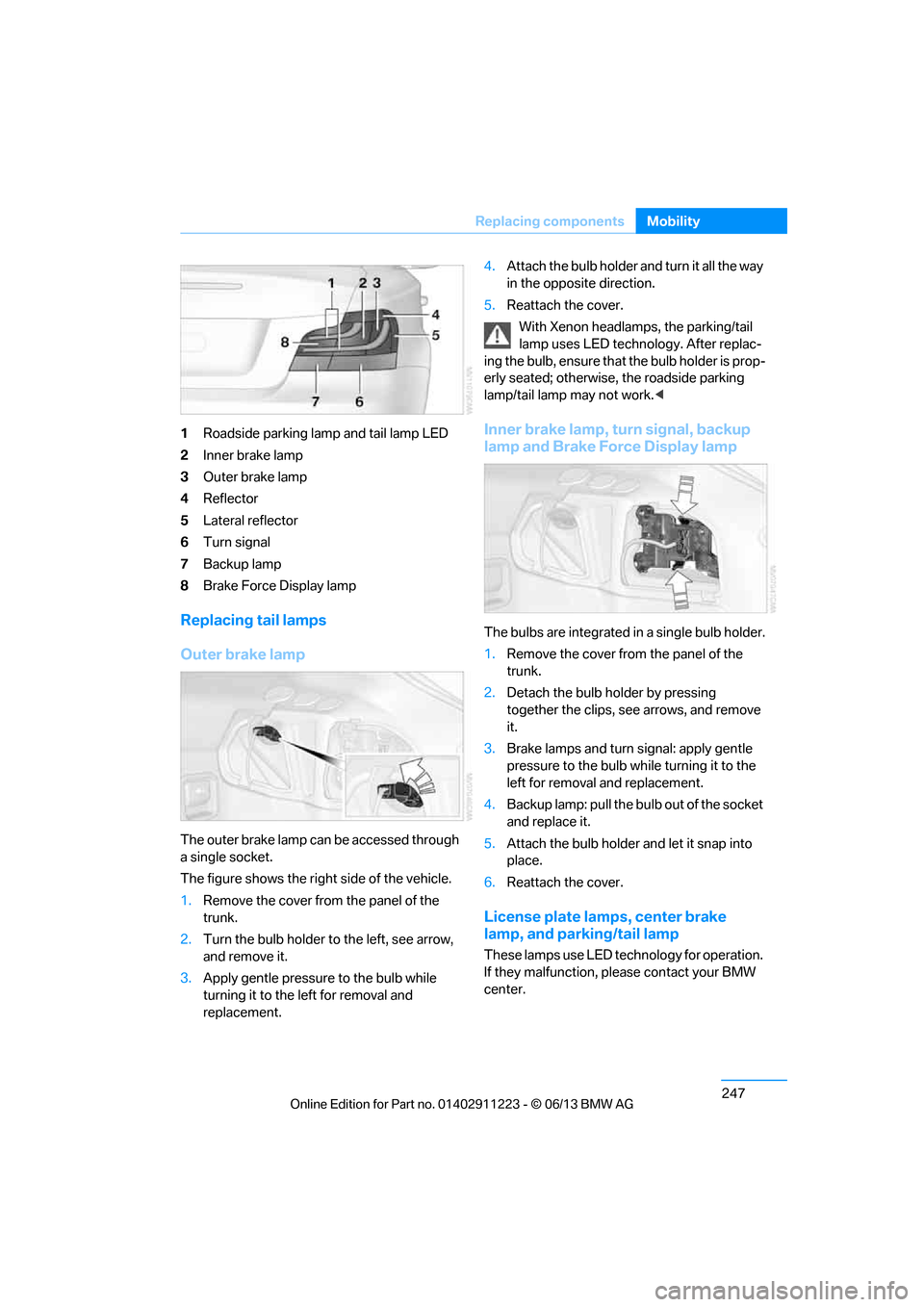
1
Roadside parking lamp and tail lamp LED
2 Inner brake lamp
3 Outer brake lamp
4 Reflector
5 Lateral reflector
6 Turn signal
7 Backup lamp
8 Brake Force Display lamp
Replacing tail lamps
Outer brake lamp
The outer brake lamp can be accessed through
a single socket.
The figure shows the right side of the vehicle.
1.Remove the cover from the panel of the
trunk.
2. Turn the bulb holder to the left, see arrow,
and remove it.
3. Apply gentle pressure to the bulb while
turning it to the left for removal and
replacement. 4.
Attach the bulb holder and turn it all the way
in the opposite direction.
5. Reattach the cover.
With Xenon headlamps, the parking/tail
lamp uses LED techno logy. After replac-
ing the bulb, ensure that the bulb holder is prop-
erly seated; otherwise, the roadside parking
lamp/tail lamp may not work. <
Inner brake lamp, turn signal, backup
lamp and Brake Force Display lamp
The bulbs are integrated in a single bulb holder.
1.Remove the cover from the panel of the
trunk.
2. Detach the bulb holder by pressing
together the clips, see arrows, and remove
it.
3. Brake lamps and turn signal: apply gentle
pressure to the bulb wh ile turning it to the
left for removal and replacement.
4. Backup lamp: pull the bulb out of the socket
and replace it.
5. Attach the bulb holder and let it snap into
place.
6. Reattach the cover.
License plate lamps, center brake
lamp, and parking/tail lamp
These lamps use LED technology for operation.
If they malfunction, please contact your BMW
center.
00320051004F004C00510048000300280047004C0057004C005200510003
Page 257 of 288
252
MobilityGiving and receiving assistance
Connecting jumper cables
Connect the jumper cables in the correct
order to prevent sparking at the battery,
which could cause injury. <
Your BMW has a jump-starting connection in
the engine compartment which acts as the bat-
tery's positive terminal, refer also to the Engine
compartment overview on page 232. The cap is
marked with +.
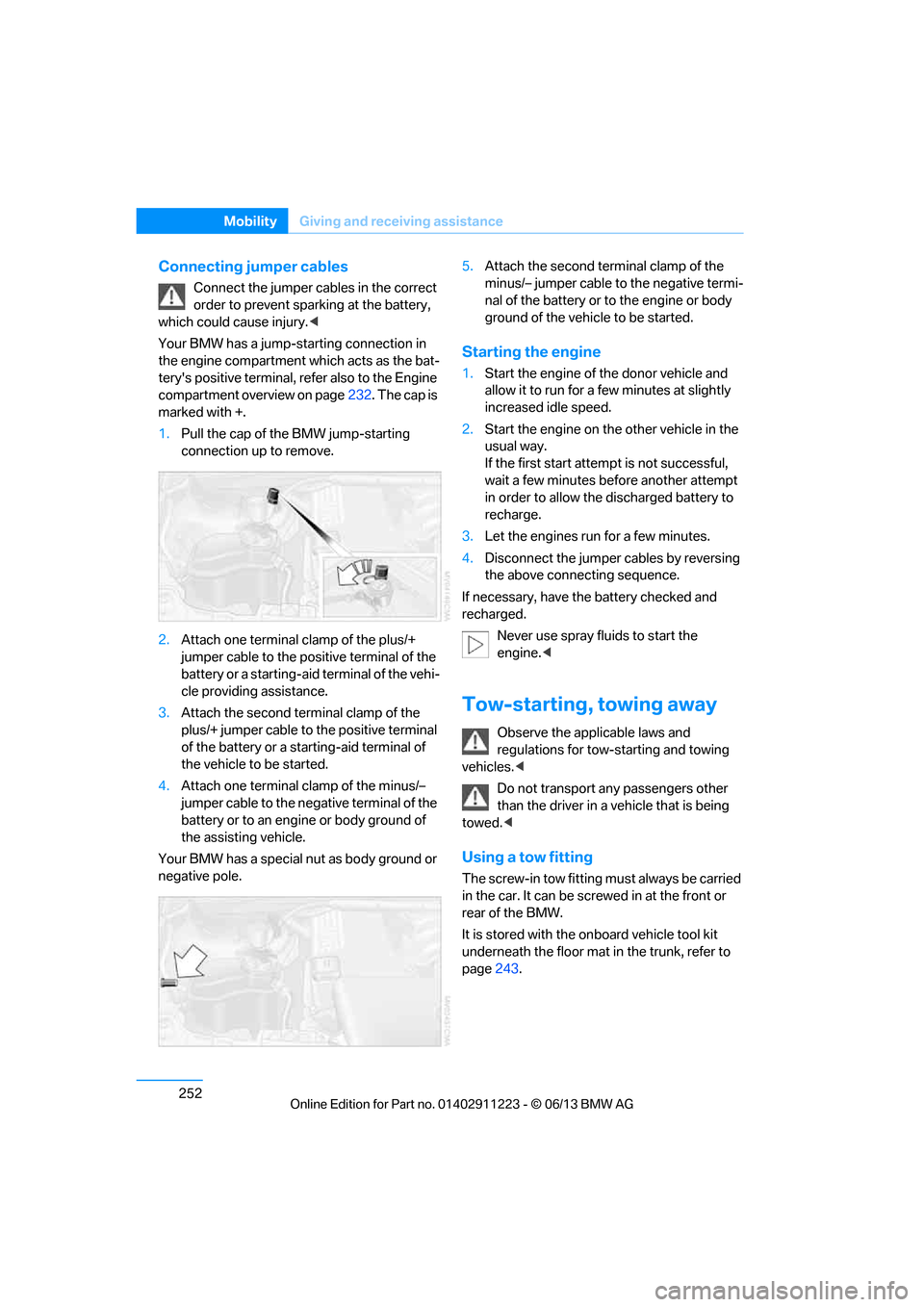
1. Pull the cap of the BMW jump-starting
connection up to remove.
2. Attach one terminal clamp of the plus/+
jumper cable to the positive terminal of the
battery or a starting-aid terminal of the vehi-
cle providing assistance.
3. Attach the second te rminal clamp of the
plus/+ jumper cable to the positive terminal
of the battery or a star ting-aid terminal of
the vehicle to be started.
4. Attach one terminal clamp of the minus/–
jumper cable to the nega tive terminal of the
battery or to an engine or body ground of
the assisting vehicle.
Your BMW has a special nut as body ground or
negative pole. 5.
Attach the second te rminal clamp of the
minus/– jumper cable to the negative termi-
nal of the battery or to the engine or body
ground of the vehicle to be started.
Starting the engine
1. Start the engine of the donor vehicle and
allow it to run for a few minutes at slightly
increased idle speed.
2. Start the engine on the other vehicle in the
usual way.
If the first start attempt is not successful,
wait a few minutes be fore another attempt
in order to allow the discharged battery to
recharge.
3. Let the engines run for a few minutes.
4. Disconnect the jumper cables by reversing
the above connecting sequence.
If necessary, have the battery checked and
recharged. Never use spray fluids to start the
engine. <
Tow-starting, towing away
Observe the applicable laws and
regulations for tow-starting and towing
vehicles. <
Do not transport any passengers other
than the driver in a vehicle that is being
towed. <
Using a tow fitting
The screw-in tow fitting must always be carried
in the car. It can be screwed in at the front or
rear of the BMW.
It is stored with the onboard vehicle tool kit
underneath the floor mat in the trunk, refer to
page 243.
00320051004F004C00510048000300280047004C0057004C005200510003
Page 258 of 288
253
Giving and receiving assistance
Mobility
Use only the tow fitting provided with the
vehicle and screw it a
ll the way in. Use the
tow fitting for towing on paved roads only. Avoid
lateral loading of the tow fitting, e.g. do not lift
the vehicle by the tow fitting. Otherwise, the
tow fitting and the vehicle could be damaged. <
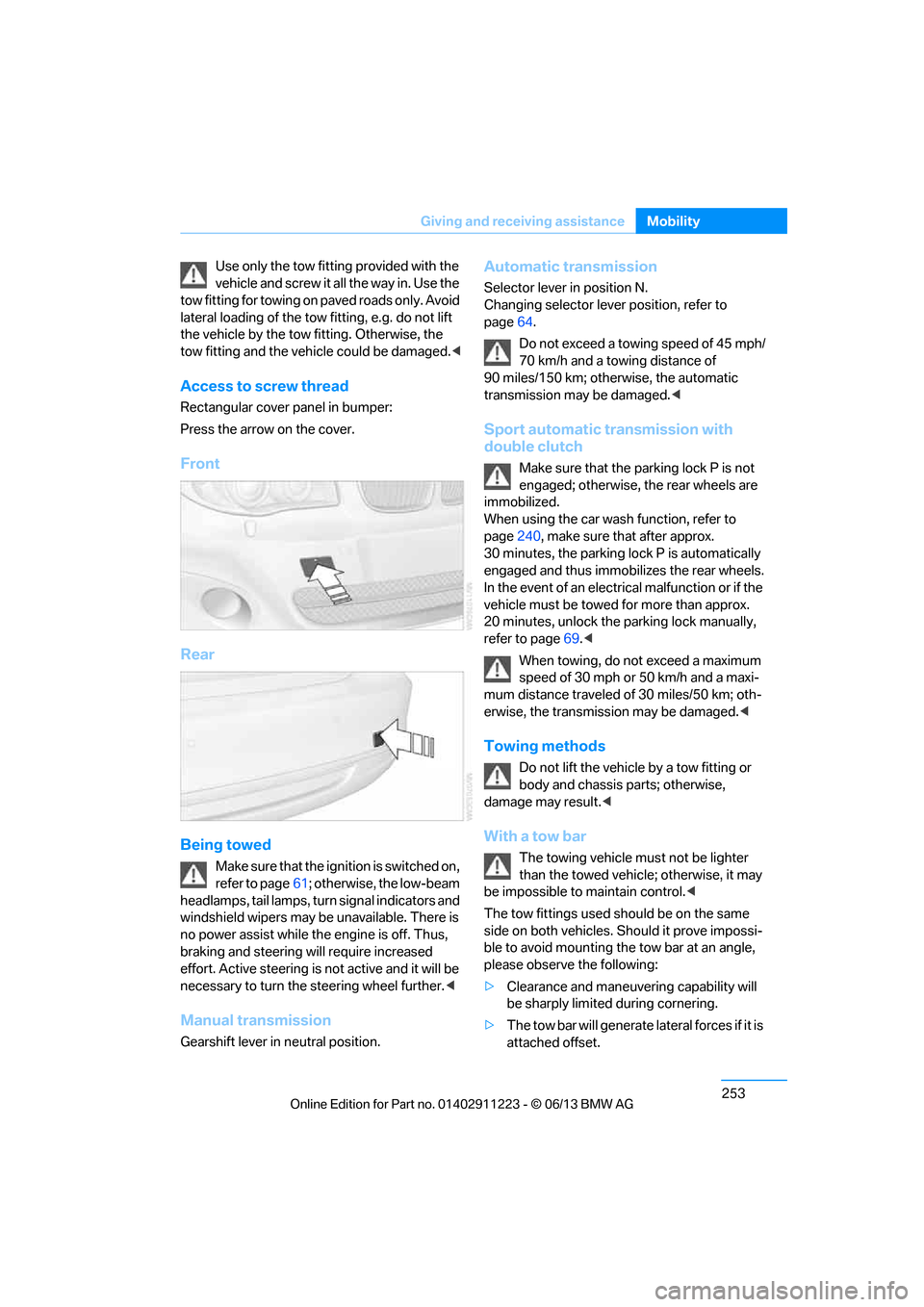
Access to screw thread
Rectangular cover panel in bumper:
Press the arrow on the cover.
Front
Rear
Being towed
Make sure that the ignition is switched on,
refer to page61; otherwise, the low-beam
headlamps, tail lamps, turn signal indicators and
windshield wipers may be unavailable. There is
no power assist while the engine is off. Thus,
braking and steering will require increased
effort. Active steering is not active and it will be
necessary to tu rn the steering wheel further. <
Manual transmission
Gearshift lever in neutral position.
Automatic transmission
Selector lever in position N.
Changing selector lever position, refer to
page 64.
Do not exceed a towing speed of 45 mph/
70 km/h and a towing distance of
90 miles/150 km; otherwise, the automatic
transmission may be damaged. <
Sport automatic transmission with
double clutch
Make sure that the parking lock P is not
engaged; otherwise, the rear wheels are
immobilized.
When using the car wash function, refer to
page 240, make sure that after approx.
30 minutes, the parking lock P is automatically
engaged and thus immobilizes the rear wheels.
In the event of an electrical malfunction or if the
vehicle must be towed for more than approx.
20 minutes, unlock the parking lock manually,
refer to page 69.<
When towing, do not exceed a maximum
speed of 30 mph or 50 km/h and a maxi-
mum distance traveled of 30 miles/50 km; oth-
erwise, the transmission may be damaged. <
Towing methods
Do not lift the vehicle by a tow fitting or
body and chassis parts; otherwise,
damage may result. <
With a tow bar
The towing vehicle must not be lighter
than the towed vehicle; otherwise, it may
be impossible to maintain control.<
The tow fittings used sh ould be on the same
side on both vehicles. Should it prove impossi-
ble to avoid mounting the tow bar at an angle,
please observe the following:
> Clearance and maneuvering capability will
be sharply limited during cornering.
> The tow bar will ge nerate lateral forces if it is
attached offset.
00320051004F004C00510048000300280047004C0057004C005200510003
Page 274 of 288
269
Everything from A to Z
Reference
Average speed
77
Avoid highways in
navigation 143
Avoiding unintentional alarms 40
Axle loads, refer to Weights 259
B
Backrests, refer to Seats 50
Backrest width adjustment 51
Back seats, refer to Rear seats
– adjusting head restraints 52
Backup lamp, replacing bulb 247
Bag for skis, refer to Ski bag 118
Band-aids, refer to First aid
pouch 251
Bar, refer to Tow-starting, towing away 253
Base plate for telephone or mobile phone
– refer to Snap-in adapter 199
Bass, tone control 155
Battery 248
– charging 248
– disposal 42,249
– jump starting 251
– replacing 248
– temporary power failure 248
Battery renewal
– remote control for vehicle 41
Being towed 253
Belts, refer to Safety belts 54
Belt tensioner, refer to Safety
belts 54
Beverage holders, refer to Cupholders 116
Blower, refer to Air volume 108 Bluetooth, activating/
deactivating 189
Bluetooth audio 180
– disconnecting an audio connection 183
– pairing device 181
– playback 182
– unpairing device 183
– what to do if … 183
BMW Assist 212
– updating 216
BMW Info 206
BMW Maintenance System 237
BMW Online 214
Bottle holders, refer to
Cupholders 116
Brake Assist, refer to Dynamic Brake Control 89
Brake fluid
– service requirements 80
Brake Force Display 96
Brake lamps
– brake force display 96
– replacing bulb 247
Brake pads, breaking in 124
Brake pedal, refer to Braking safely 126
Bra k
e rotors 127
– brakes 124
– breaking in 124
Brakes
– ABS 89
– BMW Maintenance
System 237
– braking safely 126
– breaking in 124
– parking brake 63
– service requirements 80Brake system
124
– BMW Maintenance
System 237
– breaking in 124
– disc brakes 127
Breakdown services, refer to Roadside Assistance 251
Breaking in the clutch 124
Break-in period 124
Bulb changing, refer to Lamps and bulbs 243
Button for starting the engine 61
Buttons on the steering
wheel 13
C
Calendar 207
– displaying appointment 207
– selecting calendar day 207
California Proposition 65
warning 6
Call
– accepting 193
– ending 193
– muting the microphone 195
– rejecting 193
Calling, refer to Phone numbers, dialing 194
Calls
– with multiple parties 194
Can holders, refer to Cupholders 116
Capacities 259
Capacity of the trunk 259
Car battery, refer to Vehicle
battery 248
Car care, refer to Care 239
00320051004F004C00510048000300280047004C0057004C005200510003
Page 277 of 288
272
ReferenceEverything from A to Z
Directory for navigation, refer
to Address book 136
Display, refer to Control Display 20
Displaying contact
pictures 203
Display lighting, refer to Instrument lighting 104
Displays, refer to Instrument cluster 14
Displays and controls 12
Disposal
– of coolant 235
– remote control battery 42
– vehicle battery 249
Distance, refer to
Computer 78
Distance remaining to service, refer to Service
requirements 80
Distance to destination, refer to Computer 78
Distance warning, refer to Park Distance Control
PDC 88
Door key, refer to Integrated key/remote control 32
Door lock 36
Door lock, confirmation signals 35
Doors, manual operation 36
DOT Quality Grades 228
Draft-free ventilation 109
Drinks holders, refer to
Cupholders 116
Drive mode 68
Drive-off assistance, refer to
DSC 89
Drive-off assistant 90
Driving dynamics control 69
Driving lamps, refer to Parking lamps/low beams 100
Driving notes 124
Driving off on hills, refer to Drive-off assistant 90Driving stability control
systems 89
Driving through water 126
Driving tips, refer to Driving notes 124
Dry air, refer to Air conditioning 109
DSC Dynamic Stability
Control 89
DTC Dynamic Traction Control 90
– indicator lamps 90
DVD
– country codes 168
– settings 169
– video playback 168
DVD menu 169
DVD player, refer to CD player 166
DVD video 168
D y
namic Brake Control
DBC 89
Dynamic destination guidance 149
Dynamic Stability Control
DSC 89
Dynamic Traction Control DTC 90
– indicator lamps 90
E
EBV Electronic brake-force
distribution 89
Eject button, see buttons on the CD/DVD player 154
Electrical defect
– 7-gear Sport automatic transmission with double
clutch 69
Electrical malfunction
– door lock 36
– fuel filler flap 221
Electronic brake-force distribution EBV 89Electronic oil level check
233
Electronic Stability Program
ESP, refer to Dynamic
Stability Control DSC 89
E-mail 206
Emergency operation, refer to Manual operation
– door lock 36
– fuel filler flap 221
– transmission lock, automatic transmission 66
Emergency release, trunk lid 38
Emergency Request 250
Emergency services, refer to Roadside Assistance 251
Energy, saving
– saving fuel 124
Engine
– breaking in 124
– starting 62
– starting, Comfort Access 40
– switching off 63
Engine compartment 232
Engine coolant, refer to
Coolant 235
Engine oil
– adding 235
– additives 235
– alternative oil types 235
– approved engine oils 235
– BMW Maintenance System 237
– checking level 233
– intervals between changes, refer to Service
requirements 80
Engine oil level, checking 233
Engine starting, refer to Starting the engine 62
Entering the postal code for navigation 135
Entry map for destination 139
Equalizer, tone control 155
00320051004F004C00510048000300280047004C0057004C005200510003
Page 278 of 288
273
Everything from A to Z
Reference
ESP Electronic Stability
Program, refer to Dynamic
Stability Control DSC 89
Exhaust system, refer to Hot exhaust system 126
Exterior mirrors 55
– adjusting 55
– automatic dimming
feature 56
– automatic heating 56
– folding in and out 55
External devices 177
– random sequence 180
Eyes
– for tow-starting and towing away 252
– for tying down loads 128
F
Failure messages, refer to
Check Control 84
Failure of an electrical consumer 249
False alarm, refer to Avoiding
unintentional alarms 40
Fastening safety belts, refer to Safety belts 54
Fastest route for navigation 143
Fast forward
– CD player 168
Filter of automatic climate control, refer to Microfilter/
activated charcoal filter 109
First aid pouch 251
Fixture for remote control,
refer to Ignition lock 61
Flash when locking/ unlocking 35
Flat tire
– run-flat tires 231
– tire pressure monitor
TPM 92 Flat Tire Monitor FTM
91
– indicating a flat tire 92
– initializing the system 91
– system limits 91
Flat tires, refer to Tire
condition 229
FM, waveband 157
Fog lamps 103
– indicator lamp 15,104
Footwell lamps 104
For your own safety 5
Free memory capacity, music collection 176
Front airbags 97
Front seat adjustment 50
Frost on windows, refer to
Defrosting windows 109
FTM, refer to Flat Tire Monitor 91
Fuel 221
– gauge 76
– high-quality brands 221
– quality 221
– specifications 221
– tank contents, refer to
Capacities 259
Fuel clock, refer to Fuel gauge 76
Fuel consumption indicator, refer to Average fuel
consumption 77
Fuel consumption statistics, refer to Average fuel
consumption 77
Fuel display, refer to Fuel gauge 76
Fuel filler flap 220
– releasing in the event of electrical malfunction 221
Fuses 249
G
Garage door opener, refer to
Integrated universal remote
control 111 Gasoline, refer to Required
fuel 221
Gasoline display, refer to Fuel gauge 76
Gas station
recommendations 145
Gear indicator, automatic transmission 64
Gear shifting
– automatic transmission 64
– manual transmission 64
Gearshift lever 67
– automatic transmission with Steptronic 64
– manual transmission 64
General driving notes 125
Glass roof, electric 43
– convenient opening and closing with Comfort
Access 40
– opening, closing 43
– pinch protection system 44
– remote control 34
– tilting 43
Glove compartment 115
GPS navigation, refer to Navigation system 132
Grills, refer to Air vents 106
Gross vehicle weight, refer to Weights 259
H
Halogen lamps
– replacing bulbs 244
Handbrake, refer to Parking brake 63
Hands-free system 197
Hands-free system, refer to Microphone for hands-free
mode 16
Hazard warning flashers 16
HD Radio 159
Head airbags 97
00320051004F004C00510048000300280047004C0057004C005200510003
Page 280 of 288
275
Everything from A to Z
Reference
Keypad dialing
195
Kickdown 65
Knock control 221
L
Lamps
– adaptive light control 101
– interior lighting 104
Lamps, refer to Parking lamps/ Low beams 100
Lamps and bulbs, replacing bulbs 243
Lashing eyes, refer to
Securing cargo 128
Last destinations 137
LATCH child restraint fixing system 59
Launch Control 70
Leather care 240
LED Light-emitting diodes 243
Length, refer to Dimensions 258
License plate lamp, replacing
bulb 247
Light
– instrument lighting 104
– refer to High-beam Assistant 102
Light-alloy wheels 241
Light control
– refer to High-beam Assistant 102
Light-emitting diodes LED 243
Lighter 117
– socket 117
Lighting
– lamps and bulbs 243
– of the instruments 104
– of vehicle, refer to Lamps 100
Light switch 100 Limit, refer to Speed limit
86
Load 127
Load securing equipment, refer to Securing cargo 128
Lock buttons of doors, refer to
Locking 37
Locking
– adjusting confirmation
signal 35
– from inside 37
– from outside 34
– without remote control, refer to Comfort Access 40
Locking and unlocking doors
– from inside 37
– from outside 34
Low beam control, refer to High-beam Assistant 102
Low-beam headlamps 100
– automatic 100
– replacing bulbs 244
Lower back support, refer to
Lumbar support 51
Luggage compartment
– lid, refer to Trunk lid 37
Luggage compartment, refer to Trunk
Luggage rack, refer to Roof-
mounted luggage rack 129
Lu mbar su
pport51
M
M+S tires, refer to Winter
tires 231
Maintenance, refer to
– BMW Maintenance
System 237
– Service and Warranty Information Booklet for US
models or in the Warranty
and Service Guide Booklet
for Canadian models
Maintenance system 237Malfunction warnings, refer to
Check Control 84
Managing music 175
Manually unlocking parking lock 69
Manual operation
– door lock 36
– fuel filler flap 221
– parking lock 69
– transmission lock, automatic transmission 66
Manual operation with automatic transmission 65
Manual transmission 64
Map for navigation
– changing scale 146
– entering destination 139
Map view 145
Maximum cooling 107
Maximum speed
– for winter tires 231
Menus, refer to iDrive 20
Messages 204
Messages from the Concierge service 205
Microfilter/activated-charcoal filter for automatic climate
control 109
Microphone for telephone 16
Mirror dimming feature 56
Mirrors 55
– automatic curb monitor 56
– exterior mirrors 55
– heating 56
– interior rearview mirror 56
Mobile phone
– adjusting volume 193
– connecting, refer to Mobile phone, pairing 189
– operation 193
– pairing 189
– suitable mobile phones 188
– unpairing 191
– what to do if…. 192
00320051004F004C00510048000300280047004C0057004C005200510003