radio BMW 1 SERIES 2013 E82 Owner's Guide
[x] Cancel search | Manufacturer: BMW, Model Year: 2013, Model line: 1 SERIES, Model: BMW 1 SERIES 2013 E82Pages: 288, PDF Size: 6.73 MB
Page 166 of 288
161
Satellite radio
Entertainment
Satellite radio
Vehicle equipment
In this chapter, all production, country, and
optional equipment that is offered in the model
range is described. Equipment is also described
that is not available because of, for example,
selected options or coun
try version. This also
applies to safety related functions and systems.
General information
The channels are offered in fixed packages.
Packages must be ac tivated by telephone.
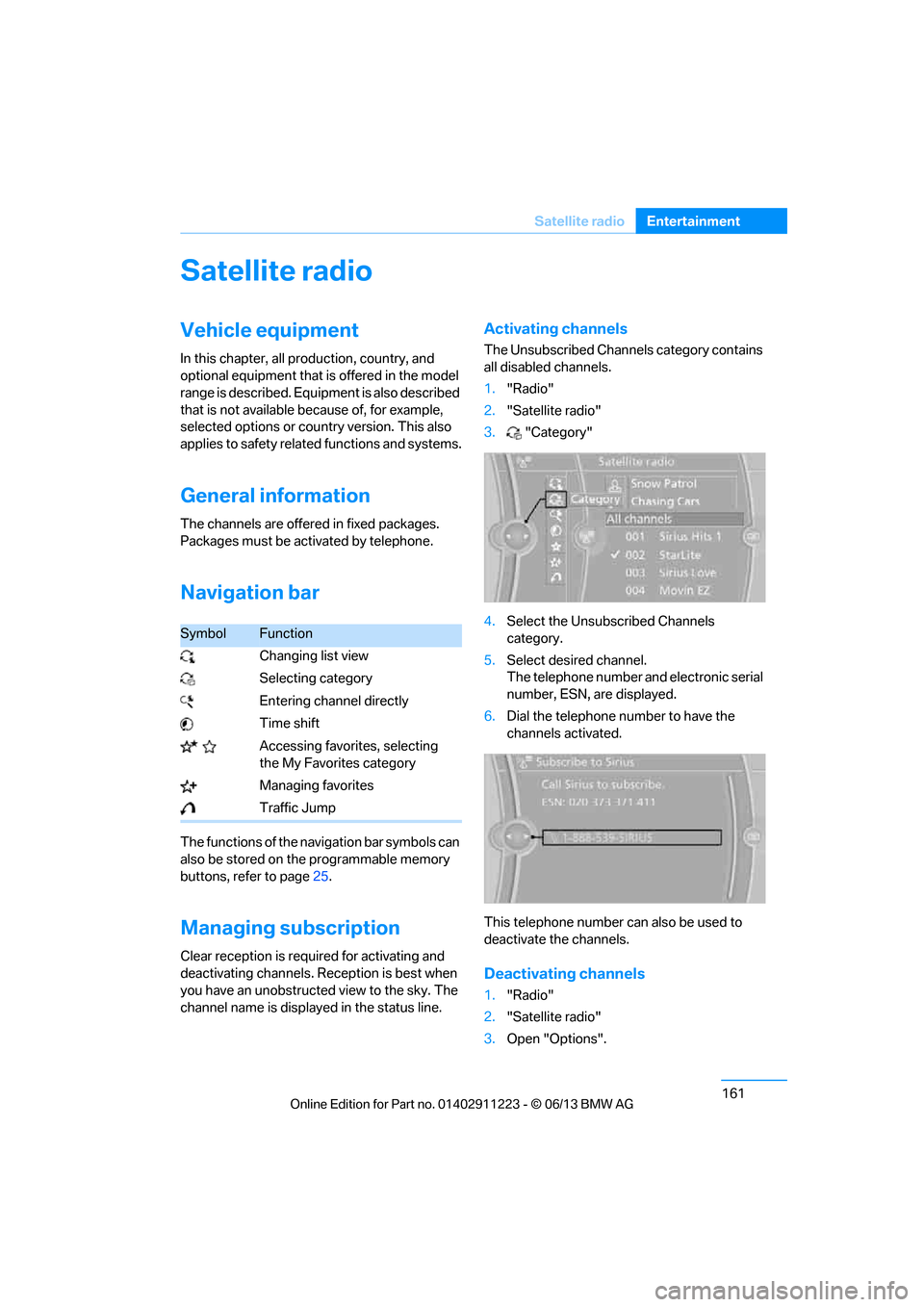
Navigation bar
The functions of the navigation bar symbols can
also be stored on the programmable memory
buttons, refer to page 25.
Managing subscription
Clear reception is required for activating and
deactivating channels. Re ception is best when
you have an unobstructed view to the sky. The
channel name is displayed in the status line.
Activating channels
The Unsubscribed Channels category contains
all disabled channels.
1. "Radio"
2. "Satellite radio"
3. "Category"
4. Select the Unsubscribed Channels
category.
5. Select desired channel.
The telephone number and electronic serial
number, ESN, are displayed.
6. Dial the telephone number to have the
channels activated.
This telephone number can also be used to
deactivate the channels.
Deactivating channels
1. "Radio"
2. "Satellite radio"
3. Open "Options".
SymbolFunction
Changing list view
Selecting category
Entering channel directly
Time shift
Accessing favorites, selecting the My Favorites category
Managing favorites
Traffic Jump
00320051004F004C00510048000300280047004C0057004C005200510003
Page 167 of 288
162
EntertainmentSatellite radio
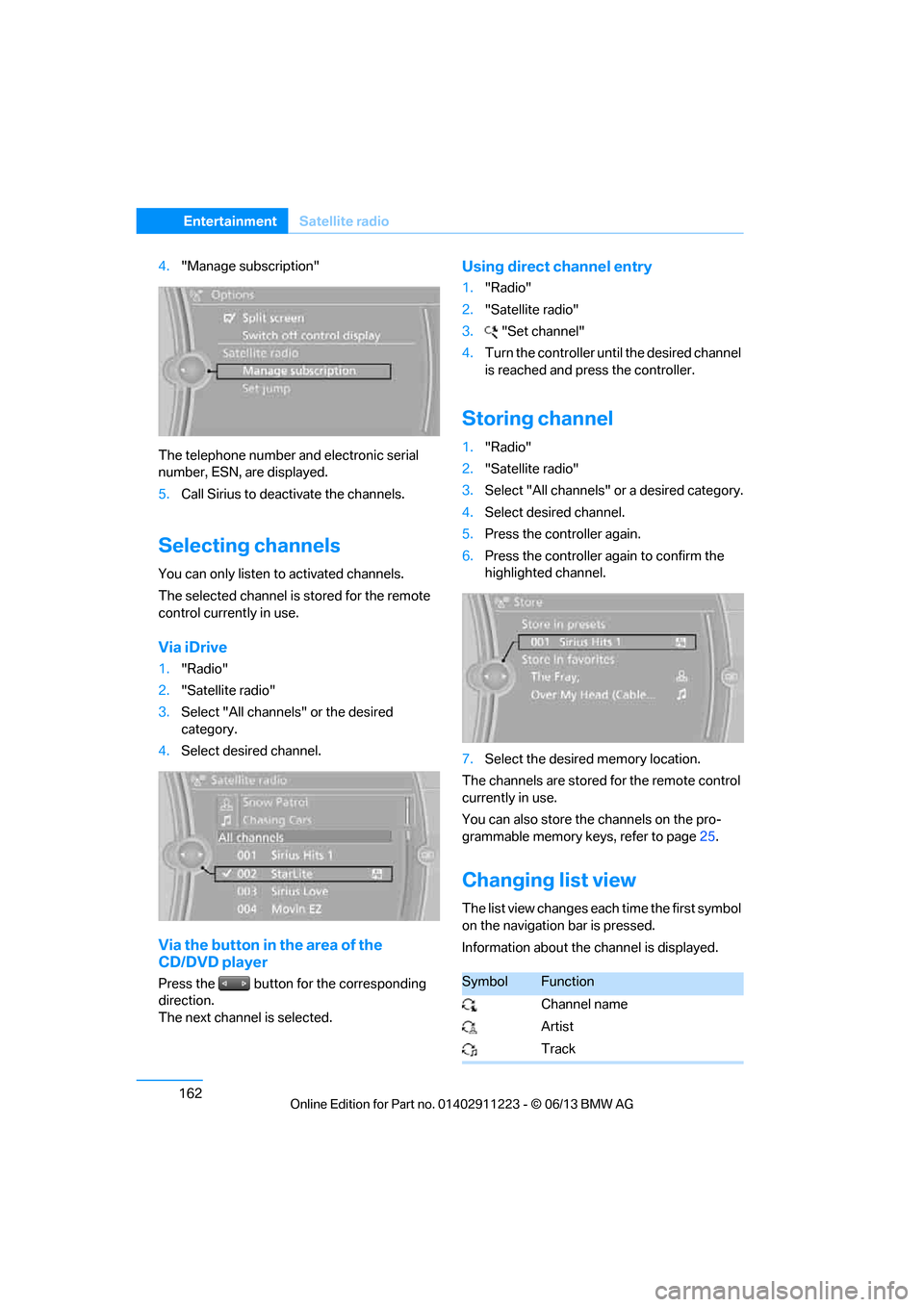
4."Manage subscription"
The telephone number and electronic serial
number, ESN, are displayed.
5. Call Sirius to deacti vate the channels.
Selecting channels
You can only listen to activated channels.
The selected channel is stored for the remote
control currently in use.
Via iDrive
1. "Radio"
2. "Satellite radio"
3. Select "All channels" or the desired
category.
4. Select desired channel.
Via the button in the area of the
CD/DVD player
Press the button for the corresponding
direction.
The next channel is selected.
Using direct channel entry
1."Radio"
2. "Satellite radio"
3. "Set channel"
4. Turn the controller unt il the desired channel
is reached and pr ess the controller.
Storing channel
1."Radio"
2. "Satellite radio"
3. Select "All channels" or a desired category.
4. Select desired channel.
5. Press the controller again.
6. Press the controller again to confirm the
highlighted channel.
7. Select the desired memory location.
The channels are stored for the remote control
currently in use.
You can also store the channels on the pro-
grammable memory ke ys, refer to page25.
Changing list view
The list view changes each time the first symbol
on the navigation bar is pressed.
Information about the channel is displayed.
SymbolFunction
Channel name
Artist
Track
00320051004F004C00510048000300280047004C0057004C005200510003
Page 168 of 288
163
Satellite radio
Entertainment
Selecting category
1.
"Radio"
2. "Satellite radio"
3. "Category"
4. Select the desired category.
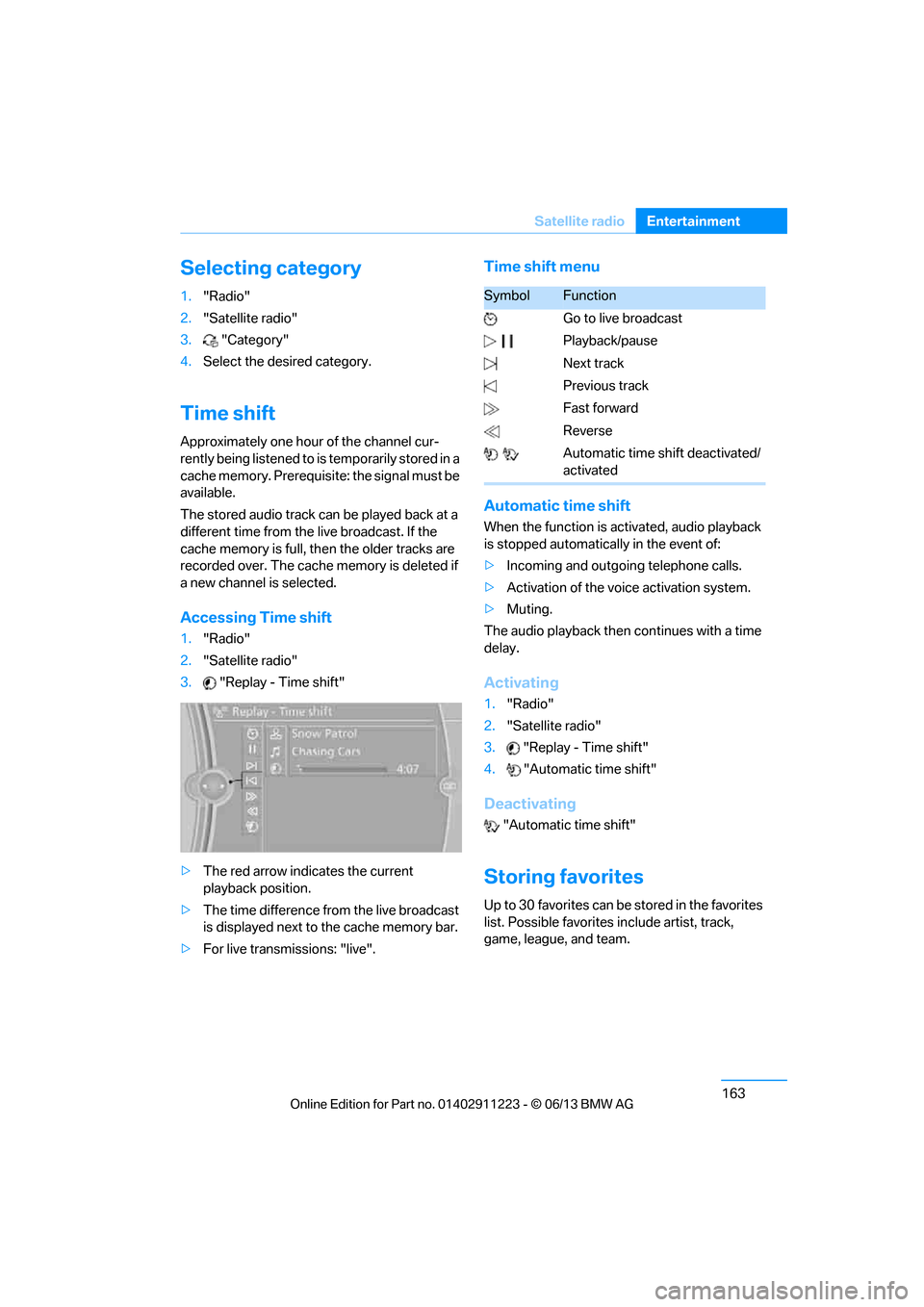
Time shift
Approximately one hour of the channel cur-
rently being listened to is temporarily stored in a
cache memory. Prerequisite: the signal must be
available.
The stored audio track can be played back at a
different time from the live broadcast. If the
cache memory is full, then the older tracks are
recorded over. The cache memory is deleted if
a new channel is selected.
Accessing Time shift
1. "Radio"
2. "Satellite radio"
3. "Replay - Time shift"
> The red arrow indicates the current
playback position.
> The time difference from the live broadcast
is displayed next to the cache memory bar.
> For live transmissions: "live".
Time shift menu
Automatic time shift
When the function is ac tivated, audio playback
is stopped automatica lly in the event of:
> Incoming and outgoing telephone calls.
> Activation of the voic e activation system.
> Muting.
The audio playback then continues with a time
delay.
Activating
1. "Radio"
2. "Satellite radio"
3. "Replay - Time shift"
4. "Automatic time shift"
Deactivating
"Automatic time shift"
Storing favorites
Up to 30 favorites can be stored in the favorites
list. Possible favorites include artist, track,
game, league, and team.
SymbolFunction
Go to live broadcast
Playback/pause
Next track
Previous track
Fast forward
Reverse
Automatic time shift deactivated/
activated
00320051004F004C00510048000300280047004C0057004C005200510003
Page 169 of 288
164
EntertainmentSatellite radio
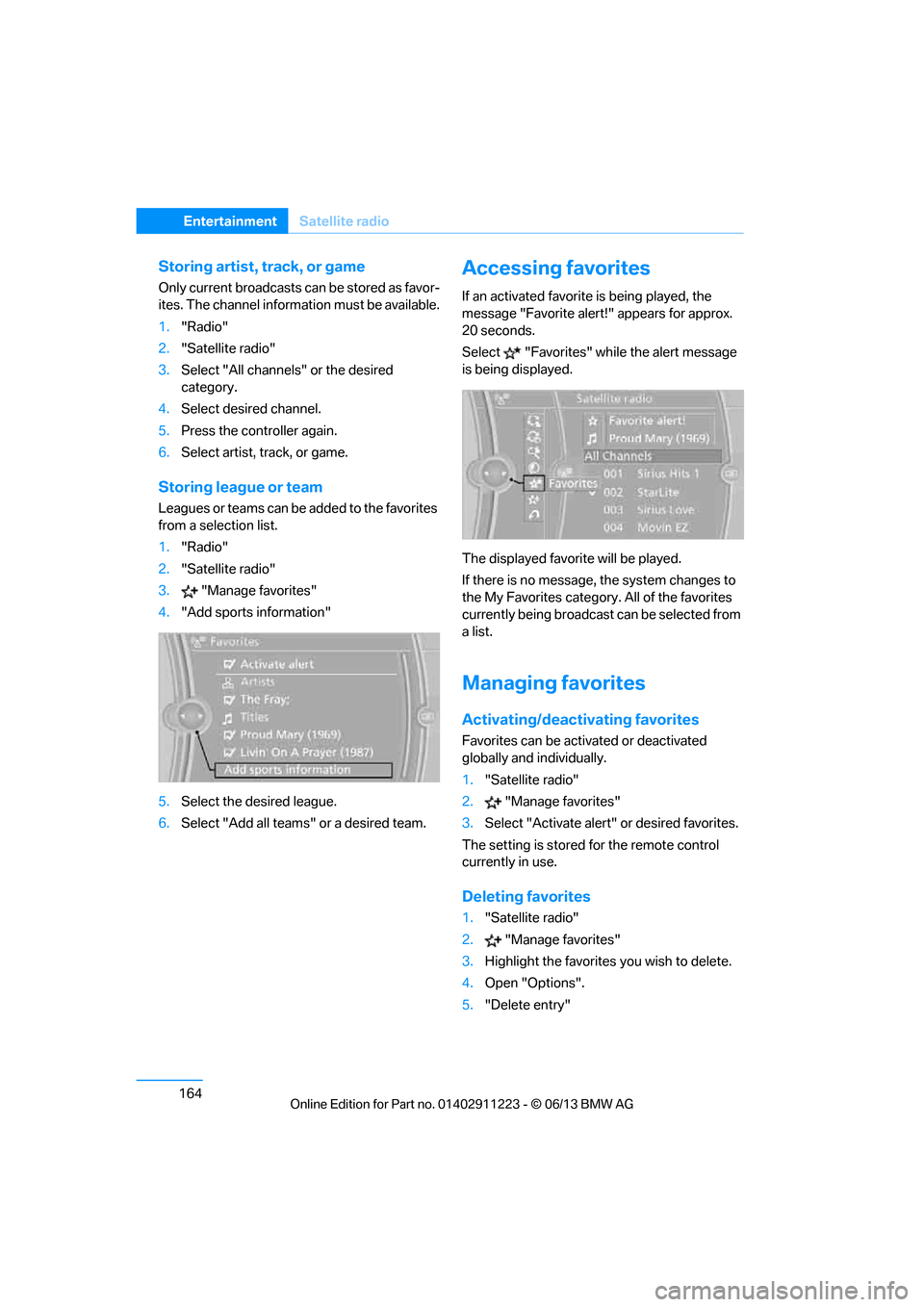
Storing artist, track, or game
Only current broadcasts can be stored as favor-
ites. The channel information must be available.
1."Radio"
2. "Satellite radio"
3. Select "All channels" or the desired
category.
4. Select desired channel.
5. Press the controller again.
6. Select artist, track, or game.
Storing league or team
Leagues or teams can be added to the favorites
from a selection list.
1. "Radio"
2. "Satellite radio"
3. "Manage favorites"
4. "Add sports information"
5. Select the desired league.
6. Select "Add all teams" or a desired team.
Accessing favorites
If an activated favorite is being played, the
message "Favorite alert! " appears for approx.
20 seconds.
Select "Favorites" while the alert message
is being displayed.
The displayed favorite will be played.
If there is no message, the system changes to
the My Favorites category. All of the favorites
currently being broadcast can be selected from
a list.
Managing favorites
Activating/deactivating favorites
Favorites can be acti vated or deactivated
globally and individually.
1. "Satellite radio"
2. "Manage favorites"
3. Select "Activate alert" or desired favorites.
The setting is stored for the remote control
currently in use.
Deleting favorites
1. "Satellite radio"
2. "Manage favorites"
3. Highlight the favorites you wish to delete.
4. Open "Options".
5. "Delete entry"
00320051004F004C00510048000300280047004C0057004C005200510003
Page 170 of 288
165
Satellite radio
Entertainment
Traffic Jump
Traffic and weather information for a selected
region are broadcast at intervals of a few
minutes.
Selecting region
1.
"Radio"
2. "Satellite radio"
3. Open "Options".
4. "Set jump"
5. Select the desired region.
The region is stored for the remote control
currently in use.
Activating/deactivating Jump
1. "Radio"
2. "Satellite radio"
3. "Jump to:"
As soon as information about the selected
region becomes availabl e, it is broadcast.
A new panel appears in the display.
Cancel Traffic Jump: "Cancel".
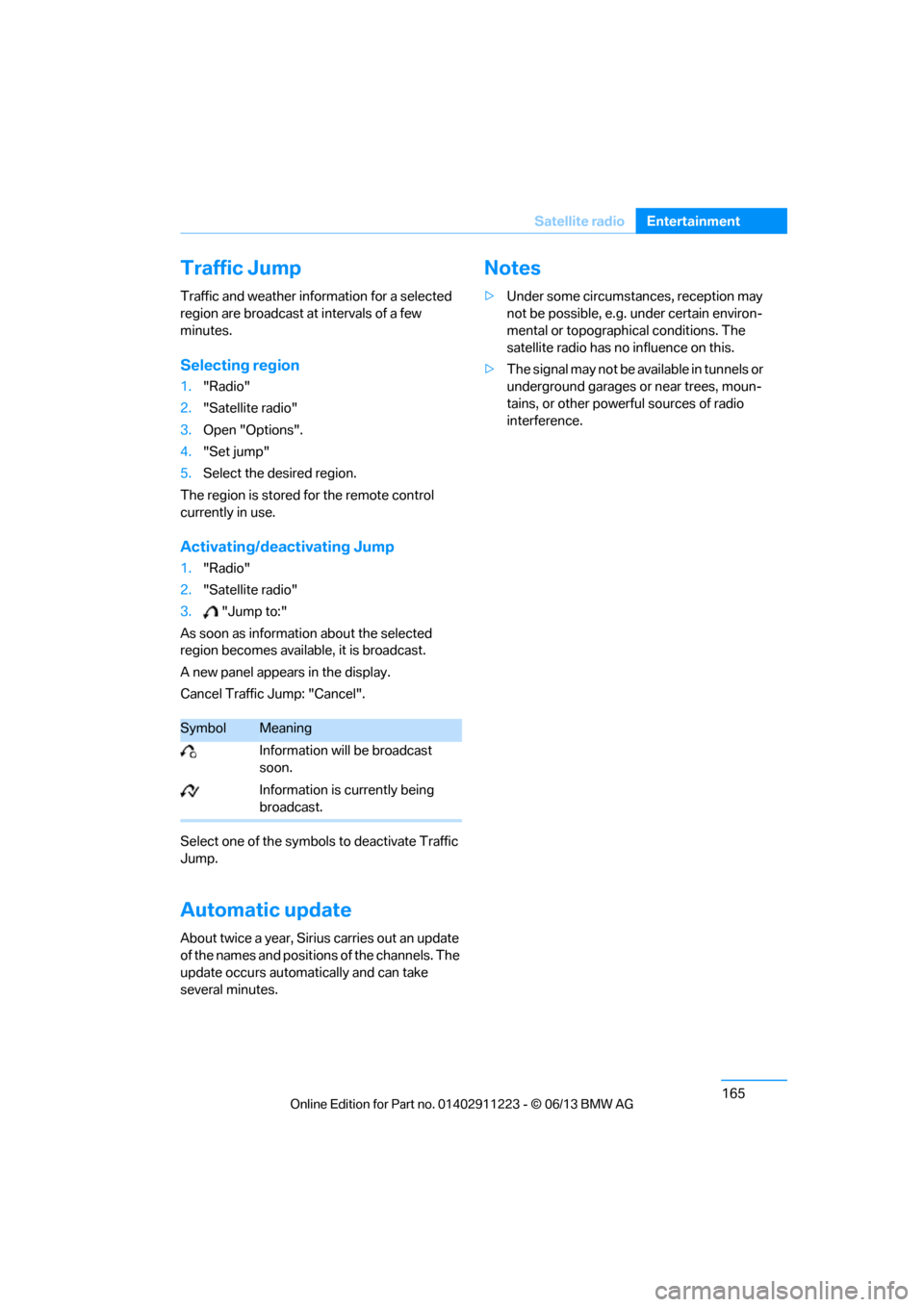
Select one of the symbol s to deactivate Traffic
Jump.
Automatic update
About twice a year, Sirius carries out an update
of the names and positions of the channels. The
update occurs automa tically and can take
several minutes.
Notes
> Under some circumstances, reception may
not be possible, e.g. under certain environ-
mental or topographical conditions. The
satellite radio has no influence on this.
> The signal may not be available in tunnels or
underground garages or near trees, moun-
tains, or other powerful sources of radio
interference.
SymbolMeaning
Information will be broadcast
soon.
Information is currently being
broadcast.
00320051004F004C00510048000300280047004C0057004C005200510003
Page 188 of 288
183
External devices
Entertainment
Disconnecting an audio connection
1.
"CD/Multimedia"
2. "Bluetooth® (audio)"
3. Select the desired device from the list of
connected devices.
4. Open "Options".
5. "Configure phone"
6. "Audio"
7. "OK"
With a mobile phone, on ly the audio connection
is disconnected. All ot her connections remain
active.
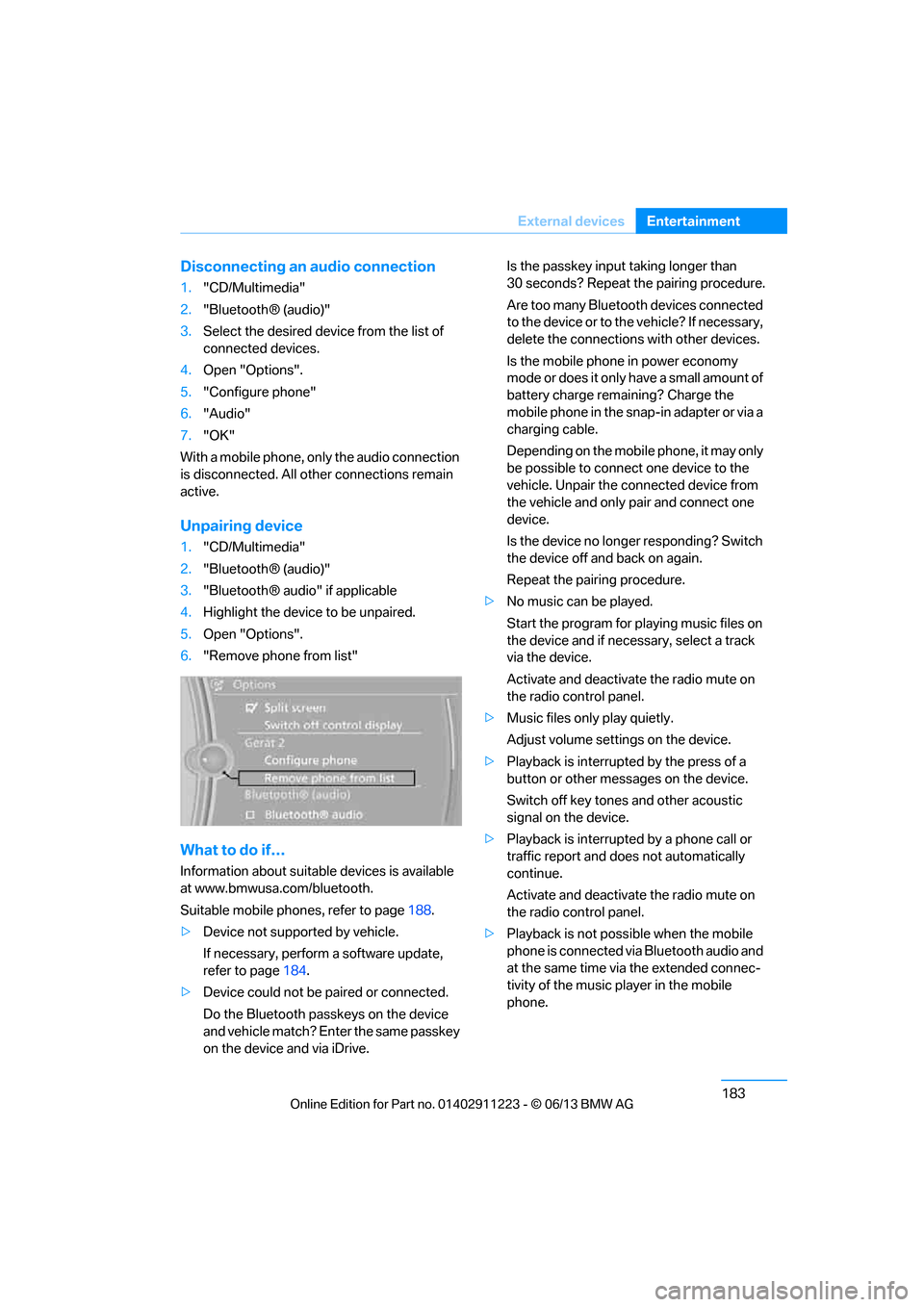
Unpairing device
1. "CD/Multimedia"
2. "Bluetooth® (audio)"
3. "Bluetooth® audio" if applicable
4. Highlight the device to be unpaired.
5. Open "Options".
6. "Remove phone from list"
What to do if…
Information about suitable devices is available
at www.bmwusa.com/bluetooth.
Suitable mobile phones, refer to page 188.
> Device not supported by vehicle.
If necessary, perform a software update,
refer to page 184.
> Device could not be paired or connected.
Do the Bluetooth passk eys on the device
and vehicle match? Enter the same passkey
on the device and via iDrive. Is the passkey input taking longer than
30 seconds? Repeat the pairing procedure.
Are too many Bluetooth devices connected
to the device or to th
e vehicle? If necessary,
delete the connections with other devices.
Is the mobile phone in power economy
mode or does it only have a small amount of
battery charge remaining? Charge the
mobile phone in the snap-in adapter or via a
charging cable.
Depending on the mobile phone, it may only
be possible to connect one device to the
vehicle. Unpair the connected device from
the vehicle and only pair and connect one
device.
Is the device no longer responding? Switch
the device off and back on again.
Repeat the pairing procedure.
> No music can be played.
Start the program for pl aying music files on
the device and if necessary, select a track
via the device.
Activate and deactivate the radio mute on
the radio control panel.
> Music files only play quietly.
Adjust volume settings on the device.
> Playback is interrupted by the press of a
button or other messages on the device.
Switch off key tones and other acoustic
signal on the device.
> Playback is interrupted by a phone call or
traffic report and does not automatically
continue.
Activate and deactivate the radio mute on
the radio control panel.
> Playback is not possible when the mobile
phone is connected via Bluetooth audio and
at the same time via the extended connec-
tivity of the music player in the mobile
phone.
00320051004F004C00510048000300280047004C0057004C005200510003
Page 206 of 288
201
Office
Communications
Office
Vehicle equipment
In this chapter, all production, country, and
optional equipment that is offered in the model
range is described. Equipment is also described
that is not available because of, for example,
selected options or coun
try version. This also
applies to safety related functions and systems.
Overview
General information
Contacts, appointments, tasks, notes, text
messages and mobile phone e-mails can be
displayed using the Control Display if the
mobile phone compatibly supports these func-
tions and the required Bluetooth radio stan-
dards.
For information about which mobile phones and
functions support the functions of Office, go to
www.bmwusa.com/bluetooth.
A limited number of compatible mobile phones
are available for Office.
Contents are only displayed completely when
the vehicle is stopped.
Only read access to the mobile phone is
possible.
Do not use Office while driving. Make
entries only when tr affic and road condi-
tions permit; otherwise, you may endanger
vehicle occupants and other road users by
being distracted. <
Requirements
>A suitable mobile phone is paired with the
vehicle and connected. In some mobile
phones, the data acce ss to the mobile
phone must be confirmed. >
Time zone, time, and date, refer to page82,
are correctly set on the Control Display and
on the mobile phone in order, for example,
to correctly display appointments.
> Office is activate d, refer to page189.
Updating
Every time that the mob ile phone is connected
to the vehicle, data are updated. Appointments,
tasks, notes and reminders can be updated
separately.
1. "Office"
2. "Current office", "Calendar", "Tasks",
"Notes" or "Reminders"
3. Open "Options".
4. "Update data"
Data from the mobile phone are again
transferred to the vehicle.
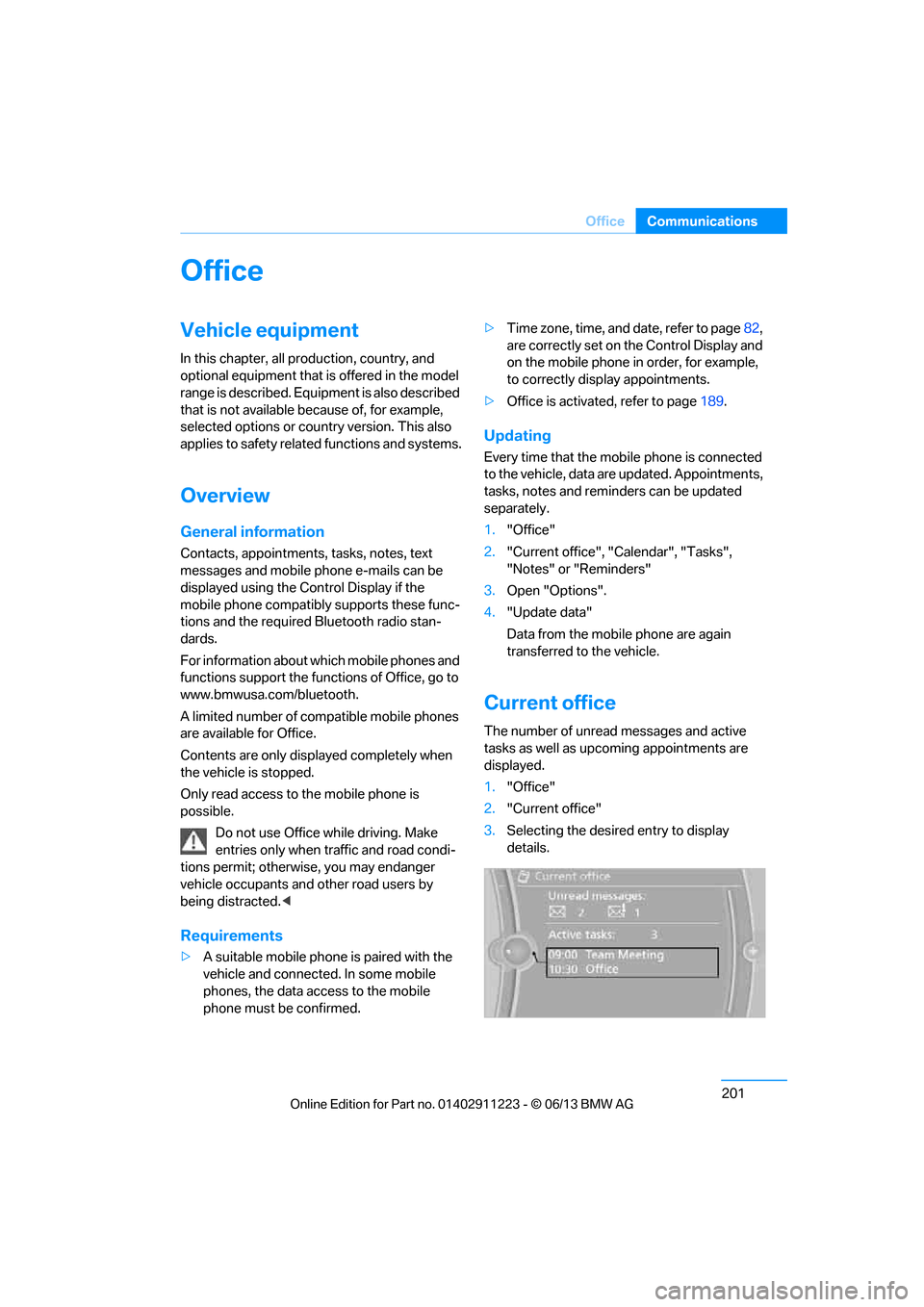
Current office
The number of unread messages and active
tasks as well as upcoming appointments are
displayed.
1."Office"
2. "Current office"
3. Selecting the desired entry to display
details.
00320051004F004C00510048000300280047004C0057004C005200510003
Page 254 of 288
249
Replacing components
Mobility
>
Radio
In some cases, statio ns may have to be
stored again, refer to page 160.
> Navigation system
Wait for the system to start, refer to
page 151.
> Glass roof
It may happen that the roof can only be
tilted. The system must be initialized.
Please contact your BMW center.
> Seat and mirror memory
The positions must be stored again, refer to
page 54.
> Inside rearview mirror with digital compass
The system must be calibrated, refer to
page 114.
> Active steering
The system automatically initializes itself
briefly during a trip. The system is deacti-
vated during this time, refer to page 96.
Disposal of old battery
Have old batteries disposed of by your
BMW center or bring them to a recycling
center. Maintain the ba ttery in an upright
position for transport and storage. Always
secure the battery against tipping over during
transport.<
Fuses
Never attempt to repair a blown fuse and
do not replace a defective fuse with a
substitute of another co lor or amperage rating;
otherwise, this could lead to a circuit overload,
ultimately resulting in a fire in the vehicle. <
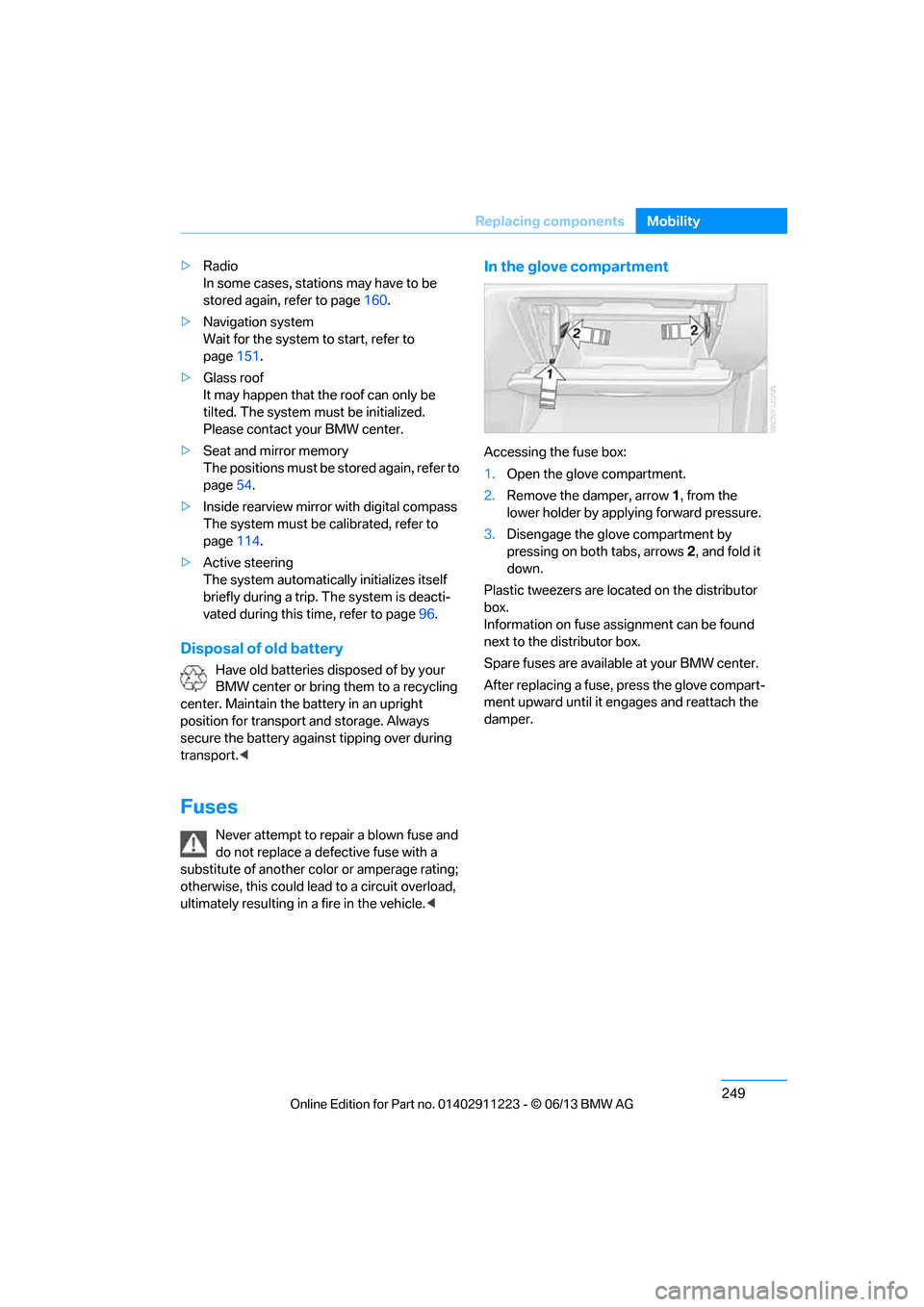
In the glove compartment
Accessing the fuse box:
1.Open the glove compartment.
2. Remove the damper, arrow 1, from the
lower holder by applying forward pressure.
3. Disengage the glove compartment by
pressing on both tabs, arrows 2, and fold it
down.
Plastic tweezers are loca ted on the distributor
box.
Information on fuse assignment can be found
next to the distributor box.
Spare fuses are available at your BMW center.
After replacing a fuse, press the glove compart-
ment upward until it en gages and reattach the
damper.
00320051004F004C00510048000300280047004C0057004C005200510003
Page 255 of 288
250
MobilityGiving and receiving assistance
Giving and receiving assistance
Vehicle equipment
In this chapter, all pr oduction, country, and
optional equipment that is offered in the model
range is described. For this reason, descrip-
tions will be given of some equipment that may
not be available in a vehi cle, for example due to
the special options or national-market version
selected. This also app lies to safety related
functions and systems.
Emergency Request
Requirements
> Full preparation package mobile phone: this
equipment makes it possible to send an
Emergency Request even if no mobile
phone is paired with the vehicle.
> BMW Assist is activated.
> Radio readiness is switched on.
> The BMW Assist system is logged into a
mobile phone network that is supported by
BMW Assist.
> The Emergency Request system is
operable.
Only press the SOS button in an emergency. For technical reasons, the Emergency
Request service canno t be guaranteed
for the most unfavorable conditions. <
Subscriber contract
Upon expiration of the subscriber contract with
BMW Assist, the BMW Assist system can be
deactivated by a BMW center without a work-
shop visit.
After the system is deacti vated, it is no longer
possible to make Emergency Requests.
It may be possible for a BMW center to reacti-
vate the system after a new contract has been
signed.
Sending an Emergency Request
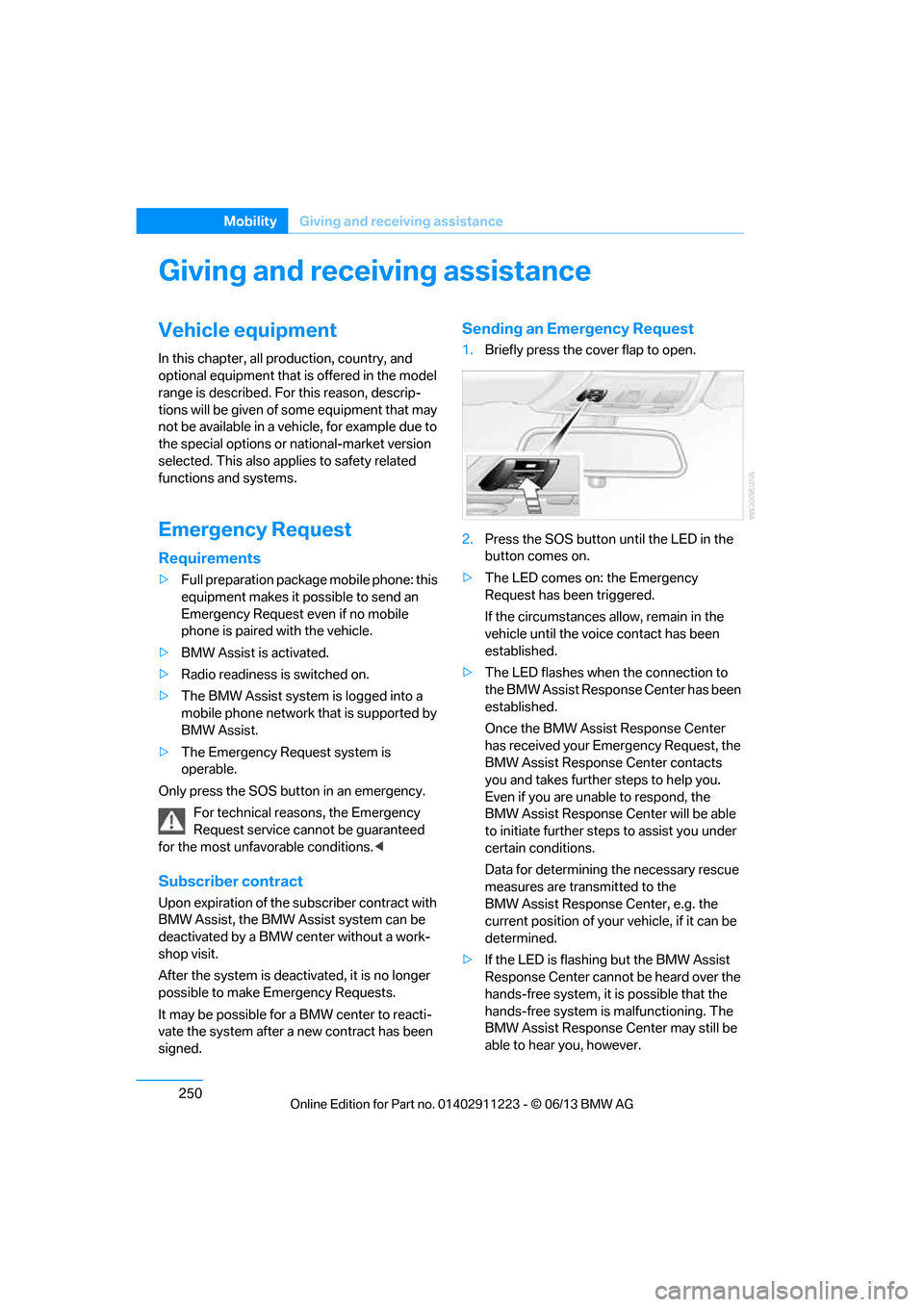
1. Briefly press the cover flap to open.
2. Press the SOS button until the LED in the
button comes on.
> The LED comes on: the Emergency
Request has been triggered.
If the circumstances a llow, remain in the
vehicle until the voice contact has been
established.
> The LED flashes when the connection to
the BMW Assist Response Center has been
established.
Once the BMW Assist Response Center
has received your Emergency Request, the
BMW Assist Response Center contacts
you and takes further steps to help you.
Even if you are unable to respond, the
BMW Assist Response Center will be able
to initiate further steps to assist you under
certain conditions.
Data for determining the necessary rescue
measures are transmitted to the
BMW Assist Response Center, e.g. the
current position of your vehicle, if it can be
determined.
> If the LED is flashing but the BMW Assist
Response Center cannot be heard over the
hands-free system, it is possible that the
hands-free system is malfunctioning. The
BMW Assist Response Center may still be
able to hear you, however.
00320051004F004C00510048000300280047004C0057004C005200510003
Page 267 of 288
262
ReferenceShort commands for the voice activation system
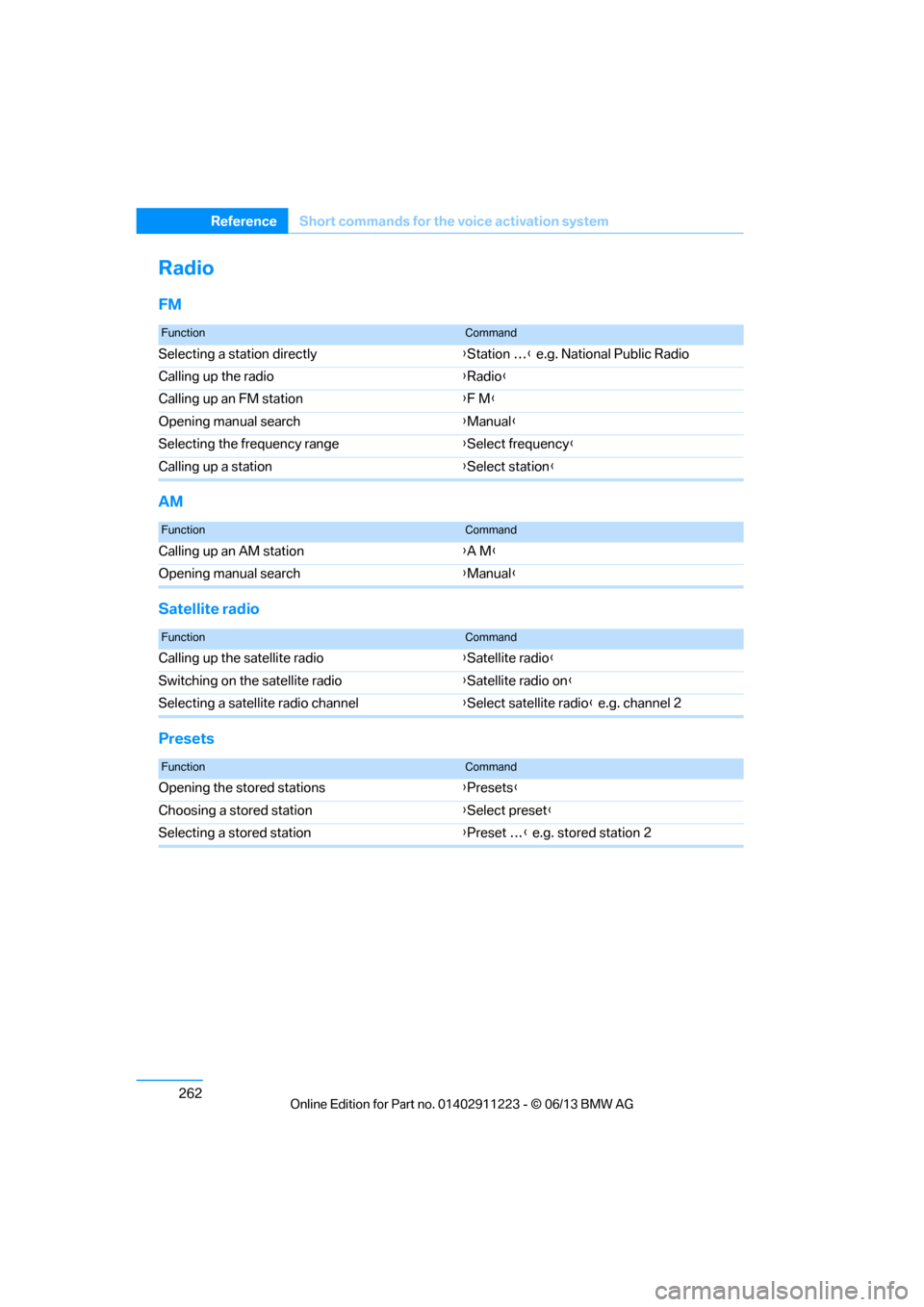
Radio
FM
AM
Satellite radio
Presets
FunctionCommand
Selecting a station directly {Station … } e.g. National Public Radio
Calling up the radio {Radio }
Calling up an FM station {F M }
Opening manual search {Manual }
Selecting the frequency range {Select frequency }
Calling up a station {Select station }
FunctionCommand
Calling up an AM station {A M }
Opening manual search {Manual }
FunctionCommand
Calling up the satellite radio {Satellite radio }
Switching on the satellite radio {Satellite radio on}
Selecting a satellite radio channel {Select satellite radio } e.g. channel 2
FunctionCommand
Opening the stored stations {Presets }
Choosing a stored station {Select preset }
Selecting a stored station {Preset … } e.g. stored station 2
00320051004F004C00510048000300280047004C0057004C005200510003