buttons BMW 1 SERIES 2013 E82 Owner's Manual
[x] Cancel search | Manufacturer: BMW, Model Year: 2013, Model line: 1 SERIES, Model: BMW 1 SERIES 2013 E82Pages: 288, PDF Size: 6.73 MB
Page 16 of 288

This overview of buttons, switches and displays
is intended to familiarize you with your vehicle's
operating environment. The section will also
assist you in becoming acquainted with the control concepts and options available for operating the various systems.
At a glance
00320051004F004C00510048000300280047004C0057004C005200510003
Page 18 of 288
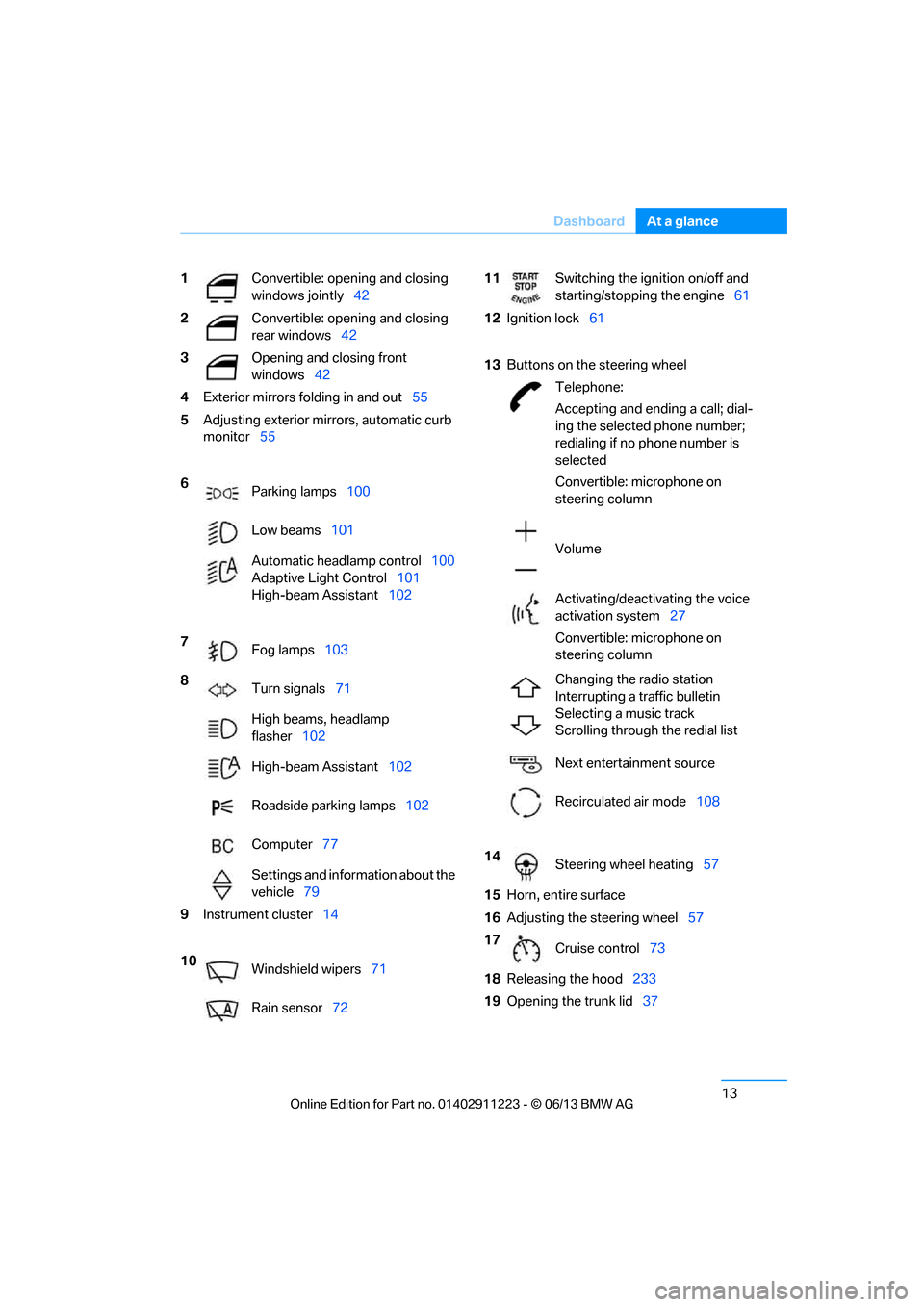
13
Dashboard
At a glance
1
Convertible: opening and closing
windows jointly 42
2 Convertible: opening and closing
rear windows 42
3 Opening and closing front
windows42
4 Exterior mirrors fo lding in and out55
5 Adjusting exterior mirrors, automatic curb
monitor 55
6 Parking lamps 100
Low beams 101
Automatic head lamp control100
Adaptive Light Control 101
High-beam Assistant 102
7 Fog lamps 103
8 Turn signals 71
High beams, headlamp
flasher 102
High-beam Assistant 102
Roadside parking lamps 102
Computer 77
Settings and information about the
vehicle 79
9 Instrument cluster 14
10 Windshield wipers 71
Rain sensor 7211Switching the ignition on/off and
starting/stopping the engine 61
12 Ignition lock 61
13 Buttons on the steering wheel
Telephone:
Accepting and ending a call; dial-
ing the selected phone number;
redialing if no phone number is
selected
Convertible: microphone on
steering column
Volume
Activating/deactivating the voice
activation system 27
Convertible: microphone on
steering column
Changing the radio station
Interrupting a traffic bulletin
Selecting a music track
Scrolling through the redial list
Next entertainment source
Recirculated air mode 108
14 Steering wheel heating 57
15 Horn, entire surface
16 Adjusting the steering wheel 57
17 Cruise control 73
18 Releasing the hood 233
19 Opening the trunk lid 37
00320051004F004C00510048000300280047004C0057004C005200510003
Page 22 of 288
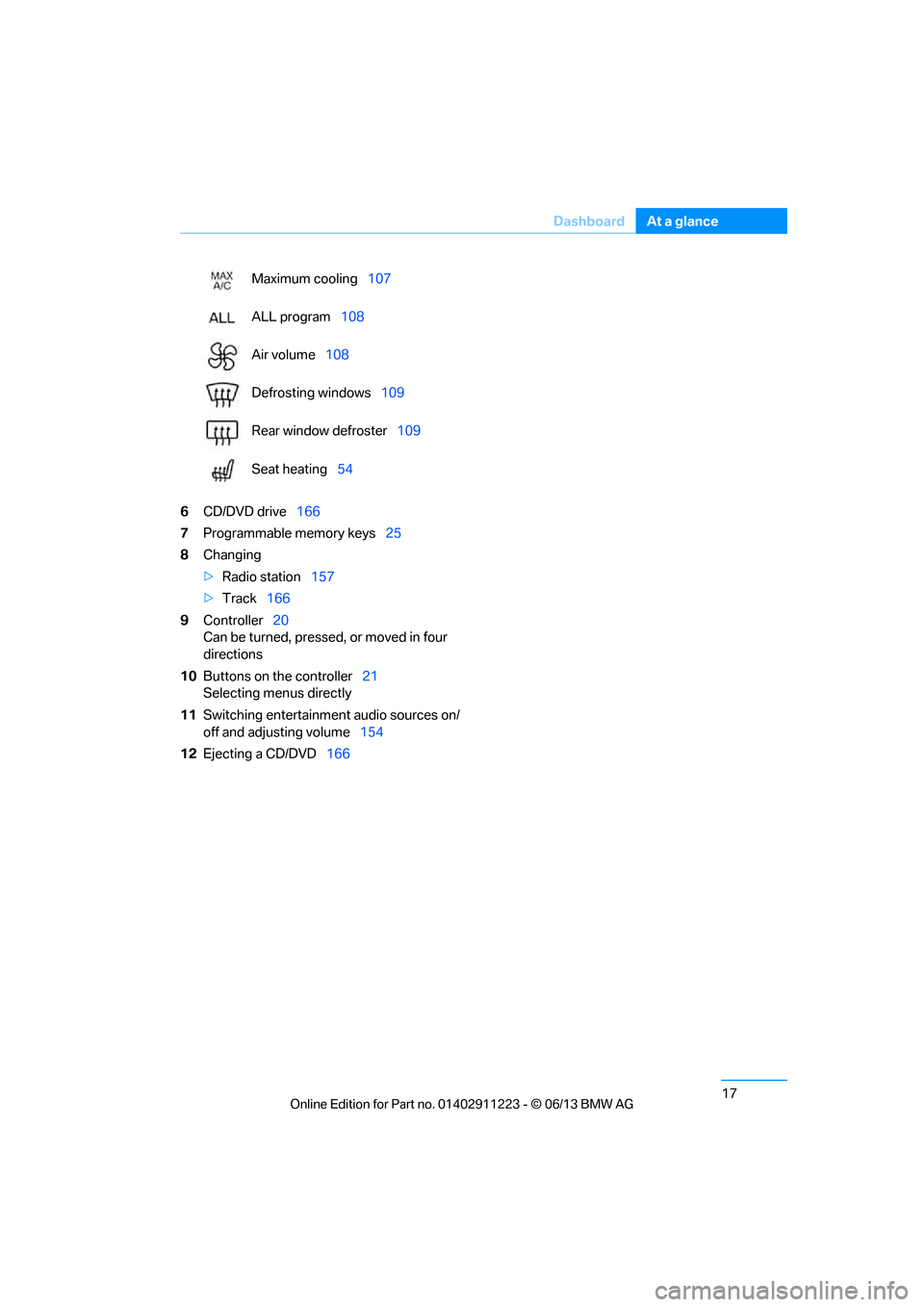
17
Dashboard
At a glance
6
CD/DVD drive 166
7 Programmable memory keys 25
8 Changing
>Radio station 157
> Track 166
9 Controller 20
Can be turned, pressed, or moved in four
directions
10 Buttons on the controller 21
Selecting menus directly
11 Switching entertainment audio sources on/
off and adjusting volume 154
12 Ejecting a CD/DVD 166
Maximum cooling
107
ALL program 108
Air volume 108
Defrosting windows 109
Rear window defroster 109
Seat heating 54
00320051004F004C00510048000300280047004C0057004C005200510003
Page 25 of 288
20
At a glanceiDrive
iDrive
Vehicle equipment
In this chapter, all pr oduction, country, and
optional equipment that is offered in the model
range is described. For this reason, descrip-
tions will be given of some equipment that may
not be available in a vehi cle, for example due to
the special options or national-market version
selected. This also app lies to safety related
functions and systems.
The concept
iDrive integrates the fu nctions of a large num-
ber of switches. This allows these functions to
be operated from a single central position.
Make entries only when traffic and road
conditions permit; otherwise, you may
endanger vehicle occupants and other road
users by being distracted. <
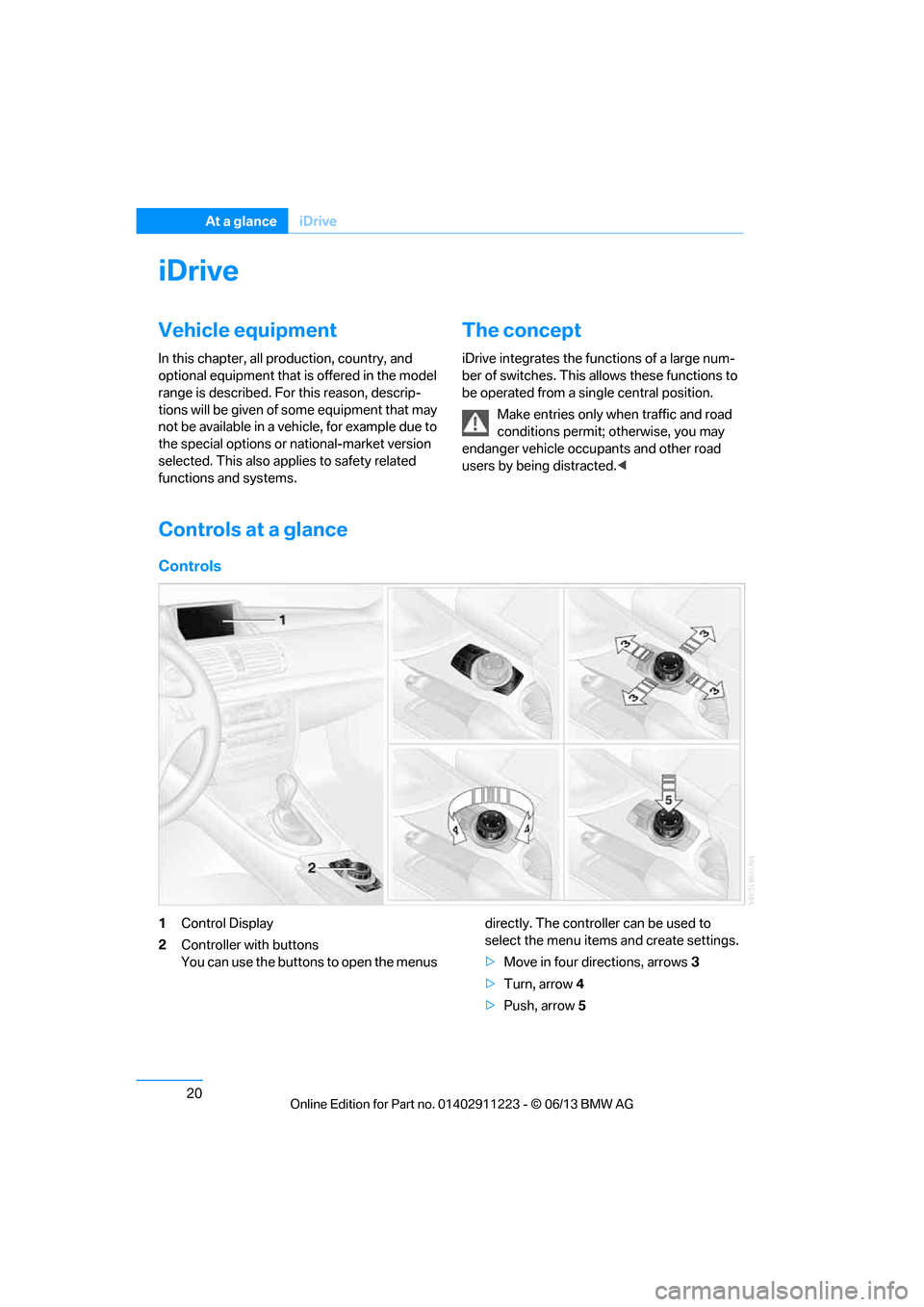
Controls at a glance
Controls
1Control Display
2 Controller with buttons
You can use the buttons to open the menus directly. The controller can be used to
select the menu item
s and create settings.
> Move in four directions, arrows 3
> Turn, arrow 4
> Push, arrow 5
00320051004F004C00510048000300280047004C0057004C005200510003
Page 26 of 288
21
iDrive
At a glance
Control Display
Notes
>
Follow care instructions when cleaning the
Control Display.
> Do not store items in the region in front of
the Control Display; doing so may damage
the Control Display.
Switching off
1. Press the button.
2. "Switch off control display"
Switching on
Press the controller to switch on.
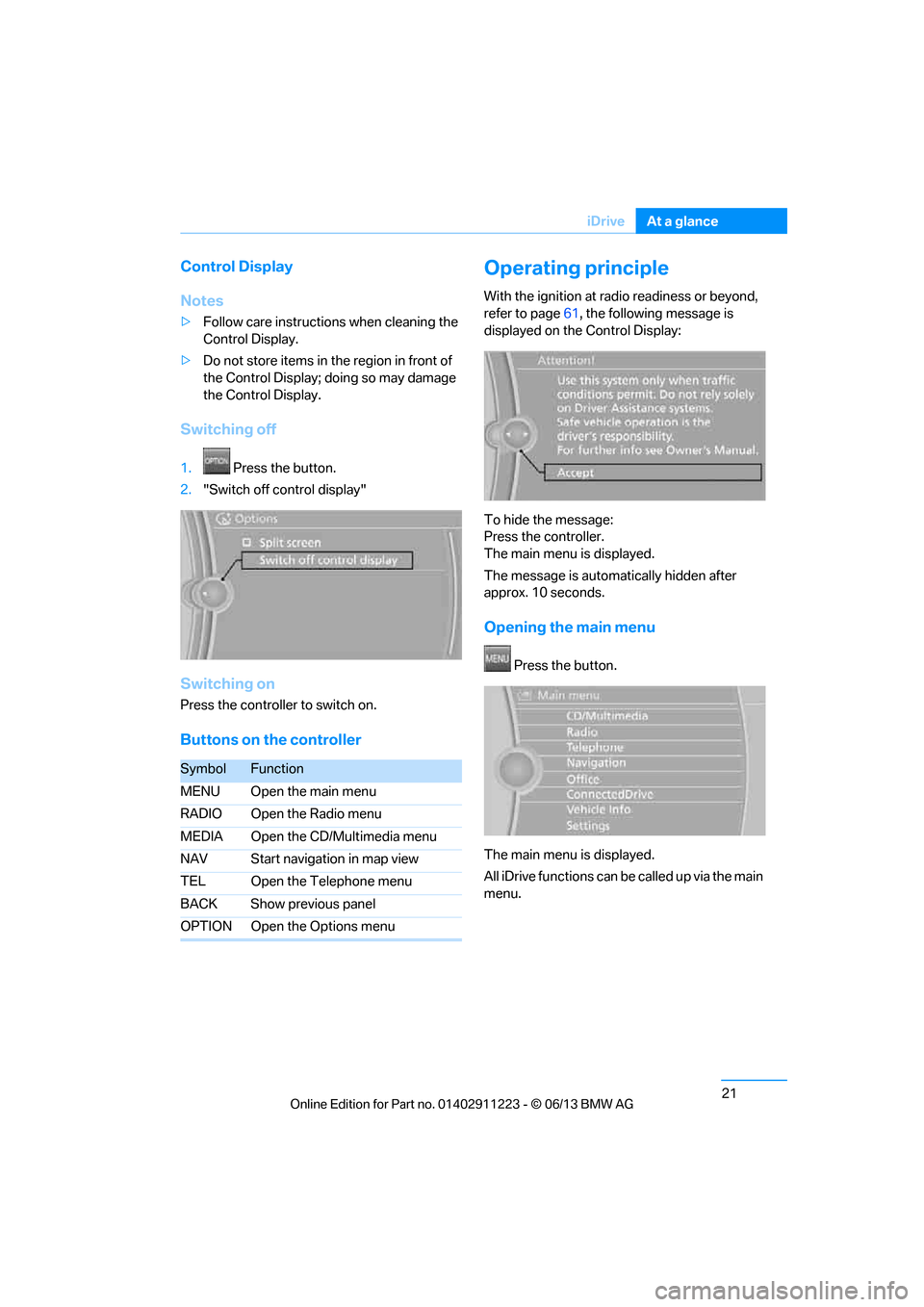
Buttons on the controller
Operating principle
With the ignition at radio readiness or beyond,
refer to page 61, the following message is
displayed on the Control Display:
To hide the message:
Press the controller.
The main menu is displayed.
The message is automatically hidden after
approx. 10 seconds.
Opening the main menu
Press the button.
The main menu is displayed.
All iDrive functions can be called up via the main
menu.
SymbolFunction
MENU Open the main menu
RADIO Open the Radio menu
MEDIA Open the CD/Multimedia menu
NAV Start navigation in map view
TEL Open the Telephone menu
BACK Show previous panel
OPTION Open the Options menu
00320051004F004C00510048000300280047004C0057004C005200510003
Page 40 of 288
35
Opening and closing
Controls
Switching on interior lamps
While the car is locked:
Press the button.
You can also use this fu
nction to locate your
vehicle in parking garages etc.
Unlocking the trunk lid
Press the button for about 1 second and
then release it.
The trunk lid opens a short distance, regardless
of whether it was locked or unlocked.
The trunk lid swings backward and up
when opened. Make sure that adequate
clearance is available before opening.
To avoid locking yourself out by accident, do
not place the remote control in the trunk.
A previously locked trun k lid is locked again
after closing.
Before and after each tr ip, check that the trunk
lid has not been inad vertently unlocked.<
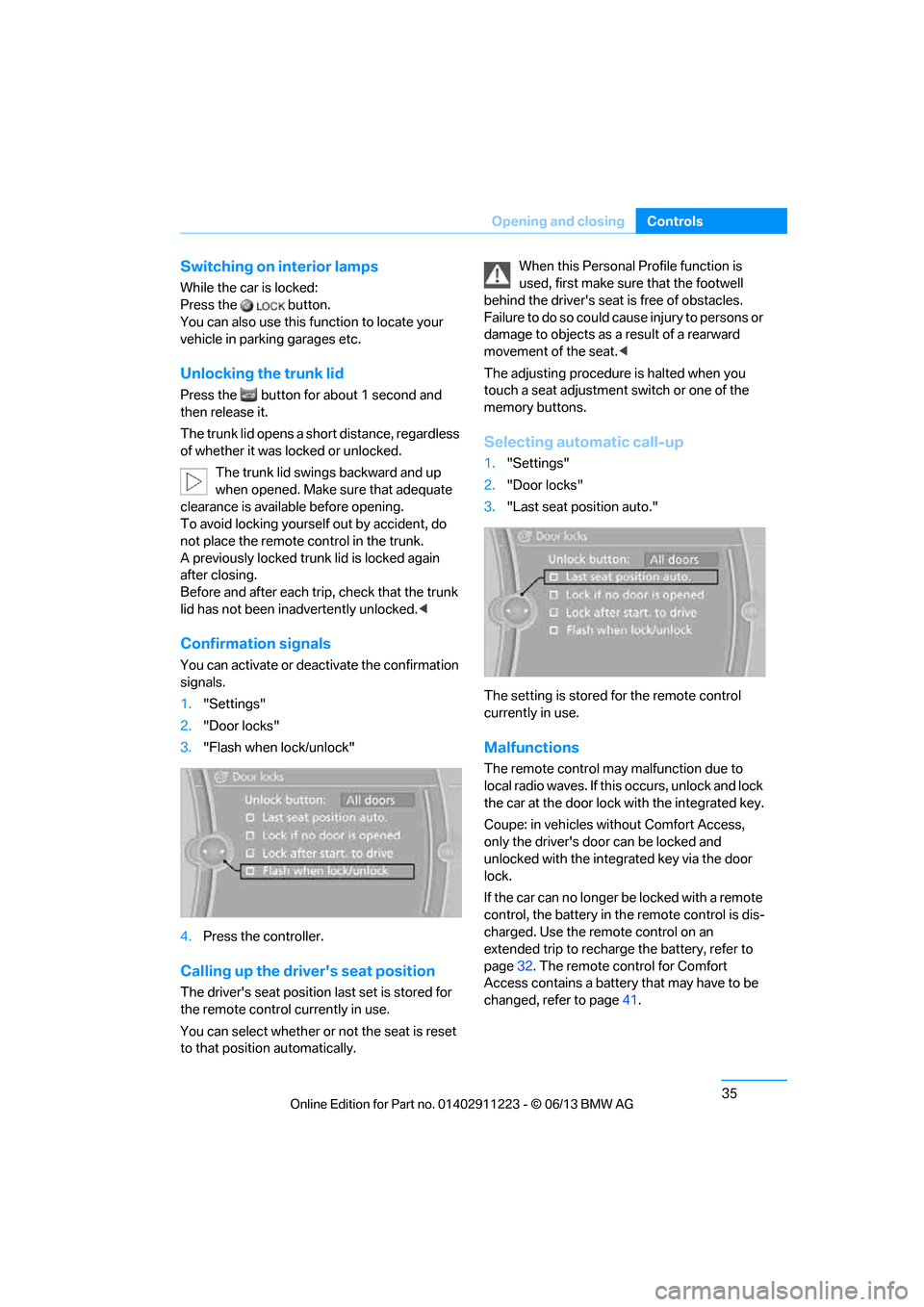
Confirmation signals
You can activate or deac tivate the confirmation
signals.
1. "Settings"
2. "Door locks"
3. "Flash when lock/unlock"
4. Press the controller.
Calling up the driver's seat position
The driver's seat position last set is stored for
the remote control currently in use.
You can select whether or not the seat is reset
to that position automatically. When this Personal Profile function is
used, first make sure
that the footwell
behind the driver's seat is free of obstacles.
Failure to do so could ca use injury to persons or
damage to objects as a result of a rearward
movement of the seat. <
The adjusting procedure is halted when you
touch a seat adjustment switch or one of the
memory buttons.
Selecting automatic call-up
1. "Settings"
2. "Door locks"
3. "Last seat position auto."
The setting is stored for the remote control
currently in use.
Malfunctions
The remote control ma y malfunction due to
local radio waves. If this occurs, unlock and lock
the car at the door lock with the integrated key.
Coupe: in vehicles without Comfort Access,
only the driver's door can be locked and
unlocked with the integr ated key via the door
lock.
If the car can no longer be locked with a remote
control, the battery in th e remote control is dis-
charged. Use the remote control on an
extended trip to recharge the battery, refer to
page 32. The remote control for Comfort
Access contains a battery that may have to be
changed, refer to page 41.
00320051004F004C00510048000300280047004C0057004C005200510003
Page 45 of 288
40
ControlsOpening and closing
Avoiding uninten tional alarms
The tilt sensor and interior motion sensor can
be deactivated together , for example in the
following situations:
> In car washes
> In stacking garages
> During transport on car-carrying trains,
boats/ships or on a trailer
> When leaving animals in the vehicle
Switching off tilt alarm sensor and
interior motion sensor
Once the vehicle is locked, press the
button on the remote control again
within approx. 10 seconds.
The indicator lamp light s up briefly and then
begins flashing again. Th e tilt alarm sensor and
the interior motion sensor are switched off until
the next time the vehicle is unlocked and subse-
quently locked again.
Comfort Access
The concept
It is possible to access the vehicle without actu-
ating the remote control. It is sufficient to have
the remote control with you, for example in your
jacket pocket. The vehicle automatically
detects the remote control in the vicinity or in
the passenger compartment.
Comfort Access supports the following func-
tions:
> Unlocking/locking the vehicle
> Convenient closing
> Unlocking the trunk lid separately
> Engine starting
Functional requirement
>There are no external sources of interfer-
ence in the vicinity.
> The remote control mu st be outside the
vehicle to lock it. >
The next unlocking and locking cycle is not
possible until after approx. 2 seconds.
> It is only possible to start the engine if the
remote control is inside the vehicle.
Comparison with ordinary remote
control
The above functions can be controlled by
pressing the remote control buttons or by using
Comfort Access.
If you notice a brief delay while opening or
closing windows, the glass roof or the
convertible top, the system is checking whether
a remote control is inside the vehicle. Please
repeat the opening or closing procedure, if
necessary. <
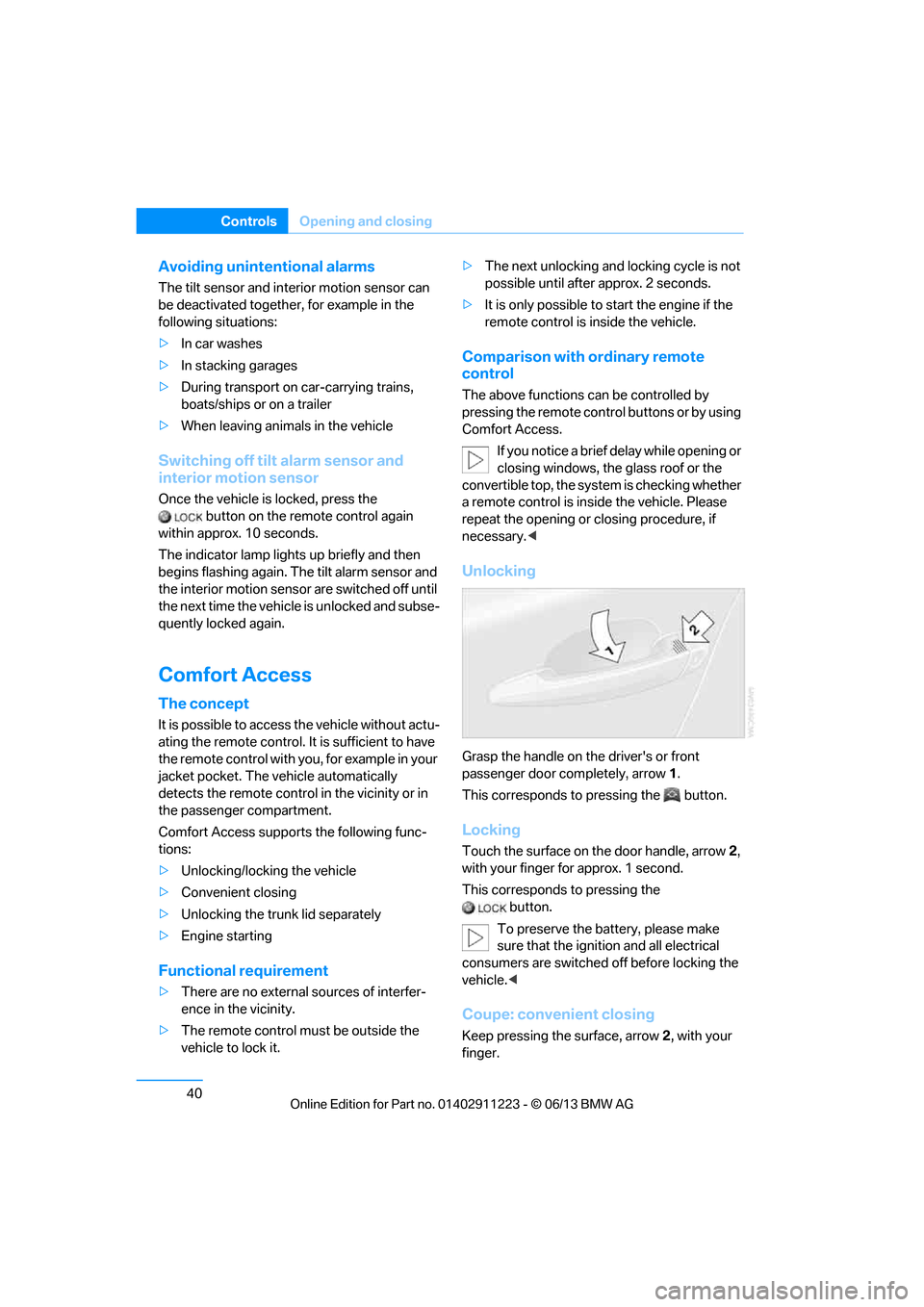
Unlocking
Grasp the handle on the driver's or front
passenger door completely, arrow 1.
This corresponds to pressing the button.
Locking
Touch the surface on the door handle, arrow 2,
with your finger for approx. 1 second.
This corresponds to pressing the button.
To preserve the battery, please make
sure that the ignition and all electrical
consumers are switched off before locking the
vehicle. <
Coupe: convenient closing
Keep pressing the surface, arrow 2, with your
finger.
00320051004F004C00510048000300280047004C0057004C005200510003
Page 46 of 288
41
Opening and closing
Controls
Convertible: window and convertible
top operation
With the ignition at radio readiness or beyond,
you can open and close the windows and the
convertible top when a remote control is
located inside the vehicle.
Unlocking the trunk lid separately
Press the button on the ou
tside of the trunk lid.
This corresponds to pressing the button. If the vehicle detects that a remote con-
trol has been accident ally left inside the
locked vehicle after the trunk lid is closed, the
lid will reopen. The haza rd warning flashers
flash and a signal sounds. <
Switching on radio readiness
Pressing the Start/Stop button switches on
radio readiness.
Do not depress the brake or the clutch; other-
wise, the engine will start immediately.
Starting the engine
The engine can be started or the ignition can be
switched on when a remote control is inside the
vehicle. It is not necessa ry to insert a remote
control into the ignition lock, refer to page 61.
Switching off the engine in cars with
automatic transmission
The engine can only be switched off when the
selector lever is in po sition P, refer to page 63.
To switch the engine off when the selector lever
is in position N, the remote control must be in
the ignition lock.
Malfunctions
Local radio waves can in terfere with the func-
tion of Comfort Access, for example when a
mobile phone is in the immediate vicinity of the
remote control or by when a mobile phone is
being charged in the vehicle. If this happens, open and close the vehicle via
the buttons on the remote control or using the
integrated key. To star
t the engine afterward,
insert the remote control into the ignition lock.
Warning lamps
The warning lamp in the instrument
cluster lights up when you attempt to
start the engine: the engine cannot
be started. The remote co ntrol is not inside the
vehicle or is malfunctio ning. Take the remote
control with you inside the vehicle or have it
checked. If necessary, insert another remote
control into the ignition lock.
The warning lamp in the instrument
cluster lights up wh ile the engine is
running: the remote control is no
longer inside the vehicle. After the engine is
switched off, the engine can only be restarted
within approx. 10 seconds.
The indicator lamp in the instrument
cluster comes on and a message
appears on the Control Display:
replace the battery in the remote control.
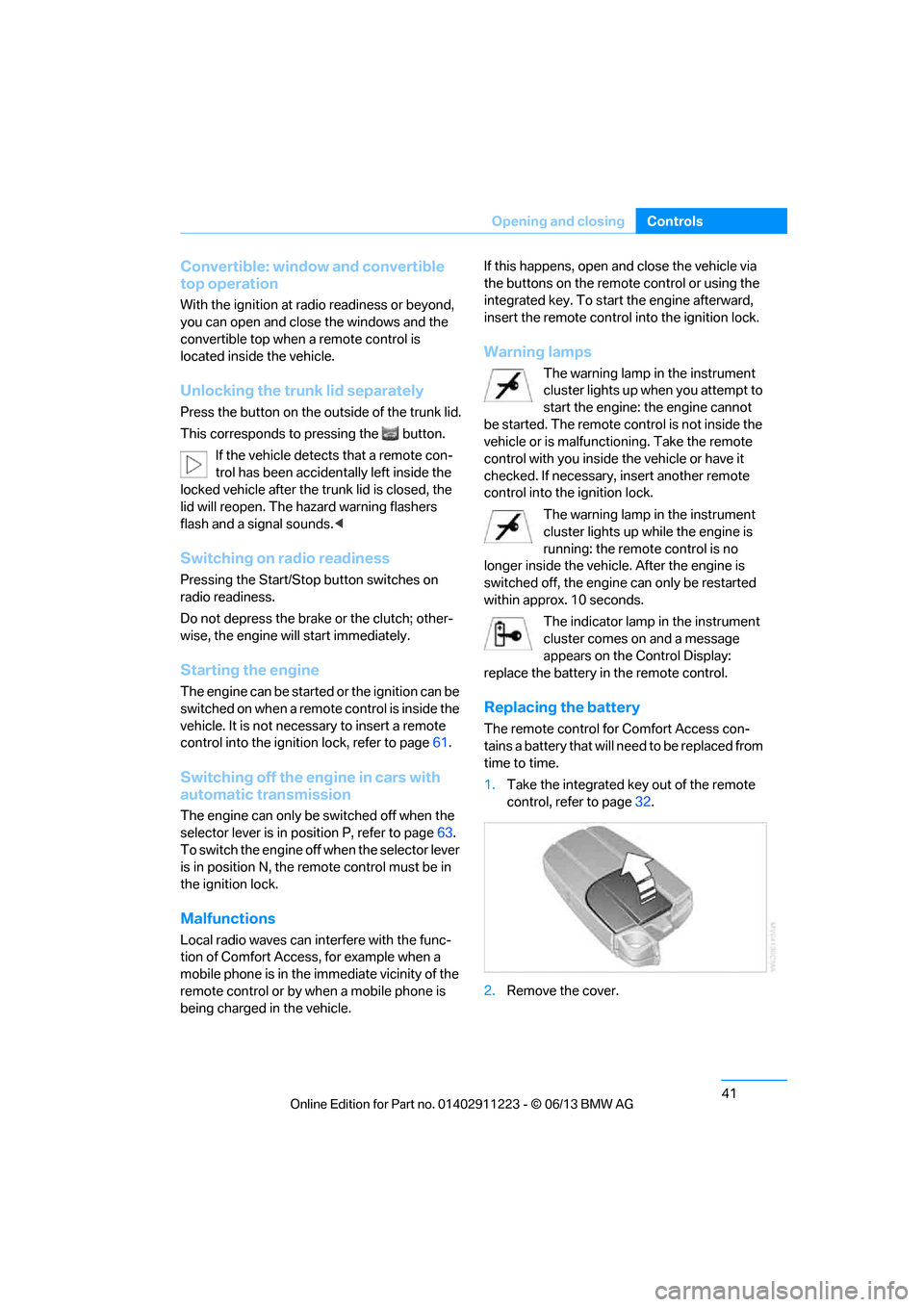
Replacing the battery
The remote control for Comfort Access con-
tains a battery that will need to be replaced from
time to time.
1. Take the integrated ke y out of the remote
control, refer to page 32.
2. Remove the cover.
00320051004F004C00510048000300280047004C0057004C005200510003
Page 50 of 288
45
Opening and closing
Controls
Before opening and closing
>
Comply with the sa fety precautions
described above.
> Ensure that the trunk partition is folded
down and engaged on both sides, refer to
page 118; otherwise, it will not be possible
to open the convertible top.
> Ensure that the cargo does not press
against the trunk partition from below.
> Ensure that the tr unk lid is closed.
Opening and closing
Convertible top operation with Comfort Access,
also refer to page 34.
As of radio readiness, refer to page 61:
To conserve battery power, if possible
operate the convertible top only while the
engine is running.
Prior to closing the conv ertible top, check for
and remove all debris from the windshield
frame; otherwise, the closing of the top may be
hampered. <
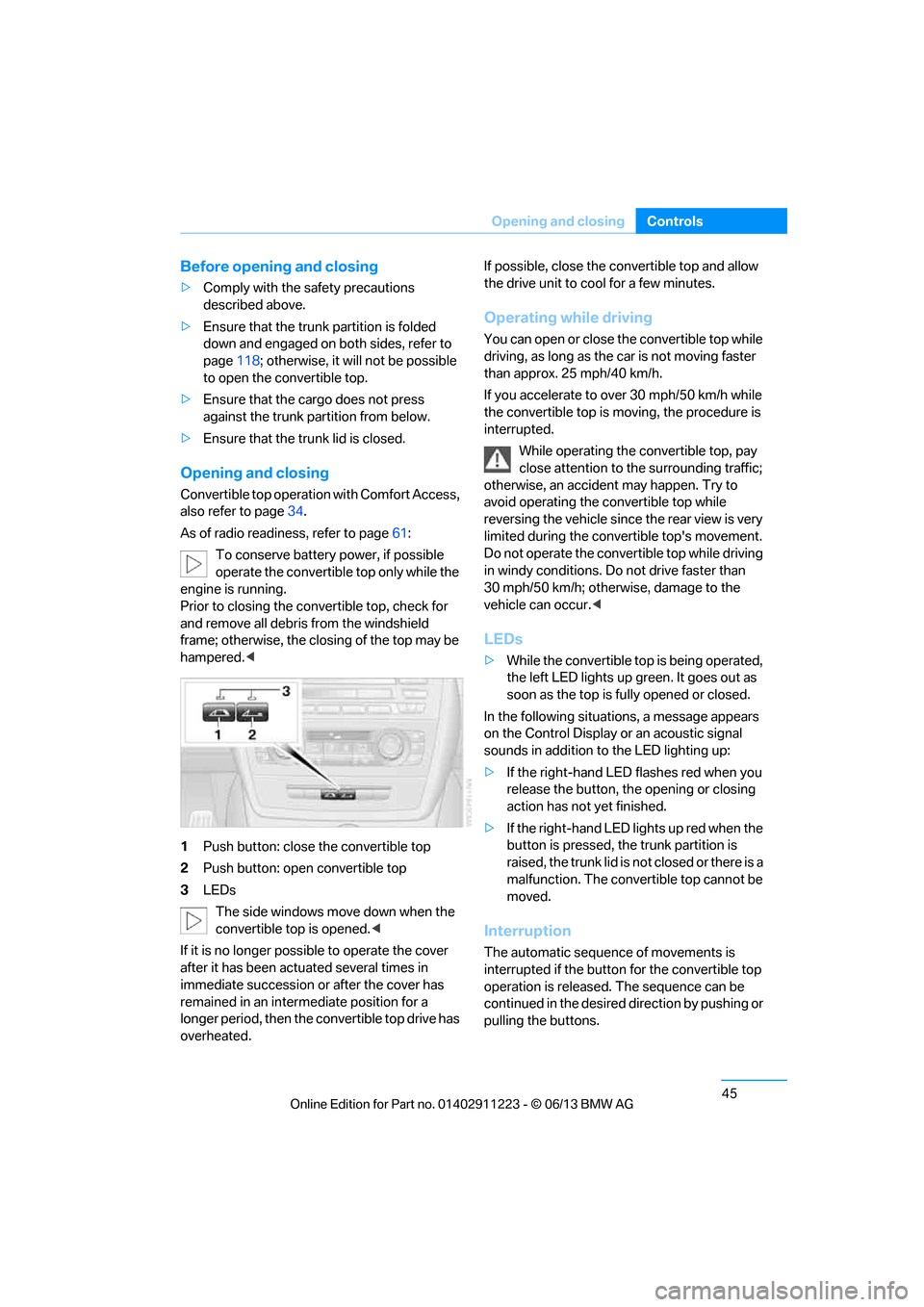
1 Push button: close the convertible top
2 Push button: open convertible top
3 LEDs
The side windows move down when the
convertible top is opened. <
If it is no longer possible to operate the cover
after it has been actuated several times in
immediate succession or after the cover has
remained in an interm ediate position for a
longer period, then the convertible top drive has
overheated. If possible, close the convertible top and allow
the drive unit to cool for a few minutes.
Operating while driving
You can open or close the convertible top while
driving, as long as the car is not moving faster
than approx. 25 mph/40 km/h.
If you accelerate to ov
er 30 mph/50 km/h while
the convertible top is moving, the procedure is
interrupted.
While operating the convertible top, pay
close attention to the surrounding traffic;
otherwise, an accident may happen. Try to
avoid operating the convertible top while
reversing the vehicle since the rear view is very
limited during the convertible top's movement.
Do not operate the convertible top while driving
in windy conditions. Do not drive faster than
30 mph/50 km/h; otherwise, damage to the
vehicle can occur. <
LEDs
>While the convertible top is being operated,
the left LED lights up green. It goes out as
soon as the top is fully opened or closed.
In the following situations, a message appears
on the Control Display or an acoustic signal
sounds in addition to the LED lighting up:
> If the right-hand LED flashes red when you
release the button, th e opening or closing
action has not yet finished.
> If the right-hand LED lights up red when the
button is pressed, the trunk partition is
raised, the trunk lid is not closed or there is a
malfunction. The convertible top cannot be
moved.
Interruption
The automatic sequence of movements is
interrupted if the button for the convertible top
operation is released. The sequence can be
continued in the desired direction by pushing or
pulling the buttons.
00320051004F004C00510048000300280047004C0057004C005200510003
Page 51 of 288
46
ControlsOpening and closing
If the opening or closing procedure is inter-
rupted for an extended period, the convertible
top remains in the raised position for approx.
10 minutes and then slowly moves to a stable
position.
A convertible top which is not completely
open or closed is hazardous. <
If the convertible top is not fully opened or
closed, the trunk lid cannot be opened
and the windows cannot be moved. <
Convenient opening and closing using
the remote control
Refer to page 34.
Closing manually
Only close the convertible top manually if
it is absolutely nece ssary. Never open it
manually. The convertible top box cover cannot
be locked if there is an electrical defect and
would then open while the vehicle is in motion.
Incorrect handling can result in damage. <
Closing the convertible top manually should be
performed by two people. The rear seats must
not be occupied.
Only move the converti ble top and the convert-
ible top box cover when th e ignition is switched
off.
Before closing
1. Open the trunk lid.
2. Take the screwdriver out of the onboard
vehicle tool kit, refer to page 243.3.
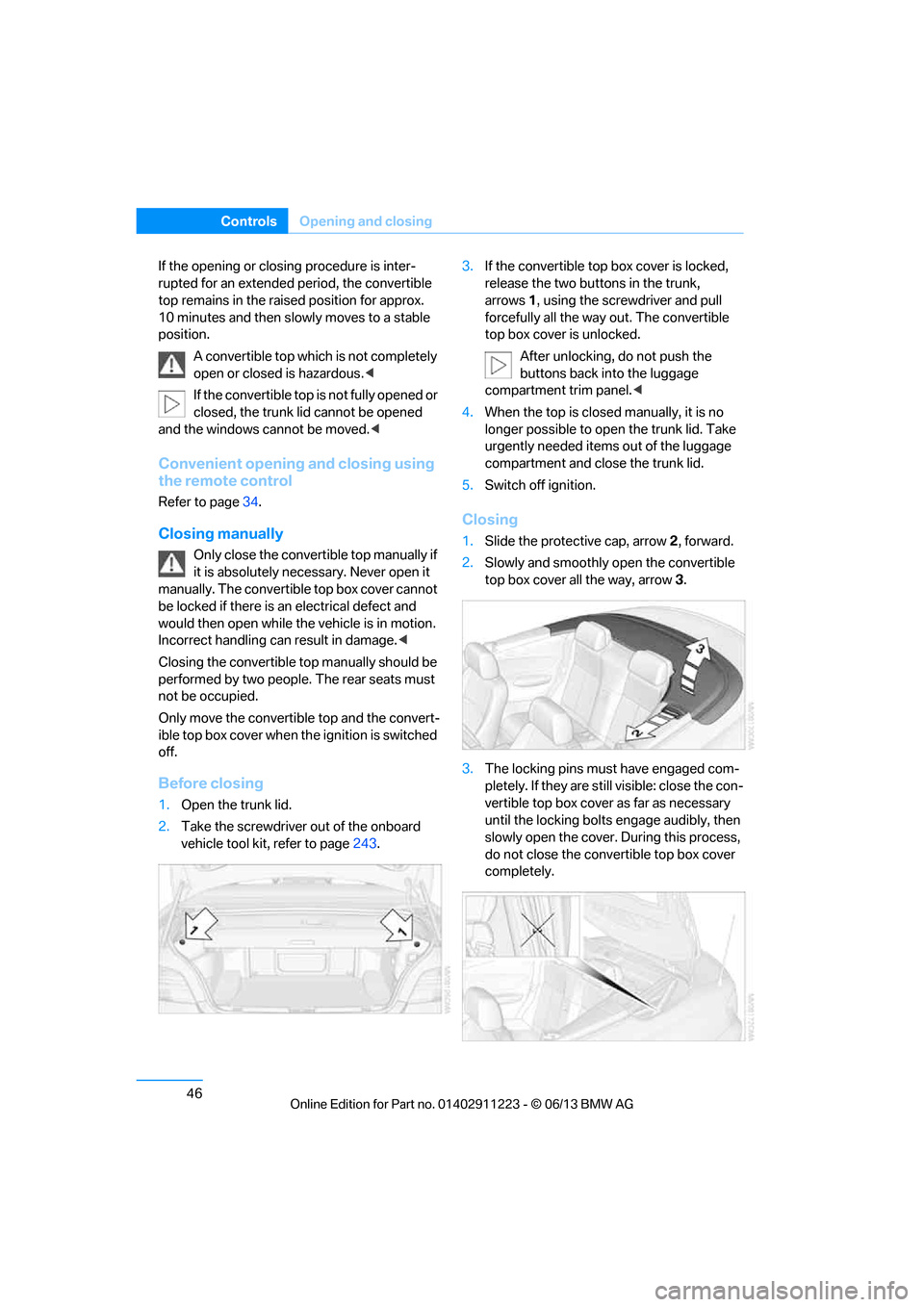
If the convertible top box cover is locked,
release the two buttons in the trunk,
arrows 1, using the screwdriver and pull
forcefully all the way out. The convertible
top box cover is unlocked.
After unlocking, do not push the
buttons back into the luggage
compartment trim panel.<
4. When the top is closed manually, it is no
longer possible to open the trunk lid. Take
urgently needed items out of the luggage
compartment and close the trunk lid.
5. Switch off ignition.
Closing
1.Slide the protective cap, arrow 2, forward.
2. Slowly and smoothly open the convertible
top box cover all the way, arrow 3.
3. The locking pins must have engaged com-
pletely. If they are still visible: close the con-
vertible top box cover as far as necessary
until the locking bolts engage audibly, then
slowly open the cover. During this process,
do not close the convertible top box cover
completely.
00320051004F004C00510048000300280047004C0057004C005200510003